
FMCSA Portal Company Viewing Company Information CSA Phase
- Slides: 21
FMCSA Portal Company: Viewing Company Information CSA Phase II Release x, Month Year vx. x
Training Objectives • • Accessing and viewing Company information in the FMCSA Portal using the Company Information Portlet on the Company Home Page Company information on the Company Information Portlet includes: Ø USDOT Registration Information Ø Cargo Tank Facility Information Ø Hazardous Materials Information Ø Operating Authority Information Ø BASICs Safety Measurement Summary Ø Inspection Selection System (ISS) Information 2
• • Introduction to Company Information The FMCSA Portal provides a real-time view of all company data currently on file with FMCSA Company Information consists of: Ø Registration Information from MCS-150/MCS-150 B Applications § General Information, including: Company Officials, Contact and Equipment Details Ø Registration Information about Cargo Tank Facilities § General Information, including: Cargo Tank Facility ID, Cargo Tank Facility Name and Location Ø Hazardous Material Information § Hazardous Materials Carried or Shipped Details and Status of Hazardous Materials Safety Permit Ø Registration Information from Operating Authority Applications § Scope of Operating Authority and Insurance Details Ø BASICs Safety Measurement Summary Information § BASICs Scores based on on-road performance, Investigation Date when Serious Violations were detected and BASICs Status Ø Inspection Selection System (ISS) Information § ISS Inspection Score, ISS Recommendation and Basis for Recommendation 3
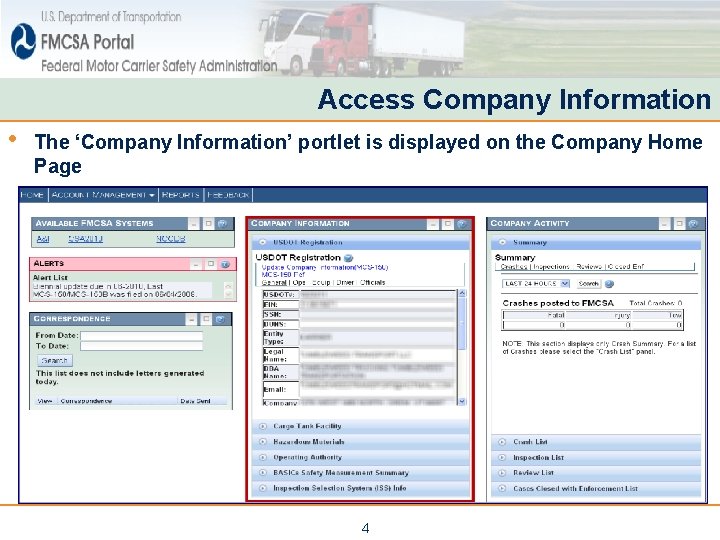
Access Company Information • The ‘Company Information’ portlet is displayed on the Company Home Page 4
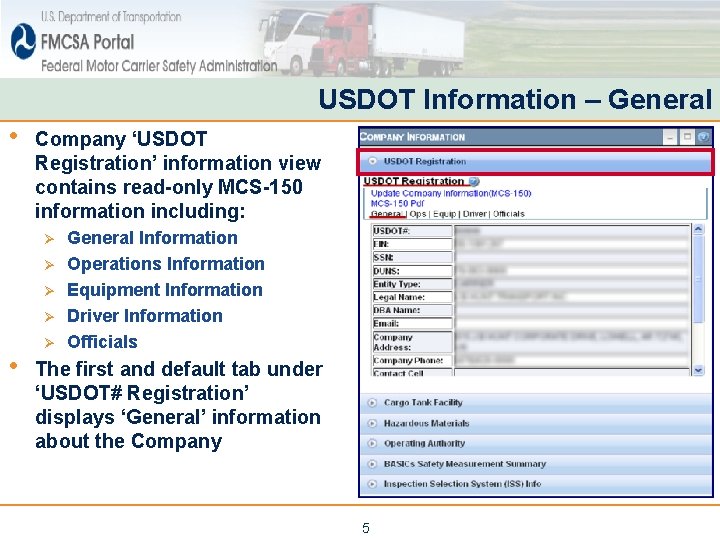
USDOT Information – General • Company ‘USDOT Registration’ information view contains read-only MCS-150 information including: Ø Ø • Ø General Information Operations Information Equipment Information Driver Information Officials The first and default tab under ‘USDOT# Registration’ displays ‘General’ information about the Company 5
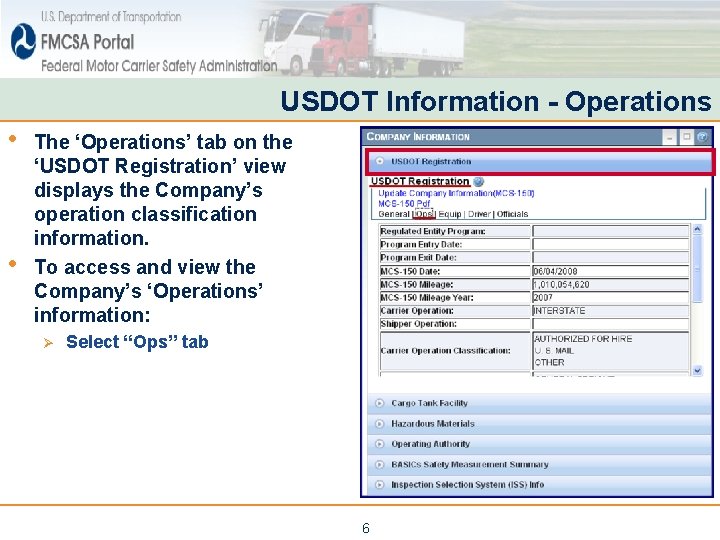
USDOT Information - Operations • • The ‘Operations’ tab on the ‘USDOT Registration’ view displays the Company’s operation classification information. To access and view the Company’s ‘Operations’ information: Ø Select “Ops” tab 6
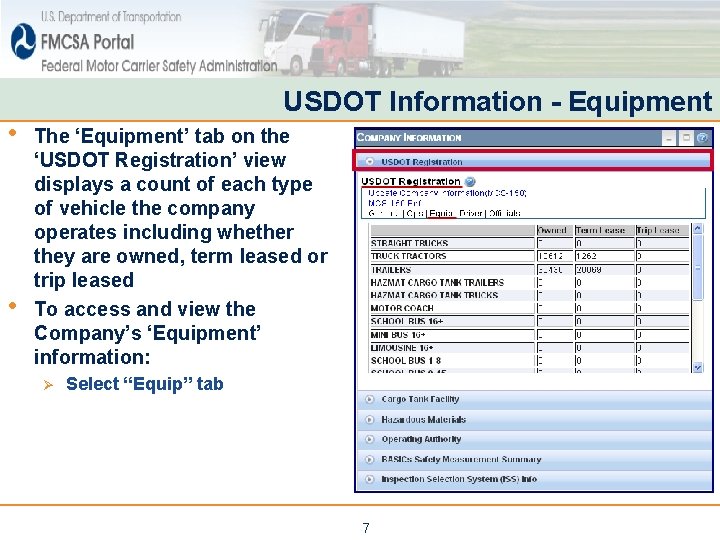
• • USDOT Information - Equipment The ‘Equipment’ tab on the ‘USDOT Registration’ view displays a count of each type of vehicle the company operates including whether they are owned, term leased or trip leased To access and view the Company’s ‘Equipment’ information: Ø Select “Equip” tab 7
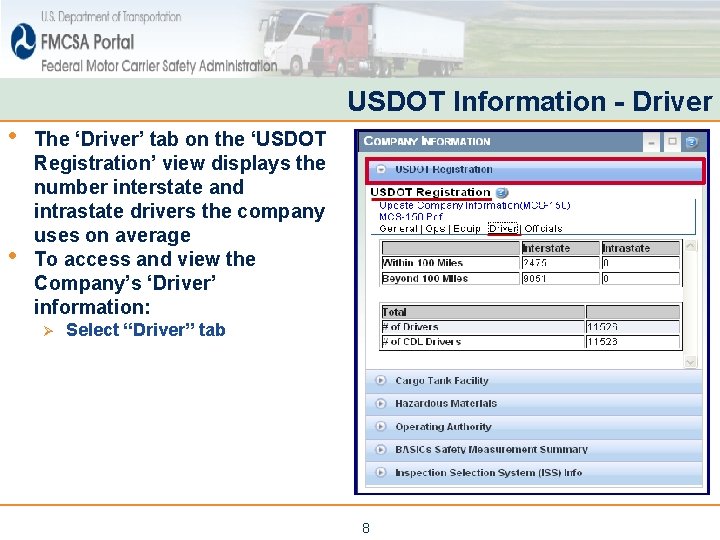
USDOT Information - Driver • • The ‘Driver’ tab on the ‘USDOT Registration’ view displays the number interstate and intrastate drivers the company uses on average To access and view the Company’s ‘Driver’ information: Ø Select “Driver” tab 8
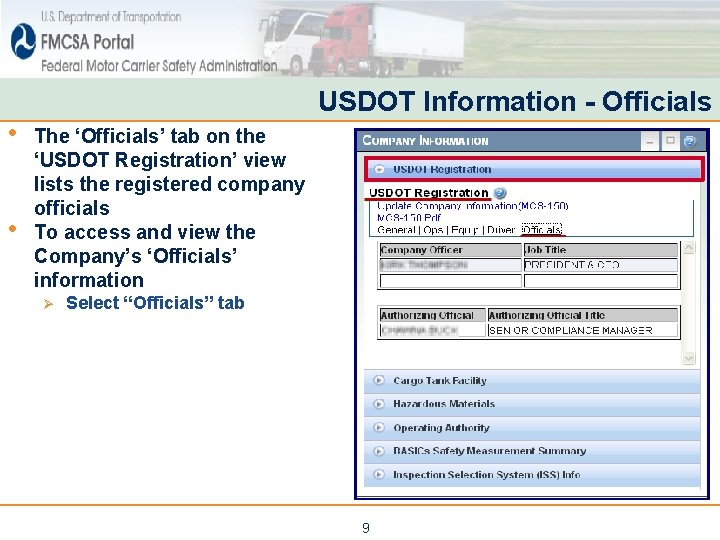
• • USDOT Information - Officials The ‘Officials’ tab on the ‘USDOT Registration’ view lists the registered company officials To access and view the Company’s ‘Officials’ information Ø Select “Officials” tab 9
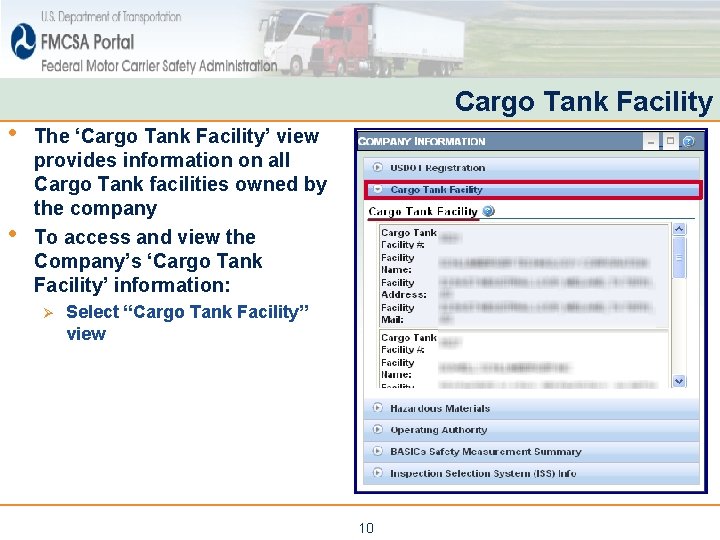
• • Cargo Tank Facility The ‘Cargo Tank Facility’ view provides information on all Cargo Tank facilities owned by the company To access and view the Company’s ‘Cargo Tank Facility’ information: Ø Select “Cargo Tank Facility” view 10
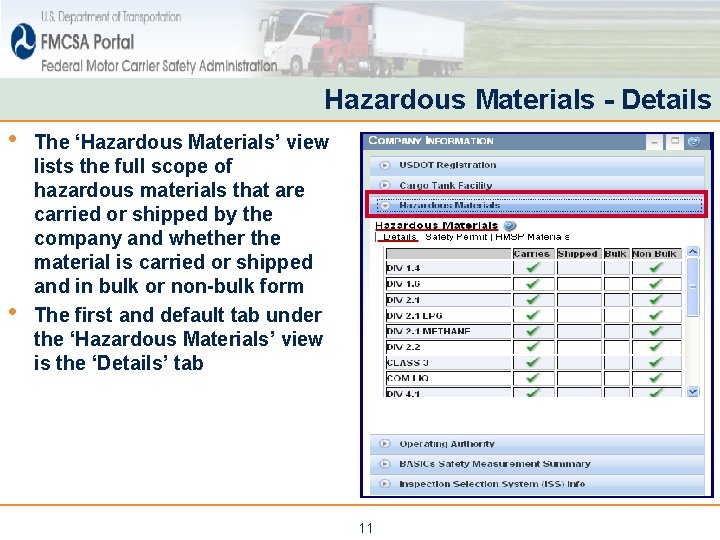
Hazardous Materials - Details • • The ‘Hazardous Materials’ view lists the full scope of hazardous materials that are carried or shipped by the company and whether the material is carried or shipped and in bulk or non-bulk form The first and default tab under the ‘Hazardous Materials’ view is the ‘Details’ tab 11
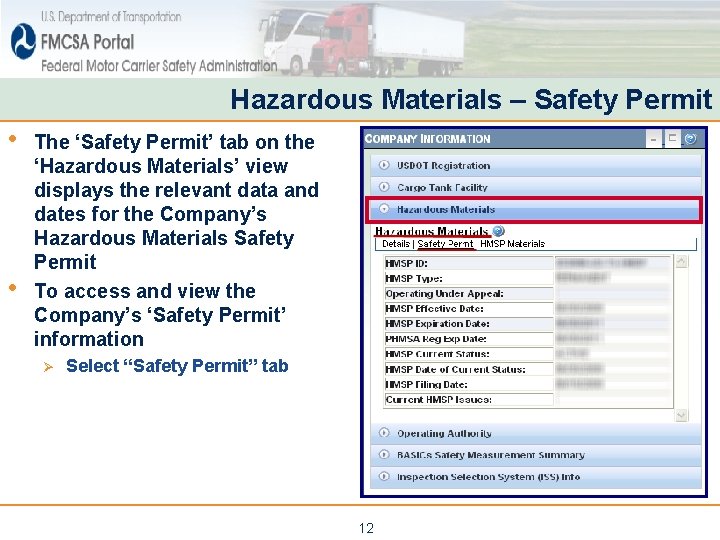
Hazardous Materials – Safety Permit • • The ‘Safety Permit’ tab on the ‘Hazardous Materials’ view displays the relevant data and dates for the Company’s Hazardous Materials Safety Permit To access and view the Company’s ‘Safety Permit’ information Ø Select “Safety Permit” tab 12
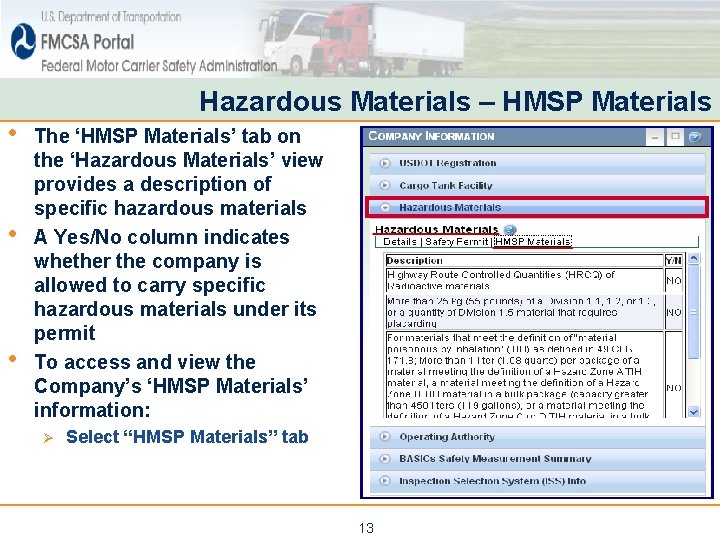
• • • Hazardous Materials – HMSP Materials The ‘HMSP Materials’ tab on the ‘Hazardous Materials’ view provides a description of specific hazardous materials A Yes/No column indicates whether the company is allowed to carry specific hazardous materials under its permit To access and view the Company’s ‘HMSP Materials’ information: Ø Select “HMSP Materials” tab 13
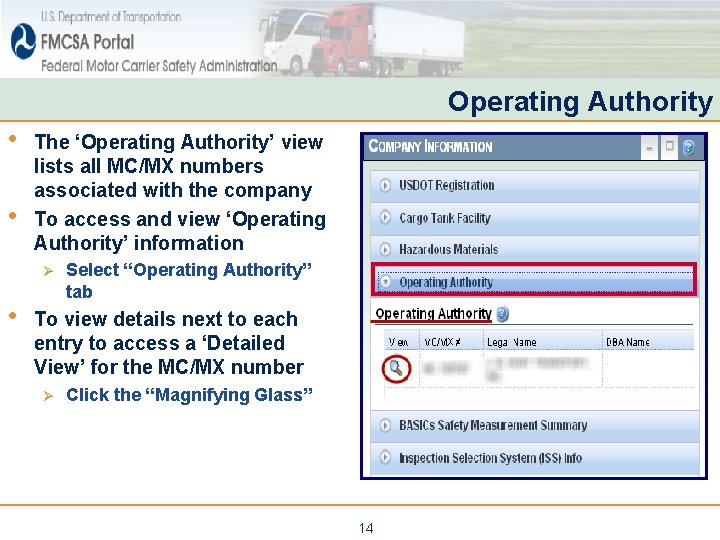
Operating Authority • • The ‘Operating Authority’ view lists all MC/MX numbers associated with the company To access and view ‘Operating Authority’ information Ø • Select “Operating Authority” tab To view details next to each entry to access a ‘Detailed View’ for the MC/MX number Ø Click the “Magnifying Glass” 14
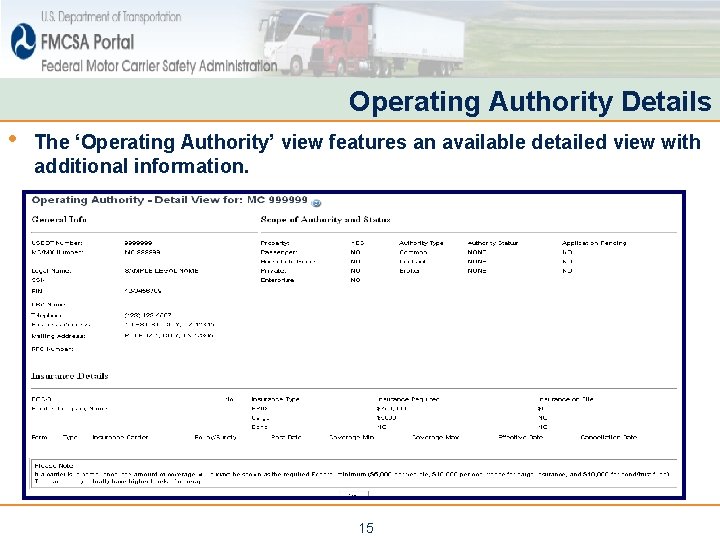
Operating Authority Details • The ‘Operating Authority’ view features an available detailed view with additional information. 15
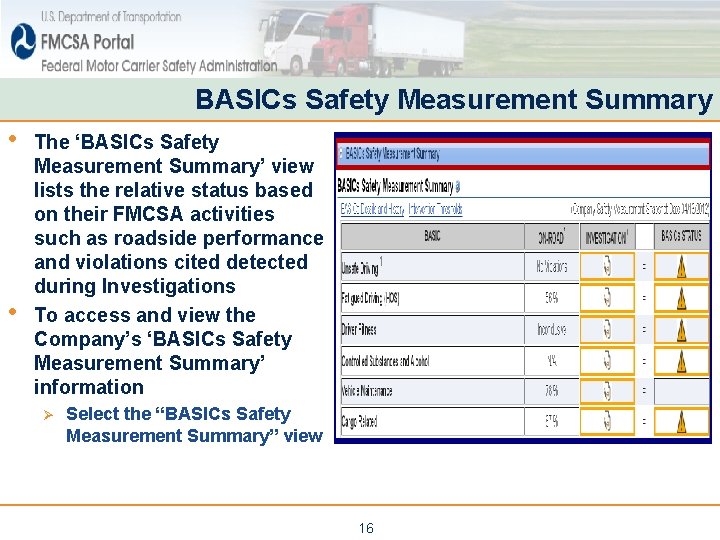
BASICs Safety Measurement Summary • • The ‘BASICs Safety Measurement Summary’ view lists the relative status based on their FMCSA activities such as roadside performance and violations cited detected during Investigations To access and view the Company’s ‘BASICs Safety Measurement Summary’ information Ø Select the “BASICs Safety Measurement Summary” view 16
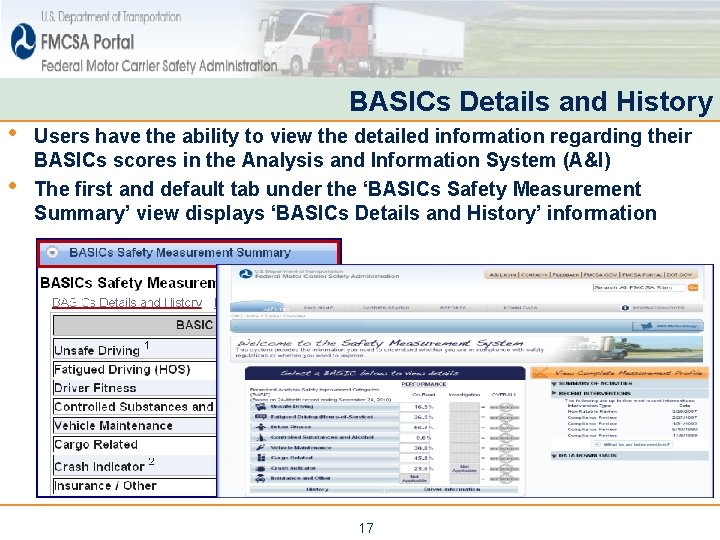
• • BASICs Details and History Users have the ability to view the detailed information regarding their BASICs scores in the Analysis and Information System (A&I) The first and default tab under the ‘BASICs Safety Measurement Summary’ view displays ‘BASICs Details and History’ information 17
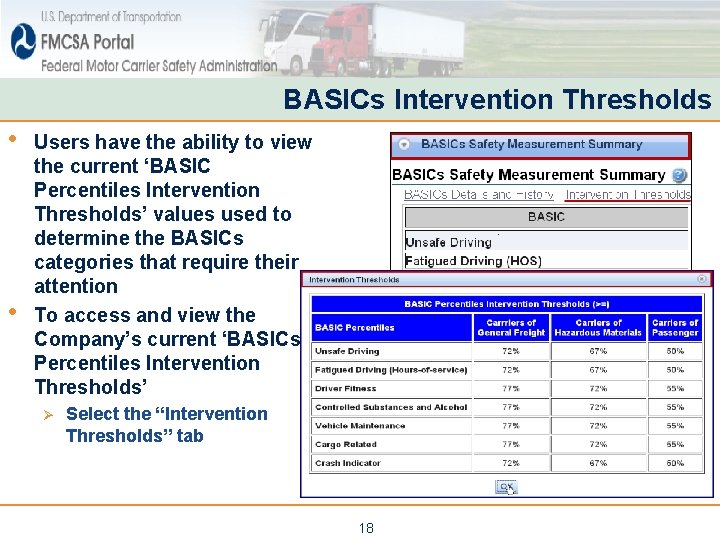
BASICs Intervention Thresholds • • Users have the ability to view the current ‘BASIC Percentiles Intervention Thresholds’ values used to determine the BASICs categories that require their attention To access and view the Company’s current ‘BASICs Percentiles Intervention Thresholds’ Ø Select the “Intervention Thresholds” tab 18
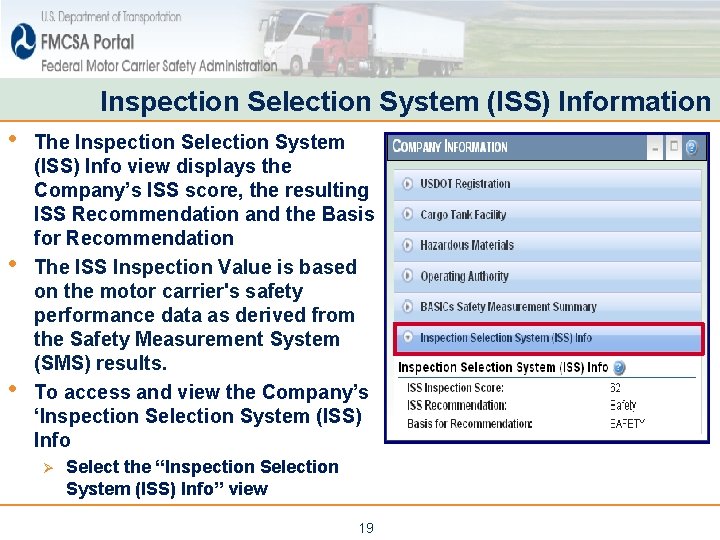
Inspection Selection System (ISS) Information • • • The Inspection Selection System (ISS) Info view displays the Company’s ISS score, the resulting ISS Recommendation and the Basis for Recommendation The ISS Inspection Value is based on the motor carrier's safety performance data as derived from the Safety Measurement System (SMS) results. To access and view the Company’s ‘Inspection Selection System (ISS) Info Ø Select the “Inspection Selection System (ISS) Info” view 19
Review • • The Company Information portlet shows detailed operating information for a company as collected by FMCSA under the company’s USDOT # Available information includes: Ø Registration Information from MCS-150/MCS-150 B Applications § General Information, including: Company Officials, Contact and Equipment Details Ø Registration Information about Cargo Tank Facilities § General Information, including: Cargo Tank Facility ID, Cargo Tank Facility Name and Location Ø Hazardous Material Information § Hazardous Materials Carried or Shipped Details and Status of Hazardous Materials Safety Permit Ø Registration Information from Operating Authority Applications § Scope of Operating Authority and Insurance Details Ø BASICs Safety Measurement Summary Information § BASICs Scores based on on-road performance, Investigation Date when Serious Violations were detected and BASICs Status Ø Inspection Selection System (ISS) Information § ISS Inspection Score, ISS Recommendation and Basis for Recommendation 20
END End of Training Module Please Close the Browser Window 21