
Fluent Software Training MTG97 183 Parallel FLUENT 5
- Slides: 37
Fluent Software Training MTG-97 -183 Parallel FLUENT 5 1 © Fluent Inc. 11/2/2020
Fluent Software Training MTG-97 -183 Outline u u u u Why Parallel Processing? Grid Partitioning Serial and Parallel Architecture File I/O and Memory Management Configuring a Parallel Network Steps for Spawning Compute Nodes Adding Available Hosts Checking Parallel Performance 2 © Fluent Inc. 11/2/2020
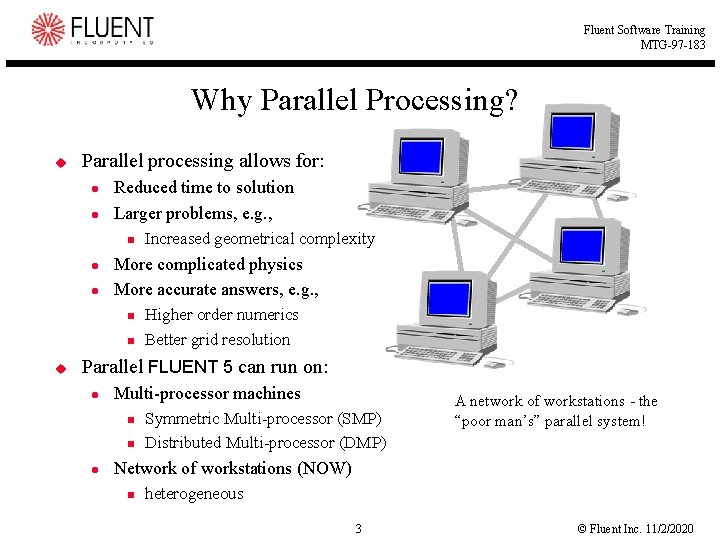
Fluent Software Training MTG-97 -183 Why Parallel Processing? u Parallel processing allows for: l l Reduced time to solution Larger problems, e. g. , n l l More complicated physics More accurate answers, e. g. , n n u Increased geometrical complexity Higher order numerics Better grid resolution Parallel FLUENT 5 can run on: l Multi-processor machines n n l Symmetric Multi-processor (SMP) Distributed Multi-processor (DMP) A network of workstations - the “poor man’s” parallel system! Network of workstations (NOW) n heterogeneous 3 © Fluent Inc. 11/2/2020
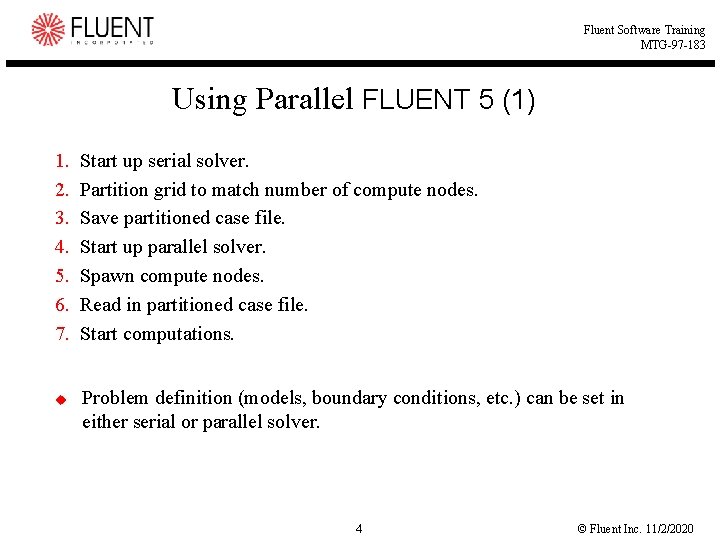
Fluent Software Training MTG-97 -183 Using Parallel FLUENT 5 (1) 1. 2. 3. 4. 5. 6. 7. u Start up serial solver. Partition grid to match number of compute nodes. Save partitioned case file. Start up parallel solver. Spawn compute nodes. Read in partitioned case file. Start computations. Problem definition (models, boundary conditions, etc. ) can be set in either serial or parallel solver. 4 © Fluent Inc. 11/2/2020
Fluent Software Training MTG-97 -183 Using Parallel FLUENT 5 (2) u Note: You can read a non-partitioned grid into the parallel solver. l l Grid automatically partitioned to match number of compute nodes. Grid partitioned based on Strip. n u Note: A standalone partitioning tool is available as an alternative to using the serial solver for partitioning. l u May not be optimal way. May be used to partition a case as it is read by the parallel solver. Note: If number of partitions > number of compute nodes: l l Partitions are merged together, provided the number of compute nodes is a multiple of the number of partitions. Previous partition information will not be overwritten. 5 © Fluent Inc. 11/2/2020
Fluent Software Training MTG-97 -183 Current Limitations on Parallel Solver u Features currently unavailable in parallel solver: l l l Discrete Transfer Radiation Model (DTRM) Conformal grid adaption (hanging-node adaption is available) Data export to non-native forms except FIELDVIEW and ENSIGHT n l Can still write out Profiles Grid zone modification n n Face/cell separation Face extrusion Fusion Pyramid layer creation 6 © Fluent Inc. 11/2/2020
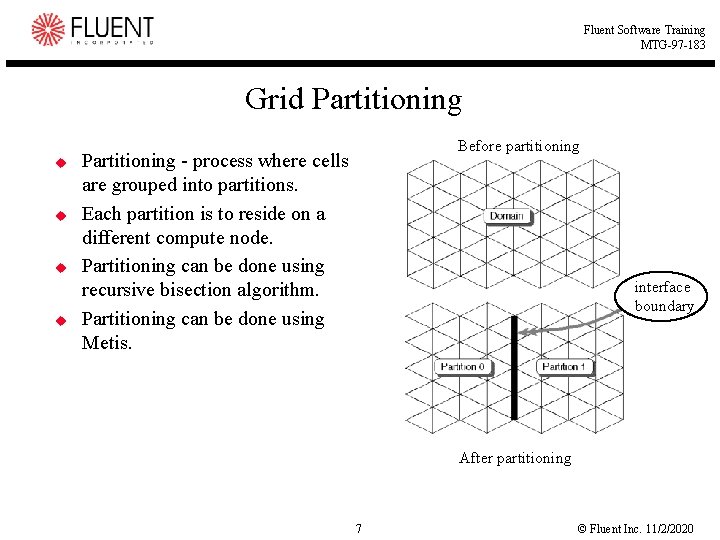
Fluent Software Training MTG-97 -183 Grid Partitioning u u Before partitioning Partitioning - process where cells are grouped into partitions. Each partition is to reside on a different compute node. Partitioning can be done using recursive bisection algorithm. Partitioning can be done using Metis. interface boundary After partitioning 7 © Fluent Inc. 11/2/2020
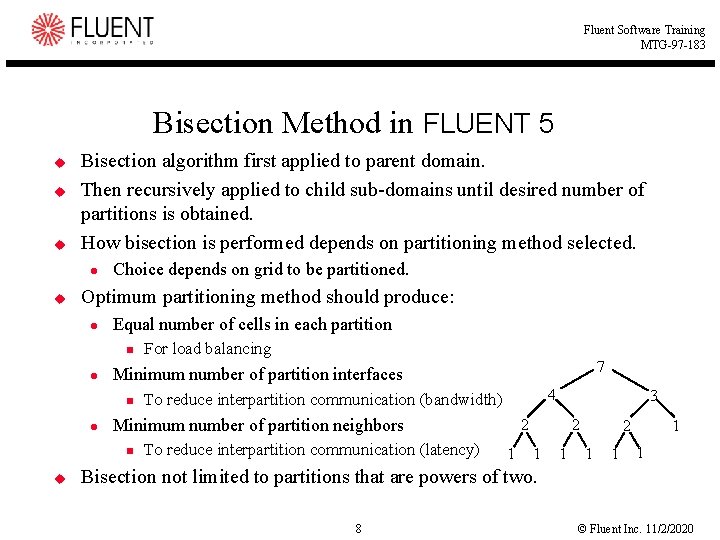
Fluent Software Training MTG-97 -183 Bisection Method in FLUENT 5 u u u Bisection algorithm first applied to parent domain. Then recursively applied to child sub-domains until desired number of partitions is obtained. How bisection is performed depends on partitioning method selected. l u Choice depends on grid to be partitioned. Optimum partitioning method should produce: l Equal number of cells in each partition n l 4 To reduce interpartition communication (bandwidth) Minimum number of partition neighbors n u 7 Minimum number of partition interfaces n l For load balancing To reduce interpartition communication (latency) 3 2 1 1 1 Bisection not limited to partitions that are powers of two. 8 © Fluent Inc. 11/2/2020
Fluent Software Training MTG-97 -183 Partitioning with Metis in FLUENT 5 u u Metis is a third-party partitioner developed by Karypis and Kumar at the University of Minnesota. It is both fast and provides high-quality partitions. It is available either through the serial solver as one of the partitioning methods (Metis) or through a standalone code (tfilter partition) It can also be used, via tfilter, to directly import unpartitioned cases into the parallel solver l l File->Import->Partition->Metis…, or File->Import->Partition->Metis Zone… n u Note: There must be enough memory on the host machine to permit the entire grid to be partitioned by tfilter. Approximately 300 bytes per cell is required. Metis should not be used for grids with non-conformal interfaces. 9 © Fluent Inc. 11/2/2020
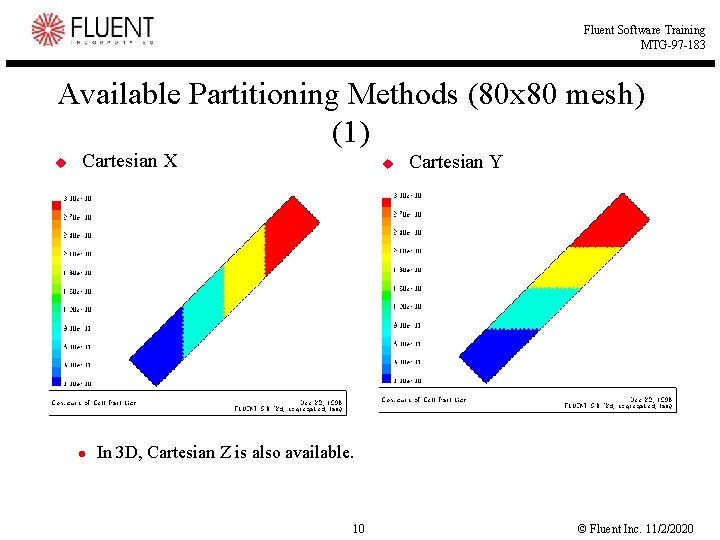
Fluent Software Training MTG-97 -183 Available Partitioning Methods (80 x 80 mesh) (1) u Cartesian X l u Cartesian Y In 3 D, Cartesian Z is also available. 10 © Fluent Inc. 11/2/2020
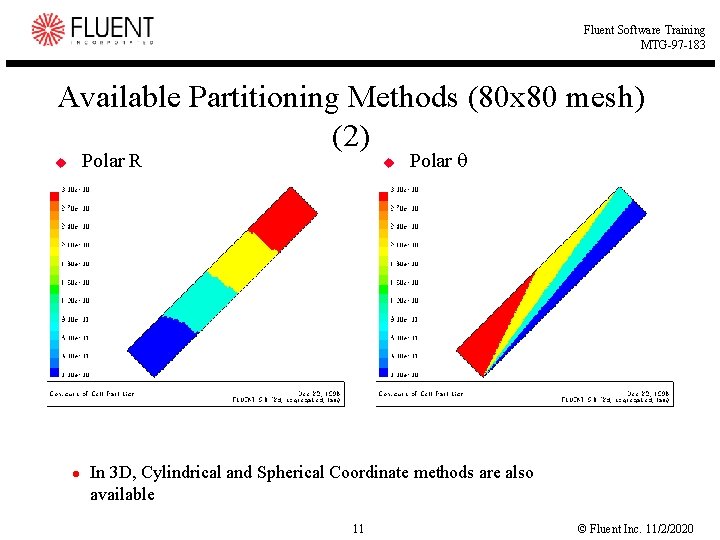
Fluent Software Training MTG-97 -183 Available Partitioning Methods (80 x 80 mesh) (2) Polar R u l u Polar In 3 D, Cylindrical and Spherical Coordinate methods are also available 11 © Fluent Inc. 11/2/2020
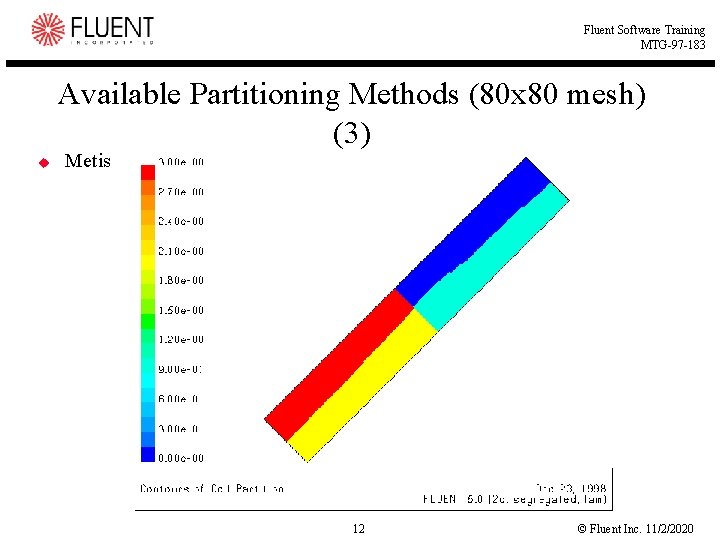
Fluent Software Training MTG-97 -183 Available Partitioning Methods (80 x 80 mesh) (3) u Metis 12 © Fluent Inc. 11/2/2020
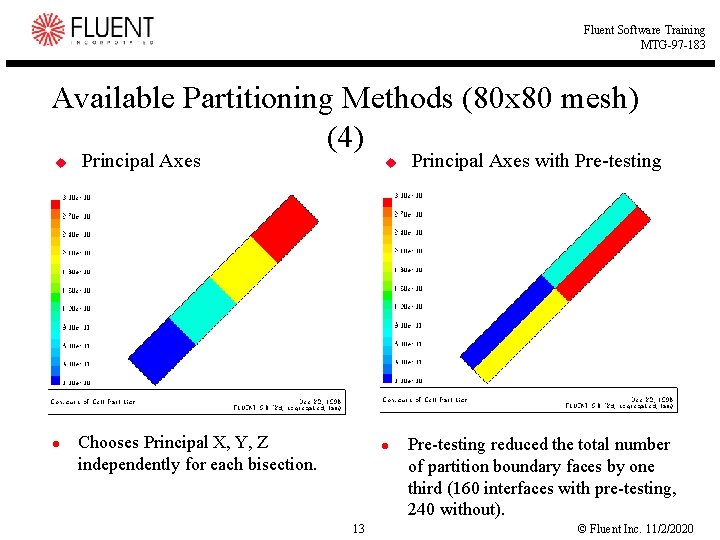
Fluent Software Training MTG-97 -183 Available Partitioning Methods (80 x 80 mesh) (4) u l Principal Axes u Chooses Principal X, Y, Z independently for each bisection. l 13 Principal Axes with Pre-testing reduced the total number of partition boundary faces by one third (160 interfaces with pre-testing, 240 without). © Fluent Inc. 11/2/2020
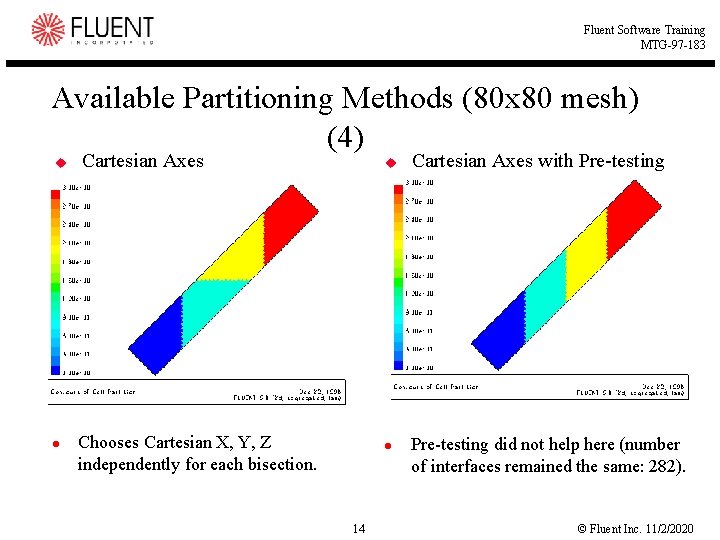
Fluent Software Training MTG-97 -183 Available Partitioning Methods (80 x 80 mesh) (4) u l Cartesian Axes u Chooses Cartesian X, Y, Z independently for each bisection. l 14 Cartesian Axes with Pre-testing did not help here (number of interfaces remained the same: 282). © Fluent Inc. 11/2/2020
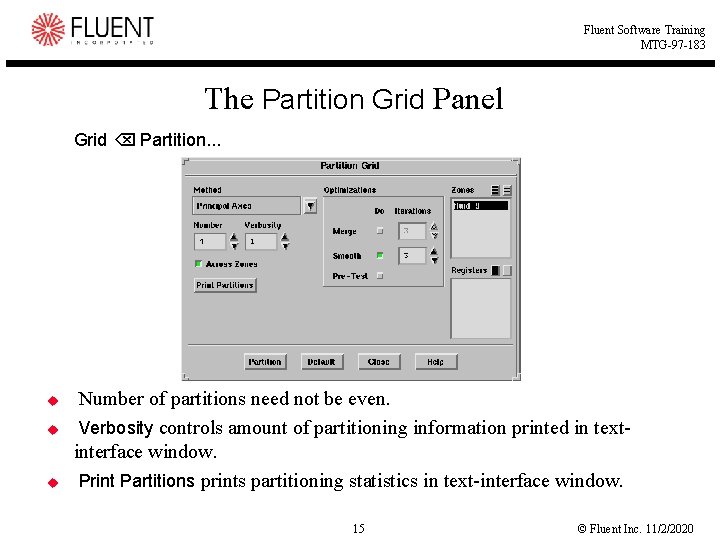
Fluent Software Training MTG-97 -183 The Partition Grid Panel Grid Partition. . . u u u Number of partitions need not be even. Verbosity controls amount of partitioning information printed in textinterface window. Print Partitions prints partitioning statistics in text-interface window. 15 © Fluent Inc. 11/2/2020
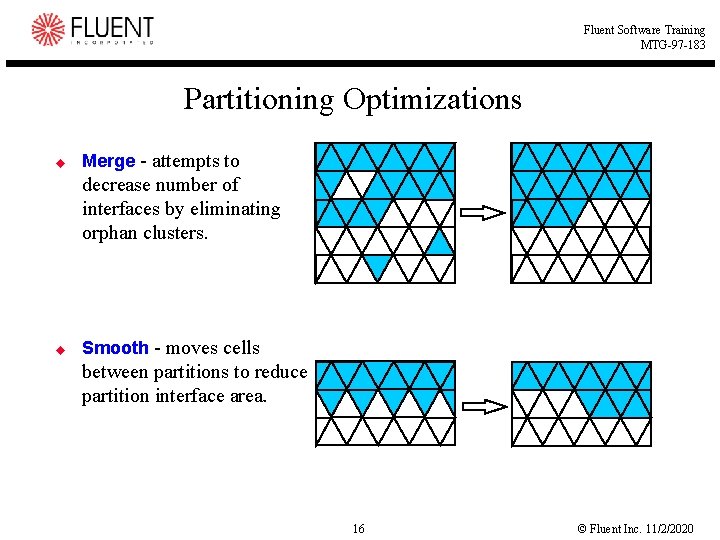
Fluent Software Training MTG-97 -183 Partitioning Optimizations u Merge - attempts to decrease number of interfaces by eliminating orphan clusters. u Smooth - moves cells between partitions to reduce partition interface area. 16 © Fluent Inc. 11/2/2020
Fluent Software Training MTG-97 -183 Partitioning Pre-Testing u u u Can only be used with Principal Axes, Cartesian, or Strip method. By default, bisection performed perpendicular to direction of longest domain extent. With pre-testing, all coordinate directions tested. l l l One that yields fewest partition interfaces is chosen. Note: With pre-testing, time required for partitioning grid will increase. However, if partitioning was done with pre-testing, solution run time may be improved. 17 © Fluent Inc. 11/2/2020
Fluent Software Training MTG-97 -183 Interpreting Partition Statistics (1) Definitions u u u Partition count number of partitions Cell count reports the cell count range, and the total count. Mean cell count deviation reports the normalized difference from the mean cell count, expressed as a percentage. Partition boundary cell count reports the variation in the number of cells that are immediately adjacent to a partition boundary, and the total number of cells along a partition boundary. Partition boundary cell count ratio expresses the variation in partition boundary cells normalized by the total number of cells in its partition, expressed as a percentage. Also reported is the total number of partition boundary cells normalized by the total number of cells in the domain, expressed as a percentage. It is always best to determine a partitioning strategy that makes this value as small as possible. 18 © Fluent Inc. 11/2/2020
Fluent Software Training MTG-97 -183 Interpreting Partition Statistics (2) Definitions u u u Face count reports the cell count range, and the total count. Mean face count deviation reports the normalized difference from the mean cell count, expressed as a percentage. Partition boundary face count reports the variation in the number of cells that are immediately adjacent to a partition boundary, and the total number of cells along a partition boundary. Partition boundary face count ratio expresses the variation in partition boundary cells normalized by the total number of cells in its partition, expressed as a percentage. Also reported is the total number of partition boundary cells normalized by the total number of cells in the domain, expressed as a percentage. Partition neighbor count expresses the variation among partitions of the number of partition neighbors. 19 © Fluent Inc. 11/2/2020
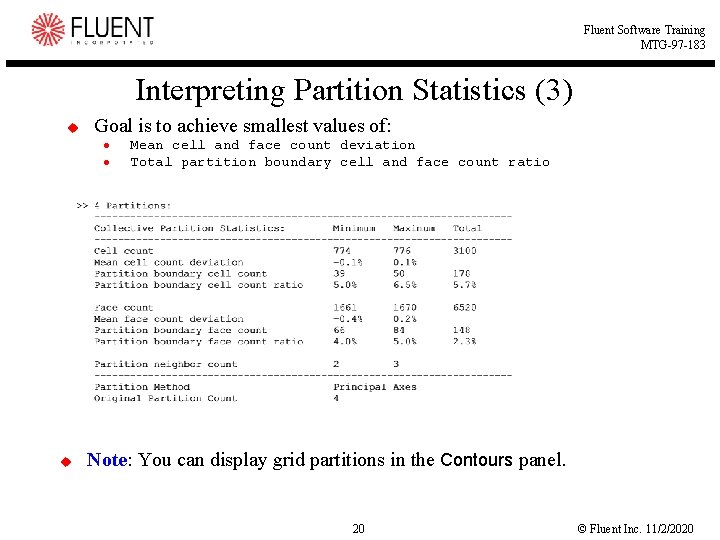
Fluent Software Training MTG-97 -183 Interpreting Partition Statistics (3) u Goal is to achieve smallest values of: l l u Mean cell and face count deviation Total partition boundary cell and face count ratio Note: You can display grid partitions in the Contours panel. 20 © Fluent Inc. 11/2/2020
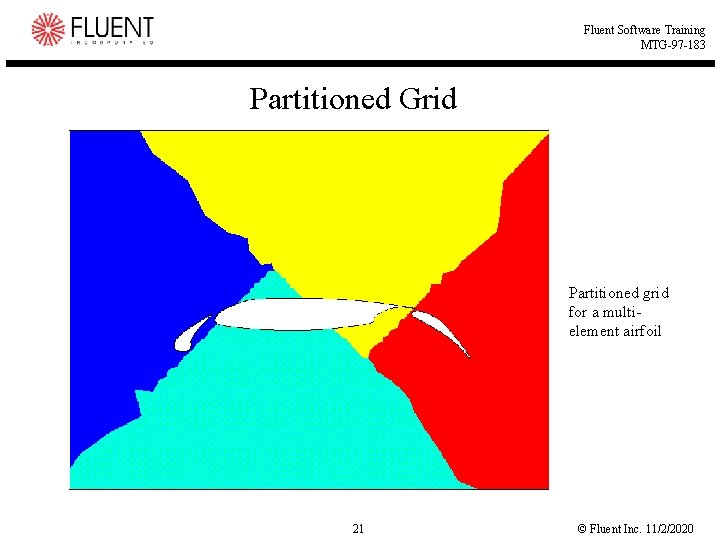
Fluent Software Training MTG-97 -183 Partitioned Grid Partitioned grid for a multielement airfoil 21 © Fluent Inc. 11/2/2020
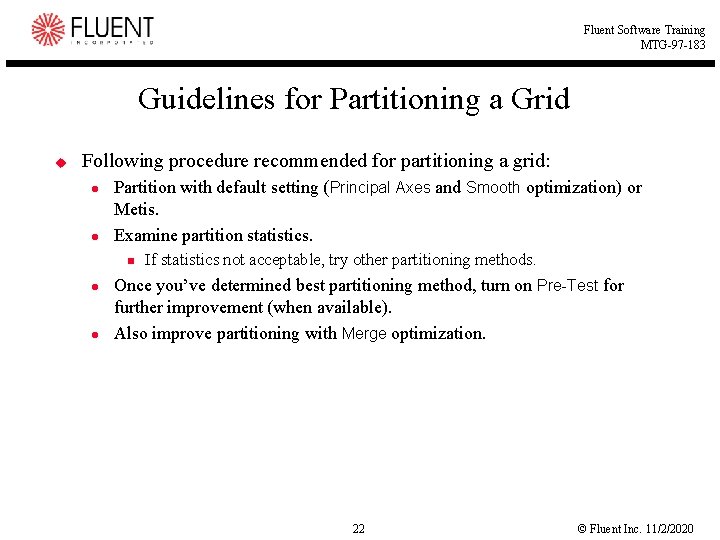
Fluent Software Training MTG-97 -183 Guidelines for Partitioning a Grid u Following procedure recommended for partitioning a grid: l l Partition with default setting (Principal Axes and Smooth optimization) or Metis. Examine partition statistics. n l l If statistics not acceptable, try other partitioning methods. Once you’ve determined best partitioning method, turn on Pre-Test for further improvement (when available). Also improve partitioning with Merge optimization. 22 © Fluent Inc. 11/2/2020
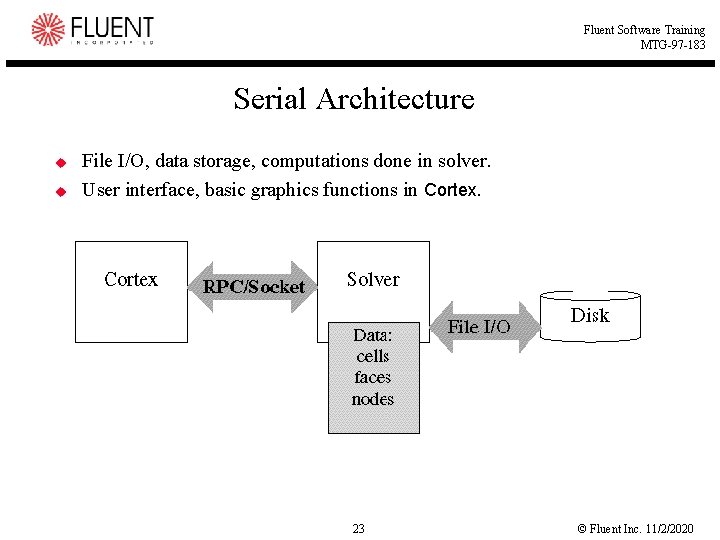
Fluent Software Training MTG-97 -183 Serial Architecture u u File I/O, data storage, computations done in solver. User interface, basic graphics functions in Cortex. 23 © Fluent Inc. 11/2/2020
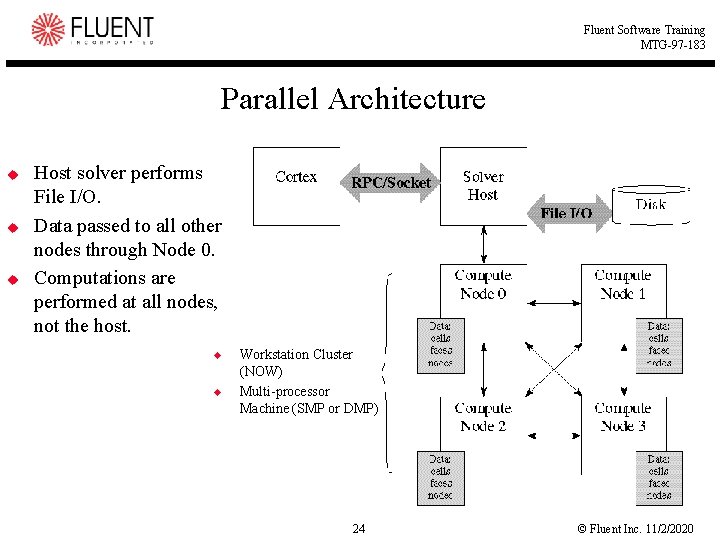
Fluent Software Training MTG-97 -183 Parallel Architecture u u u Host solver performs File I/O. Data passed to all other nodes through Node 0. Computations are performed at all nodes, not the host. u u Workstation Cluster (NOW) Multi-processor Machine (SMP or DMP) 24 © Fluent Inc. 11/2/2020
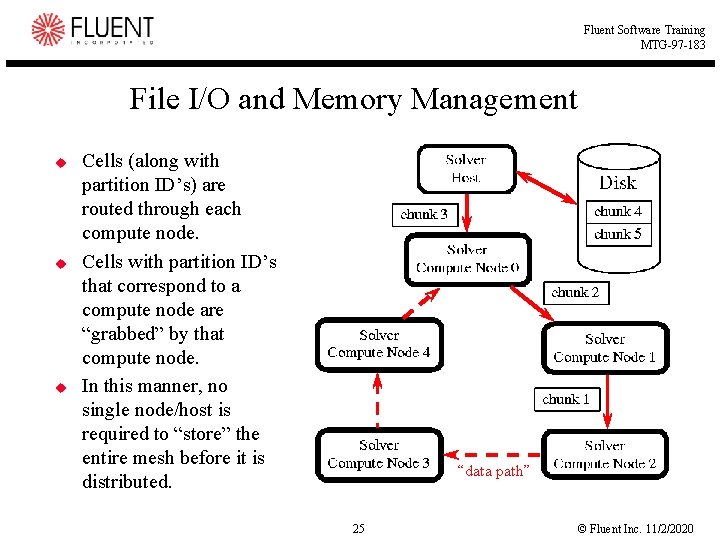
Fluent Software Training MTG-97 -183 File I/O and Memory Management u u u Cells (along with partition ID’s) are routed through each compute node. Cells with partition ID’s that correspond to a compute node are “grabbed” by that compute node. In this manner, no single node/host is required to “store” the entire mesh before it is distributed. “data path” 25 © Fluent Inc. 11/2/2020
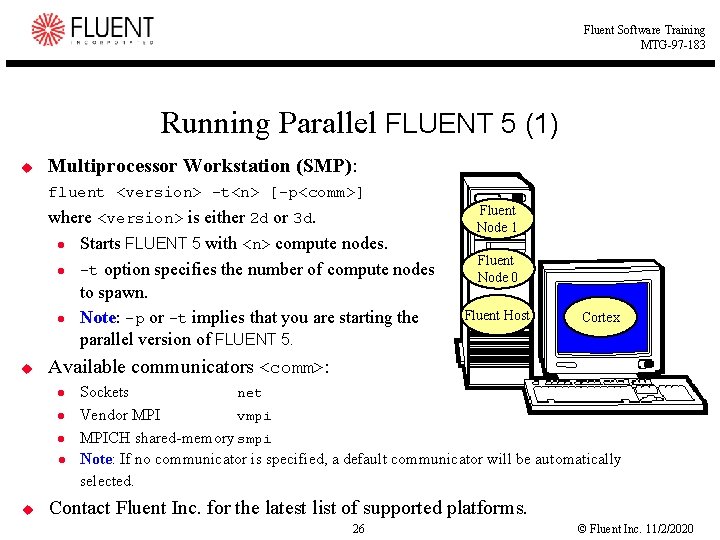
Fluent Software Training MTG-97 -183 Running Parallel FLUENT 5 (1) u Multiprocessor Workstation (SMP): fluent <version> -t<n> [-p<comm>] where <version> is either 2 d or 3 d. l Starts FLUENT 5 with <n> compute nodes. l -t option specifies the number of compute nodes to spawn. l Note: -p or -t implies that you are starting the parallel version of FLUENT 5. u Fluent Node 0 Fluent Host Cortex Available communicators <comm>: l l u Fluent Node 1 Sockets net Vendor MPI vmpi MPICH shared-memory smpi Note: If no communicator is specified, a default communicator will be automatically selected. Contact Fluent Inc. for the latest list of supported platforms. 26 © Fluent Inc. 11/2/2020
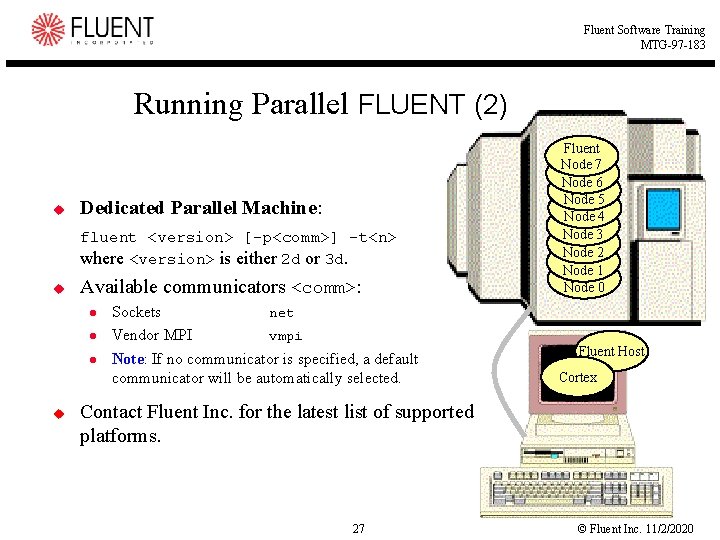
Fluent Software Training MTG-97 -183 Running Parallel FLUENT (2) u Dedicated Parallel Machine: fluent <version> [-p<comm>] -t<n> where <version> is either 2 d or 3 d. u Available communicators <comm>: l l l u Sockets net Vendor MPI vmpi Note: If no communicator is specified, a default communicator will be automatically selected. Fluent Node Fluent 7 Node Fluent 6 Node Fluent 5 Node Fluent 4 Node Fluent 3 Node Fluent 2 Node Fluent 1 Node 0 Fluent Host Cortex Contact Fluent Inc. for the latest list of supported platforms. 27 © Fluent Inc. 11/2/2020
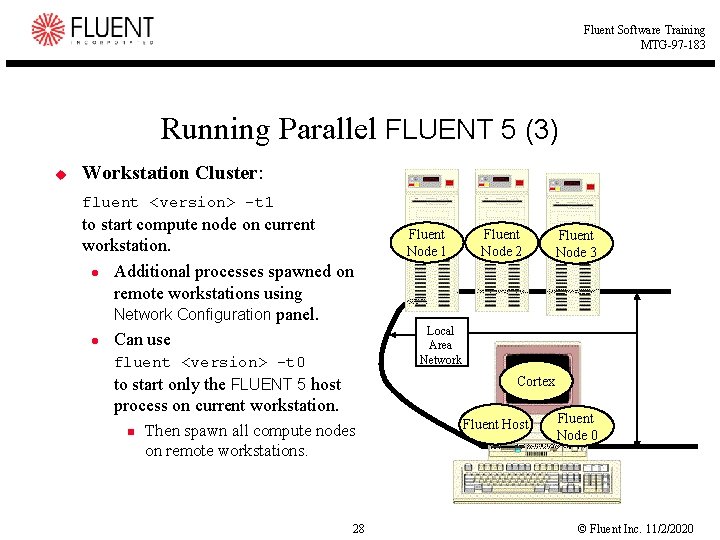
Fluent Software Training MTG-97 -183 Running Parallel FLUENT 5 (3) u Workstation Cluster: fluent <version> -t 1 to start compute node on current workstation. l Additional processes spawned on remote workstations using Network Configuration panel. l Can use fluent <version> -t 0 to start only the FLUENT 5 host Fluent Node 1 Fluent Node 2 Local Area Network Cortex process on current workstation. n Fluent Node 3 Then spawn all compute nodes on remote workstations. 28 Fluent Host Fluent Node 0 © Fluent Inc. 11/2/2020
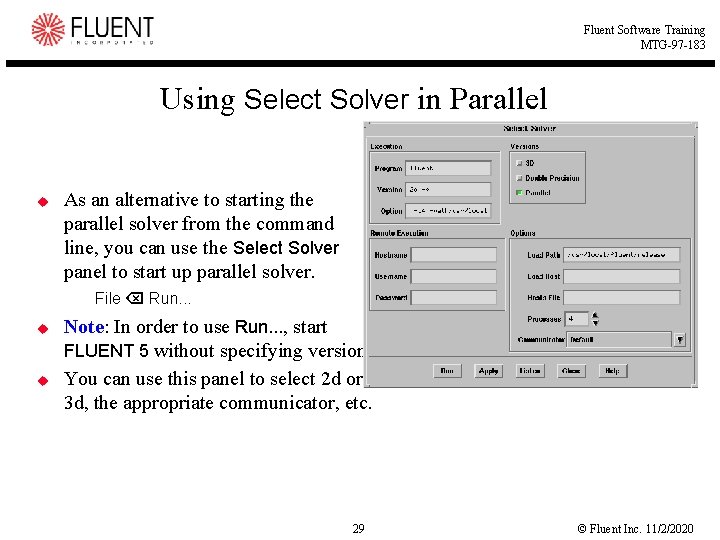
Fluent Software Training MTG-97 -183 Using Select Solver in Parallel u As an alternative to starting the parallel solver from the command line, you can use the Select Solver panel to start up parallel solver. File Run. . . u u Note: In order to use Run. . . , start FLUENT 5 without specifying version. You can use this panel to select 2 d or 3 d, the appropriate communicator, etc. 29 © Fluent Inc. 11/2/2020
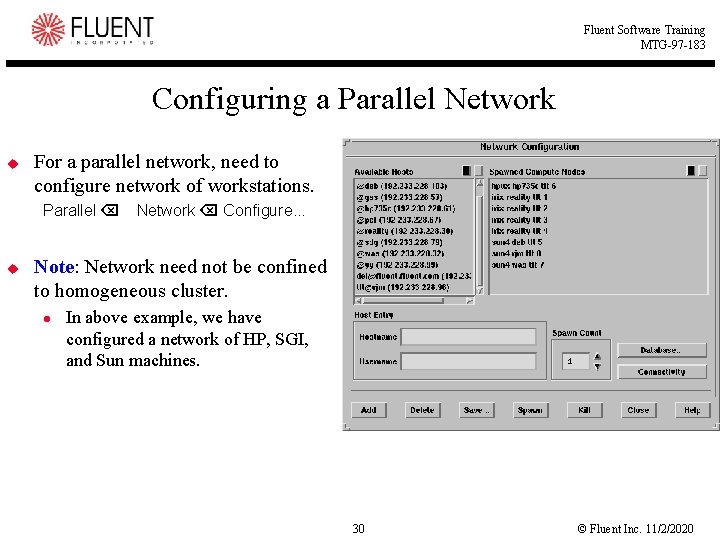
Fluent Software Training MTG-97 -183 Configuring a Parallel Network u For a parallel network, need to configure network of workstations. Parallel Network Configure. . . u Note: Network need not be confined to homogeneous cluster. l In above example, we have configured a network of HP, SGI, and Sun machines. 30 © Fluent Inc. 11/2/2020
Fluent Software Training MTG-97 -183 Steps for Spawning Compute Nodes 1. 2. 3. 4. Set up list of available hosts. Select hosts from Available Hosts list. Set number of compute nodes in Spawn Count. Click on Spawn to start ‘Spawn Count’ compute nodes on each remote host. 5. Repeat 2 -4 until proper number of Spawned Compute Nodes obtained. u Each new compute node is given a compute node number. l u If you spawn an undesired compute node, kill it by: l l u Starting with zero Selecting appropriate compute node under Spawned Compute Nodes list. Clicking on Kill. You can kill compute node 0 if it is the only remaining compute node. 31 © Fluent Inc. 11/2/2020
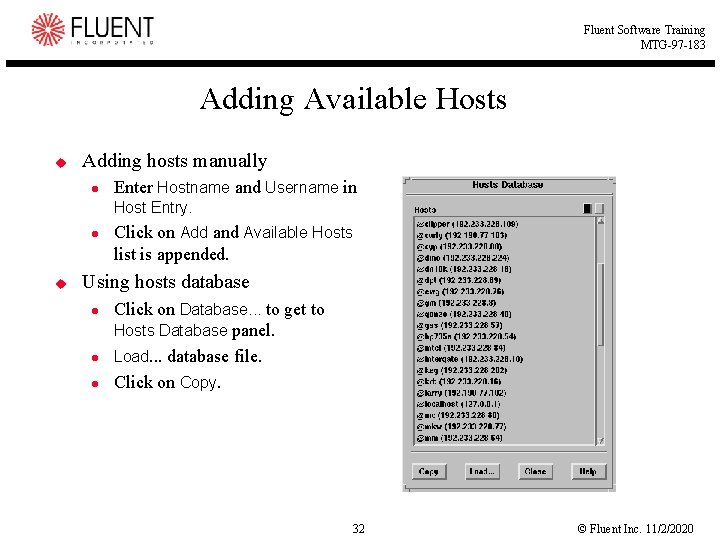
Fluent Software Training MTG-97 -183 Adding Available Hosts u Adding hosts manually l Enter Hostname and Username in Host Entry. l u Click on Add and Available Hosts list is appended. Using hosts database l l l Click on Database. . . to get to Hosts Database panel. Load. . . database file. Click on Copy. 32 © Fluent Inc. 11/2/2020
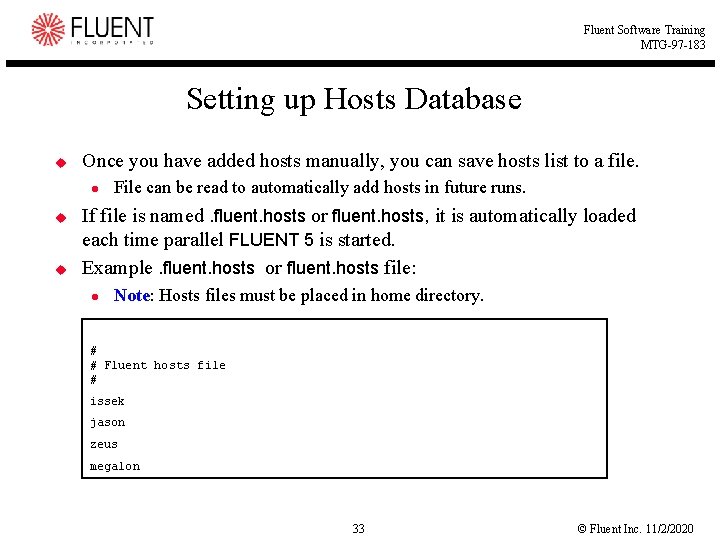
Fluent Software Training MTG-97 -183 Setting up Hosts Database u Once you have added hosts manually, you can save hosts list to a file. l u u File can be read to automatically add hosts in future runs. If file is named. fluent. hosts or fluent. hosts, it is automatically loaded each time parallel FLUENT 5 is started. Example. fluent. hosts or fluent. hosts file: l Note: Hosts files must be placed in home directory. # # Fluent hosts file # issek jason zeus megalon 33 © Fluent Inc. 11/2/2020
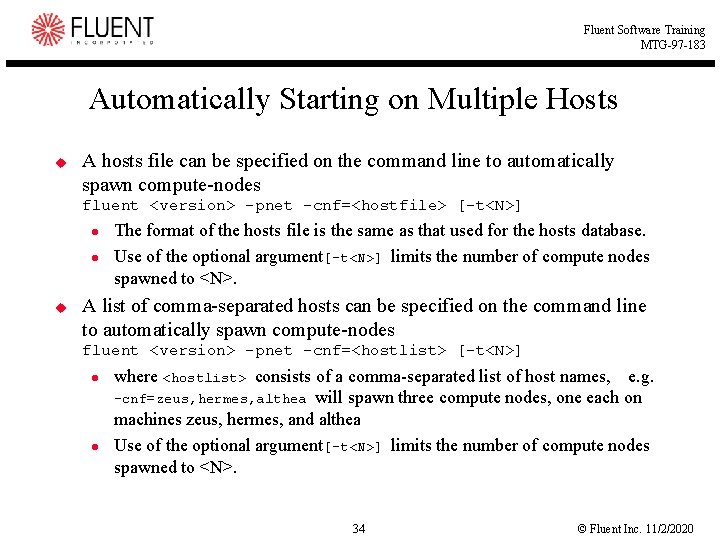
Fluent Software Training MTG-97 -183 Automatically Starting on Multiple Hosts u A hosts file can be specified on the command line to automatically spawn compute-nodes fluent <version> -pnet -cnf=<hostfile> [-t<N>] l l u The format of the hosts file is the same as that used for the hosts database. Use of the optional argument[-t<N>] limits the number of compute nodes spawned to <N>. A list of comma-separated hosts can be specified on the command line to automatically spawn compute-nodes fluent <version> -pnet -cnf=<hostlist> [-t<N>] l l where <hostlist> consists of a comma-separated list of host names, e. g. -cnf=zeus, hermes, althea will spawn three compute nodes, one each on machines zeus, hermes, and althea Use of the optional argument[-t<N>] limits the number of compute nodes spawned to <N>. 34 © Fluent Inc. 11/2/2020
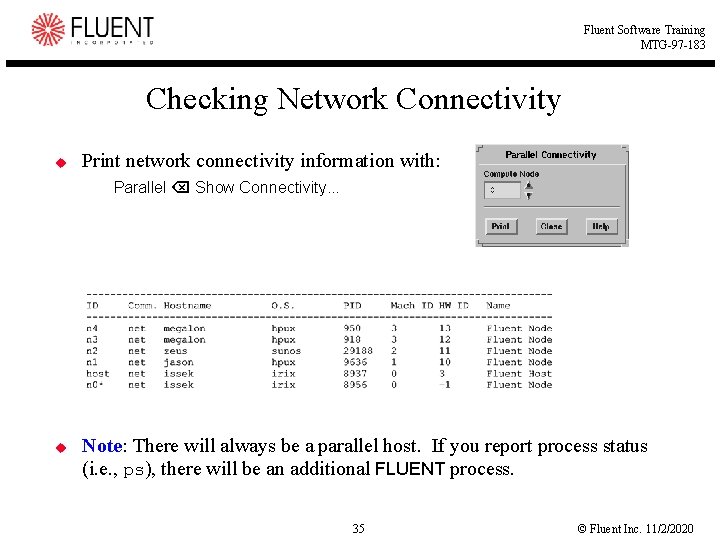
Fluent Software Training MTG-97 -183 Checking Network Connectivity u Print network connectivity information with: Parallel Show Connectivity. . . u Note: There will always be a parallel host. If you report process status (i. e. , ps), there will be an additional FLUENT process. 35 © Fluent Inc. 11/2/2020
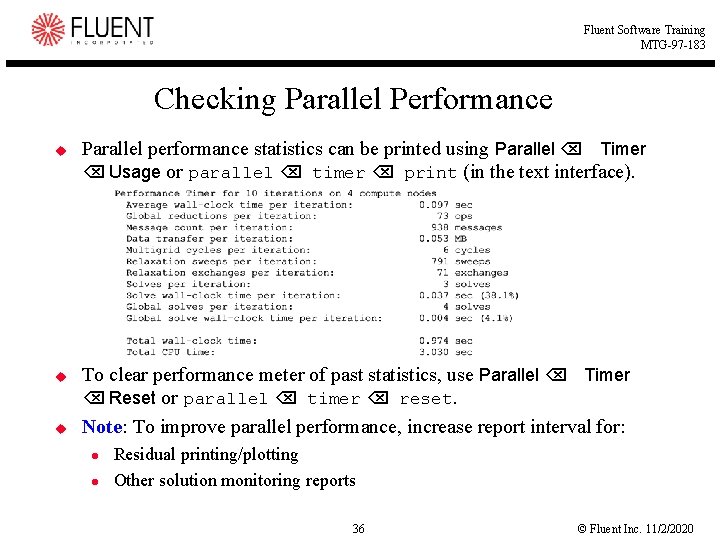
Fluent Software Training MTG-97 -183 Checking Parallel Performance u u u Parallel performance statistics can be printed using Parallel Timer Usage or parallel timer print (in the text interface). To clear performance meter of past statistics, use Parallel Timer Reset or parallel timer reset. Note: To improve parallel performance, increase report interval for: l l Residual printing/plotting Other solution monitoring reports 36 © Fluent Inc. 11/2/2020
Fluent Software Training MTG-97 -183 Summary u u u The FLUENT 5 solver can run on parallel computers or a network of workstations. Parallel versions are shipped to all customers. Tools are included for partitioning the mesh to run on different compute nodes. The user interface for the parallel version is identical to the serial interface. Benefits of parallel: l l Reduced time to solution Larger problems More complicated physics More accurate answers 37 © Fluent Inc. 11/2/2020