
Fleet Manager Certification Program Billy Beard Director Bureau
Fleet Manager Certification Program Billy Beard, Director Bureau of Fleet Management 10/30/2020 Slide 1
Objectives • • Overview of BFM Policies and Procedures New Vehicle Setup Reporting and Data Monitoring Maintaining Vehicle Data 10/30/2020 Slide 2
Overview ØStaff ØMission ØPurchasing state-owned Vehicles ØVehicle Use Policy ØSafety Operation Policy ØMaintenance and Care of Vehicles ØVehicle Replacement and Disposition ØProcess Flow Chart 10/30/2020 Slide 3
Bureau of Fleet Management Billy Beard Carlos Galloway Senior Contract Analyst 601 -359 -2030 Fax: 601 -576 -2740 Bureau Director 601 -359 -5171 Fax: 601 -576 -2740 Billy. Beard@dfa. ms. gov Carlos. Galloway@dfa. ms. gov Stephen Tucker Senior Contract Analyst 601 -359 -3107 Fax: 601 -576 -2740 Stephen. Tucker@dfa. ms. gov Woolfolk Building 501 North West St - 701 A Jackson, MS 39201 10/30/2020 Slide 4
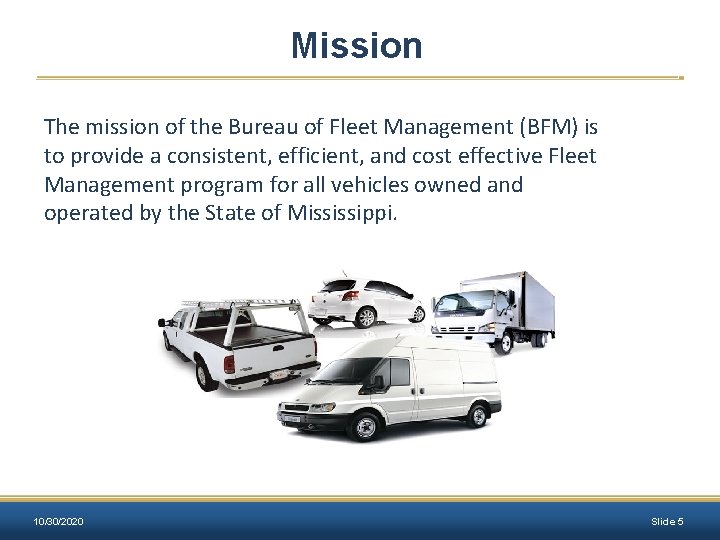
Mission The mission of the Bureau of Fleet Management (BFM) is to provide a consistent, efficient, and cost effective Fleet Management program for all vehicles owned and operated by the State of Mississippi. 10/30/2020 Slide 5
Purchasing State-Owned Vehicles: Purchase Decision The decision to purchase a vehicle should be carefully considered. BFM will not approve any request to purchase a vehicle if it is not the best use of public funds. 10/30/2020 Slide 6
Purchasing State-Owned Vehicles: Approval No Department or Agency of the State of Mississippi may purchase any motor vehicle, regardless of funds used, without first obtaining approval from BFM. No requests shall be approved if the agency has not properly maintained vehicle data in MAGIC (2017 Regular Legislative Session, HB 938). Inadequacies or discrepancies must be corrected prior to approval • Accurate Asset and Equipment Record Statuses • Fuel, Maintenance, and Repair Data of Vehicles • Accurate Vehicle Mileage Readings • Assignment Type of Vehicles and Driver Assignments • County Field on the Asset Record 10/30/2020 Slide 7
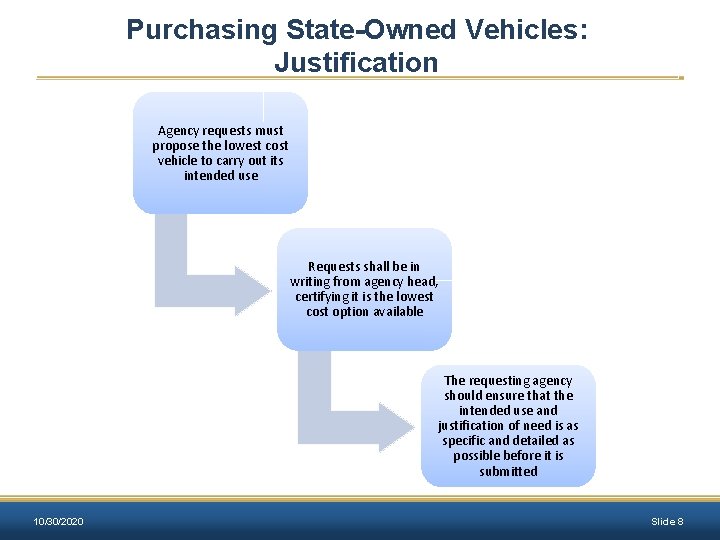
Purchasing State-Owned Vehicles: Justification Agency requests must propose the lowest cost vehicle to carry out its intended use Requests shall be in writing from agency head, certifying it is the lowest cost option available The requesting agency should ensure that the intended use and justification of need is as specific and detailed as possible before it is submitted 10/30/2020 Slide 8
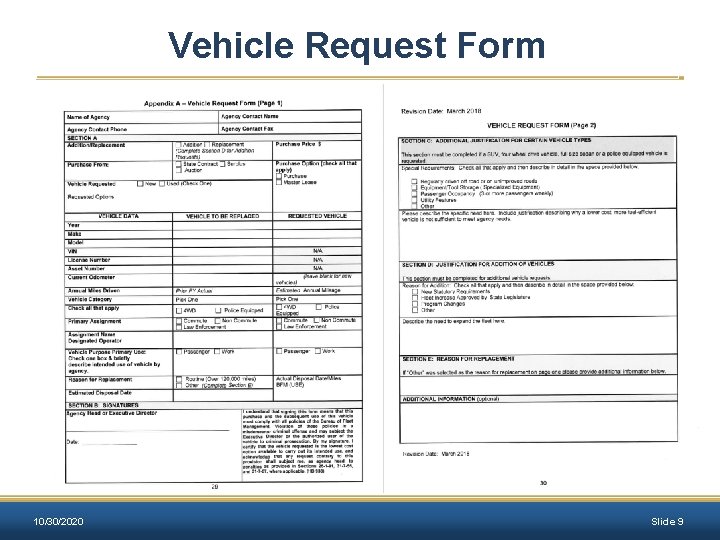
Vehicle Request Form 10/30/2020 Slide 9
Purchasing State-Owned Vehicles: Vehicle Replacement When “Vehicle Replacement” is the justification for a new purchase, the vehicle being replaced must be disposed within 60 days of delivery of the new vehicle. Agencies should identify the vehicle to be replaced with the information required by Section 3. 101. 03 of the Fleet Manual. 10/30/2020 Slide 10
Purchasing State-Owned Vehicles: Vehicle Purchase Records The department or agency shall maintain proper purchasing documentation which provides the intended use of the vehicle and the basis for choosing the vehicle. 10/30/2020 Slide 11
Purchasing State-Owned Vehicles: Title Process Vehicles should be titled as: • State of Mississippi/Department of Finance and Administration – Agency Number § See Appendix H of the Fleet Manual § The Title Application shall reflect the requesting agency’s current address as the mailing address on the title. The title should be kept on file at the agency. 10/30/2020 Slide 12
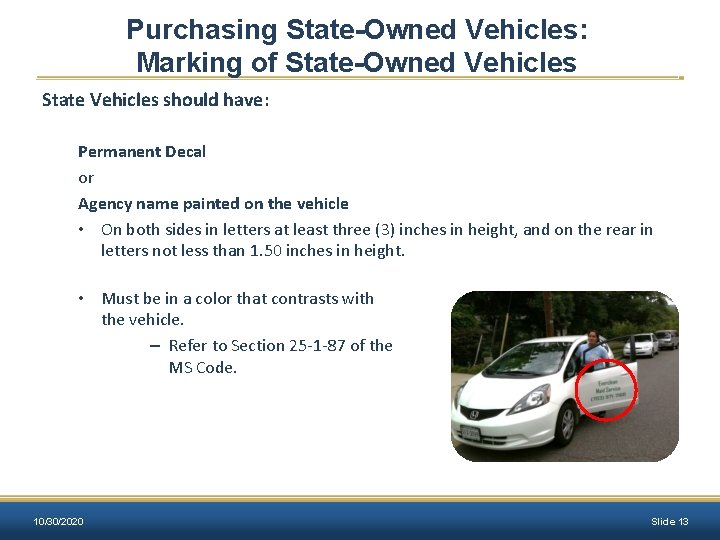
Purchasing State-Owned Vehicles: Marking of State-Owned Vehicles State Vehicles should have: Permanent Decal or Agency name painted on the vehicle • On both sides in letters at least three (3) inches in height, and on the rear in letters not less than 1. 50 inches in height. • Must be in a color that contrasts with the vehicle. – Refer to Section 25 -1 -87 of the MS Code. 10/30/2020 Slide 13
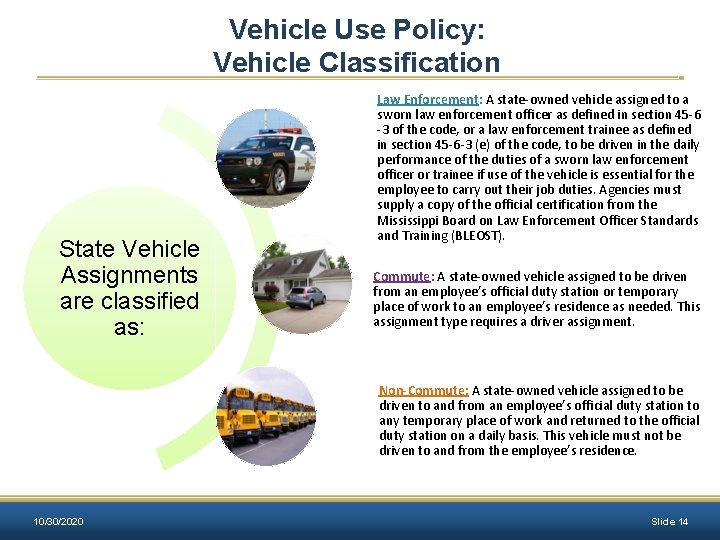
Vehicle Use Policy: Vehicle Classification State Vehicle Assignments are classified as: Law Enforcement: A state-owned vehicle assigned to a sworn law enforcement officer as defined in section 45 -6 -3 of the code, or a law enforcement trainee as defined in section 45 -6 -3 (e) of the code, to be driven in the daily performance of the duties of a sworn law enforcement officer or trainee if use of the vehicle is essential for the employee to carry out their job duties. Agencies must supply a copy of the official certification from the Mississippi Board on Law Enforcement Officer Standards and Training (BLEOST). Commute: A state-owned vehicle assigned to be driven from an employee’s official duty station or temporary place of work to an employee’s residence as needed. This assignment type requires a driver assignment. Non-Commute: A state-owned vehicle assigned to be driven to and from an employee’s official duty station to any temporary place of work and returned to the official duty station on a daily basis. This vehicle must not be driven to and from the employee’s residence. 10/30/2020 Slide 14
Vehicle Use Policy: Operating a State-Owned Vehicle Authorized users include: • State employees • State contract workers • Elected and/or appointed officials • Independent contractors (where approved on a case by case basis according to Section 5. 201. 04 of the Fleet Manual) Authorized users must: • Have a valid Mississippi Driver’s License • Have an acceptable driving record (see UA – 1 Form) • Be authorized by their agency to operate a state-owned vehicle 10/30/2020 Slide 15
Vehicle Use Policy: Misuse or Inappropriate Activities Inappropriate activities or misuse include, but are not limited to: • Improper vehicle assignment • Failure to report changes in driving status • Falsification of documents • Failure to comply with vehicle safety laws (ex: speeding and/or reckless driving) • Failure to take proper care of the vehicle • Failure to comply with any policy or procedure otherwise set forth herein • Violation of vehicle replacement policy 10/30/2020 Slide 16
Vehicle Use Policy: Misuse or Inappropriate Activities (cont. ) Inappropriate activities or misuse include, but are not limited to: • Using the vehicle for personal use outside of the employee’s scope of employment • Failure to maintain accurate Daily Trip Log (Appendix G) • Use of alcohol in state-owned vehicles • Use of drugs in state-owned vehicles • Use of tobacco products in state-owned vehicles 10/30/2020 Slide 17
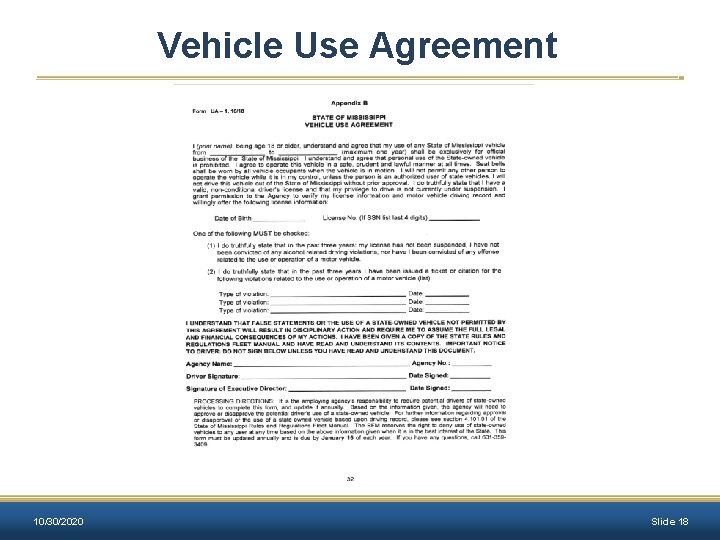
Vehicle Use Agreement 10/30/2020 Slide 18
State-Owned Vehicles: Logs A daily log of all trips must be recorded for each state-owned vehicle. (See Appendix G for Sample Daily Trip Log) Each Daily Trip Log shall contain: • the operator of the vehicle • date of vehicle use • beginning and ending odometer reading • total miles traveled • purpose of each trip • the business locations visited each day Agencies with law enforcement drivers should contact BFM for guidance on compliance with this section. 10/30/2020 Slide 19
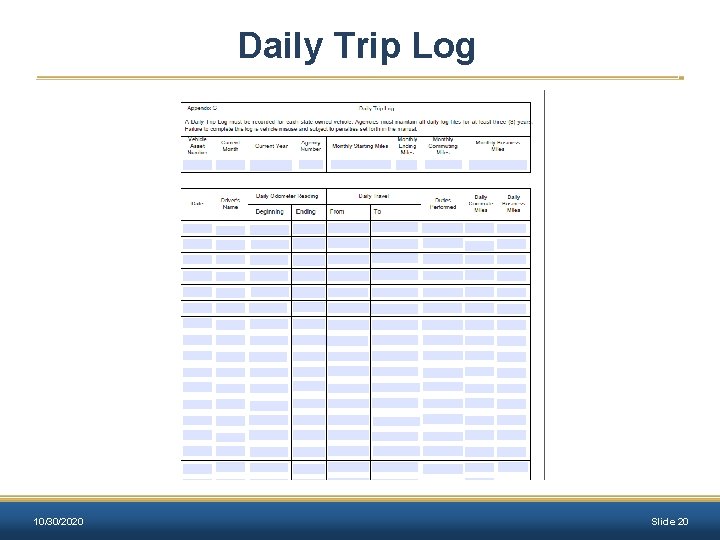
Daily Trip Log 10/30/2020 Slide 20
State-Owned Vehicles: Unauthorized Usage • Sightseeing or trips for pleasure unless the trip is part of the official agenda for a business conference. • Transporting family members, dependents or friends to school, daycare, medical appointments, social events or other personal activities. • Conducting other personal business outside the authorized user’s scope of employment. 10/30/2020 Slide 21
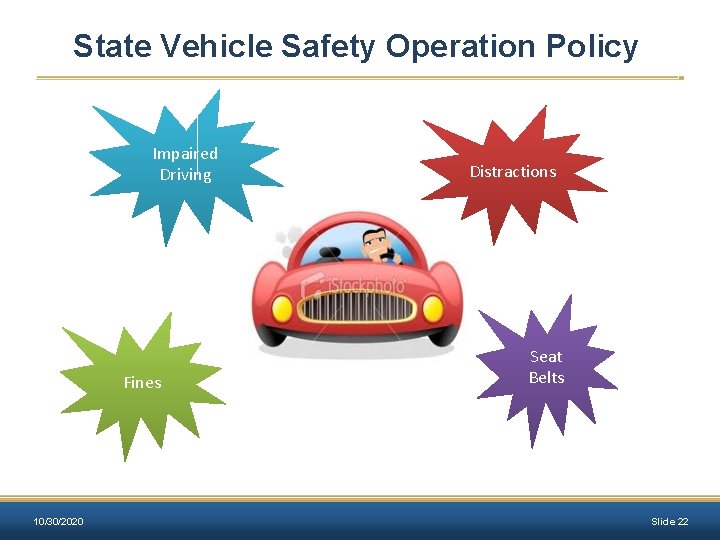
State Vehicle Safety Operation Policy Impaired Driving Fines 10/30/2020 Distractions Seat Belts Slide 22
State Vehicle Safety Operation Policies: Reporting Accidents • Call an ambulance if anyone is injured. • Immediately notify the City Police, Sheriff’s Office, or Highway Patrol. • Do not move either vehicle until an officer of the law advises you to do so. • The Proof of Insurance number that should be entered on the police report is 11 -46 -15. 10/30/2020 Slide 23
State Vehicle Safety Operation Policies: Reporting Accidents • Do not make any statement of guilt to any party. • Notify your immediate supervisor as soon as possible. • Complete a State of Mississippi Liability Claim Report Form (available online). • Submit the form, along with the police report, and any other applicable information to TORT. 10/30/2020 Slide 24
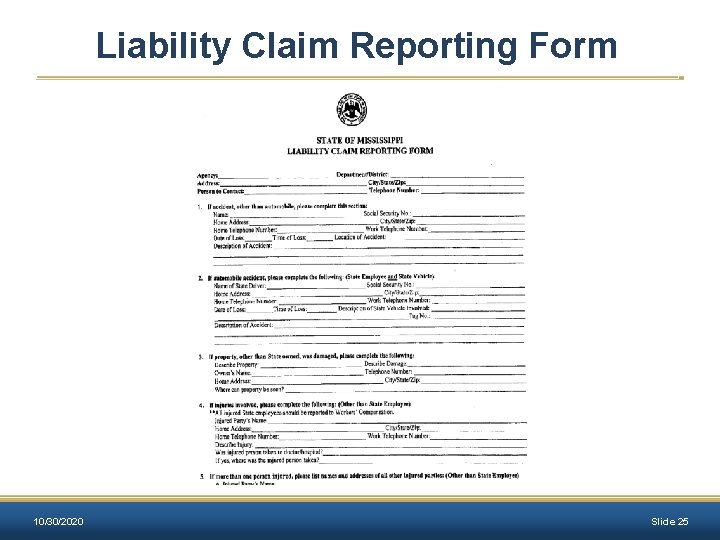
Liability Claim Reporting Form 10/30/2020 Slide 25
Maintenance and Care of Vehicles All agencies are urged to establish a written policy which shall describe the planned maintenance program for its fleet. All maintenance and repairs performed on state-owned vehicles must be documented in MAGIC and retained for the life of the vehicle. 10/30/2020 Slide 26
Maintenance and Care of Vehicles: Fuel Purchases Gasoline purchases shall be obtained using the state-approved fuel access card From vendor facilities that accept the state-approved Fuel Access Card. Compare Fuel. Man pricing weekly on the OPTFM website. Only regular, unleaded gasoline or diesel from self-service pumps should be used. No higher-octane gas is to be purchased. 10/30/2020 Slide 27
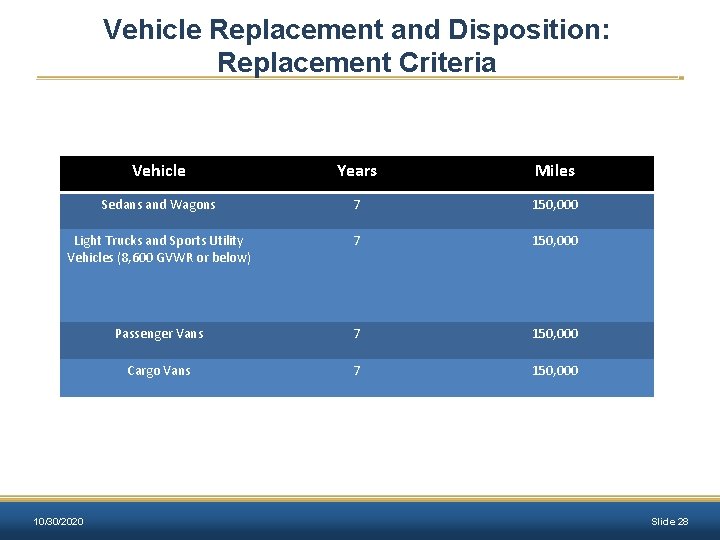
Vehicle Replacement and Disposition: Replacement Criteria Vehicle Years Miles Sedans and Wagons 7 150, 000 Light Trucks and Sports Utility Vehicles (8, 600 GVWR or below) 7 150, 000 Passenger Vans 7 150, 000 Cargo Vans 7 150, 000 10/30/2020 Slide 28
Vehicle Replacement and Disposition: Methods State-Owned vehicles which become surplus to the needs of a state agency may be disposed in any of the following ways: • Sold • Traded • Transferred 10/30/2020 Slide 29
Vehicle Replacement and Disposition: State-Owned Vehicle Disposal Specification The specifications or instructions to prospective buyers should provide a listing of all items being offered and such listing shall provide: • • 10/30/2020 Make/Model Year of Manufacture Mileage Location (Where the vehicle may be inspected) Date and time when vehicle may be inspected Address of location to which the bids shall be delivered Time and date set for the bid opening Name of person to be contacted if additional information is necessary Slide 30
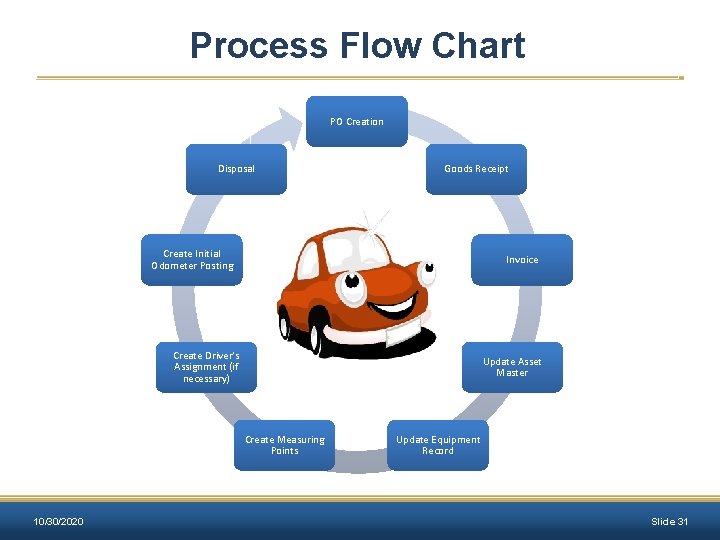
Process Flow Chart PO Creation Disposal Goods Receipt Create Initial Odometer Posting Invoice Create Driver’s Assignment (if necessary) Update Asset Master Create Measuring Points 10/30/2020 Update Equipment Record Slide 31
New Vehicle Setup Unit Objectives: Ø Asset and Equipment Lifecycle Ø Asset Record Completion Ø Update Equipment Master Ø Create Measuring Points Ø Initial Odometer Reading Ø Create Driver Assignments 10/30/2020 Slide 32
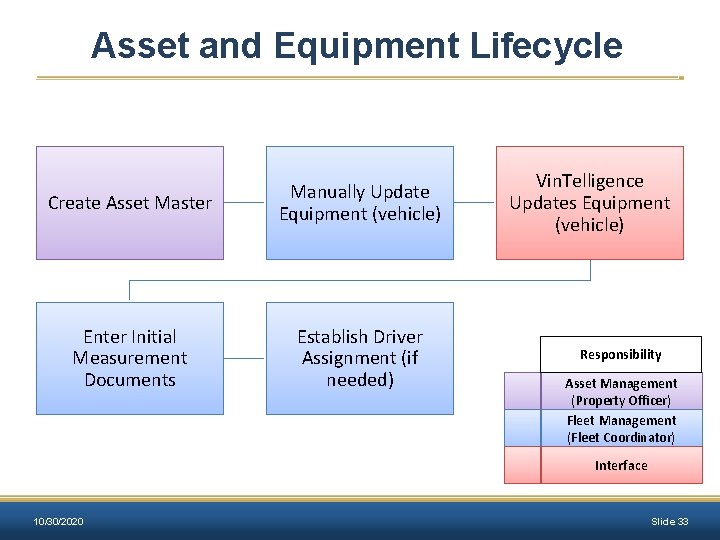
Asset and Equipment Lifecycle Create Asset Master Manually Update Equipment (vehicle) Enter Initial Measurement Documents Establish Driver Assignment (if needed) Vin. Telligence Updates Equipment (vehicle) Responsibility Asset Management (Property Officer) Fleet Management (Fleet Coordinator) Interface 10/30/2020 Slide 33
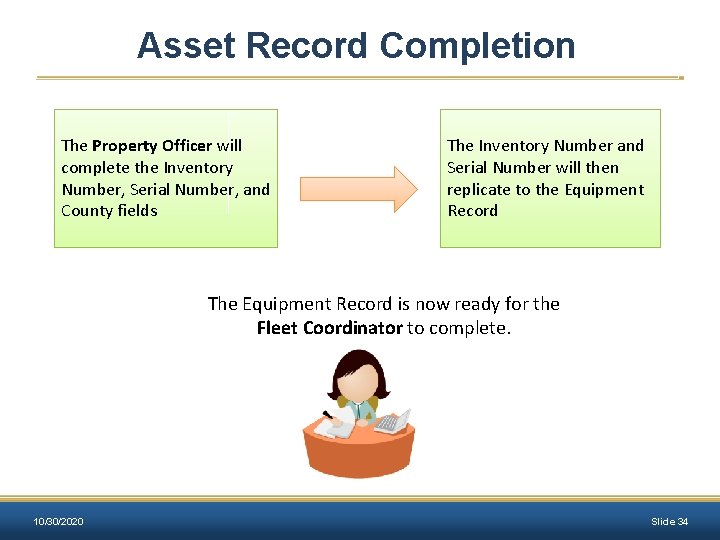
Asset Record Completion The Property Officer will complete the Inventory Number, Serial Number, and County fields The Inventory Number and Serial Number will then replicate to the Equipment Record The Equipment Record is now ready for the Fleet Coordinator to complete. 10/30/2020 Slide 34
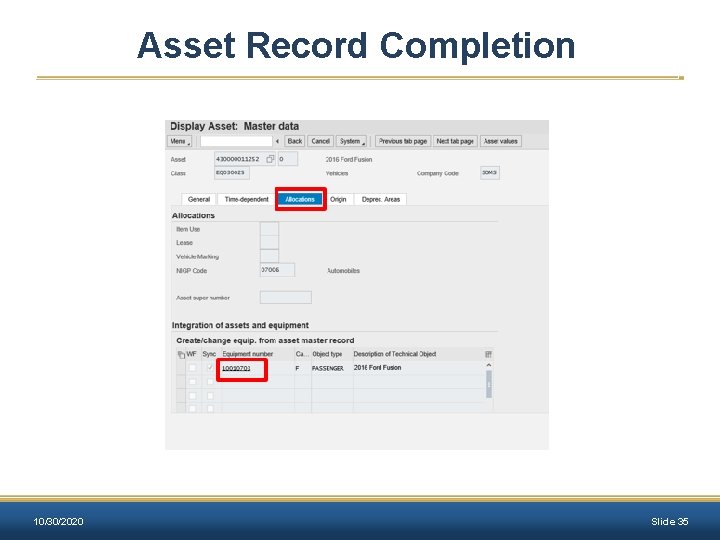
Asset Record Completion 10/30/2020 Slide 35
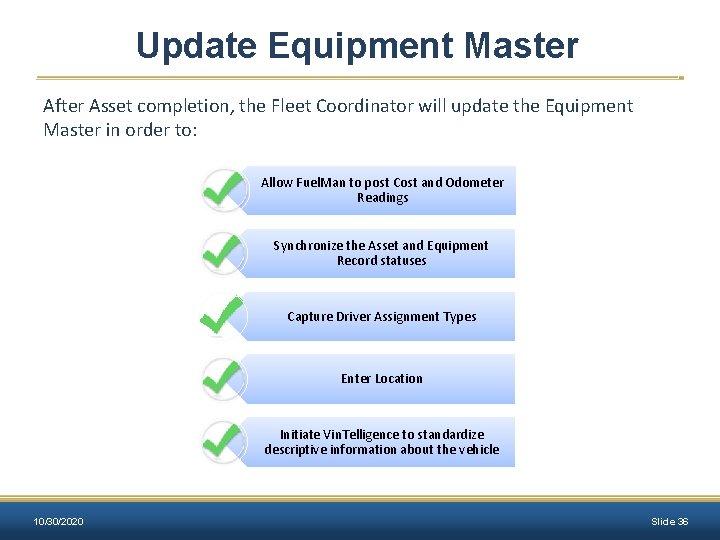
Update Equipment Master After Asset completion, the Fleet Coordinator will update the Equipment Master in order to: Allow Fuel. Man to post Cost and Odometer Readings Synchronize the Asset and Equipment Record statuses Capture Driver Assignment Types Enter Location Initiate Vin. Telligence to standardize descriptive information about the vehicle 10/30/2020 Slide 36
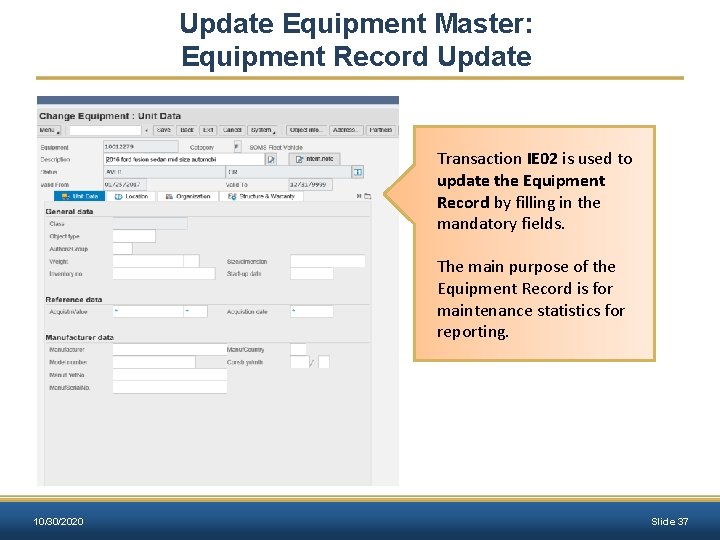
Update Equipment Master: Equipment Record Update Transaction IE 02 is used to update the Equipment Record by filling in the mandatory fields. The main purpose of the Equipment Record is for maintenance statistics for reporting. 10/30/2020 Slide 37
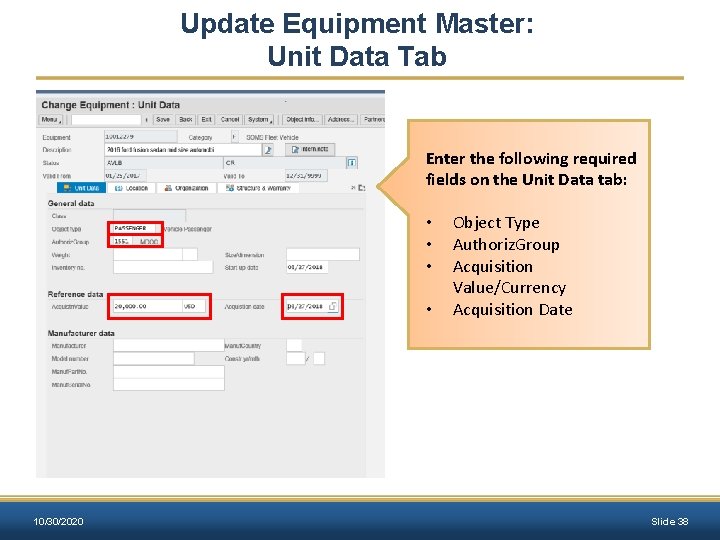
Update Equipment Master: Unit Data Tab Enter the following required fields on the Unit Data tab: • • 10/30/2020 Object Type Authoriz. Group Acquisition Value/Currency Acquisition Date Slide 38
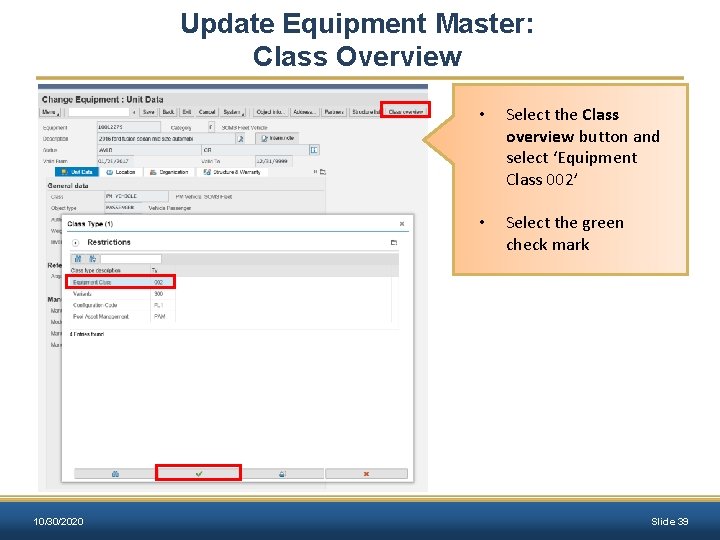
Update Equipment Master: Class Overview 10/30/2020 • Select the Class overview button and select ‘Equipment Class 002’ • Select the green check mark Slide 39
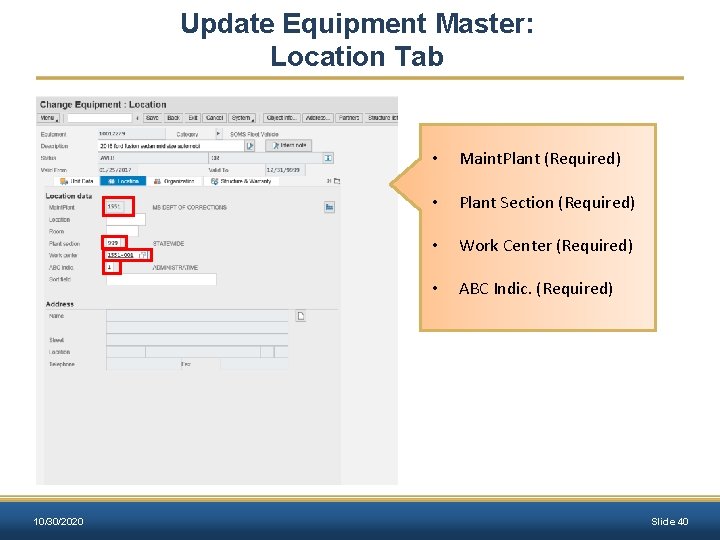
Update Equipment Master: Location Tab 10/30/2020 • Maint. Plant (Required) • Plant Section (Required) • Work Center (Required) • ABC Indic. (Required) Slide 40
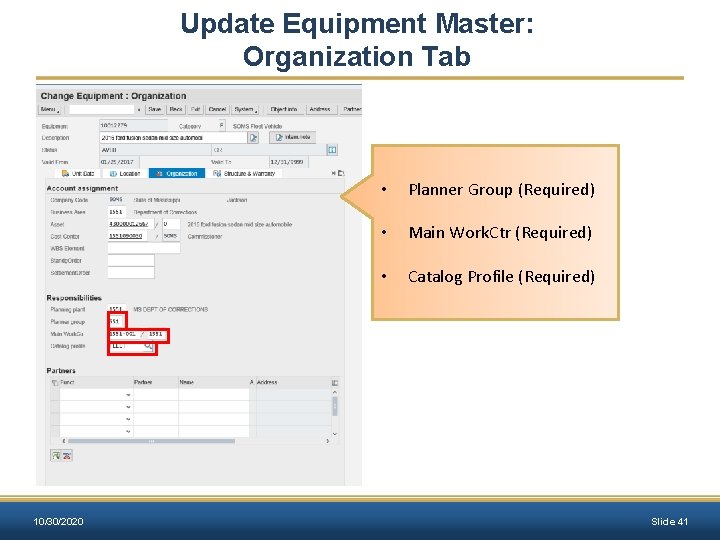
Update Equipment Master: Organization Tab 10/30/2020 • Planner Group (Required) • Main Work. Ctr (Required) • Catalog Profile (Required) Slide 41
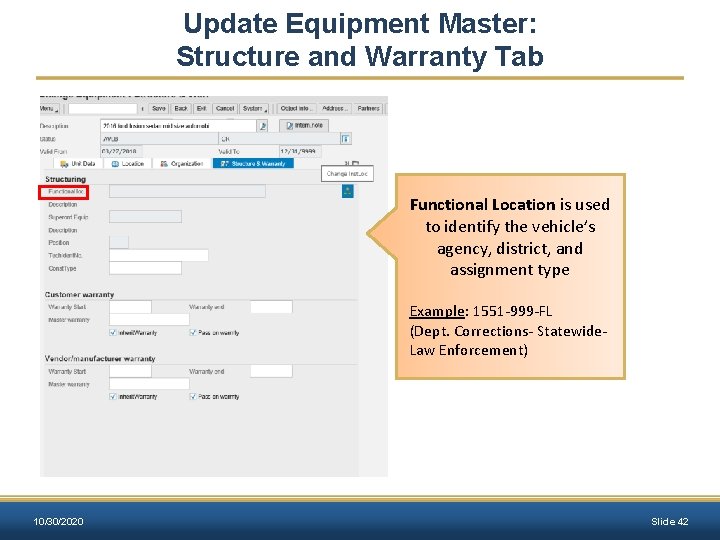
Update Equipment Master: Structure and Warranty Tab Functional Location is used to identify the vehicle’s agency, district, and assignment type Example: 1551 -999 -FL (Dept. Corrections- Statewide- Law Enforcement) 10/30/2020 Slide 42
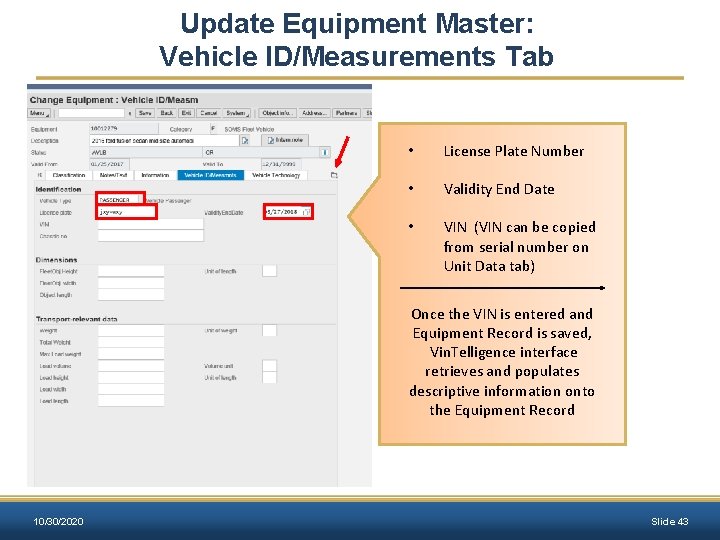
Update Equipment Master: Vehicle ID/Measurements Tab • License Plate Number • Validity End Date • VIN (VIN can be copied from serial number on Unit Data tab) Once the VIN is entered and Equipment Record is saved, Vin. Telligence interface retrieves and populates descriptive information onto the Equipment Record 10/30/2020 Slide 43
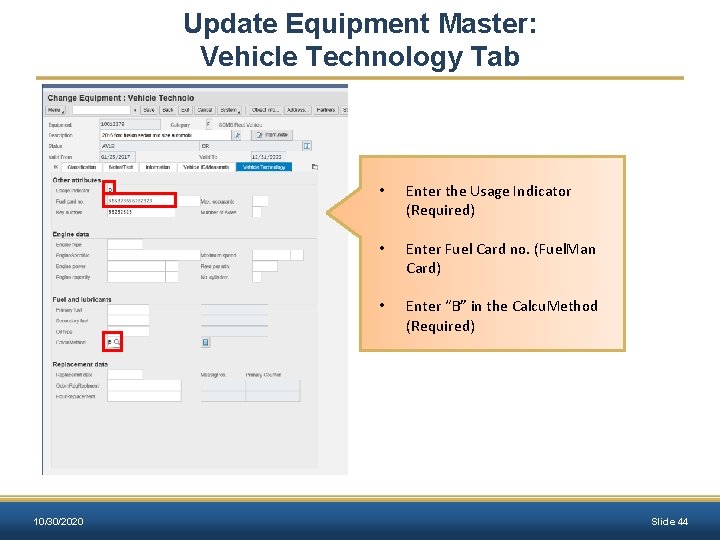
Update Equipment Master: Vehicle Technology Tab 10/30/2020 • Enter the Usage Indicator (Required) • Enter Fuel Card no. (Fuel. Man Card) • Enter “B” in the Calcu. Method (Required) Slide 44
Exercise 1 Update Equipment Master & Install a Functional Location – IE 02 Scenario Objective: A vehicle has been acquired and received. Asset Management has set up the Asset Master, which has generated the Equipment (vehicle) Master shell. Update the Equipment (vehicle) Master with the appropriate fleet information. 10/30/2020 Slide 45
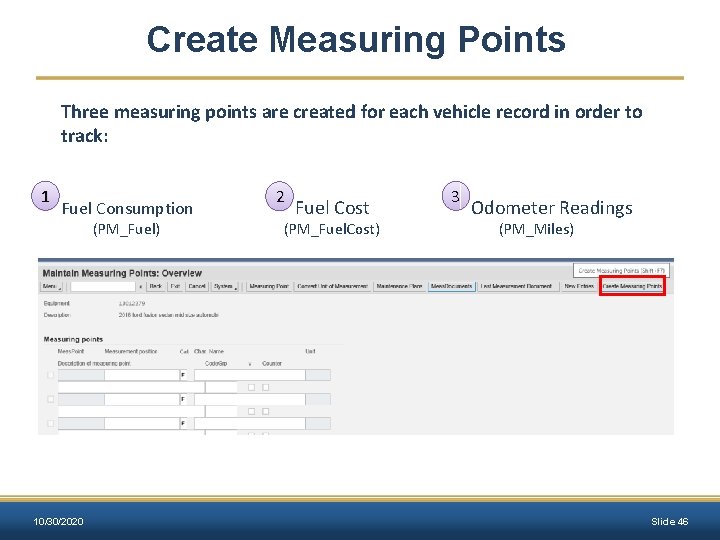
Create Measuring Points Three measuring points are created for each vehicle record in order to track: 1 Fuel Consumption (PM_Fuel) 10/30/2020 2 Fuel Cost (PM_Fuel. Cost) 3 Odometer Readings (PM_Miles) Slide 46
Exercise 2 Create measuring points – IE 02 Scenario Objective: The new vehicle must have measuring points assigned. By assigning measuring points to the vehicle, odometer readings, fuel costs and fuel consumption can be recorded. Assign the three measuring points PM_MILES, PM_FUELCOST, and PM_FUEL to the Equipment (vehicle) Master. 10/30/2020 Slide 47
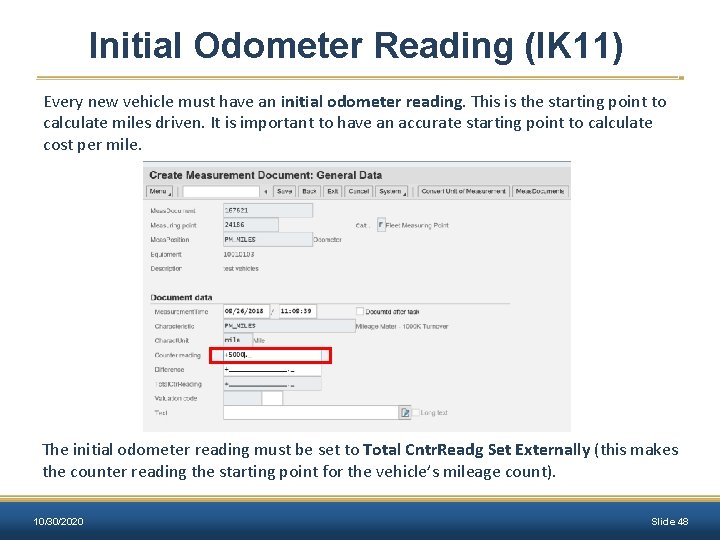
Initial Odometer Reading (IK 11) Every new vehicle must have an initial odometer reading. This is the starting point to calculate miles driven. It is important to have an accurate starting point to calculate cost per mile. The initial odometer reading must be set to Total Cntr. Readg Set Externally (this makes the counter reading the starting point for the vehicle’s mileage count). 10/30/2020 Slide 48
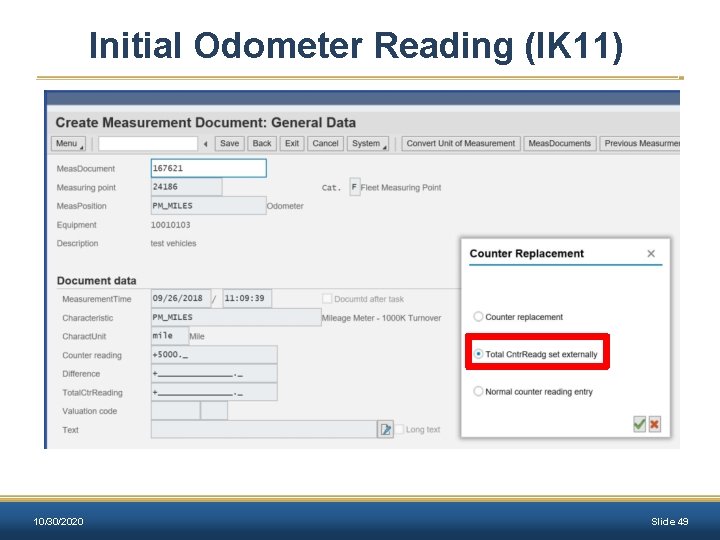
Initial Odometer Reading (IK 11) 10/30/2020 Slide 49
Exercise 3 Create Initial Odometer Reading – IK 11 Scenario Objective: The initial odometer reading must be documented for the new vehicle. Enter an initial odometer reading of 5000 miles for the equipment (vehicle) and the date is 2 months before today’s date. 10/30/2020 Slide 50
Driver Assignments Ø All vehicles with an assignment type of ‘Commute’ are required to have a valid driver’s assignment. Ø Agency driver assignments must be entered into MAGIC and approved by BFM. Ø Driver assignments are valid for a period of one year. 10/30/2020 Slide 51
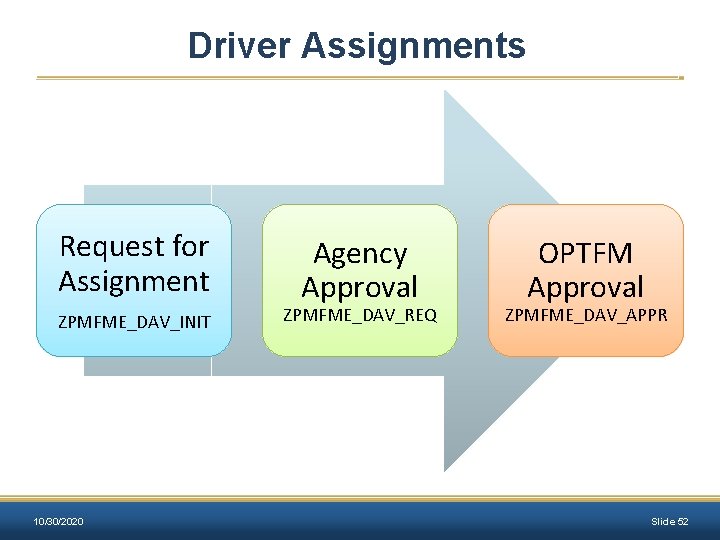
Driver Assignments Request for Assignment ZPMFME_DAV_INIT 10/30/2020 Agency Approval ZPMFME_DAV_REQ OPTFM Approval ZPMFME_DAV_APPR Slide 52
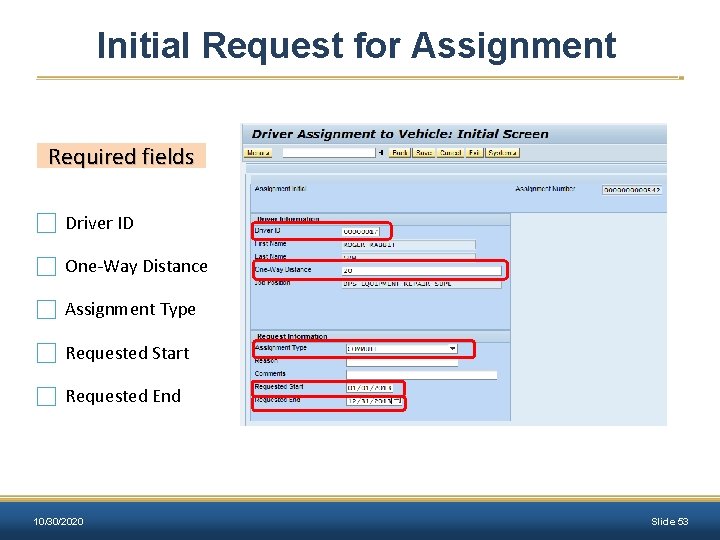
Initial Request for Assignment Required fields Driver ID One-Way Distance Assignment Type Requested Start Requested End 10/30/2020 Slide 53
Exercise 4. 1 Create Driver Assignment Request – ZPMFME_DAV_INIT Scenario Objective: A new driver assignment is required for the newly acquired vehicle. Create the Initial Driver Assignment Request. 10/30/2020 Slide 54
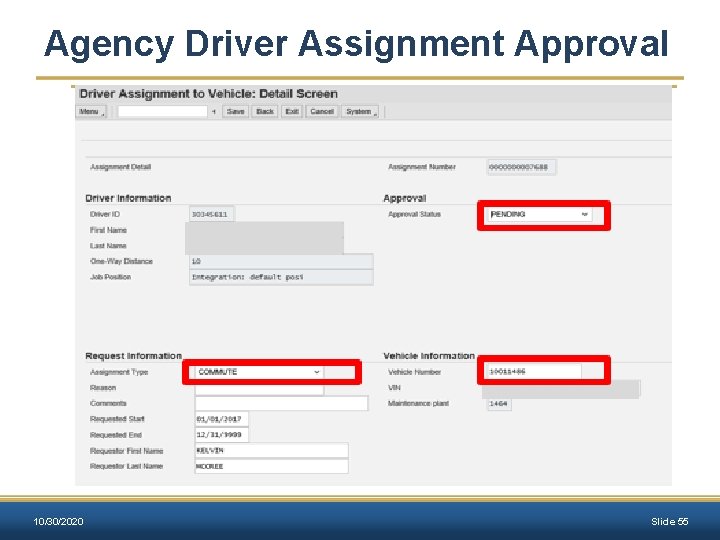
Agency Driver Assignment Approval 10/30/2020 Slide 55
Exercise 4. 2 Perform Agency Driver Assignment Approval – ZPMFME_DAV_REQ Scenario Objective: The Driver Assignment must be approved by the agency. Review the Driver Assignment Request, assign equipment (vehicle) and change the status of the request to indicate agency approval. 10/30/2020 Slide 56
Reporting and Data Monitoring Unit Objectives: • • • 10/30/2020 Perform Self Audit Asset/Fleet Report Active Equipment Records list (IE 36) Vehicle and Equipment Status Report Analytics (BI/BW) Report Slide 57
Perform Self Audit The following reports are used to complete internal audits: • Fleet/Asset Report • Display Vehicle List (IE 36) • Vehicle Mismatch Report Annual Integrity Audit et Agency Fle rs Coordinato orm should perf to self audits is ensure data nd adequate a free of ies discrepanc Executive Directors of agencies that are operating vehicles must submit to the Bureau of Fleet Management a yearly Data Integrity Audit that certifies the accuracy of the data in MAGIC. BFM will provide each agency with a Fleet Data Audit on an annual basis that must be verified and certified by the Executive Director of the agency. These audits will be completed in March of each year, beginning in 2019. 10/30/2020 Slide 58
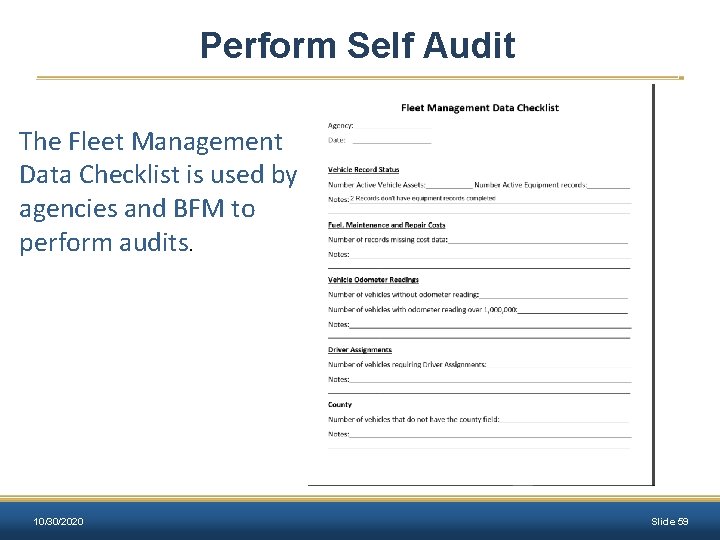
Perform Self Audit The Fleet Management Data Checklist is used by agencies and BFM to perform audits. 10/30/2020 Slide 59
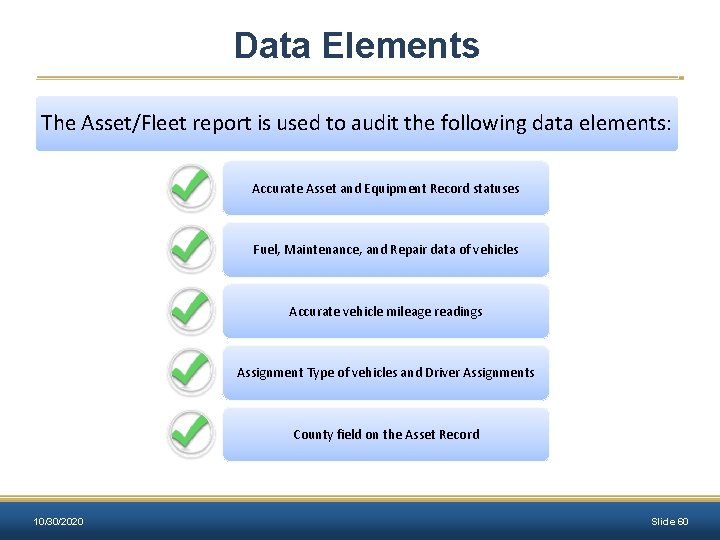
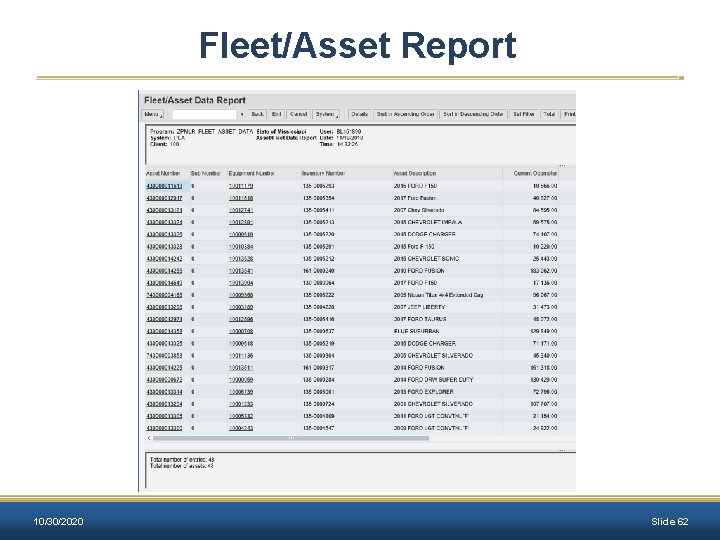
Data Elements The Asset/Fleet report is used to audit the following data elements: Accurate Asset and Equipment Record statuses Fuel, Maintenance, and Repair data of vehicles Accurate vehicle mileage readings Assignment Type of vehicles and Driver Assignments County field on the Asset Record 10/30/2020 Slide 60
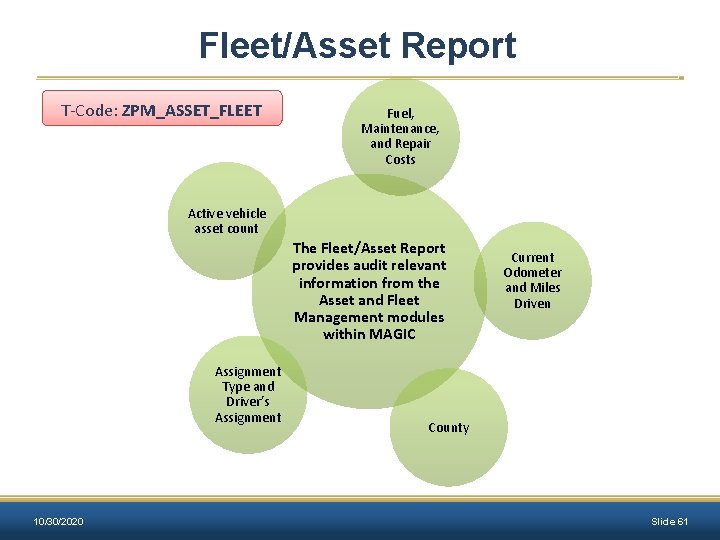
Fleet/Asset Report T-Code: ZPM_ASSET_FLEET Fuel, Maintenance, and Repair Costs Active vehicle asset count The Fleet/Asset Report provides audit relevant information from the Asset and Fleet Management modules within MAGIC Assignment Type and Driver’s Assignment 10/30/2020 Current Odometer and Miles Driven County Slide 61
Fleet/Asset Report 10/30/2020 Slide 62
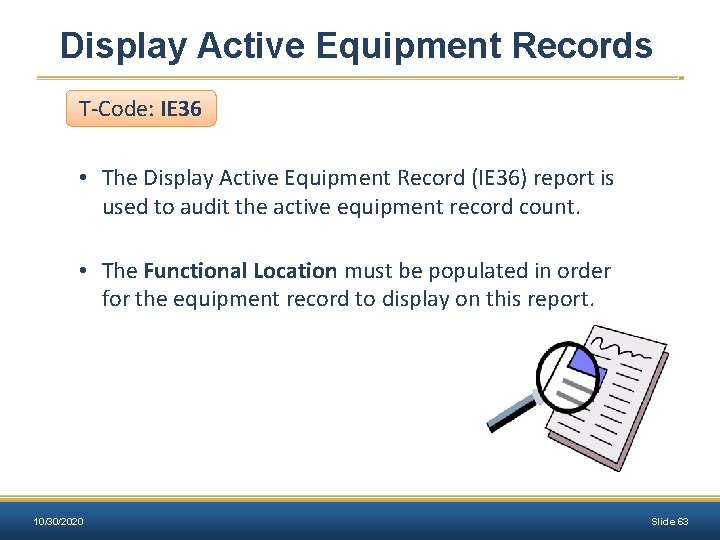
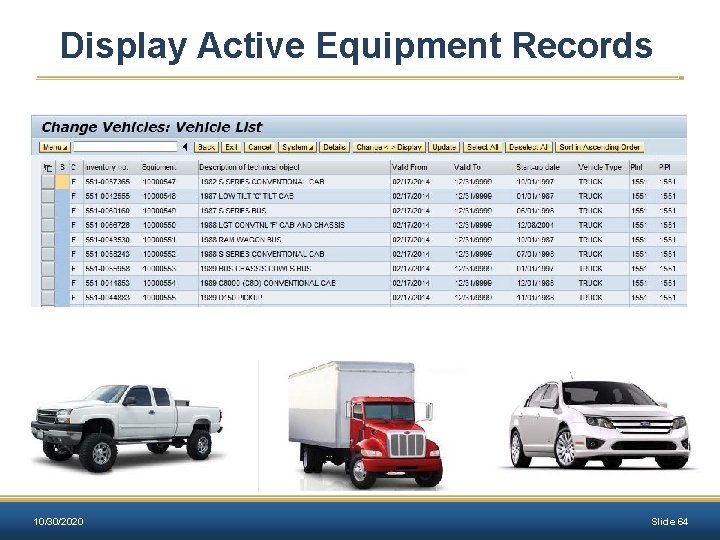
Display Active Equipment Records T-Code: IE 36 • The Display Active Equipment Record (IE 36) report is used to audit the active equipment record count. • The Functional Location must be populated in order for the equipment record to display on this report. 10/30/2020 Slide 63
Display Active Equipment Records 10/30/2020 Slide 64
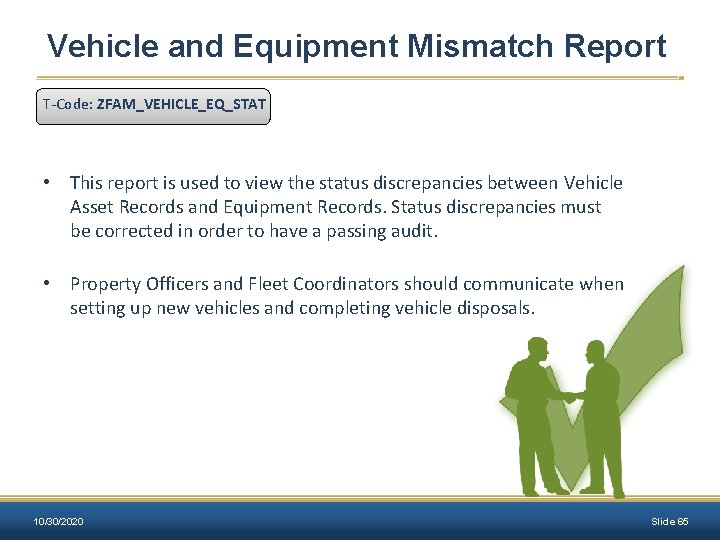
Vehicle and Equipment Mismatch Report T-Code: ZFAM_VEHICLE_EQ_STAT • This report is used to view the status discrepancies between Vehicle Asset Records and Equipment Records. Status discrepancies must be corrected in order to have a passing audit. • Property Officers and Fleet Coordinators should communicate when setting up new vehicles and completing vehicle disposals. 10/30/2020 Slide 65
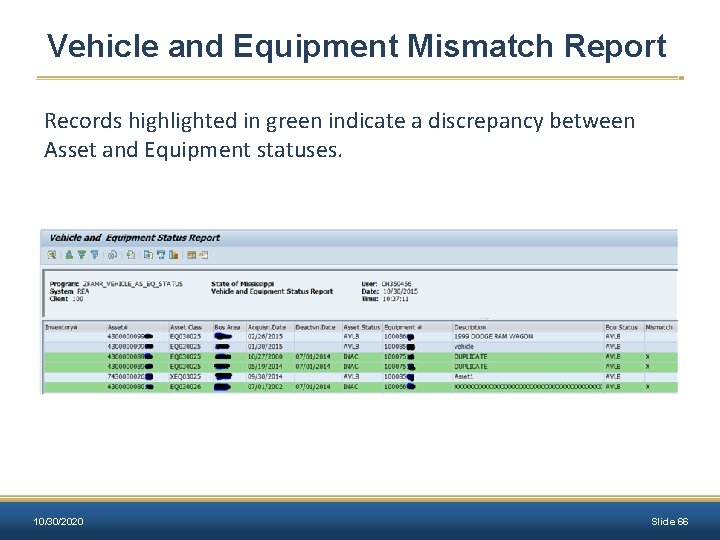
Vehicle and Equipment Mismatch Report Records highlighted in green indicate a discrepancy between Asset and Equipment statuses. 10/30/2020 Slide 66
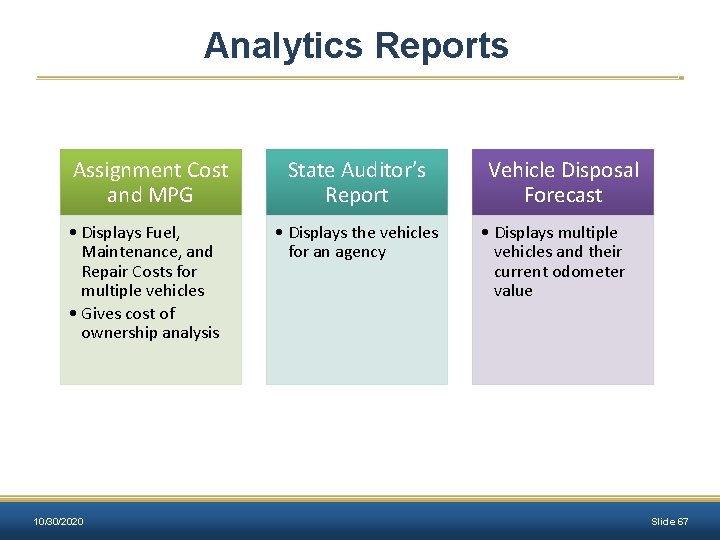
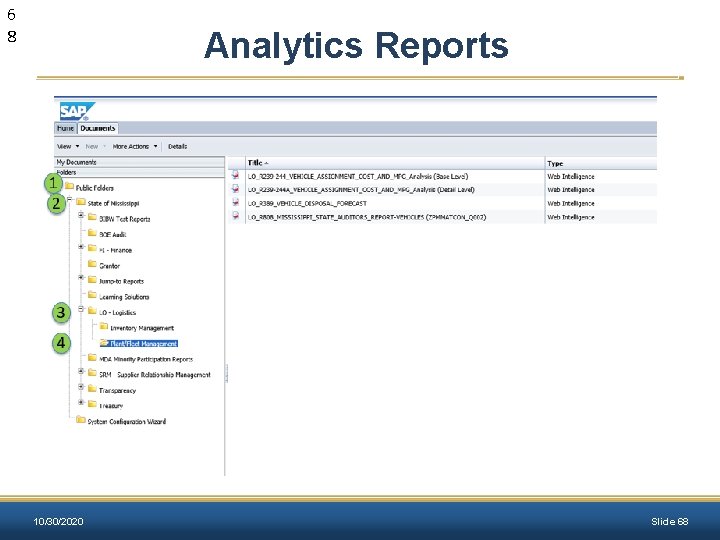
Analytics Reports Assignment Cost and MPG • Displays Fuel, Maintenance, and Repair Costs for multiple vehicles • Gives cost of ownership analysis 10/30/2020 State Auditor’s Report • Displays the vehicles for an agency Vehicle Disposal Forecast • Displays multiple vehicles and their current odometer value Slide 67
6 8 Analytics Reports 10/30/2020 Slide 68
Exercise 5 Fleet Data Audit Scenario Objective: An agency needs to perform their weekly audit of vehicle data. Using the Vehicle Data Cleanup job aid, perform an audit for agency 9955. 10/30/2020 Slide 69
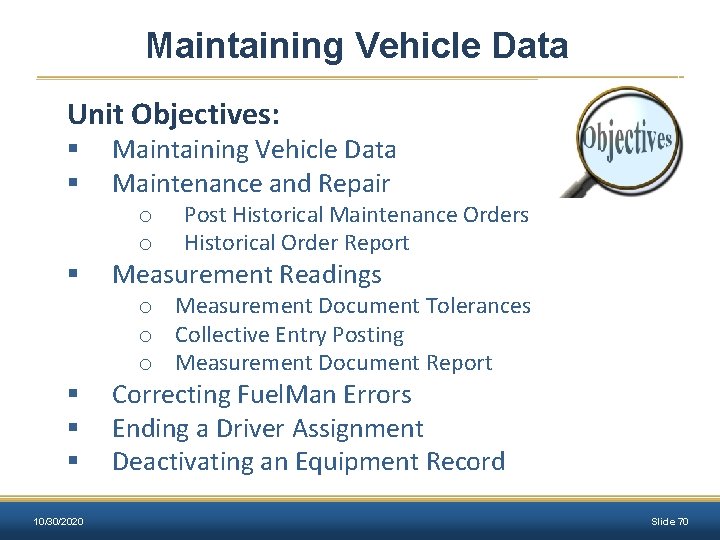
Maintaining Vehicle Data Unit Objectives: § § § 10/30/2020 Maintaining Vehicle Data Maintenance and Repair o o Post Historical Maintenance Orders Historical Order Report Measurement Readings o Measurement Document Tolerances o Collective Entry Posting o Measurement Document Report Correcting Fuel. Man Errors Ending a Driver Assignment Deactivating an Equipment Record Slide 70
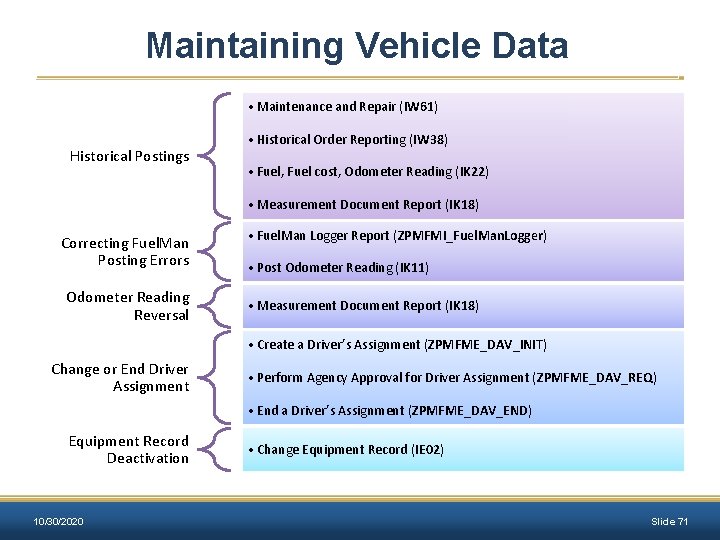
Maintaining Vehicle Data • Maintenance and Repair (IW 61) Historical Postings • Historical Order Reporting (IW 38) • Fuel, Fuel cost, Odometer Reading (IK 22) • Measurement Document Report (IK 18) Correcting Fuel. Man Posting Errors Odometer Reading Reversal • Fuel. Man Logger Report (ZPMFMI_Fuel. Man. Logger) • Post Odometer Reading (IK 11) • Measurement Document Report (IK 18) • Create a Driver’s Assignment (ZPMFME_DAV_INIT) Change or End Driver Assignment • Perform Agency Approval for Driver Assignment (ZPMFME_DAV_REQ) • End a Driver’s Assignment (ZPMFME_DAV_END) Equipment Record Deactivation 10/30/2020 • Change Equipment Record (IE 02) Slide 71
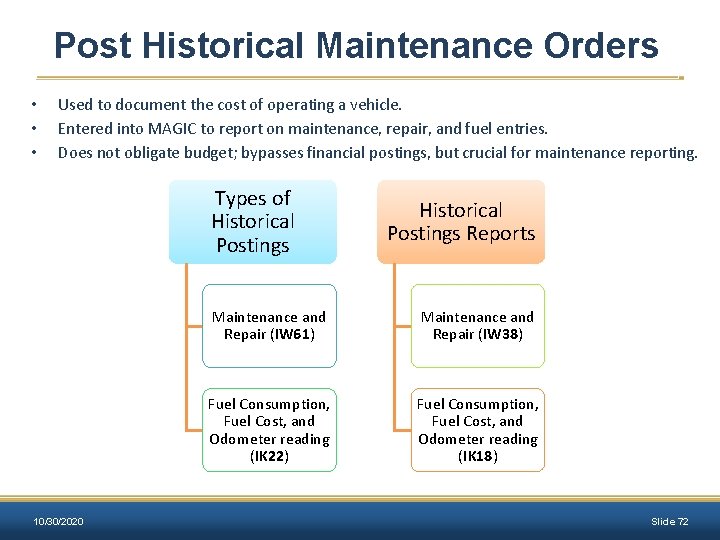
Post Historical Maintenance Orders • • • Used to document the cost of operating a vehicle. Entered into MAGIC to report on maintenance, repair, and fuel entries. Does not obligate budget; bypasses financial postings, but crucial for maintenance reporting. Types of Historical Postings 10/30/2020 Historical Postings Reports Maintenance and Repair (IW 61) Maintenance and Repair (IW 38) Fuel Consumption, Fuel Cost, and Odometer reading (IK 22) Fuel Consumption, Fuel Cost, and Odometer reading (IK 18) Slide 72
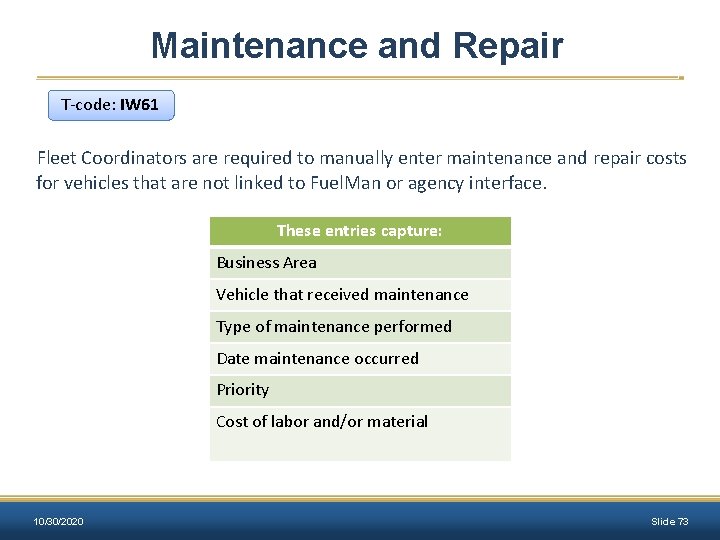
Maintenance and Repair T-code: IW 61 Fleet Coordinators are required to manually enter maintenance and repair costs for vehicles that are not linked to Fuel. Man or agency interface. These entries capture: Business Area Vehicle that received maintenance Type of maintenance performed Date maintenance occurred Priority Cost of labor and/or material 10/30/2020 Slide 73
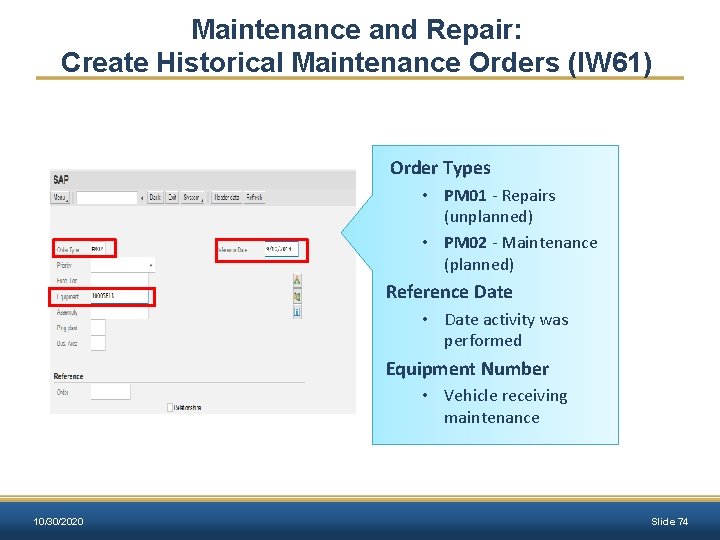
Maintenance and Repair: Create Historical Maintenance Orders (IW 61) Order Types • PM 01 - Repairs (unplanned) • PM 02 - Maintenance (planned) Reference Date • Date activity was performed Equipment Number • Vehicle receiving maintenance 10/30/2020 Slide 74
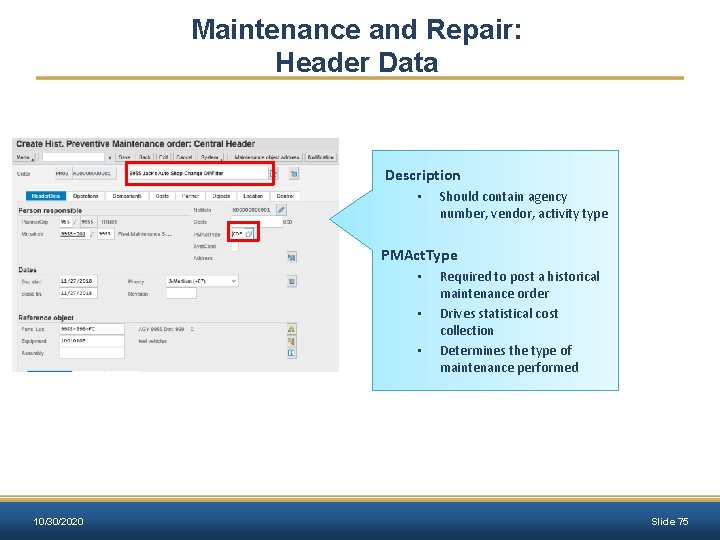
Maintenance and Repair: Header Data Description • Should contain agency number, vendor, activity type PMAct. Type • • • Required to post a historical maintenance order Drives statistical cost collection Determines the type of maintenance performed 10/30/2020 Slide 75
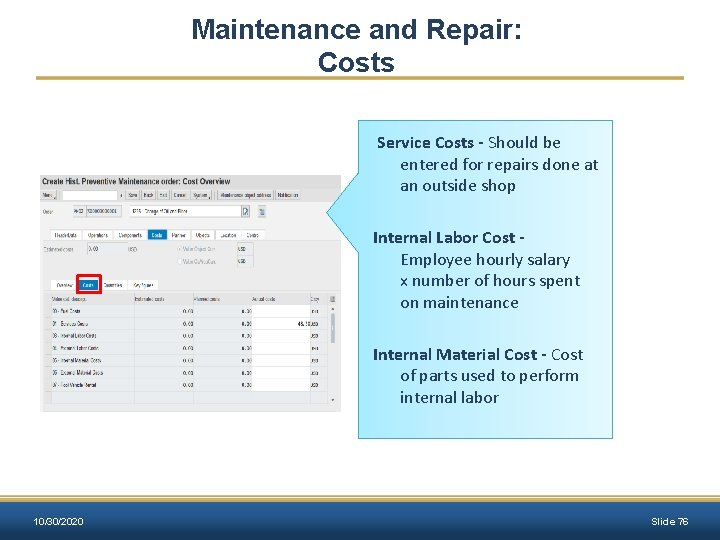
Maintenance and Repair: Costs Service Costs - Should be entered for repairs done at an outside shop Internal Labor Cost Employee hourly salary x number of hours spent on maintenance Internal Material Cost - Cost of parts used to perform internal labor 10/30/2020 Slide 76
Exercise 6 Create Historical (Statistical) Order and Post Statistical Costs – IW 61 Scenario Objective: After an oil change by a contract vendor, an historical (statistical) order is generated to statistically capture the maintenance costs on the vehicle. 10/30/2020 Slide 77
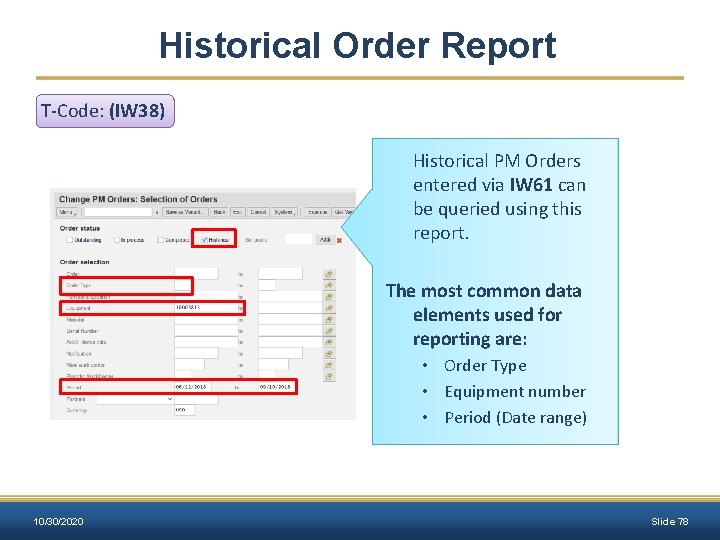
Historical Order Report T-Code: (IW 38) Historical PM Orders entered via IW 61 can be queried using this report. The most common data elements used for reporting are: • Order Type • Equipment number • Period (Date range) 10/30/2020 Slide 78
Collective Entry Posting T-Code: IK 22 This transaction allows manual entries of: • Odometer Readings • Fuel Quantity • Fuel Cost Historical (statistical) Measurement documents for these postings may only be entered after Measuring Points have been created. These entries are required for non-Fuel. Man purchases and agencies that use on-site fueling stations. 10/30/2020 Slide 79
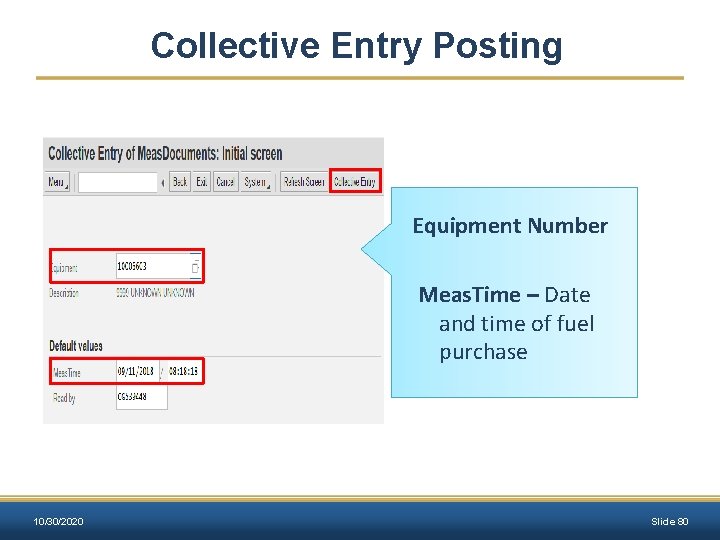
Collective Entry Posting Equipment Number Meas. Time – Date and time of fuel purchase 10/30/2020 Slide 80
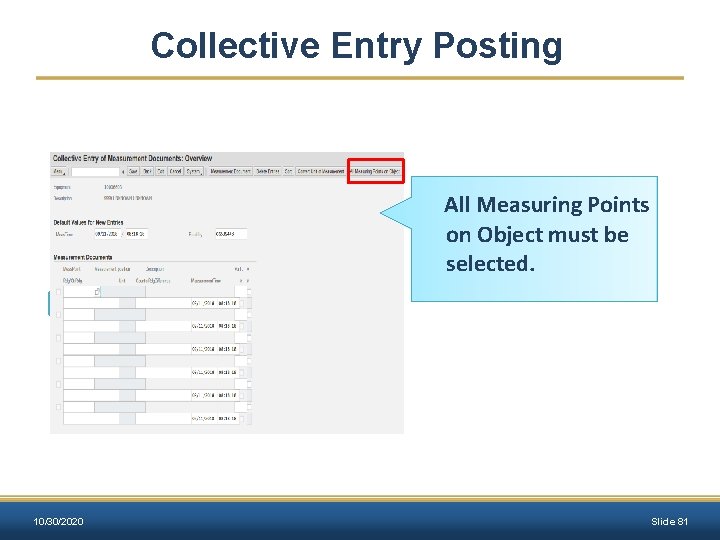
Collective Entry Posting All Measuring Points on Object must be selected. 10/30/2020 Slide 81
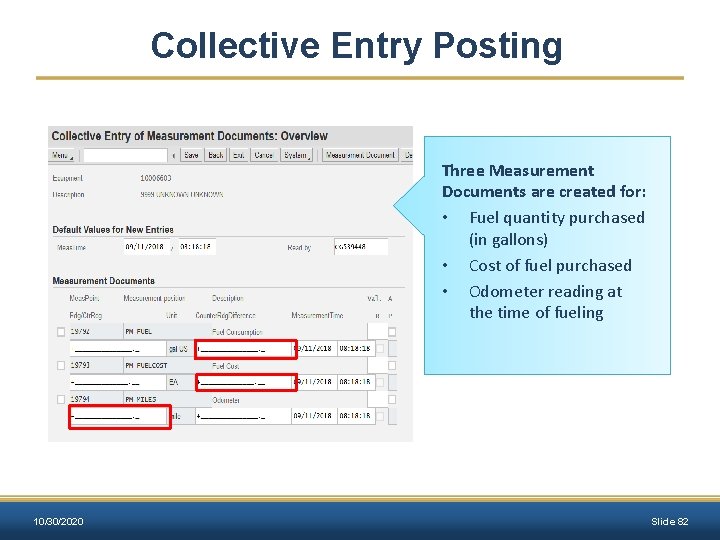
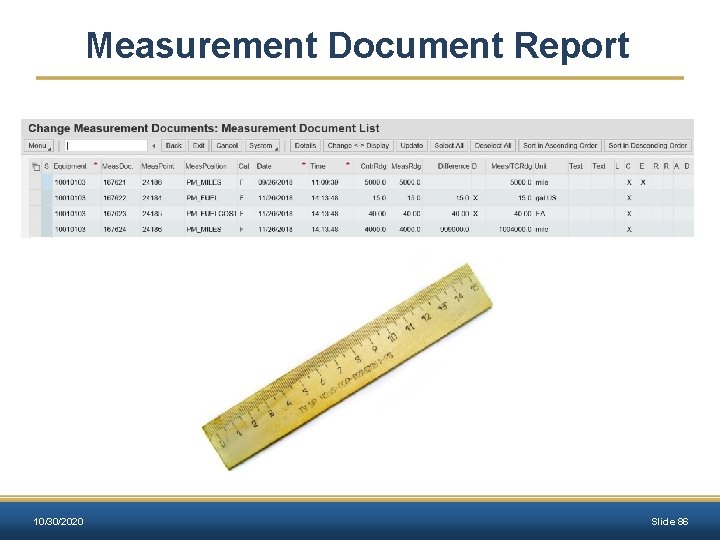
Collective Entry Posting Three Measurement Documents are created for: • Fuel quantity purchased (in gallons) • Cost of fuel purchased • Odometer reading at the time of fueling 10/30/2020 Slide 82
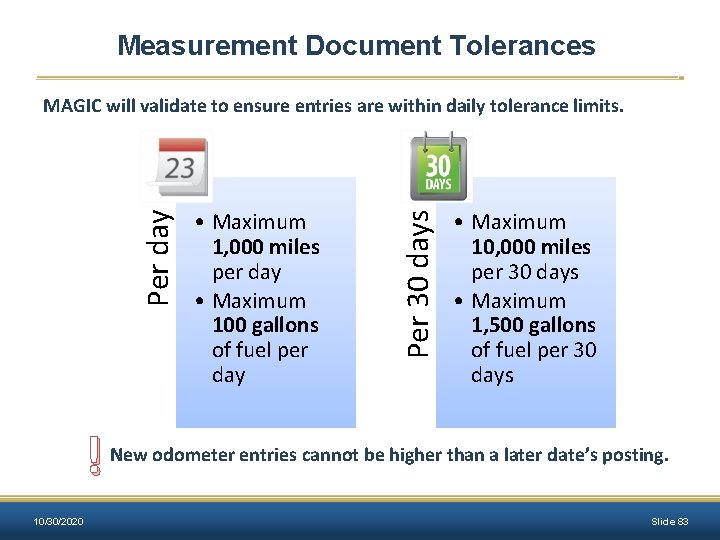
Measurement Document Tolerances ! 10/30/2020 • Maximum 1, 000 miles per day • Maximum 100 gallons of fuel per day Per 30 days Per day MAGIC will validate to ensure entries are within daily tolerance limits. • Maximum 10, 000 miles per 30 days • Maximum 1, 500 gallons of fuel per 30 days New odometer entries cannot be higher than a later date’s posting. Slide 83
Exercise 7 Create Measurement Documents for Equipment – IK 22 Scenario Objective: Manually enter the fuel posting for 2 weeks prior to the current date. The odometer value was 4000 miles, fuel cost was $40, and fuel consumption was 15 gallons. 10/30/2020 Slide 84
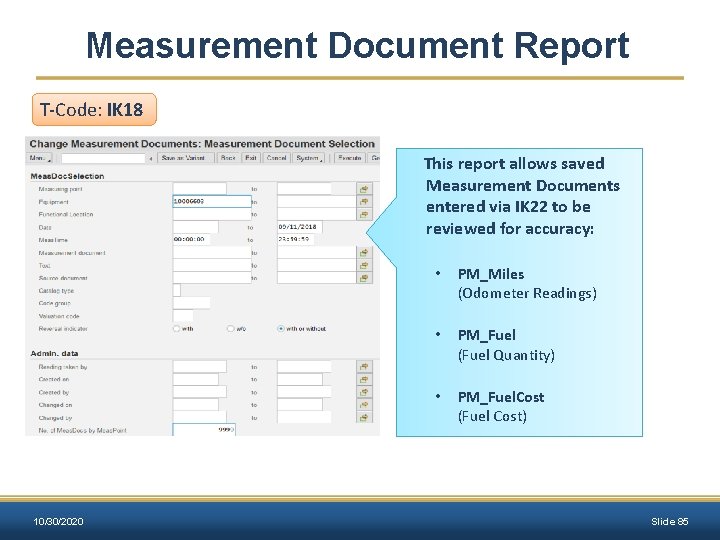
Measurement Document Report T-Code: IK 18 This report allows saved Measurement Documents entered via IK 22 to be reviewed for accuracy: • PM_Miles (Odometer Readings) • PM_Fuel (Fuel Quantity) • PM_Fuel. Cost (Fuel Cost) 10/30/2020 Slide 85
Measurement Document Report 10/30/2020 Slide 86
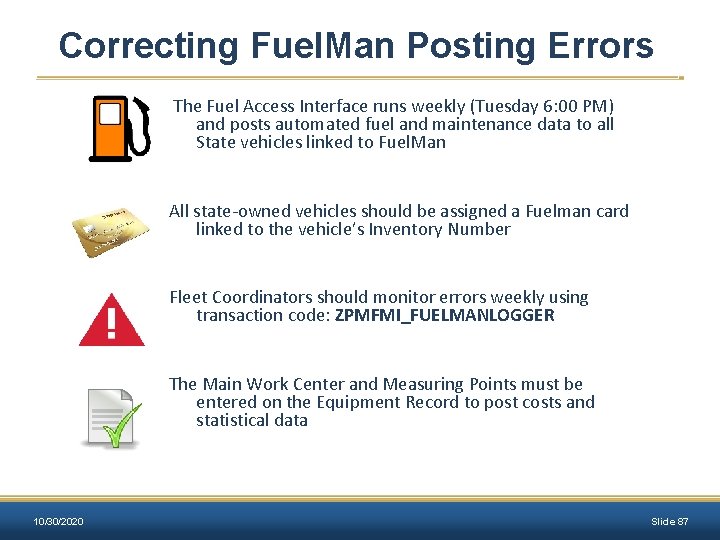
Correcting Fuel. Man Posting Errors The Fuel Access Interface runs weekly (Tuesday 6: 00 PM) and posts automated fuel and maintenance data to all State vehicles linked to Fuel. Man All state-owned vehicles should be assigned a Fuelman card linked to the vehicle’s Inventory Number Fleet Coordinators should monitor errors weekly using transaction code: ZPMFMI_FUELMANLOGGER The Main Work Center and Measuring Points must be entered on the Equipment Record to post costs and statistical data 10/30/2020 Slide 87
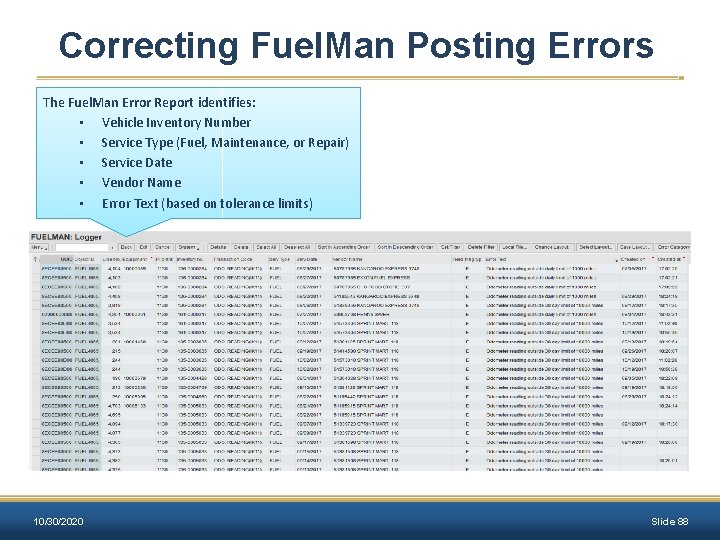
Correcting Fuel. Man Posting Errors The Fuel. Man Error Report identifies: • Vehicle Inventory Number • Service Type (Fuel, Maintenance, or Repair) • Service Date • Vendor Name • Error Text (based on tolerance limits) 10/30/2020 Slide 88
Correcting Fuel. Man Posting Errors Data corrections include: • Reverse Odometer Readings (IK 18) • Create an Odometer Entry (IK 11) • Complete/Update the Equipment Records (IE 02) • Create Measuring Points (IE 02) Please contact the MASH Help Desk for guidance at: mash@dfa. ms. gov 10/30/2020 Slide 89
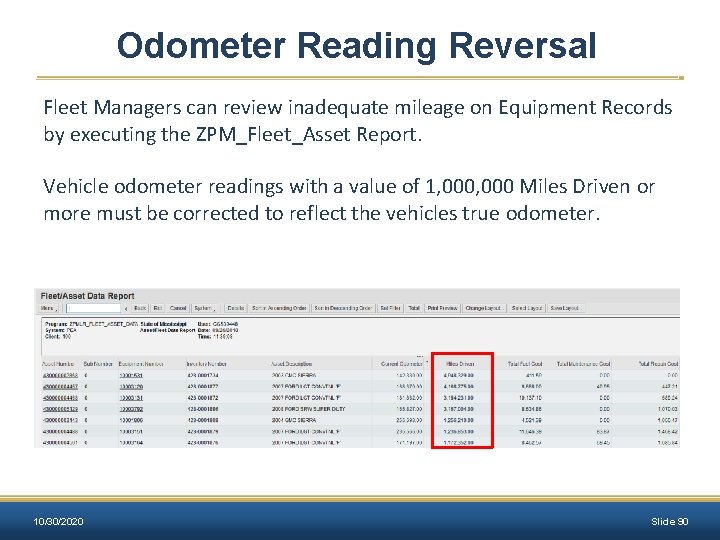
Odometer Reading Reversal Fleet Managers can review inadequate mileage on Equipment Records by executing the ZPM_Fleet_Asset Report. Vehicle odometer readings with a value of 1, 000 Miles Driven or more must be corrected to reflect the vehicles true odometer. 10/30/2020 Slide 90
Odometer Reading Reversal Incorrect mileage postings most likely occur due to: • Erroneous entry at the fueling stations • Conversion odometer is greater than a later date’s posting • Current posting is less than a previous posting Fleet Managers should encourage all authorized personnel operating a motor vehicle to enter the correct odometer reading at the pump Vehicle operators should only use the Fuel. Man card assigned to the vehicle 10/30/2020 Slide 91
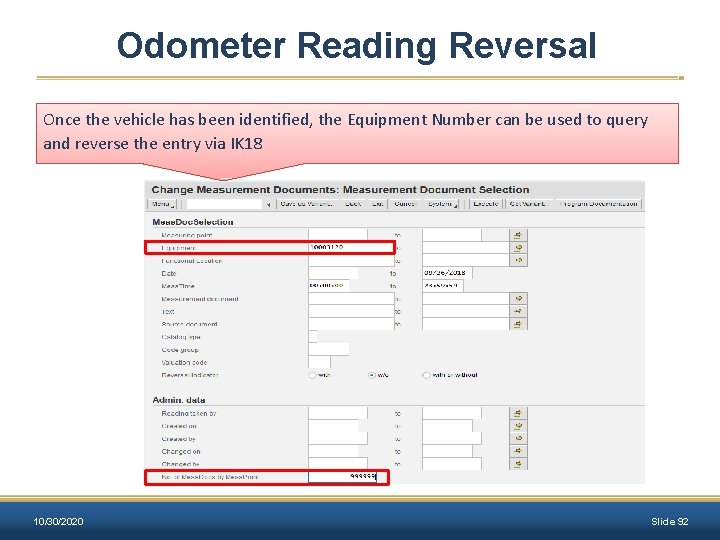
Odometer Reading Reversal Once the vehicle has been identified, the Equipment Number can be used to query and reverse the entry via IK 18 10/30/2020 Slide 92
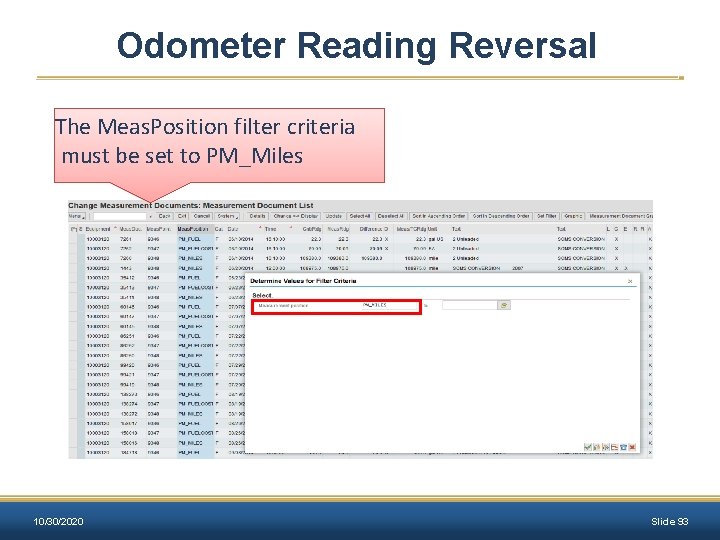
Odometer Reading Reversal The Meas. Position filter criteria must be set to PM_Miles 10/30/2020 Slide 93
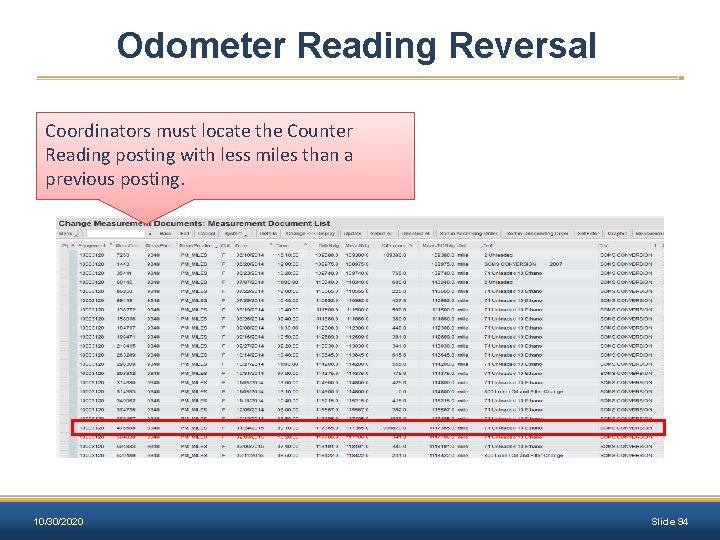
Odometer Reading Reversal Coordinators must locate the Counter Reading posting with less miles than a previous posting. 10/30/2020 Slide 94
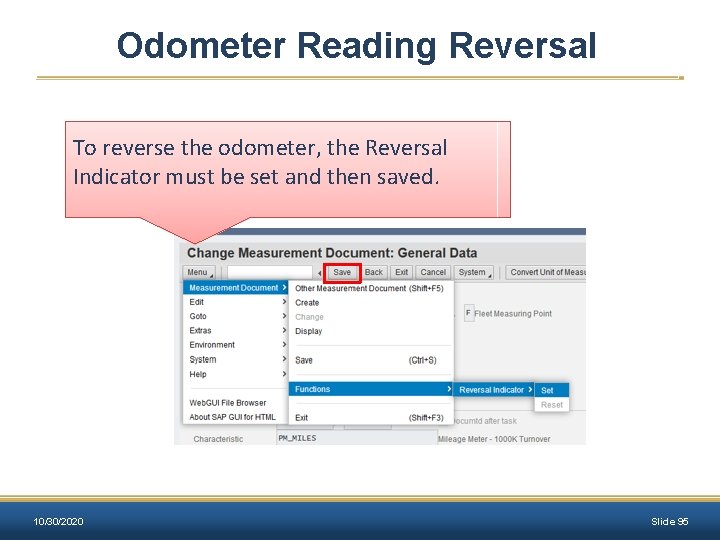
Odometer Reading Reversal To reverse the odometer, the Reversal Indicator must be set and then saved. 10/30/2020 Slide 95
Exercise 8 List Measurement Documents and Set Reversal Indicator – IK 18 Scenario Objective: One of the Measurement Documents was entered incorrectly. Generate a list of Measurement Documents for the equipment (vehicle) and set the Reversal Indicator. 10/30/2020 Slide 96
Change or End a Driver’s Assignment Driver Assignments are modified via transaction code ZPMFME_DAV_END This process is used to end the current assignment by updating the end date. Driver Assignments may be ended due to: • Employee’s resignation or termination • Revocation of driving authority (violation of agency or BFM policies) • Commuter vehicle replacement • Change in vehicle Assignment Type • Loss of Driver’s License 10/30/2020 Slide 97
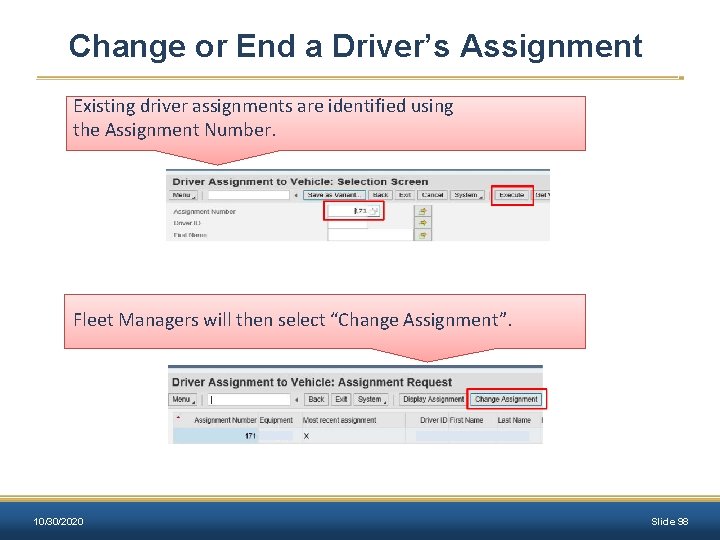
Change or End a Driver’s Assignment Existing driver assignments are identified using the Assignment Number. Fleet Managers will then select “Change Assignment”. 10/30/2020 Slide 98
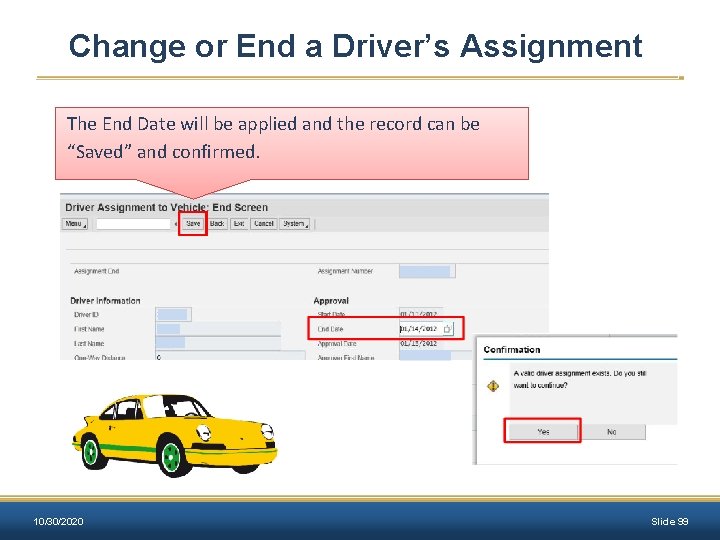
Change or End a Driver’s Assignment The End Date will be applied and the record can be “Saved” and confirmed. 10/30/2020 Slide 99
Deactivating an Equipment Record Vehicle Equipment Records must be deactivated once the vehicle asset has been disposed (sold, transferred, or traded). Property Officers and Fleet Managers should communicate regularly when setting up or disposing of Asset and Vehicle Equipment Records. It is important to have the same status for Asset and Equipment Records. • Uneven record statuses are considered a discrepancy and will not pass a vehicle audit. 10/30/2020 Slide 100
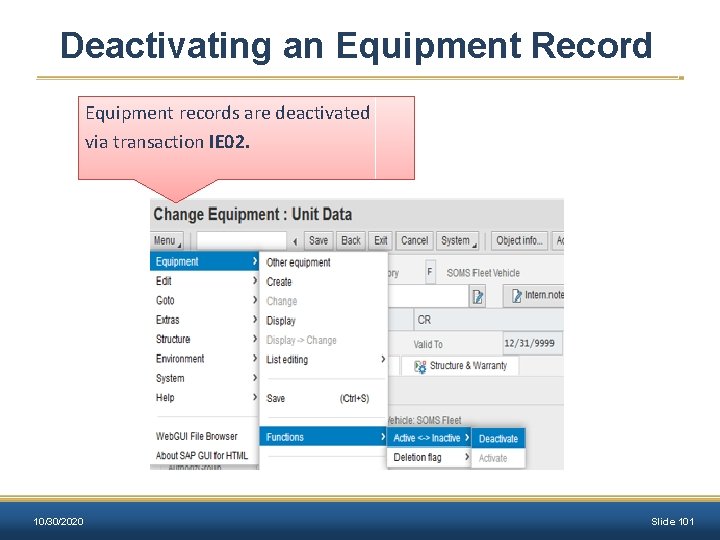
Deactivating an Equipment Record Equipment records are deactivated via transaction IE 02. 10/30/2020 Slide 101
Exercise 9 Deactivate Equipment Record Scenario Objective: The vehicle was wrecked, and it needs to be deactivated. 10/30/2020 Slide 102
Questions? Contact the MASH Help Desk for guidance at mash@dfa. ms. gov 10/30/2020 Slide 103
- Slides: 103