
Fixed Asset Management Scenario Overview Click process chevrons

- Slides: 25
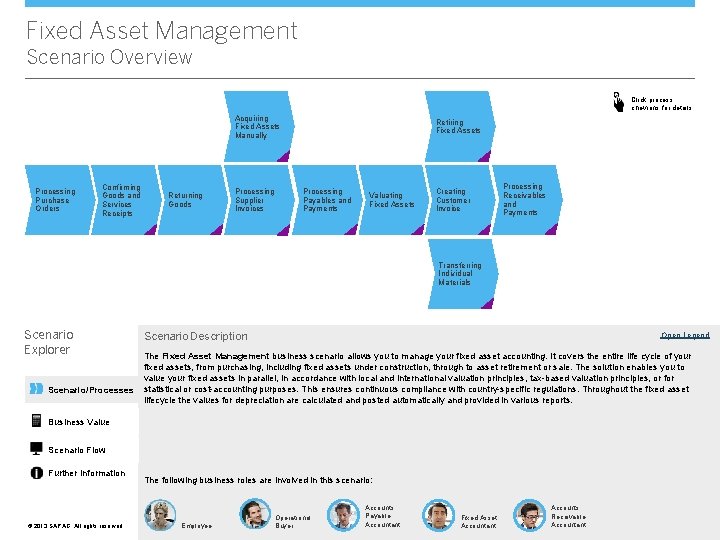
Fixed Asset Management Scenario Overview Click process chevrons for details Acquiring Fixed Assets Manually Processing Purchase Orders Confirming Goods and Services Receipts Returning Goods Processing Supplier Invoices Retiring Fixed Assets Processing Payables and Payments Valuating Fixed Assets Creating Customer Invoice Processing Receivables and Payments Transferring Individual Materials Scenario Explorer Scenario/Processes Scenario Description Open Legend The Fixed Asset Management business scenario allows you to manage your fixed asset accounting. It covers the entire life cycle of your fixed assets, from purchasing, including fixed assets under construction, through to asset retirement or sale. The solution enables you to value your fixed assets in parallel, in accordance with local and international valuation principles, tax-based valuation principles, or for statistical or cost-accounting purposes. This ensures continuous compliance with country-specific regulations. Throughout the fixed asset lifecycle the values for depreciation are calculated and posted automatically and provided in various reports. Business Value Scenario Flow Further Information © © 2013 SAP AG. All rights reserved. The following business roles are involved in this scenario: Employee Operational Buyer Accounts Payable Accountant Fixed Asset Accountant Accounts Receivable Accountant
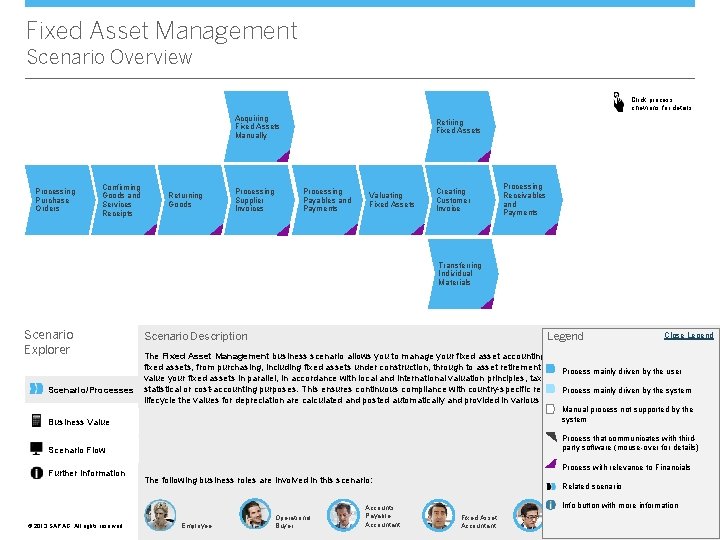
Fixed Asset Management Scenario Overview Click process chevrons for details Acquiring Fixed Assets Manually Processing Purchase Orders Confirming Goods and Services Receipts Returning Goods Processing Supplier Invoices Retiring Fixed Assets Processing Payables and Payments Valuating Fixed Assets Creating Customer Invoice Processing Receivables and Payments Transferring Individual Materials Scenario Explorer Scenario/Processes Scenario Description Legend Open Legend Close Legend The Fixed Asset Management business scenario allows you to manage your fixed asset accounting. It covers the entire life cycle of your fixed assets, from purchasing, including fixed assets under construction, through to asset retirement or sale. The solution enables you to Process mainly driven by the user value your fixed assets in parallel, in accordance with local and international valuation principles, tax-based valuation principles, or for statistical or cost-accounting purposes. This ensures continuous compliance with country-specific regulations. Throughout the fixed asset Process mainly driven by the system lifecycle the values for depreciation are calculated and posted automatically and provided in various reports. Business Value Manual process not supported by the system Scenario Flow Process that communicates with thirdparty software (mouse-over for details) Further Information © © 2013 SAP AG. All rights reserved. Process with relevance to Financials The following business roles are involved in this scenario: Employee Operational Buyer Accounts Payable Accountant Related scenario Info button with more information Fixed Asset Accountant <Role Name>
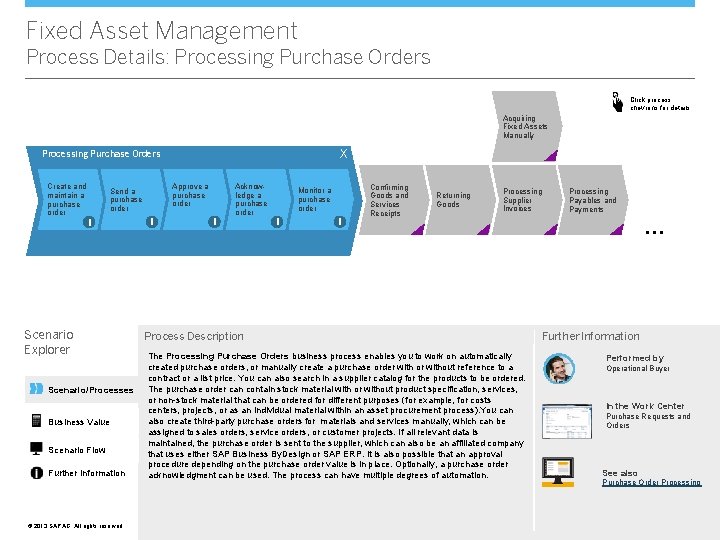
Fixed Asset Management Process Details: Processing Purchase Orders Click process chevrons for details Acquiring Fixed Assets Manually X Processing Purchase Orders Create and maintain a purchase order Approve a purchase order Send a purchase order i Scenario Explorer Scenario/Processes Business Value Scenario Flow Further Information © © 2013 SAP AG. All rights reserved. i i Acknowledge a purchase order Monitor a purchase order i i Confirming Goods and Services Receipts Returning Goods Processing Supplier Invoices Process Description The Processing Purchase Orders business process enables you to work on automatically created purchase orders, or manually create a purchase order with or without reference to a contract or a list price. You can also search in a supplier catalog for the products to be ordered. The purchase order can contain stock material with or without product specification, services, or non-stock material that can be ordered for different purposes (for example, for costs centers, projects, or as an individual material within an asset procurement process). You can also create third-party purchase orders for materials and services manually, which can be assigned to sales orders, service orders, or customer projects. If all relevant data is maintained, the purchase order is sent to the supplier, which can also be an affiliated company that uses either SAP Business By. Design or SAP ERP. It is also possible that an approval procedure depending on the purchase order value is in place. Optionally, a purchase order acknowledgment can be used. The process can have multiple degrees of automation. Processing Payables and Payments … Further Information Performed by Operational Buyer In the Work Center Purchase Requests and Orders See also Purchase Order Processing
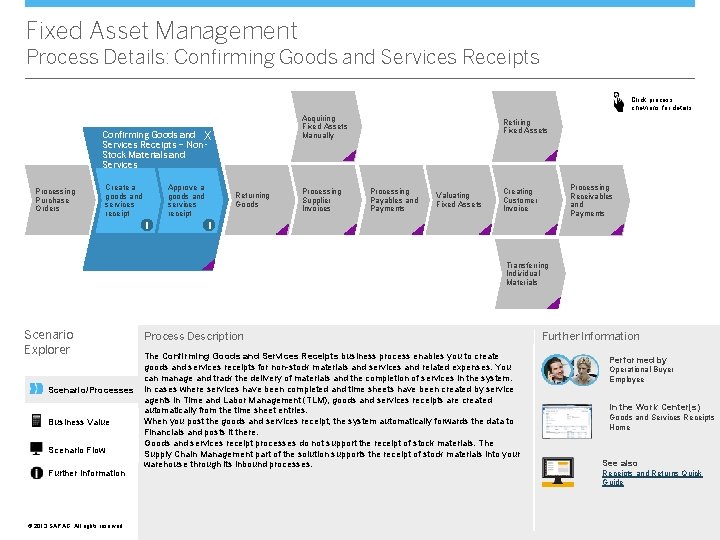
Fixed Asset Management Process Details: Confirming Goods and Services Receipts Click process chevrons for details Acquiring Fixed Assets Manually Confirming Goods and X Services Receipts – Non. Stock Materials and Services Processing Purchase Orders Create a goods and services receipt Approve a goods and services receipt i Returning Goods Processing Supplier Invoices Retiring Fixed Assets Processing Payables and Payments Valuating Fixed Assets Processing Receivables and Payments Creating Customer Invoice i Transferring Individual Materials Scenario Explorer Scenario/Processes Business Value Scenario Flow Further Information © © 2013 SAP AG. All rights reserved. Process Description The Confirming Goods and Services Receipts business process enables you to create goods and services receipts for non-stock materials and services and related expenses. You can manage and track the delivery of materials and the completion of services in the system. In cases where services have been completed and time sheets have been created by service agents in Time and Labor Management (TLM), goods and services receipts are created automatically from the time sheet entries. When you post the goods and services receipt, the system automatically forwards the data to Financials and posts it there. Goods and services receipt processes do not support the receipt of stock materials. The Supply Chain Management part of the solution supports the receipt of stock materials into your warehouse through its inbound processes. Further Information Performed by Operational Buyer Employee In the Work Center(s) Goods and Services Receipts Home See also Receipts and Returns Quick Guide
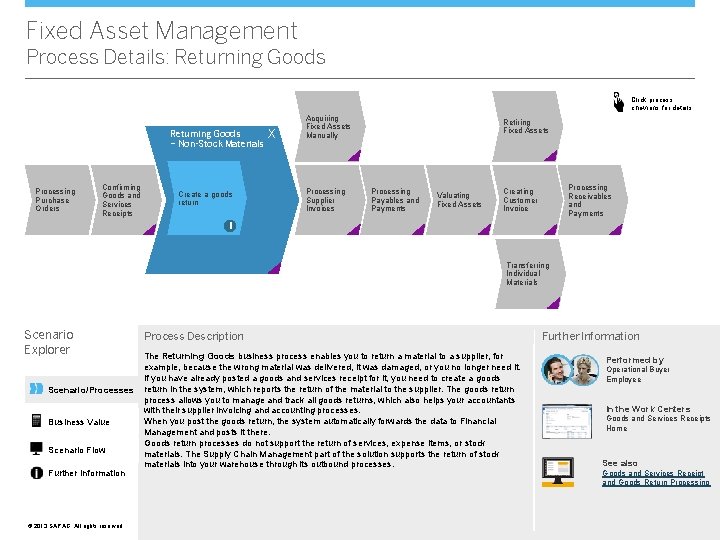
Fixed Asset Management Process Details: Returning Goods Click process chevrons for details Returning Goods – Non-Stock Materials Processing Purchase Orders Confirming Goods and Services Receipts Create a goods return X Acquiring Fixed Assets Manually Processing Supplier Invoices Retiring Fixed Assets Processing Payables and Payments Valuating Fixed Assets Processing Receivables and Payments Creating Customer Invoice i Transferring Individual Materials Scenario Explorer Scenario/Processes Business Value Scenario Flow Further Information © © 2013 SAP AG. All rights reserved. Process Description The Returning Goods business process enables you to return a material to a supplier, for example, because the wrong material was delivered, it was damaged, or you no longer need it. If you have already posted a goods and services receipt for it, you need to create a goods return in the system, which reports the return of the material to the supplier. The goods return process allows you to manage and track all goods returns, which also helps your accountants with their supplier invoicing and accounting processes. When you post the goods return, the system automatically forwards the data to Financial Management and posts it there. Goods return processes do not support the return of services, expense items, or stock materials. The Supply Chain Management part of the solution supports the return of stock materials into your warehouse through its outbound processes. Further Information Performed by Operational Buyer Employee In the Work Centers Goods and Services Receipts Home See also Goods and Services Receipt and Goods Return Processing
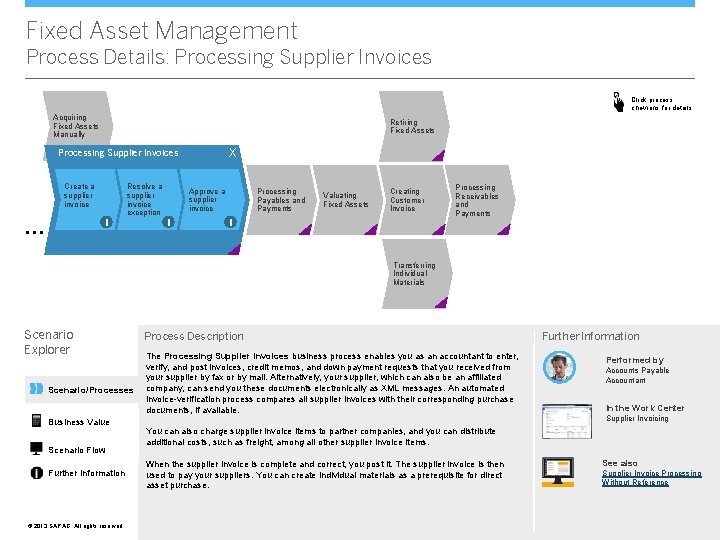
Fixed Asset Management Process Details: Processing Supplier Invoices Click process chevrons for details Acquiring Fixed Assets Manually Retiring Fixed Assets X Processing Supplier Invoices Create a supplier invoice i … Resolve a supplier invoice exception Approve a supplier invoice i Processing Payables and Payments Valuating Fixed Assets Creating Customer Invoice i Processing Receivables and Payments Transferring Individual Materials Scenario Explorer Scenario/Processes Business Value Scenario Flow Further Information © © 2013 SAP AG. All rights reserved. Process Description The Processing Supplier Invoices business process enables you as an accountant to enter, verify, and post invoices, credit memos, and down payment requests that you received from your supplier by fax or by mail. Alternatively, your supplier, which can also be an affiliated company, can send you these documents electronically as XML messages. An automated invoice-verification process compares all supplier invoices with their corresponding purchase documents, if available. Further Information Performed by Accounts Payable Accountant In the Work Center Supplier Invoicing You can also charge supplier invoice items to partner companies, and you can distribute additional costs, such as freight, among all other supplier invoice items. When the supplier invoice is complete and correct, you post it. The supplier invoice is then used to pay your suppliers. You can create individual materials as a prerequisite for direct asset purchase. See also Supplier Invoice Processing Without Reference
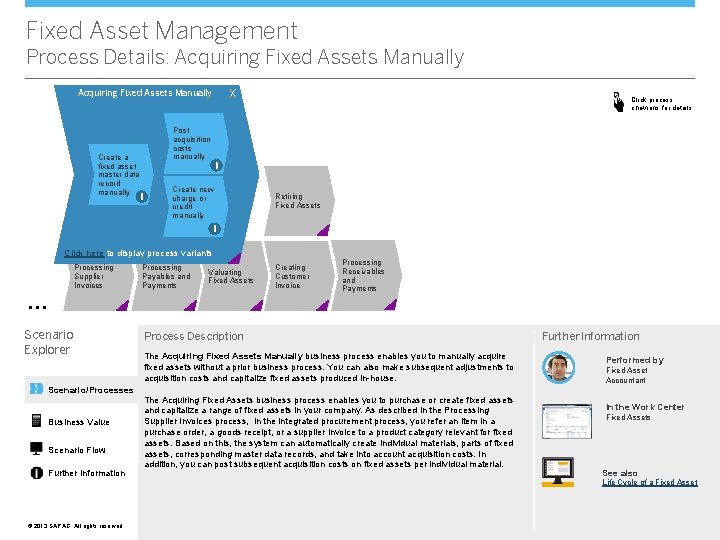
Fixed Asset Management Process Details: Acquiring Fixed Assets Manually X X Acquiring Fixed Assets Manually Click process chevrons for details X Post acquisition costs manually Create a fixed asset i master data record Create new manually i Processing charge or Payables and credit Payments manually Retiring Fixed Assets i Click here to display process variants Processing Supplier Invoices Processing Payables and Payments Valuating Fixed Assets Creating Customer Invoice Processing Receivables and Payments … Scenario Explorer Scenario/Processes Business Value Scenario Flow Further Information Process Description The Acquiring Fixed Assets Manually business process enables you to manually acquire fixed assets without a prior business process. You can also make subsequent adjustments to acquisition costs and capitalize fixed assets produced in-house. The Acquiring Fixed Assets business process enables you to purchase or create fixed assets and capitalize a range of fixed assets in your company. As described in the Processing Supplier Invoices process, in the integrated procurement process, you refer an item in a purchase order, a goods receipt, or a supplier invoice to a product category relevant for fixed assets. Based on this, the system can automatically create individual materials, parts of fixed assets, corresponding master data records, and take into account acquisition costs. In addition, you can post subsequent acquisition costs on fixed assets per individual material. Further Information Performed by Fixed Asset Accountant In the Work Center Fixed Assets See also Life Cycle of a Fixed Asset © © 2013 SAP AG. All rights reserved.
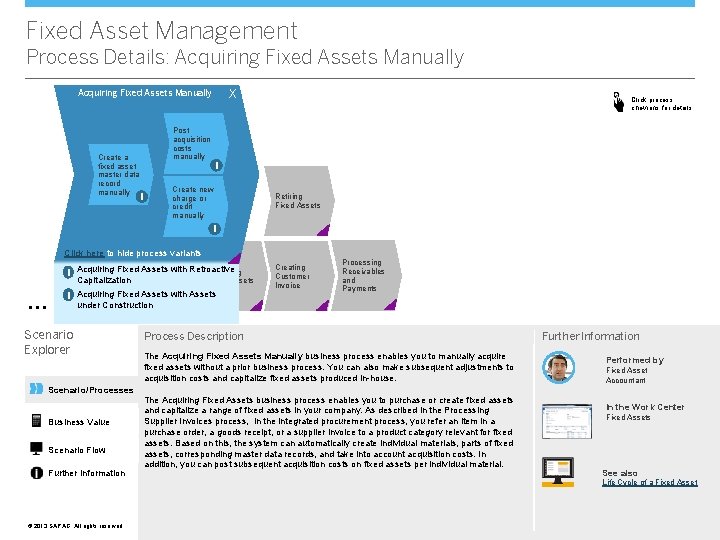
Fixed Asset Management Process Details: Acquiring Fixed Assets Manually X X Acquiring Fixed Assets Manually Click process chevrons for details Post acquisition costs manually Create a fixed asset i master data record Create new manually i Processing charge or Payables and credit Payments manually Retiring Fixed Assets i Click here to hide process variants Processing Invoices Capitalization Payments Acquiring Fixed Assets with Retroactive Payables and Valuating i Supplier … Fixed Assets i Acquiring Fixed Assets with Assets Creating Customer Invoice Processing Receivables and Payments under Construction Scenario Explorer Scenario/Processes Business Value Scenario Flow Further Information Process Description The Acquiring Fixed Assets Manually business process enables you to manually acquire fixed assets without a prior business process. You can also make subsequent adjustments to acquisition costs and capitalize fixed assets produced in-house. The Acquiring Fixed Assets business process enables you to purchase or create fixed assets and capitalize a range of fixed assets in your company. As described in the Processing Supplier Invoices process, in the integrated procurement process, you refer an item in a purchase order, a goods receipt, or a supplier invoice to a product category relevant for fixed assets. Based on this, the system can automatically create individual materials, parts of fixed assets, corresponding master data records, and take into account acquisition costs. In addition, you can post subsequent acquisition costs on fixed assets per individual material. Further Information Performed by Fixed Asset Accountant In the Work Center Fixed Assets See also Life Cycle of a Fixed Asset © © 2013 SAP AG. All rights reserved.
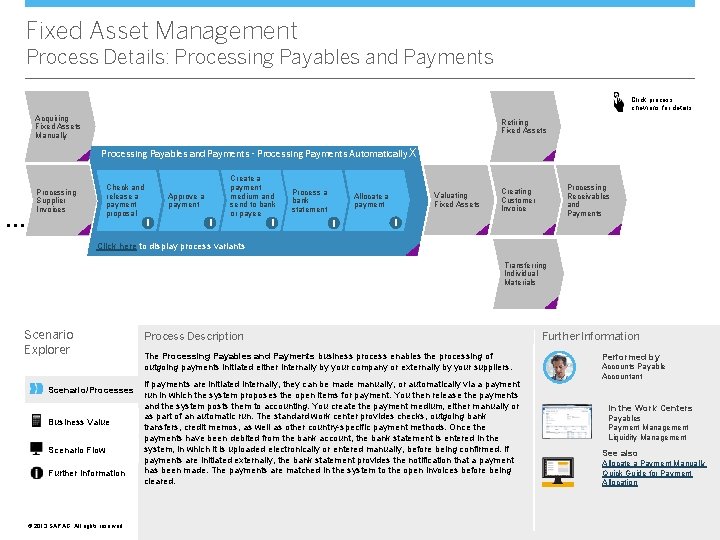
Fixed Asset Management Process Details: Processing Payables and Payments Click process chevrons for details Acquiring Fixed Assets Manually Retiring Fixed Assets Processing Payables and Payments - Processing Payments Automatically X … Check and release a payment proposal Processing Supplier Invoices Approve a payment i i Create a payment medium and send to bank or payee i Process a bank statement Valuating Fixed Assets Allocate a payment i Processing Receivables and Payments Creating Customer Invoice i Click here to display process variants Transferring Individual Materials Scenario Explorer Scenario/Processes Business Value Scenario Flow Further Information © © 2013 SAP AG. All rights reserved. Process Description The Processing Payables and Payments business process enables the processing of outgoing payments initiated either internally by your company or externally by your suppliers. If payments are initiated internally, they can be made manually, or automatically via a payment run in which the system proposes the open items for payment. You then release the payments and the system posts them to accounting. You create the payment medium, either manually or as part of an automatic run. The standard work center provides checks, outgoing bank transfers, credit memos, as well as other country-specific payment methods. Once the payments have been debited from the bank account, the bank statement is entered in the system, in which it is uploaded electronically or entered manually, before being confirmed. If payments are initiated externally, the bank statement provides the notification that a payment has been made. The payments are matched in the system to the open invoices before being cleared. Further Information Performed by Accounts Payable Accountant In the Work Centers Payables Payment Management Liquidity Management See also Allocate a Payment Manually Quick Guide for Payment Allocation
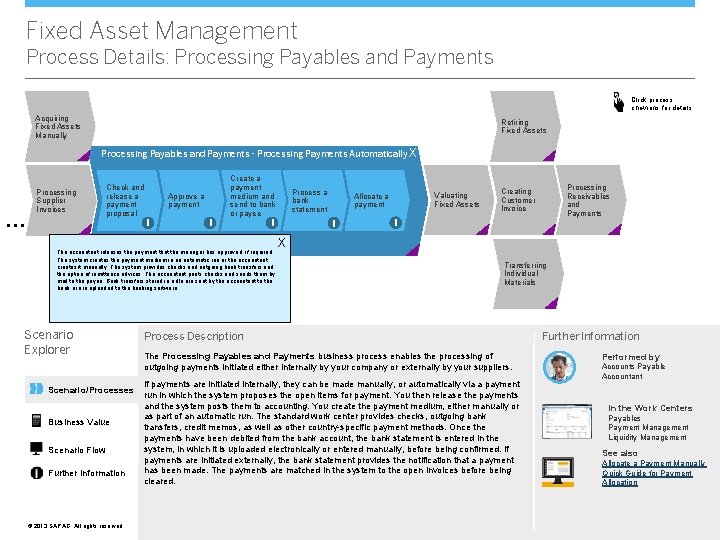
Fixed Asset Management Process Details: Processing Payables and Payments Click process chevrons for details Acquiring Fixed Assets Manually Retiring Fixed Assets Processing Payables and Payments - Processing Payments Automatically X … Check and release a payment proposal Processing Supplier Invoices Approve a payment i i Create a payment medium and send to bank or payee Click here to display process variants i The accountant releases the payment that the manager has approved, if required. The system creates the payment medium in an automatic run or the accountant creates it manually. The system provides checks and outgoing bank transfers and the option of remittance advices. The accountant prints checks and sends them by mail to the payee. Bank transfers stored in a file are sent by the accountant to the bank or are uploaded to the banking software. Scenario Explorer Scenario/Processes Business Value Scenario Flow Further Information © © 2013 SAP AG. All rights reserved. Process a bank statement Valuating Fixed Assets Allocate a payment i Processing Receivables and Payments Creating Customer Invoice i X Transferring Individual Materials Process Description The Processing Payables and Payments business process enables the processing of outgoing payments initiated either internally by your company or externally by your suppliers. If payments are initiated internally, they can be made manually, or automatically via a payment run in which the system proposes the open items for payment. You then release the payments and the system posts them to accounting. You create the payment medium, either manually or as part of an automatic run. The standard work center provides checks, outgoing bank transfers, credit memos, as well as other country-specific payment methods. Once the payments have been debited from the bank account, the bank statement is entered in the system, in which it is uploaded electronically or entered manually, before being confirmed. If payments are initiated externally, the bank statement provides the notification that a payment has been made. The payments are matched in the system to the open invoices before being cleared. Further Information Performed by Accounts Payable Accountant In the Work Centers Payables Payment Management Liquidity Management See also Allocate a Payment Manually Quick Guide for Payment Allocation
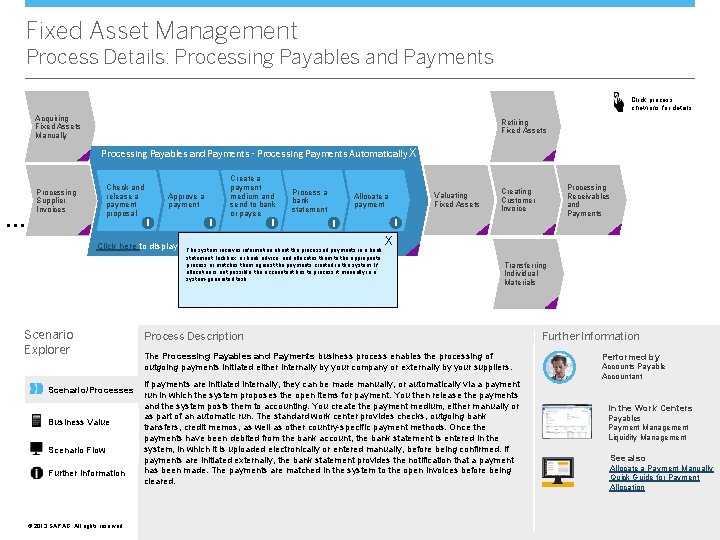
Fixed Asset Management Process Details: Processing Payables and Payments Click process chevrons for details Acquiring Fixed Assets Manually Retiring Fixed Assets Processing Payables and Payments - Processing Payments Automatically X … Check and release a payment proposal Processing Supplier Invoices Approve a payment i i Create a payment medium and send to bank or payee i Process a bank statement Valuating Fixed Assets Allocate a payment i Processing Receivables and Payments Creating Customer Invoice i X Click here to display process variants The system receives information about the processed payments in a bank statement, lockbox, or bank advice, and allocates them to the appropriate process or matches them against the payments created in the system. If allocation is not possible, the accountant has to process it manually in a system-generated task. Scenario Explorer Scenario/Processes Business Value Scenario Flow Further Information © © 2013 SAP AG. All rights reserved. Transferring Individual Materials Process Description The Processing Payables and Payments business process enables the processing of outgoing payments initiated either internally by your company or externally by your suppliers. If payments are initiated internally, they can be made manually, or automatically via a payment run in which the system proposes the open items for payment. You then release the payments and the system posts them to accounting. You create the payment medium, either manually or as part of an automatic run. The standard work center provides checks, outgoing bank transfers, credit memos, as well as other country-specific payment methods. Once the payments have been debited from the bank account, the bank statement is entered in the system, in which it is uploaded electronically or entered manually, before being confirmed. If payments are initiated externally, the bank statement provides the notification that a payment has been made. The payments are matched in the system to the open invoices before being cleared. Further Information Performed by Accounts Payable Accountant In the Work Centers Payables Payment Management Liquidity Management See also Allocate a Payment Manually Quick Guide for Payment Allocation
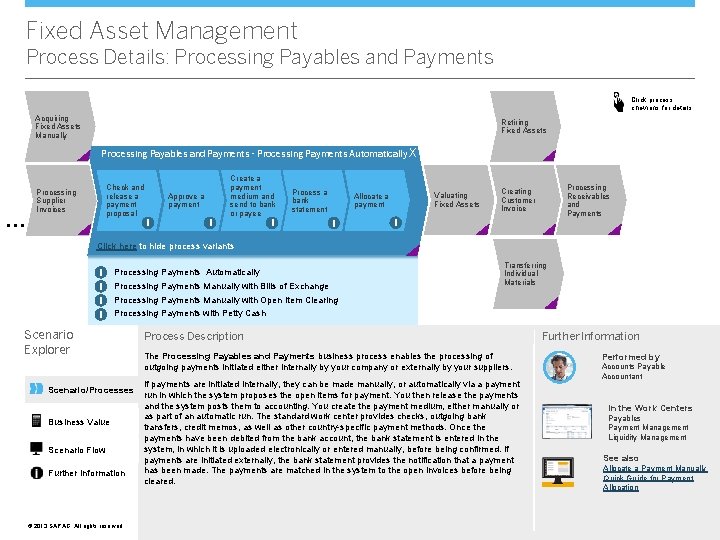
Fixed Asset Management Process Details: Processing Payables and Payments Click process chevrons for details Acquiring Fixed Assets Manually Retiring Fixed Assets Processing Payables and Payments - Processing Payments Automatically X … Check and release a payment proposal Processing Supplier Invoices Approve a payment i i Create a payment medium and send to bank or payee Process a bank statement i Valuating Fixed Assets Allocate a payment i Processing Receivables and Payments Creating Customer Invoice i Click here to hide process variants i i Processing Payments Automatically Processing Payments Manually with Bills of Exchange Transferring Individual Materials Processing Payments Manually with Open Item Clearing Processing Payments with Petty Cash Scenario Explorer Scenario/Processes Business Value Scenario Flow Further Information © © 2013 SAP AG. All rights reserved. Process Description The Processing Payables and Payments business process enables the processing of outgoing payments initiated either internally by your company or externally by your suppliers. If payments are initiated internally, they can be made manually, or automatically via a payment run in which the system proposes the open items for payment. You then release the payments and the system posts them to accounting. You create the payment medium, either manually or as part of an automatic run. The standard work center provides checks, outgoing bank transfers, credit memos, as well as other country-specific payment methods. Once the payments have been debited from the bank account, the bank statement is entered in the system, in which it is uploaded electronically or entered manually, before being confirmed. If payments are initiated externally, the bank statement provides the notification that a payment has been made. The payments are matched in the system to the open invoices before being cleared. Further Information Performed by Accounts Payable Accountant In the Work Centers Payables Payment Management Liquidity Management See also Allocate a Payment Manually Quick Guide for Payment Allocation
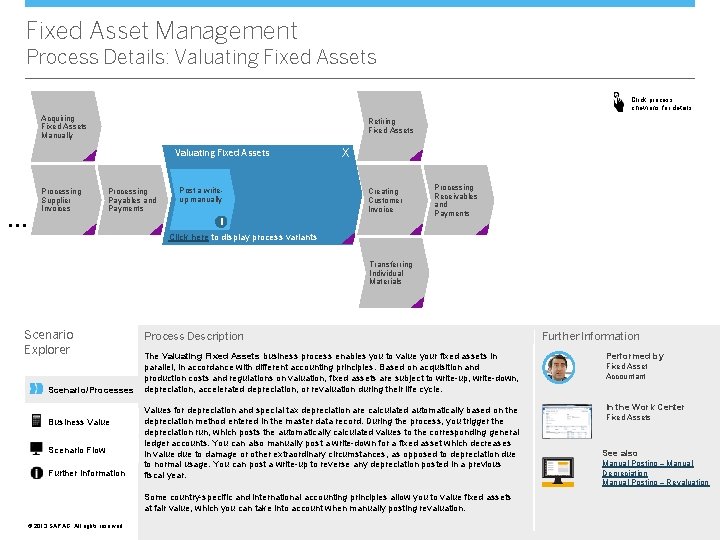
Fixed Asset Management Process Details: Valuating Fixed Assets Click process chevrons for details Acquiring Fixed Assets Manually Retiring Fixed Assets Valuating Fixed Assets … Processing Supplier Invoices Processing Payables and Payments Post a writeup manually X Creating Customer Invoice i Processing Receivables and Payments Click here to display process variants Transferring Individual Materials Scenario Explorer Scenario/Processes Business Value Scenario Flow Further Information Process Description The Valuating Fixed Assets business process enables you to value your fixed assets in parallel, in accordance with different accounting principles. Based on acquisition and production costs and regulations on valuation, fixed assets are subject to write-up, write-down, depreciation, accelerated depreciation, or revaluation during their life cycle. Performed by Values for depreciation and special tax depreciation are calculated automatically based on the depreciation method entered in the master data record. During the process, you trigger the depreciation run, which posts the automatically calculated values to the corresponding general ledger accounts. You can also manually post a write-down for a fixed asset which decreases in value due to damage or other extraordinary circumstances, as opposed to depreciation due to normal usage. You can post a write-up to reverse any depreciation posted in a previous fiscal year. In the Work Center Some country-specific and international accounting principles allow you to value fixed assets at fair value, which you can take into account when manually posting revaluation. © © 2013 SAP AG. All rights reserved. Further Information Fixed Asset Accountant Fixed Assets See also Manual Posting – Manual Depreciation Manual Posting – Revaluation
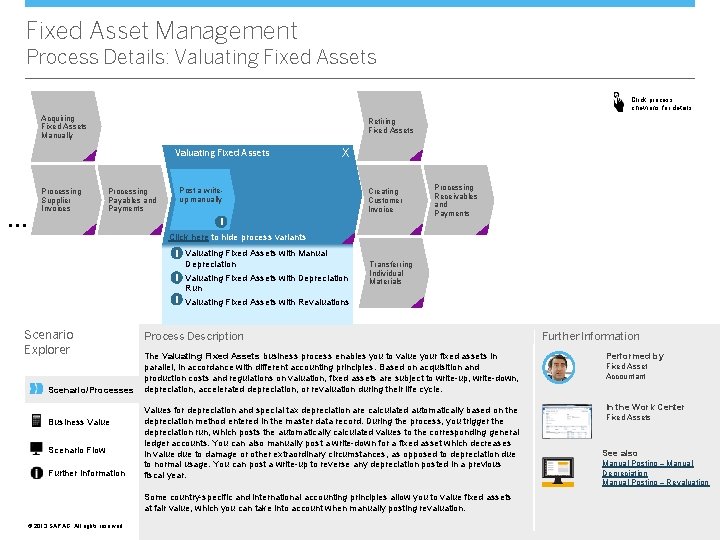
Fixed Asset Management Process Details: Valuating Fixed Assets Click process chevrons for details Acquiring Fixed Assets Manually Retiring Fixed Assets Valuating Fixed Assets … Processing Supplier Invoices Processing Payables and Payments X Post a writeup manually Creating Customer Invoice i Processing Receivables and Payments Click here to hide process variants i Valuating Fixed Assets with Manual Depreciation i Valuating Fixed Assets with Depreciation Run Transferring Individual Materials i Valuating Fixed Assets with Revaluations Scenario Explorer Scenario/Processes Business Value Scenario Flow Further Information Process Description The Valuating Fixed Assets business process enables you to value your fixed assets in parallel, in accordance with different accounting principles. Based on acquisition and production costs and regulations on valuation, fixed assets are subject to write-up, write-down, depreciation, accelerated depreciation, or revaluation during their life cycle. Performed by Values for depreciation and special tax depreciation are calculated automatically based on the depreciation method entered in the master data record. During the process, you trigger the depreciation run, which posts the automatically calculated values to the corresponding general ledger accounts. You can also manually post a write-down for a fixed asset which decreases in value due to damage or other extraordinary circumstances, as opposed to depreciation due to normal usage. You can post a write-up to reverse any depreciation posted in a previous fiscal year. In the Work Center Some country-specific and international accounting principles allow you to value fixed assets at fair value, which you can take into account when manually posting revaluation. © © 2013 SAP AG. All rights reserved. Further Information Fixed Asset Accountant Fixed Assets See also Manual Posting – Manual Depreciation Manual Posting – Revaluation
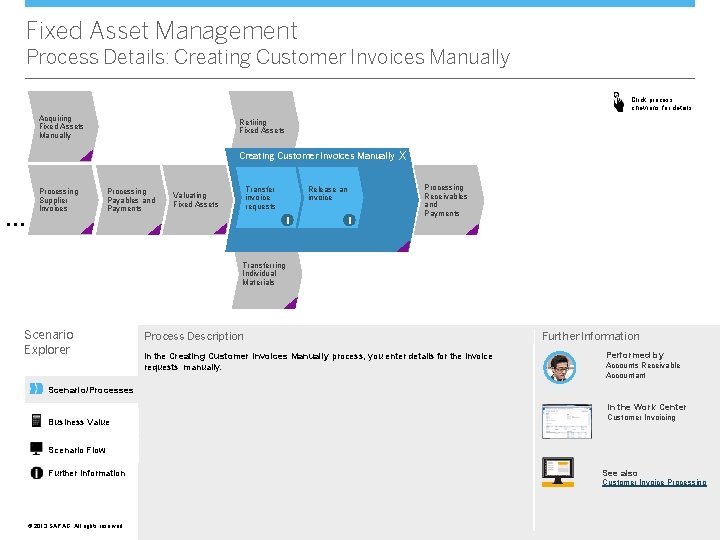
Fixed Asset Management Process Details: Creating Customer Invoices Manually Click process chevrons for details Acquiring Fixed Assets Manually Retiring Fixed Assets Creating Customer Invoices Manually … Processing Supplier Invoices Processing Payables and Payments Transfer invoice requests Valuating Fixed Assets Release an invoice i i X Processing Receivables and Payments Transferring Individual Materials Scenario Explorer Process Description In the Creating Customer Invoices Manually process, you enter details for the invoice requests manually. Further Information Performed by Accounts Receivable Accountant Scenario/Processes In the Work Center Business Value Customer Invoicing Scenario Flow Further Information See also Customer Invoice Processing © © 2013 SAP AG. All rights reserved.
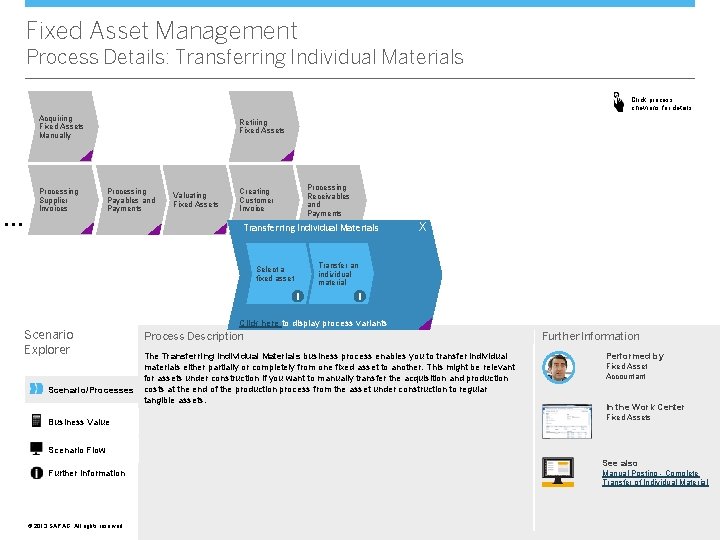
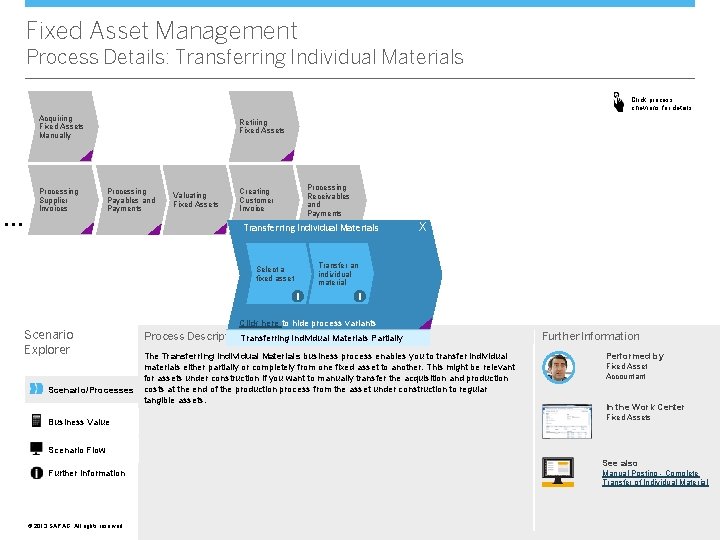
Fixed Asset Management Process Details: Transferring Individual Materials Click process chevrons for details Acquiring Fixed Assets Manually … Processing Supplier Invoices Retiring Fixed Assets Processing Payables and Payments Valuating Fixed Assets Processing Receivables and Payments Creating Customer Invoice Transferring Individual Materials X Transfer an individual material Select a fixed asset i i Click here to display process variants Scenario Explorer Scenario/Processes Business Value Process Description The Transferring Individual Materials business process enables you to transfer individual materials either partially or completely from one fixed asset to another. This might be relevant for assets under construction if you want to manually transfer the acquisition and production costs at the end of the production process from the asset under construction to regular tangible assets. Further Information Performed by Fixed Asset Accountant In the Work Center Fixed Assets Scenario Flow Further Information © © 2013 SAP AG. All rights reserved. See also Manual Posting - Complete Transfer of Individual Material
Fixed Asset Management Process Details: Transferring Individual Materials Click process chevrons for details Acquiring Fixed Assets Manually … Processing Supplier Invoices Retiring Fixed Assets Processing Payables and Payments Valuating Fixed Assets Processing Receivables and Payments Creating Customer Invoice Transferring Individual Materials X Transfer an individual material Select a fixed asset i i Click here to hide process variants Scenario Explorer Scenario/Processes Business Value Process Description. Transferring Individual Materials Partially The Transferring Individual Materials business process enables you to transfer individual materials either partially or completely from one fixed asset to another. This might be relevant for assets under construction if you want to manually transfer the acquisition and production costs at the end of the production process from the asset under construction to regular tangible assets. Further Information Performed by Fixed Asset Accountant In the Work Center Fixed Assets Scenario Flow Further Information © © 2013 SAP AG. All rights reserved. See also Manual Posting - Complete Transfer of Individual Material
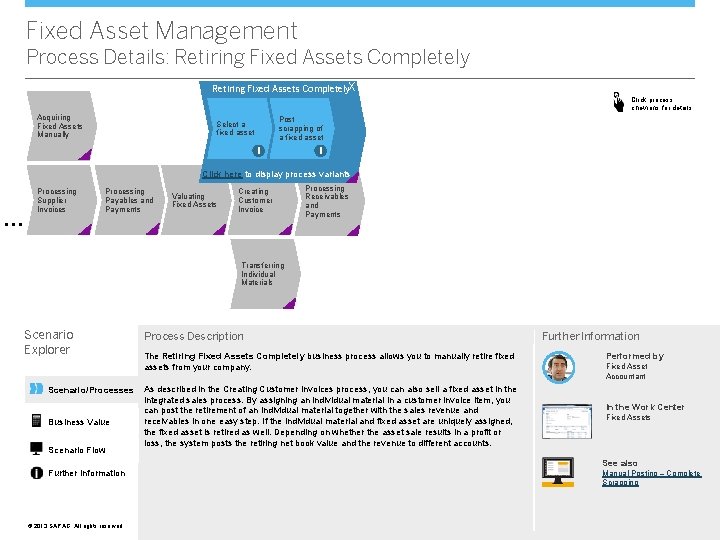
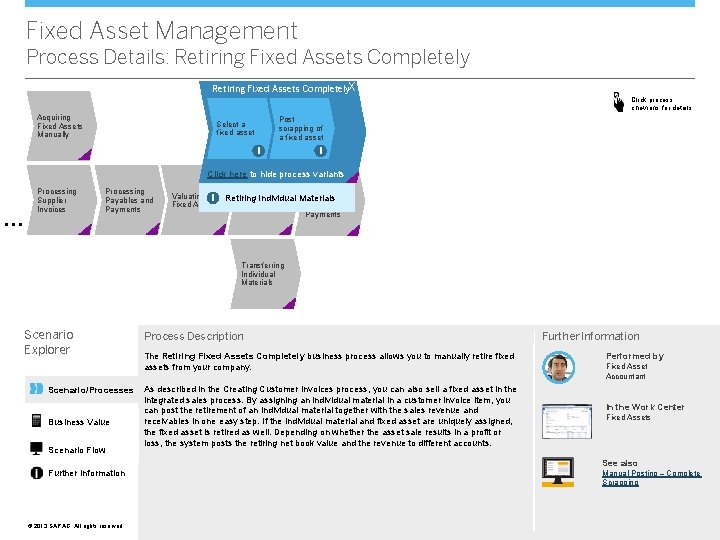
Fixed Asset Management Process Details: Retiring Fixed Assets Completely. X Click process chevrons for details Acquiring Fixed Assets Manually Post scrapping of a fixed asset Select a fixed asset i i Click here to display process variants … Processing Supplier Invoices Processing Payables and Payments Valuating Fixed Assets Creating Customer Invoice Processing Receivables and Payments Transferring Individual Materials Scenario Explorer Scenario/Processes Business Value Scenario Flow Further Information © © 2013 SAP AG. All rights reserved. Process Description The Retiring Fixed Assets Completely business process allows you to manually retire fixed assets from your company. As described in the Creating Customer Invoices process, you can also sell a fixed asset in the integrated sales process. By assigning an individual material in a customer invoice item, you can post the retirement of an individual material together with the sales revenue and receivables in one easy step. If the individual material and fixed asset are uniquely assigned, the fixed asset is retired as well. Depending on whether the asset sale results in a profit or loss, the system posts the retiring net book value and the revenue to different accounts. Further Information Performed by Fixed Asset Accountant In the Work Center Fixed Assets See also Manual Posting – Complete Scrapping
Fixed Asset Management Process Details: Retiring Fixed Assets Completely. X Click process chevrons for details Acquiring Fixed Assets Manually Post scrapping of a fixed asset Select a fixed asset i i Click here to hide process variants … Processing Supplier Invoices Processing Payables and Payments Processing Creating Valuating i Retiring Individual Materials Receivables Customer Fixed Assets and Invoice Payments Transferring Individual Materials Scenario Explorer Scenario/Processes Business Value Scenario Flow Further Information © © 2013 SAP AG. All rights reserved. Process Description The Retiring Fixed Assets Completely business process allows you to manually retire fixed assets from your company. As described in the Creating Customer Invoices process, you can also sell a fixed asset in the integrated sales process. By assigning an individual material in a customer invoice item, you can post the retirement of an individual material together with the sales revenue and receivables in one easy step. If the individual material and fixed asset are uniquely assigned, the fixed asset is retired as well. Depending on whether the asset sale results in a profit or loss, the system posts the retiring net book value and the revenue to different accounts. Further Information Performed by Fixed Asset Accountant In the Work Center Fixed Assets See also Manual Posting – Complete Scrapping
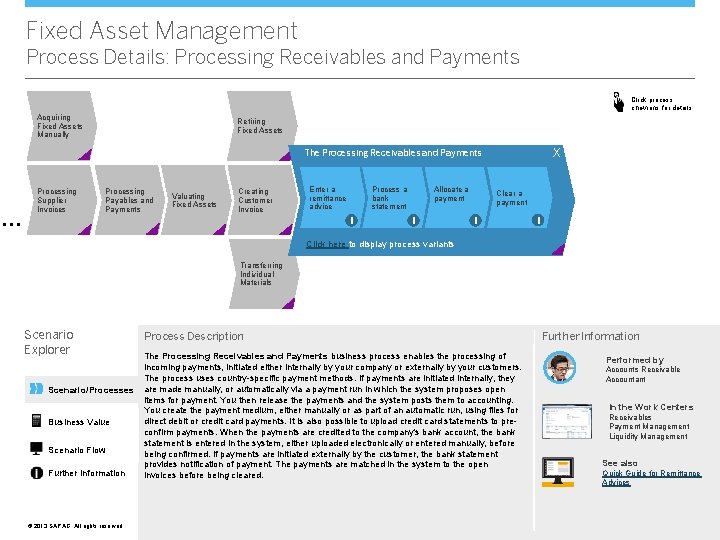
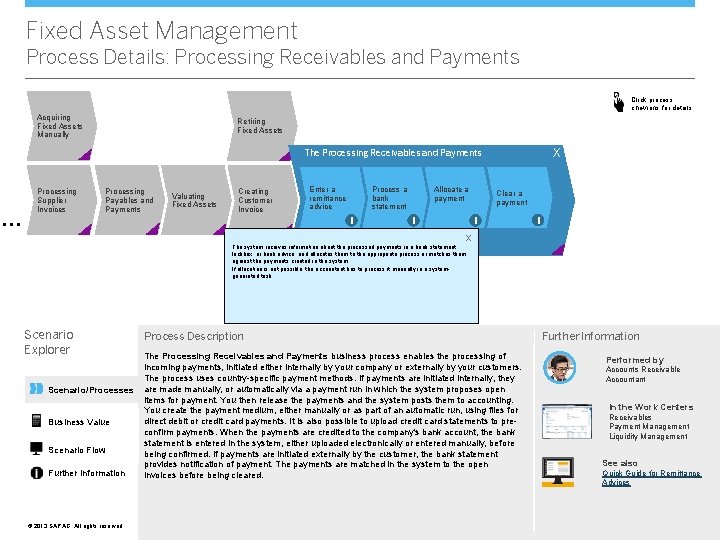
Fixed Asset Management Process Details: Processing Receivables and Payments Click process chevrons for details Acquiring Fixed Assets Manually Retiring Fixed Assets X The Processing Receivables and Payments … Processing Supplier Invoices Processing Payables and Payments Valuating Fixed Assets Creating Customer Invoice Enter a remittance advice Process a bank statement i Allocate a payment i Clear a payment i i Click here to display process variants Transferring Individual Materials Scenario Explorer Scenario/Processes Business Value Scenario Flow Further Information © © 2013 SAP AG. All rights reserved. Process Description The Processing Receivables and Payments business process enables the processing of incoming payments, initiated either internally by your company or externally by your customers. The process uses country-specific payment methods. If payments are initiated internally, they are made manually, or automatically via a payment run in which the system proposes open items for payment. You then release the payments and the system posts them to accounting. You create the payment medium, either manually or as part of an automatic run, using files for direct debit or credit card payments. It is also possible to upload credit card statements to preconfirm payments. When the payments are credited to the company's bank account, the bank statement is entered in the system, either uploaded electronically or entered manually, before being confirmed. If payments are initiated externally by the customer, the bank statement provides notification of payment. The payments are matched in the system to the open invoices before being cleared. Further Information Performed by Accounts Receivable Accountant In the Work Centers Receivables Payment Management Liquidity Management See also Quick Guide for Remittance Advices
Fixed Asset Management Process Details: Processing Receivables and Payments Click process chevrons for details Acquiring Fixed Assets Manually Retiring Fixed Assets X The Processing Receivables and Payments … Processing Supplier Invoices Processing Payables and Payments Valuating Fixed Assets Creating Customer Invoice Enter a remittance advice Process a bank statement i Allocate a payment i Clear a payment i i X Click here to display process variants The system receives information about the processed payments in a bank statement, lockbox, or bank advice, and allocates them to the appropriate process or matches them against the payments created in the system. If allocation is not possible, the accountant has to process it manually in a system. Transferring generated task. Fixed Assets Scenario Explorer Scenario/Processes Business Value Scenario Flow Further Information © © 2013 SAP AG. All rights reserved. Process Description The Processing Receivables and Payments business process enables the processing of incoming payments, initiated either internally by your company or externally by your customers. The process uses country-specific payment methods. If payments are initiated internally, they are made manually, or automatically via a payment run in which the system proposes open items for payment. You then release the payments and the system posts them to accounting. You create the payment medium, either manually or as part of an automatic run, using files for direct debit or credit card payments. It is also possible to upload credit card statements to preconfirm payments. When the payments are credited to the company's bank account, the bank statement is entered in the system, either uploaded electronically or entered manually, before being confirmed. If payments are initiated externally by the customer, the bank statement provides notification of payment. The payments are matched in the system to the open invoices before being cleared. Further Information Performed by Accounts Receivable Accountant In the Work Centers Receivables Payment Management Liquidity Management See also Quick Guide for Remittance Advices
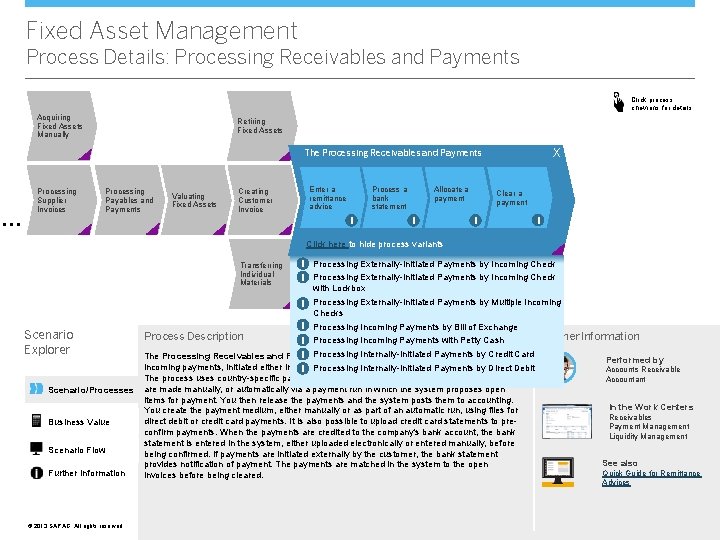
Fixed Asset Management Process Details: Processing Receivables and Payments Click process chevrons for details Acquiring Fixed Assets Manually Retiring Fixed Assets X The Processing Receivables and Payments … Processing Supplier Invoices Processing Payables and Payments Valuating Fixed Assets Creating Customer Invoice Enter a remittance advice Process a bank statement i Allocate a payment i Clear a payment i i Click here to hide process variants Transferring Individual Materials i Processing Externally-Initiated Payments by Incoming Check with Lockbox i Processing Externally-Initiated Payments by Multiple Incoming Checks Scenario Explorer Scenario/Processes Business Value Scenario Flow Further Information © © 2013 SAP AG. All rights reserved. i Processing Incoming Payments by Bill of Exchange Further Information i Processing Incoming Payments with Petty Cash i Processing Internally-Initiated Payments by Credit Card The Processing Receivables and Payments business process enables the processing of Performed by incoming payments, initiated either internally by your company or externally by your customers. Processing Internally-Initiated Payments by Direct Debit i Accounts Receivable Process Description The process uses country-specific payment methods. If payments are initiated internally, they are made manually, or automatically via a payment run in which the system proposes open items for payment. You then release the payments and the system posts them to accounting. You create the payment medium, either manually or as part of an automatic run, using files for direct debit or credit card payments. It is also possible to upload credit card statements to preconfirm payments. When the payments are credited to the company's bank account, the bank statement is entered in the system, either uploaded electronically or entered manually, before being confirmed. If payments are initiated externally by the customer, the bank statement provides notification of payment. The payments are matched in the system to the open invoices before being cleared. Accountant In the Work Centers Receivables Payment Management Liquidity Management See also Quick Guide for Remittance Advices
Fixed Asset Management Business Value Acquire Process Supplier Invoice Valuate Create Fixed Asset Master Data Process Payment Valuate with Manual Depreciation Deactivate Valuate with Write-Ups Valuate with Revaluations Transfer Individual Materials Settle Retire Fixed Asset Create Invoice Process Receivables and Post to Ledger Scenario Explorer Scenario/Processes Business Value Scenario Flow Further Information © © 2013 SAP AG. All rights reserved. Overview Key Benefits This scenario is ideal for financial professionals at midsize companies who want to efficiently manage fixed asset accounting. l Fixed Asset Management reduces the time and energy it takes to manually perform You can value your fixed assets in accordance with different accounting principles. SAP Business By. Design helps efficiently manage the entire life cycle of your fixed assets, from their purchase or first acquisition, through to retirement or sale. the necessary accounting procedures, allowing you to focus on other tasks l You can value your fixed assets quickly and easily l In accordance with local book valuation or tax-based valuation l In accordance with international accounting principles l For statistical or cost-accounting purposes l To ensure continuous compliance with country-specific regulations l You can track and report assets accurately in a fully-integrated environment l The scenario improves efficiency through greater use of automation, such as the creation of fixed asset master data records including the calculation of acquisition costs
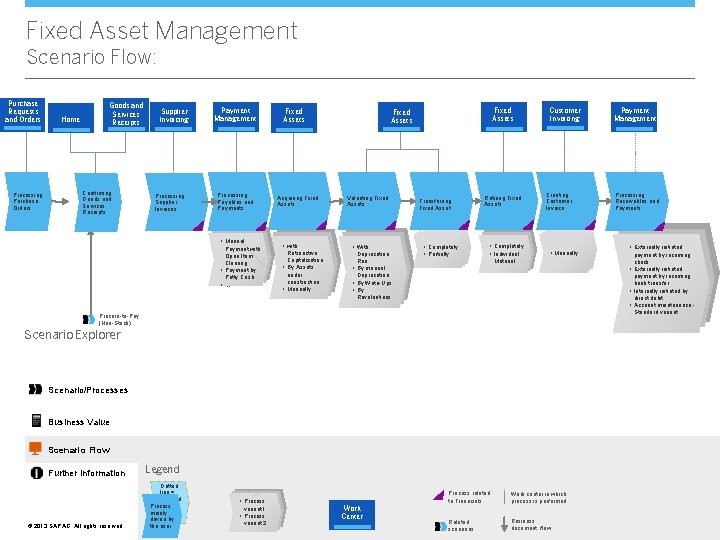
Fixed Asset Management Scenario Flow: Purchase Requests and Orders Processing Purchase Orders Home Goods and Services Receipts Confirming Goods and Services Receipts Supplier Invoicing Processing Supplier Invoices Payment Management Processing Payables and Payments • Manual Payment with Open Item Clearing • Payment by Petty Cash • …. Fixed Assets Acquiring Fixed Assets • with Retroactive Capitalization • By Assets under construction • Manually Fixed Assets Valuating Fixed Assets • With Deprecation Run • By manual Deprecation • By Write-Ups • By Revaluations Transferring Fixed Asset • Completely • Partially Retiring Fixed Assets • Completely • Individual Customer Invoicing Creating Customer Invoice • Manually Material Scenario/Processes Business Value Scenario Flow © © 2013 SAP AG. All rights reserved. Legend • Process variant 1 • Process variant 2 Work Center • Externally initiated payment by incoming check payment by incoming bank transfer • Internally initiated by direct debit • Account maintenance - Standard variant Scenario Explorer Dotted line = optional Process mainly driven by the user Processing Receivables and Payments • Externally initiated Procure-to-Pay (Non-Stock) Further Information Payment Management Process related to Financials Work center in which process is performed Related scenarios Business document flow
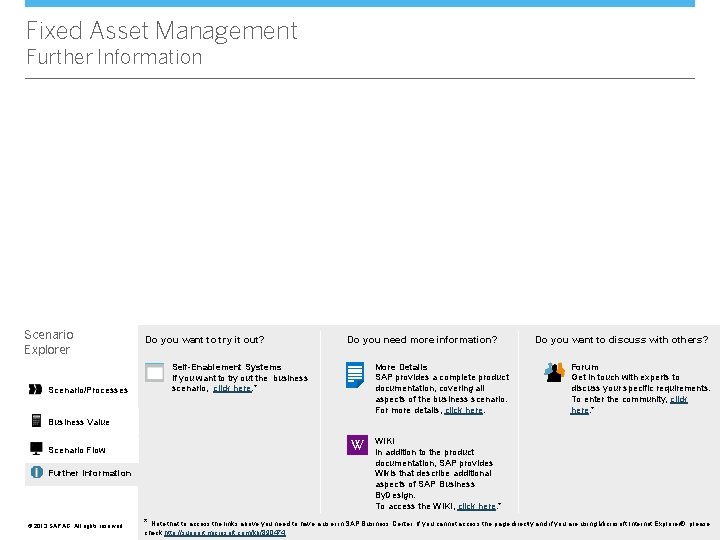
Fixed Asset Management Further Information Scenario Explorer Scenario/Processes Do you want to try it out? Do you need more information? More Details SAP provides a complete product documentation, covering all aspects of the business scenario. For more details, click here. Self-Enablement Systems If you want to try out the business scenario, click here. * Do you want to discuss with others? Forum Get in touch with experts to discuss your specific requirements. To enter the community, click here. * Business Value VV Scenario Flow Further Information © © 2013 SAP AG. All rights reserved. WIKI In addition to the product documentation, SAP provides Wikis that describe additional aspects of SAP Business By. Design. To access the WIKI, click here. * * Note that to access the links above you need to have a user in SAP Business Center. If you cannot access the page directly and if you are using Microsoft Internet Explorer®, please check http: //support. microsoft. com/kb/890474.