
Five Components of Computers Control Datapath Processor Memory






- Slides: 48
Five Components of Computers Control Datapath Processor Memory Input Output
Input / Output Technology • Human input interface • Keyboard • Mouse • Speech Data Rate (Mbit/sec)* 0. 0001 0. 0038 0. 2640 * I/O data rates are usually given in base 10 K = 1, 000 and M = 1, 000 instead of base 2 like memory and some transfer rates K = 1, 024 and M = 1, 024 x 1, 024
Input / Output Technology • Human output interface Data Rate (Mbits/sec) • Printer • Image: laser printer, ink jet printer 3. 2 • Audio • sounds, music, speech 8. 0 • Display • High Resolution Color Graphics Display 800 -8000
Input / Output Technology • Data Storage • Optical Disks • Magnetic Tapes • Hard Disks Data Rate ( Mbits/sec) 80 -220 5 -120 800 -3000
Input / Output Technology • Communications • Modem • Network / LAN Data Rate ( Mbits/sec) 0. 128 -6. 0 100 -10, 000
Input / Output Technology • Extremely Diverse • Response times • Data rates • Size of blocks of data
Input / Output Technology • Extremely Diverse • Response times • Data rates • Size of blocks of data • Requires Flexibility of Configuration • Unknown I/O may be added • Requires expandability
Input / Output Technology • Extremely Diverse • Response times • Data rates • Size of blocks of data • Requires Flexibility of Configuration • Unknown I/O may be added • Requires expandability • Most Require Critical Timing • Sustain data rates • Acceptable response time
How can we connect I/O to the computer ?
How can we connect I/O to the computer ? Dedicated Register ( I/O port) for each device I/O Register
How can we connect I/O to the computer ? Dedicated Register ( I/O port) for each device Special instructions to transfer data in and out of the register I/O Register
How can we connect I/O to the computer ? Dedicated Register ( I/O port) for each device Special instructions to transfer data in and out of the register I/O Register I/O device transfers data in and out of the register
How can we connect I/O to the computer ? Dedicated Register ( I/O port) for each device Special instructions to transfer data in and out of the register I/O Register I/O device transfers data in and out of the register Need control protocol and some control means
How can we connect I/O to the computer ? A Bus - A shared communication link
How can we connect I/O to the computer ? A Bus - A shared communication link Examples Register File Bus Memory Bus
How can we connect I/O to the computer ? A Bus - A shared communication link Examples Register File Bus Memory Bus • Shared Data and Address and Control lines ( wires) by many I/O controllers/devices
How can we connect I/O to the computer ? A Bus - A shared communication link Examples Register File Bus Memory Bus • Shared Data and Address and Control lines ( wires) by many I/O controllers/devices • Expandability, Expandability
How can we connect I/O to the computer ? A Bus - A shared communication link Examples Register File Bus Memory Bus • Shared Data and Address and Control lines ( wires) by many I/O controllers/devices • Expandability, Expandability • Standard I/O bus interfaces enable third party development
I/O bus Control CPU/ Memory Data I/O 1 I/O 2 I/O 3
I/O bus Control CPU/ Memory Data I/O 1 I/O 2 I/O 3 Typical bus transaction 1. CPU initiates a transfer with a selected I/O using Control
I/O bus Control CPU/ Memory Data I/O 1 I/O 2 I/O 3 Typical bus transaction 1. CPU initiates a transfer with a selected I/O using Control 2. The Address is sent using Data ( Multiplexed)
I/O bus Control CPU/ Memory Data I/O 1 I/O 2 I/O 3 Typical bus transaction 1. CPU initiates a transfer with a selected I/O using Control 2. The Address is sent using Data ( Multiplexed) 3. The data is sent / received using Data
I/O bus Control CPU/ Memory Data I/O 1 I/O 2 I/O 3 Typical bus transaction 1. CPU initiates a transfer with a selected I/O using Control 2. The Address is sent using Data ( Multiplexed) 3. The data is sent / received using Data Control lines control the timing, starting and completion
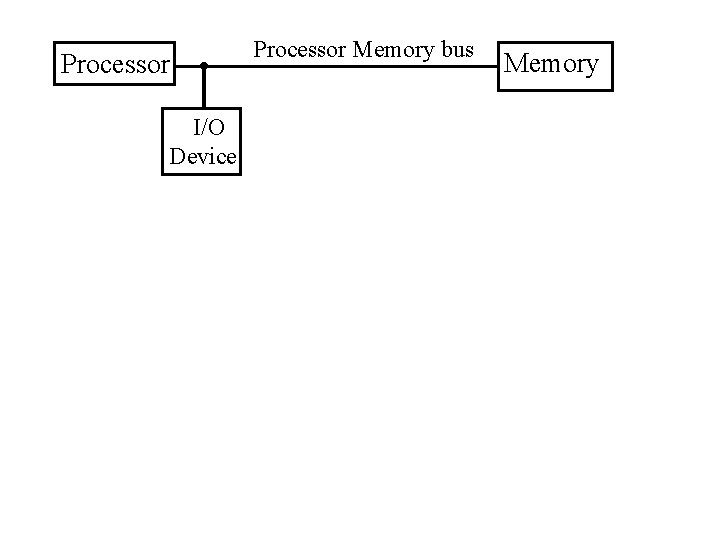
Processor I/O Device Processor Memory bus Memory
Connecting to CPU / Memory 1. The processor- memory bus • I/O conforms to the memory controls ( Memory Mapped)
Connecting to CPU / Memory 1. The processor- memory bus • I/O conforms to the memory controls • Fastest bandwidth – Direct to CPU
Connecting to CPU / Memory 1. The processor- memory bus • I/O conforms to the memory controls • Fastest bandwidth – Direct to CPU • Very restricted length – few inches
Connecting to CPU / Memory 1. The processor- memory bus • I/O conforms to the memory controls • Fastest bandwidth – Direct to CPU • Very restricted length – few inches • Loading and noise are major problems
Connecting to CPU / Memory 1. The processor- memory bus • I/O conforms to the memory controls • Fastest bandwidth – Direct to CPU • Very restricted length – few inches • Loading and noise are major problems • Processor & Memory design specific
Processor-memory bus Processor I/O Device Expansion bus Bus Adapter I/O Device Memory
Connecting to CPU / Memory 1. The processor - memory bus 2. Backplane bus or Expansion bus • Plug in Device Controller Card
Connecting to CPU / Memory 1. The processor - memory bus 2. Backplane bus or Expansion bus • Plug in Device Controller Card • Standard Spec’s (PCI, PCMCIA)
Connecting to CPU / Memory 1. The processor - memory bus 2. Backplane bus or Expansion bus • Plug in Device Controller Card • Standard Spec’s (PCI, PCMCIA) • Bus adapter to processor - memory bus
Connecting to CPU / Memory 1. The processor - memory bus 2. Backplane bus or Expansion bus • Plug in Device Controller Card • Standard Spec’s (PCI, PCMCIA) • Bus adapter to processor - memory bus • Length of several inches
Connecting to CPU / Memory 1. The processor - memory bus 2. Backplane bus or Expansion bus • Plug in Device Controller Card • Standard Spec’s (PCI, PCMCIA) • Bus adapter to processor - memory bus • Length of several inches • Can be different clock rate
Processor-memory bus Processor I/O Device Expansion bus Memory Bus Adapter I/O Device Bus Adapter I/O Bus I/O Device
Connecting to CPU / Memory 1. The processor - memory bus 2. Backplane bus or Expansion bus 3. I/O bus • Standard intelligent controller and interface
Connecting to CPU / Memory 1. The processor - memory bus 2. Backplane bus or Expansion bus 3. I/O bus • Standard intelligent controller and interface • SCSI (parallel / serial) and USB ( serial)
Connecting to CPU / Memory 1. The processor - memory bus 2. Backplane bus or Expansion bus 3. I/O bus • Standard intelligent controller and interface • SCSI (parallel / serial) and USB ( serial) • Simple low level interface
Connecting to CPU / Memory 1. The processor - memory bus 2. Backplane bus or Expansion bus 3. I/O bus • Standard intelligent controller and interface • SCSI (parallel / serial) and USB ( serial) • Simple low level interface • Typically connects to Expansion bus
Connecting to CPU / Memory 1. The processor - memory bus 2. Backplane bus or Expansion bus 3. I/O bus • Standard intelligent controller and interface • SCSI (parallel / serial) and USB ( serial) • Simple low level interface • Typically connects to Expansion bus • Length of several feet
Connecting to CPU / Memory 1. The processor - memory bus 2. Backplane bus or Expansion bus 3. I/O bus • Standard intelligent controller and interface • SCSI (parallel / serial) and USB ( serial) • Simple low level interface • Typically connects to Expansion bus • Length of several feet • May enable stand-alone device to device transfers
Processor-memory bus Processor I/O Device Expansion bus Memory Bus Adapter I/O Device Bus Adapter I/O Bus I/O Device
I/O Bus Examples Firewire USB 2. 0 PCI Express Serial ATA Serial Attached SCSI Intended use External Internal External Devices per channel 63 127 1 1 4 Data width 4 2 2/lane 4 4 Peak bandwidth 50 MB/s or 100 MB/s 0. 2 MB/s, 1. 5 MB/s, or 60 MB/s 250 MB/s/lane 300 MB/s 1×, 2×, 4×, 8×, 16×, 32× 300 MB/s Hot pluggable Yes Depends Yes Max length 4. 5 m 5 m 0. 5 m 1 m 8 m Standard IEEE 1394 USB Implementers Forum PCI-SIG SATA-IO INCITS TC T 10
Typical x 86 PC I/O System
VGA Controller