
Firewalls Chapter 5 r 1 September 2004 Copyright
Firewalls Chapter 5 r 1 September 2004 Copyright Prentice-Hall 2004
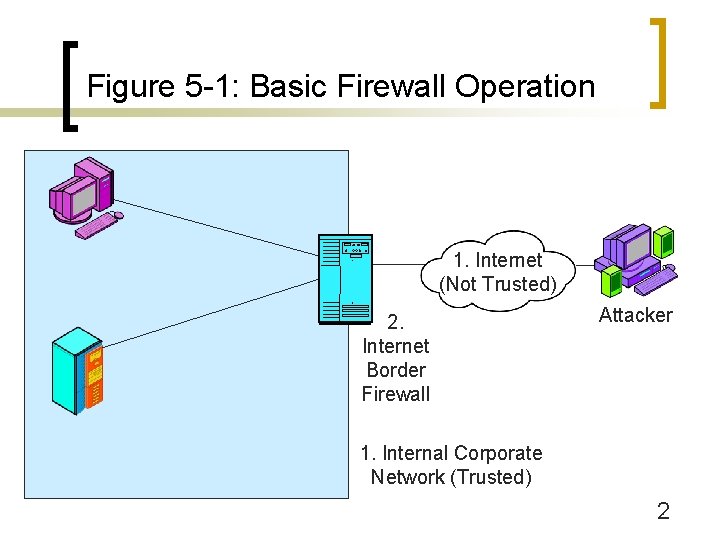
Figure 5 -1: Basic Firewall Operation 1. Internet (Not Trusted) 2. Internet Border Firewall Attacker 1. Internal Corporate Network (Trusted) 2
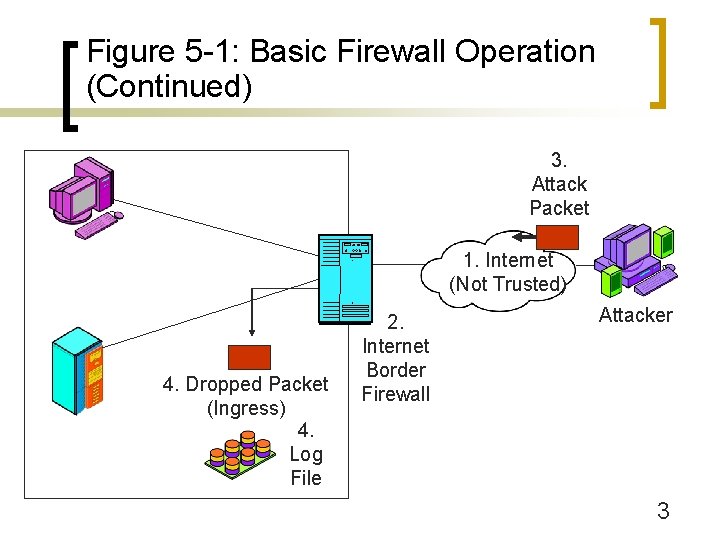
Figure 5 -1: Basic Firewall Operation (Continued) 3. Attack Packet 1. Internet (Not Trusted) 4. Dropped Packet (Ingress) 4. Log File 2. Internet Border Firewall Attacker 3
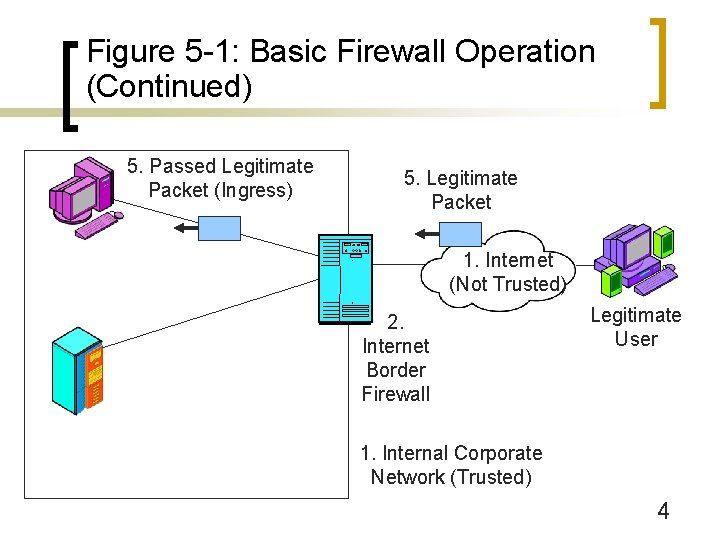
Figure 5 -1: Basic Firewall Operation (Continued) 5. Passed Legitimate Packet (Ingress) 5. Legitimate Packet 1. Internet (Not Trusted) 2. Internet Border Firewall Legitimate User 1. Internal Corporate Network (Trusted) 4
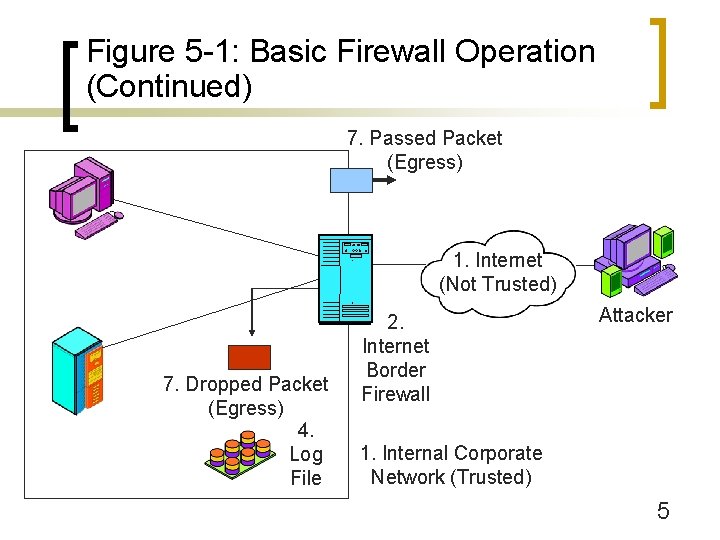
Figure 5 -1: Basic Firewall Operation (Continued) 7. Passed Packet (Egress) 1. Internet (Not Trusted) 7. Dropped Packet (Egress) 4. Log File 2. Internet Border Firewall Attacker 1. Internal Corporate Network (Trusted) 5

Figure 5 -1: Basic Firewall Operation (Continued) 6. Attack Packet that Got Through Firewall 6. Hardened Client PC 1. Internet (Not Trusted) Hardened Hosts Provide Defense in Depth 6. Hardened Server 2. Internet Border Firewall Attacker 1. Internal Corporate Network (Trusted) 6
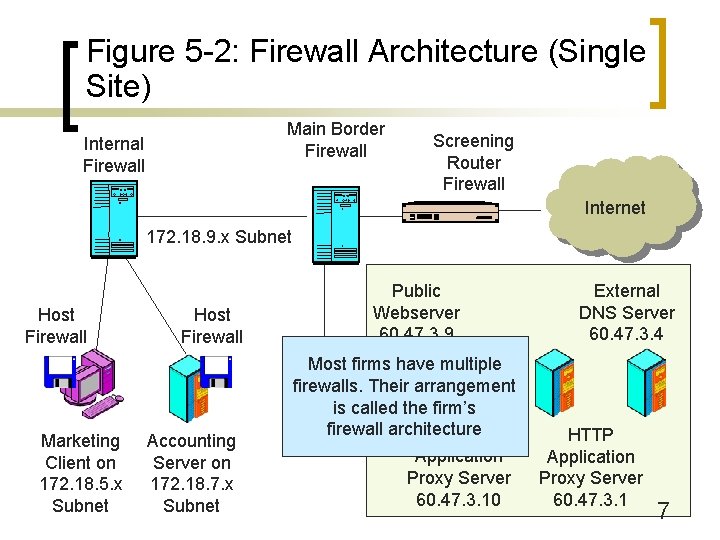
Figure 5 -2: Firewall Architecture (Single Site) Main Border Firewall Internal Firewall Screening Router Firewall Internet 172. 18. 9. x Subnet Host Firewall Marketing Client on 172. 18. 5. x Subnet Host Firewall Accounting Server on 172. 18. 7. x Subnet Public Webserver 60. 47. 3. 9 Most firms have multiple firewalls. Their arrangement is called the firm’s firewall architecture SMTP Application Proxy Server 60. 47. 3. 10 External DNS Server 60. 47. 3. 4 HTTP Application Proxy Server 60. 47. 3. 1 7
Figure 5 -3: Firewall Principles n The Changing Role of Firewalls ¡ In the early 1990 s, there was a focus on border security ¡ However, some attacks inevitably get through the border firewall ¡ And border firewalls provide no protection from internal attackers, attackers who entered the site other than through the Internet, or remote users using VPNs 8
Figure 5 -3: Firewall Principles (Continued) n The Changing Role of Firewalls ¡ Companies need to employ defense in depth (Figure 5 -2) ¡ Overall, border firewalls are important but not sufficient 9
Figure 5 -3: Firewall Principles (Continued) n Danger of Overload ¡ If a firewall is overloaded and cannot handle the traffic, it drops unprocessed packets ¡ This is the safest choice, because attack packets cannot enter the network ¡ However, this creates a self-inflicted denial-ofservice attack 10
Figure 5 -3: Firewall Principles (Continued) n Danger of Overload ¡ So firewalls must have the capacity to handle the traffic ¡ Some can handle normal traffic but cannot handle traffic during heavy attacks ¡ Need to be able to work at wire speed 11
Figure 5 -3: Firewall Principles (Continued) n Firewall Filtering Methods ¡ Several methods exist; we will look at them in this chapter ¡ Firewall Inspection Levels n Internet Level ¡ Internet and transport layer filtering ¡ Attacks and therefore firewalls began here ¡ Stateful inspection ¡ Static packet inspection ¡ Network address translation (NAT) 12
Figure 5 -3: Firewall Principles (Continued) n Firewall Filtering Methods ¡ Firewall Inspection Levels n Application Level ¡ Attacks growing at the application layer ¡ Filter application layer communication ¡ Application proxy firewalls ¡ Antivirus filtering (general malware filtering) ¡ Intrusion prevention systems (also filter internet-level attacks) 13
Figure 5 -3: Firewall Principles (Continued) n Firewall Filtering Methods ¡ Firewall Inspection Levels n Data Link Layer ¡ Usually no protection, although attacks could occur here n Physical Layer ¡ No protection 14
Main Border Firewalls Stateful Inspection
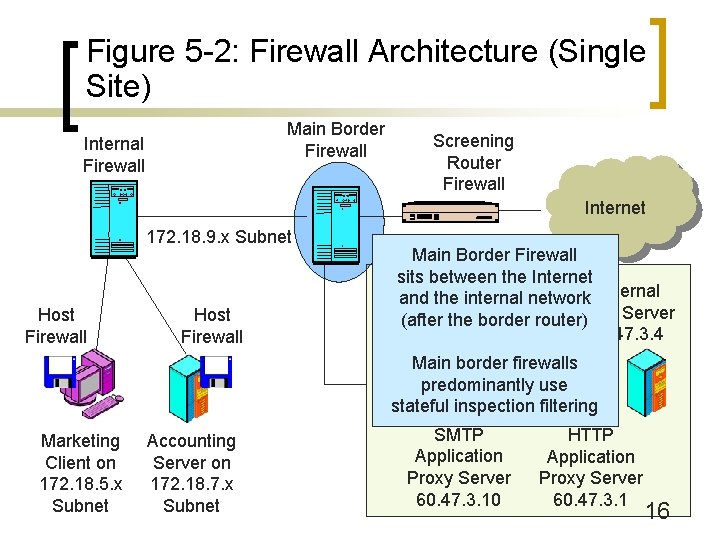
Figure 5 -2: Firewall Architecture (Single Site) Main Border Firewall Internal Firewall Screening Router Firewall Internet 172. 18. 9. x Subnet Host Firewall Main Border Firewall sits between the Internet Public and the internal network External Webserver DNS Server (after the border router) 60. 47. 3. 9 60. 47. 3. 4 Main border firewalls predominantly use stateful inspection filtering Marketing Client on 172. 18. 5. x Subnet Accounting Server on 172. 18. 7. x Subnet SMTP Application Proxy Server 60. 47. 3. 10 HTTP Application Proxy Server 60. 47. 3. 1 16
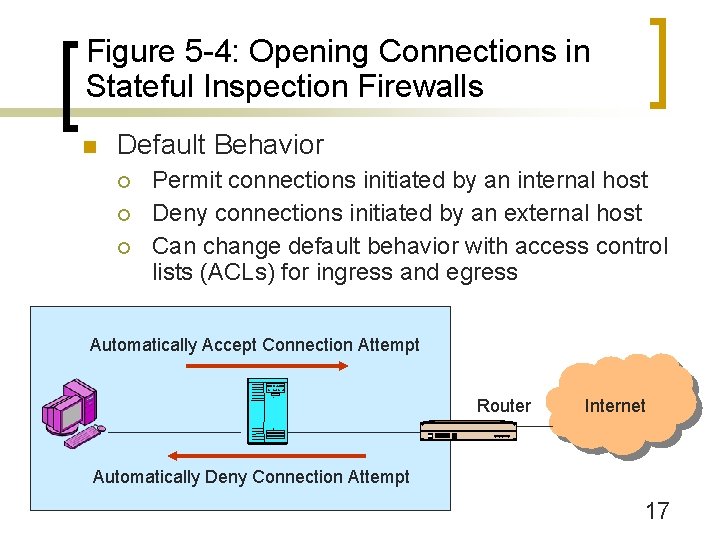
Figure 5 -4: Opening Connections in Stateful Inspection Firewalls n Default Behavior ¡ ¡ ¡ Permit connections initiated by an internal host Deny connections initiated by an external host Can change default behavior with access control lists (ACLs) for ingress and egress Automatically Accept Connection Attempt Router Internet Automatically Deny Connection Attempt 17
Figure 5 -5: Permitting Incoming Connections in a Stateful Inspection Firewall n Default Behavior Can be Modified by Access Control Lists (ACLs) ¡ Ingress ACL permits some externally-initiated connections to be opened ¡ Egress ACL prohibits some internally-initiated connections from being opened ¡ On basis of IP address, TCP or UDP port number, and/or IP protocol ¡ Sets of if-then rules applied in order 18
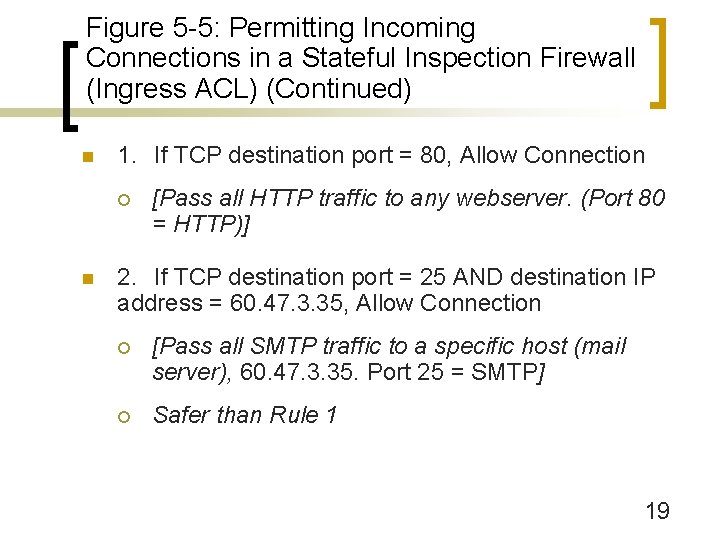
Figure 5 -5: Permitting Incoming Connections in a Stateful Inspection Firewall (Ingress ACL) (Continued) n 1. If TCP destination port = 80, Allow Connection ¡ n [Pass all HTTP traffic to any webserver. (Port 80 = HTTP)] 2. If TCP destination port = 25 AND destination IP address = 60. 47. 3. 35, Allow Connection ¡ [Pass all SMTP traffic to a specific host (mail server), 60. 47. 3. 35. Port 25 = SMTP] ¡ Safer than Rule 1 19
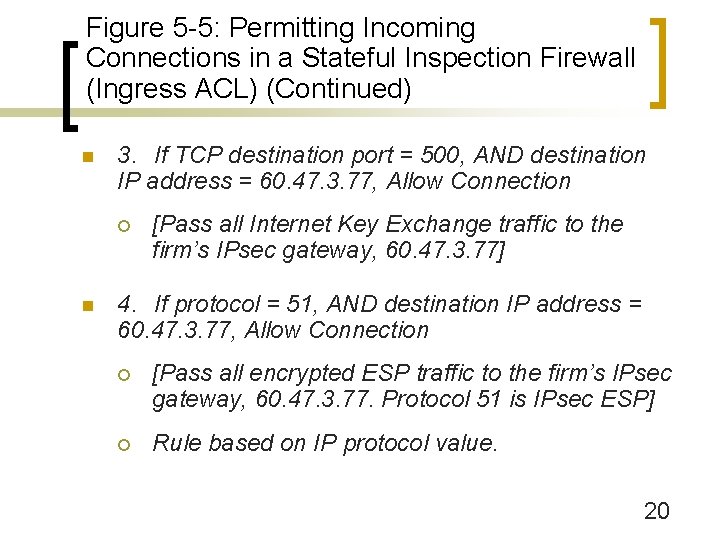
Figure 5 -5: Permitting Incoming Connections in a Stateful Inspection Firewall (Ingress ACL) (Continued) n 3. If TCP destination port = 500, AND destination IP address = 60. 47. 3. 77, Allow Connection ¡ n [Pass all Internet Key Exchange traffic to the firm’s IPsec gateway, 60. 47. 3. 77] 4. If protocol = 51, AND destination IP address = 60. 47. 3. 77, Allow Connection ¡ [Pass all encrypted ESP traffic to the firm’s IPsec gateway, 60. 47. 3. 77. Protocol 51 is IPsec ESP] ¡ Rule based on IP protocol value. 20
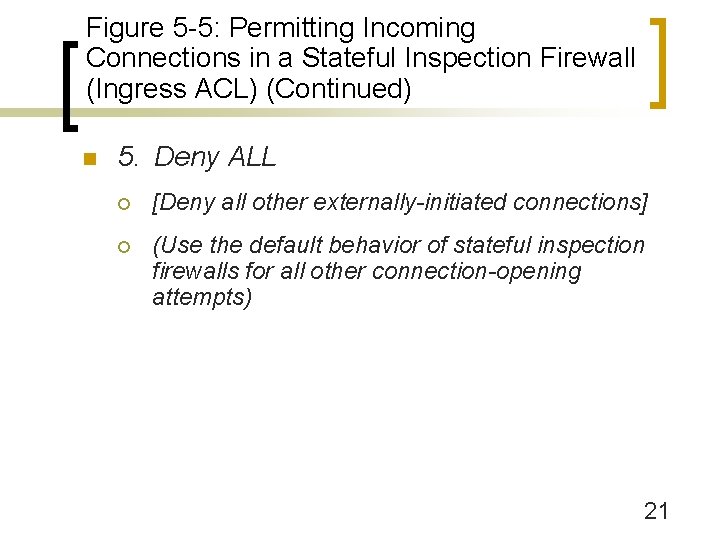
Figure 5 -5: Permitting Incoming Connections in a Stateful Inspection Firewall (Ingress ACL) (Continued) n 5. Deny ALL ¡ [Deny all other externally-initiated connections] ¡ (Use the default behavior of stateful inspection firewalls for all other connection-opening attempts) 21
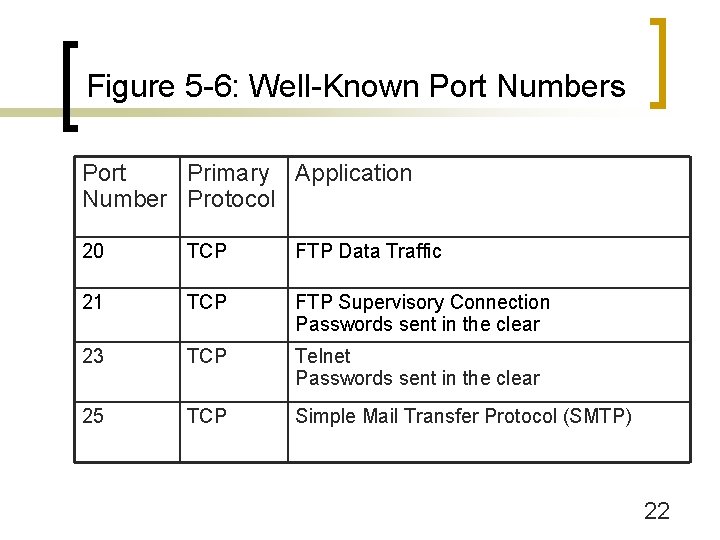
Figure 5 -6: Well-Known Port Numbers Port Primary Application Number Protocol 20 TCP FTP Data Traffic 21 TCP FTP Supervisory Connection Passwords sent in the clear 23 TCP Telnet Passwords sent in the clear 25 TCP Simple Mail Transfer Protocol (SMTP) 22
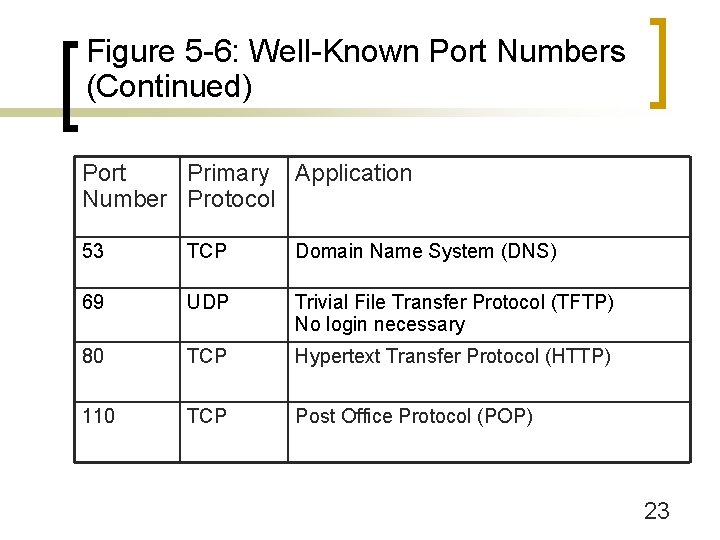
Figure 5 -6: Well-Known Port Numbers (Continued) Port Primary Application Number Protocol 53 TCP Domain Name System (DNS) 69 UDP Trivial File Transfer Protocol (TFTP) No login necessary 80 TCP Hypertext Transfer Protocol (HTTP) 110 TCP Post Office Protocol (POP) 23
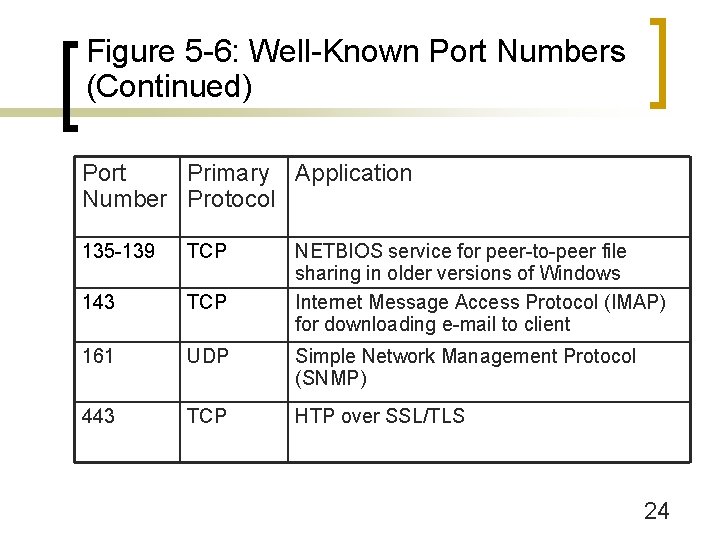
Figure 5 -6: Well-Known Port Numbers (Continued) Port Primary Application Number Protocol 135 -139 TCP NETBIOS service for peer-to-peer file sharing in older versions of Windows Internet Message Access Protocol (IMAP) for downloading e-mail to client 143 TCP 161 UDP Simple Network Management Protocol (SNMP) 443 TCP HTP over SSL/TLS 24
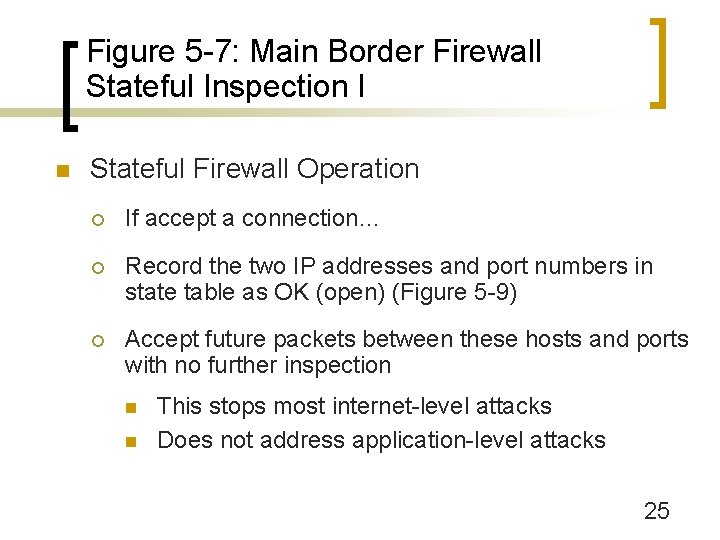
Figure 5 -7: Main Border Firewall Stateful Inspection I n Stateful Firewall Operation ¡ If accept a connection… ¡ Record the two IP addresses and port numbers in state table as OK (open) (Figure 5 -9) ¡ Accept future packets between these hosts and ports with no further inspection n n This stops most internet-level attacks Does not address application-level attacks 25
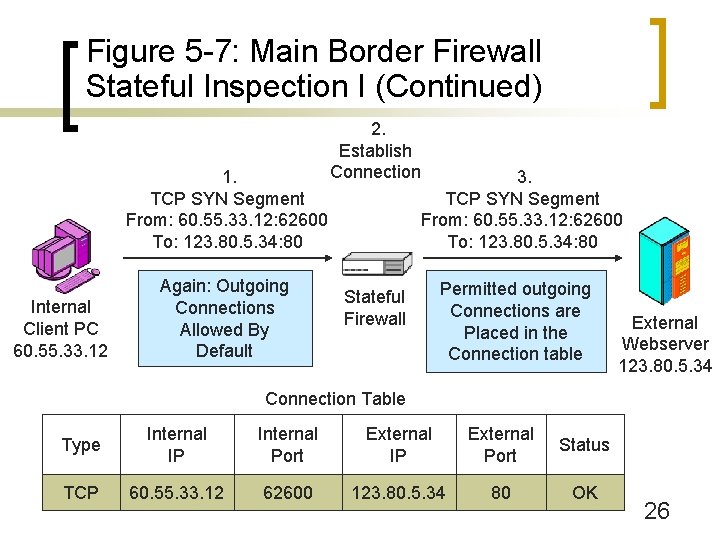
Figure 5 -7: Main Border Firewall Stateful Inspection I (Continued) 1. TCP SYN Segment From: 60. 55. 33. 12: 62600 To: 123. 80. 5. 34: 80 Internal Client PC 60. 55. 33. 12 Again: Outgoing Connections Allowed By Default 2. Establish Connection 3. TCP SYN Segment From: 60. 55. 33. 12: 62600 To: 123. 80. 5. 34: 80 Stateful Firewall Permitted outgoing Connections are Placed in the Connection table External Webserver 123. 80. 5. 34 Connection Table Type Internal IP Internal Port External IP External Port Status TCP 60. 55. 33. 12 62600 123. 80. 5. 34 80 OK 26
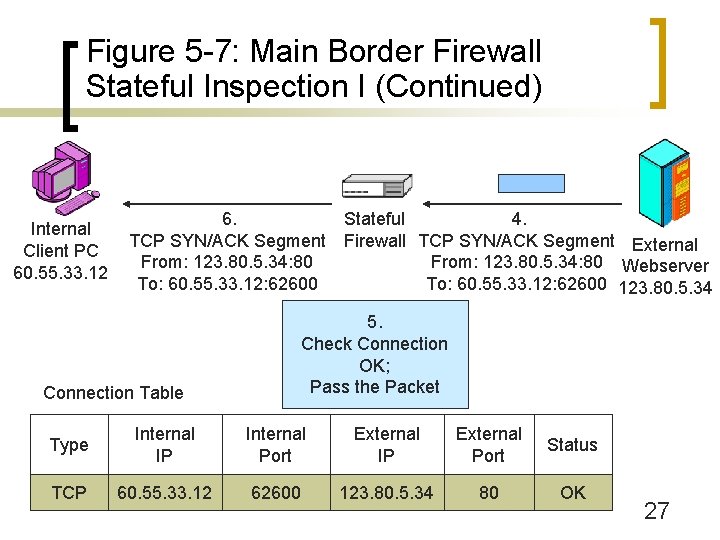
Figure 5 -7: Main Border Firewall Stateful Inspection I (Continued) Internal Client PC 60. 55. 33. 12 6. TCP SYN/ACK Segment From: 123. 80. 5. 34: 80 To: 60. 55. 33. 12: 62600 Stateful 4. Firewall TCP SYN/ACK Segment External From: 123. 80. 5. 34: 80 Webserver To: 60. 55. 33. 12: 62600 123. 80. 5. 34 5. Check Connection OK; Pass the Packet Connection Table Type Internal IP Internal Port External IP External Port Status TCP 60. 55. 33. 12 62600 123. 80. 5. 34 80 OK 27
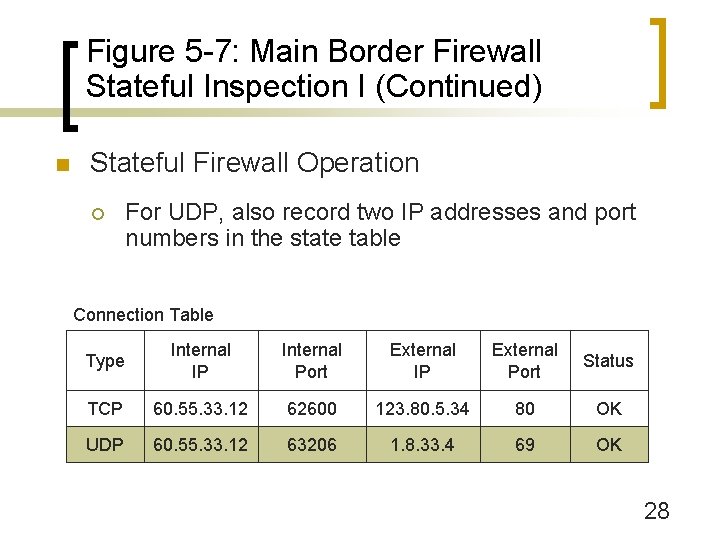
Figure 5 -7: Main Border Firewall Stateful Inspection I (Continued) n Stateful Firewall Operation ¡ For UDP, also record two IP addresses and port numbers in the state table Connection Table Type Internal IP Internal Port External IP External Port Status TCP 60. 55. 33. 12 62600 123. 80. 5. 34 80 OK UDP 60. 55. 33. 12 63206 1. 8. 33. 4 69 OK 28
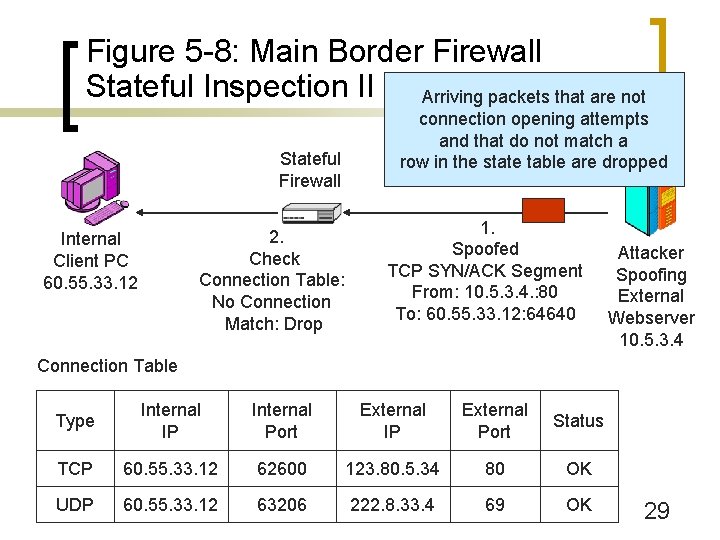
Figure 5 -8: Main Border Firewall Stateful Inspection II (Continued) Arriving packets that are not Stateful Firewall 2. Check Connection Table: No Connection Match: Drop Internal Client PC 60. 55. 33. 12 connection opening attempts and that do not match a row in the state table are dropped 1. Spoofed TCP SYN/ACK Segment From: 10. 5. 3. 4. : 80 To: 60. 55. 33. 12: 64640 Attacker Spoofing External Webserver 10. 5. 3. 4 Connection Table Type Internal IP Internal Port External IP External Port Status TCP 60. 55. 33. 12 62600 123. 80. 5. 34 80 OK UDP 60. 55. 33. 12 63206 222. 8. 33. 4 69 OK 29
Figure 5 -9: Stateful Inspection Firewall in Perspective n Simplicity and Therefore Low Cost ¡ Connection opening decisions are somewhat complex ¡ But most packets are part of approved ongoing connections ¡ Filtering ongoing packets is extremely simple ¡ Therefore, stateful inspection is fast and inexpensive 30
Figure 5 -9: Stateful Inspection Firewall in Perspective (Continued) n Low Cost n Safety n ¡ Stops nearly all internet-level attacks ¡ (Application-level filtering still needed) Dominance for Main Border Firewalls ¡ Nearly all use stateful inspection 31

Figure 5 -9: Stateful Inspection Firewall in Perspective (Continued) n Beyond Stateful Inspection ¡ Most main border firewalls also use other inspection methods ¡ Denial-of-service filtering ¡ Limited application content filtering ¡ Etc. 32
Screening Router Firewall Static Packet Inspection
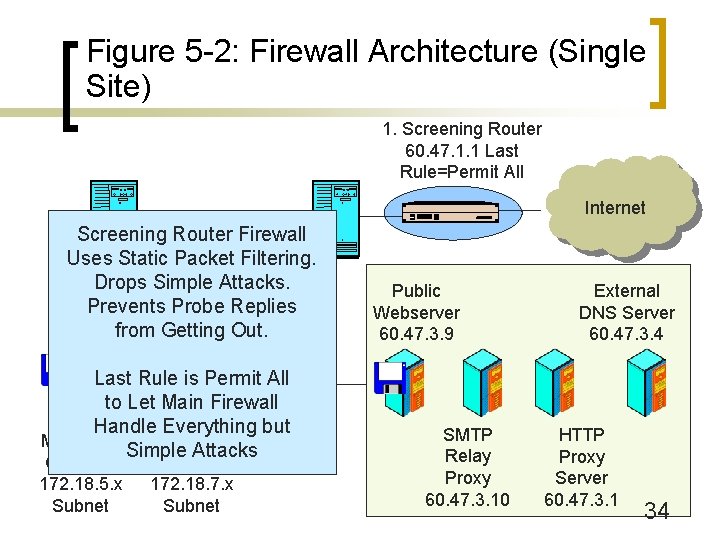
Figure 5 -2: Firewall Architecture (Single Site) 1. Screening Router 60. 47. 1. 1 Last Rule=Permit All Internet Screening Router Subnet Firewall 172. 18. 9. x Uses Static Packet Filtering. Drops Simple Attacks. Prevents Probe Replies from Getting Out. Last Rule is Permit All to Let Main Firewall Handle Everything but Marketing Accounting Simple Attacks Client on 172. 18. 5. x Subnet Server on 172. 18. 7. x Subnet Public Webserver 60. 47. 3. 9 SMTP Relay Proxy 60. 47. 3. 10 External DNS Server 60. 47. 3. 4 HTTP Proxy Server 60. 47. 3. 1 34
Figure 5 -10: Static Packet Inspection on Screening Router Firewalls n Screening Firewall Routers ¡ Add filtering to the border router (Figure 5 -2) ¡ Filter out many high-frequency, low-complexity attacks ¡ For ingress filtering, reduce the load on the main border firewall 35
Figure 5 -10: Static Packet Inspection on Screening Router Firewalls (Continued) n High Cost for Sufficient Performance ¡ Must buy inspection software for the router (expensive) ¡ Usually must upgrade router processing speed and memory (expensive) 36
Figure 5 -10: Static Packet Inspection on Screening Router Firewalls (Continued) n Good Location for Egress Filtering ¡ Stops all replies to probe packets ¡ Including those from the border router itself 37
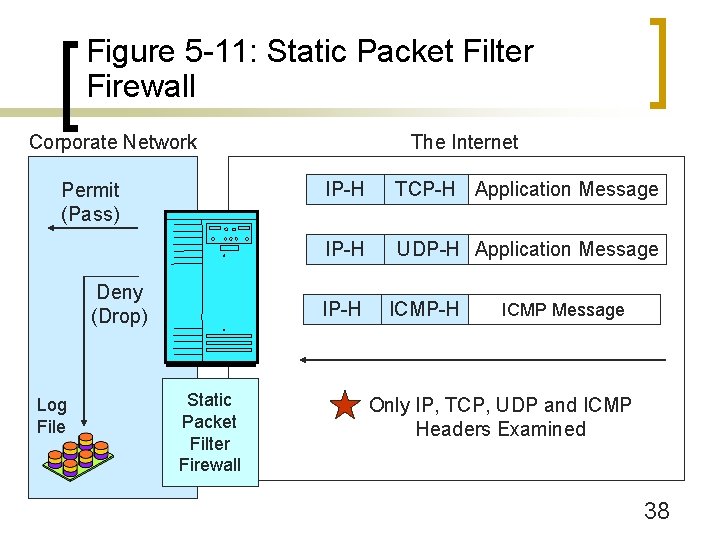
Figure 5 -11: Static Packet Filter Firewall Corporate Network Permit (Pass) Deny (Drop) Log File The Internet IP-H TCP-H Application Message IP-H UDP-H Application Message IP-H Static Packet Filter Firewall ICMP-H ICMP Message Only IP, TCP, UDP and ICMP Headers Examined 38
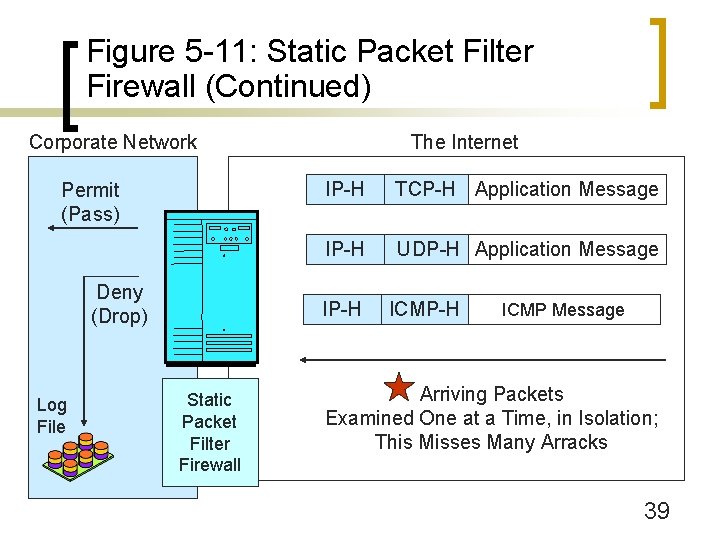
Figure 5 -11: Static Packet Filter Firewall (Continued) Corporate Network Permit (Pass) Deny (Drop) Log File The Internet IP-H TCP-H Application Message IP-H UDP-H Application Message IP-H Static Packet Filter Firewall ICMP-H ICMP Message Arriving Packets Examined One at a Time, in Isolation; This Misses Many Arracks 39
Figure 5 -10: Static Packet Inspection on Screening Router Firewalls (Continued) n Use Static Packet Filtering (Figure 5 -11) ¡ Require complex access control lists (ACLs) (Figures 5 -12 and 5 -13) n Because need an ACL statement for each rule 40

Figure 5 -12: Screening Firewall Router Ingress ACL n 1. If source IP address = 10. *. *. *, DENY [private IP address range] n 2. If source IP address = 172. 16. *. * to 172. 31. *. *, DENY [private IP address range] n 3. If source IP address = 192. 168. *. *, DENY [private IP address range] n 4. If source IP address = 60. 47. *. *, DENY [internal IP address range] n 5. If source IP address = 1. 33. 3. 4, DENY [blackholed IP address of attacker] 41
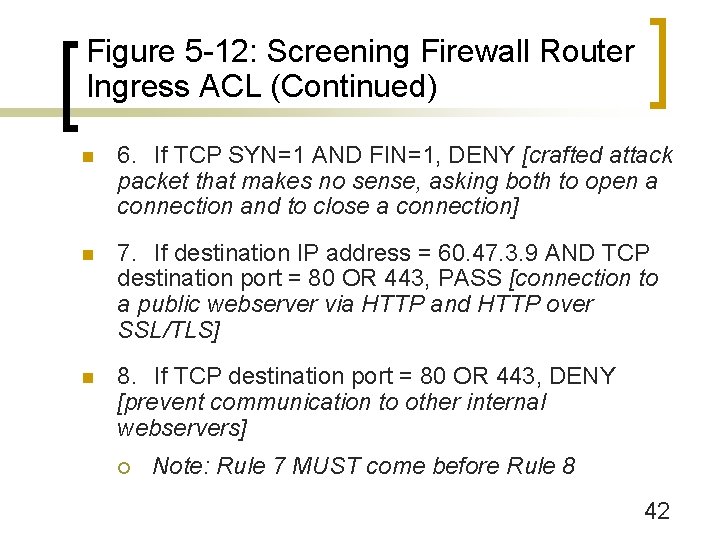
Figure 5 -12: Screening Firewall Router Ingress ACL (Continued) n 6. If TCP SYN=1 AND FIN=1, DENY [crafted attack packet that makes no sense, asking both to open a connection and to close a connection] n 7. If destination IP address = 60. 47. 3. 9 AND TCP destination port = 80 OR 443, PASS [connection to a public webserver via HTTP and HTTP over SSL/TLS] n 8. If TCP destination port = 80 OR 443, DENY [prevent communication to other internal webservers] ¡ Note: Rule 7 MUST come before Rule 8 42
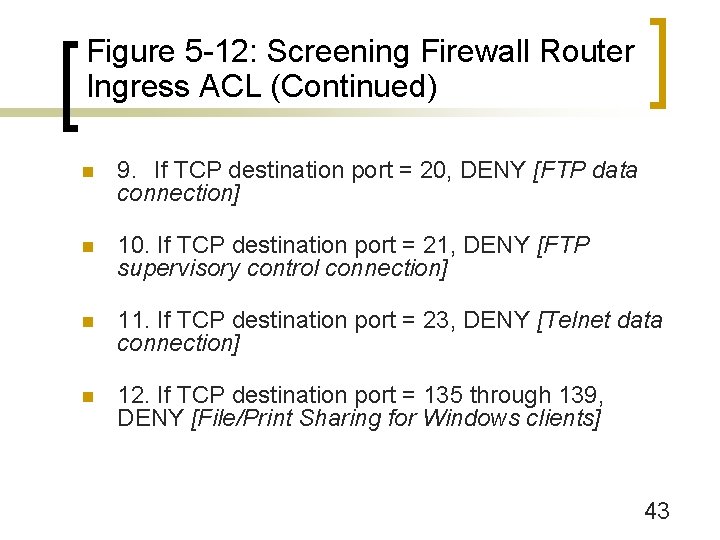
Figure 5 -12: Screening Firewall Router Ingress ACL (Continued) n 9. If TCP destination port = 20, DENY [FTP data connection] n 10. If TCP destination port = 21, DENY [FTP supervisory control connection] n 11. If TCP destination port = 23, DENY [Telnet data connection] n 12. If TCP destination port = 135 through 139, DENY [File/Print Sharing for Windows clients] 43
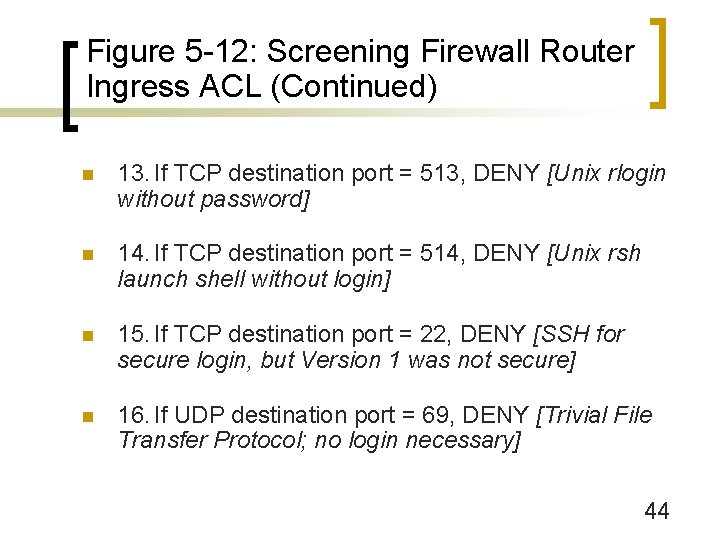
Figure 5 -12: Screening Firewall Router Ingress ACL (Continued) n 13. If TCP destination port = 513, DENY [Unix rlogin without password] n 14. If TCP destination port = 514, DENY [Unix rsh launch shell without login] n 15. If TCP destination port = 22, DENY [SSH for secure login, but Version 1 was not secure] n 16. If UDP destination port = 69, DENY [Trivial File Transfer Protocol; no login necessary] 44
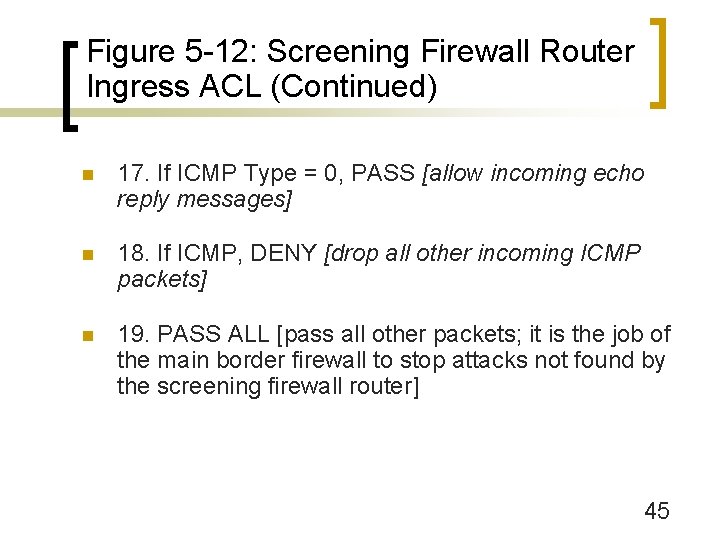
Figure 5 -12: Screening Firewall Router Ingress ACL (Continued) n 17. If ICMP Type = 0, PASS [allow incoming echo reply messages] n 18. If ICMP, DENY [drop all other incoming ICMP packets] n 19. PASS ALL [pass all other packets; it is the job of the main border firewall to stop attacks not found by the screening firewall router] 45
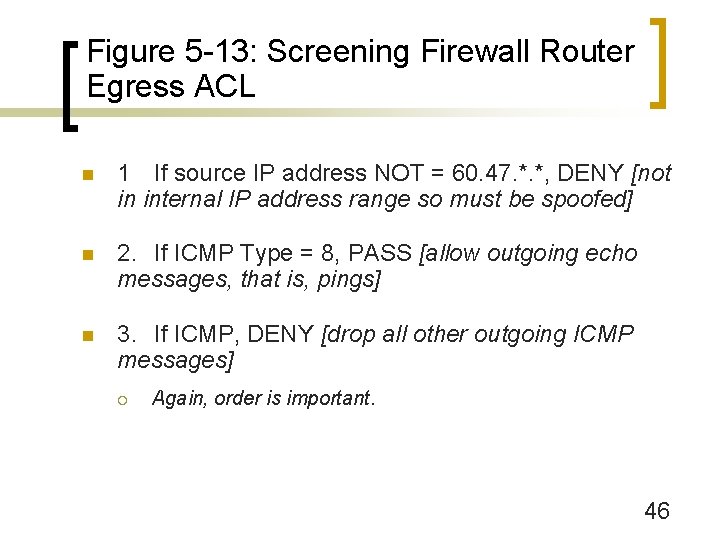
Figure 5 -13: Screening Firewall Router Egress ACL n 1 If source IP address NOT = 60. 47. *. *, DENY [not in internal IP address range so must be spoofed] n 2. If ICMP Type = 8, PASS [allow outgoing echo messages, that is, pings] n 3. If ICMP, DENY [drop all other outgoing ICMP messages] ¡ Again, order is important. 46
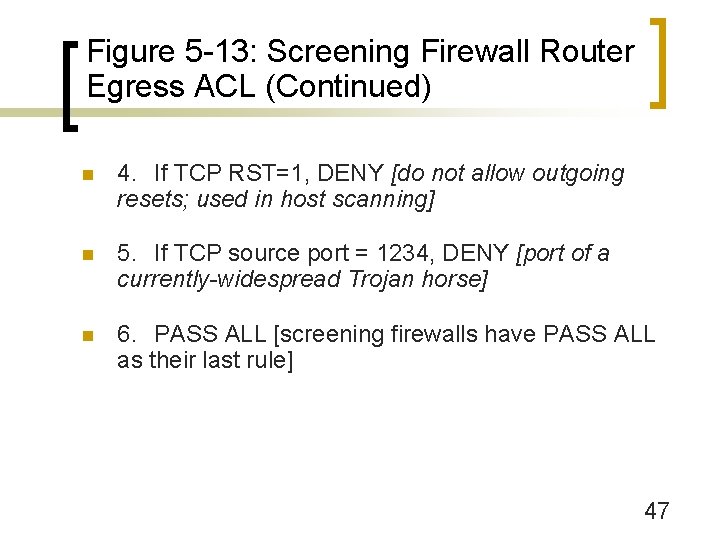
Figure 5 -13: Screening Firewall Router Egress ACL (Continued) n 4. If TCP RST=1, DENY [do not allow outgoing resets; used in host scanning] n 5. If TCP source port = 1234, DENY [port of a currently-widespread Trojan horse] n 6. PASS ALL [screening firewalls have PASS ALL as their last rule] 47
Network Address Translation (NAT)
Figure 5 -14: Network Address Translation (NAT) n The problem: Sniffers on the Internet can read packets to and from organizations ¡ Reveals IP addresses and port numbers of hosts ¡ Provides considerable information about potential victims without the risks of sending probing attacks ¡ Solution: Disguise IP addresses and port numbers of internal hosts. 49
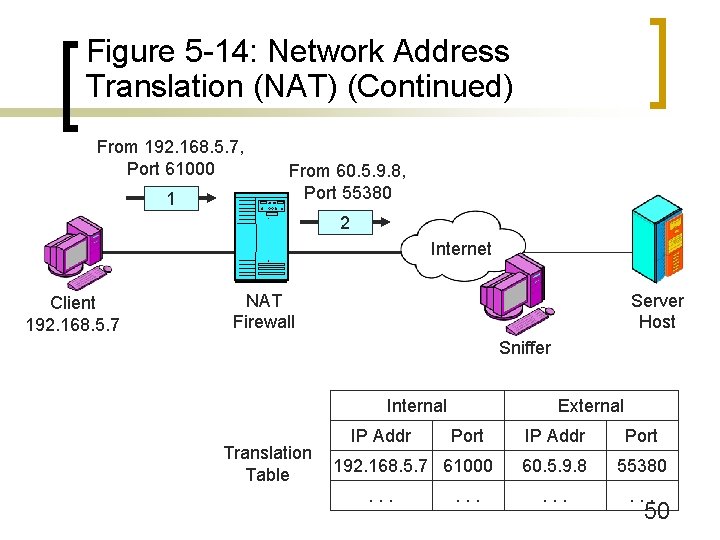
Figure 5 -14: Network Address Translation (NAT) (Continued) From 192. 168. 5. 7, Port 61000 1 From 60. 5. 9. 8, Port 55380 2 Internet Client 192. 168. 5. 7 NAT Firewall Server Host Sniffer Internal Translation Table IP Addr External Port 192. 168. 5. 7 61000. . . IP Addr Port 60. 5. 9. 8 55380 . . . 50
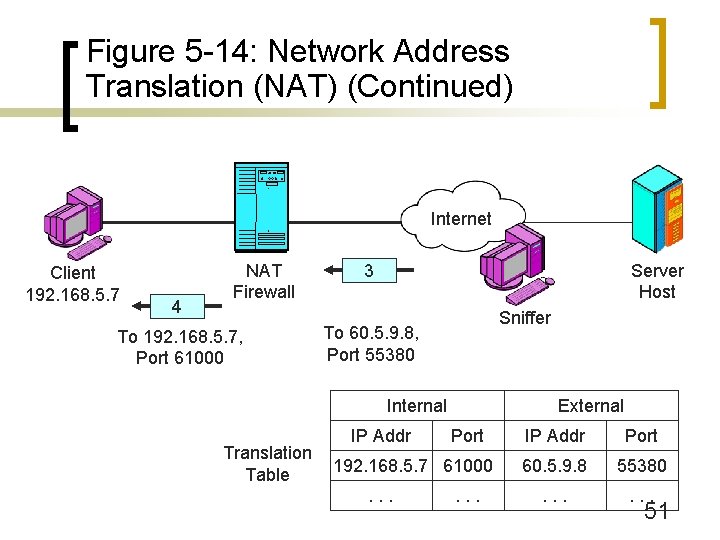
Figure 5 -14: Network Address Translation (NAT) (Continued) Internet Client 192. 168. 5. 7 4 NAT Firewall To 192. 168. 5. 7, Port 61000 Server Host 3 Sniffer To 60. 5. 9. 8, Port 55380 Internal Translation Table IP Addr External Port 192. 168. 5. 7 61000. . . IP Addr Port 60. 5. 9. 8 55380 . . . 51
Figure 5 -15: Perspective on NAT n Sniffers on the Internet cannot learn internal IP addresses and port numbers ¡ n Only learn the translated address and port number By themselves, provide a great deal of protection against attacks ¡ External attackers cannot create a connection to an internal computers 52
Figure 5 -15: Perspective on NAT (Continued) n Sniffers and NAT ¡ Sniffers can read stand-in IP addresses and port numbers ¡ Can send back packets to these stand-in values; NAT will deliver them to the real host ¡ However, most sessions too brief to exploit ¡ Still a potential danger if sniffers act quickly 53
Figure 5 -15: Perspective on NAT (Continued) n NAT/PAT ¡ NAT does more than network (IP) address translation ¡ Also does port number translation ¡ Should be called NAT/PAT, but NAT is the common term 54
Figure 5 -15: Perspective on NAT (Continued) n Problems with Certain Protocols ¡ Virtual private networks (later in the chapter) ¡ Vo. IP, etc. ¡ Static rows in translation tables can mitigate these problems n Maintained indefinitely ¡ But static assignments removes most security benefits of NAT 55
Figure 5 -15: Perspective on NAT (Continued) n Box: Using NAT for Address Multiplication ¡ Firm may only be given a limited number of public IP addresses ¡ Must use these in packets sent to the Internet ¡ May use private IP addresses internally 56
Figure 5 -15: Perspective on NAT (Continued) n Box: Using NAT for Address Multiplication ¡ For each public IP address, there can be a separate connection for each possible port n Address 60. 5. 9. 8, Port = 2000 n Address 60. 5. 9. 8, Port = 2001 n Etc. ¡ Each connection can be linked to a different internal IP address ¡ Can have thousands of internal IP addresses for each public IP address 57
Figure 5 -15: Perspective on NAT (Continued) n Sniffers on the Internet cannot learn internal IP addresses and port numbers ¡ n Only learn the translated address and port number By themselves, provide a great deal of protection against attacks ¡ External attackers cannot create a connection to an internal computers 58
Application Proxy Firewalls
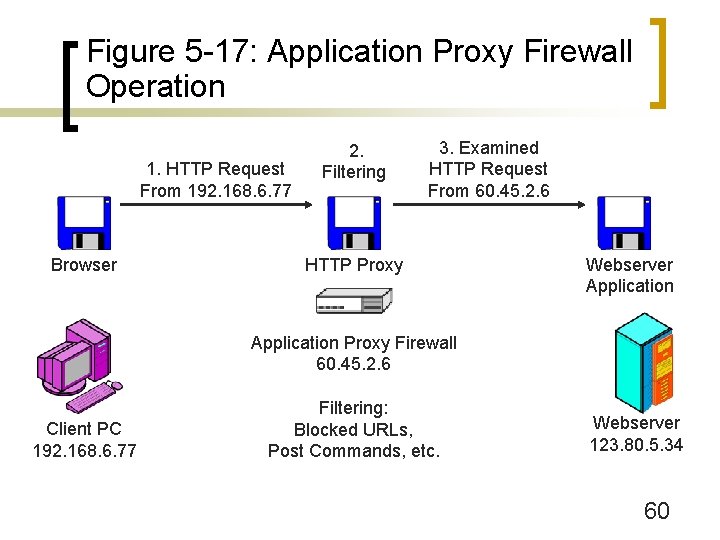
Figure 5 -17: Application Proxy Firewall Operation 1. HTTP Request From 192. 168. 6. 77 Browser 2. Filtering 3. Examined HTTP Request From 60. 45. 2. 6 HTTP Proxy Webserver Application Proxy Firewall 60. 45. 2. 6 Client PC 192. 168. 6. 77 Filtering: Blocked URLs, Post Commands, etc. Webserver 123. 80. 5. 34 60
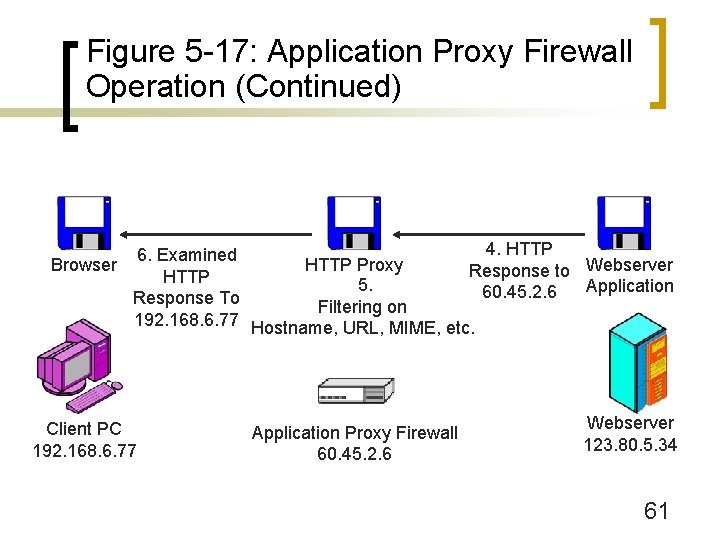
Figure 5 -17: Application Proxy Firewall Operation (Continued) 4. HTTP 6. Examined Browser HTTP Proxy Response to Webserver HTTP 5. Application 60. 45. 2. 6 Response To Filtering on 192. 168. 6. 77 Hostname, URL, MIME, etc. Client PC 192. 168. 6. 77 Application Proxy Firewall 60. 45. 2. 6 Webserver 123. 80. 5. 34 61
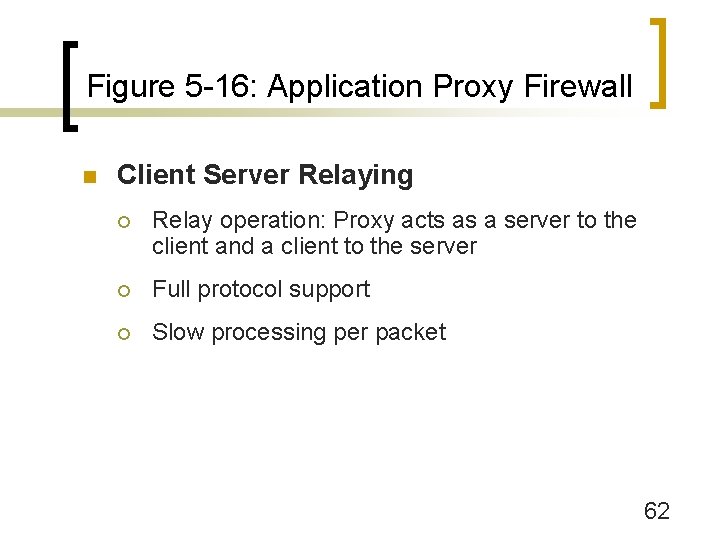
Figure 5 -16: Application Proxy Firewall n Client Server Relaying ¡ Relay operation: Proxy acts as a server to the client and a client to the server ¡ Full protocol support ¡ Slow processing per packet 62
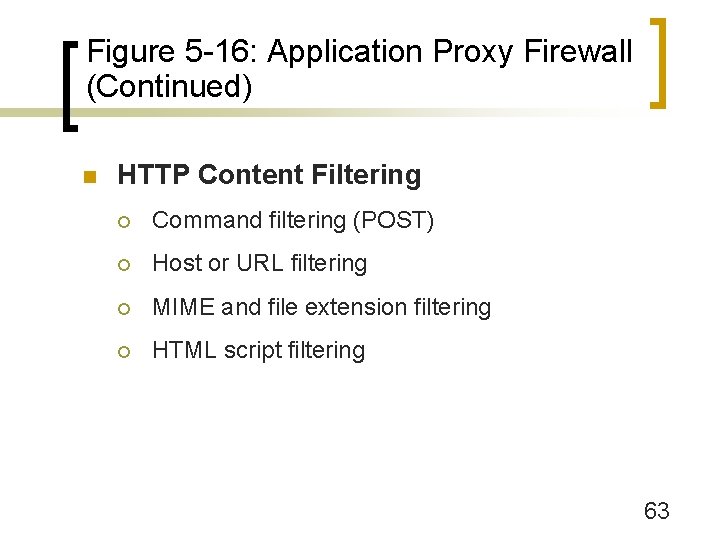
Figure 5 -16: Application Proxy Firewall (Continued) n HTTP Content Filtering ¡ Command filtering (POST) ¡ Host or URL filtering ¡ MIME and file extension filtering ¡ HTML script filtering 63
Figure 5 -16: Application Proxy Firewall (Continued) n Core Protections (see Figure 5 -18) ¡ IP address hiding (sniffer will only see the application proxy firewall’s IP address) ¡ Packet header destruction ¡ Stopping protocol spoofing with protocol enforcement n Problem with HTTP Tunneling 64
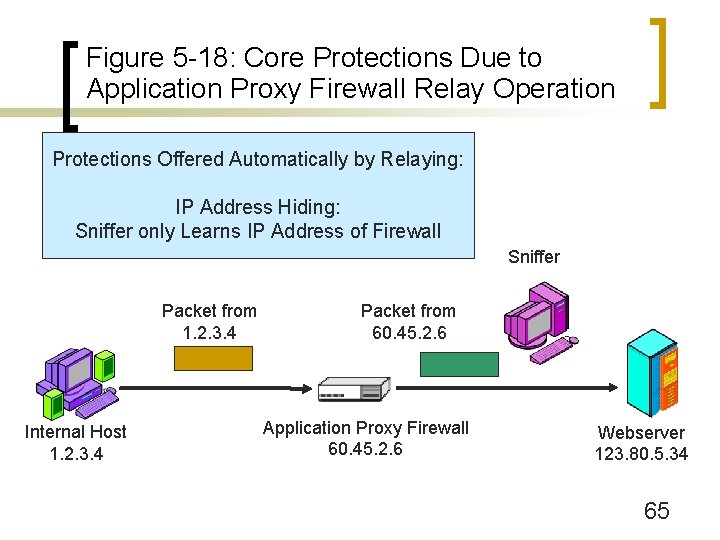
Figure 5 -18: Core Protections Due to Application Proxy Firewall Relay Operation Protections Offered Automatically by Relaying: IP Address Hiding: Sniffer only Learns IP Address of Firewall Sniffer Packet from 1. 2. 3. 4 Internal Host 1. 2. 3. 4 Packet from 60. 45. 2. 6 Application Proxy Firewall 60. 45. 2. 6 Webserver 123. 80. 5. 34 65
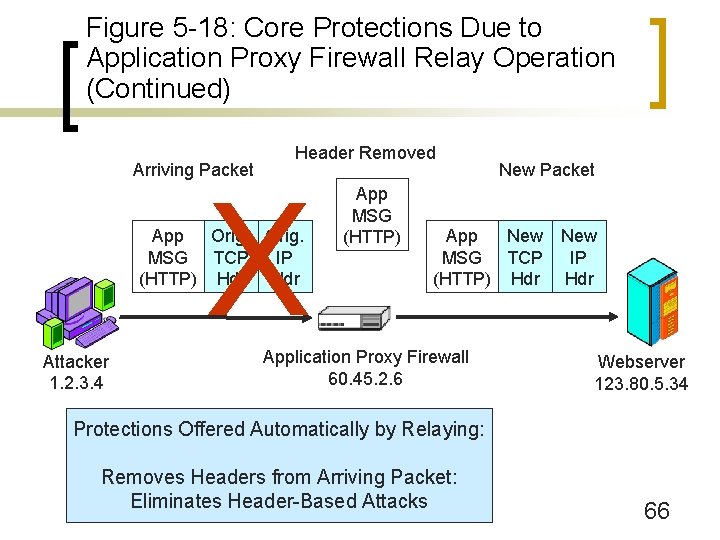
Figure 5 -18: Core Protections Due to Application Proxy Firewall Relay Operation (Continued) Arriving Packet Header Removed X App Orig. MSG TCP IP (HTTP) Hdr Attacker 1. 2. 3. 4 App MSG (HTTP) New Packet App New MSG TCP (HTTP) Hdr Application Proxy Firewall 60. 45. 2. 6 New IP Hdr Webserver 123. 80. 5. 34 Protections Offered Automatically by Relaying: Removes Headers from Arriving Packet: Eliminates Header-Based Attacks 66
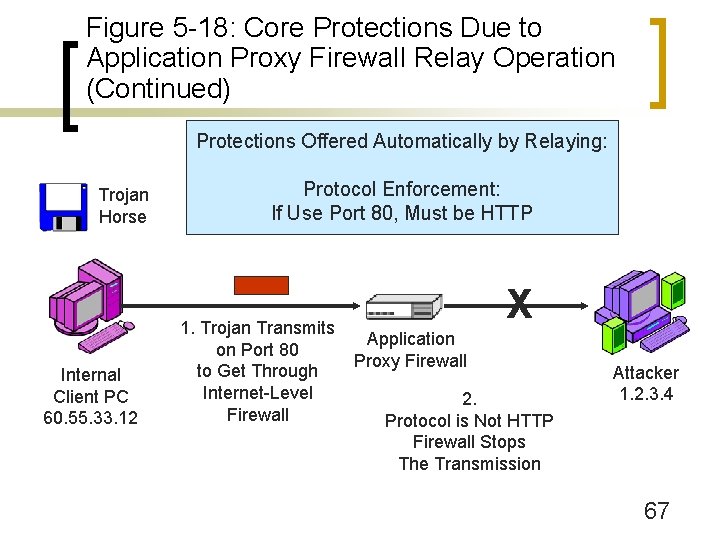
Figure 5 -18: Core Protections Due to Application Proxy Firewall Relay Operation (Continued) Protections Offered Automatically by Relaying: Trojan Horse Internal Client PC 60. 55. 33. 12 Protocol Enforcement: If Use Port 80, Must be HTTP 1. Trojan Transmits on Port 80 to Get Through Internet-Level Firewall X Application Proxy Firewall 2. Protocol is Not HTTP Firewall Stops The Transmission Attacker 1. 2. 3. 4 67
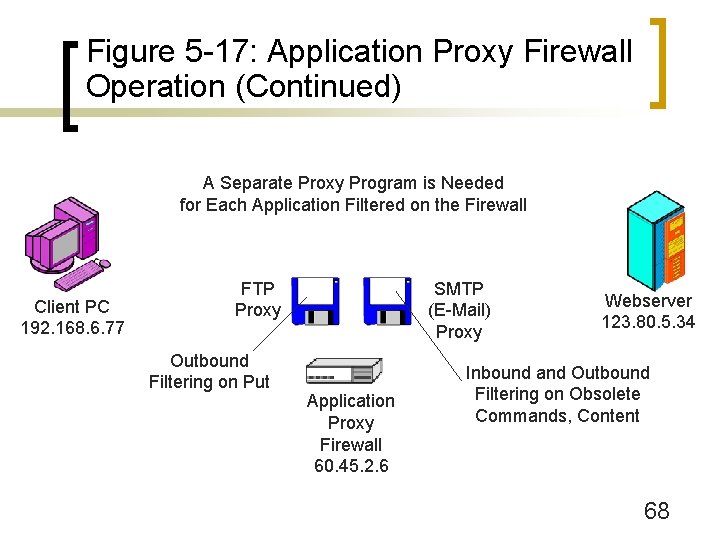
Figure 5 -17: Application Proxy Firewall Operation (Continued) A Separate Proxy Program is Needed for Each Application Filtered on the Firewall Client PC 192. 168. 6. 77 FTP Proxy Outbound Filtering on Put SMTP (E-Mail) Proxy Application Proxy Firewall 60. 45. 2. 6 Webserver 123. 80. 5. 34 Inbound and Outbound Filtering on Obsolete Commands, Content 68
Figure 5 -16: Application Proxy Firewalls (Continued) n Multiple Proxies ¡ Each application to be filtered needs a separate proxy program ¡ Small firms usually use a single application proxy firewall with multiple application proxies ¡ Large firms usually use a single application proxy firewall per proxy 69
Figure 5 -16: Application Proxy Firewalls (Continued) n Box: Other Application Proxies ¡ FTP (prohibit Put, limit file sizes, etc. ) ¡ SMTP (Prohibit obsolete commands, delete attachments, limit attachment size, MIME type) ¡ Web Services (work in progress) 70

Figure 5 -16: Application Proxy Firewalls (Continued) n Box: Circuit Firewalls (Figure 5 -19) ¡ Non application-specific application proxy firewalls ¡ Create connections at the application layer ¡ Provide IP address hiding and header destruction, but not protocol enforcement ¡ Do not provide content filtering ¡ Do provide authentication ¡ SOCKS V 5 is the dominant standard for circuit firewalls 71
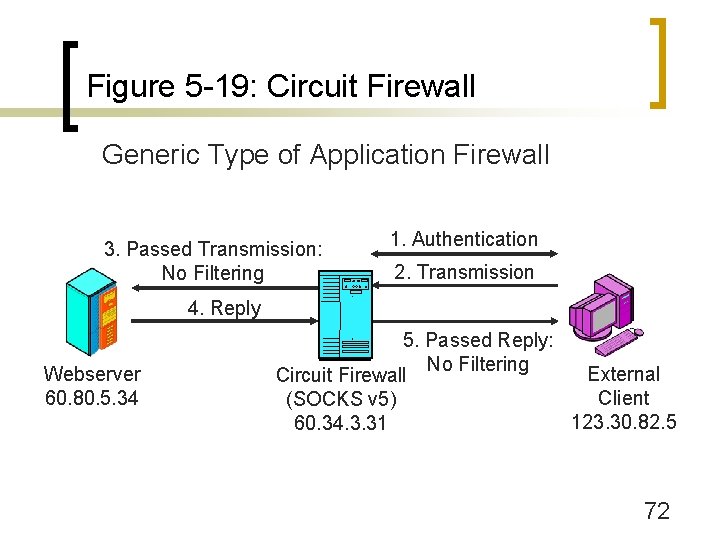
Figure 5 -19: Circuit Firewall Generic Type of Application Firewall 3. Passed Transmission: No Filtering 1. Authentication 2. Transmission 4. Reply Webserver 60. 80. 5. 34 5. Passed Reply: No Filtering External Circuit Firewall Client (SOCKS v 5) 123. 30. 82. 5 60. 34. 3. 31 72
Antivirus Filtering
Figure 5 -20: Antivirus Filtering n Normally, Firewalls Do Not Do Antivirus Filtering ¡ Pass packets needing antivirus filtering to an antivirus server (Figure 5 -21) 74
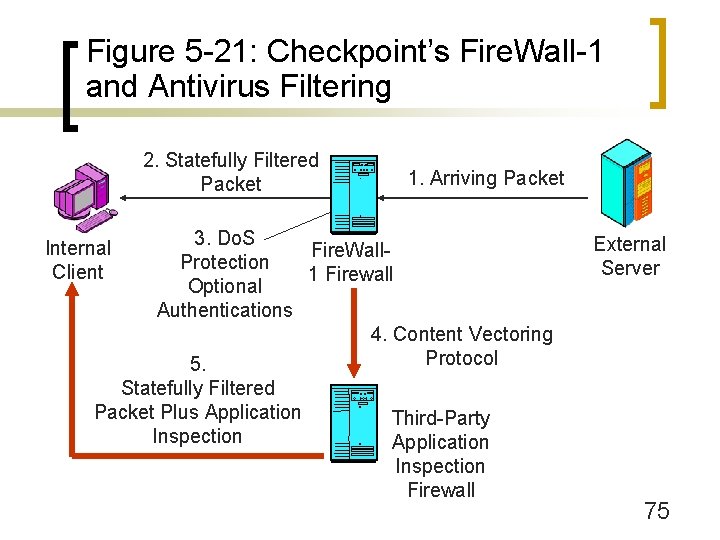
Figure 5 -21: Checkpoint’s Fire. Wall-1 and Antivirus Filtering 2. Statefully Filtered Packet 1. Arriving Packet 3. Do. S Fire. Wall. Protection 1 Firewall Optional Authentications 4. Content Vectoring Protocol 5. Statefully Filtered Packet Plus Application Third-Party Inspection Application Inspection Firewall Internal Client External Server 75
Figure 5 -20: Antivirus Filtering (Continued) n Examine Application Messages for Many Forms of Malware (see Chapter 4) ¡ Not just viruses ¡ Worms, Trojan horses, spyware, adware 76
Figure 5 -20: Antivirus Filtering (Continued) n Detection is Based on Signatures ¡ Strings of characters found within specific malware files ¡ Create a new signature for each piece of malware, add it to signatures database ¡ Antivirus filter vendors worry about signatures so complex that signature-based detection will be too slow to be useful 77
Figure 5 -20: Antivirus Filtering (Continued) n Updating Antivirus Programs ¡ All antivirus programs have an updating feature n To get new signatures and program upgrades ¡ Without updates, programs cannot handle new threats ¡ Users may turn off updating or update too rarely ¡ Users may let subscriptions lapse; program remains, but get no new updates 78
Figure 5 -20: Antivirus Filtering (Continued) n Where to Filter? ¡ On individual user PCs n The traditional approach to antivirus filtering n But users often fail to update n May even turn off the antivirus program because it is inconvenient 79
Figure 5 -20: Antivirus Filtering (Continued) n Where to Filter? ¡ On the e-mail server n Filters mail before the user gets it n Systems administrators are likely to maintain the filtering 80
Figure 5 -20: Antivirus Filtering (Continued) n Where to Filter? ¡ E-mail outsourcing companies n Filter mail before it gets to the firm n Outsourcers have expertise n This reduces corporate labor costs 81
Figure 5 -20: Antivirus Filtering (Continued) n Where to Filter? ¡ Defense in Depth n Filter in two locations or all three 82
Figure 5 -20: Antivirus Filtering (Continued) n Spam ¡ Unsolicited commercial e-mail ¡ Also can be filtered on individual PCs, on e-mail servers, or at e-mail outsourcing firms ¡ Not as precise as antivirus filtering ¡ Too many false negatives (failing to label spam messages as spam) ¡ Too many false positives (labeling good messages as spam) Very dangerous. 83
The Demilitarized Zone (DMZ)
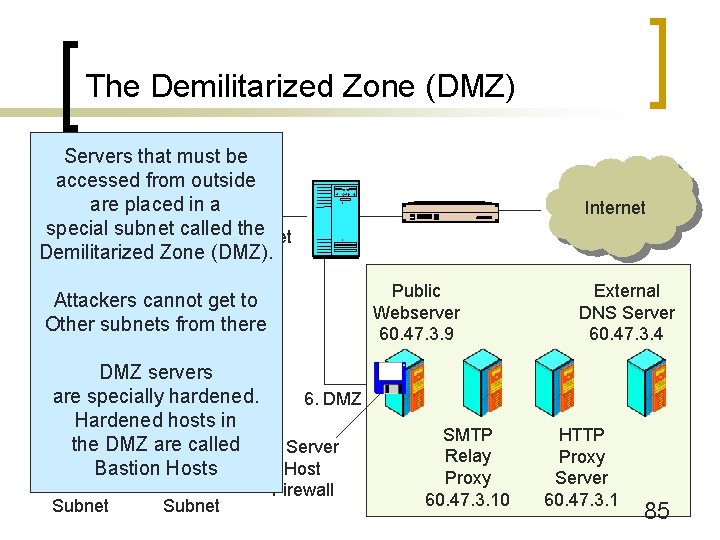
The Demilitarized Zone (DMZ) Servers that must be accessed from outside are placed in a special subnet called Subnet the 172. 18. 9. x Demilitarized Zone (DMZ). Public Webserver 60. 47. 3. 9 Attackers cannot get to Other subnets from there DMZ servers are specially hardened. 6. DMZ Hardened hosts in Marketing the DMZAccounting are called 5. Server Client Bastion on Server Hostson 172. 18. 5. x Subnet 172. 18. 7. x Subnet Internet Firewall SMTP Relay Proxy 60. 47. 3. 10 External DNS Server 60. 47. 3. 4 HTTP Proxy Server 60. 47. 3. 1 85
Figure 5 -22: The Demilitarized Zone (DMZ) n Demilitarized Zone (DMZ) ¡ Subnet for servers and application proxy firewalls accessible via the Internet (Figure 5 -2) ¡ Hosts in the DMZ must be especially hardened because they will be attacked by hackers ¡ Hardened hosts in the DMZ are called bastion hosts 86
Figure 5 -22: The Demilitarized Zone (DMZ) (Continued) n Uses Tri-Homed Main Firewalls ¡ 3 NICs, each attached to a different subnet ¡ One subnet to the border router ¡ One subnet for the DMZ (accessible to the outside world) ¡ One subnet for the internal network n Access from the subnet to the Internet is strongly controlled n Access from the DMZ is also strongly controlled 87
Figure 5 -22: The Demilitarized Zone (DMZ) (Continued) n Hosts in the DMZ ¡ Public servers (public webservers, FTP servers, etc. ) ¡ Application proxy firewalls ¡ External DNS server that only knows host names for hosts in the DMZ 88
Intrusion Detection Systems (IDSs) and Intrusion Prevention Systems (IPSs)
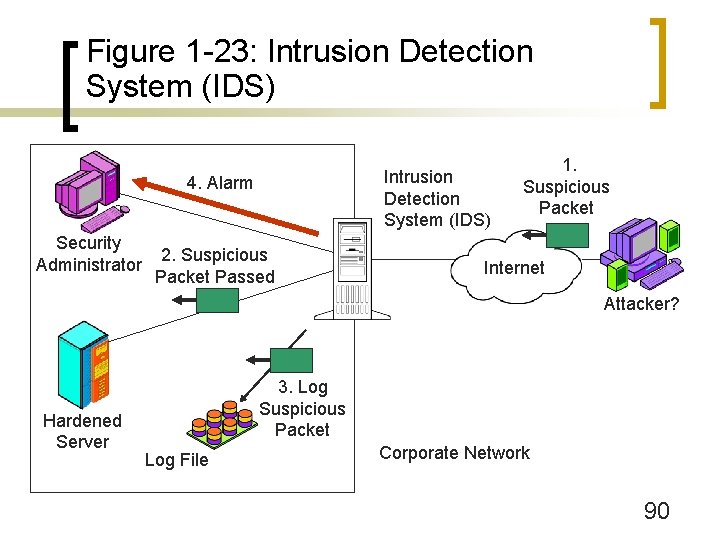
Figure 1 -23: Intrusion Detection System (IDS) 4. Alarm Security Administrator 2. Suspicious Packet Passed 1. Suspicious Packet Internet Attacker? Hardened Server 3. Log Suspicious Packet Log File Corporate Network 90
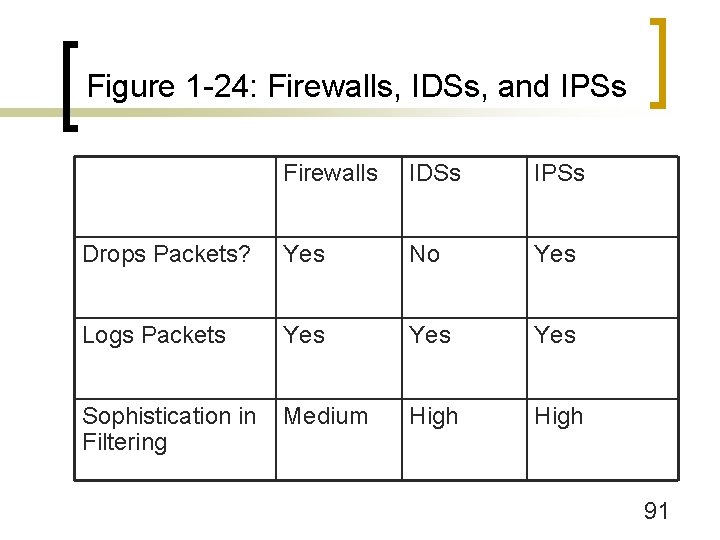
Figure 1 -24: Firewalls, IDSs, and IPSs Firewalls IDSs IPSs Drops Packets? Yes No Yes Logs Packets Yes Yes Sophistication in Filtering Medium High 91
Figure 1 -24: Firewalls, IDSs, and IPSs (Continued) n Sophistication in Filtering ¡ Message stream analysis, not just individual packets ¡ Reassemble fragmented application messages ¡ Deep packet inspection: both internet-level headers and application headers 92
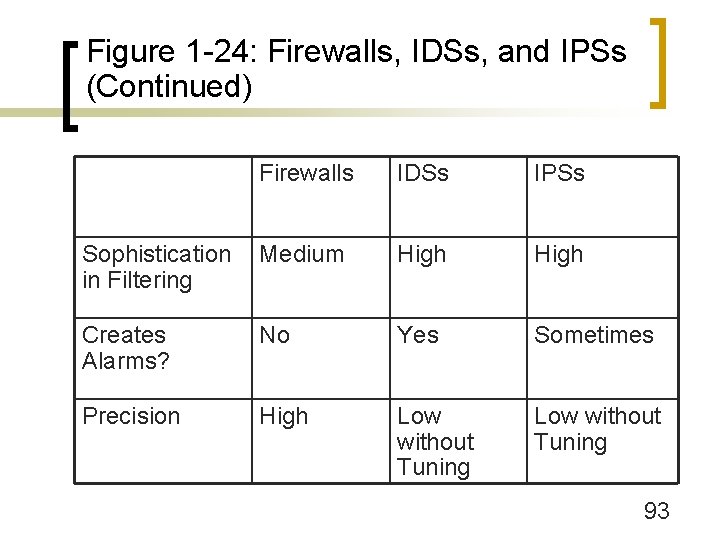
Figure 1 -24: Firewalls, IDSs, and IPSs (Continued) Firewalls IDSs IPSs Sophistication in Filtering Medium High Creates Alarms? No Yes Sometimes Precision High Low without Tuning 93
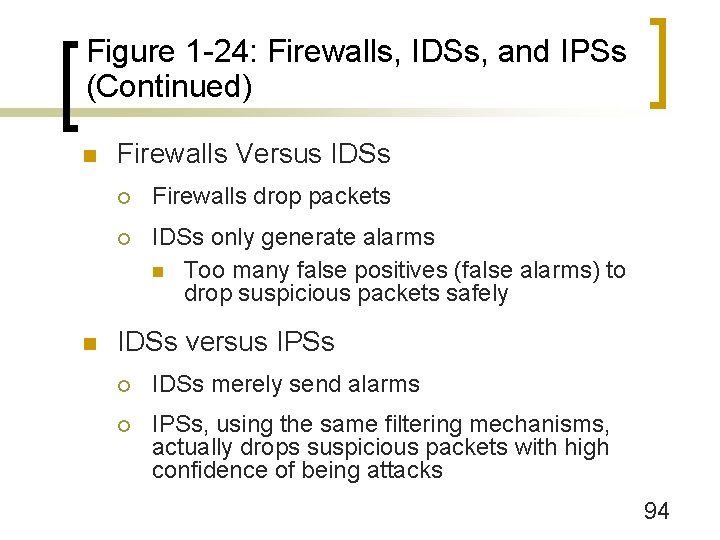
Figure 1 -24: Firewalls, IDSs, and IPSs (Continued) n n Firewalls Versus IDSs ¡ Firewalls drop packets ¡ IDSs only generate alarms n Too many false positives (false alarms) to drop suspicious packets safely IDSs versus IPSs ¡ IDSs merely send alarms ¡ IPSs, using the same filtering mechanisms, actually drops suspicious packets with high confidence of being attacks 94
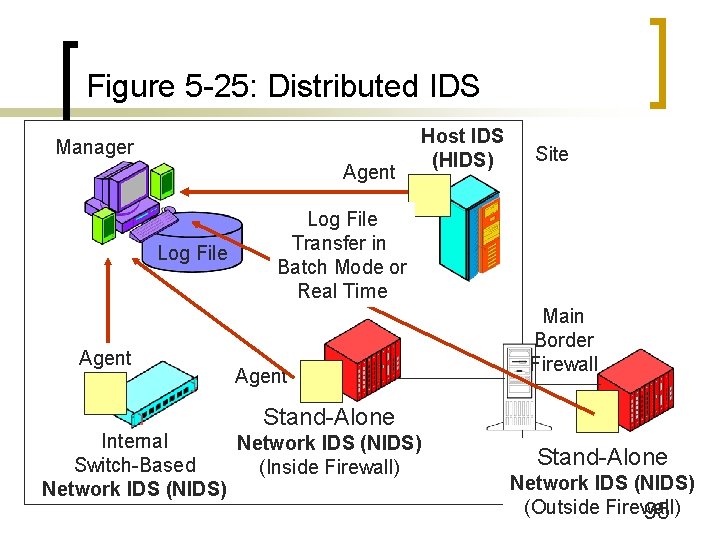
Figure 5 -25: Distributed IDS Manager Agent Log File Agent Host IDS (HIDS) Site Log File Transfer in Batch Mode or Real Time Agent Main Border Firewall Stand-Alone Internal Network IDS (NIDS) Switch-Based (Inside Firewall) Network IDS (NIDS) Stand-Alone Network IDS (NIDS) (Outside Firewall) 95
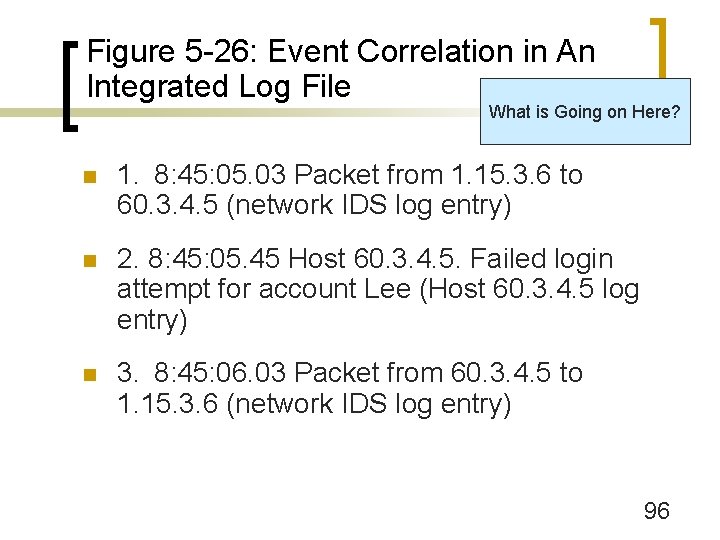
Figure 5 -26: Event Correlation in An Integrated Log File What is Going on Here? n 1. 8: 45: 05. 03 Packet from 1. 15. 3. 6 to 60. 3. 4. 5 (network IDS log entry) n 2. 8: 45: 05. 45 Host 60. 3. 4. 5. Failed login attempt for account Lee (Host 60. 3. 4. 5 log entry) n 3. 8: 45: 06. 03 Packet from 60. 3. 4. 5 to 1. 15. 3. 6 (network IDS log entry) 96
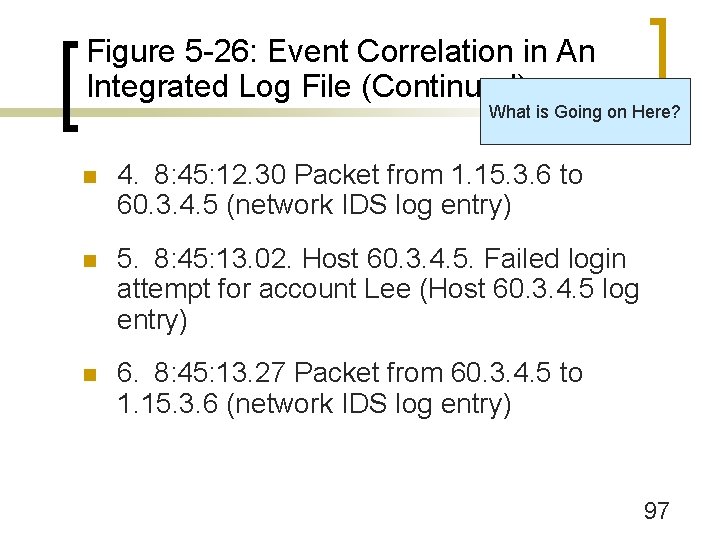
Figure 5 -26: Event Correlation in An Integrated Log File (Continued) What is Going on Here? n 4. 8: 45: 12. 30 Packet from 1. 15. 3. 6 to 60. 3. 4. 5 (network IDS log entry) n 5. 8: 45: 13. 02. Host 60. 3. 4. 5. Failed login attempt for account Lee (Host 60. 3. 4. 5 log entry) n 6. 8: 45: 13. 27 Packet from 60. 3. 4. 5 to 1. 15. 3. 6 (network IDS log entry) 97
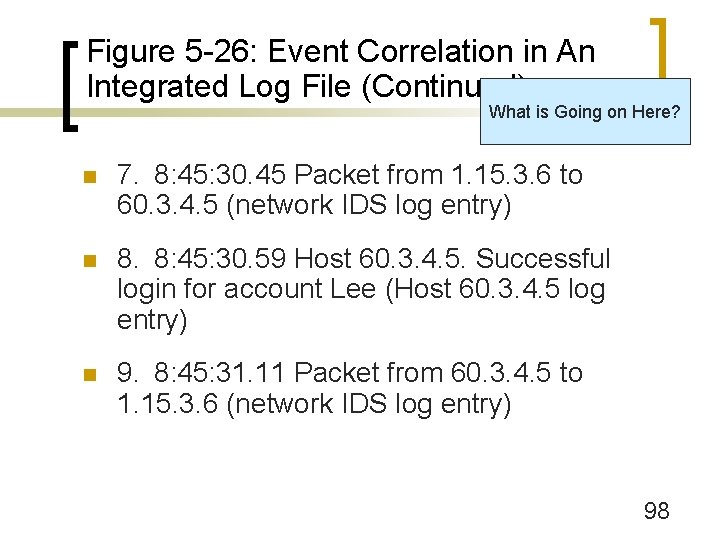
Figure 5 -26: Event Correlation in An Integrated Log File (Continued) What is Going on Here? n 7. 8: 45: 30. 45 Packet from 1. 15. 3. 6 to 60. 3. 4. 5 (network IDS log entry) n 8. 8: 45: 30. 59 Host 60. 3. 4. 5. Successful login for account Lee (Host 60. 3. 4. 5 log entry) n 9. 8: 45: 31. 11 Packet from 60. 3. 4. 5 to 1. 15. 3. 6 (network IDS log entry) 98
Figure 5 -26: Event Correlation in An Integrated Log File (Continued) n Do the first nine events constitute an attack with high likelihood of accurate assessment? (Defend your answer. ) 99
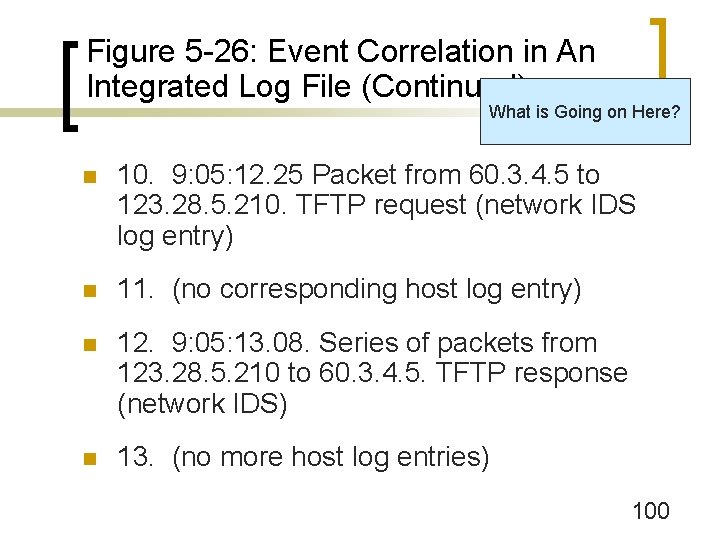
Figure 5 -26: Event Correlation in An Integrated Log File (Continued) What is Going on Here? n 10. 9: 05: 12. 25 Packet from 60. 3. 4. 5 to 123. 28. 5. 210. TFTP request (network IDS log entry) n 11. (no corresponding host log entry) n 12. 9: 05: 13. 08. Series of packets from 123. 28. 5. 210 to 60. 3. 4. 5. TFTP response (network IDS) n 13. (no more host log entries) 100
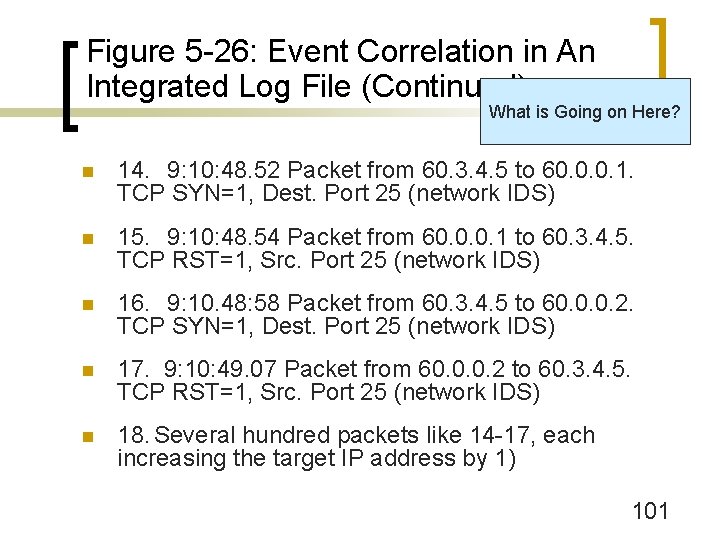
Figure 5 -26: Event Correlation in An Integrated Log File (Continued) What is Going on Here? n 14. 9: 10: 48. 52 Packet from 60. 3. 4. 5 to 60. 0. 0. 1. TCP SYN=1, Dest. Port 25 (network IDS) n 15. 9: 10: 48. 54 Packet from 60. 0. 0. 1 to 60. 3. 4. 5. TCP RST=1, Src. Port 25 (network IDS) n 16. 9: 10. 48: 58 Packet from 60. 3. 4. 5 to 60. 0. 0. 2. TCP SYN=1, Dest. Port 25 (network IDS) n 17. 9: 10: 49. 07 Packet from 60. 0. 0. 2 to 60. 3. 4. 5. TCP RST=1, Src. Port 25 (network IDS) n 18. Several hundred packets like 14 -17, each increasing the target IP address by 1) 101
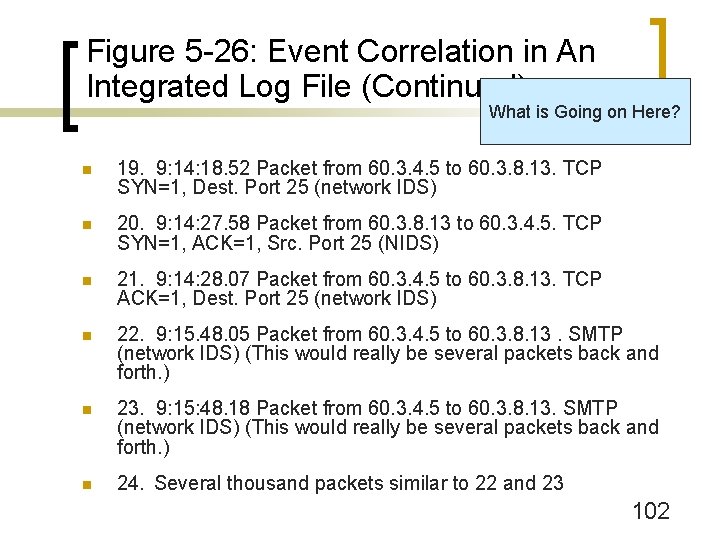
Figure 5 -26: Event Correlation in An Integrated Log File (Continued) What is Going on Here? n 19. 9: 14: 18. 52 Packet from 60. 3. 4. 5 to 60. 3. 8. 13. TCP SYN=1, Dest. Port 25 (network IDS) n 20. 9: 14: 27. 58 Packet from 60. 3. 8. 13 to 60. 3. 4. 5. TCP SYN=1, ACK=1, Src. Port 25 (NIDS) n 21. 9: 14: 28. 07 Packet from 60. 3. 4. 5 to 60. 3. 8. 13. TCP ACK=1, Dest. Port 25 (network IDS) n 22. 9: 15. 48. 05 Packet from 60. 3. 4. 5 to 60. 3. 8. 13. SMTP (network IDS) (This would really be several packets back and forth. ) n 23. 9: 15: 48. 18 Packet from 60. 3. 4. 5 to 60. 3. 8. 13. SMTP (network IDS) (This would really be several packets back and forth. ) n 24. Several thousand packets similar to 22 and 23 102
Figure 5 -28: Intrusion Prevention Systems (IPSs) n IPSs Use IDS Filtering Methods ¡ But actually stop attacks instead of just issuing warnings 103
Figure 5 -28: Intrusion Prevention Systems (IPSs) (Continued) n Traditional IDSs do Processing in Software ¡ n Too slow to be placed in-line with the packet stream, so cannot stop attacks Unlike IDSs, use Application Specific Integrated Circuits (ASICs) ¡ Fast processing in hardware ¡ Can be placed in-line with the packet stream and so can stop attacks 104
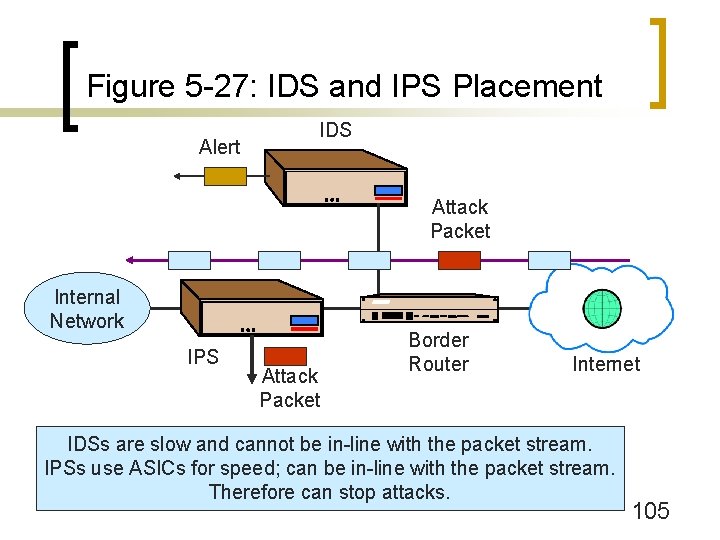
Figure 5 -27: IDS and IPS Placement Alert IDS Attack Packet Internal Network IPS Attack Packet Border Router Internet IDSs are slow and cannot be in-line with the packet stream. IPSs use ASICs for speed; can be in-line with the packet stream. Therefore can stop attacks. 105
Figure 5 -28: Intrusion Prevention Systems (IPSs) (Continued) n Attack Identification Confidence Spectrum ¡ IDSs create too many false alarms to be used in stopping attacks ¡ Some attacks can be detected with more confidence than others ¡ At first, record what the IPS would have stopped if it had been allowed to stop attacks ¡ Later, let the IPS stop high-confidence attacks ¡ May later let the IPS stop attacks with somewhat lower detection confidence 106
Figure 5 -28: Intrusion Prevention Systems (IPSs) (Continued) n Actions ¡ Drop packets ¡ Limit bandwidth of attack stream to a server n When attack packets and legitimate packets to a host cannot be separated accurately n Still hurts legitimate packets to that host n Protects other traffic from overload 107
Host Firewalls
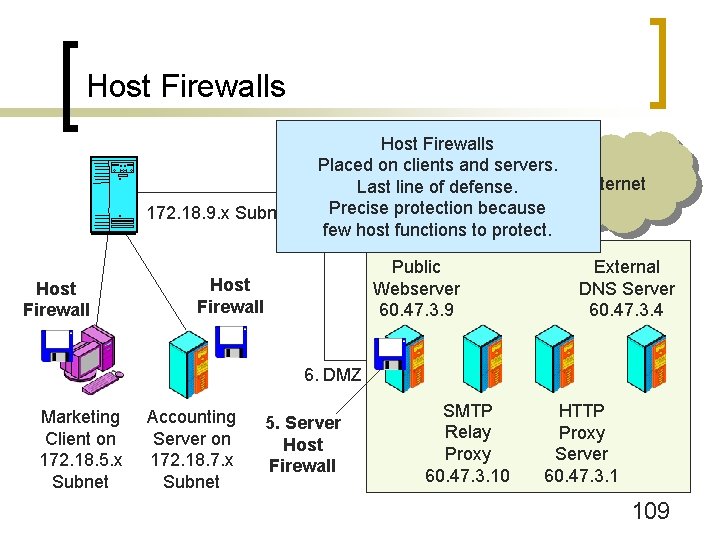
Host Firewalls 172. 18. 9. x Subnet Host Firewalls Placed on clients and servers. Last line of defense. Precise protection because few host functions to protect. Public Webserver 60. 47. 3. 9 Host Firewall Internet External DNS Server 60. 47. 3. 4 6. DMZ Marketing Client on 172. 18. 5. x Subnet Accounting Server on 172. 18. 7. x Subnet 5. Server Host Firewall SMTP Relay Proxy 60. 47. 3. 10 HTTP Proxy Server 60. 47. 3. 1 109
Figure 5 -29: Host Firewalls n Host Firewalls ¡ Firewalls on clients and servers ¡ Give defense in depth 110
Figure 5 -29: Host Firewalls (Continued) n Client PC Firewalls ¡ Third party PC firewalls are common ¡ Windows XP introduced the Internet Connection Facility (ICF) n Stateful inspection firewall n Not turned on by default n No egress filtering n Can open selected ports for ingress filtering 111
Figure 5 -29: Host Firewalls (Continued) n Client PC Firewalls ¡ Windows XP Service Pack 2 (Late 2004) introduced the Windows Firewall n Upgrade to ICF n Turned on by default n Can open selected ports for ingress filtering n Still no egress filtering 112
Figure 5 -29: Host Firewalls (Continued) n Why no egress filtering on PC firewalls? ¡ Ingress filtering requires no or little user intervention ¡ Egress filtering requires users to decide what programs can communicate over the Internet—a difficult task ¡ Does not stop spyware, other outbound attack communication 113
Figure 5 -29: Host Firewalls (Continued) n Server Firewalls ¡ Internet-level firewalls n Precise because only need to open a few specific ports ¡ Application-Specific Firewalls n Filtering rules linked to specific protocols (SQL, HTTP, etc. ) n Filtering sometimes linked to specific application programs (Microsoft’s IIS, etc. ) 114
Firewall Management
Figure 5 -30: Firewall Management n Firewalls are Ineffective without Planning and Maintenance n Planning ¡ Asset Assessment: identify all assets and their relative sensitivities ¡ Threat Assessment: what threats can attack each asset? ¡ Design a Firewall Policy for Each Asset ¡ Design a Firewall Architecture 116
Figure 5 -30: Firewall Management (Continued) n Implementation ¡ Firewall Operating System Hardening n Firewall appliances are hardened at the factory n Firewall vendors often sell firewalls that are general-purpose computers that have prehardened versions of Unix or Windows n If a firm purchases a general purpose computer and firewall software, strong actions must be taken to harden the firewall’s operating system 117
Figure 5 -30: Firewall Management (Continued) n Implementation ¡ Select Implementation Options n e. g. , Turn off remote management if not needed ¡ Firewall ACL Rule Configuration n Complex and therefore error-prone n Driven by firewall policies 118
Figure 5 -30: Firewall Management (Continued) n Implementation ¡ Vulnerability Testing After Configuration n Must do vulnerability test even after “trivial” changes n Driven by firewall policies 119
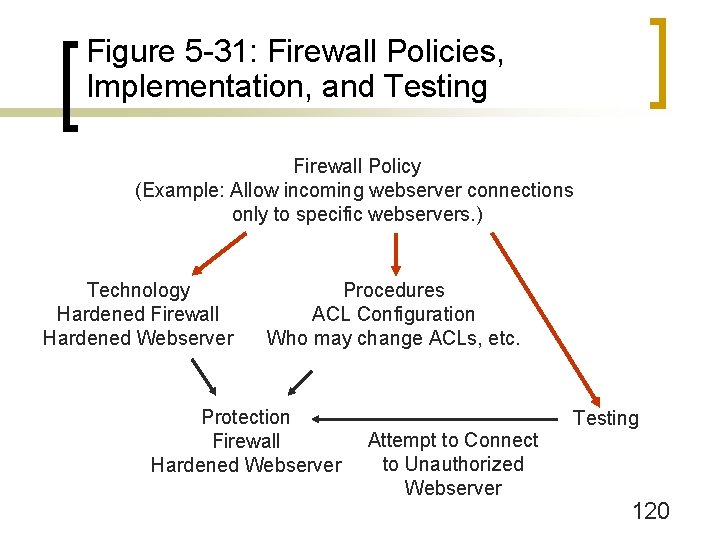
Figure 5 -31: Firewall Policies, Implementation, and Testing Firewall Policy (Example: Allow incoming webserver connections only to specific webservers. ) Technology Hardened Firewall Hardened Webserver Procedures ACL Configuration Who may change ACLs, etc. Protection Firewall Hardened Webserver Attempt to Connect to Unauthorized Webserver Testing 120
Figure 5 -30: Firewall Management (Continued) n Implementation ¡ Maintenance n Constantly change firewall policies and ACLs to deal with new threats ¡ Document each change carefully! n n n Read log files daily to understand the current threat environment Read log files daily to detect problems (the dropping of legitimate traffic, etc. ) Update the firewall software when there are new releases 121
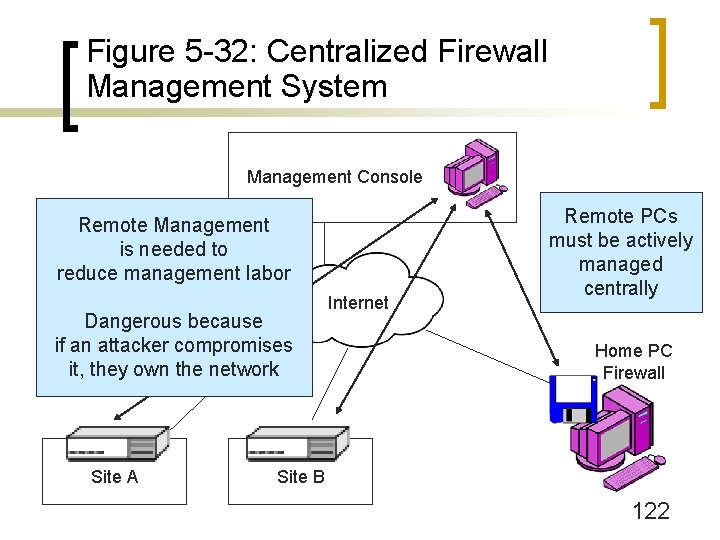
Figure 5 -32: Centralized Firewall Management System Management Console Remote Management is needed to reduce management labor Dangerous because if an attacker compromises it, they own the network Site A Internet Remote PCs must be actively managed centrally Home PC Firewall Site B 122
Figure 5 -33: Hard Problems for Firewall Filtering n Firewalls and Encrypted Communication ¡ Firewalls cannot read encrypted messages so cannot filter them ¡ Must decide upon the placement of the VPN gateway relative to the firewall (Figure 5 -34) 123
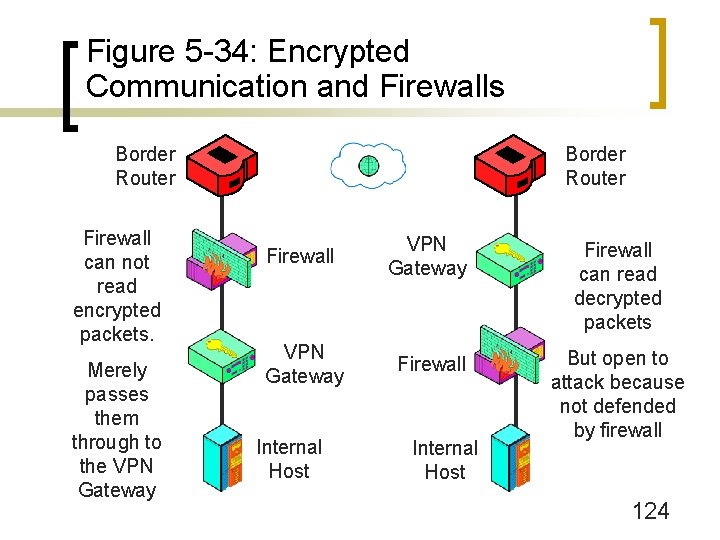
Figure 5 -34: Encrypted Communication and Firewalls Border Router Firewall can not read encrypted packets. Merely passes them through to the VPN Gateway Border Router Firewall VPN Gateway Firewall can read decrypted packets VPN Gateway Firewall But open to attack because not defended by firewall Internal Host 124
Figure 5 -33: Hard Problems for Firewall Filtering (Continued) n Denial of Service (Do. S) Protection ¡ Do. S attacks are usually easy to detect ¡ But often hard to stop even if detected accurately n Good and bad TCP segments in a flood cannot be distinguished 125
Figure 5 -33: Hard Problems for Firewall Filtering (Continued) n Rate limiting ¡ Limit rate of attack and legitimate packets to a particular server ¡ This preserves capacity for other servers ¡ Does not work if the access line to the Internet is saturated 126
Figure 5 -33: Hard Problems for Firewall Filtering (Continued) n The Need for Outside Help ¡ If the Internet access line is saturated, no internal actions help ¡ Even if rate limiting works, the target server usually is barely operating ¡ Need others to help upstream of the attack ¡ Filter out attack packets at the sources n Requires ISP efforts n Requires the efforts of other companies and individual users 127
Figure 5 -33: Hard Problems for Firewall Filtering (Continued) n Signatures Versus Anomaly Detection ¡ Signatures are rules based on attack packet content ¡ Cannot stop new attacks, for which no signatures exist yet n Attacks spread very rapidly today, so there can be significant damage before signatures are created and disseminated n Especially bad for zero-day attacks based on vulnerabilities that were not known before hand 128
Figure 5 -33: Hard Problems for Firewall Filtering (Continued) n Anomaly Detection ¡ Detect anomalous (unusual) behavior indicating attacks ¡ Statistical patterns in traffic ¡ Behavior that seems wrong (reformatting the hard drive, for instance) ¡ Too many false positives (false alarms) today ¡ Needed because anomaly detection is the only way to stop zero-day attacks and very rapidly spreading attacks 129
- Slides: 129