
Financial Accounting General Ledger Accounts Receivable Accounts Payable
목차 Financial Accounting (재무 회계) - General Ledger (총계정 원장) - Accounts Receivable (외상 매출금) - Accounts Payable (외상 매입금) 1 장 재무 회계의 개요 2 장 재무 회계의 주요 조직 구성 요소들 3 장 General Ledger 의 개요 4 장 Accounts Receivable 과 Payable 의 개요 5 장 General Ledger Master Data 의 구조 6 장 General Ledger Posting 의 처리 및 조회 7 장 Reverse & Park Documents 8 장 Reference Documents 9 장 Customer Master Data 의 구조 10 장 Customer Invoice 생성과 Incoming Payment 처리 11 장 Vendor Master Data 의 구조 12 장 Vendor Invoice 생성과 Outgoing Payment 처리 13 장 Down Payment 처리
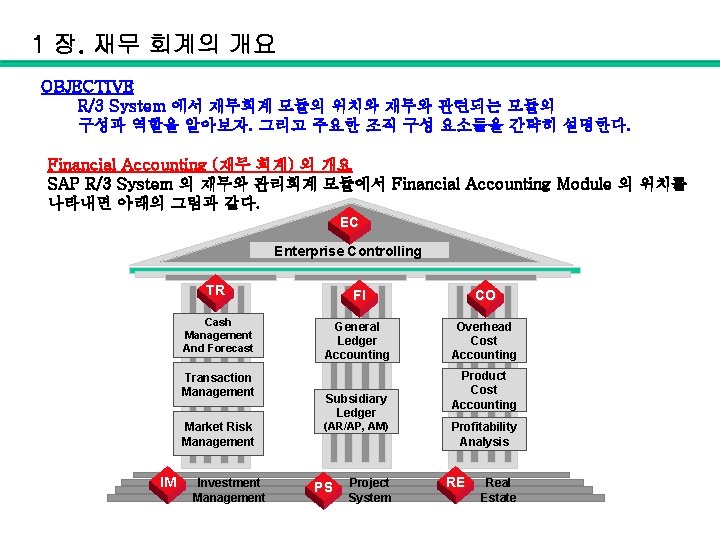
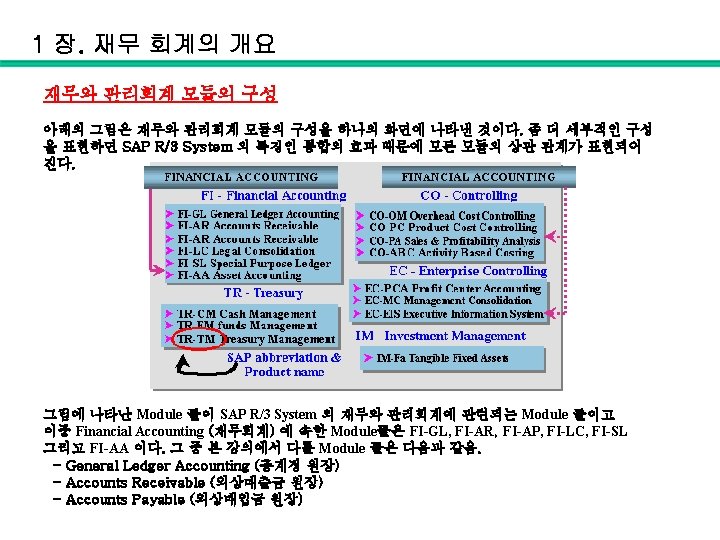
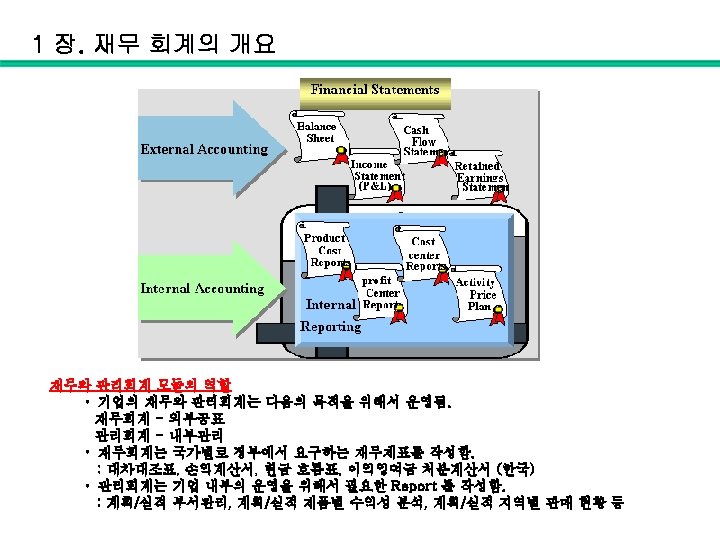
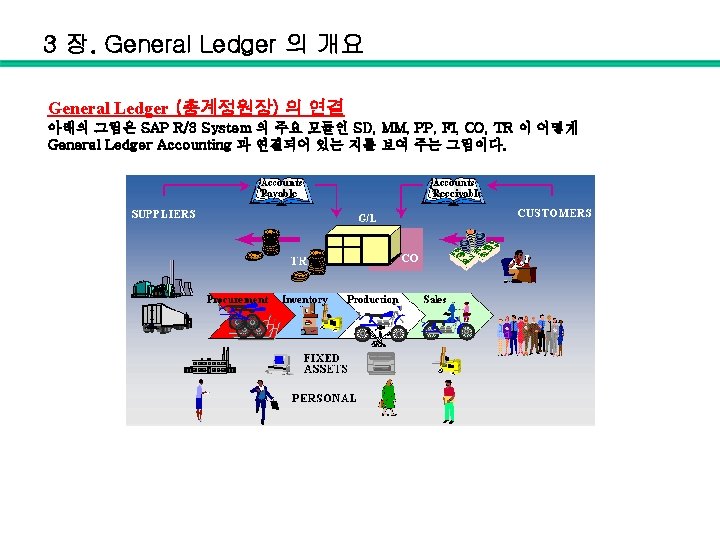
1 장. 재무 회계의 개요 OBJECTIVE R/3 System 에서 재무회계 모듈의 위치와 재무와 관련되는 모듈의 구성과 역할을 알아보자. 그리고 주요한 조직 구성 요소들을 간략히 설명한다. Financial Accounting (재무 회계) 의 개요 SAP R/3 System 의 재무와 관리회계 모듈에서 Financial Accounting Module 의 위치를 나타내면 아래의 그림과 같다. EC Enterprise Controlling TR FI CO Cash Management And Forecast General Ledger Accounting Overhead Cost Accounting Transaction Management Market Risk Management IM Investment Management Subsidiary Ledger (AR/AP, AM) PS Project System Product Cost Accounting Profitability Analysis RE Real Estate
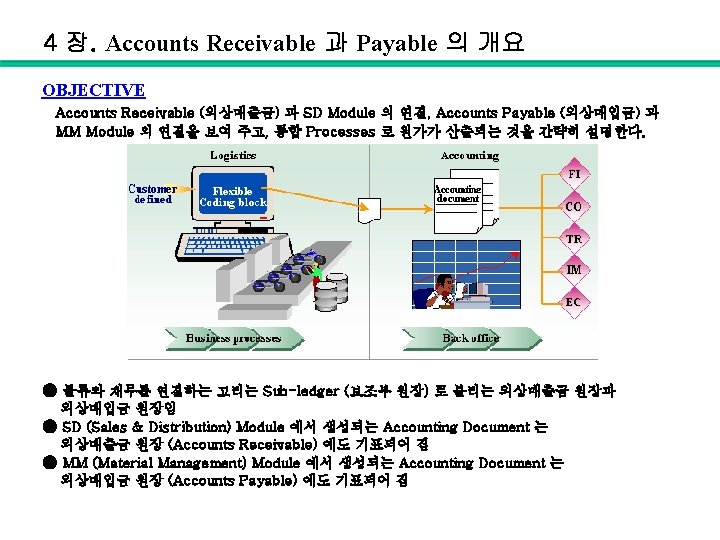
1 장. 재무 회계의 개요 ● Asset Accounting (고정자산 관리) Module 은 General Ledger (총계정 원장)에 포함되어 있음. ● Sub-ledgers (보조부 원장) ▷ SD (Sales & Distribution) - Accounts Receivable (외상매출금 원장) ▷ MM (Material Management) - Accounts Payable (외상매입금 원장) ● Legal Consolidation (연결 회계) Module은 EC (Enterprise Controlling)에 포함되어 있음.
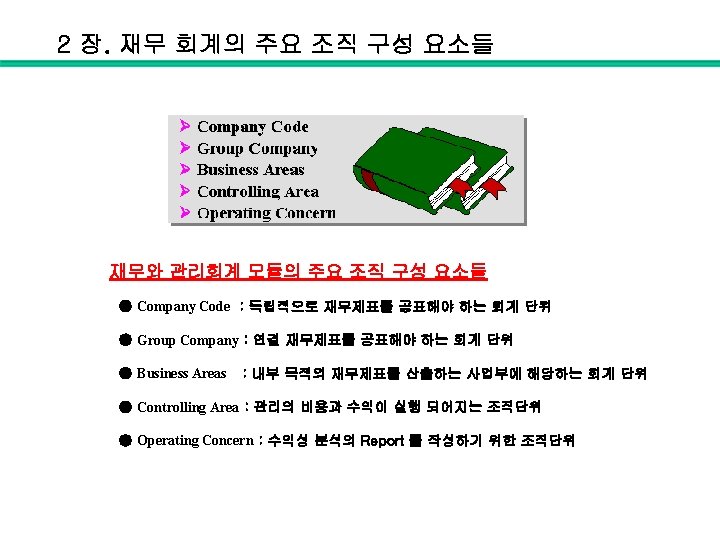
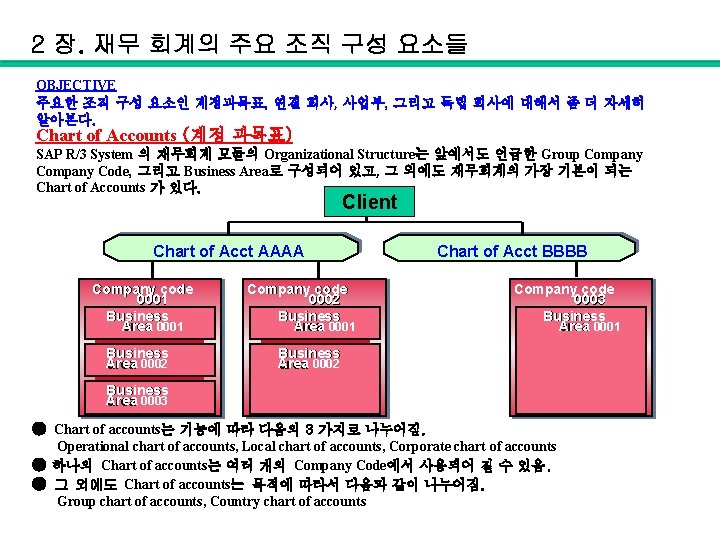
2 장. 재무 회계의 주요 조직 구성 요소들 OBJECTIVE 주요한 조직 구성 요소인 계정과목표, 연결 회사, 사업부, 그리고 독립 회사에 대해서 좀 더 자세히 알아본다. Chart of Accounts (계정 과목표) SAP R/3 System 의 재무회계 모듈의 Organizational Structure는 앞에서도 언급한 Group Company Code, 그리고 Business Area로 구성되어 있고, 그 외에도 재무회계의 가장 기본이 되는 Chart of Accounts 가 있다. Client Chart of Acct AAAA Company code 0001 Business Area area 0002 Company code 0002 Business Area area 0001 Chart of Acct BBBB Company code 0003 Business Area area 0001 Business Area area 0002 Business Area area 0003 ● Chart of accounts는 기능에 따라 다음의 3 가지로 나누어짐. Operational chart of accounts, Local chart of accounts, Corporate chart of accounts ● 하나의 Chart of accounts는 여러 개의 Company Code에서 사용되어 질 수 있음. ● 그 외에도 Chart of accounts는 목적에 따라서 다음과 같이 나누어짐. Group chart of accounts, Country chart of accounts
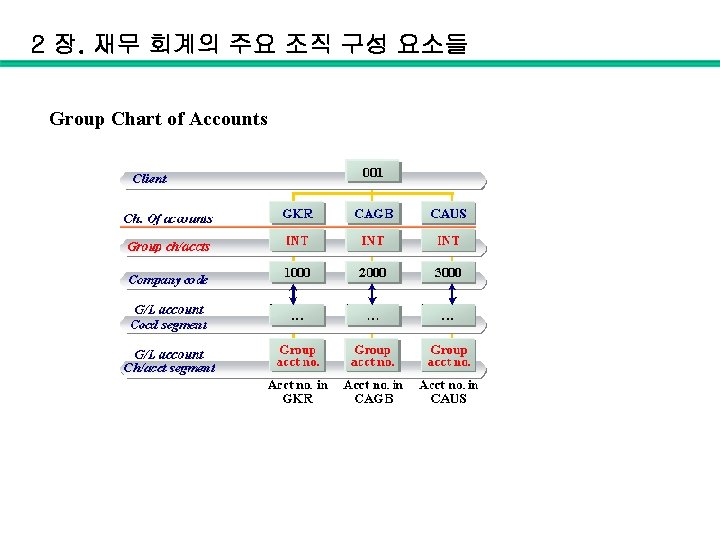
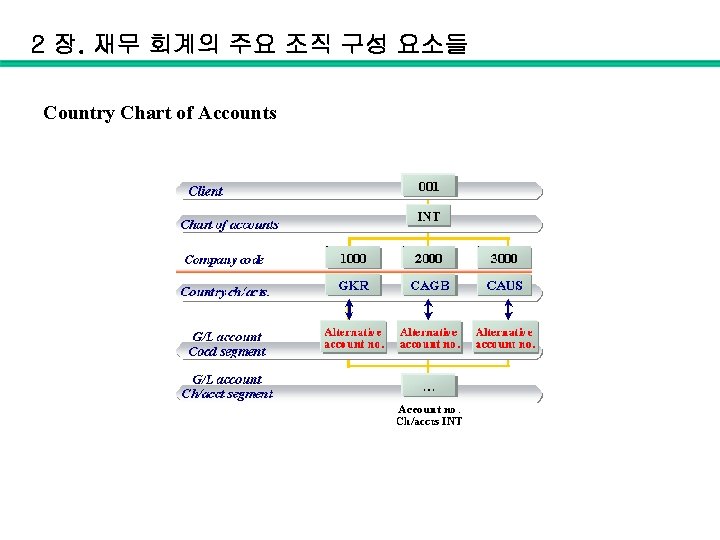
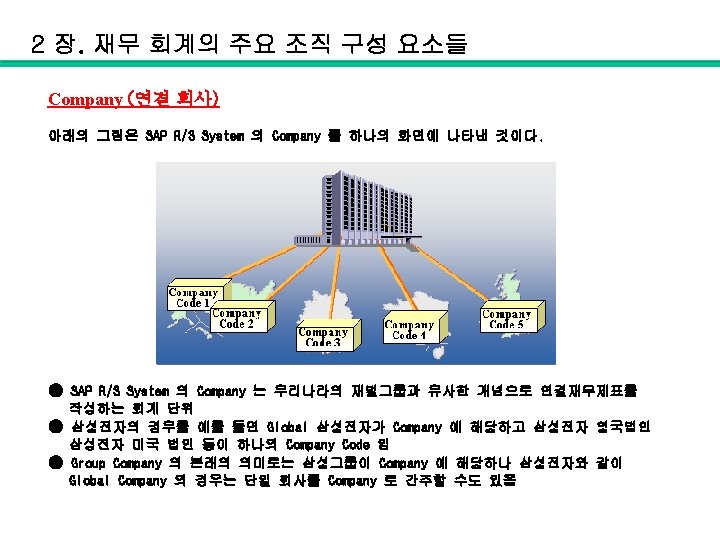
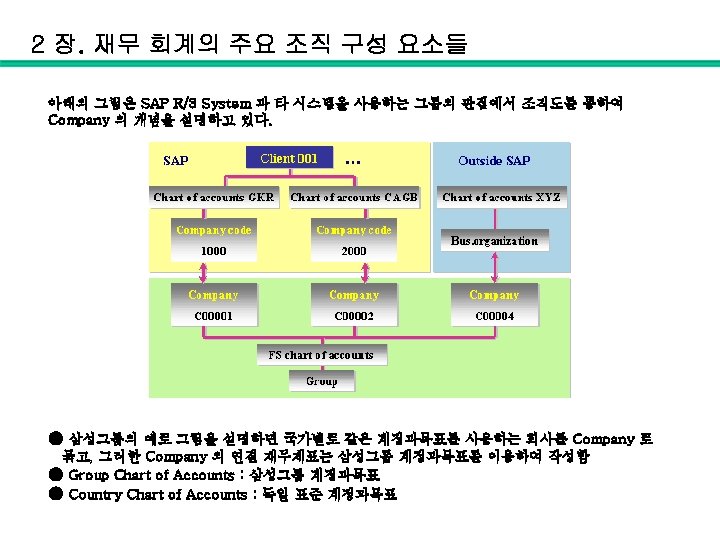
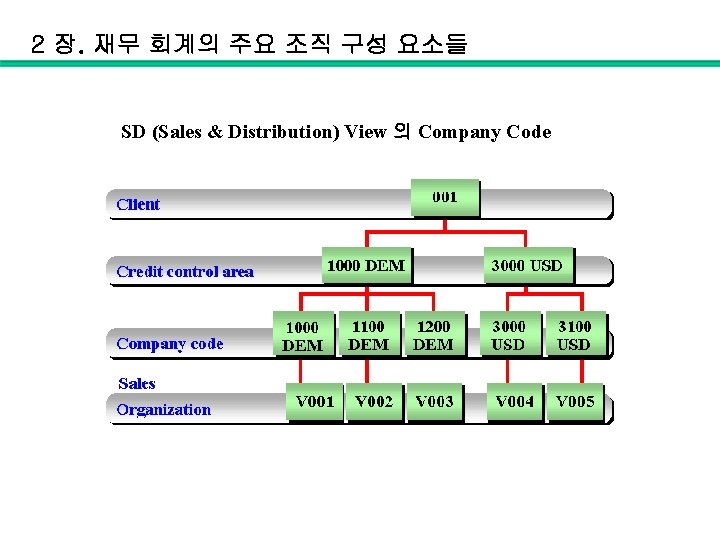
2 장. 재무 회계의 주요 조직 구성 요소들 SD (Sales & Distribution) View 의 Company Code
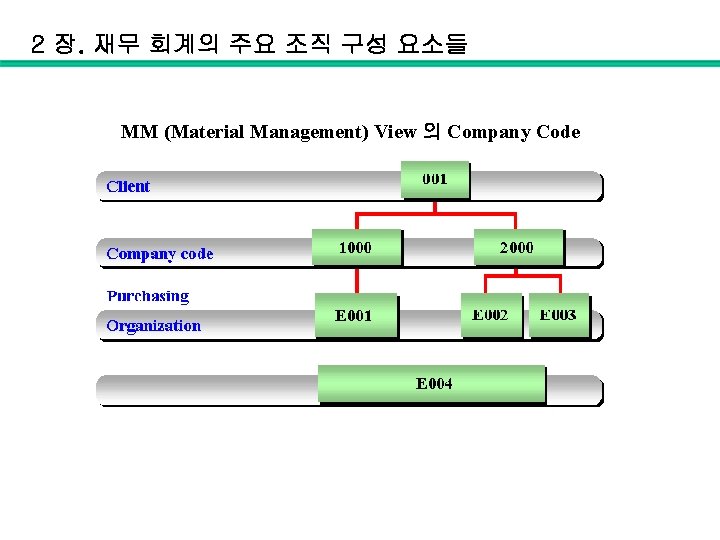
2 장. 재무 회계의 주요 조직 구성 요소들 MM (Material Management) View 의 Company Code
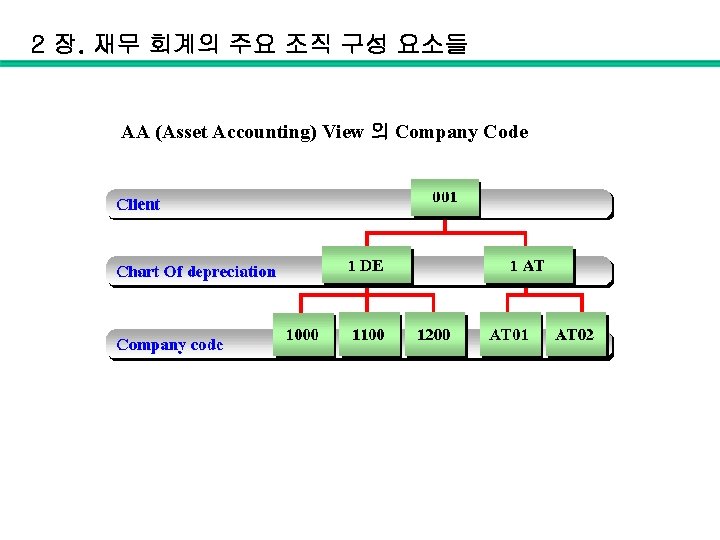
2 장. 재무 회계의 주요 조직 구성 요소들 AA (Asset Accounting) View 의 Company Code
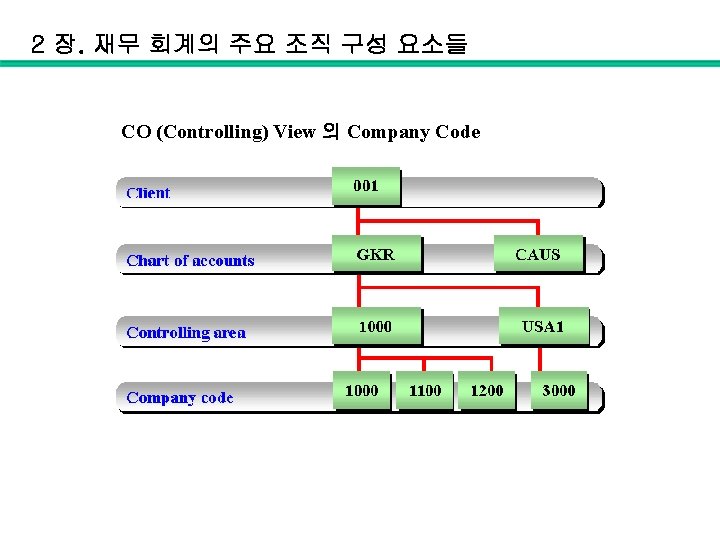
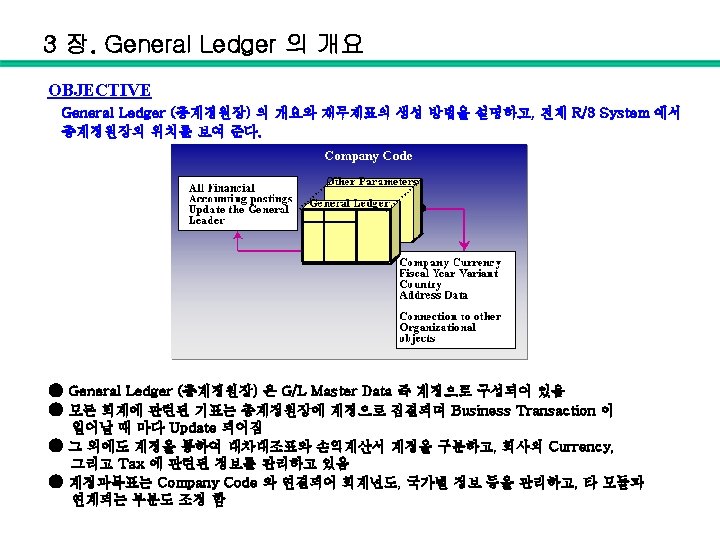
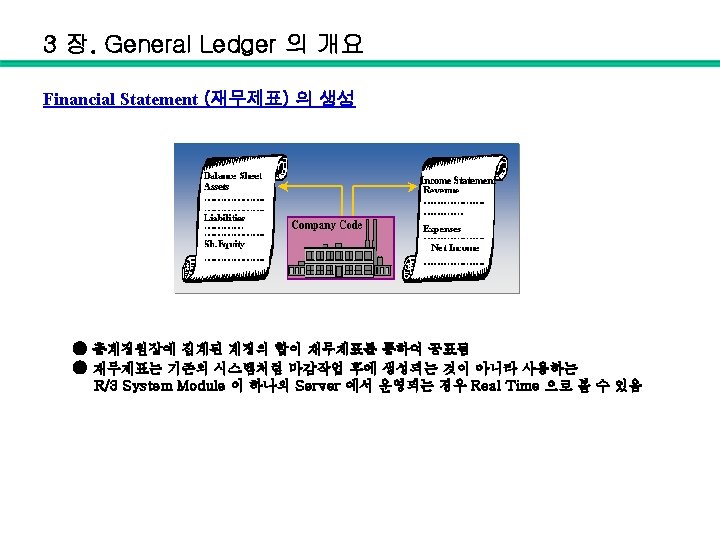
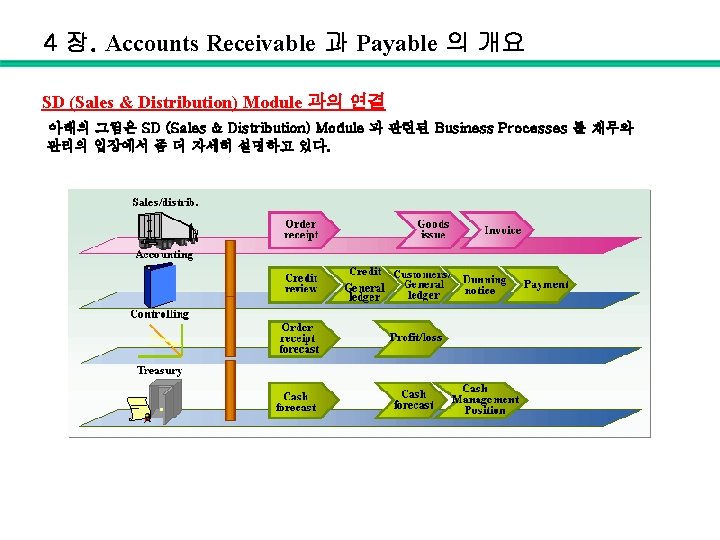
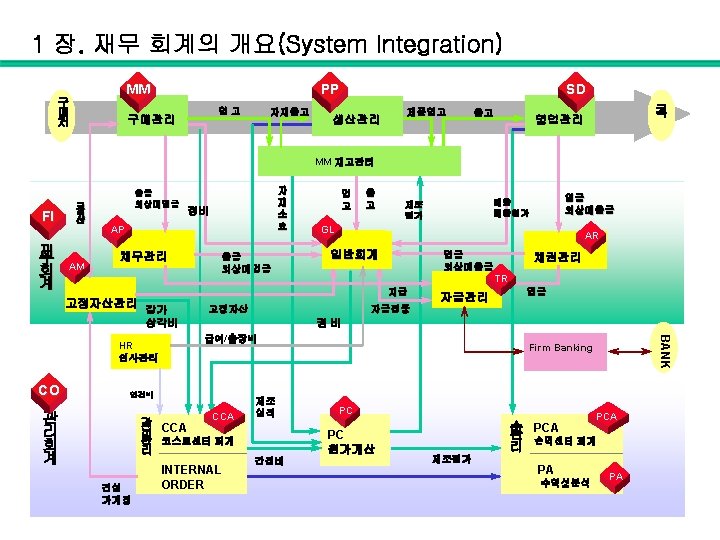
4 장. Accounts Receivable 과 Payable 의 개요 SD (Sales & Distribution) Module 과의 연결 아래의 그림은 SD (Sales & Distribution) Module 과 관련된 Business Processes 를 재무와 관리의 입장에서 좀 더 자세히 설명하고 있다.

4 장. Accounts Receivable 과 Payable 의 개요 재무회계의 입장에서 SD (Sales & Distribution) Module 과 관련된 Business Processes 를 분개로 표시하면 아래의 그림으로 나타낼 수 있다.
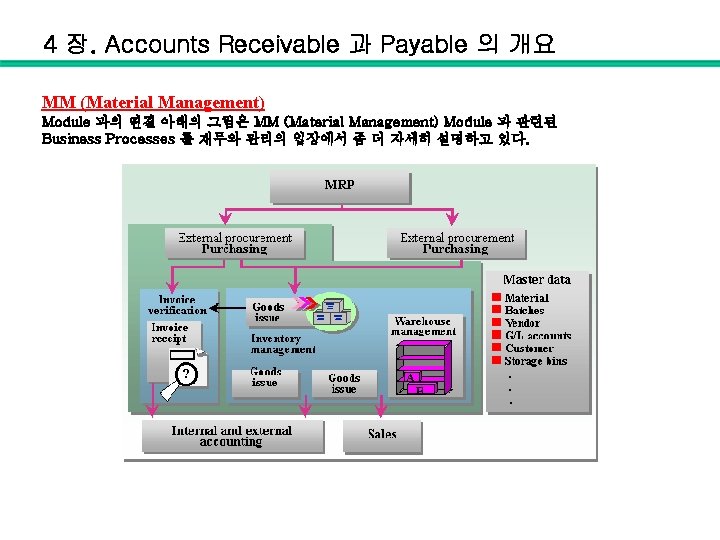
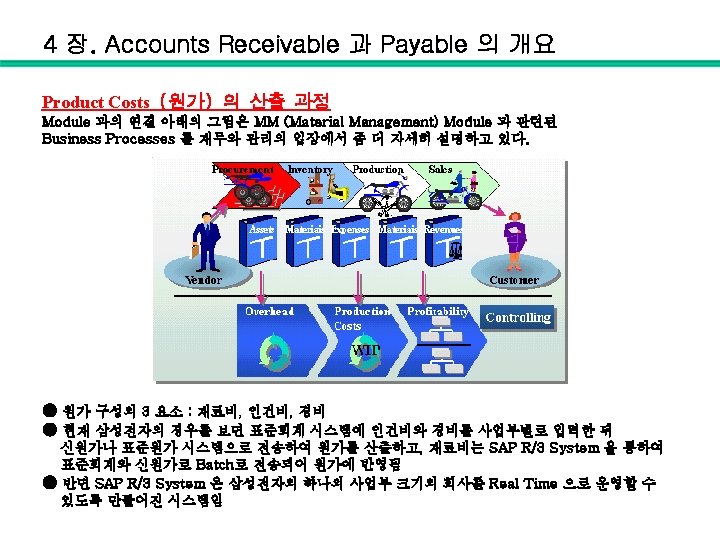
4 장. Accounts Receivable 과 Payable 의 개요 MM (Material Management) Module 과의 연결 아래의 그림은 MM (Material Management) Module 과 관련된 Business Processes 를 재무와 관리의 입장에서 좀 더 자세히 설명하고 있다.
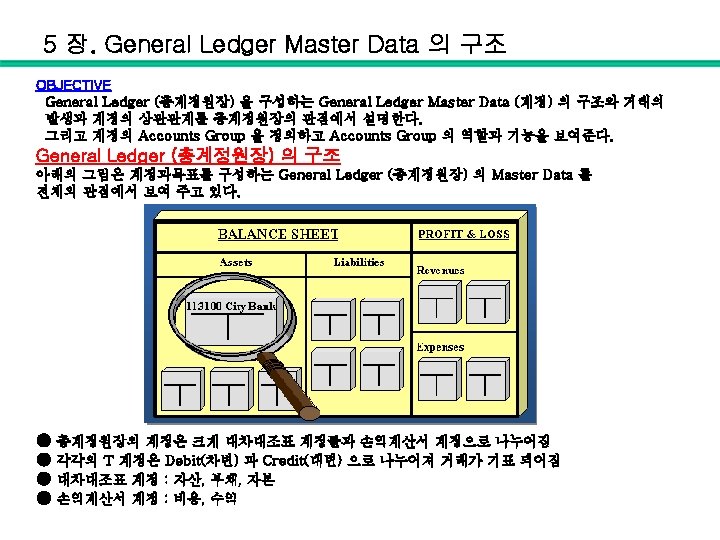
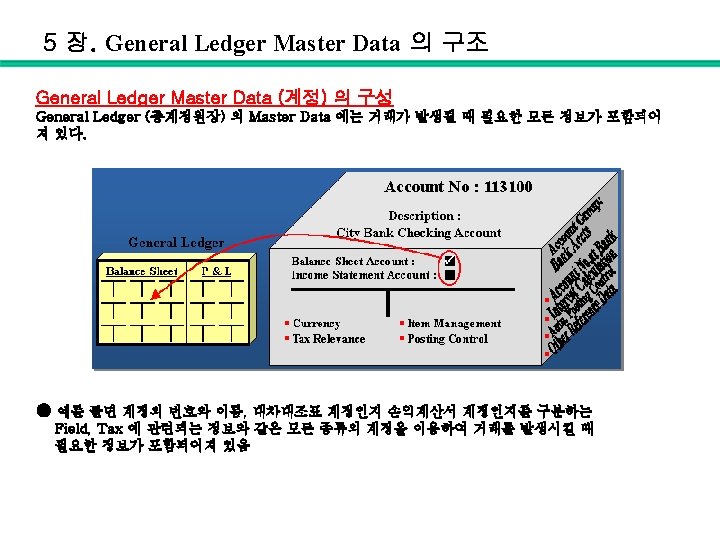
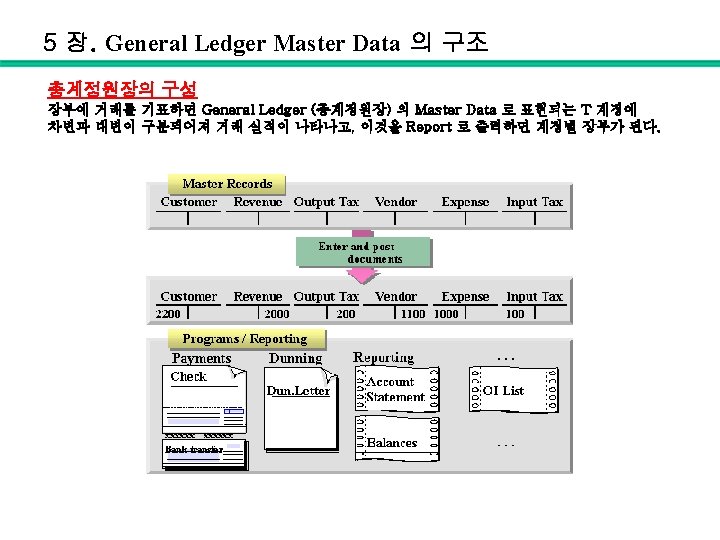
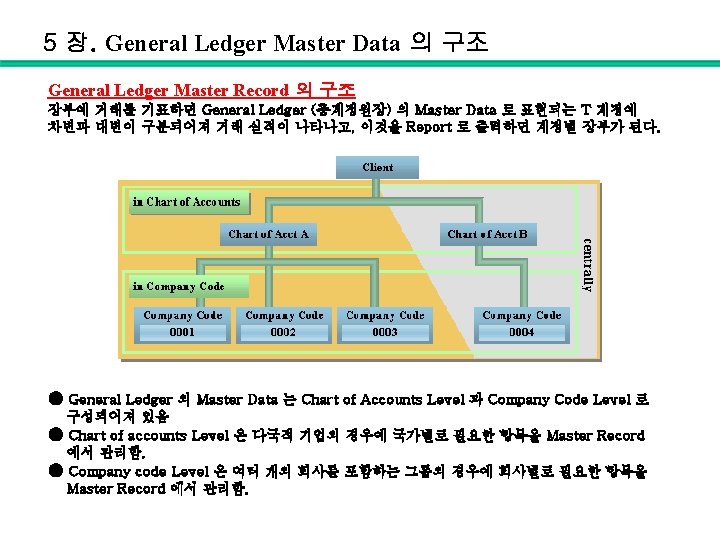
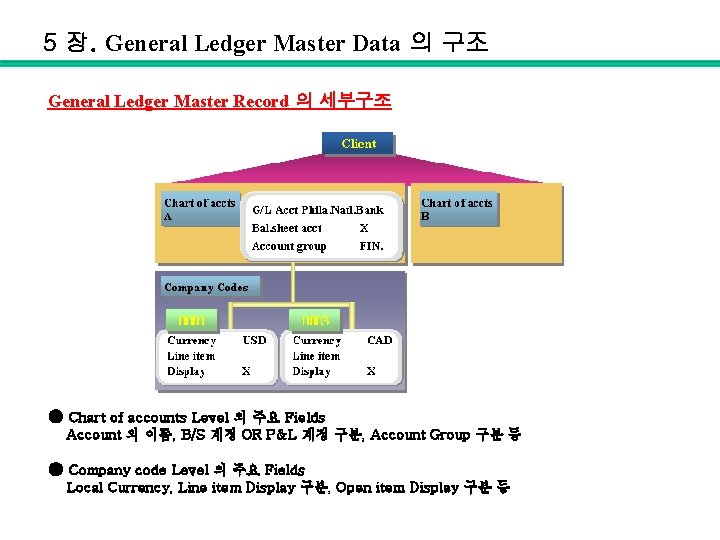
5 장. General Ledger Master Data 의 구조 General Ledger Master Record 의 세부구조 ● Chart of accounts Level 의 주요 Fields Account 의 이름, B/S 계정 OR P&L 계정 구분, Account Group 구분 등 ● Company code Level 의 주요 Fields Local Currency, Line item Display 구분, Open item Display 구분 등
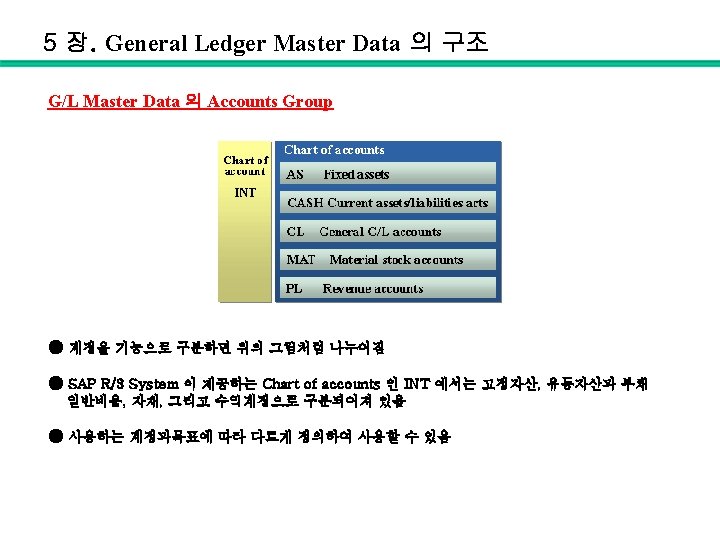
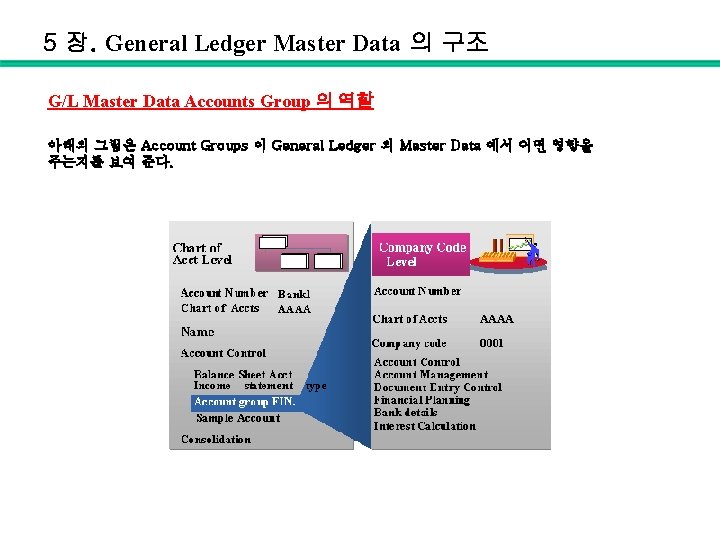
5 장. General Ledger Master Data 의 구조 G/L Master Data Accounts Group 의 역할 아래의 그림은 Account Groups 이 General Ledger 의 Master Data 에서 어떤 영향을 주는지를 보여 준다.

5 장. General Ledger Master Data 의 구조 G/L Master Data Accounts Group 의 조정 기능 Account Groups 에 따라 결정되는 Company Code Level 의 G/L Master Data 화면도 사용자가 조정하는 것이 가능하다. 예를 들면 고정자산 계정의 경우에 Bank 에 관한 정보가 필요 없다면 고정자산 Account Group 의 Field Status 를 Suppress 로 Setting 하고 Master Data 의 화면을 보면 Bank 에 관련된 Fields 가 보이지 않는다.
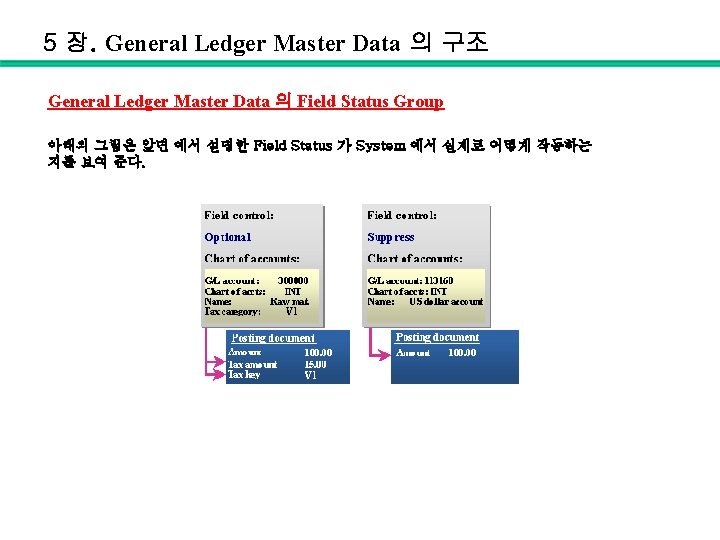
5 장. General Ledger Master Data 의 구조 General Ledger Master Data 의 Field Status Group 아래의 그림은 앞면 에서 설명한 Field Status 가 System 에서 실제로 어떻게 작동하는 지를 보여 준다.
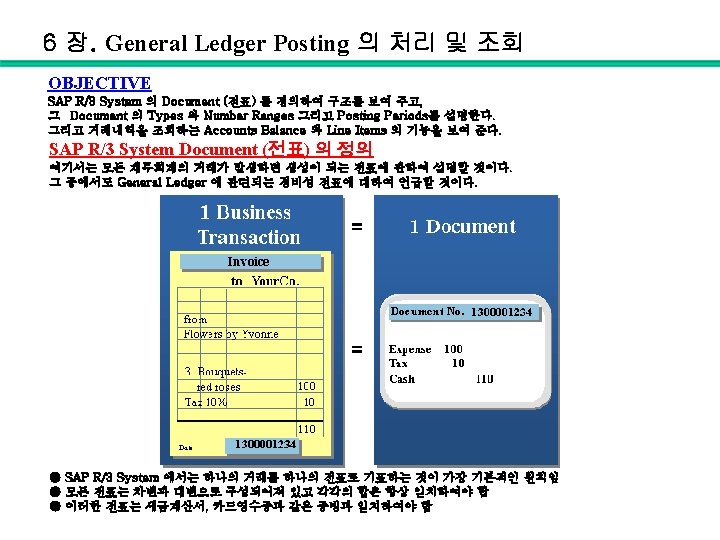
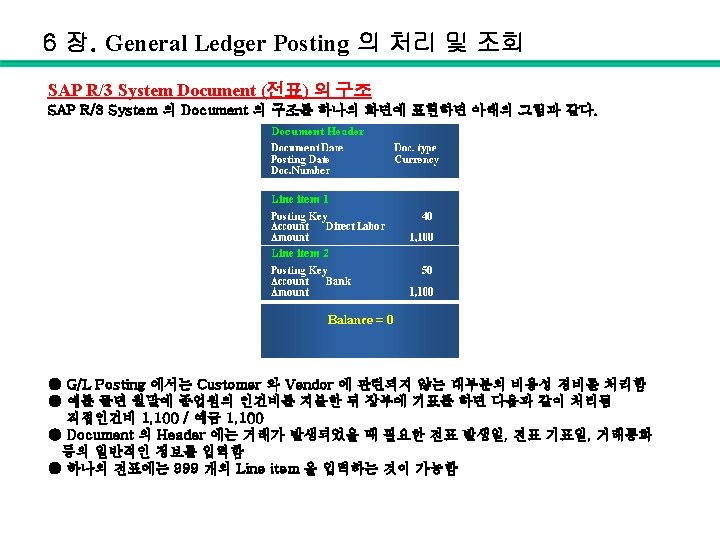
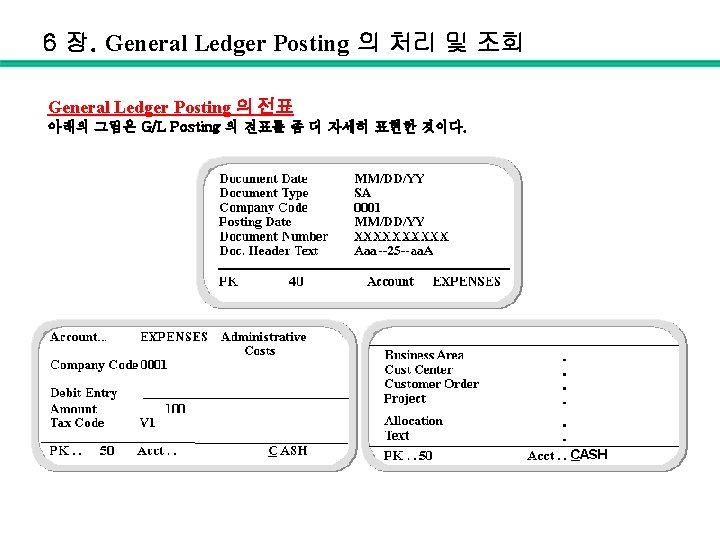
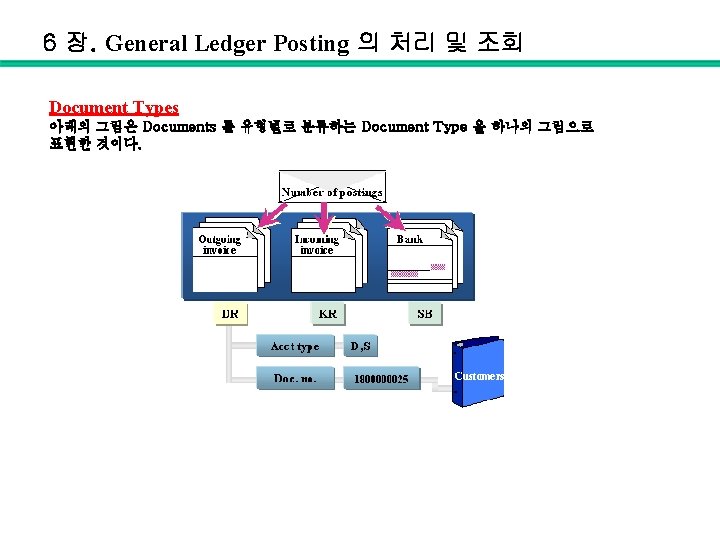
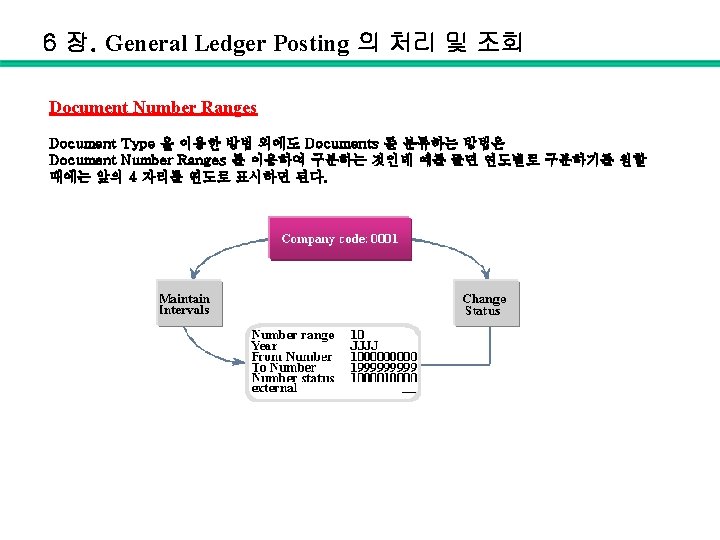
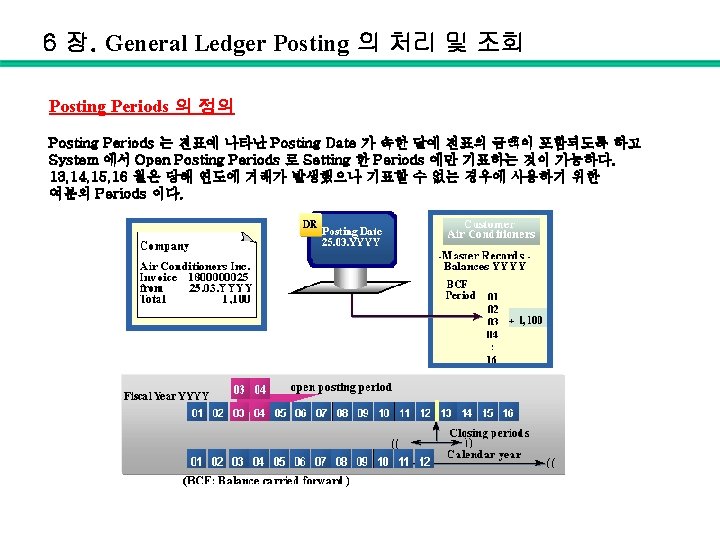
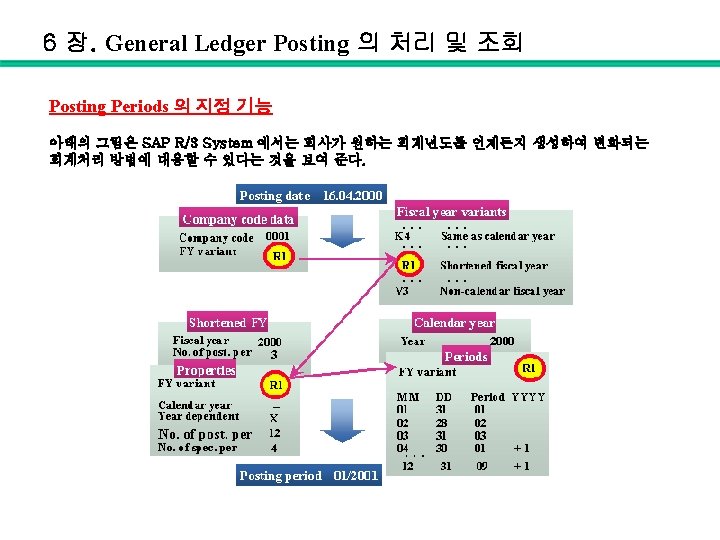
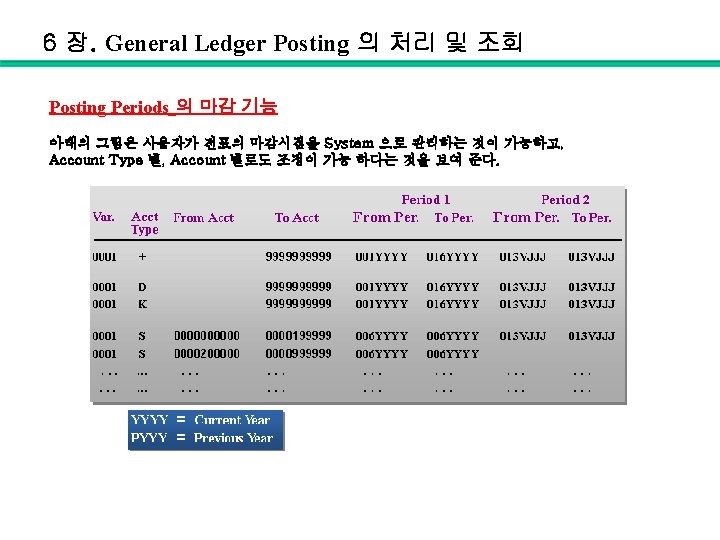
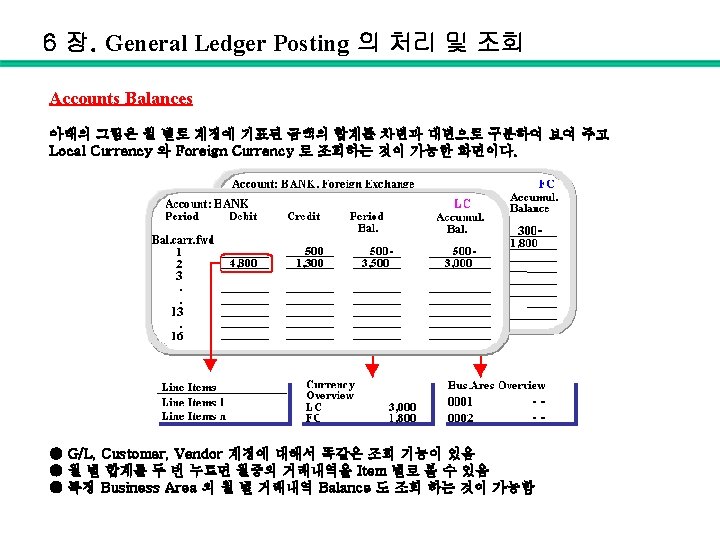
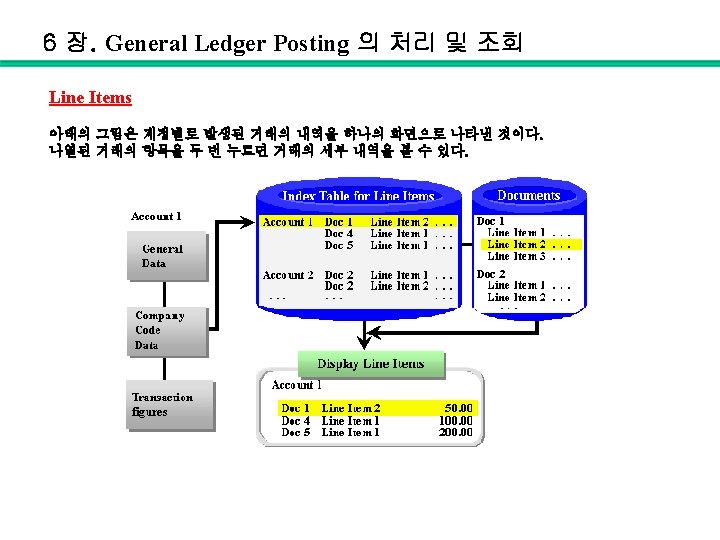
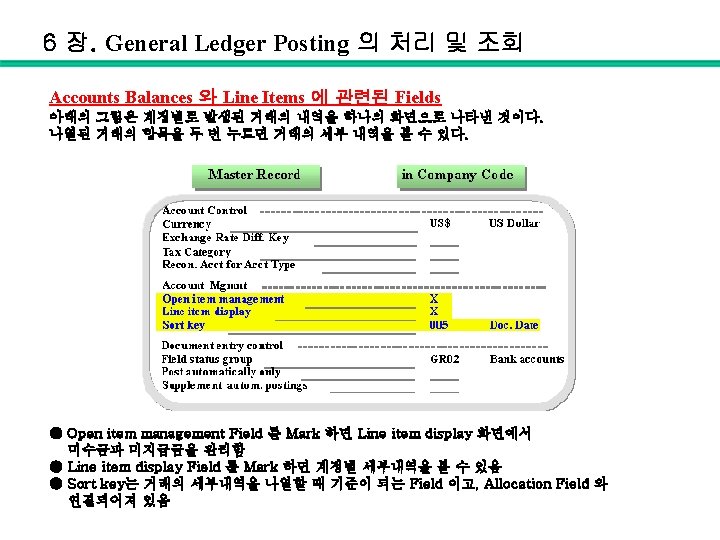
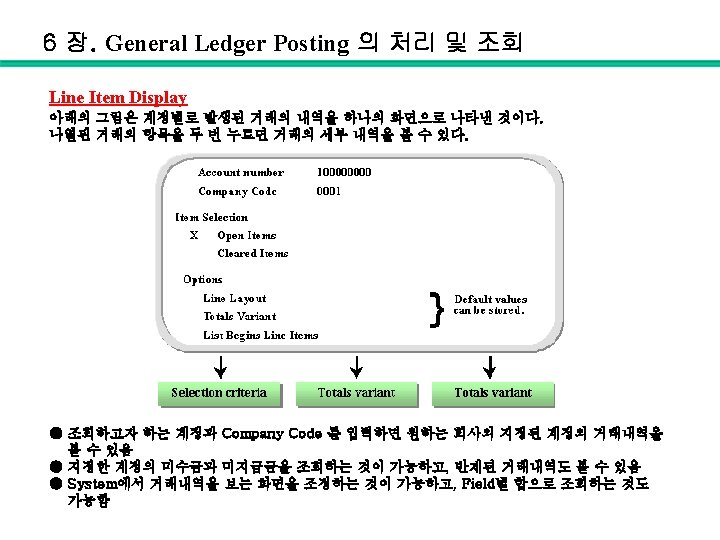
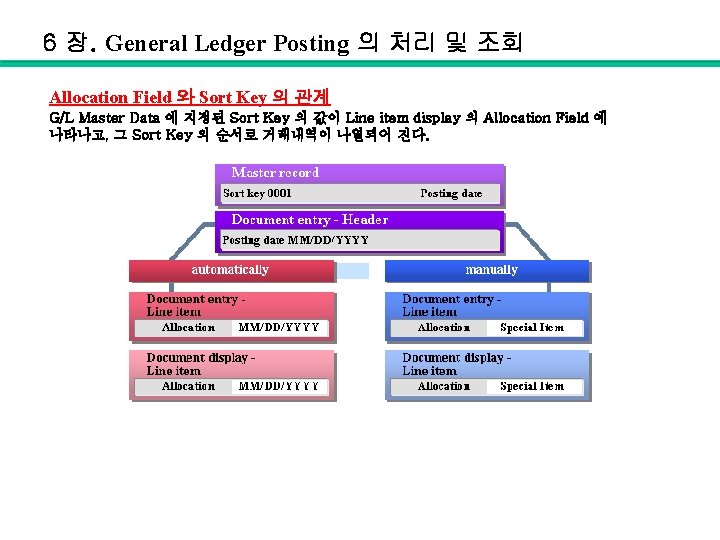
6 장. General Ledger Posting 의 처리 및 조회 Allocation Field 와 Sort Key 의 관계 G/L Master Data 에 지정된 Sort Key 의 값이 Line item display 의 Allocation Field 에 나타나고, 그 Sort Key 의 순서로 거래내역이 나열되어 진다.
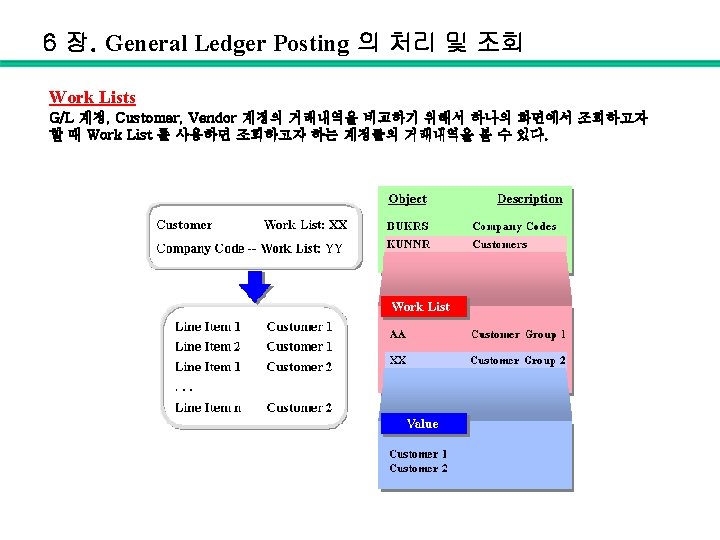
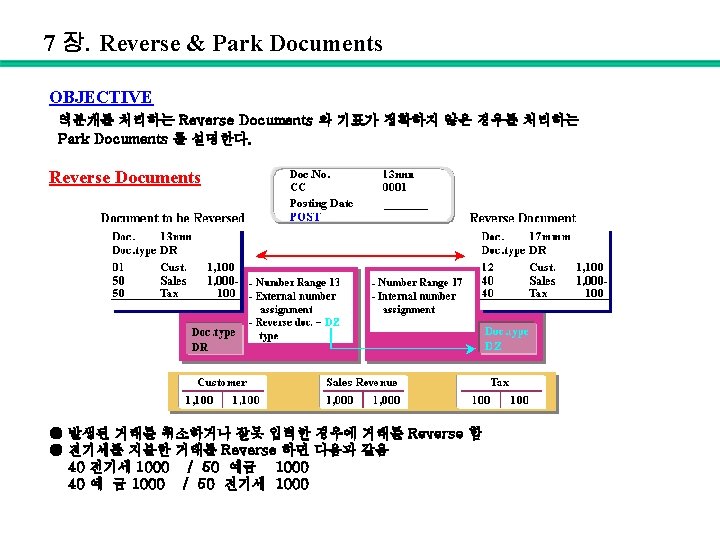
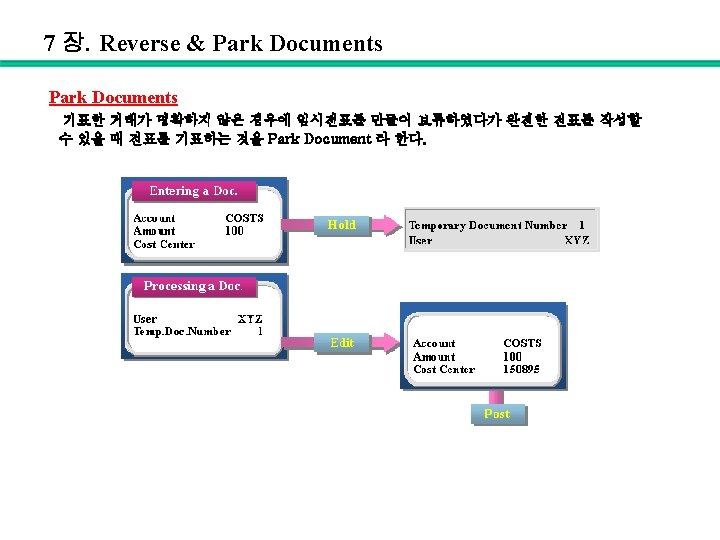
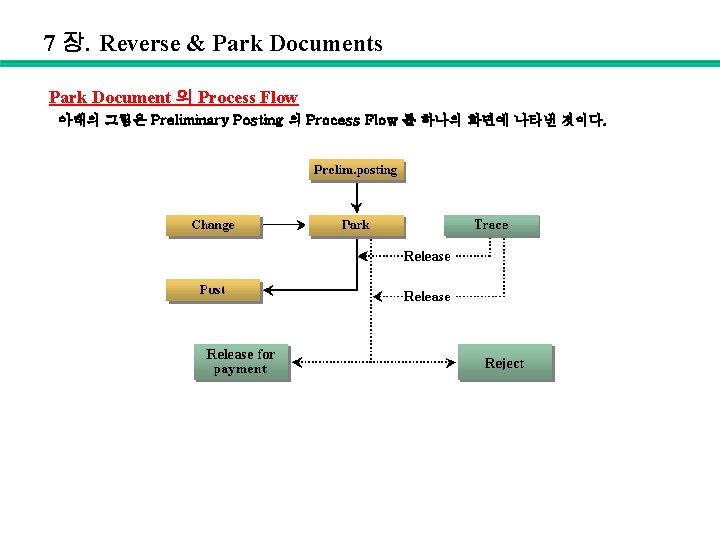
7 장. Reverse & Park Documents Park Document 의 Process Flow 아래의 그림은 Preliminary Posting 의 Process Flow 를 하나의 화면에 나타낸 것이다.
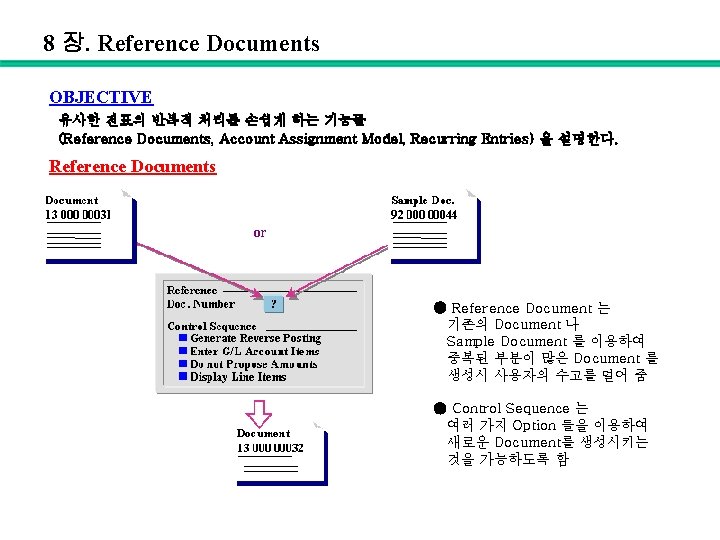
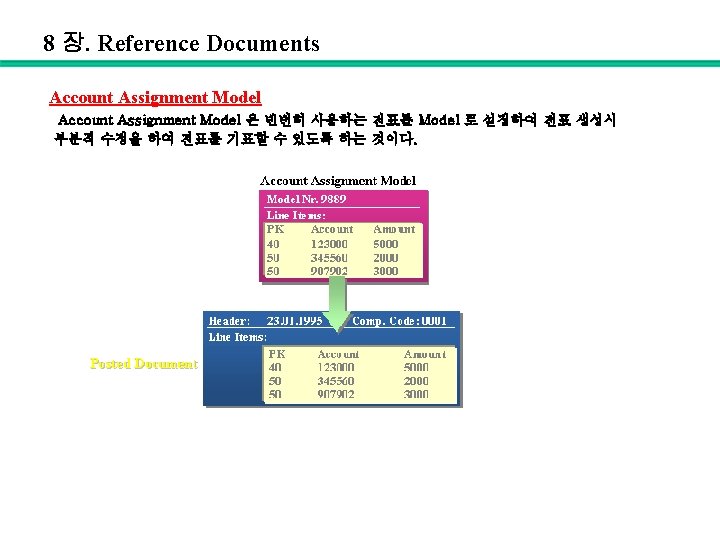
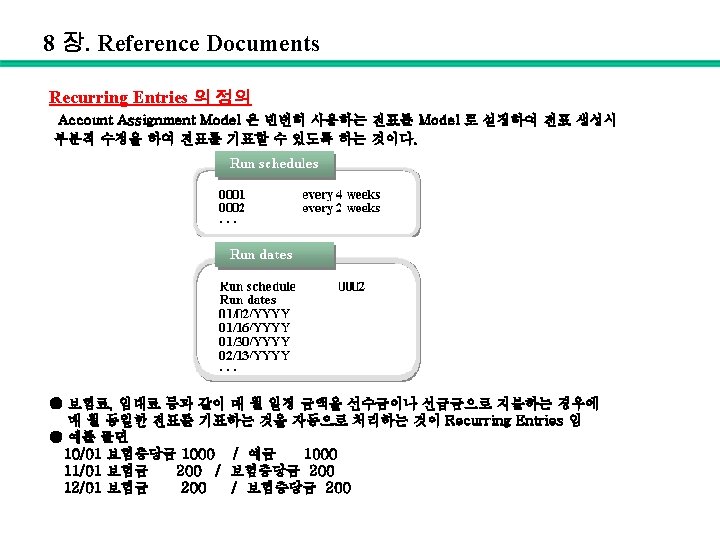
8 장. Reference Documents OBJECTIVE 유사한 전표의 반복적 처리를 손쉽게 하는 기능들 (Reference Documents, Account Assignment Model, Recurring Entries) 을 설명한다. Reference Documents ● Reference Document 는 기존의 Document 나 Sample Document 를 이용하여 중복된 부분이 많은 Document 를 생성시 사용자의 수고를 덜어 줌 ● Control Sequence 는 여러 가지 Option 들을 이용하여 새로운 Document를 생성시키는 것을 가능하도록 함
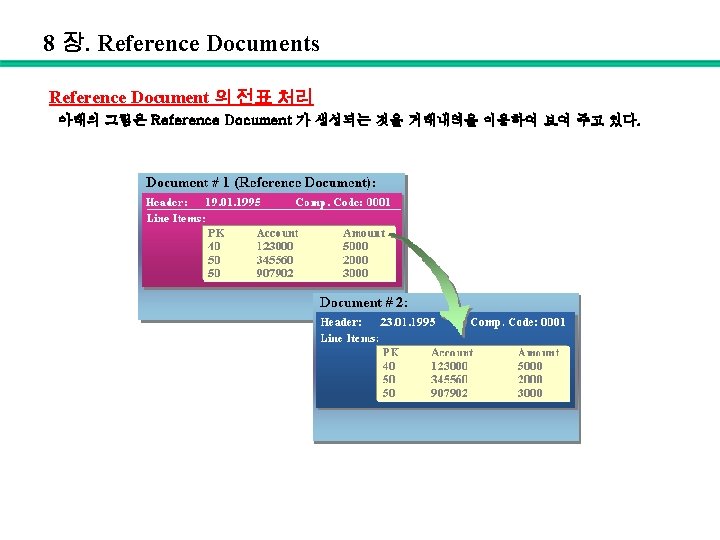
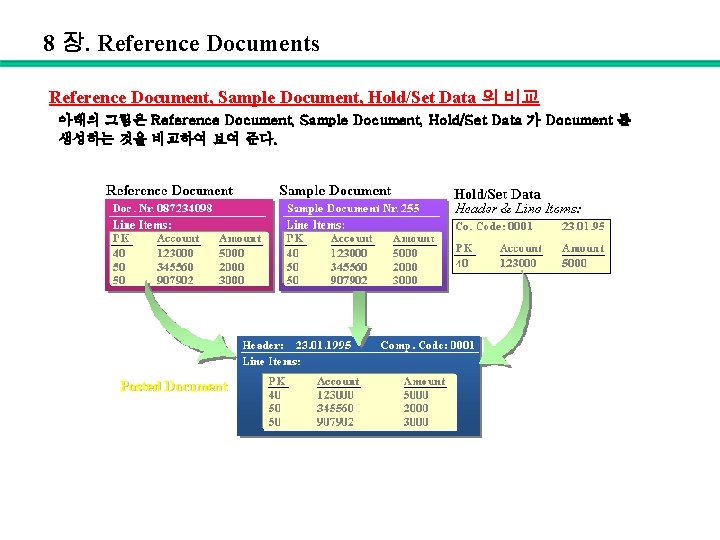
8 장. Reference Documents Reference Document, Sample Document, Hold/Set Data 의 비교 아래의 그림은 Reference Document, Sample Document, Hold/Set Data 가 Document 를 생성하는 것을 비교하여 보여 준다.
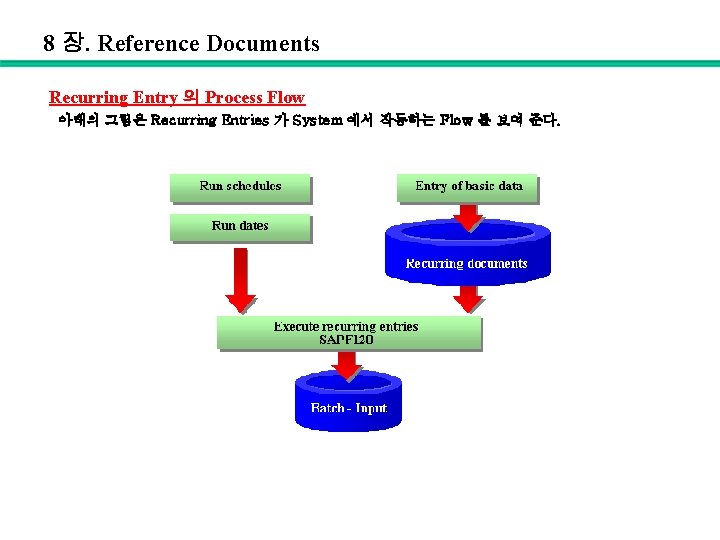
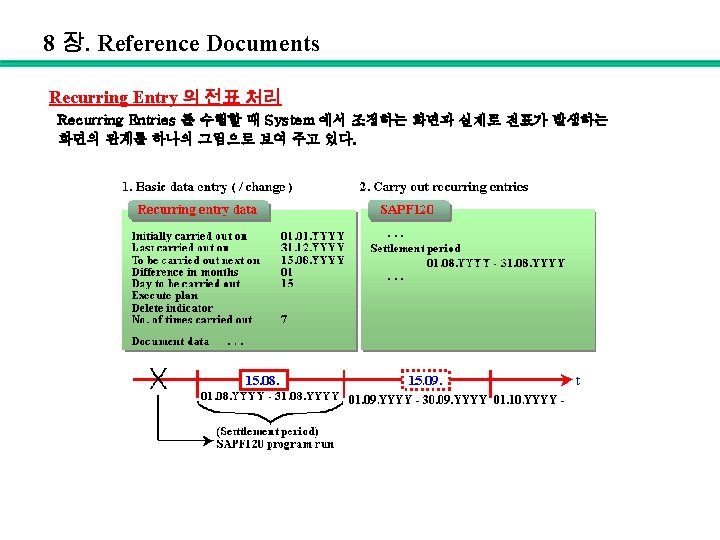
8 장. Reference Documents Recurring Entry 의 Process Flow 아래의 그림은 Recurring Entries 가 System 에서 작동하는 Flow 를 보여 준다.
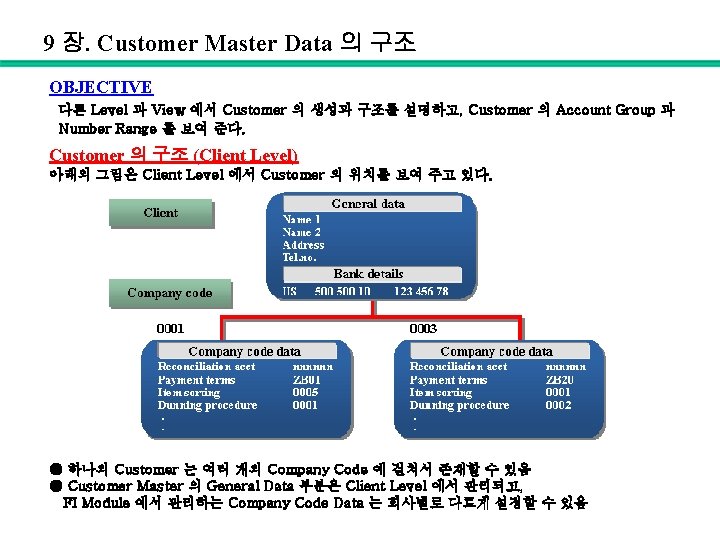
9 장. Customer Master Data 의 구조 OBJECTIVE 다른 Level 과 View 에서 Customer 의 생성과 구조를 설명하고, Customer 의 Account Group 과 Number Range 를 보여 준다. Customer 의 구조 (Client Level) 아래의 그림은 Client Level 에서 Customer 의 위치를 보여 주고 있다. ● 하나의 Customer 는 여러 개의 Company Code 에 걸쳐서 존재할 수 있음 ● Customer Master 의 General Data 부분은 Client Level 에서 관리되고, FI Module 에서 관리하는 Company Code Data 는 회사별로 다르게 설정할 수 있음
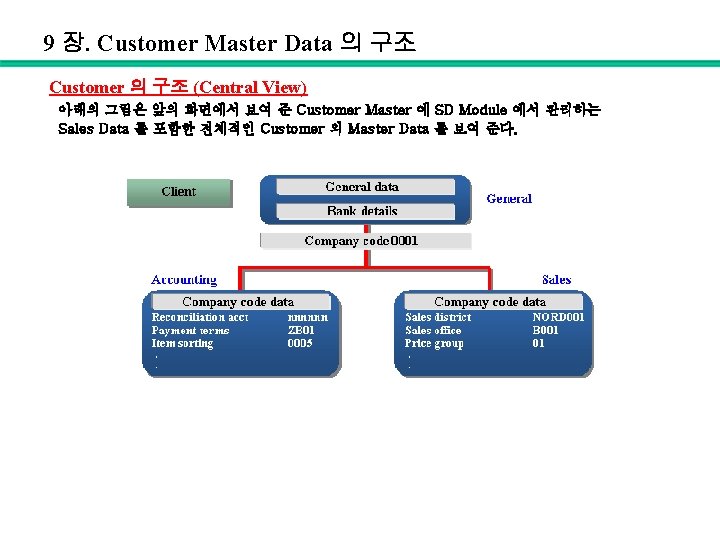
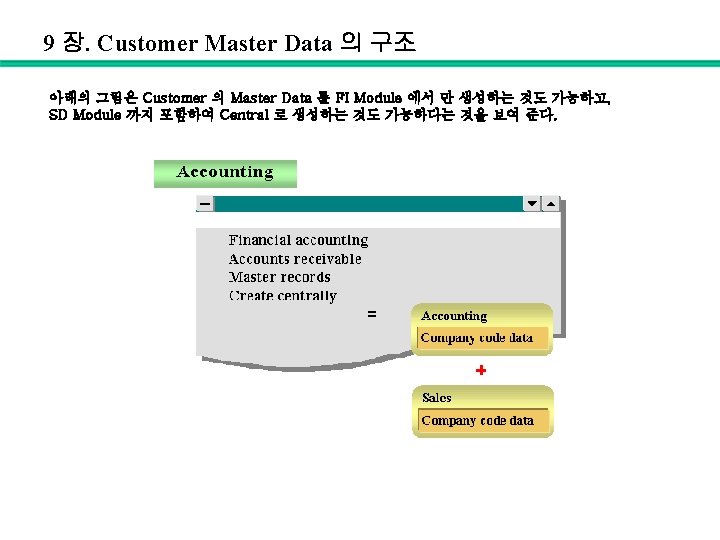
9 장. Customer Master Data 의 구조 Customer 의 구조 (Central View) 아래의 그림은 앞의 화면에서 보여 준 Customer Master 에 SD Module 에서 관리하는 Sales Data 를 포함한 전체적인 Customer 의 Master Data 를 보여 준다.
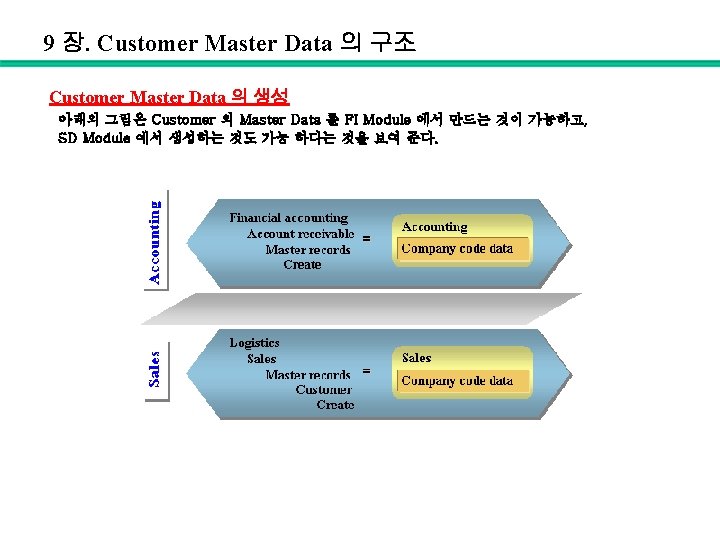
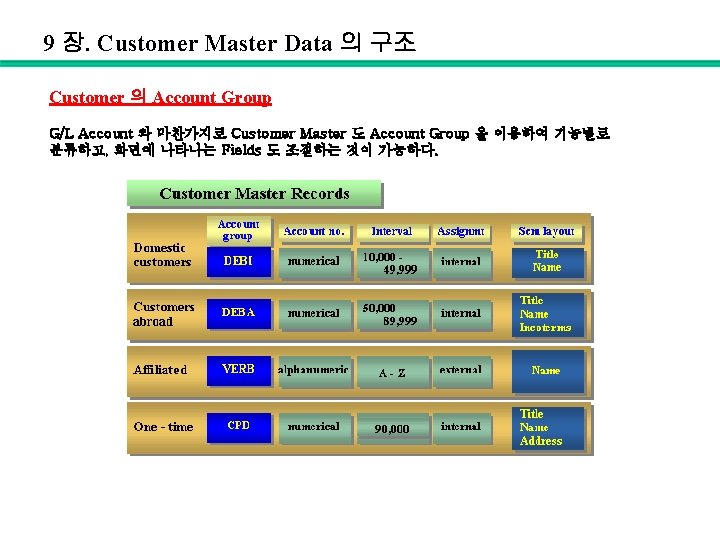
9 장. Customer Master Data 의 구조 Customer 의 Account Group G/L Account 와 마찬가지로 Customer Master 도 Account Group 을 이용하여 기능별로 분류하고, 화면에 나타나는 Fields 도 조절하는 것이 가능하다.
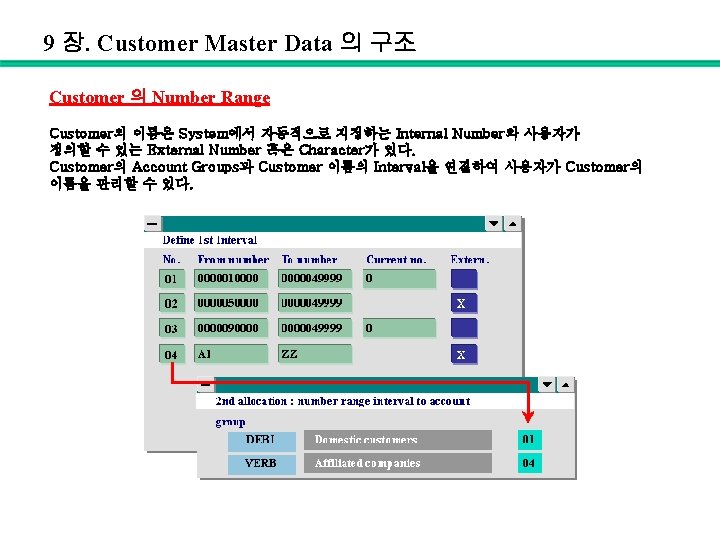
9 장. Customer Master Data 의 구조 Customer 의 Number Range Customer의 이름은 System에서 자동적으로 지정하는 Internal Number와 사용자가 정의할 수 있는 External Number 혹은 Character가 있다. Customer의 Account Groups과 Customer 이름의 Interval을 연결하여 사용자가 Customer의 이름을 관리할 수 있다.
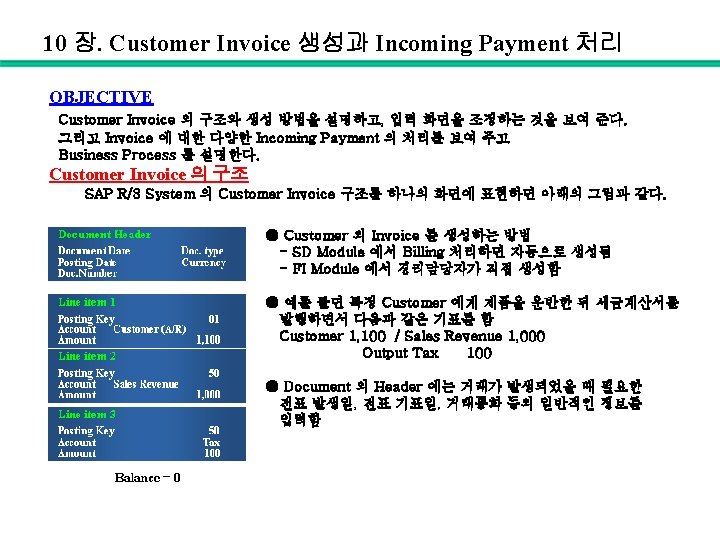
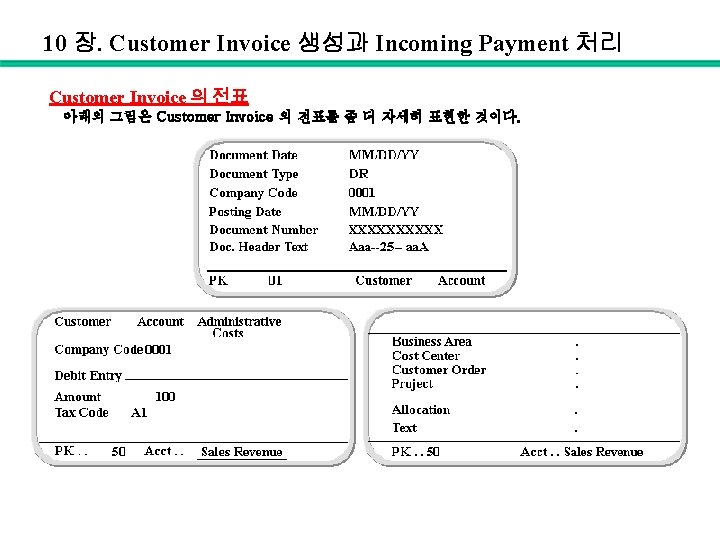
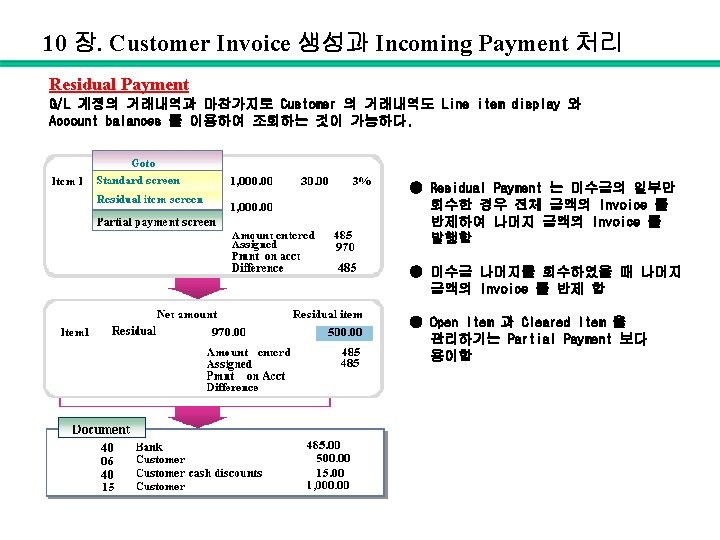
10 장. Customer Invoice 생성과 Incoming Payment 처리 Customer Invoice 의 전표 아래의 그림은 Customer Invoice 의 전표를 좀 더 자세히 표현한 것이다.
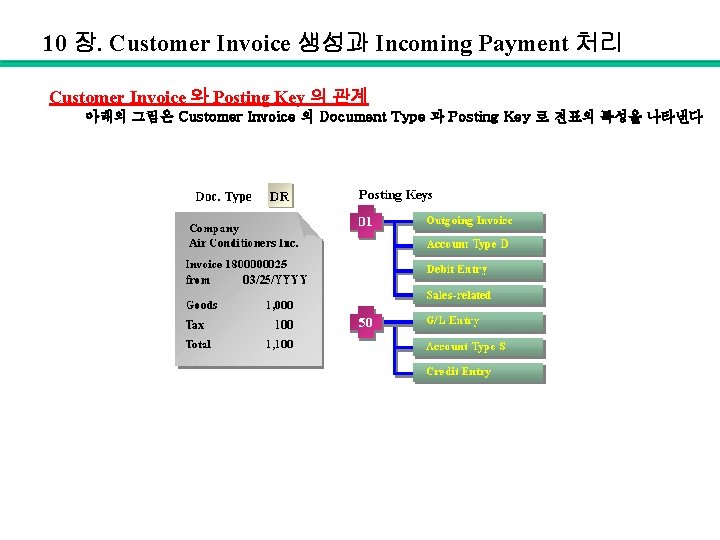
10 장. Customer Invoice 생성과 Incoming Payment 처리 Customer Invoice 와 Posting Key 의 관계 아래의 그림은 Customer Invoice 의 Document Type 과 Posting Key 로 전표의 특성을 나타낸다
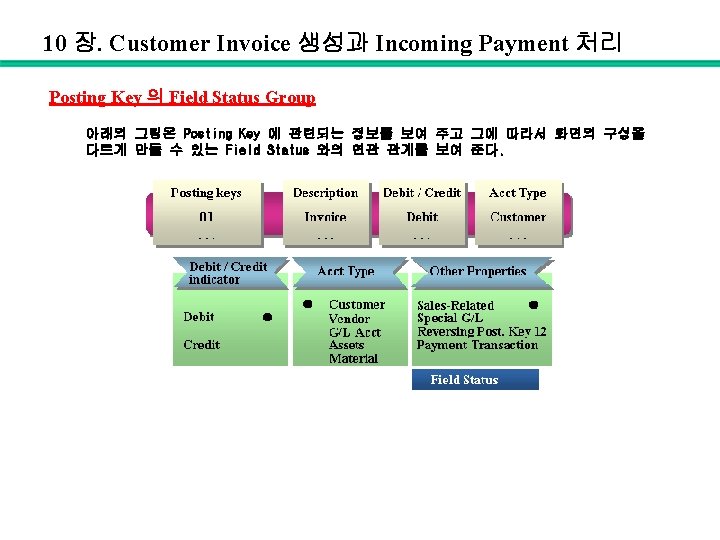
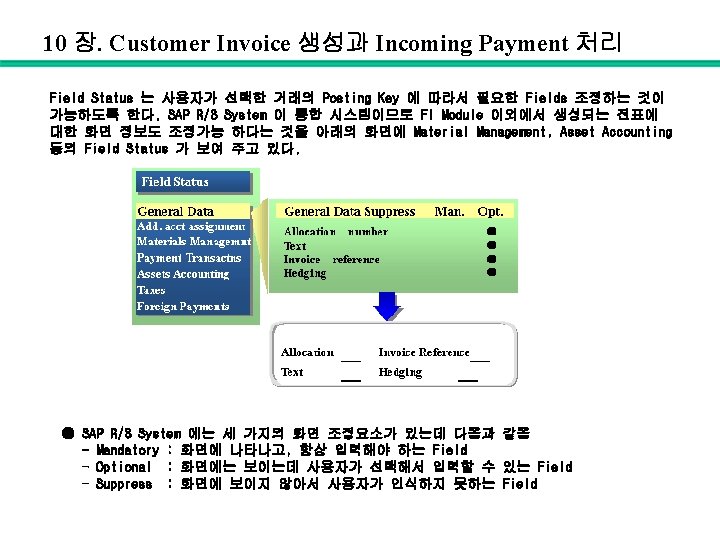
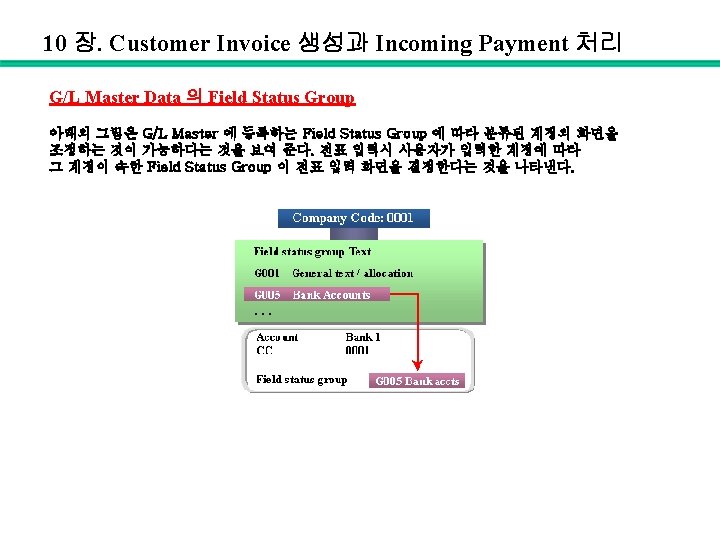
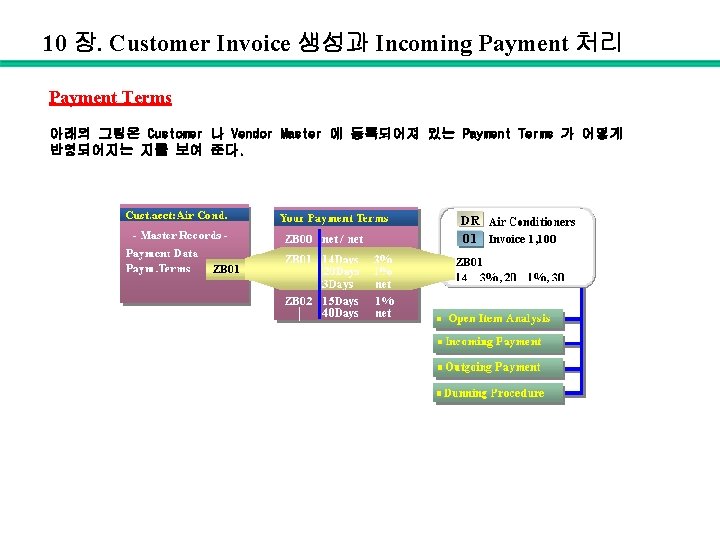
10 장. Customer Invoice 생성과 Incoming Payment 처리 Payment Terms 아래의 그림은 Customer 나 Vendor Master 에 등록되어져 있는 Payment Terms 가 어떻게 반영되어지는 지를 보여 준다.
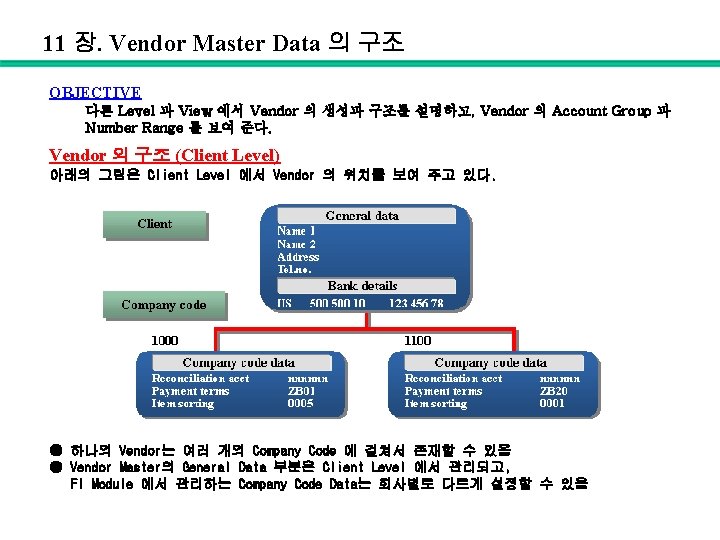
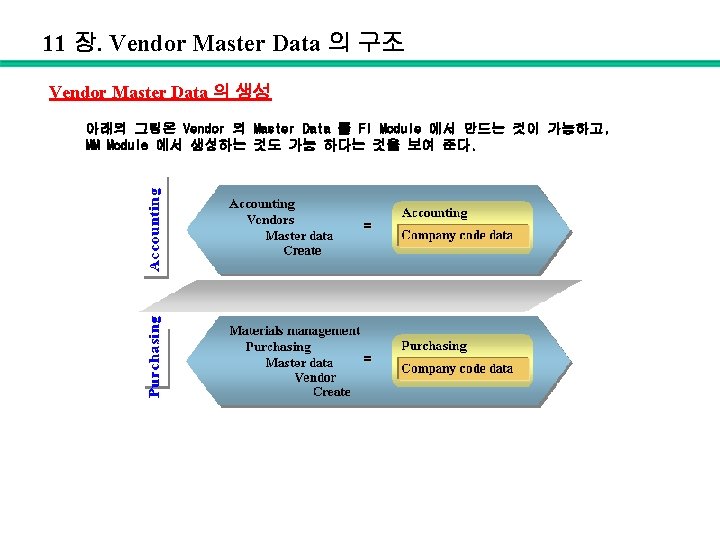
11 장. Vendor Master Data 의 구조 OBJECTIVE 다른 Level 과 View 에서 Vendor 의 생성과 구조를 설명하고, Vendor 의 Account Group 과 Number Range 를 보여 준다. Vendor 의 구조 (Client Level) 아래의 그림은 Client Level 에서 Vendor 의 위치를 보여 주고 있다. ● 하나의 Vendor는 여러 개의 Company Code 에 걸쳐서 존재할 수 있음 ● Vendor Master의 General Data 부분은 Client Level 에서 관리되고, FI Module 에서 관리하는 Company Code Data는 회사별로 다르게 설정할 수 있음
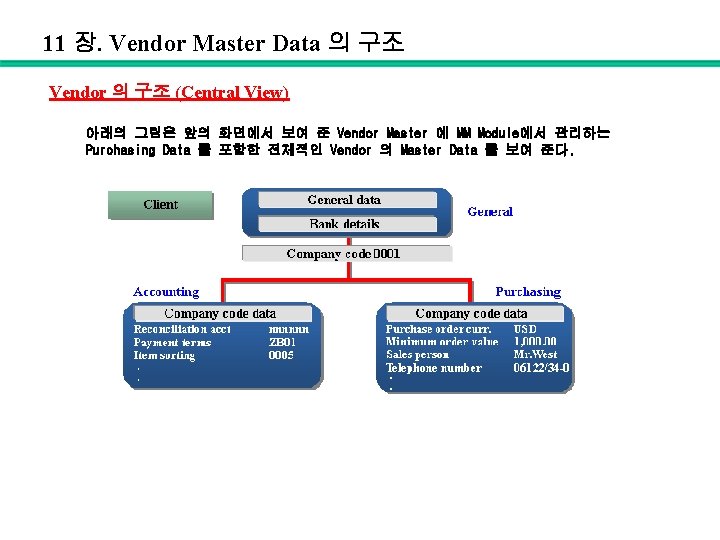
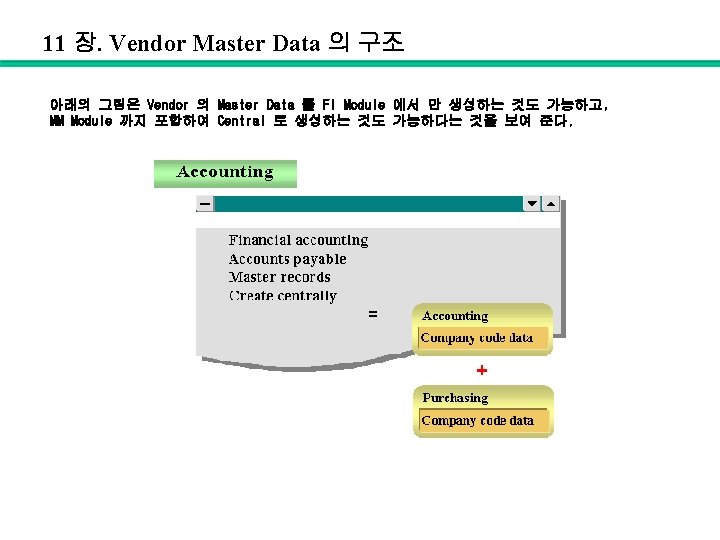
11 장. Vendor Master Data 의 구조 Vendor 의 구조 (Central View) 아래의 그림은 앞의 화면에서 보여 준 Vendor Master 에 MM Module에서 관리하는 Purchasing Data 를 포함한 전체적인 Vendor 의 Master Data 를 보여 준다.
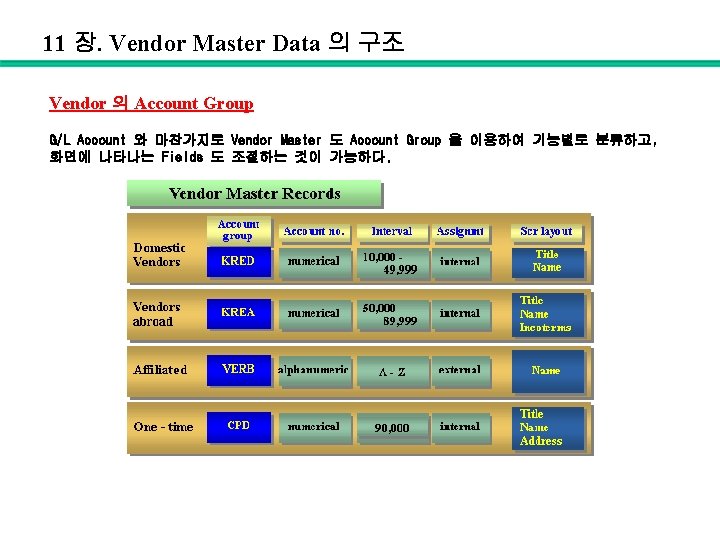
11 장. Vendor Master Data 의 구조 Vendor 의 Account Group G/L Account 와 마찬가지로 Vendor Master 도 Account Group 을 이용하여 기능별로 분류하고, 화면에 나타나는 Fields 도 조절하는 것이 가능하다.
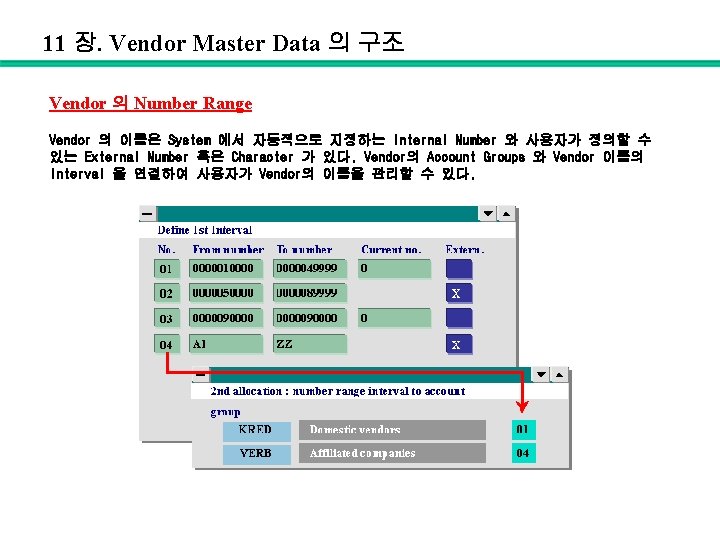
11 장. Vendor Master Data 의 구조 Vendor 의 Number Range Vendor 의 이름은 System 에서 자동적으로 지정하는 Internal Number 와 사용자가 정의할 수 있는 External Number 혹은 Character 가 있다. Vendor의 Account Groups 와 Vendor 이름의 Interval 을 연결하여 사용자가 Vendor의 이름을 관리할 수 있다.
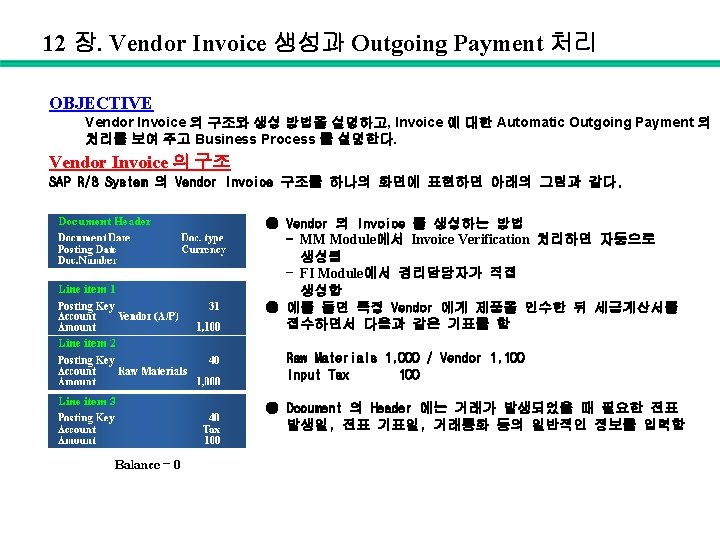
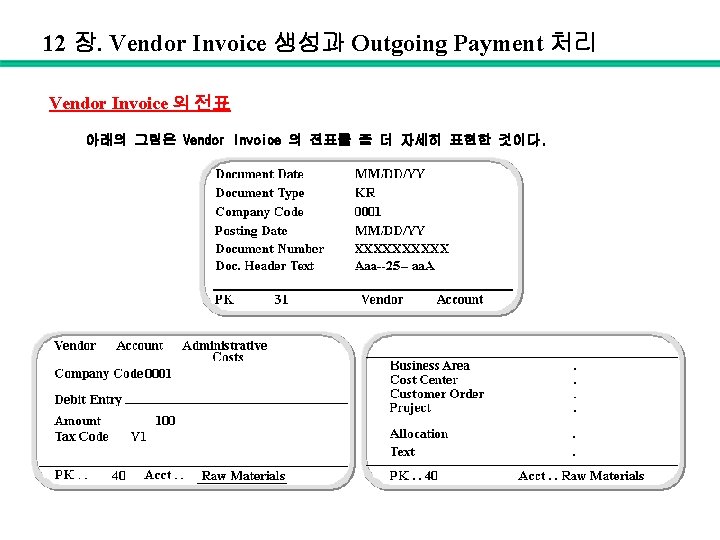
12 장. Vendor Invoice 생성과 Outgoing Payment 처리 Vendor Invoice 의 전표 아래의 그림은 Vendor Invoice 의 전표를 좀 더 자세히 표현한 것이다.
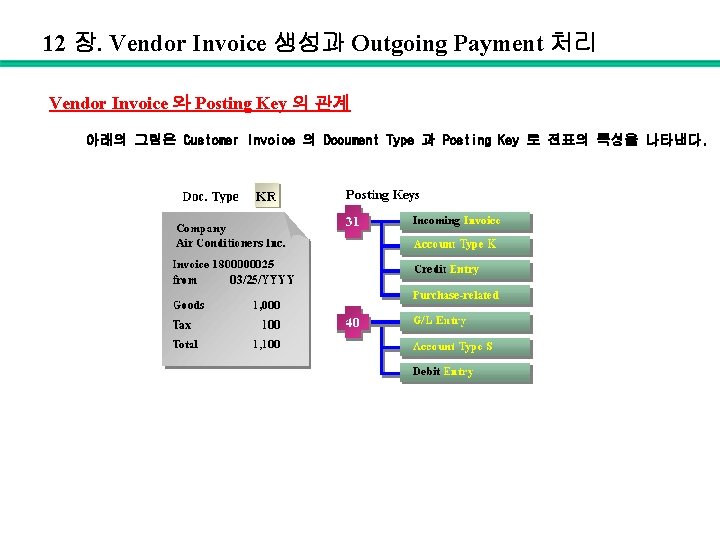
12 장. Vendor Invoice 생성과 Outgoing Payment 처리 Vendor Invoice 와 Posting Key 의 관계 아래의 그림은 Customer Invoice 의 Document Type 과 Posting Key 로 전표의 특성을 나타낸다.
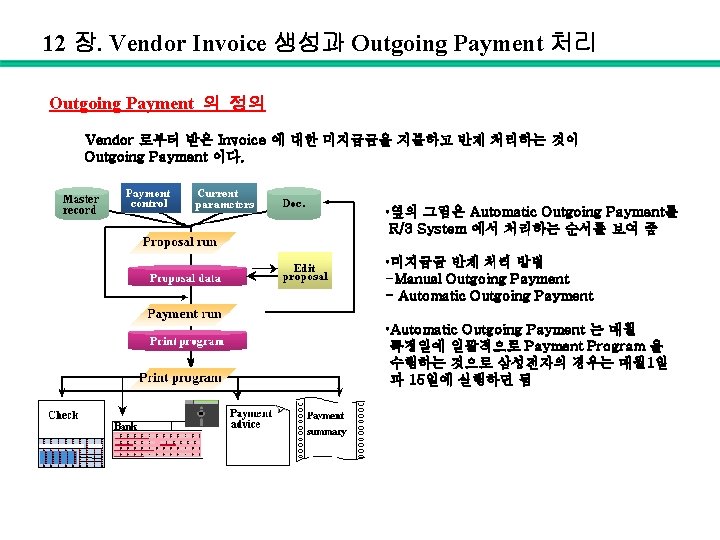
12 장. Vendor Invoice 생성과 Outgoing Payment 처리 Outgoing Payment 의 정의 Vendor 로부터 받은 Invoice 에 대한 미지급금을 지불하고 반제 처리하는 것이 Outgoing Payment 이다. • 옆의 그림은 Automatic Outgoing Payment를 R/3 System 에서 처리하는 순서를 보여 줌 • 미지급금 반제 처리 방법 -Manual Outgoing Payment - Automatic Outgoing Payment • Automatic Outgoing Payment 는 매월 특정일에 일괄적으로 Payment Program 을 수행하는 것으로 삼성전자의 경우는 매월 1일 과 15일에 실행하면 됨
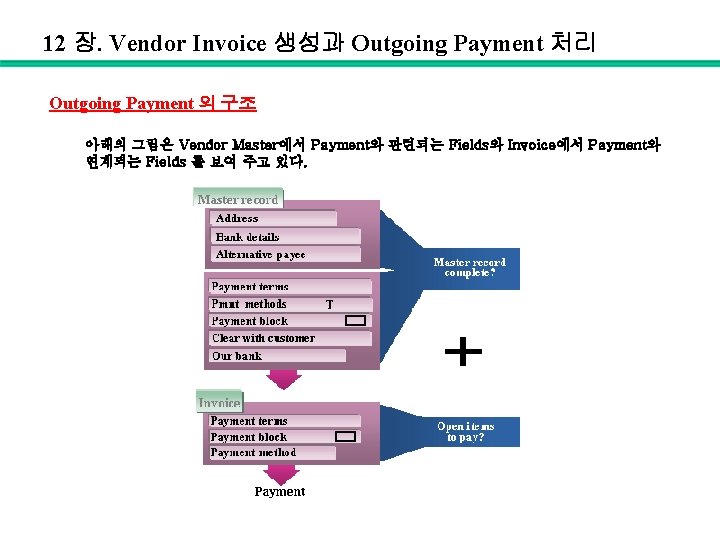
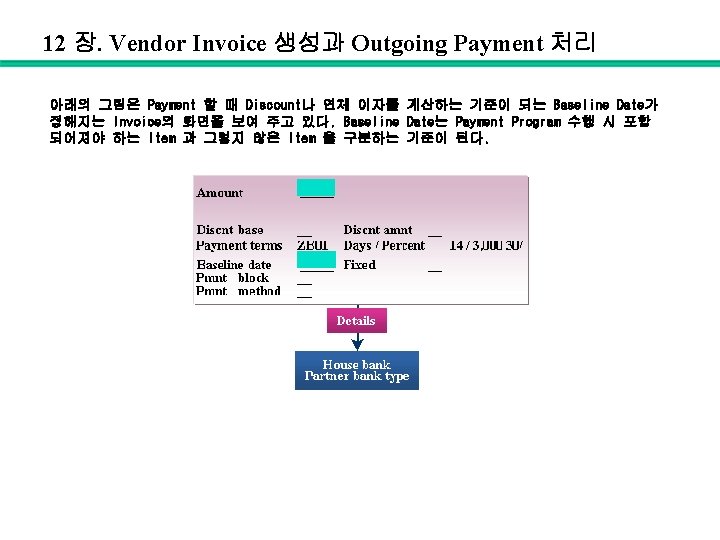
12 장. Vendor Invoice 생성과 Outgoing Payment 처리 Outgoing Payment 의 구조 아래의 그림은 Vendor Master에서 Payment와 관련되는 Fields와 Invoice에서 Payment와 연계되는 Fields 를 보여 주고 있다.
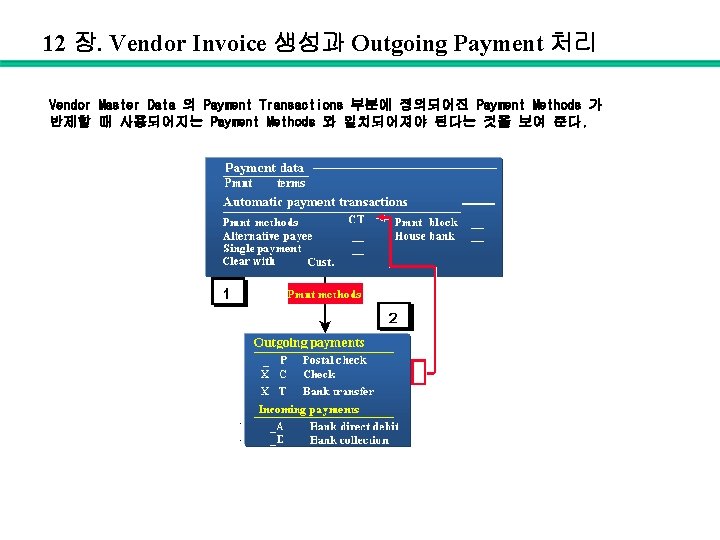
12 장. Vendor Invoice 생성과 Outgoing Payment 처리 Vendor Master Data 의 Payment Transactions 부분에 정의되어진 Payment Methods 가 반제할 때 사용되어지는 Payment Methods 와 일치되어져야 된다는 것을 보여 준다.
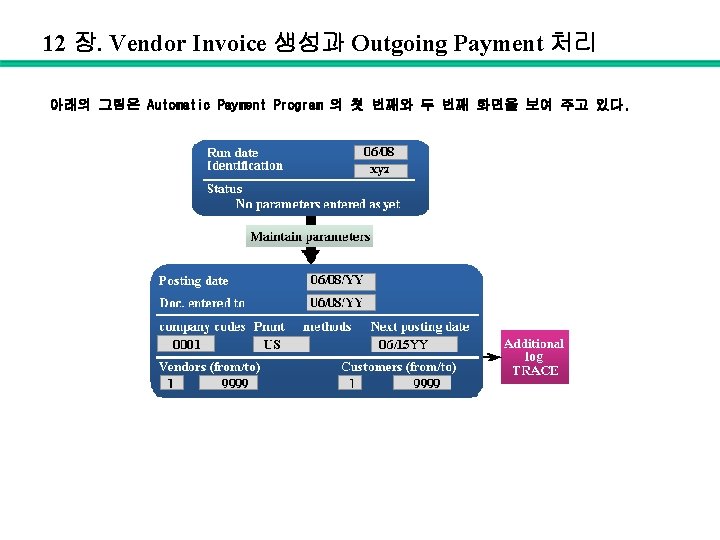
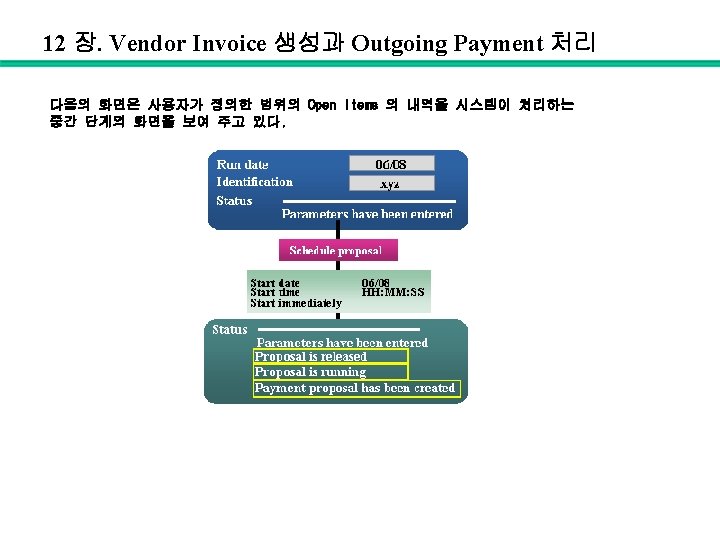
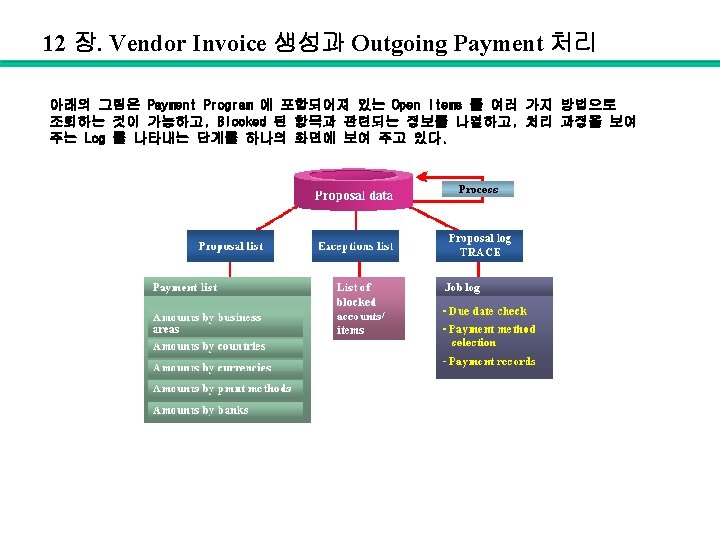
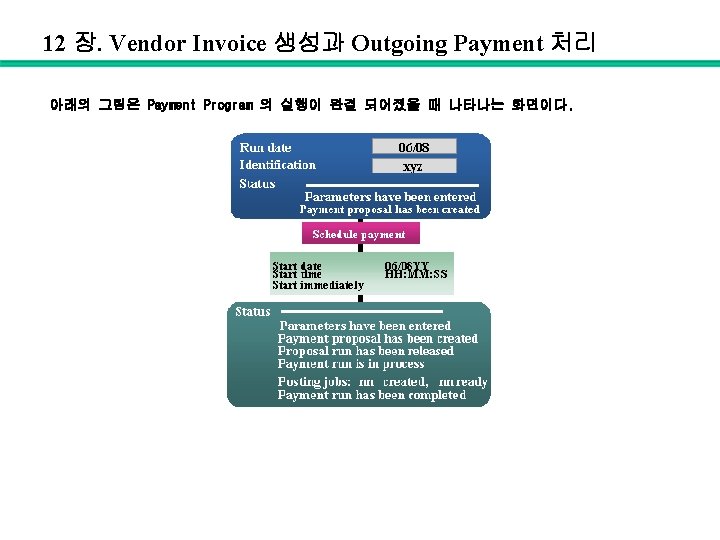
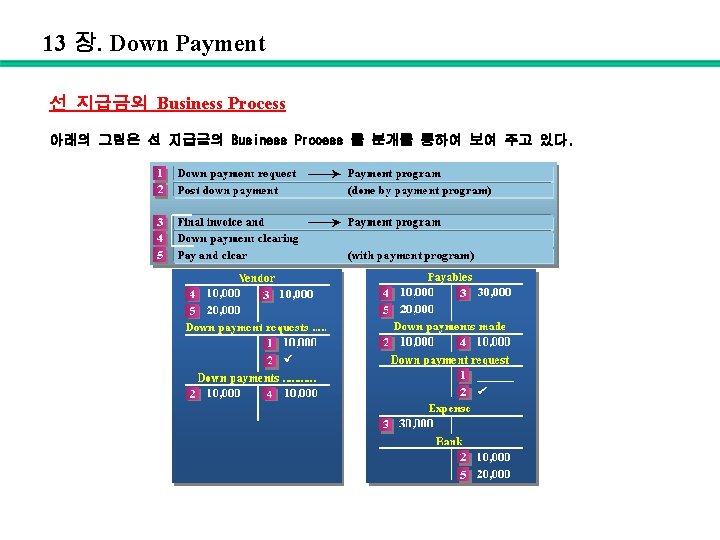
12 장. Vendor Invoice 생성과 Outgoing Payment 처리 아래의 그림은 Automatic Payment Program 의 첫 번째와 두 번째 화면을 보여 주고 있다.
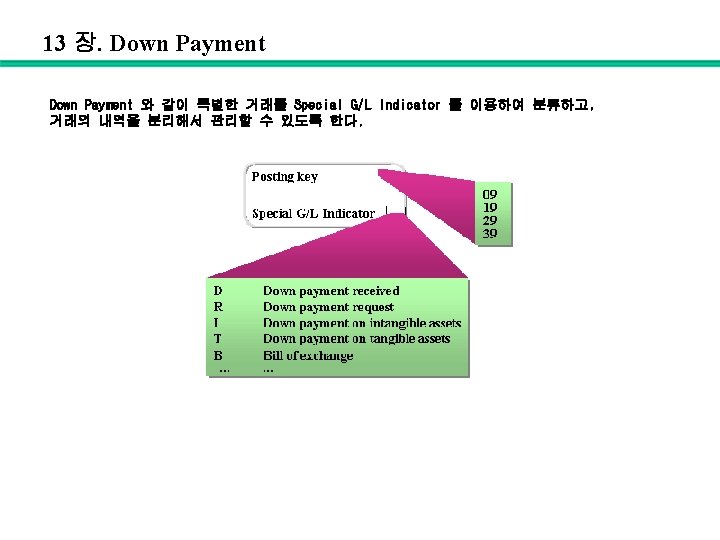
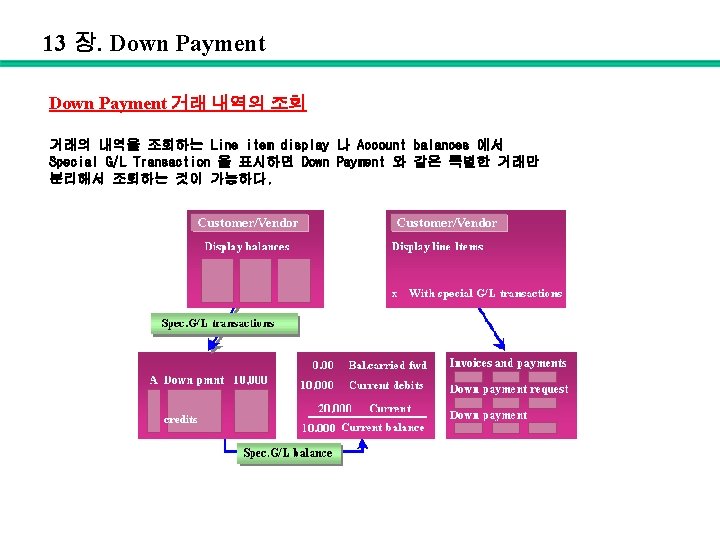
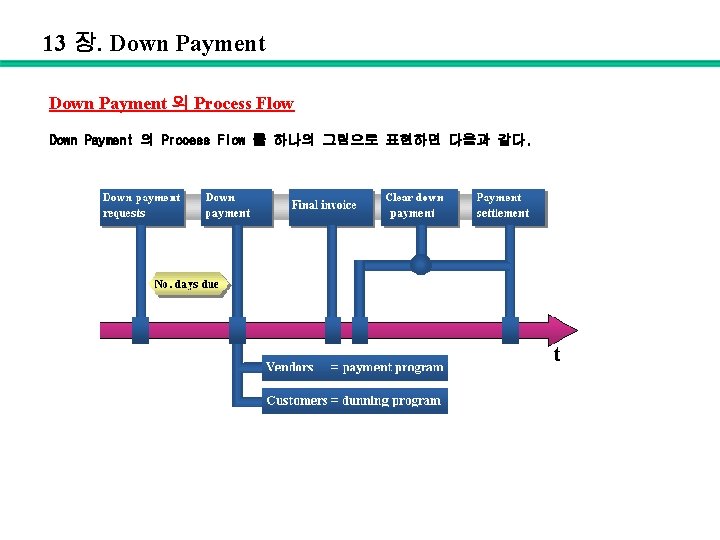
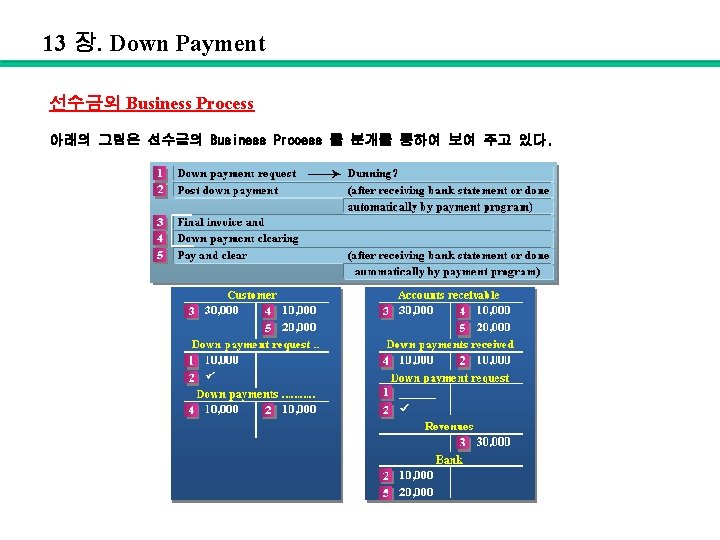
Closing Topics > Day end closing > Month end closing > Year end closing
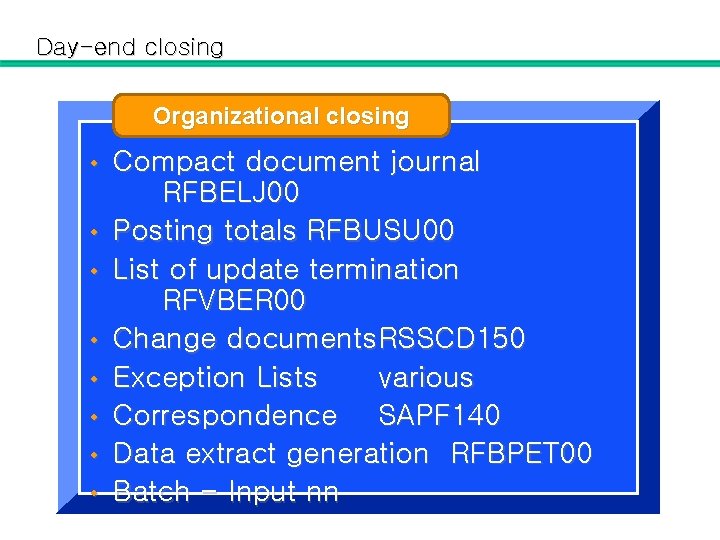
Day-end closing Organizational closing • • Compact document journal RFBELJ 00 Posting totals RFBUSU 00 List of update termination RFVBER 00 Change documents. RSSCD 150 Exception Lists various Correspondence SAPF 140 Data extract generation RFBPET 00 Batch - Input nn
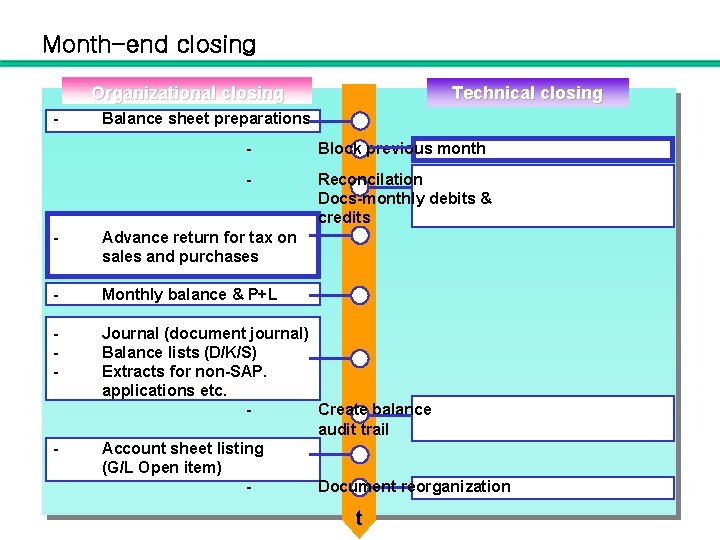
Month-end closing Organizational closing - Technical closing Balance sheet preparations - Block previous month - Reconcilation Docs-monthly debits & credits - Advance return for tax on sales and purchases - Monthly balance & P+L - Journal (document journal) Balance lists (D/K/S) Extracts for non-SAP. applications etc. Create balance audit trail Account sheet listing (G/L Open item) Document reorganization - t
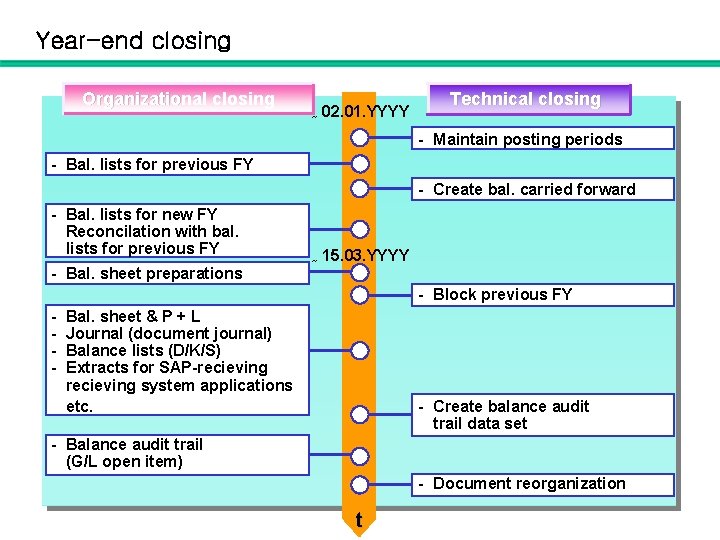
Year-end closing Organizational closing ~ 02. 01. YYYY Technical closing - Maintain posting periods - Bal. lists for previous FY - Create bal. carried forward - Bal. lists for new FY Reconcilation with bal. lists for previous FY - Bal. sheet preparations ~ 15. 03. YYYY - Block previous FY - Bal. sheet & P + L Journal (document journal) Balance lists (D/K/S) Extracts for SAP-recieving system applications etc. - Create balance audit trail data set - Balance audit trail (G/L open item) - Document reorganization t
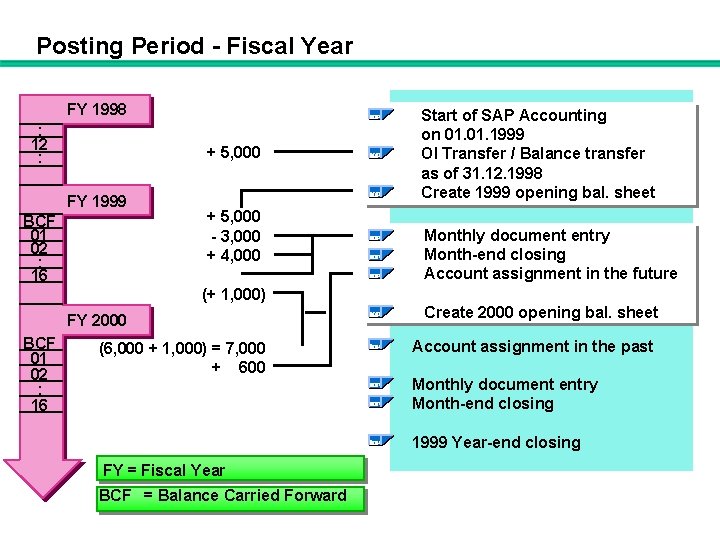
Posting Period - Fiscal Year FY 1998 : 12 : + 5, 000 FY 1999 BCF 01 02 : 16 + 5, 000 - 3, 000 + 4, 000 Start of SAP Accounting on 01. 1999 OI Transfer / Balance transfer as of 31. 12. 1998 Create 1999 opening bal. sheet Monthly document entry Month-end closing Account assignment in the future (+ 1, 000) FY 2000 BCF 01 02 : 16 (6, 000 + 1, 000) = 7, 000 + 600 Create 2000 opening bal. sheet Account assignment in the past Monthly document entry Month-end closing 1999 Year-end closing FY = Fiscal Year BCF = Balance Carried Forward
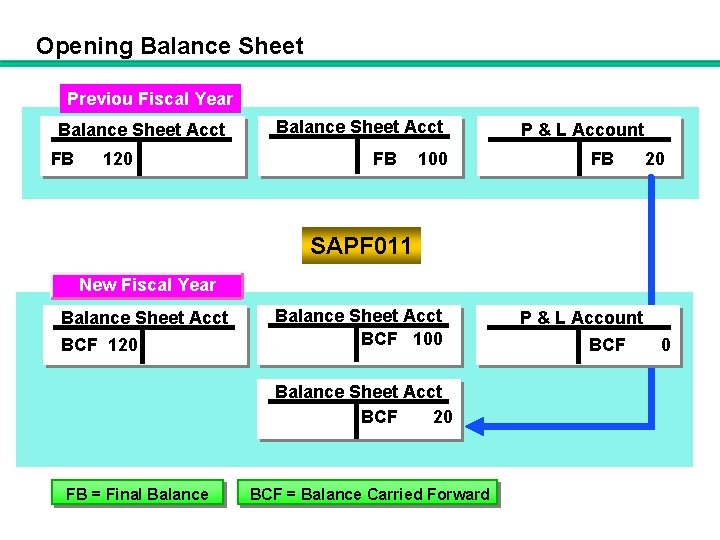
Opening Balance Sheet Previous Fiscal Year Previou Fiscal Balance Sheet Acct FB 120 Balance Sheet Acct FB 100 P & L Account FB 20 SAPF 011 New Fiscal Year Balance Sheet Acct BCF 120 BCF Balance Sheet Acct BCF 100 Balance Sheet Acct BCF 20 FB = Final Balance BCF = Balance Carried Forward P & L Account BCF 00
- Slides: 113