
File Management Basic Concepts 1 File Linear array
File Management
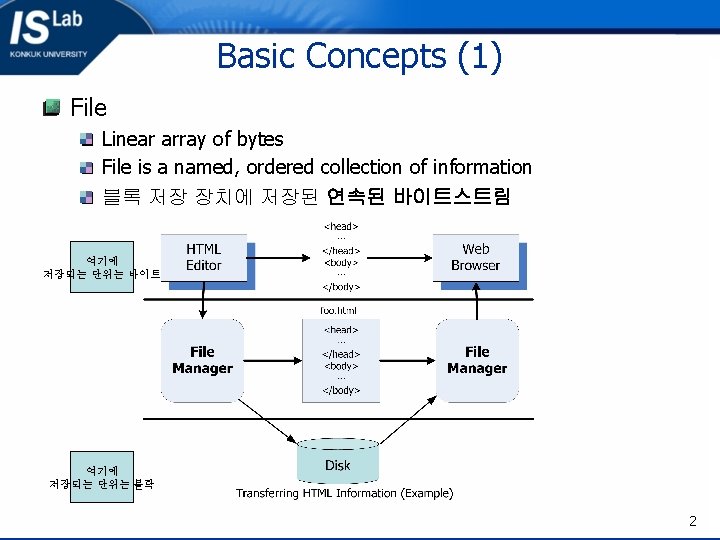
Basic Concepts (1) File Linear array of bytes File is a named, ordered collection of information 블록 저장 장치에 저장된 연속된 바이트스트림 여기에 저장되는 단위는 바이트 여기에 저장되는 단위는 블락 2
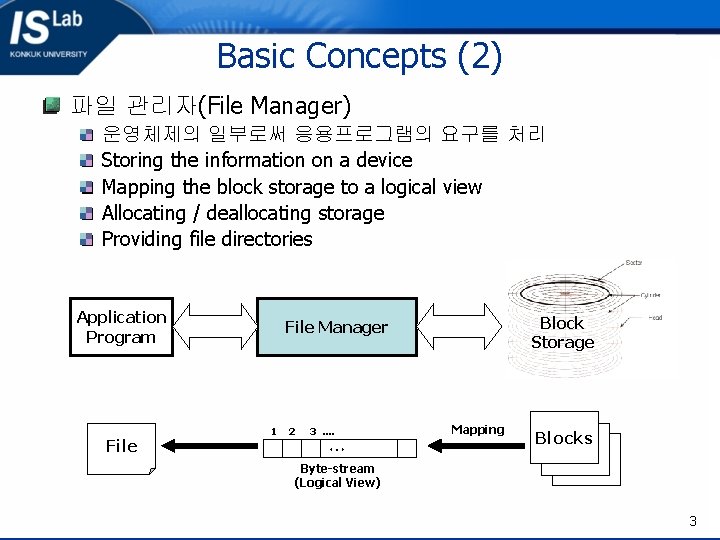
Basic Concepts (2) 파일 관리자(File Manager) 운영체제의 일부로써 응용프로그램의 요구를 처리 Storing the information on a device Mapping the block storage to a logical view Allocating / deallocating storage Providing file directories Application Program File Block Storage File Manager 1 2 3 …. … Mapping Blocks Byte-stream (Logical View) 3
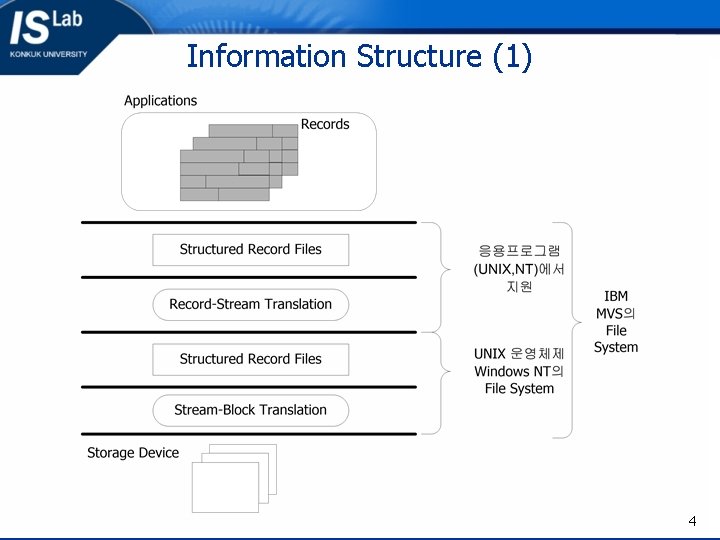
Information Structure (1) 4
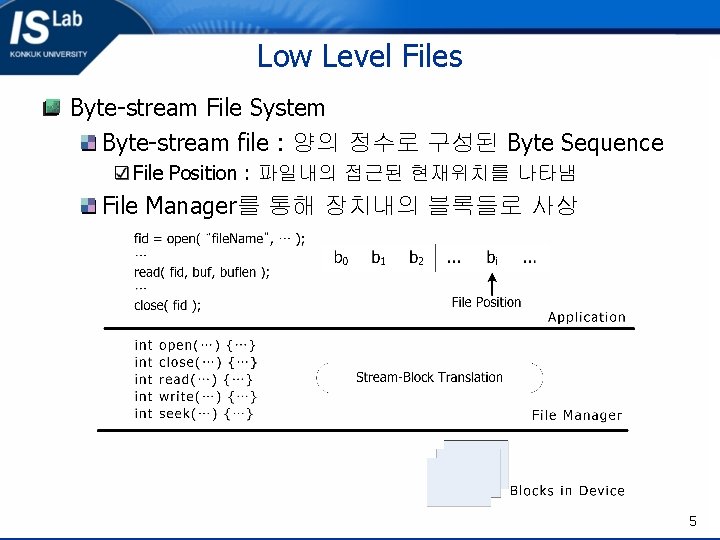
Low Level Files Byte-stream File System Byte-stream file : 양의 정수로 구성된 Byte Sequence File Position : 파일내의 접근된 현재위치를 나타냄 File Manager를 통해 장치내의 블록들로 사상 5
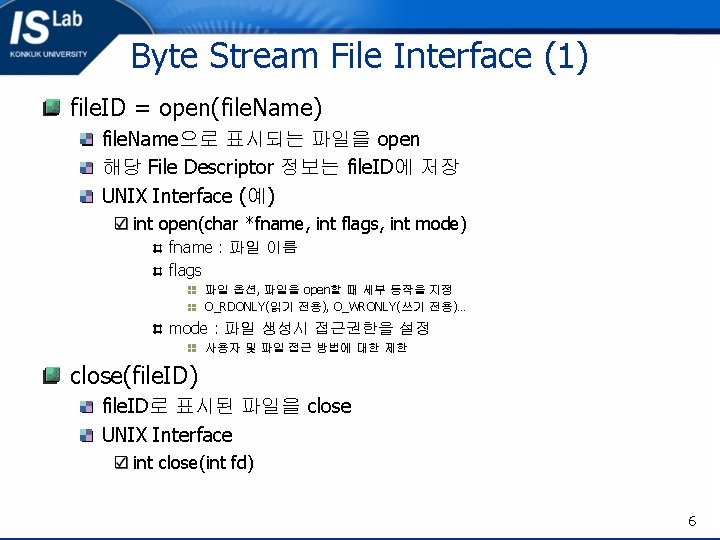
Byte Stream File Interface (1) file. ID = open(file. Name) file. Name으로 표시되는 파일을 open 해당 File Descriptor 정보는 file. ID에 저장 UNIX Interface (예) int open(char *fname, int flags, int mode) fname : 파일 이름 flags 파일 옵션, 파일을 open할 때 세부 동작을 지정 O_RDONLY(읽기 전용), O_WRONLY(쓰기 전용)… mode : 파일 생성시 접근권한을 설정 사용자 및 파일 접근 방법에 대한 제한 close(file. ID) file. ID로 표시된 파일을 close UNIX Interface int close(int fd) 6
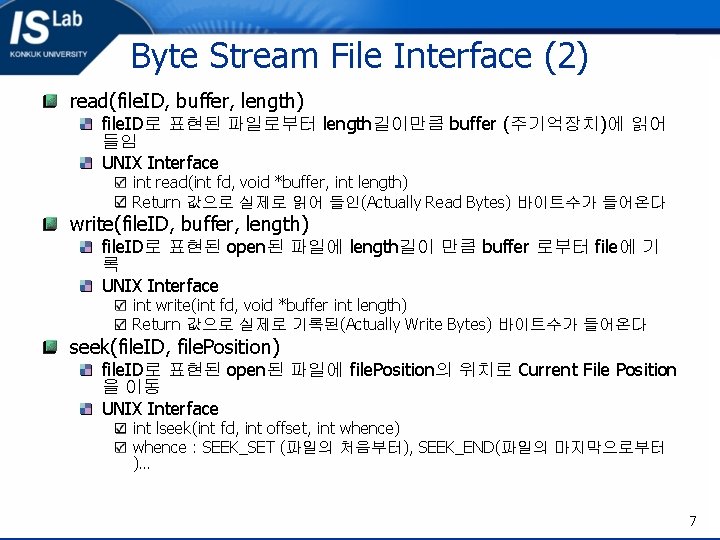
Byte Stream File Interface (2) read(file. ID, buffer, length) file. ID로 표현된 파일로부터 length길이만큼 buffer (주기억장치)에 읽어 들임 UNIX Interface int read(int fd, void *buffer, int length) Return 값으로 실제로 읽어 들인(Actually Read Bytes) 바이트수가 들어온다 write(file. ID, buffer, length) file. ID로 표현된 open된 파일에 length길이 만큼 buffer 로부터 file에 기 록 UNIX Interface int write(int fd, void *buffer int length) Return 값으로 실제로 기록된(Actually Write Bytes) 바이트수가 들어온다 seek(file. ID, file. Position) file. ID로 표현된 open된 파일에 file. Position의 위치로 Current File Position 을 이동 UNIX Interface int lseek(int fd, int offset, int whence) whence : SEEK_SET (파일의 처음부터), SEEK_END(파일의 마지막으로부터 )… 7
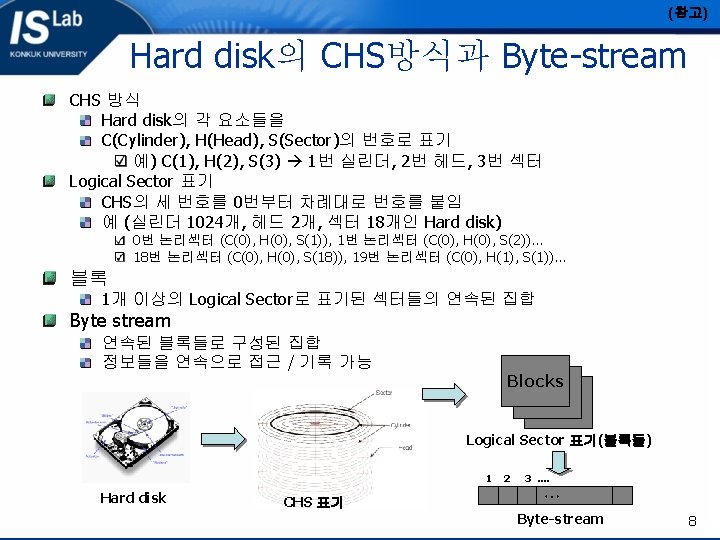
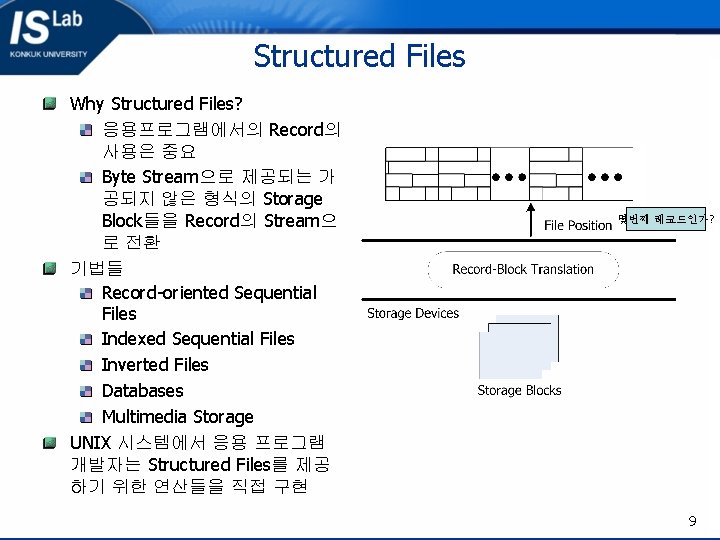
Structured Files Why Structured Files? 응용프로그램에서의 Record의 사용은 중요 Byte Stream으로 제공되는 가 공되지 않은 형식의 Storage Block들을 Record의 Stream으 로 전환 기법들 Record-oriented Sequential Files Indexed Sequential Files Inverted Files Databases Multimedia Storage UNIX 시스템에서 응용 프로그램 개발자는 Structured Files를 제공 하기 위한 연산들을 직접 구현 몇번째 레코드인가? 9
Record-oriented Sequential Files Structured Sequential File: 비부호(non-negative) 정수로 인덱스된 논 리 레코드들의 시퀀스 Operations file. ID = open( file. Name ) close( file. ID ) get. Record( file. ID, record ) file. ID가 가리키는 파일의 현재 위치에서 레코드를 읽음 put. Record( file. ID, record ) file. ID가 가리키는 파일의 현재 위치에 레코드를 저장함 seek( file. ID, position ) file. ID가 가리키는 파일에서 지정된 위치로 포인터를 변경함 순차접근장치(Sequential Accessed Device), 임의접근장치(Random Accessed Device) 모두 적용 가능 10
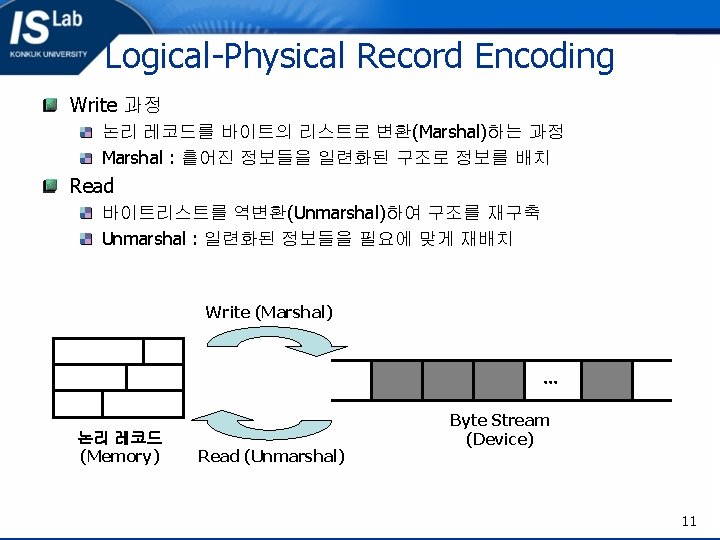
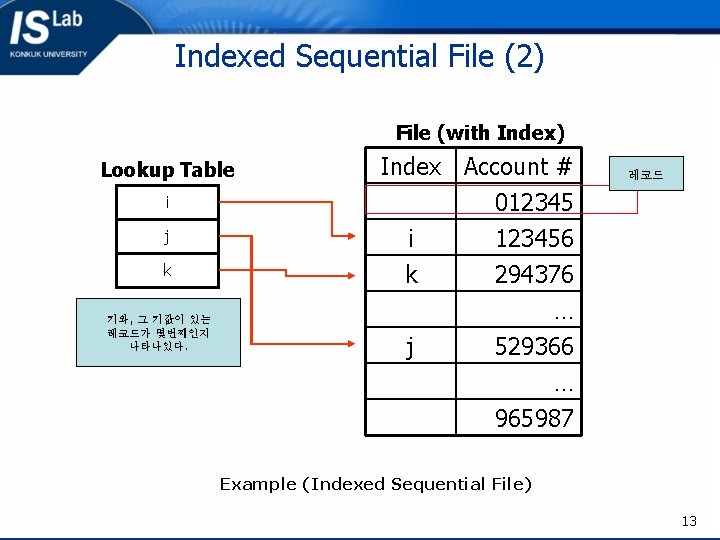
Indexed Sequential File (2) File (with Index) Lookup Table i j k 키와, 그 키값이 있는 레코드가 몇번째인지 나타나있다. Index Account # 012345 i 123456 k 294376 j 레코드 … 529366 … 965987 Example (Indexed Sequential File) 13
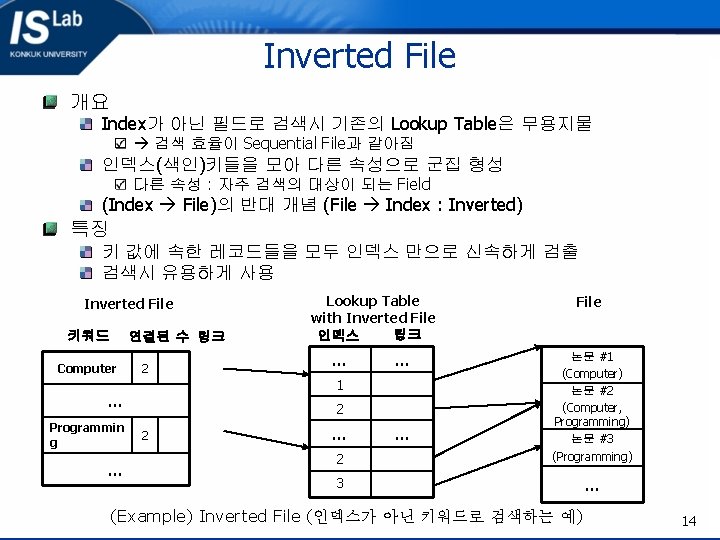
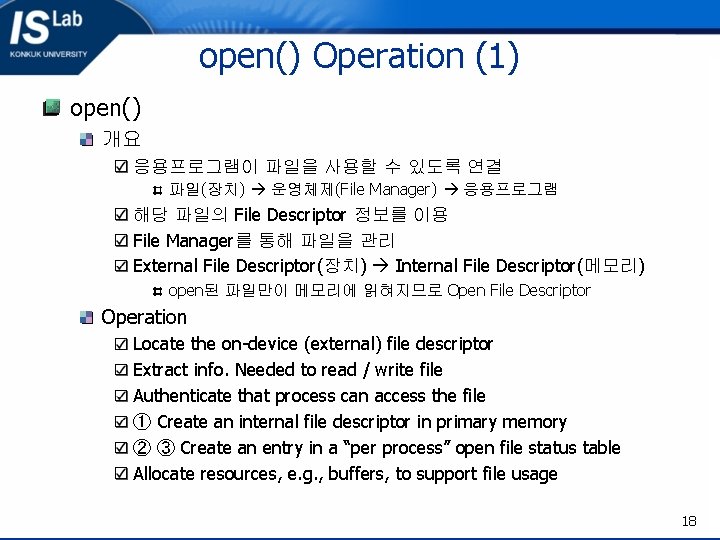
open() Operation (1) open() 개요 응용프로그램이 파일을 사용할 수 있도록 연결 파일(장치) 운영체제(File Manager) 응용프로그램 해당 파일의 File Descriptor 정보를 이용 File Manager를 통해 파일을 관리 External File Descriptor(장치) Internal File Descriptor(메모리) open된 파일만이 메모리에 읽혀지므로 Open File Descriptor Operation Locate the on-device (external) file descriptor Extract info. Needed to read / write file Authenticate that process can access the file ① Create an internal file descriptor in primary memory ② ③ Create an entry in a “per process” open file status table Allocate resources, e. g. , buffers, to support file usage 18
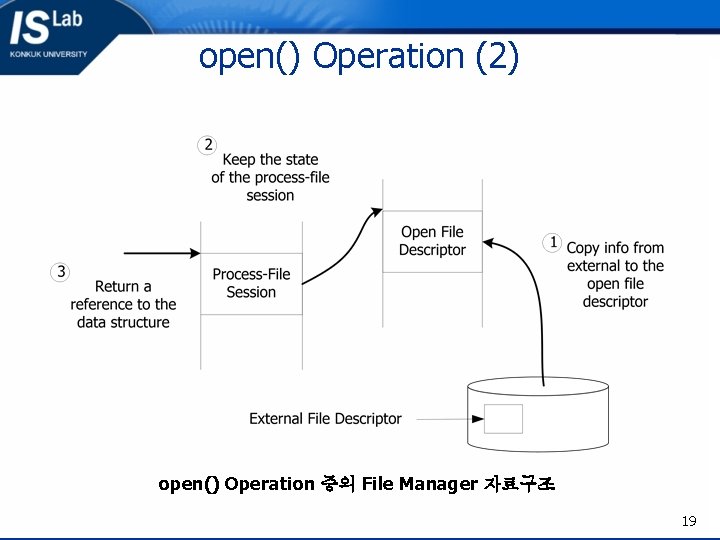
open() Operation (2) open() Operation 중의 File Manager 자료구조 19
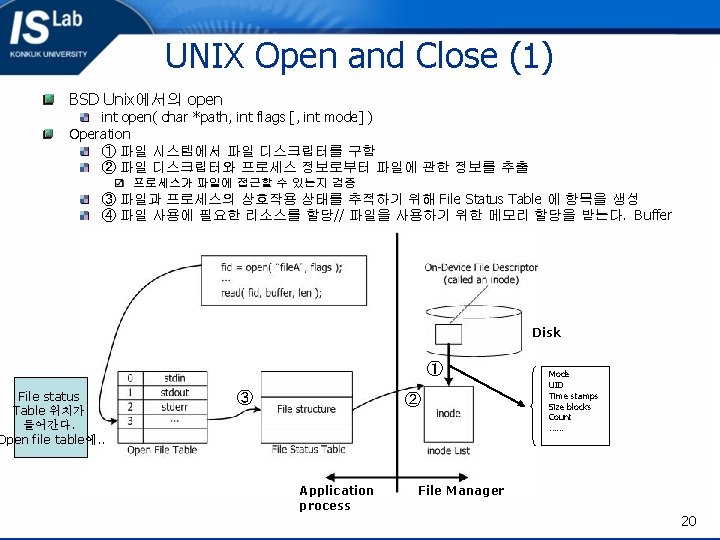
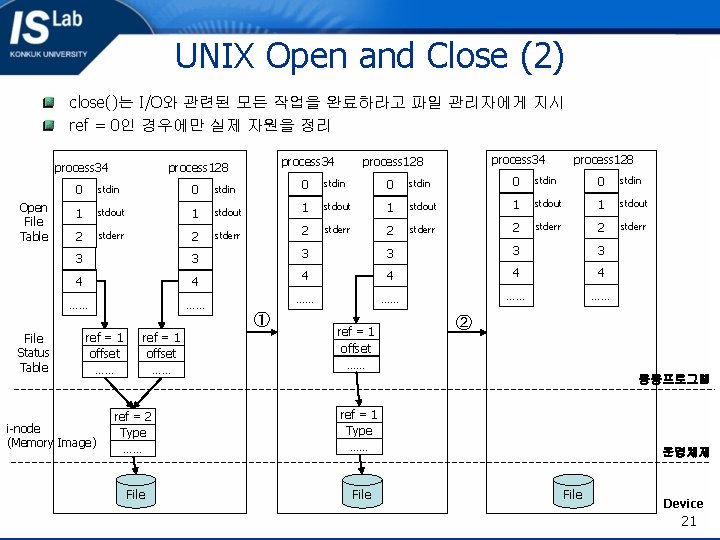
UNIX Open and Close (2) close()는 I/O와 관련된 모든 작업을 완료하라고 파일 관리자에게 지시 ref = 0인 경우에만 실제 자원을 정리 Open File Table process 34 process 128 0 stdin 0 stdin 1 stdout 1 stdout 2 stderr 2 stderr 3 3 3 4 4 4 …… …… …… ① File Status Table ref = 1 offset …… i-node (Memory Image) ref = 1 offset …… ② 응용프로그램 ref = 2 Type …… ref = 1 Type …… File 운영체제 File Device 21
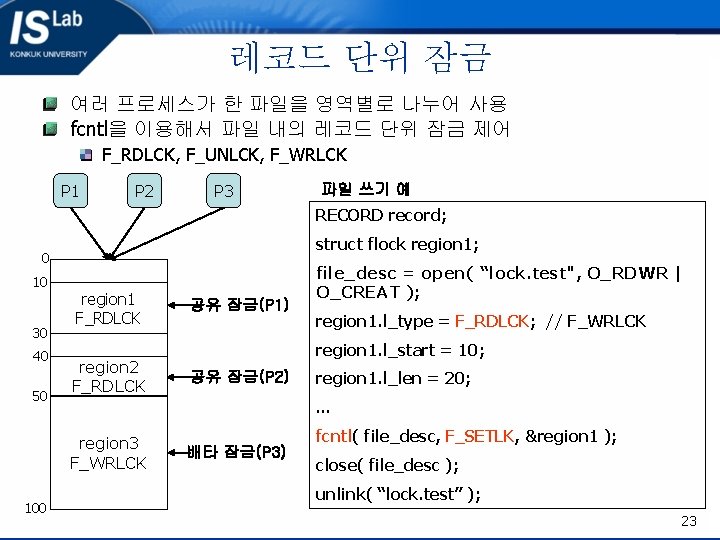
레코드 단위 잠금 여러 프로세스가 한 파일을 영역별로 나누어 사용 fcntl을 이용해서 파일 내의 레코드 단위 잠금 제어 F_RDLCK, F_UNLCK, F_WRLCK P 1 P 2 P 3 파일 쓰기 예 RECORD record; struct flock region 1; 0 10 30 40 50 region 1 F_RDLCK region 2 F_RDLCK region 1. l_type = F_RDLCK; // F_WRLCK region 1. l_start = 10; 공유 잠금(P 2) region 1. l_len = 20; … region 3 F_WRLCK 100 공유 잠금(P 1) file_desc = open( “lock. test", O_RDWR | O_CREAT ); 배타 잠금(P 3) fcntl( file_desc, F_SETLK, ®ion 1 ); close( file_desc ); unlink( “lock. test” ); 23
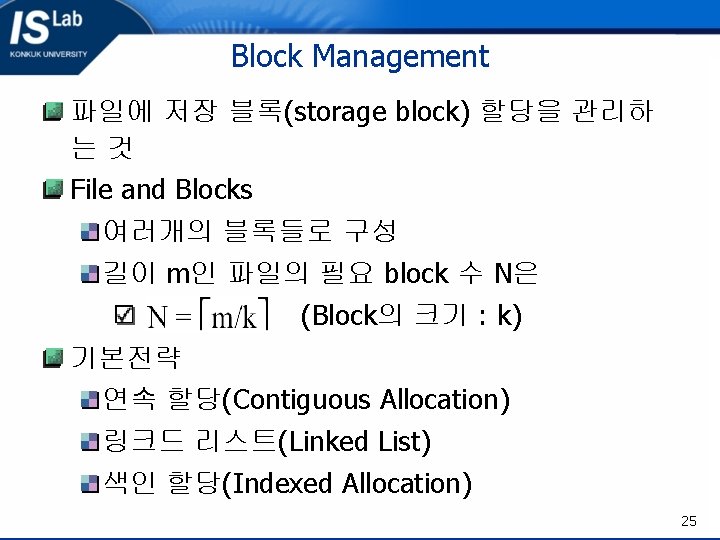
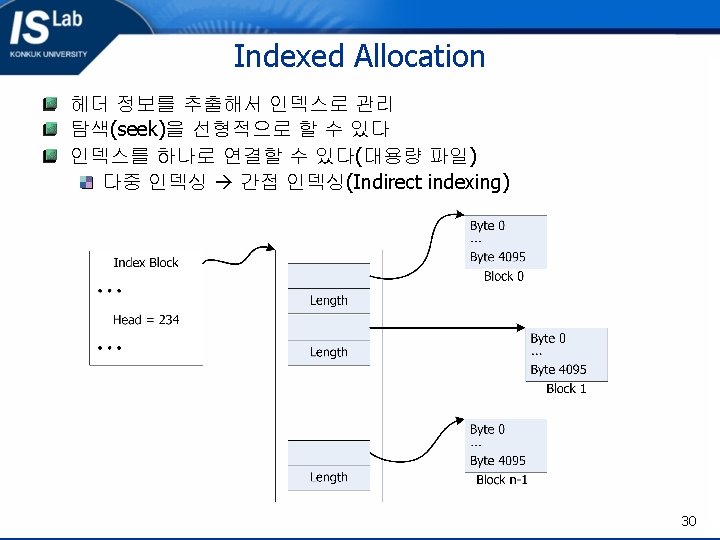
Block Management 파일에 저장 블록(storage block) 할당을 관리하 는것 File and Blocks 여러개의 블록들로 구성 길이 m인 파일의 필요 block 수 N은 (Block의 크기 : k) 기본전략 연속 할당(Contiguous Allocation) 링크드 리스트(Linked List) 색인 할당(Indexed Allocation) 25
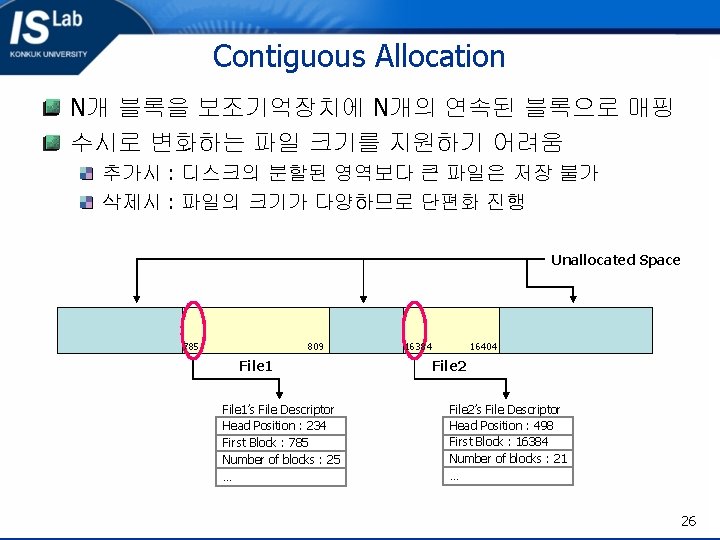
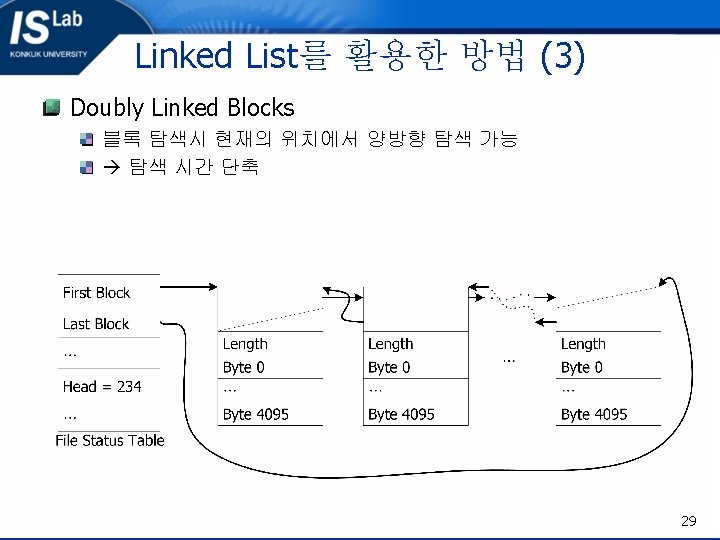
Contiguous Allocation N개 블록을 보조기억장치에 N개의 연속된 블록으로 매핑 수시로 변화하는 파일 크기를 지원하기 어려움 추가시 : 디스크의 분할된 영역보다 큰 파일은 저장 불가 삭제시 : 파일의 크기가 다양하므로 단편화 진행 Unallocated Space 785 809 File 1’s File Descriptor Head Position : 234 First Block : 785 Number of blocks : 25 … 16384 16404 File 2’s File Descriptor Head Position : 498 First Block : 16384 Number of blocks : 21 … 26
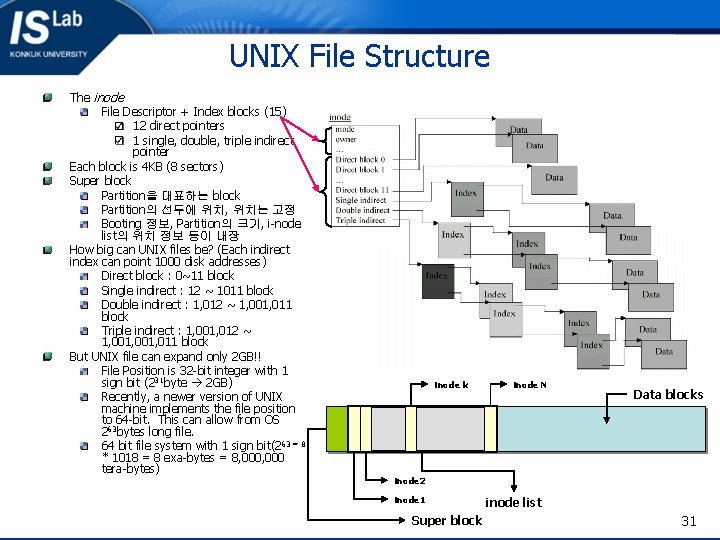
UNIX File Structure The inode File Descriptor + Index blocks (15) 12 direct pointers 1 single, double, triple indirect pointer Each block is 4 KB (8 sectors) Super block Partition을 대표하는 block Partition의 선두에 위치, 위치는 고정 Booting 정보, Partition의 크기, i-node list의 위치 정보 등이 내장 How big can UNIX files be? (Each indirect index can point 1000 disk addresses) Direct block : 0~11 block Single indirect : 12 ~ 1011 block Double indirect : 1, 012 ~ 1, 001, 011 block Triple indirect : 1, 001, 012 ~ 1, 001, 011 block But UNIX file can expand only 2 GB!! File Position is 32 -bit integer with 1 sign bit (231 byte 2 GB) Recently, a newer version of UNIX machine implements the file position to 64 -bit. This can allow from OS 263 bytes long file. 64 bit file system with 1 sign bit(2 63 = 8 * 1018 = 8 exa-bytes = 8, 000 tera-bytes) inode k inode N Data blocks inode 2 inode 1 Super block inode list 31
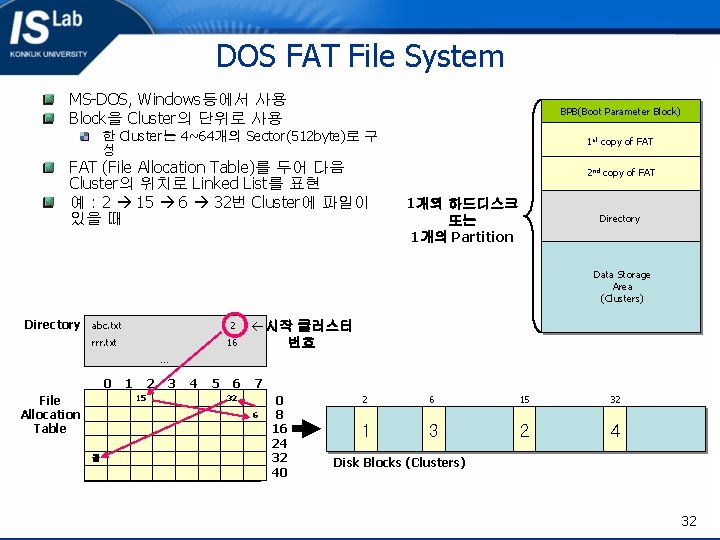
DOS FAT File System MS-DOS, Windows등에서 사용 Block을 Cluster의 단위로 사용 BPB(Boot Parameter Block) 한 Cluster는 4~64개의 Sector(512 byte)로 구 성 FAT (File Allocation Table)를 두어 다음 Cluster의 위치로 Linked List를 표현 예 : 2 15 6 32번 Cluster에 파일이 있을 때 1 st copy of FAT 2 nd copy of FAT 1개의 하드디스크 또는 1개의 Partition Directory Data Storage Area (Clusters) Directory abc. txt 2 rrr. txt 16 ß시작 클러스터 번호 … 0 File Allocation Table 1 2 15 3 4 5 6 7 32 6 끝 0 8 16 24 32 40 2 6 15 32 1 3 2 4 Disk Blocks (Clusters) 32
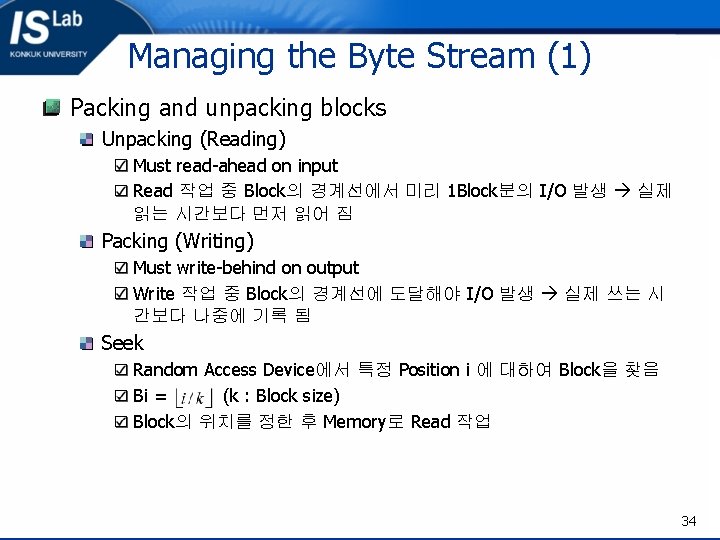
Managing the Byte Stream (1) Packing and unpacking blocks Unpacking (Reading) Must read-ahead on input Read 작업 중 Block의 경계선에서 미리 1 Block분의 I/O 발생 실제 읽는 시간보다 먼저 읽어 짐 Packing (Writing) Must write-behind on output Write 작업 중 Block의 경계선에 도달해야 I/O 발생 실제 쓰는 시 간보다 나중에 기록 됨 Seek Random Access Device에서 특정 Position i 에 대하여 Block을 찾음 Bi = (k : Block size) Block의 위치를 정한 후 Memory로 Read 작업 34
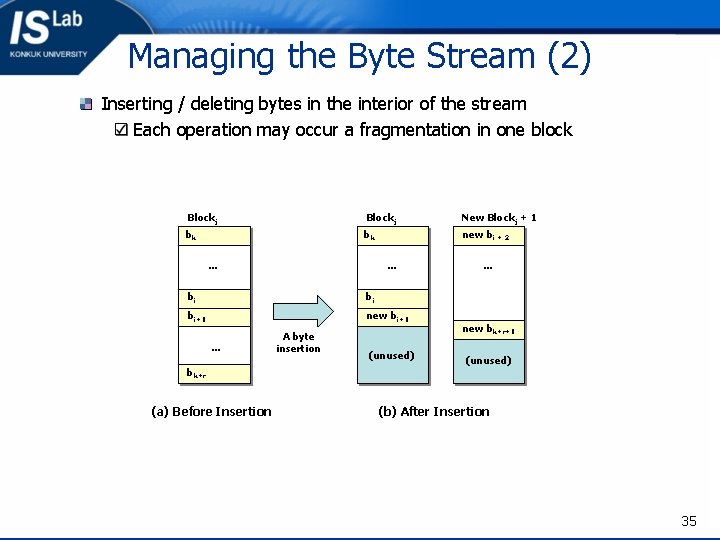
Managing the Byte Stream (2) Inserting / deleting bytes in the interior of the stream Each operation may occur a fragmentation in one block Blockj New Blockj + 1 bk bk new bi + 2 … … bi bi bi+1 new bi+1 … bk+r (a) Before Insertion A byte insertion (unused) … new bk+r+1 (unused) (b) After Insertion 35
Managing the Byte Stream (3) Block I/O Buffer several blocks Storage Device에서 연속으로 읽기 / 쓰기 동작은 평균 seek time을 줄임 수개 혹은 수십개 정도의 block을 미리 Memory에 읽음으로써 성능 향상 (Chapter 5. 2절 Buffering 참고) 36
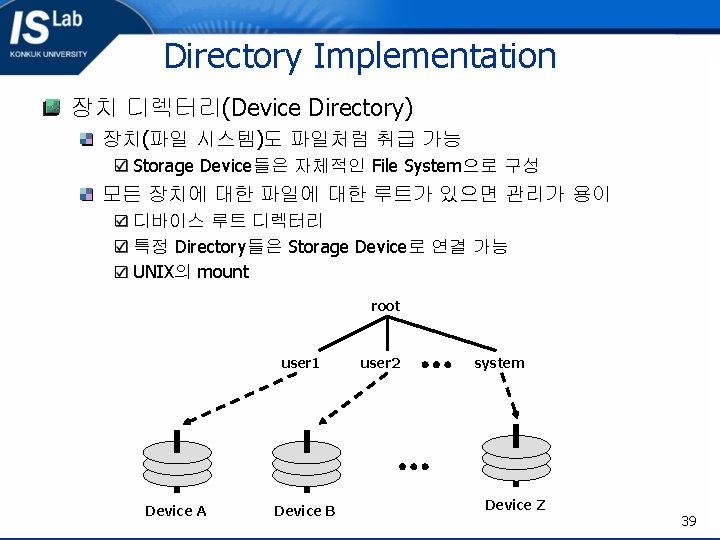
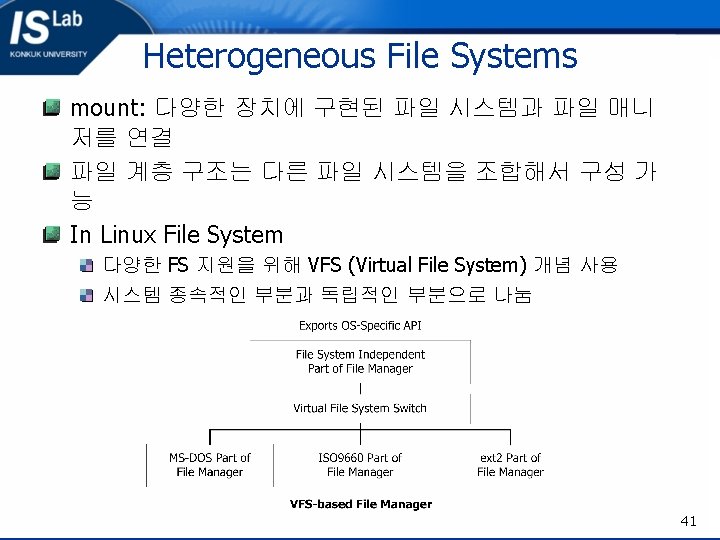
Directory Implementation 장치 디렉터리(Device Directory) 장치(파일 시스템)도 파일처럼 취급 가능 Storage Device들은 자체적인 File System으로 구성 모든 장치에 대한 파일에 대한 루트가 있으면 관리가 용이 디바이스 루트 디렉터리 특정 Directory들은 Storage Device로 연결 가능 UNIX의 mount root user 1 Device A Device B user 2 system Device Z 39
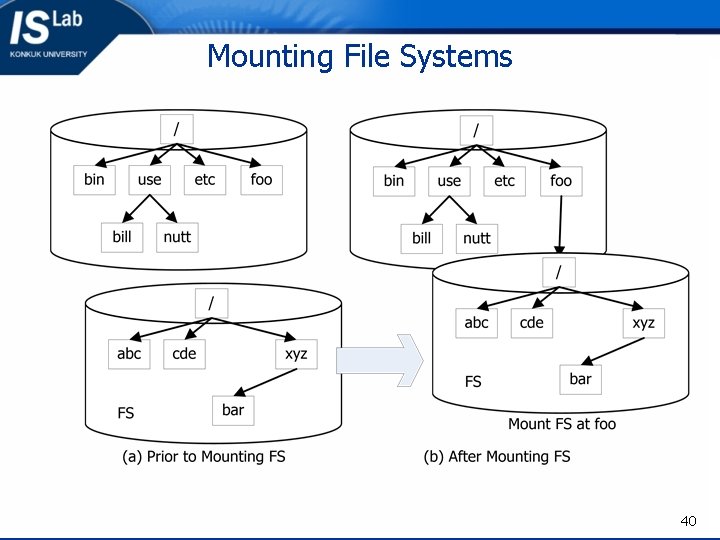
Mounting File Systems 40
- Slides: 41