
Fidelis Cybersecurity The First 72 Hours How to
Fidelis Cybersecurity The First 72 -Hours: How to Approach the Initial Hours of a Security Incident Bryan Geraldo – VP Services & Business Development
Who I Am… Lucent Technologies Background • Started in Dev • 23 Yrs IT • 19+ Yrs Infosec • Focus Red Team Riptech (Employee #30) Atstake/Symantec Relay Security Group Anomali Fidelis Security 2 © Fidelis Cybersecurity
Overall Philosophy… My philosophy on planning for any Cyber Security endeavor: “If I had an hour to solve a (major) problem, I’d spend 55 minutes thinking about the problem and 5 minutes thinking/implementing the solutions. ” – Albert Einstein 3 © Fidelis Cybersecurity
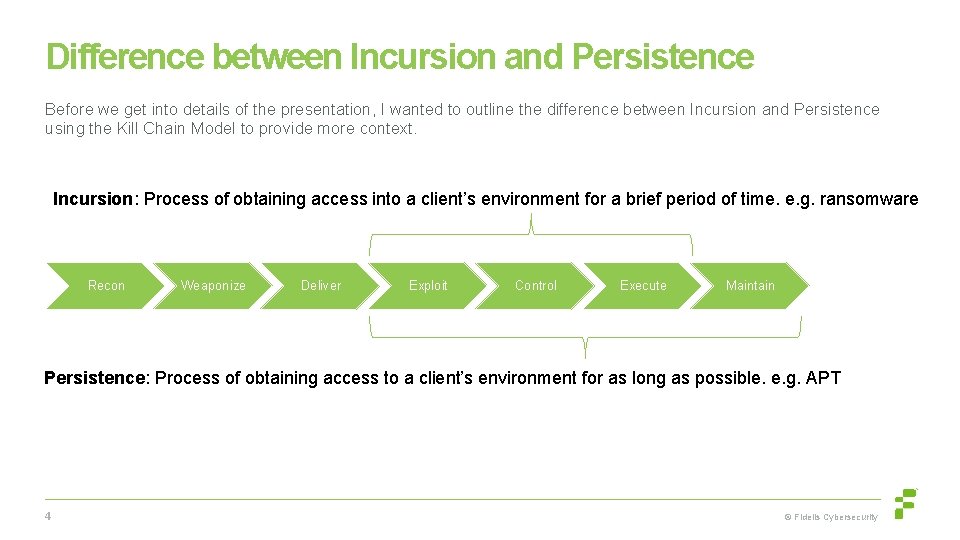
Difference between Incursion and Persistence Before we get into details of the presentation, I wanted to outline the difference between Incursion and Persistence using the Kill Chain Model to provide more context. Incursion: Process of obtaining access into a client’s environment for a brief period of time. e. g. ransomware Recon Weaponize Deliver Exploit Control Execute Maintain Persistence: Process of obtaining access to a client’s environment for as long as possible. e. g. APT 4 © Fidelis Cybersecurity
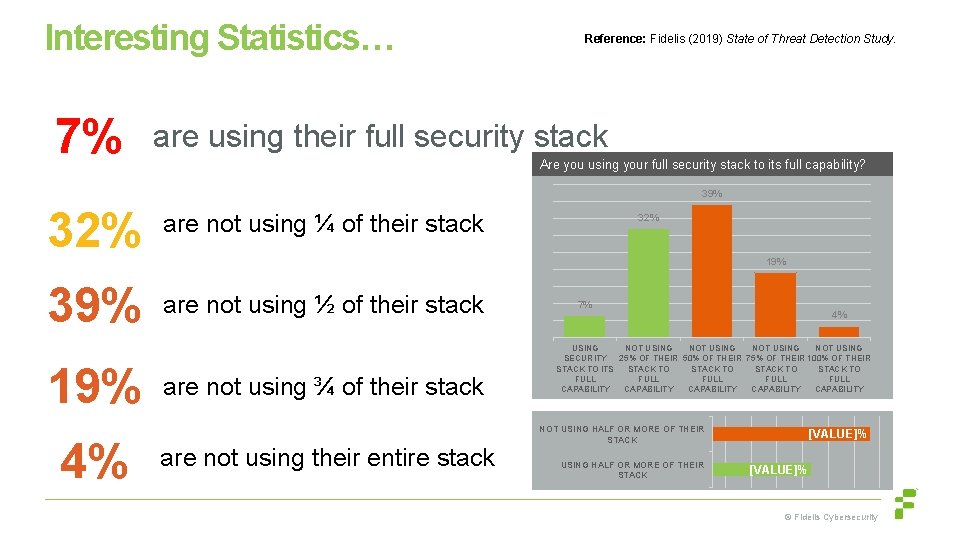
Interesting Statistics… 7% Reference: Fidelis (2019) State of Threat Detection Study. are using their full security stack Are you using your full security stack to its full capability? 39% 32% are not using ¼ of their stack 39% are not using ½ of their stack 19% 4% 32% 19% are not using ¾ of their stack are not using their entire stack 7% 4% USING NOT USING SECURITY 25% OF THEIR 50% OF THEIR 75% OF THEIR 100% OF THEIR STACK TO ITS STACK TO FULL FULL CAPABILITY CAPABILITY NOT USING HALF OR MORE OF THEIR STACK [VALUE]% © Fidelis Cybersecurity
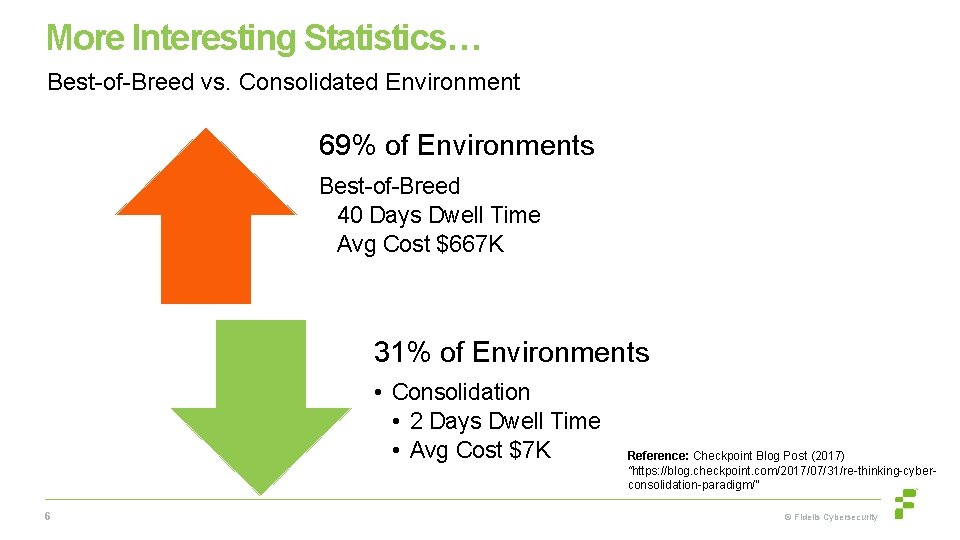
More Interesting Statistics… Best-of-Breed vs. Consolidated Environment 69% of Environments Best-of-Breed 40 Days Dwell Time Avg Cost $667 K 31% of Environments • Consolidation • 2 Days Dwell Time • Avg Cost $7 K 6 Reference: Checkpoint Blog Post (2017) “https: //blog. checkpoint. com/2017/07/31/re-thinking-cyberconsolidation-paradigm/” © Fidelis Cybersecurity
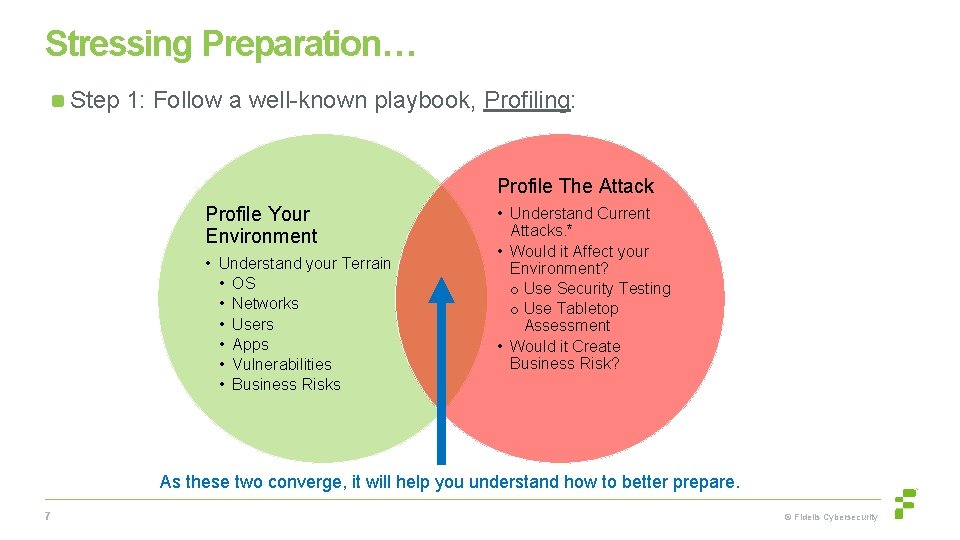
Stressing Preparation… Step 1: Follow a well-known playbook, Profiling: Profile The Attack Profile Your Environment • Understand your Terrain • OS • Networks • Users • Apps • Vulnerabilities • Business Risks • Understand Current Attacks. * • Would it Affect your Environment? o Use Security Testing o Use Tabletop Assessment • Would it Create Business Risk? As these two converge, it will help you understand how to better prepare. 7 © Fidelis Cybersecurity
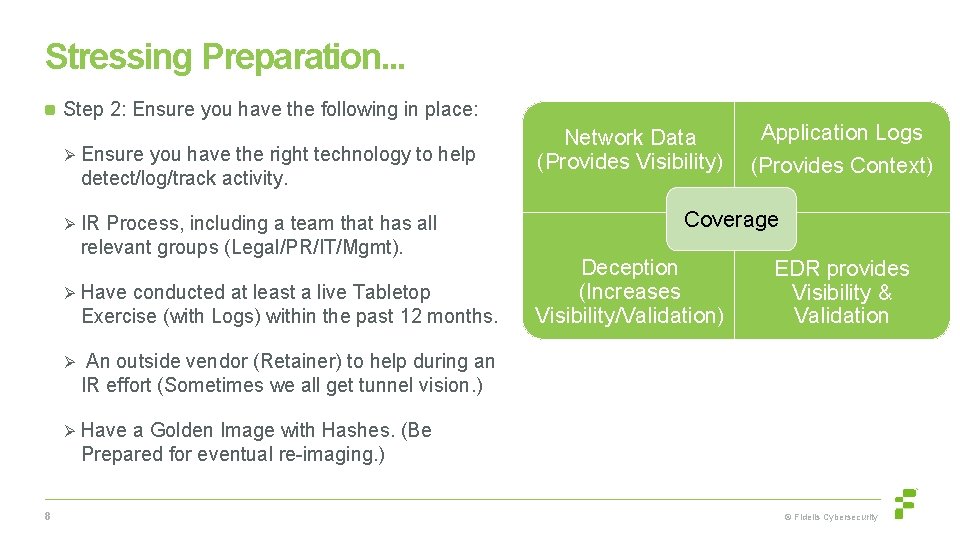
Stressing Preparation. . . Step 2: Ensure you have the following in place: Ø Ensure you have the right technology to help detect/log/track activity. Ø IR Process, including a team that has all relevant groups (Legal/PR/IT/Mgmt). Ø Have conducted at least a live Tabletop Exercise (with Logs) within the past 12 months. Ø Network Data (Provides Visibility) Application Logs (Provides Context) Coverage Deception (Increases Visibility/Validation) EDR provides Visibility & Validation An outside vendor (Retainer) to help during an IR effort (Sometimes we all get tunnel vision. ) Ø Have a Golden Image with Hashes. (Be Prepared for eventual re-imaging. ) 8 © Fidelis Cybersecurity
Remember that… An Alert will not tell you what is good or bad. It just tells you something happened or something to look at. The human should judge intent, because computers including AI cannot make the right judgement call. 9 © Fidelis Cybersecurity
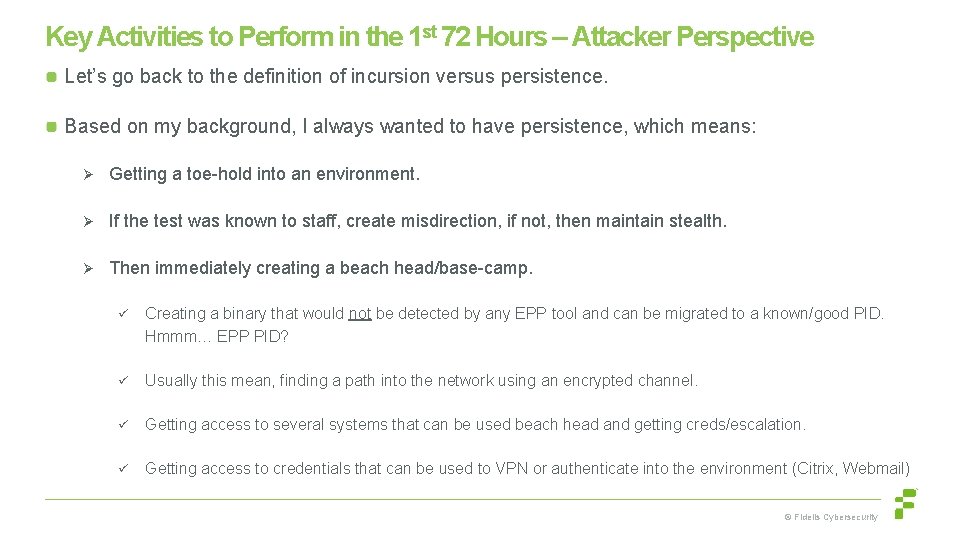
Key Activities to Perform in the 1 st 72 Hours – Attacker Perspective Let’s go back to the definition of incursion versus persistence. Based on my background, I always wanted to have persistence, which means: Ø Getting a toe-hold into an environment. Ø If the test was known to staff, create misdirection, if not, then maintain stealth. Ø Then immediately creating a beach head/base-camp. ü Creating a binary that would not be detected by any EPP tool and can be migrated to a known/good PID. Hmmm… EPP PID? ü Usually this mean, finding a path into the network using an encrypted channel. ü Getting access to several systems that can be used beach head and getting creds/escalation. ü Getting access to credentials that can be used to VPN or authenticate into the environment (Citrix, Webmail) © Fidelis Cybersecurity
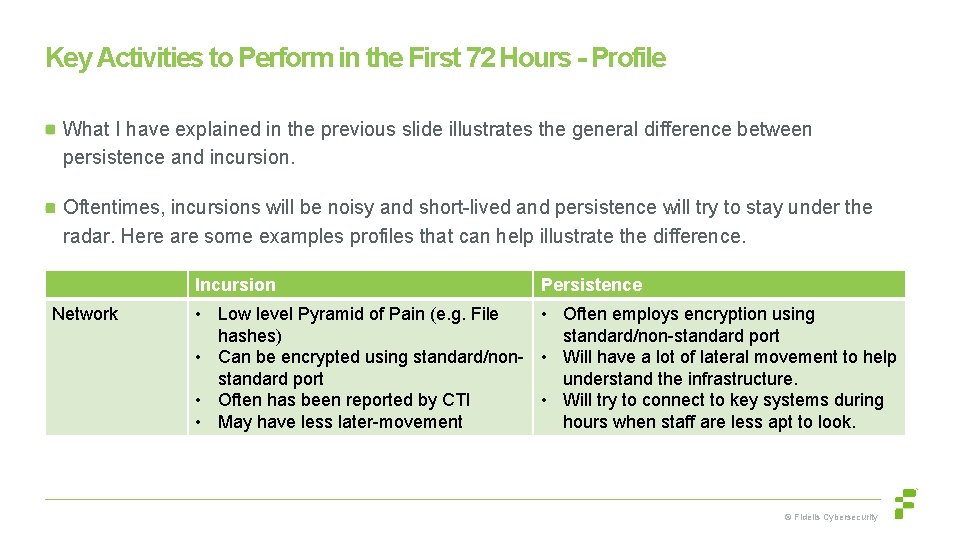
Key Activities to Perform in the First 72 Hours - Profile What I have explained in the previous slide illustrates the general difference between persistence and incursion. Oftentimes, incursions will be noisy and short-lived and persistence will try to stay under the radar. Here are some examples profiles that can help illustrate the difference. Incursion Network Persistence • Low level Pyramid of Pain (e. g. File • Often employs encryption using hashes) standard/non-standard port • Can be encrypted using standard/non- • Will have a lot of lateral movement to help standard port understand the infrastructure. • Often has been reported by CTI • Will try to connect to key systems during • May have less later-movement hours when staff are less apt to look. © Fidelis Cybersecurity
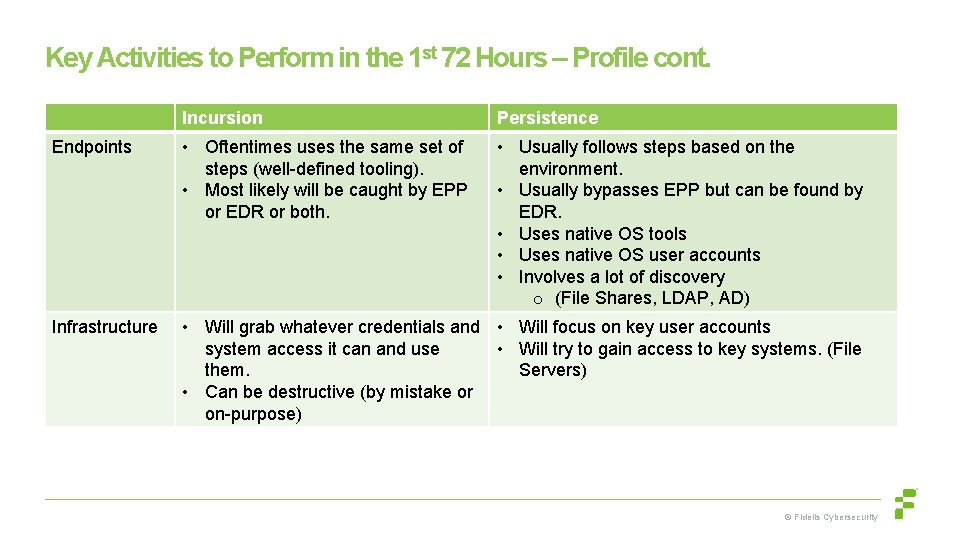
Key Activities to Perform in the 1 st 72 Hours – Profile cont. Incursion Persistence Endpoints • Oftentimes uses the same set of steps (well-defined tooling). • Most likely will be caught by EPP or EDR or both. • Usually follows steps based on the environment. • Usually bypasses EPP but can be found by EDR. • Uses native OS tools • Uses native OS user accounts • Involves a lot of discovery o (File Shares, LDAP, AD) Infrastructure • Will grab whatever credentials and • Will focus on key user accounts system access it can and use • Will try to gain access to key systems. (File them. Servers) • Can be destructive (by mistake or on-purpose) © Fidelis Cybersecurity
Key Activities to Perform in the First 72 Hours – Detection/Response Step 1 – Stay calm, you have prepared for this and have the right people, process, technology. ; ) – Use your IR Process/Playbook (Have documented IR/Remediation Teams) and involve a Third Party IR team Note: Do not immediately block activity if you can or worse, turn off the systems… Step 2 - Leverage your Threat Detection tools for visibility: Ø When was the activity/alert first detected on the network or EDR and on what VLAN. (Employ Tagging to tie together) Ø Has there been any other detections tied to the activity (e. g. IP/Domain, VLAN, specific endpoints/grouped alert activity) Ø If this was focused on an external threat, have you expanded coverage using CTI to ensure you know if there is any associated activity. Ø Are you able to look at the HTTPS traffic (using SSL Decryption). Strange User Agents being logged? © Fidelis Cybersecurity
Key Activities to Perform in the First 72 Hours – Detection/Response Step 3 – Based on the identified activity, leverage your EPP, EDR, Deception tools to help further validate the activity. Ø To see if anything strange has been detected. ”These rules should be in place based on the Table-top activity and Vendor tuning or both” Ø Have strange processes been created or strange parent child process relationships. “This PID is not my Baby’s Daddy!” Ø Do event logs show non-standard login activity to shares/RDP. "Why would an admin RDP from one workstation to another if they are not Desktop Support. ” Ø Is someone trying to use accounts (Domain Accounts) or touch files that have been created using your Deception tool. © Fidelis Cybersecurity
Key Activities to Perform in the First 72 Hours – Response During the Response: Ø As mentioned, if you stop the activity or even use VT, this may tip off the attacker and they will hide or change TTPs. ü You need to be stealthy in your response process. Ø Oftentimes letting the activity occur while you track it will increase the likelihood that you know what to look for later on and eradicate it from the network. Ø Remember use data from the Endpoint to validate as much as you can. (Enhance log visibility, Get Total Number of Compromised Hosts. ) © Fidelis Cybersecurity
Key Activities to Perform in the First 72 Hours – Response During the Response, it goes without saying: Ø Use your IR process and ensure you are tracking all assets/logs/files. Ø Use the data to create a profile of the Incident. (Attack Vector, Damage Assessment) Ø When possible, take forensically sound images of memory or the HD, so that it can be reviewed by qualified staff. Ø Any files that are gathered should be checked against a Sandbox or by a Malware analyst. Ø Short Term - Create Incident Containment Plan (Enhance Logging/Limit Access) Ø Long Term - Create a Eradication Plan (Block/Change/Mitigate/Disconnect/Rebuild) © Fidelis Cybersecurity
Thank you!
- Slides: 17