
Facebook Primary purpose Builds brand loyalty and reputation


Facebook • Primary purpose: Builds brand loyalty and reputation. Establishes your business as an authority through interesting content and informational posts. • Unique attributes: • Reaches a variety of segments of an audience with one post • Offers opportunity to create ads to drive traffic to your website or blog • Encourages dialogue and depth with a customer base • Ideal for sharing personal stories, testimonials, detailed information about your business
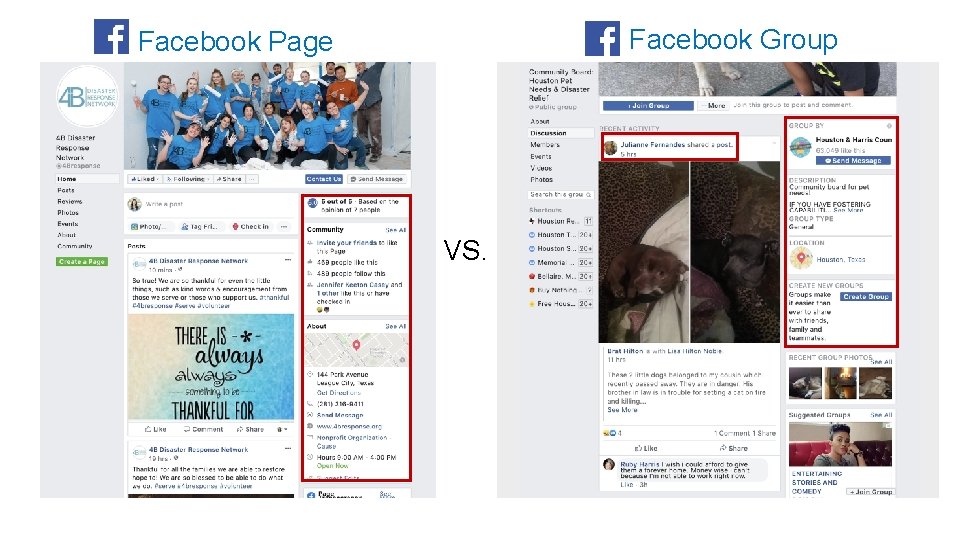
Facebook Group Facebook Page VS.
A few key Facebook terms: • Fan - A user who likes your Facebook Page • Follower – A user who is receiving information posted to your page but has not endorsed it. • Facebook Live - A Facebook feature that allows you to stream live video to your family, friends, and followers. You can get live reaction during your broadcast and interact with viewers in real-time. • Reactions - Ways Facebook users can react to posts beyond a simple “like. ” Introduced in February 2015, current reactions include: “love, ” “haha, ” “wow, ” “sad, ” and “angry. ” (We’re campaigning for an “ewww” reaction, as well as an “eye roll. ”)
You can use Facebook Pages for: • Posting photo and videos • Building followers • Inform the public about projects you are working on or any upcoming volunteer events you have coming up • Engage with the audience. The more you engage, the more people will know about you! • Creating paid ads to get the word out in the community • Pay to promote posts

Best Practices for Facebook Page: Tagging Tag Organizations in… • Text portion of a post Tag People in… • • The post itself Text portion of a post A photo The text of comment • You can “tag” an organizations and people in posts. This means that you are linking the organization or person to their Facebook page. This allows for the people that they follow to see your posts too!
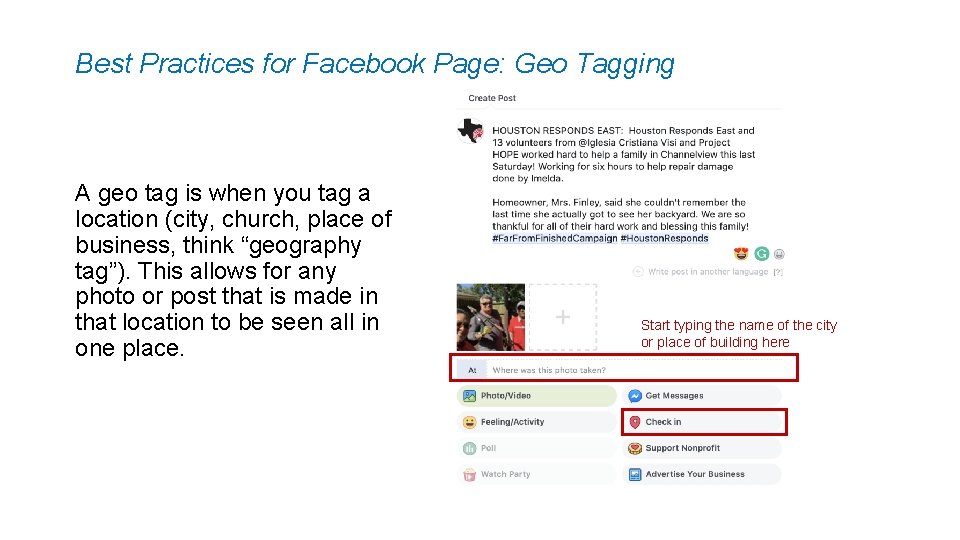
Best Practices for Facebook Page: Geo Tagging A geo tag is when you tag a location (city, church, place of business, think “geography tag”). This allows for any photo or post that is made in that location to be seen all in one place. Start typing the name of the city or place of building here
Best Practices for Facebook Page: Using Hashtags Using hashtags allows for anyone who is having a conversation about something similar to join together. • Once you create a hashtag, it becomes a link that you can click and see everyone who is also using that same hashtag. We advise not using over 3 -5 within one post. Examples: #Far. From. Finished. Campaign #Hurricane. Harvey #Houston. Responds • People can also “follow” a hashtag so they can follow topics they are interested in and posts that contain those hashtags show up in their newsfeed. Ex: Disaster related hashtags such as #Houston. Strong • Users can also search by hashtags by typing the hashtag in the search bar at the top of the Facebook home page.
Best Practices for Facebook Page: Engagement • When making a post you always want to keep it short and sweet. • End the post with a “call to action”. This will encourage people to interact with your posts. • Ex: “Tag a friend you want to volunteer with!”, “Are you interested in helping a family rebuild their home in time for the holidays? Check out our volunteer page here! *insert link*” • Did you know? Someone can be following you, but if they don’t interact with your posts you will likely not show up in their newsfeed? Average Engagement Rates: • All Post Types = 3. 91% • Video Posts = 6. 01% • Photo Posts = 4. 81% • Link Post = 3. 36% • Status Post = 2. 21% • Studies show that people who follow your page see less than 12% of the posts you make. That percentage can go up the more they interact with your content.
Using your personal Facebook account to promote your coalition and other Houston Responds coalitions: • When you see Houston Responds or a coalition post, you can also interact with it by liking, commenting and sharing. • Ask volunteers, church leaders, and anyone else to follow your coalitions social media. • Newer coalitions: encourage people to follow Houston Responds where we will be posting about your coalition while you are waiting to set up your own.
Instagram for Business • Primary purpose: A place to share videos and images that evoke feelings about your brand through the use of visual. • Unique attributes: • Provides unique filters and video styles • Let’s your company take a more playful approach to connecting with customers • Shares your message primarily through images, not the written word • Allows for users to hashtag and get involved with your brand by showing your products in use
You can use Instagram for: • Posting photo and videos • Building followers • Inform the public about projects you are working on or any upcoming volunteer events you have coming up • Engage with the audience. The more you engage, the more people will know about you!
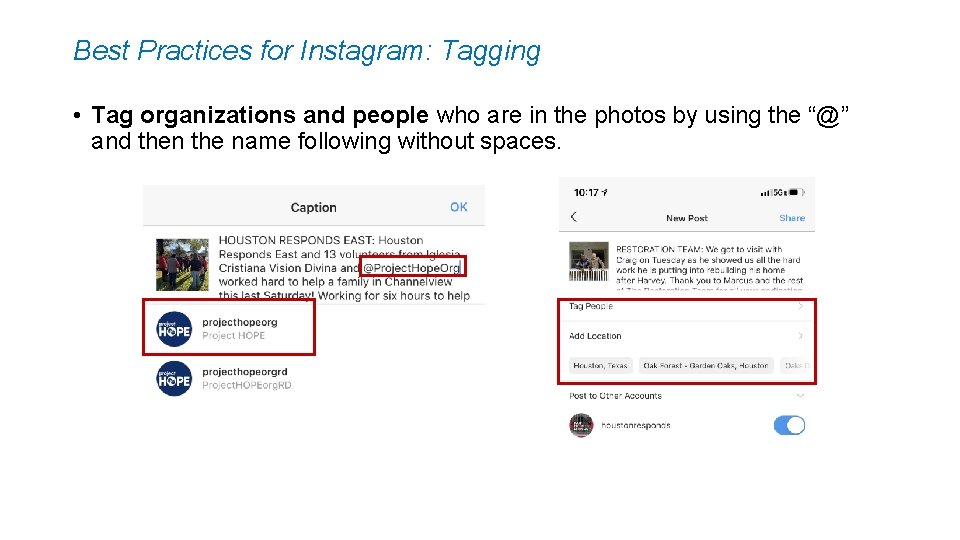
Best Practices for Instagram: Tagging • Tag organizations and people who are in the photos by using the “@” and then the name following without spaces.
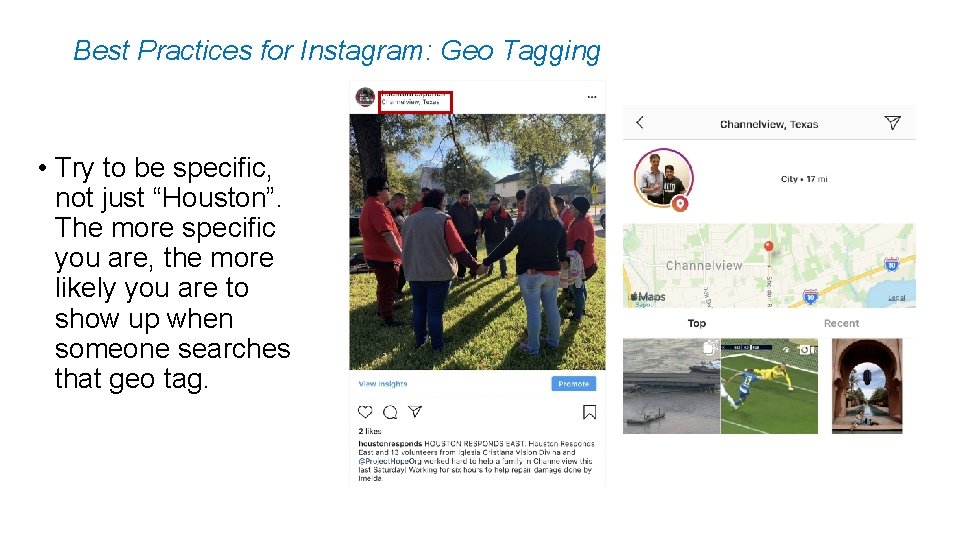
Best Practices for Instagram: Geo Tagging • Try to be specific, not just “Houston”. The more specific you are, the more likely you are to show up when someone searches that geo tag.
Best Practices for Instagram • Hashtags are more important on Instagram than they are on Facebook. You are welcome to use as many hashtags as you would like, even smaller tags that still pertain to the post. Ex: #volunteer #hurricane #Houston • End each post with a “call to action”, just like a Facebook post. Ex: “Tag a friend who you want to volunteer with!”
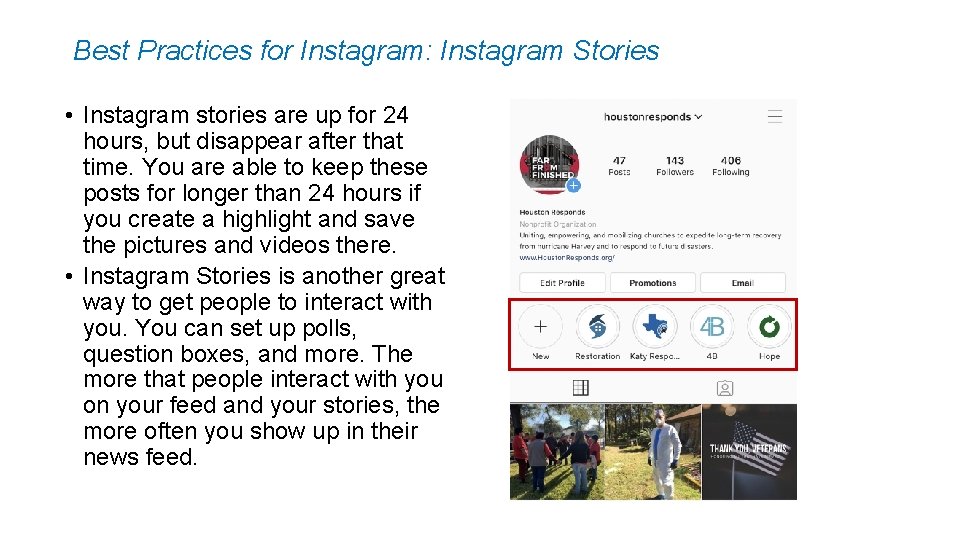
Best Practices for Instagram: Instagram Stories • Instagram stories are up for 24 hours, but disappear after that time. You are able to keep these posts for longer than 24 hours if you create a highlight and save the pictures and videos there. • Instagram Stories is another great way to get people to interact with you. You can set up polls, question boxes, and more. The more that people interact with you on your feed and your stories, the more often you show up in their news feed.
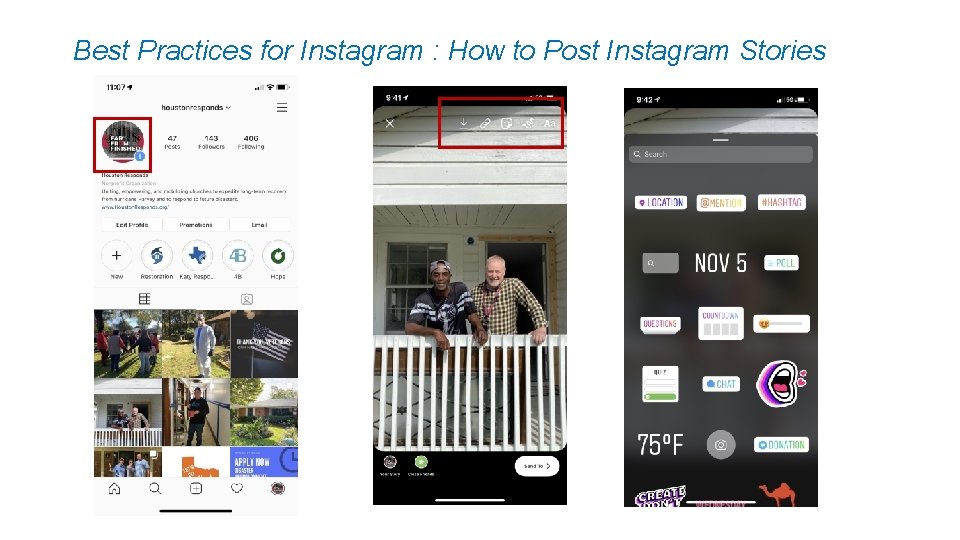
Best Practices for Instagram : How to Post Instagram Stories
Using your personal Instagram account to promote your coalition and other Houston Responds coalitions: • When you see Houston Responds or a coalition post, you can also interact with it by liking, commenting and sharing. • Ask volunteers, church leaders, and anyone else to follow your coalitions social media. • Newer coalitions: encourage people to follow Houston Responds where we will be posting about your coalition while you are waiting to set up your own.
Twitter for Business • Primary purpose: Shares breaking news and quick updates. Promotes new products, content or brand contests. Collects instant feedback from your audience. • Unique attributes: • Serves people looking for quick info, company news, and immediate responses to questions about products or events • Focuses on dialogue creation and starting conversations with customers • Known for its hashtag (#) communication functionality • Best platform for PR or publicity purposes when traditional media does not respond
You can use Twitter for: • Posting short blurbs in 280 characters or less. This is where you can share upcoming volunteer events, things going on within your coalition, etc. • Post photos and videos • Building followers • Retweeting – This is a great way to interact with others that have something in common with you.
Best Practices for Twitter: Hashtags • Hashtags are a must on Twitter. Similar to Instagram, they are very important when it comes to helping people find your page. Although, you want to keep them minimal and key to the message your sending. Ex: ” This weekend a group of volunteers helped muck and gut a home in Baytown. We are so thankful for all of their hard work! #houstonvolunteer #houstonresponds #hurricaneharvey “
Linked. In for Business • Primary purpose: Fosters a professional community, one that’s especially beneficial for B 2 B companies, to build meaningful relationships. • Unique attributes: • Makes it easy to target by industry, job title and other keywords • Ability to join Linked. In Groups, where you can invite your target market to communicate • Allows you to reach out to real people based on mutual business connections • Promotes professionalism and builds trust when you post information about your company and employees
Understanding the Audience • Facebook • Average Age range of users: 25 -45 years old • % of U. S adults who use: 74% female, 62% male • Twitter • Average range of users: 18 -29 years old • % of U. S adults who use: 24% female, 23% male • Linked. In • Average range of users: 22 -54 years old • % of U. S adults who use: 25% female, 25% male • Instagram • Average range of users: 18 -40 years old • % of U. S adults who use: 39% female, 30% male Data from Pew Research 2018
Content Ideas for Social Media • Photos of families, homes, volunteers, meetings with churches. • Simple videos. It doesn’t need to be edited or anything fancy, and i. Phone can make great videos! • Sharing a family’s story • Sharing a story about a volunteer • Have a “Did you know? ” with an uncommonly known fact about disaster relief, hurricane preparation, or anything you think would be interesting to the people following your page. • Feature a church that is in your coalition. • Post upcoming volunteer opportunities
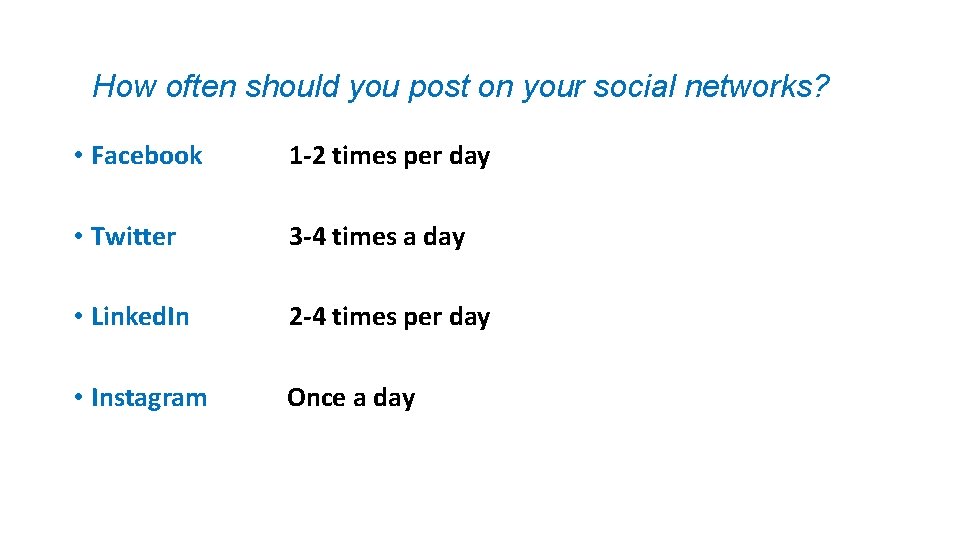
How often should you post on your social networks? • Facebook 1 -2 times per day • Twitter 3 -4 times a day • Linked. In 2 -4 times per day • Instagram Once a day
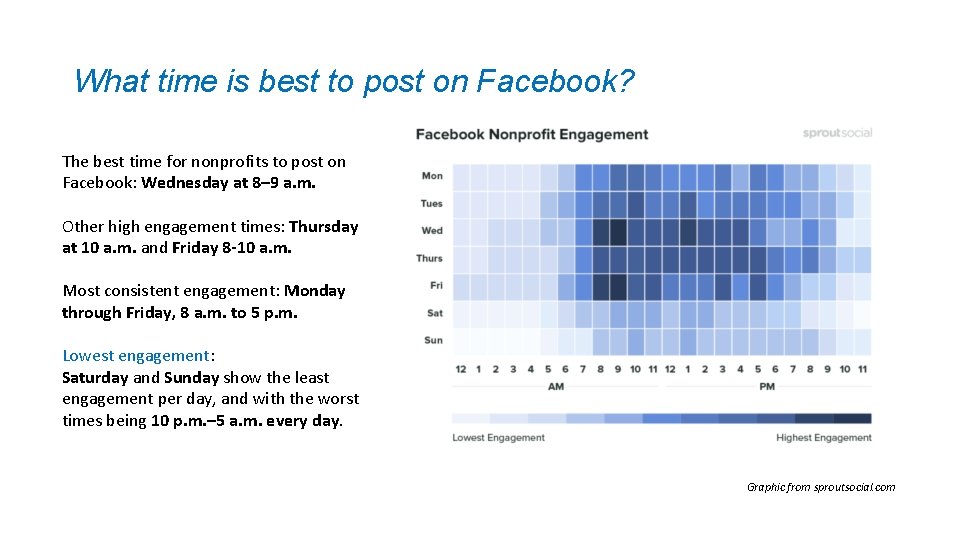
What time is best to post on Facebook? The best time for nonprofits to post on Facebook: Wednesday at 8– 9 a. m. Other high engagement times: Thursday at 10 a. m. and Friday 8 -10 a. m. Most consistent engagement: Monday through Friday, 8 a. m. to 5 p. m. Lowest engagement: Saturday and Sunday show the least engagement per day, and with the worst times being 10 p. m. – 5 a. m. every day. Graphic from sproutsocial. com
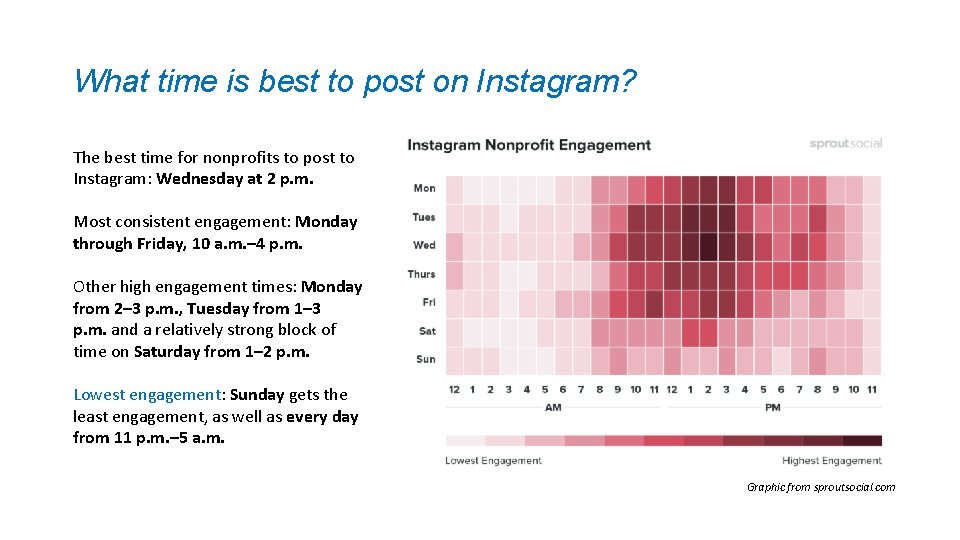
What time is best to post on Instagram? The best time for nonprofits to post to Instagram: Wednesday at 2 p. m. Most consistent engagement: Monday through Friday, 10 a. m. – 4 p. m. Other high engagement times: Monday from 2– 3 p. m. , Tuesday from 1– 3 p. m. and a relatively strong block of time on Saturday from 1– 2 p. m. Lowest engagement: Sunday gets the least engagement, as well as every day from 11 p. m. – 5 a. m. Graphic from sproutsocial. com
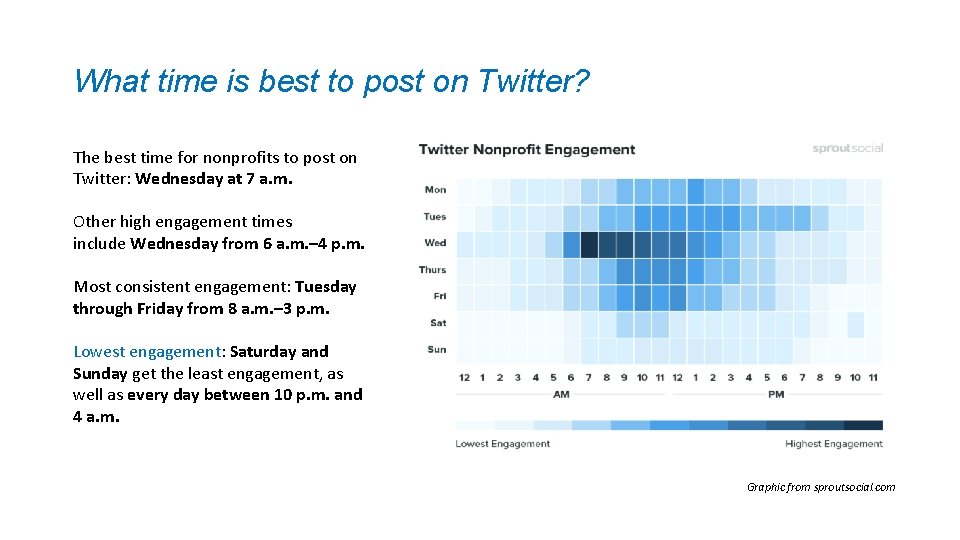
What time is best to post on Twitter? The best time for nonprofits to post on Twitter: Wednesday at 7 a. m. Other high engagement times include Wednesday from 6 a. m. – 4 p. m. Most consistent engagement: Tuesday through Friday from 8 a. m. – 3 p. m. Lowest engagement: Saturday and Sunday get the least engagement, as well as every day between 10 p. m. and 4 a. m. Graphic from sproutsocial. com
Social Media Posts & Family Stories with Houston Responds If you are on a site, take photos! Afterwards, send to Sara (sara@houstonresponds. org) & Duane (duane@houstonresponds. org) in an e-mail so we can post about it on social media or write a blog post on the family you are serving. • This is a great way for those with social media accounts to get more exposure. We are here to serve each coalition and would love to promote what your coalition is doing! • For those newer coalitions without social media, this is a way to connect with others to let them know who you are. • Feel free to invite us to join you for any client closings you have to take pictures and write about what your coalition has done for that family.
Houston Responds Post’s about Your Coalition What information do I need to send with the photos for social media posts? These require less information, 1+ photos • What is going on in the photo? • Date and location this photo was taken? • What storm has caused the damage? • Who all is helping in this photo? Volunteers, Coalitions, Houston Responds staff members, etc. • Why is it significant? Ex: the work is helping to expedite a family’s recovery and help get them back into their home before the holidays • What is the call to action? Ex: state “Get your church involved for those still recovering throughout the city by clicking here”, “tag a friend that you know has been doing recovery in our city”, etc.
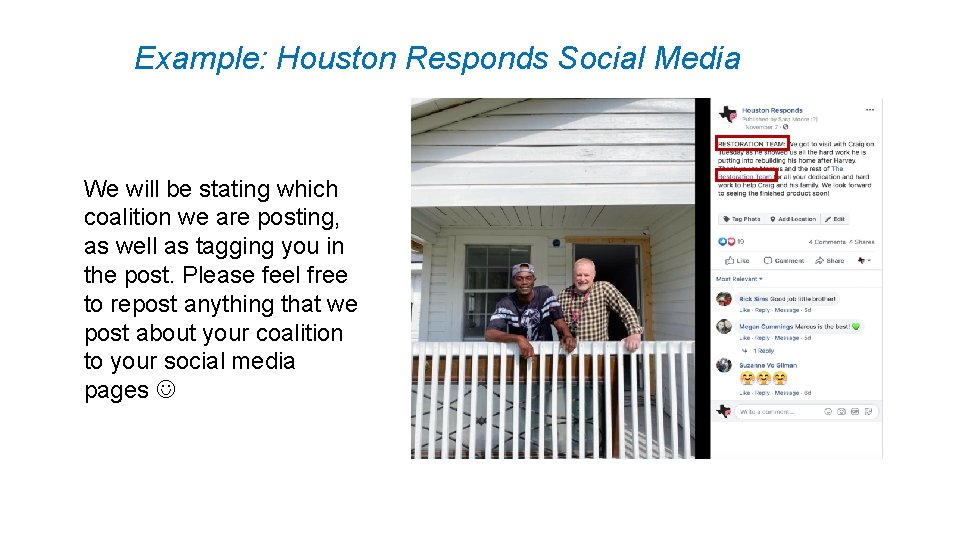
Example: Houston Responds Social Media We will be stating which coalition we are posting, as well as tagging you in the post. Please feel free to repost anything that we post about your coalition to your social media pages
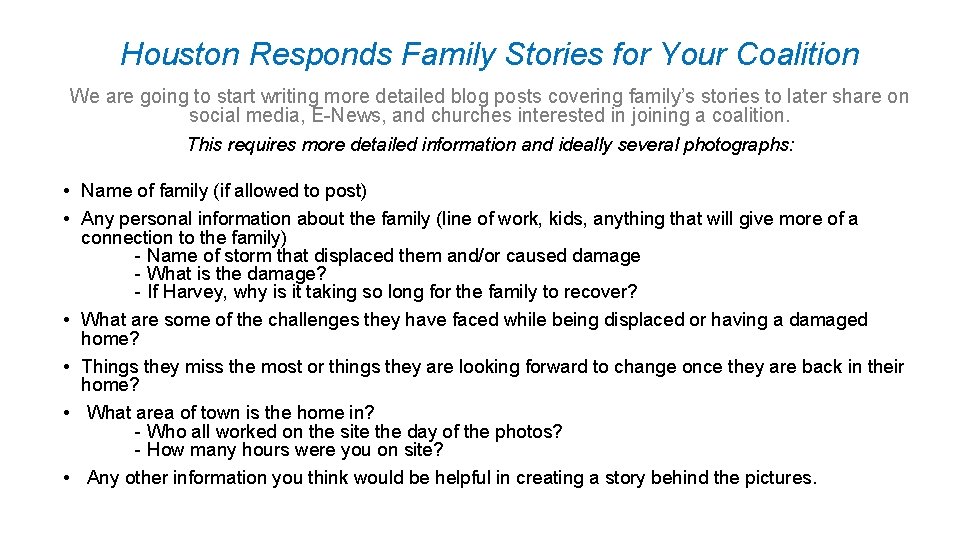
Houston Responds Family Stories for Your Coalition We are going to start writing more detailed blog posts covering family’s stories to later share on social media, E-News, and churches interested in joining a coalition. This requires more detailed information and ideally several photographs: • Name of family (if allowed to post) • Any personal information about the family (line of work, kids, anything that will give more of a connection to the family) - Name of storm that displaced them and/or caused damage - What is the damage? - If Harvey, why is it taking so long for the family to recover? • What are some of the challenges they have faced while being displaced or having a damaged home? • Things they miss the most or things they are looking forward to change once they are back in their home? • What area of town is the home in? - Who all worked on the site the day of the photos? - How many hours were you on site? • Any other information you think would be helpful in creating a story behind the pictures.
- Slides: 32