
Ext 2Ext 3 Linux File System Reporter PoLiang
- Slides: 11
Ext 2/Ext 3 Linux File System Reporter: Po-Liang, Wu
Outline • Introduction • File System Layout • Metadata Concepts • Indexing and Directories • Journaling • Example • Conclusion
Introduction • Ext 2 and Ext 3 are the default Linux file system. • Ext 3 is the new version of Ext 2 and adds journaling mechanism, but the basic structures are the same. • The metadata is stored throughout the file system, and the metadata which is associated with a file are stored “near” it.
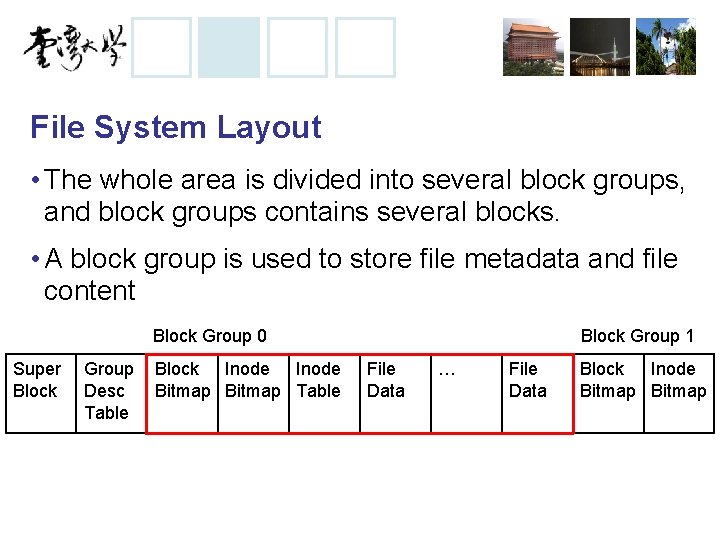
File System Layout • The whole area is divided into several block groups, and block groups contains several blocks. • A block group is used to store file metadata and file content Block Group 0 Super Block Group Desc Table Block Inode Bitmap Table Block Group 1 File Data … File Data Block Inode Bitmap
Metadata Concepts • Superblock: – The Ext 2 superblock is located 1024 bytes from the start of the file system and is 1024 bytes in size. ( The first two sectors are used to store boot code if necessary) – Back up copies are typically stored in the first file data block of each block group – It contains basic information of the file system, such as the block size, the total number of blocks, etc.
Metadata Concepts • Block Group Descriptor Table: – It contains a group descriptor data structure for every block group. – The group descriptor stores the address of block bitmap and inode bitmap for the block group. • Bitmaps: – The block bitmap manages the allocation status of the blocks in the group. – The inode bitmap manages the allocation status of the inodes in the group.
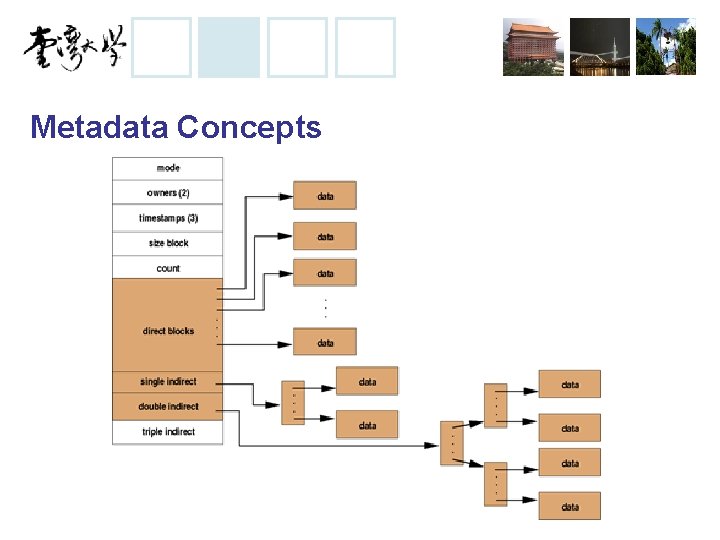
Metadata Concepts • Inode Tables: – Inode table contains the inodes that describes the files in the group • Inodes: – Inode is used to store file’s primary metadata, such as file’s size, ownership, and temporal information. – Inode is typically 128 bytes in size and is allocated to each file and directory
Metadata Concepts
Metadata Concepts • Inode Allocation: – If a new inode is for a non-directory file, Ext 2 allocates an inode in the same block group as the parent directory. – If that group has no free inode or block, Ext 2 uses a quadratic search (add powers of 2 to the current block address) – If quadratic search fails, Ext 2 uses linear search.
Metadata Concepts • Inode Allocation: – If a new inode is for a directory, Ext 2 tries to place it in a group that has not been used much.
Indexing and Directories