
Exploring Microsoft Office 2013 Excel Comprehensive by Mary
Exploring Microsoft Office 2013 Excel Comprehensive by Mary Anne Poatsy, Keith Mulbery, Jason Davidson Chapter 8 Statistical Functions Copyright © 2014 Pearson Education, Inc. Publishing as Prentice Hall. 1
Objectives • Use conditional math and statistical functions • Calculate relative standing with statistical functions • Measure central tendency • Load the Analysis Tool. Pak Copyright © 2014 Pearson Education, Inc. Publishing as Prentice Hall. 2
Objectives • Perform analysis using the Analysis Tool. Pak • Perform analysis of variance (ANOVA) • Calculate COVARIANCE • Create a histogram Copyright © 2014 Pearson Education, Inc. Publishing as Prentice Hall. 3

Using Conditional Math and Statistical Functions • Statistical functions— perform calculations on the range specified in the arguments – SUM – AVERAGE – COUNT • Conditional statistical functions— perform calculations based on a condition – SUMIF – AVERAGEIF – COUNTIF Copyright © 2014 Pearson Education, Inc. Publishing as Prentice Hall. 4

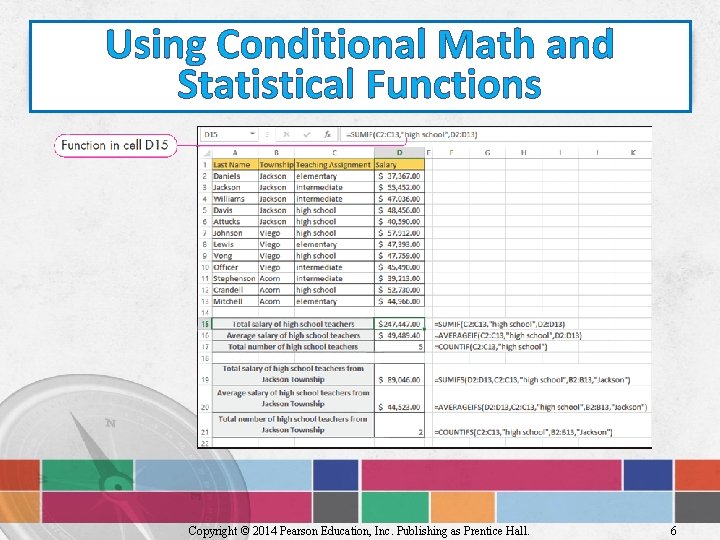
Using Conditional Math and Statistical Functions • SUMIF—similar to SUM function – Calculates a sum of values in a range only for data meeting a specific condition – Has three arguments: range, criteria, and sum_range – Example: =SUMIF(C 2: C 13, “high school”, D 2: D 13) Copyright © 2014 Pearson Education, Inc. Publishing as Prentice Hall. 5
Using Conditional Math and Statistical Functions Copyright © 2014 Pearson Education, Inc. Publishing as Prentice Hall. 6
Using Conditional Math and Statistical Functions • AVERAGEIF—similar to AVERAGE function – Calculates the average of cells in a range only for data meeting a specific condition – Has three arguments: range, criteria, and average_range – Example: =AVERAGEIF(C 2: C 13, “high school”, D 2: D 13) Copyright © 2014 Pearson Education, Inc. Publishing as Prentice Hall. 7
Using Conditional Math and Statistical Functions • COUNTIF—similar to COUNT function – Calculates the number of cells in a range only for data meeting a specific condition – Has two arguments: range and criteria – Example: =COUNTIF(C 2: C 13, “high school”) Copyright © 2014 Pearson Education, Inc. Publishing as Prentice Hall. 8
Using Conditional Math and Statistical Functions • Statistical functions (suffixed with an S) perform calculations based on multiple conditions – SUMIFS =SUMIFS(sum_range, criteria_range 1, criteria_ range 2, criteria 2, …) – AVERAGEIFS =AVERAGEIFS(average_range, criteria_range 1, criteria_range 2, criteria 2, …) – COUNTIFS =COUNTIFS(criteria_range 1, criteria_range 2, criteria 2, …) Copyright © 2014 Pearson Education, Inc. Publishing as Prentice Hall. 9
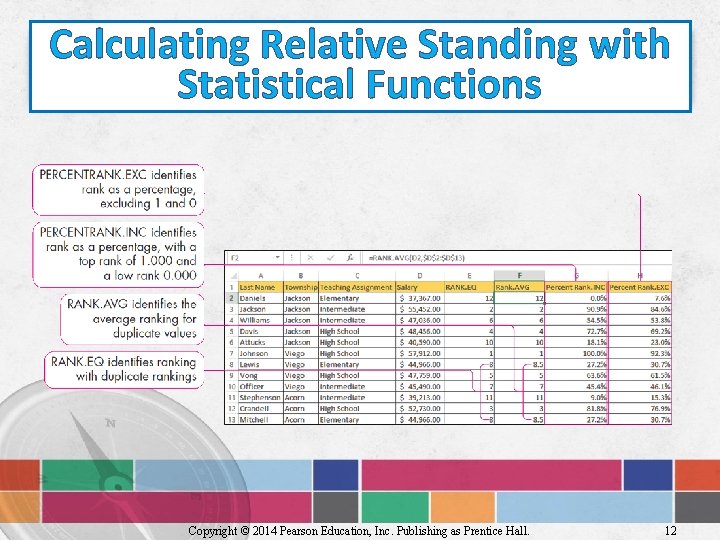
Calculating Relative Standing with Statistical Functions • RANK. EQ—identifies a value’s rank within a list of values • RANK. AVG—identifies the rank of a value but assigns an average rank when identical values exist • Both have two required arguments and one optional one: =RANK. EQ(number, ref, [order]) =RANK. AVG(number, ref, [order]) Copyright © 2014 Pearson Education, Inc. Publishing as Prentice Hall. 10
Calculating Relative Standing with Statistical Functions • PERCENTRANK. INC—displays a value’s rank as a percentile of the range of data in a dataset • PERCENTRANK. EXC—returns a value’s rank as a percent excluding 0 and 1 • Both have two required arguments and one optional one: =PERCENTRANK. INC(array, x, [significance]) =PERCENTRANK. EXC(array, x, [significance]) Copyright © 2014 Pearson Education, Inc. Publishing as Prentice Hall. 11
Calculating Relative Standing with Statistical Functions Copyright © 2014 Pearson Education, Inc. Publishing as Prentice Hall. 12
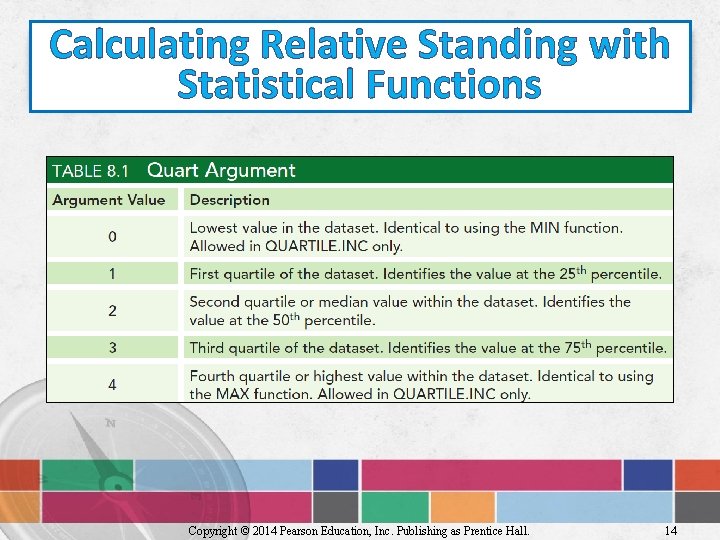
Calculating Relative Standing with Statistical Functions • Quartile—value used to divide a range of numbers into four equal groups • QUARTILE. INC—identifies the value at a specific quartile for a dataset • QUARTILE. EXC—returns the value at a specific quartile excluding quartiles 0 and 4 =QUARTILE. INC(array, quart) =QUARTILE. EXC(array, quart) Copyright © 2014 Pearson Education, Inc. Publishing as Prentice Hall. 13
Calculating Relative Standing with Statistical Functions Copyright © 2014 Pearson Education, Inc. Publishing as Prentice Hall. 14
Calculating Relative Standing with Statistical Functions • Percentile—value used to divide a range of numbers into 100 equal groups • PERCENTILE. INC—identifies the percentile of a specified value within a list of values • PERCENTRANK. EXC—returns a value’s rank as a percent excluding 0 and 1 =PERCENTILE. INC(array, k) =PERCENTILE. EXC(array, k) Copyright © 2014 Pearson Education, Inc. Publishing as Prentice Hall. 15
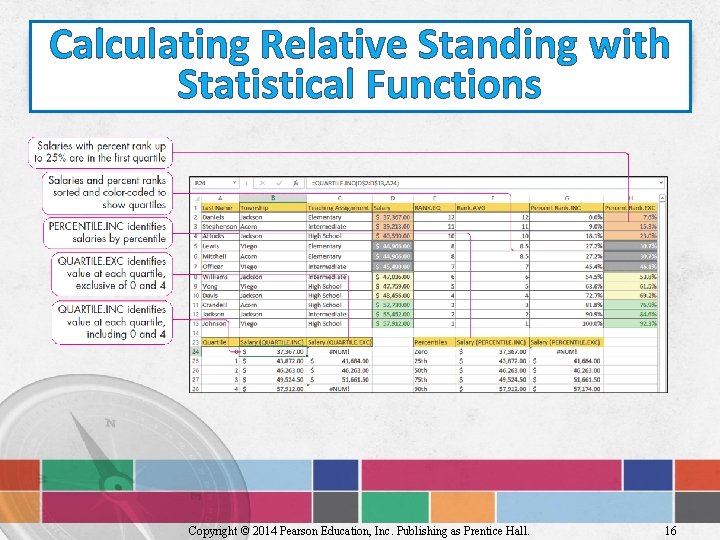
Calculating Relative Standing with Statistical Functions Copyright © 2014 Pearson Education, Inc. Publishing as Prentice Hall. 16
Measuring Central Tendency • Population—dataset containing all the data to be evaluated • Sample—smaller, more manageable segment of the population • Variance—measure of a dataset’s dispersion • Standard deviation—measure of how far the data sample is distributed around the mean Copyright © 2014 Pearson Education, Inc. Publishing as Prentice Hall. 17
Measuring Central Tendency • Sample functions: =STDEV. S(number 1, number 2) =VAR. S(number 1, number 2) • Population functions: =STDEV. P(number 1, number 2) =VAR. P(number 1, number 2) Copyright © 2014 Pearson Education, Inc. Publishing as Prentice Hall. 18
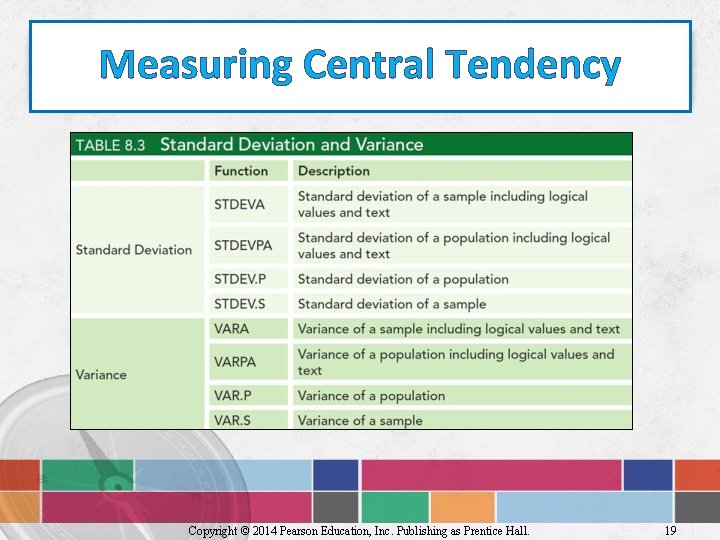
Measuring Central Tendency Copyright © 2014 Pearson Education, Inc. Publishing as Prentice Hall. 19
Measuring Central Tendency • CORREL—helps determine the strength of a relationship between two variables – =CORREL(Array 1, Array 2) • FREQUENCY—determines the frequency distribution of a dataset – =FREQUENCY(Data_array, Bins_array) Copyright © 2014 Pearson Education, Inc. Publishing as Prentice Hall. 20
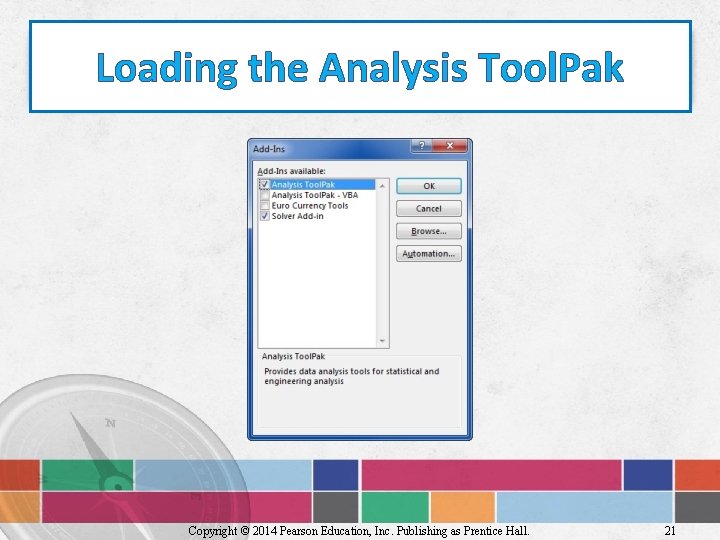
Loading the Analysis Tool. Pak Copyright © 2014 Pearson Education, Inc. Publishing as Prentice Hall. 21
Performing Analysis Using the Analysis Tool. Pak • Analysis Tool. Pak offers 19 statistical tools • Analysis Tool. Pak versus the corresponding function: – Tool. Pak generates a report – Function equivalent only returns values Copyright © 2014 Pearson Education, Inc. Publishing as Prentice Hall. 22
Performing Analysis of Variance (ANOVA) • ANOVA—statistical hypothesis test to determine if samples of data were taken from the same population • ANOVA report—created using Analysis Tool. Pak • Single-factor—most commonly used ANOVA option Copyright © 2014 Pearson Education, Inc. Publishing as Prentice Hall. 23
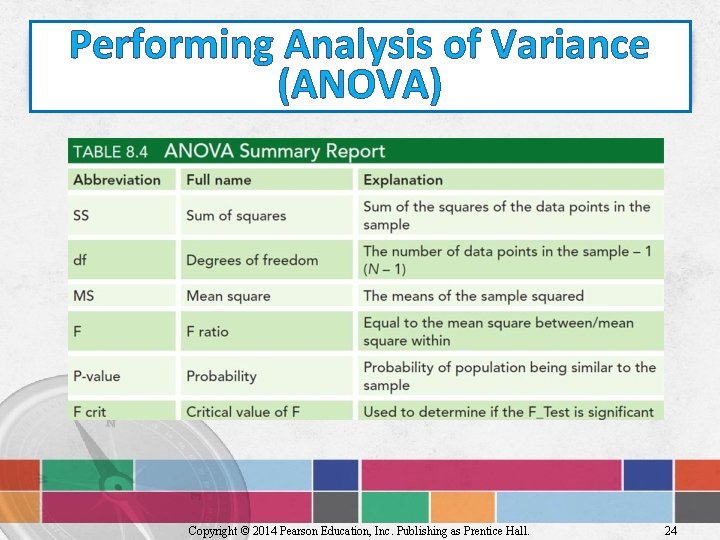
Performing Analysis of Variance (ANOVA) Copyright © 2014 Pearson Education, Inc. Publishing as Prentice Hall. 24
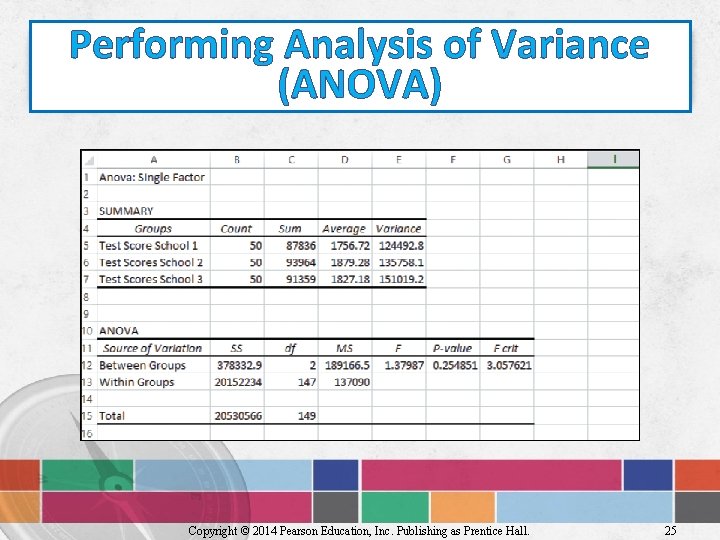
Performing Analysis of Variance (ANOVA) Copyright © 2014 Pearson Education, Inc. Publishing as Prentice Hall. 25
Calculating COVARIANCE • Covariance—measure of how two sets of data vary simultaneously – Population: • COVARIANCE. P – Sample: • COVARIANCE. S Copyright © 2014 Pearson Education, Inc. Publishing as Prentice Hall. 26
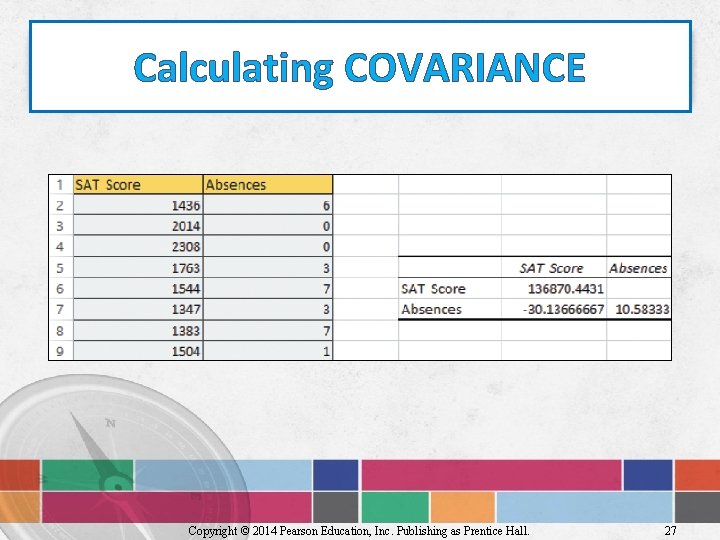
Calculating COVARIANCE Copyright © 2014 Pearson Education, Inc. Publishing as Prentice Hall. 27
Creating a Histogram • Histogram—visual display of tabulated frequencies – Requires bins to tabulate the data and returns a frequency distribution table • Analysis Tool. Pak can be used to create Copyright © 2014 Pearson Education, Inc. Publishing as Prentice Hall. 28
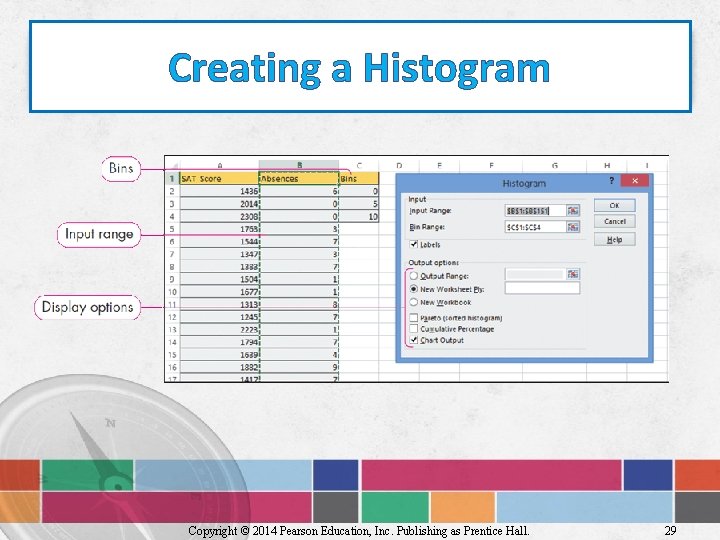
Creating a Histogram Copyright © 2014 Pearson Education, Inc. Publishing as Prentice Hall. 29
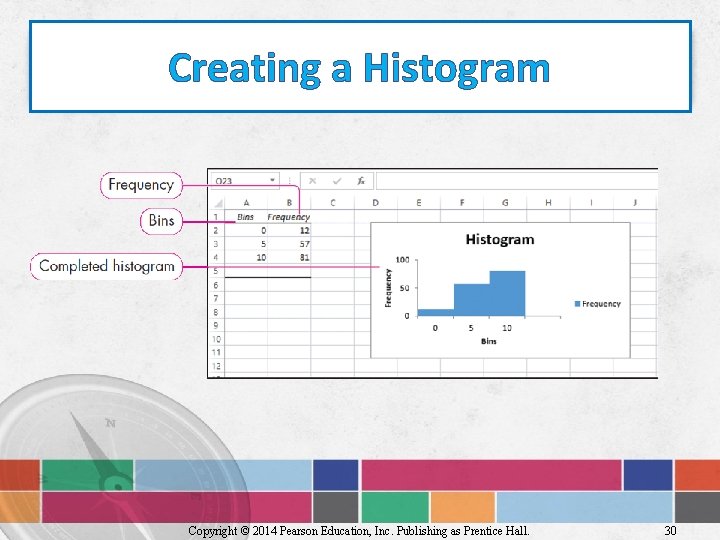
Creating a Histogram Copyright © 2014 Pearson Education, Inc. Publishing as Prentice Hall. 30
Summary • Excel has several conditional math and statistical functions • Excel functions can be used to determine relative standing • Excel functions can be used to measure central tendencies Copyright © 2014 Pearson Education, Inc. Publishing as Prentice Hall. 31
Summary • Excel’s Analysis Tool. Pak contains a wide variety of analysis tools • Some of the Tool. Pak tools include: – ANOVA – COVARIANCE – Generation of histograms Copyright © 2014 Pearson Education, Inc. Publishing as Prentice Hall. 32
Questions Copyright © 2014 Pearson Education, Inc. Publishing as Prentice Hall. 33

Copyright All rights reserved. No part of this publication may be reproduced, stored in a retrieval system, or transmitted, in any form or by any means, electronic, mechanical, photocopying, recording, or otherwise, without the prior written permission of the publisher. Printed in the United States of America. Copyright © 2014 Pearson Education, Inc. Publishing as Prentice Hall. 34
- Slides: 34