
Exploration and Visualization of Big Data Martijn Tennekes

Exploration and Visualization of Big Data Martijn Tennekes THE CONTRACTOR IS ACTING UNDER A FRAMEWORK CONTRACT CONCLUDED WITH THE COMMISSION Eurostat
Outline • • Exploratory Data Analyses Visualization of big tabular data Univariate visualization methods Bivariate visualization methods Small multiples Visualization of time series Geospatial visualization 2 Eurostat
Why exploration? We have BIG unknown data so: - Find interesting variables - Find interesting patterns - Find groups in the data - Find possible outliers - Find possible errors “Statistics is the science of learning from data” Larry Wasserman So, get to know your data! 3 Eurostat
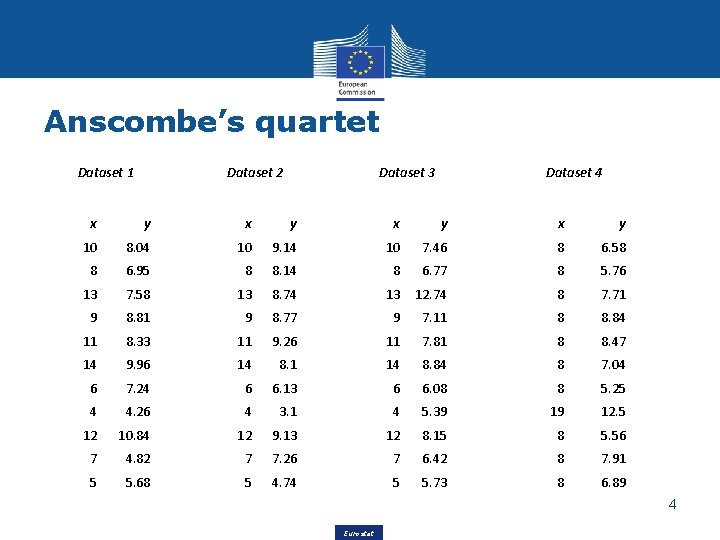
Anscombe’s quartet Dataset 1 Dataset 2 Dataset 3 Dataset 4 x y x y 10 8. 04 10 9. 14 10 7. 46 8 6. 58 8 6. 95 8 8. 14 8 6. 77 8 5. 76 13 7. 58 13 8. 74 13 12. 74 8 7. 71 9 8. 81 9 8. 77 9 7. 11 8 8. 84 11 8. 33 11 9. 26 11 7. 81 8 8. 47 14 9. 96 14 8. 1 14 8. 84 8 7. 04 6 7. 24 6 6. 13 6 6. 08 8 5. 25 4 4. 26 4 3. 1 4 5. 39 19 12. 5 12 10. 84 12 9. 13 12 8. 15 8 5. 56 7 4. 82 7 7. 26 7 6. 42 8 7. 91 5 5. 68 5 4. 74 5 5. 73 8 6. 89 4 Eurostat
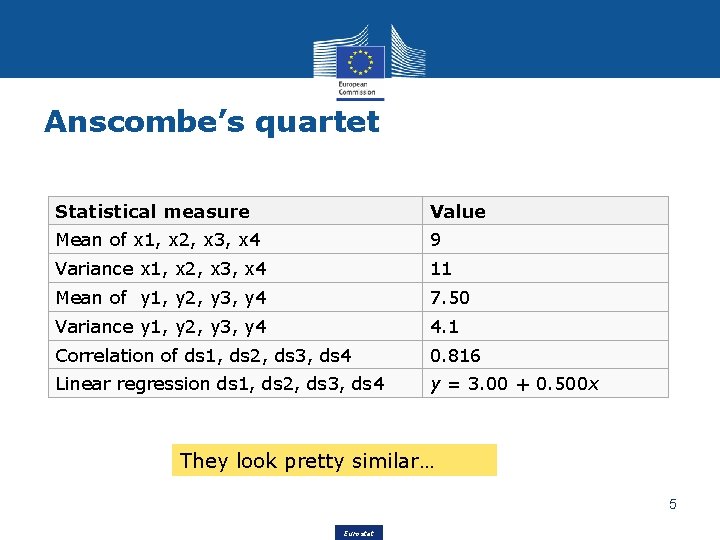
Anscombe’s quartet Statistical measure Value Mean of x 1, x 2, x 3, x 4 9 Variance x 1, x 2, x 3, x 4 11 Mean of y 1, y 2, y 3, y 4 7. 50 Variance y 1, y 2, y 3, y 4 4. 1 Correlation of ds 1, ds 2, ds 3, ds 4 0. 816 Linear regression ds 1, ds 2, ds 3, ds 4 y = 3. 00 + 0. 500 x They look pretty similar… 5 Eurostat
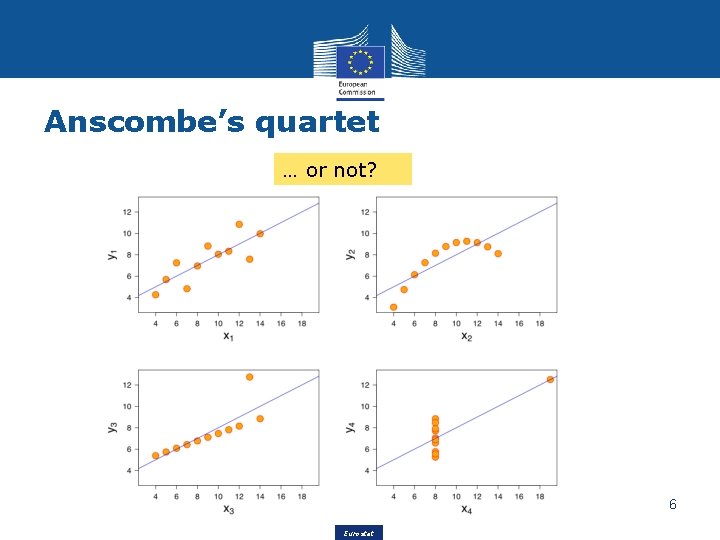
Anscombe’s quartet … or not? 6 Eurostat
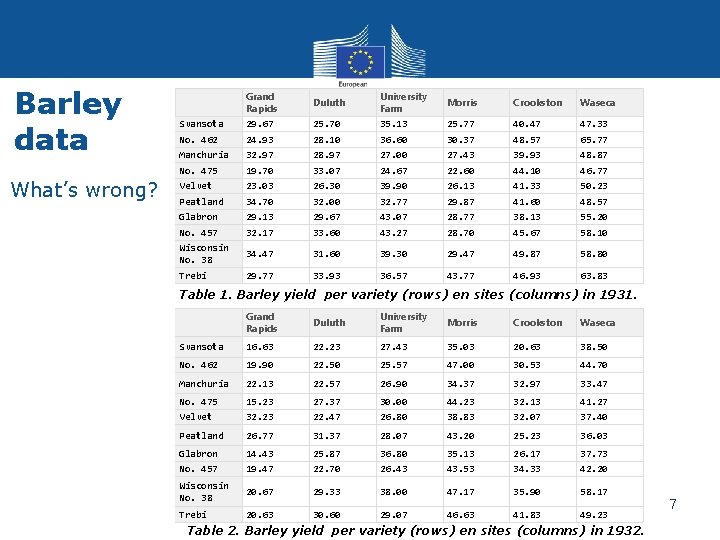
Barley data What’s wrong? Grand Rapids Duluth University Farm Morris Crookston Waseca Svansota 29. 67 25. 70 35. 13 25. 77 40. 47 47. 33 No. 462 24. 93 28. 10 36. 60 30. 37 48. 57 65. 77 Manchuria 32. 97 28. 97 27. 00 27. 43 39. 93 48. 87 No. 475 19. 70 33. 07 24. 67 22. 60 44. 10 46. 77 Velvet 23. 03 26. 30 39. 90 26. 13 41. 33 50. 23 Peatland 34. 70 32. 00 32. 77 29. 87 41. 60 48. 57 Glabron 29. 13 29. 67 43. 07 28. 77 38. 13 55. 20 No. 457 32. 17 33. 60 43. 27 28. 70 45. 67 58. 10 Wisconsin No. 38 34. 47 31. 60 39. 30 29. 47 49. 87 58. 80 Trebi 29. 77 33. 93 36. 57 43. 77 46. 93 63. 83 Table 1. Barley yield per variety (rows) en sites (columns) in 1931. Grand Rapids Duluth University Farm Morris Crookston Waseca Svansota 16. 63 22. 23 27. 43 35. 03 20. 63 38. 50 No. 462 19. 90 22. 50 25. 57 47. 00 30. 53 44. 70 Manchuria 22. 13 22. 57 26. 90 34. 37 32. 97 33. 47 No. 475 15. 23 27. 37 30. 00 44. 23 32. 13 41. 27 Velvet 32. 23 22. 47 26. 80 38. 83 32. 07 37. 40 Peatland 26. 77 31. 37 28. 07 43. 20 25. 23 36. 03 Glabron 14. 43 25. 87 36. 80 35. 13 26. 17 37. 73 No. 457 19. 47 22. 70 26. 43 43. 53 34. 33 42. 20 Wisconsin No. 38 20. 67 29. 33 38. 00 47. 17 35. 90 58. 17 Trebi 20. 63 30. 60 29. 07 46. 63 41. 83 49. 23 Table 2. Barley yield per variety (rows) en sites (columns) in 1932. Eurostat 7
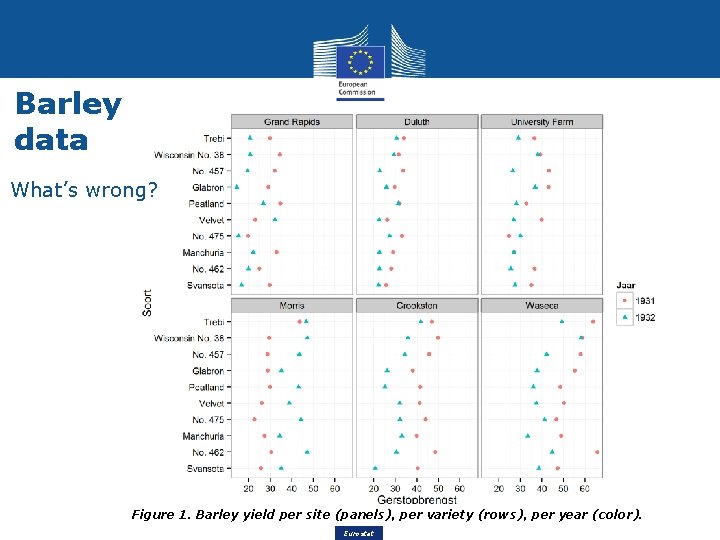
Barley data What’s wrong? Figure 1. Barley yield per site (panels), per variety (rows), per year (color). Eurostat 8
Exploratory Data Analysis (EDA) • Introduced by John Tukey (1977) • EDA is an approach to analyze data, with the focus on looking at the data directly rather than looking at indirect information such as model fit and hypothesis tests. • Many tools are useful for EDA, especially visualization methods, e. g. scatter plot, histogram, box plot, and parallel coordinates. • EDA is one of the foundations of data mining. 9 Eurostat
Visualization of Big Data Bottlenecks: • • • Screen resolution; not enough pixels to plot each data point separately Restricted focus of the users regarding • number of variables • different subgroups • overview vs. detail Computational issues Which tools are used to visualize big data? That depends on what you want to explore, the form of the data, etc. 10 Eurostat
Variety of Big Data • • Big data comes in many different formats. That is why variety is one of the V’s by which Big Data is commonly described. In general, the following formats are common for big data, especially the top three: • • Tabular data Time series data Spatial data Tree-structured data Text data Image/video/audio data Usually, the format of a big data source is a mixture of these formats. 11 Eurostat
Variety of Big Data (2) • • • Web data is often tree-structured (e. g. the prices of a web shop by category) and contains text and/or images. Social media data is often text, image, and video. Sensor data is usually tabular data with variables that describe space and time. The type of measurement data depends on the sensor type; most often numeric, but also image, video, audio, etc. In the remaining of this presentation, we focus on big tabular data with variables of type numeric, categorical, ordinal, or date-time. If a tabular dataset contains a spatial component, then it can be linked to spatial units, which can be spatial points, lines, polygons, or raster points. 12 Eurostat
Visualization of Big Tabular Data • • A major bottleneck of many EDA tools, it that they do not scale very well. For instance, a scatter plot with over a 1000 points will cause occlusion. Therefore, let Exploratory Big Data Analysis (EBDA) be EDA that is “big data” – proof. The question is: which of the tools used for EDA can also be applied to big tabular data? 13 Eurostat
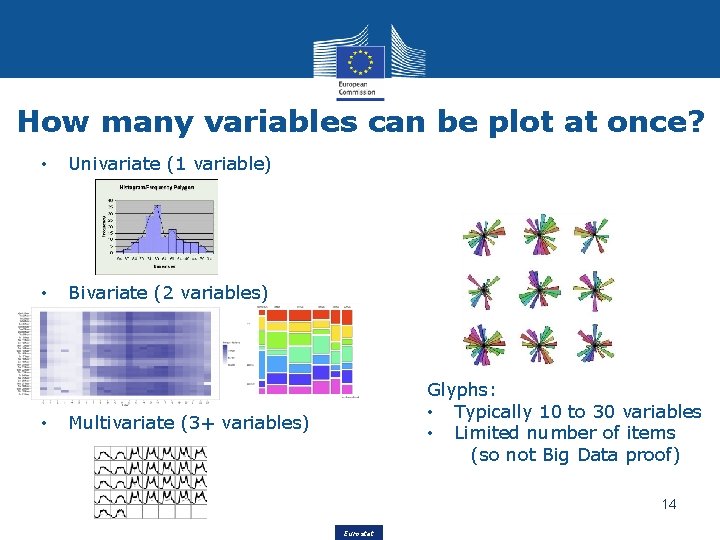
How many variables can be plot at once? • Univariate (1 variable) • Bivariate (2 variables) • Glyphs: • Typically 10 to 30 variables • Limited number of items (so not Big Data proof) Multivariate (3+ variables) 14 Eurostat
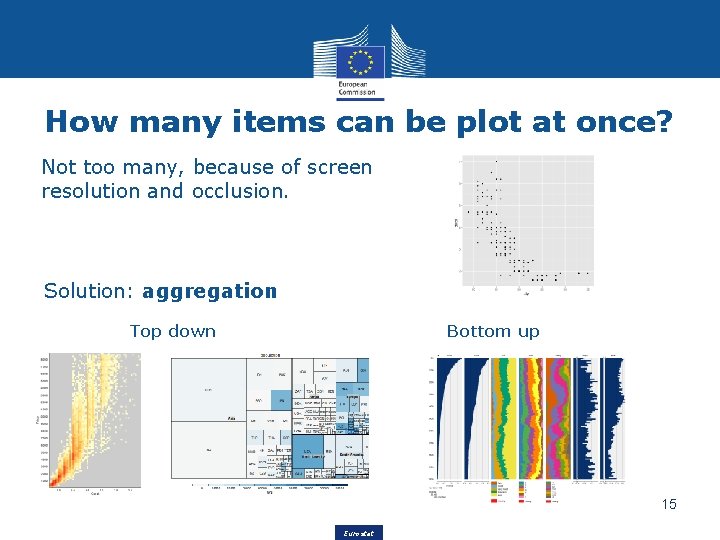
How many items can be plot at once? Not too many, because of screen resolution and occlusion. Solution: aggregation Top down Bottom up 15 Eurostat
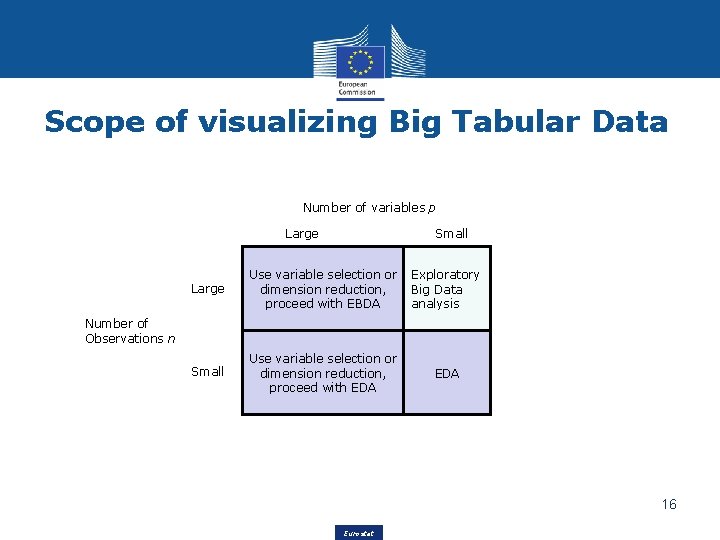
Scope of visualizing Big Tabular Data Number of variables p Large Small Large Use variable selection or Exploratory dimension reduction, Big Data proceed with EBDA analysis Small Use variable selection or dimension reduction, proceed with EDA Number of Observations n EDA 16 Eurostat
Exploratory (Big) Data Analysis tasks The tasks for EBDA are the same as for EDA: • • Describe data distribution: how often does a value or a combination of values occur? What is the dependence on other variables? Find groups: is the distribution a mixture of distributions of different “natural” groups in the data? If so, the data can be split. Identify outliers: find improbable extreme values. Are the errors? Determine if they should be excluded or connected in the analysis. How many values are invalid or missing? Determine what the impact is on the analysis. 17 Eurostat
Univariate visualizations • • • Empirical Cumulative Density Function (CDF) Histogram / frequency polygon Kernel Density Estimator (KDE) Frequency plot, pie chart, stacked bar chart Treemap Calendar plot 18 Eurostat
Empirical Cumulative Density Function (CDF) • • • Empirical Cumulative Density Function (ECDF) sorts a numerical variable and plots each value against its order (on a percentage scale). The ECDF is close to the original EDA techniques, that use quantiles to describe data distribution. It is well suited for finding outliers and describing where the ”mass” of the data is. It can therefore be used to truncate the range of a variable, or to determine an exclusion threshold for outliers based on quantiles. It is less suited for viewing the data distribution, although modes can be seen. 19 Eurostat
Histogram / frequency polygon • • • A histogram is a statistical technique to plot a numerical, ordinal or datetime variable. Numerical values are discretized cutting the variable range into intervals and counting the frequency. It is advised to try several different bin sizes to extract features from the data set: a bin size too small results in a coarse histogram describing global structure, but missing fine grained details. A histogram is well suited for describing a data distribution since it makes no assumptions. A date-time variable is typically shown in a frequency polygon, 20 which is the line-variant of the histogram. Eurostat
Kernel Density Estimator (KDE) • • • A Kernel Density Estimator (KDE) is a non-parametric technique to estimate the probability density of a numerical continuous variable. Similar to the bin width of the histogram, a KDE has a bandwidth. See figure: a small bandwidth (orange) follows local details but lacks overview, and for a large bandwidth (blue) the opposite holds. The method assumes that the variable is continuous, which makes the technique less suited for exploratory purpose: it may distort data by smoothing out relevant (asymmetric) discontinuities. Eurostat 21
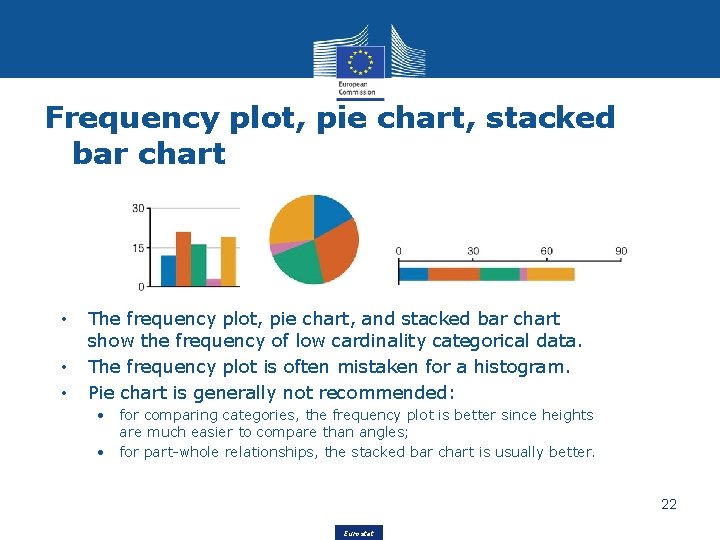
Frequency plot, pie chart, stacked bar chart • • • The frequency plot, pie chart, and stacked bar chart show the frequency of low cardinality categorical data. The frequency plot is often mistaken for a histogram. Pie chart is generally not recommended: • • for comparing categories, the frequency plot is better since heights are much easier to compare than angles; for part-whole relationships, the stacked bar chart is usually better. 22 Eurostat
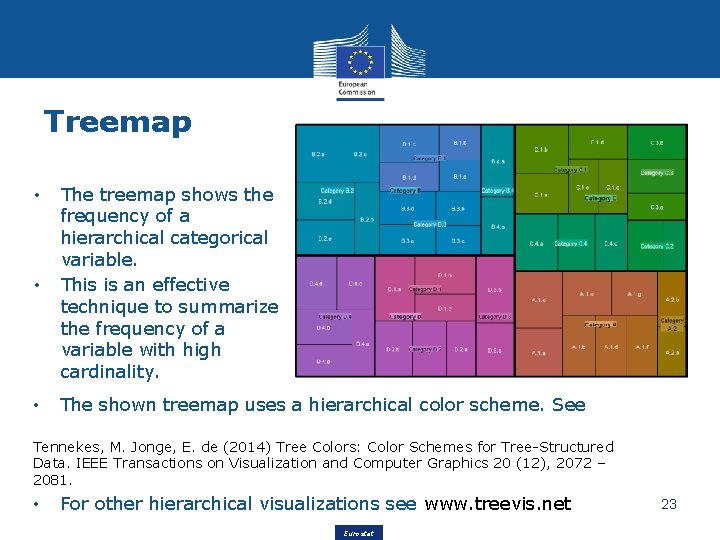
Treemap • The treemap shows the frequency of a hierarchical categorical variable. This is an effective technique to summarize the frequency of a variable with high cardinality. • The shown treemap uses a hierarchical color scheme. See • Tennekes, M. Jonge, E. de (2014) Tree Colors: Color Schemes for Tree-Structured Data. IEEE Transactions on Visualization and Computer Graphics 20 (12), 2072 – 2081. • For other hierarchical visualizations see www. treevis. net Eurostat 23
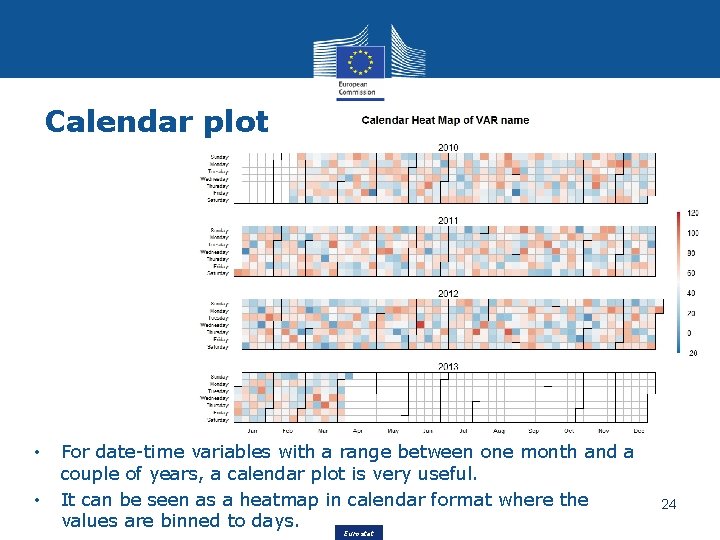
Calendar plot • • For date-time variables with a range between one month and a couple of years, a calendar plot is very useful. It can be seen as a heatmap in calendar format where the values are binned to days. Eurostat 24
Bivariate visualizations • • • Heatmap Two-dimensional kernel density plot Surface plot Mosaic plot Tableplot Treemap 25 Eurostat
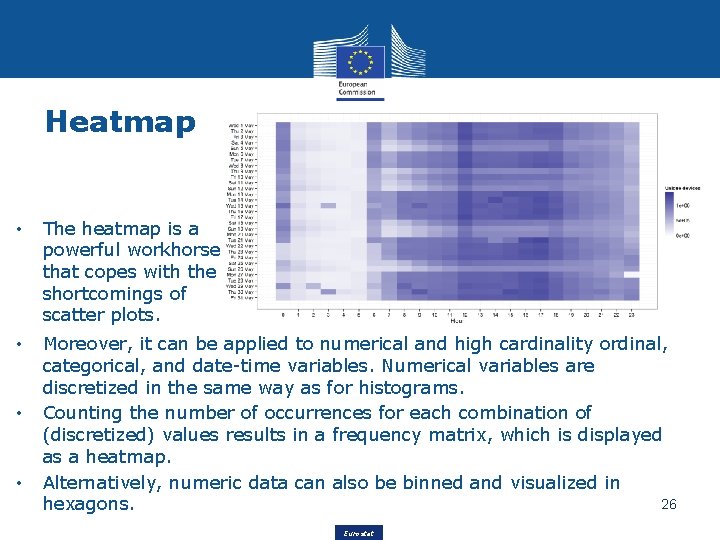
Heatmap • The heatmap is a powerful workhorse that copes with the shortcomings of scatter plots. • Moreover, it can be applied to numerical and high cardinality ordinal, categorical, and date-time variables. Numerical variables are discretized in the same way as for histograms. Counting the number of occurrences for each combination of (discretized) values results in a frequency matrix, which is displayed as a heatmap. Alternatively, numeric data can also be binned and visualized in 26 hexagons. • • Eurostat
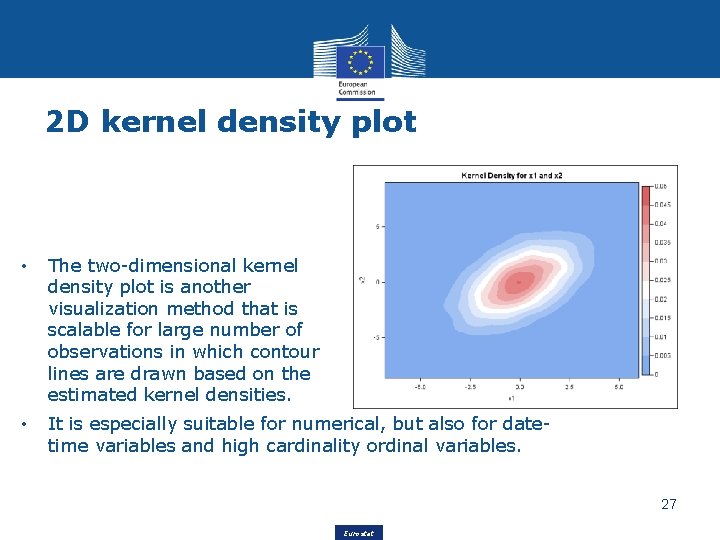
2 D kernel density plot • The two-dimensional kernel density plot is another visualization method that is scalable for large number of observations in which contour lines are drawn based on the estimated kernel densities. • It is especially suitable for numerical, but also for datetime variables and high cardinality ordinal variables. 27 Eurostat
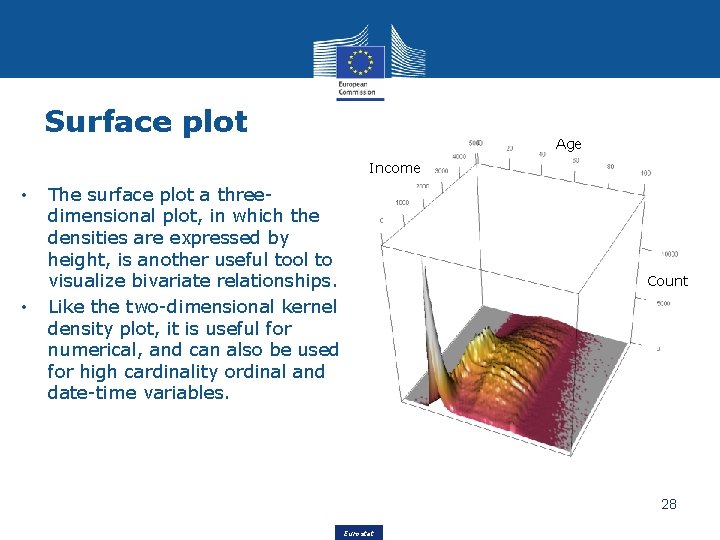
Surface plot Age Income • • The surface plot a threedimensional plot, in which the densities are expressed by height, is another useful tool to visualize bivariate relationships. Like the two-dimensional kernel density plot, it is useful for numerical, and can also be used for high cardinality ordinal and date-time variables. Count 28 Eurostat
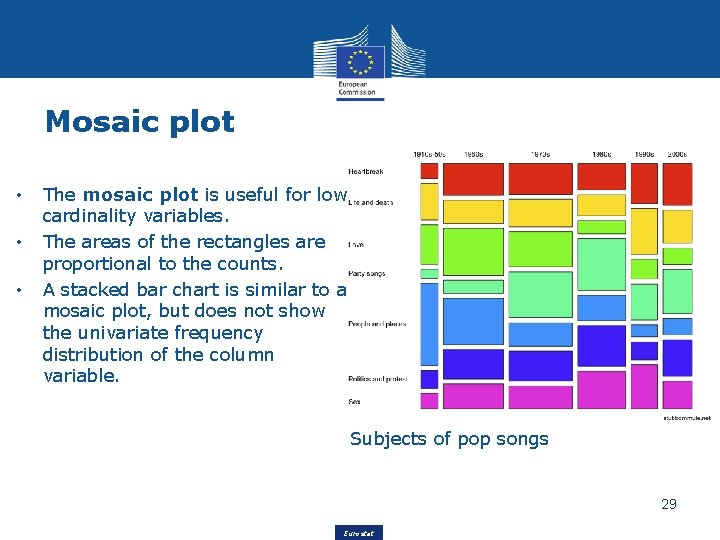
Mosaic plot • • • The mosaic plot is useful for low cardinality variables. The areas of the rectangles are proportional to the counts. A stacked bar chart is similar to a mosaic plot, but does not show the univariate frequency distribution of the column variable. Subjects of pop songs 29 Eurostat
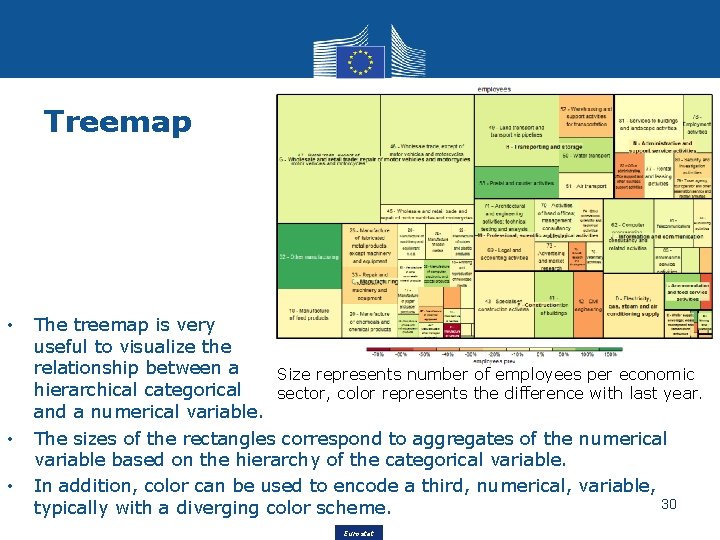
Treemap • • • The treemap is very useful to visualize the relationship between a Size represents number of employees per economic hierarchical categorical sector, color represents the difference with last year. and a numerical variable. The sizes of the rectangles correspond to aggregates of the numerical variable based on the hierarchy of the categorical variable. In addition, color can be used to encode a third, numerical, variable, 30 typically with a diverging color scheme. Eurostat
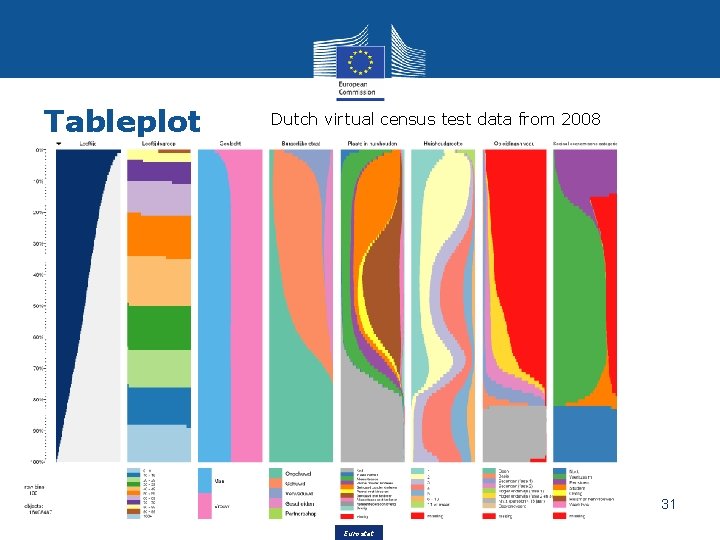
Tableplot Dutch virtual census test data from 2008 31 Eurostat
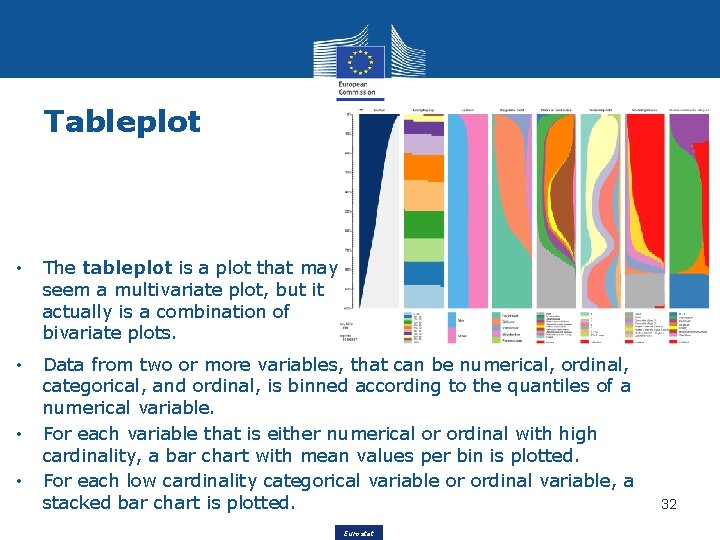
Tableplot • The tableplot is a plot that may seem a multivariate plot, but it actually is a combination of bivariate plots. • Data from two or more variables, that can be numerical, ordinal, categorical, and ordinal, is binned according to the quantiles of a numerical variable. For each variable that is either numerical or ordinal with high cardinality, a bar chart with mean values per bin is plotted. For each low cardinality categorical variable or ordinal variable, a stacked bar chart is plotted. • • Eurostat 32
Small Multiples • • Data is split into multiple subsets. For each subset, a small plot is created. These plots are called small multiples, facets, trellis charts, or lattice charts. They are usually placed on a rectangular grid. 33 Eurostat
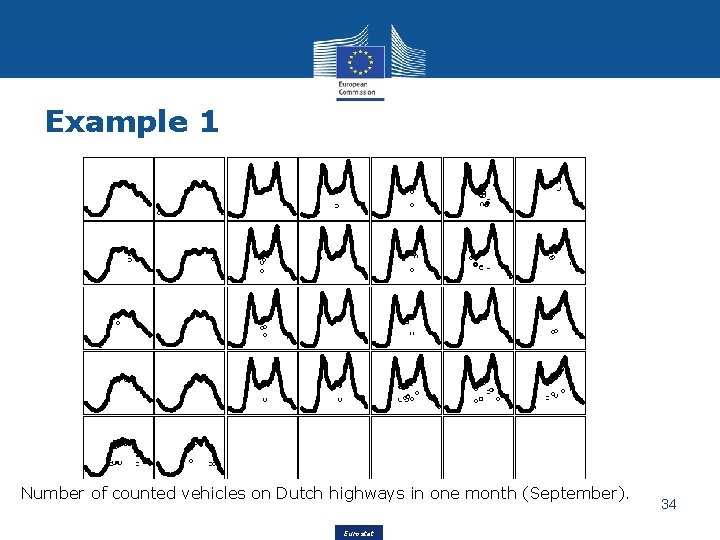
Example 1 Number of counted vehicles on Dutch highways in one month (September). Eurostat 34
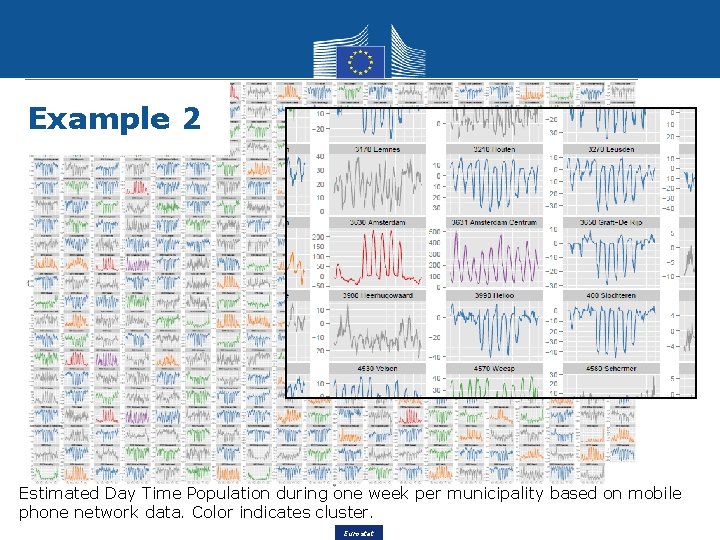
Example 2 Estimated Day Time Population during one week per municipality based on mobile phone network data. Color indicates cluster. Eurostat
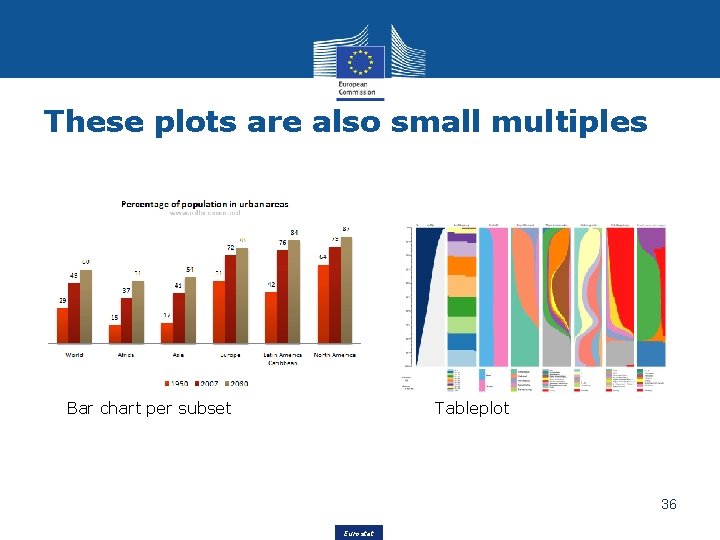
These plots are also small multiples Bar chart per subset Tableplot 36 Eurostat
Time series data • • Line graph / dot plot Calendar plot / heatmap Streamgraph Horizon graph 37 Eurostat
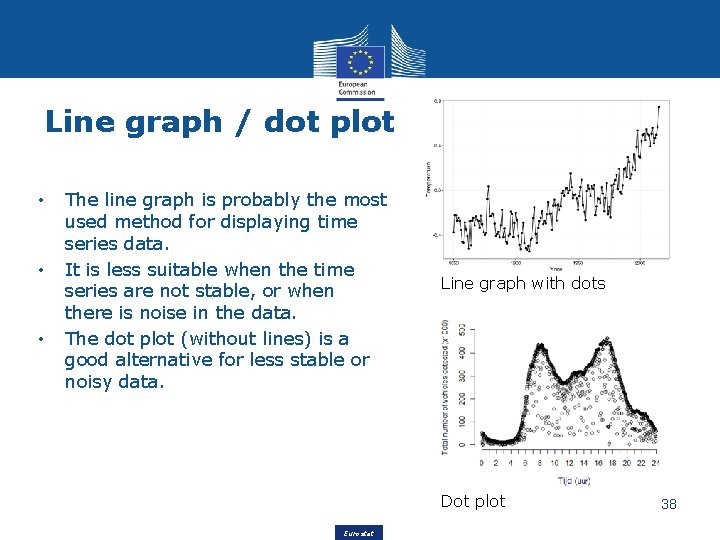
Line graph / dot plot • • • The line graph is probably the most used method for displaying time series data. It is less suitable when the time series are not stable, or when there is noise in the data. The dot plot (without lines) is a good alternative for less stable or noisy data. Line graph with dots Dot plot Eurostat 38
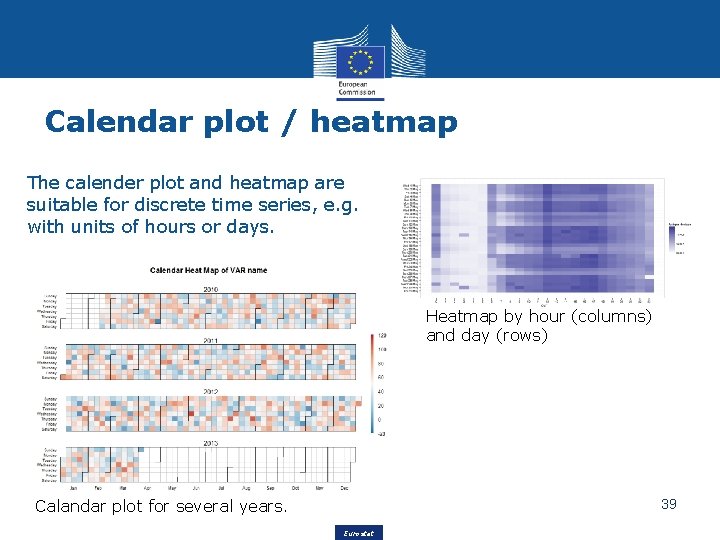
Calendar plot / heatmap The calender plot and heatmap are suitable for discrete time series, e. g. with units of hours or days. Heatmap by hour (columns) and day (rows) Calandar plot for several years. 39 Eurostat
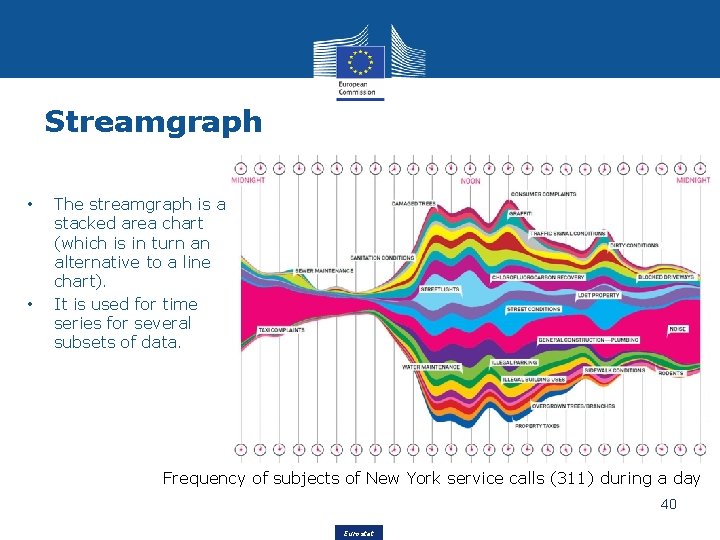
Streamgraph • • The streamgraph is a stacked area chart (which is in turn an alternative to a line chart). It is used for time series for several subsets of data. Frequency of subjects of New York service calls (311) during a day 40 Eurostat
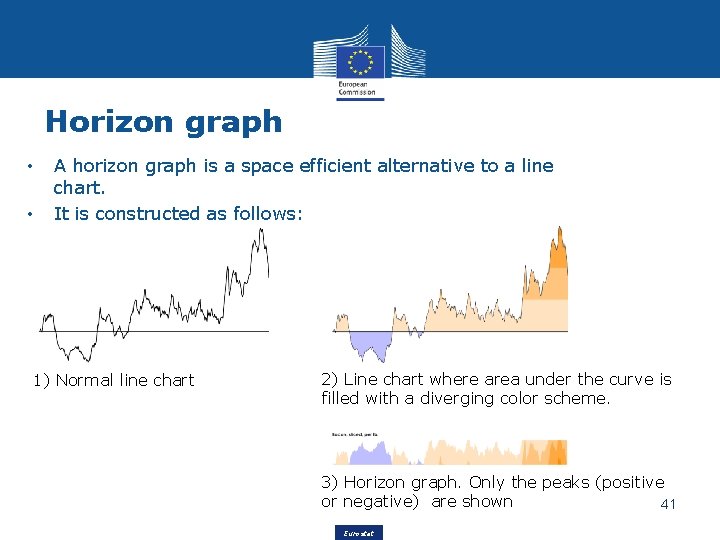
Horizon graph • • A horizon graph is a space efficient alternative to a line chart. It is constructed as follows: 1) Normal line chart 2) Line chart where area under the curve is filled with a diverging color scheme. 3) Horizon graph. Only the peaks (positive or negative) are shown 41 Eurostat
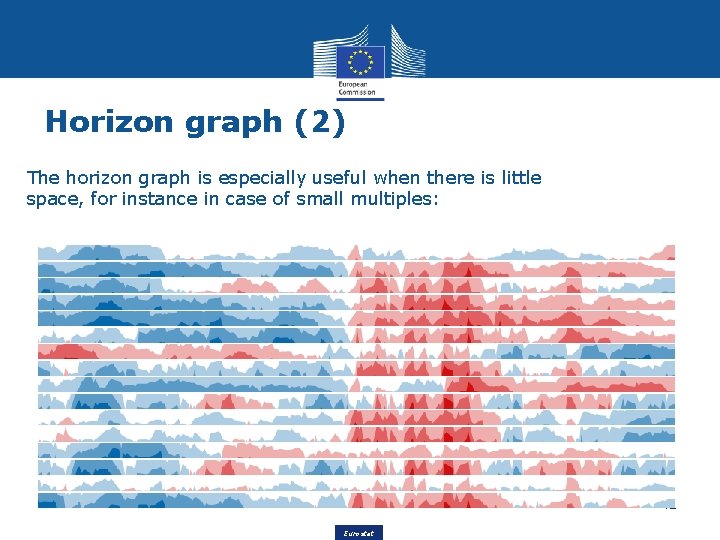
Horizon graph (2) The horizon graph is especially useful when there is little space, for instance in case of small multiples: 42 Eurostat
Spatial data • • Choropleth Dot map 2 D kernel density map Small multiples 43 Eurostat
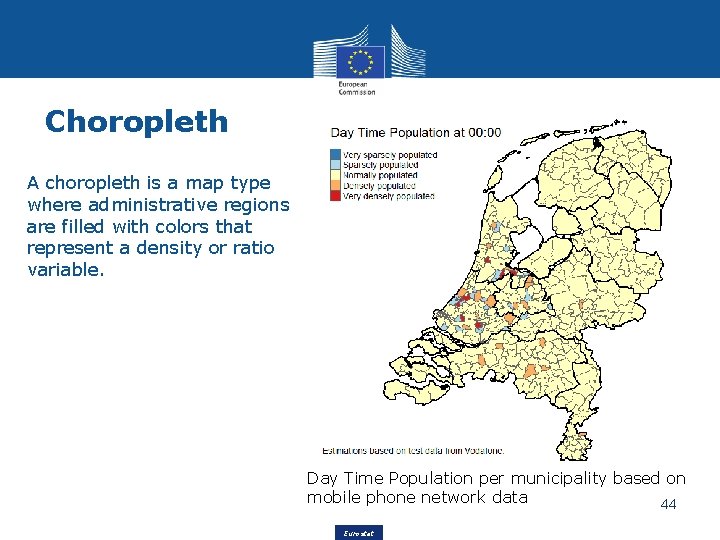
Choropleth A choropleth is a map type where administrative regions are filled with colors that represent a density or ratio variable. Day Time Population per municipality based on mobile phone network data 44 Eurostat
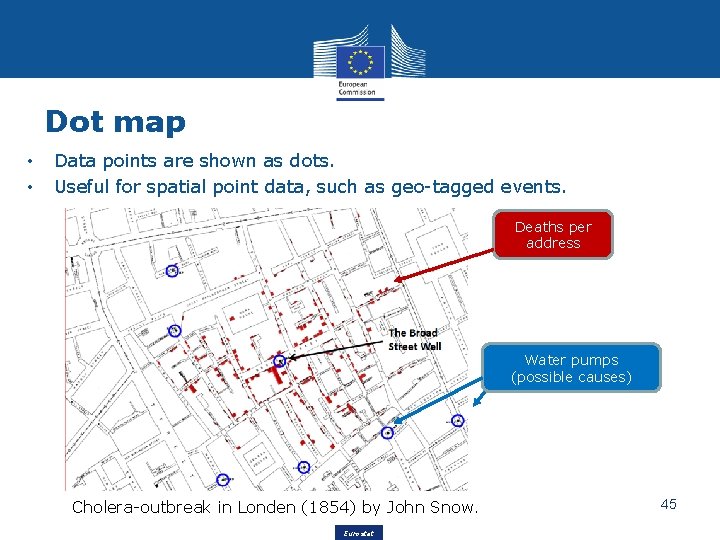
Dot map • • Data points are shown as dots. Useful for spatial point data, such as geo-tagged events. Deaths per address Water pumps (possible causes) Cholera-outbreak in Londen (1854) by John Snow. Eurostat 45
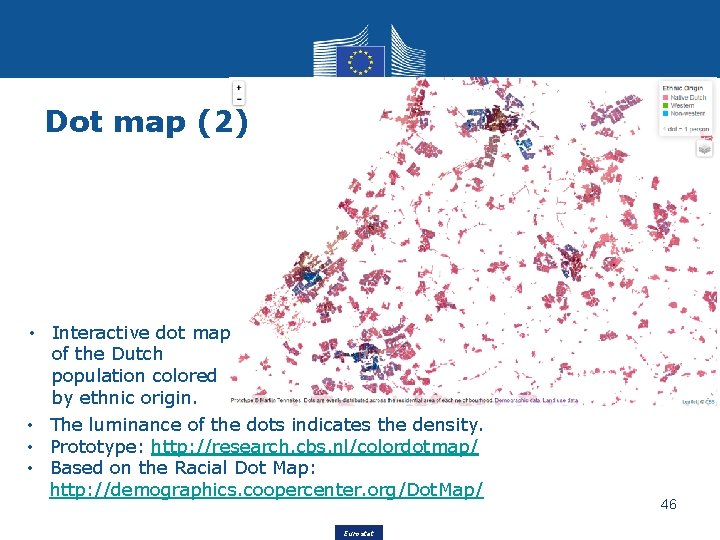
Dot map (2) • Interactive dot map of the Dutch population colored by ethnic origin. • The luminance of the dots indicates the density. • Prototype: http: //research. cbs. nl/colordotmap/ • Based on the Racial Dot Map: http: //demographics. coopercenter. org/Dot. Map/ Eurostat 46
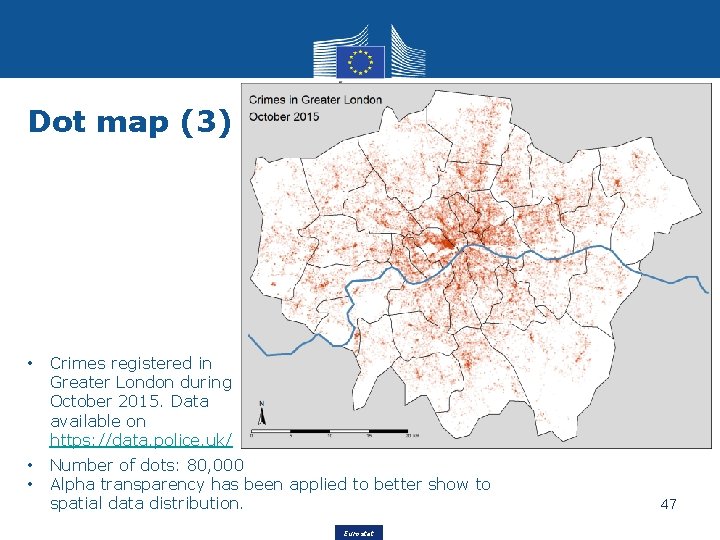
Dot map (3) • Crimes registered in Greater London during October 2015. Data available on https: //data. police. uk/ • • Number of dots: 80, 000 Alpha transparency has been applied to better show to spatial data distribution. Eurostat 47
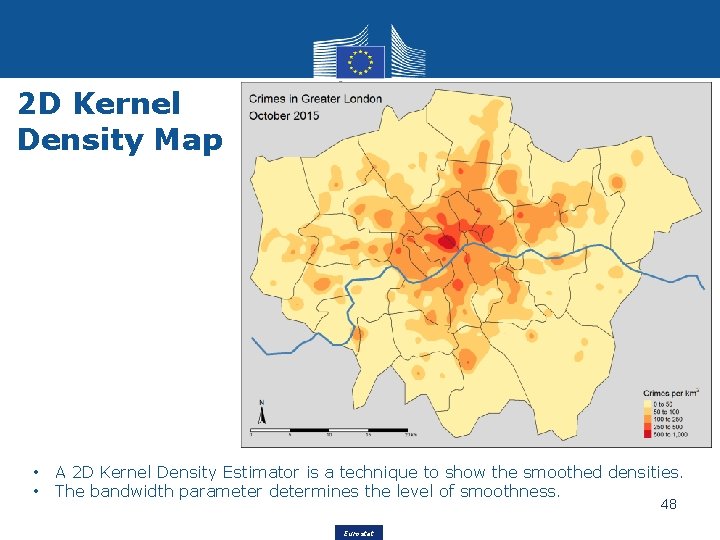
2 D Kernel Density Map • • A 2 D Kernel Density Estimator is a technique to show the smoothed densities. The bandwidth parameter determines the level of smoothness. 48 Eurostat
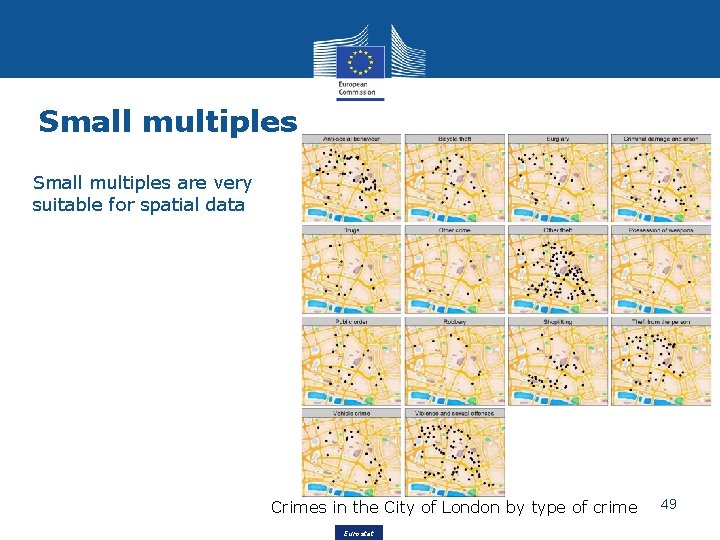
Small multiples are very suitable for spatial data Crimes in the City of London by type of crime Eurostat 49
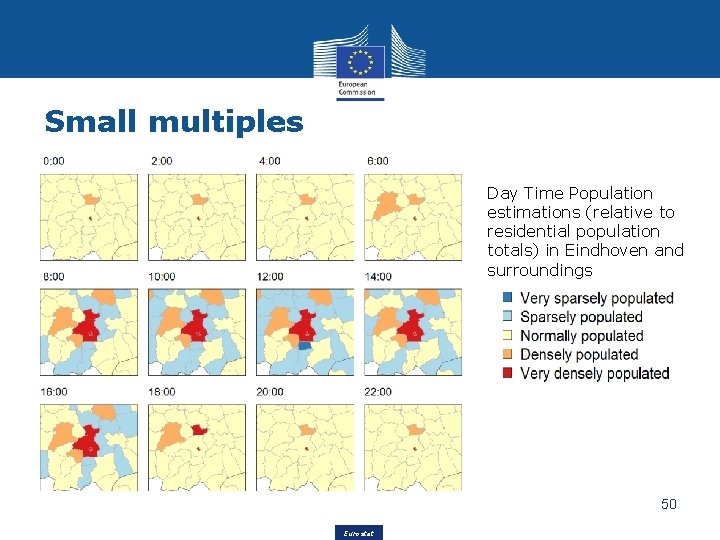
Small multiples Day Time Population estimations (relative to residential population totals) in Eindhoven and surroundings 50 Eurostat
Summary • Data exploration is important to get to know the data. • Visualization is key in data exploration; by looking at the data in different ways, patterns and anomalies become clear. • Many visualization methods can be used for data exploration. A part of these methods can be used for big data, since they are scalable. 51 Eurostat
- Slides: 51