
EWS Overview Tom Jebo Microsoft Open Specifications Agenda
EWS Overview Tom Jebo Microsoft Open Specifications
Agenda What is EWS? Protocol Overview • • • Autodiscover EWS Versioning EWS Operations Using EWS APIs Demo Resources and Tools

What is EWS? HTTP/SOAP based interface to Exchange Mailboxes EWS conversations require: HTTP GET/POST XML/SOAP When to use EWS? Alternative to MAPI (RPC or RPC/HTTP), intuitive/readable XML Email clients, admin functions, applications, web apps/services, e-Discovery. Benefits? Extensive command set and functionality access Includes modification of items Web-based (cross domains)
Clients Outlook OOF and Availability and new features Outlook for Mac (exclusively) Others: e. M Thunderbird
Exchange and Protocol Versions Exchange support for EWS • • • Started support in Exchange 2007 Previously in Exchange 2003, Web. DAV was slower syncing. Currently support in Exchange 2013 as well as Exchange Online Protocol versions • • Versioned by schema for the SOAP bodies Request. Server. Version header element in each request Next slides for details…
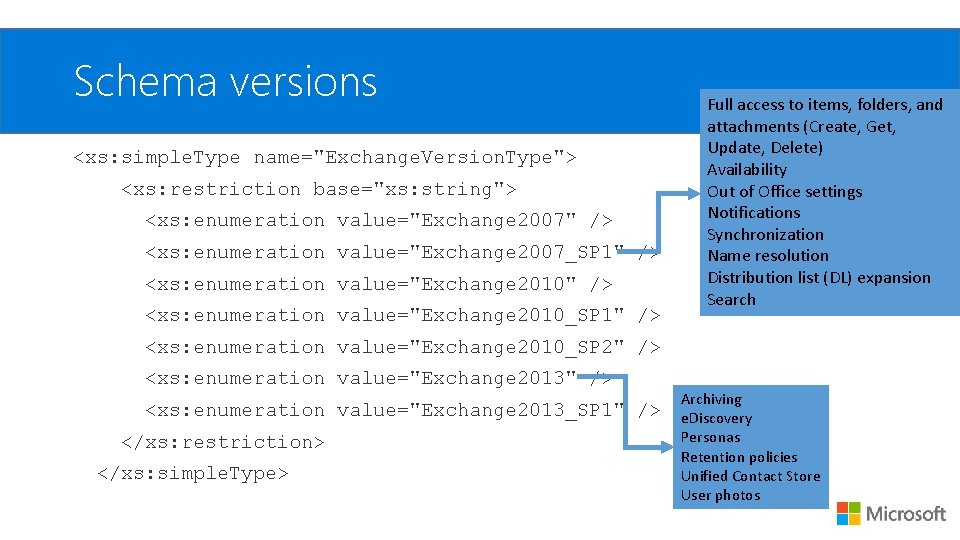
Schema versions <xs: simple. Type name="Exchange. Version. Type"> <xs: restriction base="xs: string"> <xs: enumeration value="Exchange 2007" /> <xs: enumeration value="Exchange 2007_SP 1" /> <xs: enumeration value="Exchange 2010_SP 1" /> Full access to items, folders, and attachments (Create, Get, Update, Delete) Availability Out of Office settings Notifications Synchronization Name resolution Distribution list (DL) expansion Search <xs: enumeration value="Exchange 2010_SP 2" /> <xs: enumeration value="Exchange 2013_SP 1" /> </xs: restriction> </xs: simple. Type> Archiving e. Discovery Personas Retention policies Unified Contact Store User photos
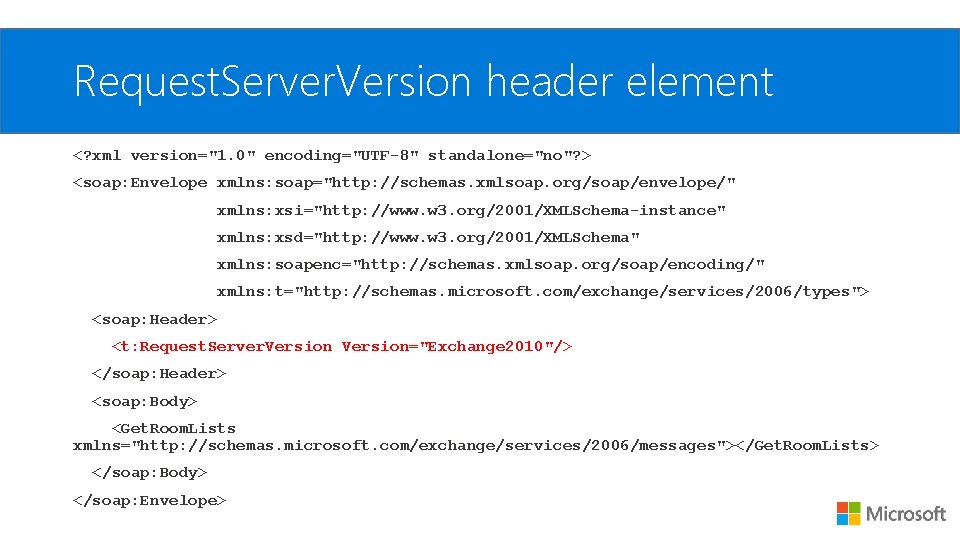
Request. Server. Version header element <? xml version="1. 0" encoding="UTF-8" standalone="no"? > <soap: Envelope xmlns: soap="http: //schemas. xmlsoap. org/soap/envelope/" xmlns: xsi="http: //www. w 3. org/2001/XMLSchema-instance" xmlns: xsd="http: //www. w 3. org/2001/XMLSchema" xmlns: soapenc="http: //schemas. xmlsoap. org/soap/encoding/" xmlns: t="http: //schemas. microsoft. com/exchange/services/2006/types"> <soap: Header> <t: Request. Server. Version="Exchange 2010"/> </soap: Header> <soap: Body> <Get. Room. Lists xmlns="http: //schemas. microsoft. com/exchange/services/2006/messages"></Get. Room. Lists> </soap: Body> </soap: Envelope>
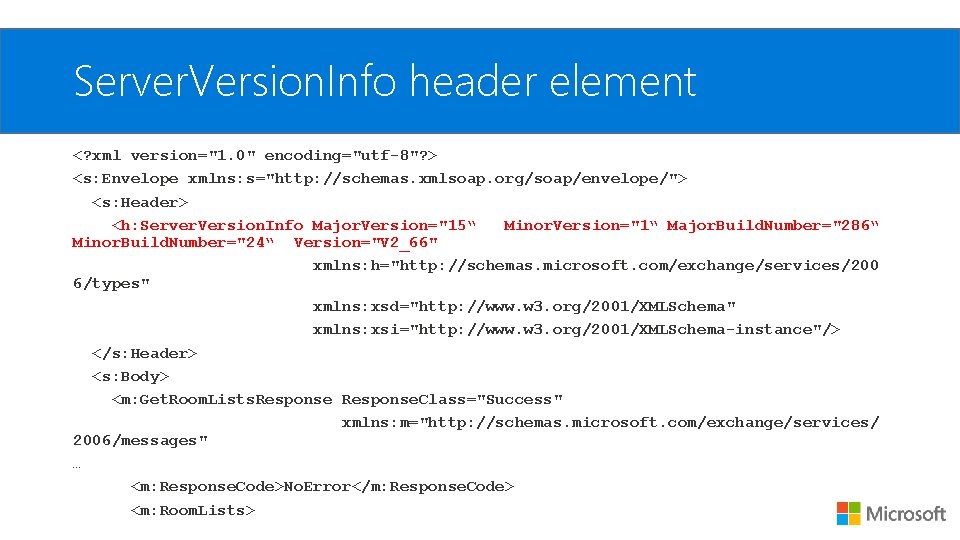
Server. Version. Info header element <? xml version="1. 0" encoding="utf-8"? > <s: Envelope xmlns: s="http: //schemas. xmlsoap. org/soap/envelope/"> <s: Header> <h: Server. Version. Info Major. Version="15“ Minor. Version="1“ Major. Build. Number="286“ Minor. Build. Number="24“ Version="V 2_66" xmlns: h="http: //schemas. microsoft. com/exchange/services/200 6/types" xmlns: xsd="http: //www. w 3. org/2001/XMLSchema" xmlns: xsi="http: //www. w 3. org/2001/XMLSchema-instance"/> </s: Header> <s: Body> <m: Get. Room. Lists. Response. Class="Success" xmlns: m="http: //schemas. microsoft. com/exchange/services/ 2006/messages" … <m: Response. Code>No. Error</m: Response. Code> <m: Room. Lists>
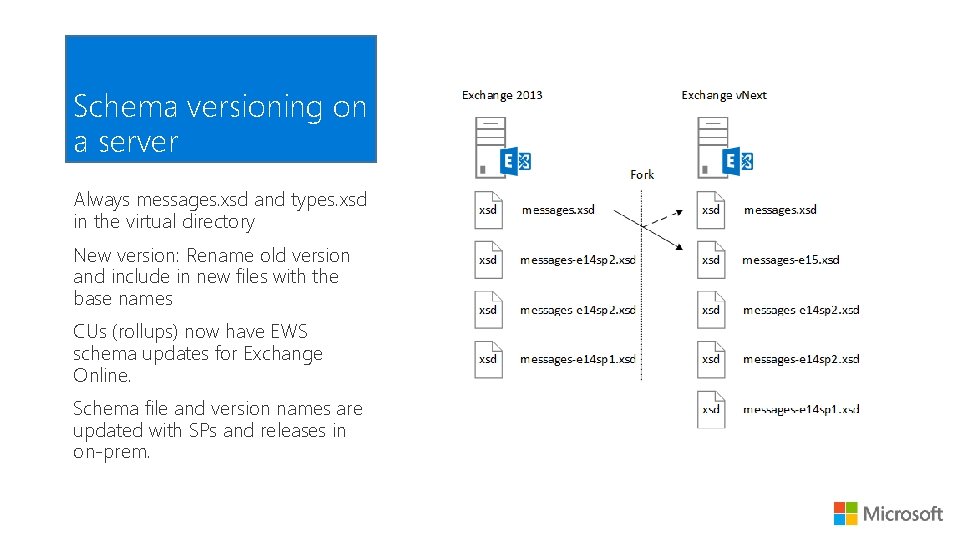
Schema versioning on a server Always messages. xsd and types. xsd in the virtual directory New version: Rename old version and include in new files with the base names CUs (rollups) now have EWS schema updates for Exchange Online. Schema file and version names are updated with SPs and releases in on-prem.
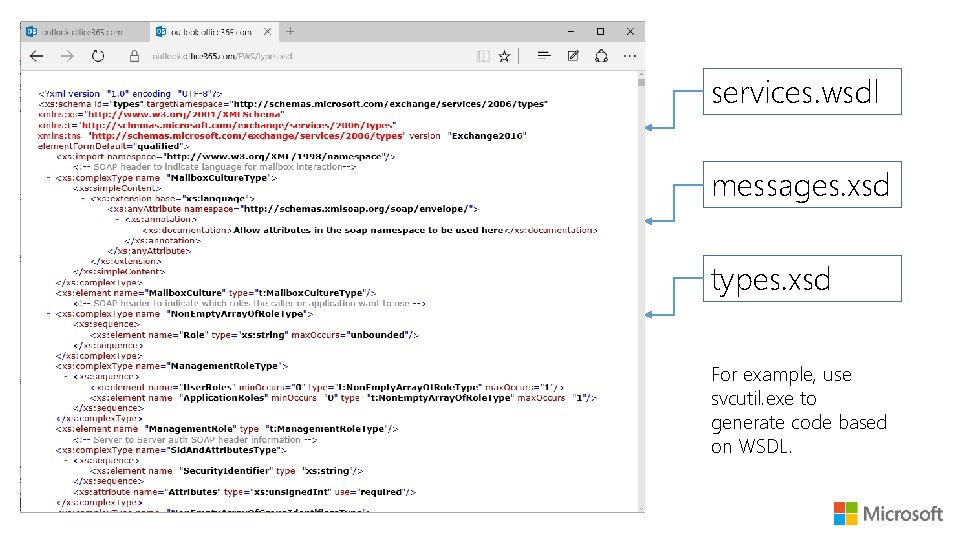
services. wsdl messages. xsd types. xsd For example, use svcutil. exe to generate code based on WSDL.
EWS Protocol Overview
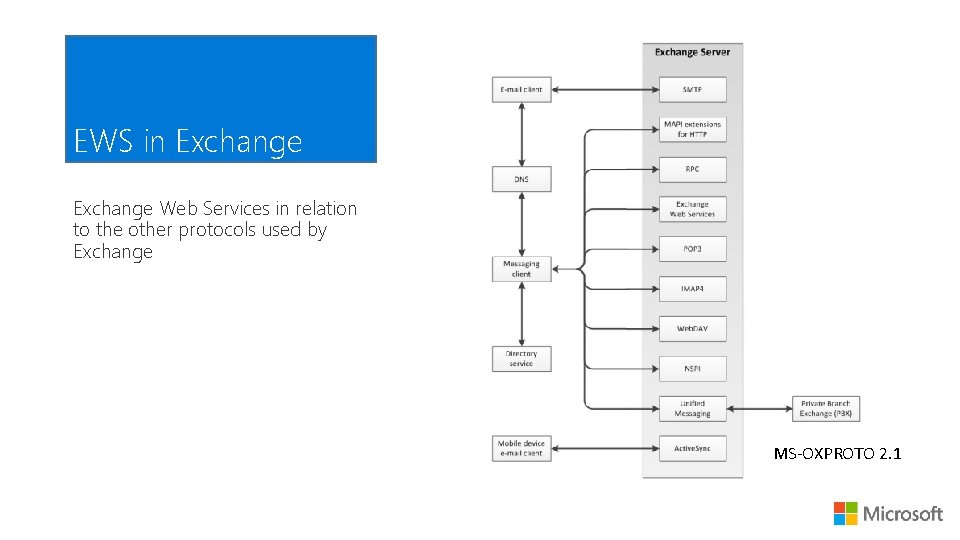
EWS in Exchange Web Services in relation to the other protocols used by Exchange MS-OXPROTO 2. 1
![The Web Services Open Specifications for Exchange [MS-OXWSADISC] Configuration settings [MS-OXWSCDATA] Types and Properties](http://slidetodoc.com/presentation_image/3721fe706947e71eec9572edcac34fb6/image-13.jpg "The Web Services Open Specifications for Exchange [MS-OXWSADISC] Configuration settings [MS-OXWSCDATA] Types and Properties")
The Web Services Open Specifications for Exchange [MS-OXWSADISC] Configuration settings [MS-OXWSCDATA] Types and Properties [MS-OXWSXPROP] [MS-OXWSCORE] [MS-OXWSMSG] [MS-OXWSFOLD] [MS-OXWSCONT] [MS-OXWSMTGS] Etc. . Operations on various items [MS-OXPROTO] 2. 2. 10
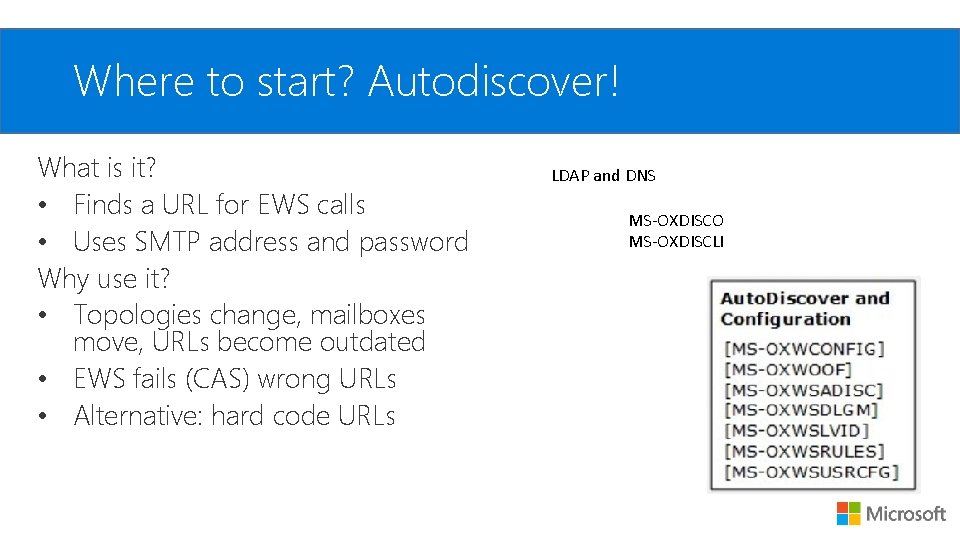
Where to start? Autodiscover! What is it? • Finds a URL for EWS calls • Uses SMTP address and password Why use it? • Topologies change, mailboxes move, URLs become outdated • EWS fails (CAS) wrong URLs • Alternative: hard code URLs LDAP and DNS MS-OXDISCO MS-OXDISCLI
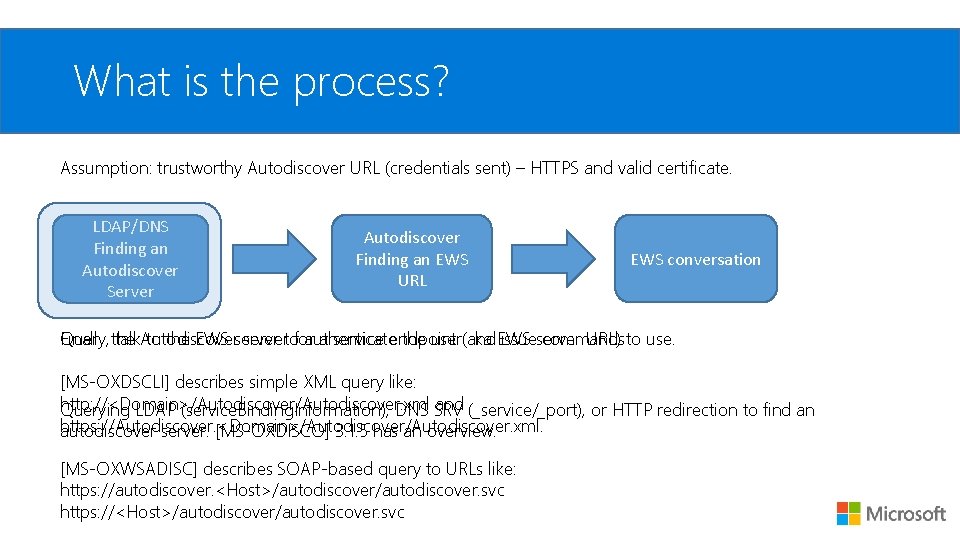
What is the process? Assumption: trustworthy Autodiscover URL (credentials sent) – HTTPS and valid certificate. LDAP/DNS Finding an Autodiscover Server Autodiscover Finding an EWS URL EWS conversation Finally, talk. Autodiscover to the EWS server authenticate the user(aka and EWS issueserver commands Query the servertofor a service endpoint URL) to use. [MS-OXDSCLI] describes simple XML query like: http: //<Domain>/Autodiscover. xml and (_service/_port), or HTTP redirection to find an Querying LDAP (service. Binding. Information), DNS SRV https: //Autodiscover. <Domain>/Autodiscover. xml. autodiscover server. [MS-OXDISCO] 3. 1. 5 has an overview. [MS-OXWSADISC] describes SOAP-based query to URLs like: https: //autodiscover. <Host>/autodiscover. svc https: //<Host>/autodiscover. svc
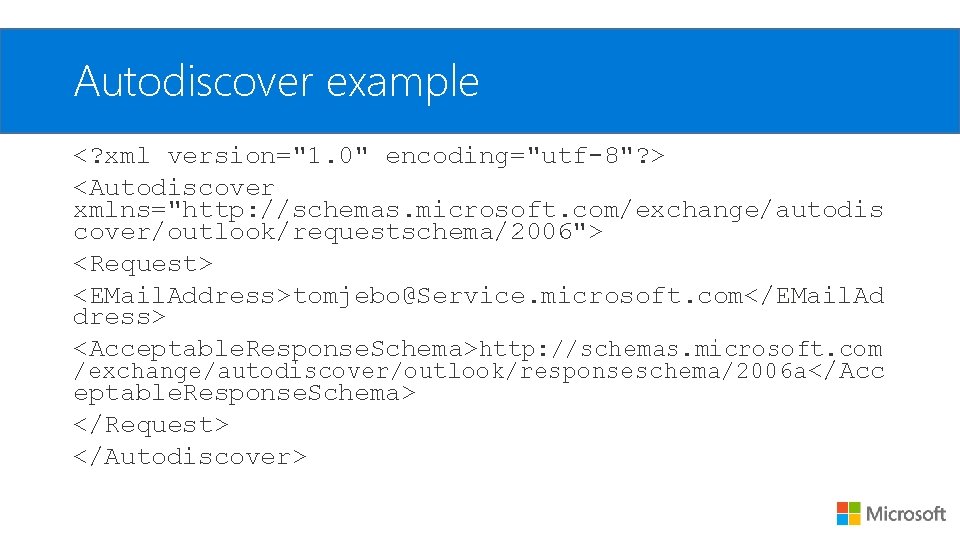
Autodiscover example <? xml version="1. 0" encoding="utf-8"? > <Autodiscover xmlns="http: //schemas. microsoft. com/exchange/autodis cover/outlook/requestschema/2006"> <Request> <EMail. Address>tomjebo@Service. microsoft. com</EMail. Ad dress> <Acceptable. Response. Schema>http: //schemas. microsoft. com /exchange/autodiscover/outlook/responseschema/2006 a</Acc eptable. Response. Schema> </Request> </Autodiscover>
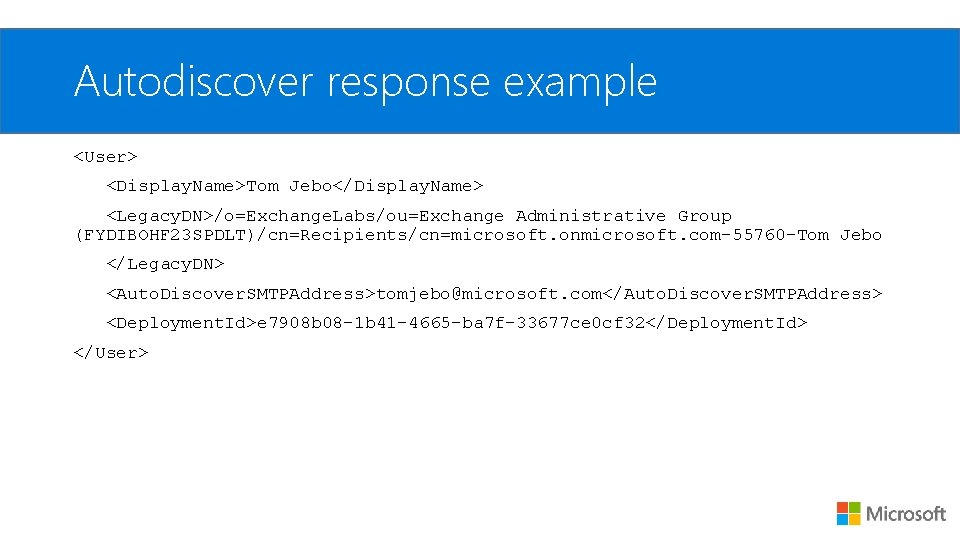
Autodiscover response example <User> <Display. Name>Tom Jebo</Display. Name> <Legacy. DN>/o=Exchange. Labs/ou=Exchange Administrative Group (FYDIBOHF 23 SPDLT)/cn=Recipients/cn=microsoft. onmicrosoft. com-55760 -Tom Jebo </Legacy. DN> <Auto. Discover. SMTPAddress>tomjebo@microsoft. com</Auto. Discover. SMTPAddress> <Deployment. Id>e 7908 b 08 -1 b 41 -4665 -ba 7 f-33677 ce 0 cf 32</Deployment. Id> </User>
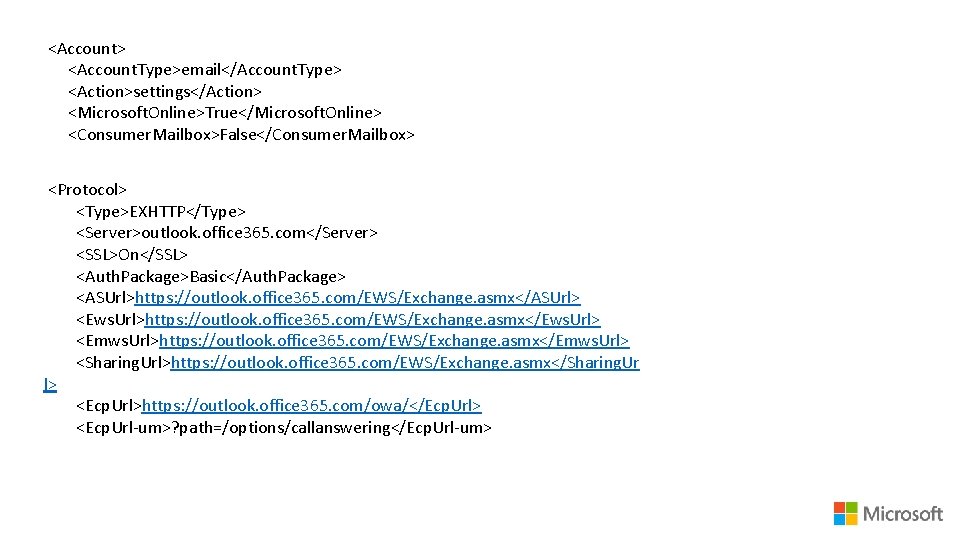
<Account> <Account. Type>email</Account. Type> <Action>settings</Action> <Microsoft. Online>True</Microsoft. Online> <Consumer. Mailbox>False</Consumer. Mailbox> <Protocol> <Type>EXHTTP</Type> <Server>outlook. office 365. com</Server> <SSL>On</SSL> <Auth. Package>Basic</Auth. Package> <ASUrl>https: //outlook. office 365. com/EWS/Exchange. asmx</ASUrl> <Ews. Url>https: //outlook. office 365. com/EWS/Exchange. asmx</Ews. Url> <Emws. Url>https: //outlook. office 365. com/EWS/Exchange. asmx</Emws. Url> <Sharing. Url>https: //outlook. office 365. com/EWS/Exchange. asmx</Sharing. Ur l> <Ecp. Url>https: //outlook. office 365. com/owa/</Ecp. Url> <Ecp. Url-um>? path=/options/callanswering</Ecp. Url-um>
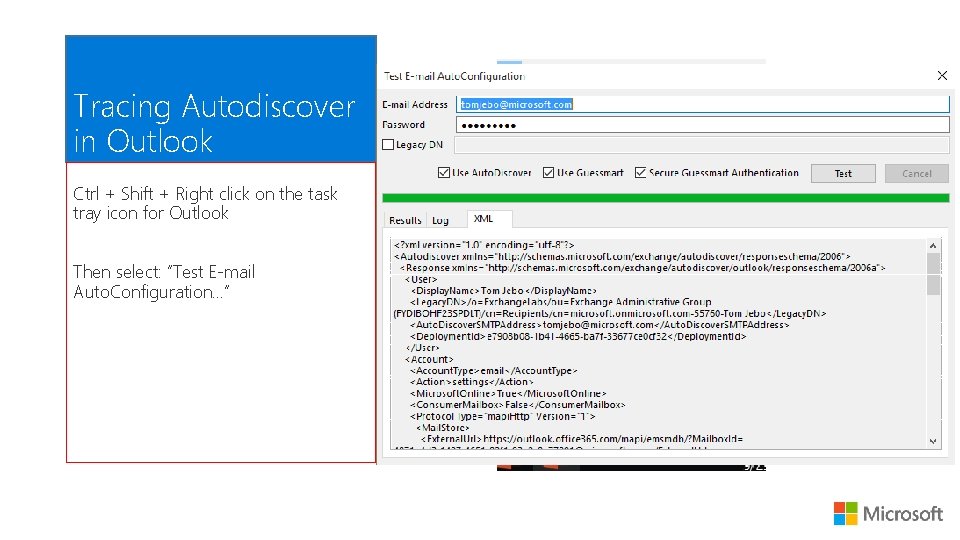
Tracing Autodiscover in Outlook Ctrl + Shift + Right click on the task tray icon for Outlook Then select: “Test E-mail Auto. Configuration…”
Functional Overview of Protocol Review several of the functional groups Example of using EWS operations follows
![Core Items and Data Types [MS-OXWSCORE]/[MS-OXWSDATA] Defines the base item operations and base types](http://slidetodoc.com/presentation_image/3721fe706947e71eec9572edcac34fb6/image-21.jpg "Core Items and Data Types [MS-OXWSCORE]/[MS-OXWSDATA] Defines the base item operations and base types")
Core Items and Data Types [MS-OXWSCORE]/[MS-OXWSDATA] Defines the base item operations and base types Get, Create, Move, Update, Delete, Copy, Send … are all defined here for the general case. Extended in other specs
![Email message operations [MS-OXWSMSG] Operations: • Get. Item – Item. Shape: Id. Only/All. Properties](http://slidetodoc.com/presentation_image/3721fe706947e71eec9572edcac34fb6/image-22.jpg "Email message operations [MS-OXWSMSG] Operations: • Get. Item – Item. Shape: Id. Only/All. Properties")
Email message operations [MS-OXWSMSG] Operations: • Get. Item – Item. Shape: Id. Only/All. Properties • Copy. Item – copies to a folder id, returns new id (new item) • Send. Item – send created email message by item id • Create. Item – specify item(s) and folder to save to • Move. Item – no new id returned • Update. Item – item id, saveto id, field changes array. • …
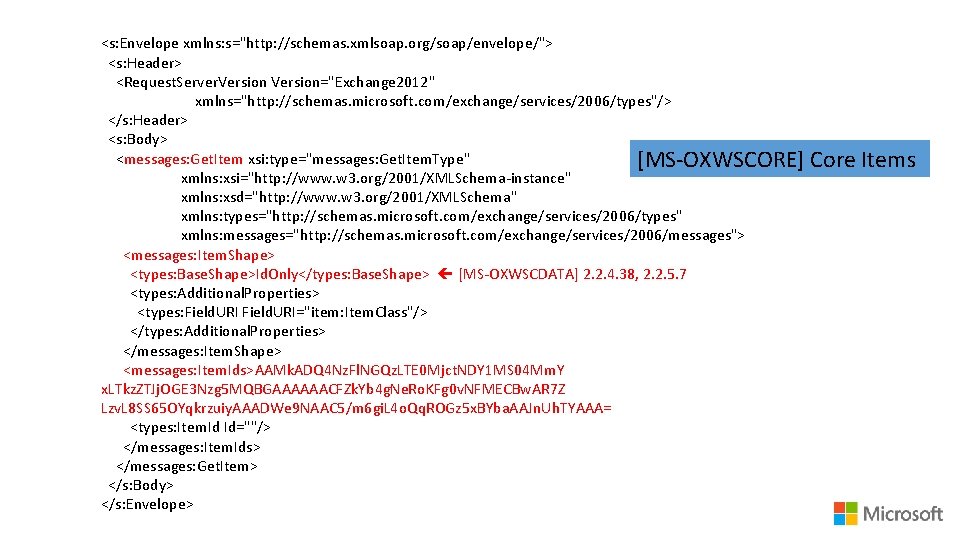
<s: Envelope xmlns: s="http: //schemas. xmlsoap. org/soap/envelope/"> <s: Header> <Request. Server. Version="Exchange 2012" xmlns="http: //schemas. microsoft. com/exchange/services/2006/types"/> </s: Header> <s: Body> <messages: Get. Item xsi: type="messages: Get. Item. Type" [MS-OXWSCORE] xmlns: xsi="http: //www. w 3. org/2001/XMLSchema-instance" xmlns: xsd="http: //www. w 3. org/2001/XMLSchema" xmlns: types="http: //schemas. microsoft. com/exchange/services/2006/types" xmlns: messages="http: //schemas. microsoft. com/exchange/services/2006/messages"> <messages: Item. Shape> <types: Base. Shape>Id. Only</types: Base. Shape> [MS-OXWSCDATA] 2. 2. 4. 38, 2. 2. 5. 7 <types: Additional. Properties> <types: Field. URI="item: Item. Class"/> </types: Additional. Properties> </messages: Item. Shape> <messages: Item. Ids>AAMk. ADQ 4 Nz. Fl. NGQz. LTE 0 Mjct. NDY 1 MS 04 Mm. Y x. LTkz. ZTJj. OGE 3 Nzg 5 MQBGAAAAAACFZk. Yb 4 g. Ne. Ro. KFg 0 v. NFMECBw. AR 7 Z Lzv. L 8 SS 65 OYqkrzuiy. AAADWe 9 NAAC 5/m 6 gi. L 4 o. Qq. ROGz 5 x. BYba. AAJn. Uh. TYAAA= <types: Item. Id Id=""/> </messages: Item. Ids> </messages: Get. Item> </s: Body> </s: Envelope> Core Items
![Folder operations [MS-OXWSFOLD] Folder. Id or Operations: Distinguished. Folder. Id • Get. Folder –](http://slidetodoc.com/presentation_image/3721fe706947e71eec9572edcac34fb6/image-24.jpg "Folder operations [MS-OXWSFOLD] Folder. Id or Operations: Distinguished. Folder. Id • Get. Folder –")
Folder operations [MS-OXWSFOLD] Folder. Id or Operations: Distinguished. Folder. Id • Get. Folder – folder id and shape: properties [MS-OXWSCDATA] 2. 2. 4. 23 has the names enum • Create. Folder – new child folder “inbox” • Delete. Folder – non-default folders “contacts” • Empty. Folder – deletes contained items & subfolders “tasks” • Move. Folder – everything moves with the folder etc… … you get the idea!
![Appointments/Meetings and Contacts [MS-OXWSMTGS] and [MS-OXWSCONT] Operations: • Copy. Item • Update. Item •](http://slidetodoc.com/presentation_image/3721fe706947e71eec9572edcac34fb6/image-25.jpg "Appointments/Meetings and Contacts [MS-OXWSMTGS] and [MS-OXWSCONT] Operations: • Copy. Item • Update. Item •")
Appointments/Meetings and Contacts [MS-OXWSMTGS] and [MS-OXWSCONT] Operations: • Copy. Item • Update. Item • Create. Item • Delete. Item • Get. Item • Move. Item Different semantics and properties for these but the same operations. Calendar. Item. Type Contact. Item. Type
![Searching for Folders and Items [MS-OXWSSRCH] Operations: • Find. Folder – get a list](http://slidetodoc.com/presentation_image/3721fe706947e71eec9572edcac34fb6/image-26.jpg "Searching for Folders and Items [MS-OXWSSRCH] Operations: • Find. Folder – get a list")
Searching for Folders and Items [MS-OXWSSRCH] Operations: • Find. Folder – get a list of subfolders based on “Restriction” • Find. Item – get an item in a folder(s) by Example on next slide…
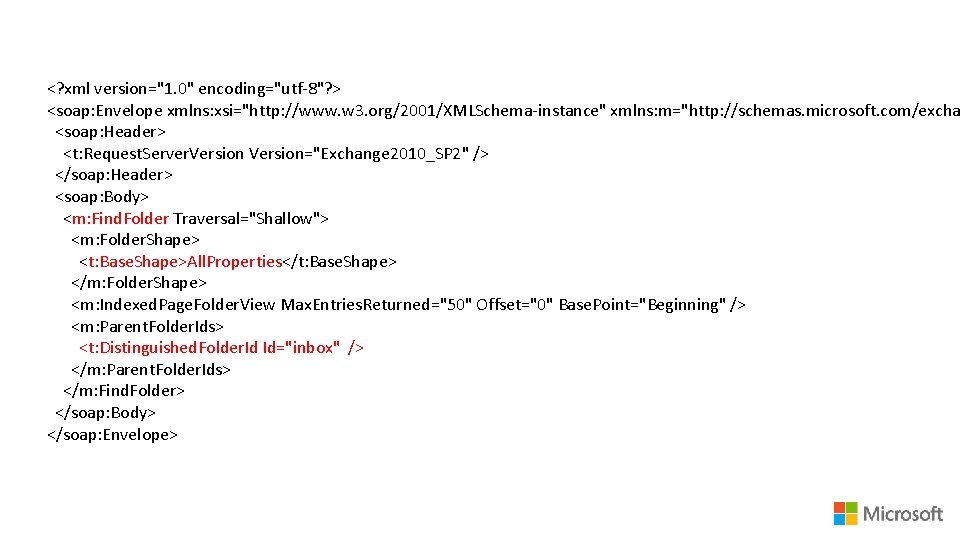
<? xml version="1. 0" encoding="utf-8"? > <soap: Envelope xmlns: xsi="http: //www. w 3. org/2001/XMLSchema-instance" xmlns: m="http: //schemas. microsoft. com/excha <soap: Header> <t: Request. Server. Version="Exchange 2010_SP 2" /> </soap: Header> <soap: Body> <m: Find. Folder Traversal="Shallow"> <m: Folder. Shape> <t: Base. Shape>All. Properties</t: Base. Shape> </m: Folder. Shape> <m: Indexed. Page. Folder. View Max. Entries. Returned="50" Offset="0" Base. Point="Beginning" /> <m: Parent. Folder. Ids> <t: Distinguished. Folder. Id Id="inbox" /> </m: Parent. Folder. Ids> </m: Find. Folder> </soap: Body> </soap: Envelope>
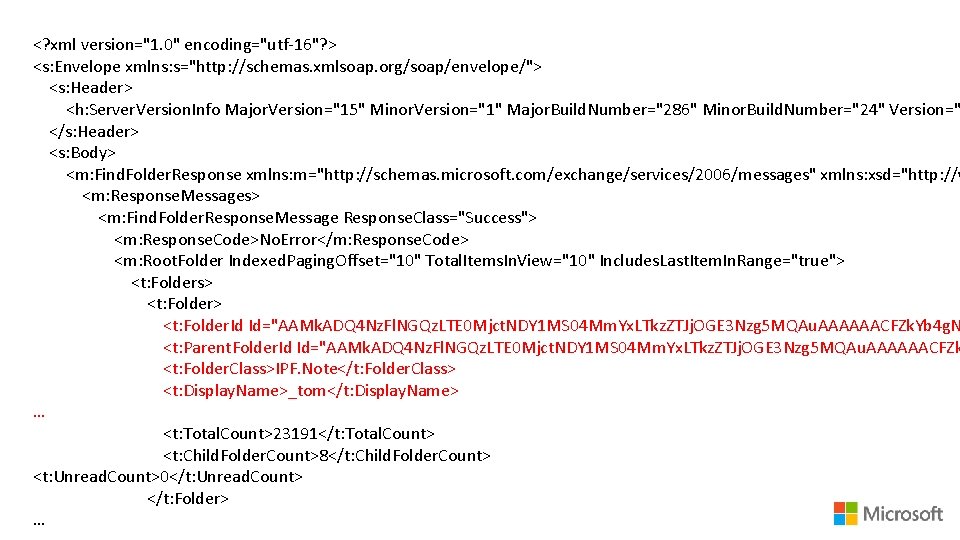
<? xml version="1. 0" encoding="utf-16"? > <s: Envelope xmlns: s="http: //schemas. xmlsoap. org/soap/envelope/"> <s: Header> <h: Server. Version. Info Major. Version="15" Minor. Version="1" Major. Build. Number="286" Minor. Build. Number="24" Version=" </s: Header> <s: Body> <m: Find. Folder. Response xmlns: m="http: //schemas. microsoft. com/exchange/services/2006/messages" xmlns: xsd="http: //w <m: Response. Messages> <m: Find. Folder. Response. Message Response. Class="Success"> <m: Response. Code>No. Error</m: Response. Code> <m: Root. Folder Indexed. Paging. Offset="10" Total. Items. In. View="10" Includes. Last. Item. In. Range="true"> <t: Folders> <t: Folder. Id Id="AAMk. ADQ 4 Nz. Fl. NGQz. LTE 0 Mjct. NDY 1 MS 04 Mm. Yx. LTkz. ZTJj. OGE 3 Nzg 5 MQAu. AAAAAACFZk. Yb 4 g. N <t: Parent. Folder. Id Id="AAMk. ADQ 4 Nz. Fl. NGQz. LTE 0 Mjct. NDY 1 MS 04 Mm. Yx. LTkz. ZTJj. OGE 3 Nzg 5 MQAu. AAAAAACFZk <t: Folder. Class>IPF. Note</t: Folder. Class> <t: Display. Name>_tom</t: Display. Name> … <t: Total. Count>23191</t: Total. Count> <t: Child. Folder. Count>8</t: Child. Folder. Count> <t: Unread. Count>0</t: Unread. Count> </t: Folder> …
![Data Xfer and Sync [MS-OXWSBTRF] • Export. Items • Upload. Items [MS-OXWSSYNC] • Sync.](http://slidetodoc.com/presentation_image/3721fe706947e71eec9572edcac34fb6/image-29.jpg "Data Xfer and Sync [MS-OXWSBTRF] • Export. Items • Upload. Items [MS-OXWSSYNC] • Sync.")
Data Xfer and Sync [MS-OXWSBTRF] • Export. Items • Upload. Items [MS-OXWSSYNC] • Sync. Folder. Hierarchy • Sync. Folder. Id <xs: element <xs: sequence> name="Item. Id" <xs: element type="t: Item. Id. Type" name="Folder. Shape" min. Occurs="0" type="t: Folder. Response. Shape. Ty max. Occurs="1" pe" /> /> <xs: element name="Data" name="Sync. Folder. Id" type="xs: base 64 Bina type="t: Target. Folder. Id. Type" ry" min. Occurs="0"/>
![Availability operations [MS-OXWAVLS] Get. User. Availability – list of mailboxes to query free/busy options](http://slidetodoc.com/presentation_image/3721fe706947e71eec9572edcac34fb6/image-30.jpg "Availability operations [MS-OXWAVLS] Get. User. Availability – list of mailboxes to query free/busy options")
Availability operations [MS-OXWAVLS] Get. User. Availability – list of mailboxes to query free/busy options to query mtg suggestions options: max non-work hours results meeting duration etc…
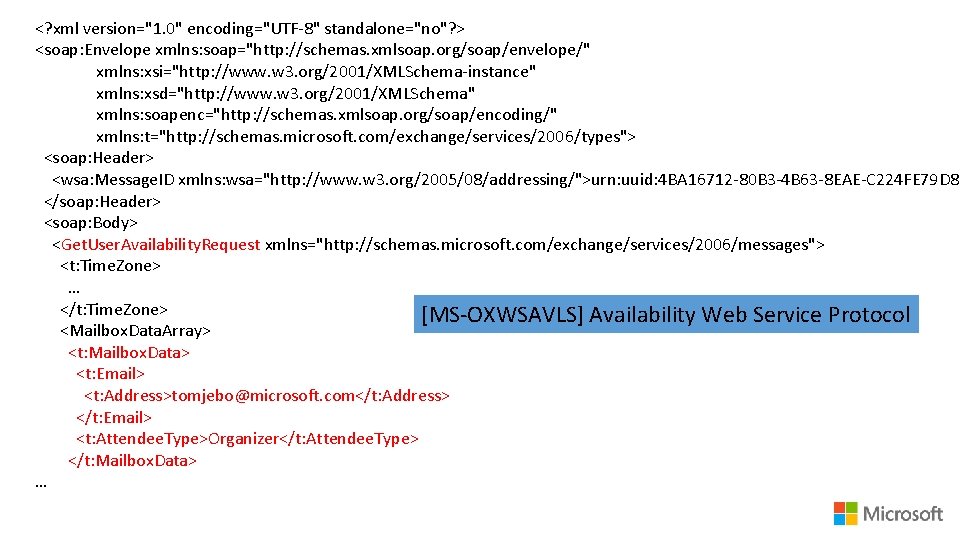
<? xml version="1. 0" encoding="UTF-8" standalone="no"? > <soap: Envelope xmlns: soap="http: //schemas. xmlsoap. org/soap/envelope/" xmlns: xsi="http: //www. w 3. org/2001/XMLSchema-instance" xmlns: xsd="http: //www. w 3. org/2001/XMLSchema" xmlns: soapenc="http: //schemas. xmlsoap. org/soap/encoding/" xmlns: t="http: //schemas. microsoft. com/exchange/services/2006/types"> <soap: Header> <wsa: Message. ID xmlns: wsa="http: //www. w 3. org/2005/08/addressing/">urn: uuid: 4 BA 16712 -80 B 3 -4 B 63 -8 EAE-C 224 FE 79 D 8 D </soap: Header> <soap: Body> <Get. User. Availability. Request xmlns="http: //schemas. microsoft. com/exchange/services/2006/messages"> <t: Time. Zone> … </t: Time. Zone> [MS-OXWSAVLS] Availability Web Service Protocol <Mailbox. Data. Array> <t: Mailbox. Data> <t: Email> <t: Address>tomjebo@microsoft. com</t: Address> </t: Email> <t: Attendee. Type>Organizer</t: Attendee. Type> </t: Mailbox. Data> …
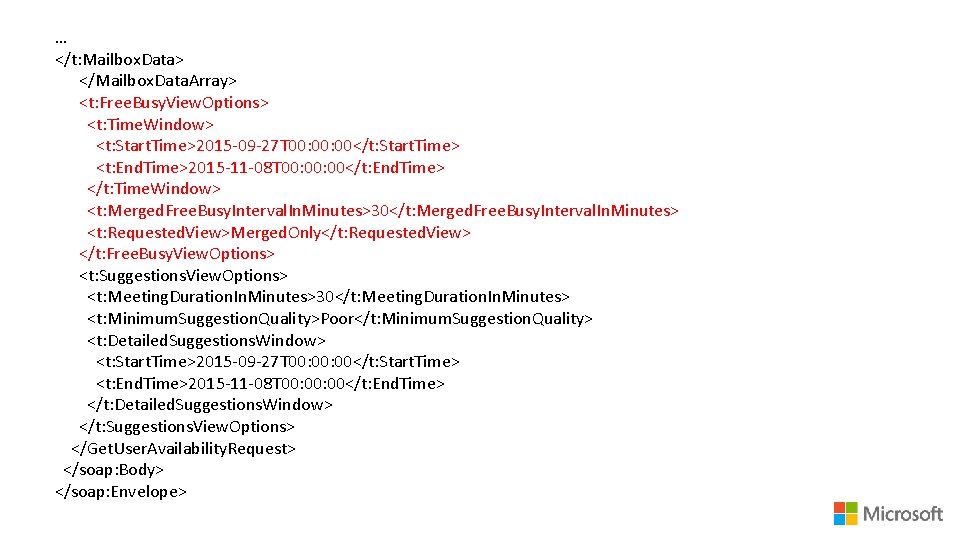
… </t: Mailbox. Data> </Mailbox. Data. Array> <t: Free. Busy. View. Options> <t: Time. Window> <t: Start. Time>2015 -09 -27 T 00: 00</t: Start. Time> <t: End. Time>2015 -11 -08 T 00: 00</t: End. Time> </t: Time. Window> <t: Merged. Free. Busy. Interval. In. Minutes>30</t: Merged. Free. Busy. Interval. In. Minutes> <t: Requested. View>Merged. Only</t: Requested. View> </t: Free. Busy. View. Options> <t: Suggestions. View. Options> <t: Meeting. Duration. In. Minutes>30</t: Meeting. Duration. In. Minutes> <t: Minimum. Suggestion. Quality>Poor</t: Minimum. Suggestion. Quality> <t: Detailed. Suggestions. Window> <t: Start. Time>2015 -09 -27 T 00: 00</t: Start. Time> <t: End. Time>2015 -11 -08 T 00: 00</t: End. Time> </t: Detailed. Suggestions. Window> </t: Suggestions. View. Options> </Get. User. Availability. Request> </soap: Body> </soap: Envelope>
DEMO: Example requests and responses Use EWSEditor to craft raw HTTP requests which would be called by the client. Then show these as examples. Let’s look at just a few examples for common requests like: 1. Finding folders 2. Getting mail items in a folder 3. Get a calendar appointment 4. Look up a contact
EWS Managed API
Overview of the API (just highlights) https: //github. com/Office. Dev/ews-managed-api And Microsoft download API version 2. 5 Requires. Net/C# or VB
DEMO: EWS Managed API in code example Take a look at some code examples using EWS Managed API.
javascript EWS in js (mail add-in only): https: //msdn. microsoft. com/en-us/library/office/fp 161019. aspx Mailbox. make. Ews. Request. Async Only available in Outlook or mail add-ins General javascript apps: Xml. Http. Request object allows calls for raw HTTP POSTS Supported in many web browsers including IE General js code
Tools
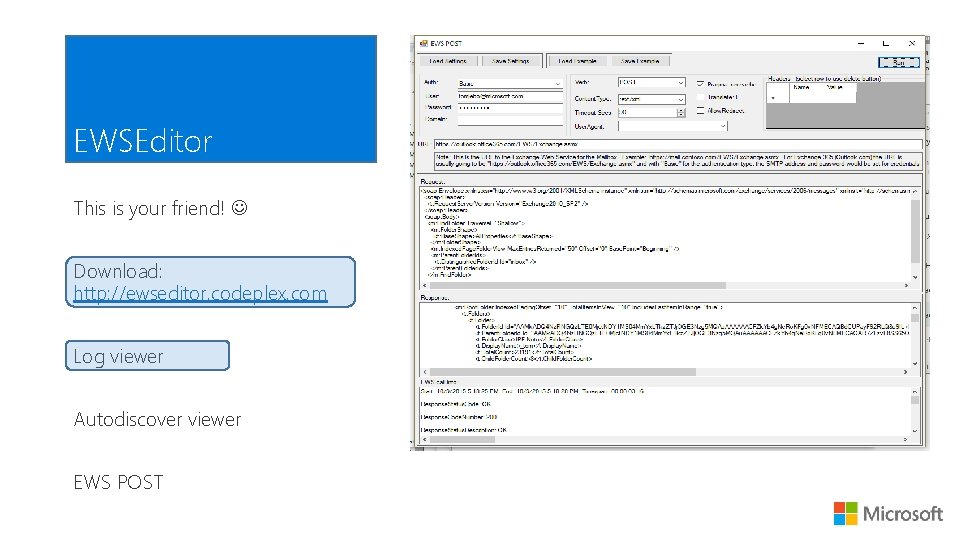
EWSEditor This is your friend! Download: http: //ewseditor. codeplex. com Log viewer Autodiscover viewer EWS POST
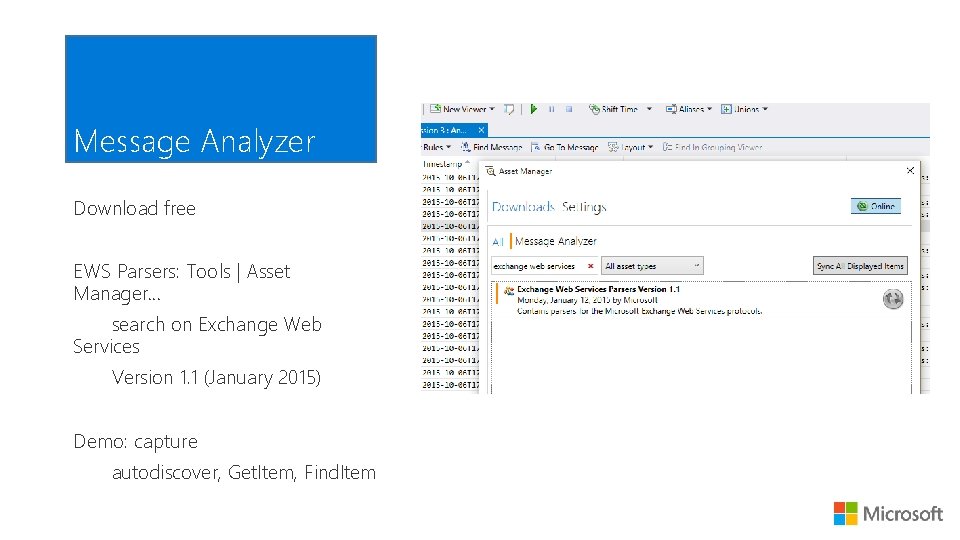
Message Analyzer Download free EWS Parsers: Tools | Asset Manager… search on Exchange Web Services Version 1. 1 (January 2015) Demo: capture autodiscover, Get. Item, Find. Item
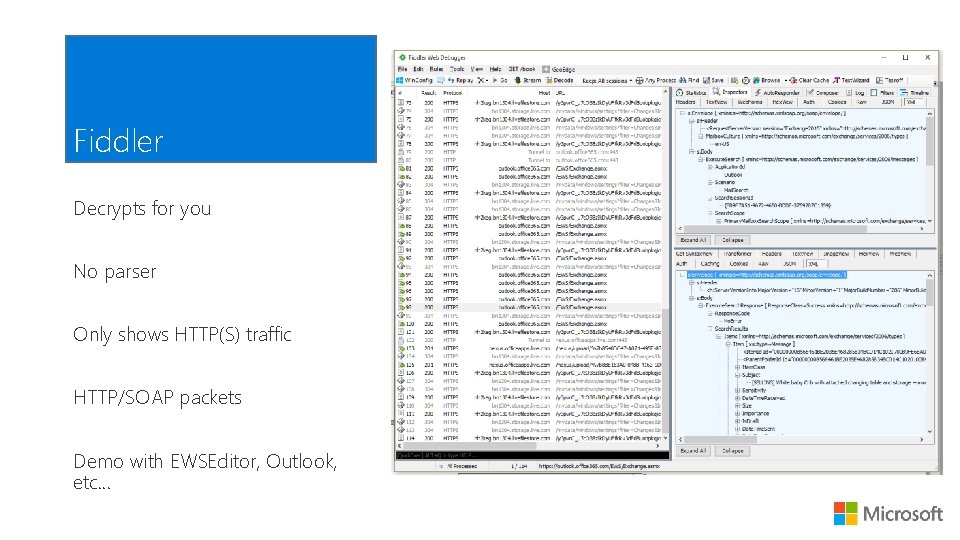
Fiddler Decrypts for you No parser Only shows HTTP(S) traffic HTTP/SOAP packets Demo with EWSEditor, Outlook, etc…
Netmon Parsers available Need unencrypted traffic using server cert Replaced by Message Analyzer Download and parsers: http: //blogs. technet. com/b/netmo n/p/downloads. aspx Support and discussion: https: //social. technet. microsoft. co m/Forums/en. US/home? forum=netmon
References and resources
References and resources EWSEditor download http: //ewseditor. codeplex. com Message Analyzer http: //www. microsoft. com/en-us/download/details. aspx? id=44226 Fiddler http: //www. telerik. com/download/fiddler EWS client design overview for Exchange https: //msdn. microsoft. com/en-us/library/office/jj 190904(v=exchg. 150). aspx Exchange EWS Test Suites http: //connect. microsoft. com/site 216/Downloads/Download. Details. aspx? Download. ID=46994
- Slides: 44