
Event partners Expo light partners Session Managed Instance
- Slides: 23
Event partners Expo light partners
Session Managed Instance – Dark Secrets Jovan Popovic Microsoft Development Center Serbia
Agenda Introducing Azure SQL Managed Instance Architecture Migration to Managed Instance
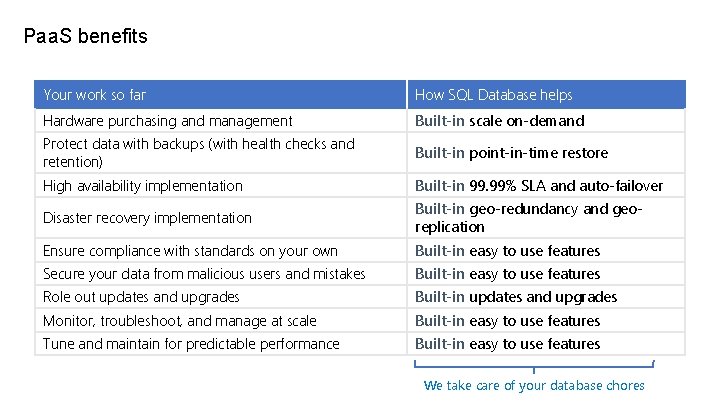
Paa. S benefits Your work so far How SQL Database helps Hardware purchasing and management Built-in scale on-demand Protect data with backups (with health checks and retention) Built-in point-in-time restore High availability implementation Built-in 99. 99% SLA and auto-failover Disaster recovery implementation Built-in geo-redundancy and georeplication Ensure compliance with standards on your own Built-in easy to use features Secure your data from malicious users and mistakes Built-in easy to use features Role out updates and upgrades Built-in updates and upgrades Monitor, troubleshoot, and manage at scale Built-in easy to use features Tune and maintain for predictable performance Built-in easy to use features We take care of your database chores
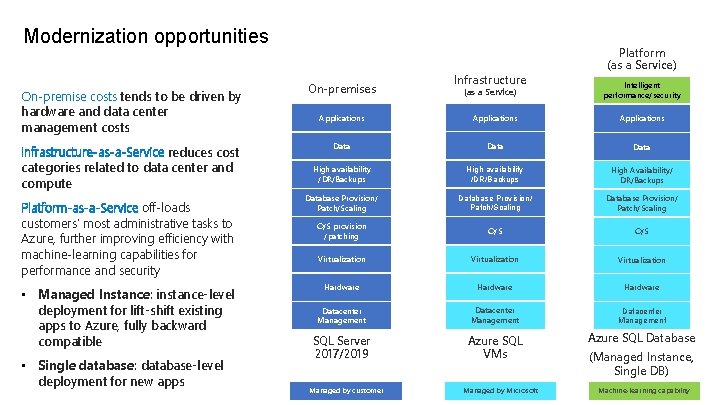
Modernization opportunities On-premise costs tends to be driven by hardware and data center management costs Infrastructure-as-a-Service reduces cost categories related to data center and compute Platform-as-a-Service off-loads customers’ most administrative tasks to Azure, further improving efficiency with machine-learning capabilities for performance and security • Managed Instance: instance-level deployment for lift-shift existing apps to Azure, fully backward compatible • Single database: database-level deployment for new apps On-premises Infrastructure (as a Service) Platform (as a Service) Intelligent performance/security Applications Data High availability /DR/Backups High Availability/ DR/Backups Database Provision/ Patch/Scaling O/S provision /patching O/S Virtualization Hardware Datacenter Management SQL Server 2017/2019 Azure SQL VMs Azure SQL Database Managed by customer Managed by Microsoft (Managed Instance, Single DB) Machine-learning capability
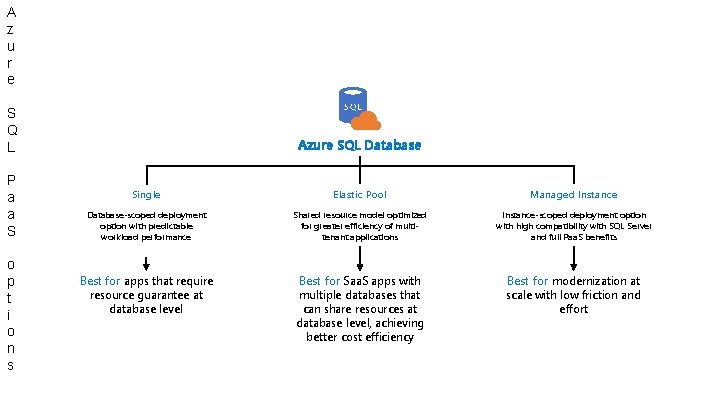
A z u r e S Q L P a a S o p t i o n s Azure SQL Database Single Elastic Pool Managed Instance Database-scoped deployment option with predictable workload performance Shared resource model optimized for greater efficiency of multitenant applications Instance-scoped deployment option with high compatibility with SQL Server and full Paa. S benefits Best for apps that require resource guarantee at database level Best for Saa. S apps with multiple databases that can share resources at database level, achieving better cost efficiency Best for modernization at scale with low friction and effort
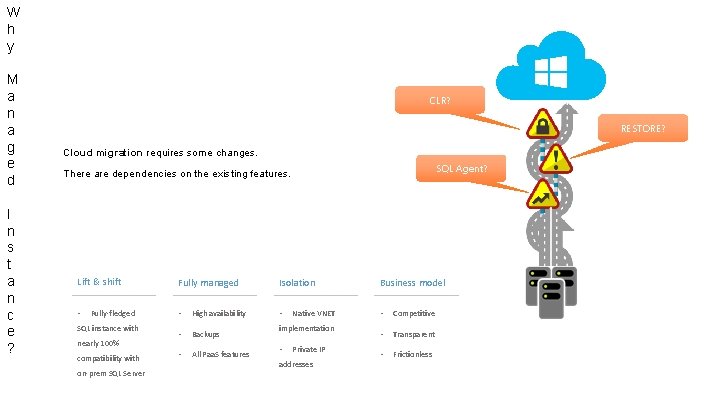
W h y M a n a g e d I n s t a n c e ? CLR? RESTORE? Cloud migration requires some changes. SQL Agent? There are dependencies on the existing features. Lift & shift Fully managed Isolation Business model • • Competitive • Transparent • Frictionless Fully-fledged SQL instance with nearly 100% compatibility with on-prem SQL Server • • High availability Backups All Paa. S features Native VNET implementation • Private IP addresses
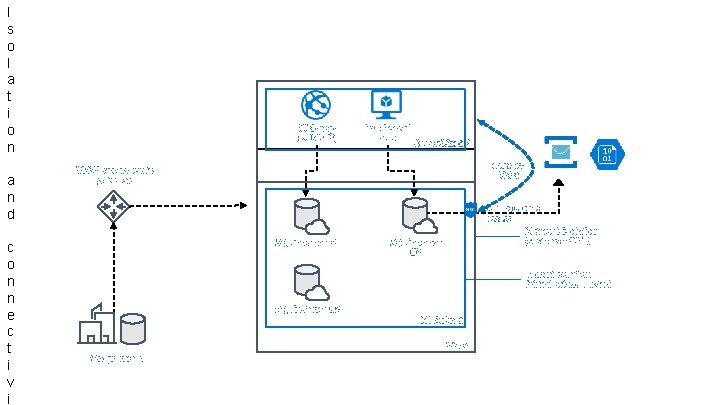
I s o l a t i o n a n d c o n n e c t i v i Web app (public IP) Iaa. S hosted app App subnet VNet 2 VNet-to. VNet VPN/Express route gateway SQL instance #1 Management access Network isolation (customer VNET) SQL instance #2 Tenant isolation (virtual private cluster) SQL instance #3 MI Subnet VNet On-premises
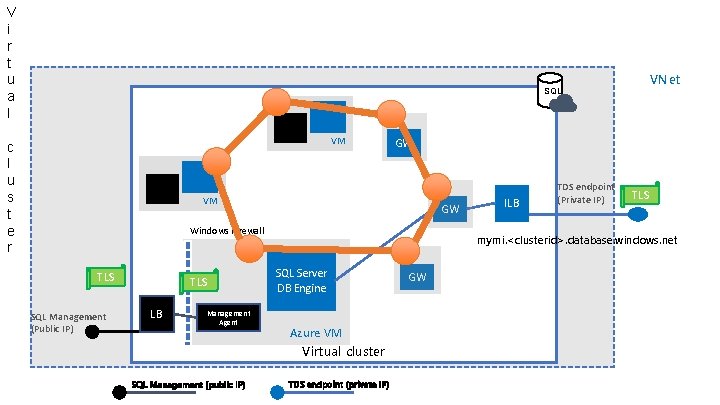
V i r t u a l VNet SQL VM c l u s t e r GW VM GW Windows Firewall TLS SQL Management (Public IP) TLS LB Management Agent SQL Management (public IP) ILB TDS endpoint (Private IP) TLS mymi. <clusterid>. database. windows. net SQL Server DB Engine Azure VM Virtual cluster TDS endpoint (private IP) GW
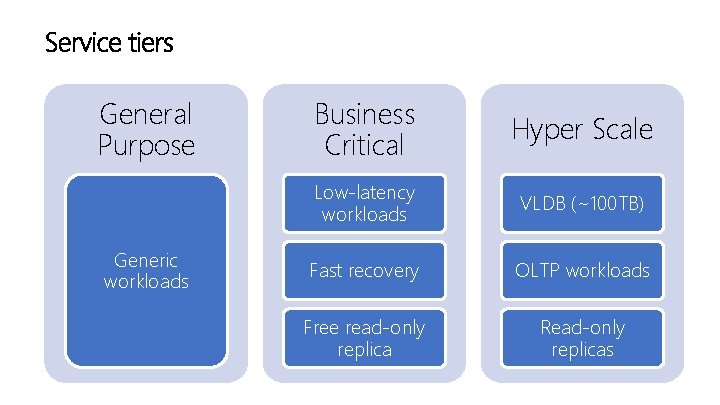
General Purpose Generic workloads Business Critical Hyper Scale Low-latency workloads VLDB (~100 TB) Fast recovery OLTP workloads Free read-only replica Read-only replicas
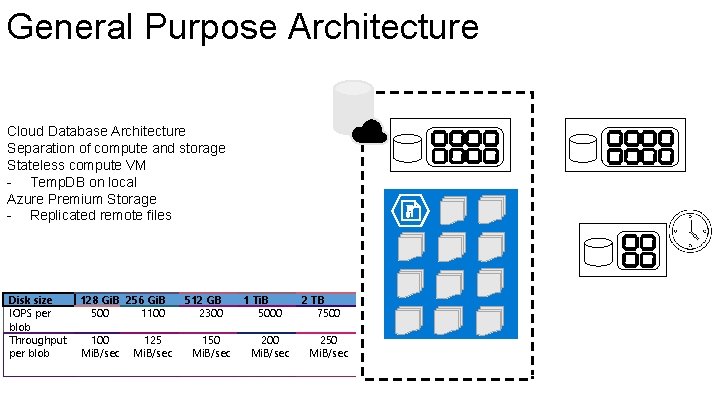
General Purpose Architecture Active compute node Cloud Database Architecture Separation of compute and storage Stateless compute VM - Temp. DB on local Azure Premium Storage - Replicated remote files Disk size IOPS per blob Throughput per blob 128 Gi. B 256 Gi. B 500 1100 Mi. B/sec 125 Mi. B/sec 512 GB 2300 150 Mi. B/sec Redundant node 1 Ti. B 5000 200 Mi. B/sec Scaled node 2 TB 7500 250 Mi. B/sec Azure storage account
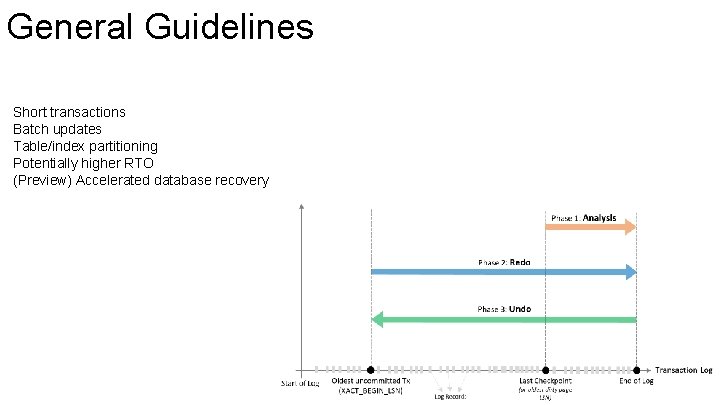
General Guidelines Short transactions Batch updates Table/index partitioning Potentially higher RTO (Preview) Accelerated database recovery
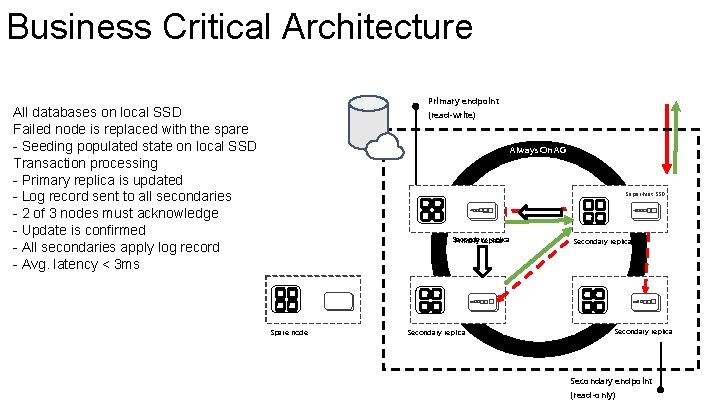
Business Critical Architecture Primary endpoint All databases on local SSD Failed node is replaced with the spare - Seeding populated state on local SSD Transaction processing - Primary replica is updated - Log record sent to all secondaries - 2 of 3 nodes must acknowledge - Update is confirmed - All secondaries apply log record - Avg. latency < 3 ms (read-write) Always On AG Super-fast SSD Secondary replica Primary replica Spare node Secondary replica Secondary endpoint (read-only)
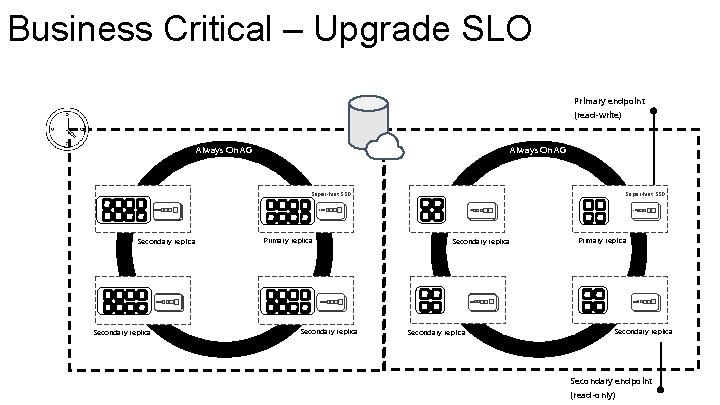
Business Critical – Upgrade SLO Primary endpoint (read-write) Always On AG Super-fast SSD Secondary replica Primary replica Secondary endpoint (read-only)
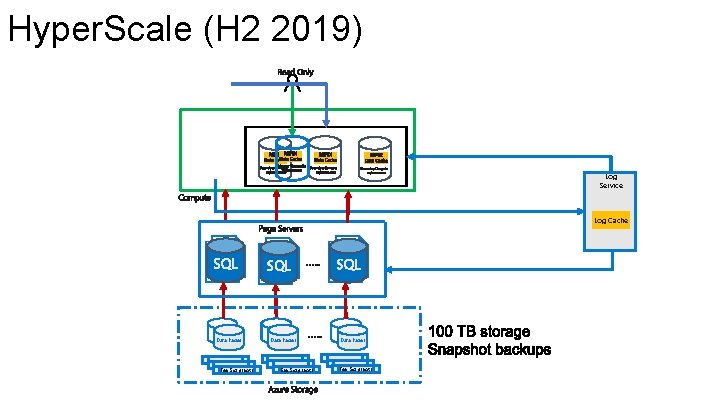
Hyper. Scale (H 2 2019) Log Service SQL Data Pages File Snapshots Log Cache SQL Data Pages File Snapshots
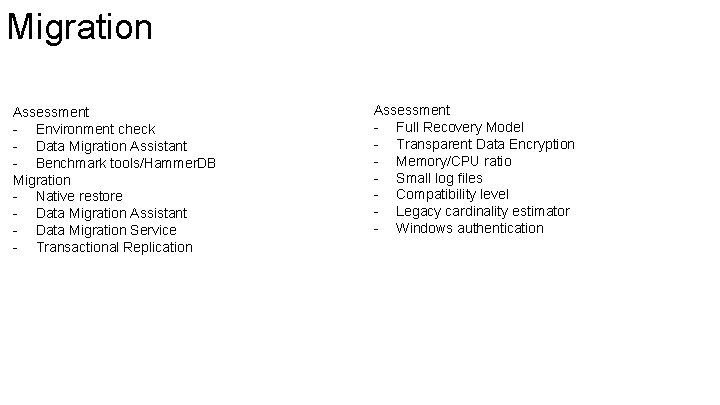
Migration Assessment - Environment check - Data Migration Assistant - Benchmark tools/Hammer. DB Migration - Native restore - Data Migration Assistant - Data Migration Service - Transactional Replication Assessment - Full Recovery Model - Transparent Data Encryption - Memory/CPU ratio - Small log files - Compatibility level - Legacy cardinality estimator - Windows authentication
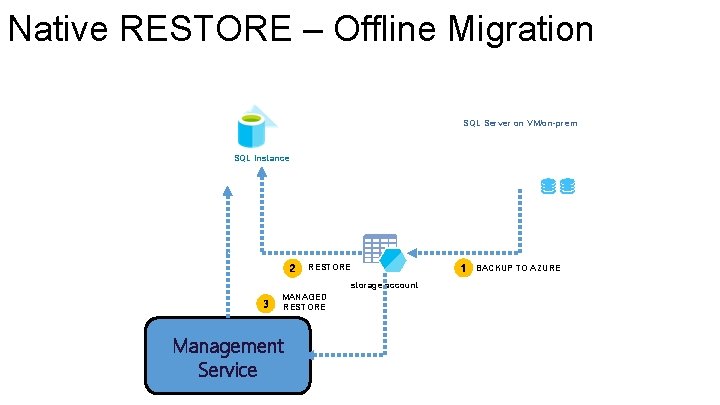
Native RESTORE – Offline Migration SQL Server on VM/on-prem SQL Instance 2 RESTORE storage account 3 MANAGED RESTORE Management Service 1 BACKUP TO AZURE
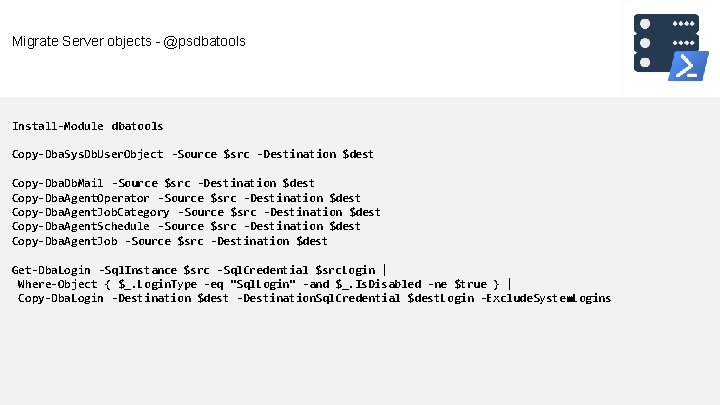
Migrate Server objects - @psdbatools Install-Module dbatools Copy-Dba. Sys. Db. User. Object -Source $src -Destination $dest Copy-Dba. Db. Mail -Source $src -Destination $dest Copy-Dba. Agent. Operator -Source $src -Destination $dest Copy-Dba. Agent. Job. Category -Source $src -Destination $dest Copy-Dba. Agent. Schedule -Source $src -Destination $dest Copy-Dba. Agent. Job -Source $src -Destination $dest Get-Dba. Login -Sql. Instance $src -Sql. Credential $src. Login | Where-Object { $_. Login. Type -eq "Sql. Login" -and $_. Is. Disabled -ne $true } | Copy-Dba. Login -Destination $dest -Destination. Sql. Credential $dest. Login -Exclude. System. Logins
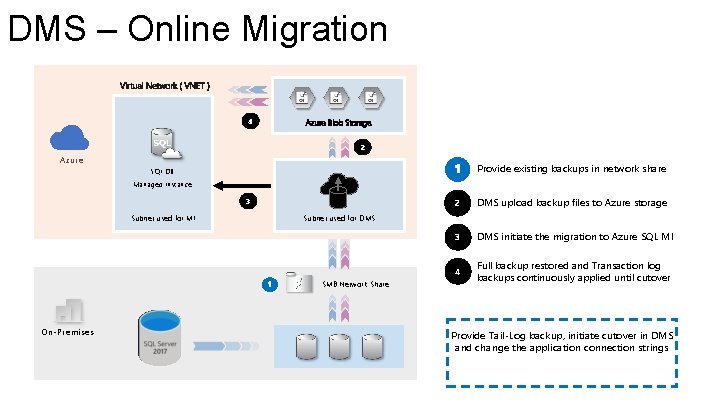
DMS – Online Migration 4 Azure Blob Storage 2 Azure Provide existing backups in network share SQL DB Managed Instance 3 Subnet used for MI DMS upload backup files to Azure storage 3 DMS initiate the migration to Azure SQL MI 4 Full backup restored and Transaction log backups continuously applied until cutover Subnet used for DMS SMB Network Share On-Premises 2 Provide Tail-Log backup, initiate cutover in DMS and change the application connection strings
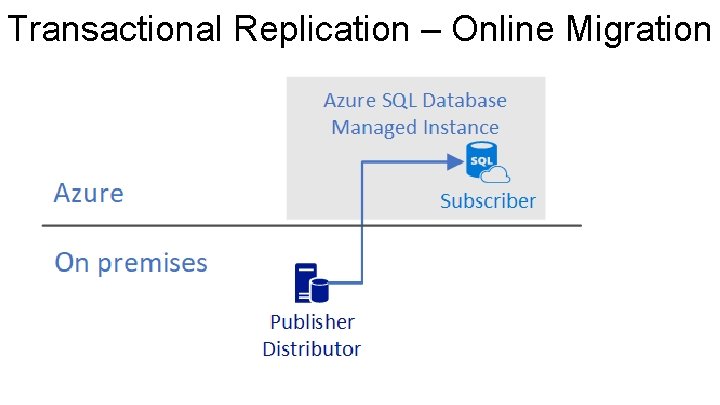
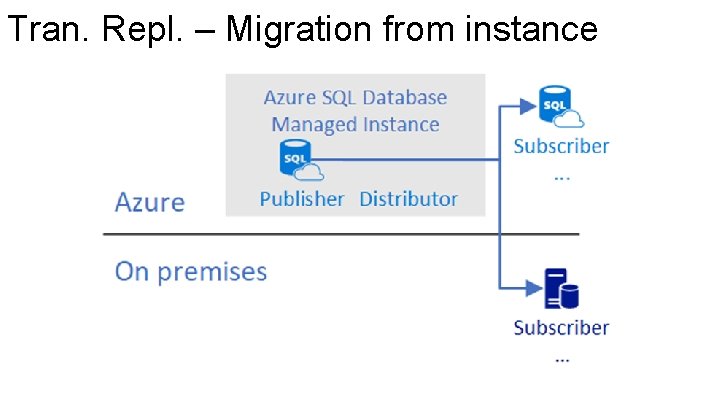
Transactional Replication – Online Migration
Tran. Repl. – Migration from instance
jovanpop@microsoft. com SQL Managed Instance Feedback Azure SQL Database Documentation