
Essentials of Interactive Computer Graphics Concepts and Implementation
- Slides: 45
Essentials of Interactive Computer Graphics: Concepts and Implementation K. Sung, P. Shirley, S. Baer Chapter 11: Hierarchical Modeling Chapter 11
Essentials of Interactive Computer Graphics: Concepts and Implementation K. Sung, P. Shirley, S. Baer This Chapter: we will learn about n n Building Hierarchical Models Controlling components in a Hierarchical Model n Object Coordinate System n Scene Graphs/Trees/Nodes Chapter 11
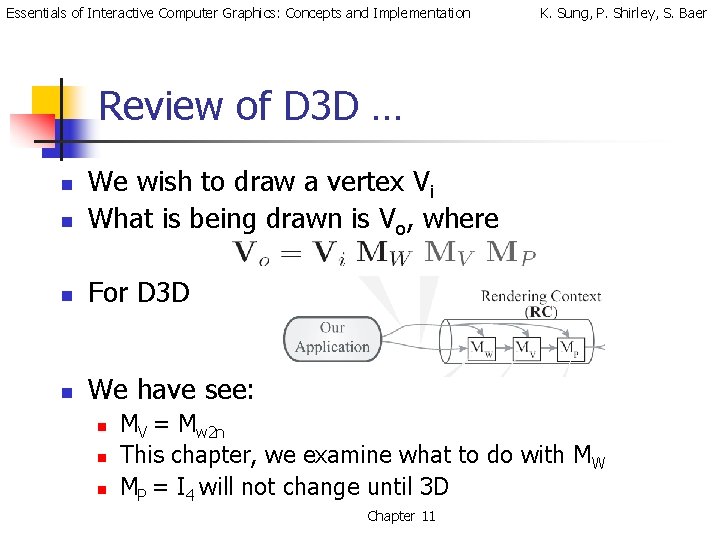
Essentials of Interactive Computer Graphics: Concepts and Implementation K. Sung, P. Shirley, S. Baer Review of D 3 D … n We wish to draw a vertex Vi What is being drawn is Vo, where n For D 3 D n We have see: n n MV = Mw 2 n This chapter, we examine what to do with MW MP = I 4 will not change until 3 D Chapter 11
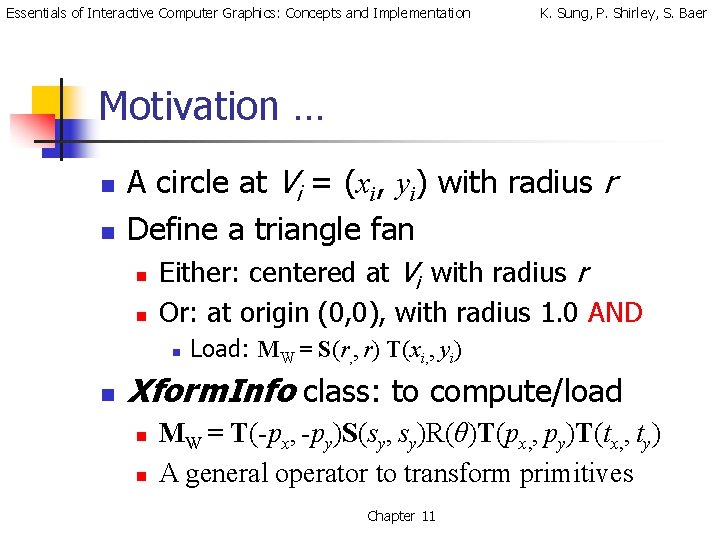
Essentials of Interactive Computer Graphics: Concepts and Implementation K. Sung, P. Shirley, S. Baer Motivation … n n A circle at Vi = (xi, yi) with radius r Define a triangle fan n n Either: centered at Vi with radius r Or: at origin (0, 0), with radius 1. 0 AND n n Load: MW = S(r, , r) T(xi, , yi) Xform. Info class: to compute/load n n MW = T(-px, -py)S(sy, sy)R(θ)T(px, , py)T(tx, , ty) A general operator to transform primitives Chapter 11
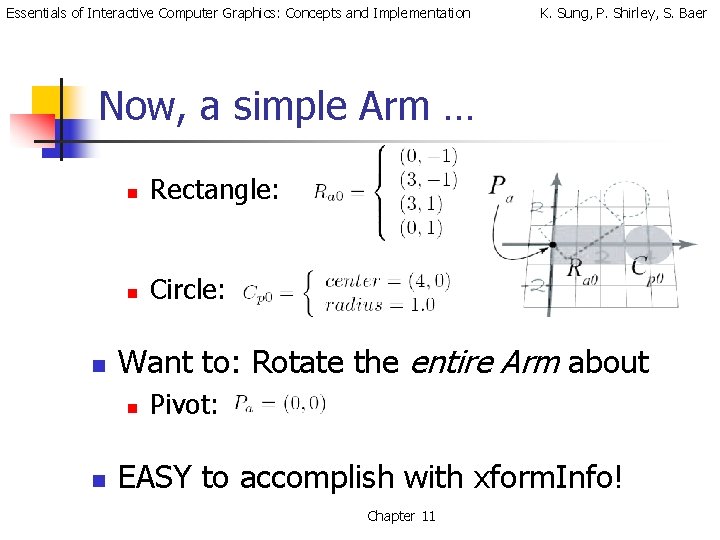
Essentials of Interactive Computer Graphics: Concepts and Implementation K. Sung, P. Shirley, S. Baer Now, a simple Arm … n n Rectangle: n Circle: Want to: Rotate the entire Arm about n n Pivot: EASY to accomplish with xform. Info! Chapter 11
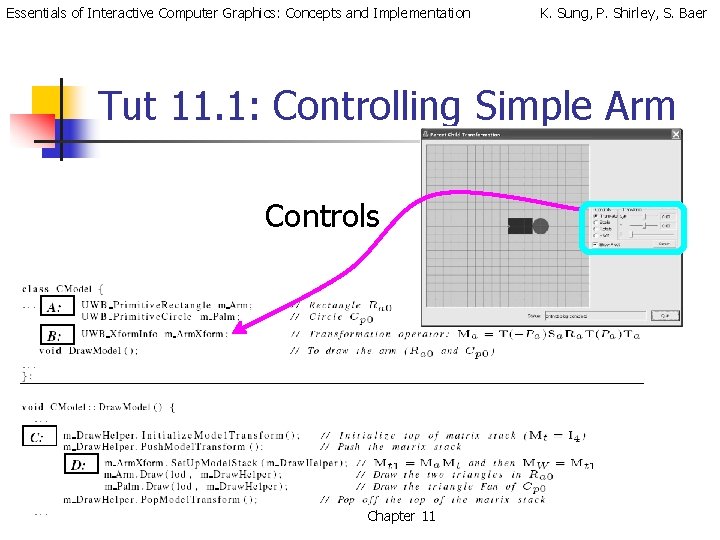
Essentials of Interactive Computer Graphics: Concepts and Implementation K. Sung, P. Shirley, S. Baer Tut 11. 1: Controlling Simple Arm Controls Chapter 11
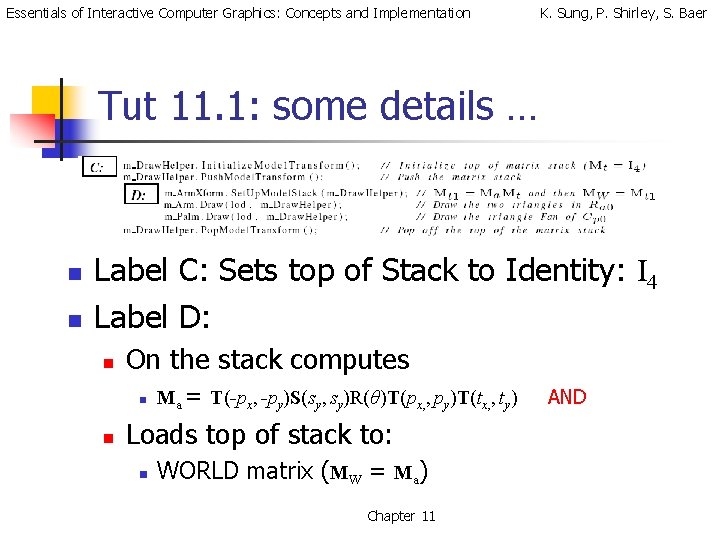
Essentials of Interactive Computer Graphics: Concepts and Implementation K. Sung, P. Shirley, S. Baer Tut 11. 1: some details … n n Label C: Sets top of Stack to Identity: I 4 Label D: n On the stack computes n n Ma = T(-px, -py)S(sy, sy)R(θ)T(px, , py)T(tx, , ty) Loads top of stack to: n WORLD matrix (MW = Ma) Chapter 11 AND
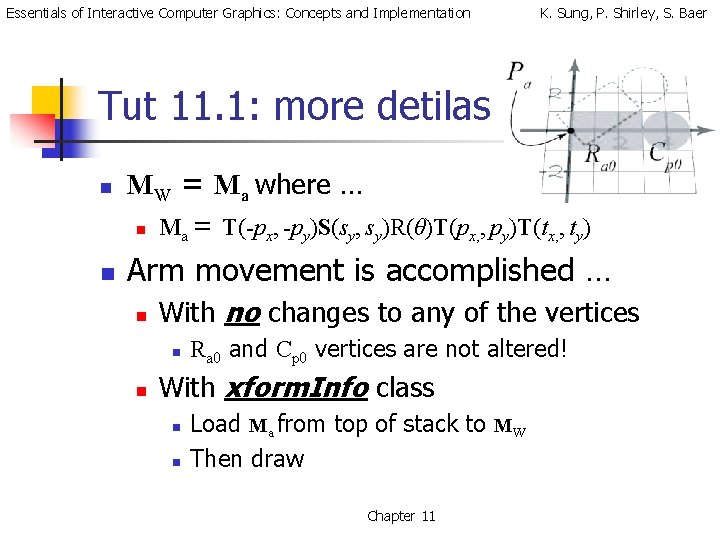
Essentials of Interactive Computer Graphics: Concepts and Implementation K. Sung, P. Shirley, S. Baer Tut 11. 1: more detilas n n MW = Ma where … n Ma = T(-px, -py)S(sy, sy)R(θ)T(px, , py)T(tx, , ty) Arm movement is accomplished … n With no changes to any of the vertices n n Ra 0 and Cp 0 vertices are not altered! With xform. Info class n n Load Ma from top of stack to MW Then draw Chapter 11
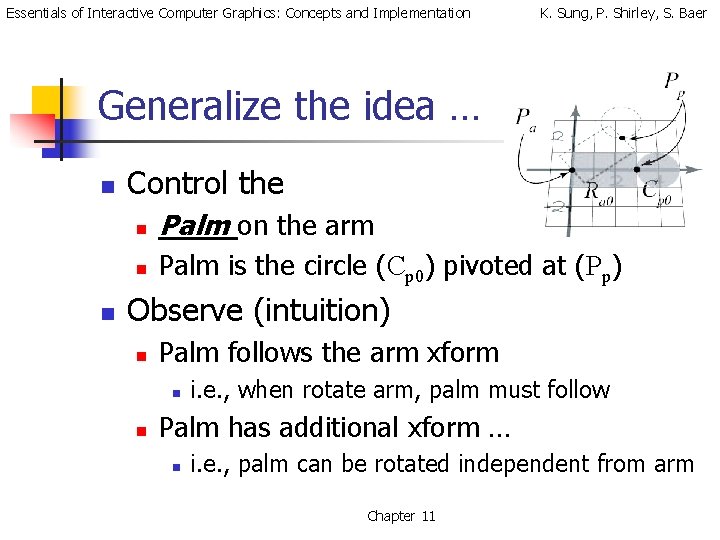
Essentials of Interactive Computer Graphics: Concepts and Implementation K. Sung, P. Shirley, S. Baer Generalize the idea … n n Control the n Palm on the arm n Palm is the circle (Cp 0) pivoted at (Pp) Observe (intuition) n Palm follows the arm xform n n i. e. , when rotate arm, palm must follow Palm has additional xform … n i. e. , palm can be rotated independent from arm Chapter 11
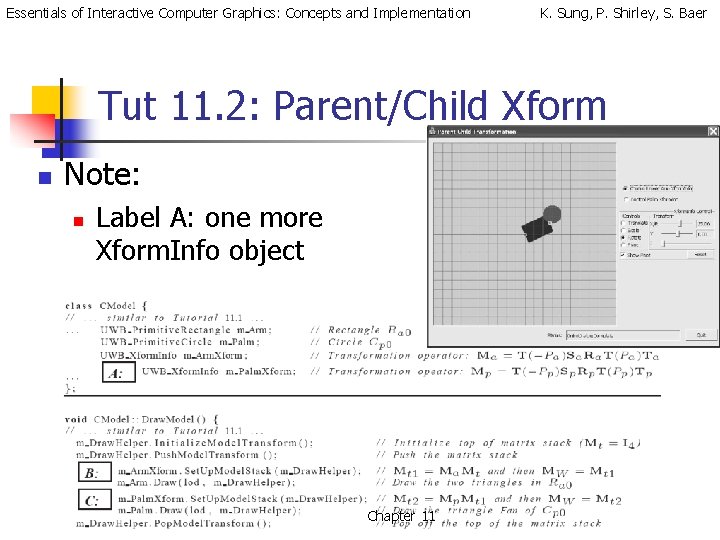
Essentials of Interactive Computer Graphics: Concepts and Implementation K. Sung, P. Shirley, S. Baer Tut 11. 2: Parent/Child Xform n Note: n Label A: one more Xform. Info object Chapter 11
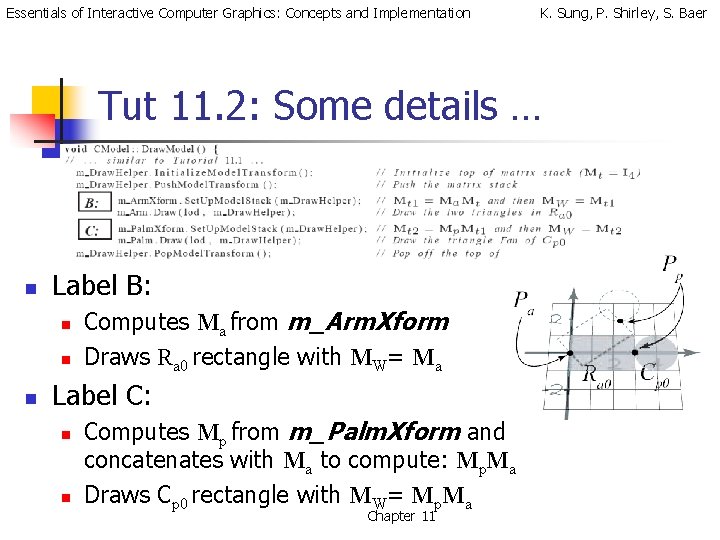
Essentials of Interactive Computer Graphics: Concepts and Implementation K. Sung, P. Shirley, S. Baer Tut 11. 2: Some details … n Label B: n n n Computes Ma from m_Arm. Xform Draws Ra 0 rectangle with MW= Ma Label C: n n Computes Mp from m_Palm. Xform and concatenates with Ma to compute: Mp. Ma Draws Cp 0 rectangle with MW= Mp. Ma Chapter 11
Essentials of Interactive Computer Graphics: Concepts and Implementation K. Sung, P. Shirley, S. Baer Observations: n Graphical Objects n n n Interactive control n n Geometric Primitives Once defined, do not alter Accomplished via computing/setting transformations Components n n By strategically defining/concatenating separate transforms Accomplish intuitive group/component control Chapter 11
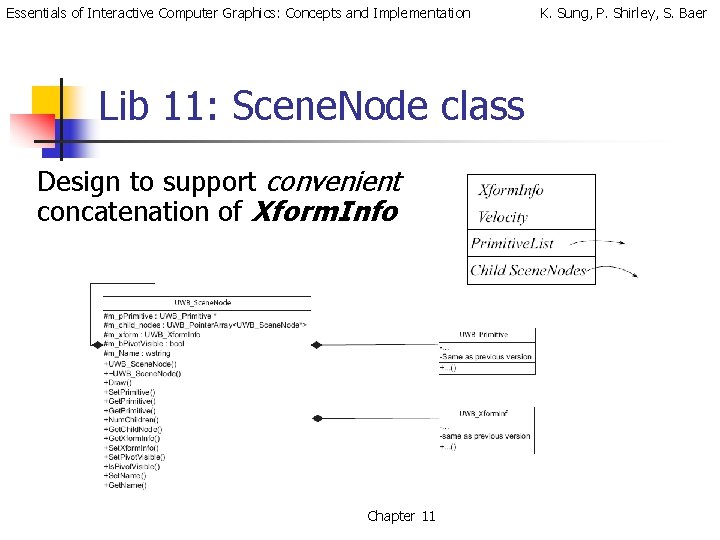
Essentials of Interactive Computer Graphics: Concepts and Implementation Lib 11: Scene. Node class Design to support convenient concatenation of Xform. Info Chapter 11 K. Sung, P. Shirley, S. Baer
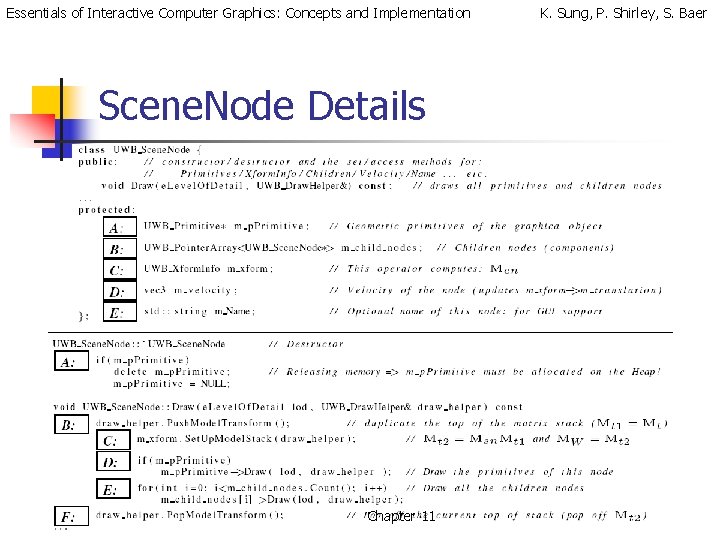
Essentials of Interactive Computer Graphics: Concepts and Implementation Scene. Node Details Chapter 11 K. Sung, P. Shirley, S. Baer
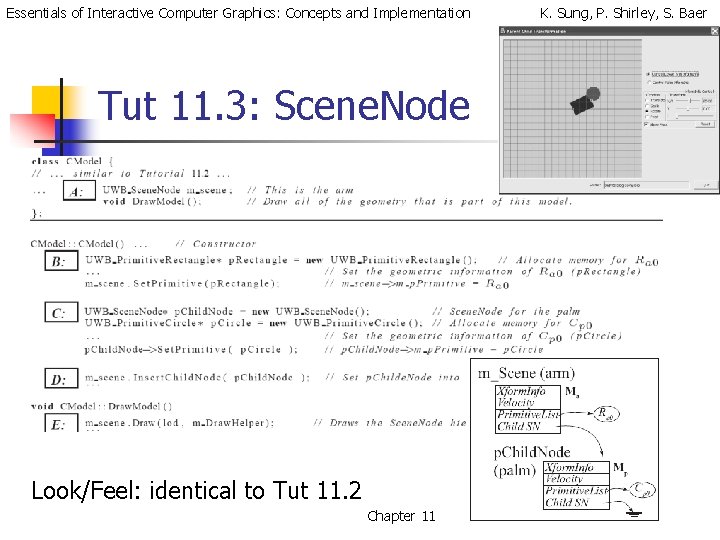
Essentials of Interactive Computer Graphics: Concepts and Implementation Tut 11. 3: Scene. Node Look/Feel: identical to Tut 11. 2 Chapter 11 K. Sung, P. Shirley, S. Baer
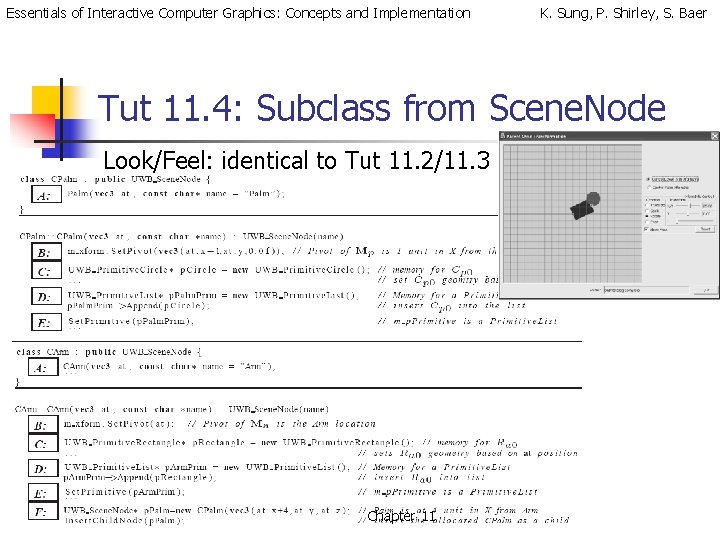
Essentials of Interactive Computer Graphics: Concepts and Implementation K. Sung, P. Shirley, S. Baer Tut 11. 4: Subclass from Scene. Node Look/Feel: identical to Tut 11. 2/11. 3 Chapter 11
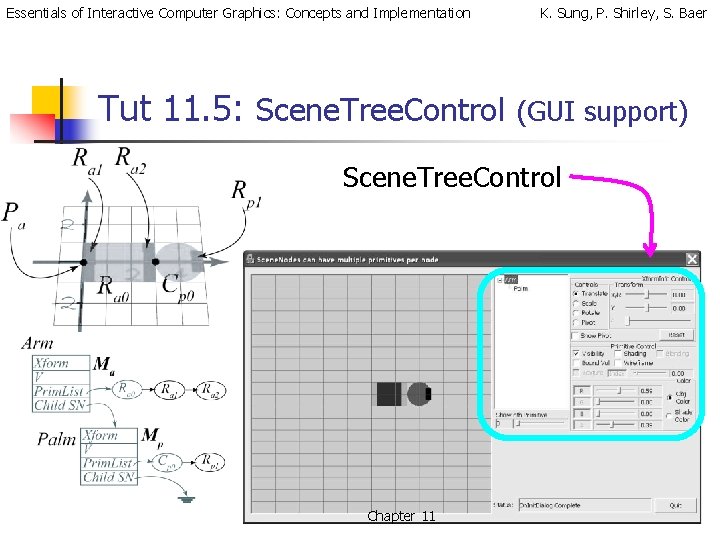
Essentials of Interactive Computer Graphics: Concepts and Implementation Tut 11. 5: Scene. Tree. Control K. Sung, P. Shirley, S. Baer (GUI support) Scene. Tree. Control Chapter 11
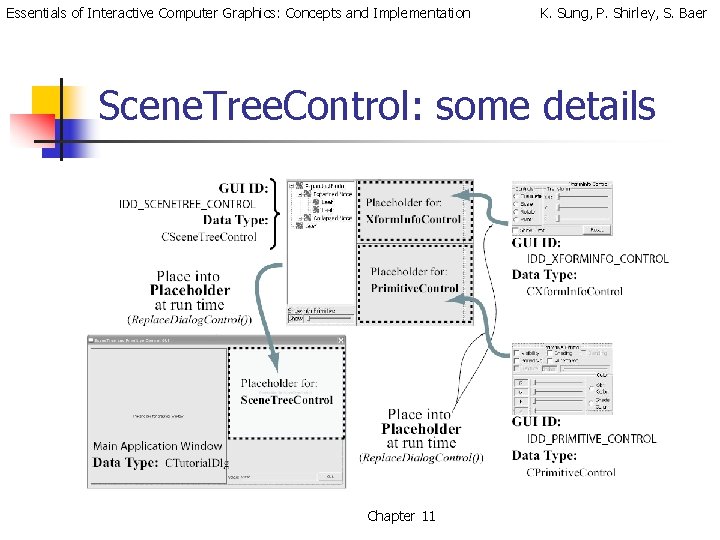
Essentials of Interactive Computer Graphics: Concepts and Implementation K. Sung, P. Shirley, S. Baer Scene. Tree. Control: some details Chapter 11
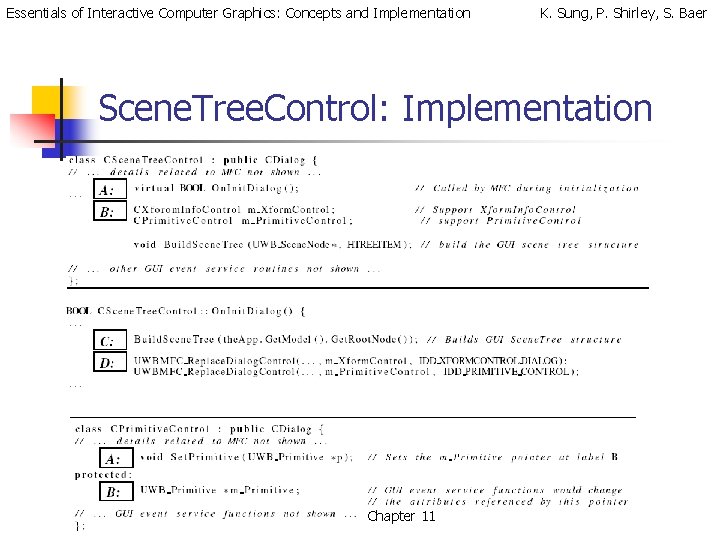
Essentials of Interactive Computer Graphics: Concepts and Implementation K. Sung, P. Shirley, S. Baer Scene. Tree. Control: Implementation Chapter 11
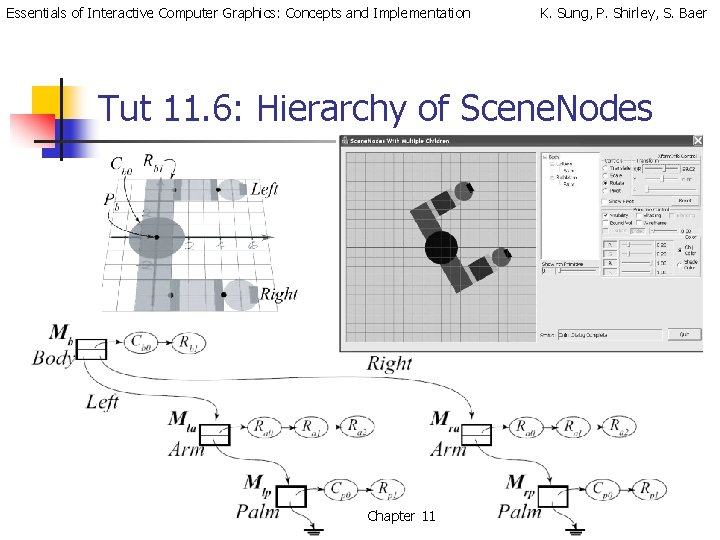
Essentials of Interactive Computer Graphics: Concepts and Implementation K. Sung, P. Shirley, S. Baer Tut 11. 6: Hierarchy of Scene. Nodes Chapter 11
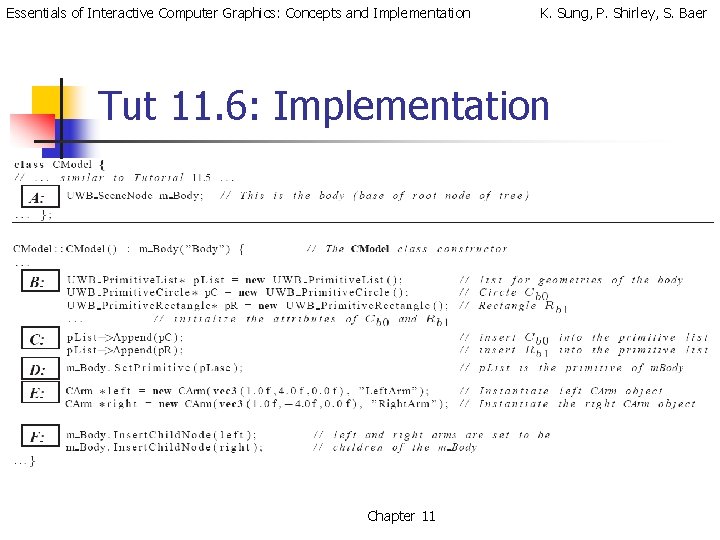
Essentials of Interactive Computer Graphics: Concepts and Implementation K. Sung, P. Shirley, S. Baer Tut 11. 6: Implementation Chapter 11
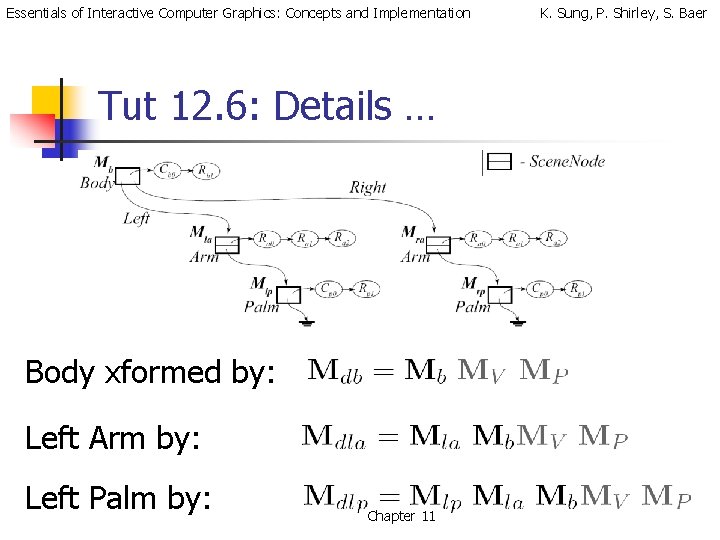
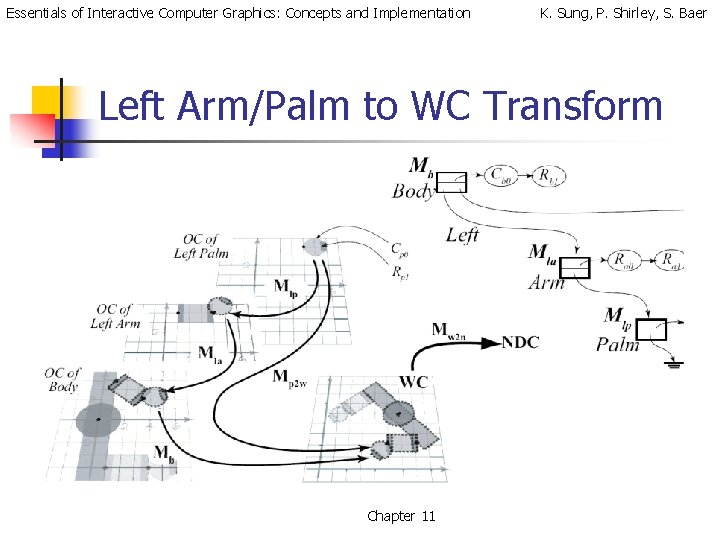
Essentials of Interactive Computer Graphics: Concepts and Implementation Tut 12. 6: Details … Body xformed by: Left Arm by: Left Palm by: Chapter 11 K. Sung, P. Shirley, S. Baer
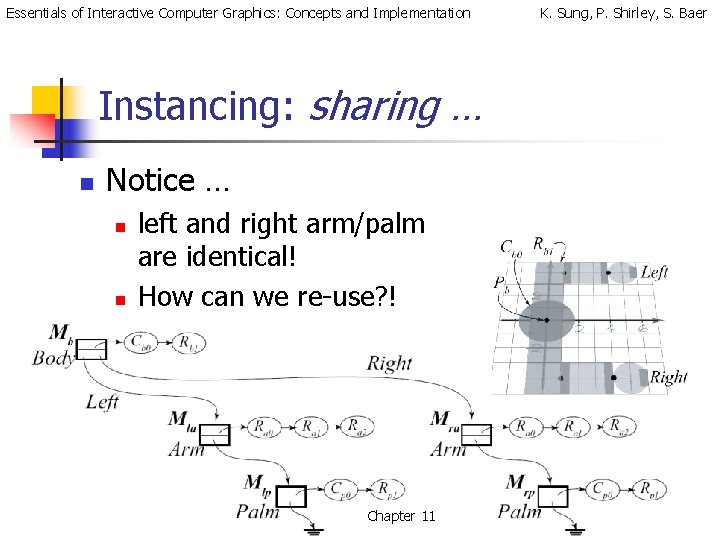
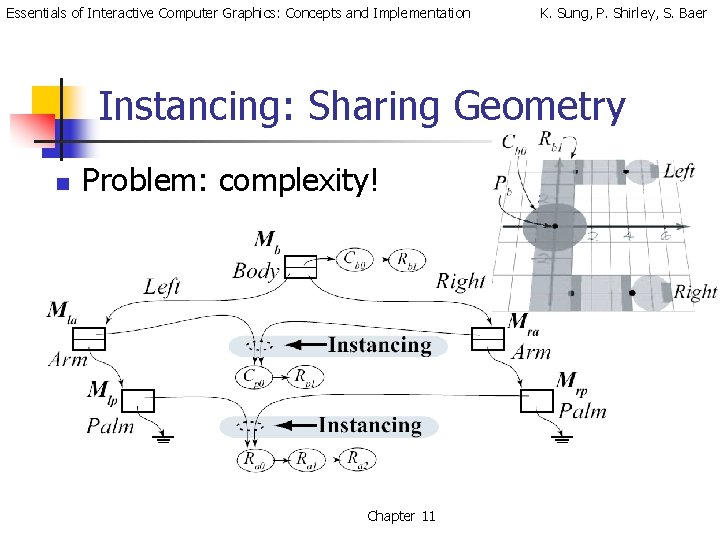
Essentials of Interactive Computer Graphics: Concepts and Implementation Instancing: sharing … n Notice … n n left and right arm/palm are identical! How can we re-use? ! Chapter 11 K. Sung, P. Shirley, S. Baer
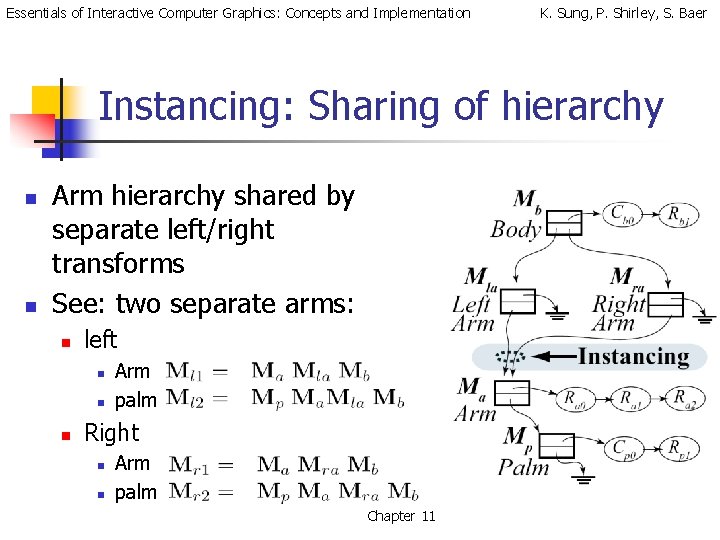
Essentials of Interactive Computer Graphics: Concepts and Implementation K. Sung, P. Shirley, S. Baer Instancing: Sharing of hierarchy n n Arm hierarchy shared by separate left/right transforms See: two separate arms: n left n n n Arm palm Right n n Arm palm Chapter 11
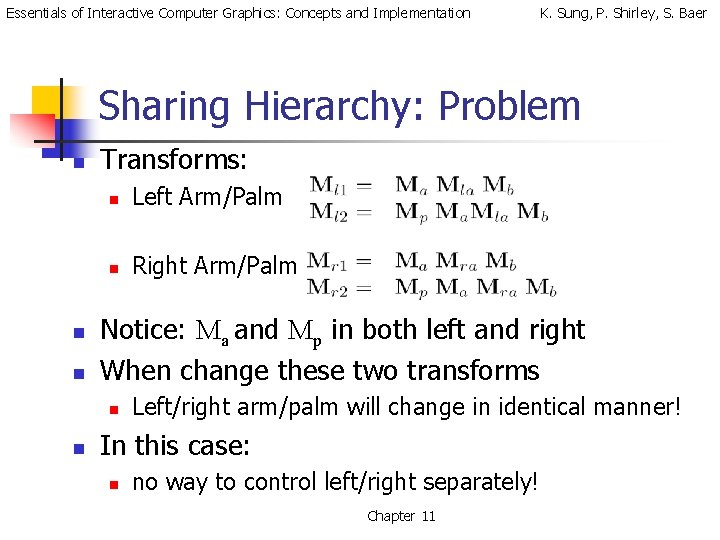
Essentials of Interactive Computer Graphics: Concepts and Implementation K. Sung, P. Shirley, S. Baer Sharing Hierarchy: Problem n n n Transforms: n Left Arm/Palm n Right Arm/Palm Notice: Ma and Mp in both left and right When change these two transforms n n Left/right arm/palm will change in identical manner! In this case: n no way to control left/right separately! Chapter 11
Essentials of Interactive Computer Graphics: Concepts and Implementation K. Sung, P. Shirley, S. Baer Instancing: Sharing Geometry n Problem: complexity! Chapter 11
Essentials of Interactive Computer Graphics: Concepts and Implementation K. Sung, P. Shirley, S. Baer Instancing: Discussion … n Commercial System: n Sharing of geometry n Memory management is tricky! n n Sharing of hierarchy n n reference count Typically not used because of restricted control UWBGL_LIB: n DO NOT support any form of instancing Chapter 11
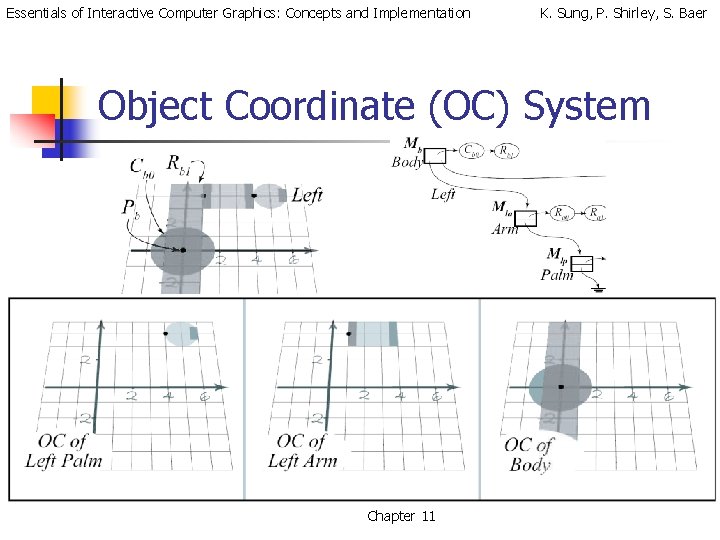
Essentials of Interactive Computer Graphics: Concepts and Implementation K. Sung, P. Shirley, S. Baer Object Coordinate (OC) System Chapter 11
Essentials of Interactive Computer Graphics: Concepts and Implementation K. Sung, P. Shirley, S. Baer Left Arm/Palm to WC Transform Chapter 11
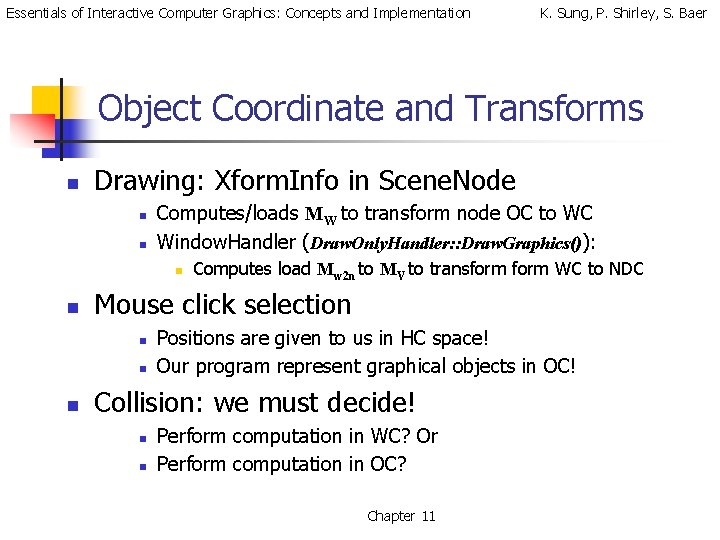
Essentials of Interactive Computer Graphics: Concepts and Implementation K. Sung, P. Shirley, S. Baer Object Coordinate and Transforms n Drawing: Xform. Info in Scene. Node n n Computes/loads MW to transform node OC to WC Window. Handler (Draw. Only. Handler: : Draw. Graphics()): n n Mouse click selection n Computes load Mw 2 n to MV to transform WC to NDC Positions are given to us in HC space! Our program represent graphical objects in OC! Collision: we must decide! n n Perform computation in WC? Or Perform computation in OC? Chapter 11
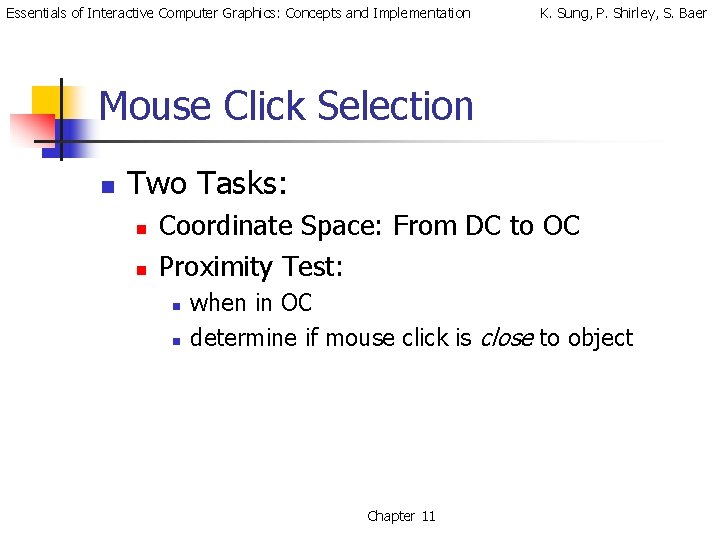
Essentials of Interactive Computer Graphics: Concepts and Implementation K. Sung, P. Shirley, S. Baer Mouse Click Selection n Two Tasks: n n Coordinate Space: From DC to OC Proximity Test: n n when in OC determine if mouse click is close to object Chapter 11
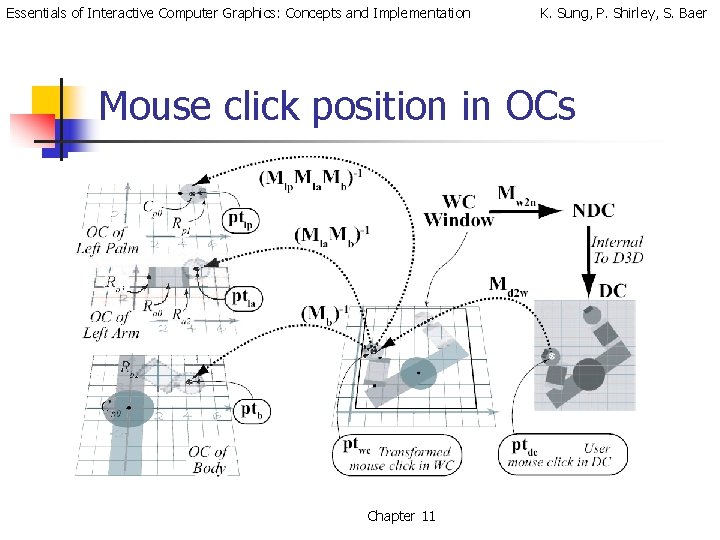
Essentials of Interactive Computer Graphics: Concepts and Implementation K. Sung, P. Shirley, S. Baer Mouse click position in OCs Chapter 11
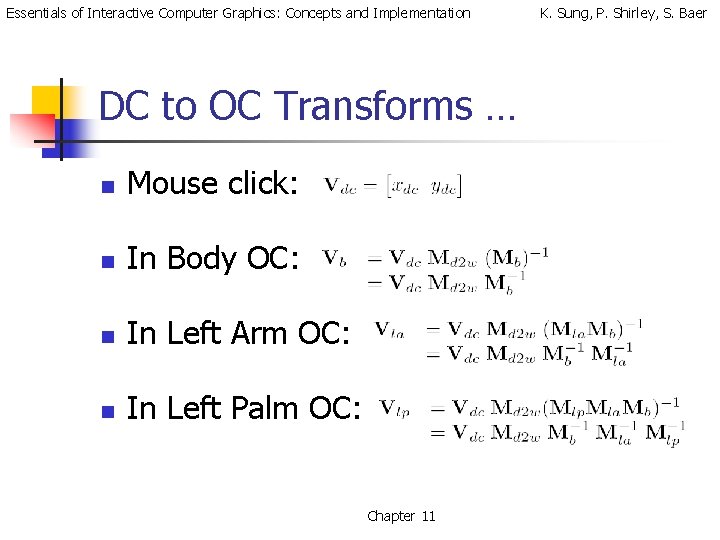
Essentials of Interactive Computer Graphics: Concepts and Implementation DC to OC Transforms … n Mouse click: n In Body OC: n In Left Arm OC: n In Left Palm OC: Chapter 11 K. Sung, P. Shirley, S. Baer
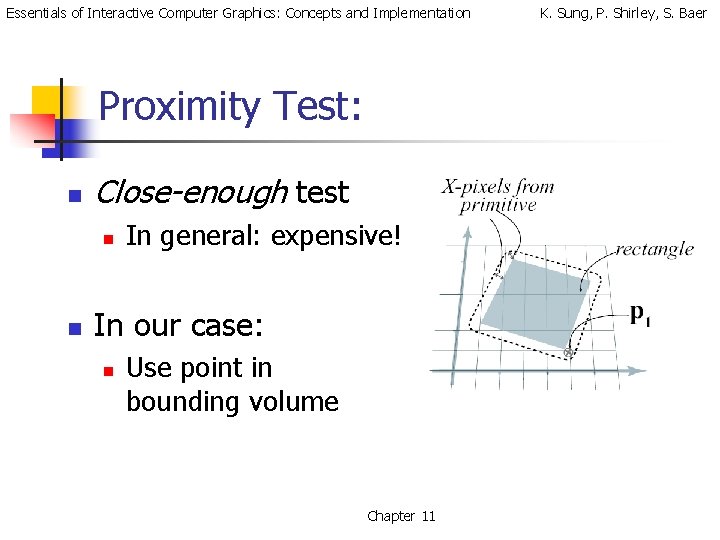
Essentials of Interactive Computer Graphics: Concepts and Implementation Proximity Test: n Close-enough test n n In general: expensive! In our case: n Use point in bounding volume Chapter 11 K. Sung, P. Shirley, S. Baer
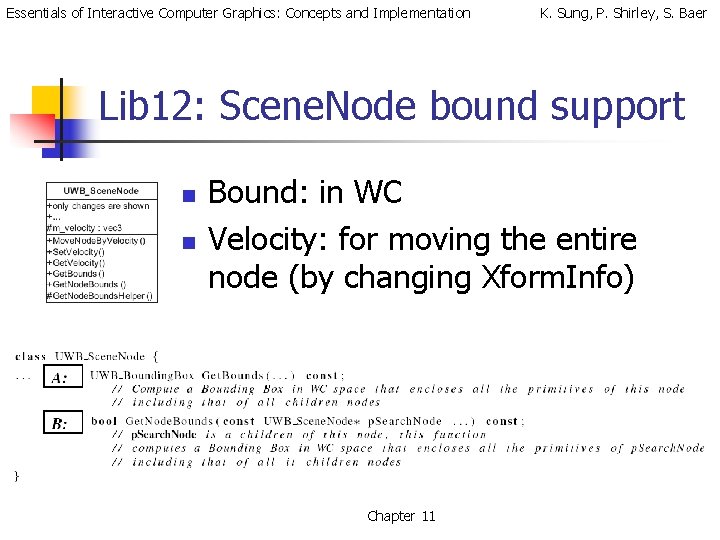
Essentials of Interactive Computer Graphics: Concepts and Implementation K. Sung, P. Shirley, S. Baer Lib 12: Scene. Node bound support n n Bound: in WC Velocity: for moving the entire node (by changing Xform. Info) Chapter 11
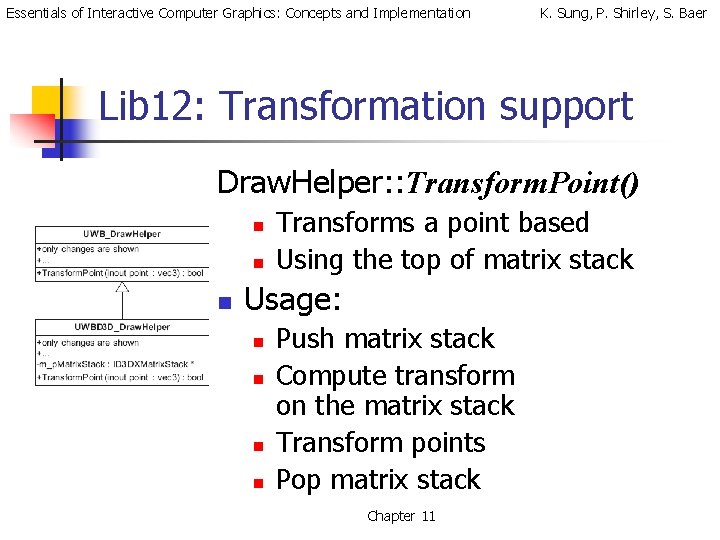
Essentials of Interactive Computer Graphics: Concepts and Implementation K. Sung, P. Shirley, S. Baer Lib 12: Transformation support Draw. Helper: : Transform. Point() n n n Transforms a point based Using the top of matrix stack Usage: n n Push matrix stack Compute transform on the matrix stack Transform points Pop matrix stack Chapter 11
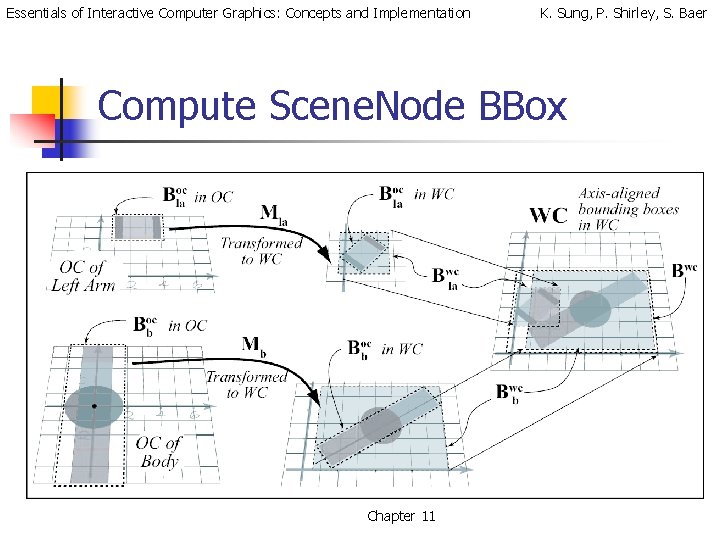
Essentials of Interactive Computer Graphics: Concepts and Implementation K. Sung, P. Shirley, S. Baer Compute Scene. Node BBox Chapter 11
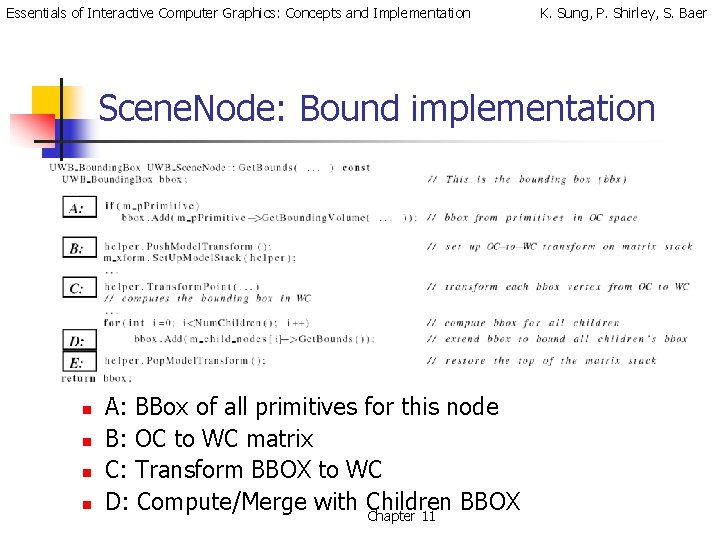
Essentials of Interactive Computer Graphics: Concepts and Implementation K. Sung, P. Shirley, S. Baer Scene. Node: Bound implementation n n A: BBox of all primitives for this node B: OC to WC matrix C: Transform BBOX to WC D: Compute/Merge with Children BBOX Chapter 11
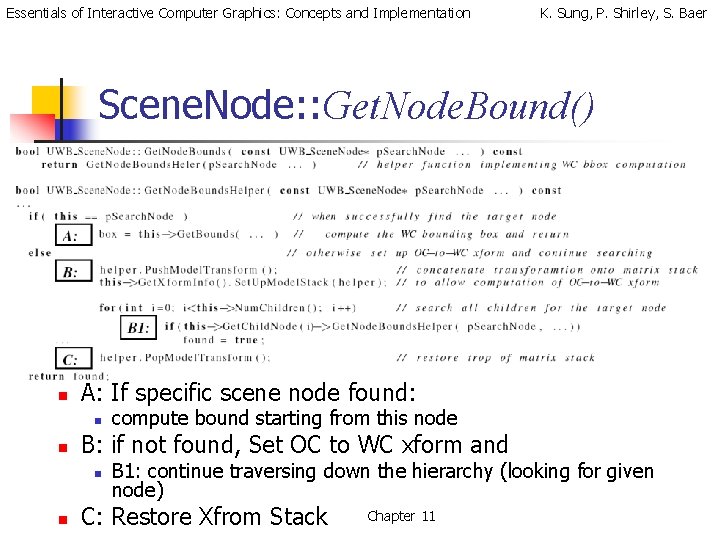
Essentials of Interactive Computer Graphics: Concepts and Implementation K. Sung, P. Shirley, S. Baer Scene. Node: : Get. Node. Bound() n A: If specific scene node found: n n B: if not found, Set OC to WC xform and n n compute bound starting from this node B 1: continue traversing down the hierarchy (looking for given node) C: Restore Xfrom Stack Chapter 11
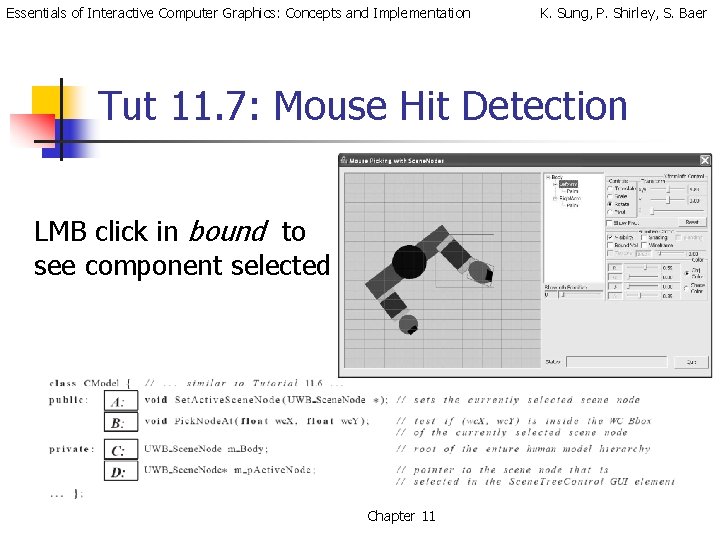
Essentials of Interactive Computer Graphics: Concepts and Implementation K. Sung, P. Shirley, S. Baer Tut 11. 7: Mouse Hit Detection LMB click in bound to see component selected Chapter 11
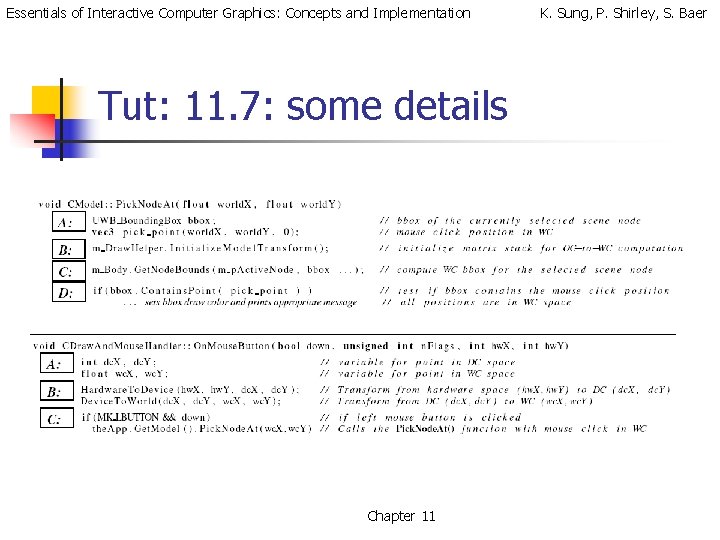
Essentials of Interactive Computer Graphics: Concepts and Implementation Tut: 11. 7: some details Chapter 11 K. Sung, P. Shirley, S. Baer
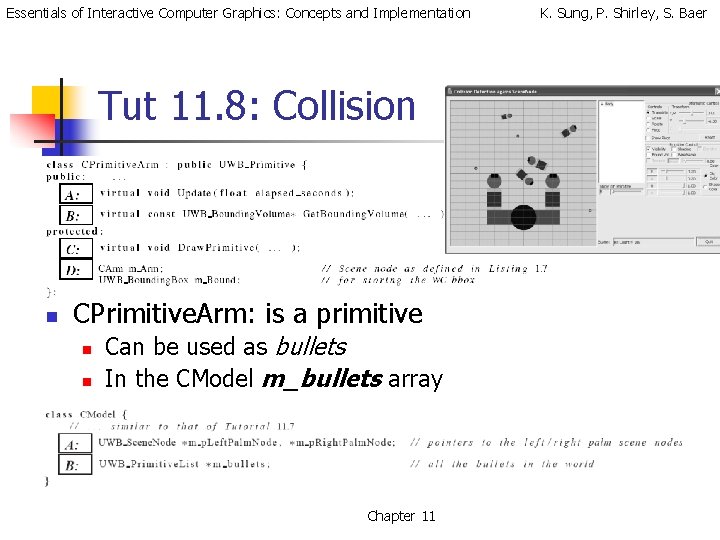
Essentials of Interactive Computer Graphics: Concepts and Implementation Tut 11. 8: Collision n CPrimitive. Arm: is a primitive n n Can be used as bullets In the CModel m_bullets array Chapter 11 K. Sung, P. Shirley, S. Baer
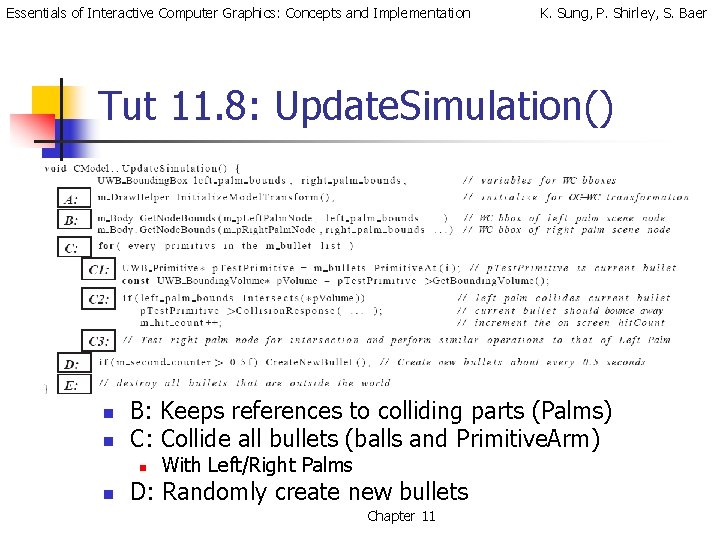
Essentials of Interactive Computer Graphics: Concepts and Implementation K. Sung, P. Shirley, S. Baer Tut 11. 8: Update. Simulation() n n B: Keeps references to colliding parts (Palms) C: Collide all bullets (balls and Primitive. Arm) n n With Left/Right Palms D: Randomly create new bullets Chapter 11
Essentials of Interactive Computer Graphics: Concepts and Implementation K. Sung, P. Shirley, S. Baer Tut 11. 8: Lesson … n Rough Approximation: n n n Proximity tests are simple Bbox Many false positives! Multiple collisions: n n A bullet can intersect with a palm multiple times! Resulting in multiple hit. Count for the same palm/bullet collisions Chapter 11
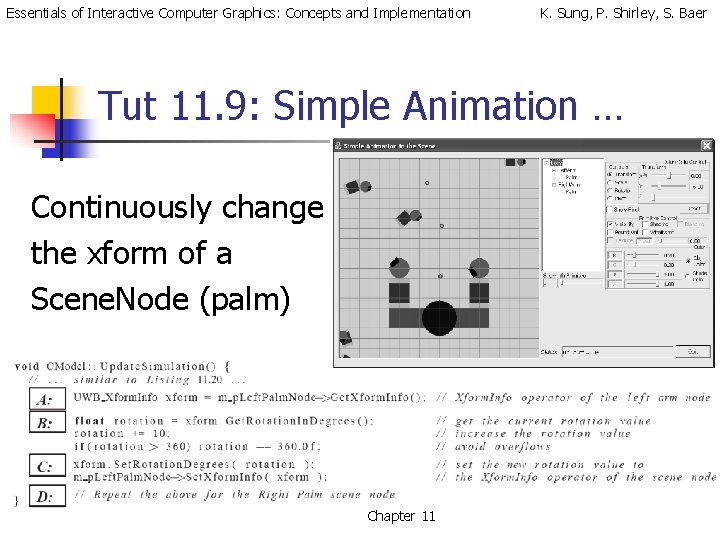
Essentials of Interactive Computer Graphics: Concepts and Implementation K. Sung, P. Shirley, S. Baer Tut 11. 9: Simple Animation … Continuously change the xform of a Scene. Node (palm) Chapter 11