
ESRTOS Syllabus Unit II Real time system and
ES&RTOS Syllabus Unit II : Real time system and RTOS 7 Hrs • Real time system, types, design approaches and considerations, • Usage of Shared resources and related issues, • Concept of RTOS, Types of RTOS, differences from GPOS (Multitasking, Inter-process communication, Timers, Device drivers, protection mechanism etc. ), • Real time scheduling algorithms, commercial RTOS , survey of RTOS 1
ES&RTOS Syllabus Unit III : μcos-II –RTOS 8 Hrs • μcos-II features, kernel structure, data structure, μcos-II services as task management, time management, inter-process communication (mailbox, queue, events, pipes etc. ), memory management. μcos-II porting on ARM 7/Cortex (M 3/M 4) architecture. 2
Unit 2 Real time system, types, design approaches and considerations 3
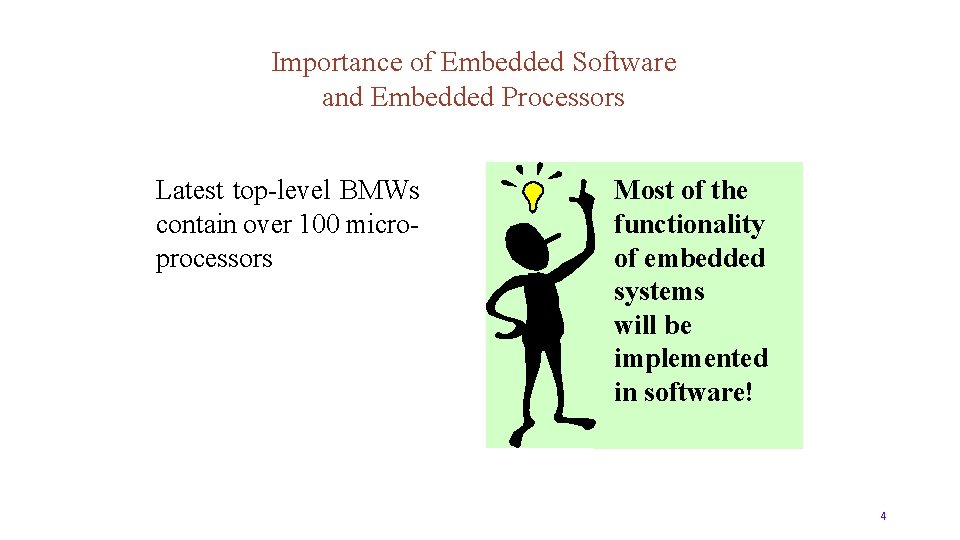
Importance of Embedded Software and Embedded Processors Latest top-level BMWs contain over 100 microprocessors Most of the functionality of embedded systems will be implemented in software! 4
Objectives • To understand the basic requirements of real-time systems and how these requirements have influenced the design of real-time programming languages and real-time operating systems • To understand the implementation and analysis techniques which enable the requirements to be realized. 5
Real Time System definition and types of real-time system Real time • Time span taken by the system to complete all its tasks and provides an output for an input • Time span should be the same for computation of all its tasks Real time system • Real time systems are those which must produce the correct response within the specified or defined time limit • Results in performance degradation and/or malfunction of system if time exceeds 6
Real Time System definition and types of real-time system • Used in in industrial, commercial, and military applications • Hard and soft real time systems • Soft real time systems is not catastrophic • It is essential to pay attention to structural and behavioral aspects of real time system than the timing constraints • Software design method describes a sequence of steps for producing design 7
Real Time System definition and types of real-time system Examples of Soft real time system • Handling input data from the keyboard, • Displaying messages on the screen. • Representation of system state variables, • Graphical activities • DVD player 8
Real Time System • Examples of hard real time system • Automobile engine control system • Aircraft engine control system • The real time control system should perform its task within a specified time as the operator/pilot intended • Failure of this can cause the loss of control and possibly the loss of many lives 9 10
Characteristics of real time system • Embedded system • Interaction with External Environment • Real-Time Constraints • Real-Time Control The real-time system makes control decisions based on input data, without any human intervention 10
Characteristics of real time system • Reactive Systems Event-driven and must respond to external stimuli • Concurrent Processing Many events that need to be processed in parallel 11
Real time program A program for which the correctness of operation depends upon the logical output of the computation and the time at which the results are produced Every real time system must be having real time clock which specifies the time of the execution of the task or interruption of the task 12
Types of real time system As per the clock and execution procedure of task the real time systems are divided as follows • Clock based systems • Event based systems • Interactive systems 13
Types of real time system Clock based real time system • The computation of its task has to be completed in the specified time interval called real time clock Example: Feedback control of tank level • The real time system should read the level of the tank • Process it with control algorithm 14
Types of real time system • Actuate the valve accordingly to maintain the level • Tasks should perform in the specified time interval 15
Types of real time system Event based real time system • Actions have to be performed in response of some events instead of some particular time intervals • A control system has to close the valve if the liquid level in the tank reaches its high level • Used extensively to indicate the alarm conditions and initiate alarm actions • Indicating the liquid level in the tank high or temperature of the liquid high etc. 16
Types of real time system • Systems uses interrupts to indicate the real time system that the action is required • Some small system uses Polling • The system periodically asks the various sensors to see whether the action is required 17
Types of real time system Interactive systems • The combination of Clock based system and Event based system which gives the importance of average execution time of the task • Automatic teller machine, reservation system for hotels, Airlines booking etc. • Systems receive the input from the plant or operator and initiate the task and executes within the average response time 18
Types of real time system To withdraw cash from ATM • Put your card to process the task of giving the money out • The response time depends on the network traffic and internal processing time and is not dependent on other atmospheric changes 1 20 9
Real Time System The Role of Software Design in Real System Development 1. The Design Process Design is a highly creative activity that relies on designer skill, experience, and judgement 2. Real-Time Design as a Software Life-Cycle phase a. Life-Cycle Considerations for Real-Time Systems Like any software systems, real-time systems should be developed using a life-cycle model. The “waterfall” model is the important one 20
Real Time System b. Requirements Definition • A real-time software system is often part of a larger embedded system, it is likely that a system requirements definition phase precedes the software requirements definition • System functional requirements are allocated to software and hardware before software requirements definition begins 21
Real Time System c. Architectural design • During this phase, the system is structured into its constituent components • Differentiates real-time systems from other systems is the need to address the issue of structuring a real-time system into concurrent tasks • The emphasis at this stage may be on decomposition into tasks or modules 22
Real Time System d. Detailed design • The algorithmic details of each component are defined • In real-time systems, particular attention needs to be paid to algorithms for resource sharing and deadlock avoidance • As well as interfacing to hardware I/O devices 23
Real Time System e. Implementation • Testing is often more complex than for other systems, possibly requiring the development environment simulators • Performance of the system needs to be tested against the requirements 24
Real Time System Design Concepts Real-Time–Specific Design Concepts a. Finite State machine • Finite state machines may be used for modeling the behavioral aspects of a system • Real-time control systems, are highly state-dependent • Finite state machine consists of a finite number of states and transitions between them be in only one of a given number of states at a time 25
Real Time System Design Concepts b. Concurrent Tasks (Processes) • A task represents the execution of a sequential program or a sequential component of a concurrent program • Overall system concurrency is obtained by having many tasks executing in parallel 26
Real Time System Design Concepts c. Information Hiding • Information hiding is a fundamental software design concept that is relevant to the design of all classes of software systems, not just real time systems • Module should hide a design decision that is considered likely to change • Greater potential for reuse than most procedural modules 27
Unit 2 Usage of shared resources and related issues 28
Usage of Shared resources and related issues Atomic and critical sections of code • A part of program is said to be atomic if it cannot be interrupted • Shared data problem arises when an interrupt routine and the task code share data • When the interrupts are disabled along some lines of code that use the shared data, we make these lines as atomic section 2 30 9
Usage of Shared resources and related issues Atomic and critical sections of code • In this way program will not be interrupted in a way that will cause corruption of data • This set of instructions that must be atomic for the system to work properly is often called a critical section 30
Usage of Shared resources and related issues Whenever an interrupt routine and your task code share data, analyze the situation to ensure that you do not have a shared data bug and take steps like disabling of interrupts to solve this problem. 31
Usage of Shared resources and related issues Classic shared data problem • The code is part of the nuclear reactor monitoring system • The code monitors two temperatures, which are supposed to be equal • If they differ, it indicates a malfunction the reactor 32
![Usage of Shared resources and related issues static int i. Temperatures[2]; void interrupt v.](http://slidetodoc.com/presentation_image_h2/36637af90973b228c861c7670d520403/image-33.jpg "Usage of Shared resources and related issues static int i. Temperatures[2]; void interrupt v.")
Usage of Shared resources and related issues static int i. Temperatures[2]; void interrupt v. Read. Temperatures(void) { itemperatures[0]=!! read in value from hardware itemperatures[1]=!! read in value from hardware } 33
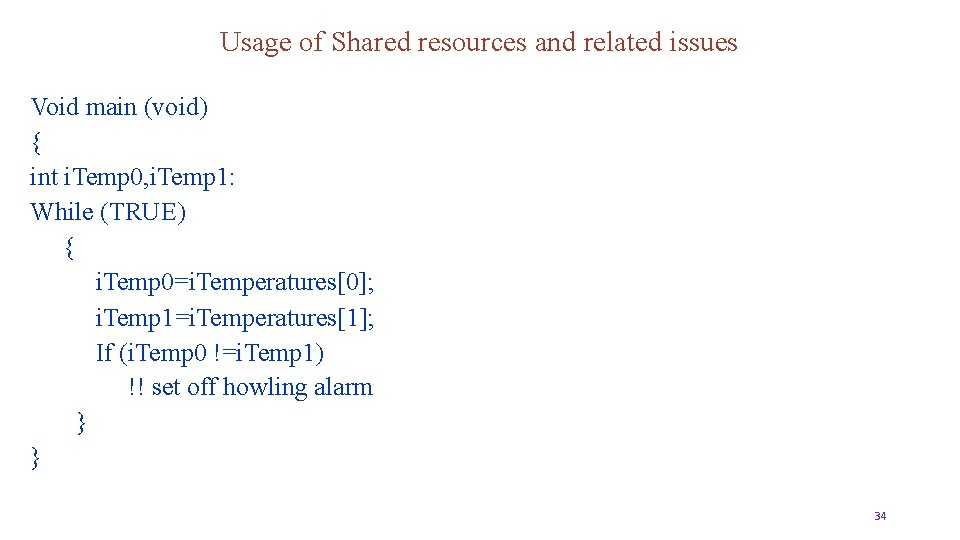
Usage of Shared resources and related issues Void main (void) { int i. Temp 0, i. Temp 1: While (TRUE) { i. Temp 0=i. Temperatures[0]; i. Temp 1=i. Temperatures[1]; If (i. Temp 0 !=i. Temp 1) !! set off howling alarm } } 34
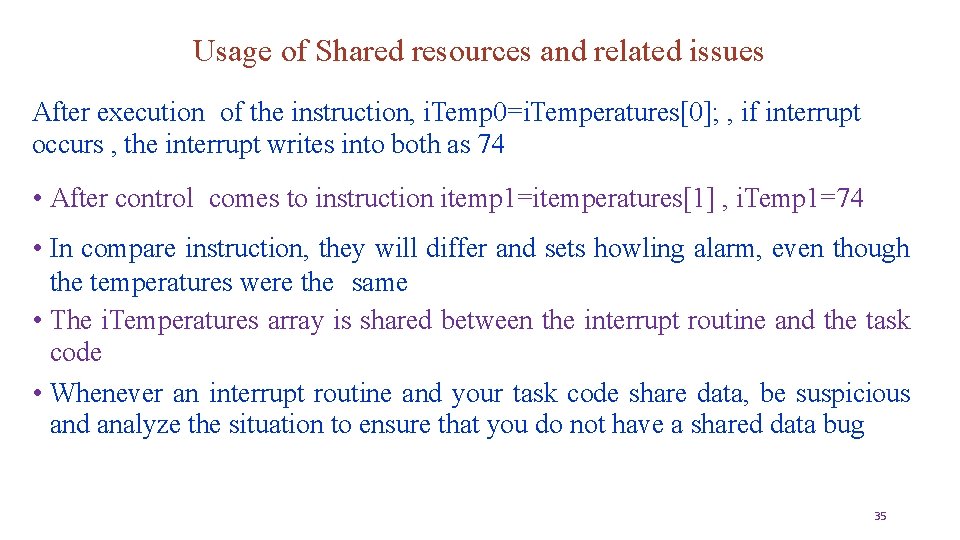
Usage of Shared resources and related issues After execution of the instruction, i. Temp 0=i. Temperatures[0]; , if interrupt occurs , the interrupt writes into both as 74 • After control comes to instruction itemp 1=itemperatures[1] , i. Temp 1=74 • In compare instruction, they will differ and sets howling alarm, even though the temperatures were the same • The i. Temperatures array is shared between the interrupt routine and the task code • Whenever an interrupt routine and your task code share data, be suspicious and analyze the situation to ensure that you do not have a shared data bug 35
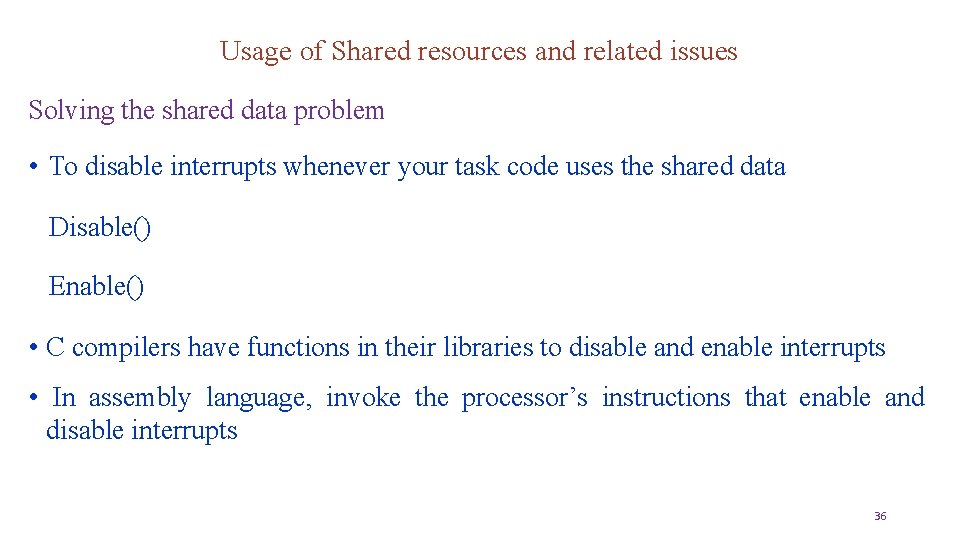
Usage of Shared resources and related issues Solving the shared data problem • To disable interrupts whenever your task code uses the shared data Disable() Enable() • C compilers have functions in their libraries to disable and enable interrupts • In assembly language, invoke the processor’s instructions that enable and disable interrupts 36
Unit 2 Concept of RTOS, Types of RTOS, differences from GPOS (Multitasking, Inter-process communication, Timers, Device drivers, protection mechanism etc. ) 37
Concept of RTOS Writing program for single task is easy For multiple tasks, there are many issues to take care of: • Memory management • Maintain task context (register contents, SP, PC, etc. ) • Scheduling • Device drivers OS will handle all the issues 38
Concept of RTOS 3 40 9
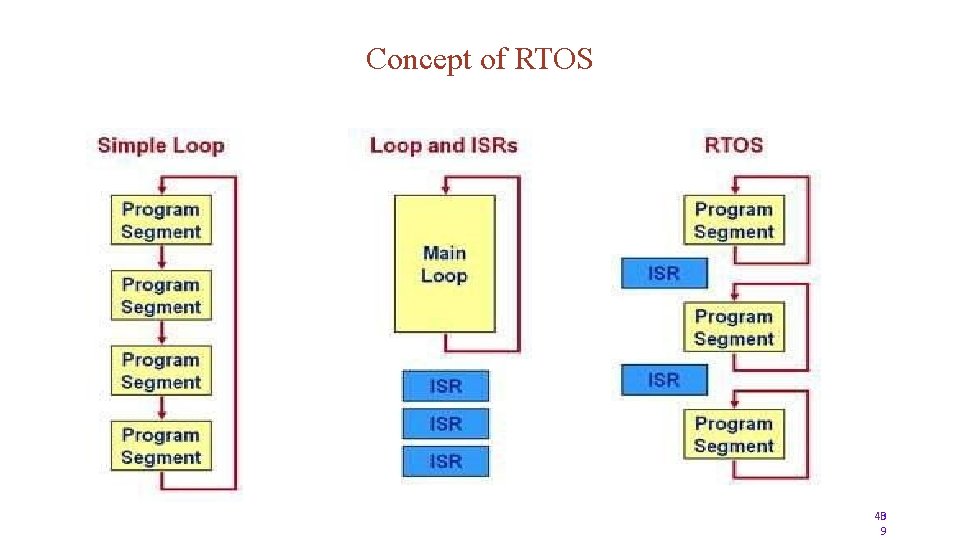
Concept of RTOS Advantages • Simple embedded systems typically use a Super-Loop concept where the application executes each function in a fixed order • Interrupt Service Routines (ISR) are used for time-critical program portions This approach is well suited for small systems but has limitations for more complex applications 40
Concept of RTOS Disadvantages of the Super-Loop Concept • • Time-critical operations must be processed within interrupts (ISR) • ISR functions become complex and require long execution times • ISR nesting may create unpredictable execution time and stack requirements Data exchange between Super-Loop and ISR is via global shared variables • Application programmer must ensure data consistency 41
Concept of RTOS A Super-Loop can be easily synchronized with the System timer, but: • • If a system requires several different cycle times, it is hard to implement • Split of time-consuming functions that exceed Super-Loop cycle • Creates software overhead and application program is hard to understand Super-Loop applications become complex and therefore hard to extend • A simple change may have unpredictable side effects; such side effects are time consuming to analyze 42
Concept of RTOS • An RTOS is multitasking OS for the applications needing meeting of time deadlines and functioning in real time constraints • An RTOS is an OS for response time controlled and event controlled processes • An RTOS is an OS for the system having the real timing constraint and deadlines on the tasks, ISRs 43
Concept of RTOS issues • Interrupt Latency should be very small • Kernel has to respond to real time events. • Interrupts should be disabled for minimum possible time. • For embedded applications Kernel Size should be small • Should fit in ROM. • Sophisticated features can be removed • No Virtual Memory 44
Concept of RTOS issues-Thumb-rule: • If your application is hard real-time, you should generally use an RTOS • RTOS is structured so that only the needed components are included in the RTOS image • Other features are added as and when required • Scalability makes RTOS widely applicable to small, single-processor applications and to large, distributed ones • Critical operations must be performed by ISR, so that they are dealt within the time frame 45
Concept of RTOS types • In Soft real time operating system, tasks are performed as quickly as possible, but they don’t have to be finished by specific time • In hard time systems, not only they have to be performed quickly but also in specific time • Otherwise there is a major failure 46
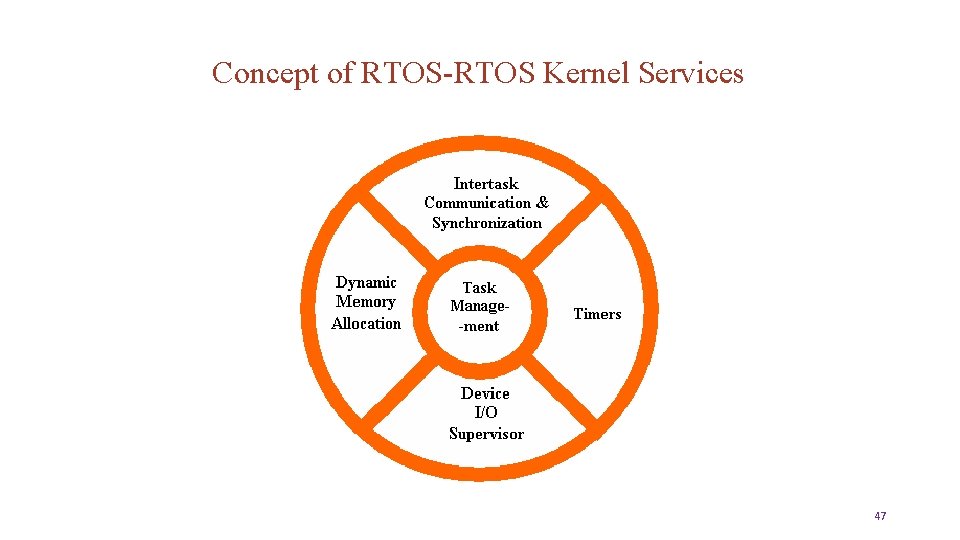
Concept of RTOS-RTOS Kernel Services 47
Concept of RTOS A RTOS separates the program functions into self-contained tasks and implements an on-demand scheduling of their execution • An advanced RTOS, delivers serious benefits: • Task scheduling - tasks are called when needed ensuring better program flow and event response • Multitasking - task scheduling gives the illusion of executing a number of tasks simultaneously • Deterministic behaviour - events and interrupts are handled within a defined time • Shorter ISRs - enables more deterministic interrupt behaviour 48
Concept of RTOS • Inter-task communication - manages the sharing of data, memory, and hardware resources among multiple tasks • Defined stack usage - each task is allocated a defined stack space, enabling predictable memory usage • System management - allows you to focus on application development rather than resource management (housekeeping) 4 50 9
Concept of RTOS-Task Management • The most basic category of kernel services Task Management • Facilitate modular design • Each separate “chunk” of software is called a “task”. • Ability to launch tasks and assign priorities • Scheduling of tasks • The Task Scheduler controls the execution of application software tasks, and can make them run in a very timely and responsive fashion 50
Concept of RTOS- Inter. Task Communication and Synchronization • These services make it possible for tasks to pass information from one to another, without danger of that information ever being damaged • Make it possible for tasks to coordinate, so that they can cooperate with one another • Without the help of these RTOS services, tasks might well communicate corrupt information or otherwise interfere with each other productively 51
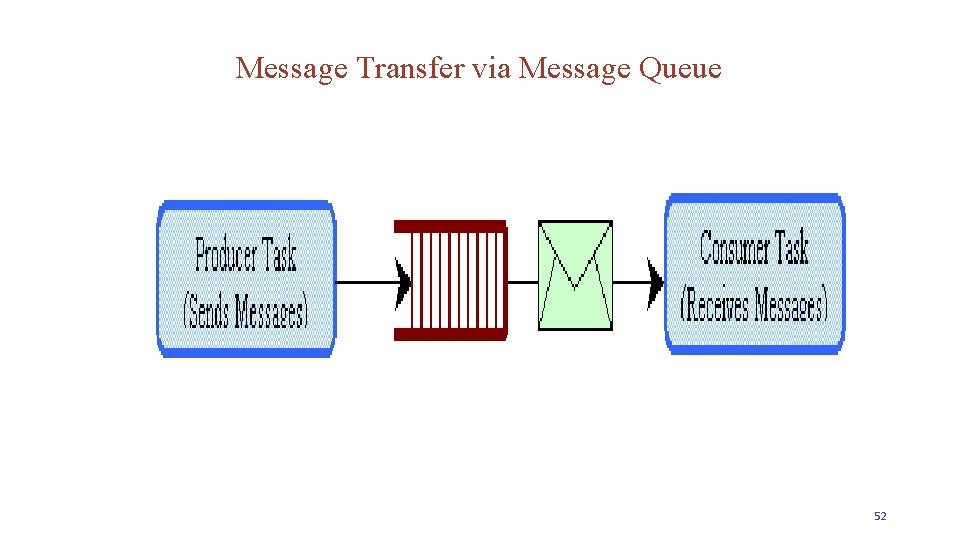
Message Transfer via Message Queue 52
Concept of RTOS- Timer • Since many embedded systems have stringent timing requirements • Most RTOS kernels also provide some basic Timer services, such as task delays and time-outs 53
Concept of RTOS-Dynamic Memory Allocation • Many (but not all) RTOS kernels provide Dynamic Memory Allocation services • This category of services allows tasks to “borrow” chunks of RAM memory for temporary use in application software • Often these chunks of memory are then passed from task to task, as a means of quickly communicating large amounts of data between tasks • Some very small RTOS kernels that are intended for tightly memorylimited environments do not offer Dynamic Memory Allocation services 54
Concept of RTOS-Memory management • Most RTOS have some kind of memory management subsystem. • C functions like malloc and free do the memory management , but many RTOS avoids using this because their execution times are unpredictable • RTOS sets up pools, each of which consist of some number of memory buffers • In any given pool all the buffers are of same size 55
Concept of RTOS-Memory management • The reqbuf and getbuf functions allocate the buffer from the pool • Each returns a pointer to the allocated buffer • If no buffers are available then getbuf blocks the calling task , where as reqbuf returns a null pointer • The relbuf frees the memory allocated 56
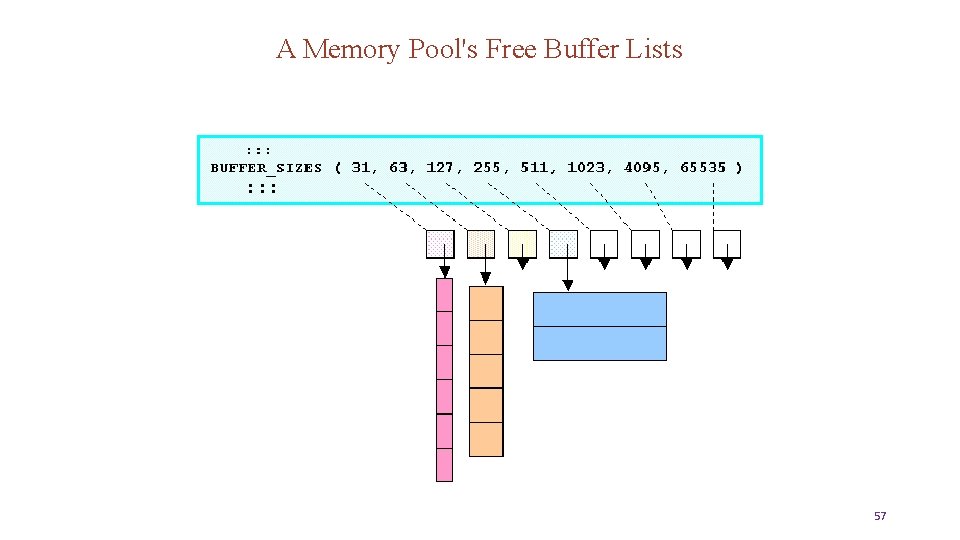
A Memory Pool's Free Buffer Lists 57
Concept of RTOS-In Addition In addition to kernel services, many RTOSs offer a number of optional addon operating system components for such as…. • File system organization, • network communication, • network management, • database management, • user-interface graphics, etc. 58
Concept of RTOS-Device I/O Supervisor-In Addition Each of these add-on components is included in an embedded system only if its services are needed for implementing the embedded application, in order to keep program memory consumption to minimum. 5 60 9
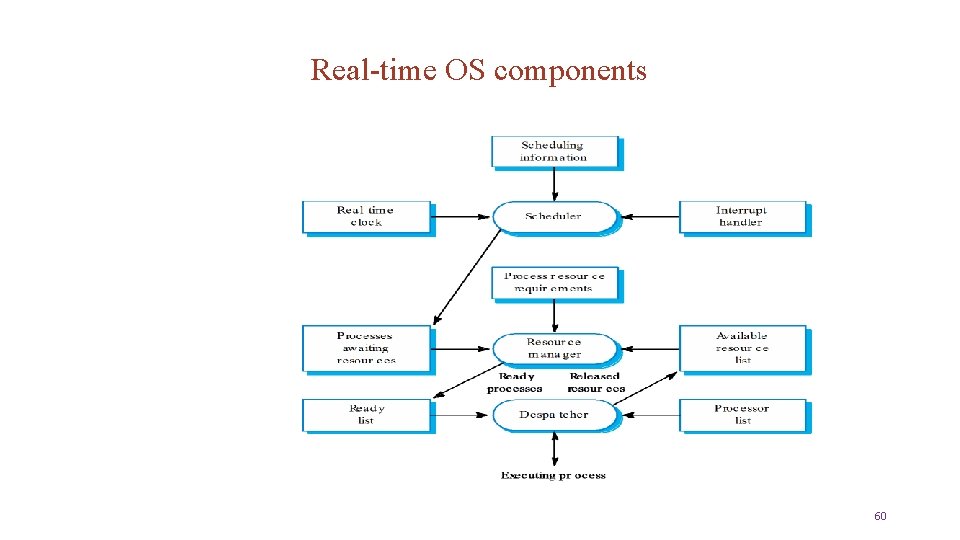
Real-time OS components 60
Unit 2 Differences from GPOS (Multitasking, Inter-process communication, Timers, Device drivers, protection mechanism etc. ) 61
RTOS versus General Purpose Operating Systems • Key difference –Deterministic service time • constant load-independent timing • Task scheduling • Fixed-time task switching • Inter task communication and synchronization • Determinism and high speed message passing • Dynamic Memory Allocation 62
RTOS versus General Purpose Operating Systems (GPOS) • All the devices have to respond user/ Environment within specified time. • In other operating system, OS takes control of machine first, then applications are executed In RTOS, application are linked and executed first, then OS gets executed • Many RTOS do not protect themselves as carefully as other OS does. E. g. Passing a pointer is valid or not is checked in other OS but not in RTOS • To save memory, RTOS only includes just the services required for embedded system and no more 63
RTOS versus General Purpose Operating Systems • GPOS performs multiple jobs at a time, RTOS performs a specific job • GPOS is not a real time operating system • GPOS requires larger memory as compared to the RTOS 64
RTOS versus General Purpose Operating Systems Task scheduling • Such a policy enables the high overall throughput required by desktop and server applications, but offers no guarantees that high-priority, time critical threads will execute in preference to lower-priority thread • In a GPOS, the scheduler typically uses a fairness policy to dispatch threads and processes onto the CPU • In an RTOS, on the other hand, threads execute in order of their priority 65
RTOS versus General Purpose Operating Systems • For most GPOSs, the OS kernel is not preemptible. Consequently, a highpriority user thread can never preempt a kernel call, but must instead wait for the entire call to complete – even if the call was invoked by the lowestpriority process in the system • Such behavior causes unpredictable delays and prevents critical activities from completing on time • In an RTOS, on the other hand, kernel operations are preemptible 66
RTOS versus General Purpose Operating Systems • • RTOS do not protect themselves as carefully from your application as do GPOS For example, Most desktop OS check that any pointer you pass into a system function is valid • Many RTOS skip this system in the interest of better performance • If the application is passing a bad pointer, it will not matter, because the whole system have to be rebooted 67
Unit 2 Real time scheduling algorithms 68
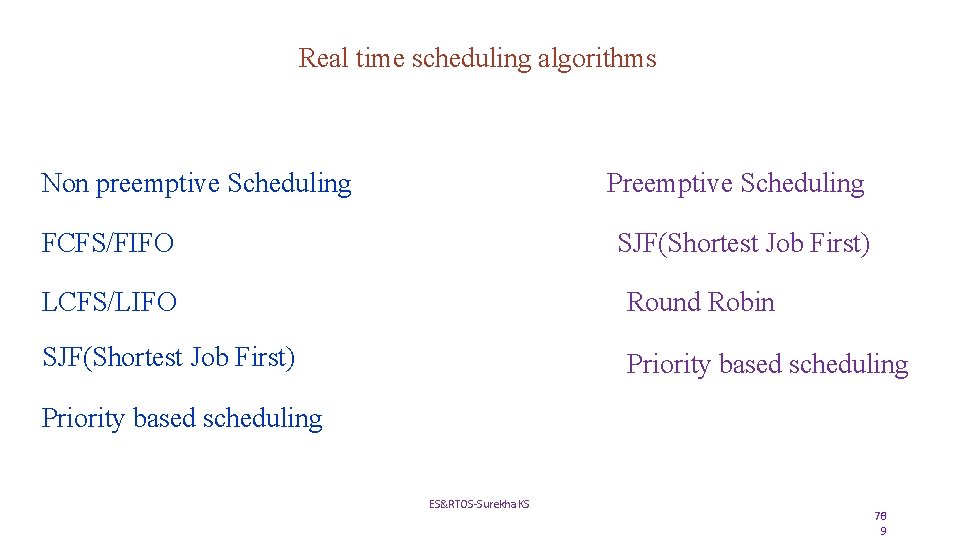
Real time scheduling algorithms Non preemptive Scheduling Preemptive Scheduling FCFS/FIFO SJF(Shortest Job First) LCFS/LIFO Round Robin SJF(Shortest Job First) Priority based scheduling ES&RTOS-Surekha KS 6 70 9
Selection criterions for the selection of scheduling algorithm • CPU utilization, • Throughput • Turn Around Time (TAT) • Waiting time and • Response time 70
Selection criterions for the selection of scheduling algorithm • CPU Utilization: - • The scheduling algorithm should always make the CPU utilization high • CPU utilization is a direct measure of how much percentage of the CPU is being utilized 71
Selection criterions for the selection of scheduling algorithm • Throughput: - This gives an indication of the number of process executed per unit of time • The throughput for a good scheduler should always be higher • Turn around Time (TAT): -It is the amount of time taken by a process for completing its execution • It includes the time spent by the process for waiting for the main memory, time spent in the ready queue, time spent on completing the I/O operations and the time spent in execution • The TAT should be a minimal for good scheduling algorithm 72
Selection criterions for the selection of scheduling algorithm • Waiting Time: -It is the amount of time spent by a process in the ‘ready’ queue waiting to get the CPU time for execution. The waiting time should be minimal for a good scheduling algorithm • Response Time: -It is the time elapsed between the submission of a process and the first response. For a good scheduling, the response time should be as least as possible 73
Performance metrics for CPU scheduling • CPU utilization: percentage of the time that CPU is busy • Throughput: the number of processes completed per unit time • Turnaround time: the interval from the time of submission of a process to the time of completion. • Wait time: the sum of the periods spent waiting in the ready queue • Response time: the time of submission to the time the first response is produced 74
Preemptive & Non-preemptive Scheduling SO what is Preemptive & Non-preemptive scheduling? Non-preemptive • Once CPU is allocated to a process, it holds it till it • Terminates (exits) • Blocks itself to wait for I/O • Requests some OS service 75
Preemptive & Non-preemptive Scheduling Preemptive • Currently running process may be interrupted and moved to the ready state by the OS • Windows 95 introduced preemptive scheduling • Used in all subsequent versions of windows 76
Non- Preemptive Scheduling First – Come – First – Served (FCFS) / FIFO scheduling • This scheduling algorithm is very simple to implement but not well suited for most applications, because it is difficult to estimate the amount of time a task has to wait for being executed • This is a good algorithm for an embedded system to perform few small tasks all with small execution times • If there is no time critically and the number of tasks is small, this algorithm can be implemented 77
Non- Preemptive Scheduling Drawbacks of FCFS/FIFO • This leads to poor utilization of CPU • The average waiting time is not minimal for FCFS scheduling algorithm • Short jobs suffer penalty 78
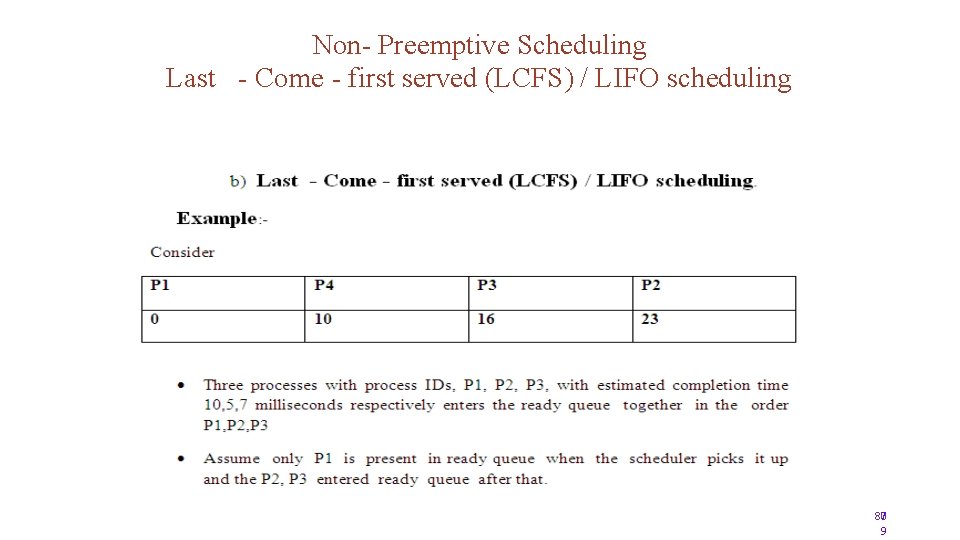
Non- Preemptive Scheduling Last - Come - first served (LCFS) / LIFO scheduling 7 80 9
Non- Preemptive Scheduling Shortest job first (SJF) scheduling • The task will take minimum time to be executed will be given priority • This approach satisfies the maximum number of tasks, but some task may wait forever • In SJF, the process with the shortest estimated run time is scheduled first, followed by the next process and so on 80
Non- Preemptive Scheduling Priority Based Scheduling • Priority based non-preemptive scheduling algorithm ensures that a process with high priority is serviced at the earliest compared to other low priority processes in the ready queue • The priority of a task/process can be indicated through various mechanisms • The shortest job first (SJF) algorithm can be viewed as priority based scheduling where each task is prioritized in the order of the time required to complete the task 81
Preemptive Scheduling • In this kind of scheduling, the scheduler can pre-empt (Stop temporarily) the currently Executive task/process and select another task/process from the ready queue for execution • When to pre-empt a task and which task is to be picked up from the ready queue for execution after pre-empting the current task is purely depends on scheduling algorithm • A task which is pre-empted by the scheduler is moved to the ready queue • The act of moving a ‘running’ process/task into the ‘Ready Queue’ by the scheduler without the processes requesting for it is known as “Pre-emption” 82
Preemptive Scheduling Preemptive SJF scheduling /Shortest reaming time (SRT) • The non – preemptive SJF scheduling algorithm sorts the ‘Ready’ Queue only after completing the execution of the current process or when the process enters ‘wait’ State • whereas the preemptive SJF scheduling algorithm sorts the ‘Ready’ queue when a new process enters the ‘Ready’ Queue and checks whether the execution time of the new process is shorter than the remaining of the total estimated time for currently execution process. 83
Preemptive Scheduling Preemptive SJF scheduling /Shortest reaming time (SRT) � If the execution time of the new is less, the currently executing process is preempted and the new process is scheduled for execution 84
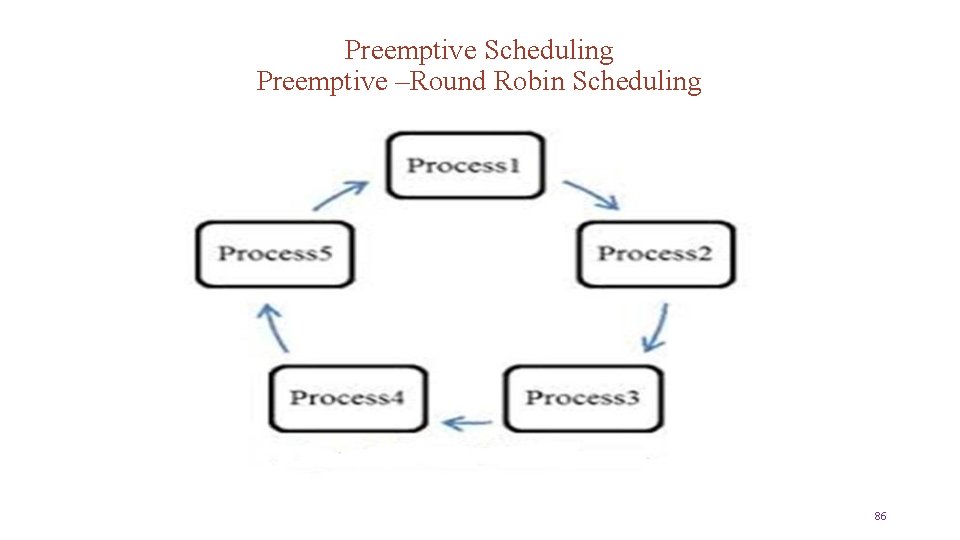
Preemptive Scheduling Preemptive –Round Robin Scheduling • Each process in the ‘Ready’ Queue is executed for a pre – defined time slot • The execution starts with picking up the first process in the ‘Ready’ Queue • It is executed for a pre-defined time elapses or the process completes (Before the pre defined slots) the next process in the ‘Ready’ Queue is selected for execution • This is repeated for all the process in the ‘Ready’ Queue. 85
Preemptive Scheduling Preemptive –Round Robin Scheduling 86
Preemptive Scheduling Priority � In preemptive scheduling, any high priority process entering the ‘ ready’ queue is immediately scheduling for execution whereas in the non preemptive scheduling any high priority process entering the ready queue is scheduling only after the currently process completes its execution or only when it voluntary relinquishes the CPU 87
Commercial RTOS • Vxworks • QNX • Nucleus • Android • Symbian 88
- Slides: 88