
ESO New General detector Controller NGC Base Software
ESO New General detector Controller (NGC) Base Software And Infrared Detector Control Software 07/10/2008 J. Stegmeier
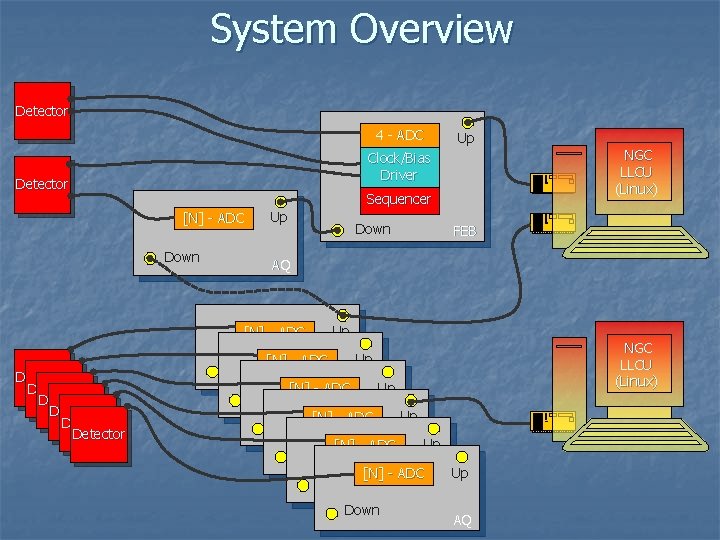
System Overview Detector 4 - ADC Up NGC LLCU (Linux) Clock/Bias Driver Detector Sequencer Up [N] - ADC Down FEB AQ [N] - ADC Up 2 3 Detector Detector Up [N] - ADC Down 2 3 [N] - ADC Up Down 2 3 Up [N] - ADC Down AQ NGC LLCU (Linux)
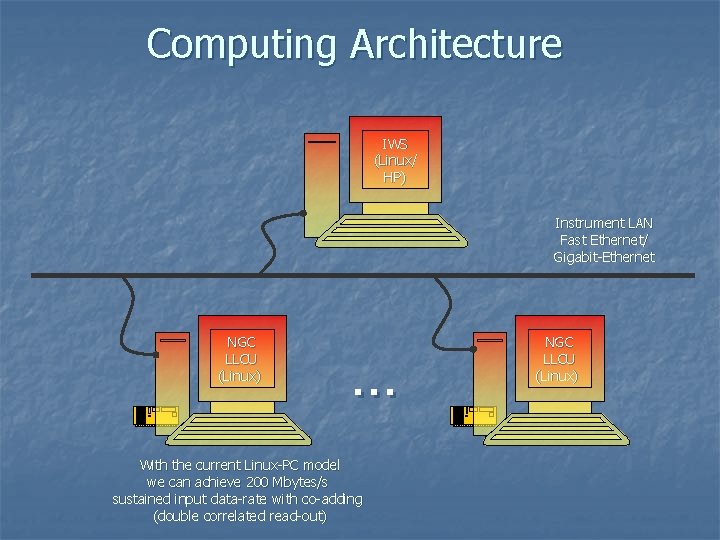
Computing Architecture IWS (Linux/ HP) Instrument LAN Fast Ethernet/ Gigabit-Ethernet NGC LLCU (Linux) … With the current Linux-PC model we can achieve 200 Mbytes/s sustained input data-rate with co-adding (double correlated read-out) NGC LLCU (Linux)
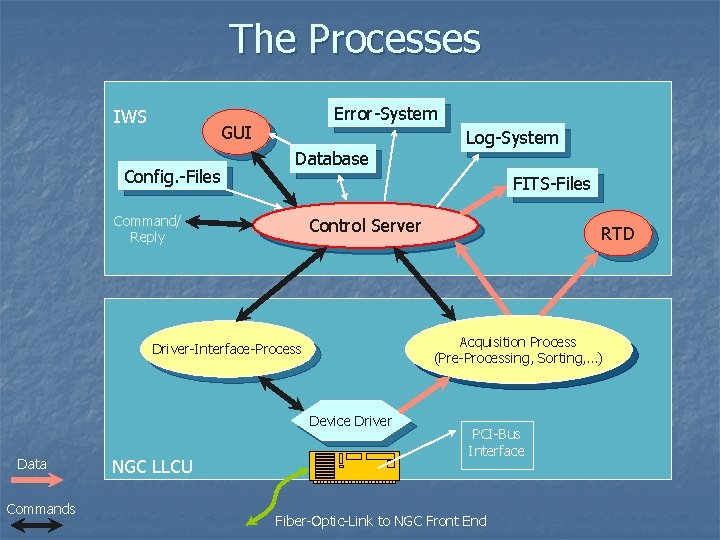
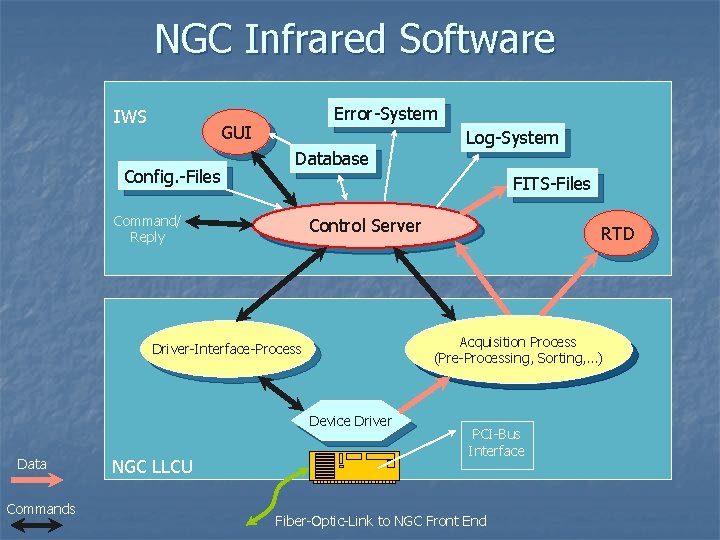
The Processes IWS Error-System GUI Config. -Files Database FITS-Files Command/ Reply Control Server Device Driver Commands NGC LLCU RTD Acquisition Process (Pre-Processing, Sorting, …) Driver-Interface-Process Data Log-System PCI-Bus Interface Fiber-Optic-Link to NGC Front End
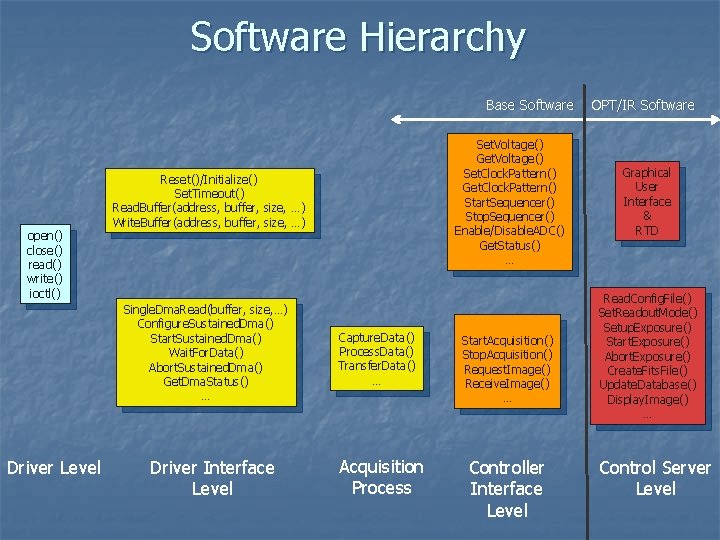
Software Hierarchy Base Software open() close() read() write() ioctl() Reset()/Initialize() Set. Timeout() Read. Buffer(address, buffer, size, …) Write. Buffer(address, buffer, size, …) Single. Dma. Read(buffer, size, …) Configure. Sustained. Dma() Start. Sustained. Dma() Wait. For. Data() Abort. Sustained. Dma() Get. Dma. Status() … Driver Level Set. Voltage() Get. Voltage() Set. Clock. Pattern() Get. Clock. Pattern() Start. Sequencer() Stop. Sequencer() Enable/Disable. ADC() Get. Status() … Driver Interface Level Capture. Data() Process. Data() Transfer. Data() … Acquisition Process Start. Acquisition() Stop. Acquisition() Request. Image() Receive. Image() … Controller Interface Level OPT/IR Software Graphical User Interface & RTD Read. Config. File() Set. Readout. Mode() Setup. Exposure() Start. Exposure() Abort. Exposure() Create. Fits. File() Update. Database() Display. Image() … Control Server Level
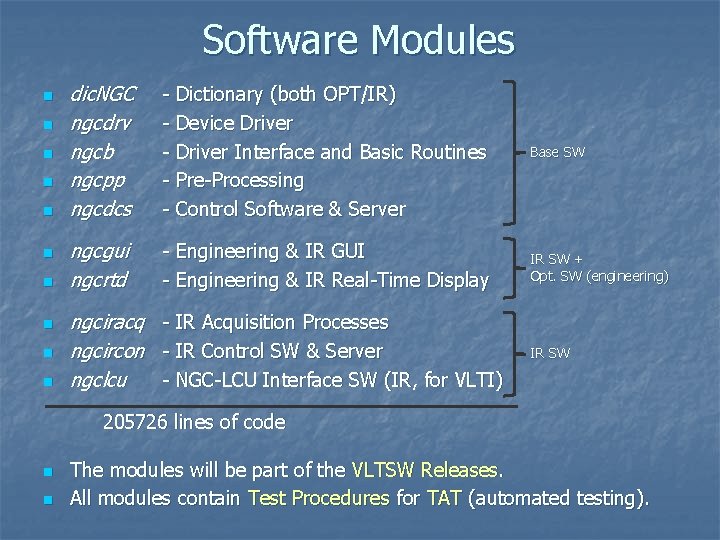
Software Modules n n n n n dic. NGC ngcdrv ngcb ngcpp ngcdcs - Dictionary (both OPT/IR) - Device Driver - Driver Interface and Basic Routines - Pre-Processing - Control Software & Server Base SW ngcgui ngcrtd - Engineering & IR GUI - Engineering & IR Real-Time Display IR SW + Opt. SW (engineering) ngciracq - IR Acquisition Processes ngcircon - IR Control SW & Server ngclcu - NGC-LCU Interface SW (IR, for VLTI) IR SW 205726 lines of code n n The modules will be part of the VLTSW Releases. All modules contain Test Procedures for TAT (automated testing).
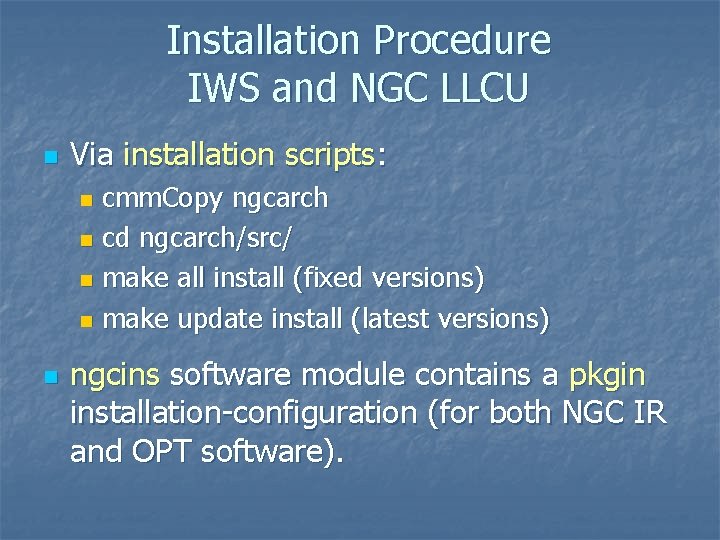
Installation Procedure IWS and NGC LLCU n Via installation scripts: cmm. Copy ngcarch n cd ngcarch/src/ n make all install (fixed versions) n make update install (latest versions) n n ngcins software module contains a pkgin installation-configuration (for both NGC IR and OPT software).
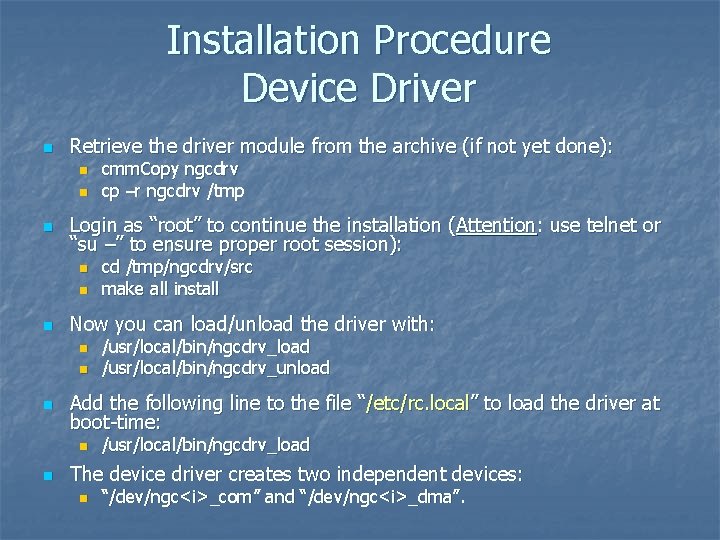
Installation Procedure Device Driver n Retrieve the driver module from the archive (if not yet done): n n n Login as “root” to continue the installation (Attention: use telnet or “su –” to ensure proper root session): n n /usr/local/bin/ngcdrv_load /usr/local/bin/ngcdrv_unload Add the following line to the file “/etc/rc. local” to load the driver at boot-time: n n cd /tmp/ngcdrv/src make all install Now you can load/unload the driver with: n n cmm. Copy ngcdrv cp –r ngcdrv /tmp /usr/local/bin/ngcdrv_load The device driver creates two independent devices: n “/dev/ngc<i>_com” and “/dev/ngc<i>_dma”.
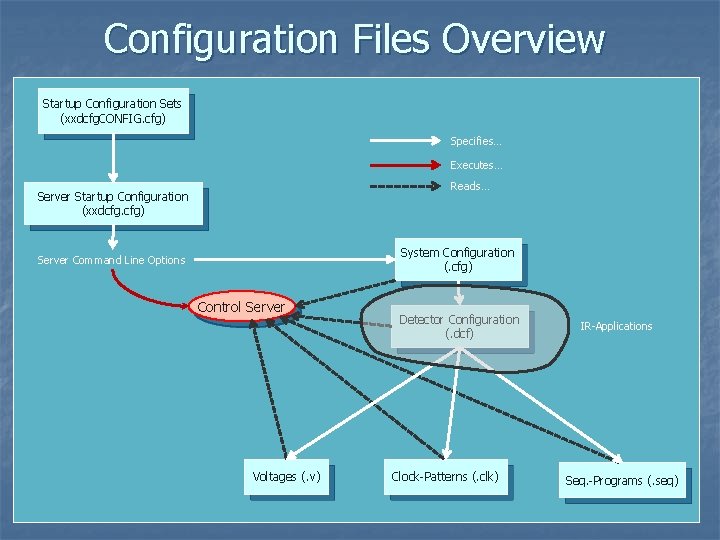
Configuration Files Overview Startup Configuration Sets (xxdcfg. CONFIG. cfg) Specifies… Executes… Reads… Server Startup Configuration (xxdcfg. cfg) System Configuration (. cfg) Server Command Line Options Control Server Voltages (. v) Detector Configuration (. dcf) Clock-Patterns (. clk) IR-Applications Seq. -Programs (. seq)
![Startup Procedure n Startup tools: n n n [other options] for maintenance (verbose mode](http://slidetodoc.com/presentation_image/2c2be363216ef9cc1e0b60058fad8ce3/image-10.jpg "Startup Procedure n Startup tools: n n n [other options] for maintenance (verbose mode")
Startup Procedure n Startup tools: n n n [other options] for maintenance (verbose mode etc. ) or for overriding the keywords defined in the Startup-Configuration-Set. The control server startup configuration is described by a unique name (configuration-set name). The <name> refers to the name of a Startup-Configuration-Set which is defined in the main configuration file: n n $INS_ROOT/SYSTEM/COMMON/CONFIGFILES/xxdcfg. CONFIG. cfg The Startup-Configuration-Set describes the Startup-Configuration-File and some administrative options: n n n ngcdcs. Start. Server <configuration-set name> [-gui] [other options] ngcdcs. Stop. Server <configuration-set name> ngcdcs. Start. Gui <configuration-set name> (only GUI) CONFIG. SET 1. NAME "KMDCS"; CONFIG. SET 1. DICT "NGCCON"; CONFIG. SET 1. FILE 1 "kmdcfg. cfg"; CONFIG. SET 1. PERM 1 664; # all CONFIG. SET 1. BACKUP T; CONFIG. SET 1. LOG T; The Startup-Configuration-File defines the server startup options - e. g. autoonline, auto-start, database-point (if not default), server instance and the controller electronics system configuration file (i. e. HW-configuration) to be loaded at startup.
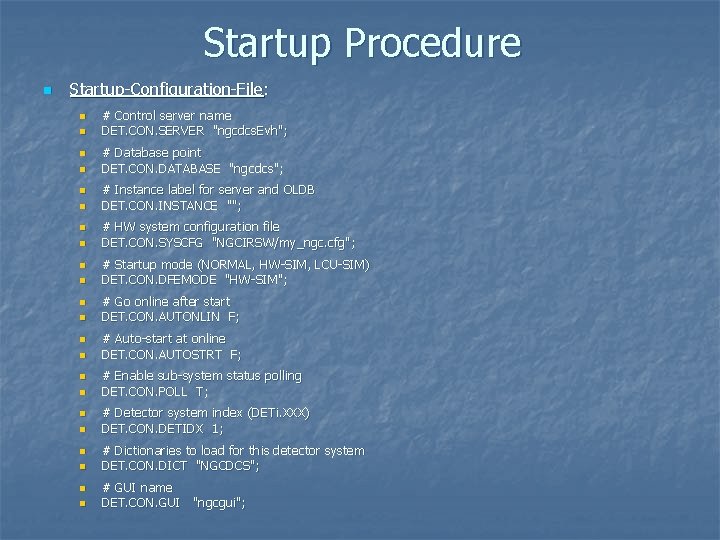
Startup Procedure n Startup-Configuration-File: n n n n n n # Control server name DET. CON. SERVER "ngcdcs. Evh"; # Database point DET. CON. DATABASE "ngcdcs"; # Instance label for server and OLDB DET. CON. INSTANCE ""; # HW system configuration file DET. CON. SYSCFG "NGCIRSW/my_ngc. cfg"; # Startup mode (NORMAL, HW-SIM, LCU-SIM) DET. CON. DFEMODE "HW-SIM"; # Go online after start DET. CON. AUTONLIN F; # Auto-start at online DET. CON. AUTOSTRT F; # Enable sub-system status polling DET. CON. POLL T; # Detector system index (DETi. XXX) DET. CON. DETIDX 1; # Dictionaries to load for this detector system DET. CON. DICT "NGCDCS"; # GUI name DET. CON. GUI "ngcgui";
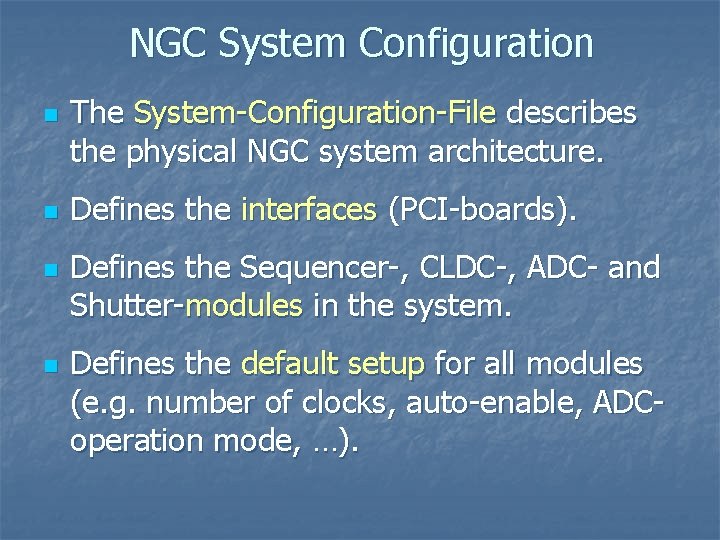
NGC System Configuration n n The System-Configuration-File describes the physical NGC system architecture. Defines the interfaces (PCI-boards). Defines the Sequencer-, CLDC-, ADC- and Shutter-modules in the system. Defines the default setup for all modules (e. g. number of clocks, auto-enable, ADCoperation mode, …).
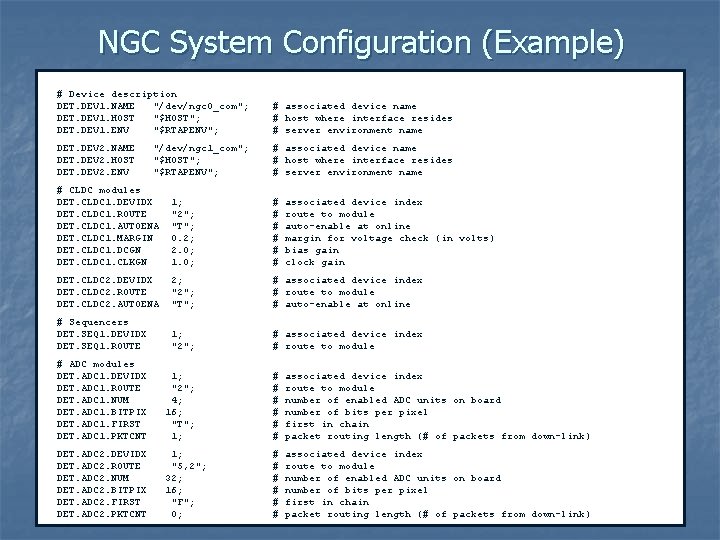
NGC System Configuration (Example) # Device description DET. DEV 1. NAME "/dev/ngc 0_com"; # associated device name DET. DEV 1. HOST "$HOST"; # host where interface resides DET. DEV 1. ENV "$RTAPENV"; # server environment name DET. DEV 2. NAME "/dev/ngc 1_com"; # associated device name DET. DEV 2. HOST "$HOST"; # host where interface resides DET. DEV 2. ENV "$RTAPENV"; # server environment name # CLDC modules DET. CLDC 1. DEVIDX 1; # associated device index DET. CLDC 1. ROUTE "2"; # route to module DET. CLDC 1. AUTOENA "T"; # auto-enable at online DET. CLDC 1. MARGIN 0. 2; # margin for voltage check (in volts) DET. CLDC 1. DCGN 2. 0; # bias gain DET. CLDC 1. CLKGN 1. 0; # clock gain DET. CLDC 2. DEVIDX 2; # associated device index DET. CLDC 2. ROUTE "2"; # route to module DET. CLDC 2. AUTOENA "T"; # auto-enable at online # Sequencers DET. SEQ 1. DEVIDX 1; # associated device index DET. SEQ 1. ROUTE "2"; # route to module # ADC modules DET. ADC 1. DEVIDX 1; # associated device index DET. ADC 1. ROUTE "2"; # route to module DET. ADC 1. NUM 4; # number of enabled ADC units on board DET. ADC 1. BITPIX 16; # number of bits per pixel DET. ADC 1. FIRST "T"; # first in chain DET. ADC 1. PKTCNT 1; # packet routing length (# of packets from down-link) DET. ADC 2. DEVIDX 1; # associated device index DET. ADC 2. ROUTE "5, 2"; # route to module DET. ADC 2. NUM 32; # number of enabled ADC units on board DET. ADC 2. BITPIX 16; # number of bits per pixel DET. ADC 2. FIRST "F"; # first in chain DET. ADC 2. PKTCNT 0; # packet routing length (# of packets from down-link)
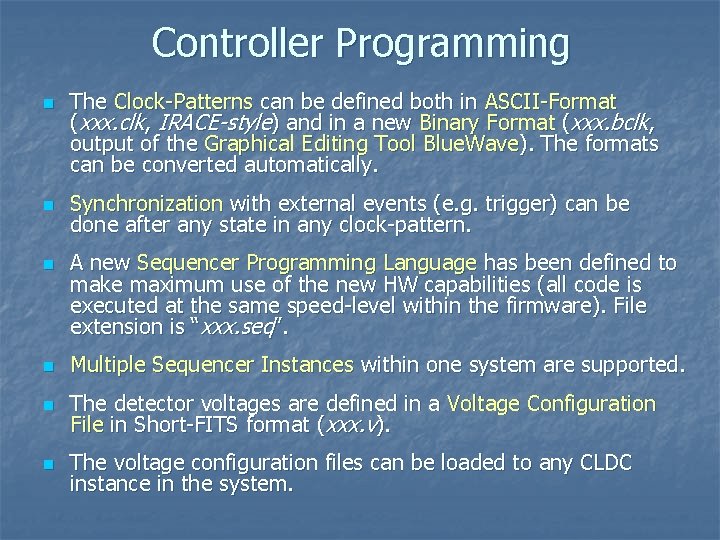
Controller Programming n n n The Clock-Patterns can be defined both in ASCII-Format (xxx. clk, IRACE-style) and in a new Binary Format (xxx. bclk, output of the Graphical Editing Tool Blue. Wave). The formats can be converted automatically. Synchronization with external events (e. g. trigger) can be done after any state in any clock-pattern. A new Sequencer Programming Language has been defined to make maximum use of the new HW capabilities (all code is executed at the same speed-level within the firmware). File extension is “xxx. seq”. n Multiple Sequencer Instances within one system are supported. n The detector voltages are defined in a Voltage Configuration File in Short-FITS format (xxx. v). n The voltage configuration files can be loaded to any CLDC instance in the system.
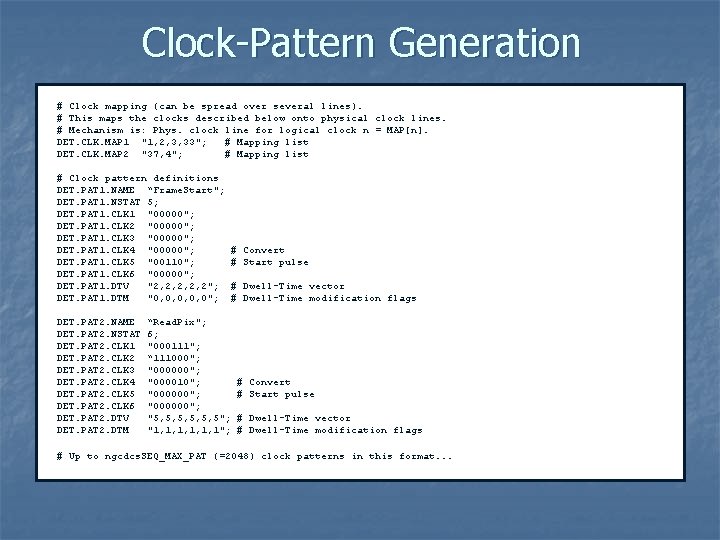
Clock-Pattern Generation # Clock mapping (can be spread over several lines). # This maps the clocks described below onto physical clock lines. # Mechanism is: Phys. clock line for logical clock n = MAP[n]. DET. CLK. MAP 1 "1, 2, 3, 33"; # Mapping list DET. CLK. MAP 2 "37, 4"; # Mapping list # Clock pattern definitions DET. PAT 1. NAME “Frame. Start"; DET. PAT 1. NSTAT 5; DET. PAT 1. CLK 1 "00000"; DET. PAT 1. CLK 2 "00000"; DET. PAT 1. CLK 3 "00000"; DET. PAT 1. CLK 4 "00000"; # Convert DET. PAT 1. CLK 5 "00110"; # Start pulse DET. PAT 1. CLK 6 "00000"; DET. PAT 1. DTV "2, 2, 2"; # Dwell-Time vector DET. PAT 1. DTM "0, 0, 0"; # Dwell-Time modification flags DET. PAT 2. NAME “Read. Pix"; DET. PAT 2. NSTAT 6; DET. PAT 2. CLK 1 "000111"; DET. PAT 2. CLK 2 “ 111000"; DET. PAT 2. CLK 3 "000000"; DET. PAT 2. CLK 4 "000010"; # Convert DET. PAT 2. CLK 5 "000000"; # Start pulse DET. PAT 2. CLK 6 "000000"; DET. PAT 2. DTV "5, 5, 5, 5"; # Dwell-Time vector DET. PAT 2. DTM "1, 1, 1, 1"; # Dwell-Time modification flags # Up to ngcdcs. SEQ_MAX_PAT (=2048) clock patterns in this format. . .
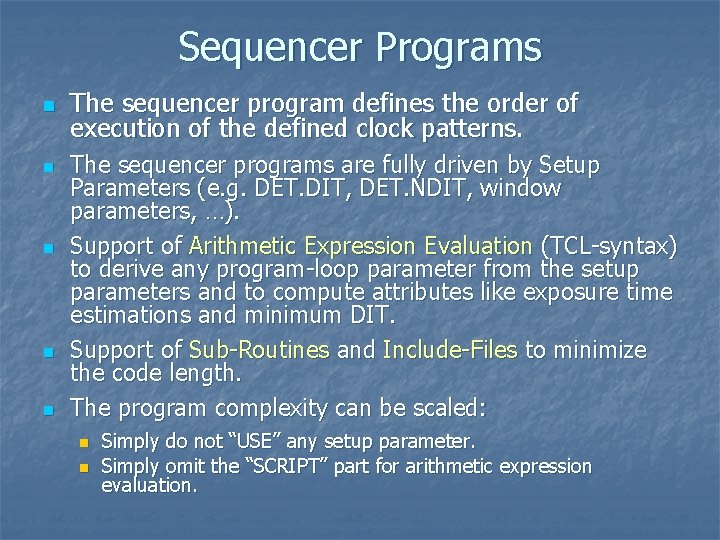
Sequencer Programs n n n The sequencer program defines the order of execution of the defined clock patterns. The sequencer programs are fully driven by Setup Parameters (e. g. DET. DIT, DET. NDIT, window parameters, …). Support of Arithmetic Expression Evaluation (TCL-syntax) to derive any program-loop parameter from the setup parameters and to compute attributes like exposure time estimations and minimum DIT. Support of Sub-Routines and Include-Files to minimize the code length. The program complexity can be scaled: n n Simply do not “USE” any setup parameter. Simply omit the “SCRIPT” part for arithmetic expression evaluation.
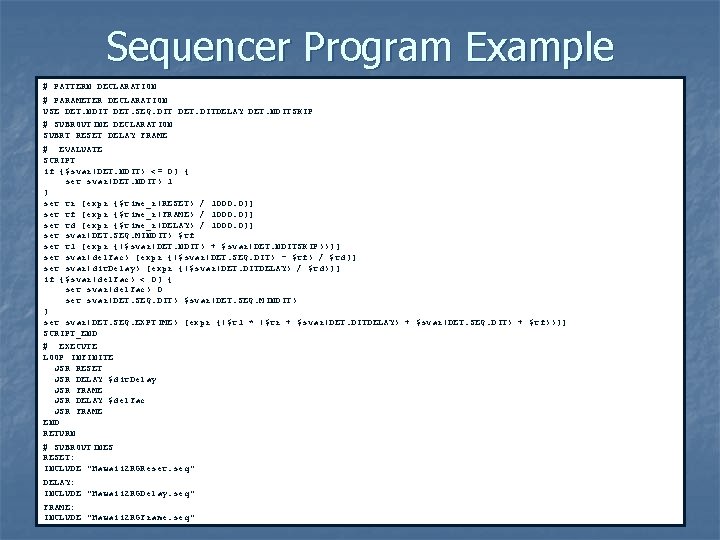
Sequencer Program Example # PATTERN DECLARATION # PARAMETER DECLARATION USE DET. NDIT DET. SEQ. DIT DET. DITDELAY DET. NDITSKIP # SUBROUTINE DECLARATION SUBRT RESET DELAY FRAME # EVALUATE SCRIPT if {$svar(DET. NDIT) <= 0} { set svar(DET. NDIT) 1 } set tr [expr {$time_r(RESET) / 1000. 0}] set tf [expr {$time_r(FRAME) / 1000. 0}] set td [expr {$time_r(DELAY) / 1000. 0}] set svar(DET. SEQ. MINDIT) $tf set t 1 [expr {($svar(DET. NDIT) + $svar(DET. NDITSKIP))}] set svar(del. Fac) [expr {($svar(DET. SEQ. DIT) - $tf) / $td}] set svar(dit. Delay) [expr {($svar(DET. DITDELAY) / $td)}] if {$svar(del. Fac) < 0} { set svar(del. Fac) 0 set svar(DET. SEQ. DIT) $svar(DET. SEQ. MINDIT) } set svar(DET. SEQ. EXPTIME) [expr {($t 1 * ($tr + $svar(DET. DITDELAY) + $svar(DET. SEQ. DIT) + $tf))}] SCRIPT_END # EXECUTE LOOP INFINITE JSR RESET JSR DELAY $dit. Delay JSR FRAME JSR DELAY $del. Fac JSR FRAME END RETURN # SUBROUTINES RESET: INCLUDE "Hawaii 2 RGReset. seq" DELAY: INCLUDE "Hawaii 2 RGDelay. seq" FRAME: INCLUDE "Hawaii 2 RGFrame. seq"
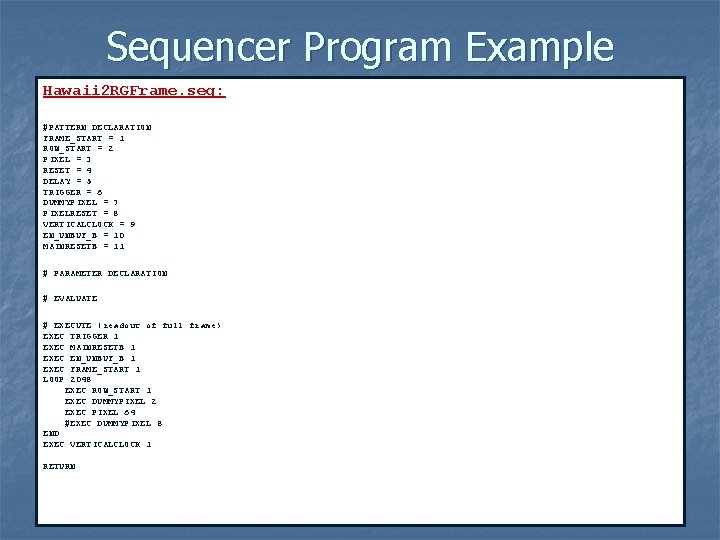
Sequencer Program Example Hawaii 2 RGFrame. seq: #PATTERN DECLARATION FRAME_START = 1 ROW_START = 2 PIXEL = 3 RESET = 4 DELAY = 5 TRIGGER = 6 DUMMYPIXEL = 7 PIXELRESET = 8 VERTICALCLOCK = 9 EN_UNBUF_B = 10 MAINRESETB = 11 # PARAMETER DECLARATION # EVALUATE # EXECUTE (readout of full frame) EXEC TRIGGER 1 EXEC MAINRESETB 1 EXEC EN_UNBUF_B 1 EXEC FRAME_START 1 LOOP 2048 EXEC ROW_START 1 EXEC DUMMYPIXEL 2 EXEC PIXEL 64 #EXEC DUMMYPIXEL 8 END EXEC VERTICALCLOCK 1 RETURN
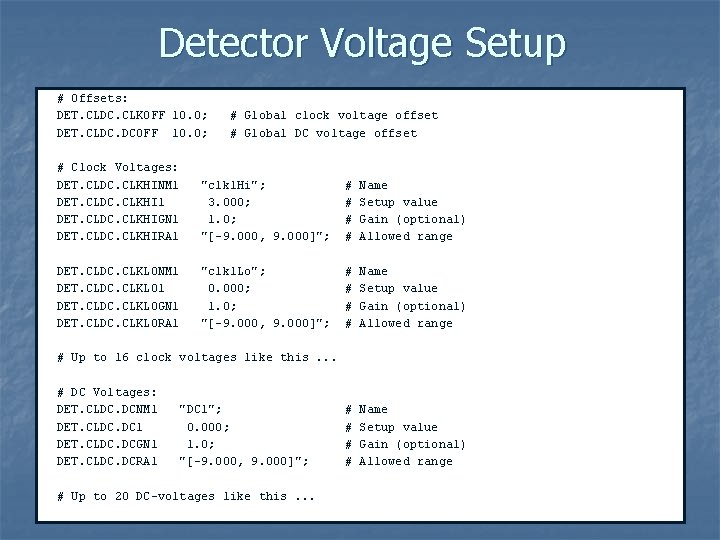
Detector Voltage Setup # Offsets: DET. CLDC. CLKOFF 10. 0; # Global clock voltage offset DET. CLDC. DCOFF 10. 0; # Global DC voltage offset # Clock Voltages: DET. CLDC. CLKHINM 1 "clk 1 Hi"; # Name DET. CLDC. CLKHI 1 3. 000; # Setup value DET. CLDC. CLKHIGN 1 1. 0; # Gain (optional) DET. CLDC. CLKHIRA 1 "[-9. 000, 9. 000]"; # Allowed range DET. CLDC. CLKLONM 1 "clk 1 Lo"; # Name DET. CLDC. CLKLO 1 0. 000; # Setup value DET. CLDC. CLKLOGN 1 1. 0; # Gain (optional) DET. CLDC. CLKLORA 1 "[-9. 000, 9. 000]"; # Allowed range # Up to 16 clock voltages like this. . . # DC Voltages: DET. CLDC. DCNM 1 "DC 1"; # Name DET. CLDC. DC 1 0. 000; # Setup value DET. CLDC. DCGN 1 1. 0; # Gain (optional) DET. CLDC. DCRA 1 "[-9. 000, 9. 000]"; # Allowed range # Up to 20 DC-voltages like this. . .
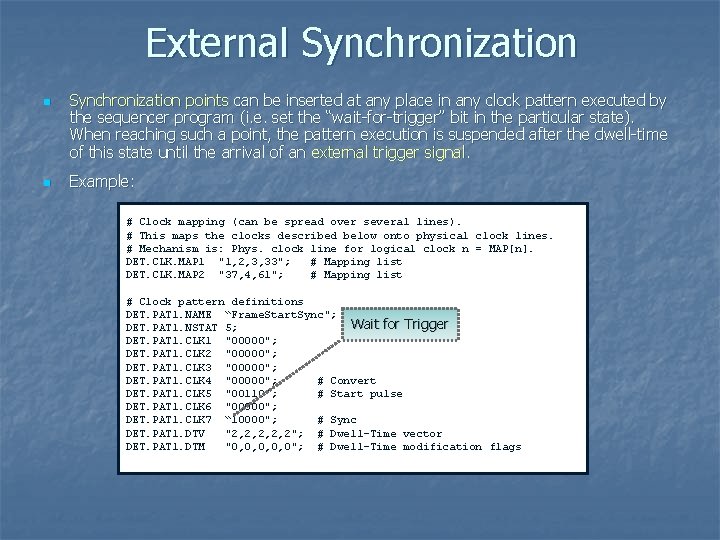
External Synchronization n n Synchronization points can be inserted at any place in any clock pattern executed by the sequencer program (i. e. set the “wait-for-trigger” bit in the particular state). When reaching such a point, the pattern execution is suspended after the dwell-time of this state until the arrival of an external trigger signal. Example: # Clock mapping (can be spread over several lines). # This maps the clocks described below onto physical clock lines. # Mechanism is: Phys. clock line for logical clock n = MAP[n]. DET. CLK. MAP 1 "1, 2, 3, 33"; # Mapping list DET. CLK. MAP 2 "37, 4, 61"; # Mapping list # Clock pattern definitions DET. PAT 1. NAME “Frame. Start. Sync"; Wait for Trigger DET. PAT 1. NSTAT 5; DET. PAT 1. CLK 1 "00000"; DET. PAT 1. CLK 2 "00000"; DET. PAT 1. CLK 3 "00000"; DET. PAT 1. CLK 4 "00000"; # Convert DET. PAT 1. CLK 5 "00110"; # Start pulse DET. PAT 1. CLK 6 "00000"; DET. PAT 1. CLK 7 “ 10000"; # Sync DET. PAT 1. DTV "2, 2, 2"; # Dwell-Time vector DET. PAT 1. DTM "0, 0, 0"; # Dwell-Time modification flags
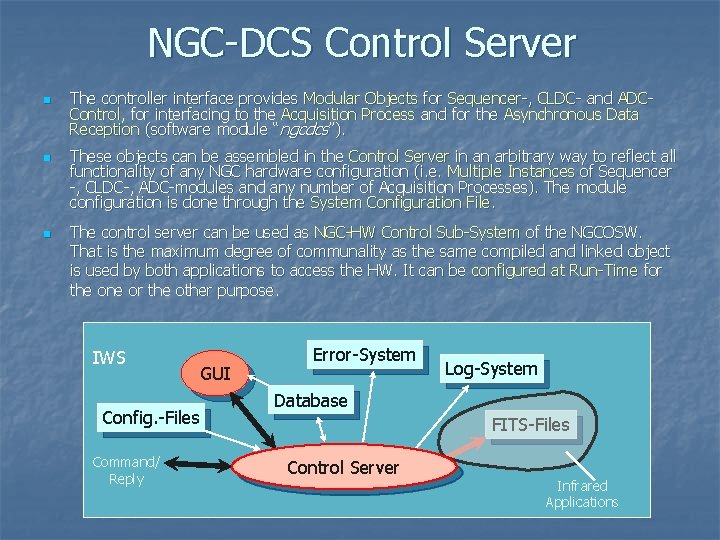
NGC-DCS Control Server n n n The controller interface provides Modular Objects for Sequencer-, CLDC- and ADCControl, for interfacing to the Acquisition Process and for the Asynchronous Data Reception (software module “ngcdcs”). These objects can be assembled in the Control Server in an arbitrary way to reflect all functionality of any NGC hardware configuration (i. e. Multiple Instances of Sequencer -, CLDC-, ADC-modules and any number of Acquisition Processes). The module configuration is done through the System Configuration File. The control server can be used as NGC-HW Control Sub-System of the NGCOSW. That is the maximum degree of communality as the same compiled and linked object is used by both applications to access the HW. It can be configured at Run-Time for the one or the other purpose. IWS Config. -Files Command/ Reply GUI Error-System Log-System Database FITS-Files Control Server Infrared Applications
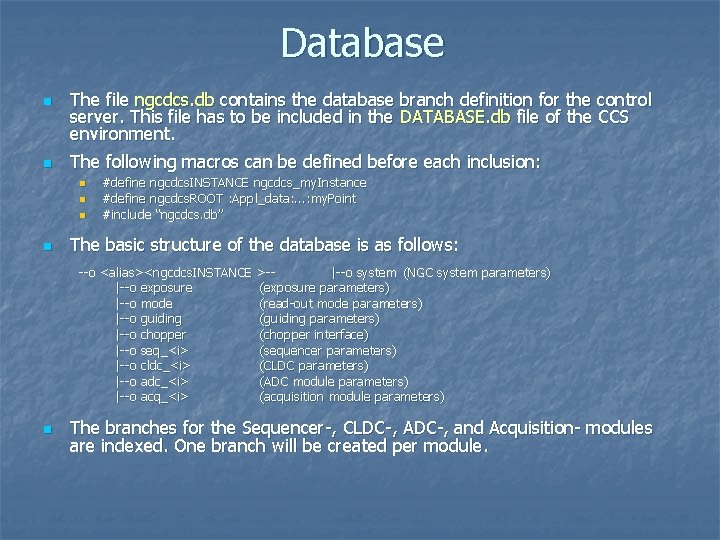
Database n n The file ngcdcs. db contains the database branch definition for the control server. This file has to be included in the DATABASE. db file of the CCS environment. The following macros can be defined before each inclusion: n n #define ngcdcs. INSTANCE ngcdcs_my. Instance #define ngcdcs. ROOT : Appl_data: . . . : my. Point #include “ngcdcs. db” The basic structure of the database is as follows: --o <alias><ngcdcs. INSTANCE >-|--o system (NGC system parameters) |--o exposure (exposure parameters) |--o mode (read-out mode parameters) |--o guiding (guiding parameters) |--o chopper (chopper interface) |--o seq_<i> (sequencer parameters) |--o cldc_<i> (CLDC parameters) |--o adc_<i> (ADC module parameters) |--o acq_<i> (acquisition module parameters) n The branches for the Sequencer-, CLDC-, ADC-, and Acquisition- modules are indexed. One branch will be created per module.
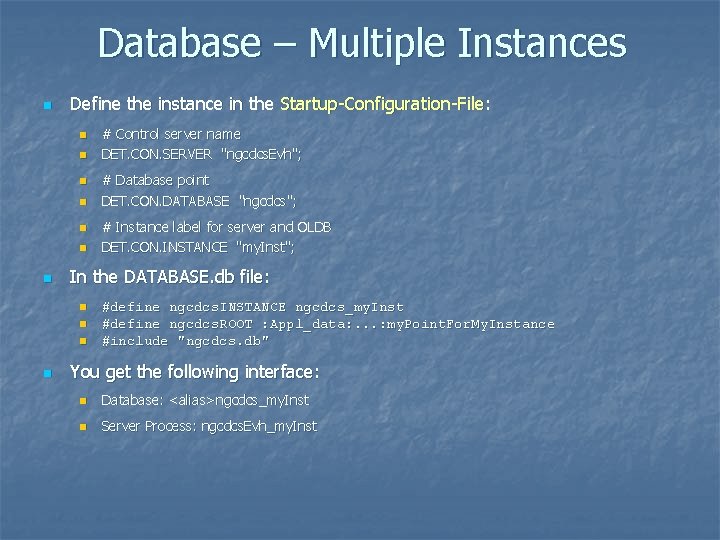
Database – Multiple Instances n Define the instance in the Startup-Configuration-File: n n n n # Database point DET. CON. DATABASE "ngcdcs"; # Instance label for server and OLDB DET. CON. INSTANCE "my. Inst"; In the DATABASE. db file: n n # Control server name DET. CON. SERVER "ngcdcs. Evh"; #define ngcdcs. INSTANCE ngcdcs_my. Inst #define ngcdcs. ROOT : Appl_data: . . . : my. Point. For. My. Instance #include "ngcdcs. db" You get the following interface: n Database: <alias>ngcdcs_my. Inst n Server Process: ngcdcs. Evh_my. Inst
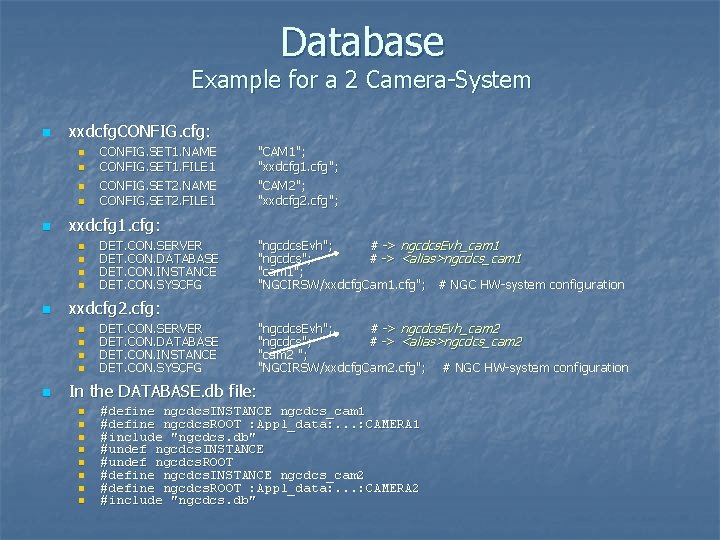
Database Example for a 2 Camera-System n xxdcfg. CONFIG. cfg: n n n DET. CON. SERVER DET. CON. DATABASE DET. CON. INSTANCE DET. CON. SYSCFG "ngcdcs. Evh"; # -> ngcdcs. Evh_cam 1 "ngcdcs"; # -> <alias>ngcdcs_cam 1 "cam 1"; "NGCIRSW/xxdcfg. Cam 1. cfg"; # NGC HW-system configuration xxdcfg 2. cfg: n n n "CAM 1"; "xxdcfg 1. cfg"; "CAM 2"; "xxdcfg 2. cfg"; xxdcfg 1. cfg: n n n CONFIG. SET 1. NAME CONFIG. SET 1. FILE 1 CONFIG. SET 2. NAME CONFIG. SET 2. FILE 1 DET. CON. SERVER DET. CON. DATABASE DET. CON. INSTANCE DET. CON. SYSCFG "ngcdcs. Evh"; # -> ngcdcs. Evh_cam 2 "ngcdcs"; # -> <alias>ngcdcs_cam 2 "; "NGCIRSW/xxdcfg. Cam 2. cfg"; # NGC HW-system configuration In the DATABASE. db file: n n n n #define ngcdcs. INSTANCE ngcdcs_cam 1 #define ngcdcs. ROOT : Appl_data: . . . : CAMERA 1 #include "ngcdcs. db" #undef ngcdcs. INSTANCE #undef ngcdcs. ROOT #define ngcdcs. INSTANCE ngcdcs_cam 2 #define ngcdcs. ROOT : Appl_data: . . . : CAMERA 2 #include "ngcdcs. db"
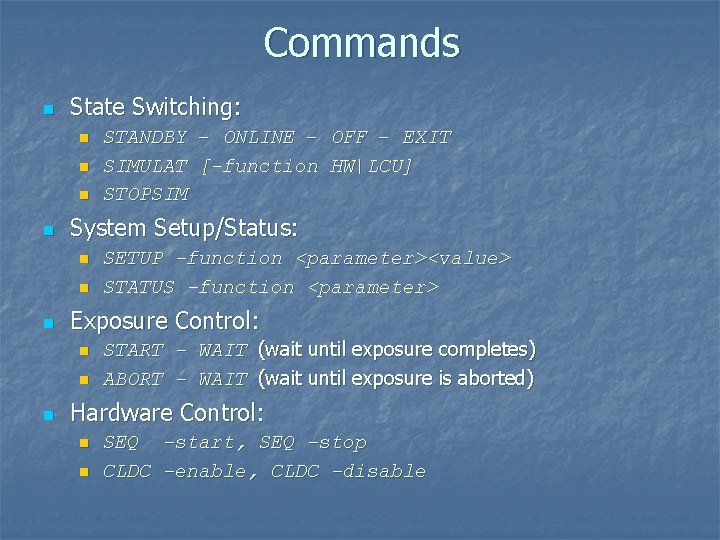
Commands n State Switching: n n System Setup/Status: n n n SETUP –function <parameter><value> STATUS –function <parameter> Exposure Control: n n n STANDBY – ONLINE – OFF – EXIT SIMULAT [-function HW|LCU] STOPSIM START – WAIT (wait until exposure completes) ABORT – WAIT (wait until exposure is aborted) Hardware Control: n n SEQ -start, SEQ -stop CLDC –enable, CLDC -disable
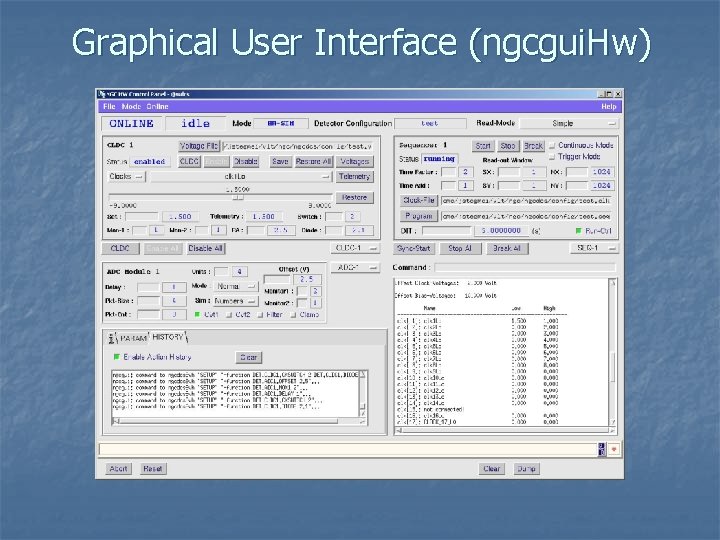
Graphical User Interface (ngcgui. Hw)
NGC Infrared Software IWS Error-System GUI Config. -Files Database FITS-Files Command/ Reply Control Server Device Driver Commands NGC LLCU RTD Acquisition Process (Pre-Processing, Sorting, …) Driver-Interface-Process Data Log-System PCI-Bus Interface Fiber-Optic-Link to NGC Front End
Data Acquisiton Processes n n The pre-processing framework for the multi-threaded Acquisition Process has been taken over from IRACE (software module “ngcpp ”). Currently this is required mainly for the data preprocessing in IR applications. Template Processes have been developed, which are an easy-to-use and stand-alone tool to visualize NGC rawdata on the RTD. The acquisition processes for the ESO Standard IR Detectors (HAWAII 1 Kx 1 K, HAWAII 2 -RG 2 Kx 2 K, …) are assembled in a separate software module (“ngciracq ”). Special setups (e. g. mosaics) for specific instruments may require special software modules (“xxacq ”).
Frame Types n n n User-definable Frame-Types (DIT, STDEV, HCYCLE, intermediate results…). The types can be selected to be generated and/or stored during an “exposure”. Exposure Break-Conditions can be set per “per frametype”. This is the number of frames of a certain type to be stored during the exposure. The exposure terminates when all break-conditions are met. A zero value indicates to store as much as possible frames of that type until all other break-conditions are met. Individual SW-Windows per frame-type. A zero value for the dimension (nx, ny) indicates that the full frame will be requested from the acquisition process.
Data Formats n n n Default data format is “Binary Image Extension”. Data Cubes for Burst-Mode or fast data acquisitions. n Minimum overhead n May require post-processing n One cube per frame-type Single files n n For detector tests in the lab To optimize merging process: start merging already before exposure is completed (e. g. VISTA-instrument).
Data Interface n FITS-Files n n Direct connection to Acquisition Process (e. g. RTD) n n Wait for exposure termination and read the generated FITS-file(s). Retrieve the binary image data with just minimum header information (dimension, type, sequential number). Post-Processing Call-Back n The control server calls a user-defined procedure before the frame is stored.
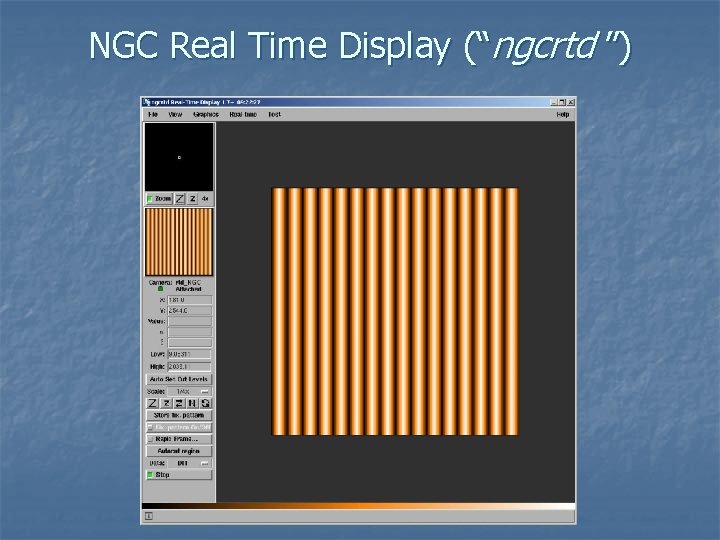
NGC Real Time Display (“ngcrtd ”)
Post-Processing Call-Back n The post-processing call-back is executed whenever a new data frame is received by the data acquisition thread of the control server: n n int Post. Proc. CB(void *buffer, ngcdcs_finfo_t *finfo, eccs. ERROR *error); The ngcdcs_finfo_t structure finfo contains all information for the buffer: int type; - Unique frame type char name[64]; - Unique frame name int fcnt; - Frame counter int scale. Factor; - Scaling factor to be applied to normalize int bit. Pix; - Bits per pixel as defined in the FITS-standard int sx; - Lower left corner (x-direction) int sy; - Lower left corner (y-direction) int nx; - Dimension in x-direction int ny; - Dimension in y-direction double crpix 1; - Reference pixel in x-direction double crpix 2; - Reference pixel in y-direction int det. Idx; - Detector index (for mosaics) int exp. Cnt; - Exposure counter for this type char utc[64]; - Time when frame was ready in the pre-processor ngcdcs. CUBE *cube; - Data cube object to be used for storing to a cube n The post-processing call-back may return one of the following values: n ngcb. SUCCESS ngcb. FAILURE ngcb. SKIP - Successful operation - Failure (add an error string to the error stack) - Successful operation - but skip all further actions on the frame (no storage to file, . . . )
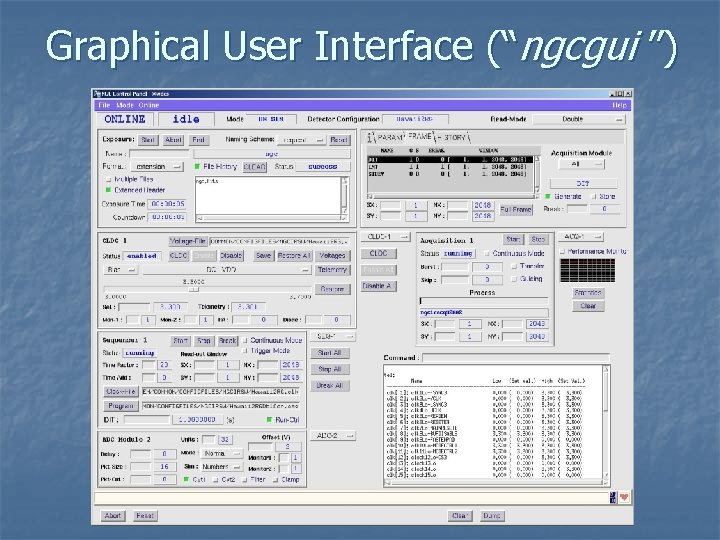
Graphical User Interface (“ngcgui ”)
Application Specific Issues n State Switching Call-Backs n The following call-backs are provided when the server state changes (i. e. upon reception of an ONLINE, STANDBY or OFF command): ccs. COMPL_STAT Online. CB 1(); ccs. COMPL_STAT Online. CB 2(); ccs. COMPL_STAT Standby. CB 1(); ccs. COMPL_STAT Standby. CB 2(); ccs. COMPL_STAT Off. CB 1(); ccs. COMPL_STAT Off. CB 2(); n n The xxx. CB 1() functions are called before the state changes, the xxx. CB 2() functions are called after internal state switching. Setup/Status Call-Backs n The following call-backs are provided upon reception of a SETUP command: ccs. COMPL_STAT Setup. CB 1(char **list, vlt. INT 32 *size); ccs. COMPL_STAT Setup. CB 2(); n The following call-back is provided upon reception of a STATUS command: int Lookup. CB(const char *name, char *value);
Infrared Setup n The data-taking is defined through “Read-Out Modes”: n n Read-out modes are defined by the Sequencer Program(s) running on the sequencer module(s) and by the corresponding Acquisiton Process(es) to be launched. Read-out modes are selected by Name or a Unique ID (a Default Mode can be given). Window Read-Out is done by evaluating the window parameters within the sequencer program. The read-out modes and the voltage- and clock-patternconfiguration files to be loaded when going ON-LINE are defined in a Detector Configuration File. This also defines the detector parameters (size, type, name, mosaic arrangement, …).
Infrared “Exposures” n n Sustained Detector Read-Out and Video Display on the RTD (display remains active during the “Exposure”). Sustained Data-Transfer between NGC-LLCU and IWS for application specific Post-Processing (slow control loops, e. g. secondary auto-guiding). Starting an “Exposure” basically means “starting to transfer data to disk”. Burst-Mode for fast raw data acquisition.
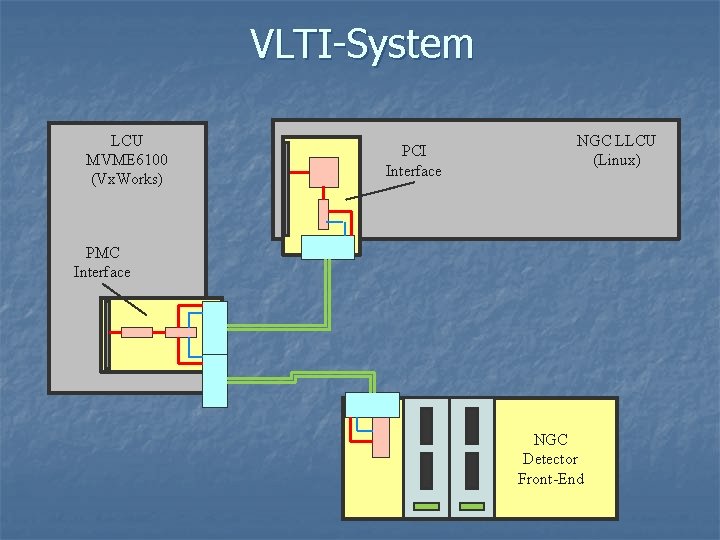
VLTI-System LCU MVME 6100 (Vx. Works) PCI Interface NGC LLCU (Linux) PMC Interface NGC Detector Front-End
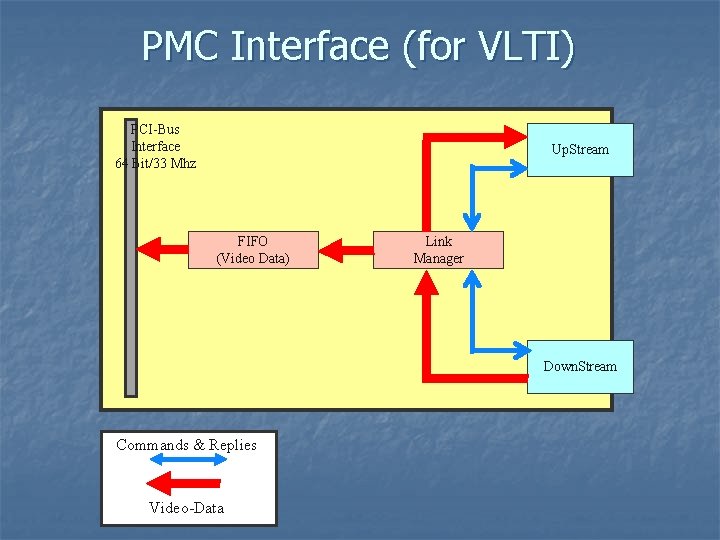
PMC Interface (for VLTI) PCI-Bus Interface 64 Bit/33 Mhz Up. Stream FIFO (Video Data) Link Manager Down. Stream Commands & Replies Video-Data
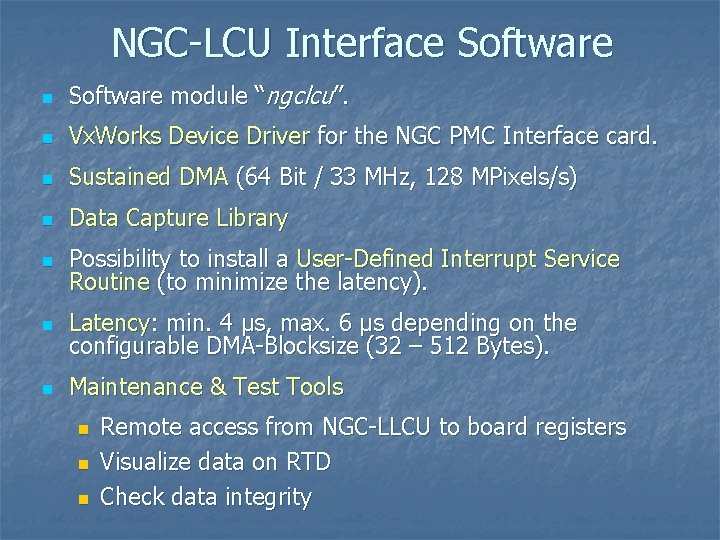
NGC-LCU Interface Software n Software module “ngclcu”. n Vx. Works Device Driver for the NGC PMC Interface card. n Sustained DMA (64 Bit / 33 MHz, 128 MPixels/s) n Data Capture Library n Possibility to install a User-Defined Interrupt Service Routine (to minimize the latency). n Latency: min. 4 µs, max. 6 µs depending on the configurable DMA-Blocksize (32 – 512 Bytes). n Maintenance & Test Tools n n n Remote access from NGC-LLCU to board registers Visualize data on RTD Check data integrity
Preview n Integration into VLTSW-Release. n New Detectors (Aquarius). n Control SW for Sidecar ASIC. n General procedure for Multiple Window Read-Out. n n Handling of the Guide-Window for the HAWAII 2 -RG array (parallel exposures). Acquisition processes for AO-Applications.
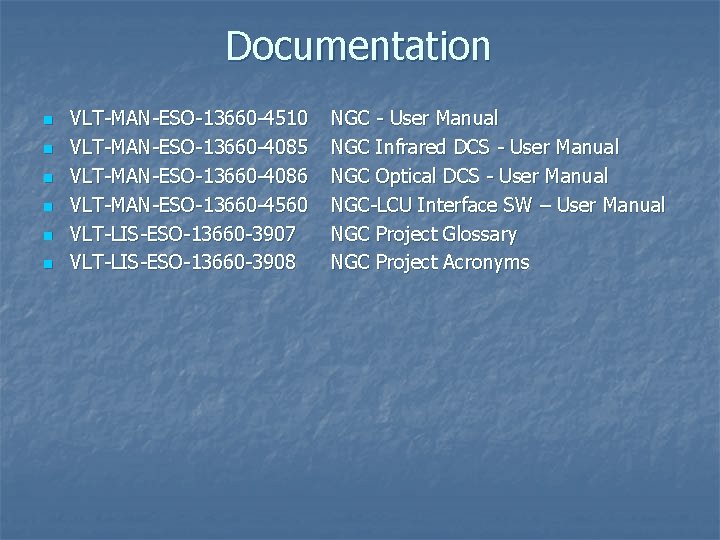
Documentation n n n VLT-MAN-ESO-13660 -4510 VLT-MAN-ESO-13660 -4085 VLT-MAN-ESO-13660 -4086 VLT-MAN-ESO-13660 -4560 VLT-LIS-ESO-13660 -3907 VLT-LIS-ESO-13660 -3908 NGC - User Manual NGC Infrared DCS - User Manual NGC Optical DCS - User Manual NGC-LCU Interface SW – User Manual NGC Project Glossary NGC Project Acronyms
- Slides: 42