
ESA Pilot Datacube for TPMsHMsEEs Andrea Della Vecchia
ESA Pilot Datacube for TPMs/HMs/EEs Andrea Della Vecchia, Mirko Albani, Damiano Guerrucci (ESA) Simone Mantovani (MEEO) 23/10/2018 ESA UNCLASSIFIED - For Official Use
Introduction Collaborative Environment Example of current Collaborative Environments Thematic Exploitation Platform Mission Exploitation Platform Joint ESA-NASA Multi-Mission Analysis Platform ESA Collaborative Environment CEOS WGISS#46 – Oberpfaffenhofen (Munich) - German Aerospace Center (DLR) | 23/10/2018 | Slide 2
Introduction Collaborative Environment Example of current Collaborative Environments Thematic Exploitation Platform Mission Exploitation Platform Joint ESA-NASA Multi-Mission Analysis Platform ESA Collaborative Environment CEOS WGISS#46 – Oberpfaffenhofen (Munich) - German Aerospace Center (DLR) | 23/10/2018 | Slide 3
Collaborative Environment EO collaborative environment is a virtual working environment providing access to EO data and analysis tools, processors, information and Communication Technology resources required to work with them, through one coherent interface. A collaborative environment aims to change the paradigm from “data to user“ to “user to data” CEOS WGISS#46 – Oberpfaffenhofen (Munich) - German Aerospace Center (DLR) | 23/10/2018 | Slide 4
Introduction Collaborative Environment Example of current Collaborative Environments Thematic Exploitation Platform Mission Exploitation Platform Joint ESA-NASA Multi-Mission Analysis Platform ESA Collaborative Environment CEOS WGISS#46 – Oberpfaffenhofen (Munich) - German Aerospace Center (DLR) | 23/10/2018 | Slide 5
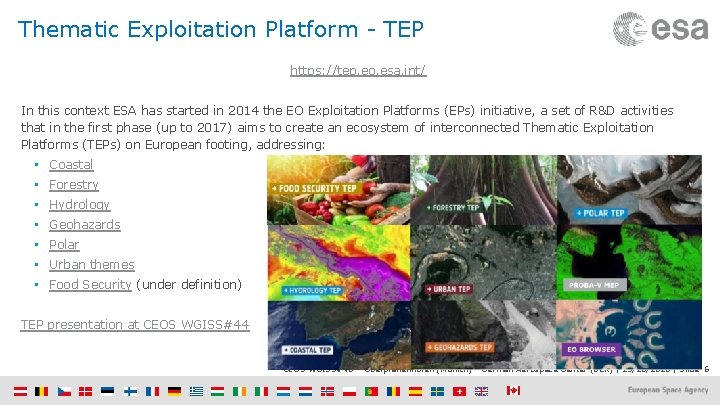
Thematic Exploitation Platform - TEP https: //tep. eo. esa. int/ In this context ESA has started in 2014 the EO Exploitation Platforms (EPs) initiative, a set of R&D activities that in the first phase (up to 2017) aims to create an ecosystem of interconnected Thematic Exploitation Platforms (TEPs) on European footing, addressing: • Coastal • Forestry • Hydrology • Geohazards • Polar • Urban themes • Food Security (under definition) TEP presentation at CEOS WGISS#44 CEOS WGISS#46 – Oberpfaffenhofen (Munich) - German Aerospace Center (DLR) | 23/10/2018 | Slide 6
PV Mission Exploitation Platform – MEP The PROBA-V Mission Exploitation Platform (PV-MEP) is an ESA pathfinder project aiming to: - Build and operational Exploitation Platform - Give full access to PROBA-V data repository (@VITO PDF) - Integrate, correlative data and derived products addressing the wider vegetation user community with the final aim to ease and foster the use of PROBA-V data. CEOS WGISS#46 – Oberpfaffenhofen (Munich) - German Aerospace Center (DLR) | 23/10/2018 | Slide 7
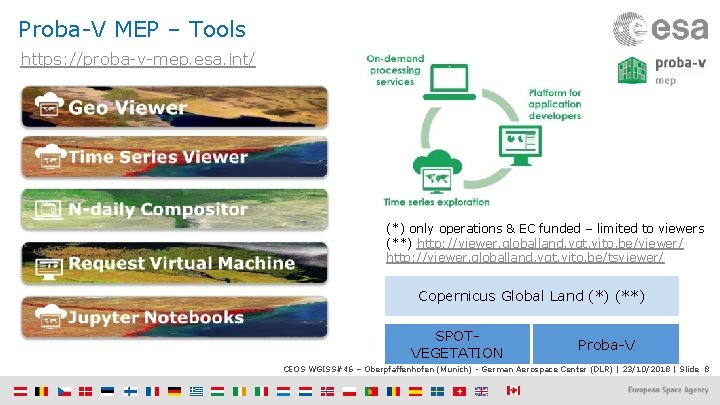
Proba-V MEP – Tools https: //proba-v-mep. esa. int/ (*) only operations & EC funded – limited to viewers (**) http: //viewer. globalland. vgt. vito. be/viewer/ http: //viewer. globalland. vgt. vito. be/tsviewer/ Copernicus Global Land (*) (**) SPOTVEGETATION Proba-V CEOS WGISS#46 – Oberpfaffenhofen (Munich) - German Aerospace Center (DLR) | 23/10/2018 | Slide 8
Joint ESA-NASA Multi-Mission Analysis Platform (MAP) CEOS WGISS#46 – Oberpfaffenhofen (Munich) - German Aerospace Center (DLR) | 23/10/2018 | Slide 9
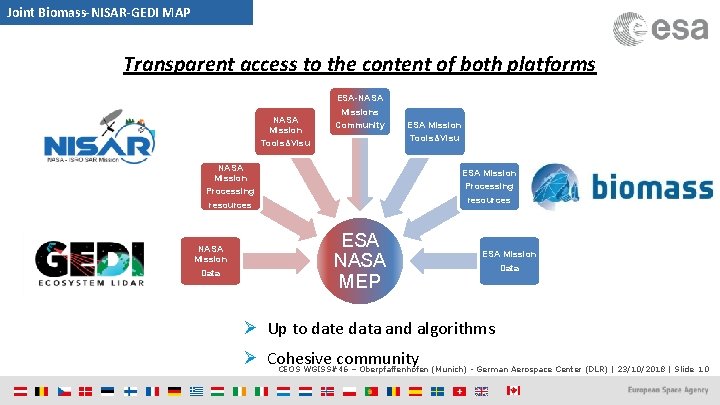
Joint Biomass-NISAR-GEDI MAP Transparent access to the content of both platforms ESA-NASA Mission Tools&Visu Missions Community Tools&Visu NASA Mission Processing resources NASA Mission Data ESA Mission Processing resources ESA NASA MEP ESA Mission Data Ø Up to date data and algorithms Ø Cohesive community CEOS WGISS#46 – Oberpfaffenhofen (Munich) - German Aerospace Center (DLR) | 23/10/2018 | Slide 10

Joint ESA-NASA MAP Objectives − To provide to the users a common virtual working environment − Federation of two (or more) platforms to allow to both US and European users a transparent access to the content of both platforms, CEOS WGISS guidelines shall be considered − To allow end-users to access up-to-date data and algorithms for biomass estimation and to increase the cohesion of the P/L-band SAR and biosphere communities − The capabilities envisioned for the MAP will enable for the first time efficient and tailorable intercomparison, cross-calibration, and fusion of data from these missions for a broad class of scientists and other users (notably with respective ground segments and cal/val activities) CEOS WGISS#46 – Oberpfaffenhofen (Munich) - German Aerospace Center (DLR) | 23/10/2018 | Slide 11
Introduction Collaborative Environment Example of current Collaborative Environments Thematic Exploitation Platform Mission Exploitation Platform Joint ESA-NASA Multi-Mission Analysis Platform ESA Collaborative Environment CEOS WGISS#46 – Oberpfaffenhofen (Munich) - German Aerospace Center (DLR) | 23/10/2018 | Slide 12
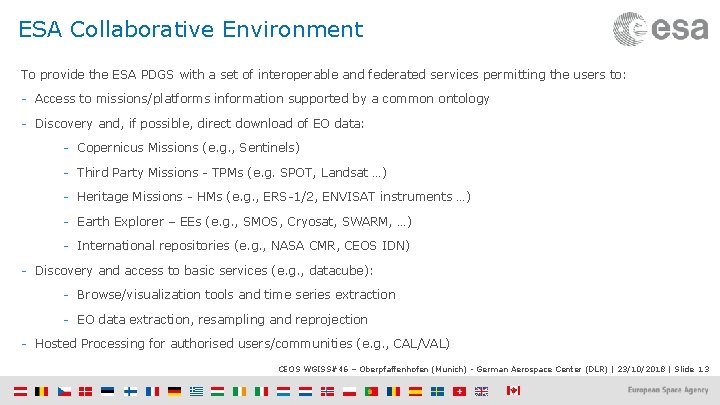
ESA Collaborative Environment To provide the ESA PDGS with a set of interoperable and federated services permitting the users to: - Access to missions/platforms information supported by a common ontology - Discovery and, if possible, direct download of EO data: - Copernicus Missions (e. g. , Sentinels) - Third Party Missions - TPMs (e. g. SPOT, Landsat …) - Heritage Missions - HMs (e. g. , ERS-1/2, ENVISAT instruments …) - Earth Explorer – EEs (e. g. , SMOS, Cryosat, SWARM, …) - International repositories (e. g. , NASA CMR, CEOS IDN) - Discovery and access to basic services (e. g. , datacube): - Browse/visualization tools and time series extraction - EO data extraction, resampling and reprojection - Hosted Processing for authorised users/communities (e. g. , CAL/VAL) CEOS WGISS#46 – Oberpfaffenhofen (Munich) - German Aerospace Center (DLR) | 23/10/2018 | Slide 13
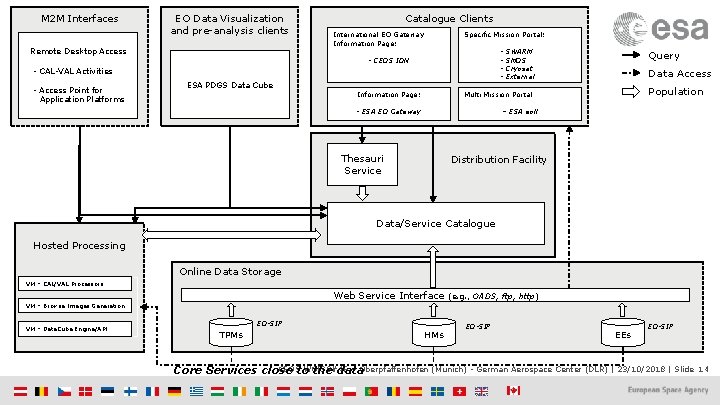
M 2 M Interfaces EO Data Visualization and pre-analysis clients Remote Desktop Access Catalogue Clients International EO Gateway Information Page: Specific Mission Portal: - - CEOS IDN - CAL-VAL Activities - Access Point for Application Platforms ESA PDGS Data Cube Information Page: SWARM SMOS Cryosat External Query Data Access Population Multi Mission Portal - ESA EO Gateway – ESA eoli Thesauri Service Distribution Facility Data/Service Catalogue Hosted Processing Online Data Storage VM – CAL/VAL Processors Web Service Interface (e. g. , OADS, ftp, http) VM – Browse Images Generation VM – Data. Cube Engine/API EO-SIP TPMs HMs EO-SIP EEs EO-SIP CEOSto WGISS#46 – Oberpfaffenhofen (Munich) - German Aerospace Center (DLR) | 23/10/2018 | Slide Core Services close the data 14
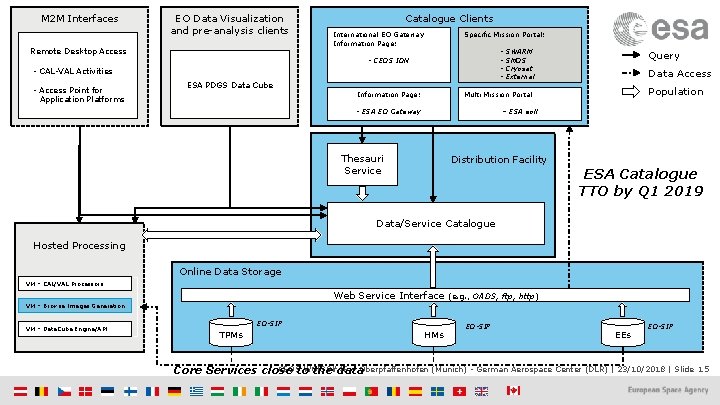
M 2 M Interfaces EO Data Visualization and pre-analysis clients Remote Desktop Access Catalogue Clients International EO Gateway Information Page: Specific Mission Portal: - - CEOS IDN - CAL-VAL Activities - Access Point for Application Platforms ESA PDGS Data Cube Information Page: SWARM SMOS Cryosat External Query Data Access Population Multi Mission Portal - ESA EO Gateway – ESA eoli Thesauri Service Distribution Facility ESA Catalogue TTO by Q 1 2019 Data/Service Catalogue Hosted Processing Online Data Storage VM – CAL/VAL Processors Web Service Interface (e. g. , OADS, ftp, http) VM – Browse Images Generation VM – Data. Cube Engine/API EO-SIP TPMs HMs EO-SIP EEs EO-SIP CEOSto WGISS#46 – Oberpfaffenhofen (Munich) - German Aerospace Center (DLR) | 23/10/2018 | Slide Core Services close the data 15
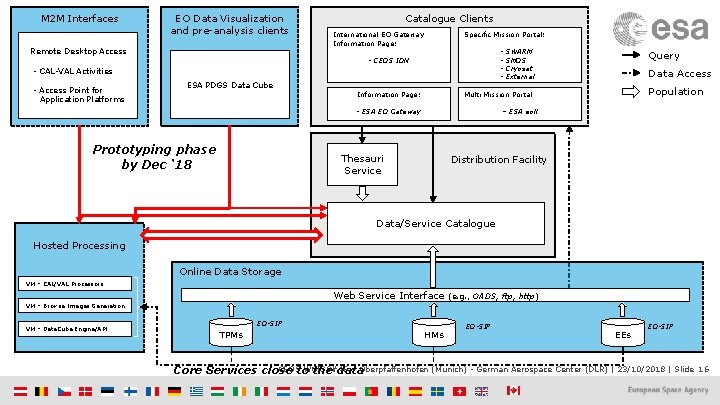
M 2 M Interfaces EO Data Visualization and pre-analysis clients Remote Desktop Access Catalogue Clients International EO Gateway Information Page: Specific Mission Portal: - - CEOS IDN - CAL-VAL Activities - Access Point for Application Platforms ESA PDGS Data Cube Information Page: Query Data Access Population Multi Mission Portal - ESA EO Gateway Prototyping phase by Dec ‘ 18 SWARM SMOS Cryosat External – ESA eoli Thesauri Service Distribution Facility Data/Service Catalogue Hosted Processing Online Data Storage VM – CAL/VAL Processors Web Service Interface (e. g. , OADS, ftp, http) VM – Browse Images Generation VM – Data. Cube Engine/API EO-SIP TPMs HMs EO-SIP EEs EO-SIP CEOSto WGISS#46 – Oberpfaffenhofen (Munich) - German Aerospace Center (DLR) | 23/10/2018 | Slide Core Services close the data 16
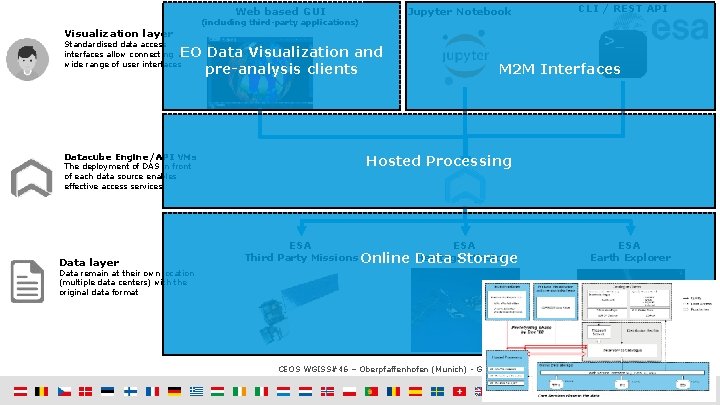
Web based GUI Jupyter Notebook (including third-party applications) Visualization layer Standardised data access interfaces allow connecting a wide range of user interfaces EO Data Visualization and pre-analysis clients Datacube Engine/API VMs The deployment of DAS in front of each data source enables effective access services Data layer CLI / REST API M 2 M Interfaces Hosted Processing ESA Third Party Missions Online Data Heritage Missions Storage ESA Earth Explorer Data remain at their own location (multiple data centers) with the original data format CEOS WGISS#46 – Oberpfaffenhofen (Munich) - German Aerospace Center (DLR) | 23/10/2018 | Slide 17
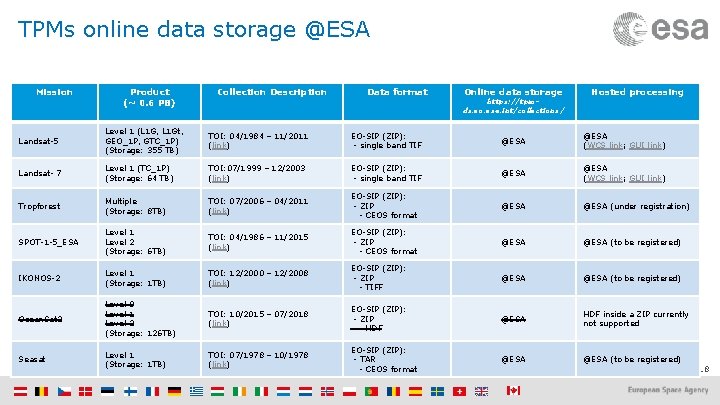
TPMs online data storage @ESA Mission Product (~ 0. 6 PB) Collection Description Data format Online data storage https: //tpmds. eo. esa. int/collections/ Hosted processing Landsat-5 Level 1 (L 1 G, L 1 Gt, GEO_1 P, GTC_1 P) (Storage: 355 TB) TOI: 04/1984 – 11/2011 (link) EO-SIP (ZIP): - single band TIF @ESA (WCS link; GUI link) Landsat- 7 Level 1 (TC_1 P) (Storage: 64 TB) TOI: 07/1999 – 12/2003 (link) EO-SIP (ZIP): - single band TIF @ESA (WCS link; GUI link) Tropforest Multiple (Storage: 8 TB) TOI: 07/2006 – 04/2011 (link) EO-SIP (ZIP): - ZIP - CEOS format @ESA (under registration) SPOT-1 -5_ESA Level 1 Level 2 (Storage: 6 TB) TOI: 04/1986 – 11/2015 (link) EO-SIP (ZIP): - ZIP - CEOS format @ESA (to be registered) IKONOS-2 Level 1 (Storage: 1 TB) TOI: 12/2000 – 12/2008 (link) EO-SIP (ZIP): - ZIP - TIFF @ESA (to be registered) Ocean. Sat 2 Level 0 Level 1 Level 2 (Storage: 126 TB) TOI: 10/2015 – 07/2018 (link) EO-SIP (ZIP): - ZIP - HDF @ESA HDF inside a ZIP currently not supported Seasat Level 1 (Storage: 1 TB) EO-SIP (ZIP): TOI: 07/1978 – 10/1978 - TAR @ESA (to be registered) (link) - CEOS format CEOS WGISS#46 – Oberpfaffenhofen (Munich) - German Aerospace Center (DLR) | 23/10/2018 | Slide 18
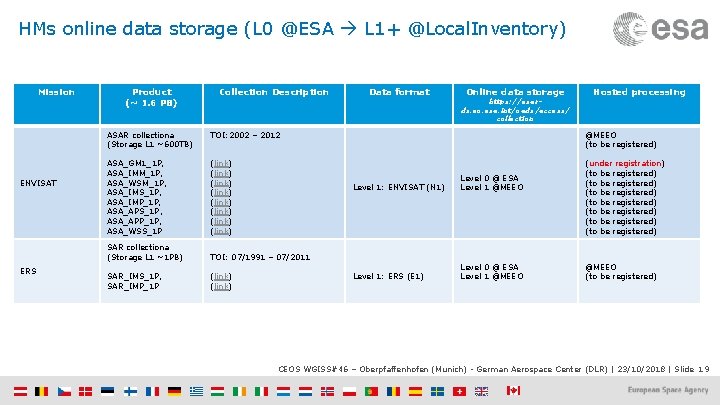
HMs online data storage (L 0 @ESA L 1+ @Local. Inventory) Mission ENVISAT ERS Product (~ 1. 6 PB) Collection Description Data format Online data storage https: //esards. eo. esa. int/oads/access/ collection Hosted processing ASAR collectiona (Storage L 1 ~600 TB) TOI: 2002 – 2012 @MEEO (to be registered) ASA_GM 1_1 P, ASA_IMM_1 P, ASA_WSM_1 P, ASA_IMS_1 P, ASA_IMP_1 P, ASA_APS_1 P, ASA_APP_1 P, ASA_WSS_1 P (link) (link) (under registration) (to be registered) (to be registered) SAR collectiona (Storage L 1 ~1 PB) TOI: 07/1991 – 07/2011 SAR_IMS_1 P, SAR_IMP_1 P (link) Level 1: ENVISAT (N 1) Level 0 @ ESA Level 1 @MEEO Level 1: ERS (E 1) Level 0 @ ESA Level 1 @MEEO (to be registered) CEOS WGISS#46 – Oberpfaffenhofen (Munich) - German Aerospace Center (DLR) | 23/10/2018 | Slide 19
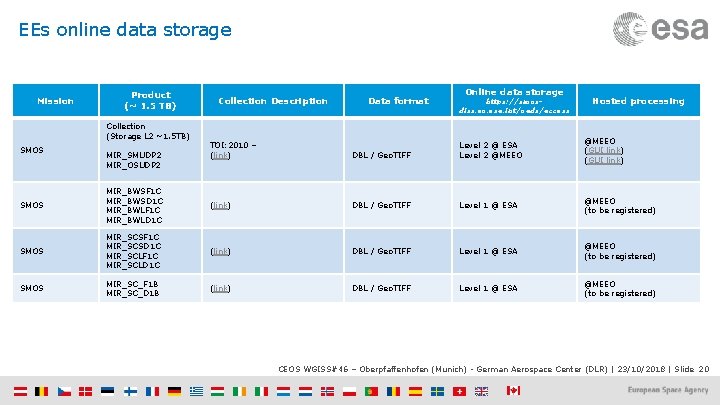
EEs online data storage Mission Product (~ 1. 5 TB) Collection (Storage L 2 ~1. 5 TB) Collection Description Data format Online data storage https: //smosdiss. eo. esa. int/oads/access Hosted processing DBL / Geo. TIFF Level 2 @ ESA Level 2 @MEEO (GUI link) (link) DBL / Geo. TIFF Level 1 @ ESA @MEEO (to be registered) SMOS MIR_SCSF 1 C MIR_SCSD 1 C MIR_SCLF 1 C MIR_SCLD 1 C (link) DBL / Geo. TIFF Level 1 @ ESA @MEEO (to be registered) SMOS MIR_SC_F 1 B MIR_SC_D 1 B (link) DBL / Geo. TIFF Level 1 @ ESA @MEEO (to be registered) TOI: 2010 – (link) SMOS MIR_BWSF 1 C MIR_BWSD 1 C MIR_BWLF 1 C MIR_BWLD 1 C SMOS MIR_SMUDP 2 MIR_OSUDP 2 CEOS WGISS#46 – Oberpfaffenhofen (Munich) - German Aerospace Center (DLR) | 23/10/2018 | Slide 20
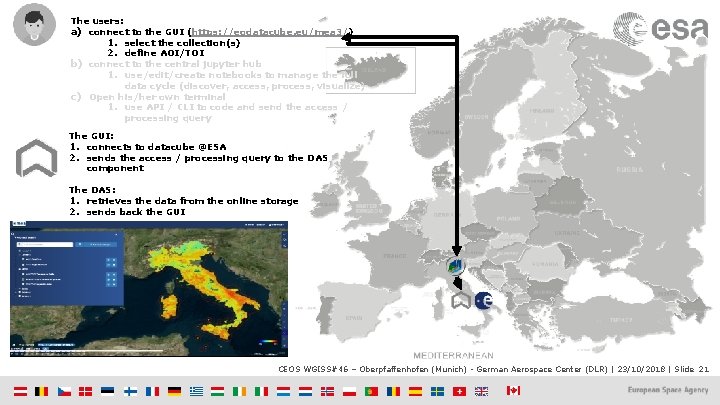
The users: a) connect to the GUI (https: //eodatacube. eu/mea 3/) 1. select the collection(s) 2. define AOI/TOI b) connect to the central jupyter hub 1. use/edit/create notebooks to manage the full data cycle (discover, access, process, visualize) c) Open his/her own terminal 1. use API / CLI to code and send the access / processing query The GUI: 1. connects to datacube @ESA 2. sends the access / processing query to the DAS component The DAS: 1. retrieves the data from the online storage 2. sends back the GUI CEOS WGISS#46 – Oberpfaffenhofen (Munich) - German Aerospace Center (DLR) | 23/10/2018 | Slide 21
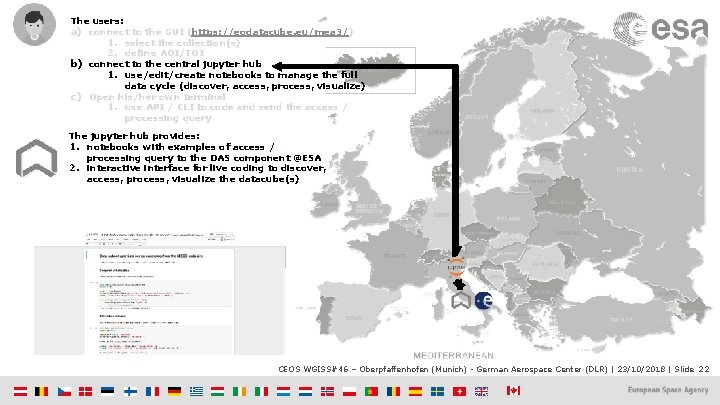
The users: a) connect to the GUI (https: //eodatacube. eu/mea 3/) 1. select the collection(s) 2. define AOI/TOI b) connect to the central jupyter hub 1. use/edit/create notebooks to manage the full data cycle (discover, access, process, visualize) c) Open his/her own terminal 1. use API / CLI to code and send the access / processing query The jupyter hub provides: 1. notebooks with examples of access / processing query to the DAS component @ESA 2. interactive interface for live coding to discover, access, process, visualize the datacube(s) CEOS WGISS#46 – Oberpfaffenhofen (Munich) - German Aerospace Center (DLR) | 23/10/2018 | Slide 22
FEDERATION CEOS WGISS#46 – Oberpfaffenhofen (Munich) - German Aerospace Center (DLR) | 23/10/2018 | Slide 23
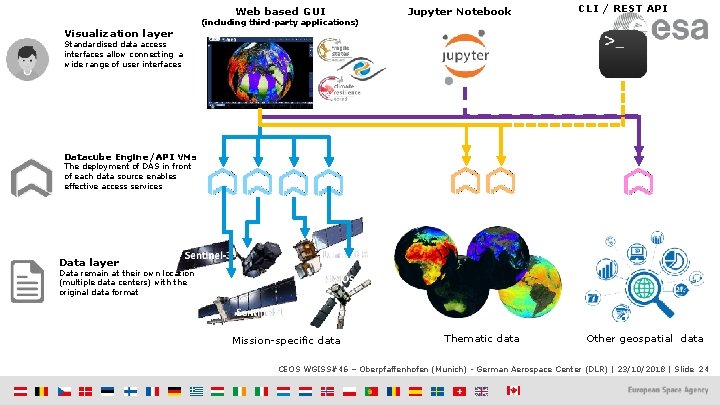
Web based GUI Visualization layer (including third-party applications) Jupyter Notebook CLI / REST API Standardised data access interfaces allow connecting a wide range of user interfaces Datacube Engine/API VMs The deployment of DAS in front of each data source enables effective access services Data layer Data remain at their own location (multiple data centers) with the original data format Mission-specific data Thematic data Other geospatial data CEOS WGISS#46 – Oberpfaffenhofen (Munich) - German Aerospace Center (DLR) | 23/10/2018 | Slide 24
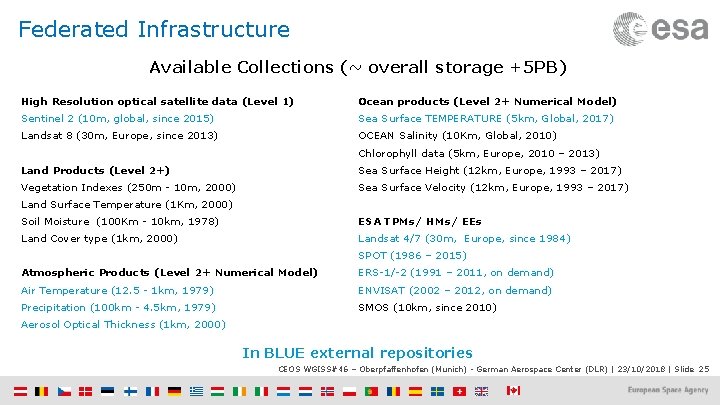
Federated Infrastructure Available Collections (~ overall storage +5 PB) High Resolution optical satellite data (Level 1) Ocean products (Level 2+ Numerical Model) Sentinel 2 (10 m, global, since 2015) Sea Surface TEMPERATURE (5 km, Global, 2017) Landsat 8 (30 m, Europe, since 2013) OCEAN Salinity (10 Km, Global, 2010) Chlorophyll data (5 km, Europe, 2010 – 2013) Land Products (Level 2+) Sea Surface Height (12 km, Europe, 1993 – 2017) Vegetation Indexes (250 m - 10 m, 2000) Sea Surface Velocity (12 km, Europe, 1993 – 2017) Land Surface Temperature (1 Km, 2000) Soil Moisture (100 Km - 10 km, 1978) ESA TPMs/ HMs/ EEs Land Cover type (1 km, 2000) Landsat 4/7 (30 m, Europe, since 1984) SPOT (1986 – 2015) Atmospheric Products (Level 2+ Numerical Model) ERS-1/-2 (1991 – 2011, on demand) Air Temperature (12. 5 - 1 km, 1979) ENVISAT (2002 – 2012, on demand) Precipitation (100 km - 4. 5 km, 1979) SMOS (10 km, since 2010) Aerosol Optical Thickness (1 km, 2000) In BLUE external repositories CEOS WGISS#46 – Oberpfaffenhofen (Munich) - German Aerospace Center (DLR) | 23/10/2018 | Slide 25
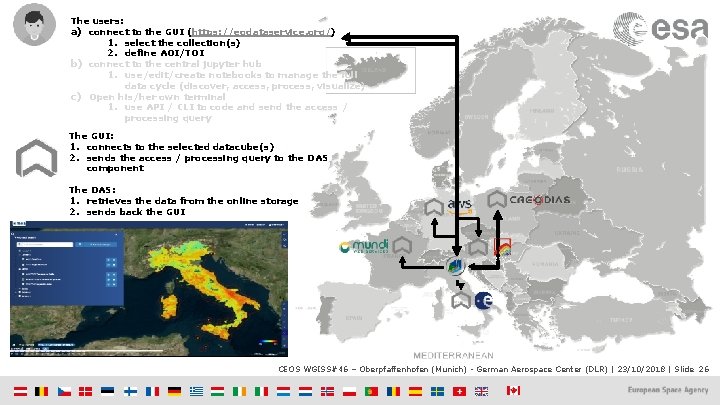
The users: a) connect to the GUI (https: //eodataservice. org/) 1. select the collection(s) 2. define AOI/TOI b) connect to the central jupyter hub 1. use/edit/create notebooks to manage the full data cycle (discover, access, process, visualize) c) Open his/her own terminal 1. use API / CLI to code and send the access / processing query The GUI: 1. connects to the selected datacube(s) 2. sends the access / processing query to the DAS component The DAS: 1. retrieves the data from the online storage 2. sends back the GUI CEOS WGISS#46 – Oberpfaffenhofen (Munich) - German Aerospace Center (DLR) | 23/10/2018 | Slide 26
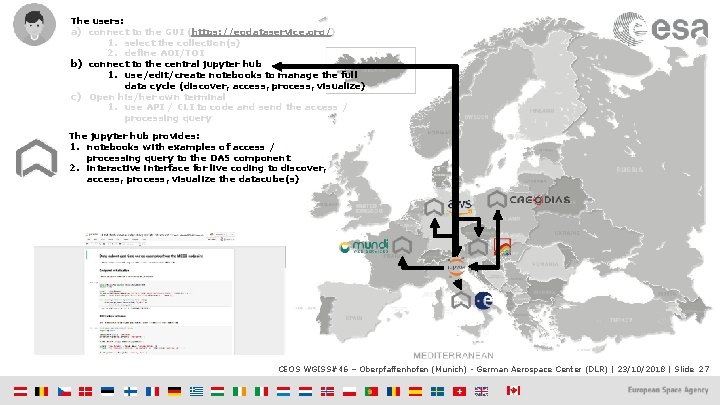
The users: a) connect to the GUI (https: //eodataservice. org/) 1. select the collection(s) 2. define AOI/TOI b) connect to the central jupyter hub 1. use/edit/create notebooks to manage the full data cycle (discover, access, process, visualize) c) Open his/her own terminal 1. use API / CLI to code and send the access / processing query The jupyter hub provides: 1. notebooks with examples of access / processing query to the DAS component 2. interactive interface for live coding to discover, access, process, visualize the datacube(s) CEOS WGISS#46 – Oberpfaffenhofen (Munich) - German Aerospace Center (DLR) | 23/10/2018 | Slide 27
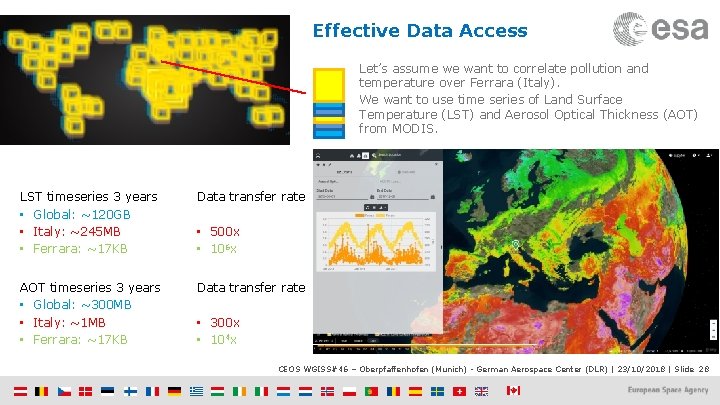
Effective Data Access Let’s assume we want to correlate pollution and temperature over Ferrara (Italy). We want to use time series of Land Surface Temperature (LST) and Aerosol Optical Thickness (AOT) from MODIS. LST timeseries 3 years • Global: ~120 GB • Italy: ~245 MB • Ferrara: ~17 KB Data transfer rate AOT timeseries 3 years • Global: ~300 MB • Italy: ~1 MB • Ferrara: ~17 KB Data transfer rate • 500 x • 106 x • 300 x • 104 x CEOS WGISS#46 – Oberpfaffenhofen (Munich) - German Aerospace Center (DLR) | 23/10/2018 | Slide 28
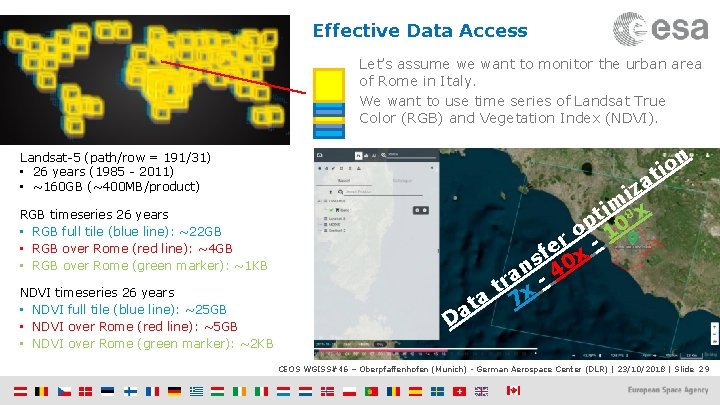
Effective Data Access Let’s assume we want to monitor the urban area of Rome in Italy. We want to use time series of Landsat True Color (RGB) and Vegetation Index (NDVI). n o i t Landsat-5 (path/row = 191/31) • 26 years (1985 - 2011) • ~160 GB (~400 MB/product) a iz im 8 x t p 0 o r -1 e sf 0 x n a -4 r t x a 7 at RGB timeseries 26 years • RGB full tile (blue line): ~22 GB • RGB over Rome (red line): ~4 GB • RGB over Rome (green marker): ~1 KB NDVI timeseries 26 years • NDVI full tile (blue line): ~25 GB • NDVI over Rome (red line): ~5 GB • NDVI over Rome (green marker): ~2 KB D CEOS WGISS#46 – Oberpfaffenhofen (Munich) - German Aerospace Center (DLR) | 23/10/2018 | Slide 29
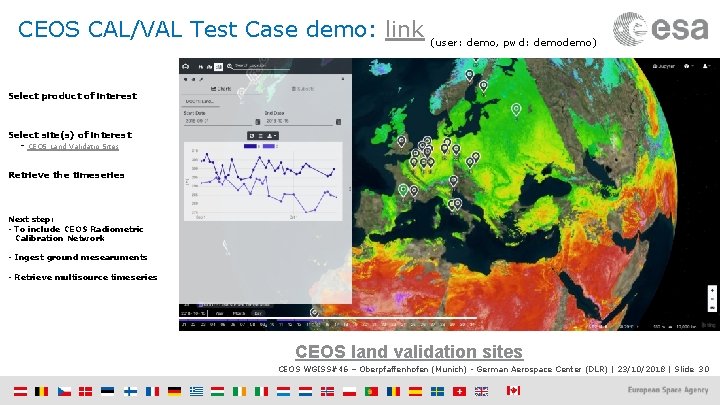
CEOS CAL/VAL Test Case demo: link (user: demo, pwd: demo) Select product of interest Select site(s) of interest - CEOS Land Validatio Sites Retrieve the timeseries Next step: - To include CEOS Radiometric Calibration Network - Ingest ground mesearuments - Retrieve multisource timeseries CEOS land validation sites CEOS WGISS#46 – Oberpfaffenhofen (Munich) - German Aerospace Center (DLR) | 23/10/2018 | Slide 30
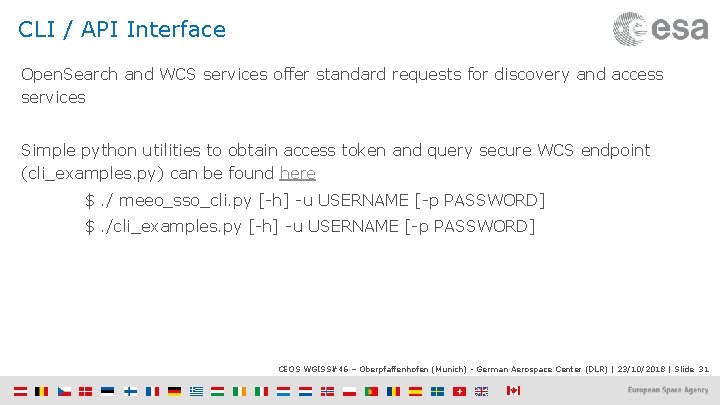
CLI / API Interface Open. Search and WCS services offer standard requests for discovery and access services Simple python utilities to obtain access token and query secure WCS endpoint (cli_examples. py) can be found here $. / meeo_sso_cli. py [-h] -u USERNAME [-p PASSWORD] $. /cli_examples. py [-h] -u USERNAME [-p PASSWORD] CEOS WGISS#46 – Oberpfaffenhofen (Munich) - German Aerospace Center (DLR) | 23/10/2018 | Slide 31
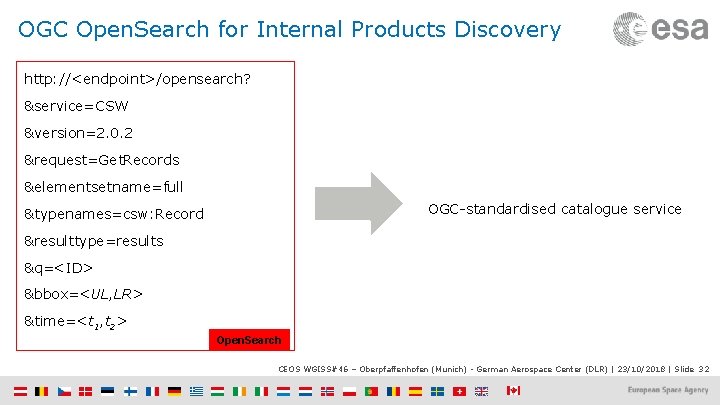
OGC Open. Search for Internal Products Discovery http: //<endpoint>/opensearch? &service=CSW &version=2. 0. 2 &request=Get. Records &elementsetname=full OGC-standardised catalogue service &typenames=csw: Record &resulttype=results &q=<ID> &bbox=<UL, LR> &time=<t 1, t 2> Open. Search CEOS WGISS#46 – Oberpfaffenhofen (Munich) - German Aerospace Center (DLR) | 23/10/2018 | Slide 32
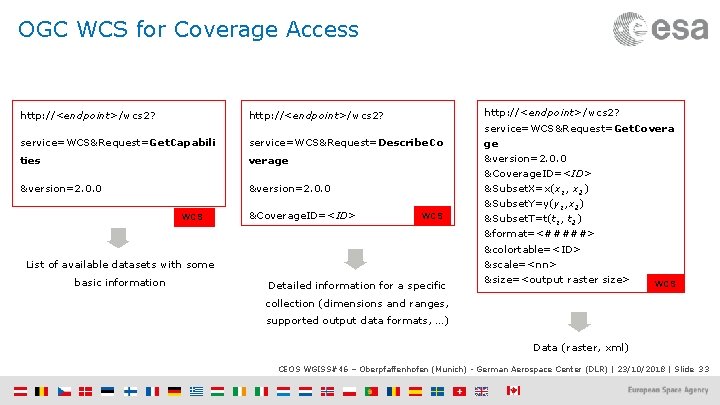
OGC WCS for Coverage Access http: //<endpoint>/wcs 2? service=WCS&Request=Get. Capabili service=WCS&Request=Describe. Co ties verage &version=2. 0. 0 WCS &Coverage. ID=<ID> WCS List of available datasets with some basic information Detailed information for a specific http: //<endpoint>/wcs 2? service=WCS&Request=Get. Covera ge &version=2. 0. 0 &Coverage. ID=<ID> &Subset. X=x(x 1, x 2) &Subset. Y=y(y 1, x 2) &Subset. T=t(t 1, t 2) &format=<#####> &colortable=<ID> &scale=<nn> &size=<output raster size> WCS collection (dimensions and ranges, supported output data formats, …) Data (raster, xml) CEOS WGISS#46 – Oberpfaffenhofen (Munich) - German Aerospace Center (DLR) | 23/10/2018 | Slide 33
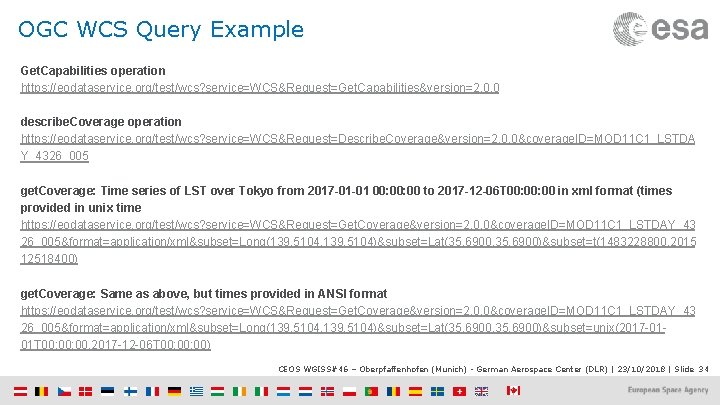
OGC WCS Query Example Get. Capabilities operation https: //eodataservice. org/test/wcs? service=WCS&Request=Get. Capabilities&version=2. 0. 0 describe. Coverage operation https: //eodataservice. org/test/wcs? service=WCS&Request=Describe. Coverage&version=2. 0. 0&coverage. ID=MOD 11 C 1_LSTDA Y_4326_005 get. Coverage: Time series of LST over Tokyo from 2017 -01 -01 00: 00 to 2017 -12 -06 T 00: 00 in xml format (times provided in unix time https: //eodataservice. org/test/wcs? service=WCS&Request=Get. Coverage&version=2. 0. 0&coverage. ID=MOD 11 C 1_LSTDAY_43 26_005&format=application/xml&subset=Long(139. 5104, 139. 5104)&subset=Lat(35. 6900, 35. 6900)&subset=t(1483228800, 2015 12518400) get. Coverage: Same as above, but times provided in ANSI format https: //eodataservice. org/test/wcs? service=WCS&Request=Get. Coverage&version=2. 0. 0&coverage. ID=MOD 11 C 1_LSTDAY_43 26_005&format=application/xml&subset=Long(139. 5104, 139. 5104)&subset=Lat(35. 6900, 35. 6900)&subset=unix(2017 -0101 T 00: 00, 2017 -12 -06 T 00: 00) CEOS WGISS#46 – Oberpfaffenhofen (Munich) - German Aerospace Center (DLR) | 23/10/2018 | Slide 34
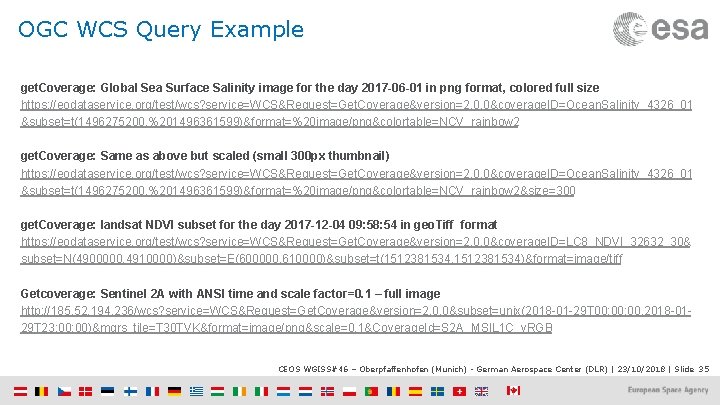
OGC WCS Query Example get. Coverage: Global Sea Surface Salinity image for the day 2017 -06 -01 in png format, colored full size https: //eodataservice. org/test/wcs? service=WCS&Request=Get. Coverage&version=2. 0. 0&coverage. ID=Ocean. Salinity_4326_01 &subset=t(1496275200, %201496361599)&format=%20 image/png&colortable=NCV_rainbow 2 get. Coverage: Same as above but scaled (small 300 px thumbnail) https: //eodataservice. org/test/wcs? service=WCS&Request=Get. Coverage&version=2. 0. 0&coverage. ID=Ocean. Salinity_4326_01 &subset=t(1496275200, %201496361599)&format=%20 image/png&colortable=NCV_rainbow 2&size=300 get. Coverage: landsat NDVI subset for the day 2017 -12 -04 09: 58: 54 in geo. Tiff format https: //eodataservice. org/test/wcs? service=WCS&Request=Get. Coverage&version=2. 0. 0&coverage. ID=LC 8_NDVI_32632_30& subset=N(4900000, 4910000)&subset=E(600000, 610000)&subset=t(1512381534, 1512381534)&format=image/tiff Getcoverage: Sentinel 2 A with ANSI time and scale factor=0. 1 – full image http: //185. 52. 194. 236/wcs? service=WCS&Request=Get. Coverage&version=2. 0. 0&subset=unix(2018 -01 -29 T 00: 00, 2018 -0129 T 23: 00)&mgrs_tile=T 30 TVK&format=image/png&scale=0. 1&Coverage. Id=S 2 A_MSIL 1 C_v. RGB CEOS WGISS#46 – Oberpfaffenhofen (Munich) - German Aerospace Center (DLR) | 23/10/2018 | Slide 35
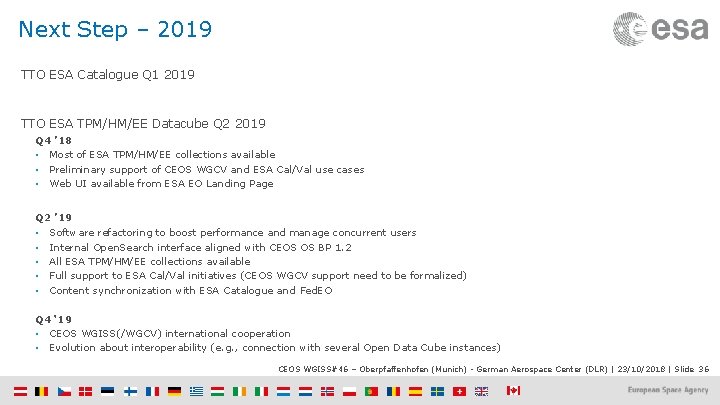
Next Step – 2019 TTO ESA Catalogue Q 1 2019 TTO ESA TPM/HM/EE Datacube Q 2 2019 Q 4 ’ 18 • Most of ESA TPM/HM/EE collections available • Preliminary support of CEOS WGCV and ESA Cal/Val use cases • Web UI available from ESA EO Landing Page Q 2 ’ 19 • • • Software refactoring to boost performance and manage concurrent users Internal Open. Search interface aligned with CEOS OS BP 1. 2 All ESA TPM/HM/EE collections available Full support to ESA Cal/Val initiatives (CEOS WGCV support need to be formalized) Content synchronization with ESA Catalogue and Fed. EO Q 4 ‘ 19 • CEOS WGISS(/WGCV) international cooperation • Evolution about interoperability (e. g. , connection with several Open Data Cube instances) CEOS WGISS#46 – Oberpfaffenhofen (Munich) - German Aerospace Center (DLR) | 23/10/2018 | Slide 36
- Slides: 36