
Ergonomics Adjusting Your Workstation to Fit Your Body
Ergonomics Adjusting Your Workstation to Fit Your Body
What is Ergonomics? Ø ERGON= “work” Ø NOMOS= “rules” or “laws” Ø 11/23/2020 Ergonomics literally means “the laws of work” Hendra - 2008 2
What is Ergonomics? Ø OSHA defines ergonomics as the science of “designing the job to fit the worker, instead of forcing the worker to fit the job. ” 11/23/2020 Hendra - 2008 3
What is Ergonomics? • Ergonomic as the application of the human biological sciences in conjunction with the engineering sciences to the worker and his working environment so as to obtain maximum satisfaction for the worker which at the same time enhances productivity (ILO) • CONFORT • HEALTH • PRODUCTIVITY TUJUAN 11/23/2020 Hendra - 2008 4

What is Ergonomics? • Ergonomic is the science of making the job fit the worker • Ergonomic is the application of human sciences to the optimization of people’s working environment 11/23/2020 Hendra - 2008 5
What is Ergonomics? Ø Ideally, ergonomics: – – 11/23/2020 Makes the job safer by preventing injury and illness Makes the job easier by adjusting the job to the worker Makes the job more pleasant by reducing physical and mental stress Saves money $$$ Hendra - 2008 6
Tujuan Ergonomics? • • • Tercapainya efisiensi kerja Terciptanya sistem kerja yang aman Minimisasi risiko kesehatan karena cara kerja yang salah Terciptanya kenyamanan kerja Meningkatnya produktifitas kerja 11/23/2020 Hendra - 2008 7
Disiplin Ilmu Yang Terkait • ANATOMY • PHYSIOLOGY • PSYCHOLOGY • SOCIOLOGY • PHYSICS • ENGINEERING • dll 11/23/2020 Hendra - 2008 8
Klasifikasi Ergonomi • PHYSICAL ERGONOMICS – ANTROPOMETRIK – BIOMEKANIK • COGNITIVE ERGONOMICS • MACROERGONOMICS 11/23/2020 Hendra - 2008 9
PHYSICAL ERGONOMICS • ANTROPOMETRIK – APLIKASI METODE PENGUKURAN TERHADAP UKURAN-UKURAN DIMENSI TUBUH MANUSIA YANG BERHUBUNGAN DENGAN GERAKAN YANG DILAKUKAN OLEH MANUSA – TUJUAN • UNTUK MEMPEROLEH DATA UKURAN TUBUH MANUSIA YANG MENJELASKAN TENTANG KARAKTERISTIK TUBUH MANUSIA SEPERTI : BERAT BADAN, TINGGI BADAN, JANGKAUAN, SUDUT POSISI KERJA YANG AMAN, DLL • UNTUK MEMBERIKAN INFORMASI YANG DAPAT DIGUNAKAN DALAM MEMBUAT DISAIN KERJA, PERALATAN KERJA YANG AMAN, NYAMAN, EFISIEN, DAN SEHAT 11/23/2020 Hendra - 2008 10

PHYSICAL ERGONOMICS • ANTROPOMETRIK STATIK ATAU STRUKTURAL DINAMIK ATAU FUNGSIONAL • • JANGKAUAN (REACH) • CLEARANCE • PERGERAKAN SENDI (RANGE OF JOIN MOVEMENT) • KEKUATAN (STRENGHT) BERAT BADAN (WEIGHT) TINGGI BADAN (STATURE) TINGGI MATA (EYE HEIGHT) TINGGI SIKU (ELBOW HEIGHT) PANJANG (LENGTH) LEBAR (BREADTH) TEBAL (DEPTH) 11/23/2020 Hendra - 2008 11
PHYSICAL ERGONOMICS • BIOMEKANIK – ASPEK BIOMEKANIK LEBIH DITEKANKAN PADA ASPEK KONSUSMSI ENERGI YANG DIBUTUHKAN SESEORANG DALAM MELAKUKAN SUATU PEKERJAAN • DISAIN KERJA • KAPASITAS KERJA (KAPASITAS FISIK) • EFISIENSI KERJA • KELELAHAN • PRODUKTIFITAS 11/23/2020 Hendra - 2008 12
COGNITIVE ERGONOMICS • BAGAIMANA ORANG SECARA MENTAL (COGNITIVE) MERUPAKAN BAGIAN DARI SISTEM KERJA • BAGAIMANA MENDISAIN SUATU SISTEM KERJA UNTUK MENDUKUNG FUNGSI MENTAL YANG OPTIMAL • HUMAN PERFORMANCE THEORY • ENGINEERING PSYCHOLOGY • BEHAVIORAL DECISION THEORY 11/23/2020 Hendra - 2008 13
MACRO ERGONOMICS • BAGAIMANA ORGANISASI LEBIH MEMPERHATIKAN SISTEM HUBUNGAN ATAU INTERAKSI ANTARA MANUSIA DENGAN MESIN • FAKTOR APA YANG MUNGKIN BERPERAN JIKA SESEORANG BEKERJA DALAM GROUP ATAU KELOMPOK • SYSTEM THEORY • ORGANIZATIONAL PSYCHOLOGY HUMAN-ORGANIZATION-ENVIRONMENTMACHINE INTERFACE TECHNOLOGY 11/23/2020 Hendra - 2008 14
Ergonomic Factors Ø Two Categories of Ergonomic Factors 11/23/2020 1. Environmental 2. Physical Hendra - 2008 15
Environmental Factors Ø Environmental factors may affect: – – – 11/23/2020 Hearing Vision General comfort and health Hendra - 2008 16
Environmental Factors Ø Some examples of ergonomic environmental problems are: – – 11/23/2020 Sick Building Syndrome Excessive noise Improper lighting Temperature extremes Hendra - 2008 17
Physical Stressors ØPhysical stressors place pressure or stress on parts of the body: – Joints, muscles, nerves, tendons, bones ØSometimes these injuries are referred to as “Cumulative Trauma Disorders” (CTDs) or “Repetitive Strain Injuries” (RSIs) 11/23/2020 Hendra - 2008 18
Cumulative Trauma Disorders (CTDs) Ø Cumulative = occurring gradually over a period of weeks, months, or years Ø Trauma = bodily injury to nerves, tissues, tendons, or joints Ø Disorders = physical ailments or abnormal conditions 11/23/2020 Hendra - 2008 19
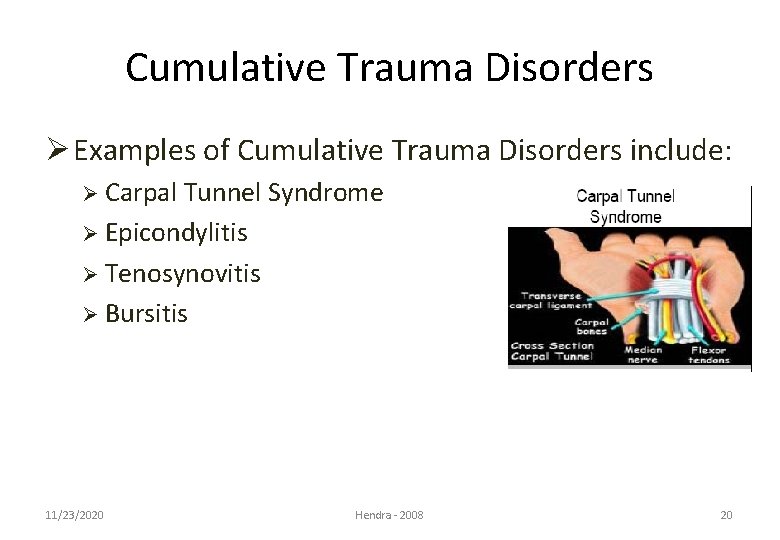
Cumulative Trauma Disorders Ø Examples of Cumulative Trauma Disorders include: Ø Carpal Tunnel Syndrome Ø Epicondylitis Ø Tenosynovitis Ø Bursitis 11/23/2020 Hendra - 2008 20
Risk Factors Ø The main risk factors for office-related CTDs are: Ø Repetition Ø Awkward positions or posture Ø Excessive pressure or force Ø Another risk factor for CTDs would be: Ø Vibration 11/23/2020 Hendra - 2008 21
Risk Factors: Repetition Ø The majority of CTDs are caused by repetitive motions that would not result in injury if only performed once. Ø Thousands of keystrokes typing Ø Hours of filing, day after day Ø Stamping dozens of papers Ø Frequent lifting Ø Repeated motions with computer mouse 11/23/2020 Hendra - 2008 22
Risk Factors: Awkward Positions • Leaning forward at your desk • Typing with wrists at an odd angle • Raising shoulders while typing • Reaching to use mouse • Twisting neck to look at monitor or phone • Lifting objects from below waist or above shoulders 11/23/2020 Hendra - 2008 23
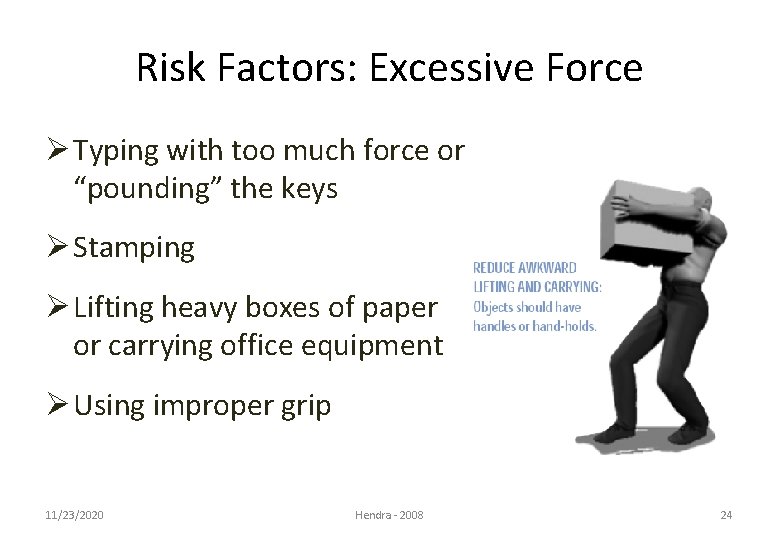
Risk Factors: Excessive Force Ø Typing with too much force or “pounding” the keys Ø Stamping Ø Lifting heavy boxes of paper or carrying office equipment Ø Using improper grip 11/23/2020 Hendra - 2008 24
But the good news is. . There are simple ways to help yourself!
Prevention Strategies Ø The elbows should be at a comfortable angle while "hanging" at the sides from the shoulders. The shoulders should remain relaxed in a lowered position while typing. 11/23/2020 Hendra - 2008 26
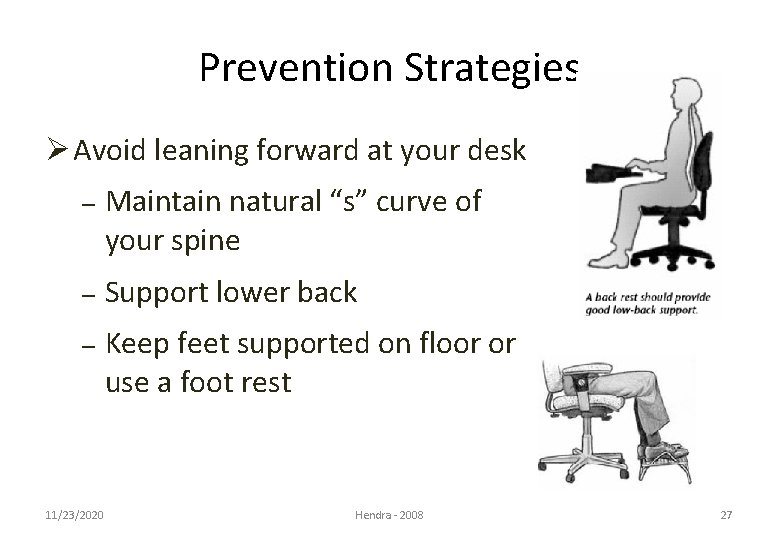
Prevention Strategies Ø Avoid leaning forward at your desk – Maintain natural “s” curve of your spine – Support lower back – Keep feet supported on floor or use a foot rest 11/23/2020 Hendra - 2008 27

Prevention Strategies Ø Avoid typing with wrists at an odd angles… – 11/23/2020 keep them in the neutral position, not bent up or down, or side-to-side Hendra - 2008 28
Prevention Strategies Ø The keyboard should be slightly lower than normal desk height. Ø If it is not low enough, try raising your chair height. Prevent your legs from dangling by using a footrest. Ø Keep "home row" of keys at elbow level. Ø Adjust your chair! 11/23/2020 Hendra - 2008 29
Prevention Strategies Ø Do not pound the keys. Use a light touch. Ø Use two hands to perform double key operations like Ctrl. C or Alt-F instead of twisting one hand to do it. Ø Position frequently used equipment so that you don’t have to reach for it. 11/23/2020 Hendra - 2008 30
Prevention Strategies Ø Place monitor in front of you, not off at an angle. Ø Take lots of breaks to stretch and relax. Ø Hold the mouse lightly. Ø Keep your hands and arms warm. 11/23/2020 Hendra - 2008 31
Prevention Strategies Ø Pay attention to the signals your body provides you. If your neck hurts at work, examine your body position to try to figure out what might be causing the soreness. Are you holding your neck at an awkward angle while you type or talk on the phone? 11/23/2020 Hendra - 2008 32
Prevention Strategies Ø If you are experiencing symptoms of CTDs… – – Tingling or numbness in the hands or fingers Pain in fingers, hands wrists, or even shooting up into the arms or forearms Loss of strength or coordination in the hands Numbness or discomfort in the hands that wakes you up at night. . SEE A DOCTOR! 11/23/2020 Hendra - 2008 33
But What About Headaches? Ø Many office-related headaches are caused by eyestrain. – – – 11/23/2020 Dry eyes Monitor glare Tired/strained eye muscles Hendra - 2008 34
Eyestrain Ø Position monitor at a comfortable distance Ø Avoid glare Ø Adjust VDT brightness and contrast Ø Keep screen clear of dust Ø Look up and away every few minutes or so! 11/23/2020 Hendra - 2008 35
Ergonomic Products Ø There a variety of ergonomic products available on the market, including: – – – 11/23/2020 Keyboards Wrist rests Mouse pads Chairs Adjustable desks Glare screens Hendra - 2008 36

See you at Final exam…
- Slides: 37