
Equipment History Report Use this procedure to display
- Slides: 2
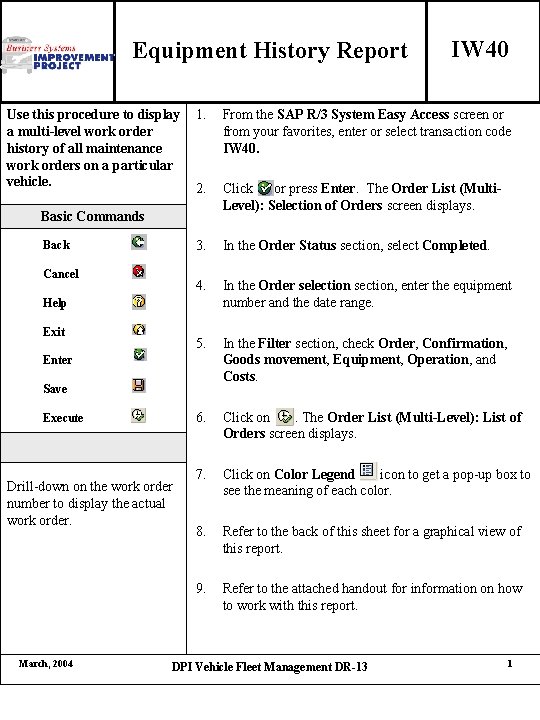
Equipment History Report Use this procedure to display a multi-level work order history of all maintenance work orders on a particular vehicle. 1. From the SAP R/3 System Easy Access screen or from your favorites, enter or select transaction code IW 40. 2. Click or press Enter. The Order List (Multi. Level): Selection of Orders screen displays. 3. In the Order Status section, select Completed. 4. In the Order selection section, enter the equipment number and the date range. 5. In the Filter section, check Order, Confirmation, Goods movement, Equipment, Operation, and Costs. 6. Click on. The Order List (Multi-Level): List of Orders screen displays. 7. Click on Color Legend icon to get a pop-up box to see the meaning of each color. 8. Refer to the back of this sheet for a graphical view of this report. 9. Refer to the attached handout for information on how to work with this report. Basic Commands Back Cancel Help Exit Enter Save Execute Drill-down on the work order number to display the actual work order. March, 2004 IW 40 DPI Vehicle Fleet Management DR-13 1
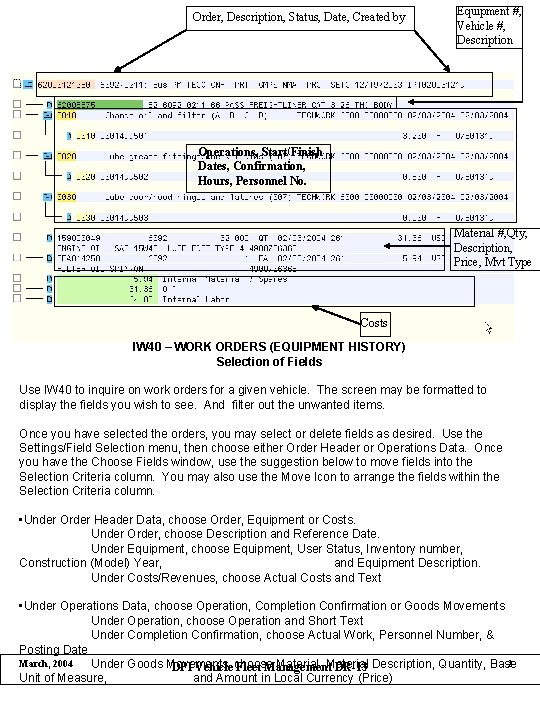
Order, Description, Status, Date, Created by Equipment #, Vehicle #, Description Operations, Start/Finish Dates, Confirmation, Hours, Personnel No. Material #, Qty, Description, Price, Mvt Type Costs IW 40 – WORK ORDERS (EQUIPMENT HISTORY) Selection of Fields Use IW 40 to inquire on work orders for a given vehicle. The screen may be formatted to display the fields you wish to see. And filter out the unwanted items. Once you have selected the orders, you may select or delete fields as desired. Use the Settings/Field Selection menu, then choose either Order Header or Operations Data. Once you have the Choose Fields window, use the suggestion below to move fields into the Selection Criteria column. You may also use the Move Icon to arrange the fields within the Selection Criteria column. • Under Order Header Data, choose Order, Equipment or Costs. Under Order, choose Description and Reference Date. Under Equipment, choose Equipment, User Status, Inventory number, Construction (Model) Year, and Equipment Description. Under Costs/Revenues, choose Actual Costs and Text • Under Operations Data, choose Operation, Completion Confirmation or Goods Movements Under Operation, choose Operation and Short Text Under Completion Confirmation, choose Actual Work, Personnel Number, & Posting Date March, 2004 2 Under Goods Movements, Material DPI Vehicle choose Fleet Management DR-13 Description, Quantity, Base Unit of Measure, and Amount in Local Currency (Price)