
EPS Coding Rubric 2018 At Expected Level Consolidating

EPS Coding Rubric 2018 At Expected Level Consolidating Beginning Prep https: //studio. code. org/ Begin Coding Course 1 Maths Circus 1 (One game 5 levels) Log in using your name Charlie Chimp Adventure Zone & Mouse Island completed Grade One & Two 2 Create a Superstory (Group) Blockly Games https: //blocklygames. appspot. com/ Made With CODE https: //www. madewithcode. co m/projects/ http: //droidz. org/index. php Adding characters https: //www. youtube. com/watch? v=d. Da. C 3 XGIHPo miming Basic Storyline Pivot Animation Completed • • Grade Three • Grade Four Use Scratch within the ICT dropdown to create a short motion clip. (Include a background & your own Sprite character. ) https: //scratch. mit. edu/about/ • Scratch Exploration (Watch this short clip. ) Grade Five • Revise 2 Create a Superstory (Independently) • 2 Do it Yourself (Begin creating a simple activity using 1 -6 min tutorial to guide you. ) • https: //www. youtube. com/wat ch? v=DUb. S 5 z. Iyk. Kk&feature=yo utu. be Turn it into a movie for You. Tube (Pivot-Movie Maker) 2 Do it Yourself (Create own Quizzes using multilevel & insert into P/Point) Paint background Beginning frames/PIVOT https: //www. tynker. com/ • • Begin Coding Course 3 Build a Robot Project (Follow the brief from Mrs Miller. ) http: //splash. abc. net. au/h ome#!/stem View 1 or more info video
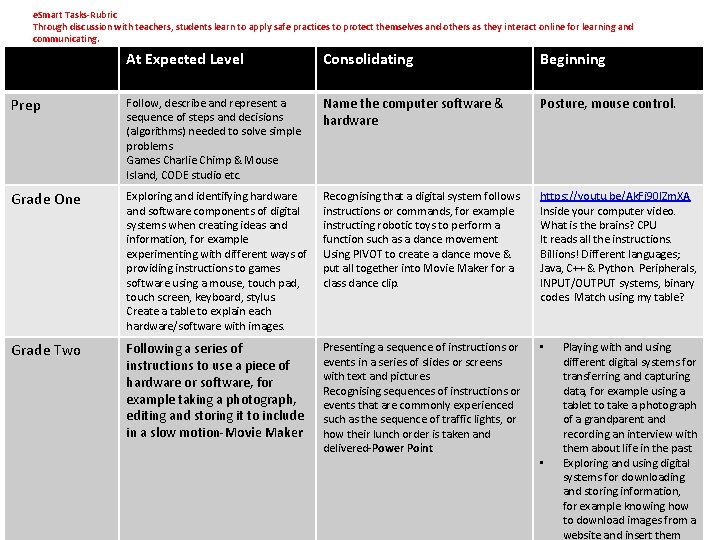
e. Smart Tasks-Rubric Through discussion with teachers, students learn to apply safe practices to protect themselves and others as they interact online for learning and communicating. At Expected Level Consolidating Beginning Prep Follow, describe and represent a sequence of steps and decisions (algorithms) needed to solve simple problems Games Charlie Chimp & Mouse Island, CODE studio etc. Name the computer software & hardware Posture, mouse control. Grade One Exploring and identifying hardware and software components of digital systems when creating ideas and information, for example experimenting with different ways of providing instructions to games software using a mouse, touch pad, touch screen, keyboard, stylus. Create a table to explain each hardware/software with images. Recognising that a digital system follows instructions or commands, for example instructing robotic toys to perform a function such as a dance movement Using PIVOT to create a dance move & put all together into Movie Maker for a class dance clip. https: //youtu. be/Ak. Fi 90 l. Zm. XA Inside your computer video. What is the brains? CPU It reads all the instructions. Billions! Different languages; Java, C++ & Python. Peripherals, INPUT/OUTPUT systems, binary codes. Match using my table? Grade Two Following a series of instructions to use a piece of hardware or software, for example taking a photograph, editing and storing it to include in a slow motion-Movie Maker Presenting a sequence of instructions or events in a series of slides or screens with text and pictures Recognising sequences of instructions or events that are commonly experienced such as the sequence of traffic lights, or how their lunch order is taken and delivered-Power Point • • Playing with and using different digital systems for transferring and capturing data, for example using a tablet to take a photograph of a grandparent and recording an interview with them about life in the past Exploring and using digital systems for downloading and storing information, for example knowing how to download images from a website and insert them
- Slides: 2