
EPICS The ASYN Software Module Andy Foster Observatory
EPICS The ASYN Software Module Andy Foster Observatory Sciences Limited 2013: The ASYN Software Module 1
Outline u u u u EPICS Where is the ASYN layer? What is ASYN? Key concepts of ASYN Architecture Vocabulary u Asyn Port u Asyn Interfaces u Asyn Command u Asyn User u Asyn. Manager Synchronous control flow Asynchronous control flow Writing ASYN device support Writing ASYN driver support Porting existing drivers to ASYN Asyn Trace asyn. Record Summary Where to find more information 2013: The ASYN Software Module 2
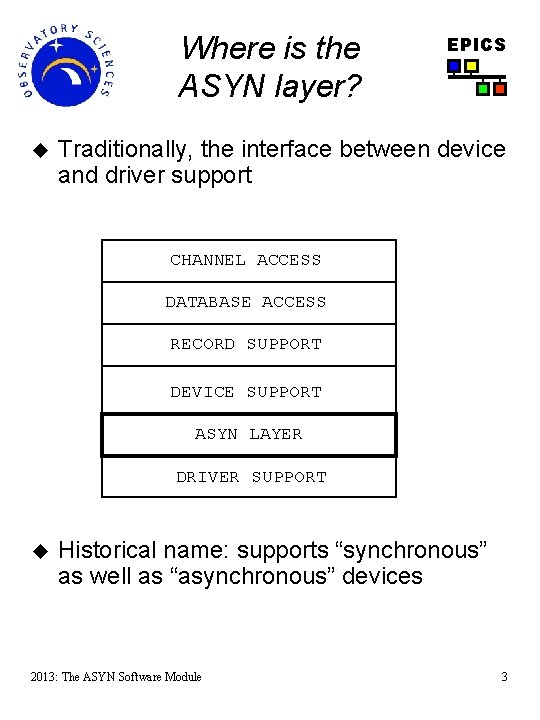
Where is the ASYN layer? u EPICS Traditionally, the interface between device and driver support CHANNEL ACCESS DATABASE ACCESS RECORD SUPPORT DEVICE SUPPORT ASYN LAYER DRIVER SUPPORT u Historical name: supports “synchronous” as well as “asynchronous” devices 2013: The ASYN Software Module 3
What is ASYN? u The EPICS interface between device support and driver support was only loosely defined. u u u EPICS Device support has direct access to the record structure and can manipulate all fields A driver support library could have almost any API. It can even be an externally provided general purpose library ASYN is a software module which provide facilities for interfacing device and driver support u u read(), write() interface with parameter and address passing Handles some of the generic “housekeeping” tasks in device support 2013: The ASYN Software Module 4
What is ASYN? u Asyn provides implementation of device support for standard records u u u ai, ao, bi, bo, mbbi, mbbo, waveform and so on Handles the details of the interaction with the record fields Asyn drivers only need to read/write data to/from hardware and the driver support layer No need to write support specifically for every record But not limited to use with EPICS device/driver support u u u EPICS Only depends on lib. Com from EPICS base Other ‘C’ code can talk directly to an Asyn support module (e. g. SNL, gen. Sub) Some support for generic communication protocols u u Serial interfaces RS 232/485 Ethernet TCP/IP, UDP/IP 2013: The ASYN Software Module 5
Key concepts of ASYN u u EPICS The ASYN layer has two interfaces: u Upwards to the device support layer. u This has been written for all the standard EPICS records. u Downwards to a device driver u Here a set of standard interfaces have been defined for both message passing (e. g. serial) and register reading/writing (e. g. DAC based devices). Therefore, for a new piece of hardware, we only need to write a driver which implements one or more of the standard interfaces to the ASYN layer. 2013: The ASYN Software Module 6
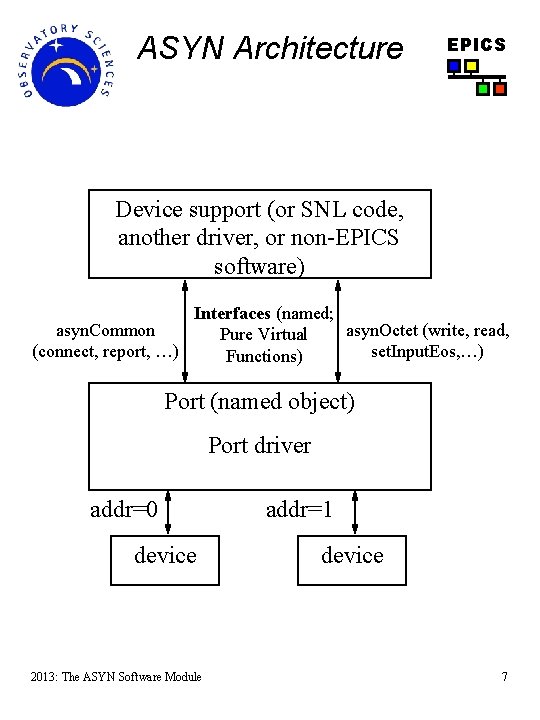
ASYN Architecture EPICS Device support (or SNL code, another driver, or non-EPICS software) Interfaces (named; asyn. Common asyn. Octet (write, read, Pure Virtual (connect, report, …) set. Input. Eos, …) Functions) Port (named object) Port driver addr=0 device 2013: The ASYN Software Module addr=1 device 7
Vocabulary: ASYN Port u u u Provides access to a device port. Name (string) provides the reference to the hardware Drivers register a port, device support connects to it One or many devices can be connected, addresses identify individual devices May be blocking or non-blocking u u EPICS Depends on speed of device Is configured in startup script: drv. Asyn. Serial. Port. Configure ("COM 2", "/dev/stty. S 1“) drv. Asyn. IPPort. Configure ("foo. Server", "192. 168. 0. 10: 40000“) my. Device. Driver. Configure ("portname", parameters) 2013: The ASYN Software Module 8
Vocabulary: ASYN Interfaces EPICS u Device support (and other ASYN clients) communicate with driver support through defined interfaces u Each interface defines a table of driver functions or methods u Examples are: u asyn. Octet (read, write, set. Input. EOS, etc) u Used for message based I/O: serial, TCP/IP u asyn. UInt 32 Digital (read, write, u Used for bit field registers: status word, switches, etc u asyn. Int 32, asyn. Int 32 Array (read, write, get. Bounds, …) u Integer registers: ADC, DAC, encoder, … u Integer arrays: spectrum analyzer, oscilloscope u asyn. Float 64, asyn. Float 64 Array (read, write, …) u Floating point registers and arrays 2013: The ASYN Software Module 9
Vocabulary: ASYN Interfaces u asyn. Common (report, connect, disconnect) u u EPICS report: Generates a report about the hardware device connect/disconnect: connect/disconnect to the hardware device Every driver must implement these! Every port has one or many interfaces 2013: The ASYN Software Module 10

Vocabulary: ASYN Command u EPICS An ASYN driver defines a set of commands it supports e. g. enum FINS_COMMANDS { FINS_MODEL, …, … } (Factory Intelligent Network Service - PLC) u In an EPICS database the ASYN command is the argument at the end of the INP or OUT field. The DTYP field is set to the type of ASYN interface being used e. g. record(waveform, "$(device): MODEL: CPU") { field(DTYP, "asyn. Octet. Read") field(INP, "@asyn(port, addr, timeout) FINS_MODEL") } 2013: The ASYN Software Module 11

Vocabulary: ASYN Command EPICS u ASYN commands are supported through a special interface. u asyn. Drv. User ( create, get. Type, destroy) u u u create: maps the ENUM command to the string used in INP/OUT in the database get. Type: Looks up ENUM command based on the database string. Destroys the resources created by “create”. asyn. Status drv. User. Create(void *pvt, asyn. User *pasyn. User, const char *drv. Info, const char **pptype. Name, size_t *psize) { if (drv. Info) { if (strcmp("FINS_MODEL", drv. Info) == 0) { pasyn. User->reason = FINS_MODEL; } else { } } } 2013: The ASYN Software Module 12
Vocabulary: asyn. User u u u EPICS Identifies the client e. g. EPICS record. Each client needs one asyn. User u An “asyn. User” must not be shared between parts of code that can simultaneously access a driver. For example, device support for EPICS records should create a separate “asyn. User” for each record instance. By creation of an “asyn. User” we obtain a handle for accessing ports and for calling interfaces implemented by drivers. In writing ASYN device support, before doing anything you must obtain a pointer to an asyn. User pasyn. User=pasyn. Manager->create. Asyn. User( process. Callback, timeout. Callback); u u u Provide 2 callbacks: process. Callback is called when you are scheduled to access the port timeout. Callback is called if port times out 2013: The ASYN Software Module 13
Vocabulary: asyn. Manager u u Core of ASYN. Creates threads for blocking ports. Registers and finds ports and interfaces. Schedules access to ports. u u EPICS Device support and driver support do not need to implement queues or semaphores, this is handled by asyn. Manager. There is exactly one global instance: pasyn. Manager u Clients ask asyn. Manager for services pasyn. Manager->connect. Device(pasyn. User , "portname", address) pasyn. Manager->find. Interface(pasyn. User, interface. Type, . . . ) pasyn. Manager->queue. Request(pasyn. User, priority, timeout) 2013: The ASYN Software Module 14
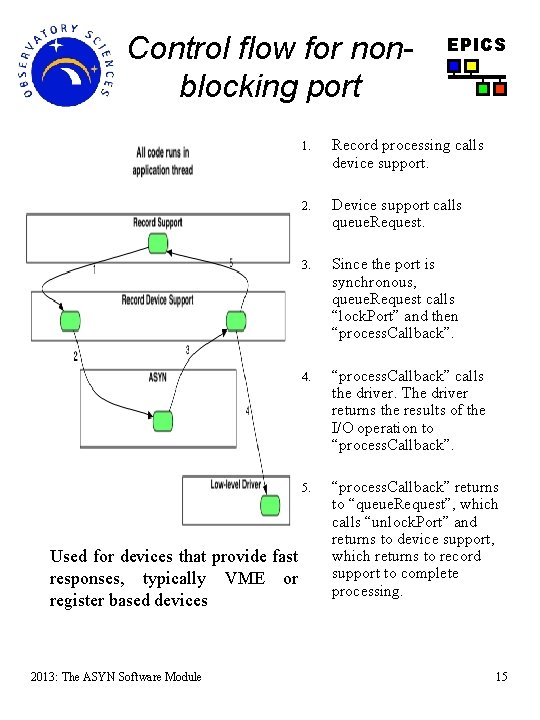
Control flow for nonblocking port Used for devices that provide fast responses, typically VME or register based devices 2013: The ASYN Software Module EPICS 1. Record processing calls device support. 2. Device support calls queue. Request. 3. Since the port is synchronous, queue. Request calls “lock. Port” and then “process. Callback”. 4. “process. Callback” calls the driver. The driver returns the results of the I/O operation to “process. Callback”. 5. “process. Callback” returns to “queue. Request”, which calls “unlock. Port” and returns to device support, which returns to record support to complete processing. 15
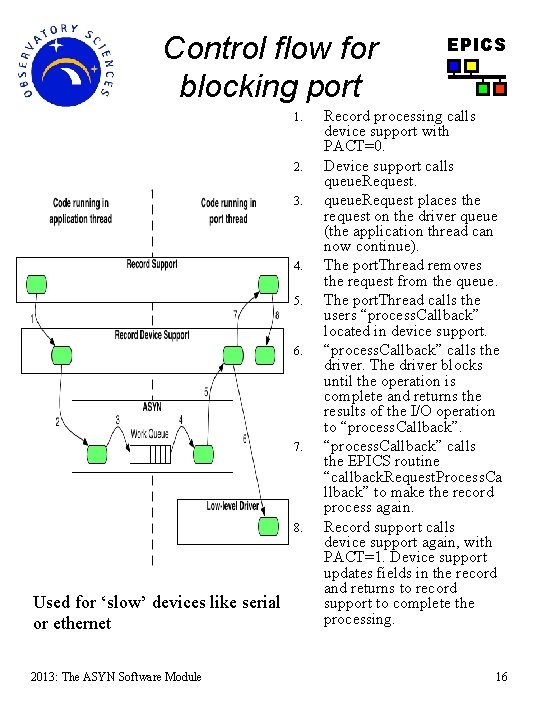
Control flow for blocking port 1. 2. 3. 4. 5. 6. 7. 8. Used for ‘slow’ devices like serial or ethernet 2013: The ASYN Software Module EPICS Record processing calls device support with PACT=0. Device support calls queue. Request places the request on the driver queue (the application thread can now continue). The port. Thread removes the request from the queue. The port. Thread calls the users “process. Callback” located in device support. “process. Callback” calls the driver. The driver blocks until the operation is complete and returns the results of the I/O operation to “process. Callback” calls the EPICS routine “callback. Request. Process. Ca llback” to make the record process again. Record support calls device support again, with PACT=1. Device support updates fields in the record and returns to record support to complete the processing. 16
Writing ASYN Device Support Step 1: Connect to the port u EPICS Before doing anything you must obtain a pointer to an asyn. User pasyn. User=pasyn. Manager->create. Asyn. User( process. Callback, timeout. Callback); u Connect to the device (port, address) status=pasyn. Manager->connect. Device(pasyn. User, port, addr); u Find the interface (e. g. asyn. Octet) pasyn. Interface=pasyn. Manager->find. Interface (pasyn. User, asyn. Octet. Type, 1); u We can now find the address of the asyn. Octet interface and of the private driver structure: pasyn. Octet =(asyn. Octet *)pasyn. Interface->pinterface; drv. Pvt = pasyn. Interface->pdrv. Pvt; u The following call is made from process. Callback when we have access to the port (next slide): pasyn. Octet->read ( drv. Pvt, pasyn. User, . . . 2013: The ASYN Software Module 17
Step 2: Request access to the port u EPICS Ask asyn. Manager to put your request to the queue status=pasyn. Manager->queue. Request(pasyn. User, priority, timeout); u u u Priorities: asyn. Queue. Priority{Low|Medium|High} queue. Request never blocks. Blocking port: Asyn. Manager will call your process. Callback when port is free. The callback runs in port thread. Non blocking port: queue. Request calls process. Callback. If port is not free for timeout seconds, asyn. Manager calls timeout. Callback. In process. Callback, you have exclusive access to the port. 2013: The ASYN Software Module 18
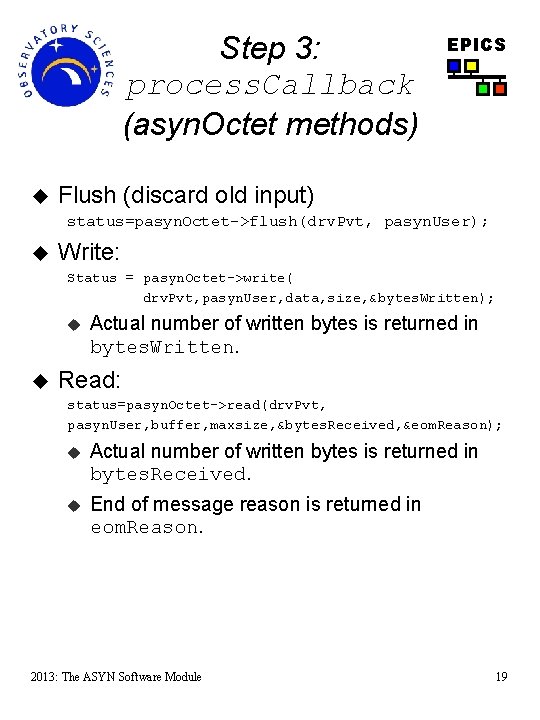
Step 3: process. Callback (asyn. Octet methods) u EPICS Flush (discard old input) status=pasyn. Octet->flush(drv. Pvt, pasyn. User); u Write: Status = pasyn. Octet->write( drv. Pvt, pasyn. User, data, size, &bytes. Written); u u Actual number of written bytes is returned in bytes. Written. Read: status=pasyn. Octet->read(drv. Pvt, pasyn. User, buffer, maxsize, &bytes. Received, &eom. Reason); u Actual number of written bytes is returned in bytes. Received. u End of message reason is returned in eom. Reason. 2013: The ASYN Software Module 19
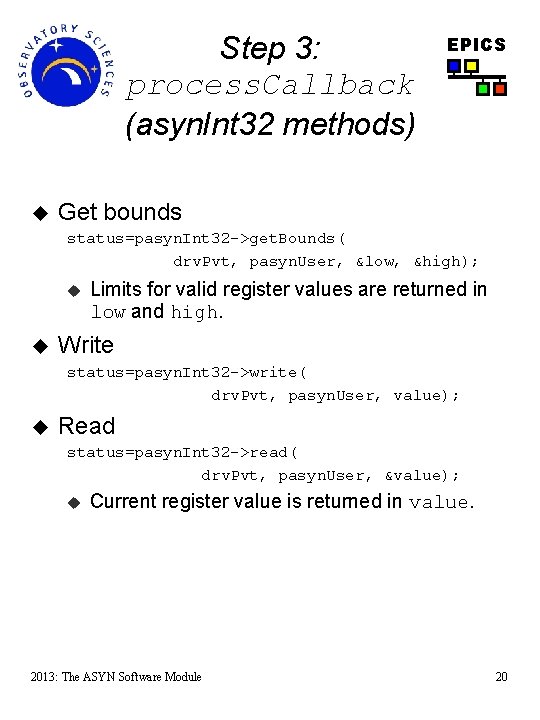
Step 3: process. Callback (asyn. Int 32 methods) u EPICS Get bounds status=pasyn. Int 32 ->get. Bounds( drv. Pvt, pasyn. User, &low, &high); u u Limits for valid register values are returned in low and high. Write status=pasyn. Int 32 ->write( drv. Pvt, pasyn. User, value); u Read status=pasyn. Int 32 ->read( drv. Pvt, pasyn. User, &value); u Current register value is returned in value. 2013: The ASYN Software Module 20
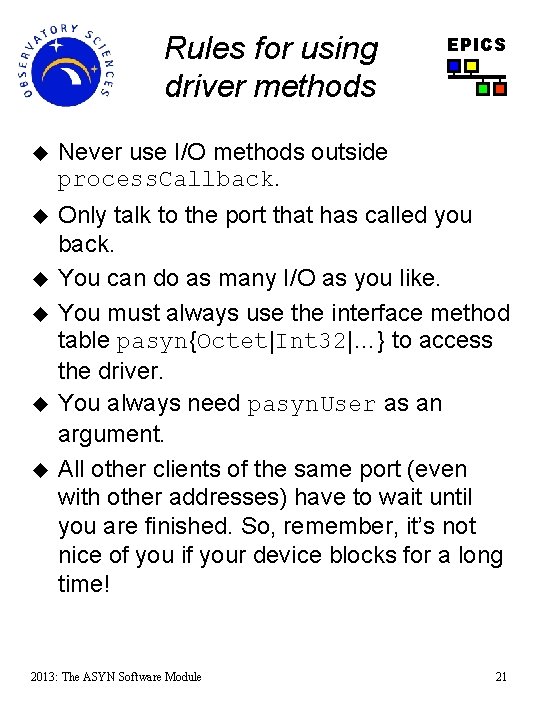
Rules for using driver methods EPICS u Never use I/O methods outside process. Callback. u Only talk to the port that has called you back. You can do as many I/O as you like. You must always use the interface method table pasyn{Octet|Int 32|…} to access the driver. You always need pasyn. User as an argument. All other clients of the same port (even with other addresses) have to wait until you are finished. So, remember, it’s not nice of you if your device blocks for a long time! u u 2013: The ASYN Software Module 21
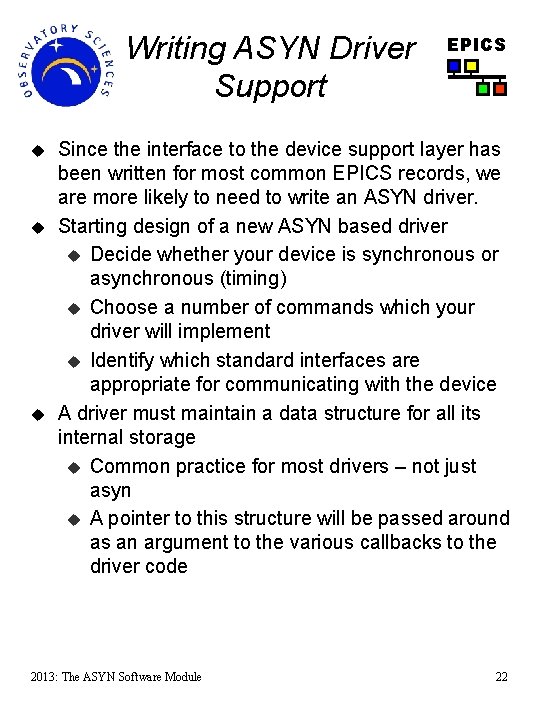
Writing ASYN Driver Support u u u EPICS Since the interface to the device support layer has been written for most common EPICS records, we are more likely to need to write an ASYN driver. Starting design of a new ASYN based driver u Decide whether your device is synchronous or asynchronous (timing) u Choose a number of commands which your driver will implement u Identify which standard interfaces are appropriate for communicating with the device A driver must maintain a data structure for all its internal storage u Common practice for most drivers – not just asyn u A pointer to this structure will be passed around as an argument to the various callbacks to the driver code 2013: The ASYN Software Module 22
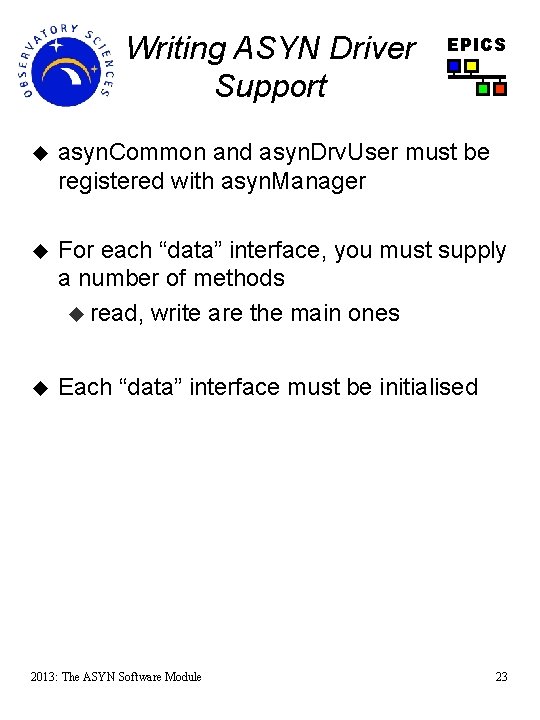
Writing ASYN Driver Support EPICS u asyn. Common and asyn. Drv. User must be registered with asyn. Manager u For each “data” interface, you must supply a number of methods u read, write are the main ones u Each “data” interface must be initialised 2013: The ASYN Software Module 23
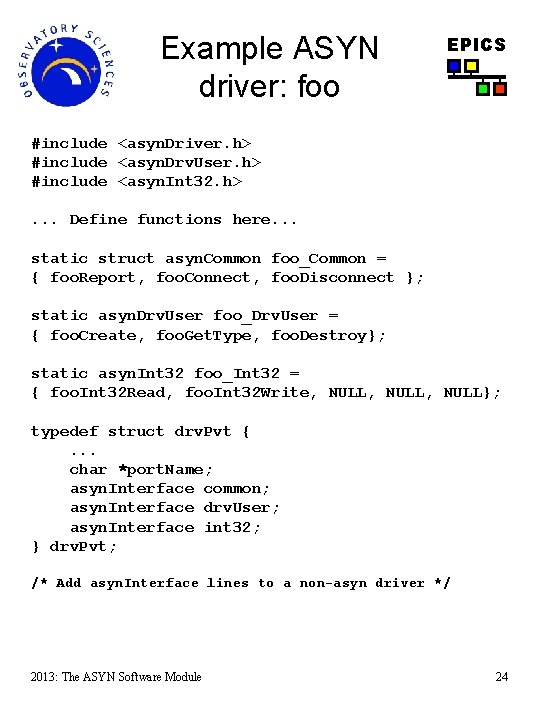
Example ASYN driver: foo EPICS #include <asyn. Driver. h> #include <asyn. Drv. User. h> #include <asyn. Int 32. h>. . . Define functions here. . . static struct asyn. Common foo_Common = { foo. Report, foo. Connect, foo. Disconnect }; static asyn. Drv. User foo_Drv. User = { foo. Create, foo. Get. Type, foo. Destroy}; static asyn. Int 32 foo_Int 32 = { foo. Int 32 Read, foo. Int 32 Write, NULL, NULL}; typedef struct drv. Pvt {. . . char *port. Name; asyn. Interface common; asyn. Interface drv. User; asyn. Interface int 32; } drv. Pvt; /* Add asyn. Interface lines to a non-asyn driver */ 2013: The ASYN Software Module 24
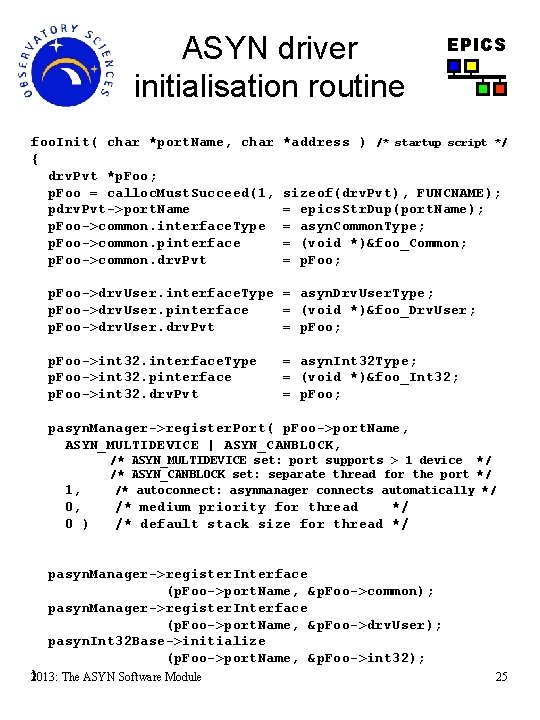
ASYN driver initialisation routine foo. Init( char *port. Name, char { drv. Pvt *p. Foo; p. Foo = calloc. Must. Succeed(1, pdrv. Pvt->port. Name p. Foo->common. interface. Type p. Foo->common. pinterface p. Foo->common. drv. Pvt *address ) EPICS /* startup script */ sizeof(drv. Pvt), FUNCNAME); = epics. Str. Dup(port. Name); = asyn. Common. Type; = (void *)&foo_Common; = p. Foo; p. Foo->drv. User. interface. Type = asyn. Drv. User. Type; p. Foo->drv. User. pinterface = (void *)&foo_Drv. User; p. Foo->drv. User. drv. Pvt = p. Foo; p. Foo->int 32. interface. Type p. Foo->int 32. pinterface p. Foo->int 32. drv. Pvt = asyn. Int 32 Type; = (void *)&foo_Int 32; = p. Foo; pasyn. Manager->register. Port( p. Foo->port. Name, ASYN_MULTIDEVICE | ASYN_CANBLOCK, 1, 0, 0 ) /* ASYN_MULTIDEVICE set: port supports > 1 device */ /* ASYN_CANBLOCK set: separate thread for the port */ /* autoconnect: asynmanager connects automatically */ /* medium priority for thread */ /* default stack size for thread */ pasyn. Manager->register. Interface (p. Foo->port. Name, &p. Foo->common); pasyn. Manager->register. Interface (p. Foo->port. Name, &p. Foo->drv. User); pasyn. Int 32 Base->initialize (p. Foo->port. Name, &p. Foo->int 32); } 2013: The ASYN Software Module 25
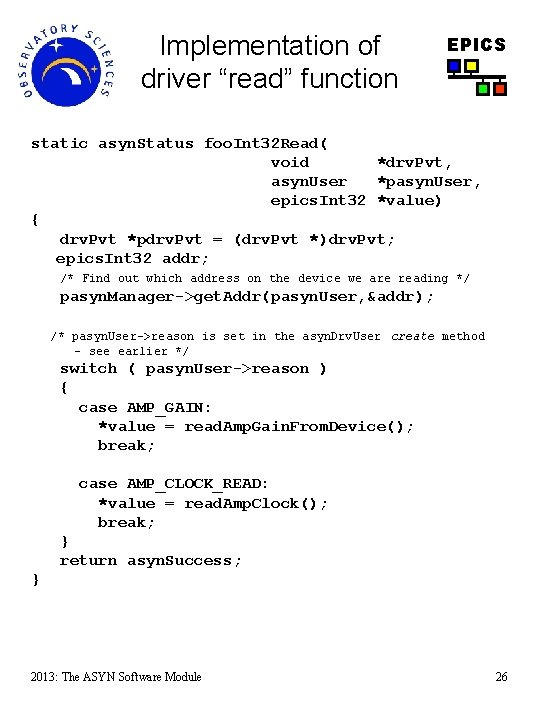
Implementation of driver “read” function EPICS static asyn. Status foo. Int 32 Read( void *drv. Pvt, asyn. User *pasyn. User, epics. Int 32 *value) { drv. Pvt *pdrv. Pvt = (drv. Pvt *)drv. Pvt; epics. Int 32 addr; /* Find out which address on the device we are reading */ pasyn. Manager->get. Addr(pasyn. User, &addr); /* pasyn. User->reason is set in the asyn. Drv. User create method – see earlier */ switch ( pasyn. User->reason ) { case AMP_GAIN: *value = read. Amp. Gain. From. Device(); break; case AMP_CLOCK_READ: *value = read. Amp. Clock(); break; } return asyn. Success; } 2013: The ASYN Software Module 26
Porting existing drivers to ASYN u EPICS Depends on the existing design u Does it have both device and driver support? u Device support is supplied by asyn so remove or untangle existing device support u Identify and name specific commands to communicate with the device u u Implement driver read + write functions u u Typically with big switch/case structure to handle different ‘reasons’ or ‘commands’ Implement driver structure u u u Implement an enum type with the commands and a lookup table for string representations A driver structure should already exist (common in way of keeping track of a device) Add the asyn interface pointers to the structure Initialisation routine must register and initialize the relevant interfaces 2013: The ASYN Software Module 27
Vocabulary: asyn. Trace u EPICS Diagnostic facility u Provides routines to call for diagnostic messages: asyn. Print(), asyn. Print. IO() u Several masks or levels can be selected for debugging purposes u Provides consistent debugging mechanism for drivers 2013: The ASYN Software Module 28
asyn. Record u u u u EPICS Special record type that can use all asyn interfaces. Can connect to different ports at run-time. Is a good debug tool. Access to options, including tracing. Comes with set of medm screens for different interfaces. Can handle simple devices: u e. g. asyn. Octet: write one string, read one string If a new instrument arrives that has a serial, GPIB or ethernet port, then it is often possible to communicate with it just by attaching an asyn. Record i. e. a database containing one record! 2013: The ASYN Software Module 29
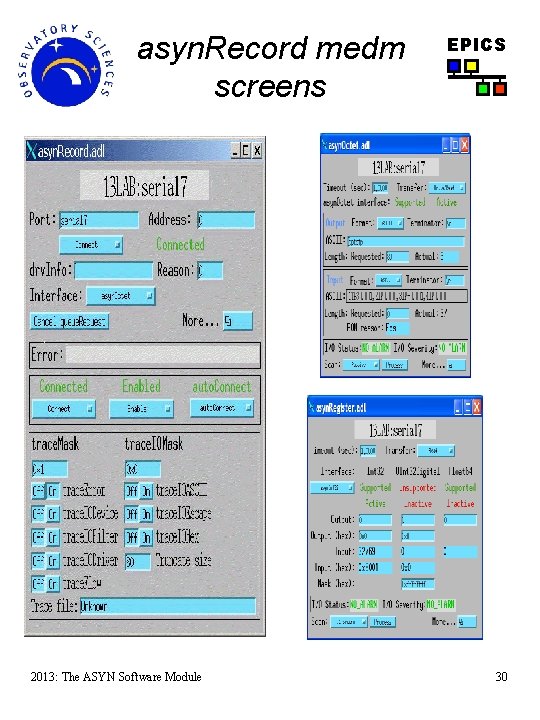
asyn. Record medm screens 2013: The ASYN Software Module EPICS 30
u Summary Advantages of ASYN EPICS Drivers implement standard interfaces that can be accessed from: u u u Multiple record types SNL programs Other drivers u Generic device support eliminates the need for separate device support in 90% of cases u Consistent trace/debugging at (port, addr) level u asyn. Record can be used for testing, debugging, and actual I/O applications u Easy to add ASYN interfaces to existing drivers: u u Register port, implement interface write(), read() and change debugging output Preserve 90% of driver code 2013: The ASYN Software Module 31
More information u Asyn. Driver u u linux-gpib. sourceforge. net/ Drivers/device supports using asyn. Driver u u epics. web. psi. ch/software/streamdevice/ linux. Gpib u u www. aps. anl. gov/epics/modules/soft/asyn/ Stream. Device u u EPICS www. aps. anl. gov/aod/bcda/syn. Apps/ Talks about asyn. Driver u u www. aps. anl. gov/aod/bcda/epicsgettingstarted/iocs/ ASYN. html www. aps. anl. gov/epics/docs/USPAS 2007. php 2013: The ASYN Software Module 32
- Slides: 32