
Engineering Notebooks FIRST Tech Challenge 2018 Season KickOff
Engineering Notebooks FIRST Tech Challenge 2018 Season Kick-Off
What’s the purpose of the Engineering Notebook? One of the GOALS of FTC is to recognize the engineering design process and the journey that a team makes. • Problem definition • Concept design, system-level design, detailed design • Test and verification • Production of the robot • Protection of intellectual property
What should it include? This is your documentation of your robot design & team development. It should record ALL time spent doing research, outreach, team meetings, & plans for growth. It should include: • Sketches (on graph paper…not a napkin!) • Discussions & team meetings • Design evolution • Software development…your programming • Processes & obstacles • EACH team member’s thoughts throughout the journey of the season
What are judges looking for? Judges use your engineering notebook to get a better understanding of the journey your team has taken throughout the season ~ developing your team, designing and building your robot & promoting FIRST. • Include obstacles, • Lessons learned, • Drawings on paper…INCLUDE the math and science used The notebooks are there to track your team’s progress from the beginning of the season throughout competition season.

Engineering Notebook Guidelines • The front cover MUST have your team name AND number. • Binders can’t be greater than 3 inches & you can’t submit more than two notebooks to judges at competition. Attach a one page team summary to the inside front cover. • Summary narrative about the team • Bullet highlights from your season (EX: professionals you worked with, type of outreach, how many people did you impact with outreach, veteran teams need to highlight any new growth or direction the team has taken) • “…include the team number & list of pages in the EN (you) would most like the judges to consider. ” (FIRST revision 1. 1: 01. 09. 2018)

Engineering Notebook Guidelines EN’s MUST be divided into the following sections. Engineering section (required) • The robot design process with a note written for each meeting. • Where to put your sketches, CAD drawings, build pics, programming info. Team Section (required) • Information about your team and outreach activities. A Business Plan, Strategic Plan or Sustainability Plan (NOT required, BUT strongly recommended)
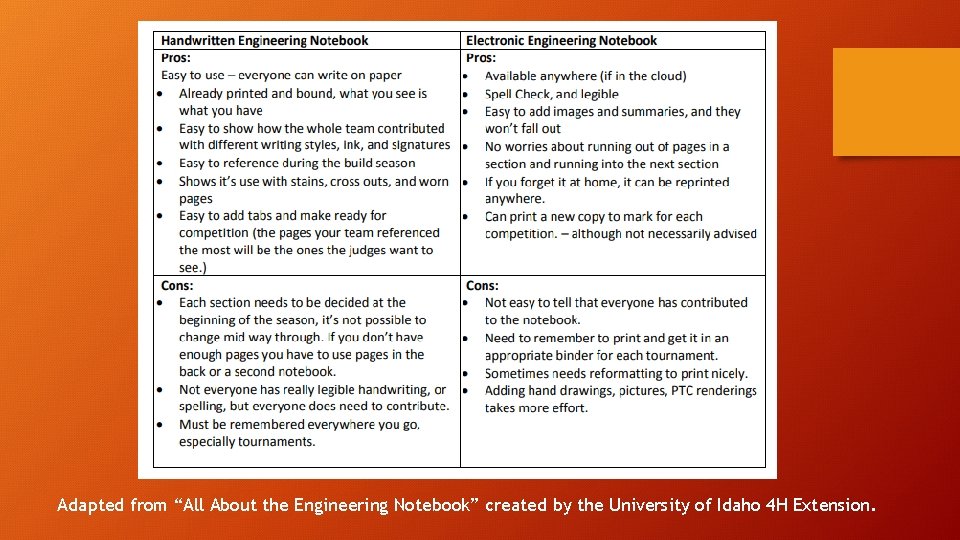
Adapted from “All About the Engineering Notebook” created by the University of Idaho 4 H Extension.
Additional Pointers • Blue or black ink only. • It’s okay to misspell. Strike through the misspelling and move on to the next word…NO liquid paper. • A team member should sign each note. • You want the EN to be so detailed that a person could sit down to look at it and see exactly how to build your robot and the thought it took to get there. • LABEL your programming code. • Use the EN to show you changed your robot between competitions and why you chose to change it. • CITE!!! if another team’s robot inspired some part of your design!!!
Biggest Struggle with the Engineering Notebook Attitude: • “I came here to build, not to write another paper. ” • “Writing everything down gets in the way of my creativity. ” DON’T: • Assign just one person to complete the EN. Everyone needs to be a part of the documentation. However, one person can be in charge of making sure it gets done. • Put off documentation instead of doing it every meeting. Designs can change pretty quickly sometimes. You will loose needed information and get overwhelmed.
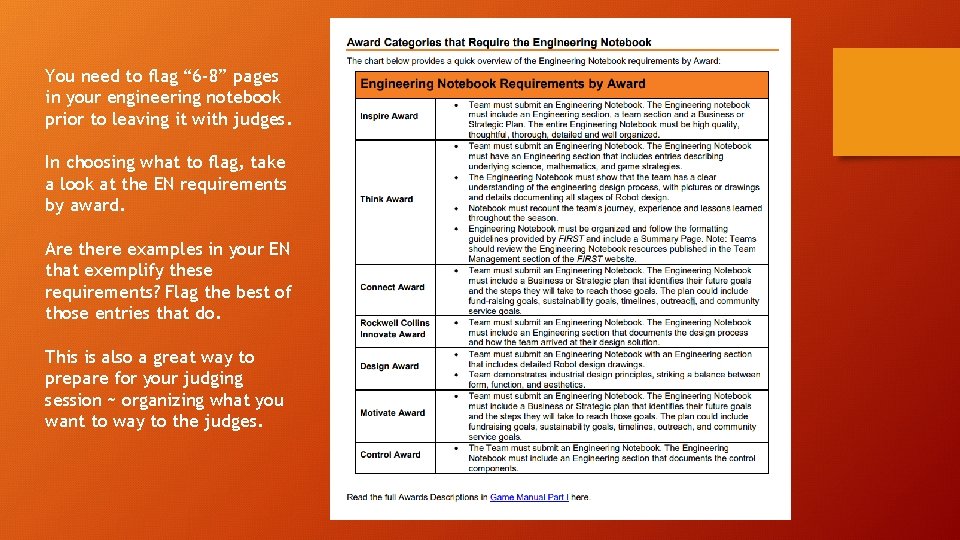
You need to flag “ 6 -8” pages in your engineering notebook prior to leaving it with judges. In choosing what to flag, take a look at the EN requirements by award. Are there examples in your EN that exemplify these requirements? Flag the best of those entries that do. This is also a great way to prepare for your judging session ~ organizing what you want to way to the judges.
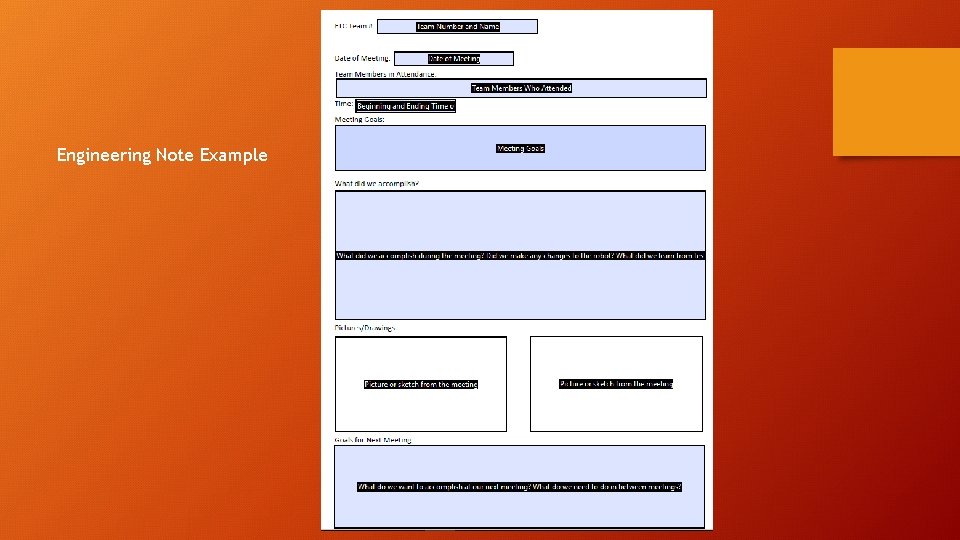
Engineering Note Example
Parts to add to your Business/Strategic Plan • • Mission Statement & Team Goals Projected Hours & Team Commitment Budget Fundraising/Sponsorship Plan Recruitment Training Risks & Opportunities Outreach Documentation & Recognition
- Slides: 12