
Engineering 1182 Orthographic Projection Basics Chapter 10 of
• Engineering 1182 Orthographic Projection Basics Chapter 10 of Text College of Engineering Education Innovation Center
• Engineering 1182 Objectives • Discuss the principles of orthogonal projection • Show and why orthogonal projection is used to create multiple views of an object formal engineering drawings • Create a multiview drawing from a 3 -D object v Note: The terms orthogonal and orthographic are used to refer to the same drawing type.
• Engineering 1182 Why Orthographic Drawings? • The best way to communicate what an object looks like is to show someone an image. • Isometric sketches distort the features of an object and may lead to misinterpretation. • Objects must be represented in a way that prevents misinterpretation. • Multiview drawings show an object looks from multiple angles. • Multiviews help to prevent any miscommunications that may happen when looking at only isometric pictorials.
• Engineering 1182 Orthographic Projections • Orthographic projections are another way of representing a 3 D object in 2 D space. • In an orthographic projection, the object is projected perpendicularly onto a viewing plane. • By using a multiview drawing, we can eliminate misinterpretations that isometric views alone allow.
• Orthographic Projections • When drawing an orthographic multiview, it sometimes helps to visualize the object inside of a glass box. • Imagine that the object is projected on to each surface of the glass box. • The box is then unfolded to form the multiview drawing. Engineering 1182
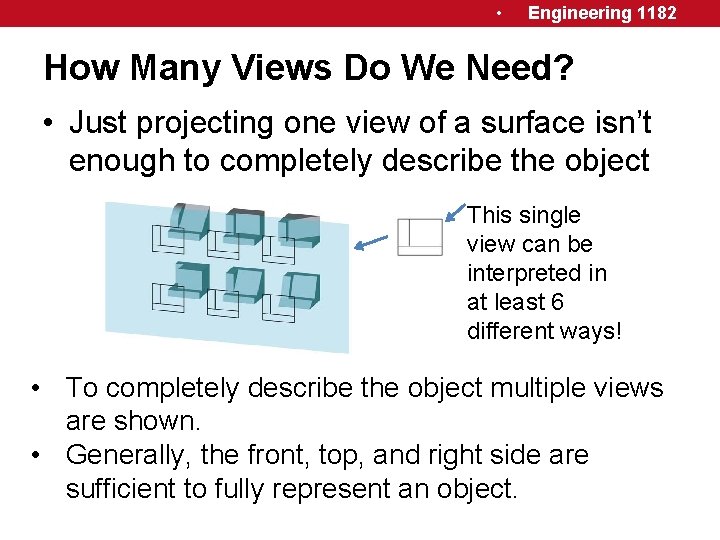
• Engineering 1182 How Many Views Do We Need? • Just projecting one view of a surface isn’t enough to completely describe the object This single view can be interpreted in at least 6 different ways! • To completely describe the object multiple views are shown. • Generally, the front, top, and right side are sufficient to fully represent an object.
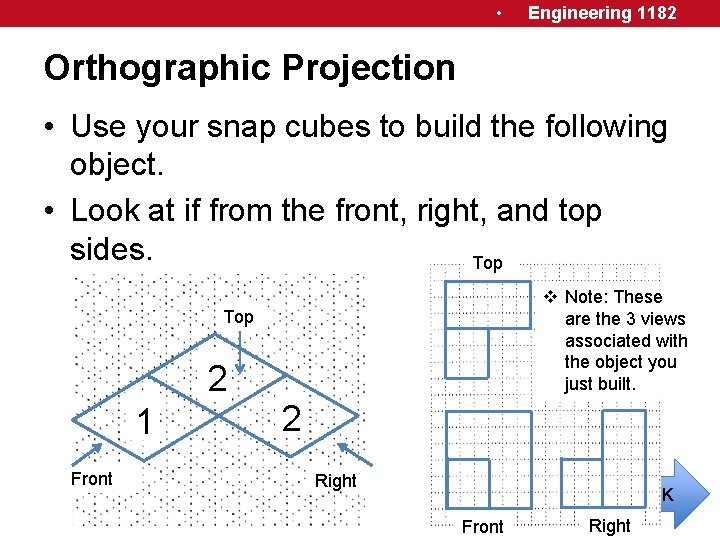
• Engineering 1182 Orthographic Projection • Use your snap cubes to build the following object. • Look at if from the front, right, and top sides. Top v Note: These are the 3 views associated with the object you just built. Top 2 1 Front 2 Right CLICK Front Right
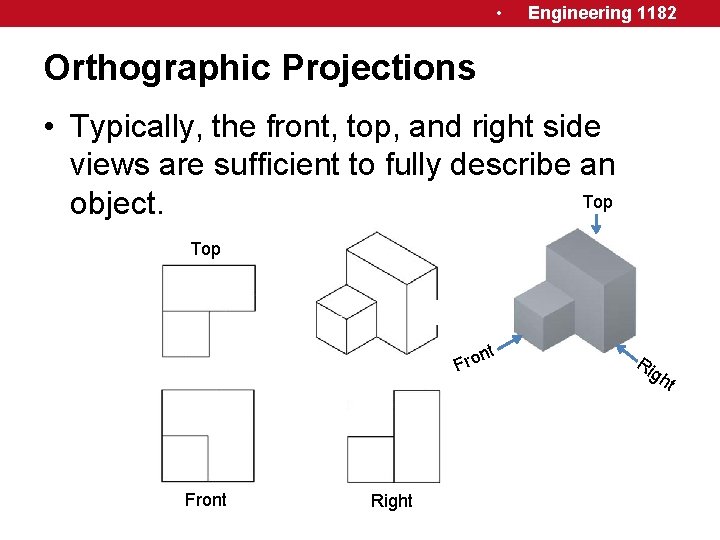
• Engineering 1182 Orthographic Projections • Typically, the front, top, and right side views are sufficient to fully describe an Top object. Top nt Front Right Ri gh t
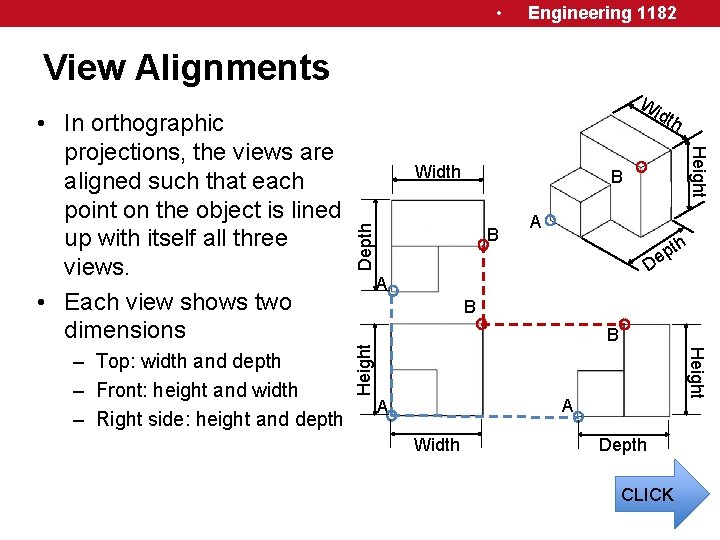
• Engineering 1182 View Alignments Width Depth B B A th p e D A B Height – Top: width and depth – Front: height and width – Right side: height and depth dth Height • In orthographic projections, the views are aligned such that each point on the object is lined up with itself all three views. • Each view shows two dimensions Wi A A Width Depth CLICK
• Engineering 1182 Orthographic Projections • Use this time and your snap cubes to practice building objects and sketching orthographic projections. • In class assignment
- Slides: 10