
En Case v 7 Essential Training Sherif Eldeeb
ﺑﺴﻢ ﺍﻟﻠﻪ ﺍﻟﺮﺣﻤﻦ ﺍﻟﺮﺣﻴﻢ En. Case v 7 Essential Training Sherif Eldeeb https: //eldeeb. net
What’s in this course Explore the most notable features of the new version. Everything you need to know about En. Case v 7 to conduct basic investigations. ◦ Create Cases ◦ Acquire Mobile phones and Storage Devices ◦ Add existing evidence to cases ◦ Browse and explore evidence ◦ Process evidence and conduct analysis ◦ Export findings and Write reports. Sherif Eldeeb https: //eldeeb. net ENCASE V 7 ESSENTIAL TRAINING 2
Acknowledgment The Computer Evidence sample we shall use is “TDurden evidence file”, which Guidance Software provides for free; get it from: ◦ http: //media. johnwiley. com. au/product_ancillar y/63/04709010/DOWNLOAD/tdurdenex 01. html ◦ https: //www. 4 shared. com/file/aa 3 BYubz/TDurd en. htm Few screenshots in this presentation are taken from “En. Case® Version 7. 10 User 's Guide” Sherif Eldeeb https: //eldeeb. net ENCASE V 7 ESSENTIAL TRAINING 3
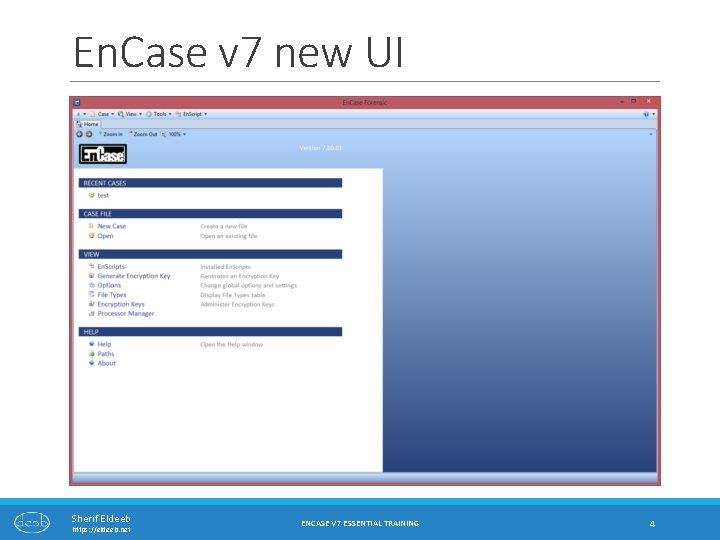
En. Case v 7 new UI Sherif Eldeeb https: //eldeeb. net ENCASE V 7 ESSENTIAL TRAINING 4
Evidence Acquisition Sherif Eldeeb https: //eldeeb. net ENCASE V 7 ESSENTIAL TRAINING 5
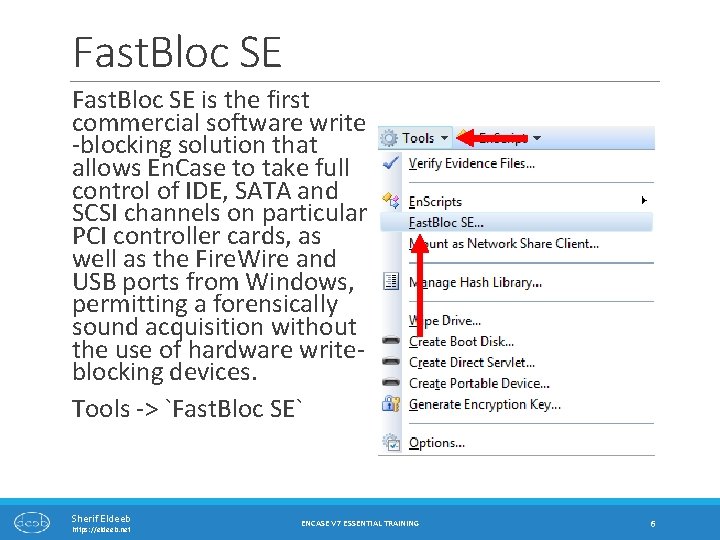
Fast. Bloc SE is the first commercial software write -blocking solution that allows En. Case to take full control of IDE, SATA and SCSI channels on particular PCI controller cards, as well as the Fire. Wire and USB ports from Windows, permitting a forensically sound acquisition without the use of hardware writeblocking devices. Tools -> `Fast. Bloc SE` Sherif Eldeeb https: //eldeeb. net ENCASE V 7 ESSENTIAL TRAINING 6
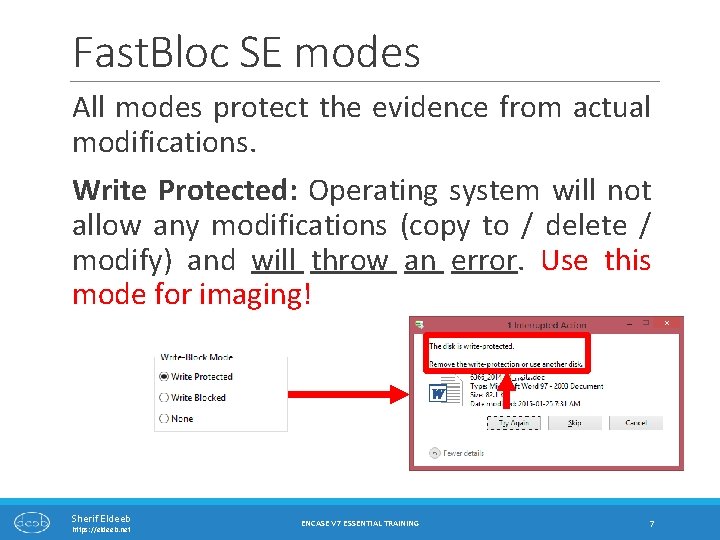
Fast. Bloc SE modes All modes protect the evidence from actual modifications. Write Protected: Operating system will not allow any modifications (copy to / delete / modify) and will throw an error. Use this mode for imaging! Sherif Eldeeb https: //eldeeb. net ENCASE V 7 ESSENTIAL TRAINING 7
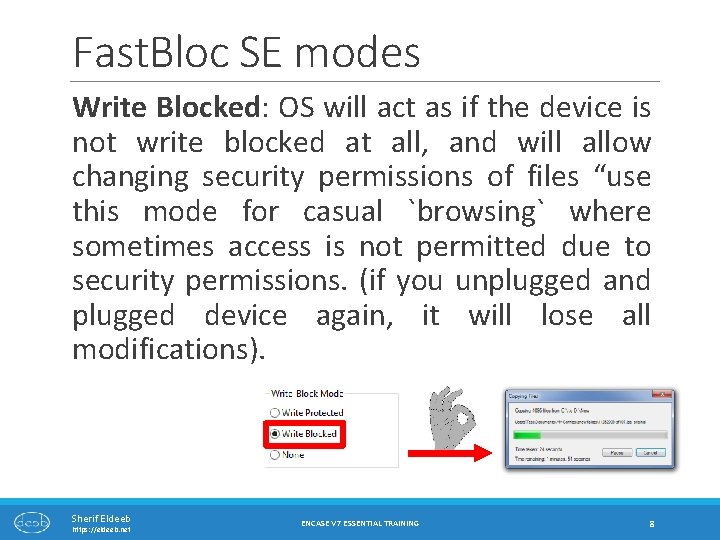
Fast. Bloc SE modes Write Blocked: OS will act as if the device is not write blocked at all, and will allow changing security permissions of files “use this mode for casual `browsing` where sometimes access is not permitted due to security permissions. (if you unplugged and plugged device again, it will lose all modifications). Sherif Eldeeb https: //eldeeb. net ENCASE V 7 ESSENTIAL TRAINING 8
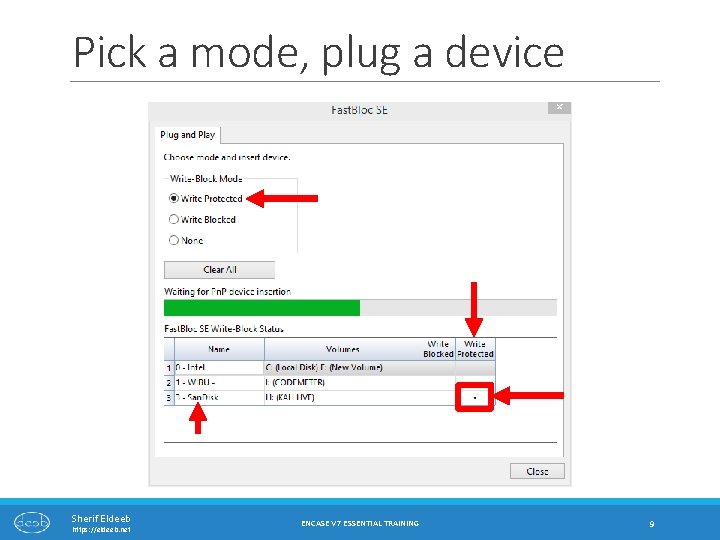
Pick a mode, plug a device Sherif Eldeeb https: //eldeeb. net ENCASE V 7 ESSENTIAL TRAINING 9
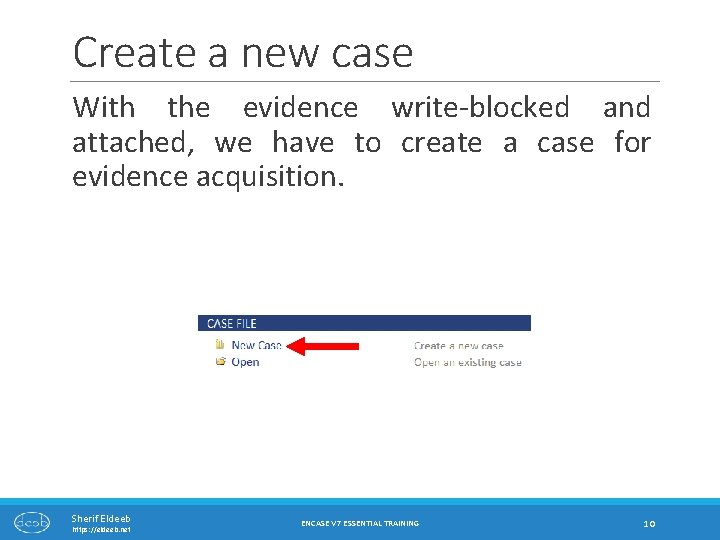
Create a new case With the evidence write-blocked and attached, we have to create a case for evidence acquisition. Sherif Eldeeb https: //eldeeb. net ENCASE V 7 ESSENTIAL TRAINING 10
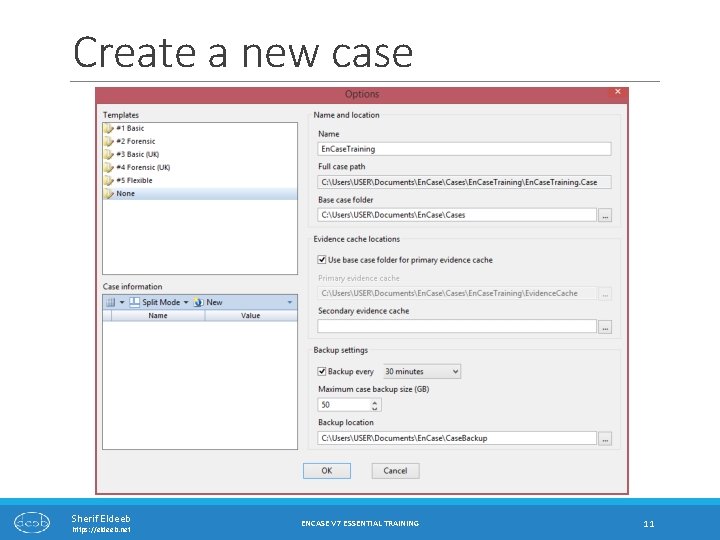
Create a new case Sherif Eldeeb https: //eldeeb. net ENCASE V 7 ESSENTIAL TRAINING 11
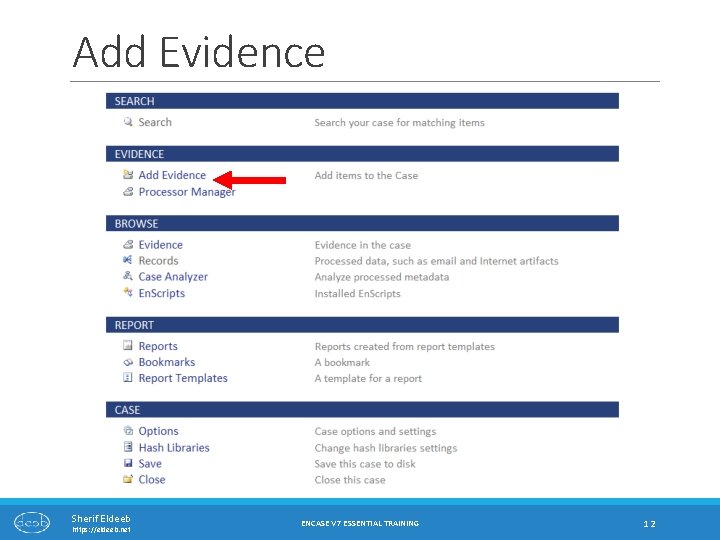
Add Evidence Sherif Eldeeb https: //eldeeb. net ENCASE V 7 ESSENTIAL TRAINING 12
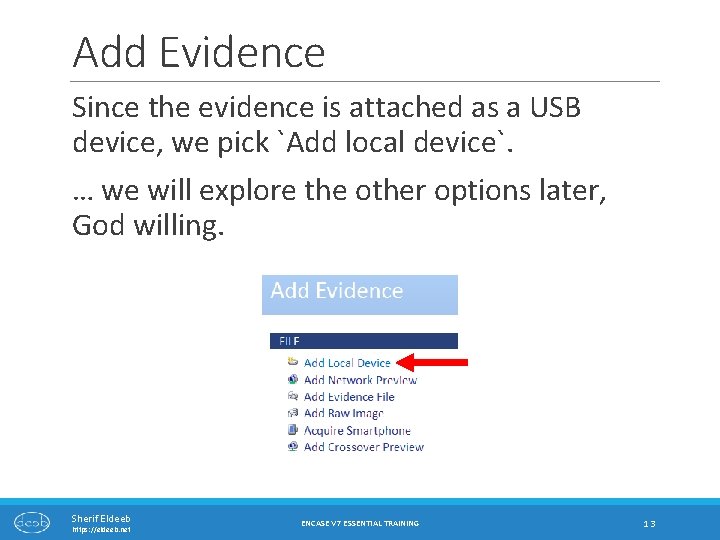
Add Evidence Since the evidence is attached as a USB device, we pick `Add local device`. … we will explore the other options later, God willing. Sherif Eldeeb https: //eldeeb. net ENCASE V 7 ESSENTIAL TRAINING 13
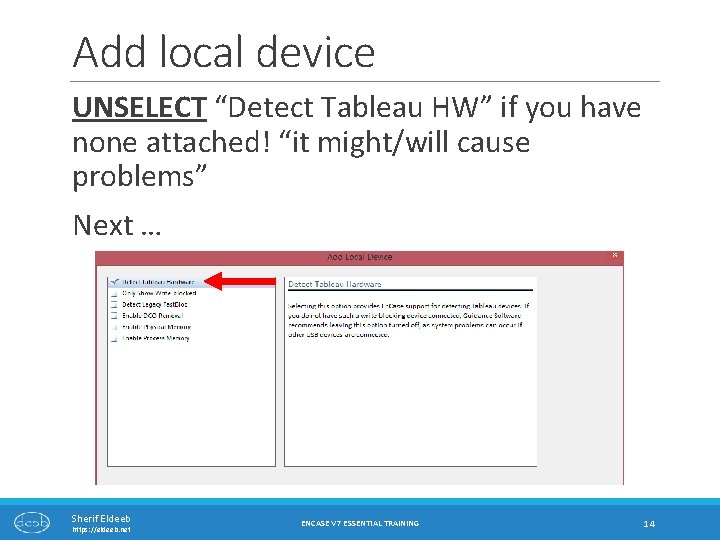
Add local device UNSELECT “Detect Tableau HW” if you have none attached! “it might/will cause problems” Next … Sherif Eldeeb https: //eldeeb. net ENCASE V 7 ESSENTIAL TRAINING 14
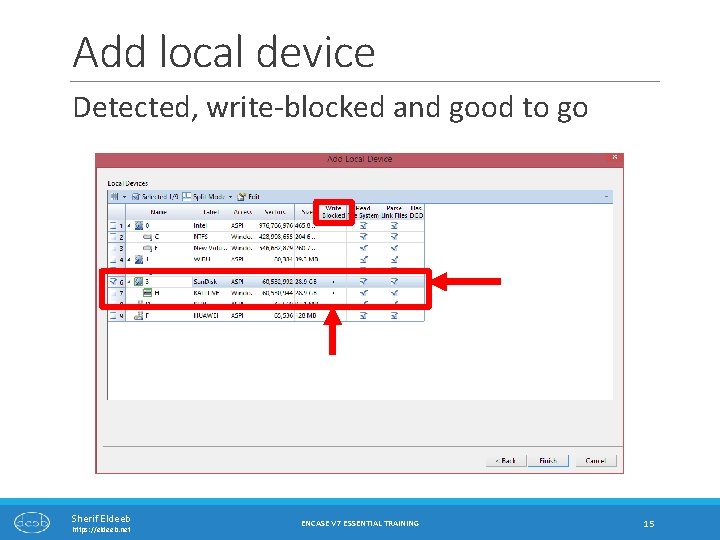
Add local device Detected, write-blocked and good to go Sherif Eldeeb https: //eldeeb. net ENCASE V 7 ESSENTIAL TRAINING 15
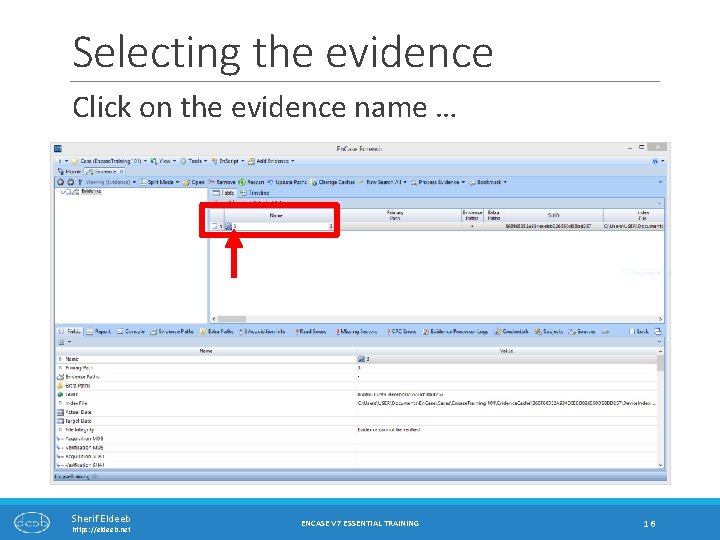
Selecting the evidence Click on the evidence name … Sherif Eldeeb https: //eldeeb. net ENCASE V 7 ESSENTIAL TRAINING 16
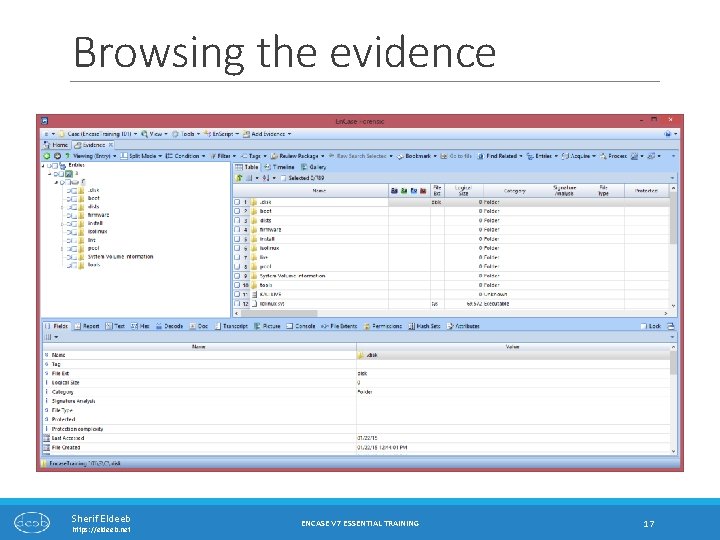
Browsing the evidence Sherif Eldeeb https: //eldeeb. net ENCASE V 7 ESSENTIAL TRAINING 17
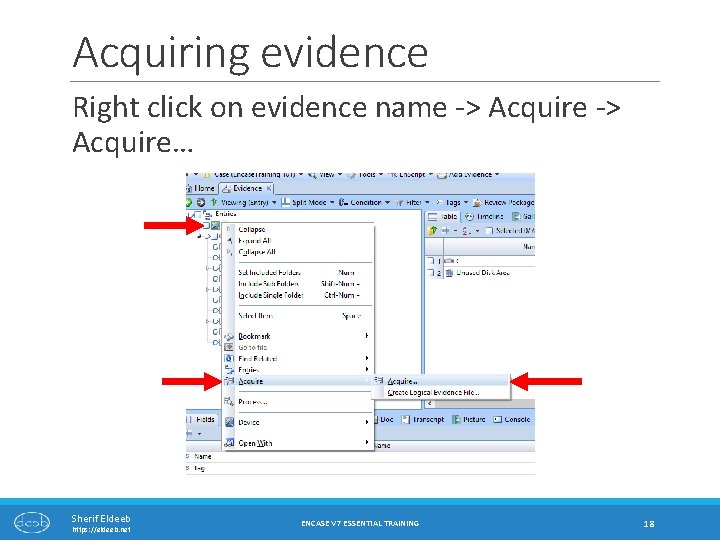
Acquiring evidence Right click on evidence name -> Acquire… Sherif Eldeeb https: //eldeeb. net ENCASE V 7 ESSENTIAL TRAINING 18
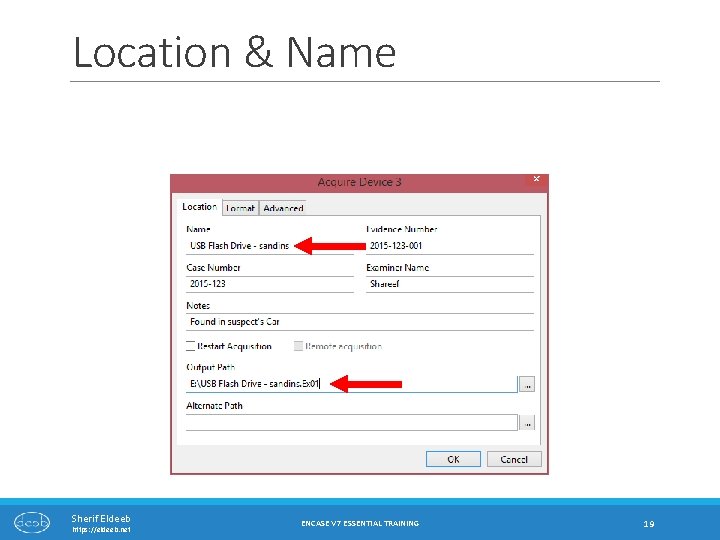
Location & Name Sherif Eldeeb https: //eldeeb. net ENCASE V 7 ESSENTIAL TRAINING 19
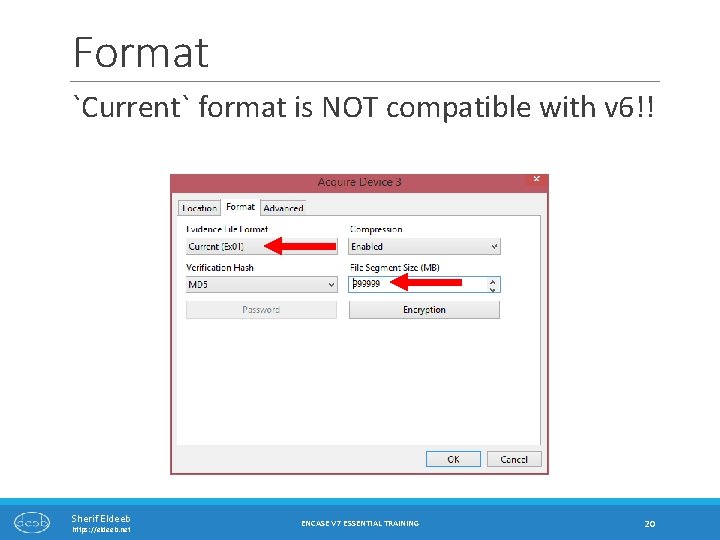
Format `Current` format is NOT compatible with v 6!! Sherif Eldeeb https: //eldeeb. net ENCASE V 7 ESSENTIAL TRAINING 20
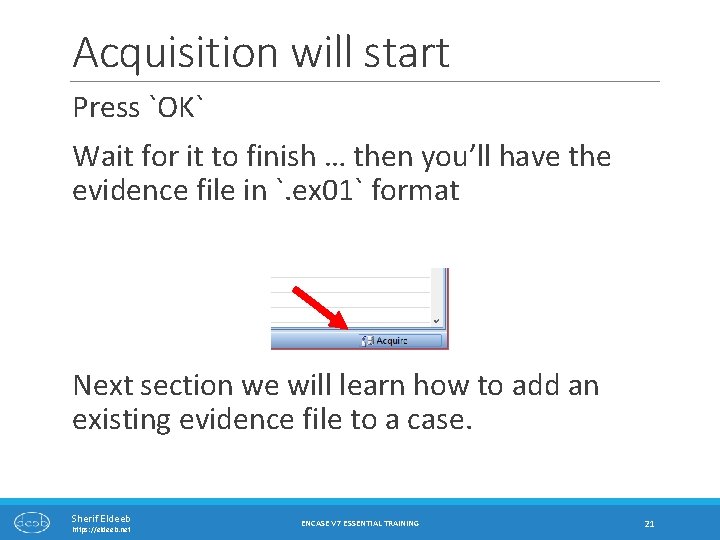
Acquisition will start Press `OK` Wait for it to finish … then you’ll have the evidence file in `. ex 01` format Next section we will learn how to add an existing evidence file to a case. Sherif Eldeeb https: //eldeeb. net ENCASE V 7 ESSENTIAL TRAINING 21
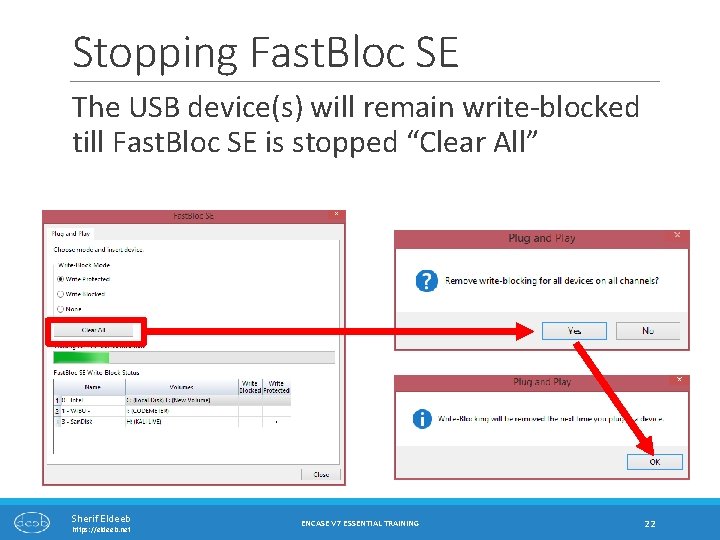
Stopping Fast. Bloc SE The USB device(s) will remain write-blocked till Fast. Bloc SE is stopped “Clear All” Sherif Eldeeb https: //eldeeb. net ENCASE V 7 ESSENTIAL TRAINING 22
Adding Evidence Files Sherif Eldeeb https: //eldeeb. net ENCASE V 7 ESSENTIAL TRAINING 23
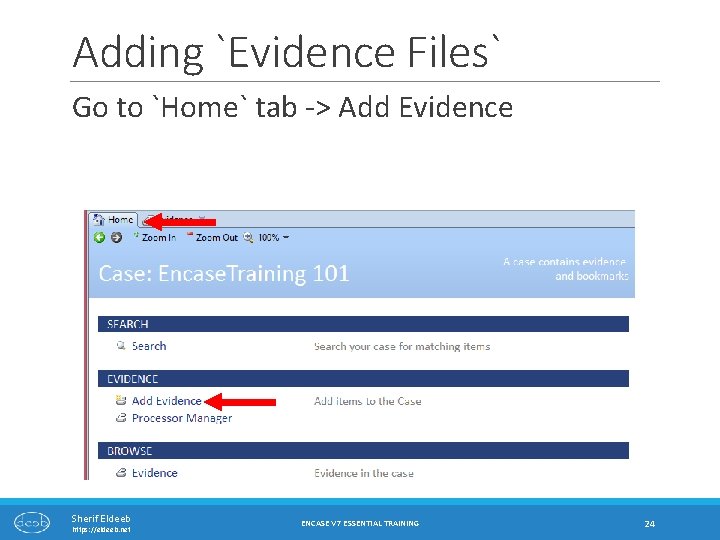
Adding `Evidence Files` Go to `Home` tab -> Add Evidence Sherif Eldeeb https: //eldeeb. net ENCASE V 7 ESSENTIAL TRAINING 24
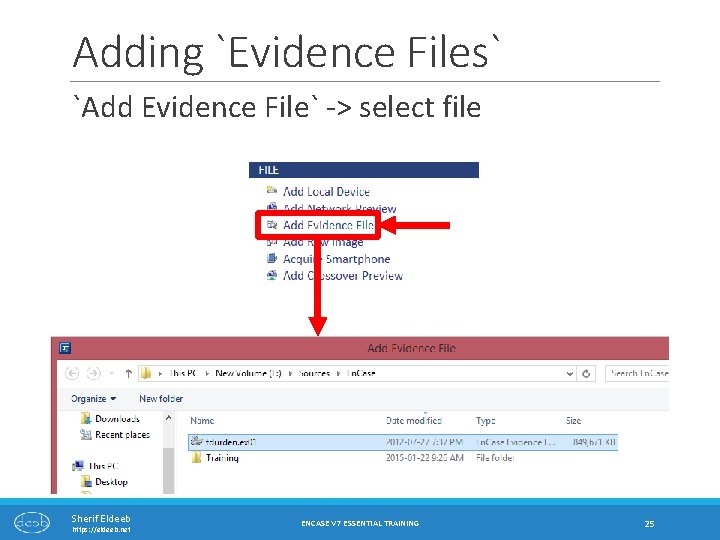
Adding `Evidence Files` `Add Evidence File` -> select file Sherif Eldeeb https: //eldeeb. net ENCASE V 7 ESSENTIAL TRAINING 25
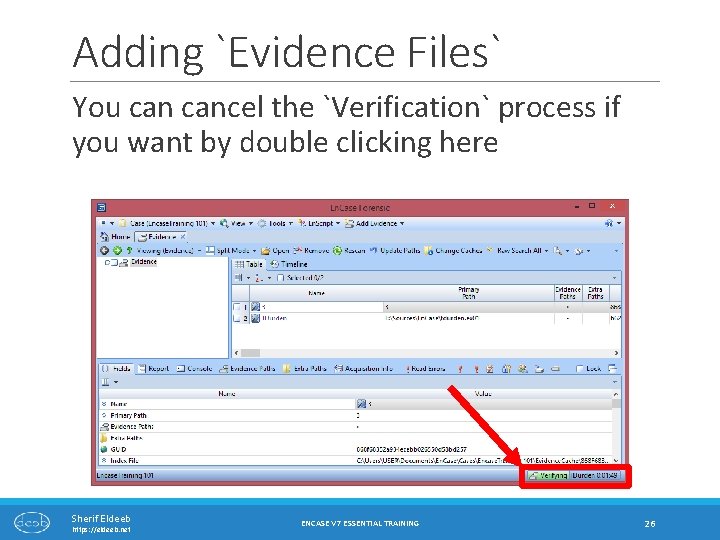
Adding `Evidence Files` You cancel the `Verification` process if you want by double clicking here Sherif Eldeeb https: //eldeeb. net ENCASE V 7 ESSENTIAL TRAINING 26
Adding Raw image files `DD` Sherif Eldeeb https: //eldeeb. net ENCASE V 7 ESSENTIAL TRAINING 27
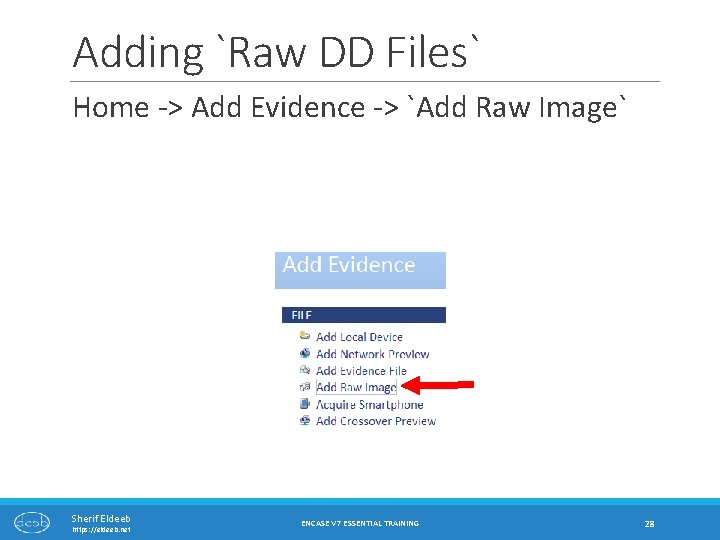
Adding `Raw DD Files` Home -> Add Evidence -> `Add Raw Image` Sherif Eldeeb https: //eldeeb. net ENCASE V 7 ESSENTIAL TRAINING 28
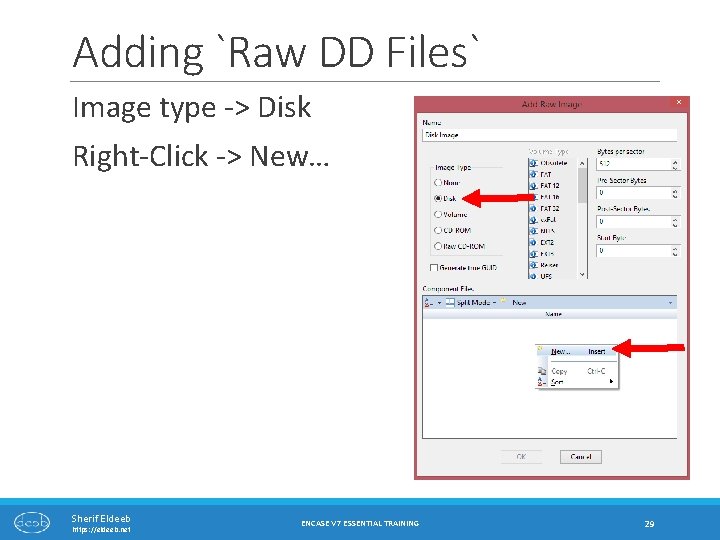
Adding `Raw DD Files` Image type -> Disk Right-Click -> New… Sherif Eldeeb https: //eldeeb. net ENCASE V 7 ESSENTIAL TRAINING 29
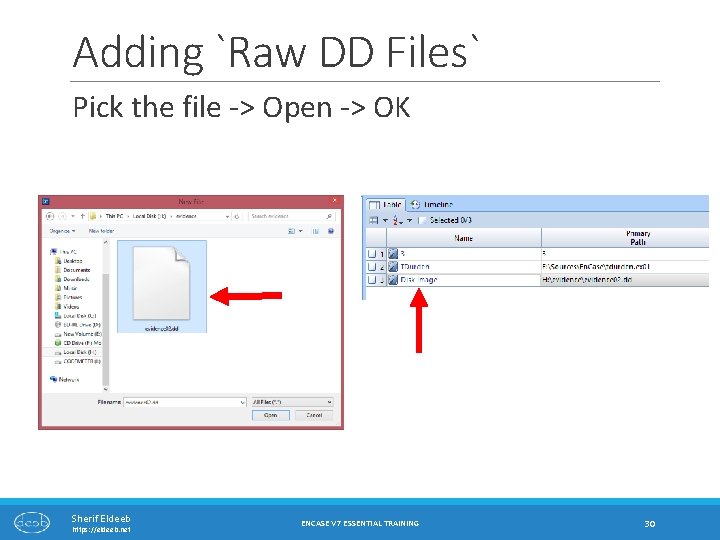
Adding `Raw DD Files` Pick the file -> Open -> OK Sherif Eldeeb https: //eldeeb. net ENCASE V 7 ESSENTIAL TRAINING 30
Acquiring Mobile Phones PRE-REQUISITES AND IMPORTANT CONSIDERATIONS Sherif Eldeeb https: //eldeeb. net ENCASE V 7 ESSENTIAL TRAINING 31
Mobile Phone Support En. Case v 7 supports acquiring data from smartphones and tablets directly. Evidences could be acquired from the device itself, or a backup file located on the suspect Computer. Allows exporting geo-tags and other location data which can then be loaded into google maps! Creating a report is very easy! Sherif Eldeeb https: //eldeeb. net ENCASE V 7 ESSENTIAL TRAINING 32
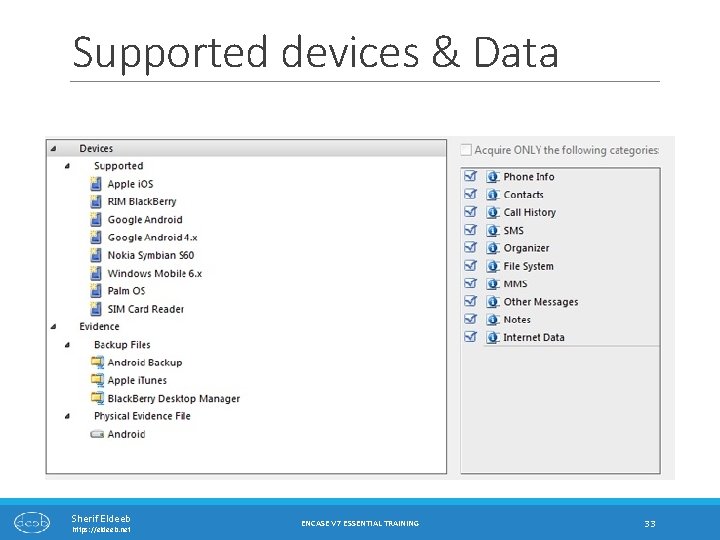
Supported devices & Data Sherif Eldeeb https: //eldeeb. net ENCASE V 7 ESSENTIAL TRAINING 33
Physical v. s. Logical Acquisition For some devices (like Android) it is possible to perform `Physical Acquisition`, that enables recovery of more data, including deleted files which will not possible otherwise. Logical acquisition is like “copying” the data from the device, yet deleted data will not be available for parsing. Physical acquisition requires that the device is rooted (Google that if you are unfamiliar with the term). Sherif Eldeeb https: //eldeeb. net ENCASE V 7 ESSENTIAL TRAINING 34
IMPORTANT!!! Few things needs to be considered before acquiring evidence from mobile devices: ◦ Examination environment considerations ◦ Computer-side preparation and necessary drivers installation. ◦ Preparing target mobile device for acquisition Sherif Eldeeb https: //eldeeb. net ENCASE V 7 ESSENTIAL TRAINING 35
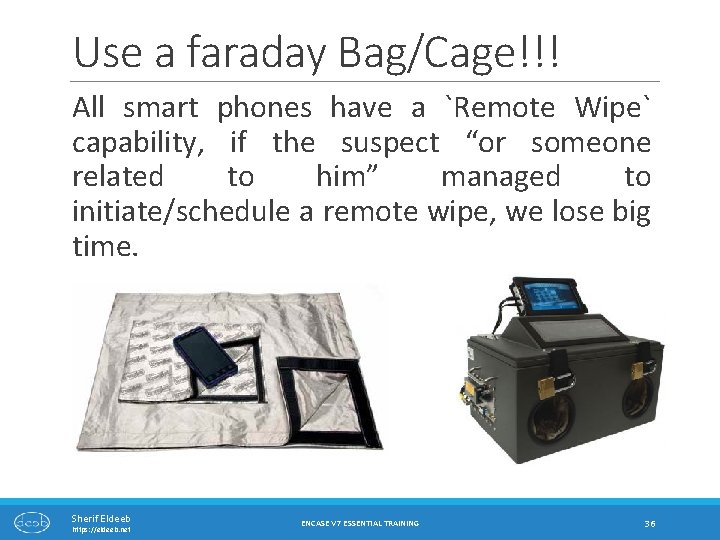
Use a faraday Bag/Cage!!! All smart phones have a `Remote Wipe` capability, if the suspect “or someone related to him” managed to initiate/schedule a remote wipe, we lose big time. Sherif Eldeeb https: //eldeeb. net ENCASE V 7 ESSENTIAL TRAINING 36
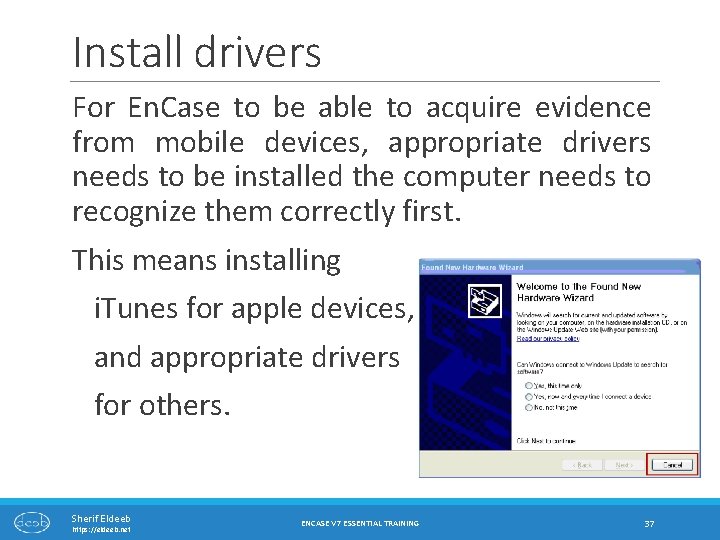
Install drivers For En. Case to be able to acquire evidence from mobile devices, appropriate drivers needs to be installed the computer needs to recognize them correctly first. This means installing i. Tunes for apple devices, and appropriate drivers for others. Sherif Eldeeb https: //eldeeb. net ENCASE V 7 ESSENTIAL TRAINING 37
Android: Prerequisites Sherif Eldeeb https: //eldeeb. net ENCASE V 7 ESSENTIAL TRAINING 38
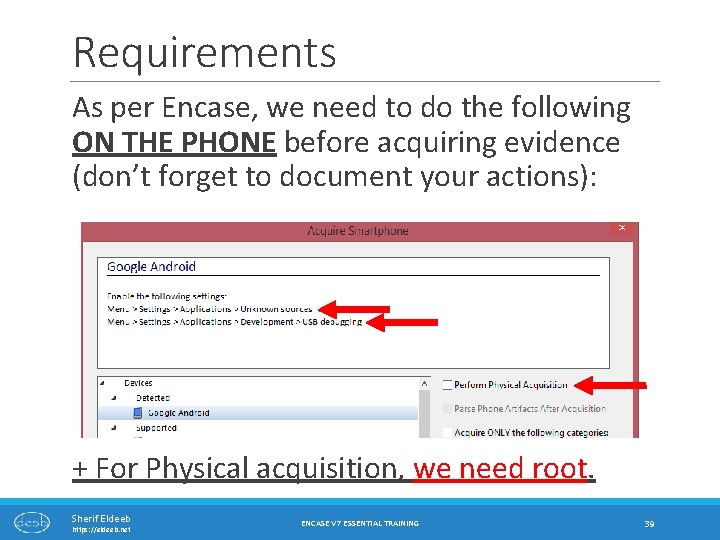
Requirements As per Encase, we need to do the following ON THE PHONE before acquiring evidence (don’t forget to document your actions): + For Physical acquisition, we need root. Sherif Eldeeb https: //eldeeb. net ENCASE V 7 ESSENTIAL TRAINING 39
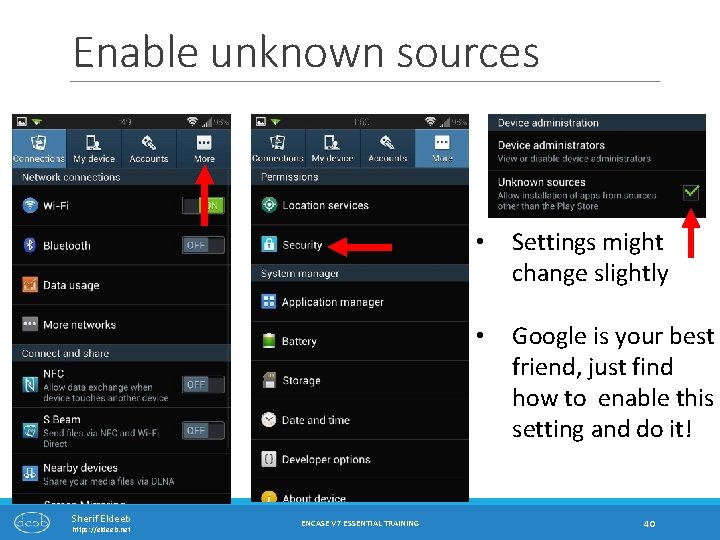
Enable unknown sources Sherif Eldeeb https: //eldeeb. net ENCASE V 7 ESSENTIAL TRAINING • Settings might change slightly • Google is your best friend, just find how to enable this setting and do it! 40
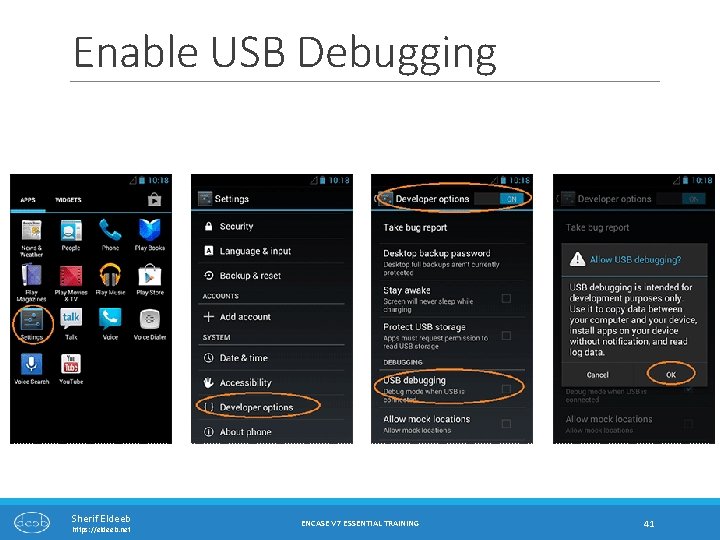
Enable USB Debugging Sherif Eldeeb https: //eldeeb. net ENCASE V 7 ESSENTIAL TRAINING 41
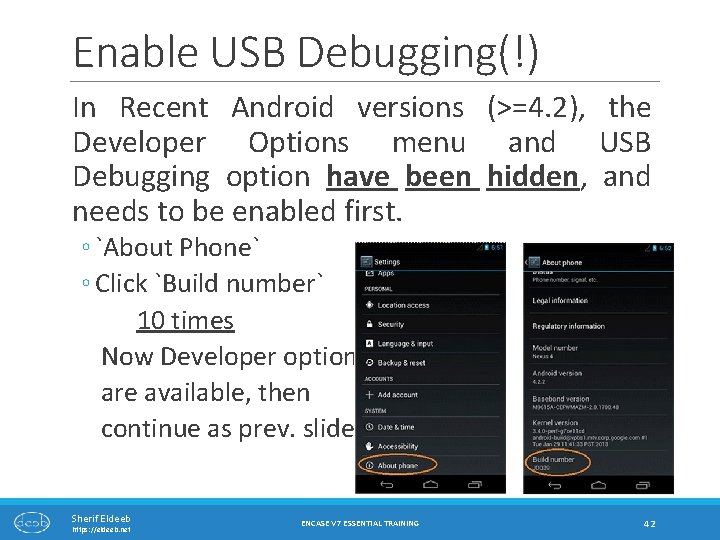
Enable USB Debugging(!) In Recent Android versions (>=4. 2), the Developer Options menu and USB Debugging option have been hidden, and needs to be enabled first. ◦ `About Phone` ◦ Click `Build number` 10 times Now Developer options are available, then continue as prev. slide Sherif Eldeeb https: //eldeeb. net ENCASE V 7 ESSENTIAL TRAINING 42
Rooting the phone As mentioned earlier, physical acquisition (and recovery of deleted data) requires the device to be `Rooted`. If it is already rooted, you’re in good shape, if it is not, please note that there is a very high probability that the device gets fully erased, or irrecoverably damaged! Short answer, don’t ever root a device in course of examination!!! `unless authorized, and after “authority” understands the risk` Sherif Eldeeb https: //eldeeb. net ENCASE V 7 ESSENTIAL TRAINING 43

Android: Acquisition Demo Sherif Eldeeb https: //eldeeb. net ENCASE V 7 ESSENTIAL TRAINING 44
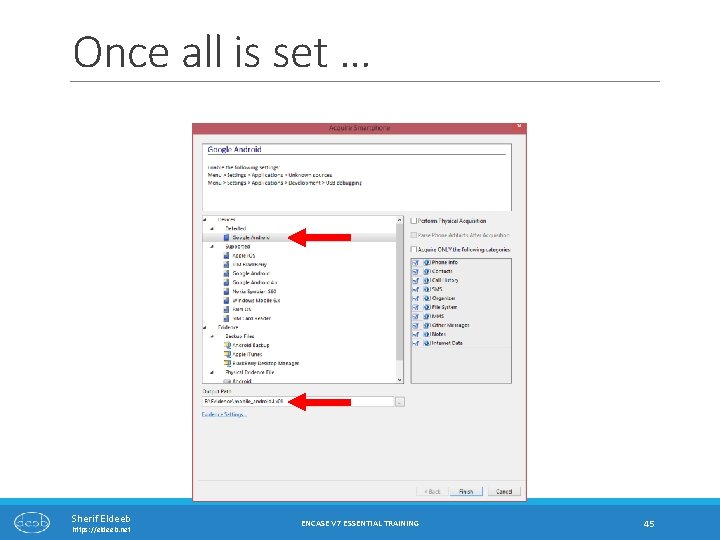
Once all is set … Sherif Eldeeb https: //eldeeb. net ENCASE V 7 ESSENTIAL TRAINING 45
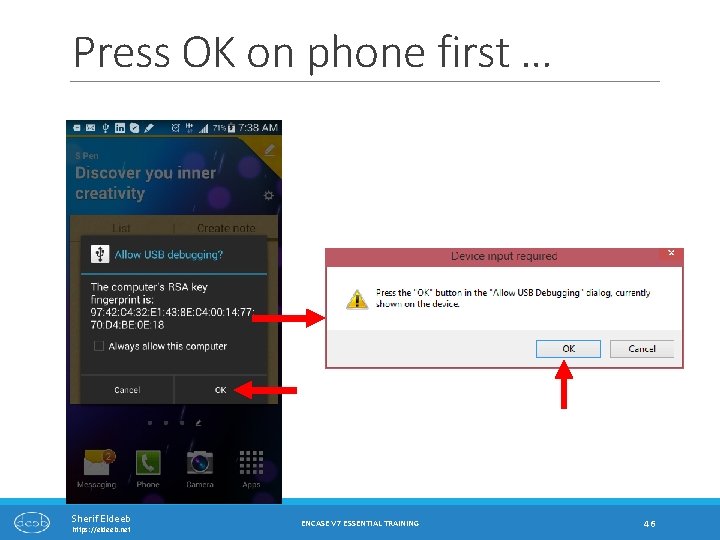
Press OK on phone first … Sherif Eldeeb https: //eldeeb. net ENCASE V 7 ESSENTIAL TRAINING 46
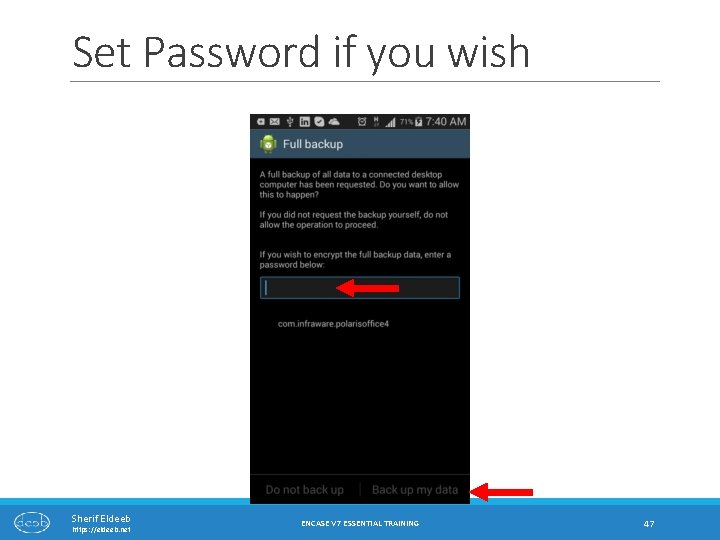
Set Password if you wish Sherif Eldeeb https: //eldeeb. net ENCASE V 7 ESSENTIAL TRAINING 47
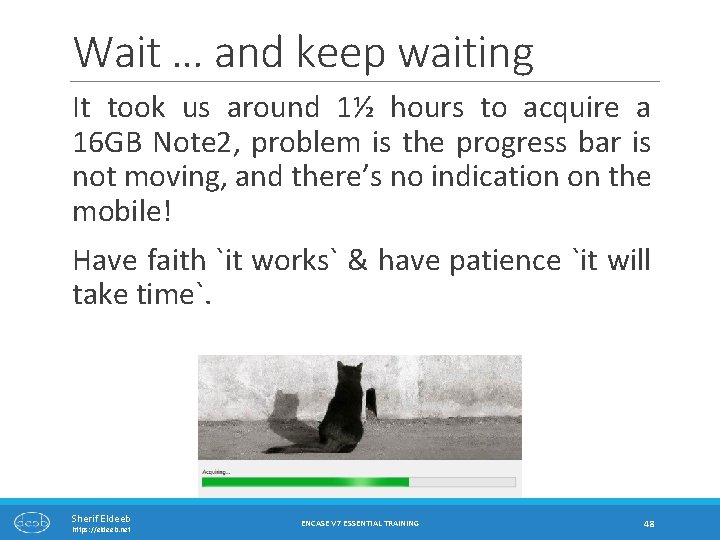
Wait … and keep waiting It took us around 1½ hours to acquire a 16 GB Note 2, problem is the progress bar is not moving, and there’s no indication on the mobile! Have faith `it works` & have patience `it will take time`. Sherif Eldeeb https: //eldeeb. net ENCASE V 7 ESSENTIAL TRAINING 48
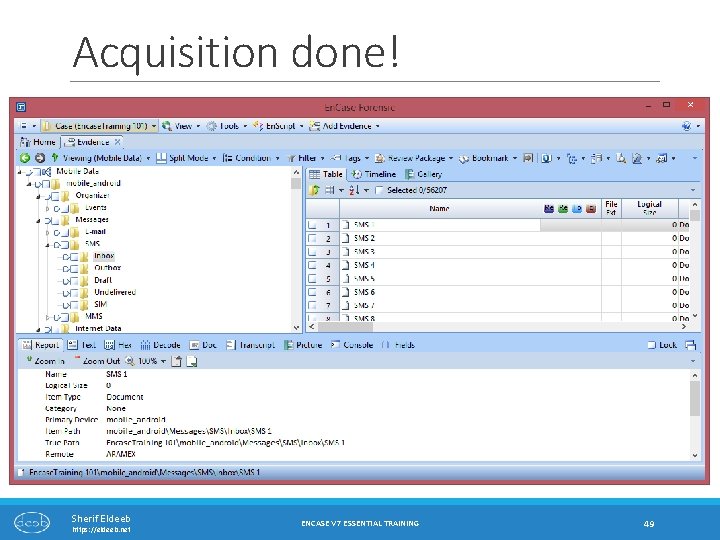
Acquisition done! Sherif Eldeeb https: //eldeeb. net ENCASE V 7 ESSENTIAL TRAINING 49
Note! For some reason, photos taken by camera (the ones usually in DCIM) were not included in the evidence file when we acquired it … We didn’t check why, but you may copy the files from the phone storage directly and take appropriate notes (MD 5 hashes … etc. ) ◦ Or make a logical evidence file which includes the images. Sherif Eldeeb https: //eldeeb. net ENCASE V 7 ESSENTIAL TRAINING 50
i. Tunes Backup Files Sherif Eldeeb https: //eldeeb. net ENCASE V 7 ESSENTIAL TRAINING 51
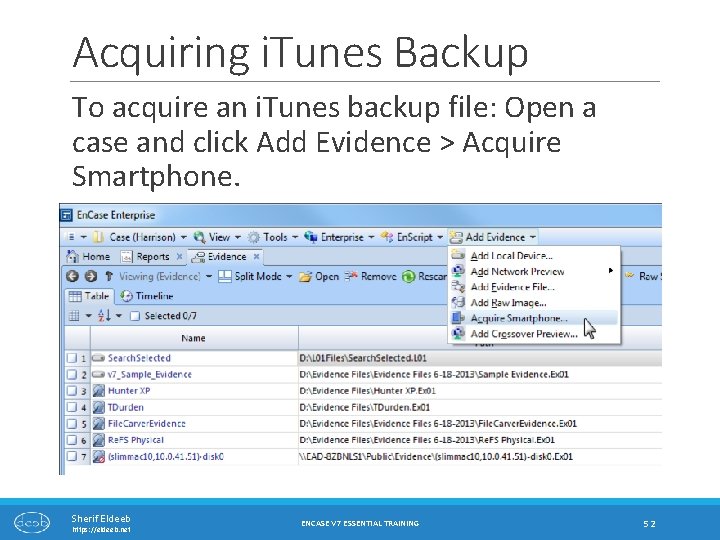
Acquiring i. Tunes Backup To acquire an i. Tunes backup file: Open a case and click Add Evidence > Acquire Smartphone. Sherif Eldeeb https: //eldeeb. net ENCASE V 7 ESSENTIAL TRAINING 52
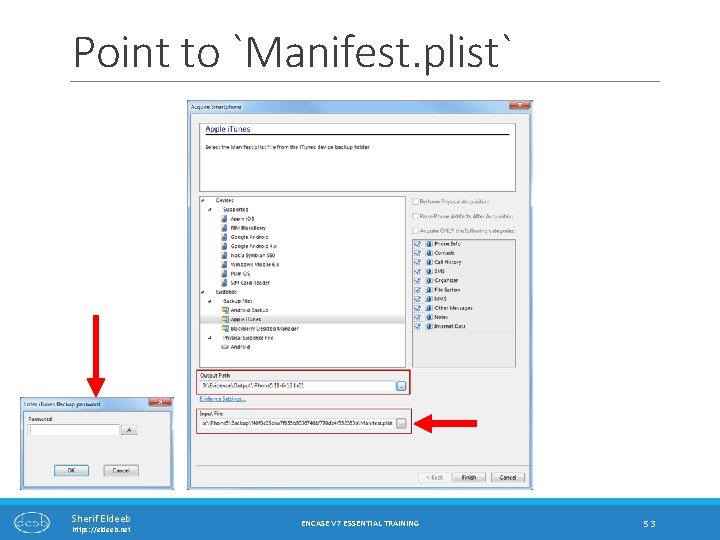
Point to `Manifest. plist` Sherif Eldeeb https: //eldeeb. net ENCASE V 7 ESSENTIAL TRAINING 53
Browsing and Viewing Evidence Sherif Eldeeb https: //eldeeb. net ENCASE V 7 ESSENTIAL TRAINING 54
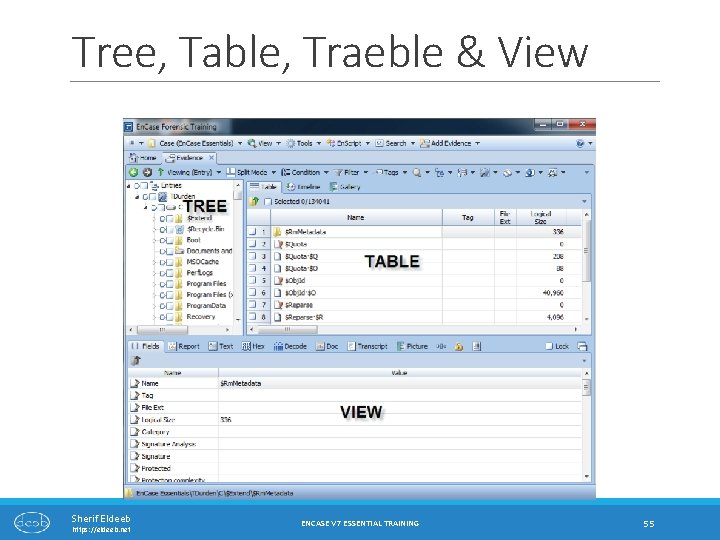
Tree, Table, Traeble & View Sherif Eldeeb https: //eldeeb. net ENCASE V 7 ESSENTIAL TRAINING 55
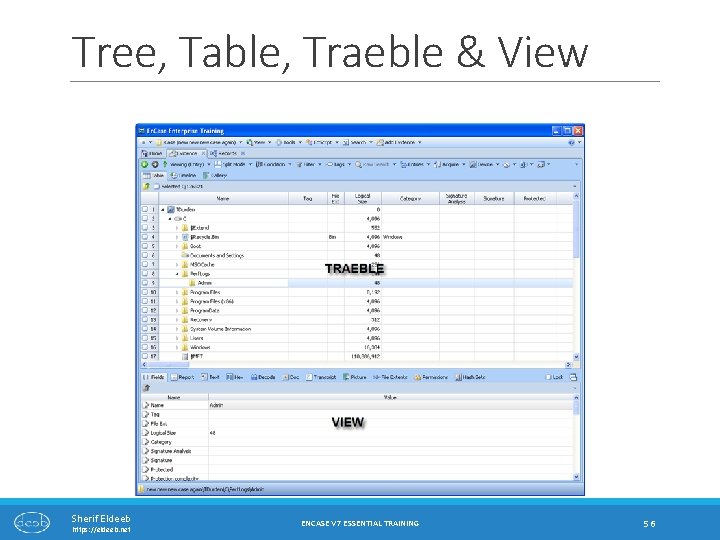
Tree, Table, Traeble & View Sherif Eldeeb https: //eldeeb. net ENCASE V 7 ESSENTIAL TRAINING 56
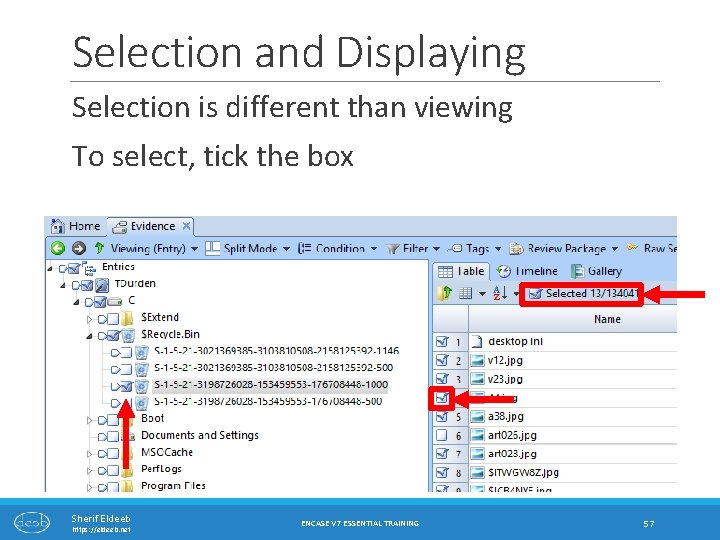
Selection and Displaying Selection is different than viewing To select, tick the box Sherif Eldeeb https: //eldeeb. net ENCASE V 7 ESSENTIAL TRAINING 57
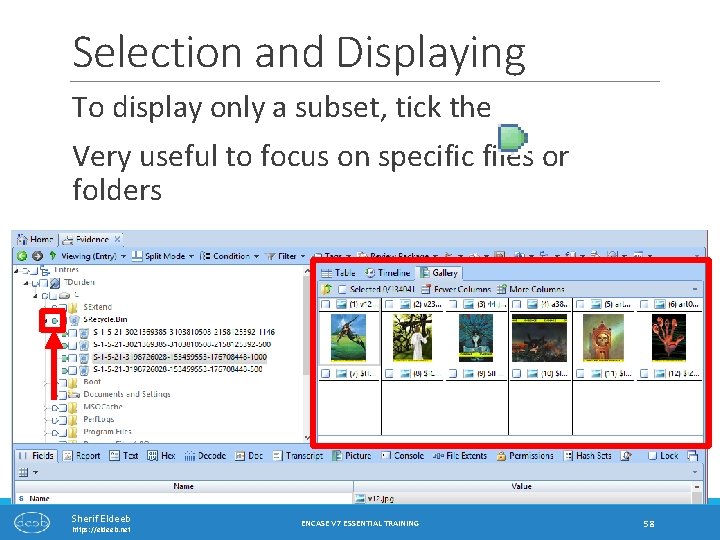
Selection and Displaying To display only a subset, tick the Very useful to focus on specific files or folders Sherif Eldeeb https: //eldeeb. net ENCASE V 7 ESSENTIAL TRAINING 58
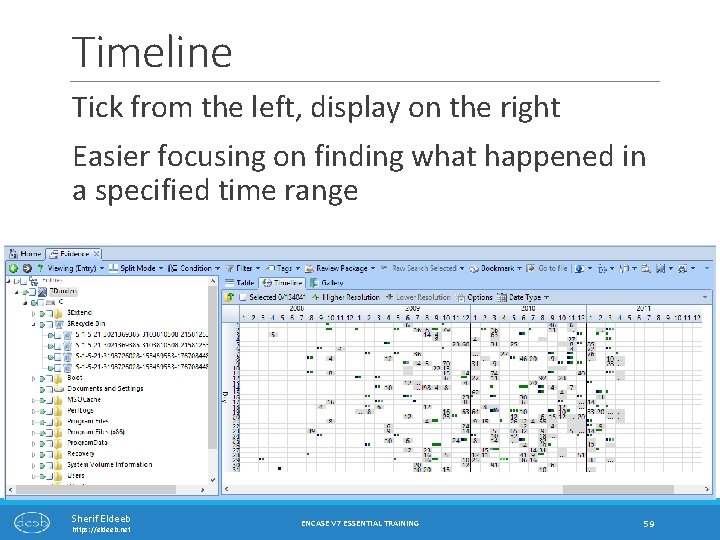
Timeline Tick from the left, display on the right Easier focusing on finding what happened in a specified time range Sherif Eldeeb https: //eldeeb. net ENCASE V 7 ESSENTIAL TRAINING 59
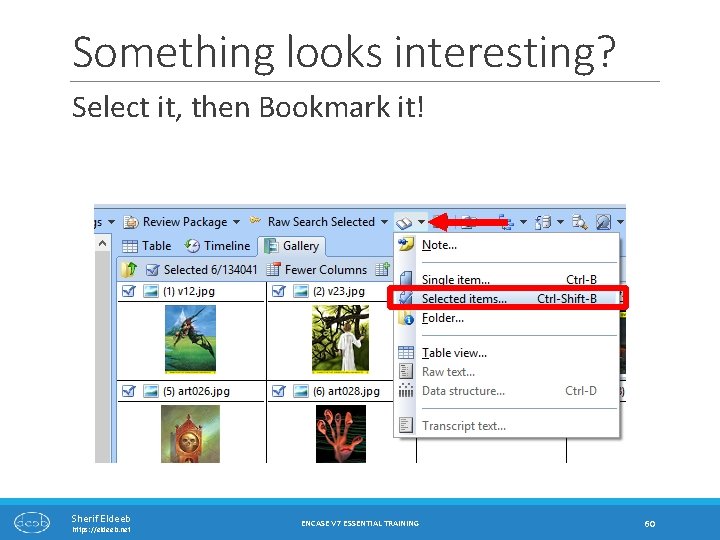
Something looks interesting? Select it, then Bookmark it! Sherif Eldeeb https: //eldeeb. net ENCASE V 7 ESSENTIAL TRAINING 60
Other features to consider Consider them on your own! Covering them here can take forever … Take a look at Chapter 7 in the user manual. Filtering & conditions. Searching. Sherif Eldeeb https: //eldeeb. net ENCASE V 7 ESSENTIAL TRAINING 61
Mounting Evidence Sherif Eldeeb https: //eldeeb. net ENCASE V 7 ESSENTIAL TRAINING 62
Mounting evidence Evidence could be mounted as local, or network mounted drives. This will enable casually “browsing” the evidence, or perform a virus scan. Virtual Machines could be created from evidence if mounted as local drive. This also enables to view all file systems even those not supported by windows “e. g. evidence from Linux or Mac computers” Sherif Eldeeb https: //eldeeb. net ENCASE V 7 ESSENTIAL TRAINING 63
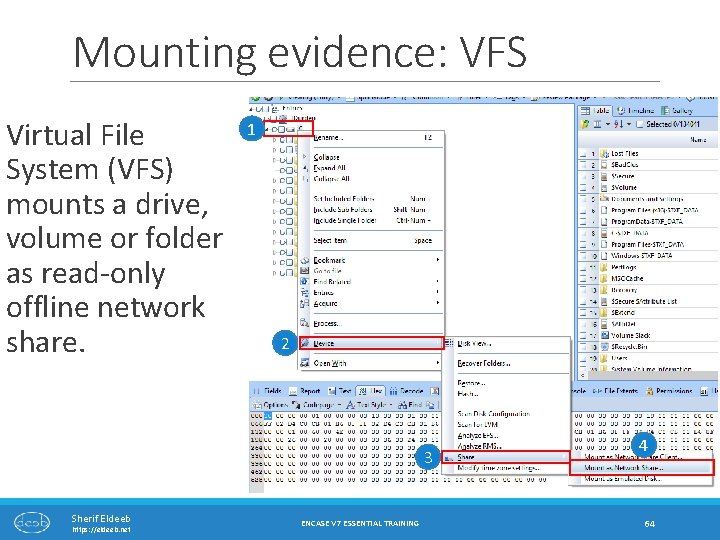
Mounting evidence: VFS Virtual File System (VFS) mounts a drive, volume or folder as read-only offline network share. 1 2 3 Sherif Eldeeb https: //eldeeb. net ENCASE V 7 ESSENTIAL TRAINING 4 64
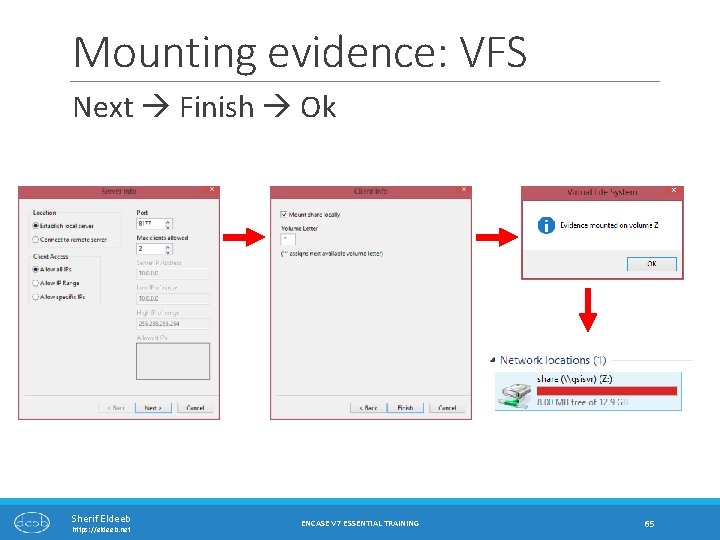
Mounting evidence: VFS Next Finish Ok Sherif Eldeeb https: //eldeeb. net ENCASE V 7 ESSENTIAL TRAINING 65
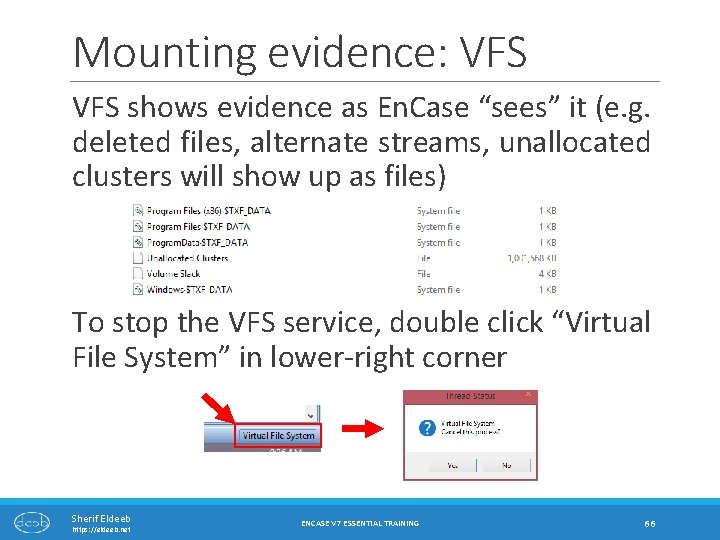
Mounting evidence: VFS shows evidence as En. Case “sees” it (e. g. deleted files, alternate streams, unallocated clusters will show up as files) To stop the VFS service, double click “Virtual File System” in lower-right corner Sherif Eldeeb https: //eldeeb. net ENCASE V 7 ESSENTIAL TRAINING 66
Mounting evidence: PDE Another way to mount evidence is Physical Disk Emulator (PDE), which “tricks” windows into thinking that the evidence is an actual physical disk attached to the examiner machine. This enables analysis of the evidence using other forensic tools, or use it to boot into a virtual machine. But this limits the supported file systems for casual browsing to those supported by windows (i. e. FAT & NTFS) Sherif Eldeeb https: //eldeeb. net ENCASE V 7 ESSENTIAL TRAINING 67
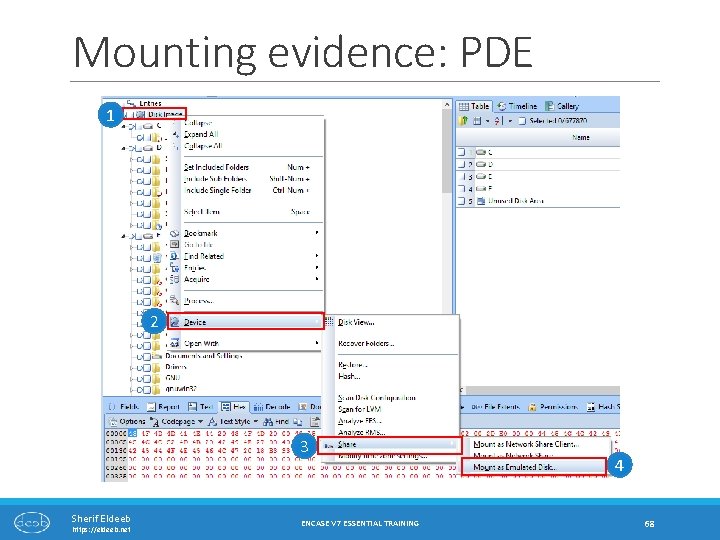
Mounting evidence: PDE 1 2 3 Sherif Eldeeb https: //eldeeb. net ENCASE V 7 ESSENTIAL TRAINING 4 68
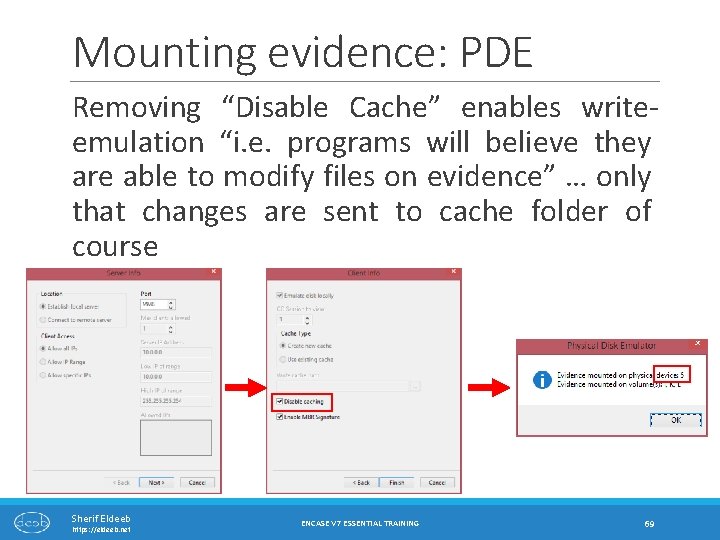
Mounting evidence: PDE Removing “Disable Cache” enables writeemulation “i. e. programs will believe they are able to modify files on evidence” … only that changes are sent to cache folder of course Sherif Eldeeb https: //eldeeb. net ENCASE V 7 ESSENTIAL TRAINING 69
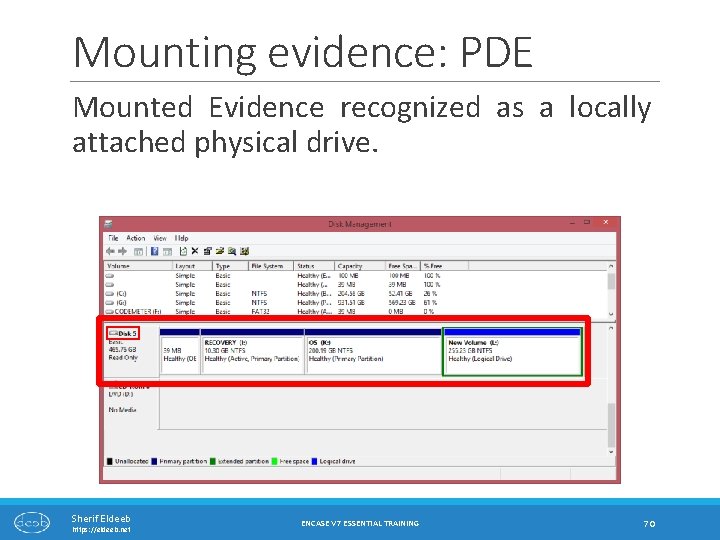
Mounting evidence: PDE Mounted Evidence recognized as a locally attached physical drive. Sherif Eldeeb https: //eldeeb. net ENCASE V 7 ESSENTIAL TRAINING 70
Running evidence as a Virtual Machine Sherif Eldeeb https: //eldeeb. net ENCASE V 7 ESSENTIAL TRAINING 71
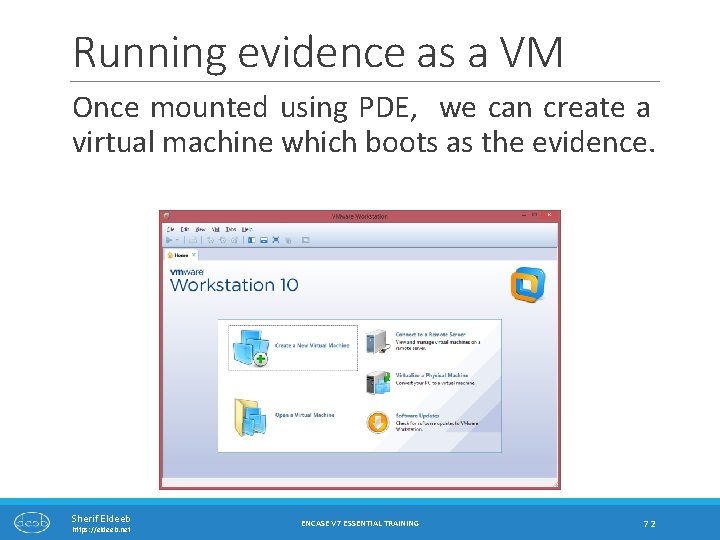
Running evidence as a VM Once mounted using PDE, we can create a virtual machine which boots as the evidence. Sherif Eldeeb https: //eldeeb. net ENCASE V 7 ESSENTIAL TRAINING 72
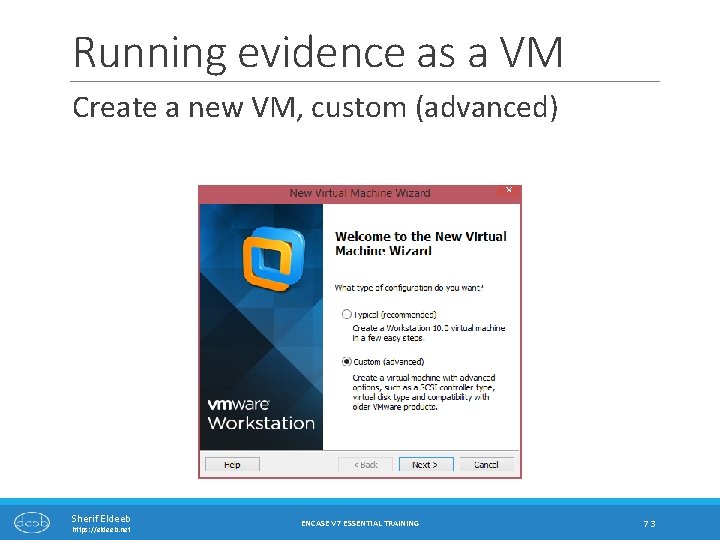
Running evidence as a VM Create a new VM, custom (advanced) Sherif Eldeeb https: //eldeeb. net ENCASE V 7 ESSENTIAL TRAINING 73
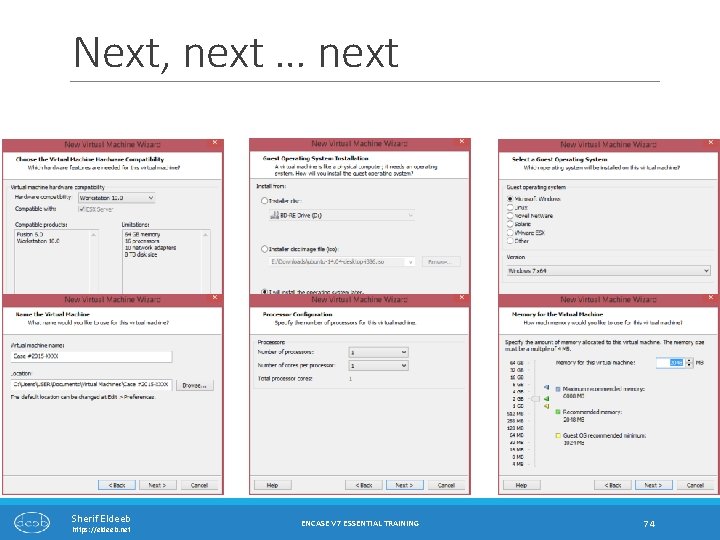
Next, next … next Sherif Eldeeb https: //eldeeb. net ENCASE V 7 ESSENTIAL TRAINING 74
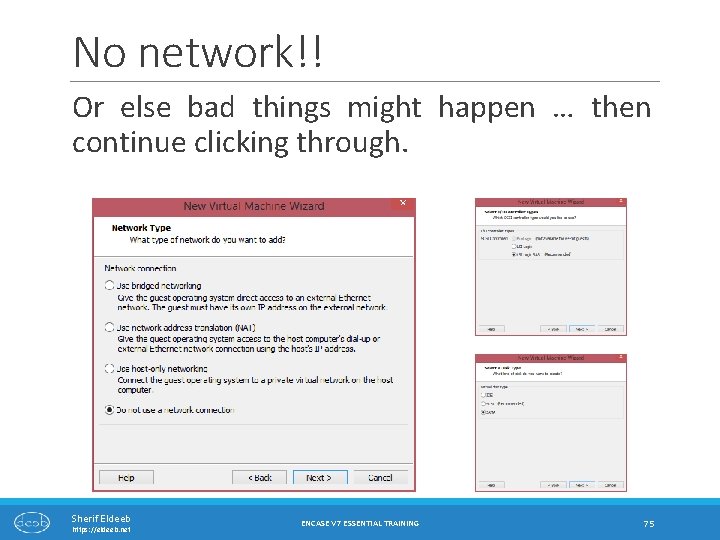
No network!! Or else bad things might happen … then continue clicking through. Sherif Eldeeb https: //eldeeb. net ENCASE V 7 ESSENTIAL TRAINING 75
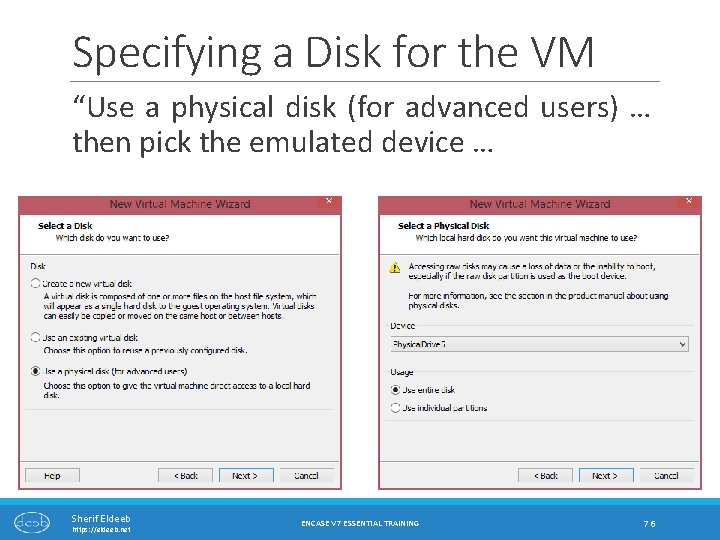
Specifying a Disk for the VM “Use a physical disk (for advanced users) … then pick the emulated device … Sherif Eldeeb https: //eldeeb. net ENCASE V 7 ESSENTIAL TRAINING 76
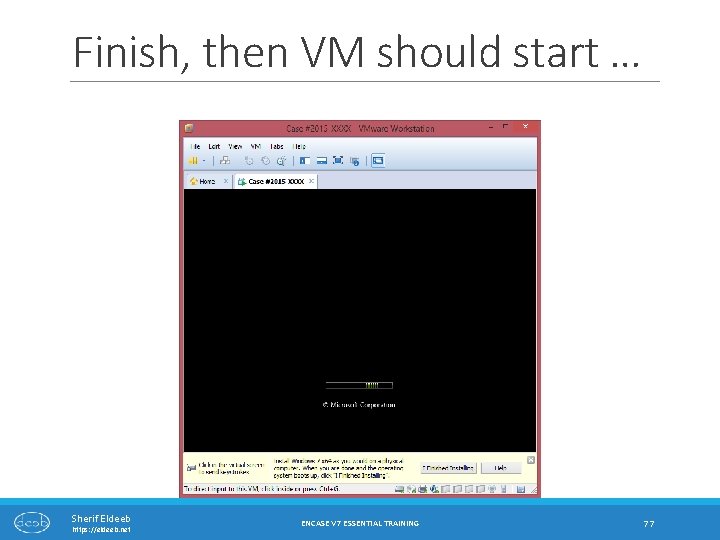
Finish, then VM should start … Sherif Eldeeb https: //eldeeb. net ENCASE V 7 ESSENTIAL TRAINING 77
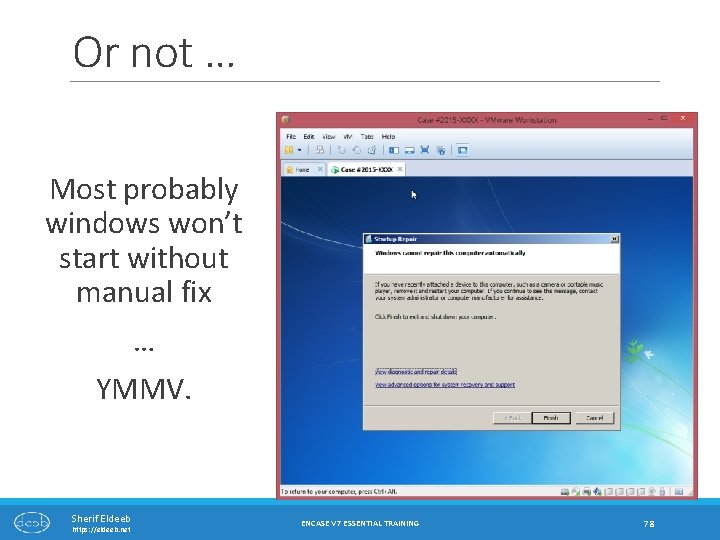
Or not … Most probably windows won’t start without manual fix … YMMV. Sherif Eldeeb https: //eldeeb. net ENCASE V 7 ESSENTIAL TRAINING 78
Processing Evidence …. WHERE THE FUN BEGINS Sherif Eldeeb https: //eldeeb. net ENCASE V 7 ESSENTIAL TRAINING 79
What is `Evidence Processing`? The Evidence Processor runs, in a single automated session, a collection of potent analytic tools against the case data. Examples include: File carving, Internet artifact extraction, history of connected USB devices, network info (IP address & MAC addresses), System info, Instant messaging parser, Recovery of deleted files … and much more! Sherif Eldeeb https: //eldeeb. net ENCASE V 7 ESSENTIAL TRAINING 80
Evidence Processing Some tasks take very, very … very long time. It is recommended that you pick what you are looking for only. It has two pre-requisites: ◦ Evidence must have been Acquired. ◦ Set the time zones of the evidence. … let’s see how to get the time zone of the evidence and configure En. Case appropriately Sherif Eldeeb https: //eldeeb. net ENCASE V 7 ESSENTIAL TRAINING 81
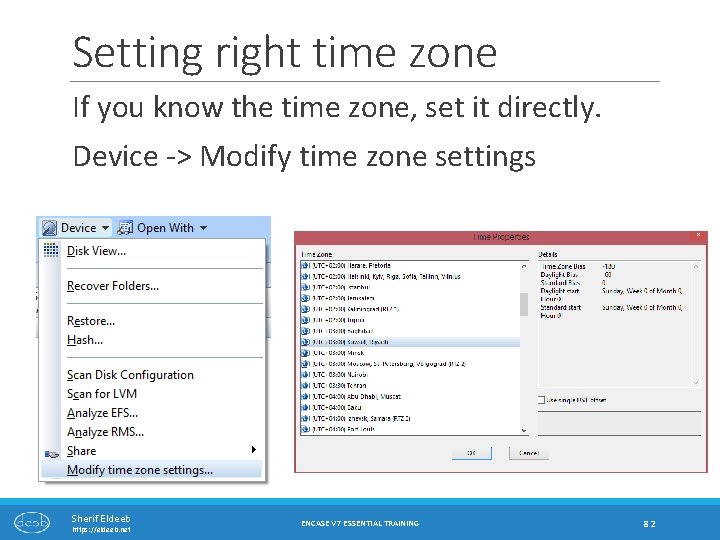
Setting right time zone If you know the time zone, set it directly. Device -> Modify time zone settings Sherif Eldeeb https: //eldeeb. net ENCASE V 7 ESSENTIAL TRAINING 82
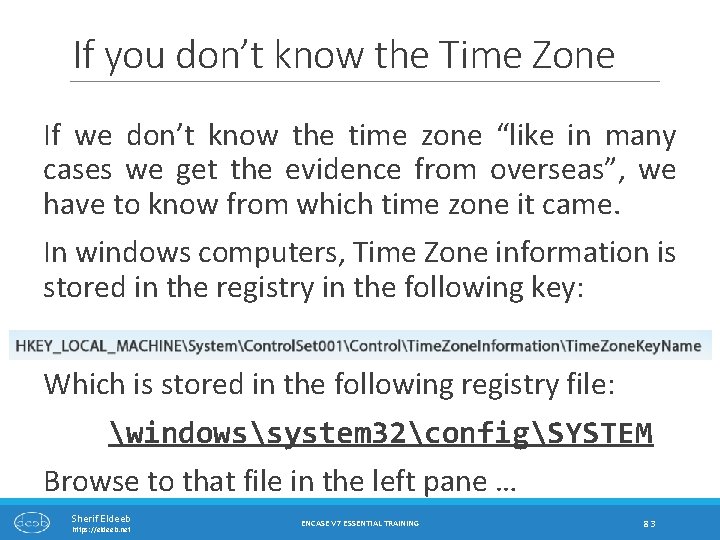
If you don’t know the Time Zone If we don’t know the time zone “like in many cases we get the evidence from overseas”, we have to know from which time zone it came. In windows computers, Time Zone information is stored in the registry in the following key: Which is stored in the following registry file: windowssystem 32configSYSTEM Browse to that file in the left pane … Sherif Eldeeb https: //eldeeb. net ENCASE V 7 ESSENTIAL TRAINING 83
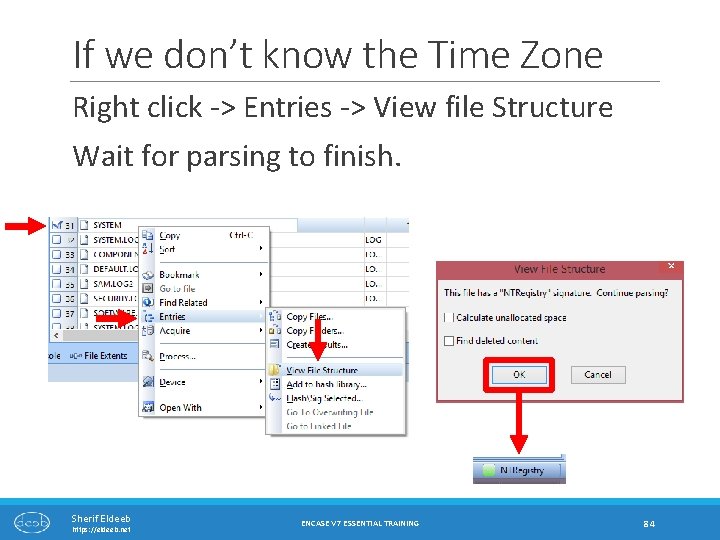
If we don’t know the Time Zone Right click -> Entries -> View file Structure Wait for parsing to finish. Sherif Eldeeb https: //eldeeb. net ENCASE V 7 ESSENTIAL TRAINING 84
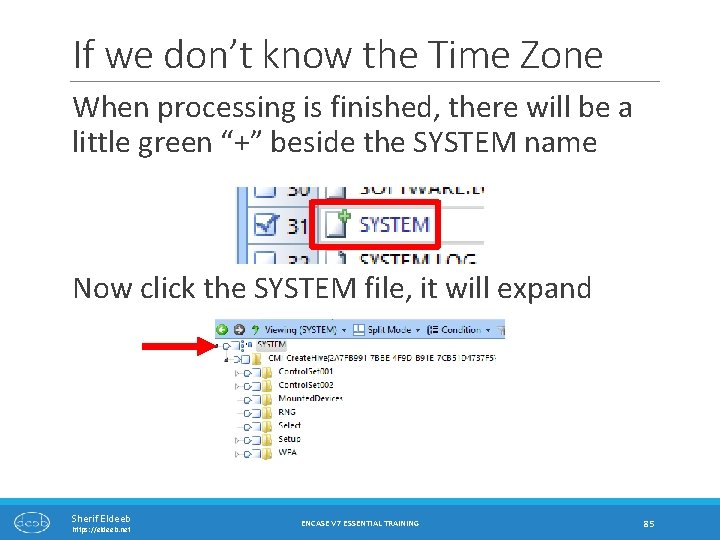
If we don’t know the Time Zone When processing is finished, there will be a little green “+” beside the SYSTEM name Now click the SYSTEM file, it will expand Sherif Eldeeb https: //eldeeb. net ENCASE V 7 ESSENTIAL TRAINING 85
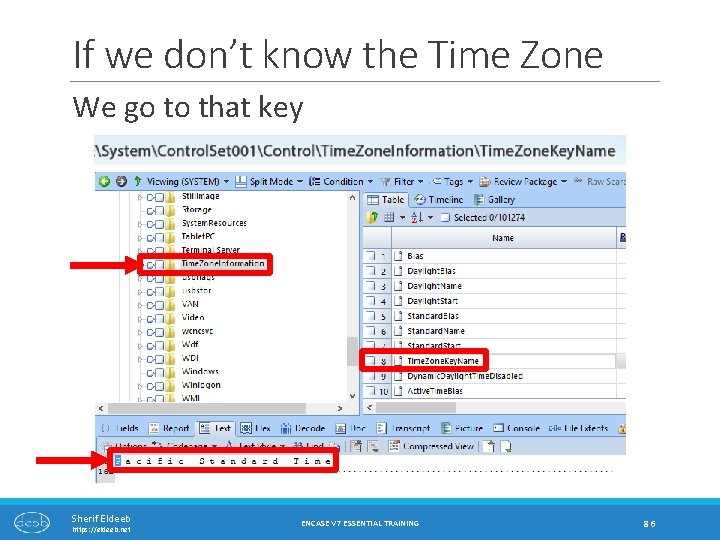
If we don’t know the Time Zone We go to that key Sherif Eldeeb https: //eldeeb. net ENCASE V 7 ESSENTIAL TRAINING 86
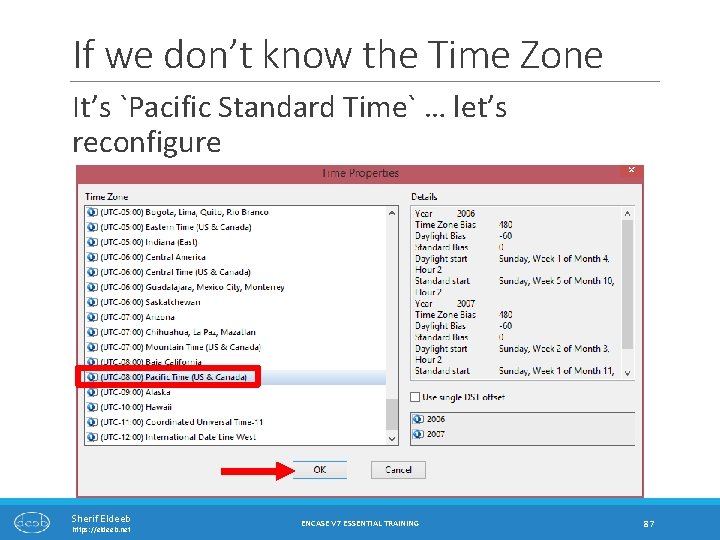
If we don’t know the Time Zone It’s `Pacific Standard Time` … let’s reconfigure Sherif Eldeeb https: //eldeeb. net ENCASE V 7 ESSENTIAL TRAINING 87
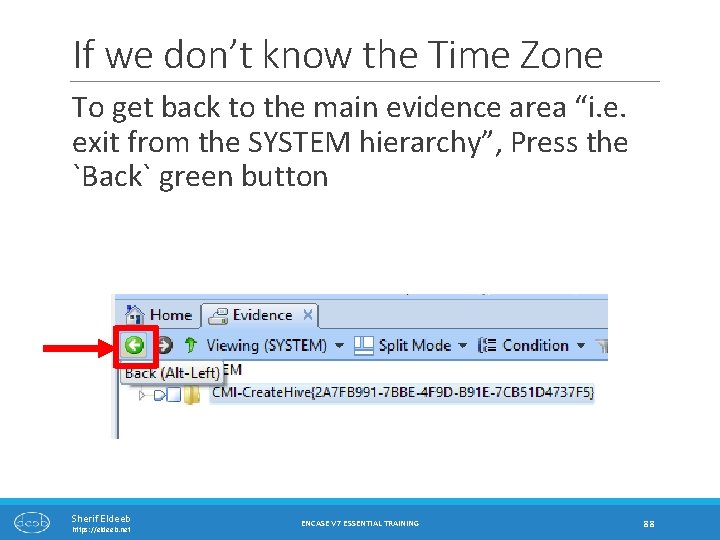
If we don’t know the Time Zone To get back to the main evidence area “i. e. exit from the SYSTEM hierarchy”, Press the `Back` green button Sherif Eldeeb https: //eldeeb. net ENCASE V 7 ESSENTIAL TRAINING 88
Processing Evidence …CONTD. Sherif Eldeeb https: //eldeeb. net ENCASE V 7 ESSENTIAL TRAINING 89
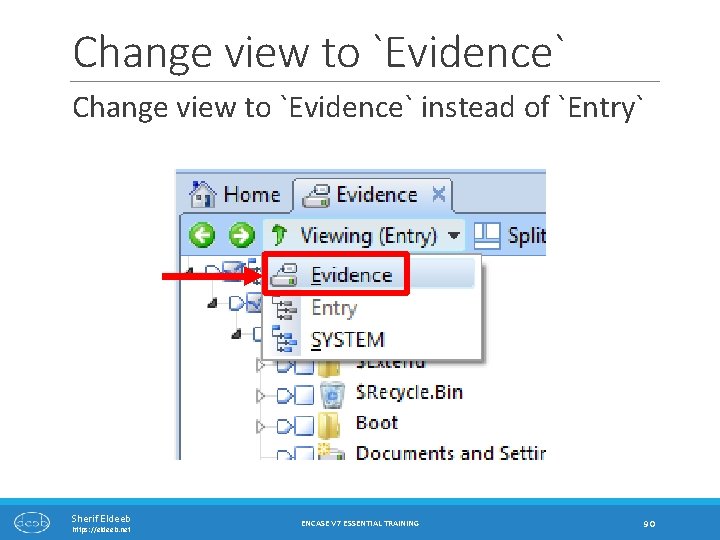
Change view to `Evidence` instead of `Entry` Sherif Eldeeb https: //eldeeb. net ENCASE V 7 ESSENTIAL TRAINING 90
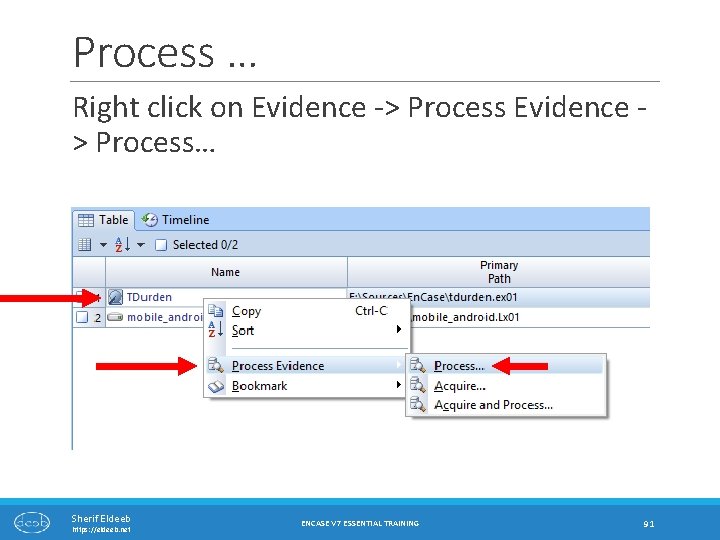
Process … Right click on Evidence -> Process Evidence > Process… Sherif Eldeeb https: //eldeeb. net ENCASE V 7 ESSENTIAL TRAINING 91
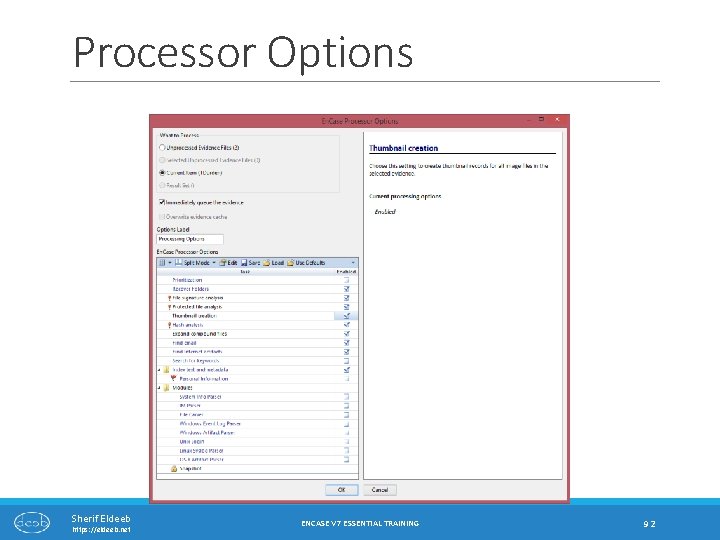
Processor Options Sherif Eldeeb https: //eldeeb. net ENCASE V 7 ESSENTIAL TRAINING 92
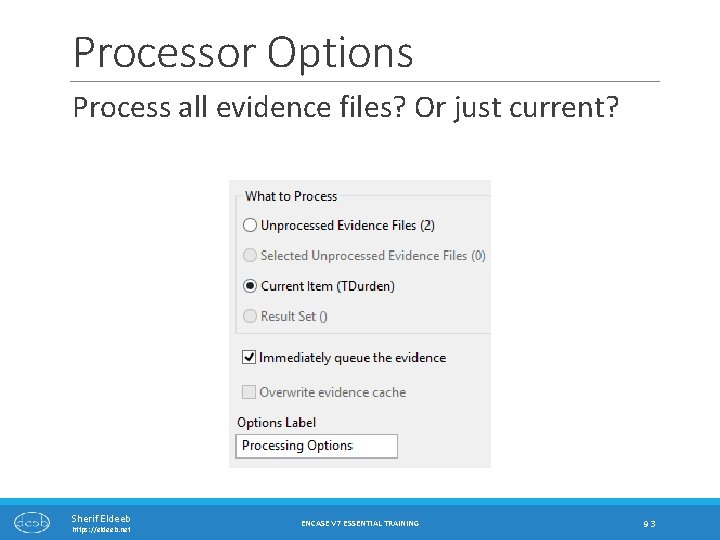
Processor Options Process all evidence files? Or just current? Sherif Eldeeb https: //eldeeb. net ENCASE V 7 ESSENTIAL TRAINING 93
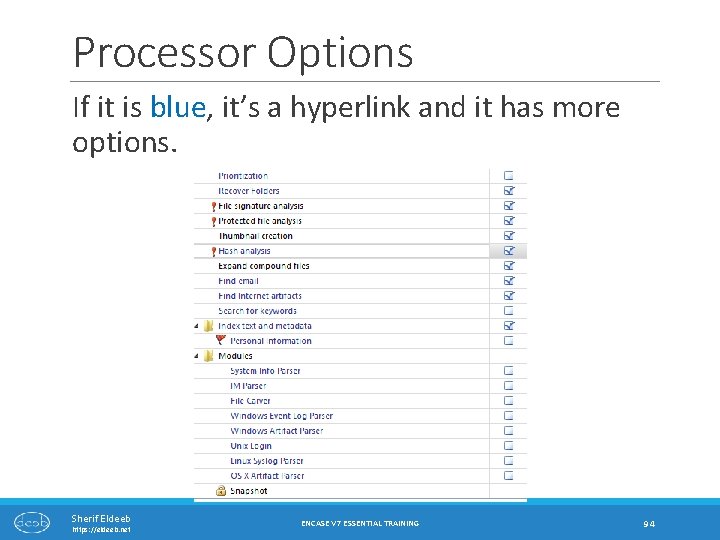
Processor Options If it is blue, it’s a hyperlink and it has more options. Sherif Eldeeb https: //eldeeb. net ENCASE V 7 ESSENTIAL TRAINING 94
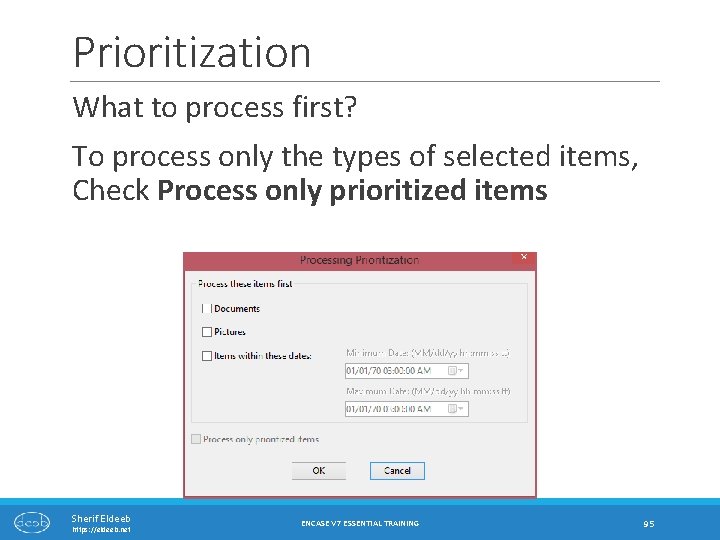
Prioritization What to process first? To process only the types of selected items, Check Process only prioritized items Sherif Eldeeb https: //eldeeb. net ENCASE V 7 ESSENTIAL TRAINING 95
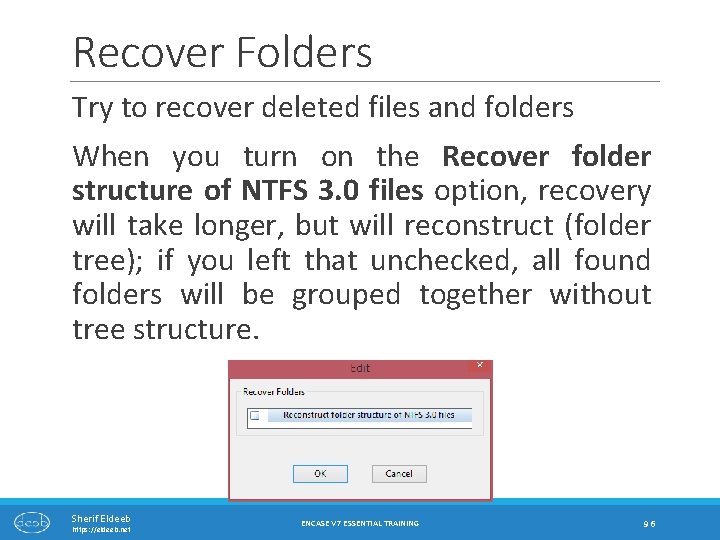
Recover Folders Try to recover deleted files and folders When you turn on the Recover folder structure of NTFS 3. 0 files option, recovery will take longer, but will reconstruct (folder tree); if you left that unchecked, all found folders will be grouped together without tree structure. Sherif Eldeeb https: //eldeeb. net ENCASE V 7 ESSENTIAL TRAINING 96
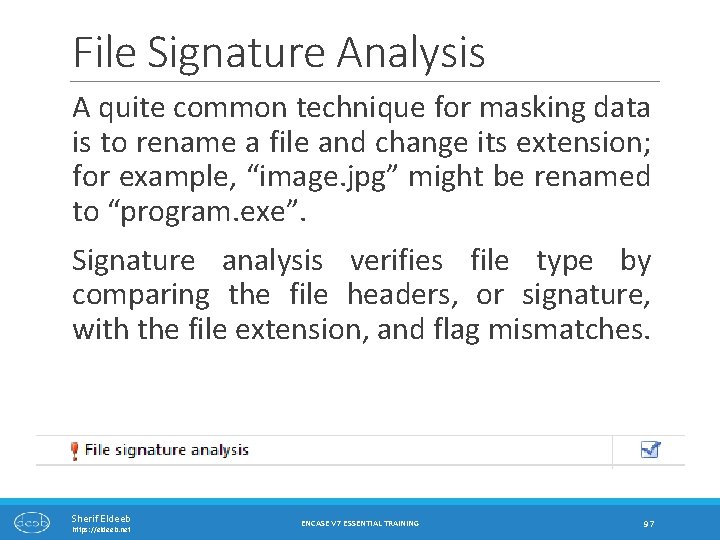
File Signature Analysis A quite common technique for masking data is to rename a file and change its extension; for example, “image. jpg” might be renamed to “program. exe”. Signature analysis verifies file type by comparing the file headers, or signature, with the file extension, and flag mismatches. Sherif Eldeeb https: //eldeeb. net ENCASE V 7 ESSENTIAL TRAINING 97
Protected File Analysis Relies on “Passware Kit” to be installed on examiner machine and properly configured http: //www. lostpassword. com/encase. htm Identify password-protected files This will take long, long time. Sherif Eldeeb https: //eldeeb. net ENCASE V 7 ESSENTIAL TRAINING 98
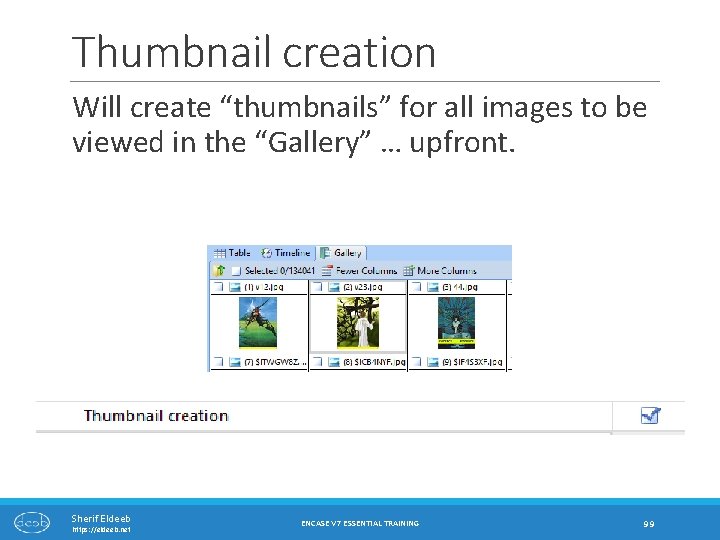
Thumbnail creation Will create “thumbnails” for all images to be viewed in the “Gallery” … upfront. Sherif Eldeeb https: //eldeeb. net ENCASE V 7 ESSENTIAL TRAINING 99
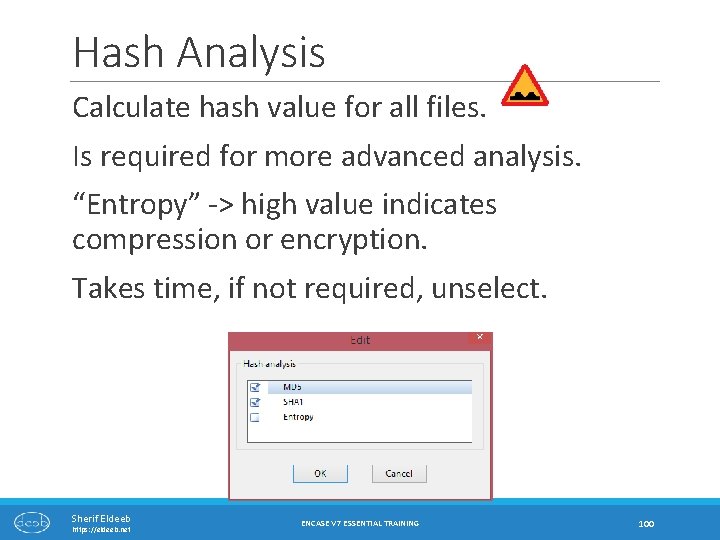
Hash Analysis Calculate hash value for all files. Is required for more advanced analysis. “Entropy” -> high value indicates compression or encryption. Takes time, if not required, unselect. Sherif Eldeeb https: //eldeeb. net ENCASE V 7 ESSENTIAL TRAINING 100
Expand Compound Files Will expand ZIP, RAR, BZIP 2 and other compressed files, and make files within them available for processing. VERY USEFUL! Sherif Eldeeb https: //eldeeb. net ENCASE V 7 ESSENTIAL TRAINING 101
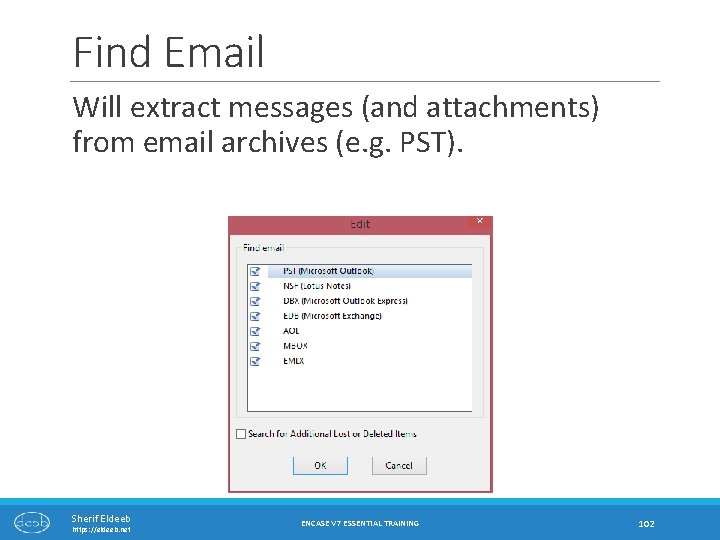
Find Email Will extract messages (and attachments) from email archives (e. g. PST). Sherif Eldeeb https: //eldeeb. net ENCASE V 7 ESSENTIAL TRAINING 102
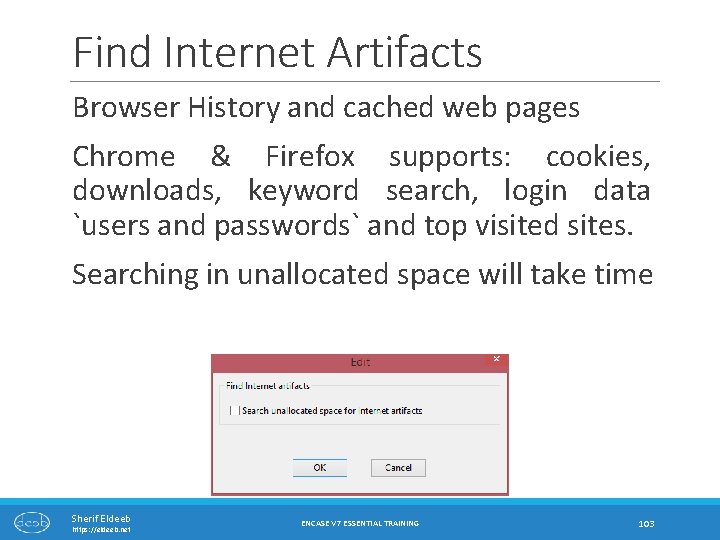
Find Internet Artifacts Browser History and cached web pages Chrome & Firefox supports: cookies, downloads, keyword search, login data `users and passwords` and top visited sites. Searching in unallocated space will take time Sherif Eldeeb https: //eldeeb. net ENCASE V 7 ESSENTIAL TRAINING 103
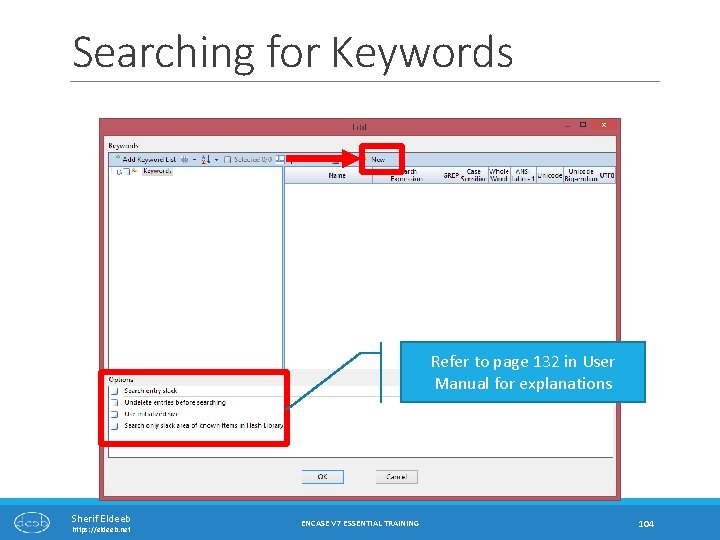
Searching for Keywords Refer to page 132 in User Manual for explanations Sherif Eldeeb https: //eldeeb. net ENCASE V 7 ESSENTIAL TRAINING 104
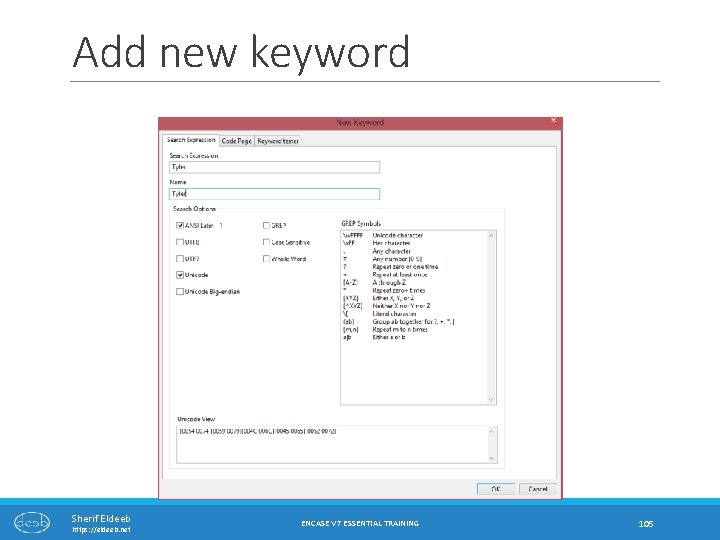
Add new keyword Sherif Eldeeb https: //eldeeb. net ENCASE V 7 ESSENTIAL TRAINING 105
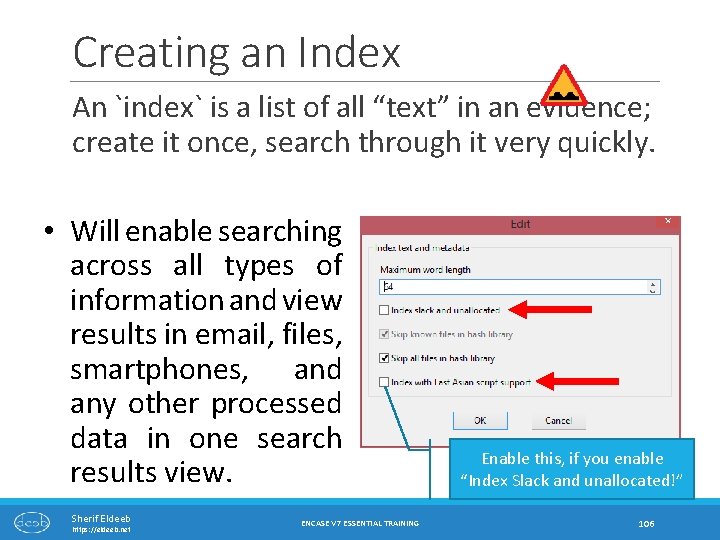
Creating an Index An `index` is a list of all “text” in an evidence; create it once, search through it very quickly. • Will enable searching across all types of information and view results in email, files, smartphones, and any other processed data in one search results view. Sherif Eldeeb https: //eldeeb. net ENCASE V 7 ESSENTIAL TRAINING Enable this, if you enable “Index Slack and unallocated!” 106
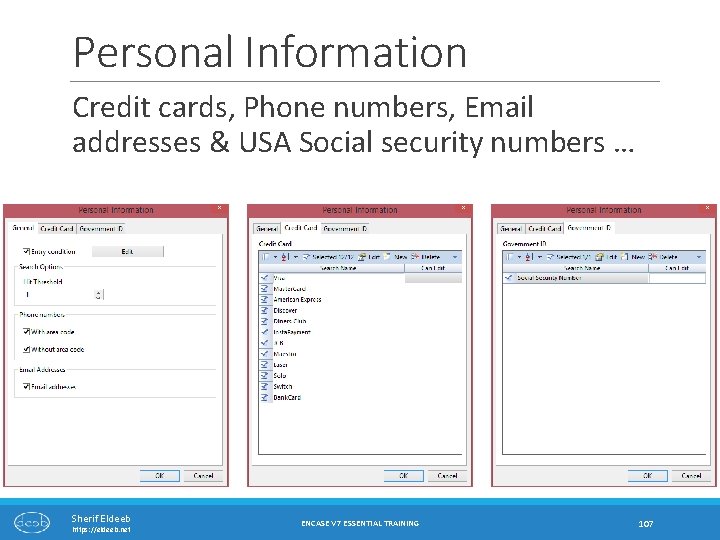
Personal Information Credit cards, Phone numbers, Email addresses & USA Social security numbers … Sherif Eldeeb https: //eldeeb. net ENCASE V 7 ESSENTIAL TRAINING 107
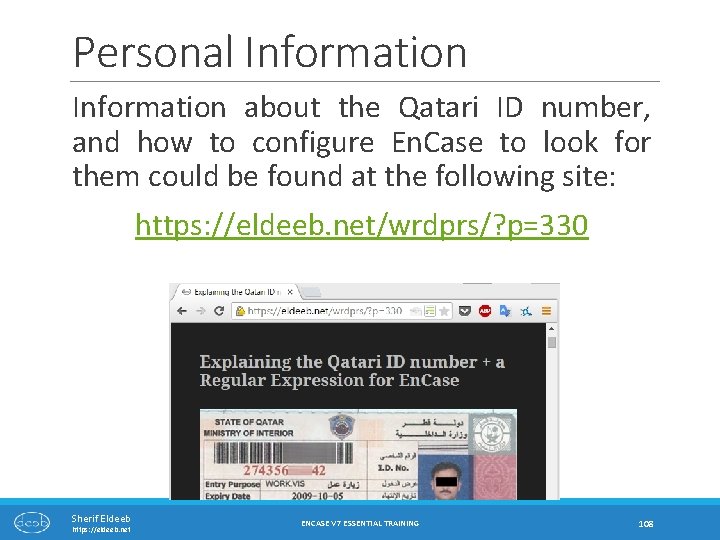
Personal Information about the Qatari ID number, and how to configure En. Case to look for them could be found at the following site: https: //eldeeb. net/wrdprs/? p=330 Sherif Eldeeb https: //eldeeb. net ENCASE V 7 ESSENTIAL TRAINING 108
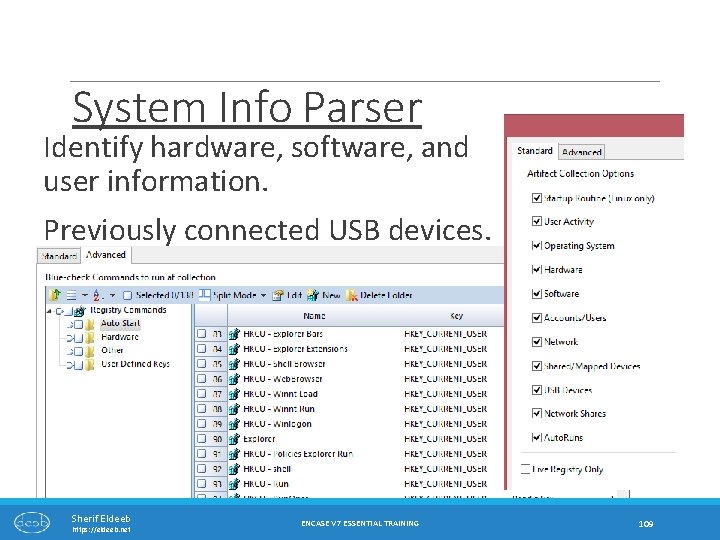
System Info Parser Identify hardware, software, and user information. Previously connected USB devices. Sherif Eldeeb https: //eldeeb. net ENCASE V 7 ESSENTIAL TRAINING 109
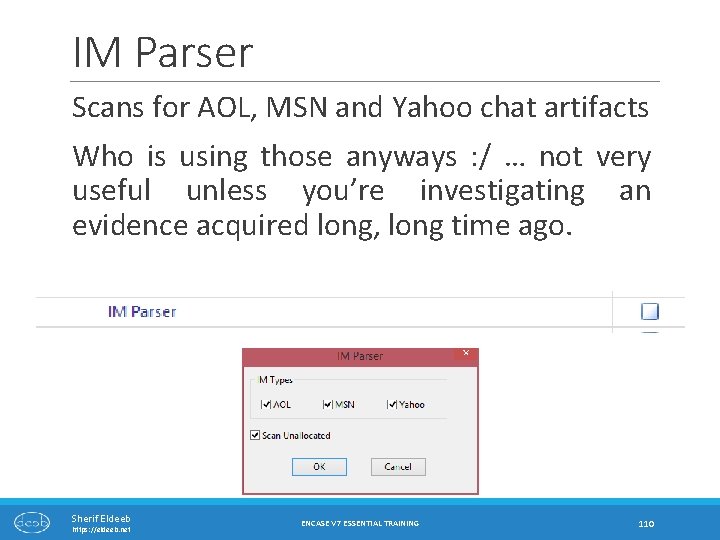
IM Parser Scans for AOL, MSN and Yahoo chat artifacts Who is using those anyways : / … not very useful unless you’re investigating an evidence acquired long, long time ago. Sherif Eldeeb https: //eldeeb. net ENCASE V 7 ESSENTIAL TRAINING 110
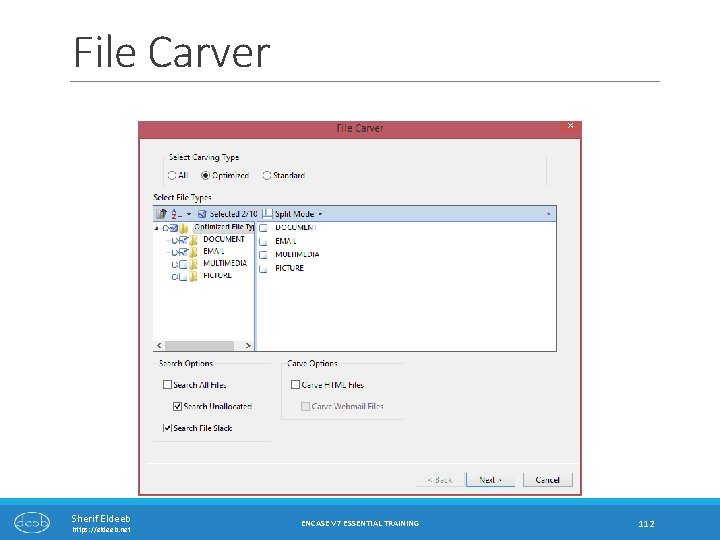
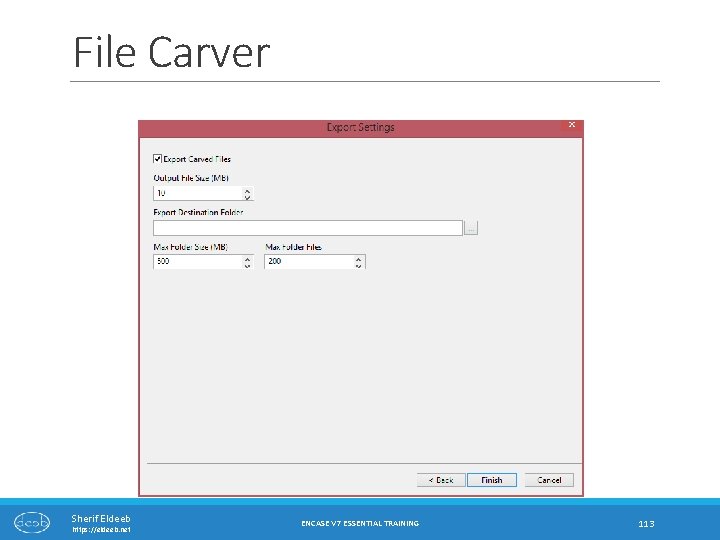
File Carver File carving is the process of reassembling files from fragments in the absence of filesystem metadata. ◦ e. g. there will be no file names or created time… only file data. This should be able to recover deleted files which has not been overwritten, even if the metadata has been overwritten Very useful for recovering deleted files, especially for relatively small files (images, audio …etc. ) Sherif Eldeeb https: //eldeeb. net ENCASE V 7 ESSENTIAL TRAINING 111
File Carver Sherif Eldeeb https: //eldeeb. net ENCASE V 7 ESSENTIAL TRAINING 112
File Carver Sherif Eldeeb https: //eldeeb. net ENCASE V 7 ESSENTIAL TRAINING 113
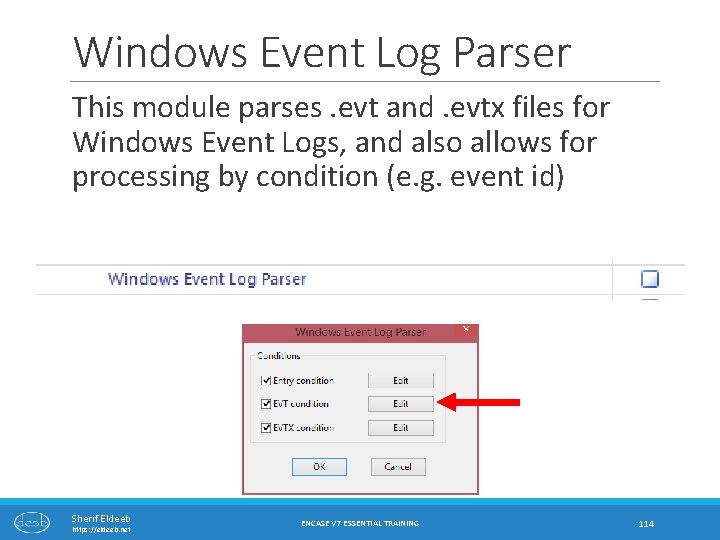
Windows Event Log Parser This module parses. evt and. evtx files for Windows Event Logs, and also allows for processing by condition (e. g. event id) Sherif Eldeeb https: //eldeeb. net ENCASE V 7 ESSENTIAL TRAINING 114
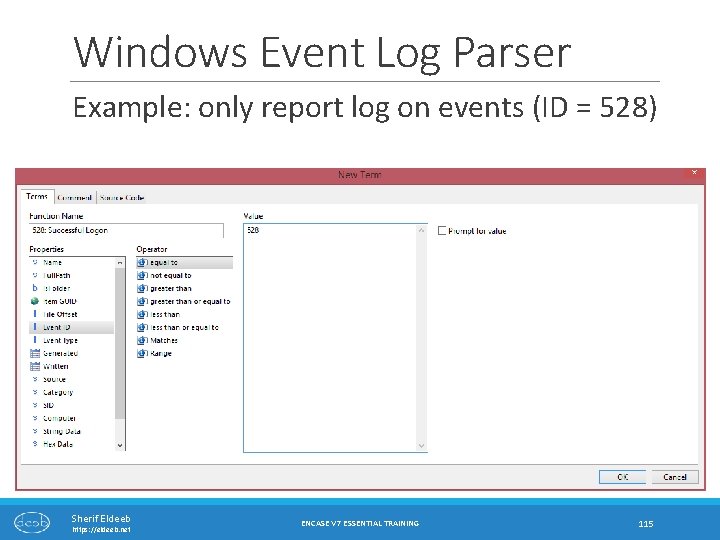
Windows Event Log Parser Example: only report log on events (ID = 528) Sherif Eldeeb https: //eldeeb. net ENCASE V 7 ESSENTIAL TRAINING 115
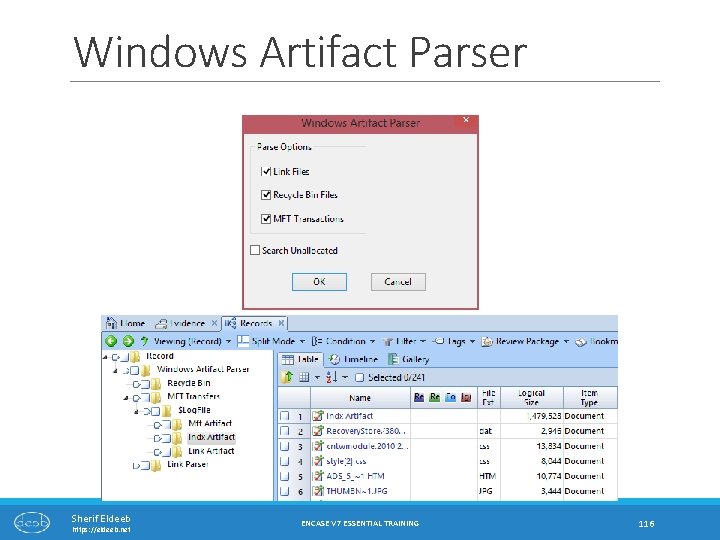
Windows Artifact Parser Sherif Eldeeb https: //eldeeb. net ENCASE V 7 ESSENTIAL TRAINING 116
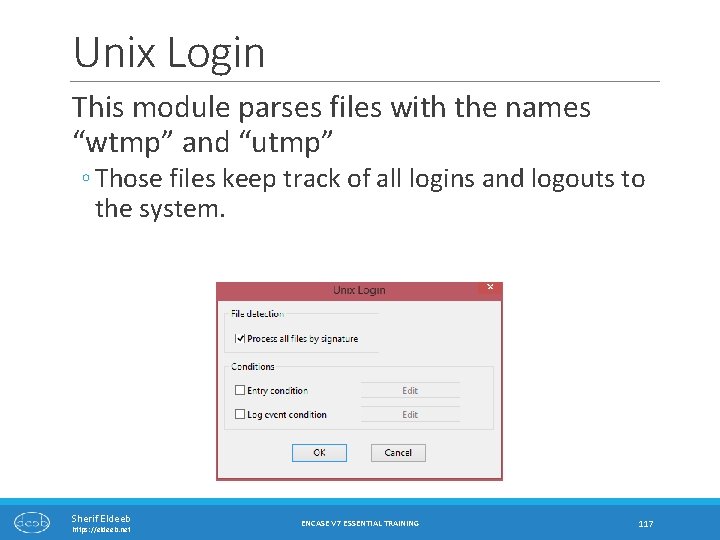
Unix Login This module parses files with the names “wtmp” and “utmp” ◦ Those files keep track of all logins and logouts to the system. Sherif Eldeeb https: //eldeeb. net ENCASE V 7 ESSENTIAL TRAINING 117
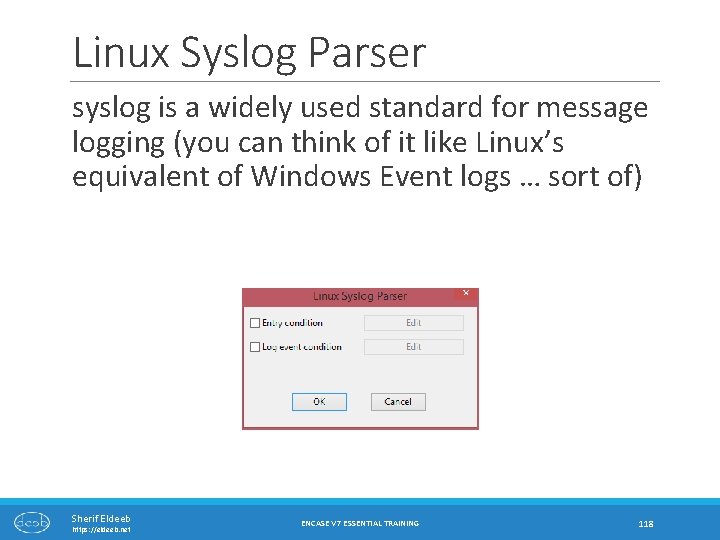
Linux Syslog Parser syslog is a widely used standard for message logging (you can think of it like Linux’s equivalent of Windows Event logs … sort of) Sherif Eldeeb https: //eldeeb. net ENCASE V 7 ESSENTIAL TRAINING 118
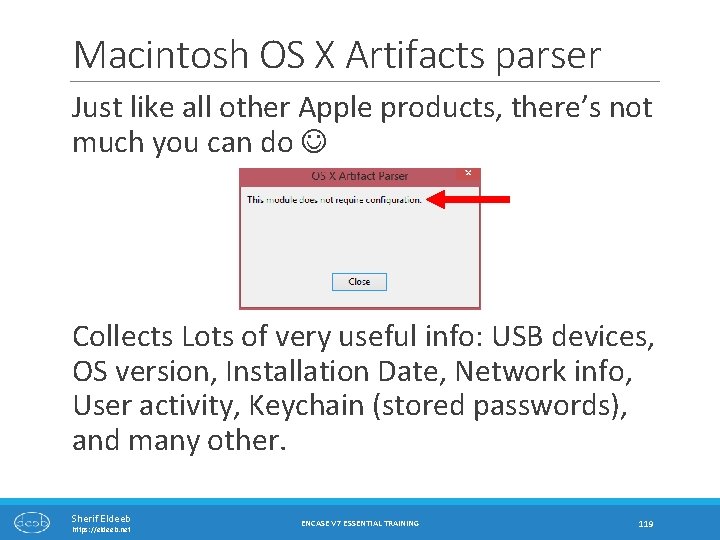
Macintosh OS X Artifacts parser Just like all other Apple products, there’s not much you can do Collects Lots of very useful info: USB devices, OS version, Installation Date, Network info, User activity, Keychain (stored passwords), and many other. Sherif Eldeeb https: //eldeeb. net ENCASE V 7 ESSENTIAL TRAINING 119
Processing Evidence RESULT SETS: LIMITING THE CASE PROCESSING SCOPE Sherif Eldeeb https: //eldeeb. net ENCASE V 7 ESSENTIAL TRAINING 120
Case Processing is slow… If you are only interested in specific items, or time frame, you can limit the “scope” of the case processor using “Result Sets” To create a Result Set (see next slide) 1. 2. 3. 4. 5. Sherif Eldeeb https: //eldeeb. net select the files -> right click on any of them -> Entries -> Create Results … Call it something ENCASE V 7 ESSENTIAL TRAINING 121
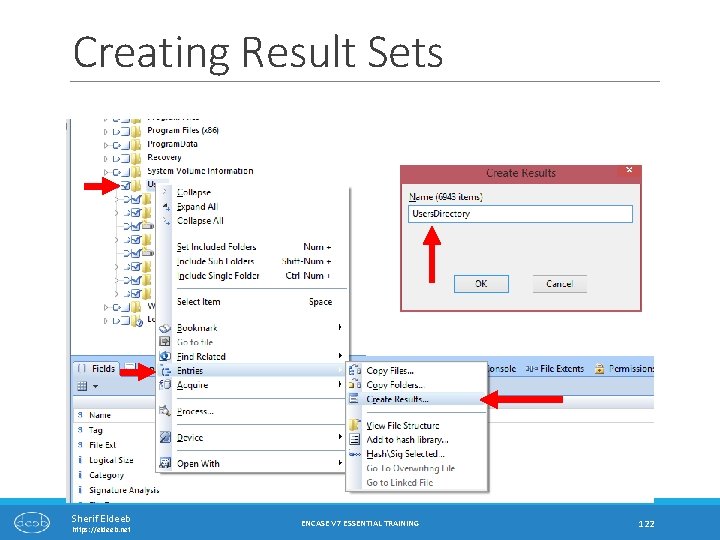
Creating Result Sets Sherif Eldeeb https: //eldeeb. net ENCASE V 7 ESSENTIAL TRAINING 122
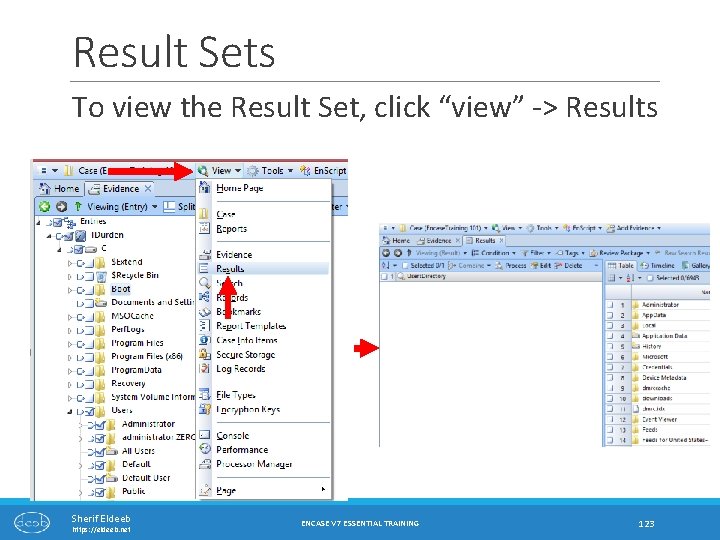
Result Sets To view the Result Set, click “view” -> Results Sherif Eldeeb https: //eldeeb. net ENCASE V 7 ESSENTIAL TRAINING 123
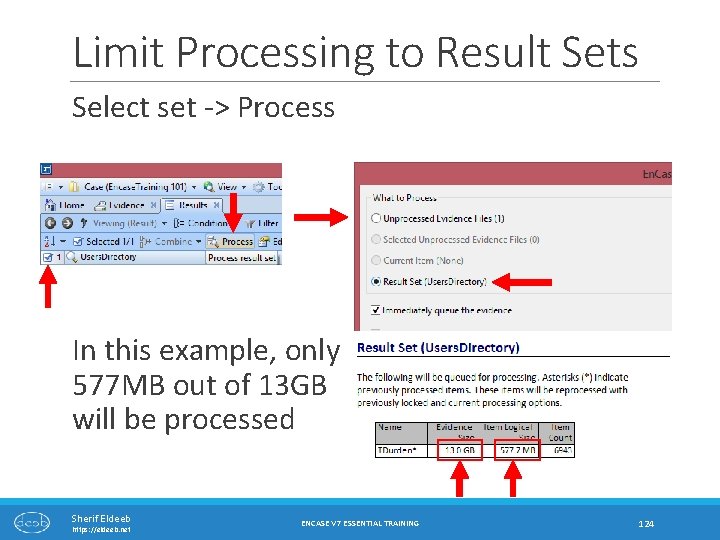
Limit Processing to Result Sets Select set -> Process In this example, only 577 MB out of 13 GB will be processed Sherif Eldeeb https: //eldeeb. net ENCASE V 7 ESSENTIAL TRAINING 124
Viewing Case Processor Results Sherif Eldeeb https: //eldeeb. net ENCASE V 7 ESSENTIAL TRAINING 125
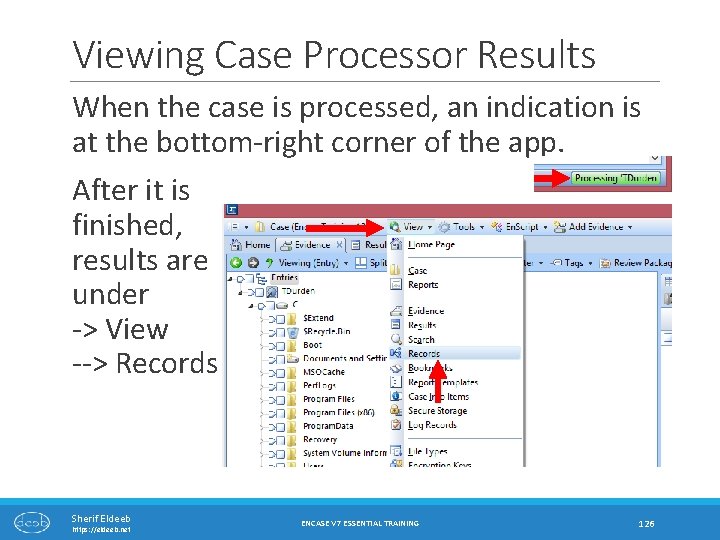
Viewing Case Processor Results When the case is processed, an indication is at the bottom-right corner of the app. After it is finished, results are under -> View --> Records Sherif Eldeeb https: //eldeeb. net ENCASE V 7 ESSENTIAL TRAINING 126
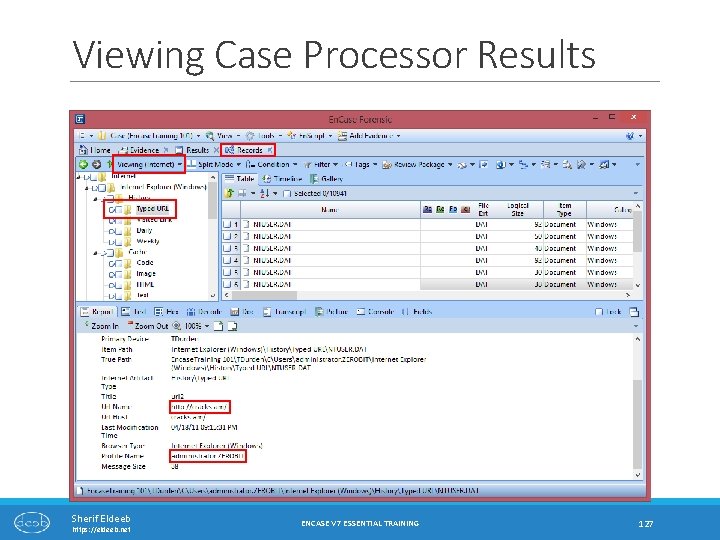
Viewing Case Processor Results Sherif Eldeeb https: //eldeeb. net ENCASE V 7 ESSENTIAL TRAINING 127
General Useful Tricks Sherif Eldeeb https: //eldeeb. net ENCASE V 7 ESSENTIAL TRAINING 128
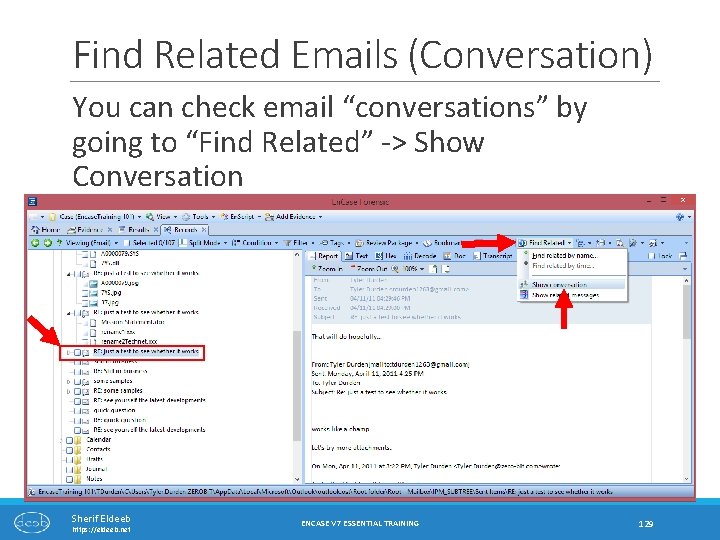
Find Related Emails (Conversation) You can check email “conversations” by going to “Find Related” -> Show Conversation Sherif Eldeeb https: //eldeeb. net ENCASE V 7 ESSENTIAL TRAINING 129
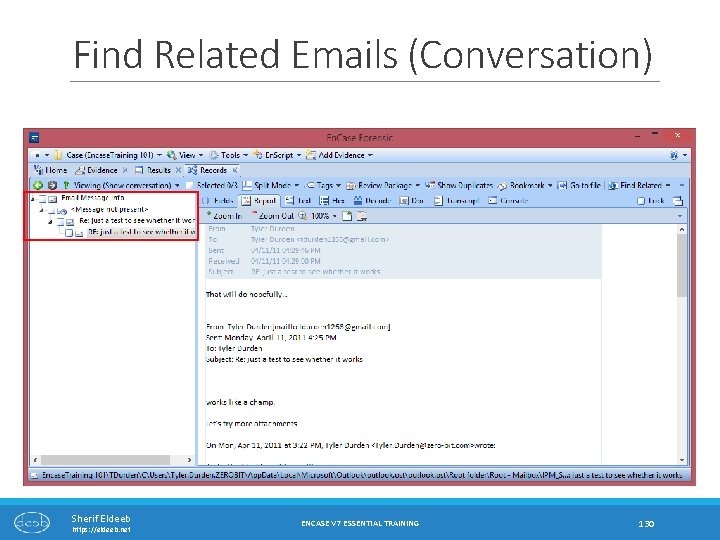
Find Related Emails (Conversation) Sherif Eldeeb https: //eldeeb. net ENCASE V 7 ESSENTIAL TRAINING 130
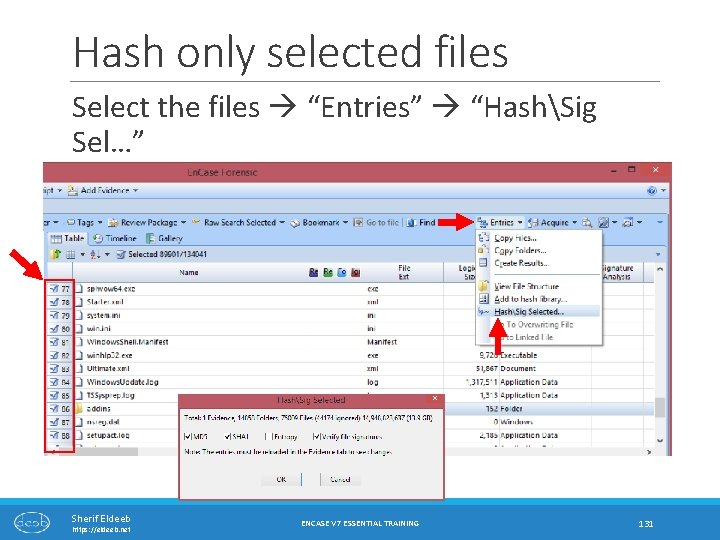
Hash only selected files Select the files “Entries” “HashSig Sel…” Sherif Eldeeb https: //eldeeb. net ENCASE V 7 ESSENTIAL TRAINING 131

Smartphone Reports Sherif Eldeeb https: //eldeeb. net ENCASE V 7 ESSENTIAL TRAINING 132
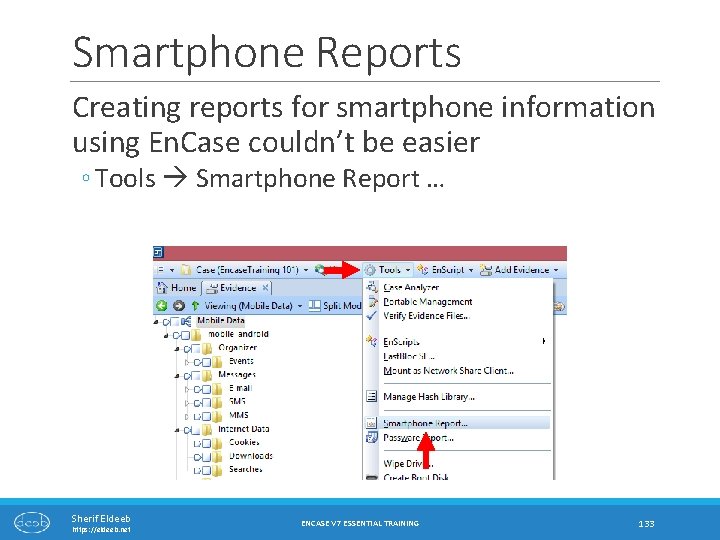
Smartphone Reports Creating reports for smartphone information using En. Case couldn’t be easier ◦ Tools Smartphone Report … Sherif Eldeeb https: //eldeeb. net ENCASE V 7 ESSENTIAL TRAINING 133
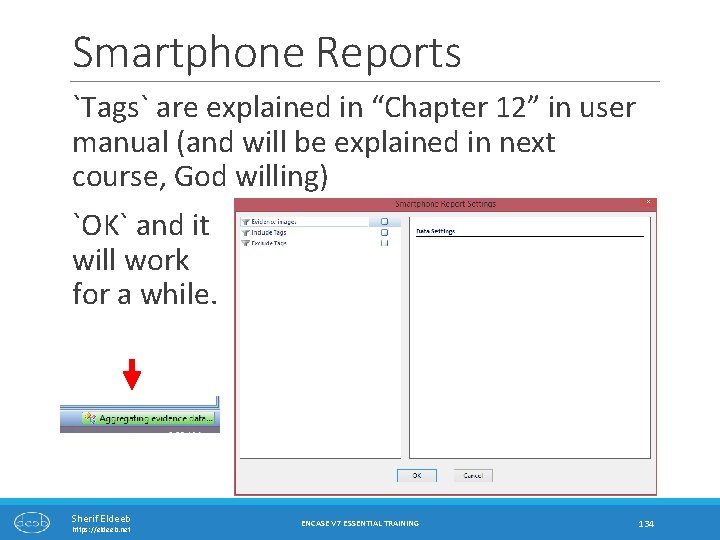
Smartphone Reports `Tags` are explained in “Chapter 12” in user manual (and will be explained in next course, God willing) `OK` and it will work for a while. Sherif Eldeeb https: //eldeeb. net ENCASE V 7 ESSENTIAL TRAINING 134
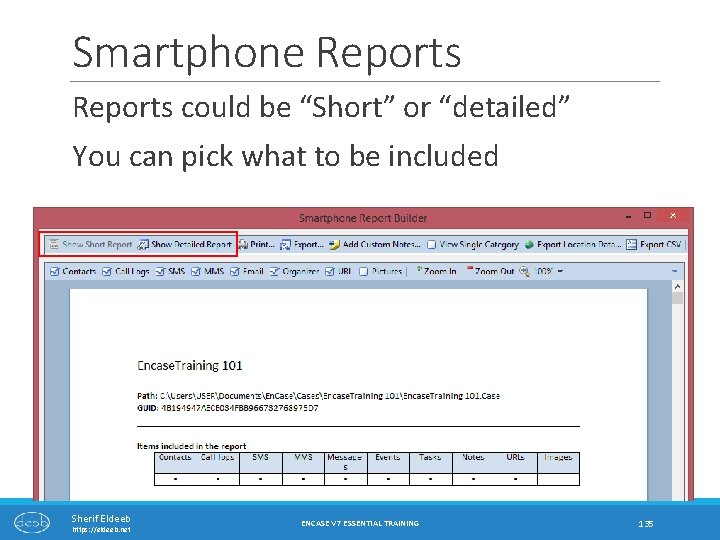
Smartphone Reports could be “Short” or “detailed” You can pick what to be included Sherif Eldeeb https: //eldeeb. net ENCASE V 7 ESSENTIAL TRAINING 135
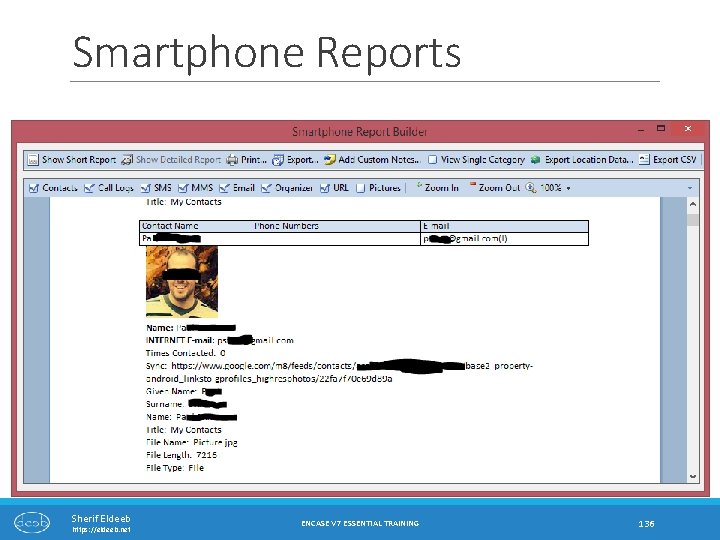
Smartphone Reports Sherif Eldeeb https: //eldeeb. net ENCASE V 7 ESSENTIAL TRAINING 136
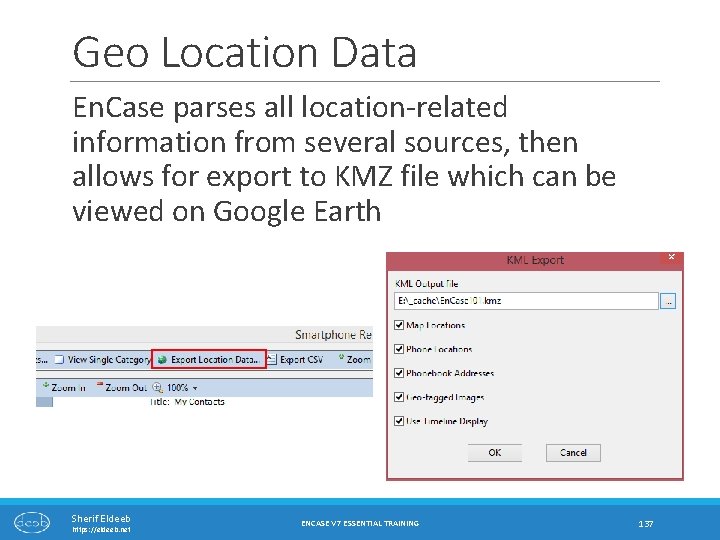
Geo Location Data En. Case parses all location-related information from several sources, then allows for export to KMZ file which can be viewed on Google Earth Sherif Eldeeb https: //eldeeb. net ENCASE V 7 ESSENTIAL TRAINING 137

Geo Location Data Photos and icons will be placed on their exact locations Sherif Eldeeb https: //eldeeb. net ENCASE V 7 ESSENTIAL TRAINING 138
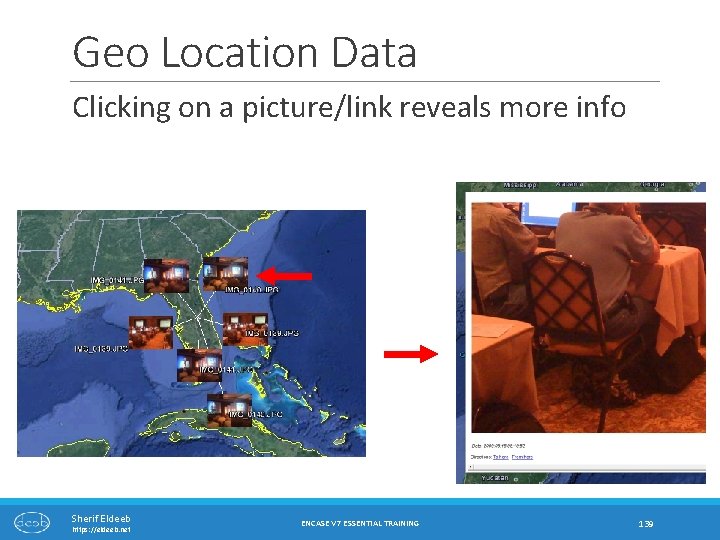
Geo Location Data Clicking on a picture/link reveals more info Sherif Eldeeb https: //eldeeb. net ENCASE V 7 ESSENTIAL TRAINING 139
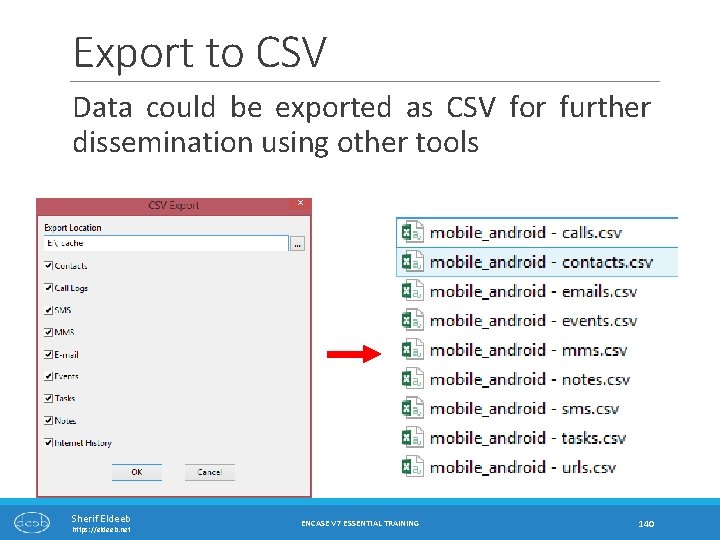
Export to CSV Data could be exported as CSV for further dissemination using other tools Sherif Eldeeb https: //eldeeb. net ENCASE V 7 ESSENTIAL TRAINING 140
The forensic challenge Sherif Eldeeb https: //eldeeb. net ENCASE V 7 ESSENTIAL TRAINING 141
ﺗﻢ ﺑﺤﻤﺪ ﺍﻟﻩ Sherif Eldeeb https: //eldeeb. net @Sherief. Eldeeb Sherif Eldeeb https: //eldeeb. net
- Slides: 142