
Employee SelfService ESS for Academic Staff Hourly Employees
- Slides: 4
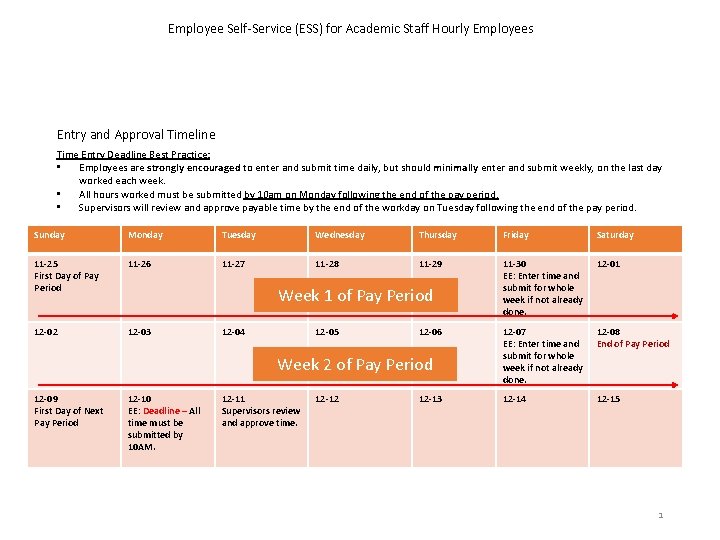
Employee Self-Service (ESS) for Academic Staff Hourly Employees Entry and Approval Timeline Time Entry Deadline Best Practice: • Employees are strongly encouraged to enter and submit time daily, but should minimally enter and submit weekly, on the last day worked each week. • All hours worked must be submitted by 10 am on Monday following the end of the pay period. • Supervisors will review and approve payable time by the end of the workday on Tuesday following the end of the pay period. Sunday Monday Tuesday Wednesday Thursday Friday Saturday 11 -25 First Day of Pay Period 11 -26 11 -27 11 -28 11 -29 11 -30 EE: Enter time and submit for whole week if not already done. 12 -01 12 -02 12 -03 12 -07 EE: Enter time and submit for whole week if not already done. 12 -08 End of Pay Period 12 -14 12 -15 Week 1 of Pay Period 12 -04 12 -05 12 -06 Week 2 of Pay Period 12 -09 First Day of Next Pay Period 12 -10 EE: Deadline – All time must be submitted by 10 AM. 12 -11 Supervisors review and approve time. 12 -12 12 -13 1
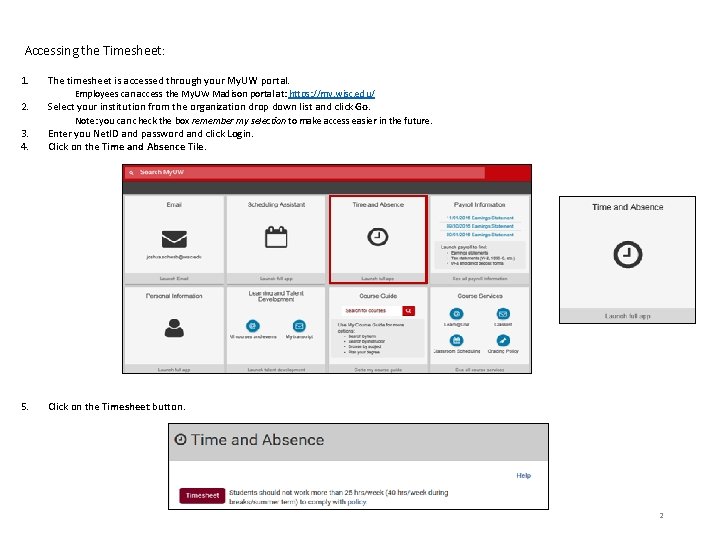
Accessing the Timesheet: 1. The timesheet is accessed through your My. UW portal. 2. Select your institution from the organization drop down list and click Go. Employees can access the My. UW Madison portal at: https: //my. wisc. edu/ Note: you can check the box remember my selection to make access easier in the future. 3. 4. Enter you Net. ID and password and click Login. Click on the Time and Absence Tile. 5. Click on the Timesheet button. 2
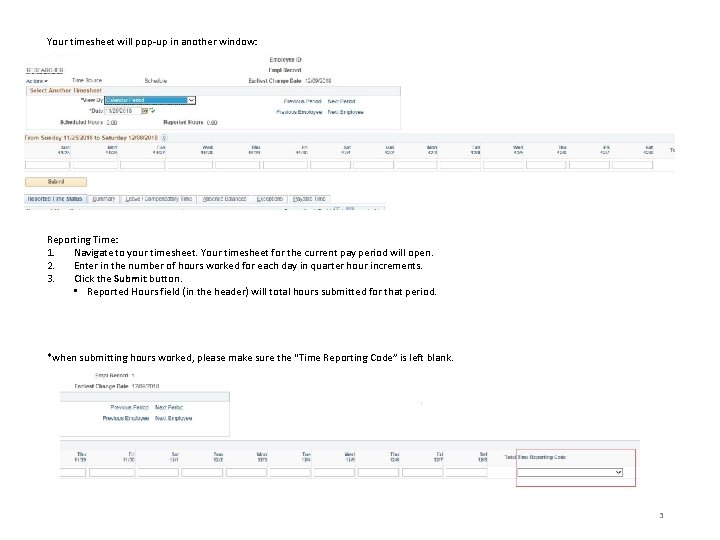
Your timesheet will pop-up in another window: Reporting Time: 1. Navigate to your timesheet. Your timesheet for the current pay period will open. 2. Enter in the number of hours worked for each day in quarter hour increments. 3. Click the Submit button. • Reported Hours field (in the header) will total hours submitted for that period. *when submitting hours worked, please make sure the “Time Reporting Code” is left blank. 3
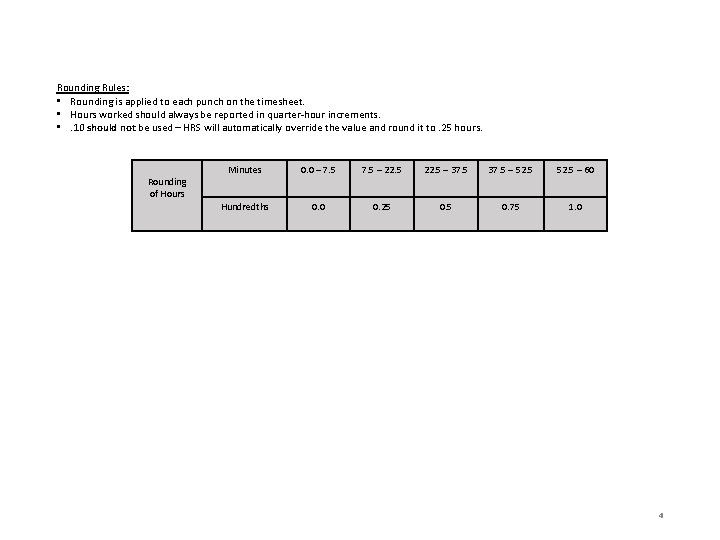
Rounding Rules: • Rounding is applied to each punch on the timesheet. • Hours worked should always be reported in quarter-hour increments. • . 10 should not be used – HRS will automatically override the value and round it to. 25 hours. Rounding of Hours Minutes 0. 0 – 7. 5 – 22. 5 – 37. 5 – 52. 5 – 60 Hundredths 0. 0 0. 25 0. 75 1. 0 4