
EMPLOYEE BENEFITS INFORMATION SYSTEM EBIS Department of the
EMPLOYEE BENEFITS INFORMATION SYSTEM (EBIS) Department of the Navy Office of Civilian Human Resources (OCHR) Civilian Benefits Center (CBC) August 2015
Topics r What is EBIS? r Information available in EBIS r How to access EBIS r Registering for OCHR portal r Accessing EBIS in the portal r Helpful icons r Contacts 2
What is EBIS? r Automated, secure, self-service web application r Provides access to general and personal benefit information r Opportunity to enroll and/or make changes to benefit elections electronically 3
Information Available in EBIS r Personal Statement of Benefits r Benefit elections for: ®Federal Employees Health Benefits (FEHB) ®Federal Employees’ Group Life Insurance (FEGLI) ®Thrift Savings Plan (TSP) r Calculations for retirement to perform “what-if” scenarios r e. Seminars/e. Training r Information library 4
Personal Statement of Benefits r Detailed “personalized” statement: ®Benefit enrollments ®Retirement information r Up to date information about: ®Current and projected retirement benefits ®FEGLI ®FEHB ®TSP ®Retirement eligibility 5
FEHB Transactions r Elect or waive FEHB coverage r View current health plan enrollment and premiums r View and/or void FEHB projected actions r FEHB open season elections/changes in enrollment 6
FEGLI Transactions r Elect optional coverage r View current FEGLI enrollment r View and/or void FEGLI projected action r Waive/decrease optional coverage 7
TSP Transactions r Coverage elections ®Regular TSP ®Roth TSP ®Catch-up r View current TSP election r Start, change, stop TSP transactions r If eligible, elect TSP catch-up annually 8
Retirement r Calculators are available to perform: ®Current and projected retirement annuity estimates ®Calculate high three average salary ®Projected TSP annuity r e. Retirement ®Tool used to accurately complete application for retirement ®Must be within 360 days of first date of eligibility for retirement 9
e. Seminars/e. Training r e. Seminars – online seminars covering ®New employee benefits ®Flexible Spending Accounts ®TSP ®Lots more r e. Training – catalog of interactive courses ®Course topics include · · Retirement programs Insurance Financial planning Wills and taxes 10
Information Library r Comprehensive reference library covering ®Federal Employees Retirement System (FERS) ®Civil Service Retirement System (CSRS) ®FEHB ®FEGLI ®TSP ®Social Security 11
How to Access EBIS r EBIS is accessed via the OCHR portal on a computer with a. mil, . edu or. gov environment using a Department of Defense (DOD) Common Access Card (CAC) r First-time users must register for an account r Portal accounts are disabled after 35 days of inactivity and deleted after 6 months of inactivity r If your account is disabled you must -register re 12
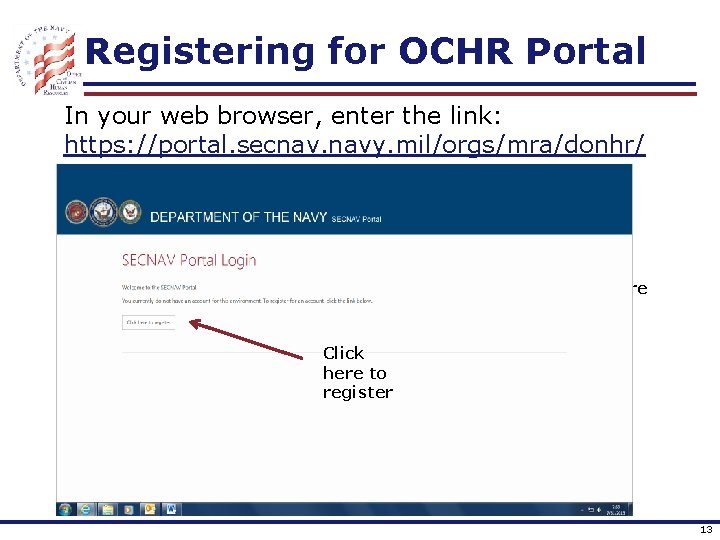
Registering for OCHR Portal In your web browser, enter the link: https: //portal. secnav. navy. mil/orgs/mra/donhr/ Click here to register 13
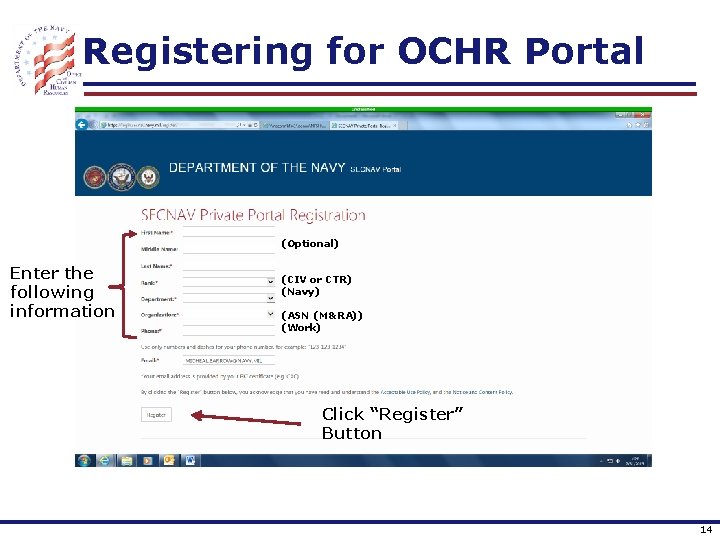
Registering for OCHR Portal (Optional) Enter the following information (CIV or CTR) (Navy) (ASN (M&RA)) (Work) Click “Register” Button 14
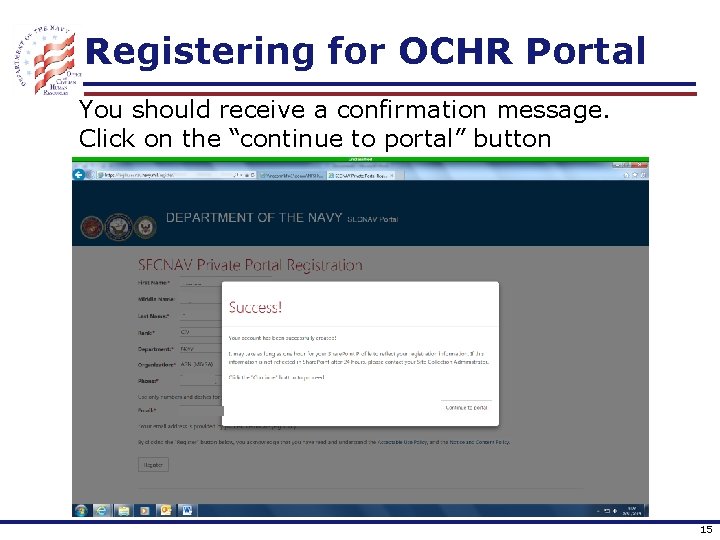
Registering for OCHR Portal You should receive a confirmation message. Click on the “continue to portal” button 15
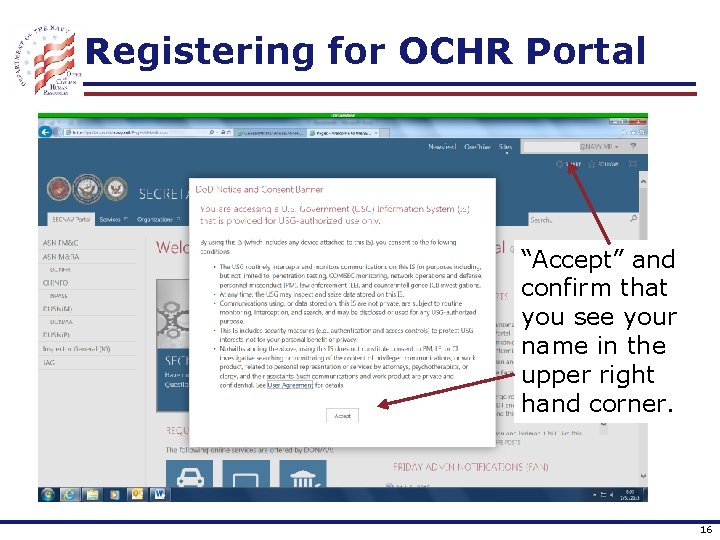
Registering for OCHR Portal “Accept” and confirm that you see your name in the upper right hand corner. 16
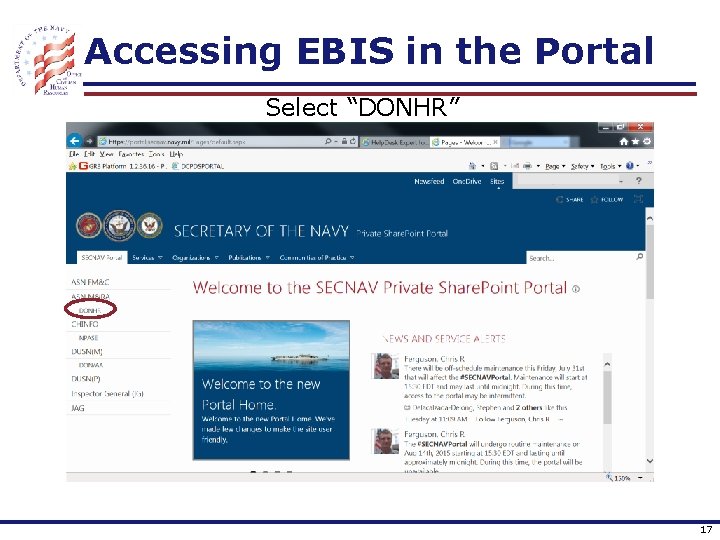
Accessing EBIS in the Portal Select “DONHR” 17
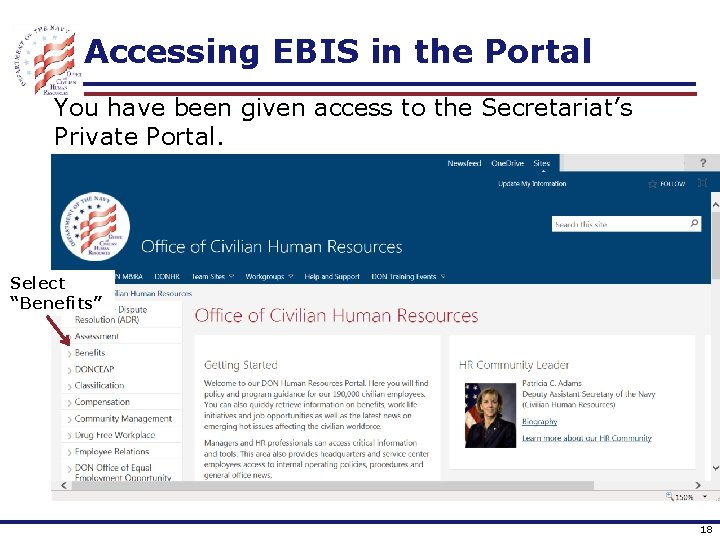
Accessing EBIS in the Portal You have been given access to the Secretariat’s Private Portal. Select “Benefits” 18
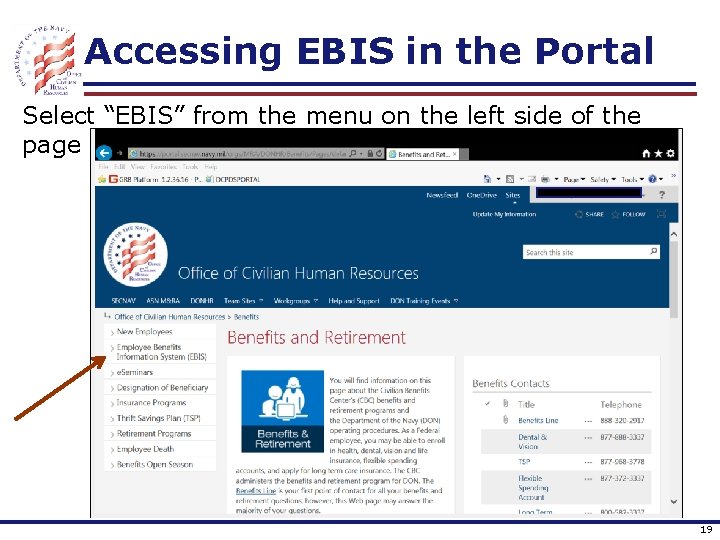
Accessing EBIS in the Portal Select “EBIS” from the menu on the left side of the page 19
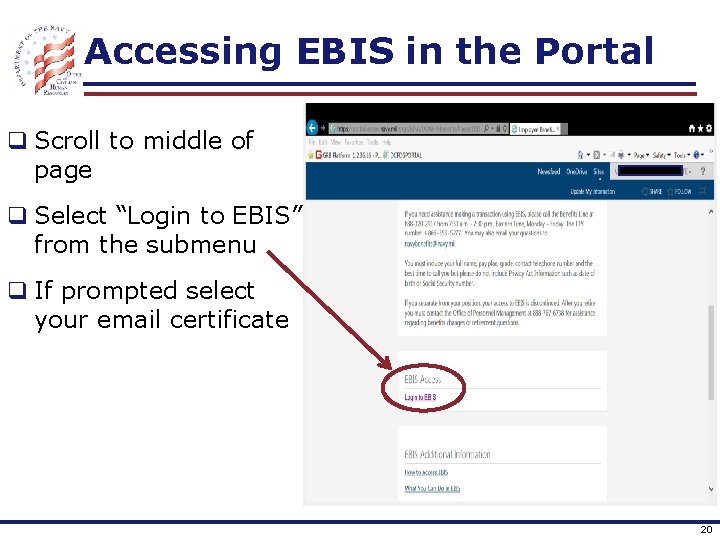
Accessing EBIS in the Portal q Scroll to middle of page q Select “Login to EBIS” from the submenu q If prompted select your email certificate 20
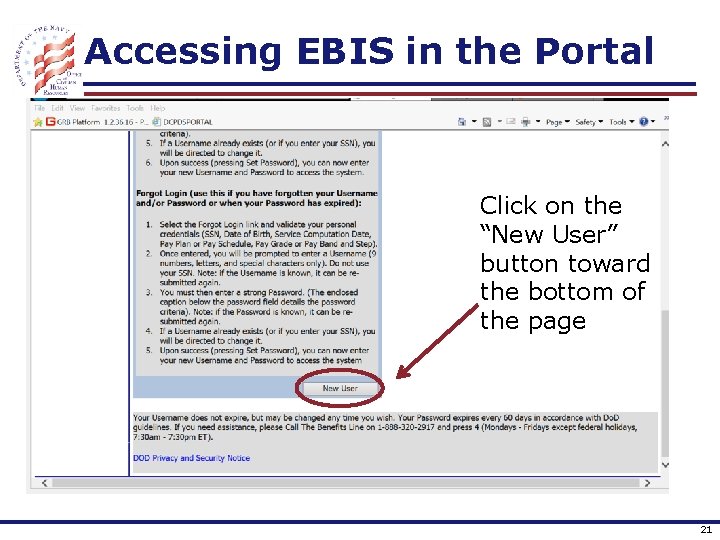
Accessing EBIS in the Portal Click on the “New User” button toward the bottom of the page 21
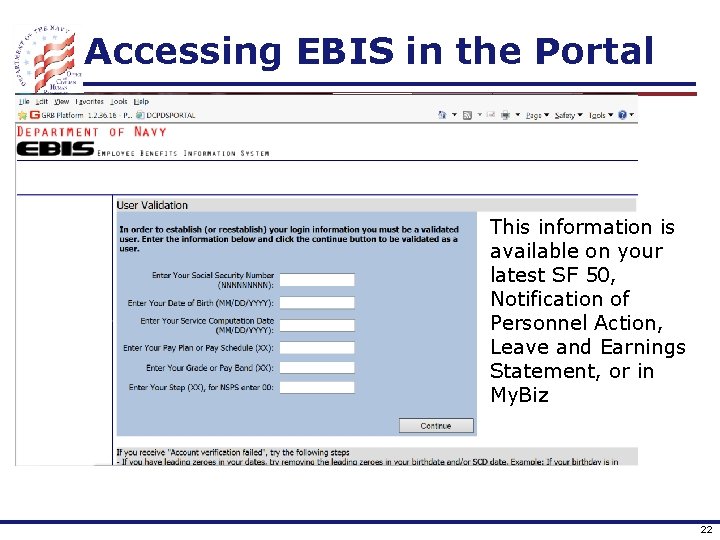
Accessing EBIS in the Portal This information is available on your latest SF 50, Notification of Personnel Action, Leave and Earnings Statement, or in My. Biz 22
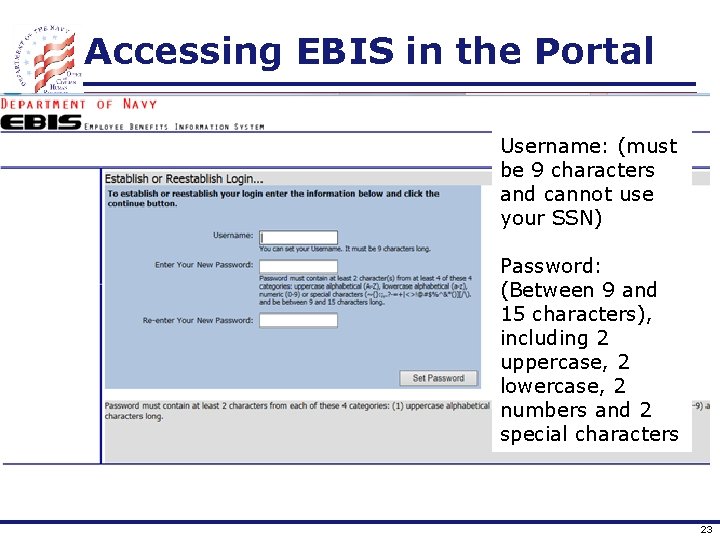
Accessing EBIS in the Portal Username: (must be 9 characters and cannot use your SSN) Password: (Between 9 and 15 characters), including 2 uppercase, 2 lowercase, 2 numbers and 2 special characters 23
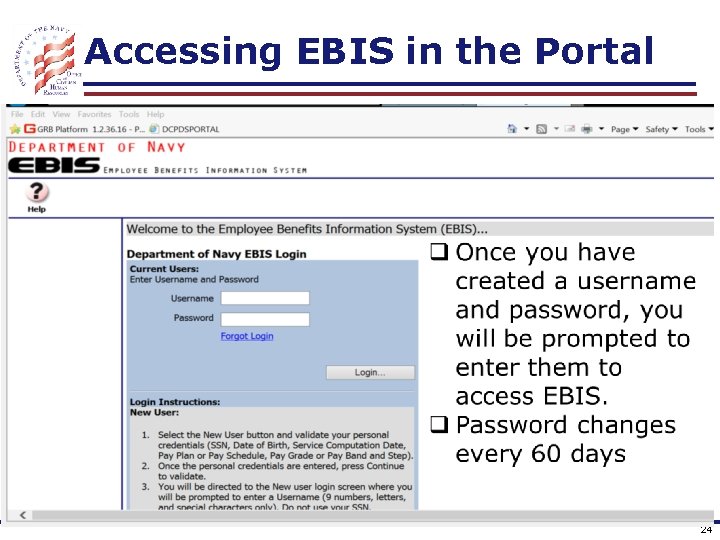
Accessing EBIS in the Portal 24
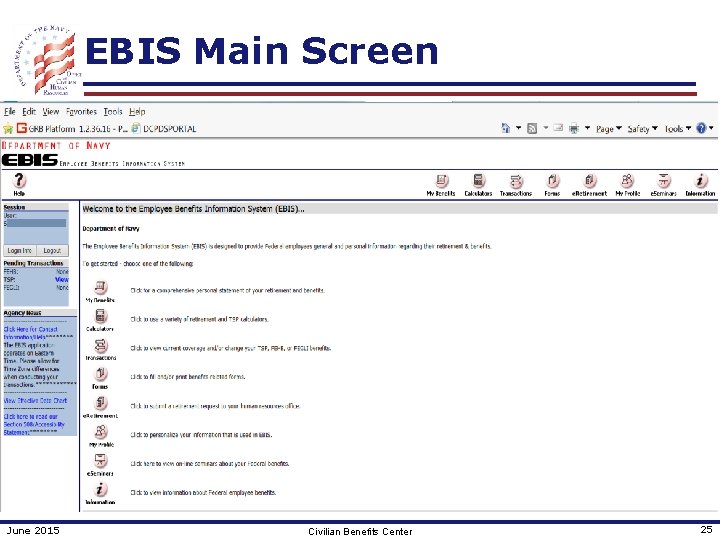
EBIS Main Screen June 2015 Civilian Benefits Center 25
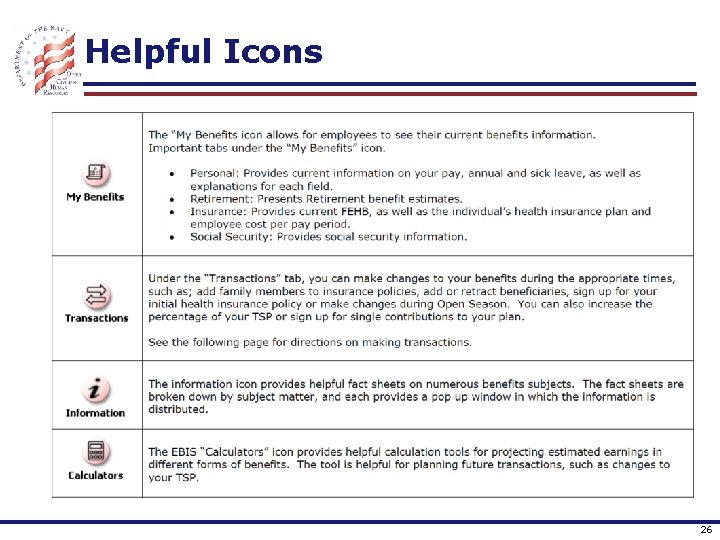
Helpful Icons 26
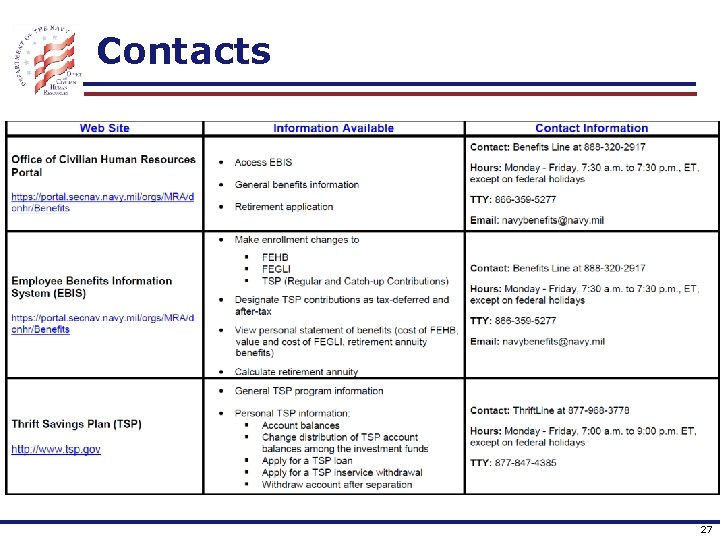
Contacts 27
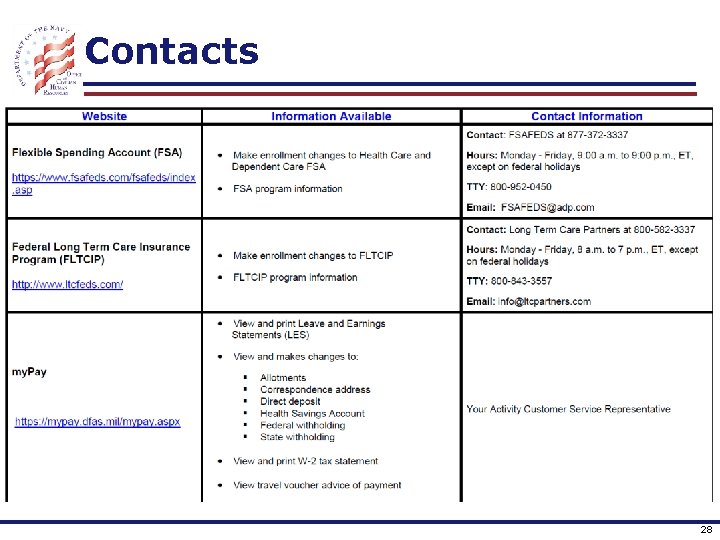
Contacts 28
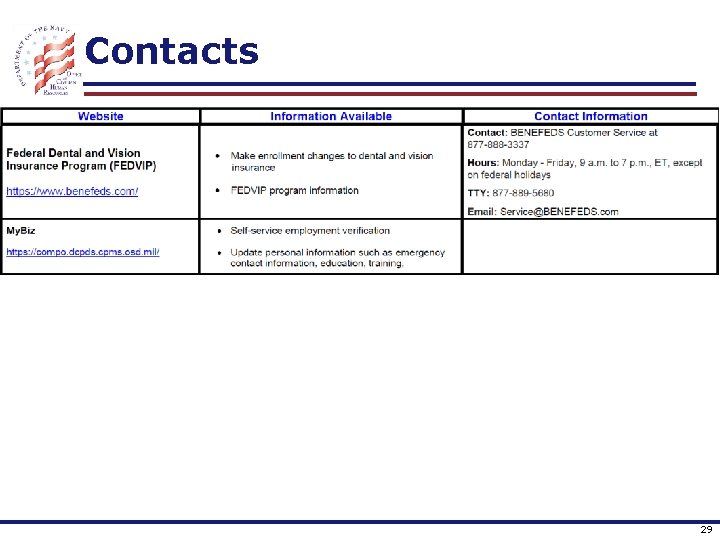
Contacts 29
- Slides: 29