
Emergency Visual Response System Overview Briefing AAMCORE Inc
Emergency Visual Response System Overview Briefing AAMCORE, Inc. 10/2/2020 AAMCORE, Inc. Proprietary Information 1
Emergency Visual Response System n Founded in 2003 n SDVO/HUBZone Company n Support Centers: n Deer Park, WA (Stevens County) n Honolulu, HI n Reston, VA (Company Headquarters) n Multicasting Applications are built on patented software/firmware product n Tactical/Strategic Intelligence Application n Common Operating Picture Application n n 10/2/2020 Emergency Visual Response System/Critical Infrastructure Protection Classroom of the future/E-learning/Distance Learning Application AAMCORE, Inc. Proprietary Information 2

Emergency Visual Response System Presentation Summary n This briefing provides an overview of an integrated security solution. It is designed to assist our clients in meeting current and future security requirements. n Emergency visual response system (EVRS) is a proactive threat deterrence and response, network based system. n This system provides a world-class technical Critical Infrastructure Protection Plan (CIPP) management system which closely replicates those used by other security agencies around the world. 10/2/2020 AAMCORE, Inc. Proprietary Information 3

Emergency Visual Response System Overview 10/2/2020 AAMCORE, Inc. Proprietary Information 4
Emergency Visual Response System What is the EVRS? n EVRS is an industry compliant infrastructure which uses industry n n n n 10/2/2020 compliant hardware and software in a single integrated system. Moreover, this infrastructure is a best of breed system which incorporates a unique and specifically designed multi-casting capability which has heretofore been unavailable. This system is intended and designed to be used with the emerging technologies. The System uses, to a maximum extent, existing materials and produces an integrated topology that exploits existing hardware and locations. EVRS provides an Agency “look and feel” for approval and ultimate deployment throughout the organization. EVRS provides for a biometric security database and system integration where needed. EVRS provides visual monitoring of any integrated camera system regardless of location within the command. EVRS provides for access control monitoring regardless of location within the command. The system can implement a vehicle recognition entry systems. The system can integrate any additional digital/analog system with relative ease. AAMCORE, Inc. Proprietary Information 5
EVRS--Key Functional Requirements General Provide digital video monitoring (day/night/low light) of access points and critical infrastructure of the command to prevent unauthorized entry or terrorist attack. Provide exception-monitoring capability. Alarm intrusion alarm (e. g. motion detection). Automatically display live video of appropriate area. Provideo camera monitoring for the command. Provide biometric security/entry devices systems. Provide vehicle control entry systems. Provide the command with the Emergency Visual Response System (EVRS) for deployment throughout the command. All equipment must operate in the ambient environment of the command’s various environmental locations. Video Camera Requirements · Video Recording Requirements Digital recording. On-site video recording. Distributed instead of central recording. Record alarms and events (e. g. motion detection alarm) along with video. Simultaneous record and playback capability. High resolution and high image rate recording (minimum 30 fps) Supports multiple cameras Can be programmed to record only specific alarms or by time period Search video by Alarm condition (e. g. motion detection) Time and date Provide capability for multiple inputs (alarms) and outputs (e. g. to turn on lights). Outdoor, heat and weather resistant. Tamper resistant. Central Monitoring Monitor video camera displays from central location over the Agency WAN/LAN. Provide single monitoring console to monitor and control all security activities Color Intrusion and other security alarms Video displays High quality, smooth, stutter free video Access control and access alarms (e. g. unauthorized access attempted) Digital Monitor by exception. Annunciate alarm Hi-resolution (minimum 768 H x 494 V) Automatically display live video of predefined area when intrusion alarm generated. Minimum 30 fps frame rate Automatically pan, zoom and tilt to predefined area. Low light capability (1 lux or less) Manually pan, zoom and tilt camera from central location. Pan, zoom, tilt capability Alarms. Intrusion alarm at facility will: Optical and digital zoom Annunciate alarms using screen displays and audible alarms. Log alarms. Pan, zoom and tilt to predefined location after motion detected Provide capability to acknowledge alarms and log acknowledgement. Manual control from central location View live video displays from multiple cameras/records from multiple locations by Pan following predefined path multiple users. Intrusion alarm capability (e. g. motion detection) View multiple video from multiple cameras and multiple sites on a single screen (e. g. 2 x 2, Generate alarm to be annunciated at central monitoring location. 3 x 3, 4 x 4). Trigger pan, zoom and tilt to predefined location after motion detected. Display live Retrieve and view pre-recorded video using time, date, and alarm criteria. video. Pause, fast forward, fast reverse, freeze, scroll and zoom video images Turn on lights. Enhance image by adjusting image quality (e. g. contrast) Provide provisions for minimizing false alarms caused by insects, small animals, birds, Security. Limit user access to central monitoring. etc. Archiving capability Automatically archive video recordings Provide capability for multiple inputs (alarms) and outputs (e. g. to turn on lights). Capability to selectively archive recordings (e. g. only during alarm conditions). Pan, zoom, tilt to predefined areas based on inputs. Windows NT/2000. Inputs could include door, gate and reservoir hatch intrusion detection alarms. JTA Compliant systems. Generate alarm when video camera fails. Web-enabled. Backup through redundant equipment or overlapping coverage desired (e. g. in AAMCORE, Inc. Proprietary Information 6 10/2/2020 case a camera is disabled). Provide access for other Agencies on an as needed basis. Ruggedized, outdoor, heat and weather resistant. Provide access over the Internet with password security. Tamper resistant equipment and wiring.
EVRS--Key Functional Requirements Communication IP based WAN connection Provide adequate bandwidth for high quality, smooth, stutter free video displays. Possible access to agencies and commands using the Agency facilities and network Integration Direct WAN communications from command facilities. System must integrate with existing the Agency LAN and WAN. System must integrate with access control and identification systems (e. g. Identicard Identipass system or other existing systems within the command). Maintenance and Support On-site maintenance and support of all equipment and software using on-island staff. 24 x 7 support 4 hour response time Training User software training Technical support Implementation Turn-key solution. Provide all hardware, software, installation, training, maintenance and support services required. Statement of Objective System EVRS system that incorporates all possible integration and communication scenarios end to end while accomodating system expansion, both vertical and horizontal operational environment that is 24/7/365. 10/2/2020 AAMCORE, Inc. Proprietary Information 7
Emergency Visual Response System n The remote site components of the EVRS are: n n n n The critical function and added benefits are: n n n n Live low latency video, multi access secure WEB network. Network broadband connection with routers and a HUB via hard line or wireless network. Digital Video Recording System onsite for video archive and retrieval. View Master 16 to allow PTZ control and onsite camera control. Dome cameras which are the most advanced programmable PTZ Dome Redundant system function with UPS on site backup. Immediate live video of site to determine level of threat and actions to follow. System is interoperable with existing Agency equipment and can be viewed by multiple global users at once. System integrates with Primary Alarm system and Access Control to assist in quicker response. Automatic Continuous Live Digital Recording and archiving. Archived video retrieved by advanced security software Network Client from any location. Audio “listen in” capabilities Full customized interactive, password enabled WEB interface that Auto Directs, Auto Assists and GUI visualizes and allows for systems to be turned off and on remotely all in one place. Total Control. EVRS is the quickest way to act on any attack or threat to multiple secured sites with the ability to have every major response Department connected at the same time. 10/2/2020 AAMCORE, Inc. Proprietary Information 8
Emergency Visual Response System What are the CIP Demands? n Event Management Alarm & Event Notification (“pushing” alarms & Events) n Mapping Alarms to Actions (Central Monitoring) Integration with Other Systems n Digital Video Recorders with CCTV Switchers n Access Control, Fire, Unauthorized Entry (UE) Site/Floor Map Representation of Cameras n Better Visualization (versus camera names) n Faster Call up of Cameras Server Independence n Universal Viewing (regardless of Digital or Analog) n Universal Management GUI Browser Based Remote Management n n n 10/2/2020 Intuitive and easy-to-learn AAMCORE, Inc. Proprietary Information 9
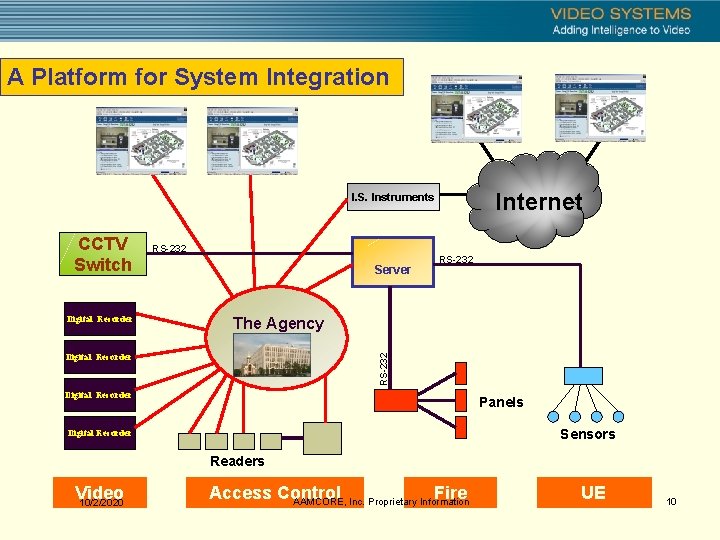
A Platform for System Integration Internet I. S. Instruments CCTV Switch Digital Recorder RS-232 Server RS-232 The Agency RS-232 Digital Recorder Panels Sensors Digital Recorder Readers Video 10/2/2020 Access Control Fire AAMCORE, Inc. Proprietary Information UE 10
Emergency Visual Response System An Interactive Security Integration and Monitoring Software Suite n EVRS Design. Center n Visual configuration tools n EVRS Server n Server software n EVRS Active. Node n Sub-systems component n EVRS Site. Browser n 10/2/2020 Web-browser interface to monitor sub-systems AAMCORE, Inc. Proprietary Information 11
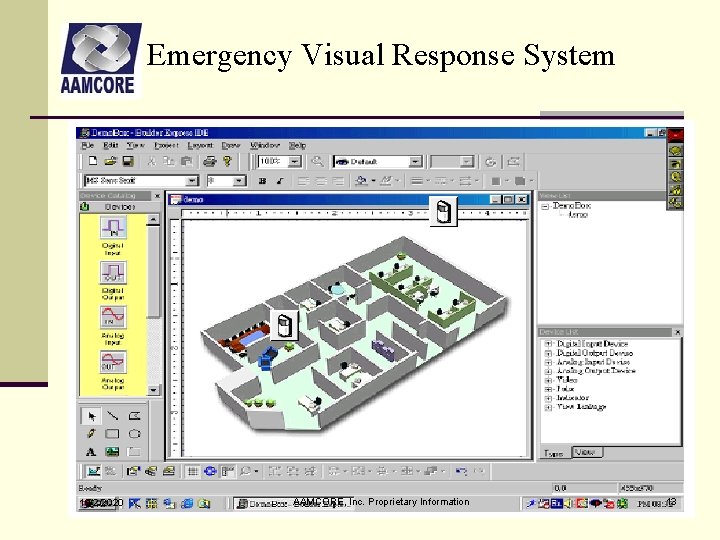
Emergency Visual Response System EVRS Overview Design. Center n Software development tool for constructing a Web-enabled integrated security management and monitoring system n Build rules and relationships among security devices and subsystems n For Example: When door opens, move dome, record video for 15 seconds n Visual Configuration Tools n n 10/2/2020 Drag & drop icons that represent devices No need for writing interface or software code AAMCORE, Inc. Proprietary Information 12
Emergency Visual Response System 10/2/2020 AAMCORE, Inc. Proprietary Information 13
Emergency Visual Response System EVRS Multicasting Server n Provides the Common Operating Picture (COP). n Consists of the software that hosts information on the web representing the facility that is being monitored and managed. n Runs the rules that were established in the Design. Center n Maintains user authorization and authentication n Provides for secure and controlled remote access 10/2/2020 AAMCORE, Inc. Proprietary Information 14
Emergency Visual Response System EVRS Active. Node n The software engine that runs the rules created in the Design. Center. n Interfaces with sub-systems n Communications infrastructure that bridges the sub-systems with the Server. 10/2/2020 AAMCORE, Inc. Proprietary Information 15
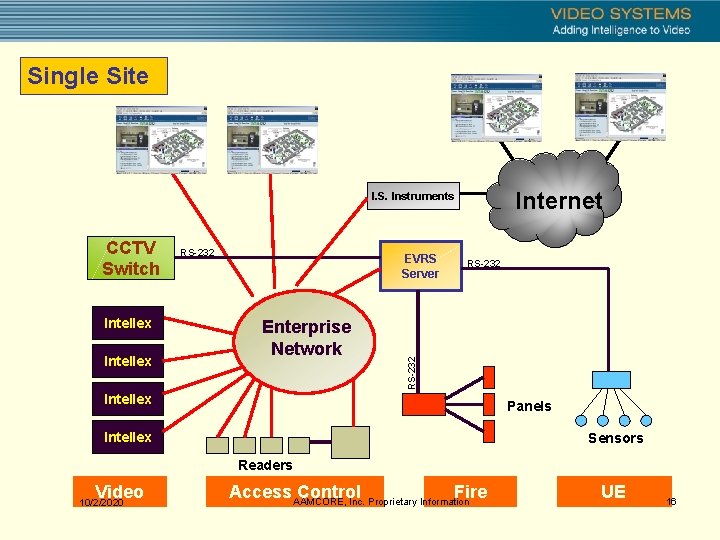
Single Site Internet I. S. Instruments Intellex RS-232 EVRS Server Enterprise Network RS-232 CCTV Switch Intellex Panels Intellex Sensors Readers Video 10/2/2020 Access AAMCORE, Inc. Proprietary Information Control Fire UE 16
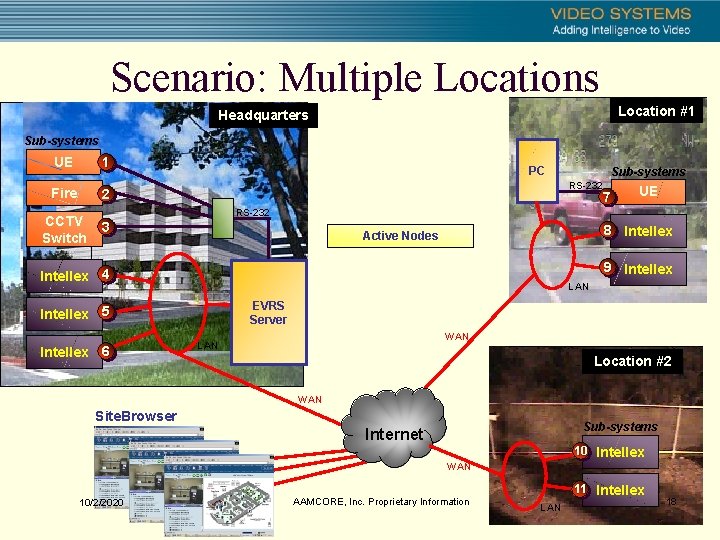
Scenario: Multiple Locations Location #1 Headquarters Sub-systems UE 1 Fire 2 CCTV Switch PC Sub-systems RS-232 7 UE RS-232 3 8 Intellex Active Nodes 9 Intellex 4 LAN EVRS Server Intellex 5 Intellex 6 WAN Location #2 WAN Site. Browser Sub-systems Internet 10 Intellex WAN 10/2/2020 AAMCORE, Inc. Proprietary Information 11 Intellex LAN 18
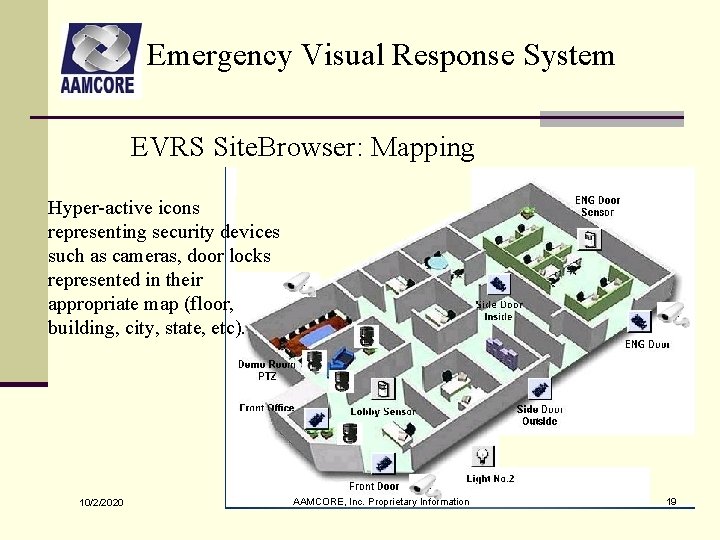
Emergency Visual Response System EVRS Site. Browser: Mapping Hyper-active icons representing security devices such as cameras, door locks represented in their appropriate map (floor, building, city, state, etc). 10/2/2020 AAMCORE, Inc. Proprietary Information 19
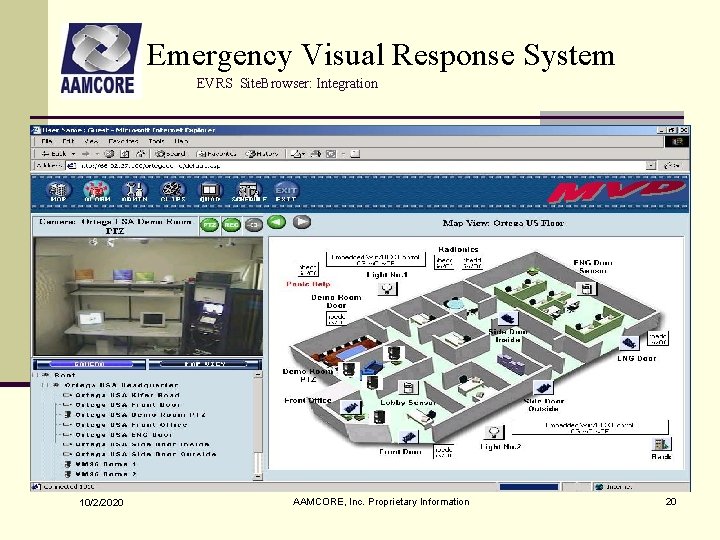
Emergency Visual Response System EVRS Site. Browser: Integration 10/2/2020 AAMCORE, Inc. Proprietary Information 20
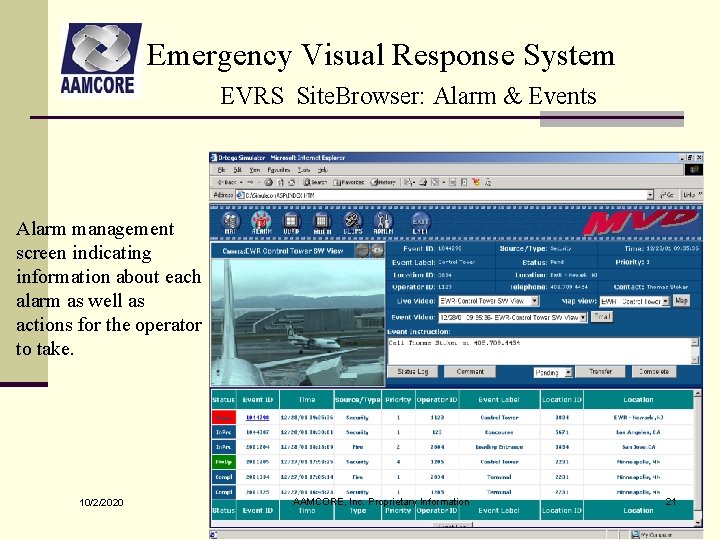
Emergency Visual Response System EVRS Site. Browser: Alarm & Events Alarm management screen indicating information about each alarm as well as actions for the operator to take. 10/2/2020 AAMCORE, Inc. Proprietary Information 21
Emergency Visual Response System Benefits n Alarm Notification n Transparent Interfacing among: n n AD & VM Matrix Switchers, and Domes Access Control Fire & Unauthorized Entry (UE) Other security devices n Secured Access through Browser Interface n Authorization & Authentication n Easy to update configurations and “rules” n 10/2/2020 Visual Configuration Tools AAMCORE, Inc. Proprietary Information 22
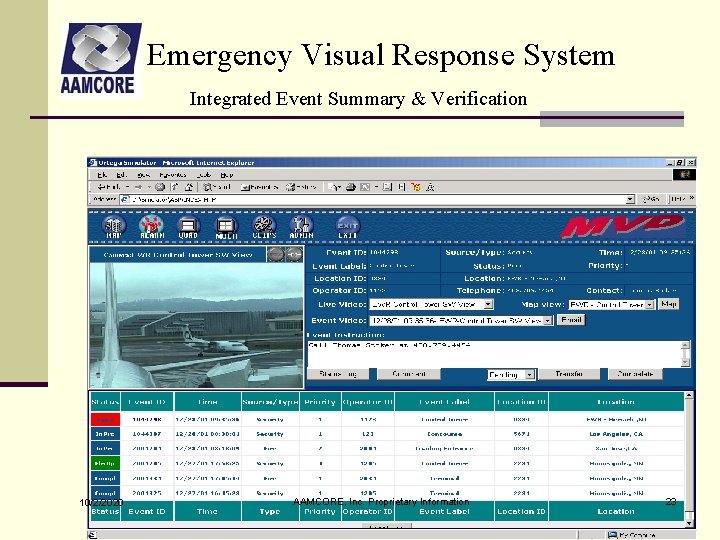
Emergency Visual Response System Integrated Event Summary & Verification 10/2/2020 AAMCORE, Inc. Proprietary Information 23
Emergency Visual Response System Key Differentiators n Design. Center n Visual programming and establishment implementation of automation rules n Open and Centralized Integration n Eliminates the need for component to component interface implementation n Browser Interface n 10/2/2020 Integrated mapping of building with devices makes visualization of alarms and real-time actions to events much easier AAMCORE, Inc. Proprietary Information 24
Emergency Visual Response System Product Benefits n Highly Scalable Architecture Active. Node n Active-X Object Oriented Design Active. Node n Drag-n-Drop Design Platform n Online Automatic System Update n Microsoft Windows Based n Internet Explorer Browser Based n Internet, WAN, LAN, VPN, Intranet n Graphical User Interface n Intuitive Design n Distribution Software Control System n Integrates with existing systems 10/2/2020 AAMCORE, Inc. Proprietary Information 25
- Slides: 24