
EMBEDDED SYSTEMS DESIGN CHAPTER 7 DATA MANIPULATION INSTRUCTIONS
EMBEDDED SYSTEMS DESIGN CHAPTER 7: DATA MANIPULATION INSTRUCTIONS 7. 1 ARITHMETIC INSTRUCTIONS (ADD) BROCK J. LAMERES, PH. D.
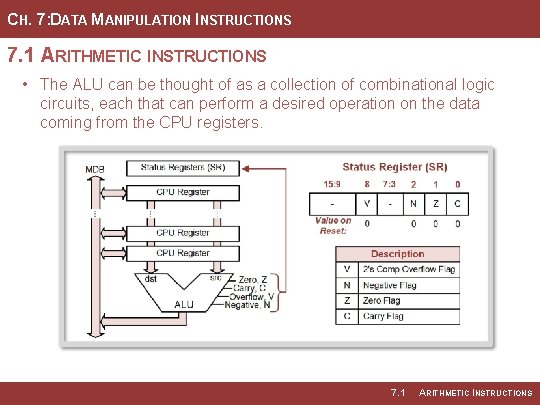
CH. 7: DATA MANIPULATION INSTRUCTIONS 7. 1 ARITHMETIC INSTRUCTIONS • The ALU can be thought of as a collection of combinational logic circuits, each that can perform a desired operation on the data coming from the CPU registers. 7. 1 ARITHMETIC INSTRUCTIONS
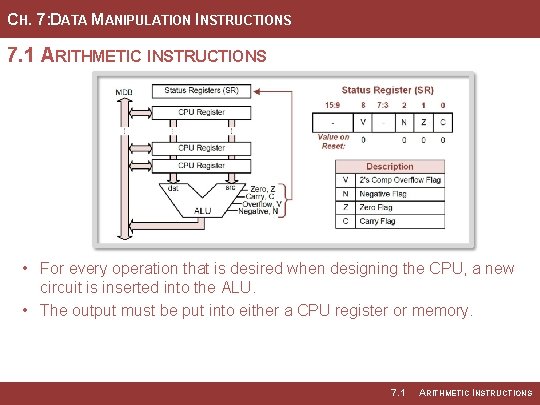
CH. 7: DATA MANIPULATION INSTRUCTIONS 7. 1 ARITHMETIC INSTRUCTIONS • For every operation that is desired when designing the CPU, a new circuit is inserted into the ALU. • The output must be put into either a CPU register or memory. 7. 1 ARITHMETIC INSTRUCTIONS
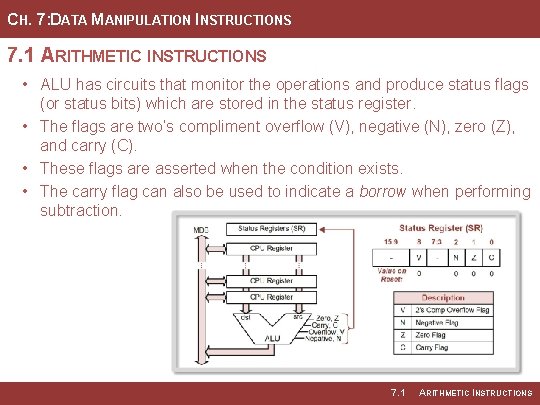
CH. 7: DATA MANIPULATION INSTRUCTIONS 7. 1 ARITHMETIC INSTRUCTIONS • ALU has circuits that monitor the operations and produce status flags (or status bits) which are stored in the status register. • The flags are two’s compliment overflow (V), negative (N), zero (Z), and carry (C). • These flags are asserted when the condition exists. • The carry flag can also be used to indicate a borrow when performing subtraction. 7. 1 ARITHMETIC INSTRUCTIONS
CH. 7: DATA MANIPULATION INSTRUCTIONS 7. 1. 1 ADDITION INSTRUCTIONS • add – performs binary addition on two inputs, the src and dst, and puts the sum back into the dst. • This operation works the same regardless of whether the src or dst are treated as unsigned or signed numbers. • Operation can be performed on both 8 -bit and 16 -bit words by appending. w or. b. Image Courtesy of https: //neodem. wp. horizon. ac. uk/ 7. 1 ARITHMETIC INSTRUCTIONS
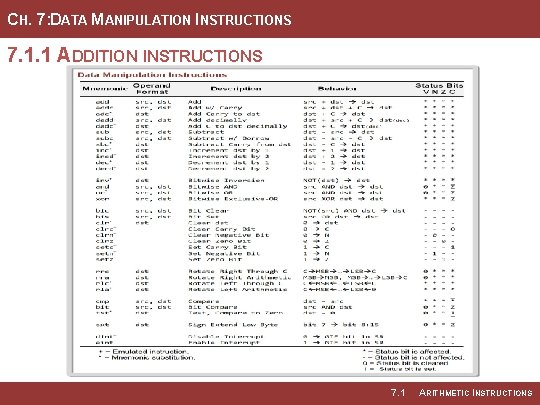
CH. 7: DATA MANIPULATION INSTRUCTIONS 7. 1. 1 ADDITION INSTRUCTIONS 7. 1 ARITHMETIC INSTRUCTIONS
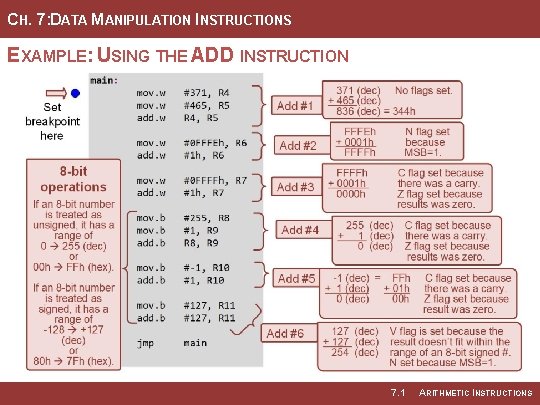
CH. 7: DATA MANIPULATION INSTRUCTIONS EXAMPLE: USING THE ADD INSTRUCTION Image Courtesy of Recording Connection of Canada 7. 1 ARITHMETIC INSTRUCTIONS
CH. 7: DATA MANIPULATION INSTRUCTIONS EXAMPLE: USING THE ADDITION INSTRUCTION Step 1: Create a new Empty Assembly-only CCS project titled: Asm_ALU_ADD Step 2: Type in the following code into the main. asm file where the comments say “Main loop here. ” Image Courtesy of https: //neodem. wp. horizon. ac. uk/ Image Courtesy of Recording Connection of Canada 7. 1 ARITHMETIC INSTRUCTIONS
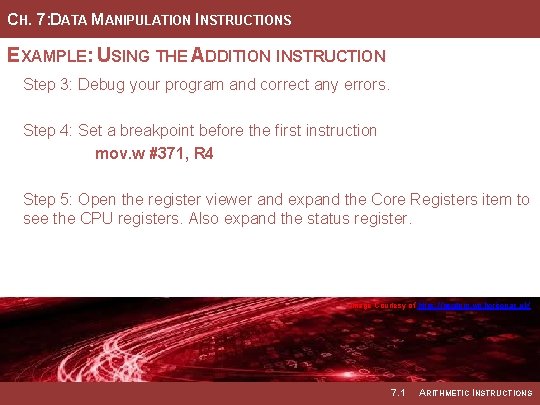
CH. 7: DATA MANIPULATION INSTRUCTIONS EXAMPLE: USING THE ADDITION INSTRUCTION Step 3: Debug your program and correct any errors. Step 4: Set a breakpoint before the first instruction mov. w #371, R 4 Step 5: Open the register viewer and expand the Core Registers item to see the CPU registers. Also expand the status register. Image Courtesy of https: //neodem. wp. horizon. ac. uk/ Image Courtesy of Recording Connection of Canada 7. 1 ARITHMETIC INSTRUCTIONS
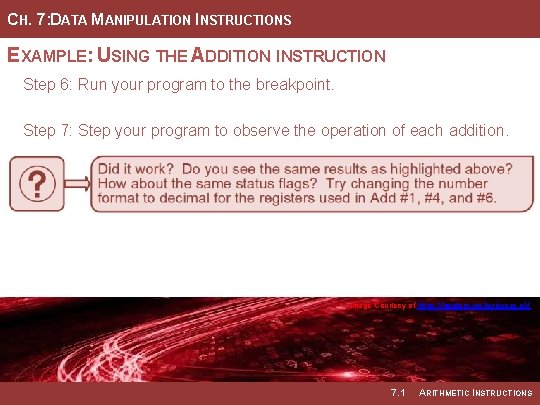
CH. 7: DATA MANIPULATION INSTRUCTIONS EXAMPLE: USING THE ADDITION INSTRUCTION Step 6: Run your program to the breakpoint. Step 7: Step your program to observe the operation of each addition. Image Courtesy of https: //neodem. wp. horizon. ac. uk/ Image Courtesy of Recording Connection of Canada 7. 1 ARITHMETIC INSTRUCTIONS
EMBEDDED SYSTEMS DESIGN CHAPTER 7: DATA MANIPULATION INSTRUCTIONS 7. 1 ARITHMETIC INSTRUCTIONS (ADD) www. youtube. com/c/Digital. Logic. Programming_La. Meres BROCK J. LAMERES, PH. D.
EMBEDDED SYSTEMS DESIGN CHAPTER 7: DATA MANIPULATION INSTRUCTIONS 7. 1 ARITHMETIC INSTRUCTIONS (ADDC = ADD WITH CARRY) BROCK J. LAMERES, PH. D.
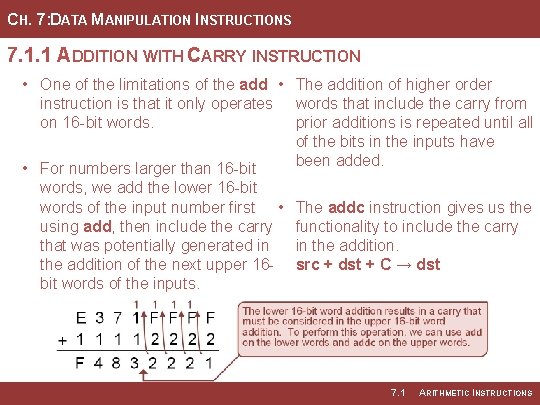
CH. 7: DATA MANIPULATION INSTRUCTIONS 7. 1. 1 ADDITION WITH CARRY INSTRUCTION • One of the limitations of the add • The addition of higher order instruction is that it only operates words that include the carry from on 16 -bit words. prior additions is repeated until all of the bits in the inputs have been added. • For numbers larger than 16 -bit words, we add the lower 16 -bit words of the input number first • using add, then include the carry that was potentially generated in the addition of the next upper 16 bit words of the inputs. The addc instruction gives us the functionality to include the carry in the addition. src + dst + C → dst 7. 1 ARITHMETIC INSTRUCTIONS
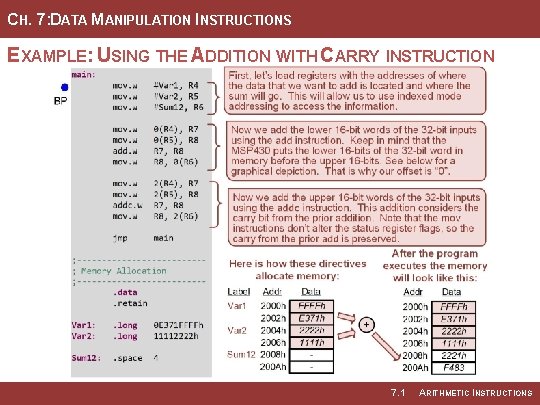
CH. 7: DATA MANIPULATION INSTRUCTIONS EXAMPLE: USING THE ADDITION WITH CARRY INSTRUCTION 7. 1 ARITHMETIC INSTRUCTIONS
CH. 7: DATA MANIPULATION INSTRUCTIONS EXAMPLE: USING THE ADDITION WITH CARRY INSTRUCTION Step 1: Create a new Empty Assembly-only CCS project titled: Asm_ALU_ADDC Step 2: Type in the following code into the main. asm file where the comments say “Main loop here. ” Image Courtesy of https: //neodem. wp. horizon. ac. uk/ 7. 1 ARITHMETIC INSTRUCTIONS
CH. 7: DATA MANIPULATION INSTRUCTIONS EXAMPLE: USING THE ADDITION WITH CARRY INSTRUCTION Step 3: Debug your program and correct any errors. Step 4: Set a breakpoint before the first instruction mov. w #Var 1, R 4 Step 5: Open the register viewer and expand the Core Register item to see the CPU registers. Also expand the status register. Also go to address 0 x 2000 in the Memory Browser. Image Courtesy of https: //neodem. wp. horizon. ac. uk/ 7. 1 ARITHMETIC INSTRUCTIONS
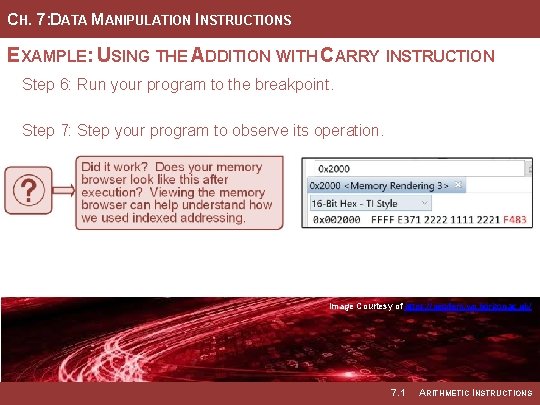
CH. 7: DATA MANIPULATION INSTRUCTIONS EXAMPLE: USING THE ADDITION WITH CARRY INSTRUCTION Step 6: Run your program to the breakpoint. Step 7: Step your program to observe its operation. Image Courtesy of https: //neodem. wp. horizon. ac. uk/ Image Courtesy of Recording Connection of Canada 7. 1 ARITHMETIC INSTRUCTIONS
EMBEDDED SYSTEMS DESIGN CHAPTER 7: DATA MANIPULATION INSTRUCTIONS 7. 1 ARITHMETIC INSTRUCTIONS (ADDC = ADD WITH CARRY) www. youtube. com/c/Digital. Logic. Programming_La. Meres BROCK J. LAMERES, PH. D.
EMBEDDED SYSTEMS DESIGN CHAPTER 7: DATA MANIPULATION INSTRUCTIONS 7. 1 ARITHMETIC INSTRUCTIONS (SUB) BROCK J. LAMERES, PH. D.
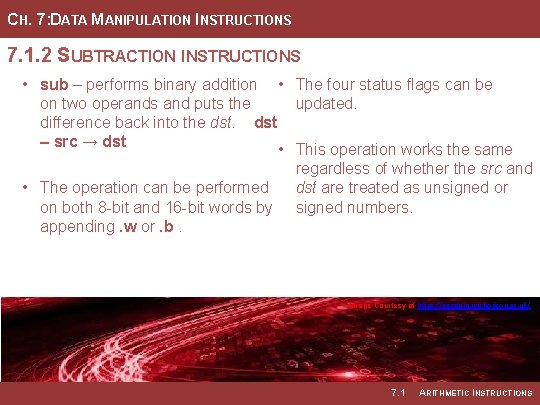
CH. 7: DATA MANIPULATION INSTRUCTIONS 7. 1. 2 SUBTRACTION INSTRUCTIONS • sub – performs binary addition • The four status flags can be on two operands and puts the updated. difference back into the dst – src → dst • This operation works the same regardless of whether the src and • The operation can be performed dst are treated as unsigned or on both 8 -bit and 16 -bit words by signed numbers. appending. w or. b. Image Courtesy of https: //neodem. wp. horizon. ac. uk/ Image Courtesy of Recording Connection of Canada 7. 1 ARITHMETIC INSTRUCTIONS
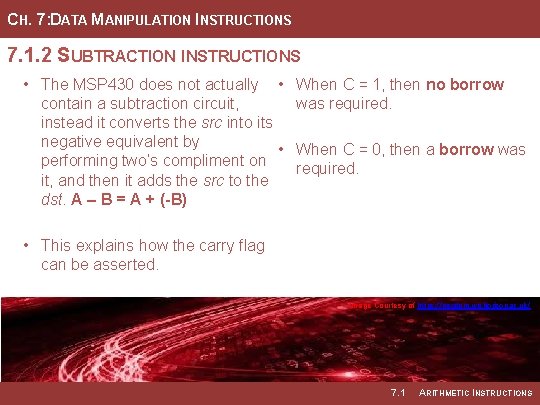
CH. 7: DATA MANIPULATION INSTRUCTIONS 7. 1. 2 SUBTRACTION INSTRUCTIONS • The MSP 430 does not actually • When C = 1, then no borrow contain a subtraction circuit, was required. instead it converts the src into its negative equivalent by • When C = 0, then a borrow was performing two’s compliment on required. it, and then it adds the src to the dst. A – B = A + (-B) • This explains how the carry flag can be asserted. Image Courtesy of https: //neodem. wp. horizon. ac. uk/ Image Courtesy of Recording Connection of Canada 7. 1 ARITHMETIC INSTRUCTIONS
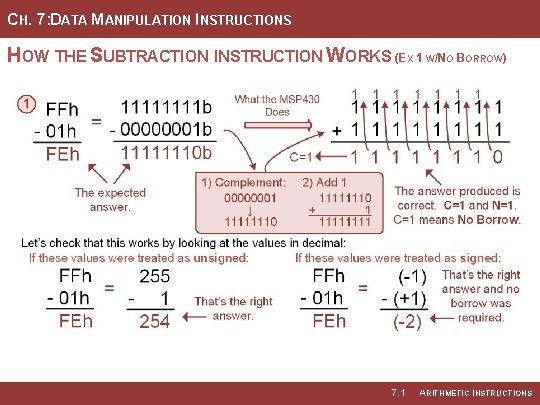
CH. 7: DATA MANIPULATION INSTRUCTIONS HOW THE SUBTRACTION INSTRUCTION WORKS (EX 1 W/NO BORROW) 7. 1 ARITHMETIC INSTRUCTIONS
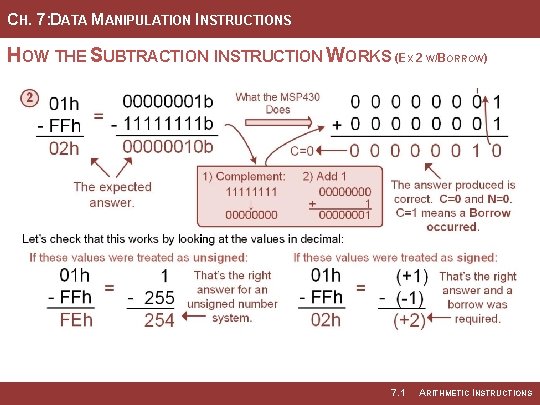
CH. 7: DATA MANIPULATION INSTRUCTIONS HOW THE SUBTRACTION INSTRUCTION WORKS (EX 2 W/BORROW) 7. 1 ARITHMETIC INSTRUCTIONS
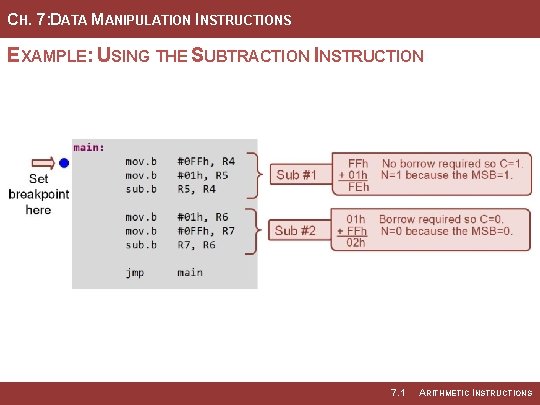
CH. 7: DATA MANIPULATION INSTRUCTIONS EXAMPLE: USING THE SUBTRACTION INSTRUCTION 7. 1 ARITHMETIC INSTRUCTIONS
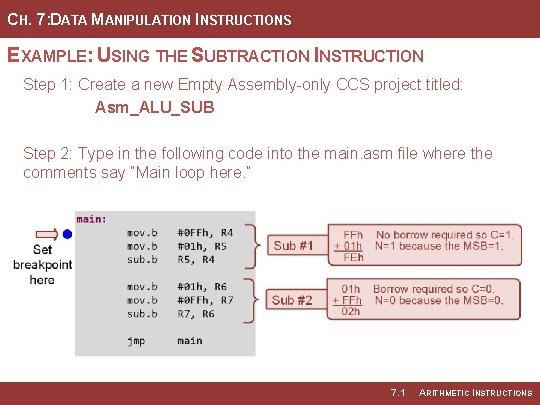
CH. 7: DATA MANIPULATION INSTRUCTIONS EXAMPLE: USING THE SUBTRACTION INSTRUCTION Step 1: Create a new Empty Assembly-only CCS project titled: Asm_ALU_SUB Step 2: Type in the following code into the main. asm file where the comments say “Main loop here. ” 7. 1 ARITHMETIC INSTRUCTIONS
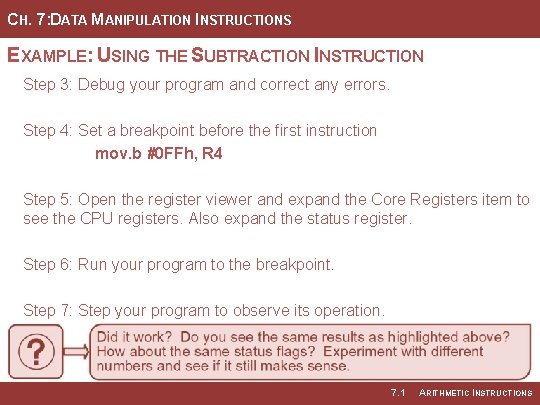
CH. 7: DATA MANIPULATION INSTRUCTIONS EXAMPLE: USING THE SUBTRACTION INSTRUCTION Step 3: Debug your program and correct any errors. Step 4: Set a breakpoint before the first instruction mov. b #0 FFh, R 4 Step 5: Open the register viewer and expand the Core Registers item to see the CPU registers. Also expand the status register. Step 6: Run your program to the breakpoint. Step 7: Step your program to observe its operation. 7. 1 ARITHMETIC INSTRUCTIONS
EMBEDDED SYSTEMS DESIGN CHAPTER 7: DATA MANIPULATION INSTRUCTIONS 7. 1 ARITHMETIC INSTRUCTIONS (SUB) www. youtube. com/c/Digital. Logic. Programming_La. Meres BROCK J. LAMERES, PH. D.
EMBEDDED SYSTEMS DESIGN CHAPTER 7: DATA MANIPULATION INSTRUCTIONS 7. 1 ARITHMETIC INSTRUCTIONS (SUBC = SUBTRACT W/ CARRY) BROCK J. LAMERES, PH. D.
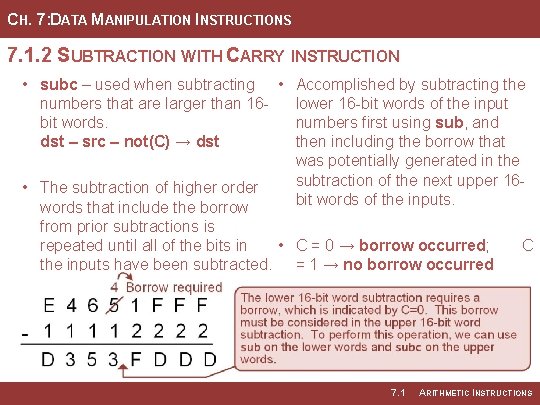
CH. 7: DATA MANIPULATION INSTRUCTIONS 7. 1. 2 SUBTRACTION WITH CARRY INSTRUCTION • subc – used when subtracting • Accomplished by subtracting the numbers that are larger than 16 lower 16 -bit words of the input bit words. numbers first using sub, and dst – src – not(C) → dst then including the borrow that was potentially generated in the subtraction of the next upper 16 • The subtraction of higher order bit words of the inputs. words that include the borrow from prior subtractions is repeated until all of the bits in • C = 0 → borrow occurred; the inputs have been subtracted. = 1 → no borrow occurred 7. 1 C ARITHMETIC INSTRUCTIONS
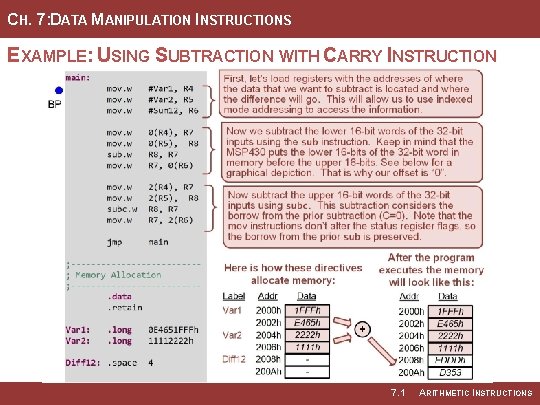
CH. 7: DATA MANIPULATION INSTRUCTIONS EXAMPLE: USING SUBTRACTION WITH CARRY INSTRUCTION 7. 1 ARITHMETIC INSTRUCTIONS
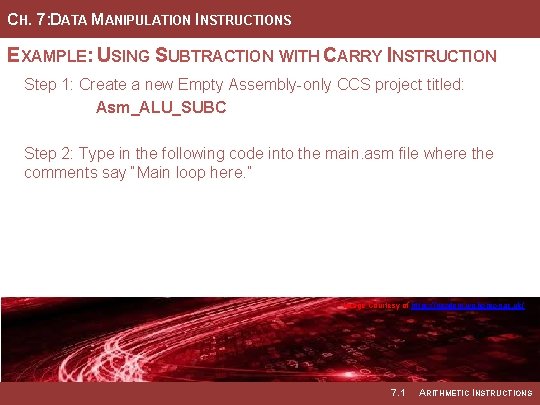
CH. 7: DATA MANIPULATION INSTRUCTIONS EXAMPLE: USING SUBTRACTION WITH CARRY INSTRUCTION Step 1: Create a new Empty Assembly-only CCS project titled: Asm_ALU_SUBC Step 2: Type in the following code into the main. asm file where the comments say “Main loop here. ” Image Courtesy of https: //neodem. wp. horizon. ac. uk/ 7. 1 ARITHMETIC INSTRUCTIONS
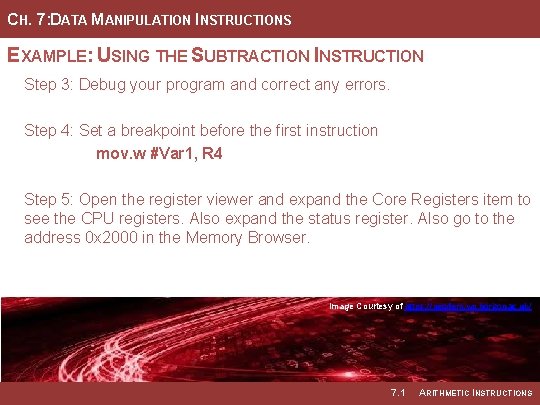
CH. 7: DATA MANIPULATION INSTRUCTIONS EXAMPLE: USING THE SUBTRACTION INSTRUCTION Step 3: Debug your program and correct any errors. Step 4: Set a breakpoint before the first instruction mov. w #Var 1, R 4 Step 5: Open the register viewer and expand the Core Registers item to see the CPU registers. Also expand the status register. Also go to the address 0 x 2000 in the Memory Browser. Image Courtesy of https: //neodem. wp. horizon. ac. uk/ Image Courtesy of Recording Connection of Canada 7. 1 ARITHMETIC INSTRUCTIONS
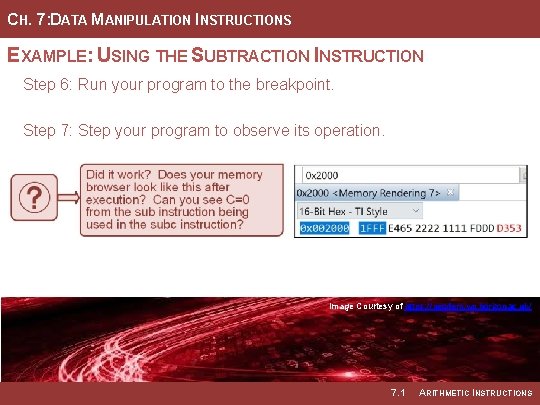
CH. 7: DATA MANIPULATION INSTRUCTIONS EXAMPLE: USING THE SUBTRACTION INSTRUCTION Step 6: Run your program to the breakpoint. Step 7: Step your program to observe its operation. Image Courtesy of https: //neodem. wp. horizon. ac. uk/ Image Courtesy of Recording Connection of Canada 7. 1 ARITHMETIC INSTRUCTIONS
EMBEDDED SYSTEMS DESIGN CHAPTER 7: DATA MANIPULATION INSTRUCTIONS 7. 1 ARITHMETIC INSTRUCTIONS (SUBC = SUBTRACT W/ BORROW) www. youtube. com/c/Digital. Logic. Programming_La. Meres BROCK J. LAMERES, PH. D.
EMBEDDED SYSTEMS DESIGN CHAPTER 7: DATA MANIPULATION INSTRUCTIONS 7. 1 ARITHMETIC INSTRUCTIONS (INCREMENTS AND DECREMENTS) BROCK J. LAMERES, PH. D.
CH. 7: DATA MANIPULATION INSTRUCTIONS 7. 1. 3 INCREMENTS AND DECREMENTS • inc & incd – incremented a storage location by 1 and 2 respectively. • dec & decd – decrements a storage location by 1 and 2 respectively. Image Courtesy of https: //neodem. wp. horizon. ac. uk/ Image Courtesy of Recording Connection of Canada 7. 1 ARITHMETIC INSTRUCTIONS
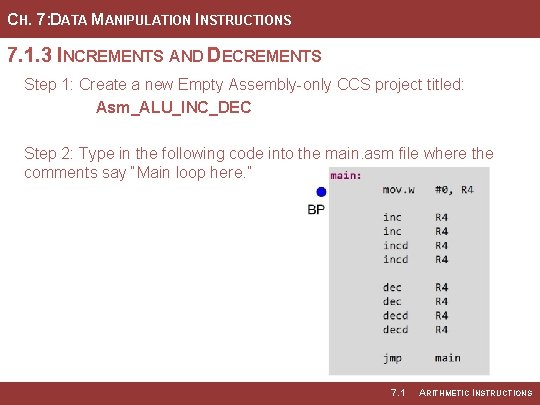
CH. 7: DATA MANIPULATION INSTRUCTIONS 7. 1. 3 INCREMENTS AND DECREMENTS Step 1: Create a new Empty Assembly-only CCS project titled: Asm_ALU_INC_DEC Step 2: Type in the following code into the main. asm file where the comments say “Main loop here. ” 7. 1 ARITHMETIC INSTRUCTIONS
CH. 7: DATA MANIPULATION INSTRUCTIONS 7. 1. 3 INCREMENTS AND DECREMENTS Step 3: Debug your program and correct any errors. Step 4: Set a breakpoint before the first instruction mov. w #0, R 4 Step 5: Open the register viewer and expand the Core Registers item to see the CPU registers. Image Courtesy of https: //neodem. wp. horizon. ac. uk/ Image Courtesy of Recording Connection of Canada 7. 1 ARITHMETIC INSTRUCTIONS
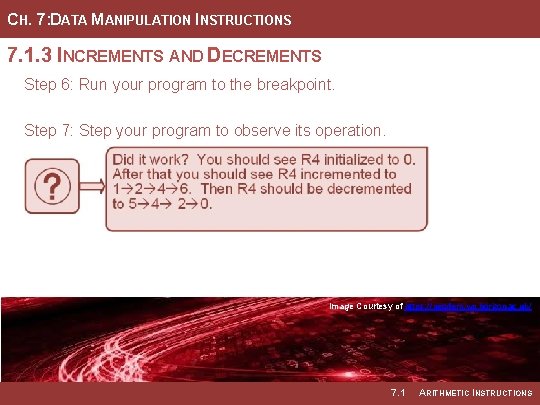
CH. 7: DATA MANIPULATION INSTRUCTIONS 7. 1. 3 INCREMENTS AND DECREMENTS Step 6: Run your program to the breakpoint. Step 7: Step your program to observe its operation. Image Courtesy of https: //neodem. wp. horizon. ac. uk/ Image Courtesy of Recording Connection of Canada 7. 1 ARITHMETIC INSTRUCTIONS
CH. 7: DATA MANIPULATION INSTRUCTIONS 7. 1. 3 INCREMENTS AND DECREMENTS Step 8: Now enter the following code. You can place this after the prior inc/dec lines. Step 9: Debug your program and correct any errors. Step 10: Step your program to observe its operation. Step 11: Open the register viewer and memory browsers at 0 x 2000. Image Courtesy of https: //neodem. wp. horizon. ac. uk/ Image Courtesy of Recording Connection of Canada 7. 1 ARITHMETIC INSTRUCTIONS
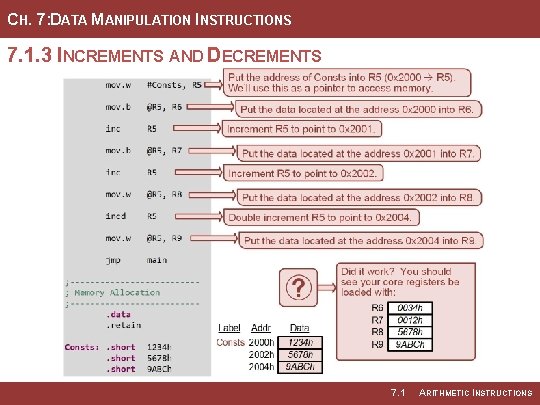
CH. 7: DATA MANIPULATION INSTRUCTIONS 7. 1. 3 INCREMENTS AND DECREMENTS 7. 1 ARITHMETIC INSTRUCTIONS
EMBEDDED SYSTEMS DESIGN CHAPTER 7: DATA MANIPULATION INSTRUCTIONS 7. 1 ARITHMETIC INSTRUCTIONS (INCREMENTS AND DECREMENTS) www. youtube. com/c/Digital. Logic. Programming_La. Meres BROCK J. LAMERES, PH. D.
EMBEDDED SYSTEMS DESIGN CHAPTER 7: DATA MANIPULATION INSTRUCTIONS 7. 2 LOGIC INSTRUCTIONS BROCK J. LAMERES, PH. D.
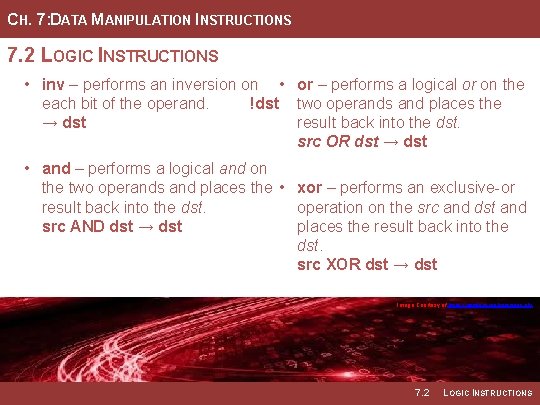
CH. 7: DATA MANIPULATION INSTRUCTIONS 7. 2 LOGIC INSTRUCTIONS • inv – performs an inversion on • or – performs a logical or on the each bit of the operand. !dst two operands and places the → dst result back into the dst. src OR dst → dst • and – performs a logical and on the two operands and places the • xor – performs an exclusive-or result back into the dst. operation on the src and dst and src AND dst → dst places the result back into the dst. src XOR dst → dst Image Courtesy of https: //neodem. wp. horizon. ac. uk/ 7. 2 LOGIC INSTRUCTIONS
CH. 7: DATA MANIPULATION INSTRUCTIONS 7. 2 LOGIC INSTRUCTIONS • Bitwise operation – takes place on the individual bits of the src and dst independent of each other. • Bit masking – the of setting, clearing, toggling, or testing the value of a bit within a word. Image Courtesy of https: //neodem. wp. horizon. ac. uk/ 7. 2 LOGIC INSTRUCTIONS
CH. 7: DATA MANIPULATION INSTRUCTIONS 7. 2 LOGIC INSTRUCTIONS • Bit Masking w/ AND Image Courtesy of https: //neodem. wp. horizon. ac. uk/ Image Courtesy of Recording Connection of Canada 7. 2 LOGIC INSTRUCTIONS
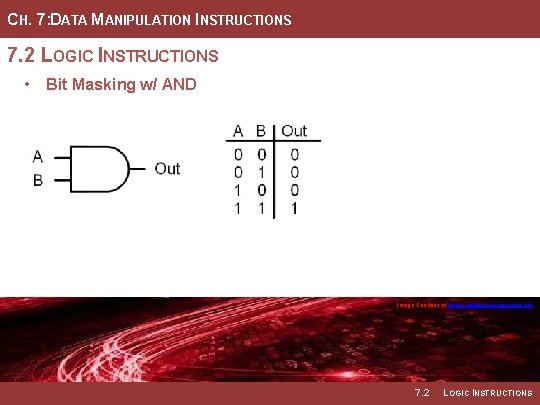
CH. 7: DATA MANIPULATION INSTRUCTIONS 7. 2 LOGIC INSTRUCTIONS • Bit Masking w/ AND Image Courtesy of https: //neodem. wp. horizon. ac. uk/ Image Courtesy of Recording Connection of Canada 7. 2 LOGIC INSTRUCTIONS
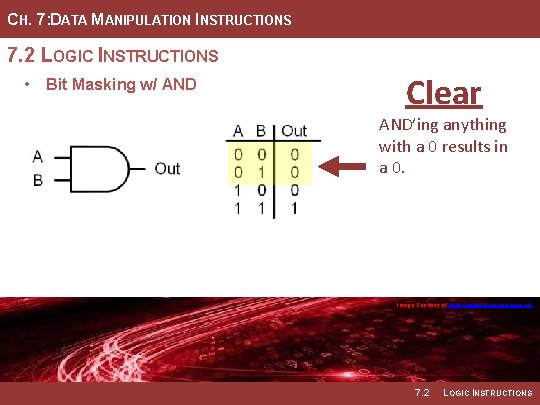
CH. 7: DATA MANIPULATION INSTRUCTIONS 7. 2 LOGIC INSTRUCTIONS • Bit Masking w/ AND Clear AND’ing anything with a 0 results in a 0. Image Courtesy of https: //neodem. wp. horizon. ac. uk/ 7. 2 LOGIC INSTRUCTIONS
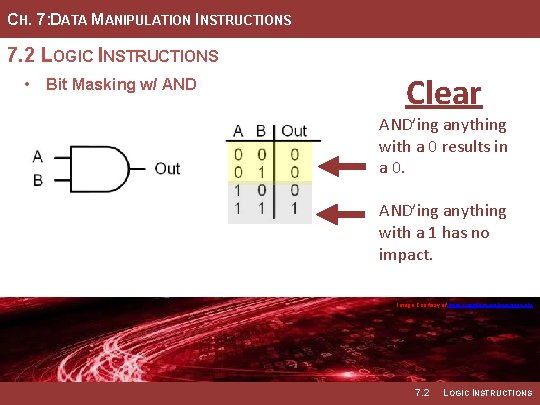
CH. 7: DATA MANIPULATION INSTRUCTIONS 7. 2 LOGIC INSTRUCTIONS • Bit Masking w/ AND Clear AND’ing anything with a 0 results in a 0. AND’ing anything with a 1 has no impact. Image Courtesy of https: //neodem. wp. horizon. ac. uk/ 7. 2 LOGIC INSTRUCTIONS
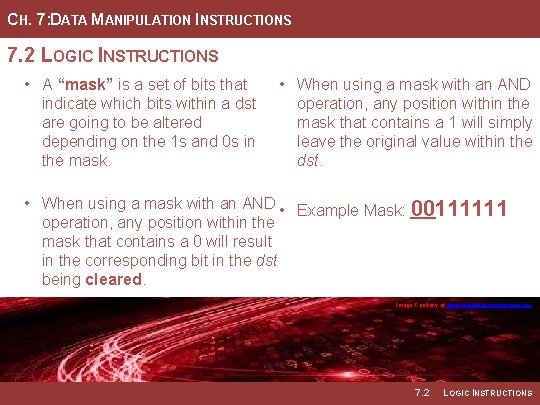
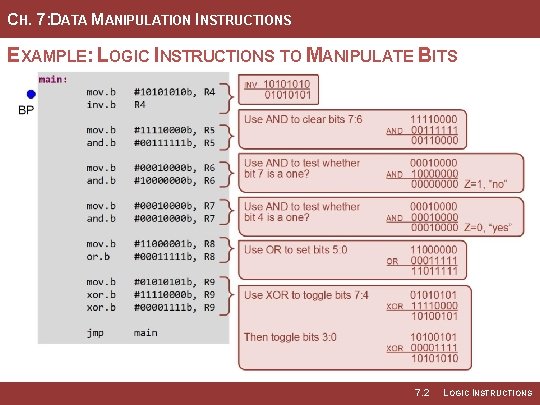
CH. 7: DATA MANIPULATION INSTRUCTIONS 7. 2 LOGIC INSTRUCTIONS • A “mask” is a set of bits that indicate which bits within a dst are going to be altered depending on the 1 s and 0 s in the mask. • When using a mask with an AND operation, any position within the mask that contains a 1 will simply leave the original value within the dst. • When using a mask with an AND • Example Mask: 00111111 operation, any position within the mask that contains a 0 will result in the corresponding bit in the dst being cleared. Image Courtesy of https: //neodem. wp. horizon. ac. uk/ Image Courtesy of Recording Connection of Canada 7. 2 LOGIC INSTRUCTIONS
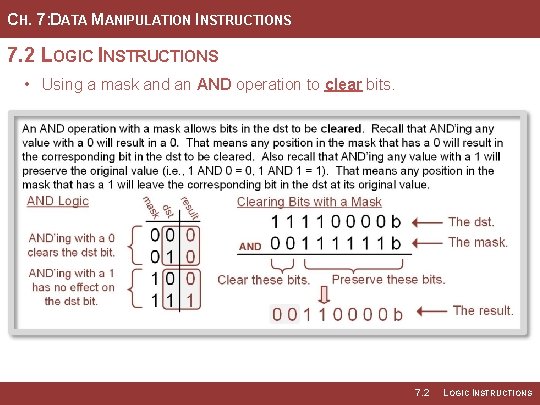
CH. 7: DATA MANIPULATION INSTRUCTIONS 7. 2 LOGIC INSTRUCTIONS • Using a mask and an AND operation to clear bits. 7. 2 LOGIC INSTRUCTIONS
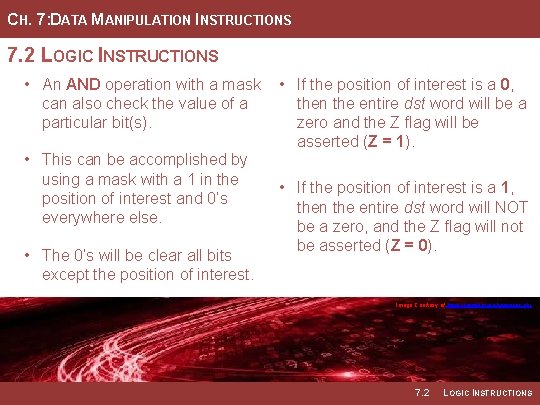
CH. 7: DATA MANIPULATION INSTRUCTIONS 7. 2 LOGIC INSTRUCTIONS • An AND operation with a mask can also check the value of a particular bit(s). • This can be accomplished by using a mask with a 1 in the position of interest and 0’s everywhere else. • The 0’s will be clear all bits except the position of interest. • If the position of interest is a 0, then the entire dst word will be a zero and the Z flag will be asserted (Z = 1). • If the position of interest is a 1, then the entire dst word will NOT be a zero, and the Z flag will not be asserted (Z = 0). Image Courtesy of https: //neodem. wp. horizon. ac. uk/ Image Courtesy of Recording Connection of Canada 7. 2 LOGIC INSTRUCTIONS
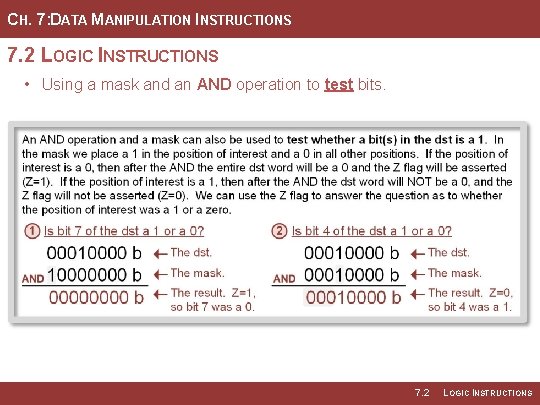
CH. 7: DATA MANIPULATION INSTRUCTIONS 7. 2 LOGIC INSTRUCTIONS • Using a mask and an AND operation to test bits. 7. 2 LOGIC INSTRUCTIONS
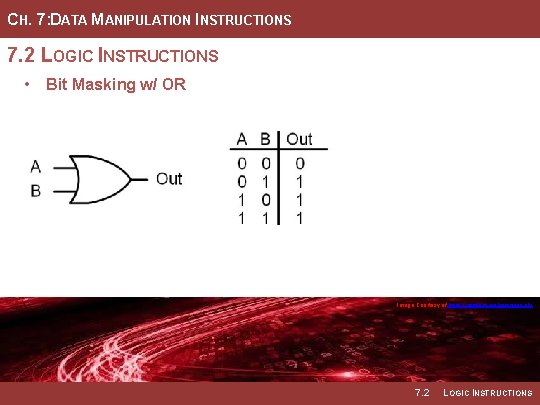
CH. 7: DATA MANIPULATION INSTRUCTIONS 7. 2 LOGIC INSTRUCTIONS • Bit Masking w/ OR Image Courtesy of https: //neodem. wp. horizon. ac. uk/ 7. 2 LOGIC INSTRUCTIONS
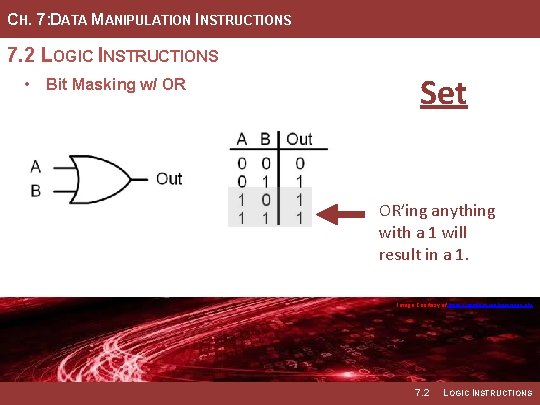
CH. 7: DATA MANIPULATION INSTRUCTIONS 7. 2 LOGIC INSTRUCTIONS • Bit Masking w/ OR Set OR’ing anything with a 1 will result in a 1. Image Courtesy of https: //neodem. wp. horizon. ac. uk/ 7. 2 LOGIC INSTRUCTIONS
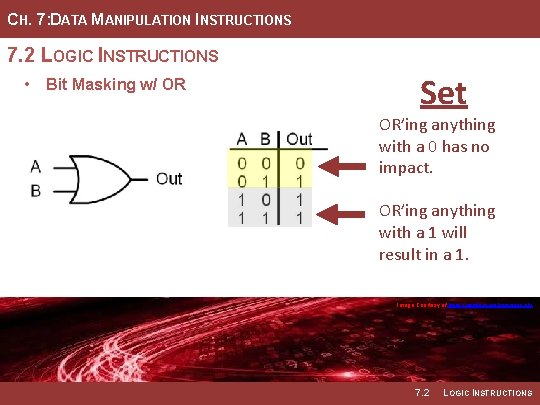
CH. 7: DATA MANIPULATION INSTRUCTIONS 7. 2 LOGIC INSTRUCTIONS • Bit Masking w/ OR Set OR’ing anything with a 0 has no impact. OR’ing anything with a 1 will result in a 1. Image Courtesy of https: //neodem. wp. horizon. ac. uk/ 7. 2 LOGIC INSTRUCTIONS
CH. 7: DATA MANIPULATION INSTRUCTIONS 7. 2 LOGIC INSTRUCTIONS • A logical OR will produce a 1 • Any position within the mask that when either of the bits of the contains a 1 will result in the inputs are a 1. Thus, we can use corresponding bit int eh dst being the OR operation with a one to set any bit within a word. • Any position within the mask that • When using a mask with an OR, contains a 0 will simply leave the mask indicates which bit(s) to original value within the dst. set and which to preserve. • Example Mask: 00011111 Image Courtesy of https: //neodem. wp. horizon. ac. uk/ Image Courtesy of Recording Connection of Canada 7. 2 LOGIC INSTRUCTIONS
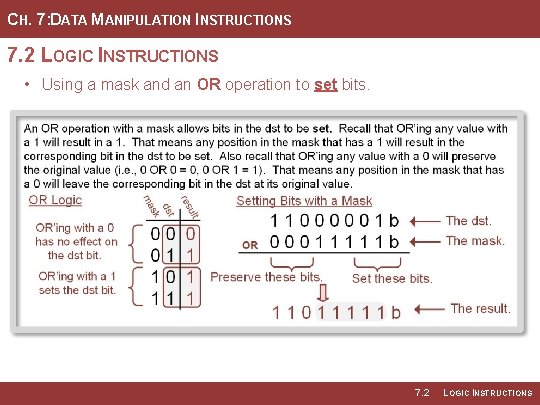
CH. 7: DATA MANIPULATION INSTRUCTIONS 7. 2 LOGIC INSTRUCTIONS • Using a mask and an OR operation to set bits. 7. 2 LOGIC INSTRUCTIONS
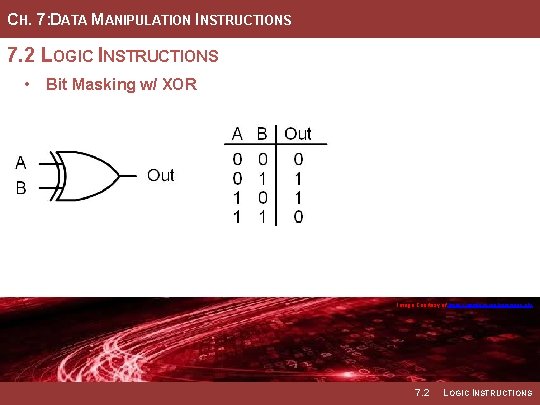
CH. 7: DATA MANIPULATION INSTRUCTIONS 7. 2 LOGIC INSTRUCTIONS • Bit Masking w/ XOR Image Courtesy of https: //neodem. wp. horizon. ac. uk/ 7. 2 LOGIC INSTRUCTIONS
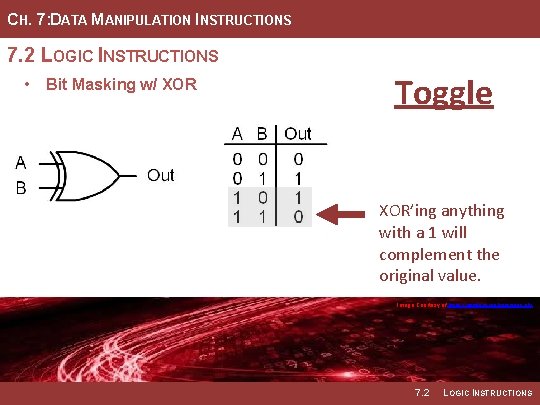
CH. 7: DATA MANIPULATION INSTRUCTIONS 7. 2 LOGIC INSTRUCTIONS • Bit Masking w/ XOR Toggle XOR’ing anything with a 1 will complement the original value. Image Courtesy of https: //neodem. wp. horizon. ac. uk/ 7. 2 LOGIC INSTRUCTIONS
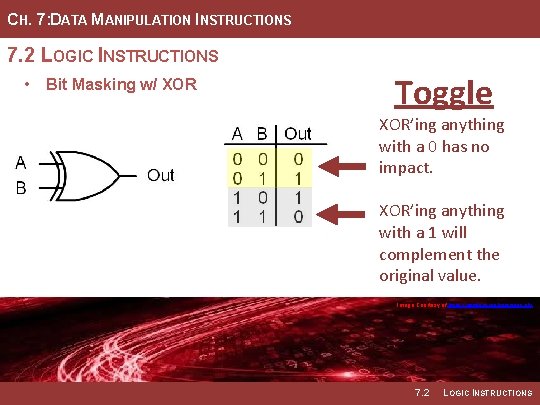
CH. 7: DATA MANIPULATION INSTRUCTIONS 7. 2 LOGIC INSTRUCTIONS • Bit Masking w/ XOR Toggle XOR’ing anything with a 0 has no impact. XOR’ing anything with a 1 will complement the original value. Image Courtesy of https: //neodem. wp. horizon. ac. uk/ 7. 2 LOGIC INSTRUCTIONS
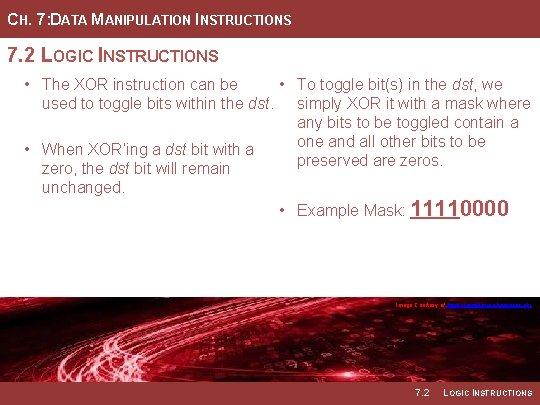
CH. 7: DATA MANIPULATION INSTRUCTIONS 7. 2 LOGIC INSTRUCTIONS • The XOR instruction can be • To toggle bit(s) in the dst, we used to toggle bits within the dst. simply XOR it with a mask where any bits to be toggled contain a one and all other bits to be • When XOR’ing a dst bit with a preserved are zeros. zero, the dst bit will remain unchanged. • Example Mask: 11110000 Image Courtesy of https: //neodem. wp. horizon. ac. uk/ Image Courtesy of Recording Connection of Canada 7. 2 LOGIC INSTRUCTIONS
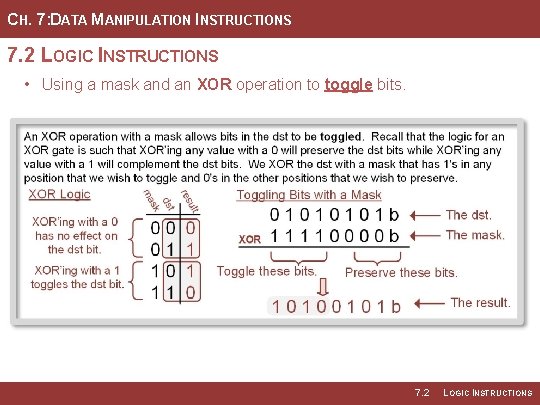
CH. 7: DATA MANIPULATION INSTRUCTIONS 7. 2 LOGIC INSTRUCTIONS • Using a mask and an XOR operation to toggle bits. 7. 2 LOGIC INSTRUCTIONS
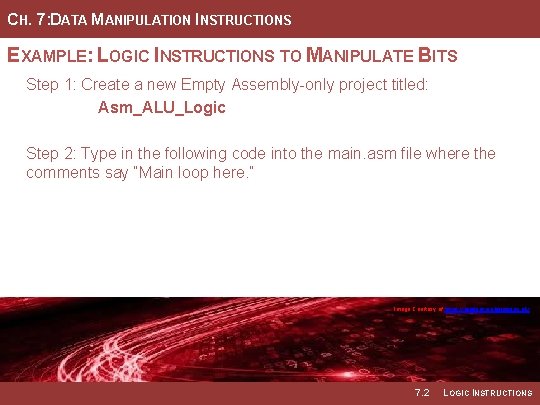
CH. 7: DATA MANIPULATION INSTRUCTIONS EXAMPLE: LOGIC INSTRUCTIONS TO MANIPULATE BITS Step 1: Create a new Empty Assembly-only project titled: Asm_ALU_Logic Step 2: Type in the following code into the main. asm file where the comments say “Main loop here. ” Image Courtesy of https: //neodem. wp. horizon. ac. uk/ Image Courtesy of Recording Connection of Canada 7. 2 LOGIC INSTRUCTIONS
CH. 7: DATA MANIPULATION INSTRUCTIONS EXAMPLE: LOGIC INSTRUCTIONS TO MANIPULATE BITS 7. 2 LOGIC INSTRUCTIONS
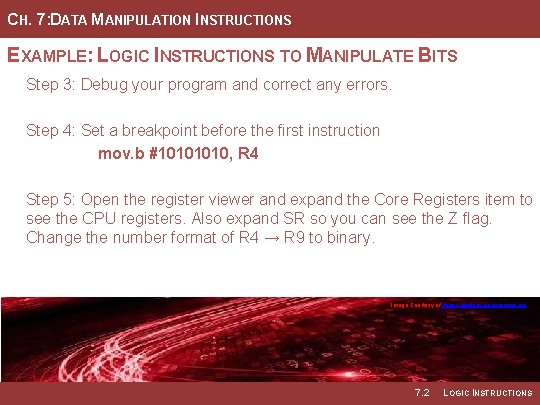
CH. 7: DATA MANIPULATION INSTRUCTIONS EXAMPLE: LOGIC INSTRUCTIONS TO MANIPULATE BITS Step 3: Debug your program and correct any errors. Step 4: Set a breakpoint before the first instruction mov. b #1010, R 4 Step 5: Open the register viewer and expand the Core Registers item to see the CPU registers. Also expand SR so you can see the Z flag. Change the number format of R 4 → R 9 to binary. Image Courtesy of https: //neodem. wp. horizon. ac. uk/ Image Courtesy of Recording Connection of Canada 7. 2 LOGIC INSTRUCTIONS
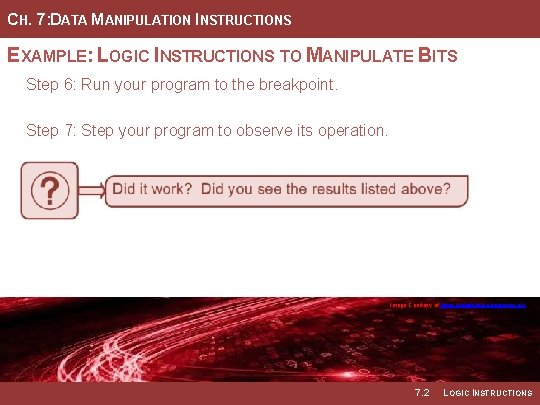
CH. 7: DATA MANIPULATION INSTRUCTIONS EXAMPLE: LOGIC INSTRUCTIONS TO MANIPULATE BITS Step 6: Run your program to the breakpoint. Step 7: Step your program to observe its operation. Image Courtesy of https: //neodem. wp. horizon. ac. uk/ Image Courtesy of Recording Connection of Canada 7. 2 LOGIC INSTRUCTIONS
EMBEDDED SYSTEMS DESIGN CHAPTER 7: DATA MANIPULATION INSTRUCTIONS 7. 2 LOGIC INSTRUCTIONS www. youtube. com/c/Digital. Logic. Programming_La. Meres BROCK J. LAMERES, PH. D.
EMBEDDED SYSTEMS DESIGN CHAPTER 7: DATA MANIPULATION INSTRUCTIONS 7. 3 BIT SET AND BIT CLEAR INSTRUCTIONS BROCK J. LAMERES, PH. D.
CH. 7: DATA MANIPULATION INSTRUCTIONS 7. 3 BIT SET AND BIT CLEAR INSTRUCTIONS • bis (bit set) – sets the bits in the • All bits within the mask for each dst corresponding to 1’s within the instruction that are 0’s will leave src operand mask. the dst bits unaltered. • bic (bit clear) – clears the bits in • By providing a masking approach the dst corresponding to 1’s within that works the same for bis and the src operand mask. bic, the same masks can be used throughout the program to alter the same bit location. • The bis and bic instructions work on both 16 -bit words (. w) and 8 -bit bytes (. b). • Immediate mode is most common. Image Courtesy of https: //neodem. wp. horizon. ac. uk/ Image Courtesy of Recording Connection of Canada 7. 3 BIT SET AND BIT CLEAR INSTRUCTIONS
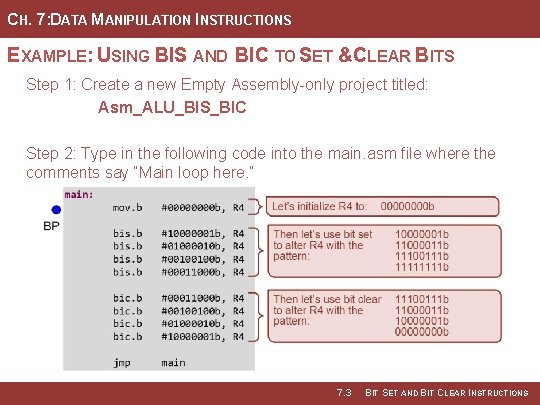
CH. 7: DATA MANIPULATION INSTRUCTIONS EXAMPLE: USING BIS AND BIC TO SET &CLEAR BITS Step 1: Create a new Empty Assembly-only project titled: Asm_ALU_BIS_BIC Step 2: Type in the following code into the main. asm file where the comments say “Main loop here. ” 7. 3 BIT SET AND BIT CLEAR INSTRUCTIONS
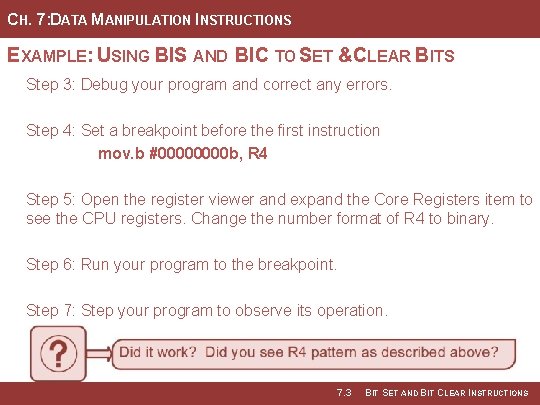
CH. 7: DATA MANIPULATION INSTRUCTIONS EXAMPLE: USING BIS AND BIC TO SET &CLEAR BITS Step 3: Debug your program and correct any errors. Step 4: Set a breakpoint before the first instruction mov. b #0000 b, R 4 Step 5: Open the register viewer and expand the Core Registers item to see the CPU registers. Change the number format of R 4 to binary. Step 6: Run your program to the breakpoint. Step 7: Step your program to observe its operation. 7. 3 BIT SET AND BIT CLEAR INSTRUCTIONS
EMBEDDED SYSTEMS DESIGN CHAPTER 7: DATA MANIPULATION INSTRUCTIONS 7. 3 BIT SET AND BIT CLEAR INSTRUCTIONS www. youtube. com/c/Digital. Logic. Programming_La. Meres BROCK J. LAMERES, PH. D.
EMBEDDED SYSTEMS DESIGN CHAPTER 7: DATA MANIPULATION INSTRUCTIONS 7. 4 TEST INSTRUCTIONS BROCK J. LAMERES, PH. D.
CH. 7: DATA MANIPULATION INSTRUCTIONS 7. 4 TEST INSTRUCTIONS • Testing a bit or word – try to determine whether a bit is one, whether the value is zero, whether the values is negative, or whether the value is the same as another number. Image Courtesy of Recording Connection of Canada Image Courtesy of https: //neodem. wp. horizon. ac. uk/ 7. 4 TEST INSTRUCTIONS
CH. 7: DATA MANIPULATION INSTRUCTIONS 7. 4 TEST INSTRUCTIONS • Bit (bit test) – perform a logical • If the bit location in the dst AND with the mask provided in dictated by the mask is a 1, then the src and the value held in the result of the AND will be dst. value that is not zero and the Z flag will not be asserted (Z = 0). • This is used to determine whether certain bits within the • If the Z flag is asserted (Z = 1), dst are 1’s by checking the Z flag then the bit value of interest in after the operation. the dst was a zero. Image Courtesy of Recording Connection of Canada Image Courtesy of https: //neodem. wp. horizon. ac. uk/ 7. 4 TEST INSTRUCTIONS
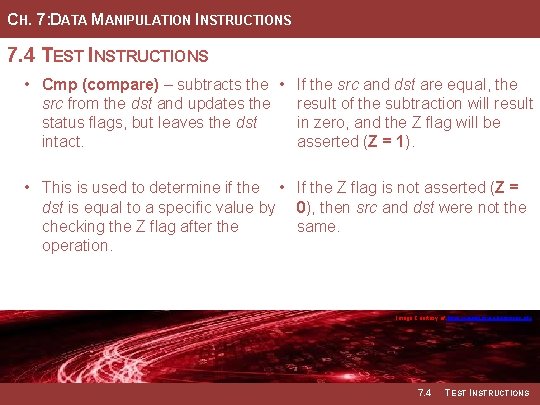
CH. 7: DATA MANIPULATION INSTRUCTIONS 7. 4 TEST INSTRUCTIONS • Cmp (compare) – subtracts the • If the src and dst are equal, the src from the dst and updates the result of the subtraction will result status flags, but leaves the dst in zero, and the Z flag will be intact. asserted (Z = 1). • This is used to determine if the • If the Z flag is not asserted (Z = dst is equal to a specific value by 0), then src and dst were not the checking the Z flag after the same. operation. Image Courtesy of Recording Connection of Canada Image Courtesy of https: //neodem. wp. horizon. ac. uk/ 7. 4 TEST INSTRUCTIONS
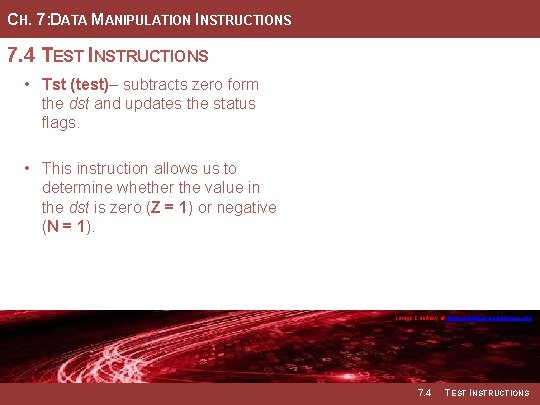
CH. 7: DATA MANIPULATION INSTRUCTIONS 7. 4 TEST INSTRUCTIONS • Tst (test)– subtracts zero form the dst and updates the status flags. • This instruction allows us to determine whether the value in the dst is zero (Z = 1) or negative (N = 1). Image Courtesy of Recording Connection of Canada Image Courtesy of https: //neodem. wp. horizon. ac. uk/ 7. 4 TEST INSTRUCTIONS
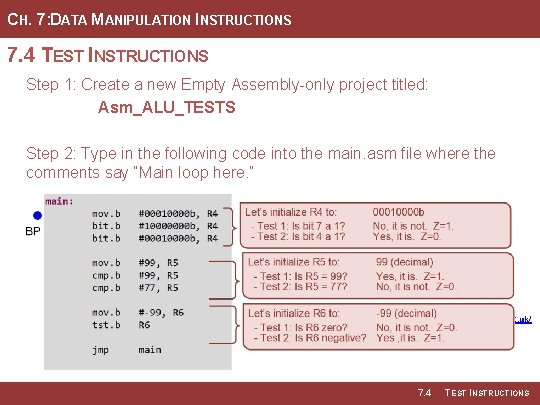
CH. 7: DATA MANIPULATION INSTRUCTIONS 7. 4 TEST INSTRUCTIONS Step 1: Create a new Empty Assembly-only project titled: Asm_ALU_TESTS Step 2: Type in the following code into the main. asm file where the comments say “Main loop here. ” Image Courtesy of Recording Connection of Canada Image Courtesy of https: //neodem. wp. horizon. ac. uk/ 7. 4 TEST INSTRUCTIONS
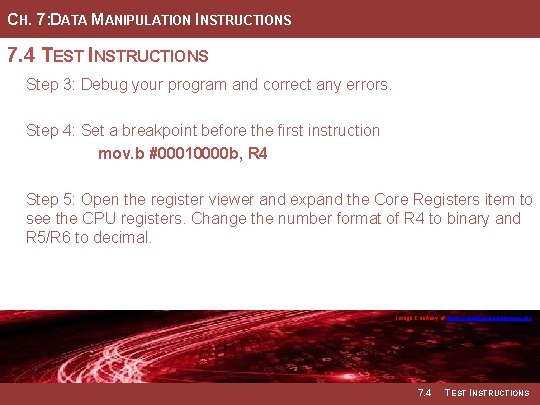
CH. 7: DATA MANIPULATION INSTRUCTIONS 7. 4 TEST INSTRUCTIONS Step 3: Debug your program and correct any errors. Step 4: Set a breakpoint before the first instruction mov. b #00010000 b, R 4 Step 5: Open the register viewer and expand the Core Registers item to see the CPU registers. Change the number format of R 4 to binary and R 5/R 6 to decimal. Image Courtesy of Recording Connection of Canada Image Courtesy of https: //neodem. wp. horizon. ac. uk/ 7. 4 TEST INSTRUCTIONS
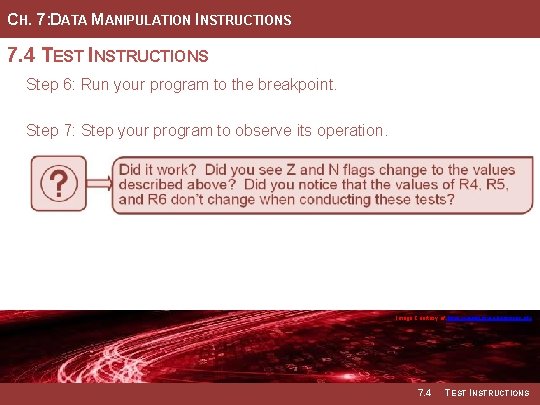
CH. 7: DATA MANIPULATION INSTRUCTIONS 7. 4 TEST INSTRUCTIONS Step 6: Run your program to the breakpoint. Step 7: Step your program to observe its operation. Image Courtesy of of Image Recording Connection of of Canada Recording Image Courtesy of https: //neodem. wp. horizon. ac. uk/ 7. 4 TEST INSTRUCTIONS
EMBEDDED SYSTEMS DESIGN CHAPTER 7: DATA MANIPULATION INSTRUCTIONS 7. 4 TEST INSTRUCTIONS www. youtube. com/c/Digital. Logic. Programming_La. Meres BROCK J. LAMERES, PH. D.
EMBEDDED SYSTEMS DESIGN CHAPTER 7: DATA MANIPULATION INSTRUCTIONS 7. 5 ROTATE OPERATIONS BROCK J. LAMERES, PH. D.
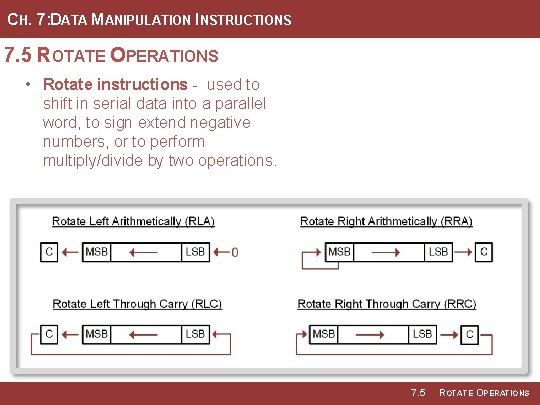
CH. 7: DATA MANIPULATION INSTRUCTIONS 7. 5 ROTATE OPERATIONS • Rotate instructions - used to shift in serial data into a parallel word, to sign extend negative numbers, or to perform multiply/divide by two operations. 7. 5 ROTATE OPERATIONS
CH. 7: DATA MANIPULATION INSTRUCTIONS EXAMPLE: USING ROTATE ARITHMETICALLY Step 1: Create a new Empty Assembly-only project titled: Asm_ALU_ROTATE_ARITH Step 2: Type in the following code into the main. asm file where the comments say “Main loop here. ” Image Courtesy of of Image Recording Connection of of Canada Recording Image Courtesy of of https: //neodem. wp. horizon. ac. uk/ Image 7. 5 ROTATE OPERATIONS
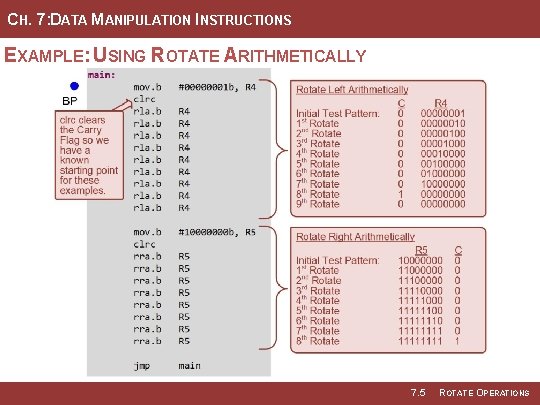
CH. 7: DATA MANIPULATION INSTRUCTIONS EXAMPLE: USING ROTATE ARITHMETICALLY 7. 5 ROTATE OPERATIONS
CH. 7: DATA MANIPULATION INSTRUCTIONS EXAMPLE: USING ROTATE ARITHMETICALLY Step 3: Debug your program and correct any errors. Step 4: Set a breakpoint before the first instruction mov. b #00000001 b, R 4 Step 5: Open the register viewer and expand the Core Registers item to see the CPU registers. Change the number format of R 4 → R 5 to binary. Expand SR so you can see the C-flag. Image Courtesy of of Image Recording Connection of of Canada Recording Image Courtesy of of https: //neodem. wp. horizon. ac. uk/ Image 7. 5 ROTATE OPERATIONS
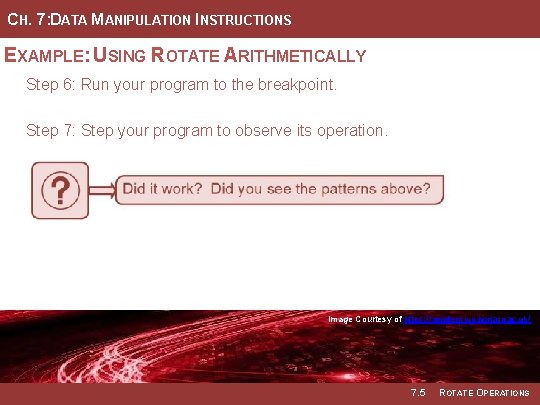
CH. 7: DATA MANIPULATION INSTRUCTIONS EXAMPLE: USING ROTATE ARITHMETICALLY Step 6: Run your program to the breakpoint. Step 7: Step your program to observe its operation. Image Courtesy of of Image Recording Connection of of Canada Recording Image Courtesy of of https: //neodem. wp. horizon. ac. uk/ Image 7. 5 ROTATE OPERATIONS
CH. 7: DATA MANIPULATION INSTRUCTIONS EXAMPLE: USING ROTATE THROUGH CARRY Step 1: Create a new Empty Assembly-only project titled: Asm_ALU_ROTATE_THRC Step 2: Type in the following code into the main. asm file where the comments say “Main loop here. ” Image Courtesy of of Image Recording Connection of of Canada Recording Image Courtesy of of https: //neodem. wp. horizon. ac. uk/ Image 7. 5 ROTATE OPERATIONS
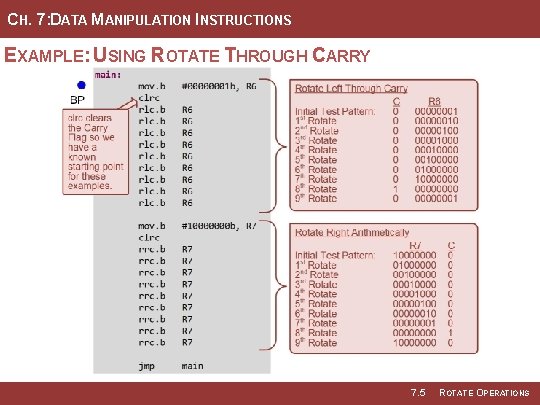
CH. 7: DATA MANIPULATION INSTRUCTIONS EXAMPLE: USING ROTATE THROUGH CARRY 7. 5 ROTATE OPERATIONS
CH. 7: DATA MANIPULATION INSTRUCTIONS EXAMPLE: USING ROTATE THROUGH CARRY Step 3: Debug your program and correct any errors. Step 4: Set a breakpoint before the first instruction mov. b #00000001 b, R 6 Step 5: Open the register viewer and expand the Core Registers item to see the CPU registers. Change the number format of R 6 → R 7 to binary. Expand SR so you can see the C-flag. Image Courtesy of of Image Recording Connection of of Canada Recording Image Courtesy of of https: //neodem. wp. horizon. ac. uk/ Image 7. 5 ROTATE OPERATIONS
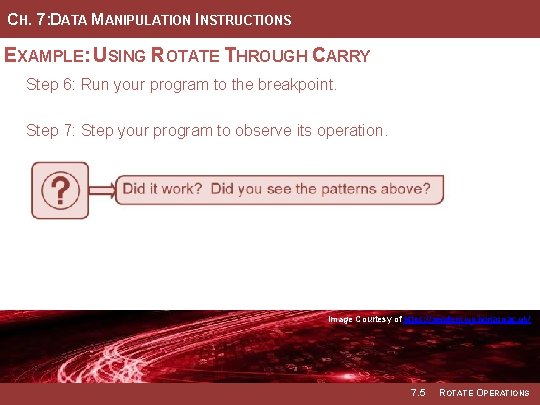
CH. 7: DATA MANIPULATION INSTRUCTIONS EXAMPLE: USING ROTATE THROUGH CARRY Step 6: Run your program to the breakpoint. Step 7: Step your program to observe its operation. Image Courtesy of of Image Recording Connection of of Canada Recording Image Courtesy of of https: //neodem. wp. horizon. ac. uk/ Image 7. 5 ROTATE OPERATIONS
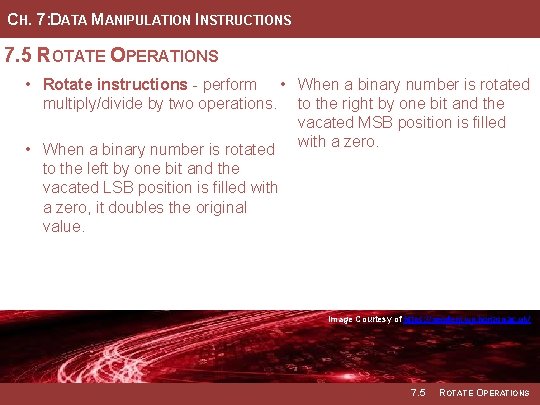
CH. 7: DATA MANIPULATION INSTRUCTIONS 7. 5 ROTATE OPERATIONS • Rotate instructions - perform • When a binary number is rotated multiply/divide by two operations. to the right by one bit and the vacated MSB position is filled • When a binary number is rotated with a zero. to the left by one bit and the vacated LSB position is filled with a zero, it doubles the original value. Image Courtesy of of Image Recording Connection of of Canada Recording Image Courtesy of of https: //neodem. wp. horizon. ac. uk/ Image 7. 5 ROTATE OPERATIONS
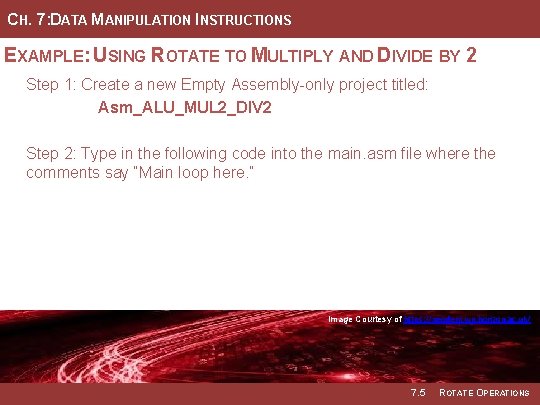
CH. 7: DATA MANIPULATION INSTRUCTIONS EXAMPLE: USING ROTATE TO MULTIPLY AND DIVIDE BY 2 Step 1: Create a new Empty Assembly-only project titled: Asm_ALU_MUL 2_DIV 2 Step 2: Type in the following code into the main. asm file where the comments say “Main loop here. ” Image Courtesy of of Image Recording Connection of of Canada Recording Image Courtesy of of https: //neodem. wp. horizon. ac. uk/ Image 7. 5 ROTATE OPERATIONS
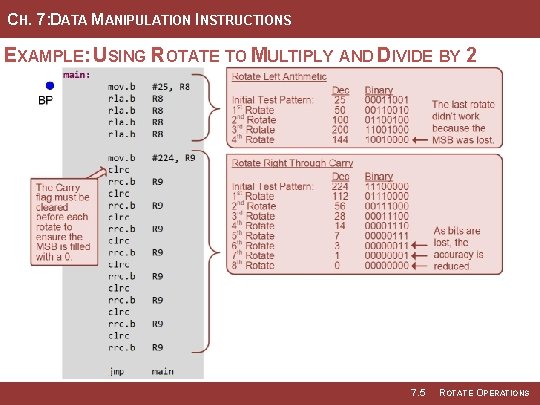
CH. 7: DATA MANIPULATION INSTRUCTIONS EXAMPLE: USING ROTATE TO MULTIPLY AND DIVIDE BY 2 7. 5 ROTATE OPERATIONS
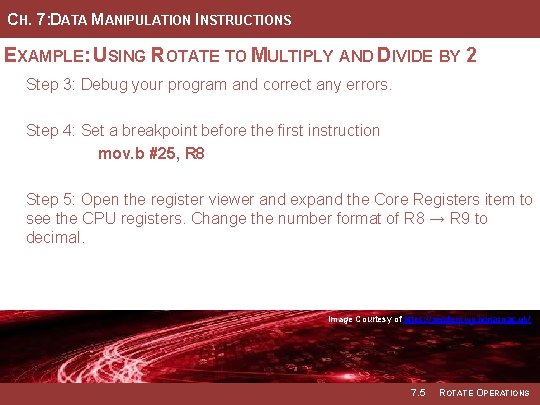
CH. 7: DATA MANIPULATION INSTRUCTIONS EXAMPLE: USING ROTATE TO MULTIPLY AND DIVIDE BY 2 Step 3: Debug your program and correct any errors. Step 4: Set a breakpoint before the first instruction mov. b #25, R 8 Step 5: Open the register viewer and expand the Core Registers item to see the CPU registers. Change the number format of R 8 → R 9 to decimal. Image Courtesy of of Image Recording Connection of of Canada Recording Image Courtesy of of https: //neodem. wp. horizon. ac. uk/ Image 7. 5 ROTATE OPERATIONS
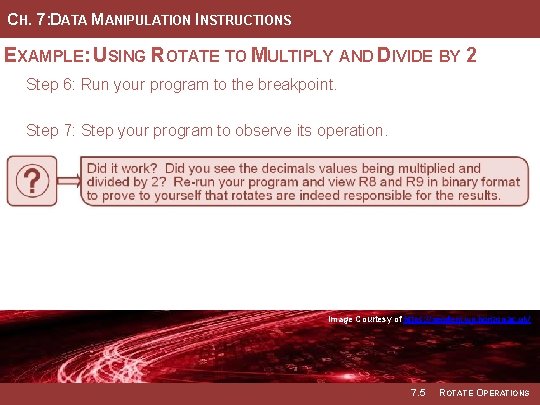
CH. 7: DATA MANIPULATION INSTRUCTIONS EXAMPLE: USING ROTATE TO MULTIPLY AND DIVIDE BY 2 Step 6: Run your program to the breakpoint. Step 7: Step your program to observe its operation. Image Courtesy of of Image Recording Connection of of Canada Recording Image Courtesy of of https: //neodem. wp. horizon. ac. uk/ Image 7. 5 ROTATE OPERATIONS
EMBEDDED SYSTEMS DESIGN CHAPTER 7: DATA MANIPULATION INSTRUCTIONS 7. 5 ROTATE OPERATIONS www. youtube. com/c/Digital. Logic. Programming_La. Meres BROCK J. LAMERES, PH. D.
- Slides: 98