
Embedded RealTime Systems Lecture Buses DMA Buffers Dimitris
Embedded Real-Time Systems Lecture: Buses, DMA, Buffers Dimitris Metafas, Ph. D. Slide 1
1. Bus Slide 2
Buses n n n n A bus is a collection of parallel signal wires that carry: n Address n Data n Control Address and data lines may be multiplexed. Serial Bus: Data bus is 1 bit Parallel Bus: Data bus width is more than 1 bit (usually, 8, 16, 32, 64, …) Bus may include clock signal. n Timing is relative to clock. Buses are typically shared by multiple devices, i. e. a bus is a shared communication medium. When several devices connect to a bus: n How do they communicate? n What happens on bus request conflicts? 3
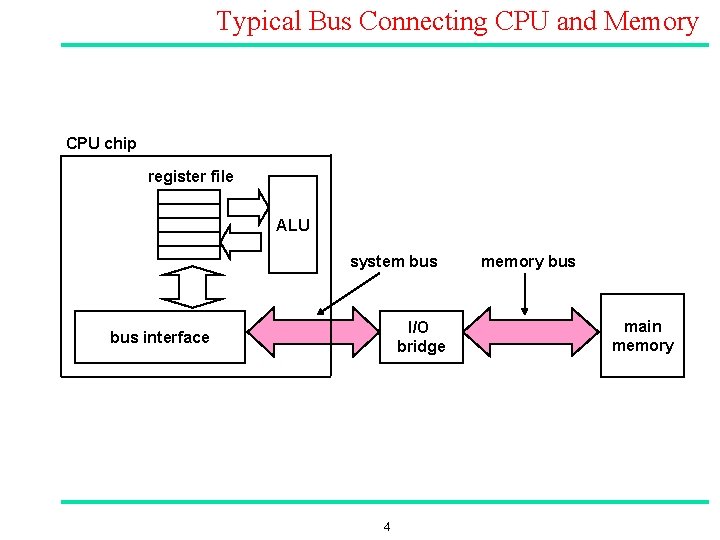
Typical Bus Connecting CPU and Memory CPU chip register file ALU system bus I/O bridge bus interface 4 memory bus main memory
![Memory Read Transaction (1) n Assume r 2 stores memory address A, while memory[A]=x](http://slidetodoc.com/presentation_image_h2/37ec65aa8498d03d5543443a92d03fdf/image-5.jpg "Memory Read Transaction (1) n Assume r 2 stores memory address A, while memory[A]=x")
Memory Read Transaction (1) n Assume r 2 stores memory address A, while memory[A]=x n CPU places address A (stored in r 2) on the memory bus. register file r 1 Load operation: ALU LDR r 1, [r 2] I/O bridge bus interface A ; r 1: = mem[r 2] main memory 0 x 5 A

Memory Read Transaction (2) n Main memory reads A from the memory bus, retrieves word x, and places it on the bus. register file r 1 Load operation: ALU LDR r 1, [r 2] I/O bridge bus interface A ; r 1: = mem[r 2] main memory 0 x 6 A
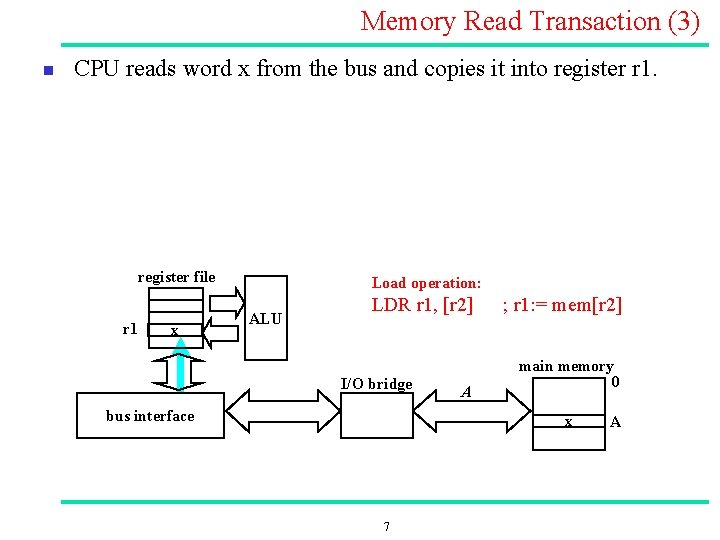
Memory Read Transaction (3) n CPU reads word x from the bus and copies it into register r 1. register file r 1 x Load operation: ALU LDR r 1, [r 2] I/O bridge bus interface A ; r 1: = mem[r 2] main memory 0 x 7 A
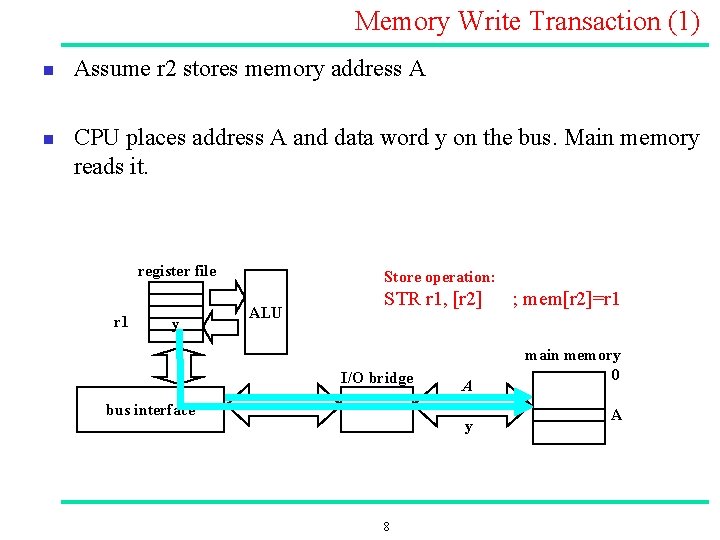
Memory Write Transaction (1) n n Assume r 2 stores memory address A CPU places address A and data word y on the bus. Main memory reads it. register file r 1 y Store operation: ALU STR r 1, [r 2] I/O bridge bus interface A y 8 ; mem[r 2]=r 1 main memory 0 A
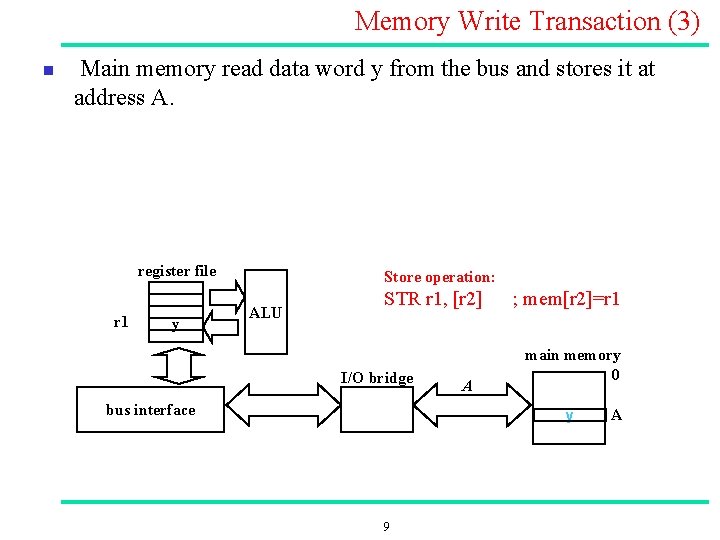
Memory Write Transaction (3) n Main memory read data word y from the bus and stores it at address A. register file r 1 y Store operation: ALU STR r 1, [r 2] I/O bridge bus interface A ; mem[r 2]=r 1 main memory 0 y 9 A
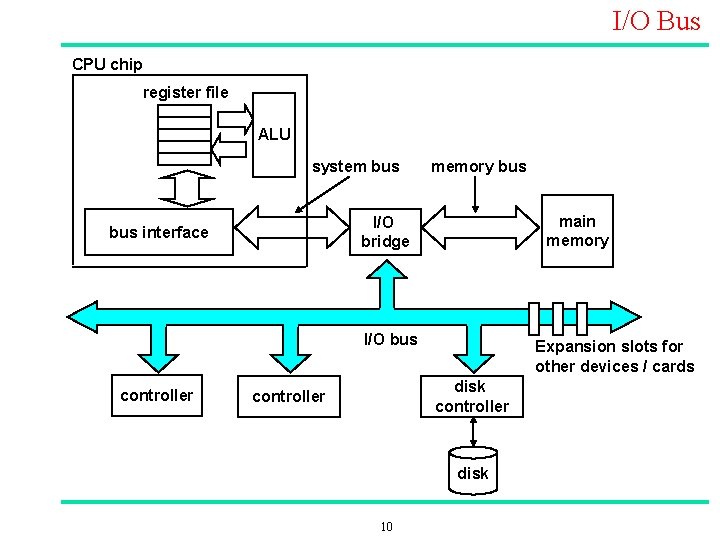
I/O Bus CPU chip register file ALU system bus memory bus main memory I/O bridge bus interface I/O bus controller Expansion slots for other devices / cards disk controller disk 10
Bus Masters / Slaves n n n Devices that can initiate their own bus transfers are termed Bus Masters n CPU n DMA n I/O Processors Bus mastership n The bus master controls operations on the bus n CPU is the default bus master n Other devices may request bus mastership (through the bus request and bus grant signals n CPU cannot use the bus while it is not master Devices that do not have the capability to be masters do not need to connect to bus request and bus grant signals (Bus slaves). n I/O devices 11
Bus Protocols n Bus Protocol refers to the set of rules agreed upon by both the bus master and bus slaves n Synchronous bus transfers occur in relation to successive edges of a clock n Asynchronous bus transfers bear no particular timing relationship n Semi synchronous bus Operations/control initiate asynchronously, but data transfer occurs synchronously 12
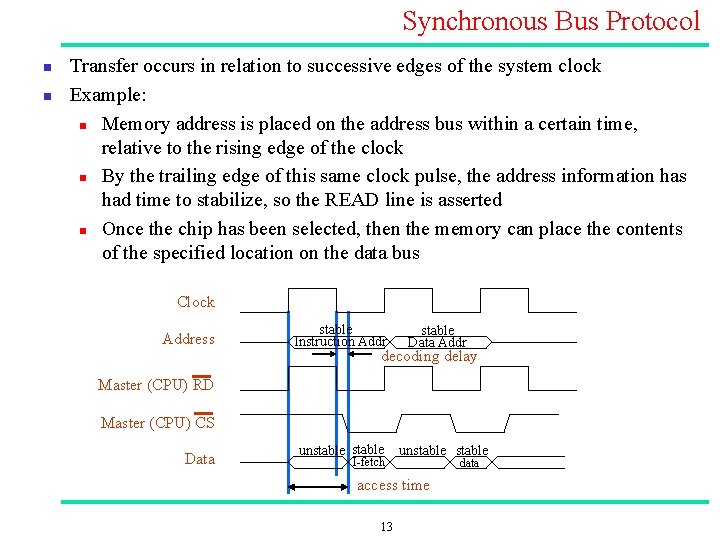
Synchronous Bus Protocol n n Transfer occurs in relation to successive edges of the system clock Example: n Memory address is placed on the address bus within a certain time, relative to the rising edge of the clock n By the trailing edge of this same clock pulse, the address information has had time to stabilize, so the READ line is asserted n Once the chip has been selected, then the memory can place the contents of the specified location on the data bus Clock Address stable Instruction Addr stable Data Addr decoding delay Master (CPU) RD Master (CPU) CS Data unstable I fetch unstable access time 13 data
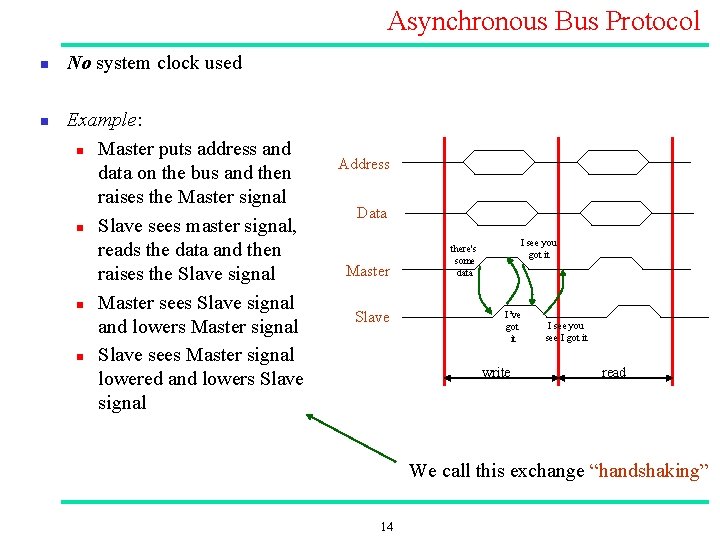
Asynchronous Bus Protocol n n No system clock used Example: n Master puts address and data on the bus and then raises the Master signal n Slave sees master signal, reads the data and then raises the Slave signal n Master sees Slave signal and lowers Master signal n Slave sees Master signal lowered and lowers Slave signal Address Data Master Slave I see you got it there's some data I’ve got it write I see you see I got it read We call this exchange “handshaking” 14
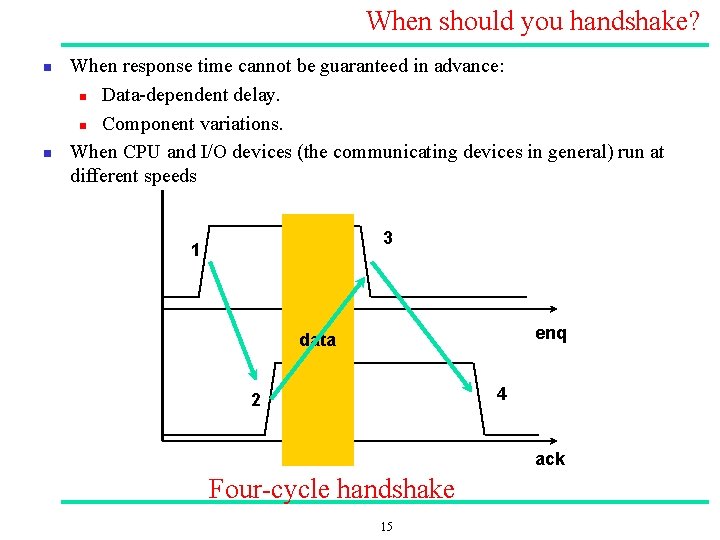
When should you handshake? n n When response time cannot be guaranteed in advance: n Data dependent delay. n Component variations. When CPU and I/O devices (the communicating devices in general) run at different speeds 3 1 enq data 4 2 ack Four cycle handshake 15

Synchronous vs. Asynchronous Buses n Synchronous + n quicker once you start, speed is limited by the clock, you can be ready but wait for next clock, all devices at same speed => use lowest speed device Asynchronous Handshake logic overhead + No speed limit; whenever you are ready you put data on bus 16
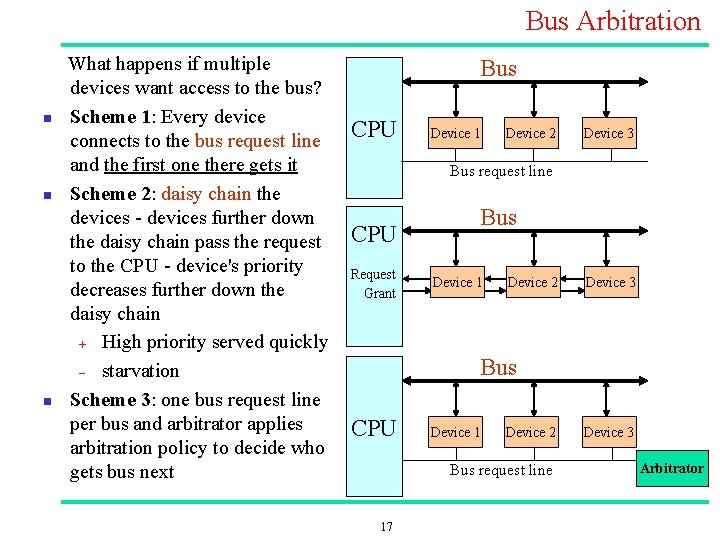
Bus Arbitration n What happens if multiple devices want access to the bus? Scheme 1: Every device connects to the bus request line and the first one there gets it Scheme 2: daisy chain the devices further down the daisy chain pass the request to the CPU device's priority decreases further down the daisy chain + High priority served quickly - starvation Scheme 3: one bus request line per bus and arbitrator applies arbitration policy to decide who gets bus next Bus CPU Device 1 Device 2 Device 3 Bus request line CPU Request Grant Bus Device 1 Device 2 Device 3 Bus CPU Device 1 Device 2 Bus request line 17 Device 3 Arbitrator
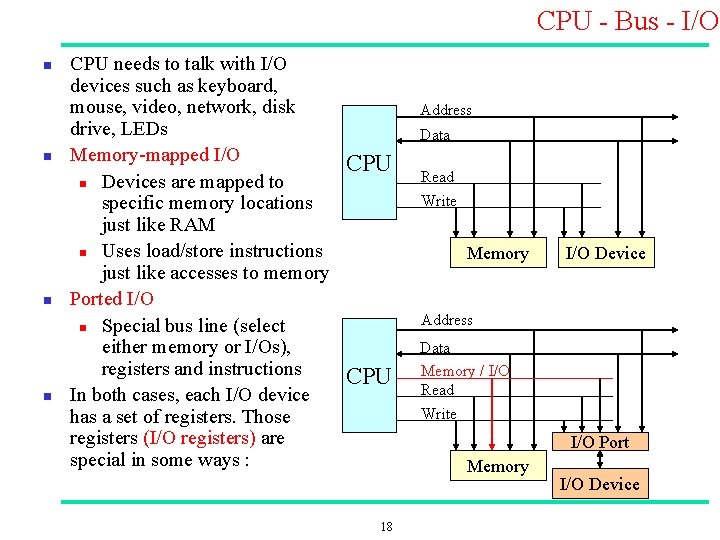
CPU Bus I/O n n CPU needs to talk with I/O devices such as keyboard, mouse, video, network, disk drive, LEDs Memory mapped I/O n Devices are mapped to specific memory locations just like RAM n Uses load/store instructions just like accesses to memory Ported I/O n Special bus line (select either memory or I/Os), registers and instructions In both cases, each I/O device has a set of registers. Those registers (I/O registers) are special in some ways : Address Data CPU Read Write Memory I/O Device Address CPU Data Memory / I/O Read Write I/O Port Memory 18 I/O Device
I/O Register Basics n I/O Registers are NOT like normal memory n Device events can change their values (e. g. , status registers) n Reading a register can change its value (e. g. , error condition reset) n n Some are read only (e. g. , receive registers) Some are write only (e. g. , transmit registers) Sometimes multiple I/O registers are mapped to same address n n so, do not expect to get the same value if read twice in a row! selection of one based on other info (e. g. , read vs. write or extra control bits) The bits in a control register often each specify something different and important and have significant side effects When polling I/O registers, we should inform the compiler that the value can change on its own => compiler should avoid unnecessary optimization. n volatile int *ptr; Also cache must be disabled for such registers or volatiles (so that we do not use a previous value of the variable while it has changed!) 19
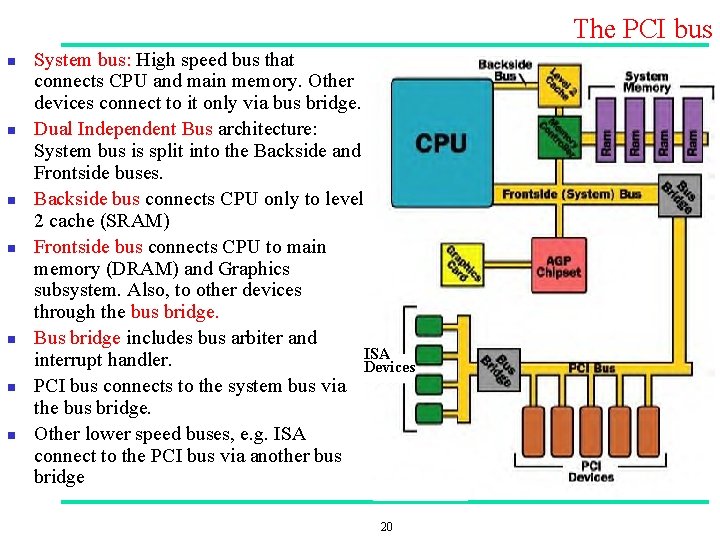
The PCI bus n n n n System bus: High speed bus that connects CPU and main memory. Other devices connect to it only via bus bridge. Dual Independent Bus architecture: System bus is split into the Backside and Frontside buses. Backside bus connects CPU only to level 2 cache (SRAM) Frontside bus connects CPU to main memory (DRAM) and Graphics subsystem. Also, to other devices through the bus bridge. Bus bridge includes bus arbiter and ISA interrupt handler. Devices PCI bus connects to the system bus via the bus bridge. Other lower speed buses, e. g. ISA connect to the PCI bus via another bus bridge 20
PCI bus n n n PCI bus speed: n up to 133 MHz, 64 bit => ~ 1 GBps (in BRH: 33 MHz, 64 bit) PCI bus can connect : n Up to 5 external devices n Each external device can be replaced with two devices on the motherboard PCI supports 5 V or 3. 3 V devices Shared bus => same path from multiple devices to CPU/memory n Direct access to system memory n Single system IRQ for all devices through the bus bridge PCI cards n 47 pins or 49 pins for mastering cards (cards which can control the PCI bus without CPU intervention) 21
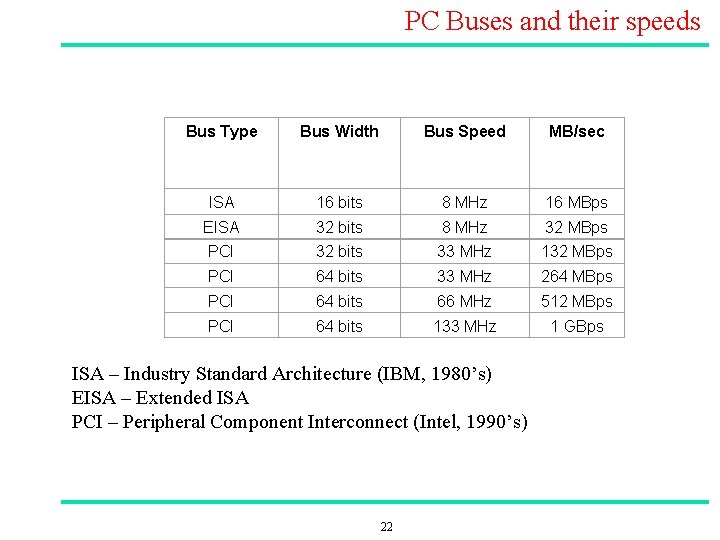
PC Buses and their speeds Bus Type Bus Width Bus Speed MB/sec ISA 16 bits 8 MHz 16 MBps EISA 32 bits 8 MHz 32 MBps PCI 32 bits 33 MHz 132 MBps PCI 64 bits 33 MHz 264 MBps PCI 64 bits 66 MHz 512 MBps PCI 64 bits 133 MHz 1 GBps ISA – Industry Standard Architecture (IBM, 1980’s) EISA – Extended ISA PCI – Peripheral Component Interconnect (Intel, 1990’s) 22
2. DMA Slide 23
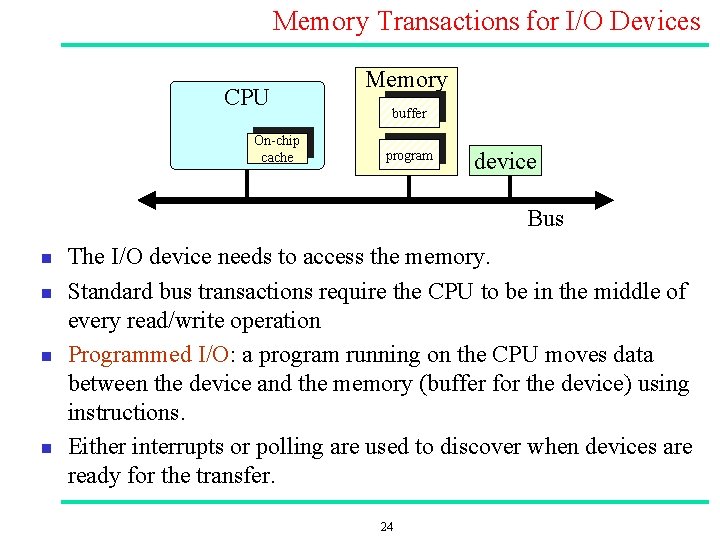
Memory Transactions for I/O Devices CPU On chip cache Memory buffer program device Bus n n The I/O device needs to access the memory. Standard bus transactions require the CPU to be in the middle of every read/write operation Programmed I/O: a program running on the CPU moves data between the device and the memory (buffer for the device) using instructions. Either interrupts or polling are used to discover when devices are ready for the transfer. 24
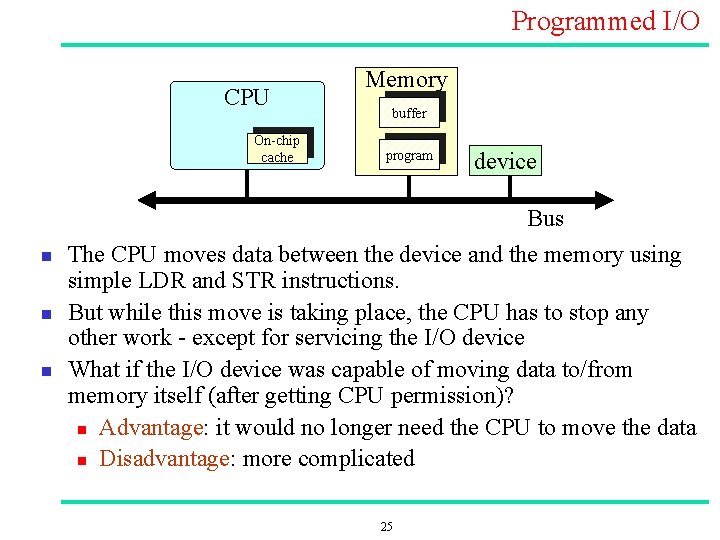
Programmed I/O CPU On chip cache n n n Memory buffer program device Bus The CPU moves data between the device and the memory using simple LDR and STR instructions. But while this move is taking place, the CPU has to stop any other work except for servicing the I/O device What if the I/O device was capable of moving data to/from memory itself (after getting CPU permission)? n Advantage: it would no longer need the CPU to move the data n Disadvantage: more complicated 25
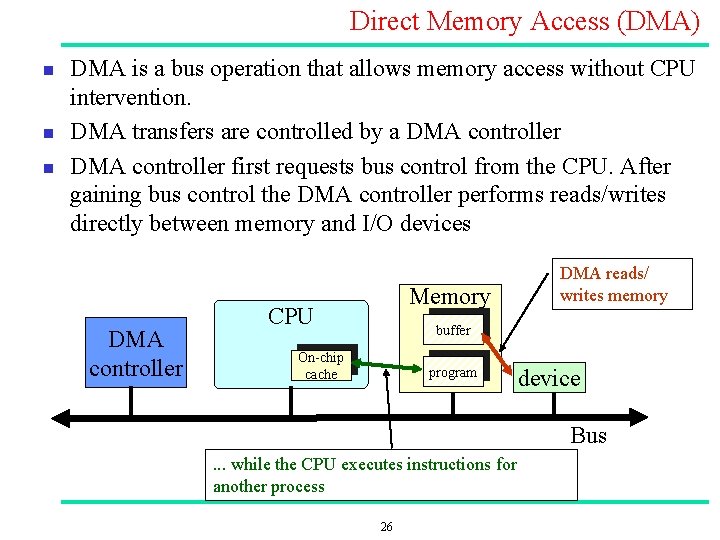
Direct Memory Access (DMA) n n n DMA is a bus operation that allows memory access without CPU intervention. DMA transfers are controlled by a DMA controller first requests bus control from the CPU. After gaining bus control the DMA controller performs reads/writes directly between memory and I/O devices DMA controller Memory CPU DMA reads/ writes memory buffer On chip cache program device Bus . . . while the CPU executes instructions for another process 26
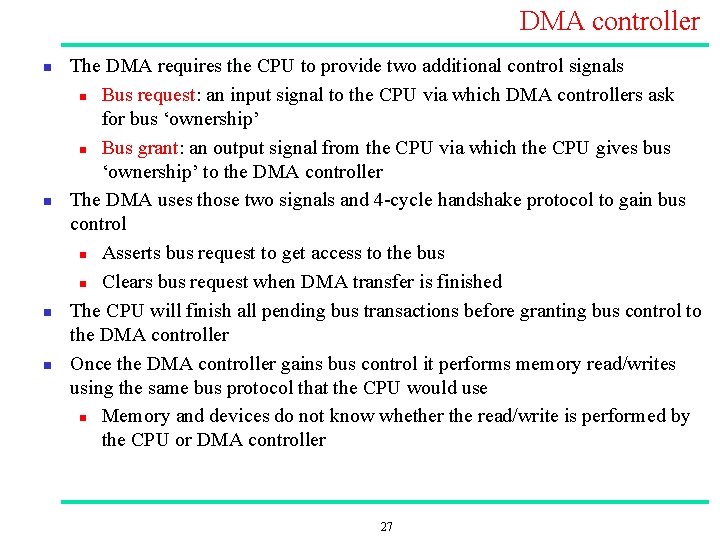
DMA controller n n The DMA requires the CPU to provide two additional control signals n Bus request: an input signal to the CPU via which DMA controllers ask for bus ‘ownership’ n Bus grant: an output signal from the CPU via which the CPU gives bus ‘ownership’ to the DMA controller The DMA uses those two signals and 4 cycle handshake protocol to gain bus control n Asserts bus request to get access to the bus n Clears bus request when DMA transfer is finished The CPU will finish all pending bus transactions before granting bus control to the DMA controller Once the DMA controller gains bus control it performs memory read/writes using the same bus protocol that the CPU would use n Memory and devices do not know whether the read/write is performed by the CPU or DMA controller 27
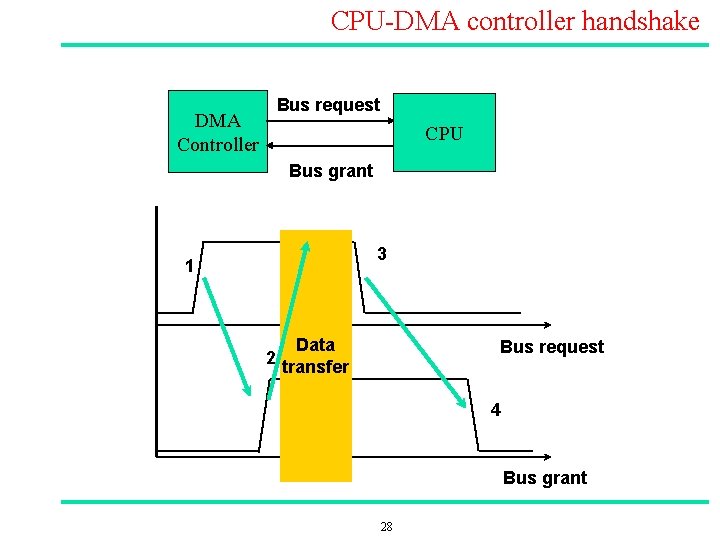
CPU DMA controller handshake Bus request DMA Controller CPU Bus grant 3 1 2 Data transfer Bus request 4 Bus grant 28

Why Direct Memory Access? n Stealing a cycle from the bus and doing the DMA transfer is faster than doing a single move instruction n n Each byte potentially goes over the bus fewer times n DMA: once n Programmed I/O: twice: LDR and STR DMA is used for: n n high performance, block oriented devices: disks, tapes, networks, etc. high performance processes, e. g. video processing, signal processing 29
DMA modes: Block Move n Each DMA transfer consists of a “block” move e. g. 512 bytes per block n A setup routine is used to initialize the DMA transfer providing n n n Buffer start address. Transfer length (number of bytes / words to be moved) The DMA move is done A signal indicates completion of the transfer. Higher performance n Only one interrupt per N bytes moved, rather than one interrupt per byte n n 30
DMA problem n n What is the CPU doing while the DMA controller is master of the bus? n The CPU CANNOT use the bus at that time n If it has enough data / instructions in the cache and registers, OK, it will keep executing the program. n But if it needs to access the bus (e. g. for fetching more data / instructions from memory) it will stall wait until the DMA controller releases the bus ( returns bus mastership to the CPU) Other DMA modes can be used n E. g. DMA controller occupies the bus only for few cycles (4, 8, 16) each time n “Sleeps” for some (preset number of) cycles and then requests the bus again 31
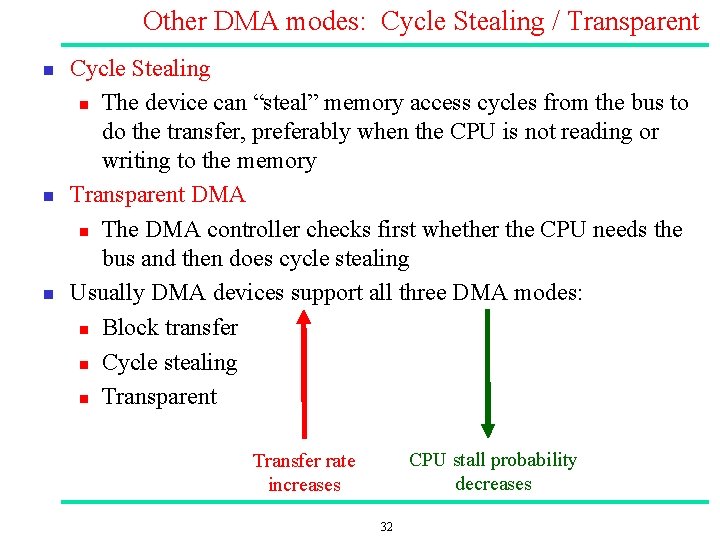
Other DMA modes: Cycle Stealing / Transparent n n n Cycle Stealing n The device can “steal” memory access cycles from the bus to do the transfer, preferably when the CPU is not reading or writing to the memory Transparent DMA n The DMA controller checks first whether the CPU needs the bus and then does cycle stealing Usually DMA devices support all three DMA modes: n Block transfer n Cycle stealing n Transparent CPU stall probability decreases Transfer rate increases 32
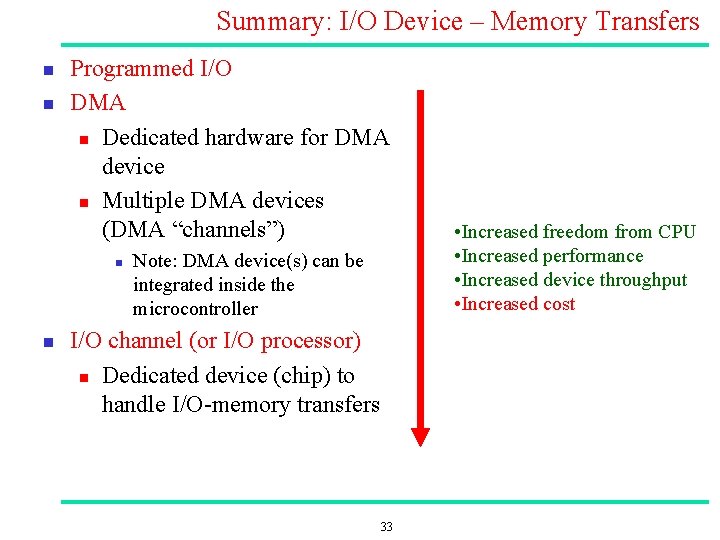
Summary: I/O Device – Memory Transfers n n Programmed I/O DMA n Dedicated hardware for DMA device n Multiple DMA devices (DMA “channels”) n n Note: DMA device(s) can be integrated inside the microcontroller I/O channel (or I/O processor) n Dedicated device (chip) to handle I/O memory transfers 33 • Increased freedom from CPU • Increased performance • Increased device throughput • Increased cost
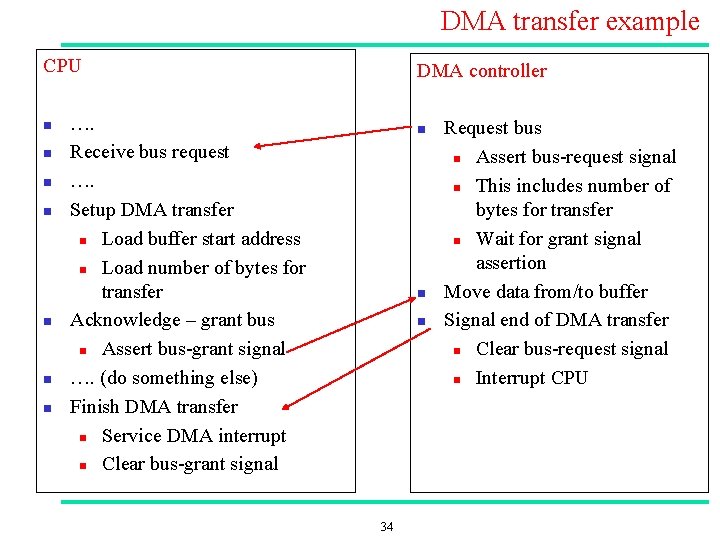
DMA transfer example CPU n n n n DMA controller …. Receive bus request …. Setup DMA transfer n Load buffer start address n Load number of bytes for transfer Acknowledge – grant bus n Assert bus grant signal …. (do something else) Finish DMA transfer n Service DMA interrupt n Clear bus grant signal n n n 34 Request bus n Assert bus request signal n This includes number of bytes for transfer n Wait for grant signal assertion Move data from/to buffer Signal end of DMA transfer n Clear bus request signal n Interrupt CPU
3. Double buffers Slide 35

Handling concurrency in buffer access n n Consider two devices (e. g. a the CPU and an I/O device) communicating using a buffer. The CPU and the I/O device cannot safely access the buffer at the same time n What if the I/O device tries to read a word while at the same time the CPU is trying to write at the same position a new value? The CPU and I/O device have to take turns in accessing the buffer. n This can be done with interrupt masking or using semaphores n But if they have to take turns, then the amount of overlapping (parallel processing leading to higher system performance) may be much lower Solution: n Double Buffering 36
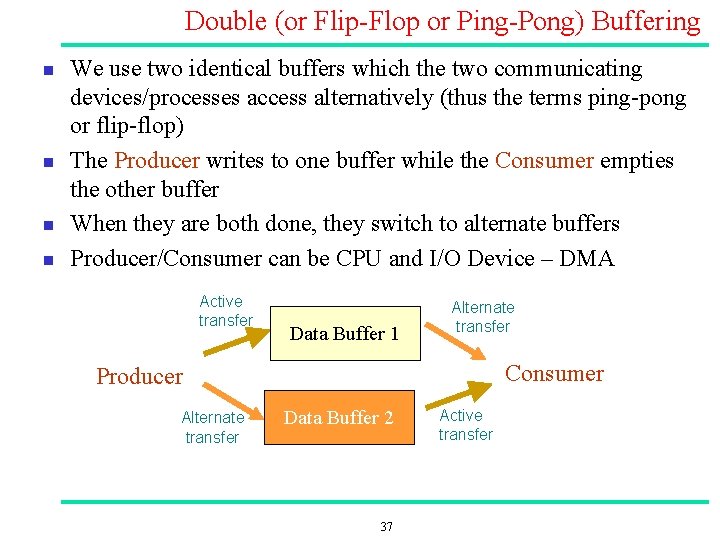
Double (or Flip Flop or Ping Pong) Buffering n n We use two identical buffers which the two communicating devices/processes access alternatively (thus the terms ping pong or flip flop) The Producer writes to one buffer while the Consumer empties the other buffer When they are both done, they switch to alternate buffers Producer/Consumer can be CPU and I/O Device – DMA Active transfer Data Buffer 1 Alternate transfer Consumer Producer Alternate transfer Data Buffer 2 37 Active transfer
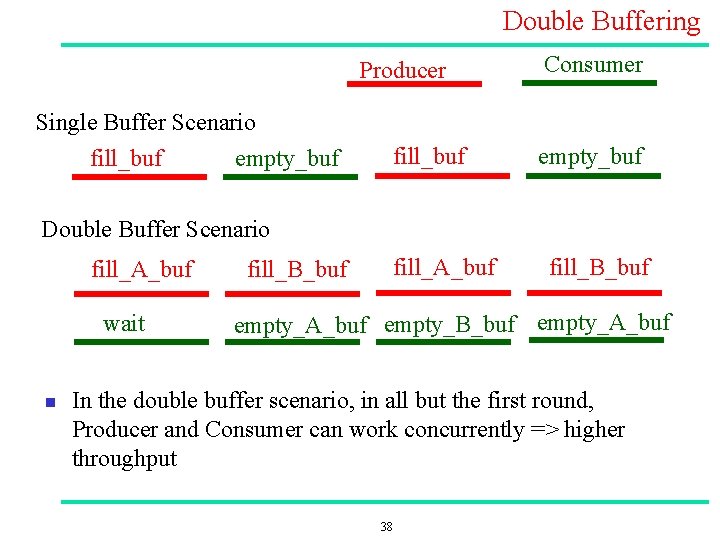
Double Buffering Producer Consumer Single Buffer Scenario fill_buf empty_buf Double Buffer Scenario fill_A_buf wait n fill_A_buf fill_B_buf empty_A_buf empty_B_buf empty_A_buf In the double buffer scenario, in all but the first round, Producer and Consumer can work concurrently => higher throughput 38
Why is Double Buffering Better? n Overlap processing n Two “processes” run concurrently their activity overlaps. n n i. e. at the same time that the producer calculates data and fills a buffer, the consumer consumes another. Device utilization n The two devices/processes are better utilized (kept busy for bigger percentage of time) Shorter delays n between completion of one buffer and the availability of next But, double buffering takes more memory and time to set up n So, it is not worth it for small, quick and infrequent activities. . . 39
- Slides: 39