
Embedded Programming and Robotics Lesson 16 Robot Control
Embedded Programming and Robotics Lesson 16 Robot Control with Raspberry Pi Pi Robot Control 1
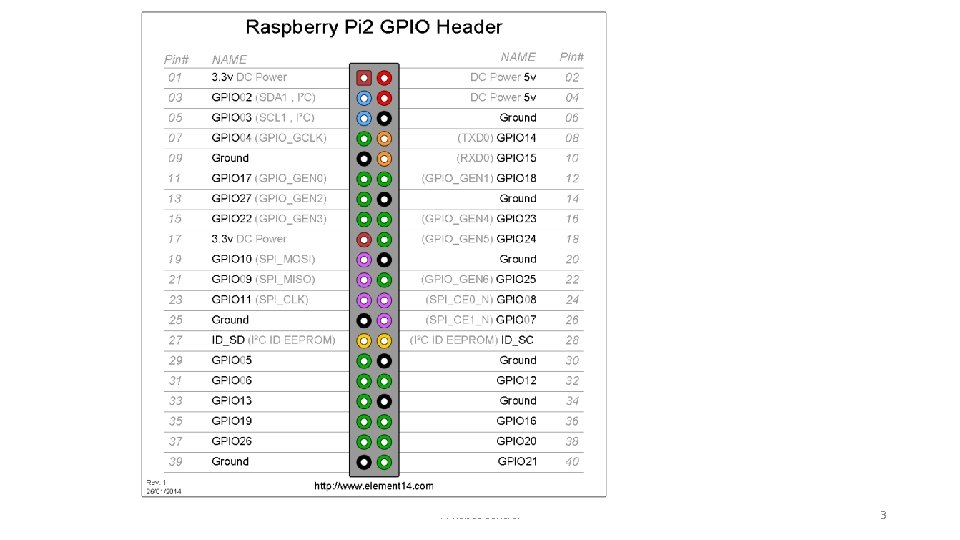
GPIO and PWM • On the Pi B Model 2, which you have, 7 pins are marked as 'GPIO GEN 0' to 'GPIO GEN 6‘; these can be used for PWM • Write a program that dims an LED using any one of these pins, equivalent to the “fade” program you wrote for Arduino • No need for Wiring. Pi, just use GPIO Pi Robot Control 2
Pi Robot Control 3

Download and Install Wiring. Pi sudo apt-get install git-core git clone git: //git. drogon. net/wiring. Pi cd wiring. Pi git pull origin cd wiring. Pi. /build Pi Robot Control 4
Download and Install Wiring. Pi • Test the installation: gpio -v gpio readall Pi Robot Control 5
Robot Control • You can use the GPIO pins and the Wiring. Pi library to control your robot directly • One of the functions is a PWM output: pin. Mode(MOTORL 1, PWM_OUTPUT); pwm. Write(MOTORL 1, 255); Pi Robot Control 6
Robot Control • Write, in C or Python, a program that makes the robot move forward for 5 seconds at half speed, then forward for 5 more at full speed, then stop Pi Robot Control 7
• http: //wiringpi. com/download-and-install/ Pi Robot Control 8
- Slides: 8