Elevator Project Description Dr S Ahmadi ECE 002
- Slides: 5
Elevator Project Description Dr. S. Ahmadi ECE 002
Project Description • Students will build a mock elevator for a 2 story building and create a program to control it. • The basic blocks will be: elevator car, elevator shaft, digital sensors, analog sensors. • The elevator and elevator shaft will be made of legos. • The elevator car will be powered using the motors from the lego kit. • Analog Sensors will be used to determine when the elevator has reached a given “floor. ” • Digital Sensors will be used to determine if a customer is “calling” the elevator to a given “floor. ” • The students will use the handyboard to control the motors and sensors to operate the elevator and program the device using Interactive C.
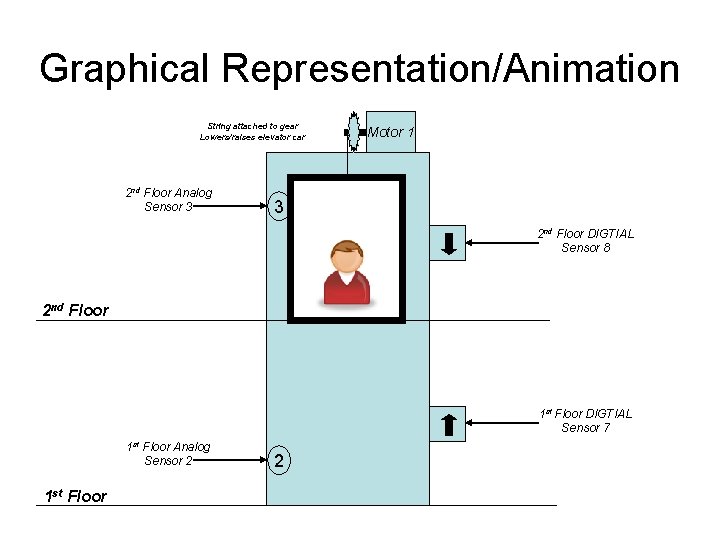
Graphical Representation/Animation String attached to gear Lowers/raises elevator car 2 nd Floor Analog Sensor 3 Motor 1 3 2 nd Floor DIGTIAL Sensor 8 2 nd Floor 1 st Floor DIGTIAL Sensor 7 1 st Floor Analog Sensor 2 1 st Floor 2
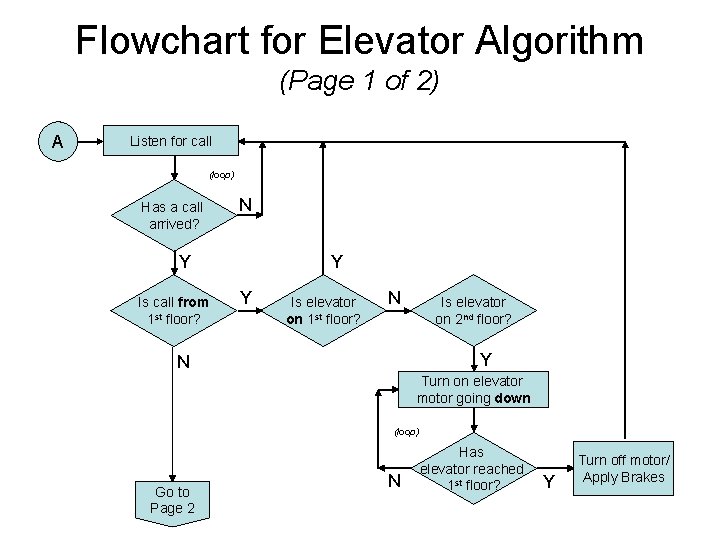
Flowchart for Elevator Algorithm (Page 1 of 2) A Listen for call (loop) Has a call arrived? N Y Y Is call from 1 st floor? Y Is elevator on 1 st floor? N Is elevator on 2 nd floor? Y N Turn on elevator motor going down (loop) Go to Page 2 N Has elevator reached 1 st floor? Y Turn off motor/ Apply Brakes
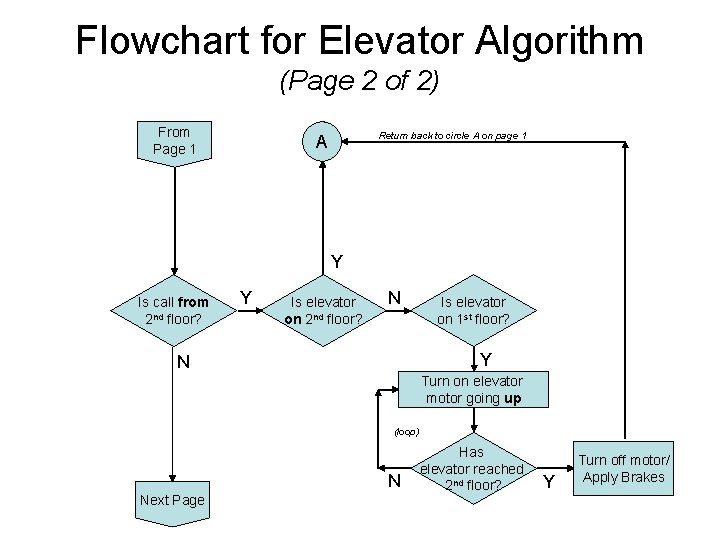
Flowchart for Elevator Algorithm (Page 2 of 2) From Page 1 Return back to circle A on page 1 A Y Is call from 2 nd floor? Y Is elevator on 2 nd floor? N Is elevator on 1 st floor? Y N Turn on elevator motor going up (loop) N Next Page Has elevator reached 2 nd floor? Y Turn off motor/ Apply Brakes