
Electronic prescribing in hospitals challenges and lessons learned
Electronic prescribing in hospitals: challenges and lessons learned 01 June 2009
This slide set is one of the outputs from a project commissioned by NHS Connecting for Health. The project involved gathering experiences and opinions from people who had been part of the implementation of electronic prescribing (e. Prescribing) systems in a number of hospitals in England. The ideas presented here are thus based on the actual experiences of NHS staff who have worked on e. Prescribing implementations. This slide set is intended to be used alongside the other outputs of this project: a report and briefing documents for various groups. These slides are designed to be sampled, edited and developed so as to include specific detail and examples appropriate to the site where they are to be used and the intended audience. For this purpose we have included some add your own slides to indicate possible opportunities to include locally relevant content.
Contents • Introduction • e. Prescribing • Integrating medicines use • Benefits and risks • Experiences of users • The team approach • Clinical decision support • Security and backups • Exploiting e. Prescribing data • Final thoughts
Introduction
e. Prescribing in hospitals • This slide set is one of the outputs from a project commissioned by NHS Connecting for Health • The project involved gathering experiences and opinions from people who had been part of the implementation of e. Prescribing systems in a number of hospitals in England • The ideas presented here are based on the reported experiences of NHS staff who have worked on e. Prescribing implementations
The other project outputs A full report on experiences of e. Prescribing in hospitals in England A set of briefing guides aimed at: • Nurses • Pharmacists • Doctors • Senior executives • Implementation team members • IM&T staff
Check the website This slide show, the main report and the six briefs are available at the e. Prescribing website: http: //www. connectingforhealth. nhs. uk/eprescribing
e. Prescribing
Medicines are at the very heart of modern medicine • The medications we use have increased in number and complexity. This demands more knowledge and understanding from clinical staff • This also leads to greater concern over the risk of errors and the harm they cause • Medication errors are indeed identified as a major preventable source of harm in healthcare
Medicines safety is a key concern • Errors do occur, UK studies show that: o Prescribing errors occur in 1. 5 -9. 2% of medication orders written for hospital inpatients o Dispensing errors are identified in 0. 02% of dispensed items o Medication administration errors occur in 3. 0 -8. 0% of non-intravenous doses and about 50% of all intravenous doses • The use of e. Prescribing can help reduce such errors Source: Vincent C, Barber N, Franklin BD, Burnett S. The contribution of pharmacy to making Britain a safer place to take medicines. Royal Pharmaceutical Society of Great Britain: London; 2009.

Defining e. Prescribing: the utilisation of electronic systems to facilitate and enhance the communication of a prescription or medicine order, aiding the choice, administration and supply of a medicine through knowledge and decision support and providing a robust audit trail for the entire medicines use process. (NHS Connecting for Health, 2007) http: //www. connectingforhealth. nhs. uk/systemsandservices/eprescribing/baselinefunctspec. pdf
e. Prescribing and CPOE • In this slide show, and in other publications from this project and NHS CFH, we abbreviate electronic prescribing to e. Prescribing • You may however also read about e. Prescribing under the common American abbreviation of CPOE (computerised provider order entry)

More than prescribing…. • Despite the name e. Prescribing is about more than just prescribing, and more than entering orders too • It potentially covers the full medicine use process, from supply of drugs through prescribing, dispensing and administration, to patient discharge
Supporting the care team • e. Prescribing involves all healthcare professionals who have a role in assuring medicines are used safely and appropriately as part of patient care
Integrating medicines use
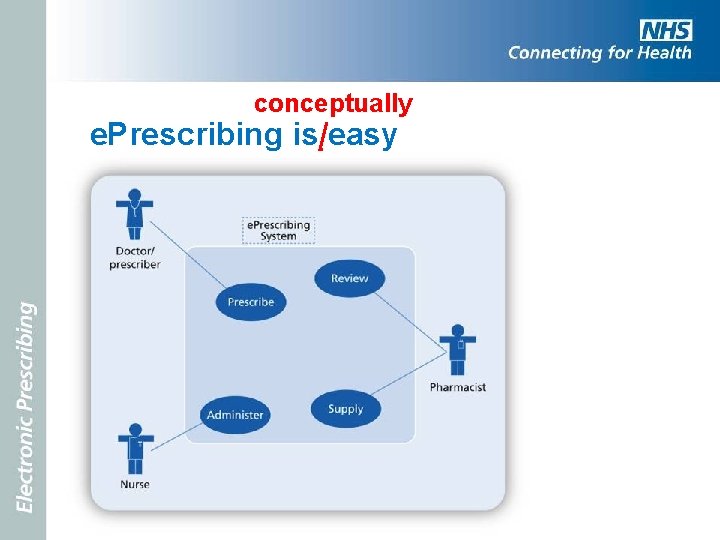
conceptually e. Prescribing is easy
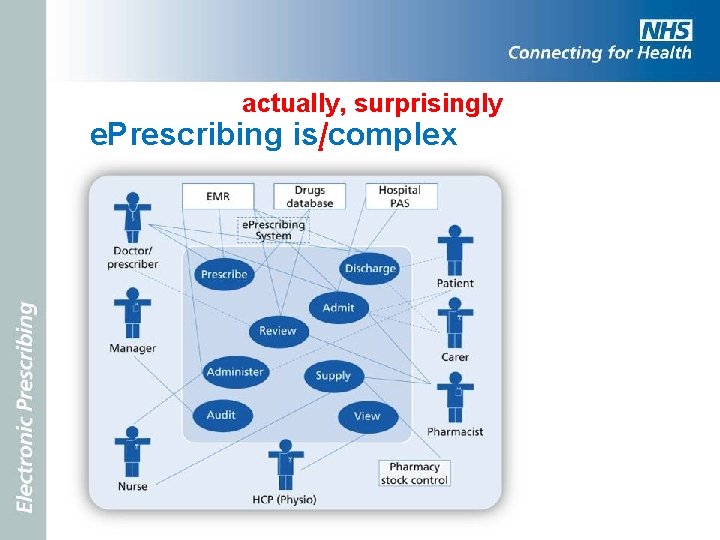
actually, surprisingly e. Prescribing is complex
e. Prescribing integrates the processes of medicines use • Linking people with interests in medicines use o Doctors, nurses and pharmacists perform primary tasks as they prescribe, dispense, supply, check and administer o Patients and carers are important too, they often need to know about their medicines eg at discharge o Allied healthcare professionals may require read access to medicines information and on occasions may prescribe too o Managers and researchers also need to access medicines data for review and audit
e. Prescribing systems share data with other clinical information systems • Data may flow to and from a large number of other systems o Patient administration system (PAS) o Pharmacy stock control o Electronic medical records (EMR) o Drugs information database o Chemical pathology o Discharge systems
The challenges of implementation • The technical complexity, the concern with safety, and the diverse stakeholder groups makes initial e. Prescribing implementations a challenge • But it is exactly because e. Prescribing systems can integrate these distinct activities, and these various actors (human and technical), that they are able to contribute to improved patient care
Benefits and risks
e. Prescribing can do great things • e. Prescribing systems help reduce the risk of medication errors to: o Produce more legible prescriptions o Alert for contra-indications, allergies and drug interactions o Guide inexperienced prescribers o Support timely and complete administration
Add your own…. Picture to show an example of an (anonymised) illegible drug chart Classic drug-drug interactions that cause harm Recent prescribing errors found, e. g. among junior doctors But be careful not to imply that most people are bad prescribers or lazy administrators, and e. Prescribing is just there to stop them making silly errors.
But there are risks • Systematic errors may be programmed in, e. g. terminating antibiotics without warning • Assumption that ‘the computer must be right’, e. g. unthinking use of default doses • Errors using drug selection drop-down lists • Reduction in face-to-face communications within the care team
Support people who work with medicines • e. Prescribing systems help people perform their tasks: o Legible instructions o Reviewing medications history o Indications of errors or omissions o Access to further information o Clear guidance on what to do next
Beneficial changes in work flow • e. Prescribing brings changes in how tasks are undertaken, where they are undertaken, and how the workflow is organised • Some of these changes are probably designed in as part of implementation, for example changes in supply to wards • Some changes will come about as people learn to use the system and adapt to it, and also adapt it to their needs
Expect change and manage it • Change in workflow, be it designed or emerging from experience, needs to be monitored and assessed • Emergent change is desirable, the sign of the system being adopted and adsorbed into the work environment • However, the support team needs to monitor and steer such change, and some elements may not be beneficial, and will need to be challenged
Add your own…. The following screen shots are based on the generic common user interface (CUI). It may be appropriate to use screen shots of your vendor’s system.
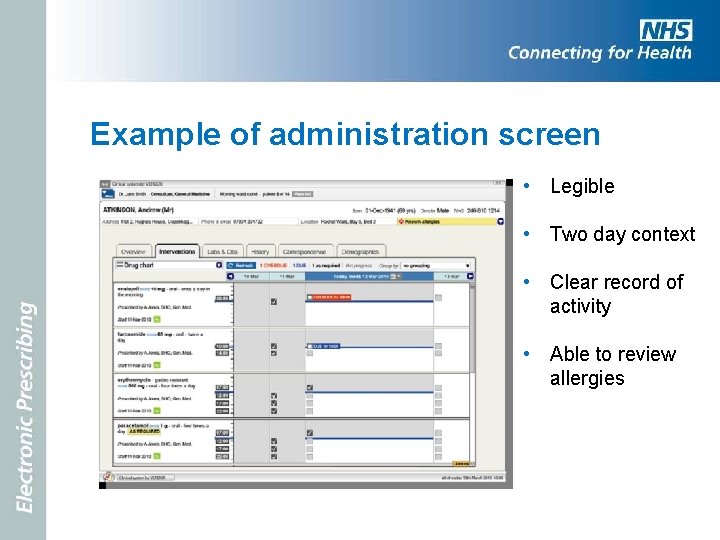
Example of administration screen • Legible • Two day context • Clear record of activity • Able to review allergies
Provide clinical decision support (CDS) • Helping prescribers create complete orders based on full information about the patient and about the medicines in use • Allowing access to decision support during administration, for example recent lab results
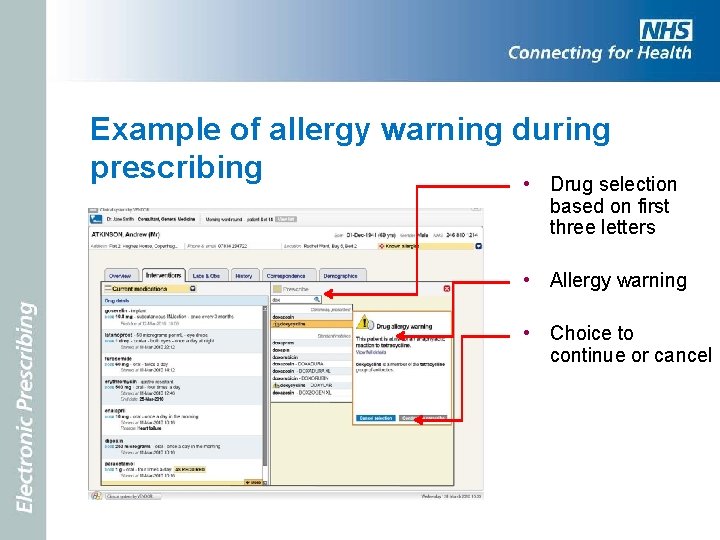
Example of allergy warning during prescribing • Drug selection based on first three letters • Allergy warning • Choice to continue or cancel
Improve communications • e. Prescribing should help communications between departments and care settings o Reduce paperwork o Reduce lost or illegible medication records o Provide clear and complete audit trails o Improved formulary guidance and adherence o Support care pathways
Experiences of users
What is it like to use e. Prescribing? • Changing from paper to a computer based system is hard • Most people struggle at first, and tasks take longer • Some people are fearful that their computer skills are not sufficient
Training and support • Training is important but it has to be the right kind (active, focused on essentials, almost on the job), given at the right time (shortly before use begins), and use the same system as will be used in practice • More important perhaps are good support services, help desks and hot lines
But it gets better • Most nurses and doctors report that, once they have experienced e. Prescribing for a few months, they would never want to go back to a paper based system
What people like about e. Prescribing • Among the positive aspects that users report are: clear and legible prescriptions, no chart chasing, less running about to locate drugs, ability to prescribe remotely, fewer bleeps to query prescriptions • Other benefits reported are: no more rewriting drug charts, order sets for common collections of medications, and discharge prescriptions being sent direct to pharmacy
During changeover • Special care is needed to support people when they start to use the new system • Special care is also needed to ensure safety of care is monitored and maintained • All clinical staff must feel free to raise safety concerns which must be swiftly addressed • Extra people are needed to transfer data to the new system, offer support to new users, and deal promptly with issues as they arise
Management benefits • At the ward and trust level, e. Prescribing can help pharmacists and other specialist and senior nurses to monitor and manage medication • For example, the infection control team can gain more detailed antibiotic use data than could be easily available from a paper based prescribing system
The team approach
Think of e. Prescribing Think of the team… • e. Prescribing is an important and powerful innovation for the whole care team • As e. Prescribing projects are planned it is important that all health care professional groups are involved and that they remain involved as the system comes into use
The multidisciplinary team • Planning for e. Prescribing needs a multidisciplinary team • This team needs committed representatives from the main clinical disciplines – doctors, nurses and pharmacists as well as IM&T specialists. • The full backing and active support of the senior management team is also essential
Building and maintaining institutional links • Team members must maintain good links back to their professional and operational groups • In this way the project can communicate with, and draw on the whole hospital community
A vision • At the outset the team has primary responsibility for developing a vision for e. Prescribing to communicate to the wider community and attract their commitment • Experience suggests the more clinical participation there is, drawing from all disciplines, the more likely e. Prescribing will succeed, and that the inevitable problems along the way will be overcome
The e. Prescribing team agenda (1 of 4) • Establishing and communicating the vision and its relationship with wider hospital strategy • Building and sustaining links to senior management and clinical leaders • Working to secure wide stakeholder commitment • Talking to other people and other sites that have experience with e. Prescribing
The e. Prescribing team agenda (2 of 4) • Specifying, selecting, procuring and installing software and equipment • Configuring software and building required databases with appropriate governance • Exploring changes in work practices that are necessary, desirable and safe • Establishing training and support resources
The e. Prescribing team agenda (3 of 4) • Designing robust backup and recovery procedures, given that computers can and do stop working • Collecting baseline data against which to monitor implementation outcomes • Identifying pilot sites and the roll-out strategy
The e. Prescribing team agenda (4 of 4) • Ensuring strong and active two-way links with both clinical users and the suppliers of software and databases • Ensuring that e. Prescribing is actively managed into use, and then in use, with ongoing support and a positive development trajectory
Choosing how to roll-out • e. Prescribing can be rolled-out in a number of different ways. o A pilot site – perhaps one or two wards or clinics – where software, equipment and re-designed work processes can be tested o Parallel running, where the new system is run alongside an older system for a period of time to validate its outputs
Choosing how to roll-out • Incremental implementation in which the system is launched with limited or restricted functions, and more added to over time • Big bang, where work is moved in one swift activity from the old paper based system to the new e. Prescribing
A suggested approach • The approach adopted by a number of UK hospitals is to use a pilot site for a period of two or three months, followed by a swift roll-out across the rest of the hospital – not quite a big bang, more rolling thunder • Choice of pilot site can be based in part on enthusiasm and competence of the staff
How fast? • The impetus to roll out faster rather than slower is to minimise the period of time in which staff and patients have to cross the boundaries between one way of working and the other • By limiting the period of change, it is also possible to limit problems of interference between different change initiatives, and to focus substantial support resources
But remember… • The level of functionality in the first version of a system put into use will also need to be carefully considered. • Too little functionality may disappoint users; too much may overwhelm them • A successful initial implementation of e. Prescribing is the start, not the end, of running a successful system
Clinical decision support
Clinical decision support (CDS) • Decision support is one of the principal means by which e. Prescribing offers clinical benefits • CDS features range from the most basic - access to a drug dictionary - to the very complex, for example checking medication orders against patients' laboratory results and documented co-morbidities • But decision support does not need to be complex to yield benefits eg dose checking
Basis of decision support • To support CDS e. Prescribing systems make use of standard drug dictionaries • Usually supplied by specialist providers, but must be configured to support a hospital’s own formulary and prescribing guidelines • This can include order sets - bundles of medicines that are available as a single prescribed item
Constrain and inform • CDS can be roughly divided into two areas o Decision constraint, which stops people doing daft things or leaving orders incomplete o Decision support, which guides and helps prescribing and administration decisions
Constraint • Decision constraint can be very effective. • It is a central part of most initial e. Prescribing implementations, for example, setting suggested doses, frequencies, routes and treatment lengths • The level of control varies from set options in a drop down list, through "warning boxes” which can be bypassed, but perhaps demand a reason be entered, to absolute blocks • For example making it impossible to prescribe oral methotrexate daily
Support • Decision support is more focused on helping the user by supplying information or drawing on other data: o drug-allergy checking o drug-drug interactions o checking doses against renal function o checking doses against patient’s age (if elderly) o drug – laboratory result checking o dose ceilings
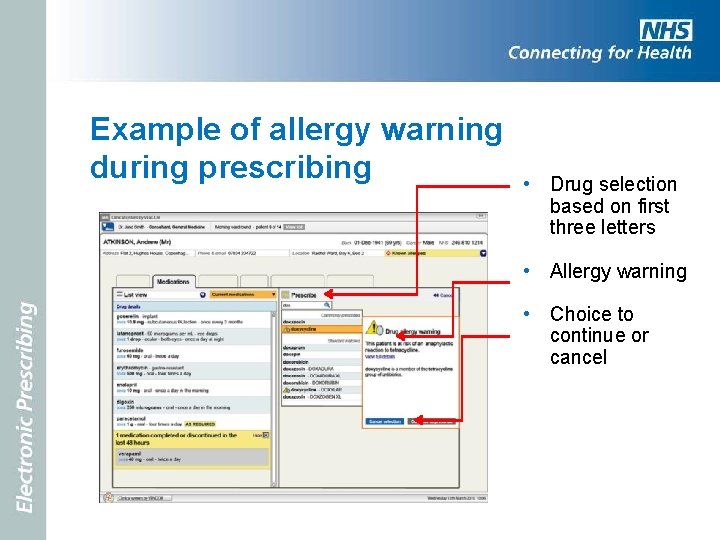
Example of allergy warning during prescribing • Drug selection based on first three letters • Allergy warning • Choice to continue or cancel
CDS needs careful management • If implemented well CDS is very much appreciated by clinical staff and has positive benefits • If done poorly, or too comprehensively, CDS can antagonise people as they deal with multiple nagging warnings • Much evidence shows that decision support features are often turned off or ignored
Manage CDS • Good clinical decision support needs large amounts of resource • Maintaining rules relating to the BNF, NPSA, local PCTs, formulary and DT&C, new drugs and new uses of existing drugs is a huge task • The interconnecting web of knowledge can easily become unstable, with conflicting rules. For example, to change a first choice statin may take many weeks to alter rules and ensure there are no conflicts • With decision support it is better to start simple and build up over time.
Incremental and intelligent approach to CDS • Careful attention needs to be given to choosing the initial CDS functions used at first implementation, and planning the gradual introduction of further functions • The aim should be to introduce features with the best ratio of benefit to demand-on-users • As CDS is used it must be monitored. For example, for the number and type of warnings produced and the number of warnings overridden
Security and backups
What happens when it crashes? • One common questions that clinical staff quite reasonably ask is, “What happens if the computer crashes? ” • Of course good technical skills should minimise that possibility, but the probability cannot be reduced to zero • We must assume occasional failure
Plan for a graceful failure • Back-up and recovery procedures need to be well established and everybody needs to know what to do and who is in charge • It is very desirable that people have practiced using these procedures
Aspects of the plan to consider • Who is in charge of making decisions on when to operate fall back practices? • How will backup paper medication records be produced and distributed? • Which areas should have the highest priority? • How will data be safely added back to the e. Prescribing system once it recovers (and by whom)?
Technical resources • Duplicate 'shadow' servers can be quickly brought into use if one of the main servers fails • Separate computers and printers with uninterruptible power supplies to hold a recent (30 minutes old) back-up of the patient prescription data • Paper drug charts can be printed out if e. Prescribing will be unavailable for any length of time.
When is failure most likely? • Failures often come during other changes o Software upgrades o Network improvements o Integration with parallel clinical systems o Database upgrades • Need to be safely managed using appropriate testing and quality assurance procedures
Exploiting e. Prescribing data
Support for medicines management, reflective practice, audit and research • e. Prescribing systems accumulate quantities of data on medicines use • This data can be exploited in many ways: o to inform decisions made by hospital managers o to allow the investigation of incidents o to allow audit o to support research o For example, the infection control team can gain more detailed antibiotic use data than could be easily available from a paper based prescribing system
Final thoughts
The challenge • Implementing e. Prescribing is a challenge, a major project and a substantial change in the way care is delivered • But it is achievable, and others have achieved it and gained many benefits • Once it is in use most health care professionals would not want to go back to paper
The team approach • Successful e. Prescribing depends on adopting a team approach to planning the change, sustaining it in the early period of use, and resourcing the further work needed identify and achieve further benefits
Add your own…. Identify the team that will be drawn on in the specific projects. Identify what they can bring to the project and how their contribution adds to the overall effort.
A part of a bigger picture • e. Prescribing needs to be seen as a part of the overall strategic direction for any hospital or trust • A central part within a wider and evolving set of information systems that serve multiple professional groups, managers, patients and carers
- Slides: 76