
Electronic Field Office Technical Guide EFOTG July 30


- Slides: 19
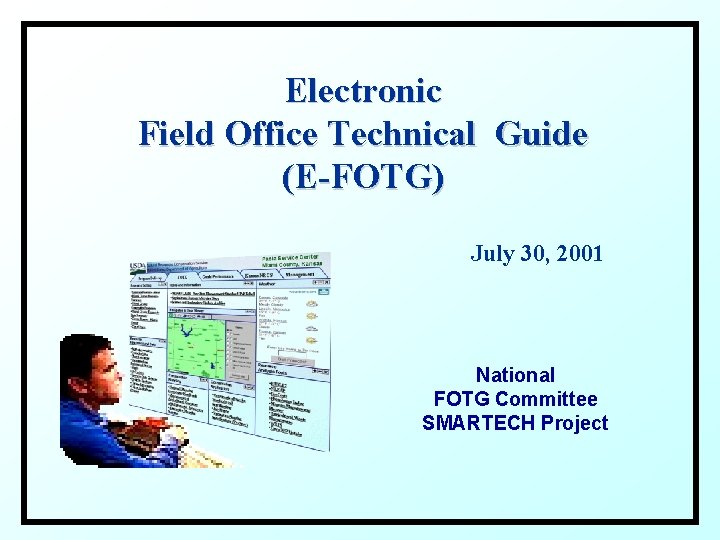
Electronic Field Office Technical Guide (E-FOTG) July 30, 2001 National FOTG Committee SMARTECH Project
Issues and Opportunities ISSUE: NRCS technical content is distributed among many web sites, not readily accessible to field conservationists, and often hard to find. NRCS state web sites reference only a small percentage of the technical content available in the agency. OPPORTUNITY: Available technical content should be organized into recognized technical categories and made available through a web site (portal) that can be customized by the user. ISSUE: The FOTG has always been tailored to field office resource conditions and needs. OPPORTUNITY: An electronic version of the FOTG should be configurable to the field office level, and perhaps to the individual field conservationist or technician.
Issues and Opportunities (cont’d) ISSUE: Most web-based resource planning and analysis tools require natural resource data and often the same data. OPPORTUNITY: Tools should run against data marts fed from a central natural resource data warehouse. ISSUE: There are common processes among web-based resource planning and analysis tools, for example navigation, map display, map printing. OPPORTUNITY: Many common processes have already been programmed, they should be made available to web-application developers, and they should be an integral part of a E-FOTG framework.
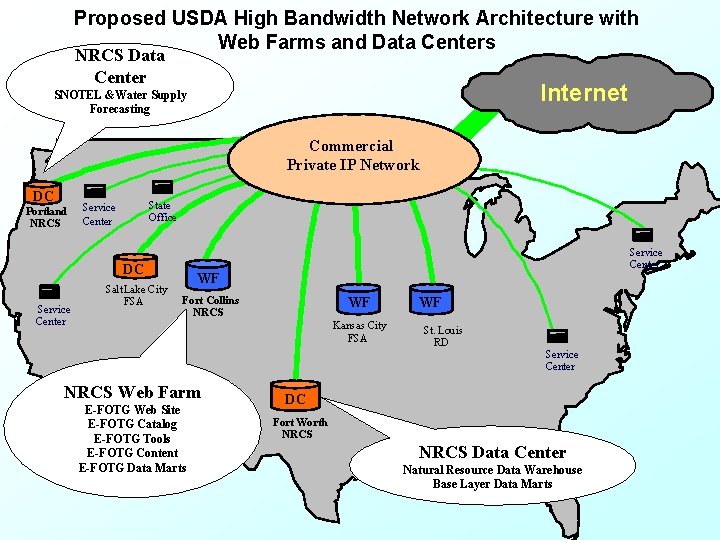
Issues and Opportunities (cont’d) ISSUE: An E-FOTG should be built on an infrastructure that ensures good performance. OPPORTUNITY: E-FOTG should take advantage of the new NRCS Web Farm and Data Center Architecture and planned high bandwidth improvements. ISSUE: Nearly all state office web sites contain FOTG information and links to technical information. The information primarily is static with limited interactive content. OPPORTUNITY: An E-FOTG framework enables states to efficiently organize technical content and provide interactive resource analysis and planning capability.
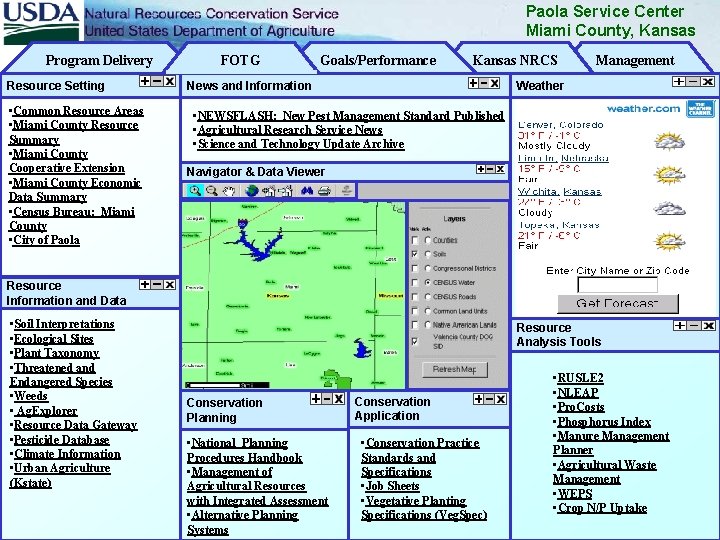
E-FOTG will be built with portal technology, similar to that used in My Yahoo or Microsoft Network (MSN)… …and could look something like the following…
Paola Service Center Miami County, Kansas Program Delivery Resource Setting • Common Resource Areas • Miami County Resource Summary • Miami County Cooperative Extension • Miami County Economic Data Summary • Census Bureau: Miami County • City of Paola FOTG Goals/Performance Kansas NRCS News and Information Management Weather • NEWSFLASH: New Pest Management Standard Published • Agricultural Research Service News • Science and Technology Update Archive Navigator & Data Viewer Resource Information and Data • Soil Interpretations • Ecological Sites • Plant Taxonomy • Threatened and Endangered Species • Weeds • Ag. Explorer • Resource Data Gateway • Pesticide Database • Climate Information • Urban Agriculture (Kstate) Resource Analysis Tools Conservation Planning • National Planning Procedures Handbook • Management of Agricultural Resources with Integrated Assessment • Alternative Planning Systems Conservation Application • Conservation Practice Standards and Specifications • Job Sheets • Vegetative Planting Specifications (Veg. Spec) • RUSLE 2 • NLEAP • Pro. Costs • Phosphorus Index • Manure Management Planner • Agricultural Waste Management • WEPS • Crop N/P Uptake
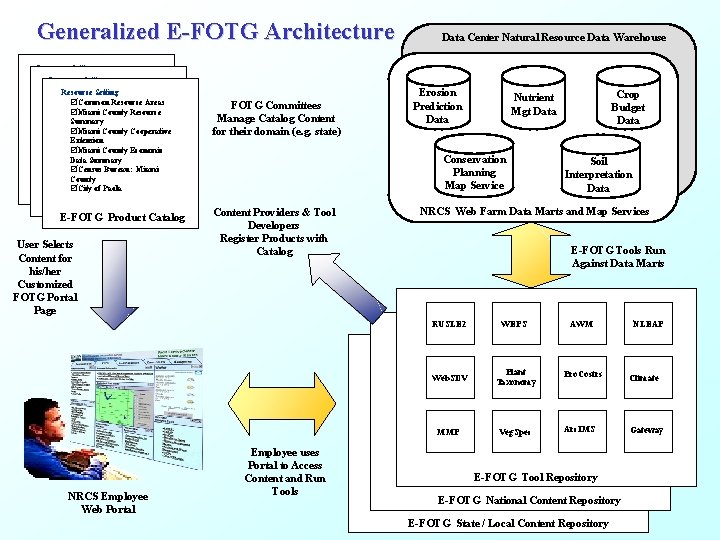
Generalized E-FOTG Architecture Resource Setting þ Common. Setting Resource Areas Resource þMiami County Resource þ Common Resource Areas Resource Setting Summary þMiami County Resource þCommon Resource Areas þMiami County Cooperative Summary þMiami County Resource Extension þMiami County Cooperative Summary þMiami County Economic Extension þMiami County Cooperative Data þSummary Miami County Economic Extension þCensus Bureau: Miami Data þSummary Miami County Economic County þCensus Bureau: Miami Data Summary þCity of Paola County þCensus Bureau: Miami þCity of Paola County þCity of Paola E-FOTG Product Catalog User Selects Content for his/her Customized FOTG Portal Page NRCS Employee Web Portal FOTG Committees Manage Catalog Content for their domain (e. g. state) Data Center Natural Resource Data Warehouse Erosion Prediction Data Conservation Planning Map Service Content Providers & Tool Developers Register Products with Catalog Employee uses Portal to Access Content and Run Tools Crop Budget Data Nutrient Mgt Data Soil Interpretation Data NRCS Web Farm Data Marts and Map Services E-FOTG Tools Run Against Data Marts RUSLE 2 WEPS AWM Web. SDV Plant Taxonomy Pro. Costrs Climate MMP Veg. Spec Arc. IMS Gateway E-FOTG Tool Repository E-FOTG National Content Repository E-FOTG State / Local Content Repository NLEAP
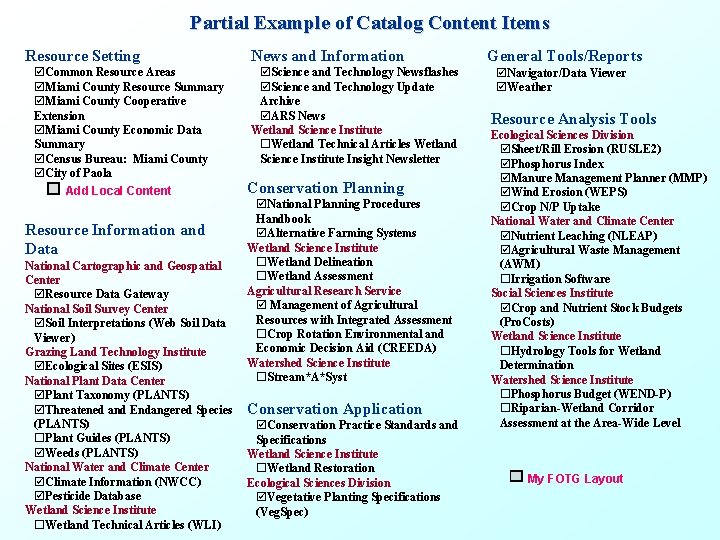
Partial Example of Catalog Content Items Resource Setting þCommon Resource Areas þMiami County Resource Summary þMiami County Cooperative Extension þMiami County Economic Data Summary þCensus Bureau: Miami County þCity of Paola Add Local Content Resource Information and Data National Cartographic and Geospatial Center þResource Data Gateway National Soil Survey Center þSoil Interpretations (Web Soil Data Viewer) Grazing Land Technology Institute þEcological Sites (ESIS) National Plant Data Center þPlant Taxonomy (PLANTS) þThreatened and Endangered Species (PLANTS) ¨Plant Guides (PLANTS) þWeeds (PLANTS) National Water and Climate Center þClimate Information (NWCC) þPesticide Database Wetland Science Institute ¨Wetland Technical Articles (WLI) News and Information þScience and Technology Newsflashes þScience and Technology Update Archive þARS News Wetland Science Institute ¨Wetland Technical Articles Wetland Science Institute Insight Newsletter Conservation Planning þNational Planning Procedures Handbook þAlternative Farming Systems Wetland Science Institute ¨Wetland Delineation ¨Wetland Assessment Agricultural Research Service þ Management of Agricultural Resources with Integrated Assessment ¨Crop Rotation Environmental and Economic Decision Aid (CREEDA) Watershed Science Institute ¨Stream*A*Syst Conservation Application þConservation Practice Standards and Specifications Wetland Science Institute ¨Wetland Restoration Ecological Sciences Division þVegetative Planting Specifications (Veg. Spec) General Tools/Reports þNavigator/Data Viewer þWeather Resource Analysis Tools Ecological Sciences Division þSheet/Rill Erosion (RUSLE 2) þPhosphorus Index þManure Management Planner (MMP) þWind Erosion (WEPS) þCrop N/P Uptake National Water and Climate Center þNutrient Leaching (NLEAP) þAgricultural Waste Management (AWM) ¨Irrigation Software Social Sciences Institute þCrop and Nutrient Stock Budgets (Pro. Costs) Wetland Science Institute ¨Hydrology Tools for Wetland Determination Watershed Science Institute ¨Phosphorus Budget (WEND-P) ¨Riparian-Wetland Corridor Assessment at the Area-Wide Level My FOTG Layout
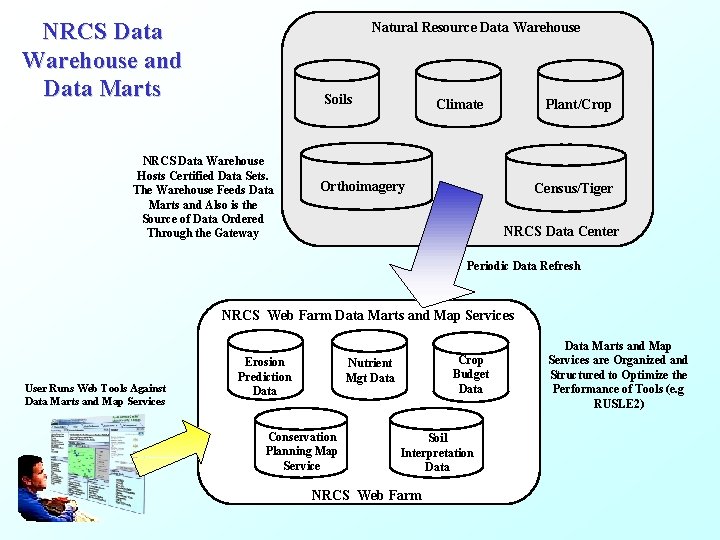
NRCS Data Warehouse and Data Marts Natural Resource Data Warehouse Soils NRCS Data Warehouse Hosts Certified Data Sets. The Warehouse Feeds Data Marts and Also is the Source of Data Ordered Through the Gateway Climate Plant/Crop Orthoimagery Census/Tiger NRCS Data Center Periodic Data Refresh NRCS Web Farm Data Marts and Map Services User Runs Web Tools Against Data Marts and Map Services Erosion Prediction Data Crop Budget Data Nutrient Mgt Data Conservation Planning Map Service Soil Interpretation Data NRCS Web Farm Data Marts and Map Services are Organized and Structured to Optimize the Performance of Tools (e. g RUSLE 2)
Proposed USDA High Bandwidth Network Architecture with Web Farms and Data Centers NRCS Data Center Internet SNOTEL &Water Supply Forecasting Commercial Private IP Network DC Portland NRCS State Office Service Center DC Service Center Salt Lake City FSA WF Fort Collins NRCS WF Kansas City FSA NRCS Web Farm E-FOTG Web Site E-FOTG Catalog E-FOTG Tools E-FOTG Content E-FOTG Data Marts WF St. Louis RD Service Center DC Fort Worth NRCS Data Center Natural Resource Data Warehouse Base Layer Data Marts
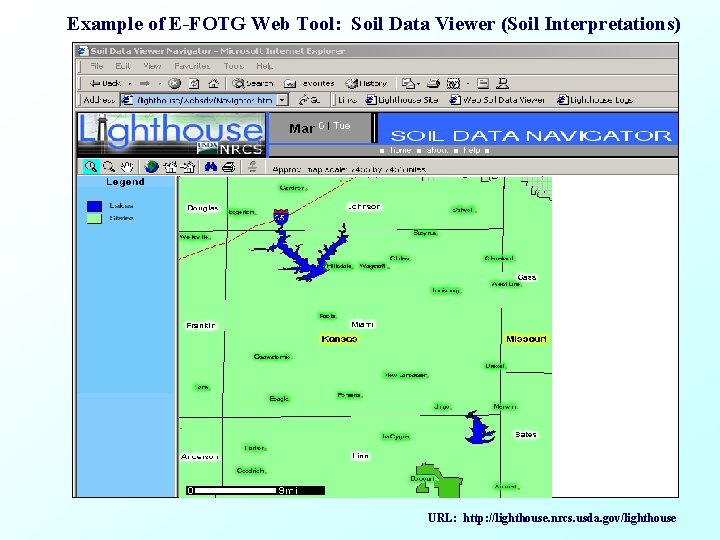
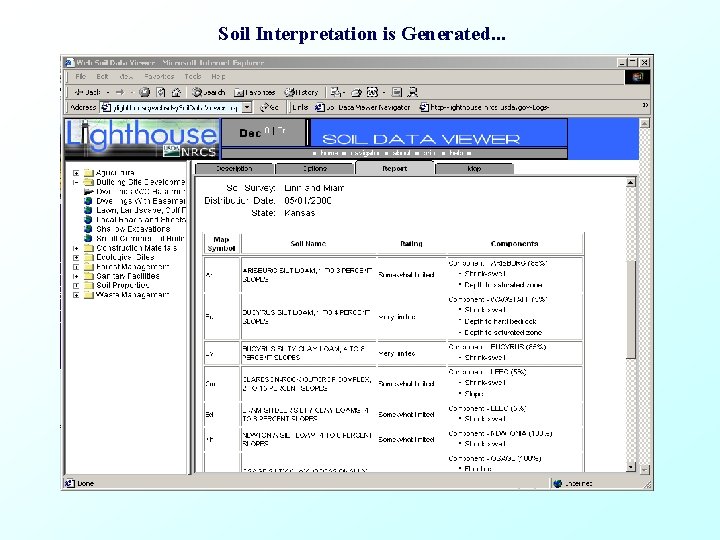
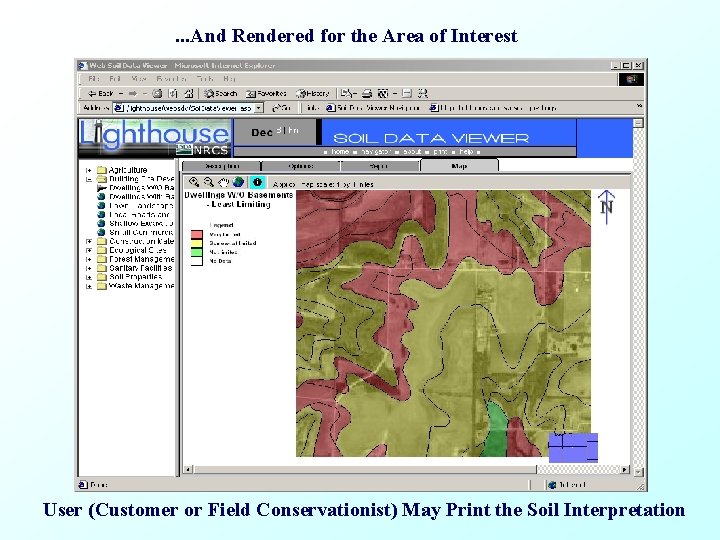
Example of E-FOTG Web Tool: Soil Data Viewer (Soil Interpretations) URL: http: //lighthouse. nrcs. usda. gov/lighthouse
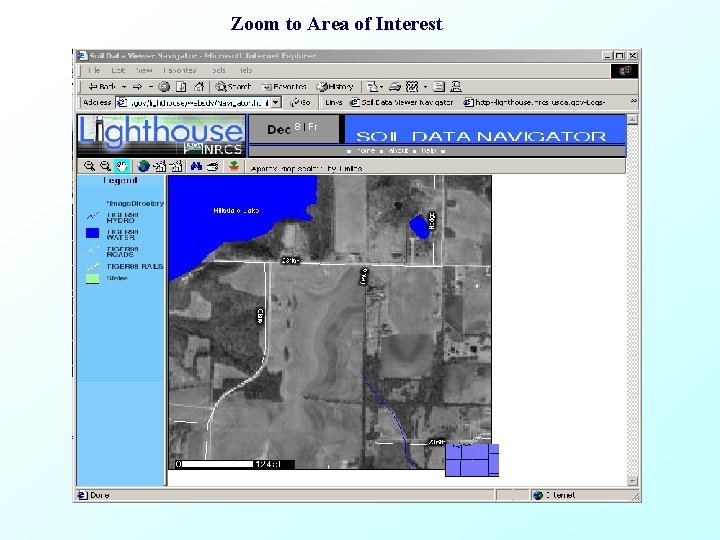
Zoom to Area of Interest
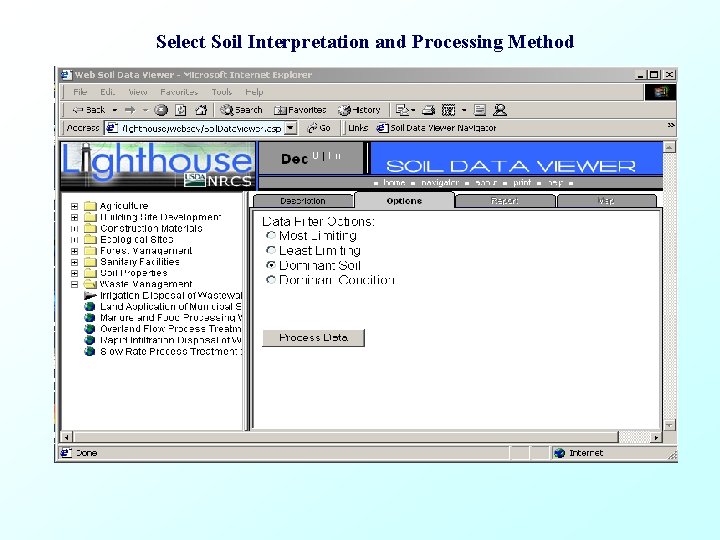
Select Soil Interpretation and Processing Method
Soil Interpretation is Generated. . .
. . . And Rendered for the Area of Interest User (Customer or Field Conservationist) May Print the Soil Interpretation
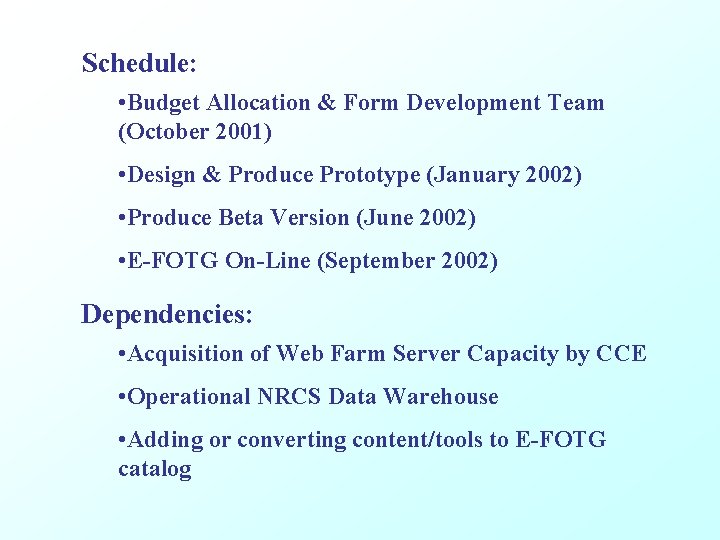
Schedule: • Budget Allocation & Form Development Team (October 2001) • Design & Produce Prototype (January 2002) • Produce Beta Version (June 2002) • E-FOTG On-Line (September 2002) Dependencies: • Acquisition of Web Farm Server Capacity by CCE • Operational NRCS Data Warehouse • Adding or converting content/tools to E-FOTG catalog
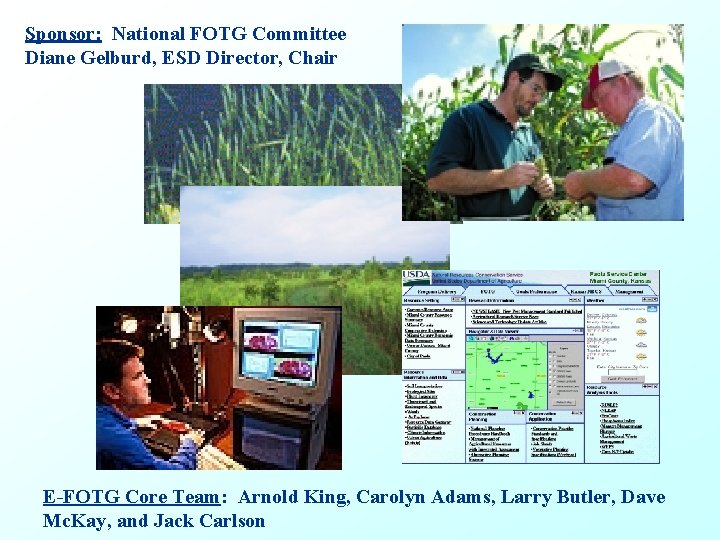
Sponsor: National FOTG Committee Diane Gelburd, ESD Director, Chair E-FOTG Core Team: Arnold King, Carolyn Adams, Larry Butler, Dave Mc. Kay, and Jack Carlson
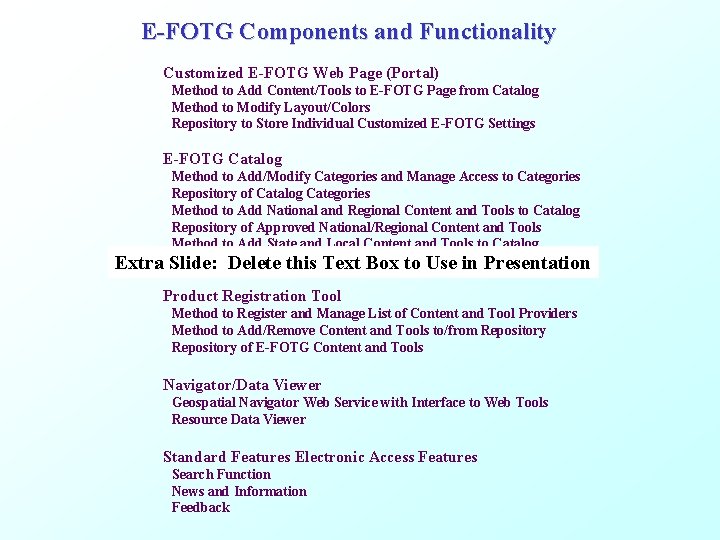
E-FOTG Components and Functionality Customized E-FOTG Web Page (Portal) Method to Add Content/Tools to E-FOTG Page from Catalog Method to Modify Layout/Colors Repository to Store Individual Customized E-FOTG Settings E-FOTG Catalog Extra Method to Add/Modify Categories and Manage Access to Categories Repository of Catalog Categories Method to Add National and Regional Content and Tools to Catalog Repository of Approved National/Regional Content and Tools Method to Add State and Local Content and Tools to Catalog Repository of Approved andin Tools Slide: Delete this State/Local Text Box. Content to Use Presentation Product Registration Tool Method to Register and Manage List of Content and Tool Providers Method to Add/Remove Content and Tools to/from Repository of E-FOTG Content and Tools Navigator/Data Viewer Geospatial Navigator Web Service with Interface to Web Tools Resource Data Viewer Standard Features Electronic Access Features Search Function News and Information Feedback