
Electrical Series V PCB Design Tridib Saha What

Electrical Series V PCB Design Tridib Saha
What is PCB? • Printed Circuit Board • Electronic Board that connects circuit components • PCB populated with electronic components is a printed circuit assembly (PCA) • PCBs are rugged, inexpensive, and can be highly reliable • Mass manufacturing • Professional

Materials of PCB • Conducting layers are typically made of thin copper foil. • The board is typically coated with a solder mask that is green in color. Other colors that are normally available are blue and red. • Unwanted copper is removed from the substrate after etching leaving only the desired copper traces or pathways
Parts of a PCB • • • Components Pads Traces Vias Top Metal Layer Bottom Metal Layer
Components • Components are the actual devices used in the circuit. • This includes input/output connections. • I/O ports, including power supply connections, are also important in the PCB design.
Pads • Location that components connect to. • You will solder components to the pads on the PCB. • Pads will connect to traces. • Pads have an inner diameter and outer diameter.
Traces • • • Traces connect pads together. Traces are essentially the wiring of the PCB. Equivalent to wire for conducting signals Traces sometimes connect to vias. High current traces should be wide. Signal traces usually narrower than power or ground traces
Vias • Pad with a plated hole connecting traces from one layer of board to other layers. • Attempt to minimize via use in your PCBs. • Some component leads can be used as vias.
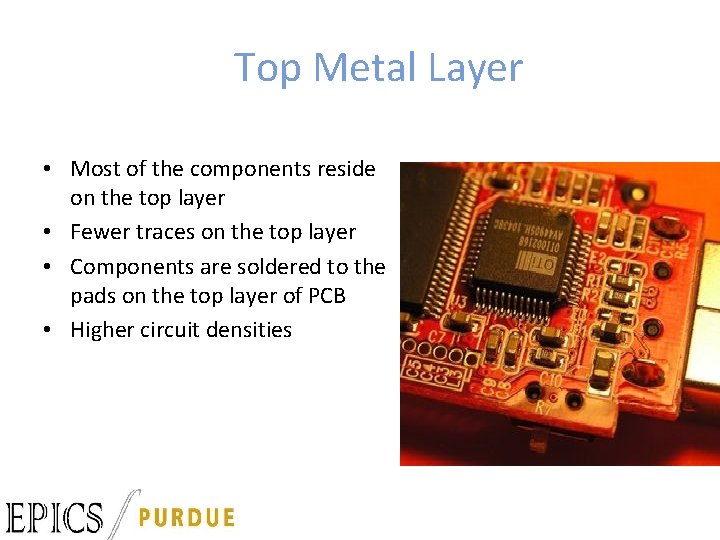
Top Metal Layer • Most of the components reside on the top layer • Fewer traces on the top layer • Components are soldered to the pads on the top layer of PCB • Higher circuit densities
Bottom Metal Layer • Few components on this layer. • Many traces on this layer. • Most soldering done on this layer.
Jumpers • Often, many signal wires need to exist in too small of a space and must overlap. • Running traces on different PCB layers is an option. • Multilayer PCBs are often expensive. • Solution: use jumpers
Solder Mask • Protect copper traces on outer layers from corrosion • Areas that shouldn't be soldered may be covered with polymer resist solder mask coating • Designed to keep solder only in certain areas • Prevents solder form binding between conductors and thereby creating short circuits
Silkscreen • Printing on the solder mask to designate component locations • Readable information about component part numbers and placement. • Helpful in assembling, testing and servicing the circuit board.
Multilayer PCBs • More then a top and bottom layer. • Typically there will be a power plane, ground plane, top layer, and bottom layer. • Sometimes signal layers are added as needed. • Sometimes RF planes made of more expensive materials are added.
PCB Design Tips • Make larger traces on power lines • Always run digital and analog lines in perpendicular to each other • Do not turn traces at 90 degrees • Try and make ground and power planes • Do not change a thicker trace into a smaller trace due to insufficient space • Place power supply and high current components at 90 degrees or away from each other to prevent noise • Use common sense!!
Physical Design Issues • • Component Size Heat Dissipation Input and Output Mounting Points
Component Size • Make sure components will actually fit. • This especially applies for circuits that require high component densities. • Some components come in multiple sizes. SMT vs Through Hole • Sometimes you can get tall and narrow caps or short and wide capacitors.
Heat Dissipation-Heat Sinks • Heat sink dissipates heat off the component • Doesn’t remove the heat just moves it • Some components may get hot. Make sure you get a large enough heat sink. • Data sheets specify the size of the heat sink • A short circuit may result when two devices share the same heat sink
Mounting Points • The PCB needs to be mechanically secured to something. • Could be the chassis-consist of metal frame on which the circuit boards and other electronic components are mounted. • Could be another PCB/socket on PCB. • Could be attachments to a heatsink.
Pre-work • Thoroughly simulate your circuit-make sure the circuit worked in simulations • Thoroughly test the prototype-make sure the circuit worked on the bread board • Have all the data sheets handy for every components • Play around with the placement of the components
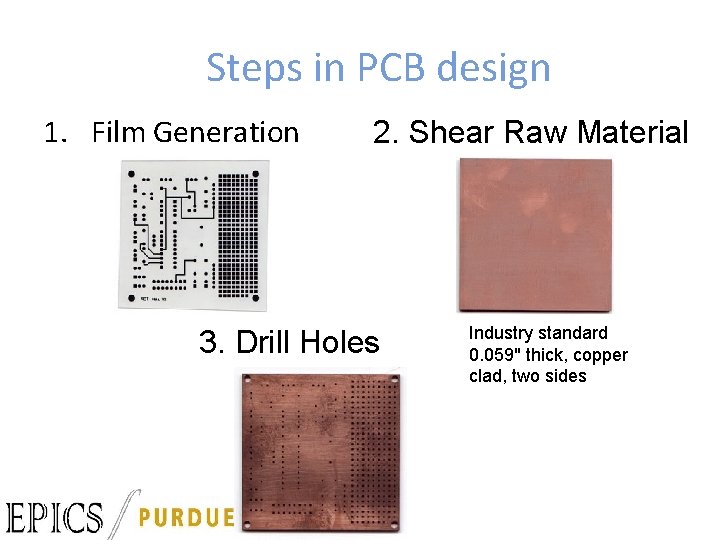
Steps in PCB design 1. Film Generation 2. Shear Raw Material 3. Drill Holes Industry standard 0. 059" thick, copper clad, two sides
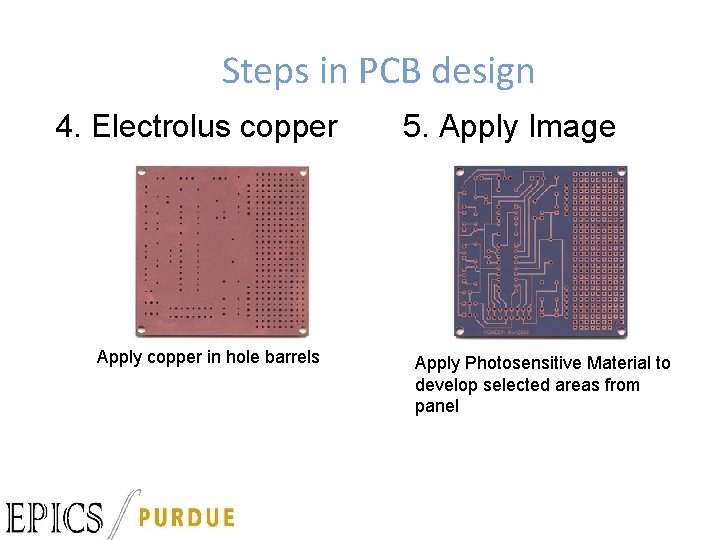
Steps in PCB design 4. Electrolus copper Apply copper in hole barrels 5. Apply Image Apply Photosensitive Material to develop selected areas from panel
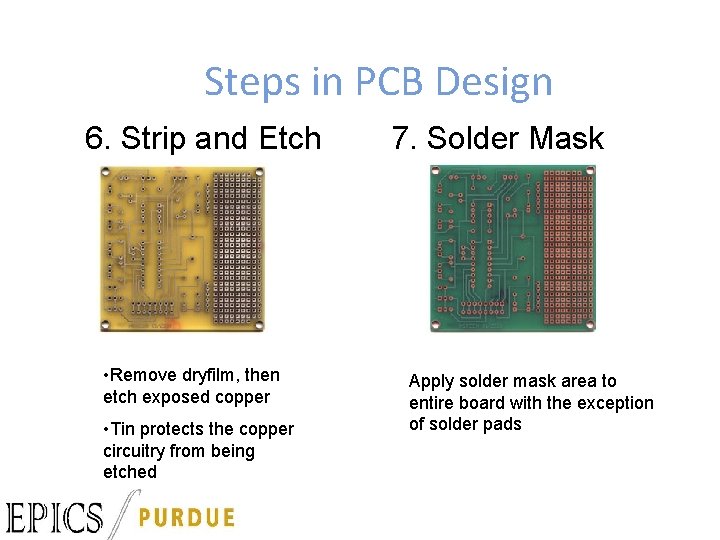
Steps in PCB Design 6. Strip and Etch • Remove dryfilm, then etch exposed copper • Tin protects the copper circuitry from being etched 7. Solder Mask Apply solder mask area to entire board with the exception of solder pads
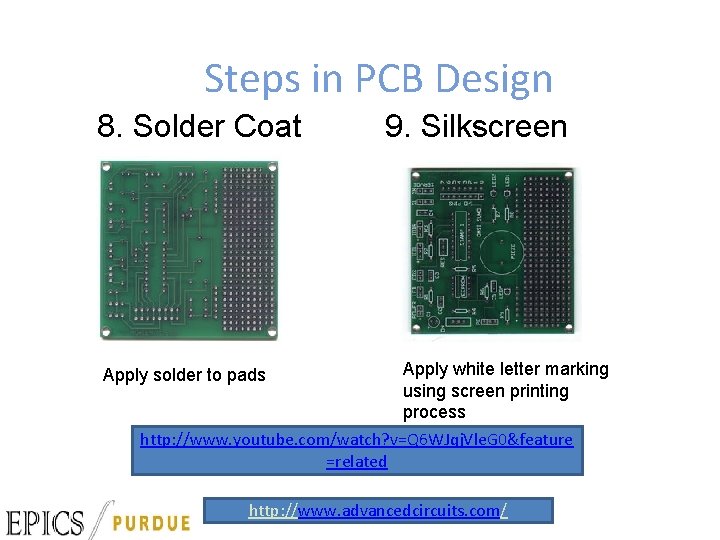
Steps in PCB Design 8. Solder Coat 9. Silkscreen Apply white letter marking using screen printing process http: //www. youtube. com/watch? v=Q 6 WJqj. Vle. G 0&feature =related Apply solder to pads http: //www. advancedcircuits. com/
References • • PCB Design slides by Chris Stahl www. wikipedia. org www. pcbexpress. com A Practical Guide to high-speed printed circuit board layout
WEBSITE • • 1. 2. 3. 4. 5. http: //www. advancedcircuits. com How to download the software (EAGLE Layout editor) Go to http: //www. cadsoftusa. com Click ‘Freeware’ Click ‘Download’ Find the correct version (Windows/Linux, English) Also download Manual and Tutorial
USEFUL LINKS • http: //www. pcbexpress. com • http: //www. freepcb. com • http: //www. 4 pcb. com • Adafruit Library: – https: //github. com/adafruit/Adafruit-Eagle-Library • Video Tutorial – http: //www. youtube. com/watch? v=1 AXwj. Zoy. Nno – https: //www. youtube. com/watch? v=CCTs 0 m. NXY 24
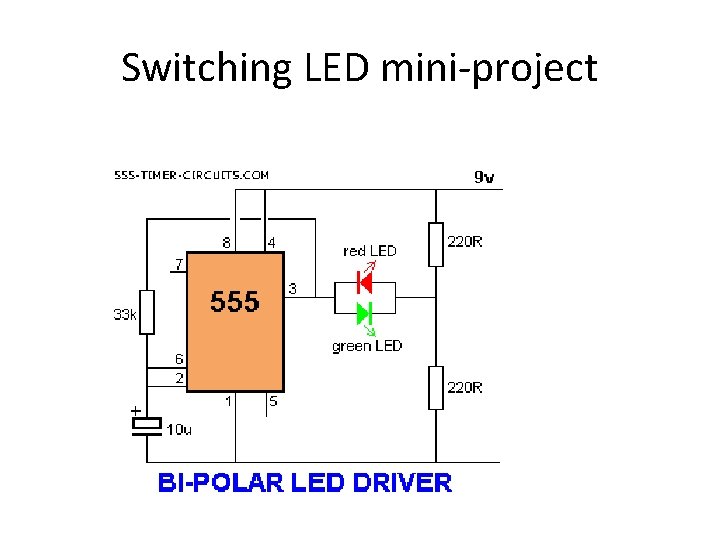
Switching LED mini-project
- Slides: 28