
Effective Presentations A howto guide by ILS English
Effective Presentations A “how-to” guide by ILS English
Why Give a Presentation? • To Persuade • To Sell an idea or product • To Inform • To Impress
Five basic parts of effective presentations: 1. Planning 2. Organization 3. Construction 4. Delivery 5. Question and Answer
1. Presentation Planning • • • What is the objective of the presentation Who is the audience How large is the audience Where is the presentation to be given What resources are available How much time do you have Ask Questions
2. Organization • • Carefully outline your presentation before getting into construction details Organize around effective visual aids Careful use of humour Organize presentation with: – – – introduction body conclusion

Types of Visual Aids • • • Chalkboards Overhead transparencies Posters and flip charts 35 mm slides Paper handouts Physical models Videotape, DVD or film Computer projection Smart Boards ISSUES: Cost Lead Time Flexibility Visibility Attractiveness
3. Construction • • Start with a detailed outline Appearance is EVERYTHING Allow at least one minute for each slide Minimize the number of lines of text and the number of graphs shown on each slide. More than 12 lines of text or 5 curves are too many. – Too little is better than too much. Put a frame or border around each slide Use landscape, not portrait orientation – • •
3. Construction - continued • • Mix modes - a slide completely filled with text or equations is BORING ! Intersperse pictures or graphics wherever possible to catch reader’s eye Hello
Construction - continued • • • Text must be large enough to be visible. (this is a 28 point Garamond font) This is BOLD (for comparison, this is a 12 point Times Roman font) Use the “Floor Test” DO NOT make transparencies directly from pages in books, reports or papers unless they can be enlarged Light text on dark background is very effective Don’t get carried away with fonts and colours
4. Delivery • • • Mechanics – Eye contact – Cue cards or script if desired – Variation (media, voice, position, . . . ) Voice – Speak clearly, distinctly – To audience, not screen – Proper tempo – Avoid monotone delivery Posture
4. Delivery - continued • Professional Demeanor – Confidence: If you want to persuade the audience to accept your message, you must show confidence (but not arrogance) in yourself and your work. – Respect your audience - don’t insult them – Approach: your purpose is usually to inform or persuade, not to baffle and confuse. People are always more impressed with a clear presentation than with one they cannot understand or which makes them feel stupid. – Dress to the level of the most important audience member – Know your subject and be excited about it !
4. Delivery - continued • • • Practice – Know your surroundings and equipment – Dry run for a test audience and solicit constructive feedback – Test your equipment first – Colour schemes which look good on the computer monitor may look terrible when projected Time - keep to a schedule Have a backup - if using computer technology, always bring standard transparencies just in case Murphy* strikes
5. Question and Answer • Observe diplomacy and tact – People ask questions for a variety of reasons, not necessarily to get further information. Above all, don’t lose your cool or get defensive. Keep on track – Repeat the question for benefit of the audience and to make sure you heard it right (this also helps you organize your thoughts). – Answer the question. Do not elaborate unless asked to do so.
5. Question and Answer continued • • Watch assertions – “In my opinion. . ” only works if you are qualified to give an opinion. Defer to facts and resources when possible. Don’t lie – It’s unethical ! Assume that the audience knows everything about the topic -- if you lie and get caught, they’ll kill you. If you don’t know don’t be afraid to say “I don’t know”. Tell the questioner that you do not have the answer right now but you would be happy to look it up, or discuss the concept with him or her at a later time.
Summary • • • Effective presentation skills are essential Elements of effective presentations – Planning – Organization – Construction – Delivery – Q&A Just Do It!
Now it’s your turn • • • Prepare a 10 -15 minute multi-media presentation (including 3 minutes for questions) Apply principles covered in this presentation Objective of these student presentations: – Give you a chance to practice presentation skills and obtain feedback in a friendly environment – Educate us in a topic relating to this course
Ideas for Presentation Topics My city My Job Examples of good and bad building design Examples of good and bad design in consumer products at Asda Experiences in a summer job History of a famous invention Coke Vs Pepsi
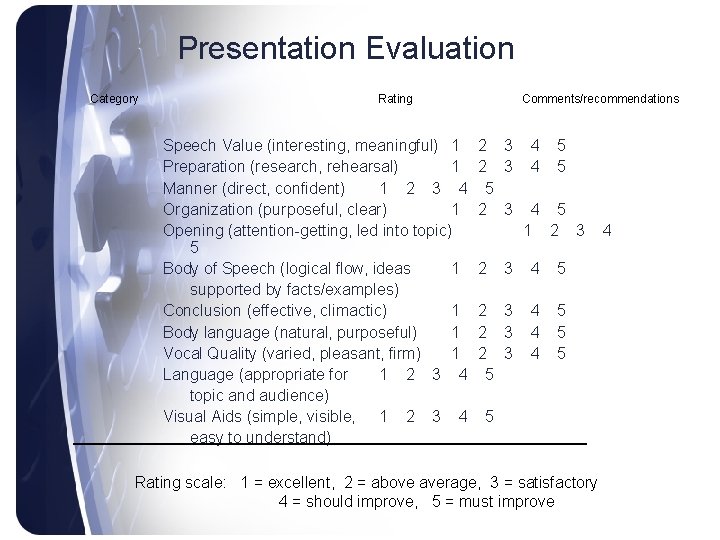
Presentation Evaluation Category Rating Speech Value (interesting, meaningful) 1 Preparation (research, rehearsal) 1 Manner (direct, confident) 1 2 3 4 Organization (purposeful, clear) 1 Opening (attention-getting, led into topic) 5 Body of Speech (logical flow, ideas 1 supported by facts/examples) Conclusion (effective, climactic) 1 Body language (natural, purposeful) 1 Vocal Quality (varied, pleasant, firm) 1 Language (appropriate for 1 2 3 4 topic and audience) Visual Aids (simple, visible, 1 2 3 4 easy to understand) Comments/recommendations 2 3 5 2 3 2 4 4 5 5 4 5 1 2 3 3 4 5 2 3 2 3 5 4 4 4 5 5 Rating scale: 1 = excellent, 2 = above average, 3 = satisfactory 4 = should improve, 5 = must improve 4
- Slides: 18