
EECS 373 Design of MicroprocessorBased Systems Website www
EECS 373 Design of Microprocessor-Based Systems Website: www. eecs. umich. edu/courses/eecs 373/ Ronald Dreslinski University of Michigan Lecture 1: Introduction, start on ARM ISA September 7 th 2016 Slides developed in part by Prof. Dutta and Dr. Brehob 1
Folks • Prof. Ron Dreslinski • Matt Smith – Head lab instructor – Been doing 373 for about 15 years! • IAs: – – Yifan Hao haoyifan@umich. edu Daniel Synder snysly@umich. edu Jay Mulani jmulani@umich. edu Kevin Yang kbyang@umich. edu 2
What is an embedded system? 3
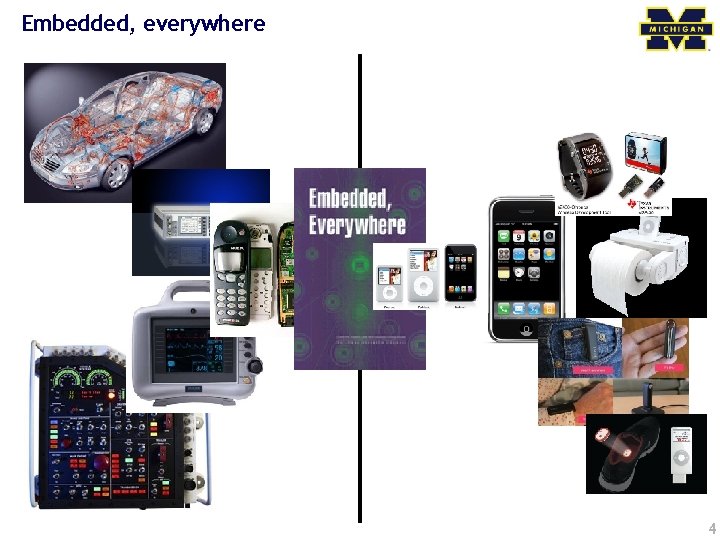
Embedded, everywhere 4
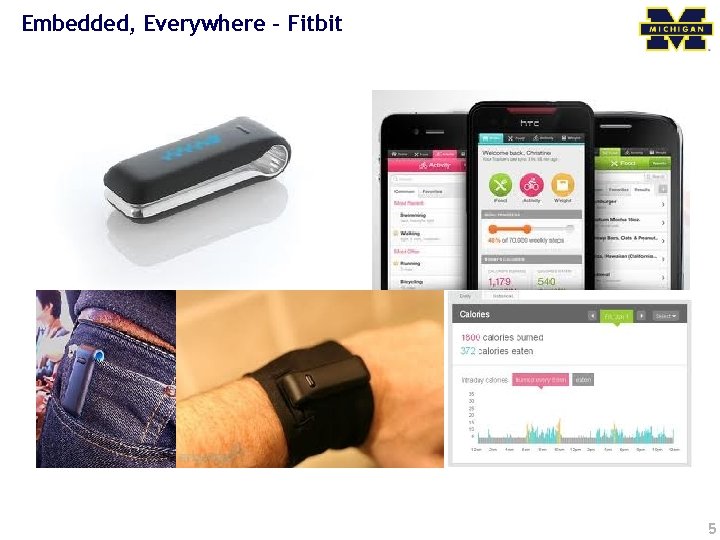
Embedded, Everywhere - Fitbit 5
What is driving the embedded everywhere explosion? 6
Outline Technology Trends Course Description/Overview Tools Overview/ISA start 7
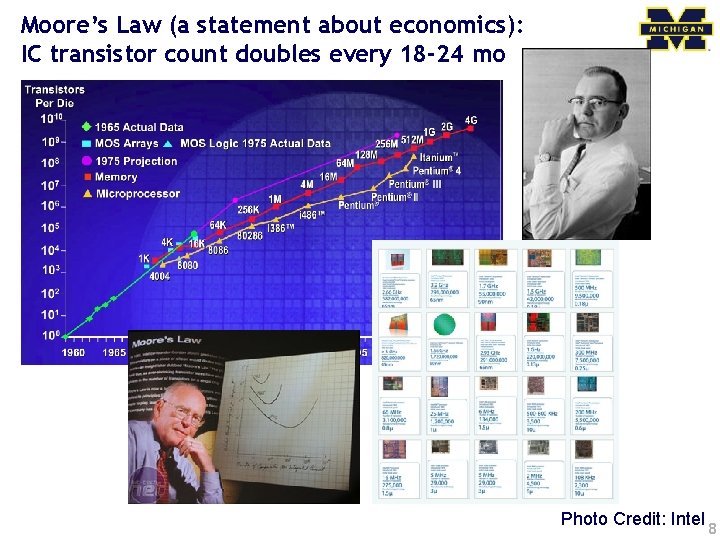
Moore’s Law (a statement about economics): IC transistor count doubles every 18 -24 mo Photo Credit: Intel 8
![The number of computers person grows [Bell et al. Computer, 1972, ACM, 2008] Mainframe](http://slidetodoc.com/presentation_image/11f3f5c26bc06e7a67c58c3195fb0815/image-9.jpg "The number of computers person grows [Bell et al. Computer, 1972, ACM, 2008] Mainframe")
The number of computers person grows [Bell et al. Computer, 1972, ACM, 2008] Mainframe log (people per computer) 1 per Enterprise Workstation 1 per Engineer Laptop 1 per Professional Smart Sensors Mini Computer Ubiquitous 1 per Company Personal Computer 1 per Family 1 person 100 – 1000’s person Smartphone 9
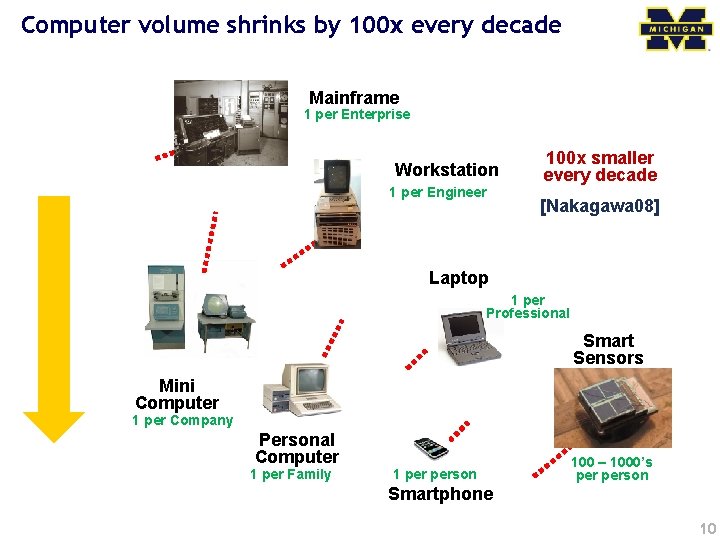
Computer volume shrinks by 100 x every decade Mainframe 1 per Enterprise Workstation 1 per Engineer 100 x smaller every decade [Nakagawa 08] Laptop 1 per Professional Smart Sensors Mini Computer Ubiquitous 1 per Company Personal Computer 1 per Family 1 person 100 – 1000’s person Smartphone 10
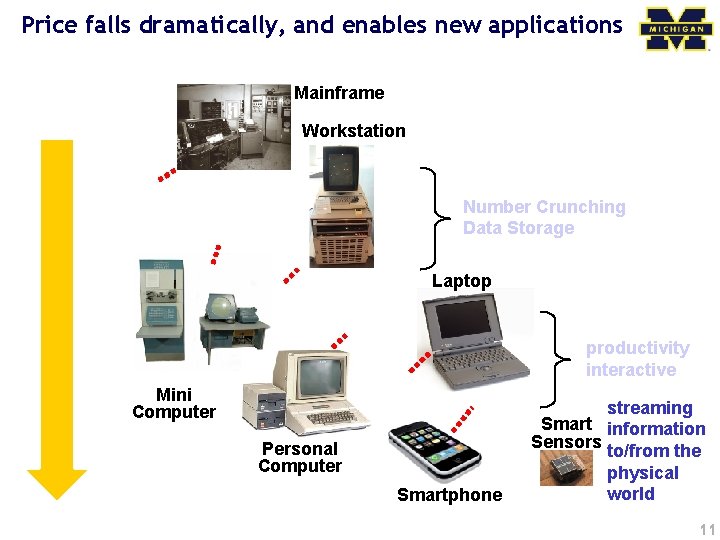
Price falls dramatically, and enables new applications Mainframe Workstation Number Crunching Data Storage Laptop productivity interactive Mini Computer Personal Computer Smartphone streaming Smart information Sensors to/from the physical world 11
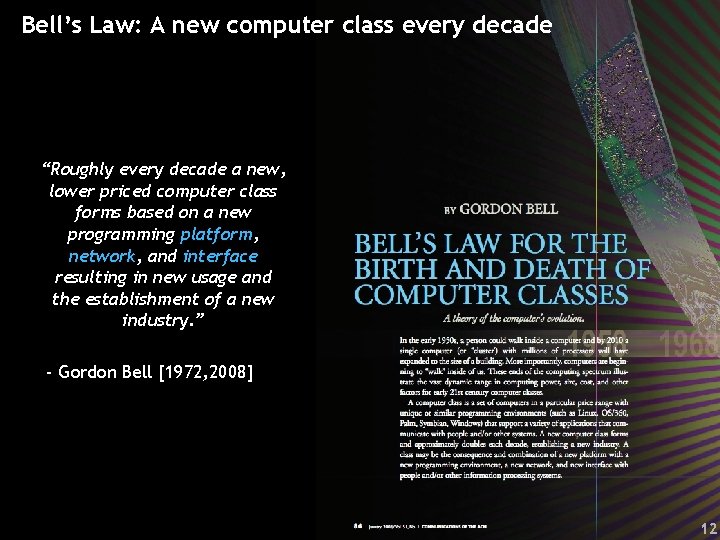
Bell’s Law: A new computer class every decade “Roughly every decade a new, lower priced computer class forms based on a new programming platform, network, and interface resulting in new usage and the establishment of a new industry. ” - Gordon Bell [1972, 2008] 12
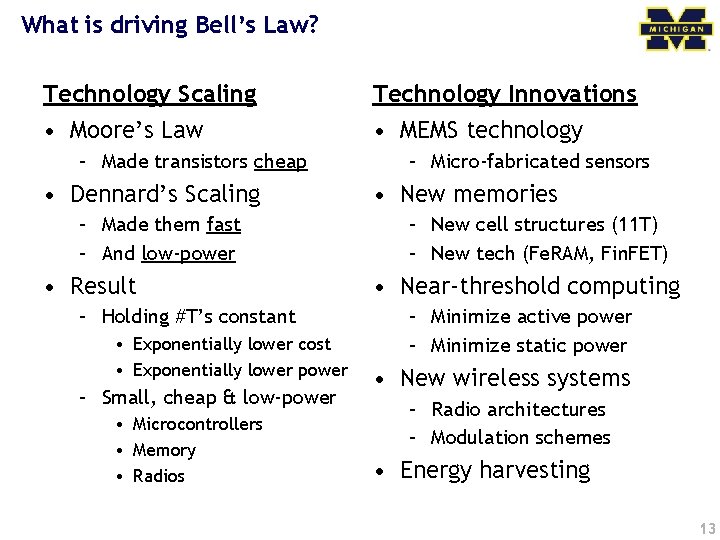
What is driving Bell’s Law? Technology Scaling • Moore’s Law – Made transistors cheap • Dennard’s Scaling – Made them fast – And low-power • Result – Holding #T’s constant • Exponentially lower cost • Exponentially lower power – Small, cheap & low-power • Microcontrollers • Memory • Radios Technology Innovations • MEMS technology – Micro-fabricated sensors • New memories – New cell structures (11 T) – New tech (Fe. RAM, Fin. FET) • Near-threshold computing – Minimize active power – Minimize static power • New wireless systems – Radio architectures – Modulation schemes • Energy harvesting 13
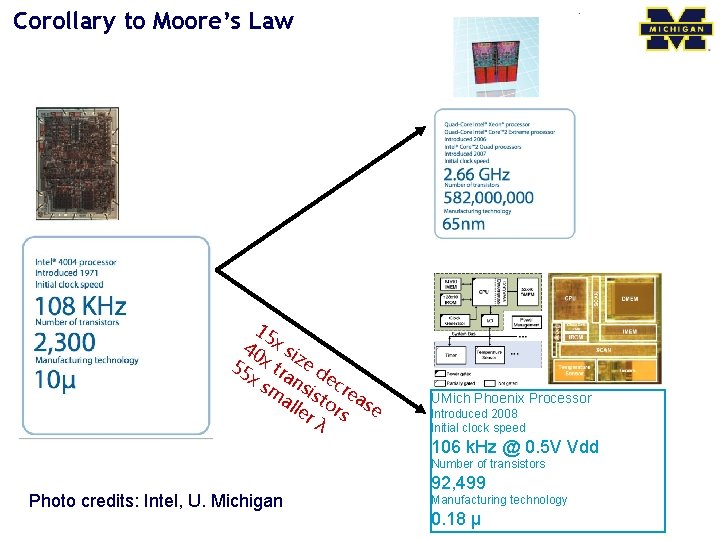
Corollary to Moore’s Law 15 40 x si 55 x tr ze d x s an ec m sis rea all to er rs se λ UMich Phoenix Processor Introduced 2008 Initial clock speed 106 k. Hz @ 0. 5 V Vdd Number of transistors Photo credits: Intel, U. Michigan 92, 499 Manufacturing technology 0. 18 µ
Broad availability of inexpensive, low-power, 32 -bit MCUs (with enough memory to do interesting things) 15
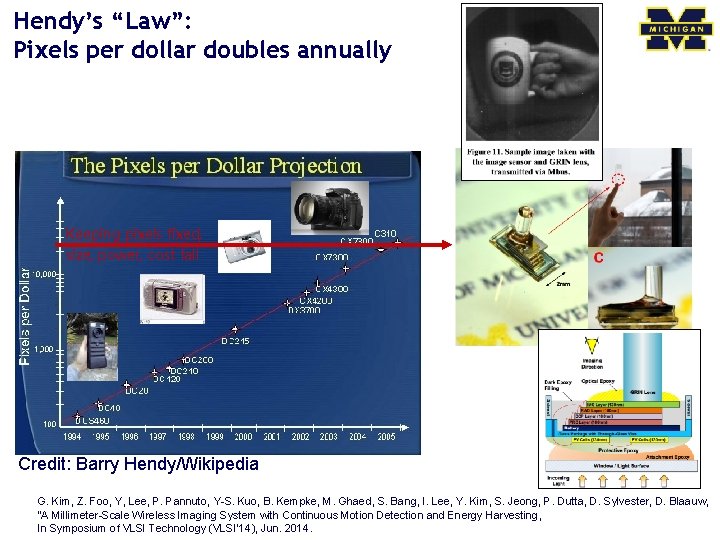
Hendy’s “Law”: Pixels per dollar doubles annually Keeping pixels fixed, size, power, cost fall Credit: Barry Hendy/Wikipedia G. Kim, Z. Foo, Y, Lee, P. Pannuto, Y-S. Kuo, B. Kempke, M. Ghaed, S. Bang, I. Lee, Y. Kim, S. Jeong, P. Dutta, D. Sylvester, D. Blaauw, “A Millimeter-Scale Wireless Imaging System with Continuous Motion Detection and Energy Harvesting, In Symposium of VLSI Technology (VLSI’ 14), Jun. 2014.
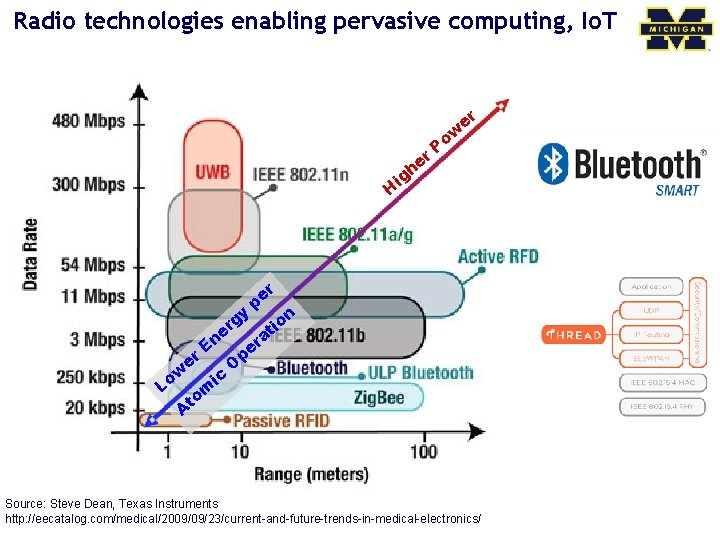
Radio technologies enabling pervasive computing, Io. T er r e gh w o P i H r e p gy on r i e at n r E e r p e O w c i Lo m to A Source: Steve Dean, Texas Instruments http: //eecatalog. com/medical/2009/09/23/current-and-future-trends-in-medical-electronics/
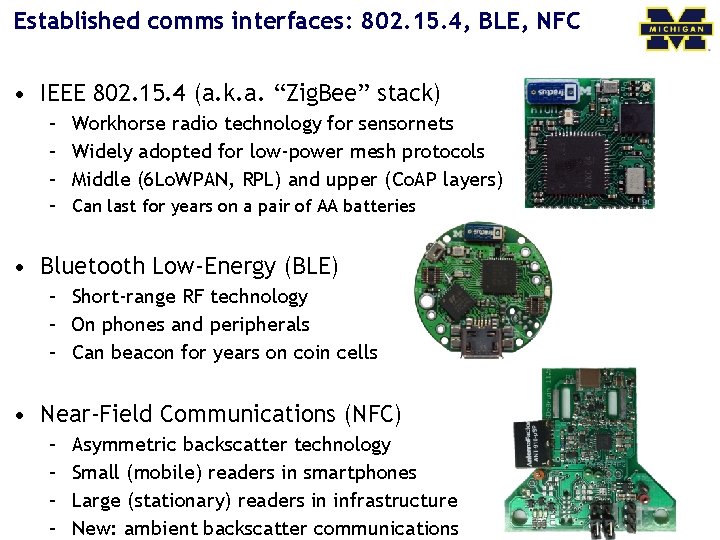
Established comms interfaces: 802. 15. 4, BLE, NFC • IEEE 802. 15. 4 (a. k. a. “Zig. Bee” stack) – Workhorse radio technology for sensornets – Widely adopted for low-power mesh protocols – Middle (6 Lo. WPAN, RPL) and upper (Co. AP layers) – Can last for years on a pair of AA batteries • Bluetooth Low-Energy (BLE) – Short-range RF technology – On phones and peripherals – Can beacon for years on coin cells • Near-Field Communications (NFC) – – Asymmetric backscatter technology Small (mobile) readers in smartphones Large (stationary) readers in infrastructure New: ambient backscatter communications
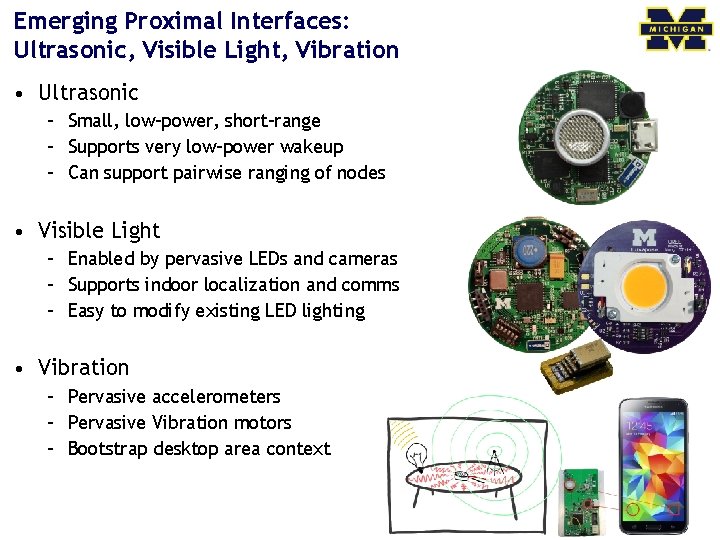
Emerging Proximal Interfaces: Ultrasonic, Visible Light, Vibration • Ultrasonic – Small, low-power, short-range – Supports very low-power wakeup – Can support pairwise ranging of nodes • Visible Light – Enabled by pervasive LEDs and cameras – Supports indoor localization and comms – Easy to modify existing LED lighting • Vibration – Pervasive accelerometers – Pervasive Vibration motors – Bootstrap desktop area context
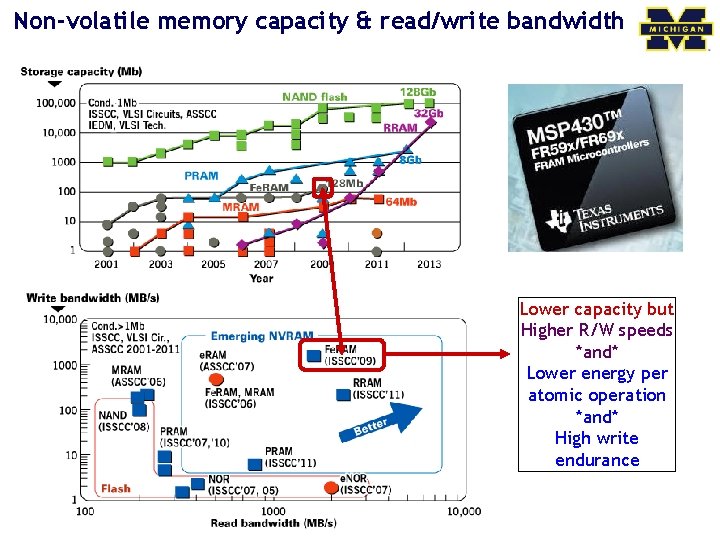
Non-volatile memory capacity & read/write bandwidth Lower capacity but Higher R/W speeds *and* Lower energy per atomic operation *and* High write endurance
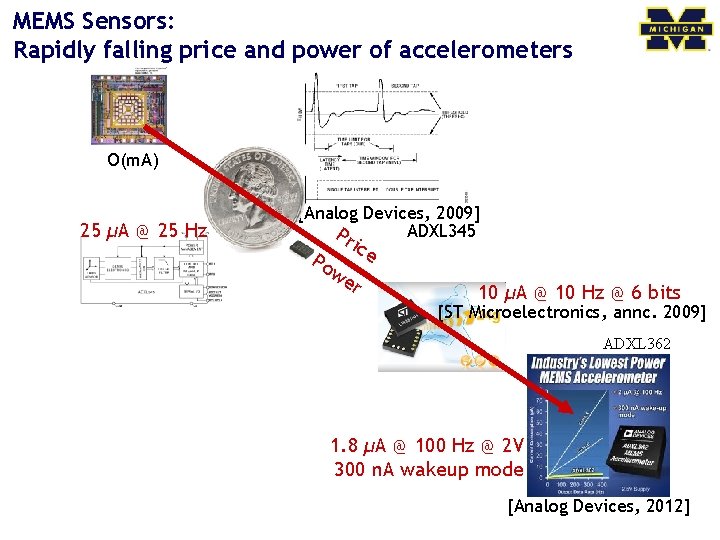
MEMS Sensors: Rapidly falling price and power of accelerometers O(m. A) 25 µA @ 25 Hz [Analog Devices, 2009] ADXL 345 Pr ice Po we r 10 µA @ 10 Hz @ 6 bits [ST Microelectronics, annc. 2009] ADXL 362 1. 8 µA @ 100 Hz @ 2 V 300 n. A wakeup mode [Analog Devices, 2012]
![Energy harvesting and storage: Small doesn’t mean powerless… RF [Intel] Thin-film batteries Piezoelectric [Holst/IMEC]](http://slidetodoc.com/presentation_image/11f3f5c26bc06e7a67c58c3195fb0815/image-22.jpg "Energy harvesting and storage: Small doesn’t mean powerless… RF [Intel] Thin-film batteries Piezoelectric [Holst/IMEC]")
Energy harvesting and storage: Small doesn’t mean powerless… RF [Intel] Thin-film batteries Piezoelectric [Holst/IMEC] Clare Solar Cell Shock Energy Harvesting CEDRAT Technologies Electrostatic Energy Harvester [ICL] Thermoelectric Ambient Energy Harvester [PNNL]
Why study 32 -bit MCUs and FPGAs? 23
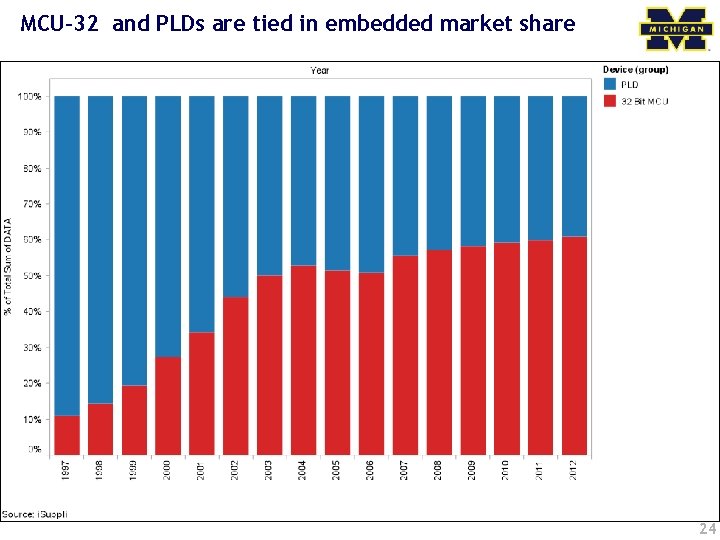
MCU-32 and PLDs are tied in embedded market share 24
What differentiates these products from one another? FPGA ===== Microprocessor ======= 25
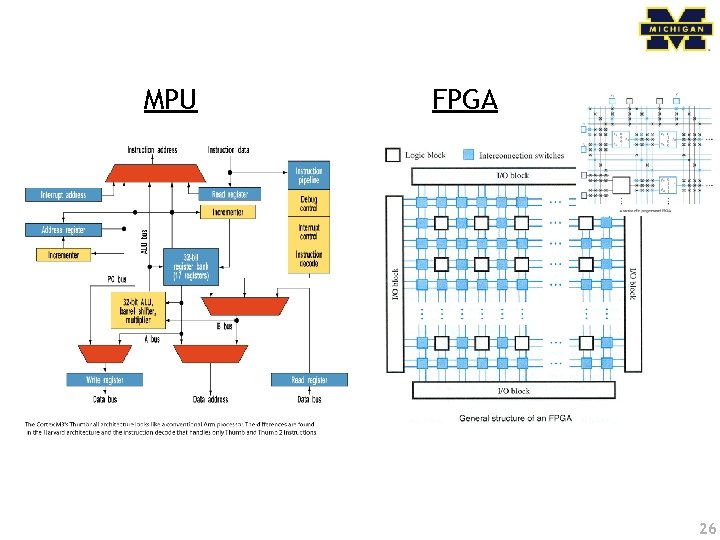
MPU FPGA 26
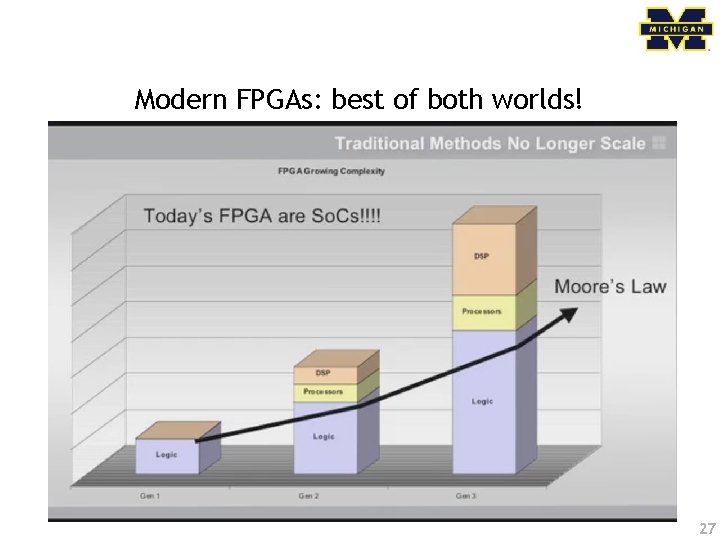
Modern FPGAs: best of both worlds! 27
Why study the ARM architecture (and the Cortex-M 3 in particular)? 28
Lots of manufacturers ship ARM products 29
ARM is the big player • ARM has a huge market share – As of 2011 ARM has chips in about 90% of the world’s mobile handsets – As of 2010 ARM has chips in 95% of the smartphone market, 10% of the notebook market • Expected to hit 40% of the notebook market in 2015. – Heavy use in general embedded systems. • Cheap to use – ARM appears to get an average of 8¢ per device (averaged over cheap and expensive chips). • Flexible – Spin your own designs. 30
Outline Technology Trends Course Description/Overview Tools Overview/ISA start 31
Course goals • Learn to implement embedded systems including hardware/software interfacing. • Learn to design embedded systems and how to think about embedded software and hardware. • Have the opportunity to design and build nontrivial projects involving both hardware and software. 32
Prerequisites • EECS 270: Introduction to Logic Design – Combinational and sequential logic design – Logic minimization, propagation delays, timing • EECS 280: Programming and Intro Data Structures – C programming – Algorithms (e. g. sort) and data structures (e. g. lists) • EECS 370: Introduction to Computer Organization – Basic computer architecture – CPU control/datapath, memory, I/O – Compiler, assembler 33
Topics • Memory-mapped I/O – The idea of using memory addressed to talk to input and output devices. • Switches, LEDs, hard drives, keyboards, motors • Interrupts – How to get the processor to become “event driven” and react to things as they happen. • Working with Analog inputs – The real world isn’t digital! • Common devices and interfaces – Serial buses, timers, etc. 34
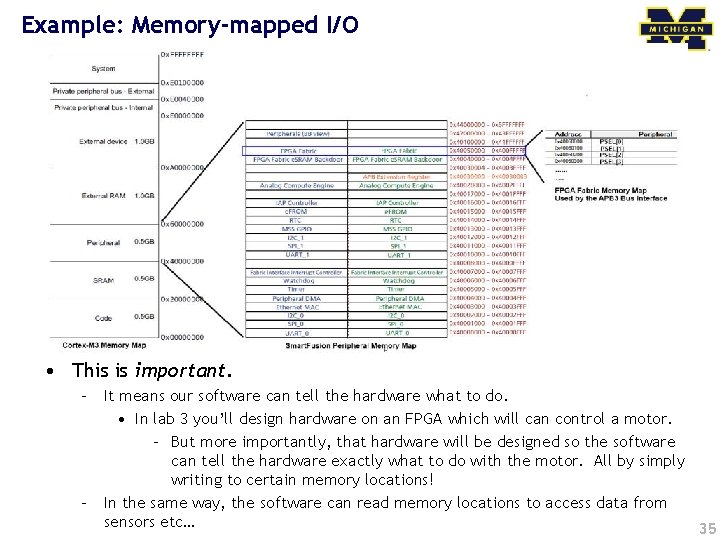
Example: Memory-mapped I/O • This is important. – It means our software can tell the hardware what to do. • In lab 3 you’ll design hardware on an FPGA which will can control a motor. – But more importantly, that hardware will be designed so the software can tell the hardware exactly what to do with the motor. All by simply writing to certain memory locations! – In the same way, the software can read memory locations to access data from sensors etc… 35
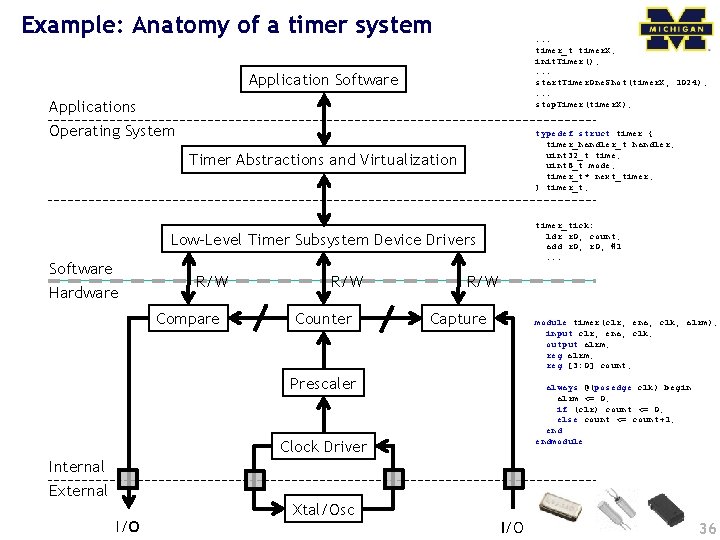
Example: Anatomy of a timer system . . . timer_t timer. X; init. Timer(); . . . start. Timer. One. Shot(timer. X, 1024); . . . stop. Timer(timer. X); Application Software Applications Operating System typedef struct timer { timer_handler_t handler; uint 32_t time; uint 8_t mode; timer_t* next_timer; } timer_t; Timer Abstractions and Virtualization timer_tick: ldr r 0, count; add r 0, #1. . . Low-Level Timer Subsystem Device Drivers Software Hardware R/W Compare R/W Counter R/W Capture module timer(clr, ena, clk, alrm); input clr, ena, clk; output alrm; reg [3: 0] count; Prescaler always @(posedge clk) begin alrm <= 0; if (clr) count <= 0; else count <= count+1; endmodule Clock Driver Internal External I/O Xtal/Osc I/O 36
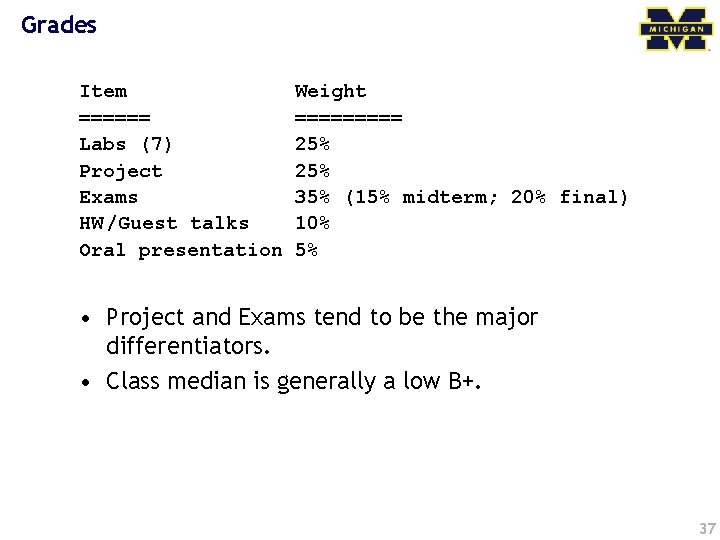
Grades Item ====== Labs (7) Project Exams HW /Guest talks Oral presentation Weight ===== 25% 35% (15% midterm; 20% final) 10% 5% • Project and Exams tend to be the major differentiators. • Class median is generally a low B+. 37
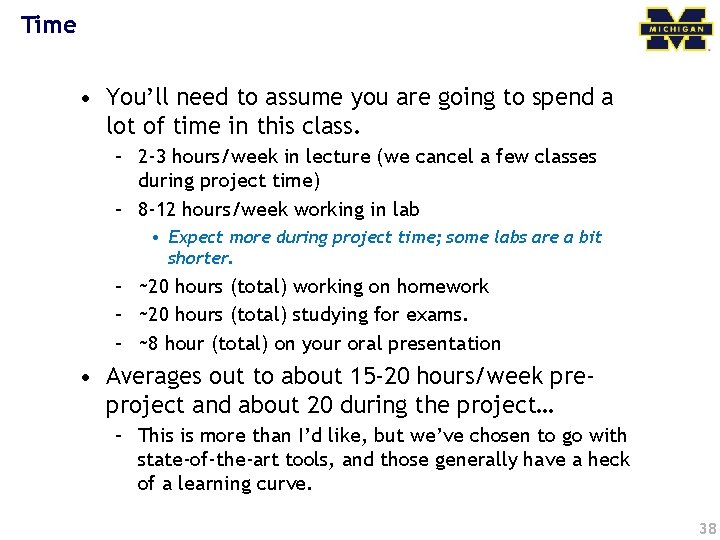
Time • You’ll need to assume you are going to spend a lot of time in this class. – 2 -3 hours/week in lecture (we cancel a few classes during project time) – 8 -12 hours/week working in lab • Expect more during project time; some labs are a bit shorter. – ~20 hours (total) working on homework – ~20 hours (total) studying for exams. – ~8 hour (total) on your oral presentation • Averages out to about 15 -20 hours/week preproject and about 20 during the project… – This is more than I’d like, but we’ve chosen to go with state-of-the-art tools, and those generally have a heck of a learning curve. 38
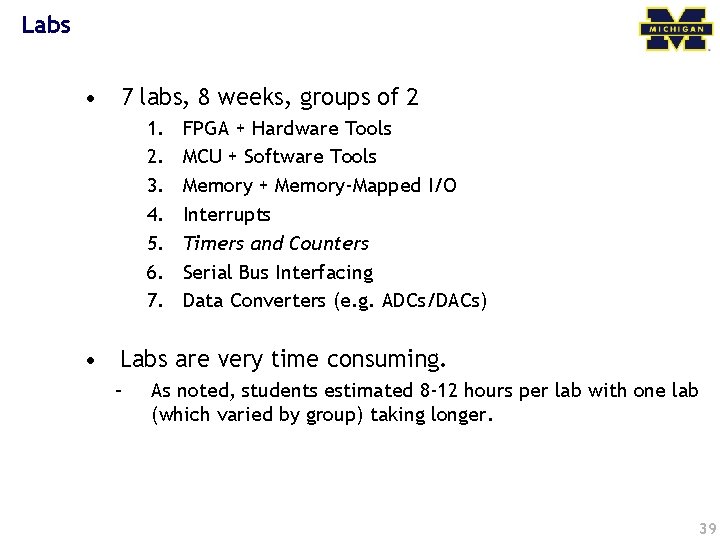
Labs • 7 labs, 8 weeks, groups of 2 1. 2. 3. 4. 5. 6. 7. FPGA + Hardware Tools MCU + Software Tools Memory + Memory-Mapped I/O Interrupts Timers and Counters Serial Bus Interfacing Data Converters (e. g. ADCs/DACs) • Labs are very time consuming. – As noted, students estimated 8 -12 hours per lab with one lab (which varied by group) taking longer. 39
Open-Ended Project • Goal: learn how to build embedded systems – By building an embedded system – Work in teams of 4 – You design your own project • The major focus of the last third of the class. – Labs will be done and we will cancel some lectures and generally try to keep you focused. • Important to start early. – After all the effort in the labs, it’s tempting to slack for a bit. The best projects are those that get going right away. 40
Homework • 4 -6 assignments – A few “mini” assignments • Mainly to get you up to speed on lab topics – A few “standard” assignments • Hit material we can’t do in lab. • Also a small part is for showing up to guest lecturer(s) Start today, Homework 1 due on Wednesday 41
Looking for me? • Office Hours in 2637 BBB – Tuesday 2 -3 pm – Thursday 3: 30 -4: 30 pm • Email to schedule other times as needed 42
Outline Technology Trends Course Description/Overview Tools overview/ISA start 43
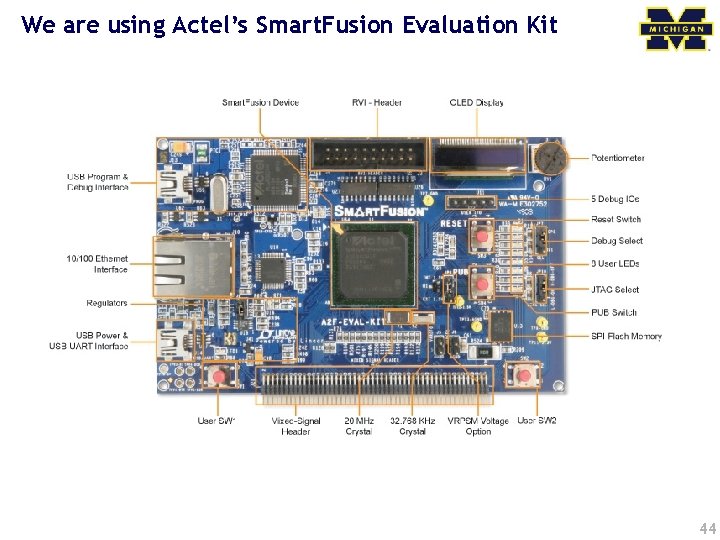
We are using Actel’s Smart. Fusion Evaluation Kit 44
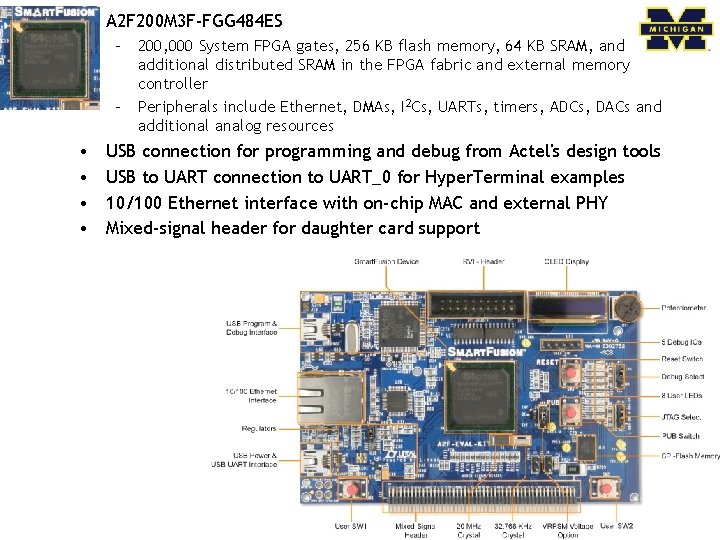
A 2 F 200 M 3 F-FGG 484 ES – 200, 000 System FPGA gates, 256 KB flash memory, 64 KB SRAM, and additional distributed SRAM in the FPGA fabric and external memory controller – Peripherals include Ethernet, DMAs, I 2 Cs, UARTs, timers, ADCs, DACs and additional analog resources • • USB connection for programming and debug from Actel's design tools USB to UART connection to UART_0 for Hyper. Terminal examples 10/100 Ethernet interface with on-chip MAC and external PHY Mixed-signal header for daughter card support 45
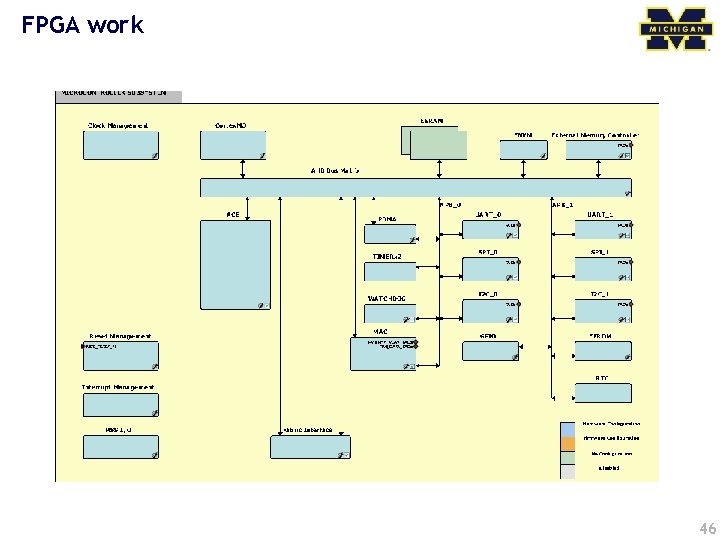
FPGA work 46
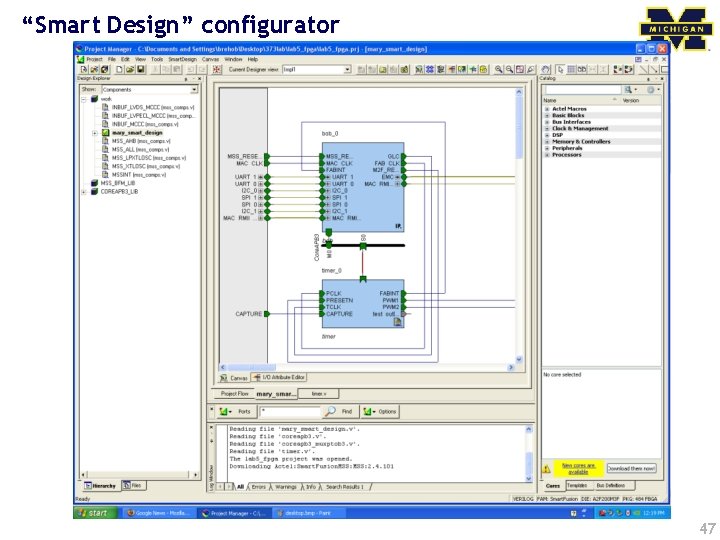
“Smart Design” configurator 47
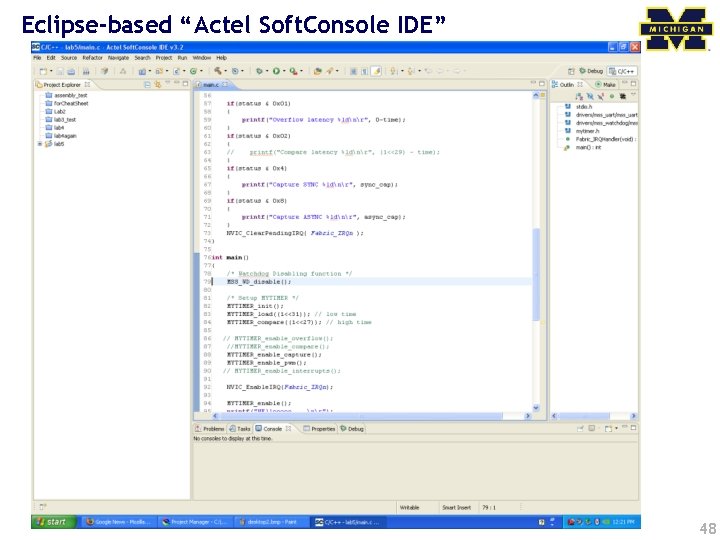
Eclipse-based “Actel Soft. Console IDE” 48
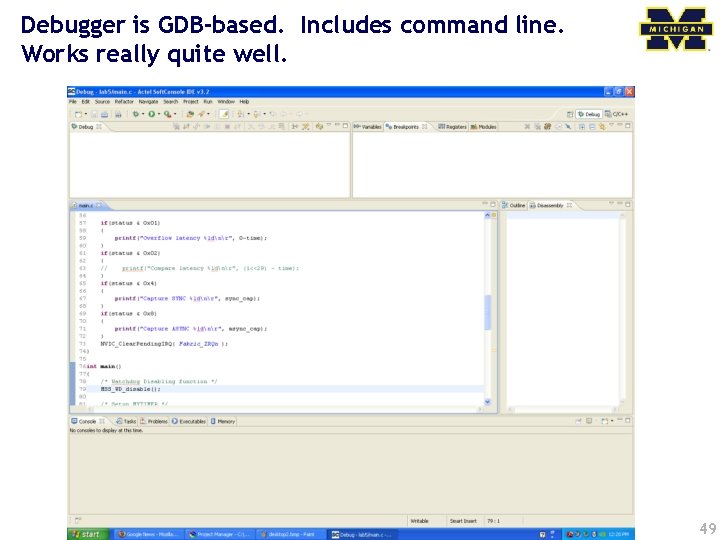
Debugger is GDB-based. Includes command line. Works really quite well. 49
ARM ISA 50
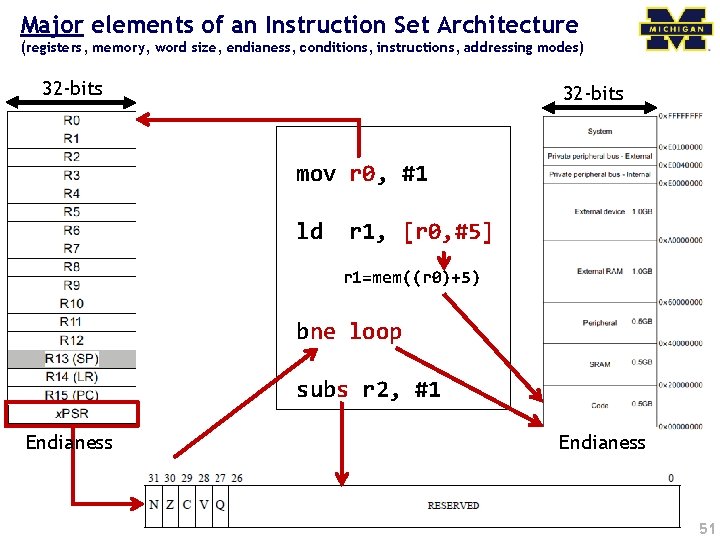
Major elements of an Instruction Set Architecture (registers, memory, word size, endianess, conditions, instructions, addressing modes) 32 -bits mov r 0, #1 ld r 1, [r 0, #5] r 1=mem((r 0)+5) bne loop subs r 2, #1 Endianess 51
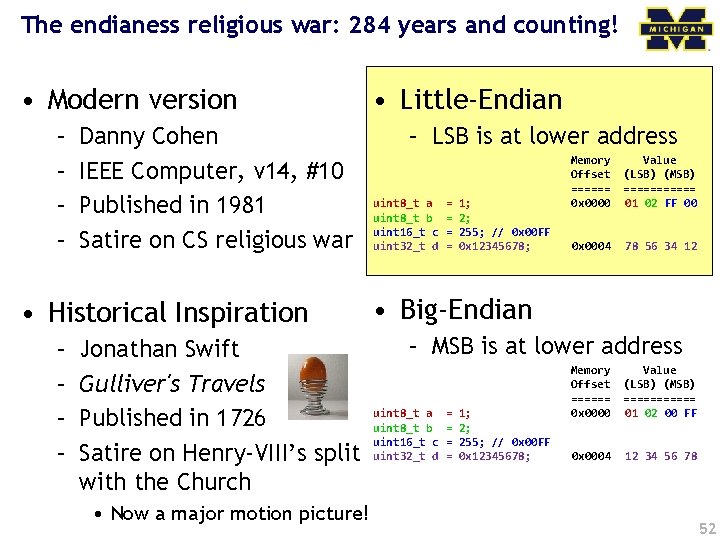
The endianess religious war: 284 years and counting! • Modern version – – Danny Cohen IEEE Computer, v 14, #10 Published in 1981 Satire on CS religious war • Historical Inspiration – – Jonathan Swift Gulliver's Travels Published in 1726 Satire on Henry-VIII’s split with the Church • Now a major motion picture! • Little-Endian – LSB is at lower address uint 8_t a uint 8_t b uint 16_t c uint 32_t d = = 1; 2; 255; // 0 x 00 FF 0 x 12345678; Memory Offset ====== 0 x 0000 Value (LSB) (MSB) ====== 01 02 FF 00 0 x 0004 78 56 34 12 • Big-Endian – MSB is at lower address uint 8_t a uint 8_t b uint 16_t c uint 32_t d = = 1; 2; 255; // 0 x 00 FF 0 x 12345678; Memory Offset ====== 0 x 0000 Value (LSB) (MSB) ====== 01 02 00 FF 0 x 0004 12 34 56 78 52
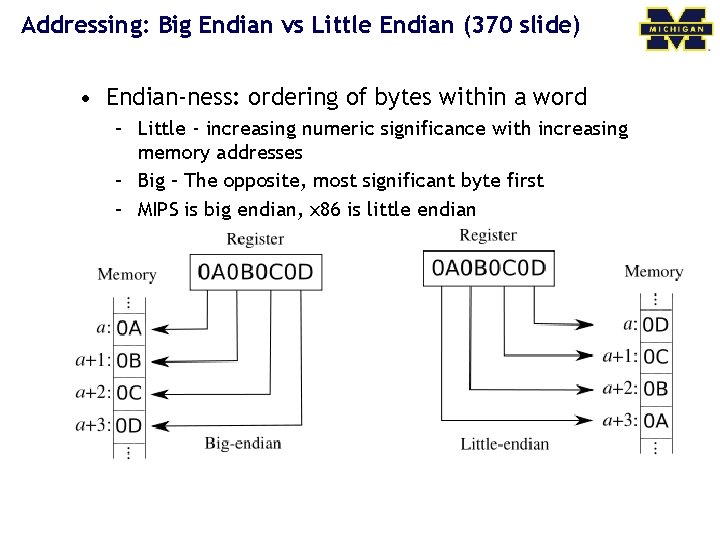
Addressing: Big Endian vs Little Endian (370 slide) • Endian-ness: ordering of bytes within a word – Little - increasing numeric significance with increasing memory addresses – Big – The opposite, most significant byte first – MIPS is big endian, x 86 is little endian
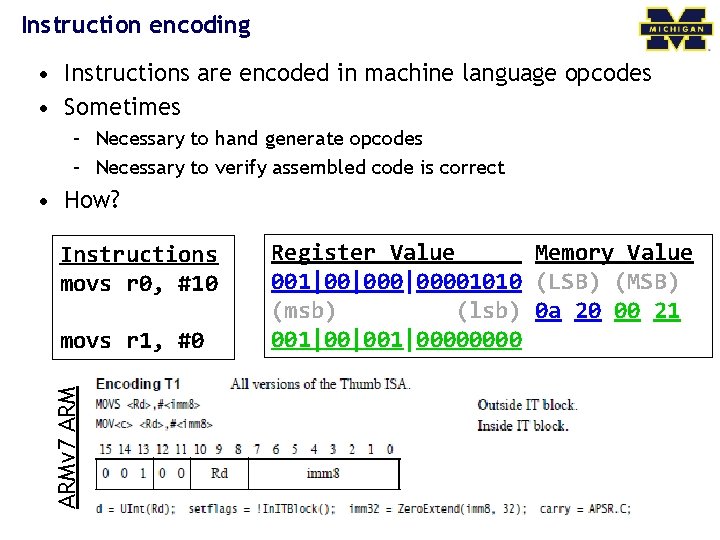
Instruction encoding • Instructions are encoded in machine language opcodes • Sometimes – Necessary to hand generate opcodes – Necessary to verify assembled code is correct • How? Instructions movs r 0, #10 ARMv 7 ARM movs r 1, #0 Register Value Memory Value 001|00|00001010 (LSB) (MSB) (msb) (lsb) 0 a 20 00 21 001|00|001|0000
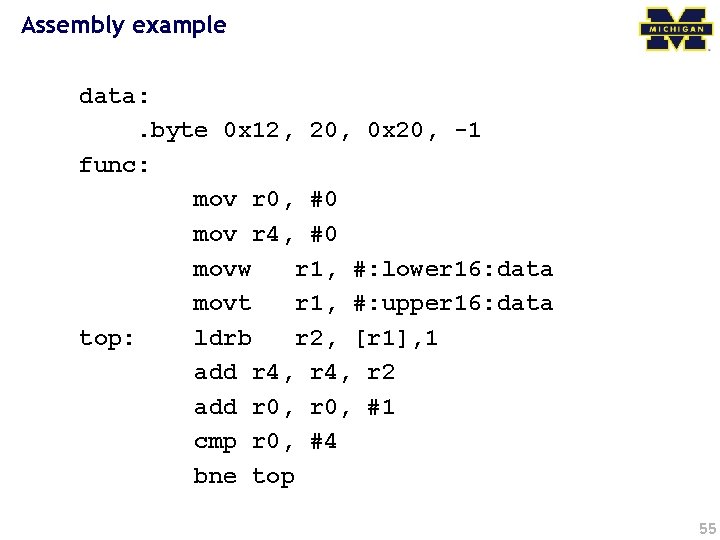
Assembly example data: . byte 0 x 12, 20, 0 x 20, -1 func: mov r 0, #0 mov r 4, #0 movw r 1, #: lower 16: data movt r 1, #: upper 16: data top: ldrb r 2, [r 1], 1 add r 4, r 2 add r 0, #1 cmp r 0, #4 bne top 55
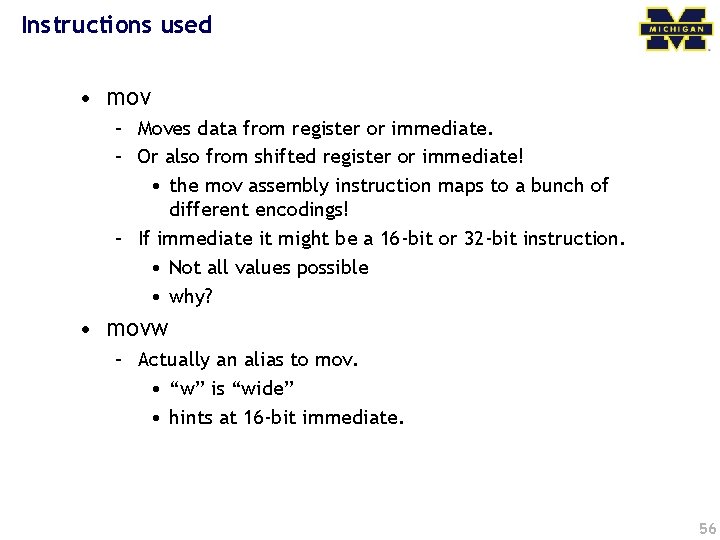
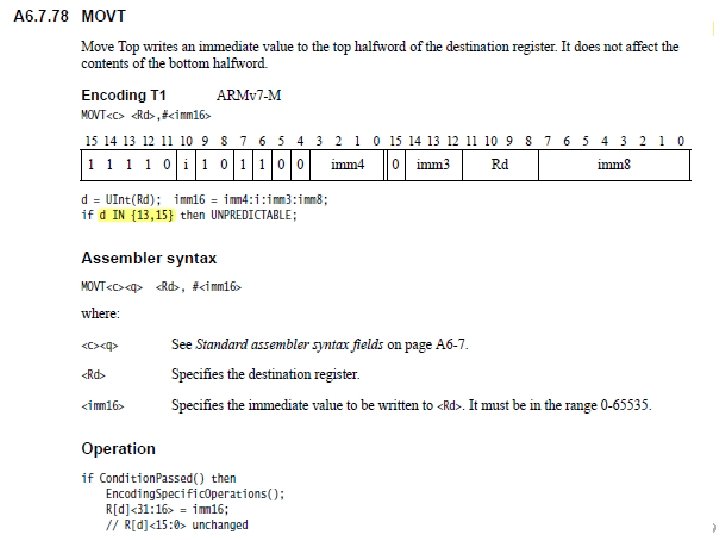
Instructions used • mov – Moves data from register or immediate. – Or also from shifted register or immediate! • the mov assembly instruction maps to a bunch of different encodings! – If immediate it might be a 16 -bit or 32 -bit instruction. • Not all values possible • why? • movw – Actually an alias to mov. • “w” is “wide” • hints at 16 -bit immediate. 56
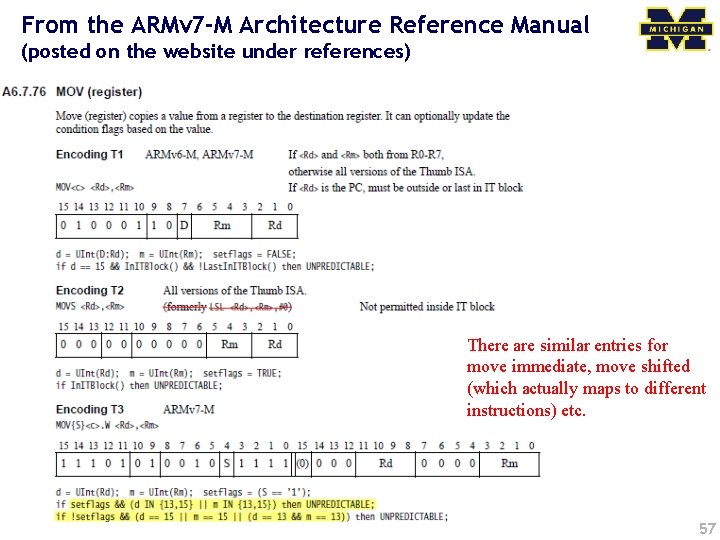
From the ARMv 7 -M Architecture Reference Manual (posted on the website under references) There are similar entries for move immediate, move shifted (which actually maps to different instructions) etc. 57
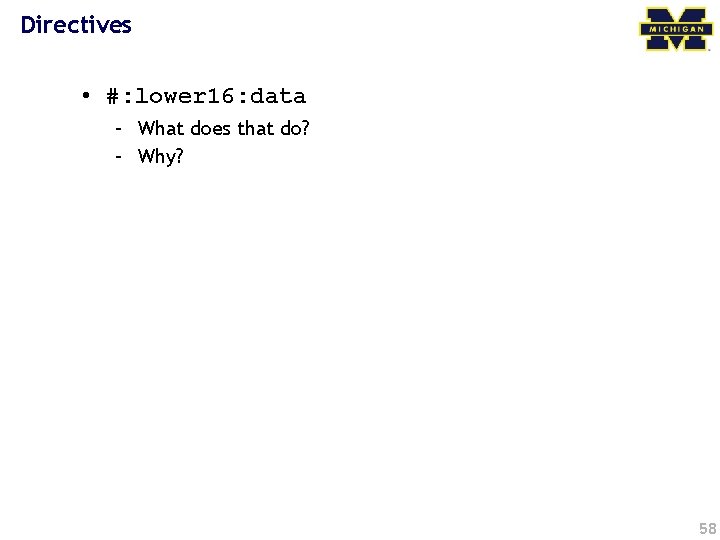
Directives • #: lower 16: data – What does that do? – Why? 58
59
Loads! • ldrb? • ldrsb? 60
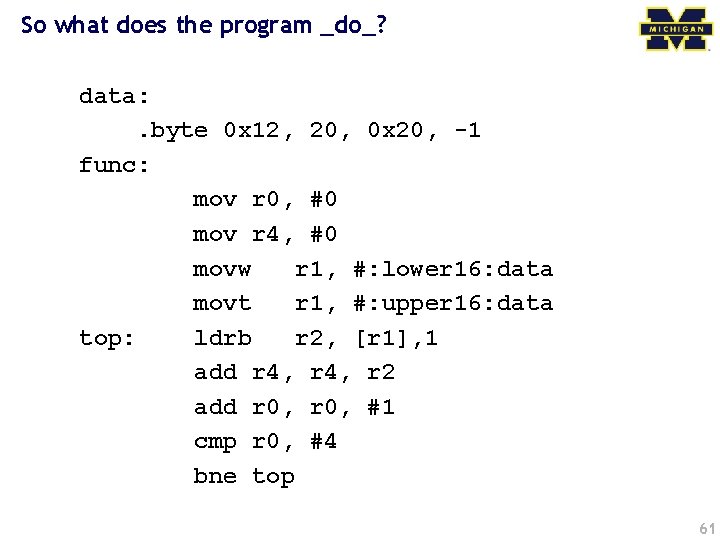
So what does the program _do_? data: . byte 0 x 12, 20, 0 x 20, -1 func: mov r 0, #0 mov r 4, #0 movw r 1, #: lower 16: data movt r 1, #: upper 16: data top: ldrb r 2, [r 1], 1 add r 4, r 2 add r 0, #1 cmp r 0, #4 bne top 61
Questions? Comments? Discussion? 62
- Slides: 62