
Ecommerce 2019 Business Technology Society Fifteenth Edition Global
E-commerce 2019: Business. Technology. Society. Fifteenth Edition, Global Edition Chapter 2 E-commerce Infrastructure Slides in this presentation contain hyperlinks. JAWS users should be able to get a list of links by using INSERT+F 7 Copyright © 2020 Pearson Education Ltd. All Rights Reserved
Learning Objectives 2. 1 Discuss the origins of, and the key technology concepts behind, the Internet. 2. 2 Explain the current structure of the Internet. 2. 3 Understand how the Web works. 2. 4 Describe how Internet and web features and services support e-commerce. 2. 5 Understand the impact of mobile applications. Copyright © 2020 Pearson Education Ltd. All Rights Reserved
Tech Titans Target a Prize: Bringing Internet Access to Rural India • Class Discussion – How can the business opportunities of rural India be assessed? – What is rural India’s biggest potential? – Which of the various methods described for bringing the Internet to rural India do you feel might be most successful? Copyright © 2020 Pearson Education Ltd. All Rights Reserved
The Internet: Technology Background • Internet – Interconnected network of thousands of networks and millions of computers – Links businesses, educational institutions, government agencies, and individuals • World Wide Web (Web) – One of the Internet’s most popular services – Provides access to billions, possibly trillions, of web pages Copyright © 2020 Pearson Education Ltd. All Rights Reserved
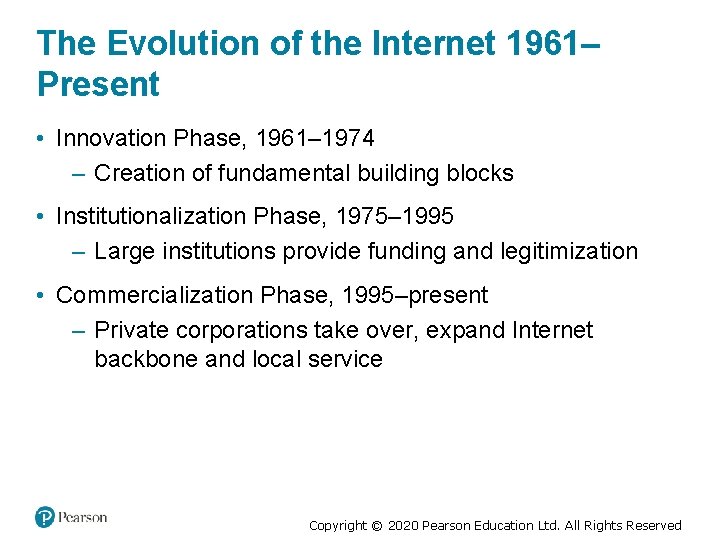
The Evolution of the Internet 1961– Present • Innovation Phase, 1961– 1974 – Creation of fundamental building blocks • Institutionalization Phase, 1975– 1995 – Large institutions provide funding and legitimization • Commercialization Phase, 1995–present – Private corporations take over, expand Internet backbone and local service Copyright © 2020 Pearson Education Ltd. All Rights Reserved
The Internet: Key Technology Concepts • Internet defined as network that: – Uses IP addressing – Supports TCP/IP – Provides services to users, in manner similar to telephone system • Three important concepts: – Packet switching – TCP/IP communications protocol – Client/server computing Copyright © 2020 Pearson Education Ltd. All Rights Reserved
Packet Switching • Slices digital messages into packets • Sends packets along different communication paths as they become available • Reassembles packets once they arrive at destination • Uses routers • Less expensive, wasteful than circuit-switching Copyright © 2020 Pearson Education Ltd. All Rights Reserved
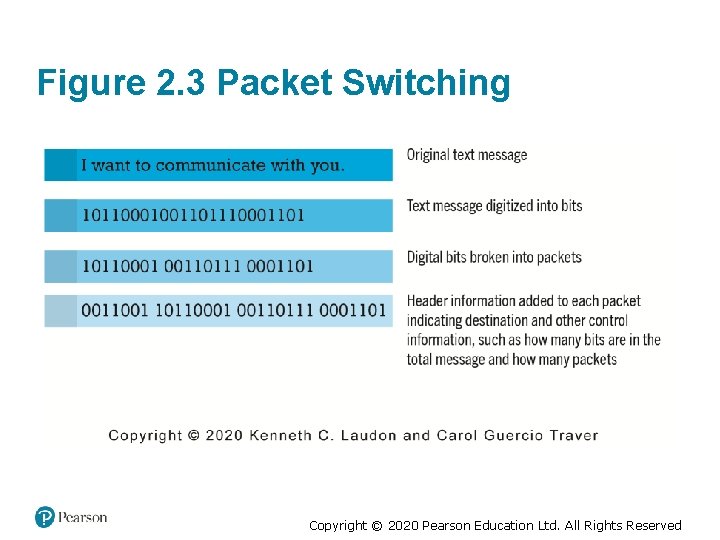
Figure 2. 3 Packet Switching Copyright © 2020 Pearson Education Ltd. All Rights Reserved
TCP/IP • Transmission Control Protocol (TCP) – Establishes connections among sending and receiving Web computers – Handles assembly of packets at point of transmission, and reassembly at receiving end • Internet Protocol (IP) • Four TCP/IP layers – Network interface layer – Internet layer – Transport layer – Application layer Copyright © 2020 Pearson Education Ltd. All Rights Reserved
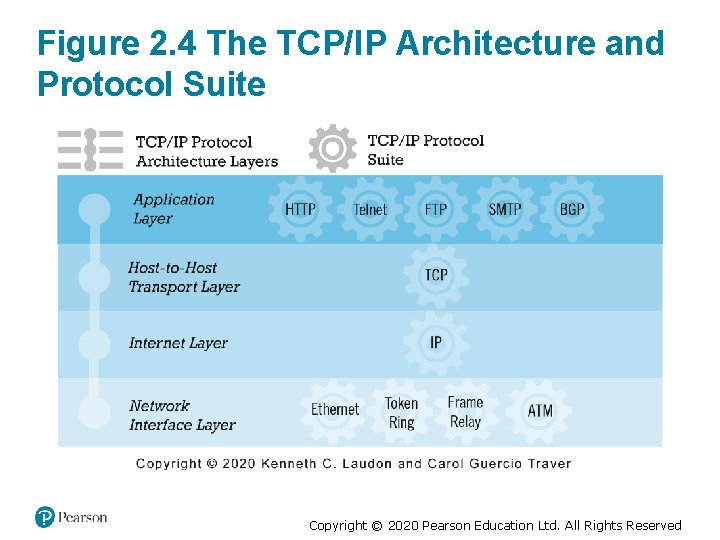
Figure 2. 4 The TCP/IP Architecture and Protocol Suite Copyright © 2020 Pearson Education Ltd. All Rights Reserved
Internet (IP) Addresses • IPv 4 – 32 -bit number – Four sets of numbers marked off by periods: 201. 61. 186. 227 ▪ Class C address: Network identified by first three sets, computer identified by last set • IPv 6 – 128 -bit addresses, able to handle up to 1 quadrillion addresses (IPv 4 can handle only 4 billion) Copyright © 2020 Pearson Education Ltd. All Rights Reserved
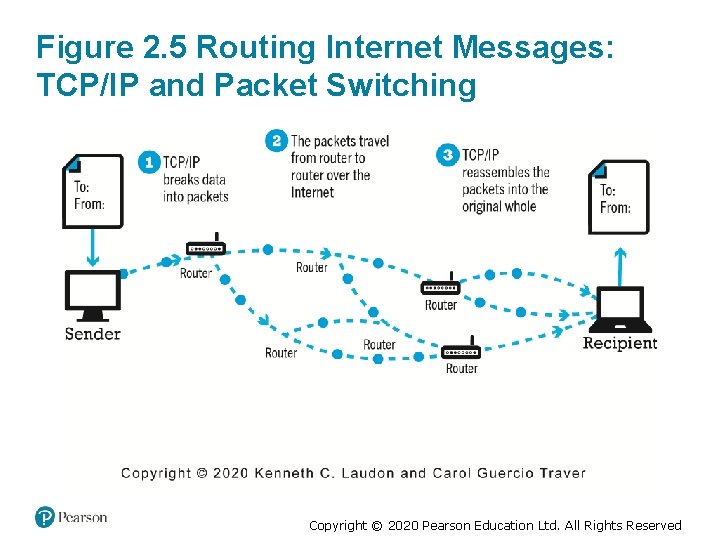
Figure 2. 5 Routing Internet Messages: TCP/IP and Packet Switching Copyright © 2020 Pearson Education Ltd. All Rights Reserved
Domain Names, DNS, and URLs • Domain name – IP address expressed in natural language • Domain name system (DNS) – Allows numeric IP addresses to be expressed in natural language • Uniform resource locator (URL) – Address used by Web browser to identify location of content on the Web – For example: http: //www. azimuth-interactive. com/ Copyright © 2020 Pearson Education Ltd. All Rights Reserved
Client/Server Computing • Powerful personal computers (clients) connected in network with one or more servers • Servers perform common functions for the clients – Storing files – Software applications – Access to printers, and so on Copyright © 2020 Pearson Education Ltd. All Rights Reserved
The Mobile Platform • Primary Internet access is now through tablets and smartphones • Tablets supplement PCs for mobile situations – Over 160 million people in U. S. use Internet with tablets • Smartphones are a disruptive technology – New processors and operating systems – Over 230 million in U. S. access Internet with smartphones Copyright © 2020 Pearson Education Ltd. All Rights Reserved
The Internet “Cloud Computing” Model (1 of 2) • Firms and individuals obtain computing power and software over Internet • Three types of services – Infrastructure as a service (Iaa. S) – Software as a service (Saa. S) – Platform as a service (Paa. S) • Public, private, and hybrid clouds Copyright © 2020 Pearson Education Ltd. All Rights Reserved
The Internet “Cloud Computing” Model (2 of 2) • Drawbacks – Security risks – Shifts responsibility for storage and control to providers • Radically reduces costs of: – Building and operating websites – Infrastructure, IT support – Hardware, software Copyright © 2020 Pearson Education Ltd. All Rights Reserved
Other Internet Protocols and Utility Programs • Internet protocols – HTTP – E-mail: SMTP, POP 3, IMAP – FTP, Telnet, SSL/TLS • Utility programs – Ping – Tracert Copyright © 2020 Pearson Education Ltd. All Rights Reserved
Internet Infrastructure • Internet growth has boomed without disruption because of: – Client/server computing model – Hourglass, layered architecture ▪ Network Technology Substrate ▪ Transport Services and Representation Standards ▪ Middleware Services ▪ Applications Copyright © 2020 Pearson Education Ltd. All Rights Reserved
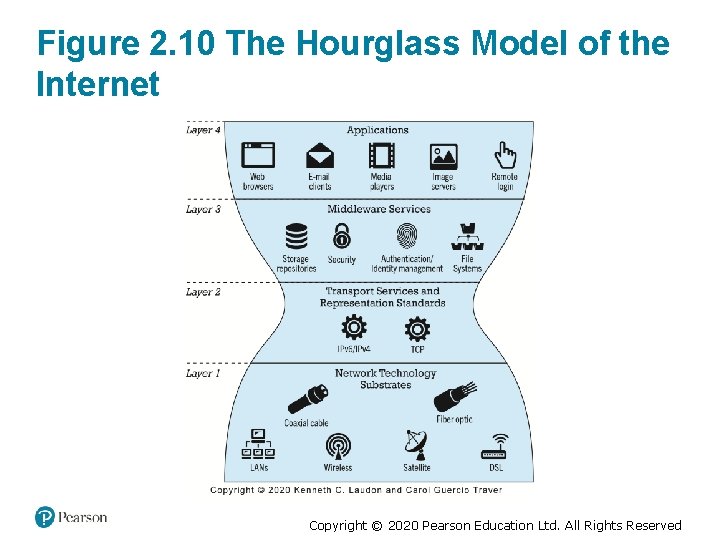
Figure 2. 10 The Hourglass Model of the Internet Copyright © 2020 Pearson Education Ltd. All Rights Reserved
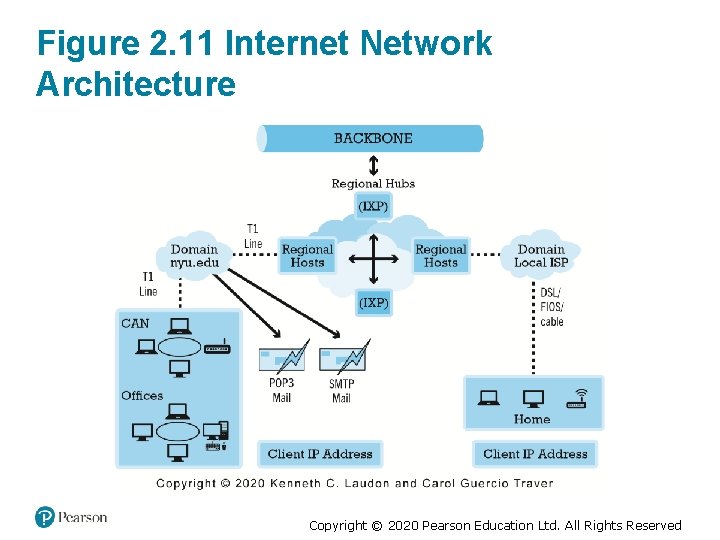
Figure 2. 11 Internet Network Architecture Copyright © 2020 Pearson Education Ltd. All Rights Reserved
The Internet Backbone • Comprised of fiber-optic cable: hundreds of glass strands that use light to transmit data – Faster speeds and greater bandwidth – Thinner, lighter cables – Less interference – Better data security • Tier 1 Internet Service Providers (Tier 1 ISPs) or transit ISPs • Numerous private networks physically connected to each other • Undersea fiber optics, satellite links Copyright © 2020 Pearson Education Ltd. All Rights Reserved
Internet Exchange Points (IXPs) • Regional hubs where Tier 1 ISPs physically connect with one another and with regional Tier 2 ISPs. • Tier 2 ISPs provide Tier 3 ISPs with Internet access. • Originally called Network Access Points (NAPs) or Metropolitan Area Exchanges (MAEs). Copyright © 2020 Pearson Education Ltd. All Rights Reserved
Tier 3 Internet Service Providers • Retail providers – Lease Internet access to home owners, small businesses – Large providers: Comcast, Charter Spectrum, AT&T, Verizon, Altice (Optimum) – Smaller local providers • Services – Narrowband – Broadband – Digital subscriber line (DSL) – Cable Internet – Satellite Internet Copyright © 2020 Pearson Education Ltd. All Rights Reserved
Campus/Corporate Area Networks • Local area networks operating within single organization, such as NYU or Microsoft Corporation • Lease Internet access directly from regional and national carriers Copyright © 2020 Pearson Education Ltd. All Rights Reserved
Mobile Internet Access • Two basic types of wireless Internet access: – Telephone-based (mobile phones, smartphones) – Computer network-based (wireless local area networkbased) • Telephone-based wireless Internet access – Currently based on 3 G and 4 G technologies – 5 G will provide higher bandwidth with speeds reaching 10 Gbps or more Copyright © 2020 Pearson Education Ltd. All Rights Reserved
Wireless Local Area Network (WLAN) Based Internet Access • Wi-Fi (various 802. 11 standards) – High-speed, fixed broadband wireless LAN (WLAN) – Wireless access point (“hot spots”) – Limited range but inexpensive • Wi. Max • Bluetooth Copyright © 2020 Pearson Education Ltd. All Rights Reserved
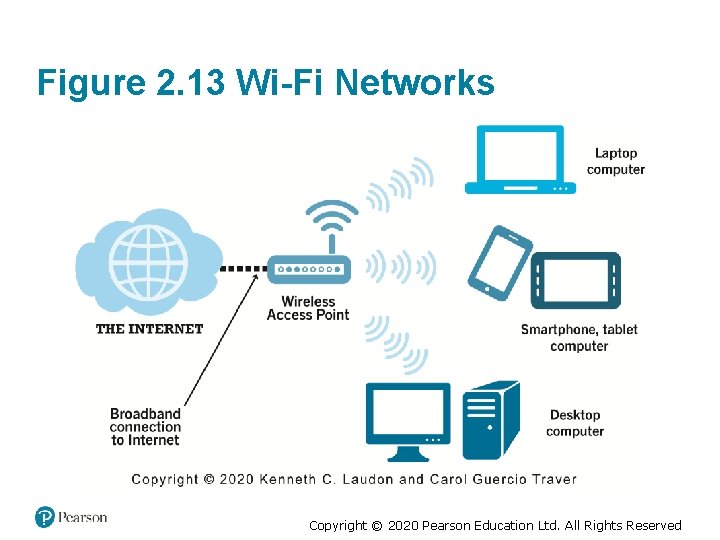
Figure 2. 13 Wi-Fi Networks Copyright © 2020 Pearson Education Ltd. All Rights Reserved
Other Innovative Internet Access Technologies: Drones, Balloons, and White Space • Google: Project Loon • Facebook: Facebook Connectivity Lab/Acquila drone • Microsoft: Airband Initiative (white spaces) Copyright © 2020 Pearson Education Ltd. All Rights Reserved
The Internet of Things (IOT) • Objects connected via sensors/RFID to the Internet • “Smart things” • Interoperability issues and standards • Security and privacy concerns Copyright © 2020 Pearson Education Ltd. All Rights Reserved
Insight on Business: The Apple Watch: Bringing the Internet of Things to Your Wrist • Class Discussion – Are you or anyone you know using the Apple Watch? If not, why not? If so, what apps do you use most? – What are the potential benefits of wearable technology? Are there any disadvantages? – What effects will features like the Apple Pay button and Taptic Engine have? – Are there any privacy issues raised by wearable technology? Copyright © 2020 Pearson Education Ltd. All Rights Reserved
Who Governs the Internet? • Organizations that influence the Internet and monitor its operations include: – Internet Corporation for Assigned Names and Numbers (ICANN) – Internet Engineering Task Force (IETF) – Internet Research Task Force (IRTF) – Internet Engineering Steering Group (IESG) – Internet Architecture Board (IAB) – Internet Society (ISOC) – Internet Governance Forum (IGF) – World Wide Web Consortium (W 3 C) – Internet Network Operators Groups (NOGs) Copyright © 2020 Pearson Education Ltd. All Rights Reserved
Insight on Society: Government Regulation and Surveillance of the Internet • Class discussion: – How is it possible for any government to “control” or censor the Web? – Does the Chinese government, or the U. S. government, have the right to censor online content? – How should U. S. companies deal with governments that want to censor content? – What would happen to e-commerce if the existing Web split into a different Web for each country? Copyright © 2020 Pearson Education Ltd. All Rights Reserved
The Web • 1989– 1991: Web invented – Tim Berners-Lee at CERN – HTML, HTTP, web server, web browser • 1993: Mosaic web browser w/GUI – Andreessen and others at NCSA – Runs on Windows, Macintosh, or Unix • 1994: Netscape Navigator, first commercial web browser • 1995: Microsoft Internet Explorer Copyright © 2020 Pearson Education Ltd. All Rights Reserved
Hypertext • Text formatted with embedded links – Links connect documents to one another, and to other objects such as sound, video, or animation files • Uses Hypertext Transfer Protocol (HTTP) and URLs to locate resources on the Web – Example URL: http: //megacorp. com/content/features/082602. html Copyright © 2020 Pearson Education Ltd. All Rights Reserved
Markup Languages • Hypertext Markup Language (HTML) – Fixed set of pre-defined markup “tags” used to format text – Controls look and feel of web pages – Used in conjunction with Cascading Style Sheets (CS S) – HTML 5 the newest version • e. Xtensible Markup Language (XML) – Designed to describe data and information – Tags used are defined by user Copyright © 2020 Pearson Education Ltd. All Rights Reserved
Web Servers and Web Clients • Web server software – Enables a computer to deliver web pages to clients on a network that request this service by sending an HTTP request – Basic capabilities: Security services, FTP, search engine, data capture • Web server – May refer to either web server software or physical server – Specialized servers: Database servers, ad servers, and so on • Web client – Any computing device attached to the Internet that is capable of making HTTP requests and displaying HTML pages Copyright © 2020 Pearson Education Ltd. All Rights Reserved
Web Browsers • Primary purpose is to display web page, but may include added features – Google’s Chrome: more than 60% of both the desktop and mobile market ▪ Open source – Internet Explorer: 12% of desktop, >1% mobile – Mozilla Firefox: 11% desktop, >1% mobile ▪ Open source – Apple’s Safari: 4% desktop, 27% mobile Copyright © 2020 Pearson Education Ltd. All Rights Reserved
The Internet and Web: Features • Features on which the foundations of e-commerce are built: – Communication tools – Search engines – Downloadable and streaming media – Web 2. 0 applications and services – Virtual reality and augmented reality – Intelligent digital assistants Copyright © 2020 Pearson Education Ltd. All Rights Reserved
Communication Tools • E-mail – Most used application of the Internet • Messaging Applications – Instant messaging • Online message boards • Internet telephony – VOIP • Video conferencing, video chatting, telepresence Copyright © 2020 Pearson Education Ltd. All Rights Reserved
Search Engines • Identify web pages that match queries based on one or more techniques – Keyword indexes – Page ranking • Also serve as: – Shopping tools – Advertising vehicles (search engine marketing) – Tool within e-commerce sites • Top three providers: Google, Bing, Yahoo (Oath) Copyright © 2020 Pearson Education Ltd. All Rights Reserved
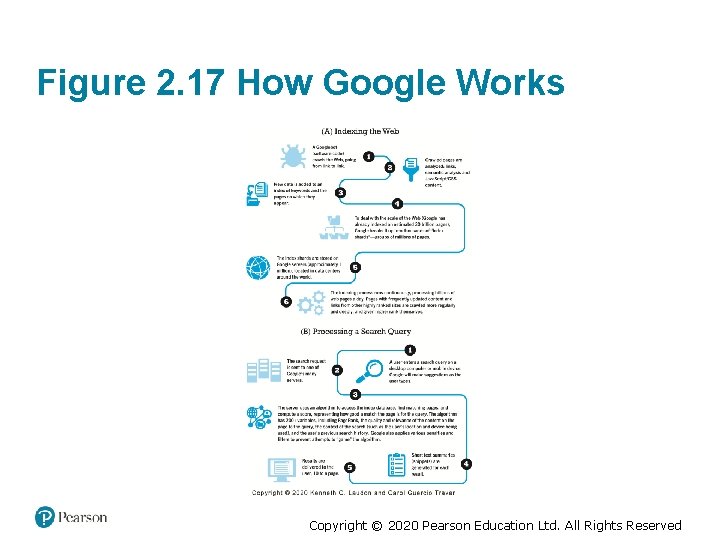
Figure 2. 17 How Google Works Copyright © 2020 Pearson Education Ltd. All Rights Reserved
Downloadable and Streaming Media • Downloads: – Growth in broadband connections enables large media file downloads • Streaming technologies – Enables music, video, and other large files to be sent to users in chunks so that the file can play uninterrupted • Podcasting • Explosion in online video viewing Copyright © 2020 Pearson Education Ltd. All Rights Reserved
Web 2. 0 Features and Services • Online Social Networks – Services that support communication among networks of friends, peers • Blogs – Personal web page of chronological entries – Enables web page publishing with no knowledge of HTML • Wikis – Enables documents to be written collectively and collaboratively – E. g. Wikipedia Copyright © 2020 Pearson Education Ltd. All Rights Reserved
Virtual Reality and Augmented Reality • Virtual reality (VR) – Immersing users within virtual world – Typically uses head-mounted display (HMD) – Oculus Rift, Vive, Play. Station VR • Augmented reality (AR) – Overlaying virtual objects over the real world, via mobile devices or HMDs – Pokémon GO Copyright © 2020 Pearson Education Ltd. All Rights Reserved
Insight on Technology: Leaping into the Future with AR and VR • Class Discussion – What are some of the challenges to the widespread adoption of AR and VR? – Why are major players such as Facebook, Google, Apple, Amazon, and telecommunications companies so interested in AR and VR applications? – Have you used any e-commerce-related AR or VR applications? If you have, did you find them to be useful? What did you like about them? What didn’t you like? Copyright © 2020 Pearson Education Ltd. All Rights Reserved
Intelligent Digital Assistants • Computer search engine using: – Natural language – Conversational interface, verbal commands – Situational awareness • Can handle requests for appointments, flights, routes, event scheduling, and more. – Examples: ▪ Apple’s Siri ▪ Google Now ▪ Google Assistant Copyright © 2020 Pearson Education Ltd. All Rights Reserved
Mobile Apps • Use of mobile apps has exploded – Most popular entertainment media, over TV – Always present shopping tool – Almost all top 100 brands have an app • Platforms – i. Phone/i. Pad (i. OS), Android • App marketplaces – Google Play, Apple’s App Store, Amazon’s Appstore Copyright © 2020 Pearson Education Ltd. All Rights Reserved
Careers in E-commerce • Position: E-commerce Specialist • Qualification/Skills • Preparing for the Interview • Possible Interview Questions Copyright © 2020 Pearson Education Ltd. All Rights Reserved
Copyright © 2020 Pearson Education Ltd. All Rights Reserved
- Slides: 50