
Eclipse World 2006 Sep 6 8 2006 Session
- Slides: 32
Eclipse. World 2006 Sep 6 -8, 2006 Session 805 Developing Collaborative Tools With Equinox and ECF Bob Brady ALF, ECF Contributor
2 Agenda • • • Motivation & Use Case Part I: OSGi Fundamentals Part II: ECF Fundamentals Part III: Server-Side Eclipse Part IV: Putting It all Together Questions & Resources Developing Collaborative Tools with Equinox and ECF | © 2006 by Bob Brady; made available under the EPL v 1. 0
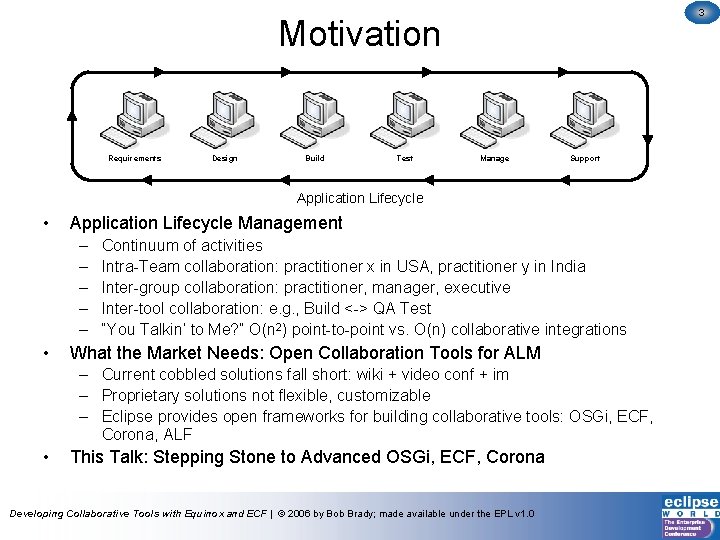
3 Motivation Requirements Design Build Test Manage Support Application Lifecycle • Application Lifecycle Management – – – • Continuum of activities Intra-Team collaboration: practitioner x in USA, practitioner y in India Inter-group collaboration: practitioner, manager, executive Inter-tool collaboration: e. g. , Build <-> QA Test “You Talkin’ to Me? ” O(n 2) point-to-point vs. O(n) collaborative integrations What the Market Needs: Open Collaboration Tools for ALM – Current cobbled solutions fall short: wiki + video conf + im – Proprietary solutions not flexible, customizable – Eclipse provides open frameworks for building collaborative tools: OSGi, ECF, Corona, ALF • This Talk: Stepping Stone to Advanced OSGi, ECF, Corona Developing Collaborative Tools with Equinox and ECF | © 2006 by Bob Brady; made available under the EPL v 1. 0
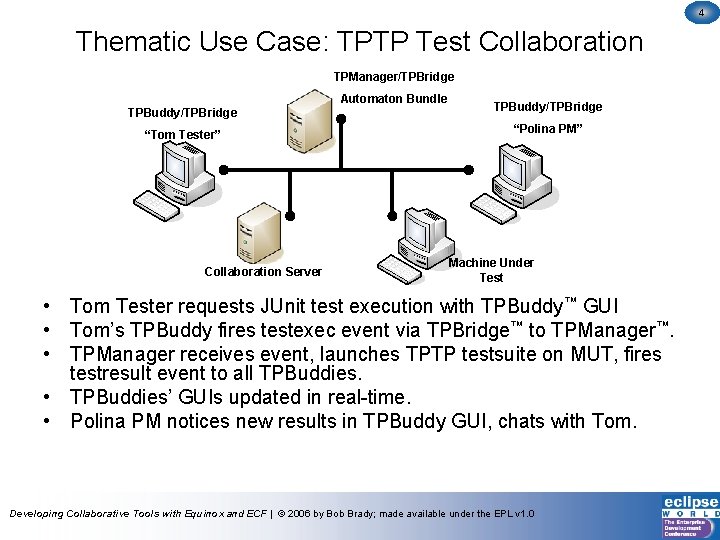
4 Thematic Use Case: TPTP Test Collaboration TPManager/TPBridge Automaton Bundle TPBuddy/TPBridge “Tom Tester” “Polina PM” Collaboration Server Machine Under Test • Tom Tester requests JUnit test execution with TPBuddy™ GUI • Tom’s TPBuddy fires testexec event via TPBridge™ to TPManager™. • TPManager receives event, launches TPTP testsuite on MUT, fires testresult event to all TPBuddies. • TPBuddies’ GUIs updated in real-time. • Polina PM notices new results in TPBuddy GUI, chats with Tom. Developing Collaborative Tools with Equinox and ECF | © 2006 by Bob Brady; made available under the EPL v 1. 0
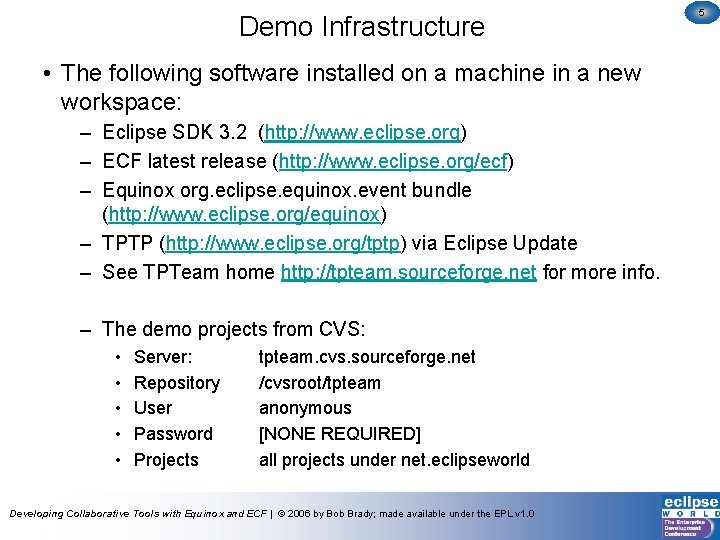
Demo Infrastructure • The following software installed on a machine in a new workspace: – Eclipse SDK 3. 2 (http: //www. eclipse. org) – ECF latest release (http: //www. eclipse. org/ecf) – Equinox org. eclipse. equinox. event bundle (http: //www. eclipse. org/equinox) – TPTP (http: //www. eclipse. org/tptp) via Eclipse Update – See TPTeam home http: //tpteam. sourceforge. net for more info. – The demo projects from CVS: • • • Server: Repository User Password Projects tpteam. cvs. sourceforge. net /cvsroot/tpteam anonymous [NONE REQUIRED] all projects under net. eclipseworld Developing Collaborative Tools with Equinox and ECF | © 2006 by Bob Brady; made available under the EPL v 1. 0 5
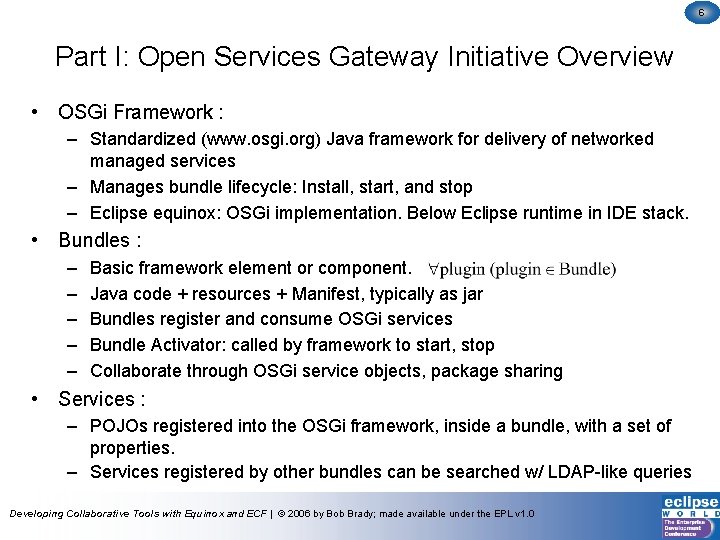
6 Part I: Open Services Gateway Initiative Overview • OSGi Framework : – Standardized (www. osgi. org) Java framework for delivery of networked managed services – Manages bundle lifecycle: Install, start, and stop – Eclipse equinox: OSGi implementation. Below Eclipse runtime in IDE stack. • Bundles : – – – Basic framework element or component. Java code + resources + Manifest, typically as jar Bundles register and consume OSGi services Bundle Activator: called by framework to start, stop Collaborate through OSGi service objects, package sharing • Services : – POJOs registered into the OSGi framework, inside a bundle, with a set of properties. – Services registered by other bundles can be searched w/ LDAP-like queries Developing Collaborative Tools with Equinox and ECF | © 2006 by Bob Brady; made available under the EPL v 1. 0
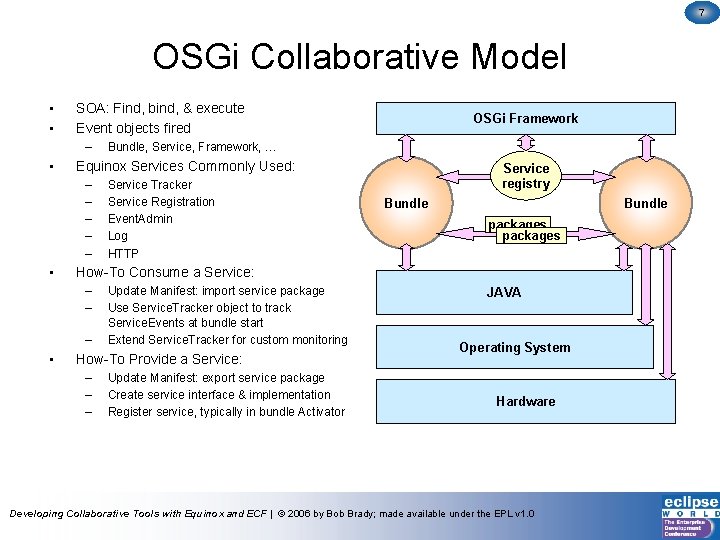
7 OSGi Collaborative Model • • SOA: Find, bind, & execute Event objects fired – • Service Tracker Service Registration Event. Admin Log HTTP Service registry Bundle packages How-To Consume a Service: – – – • Bundle, Service, Framework, … Equinox Services Commonly Used: – – – • OSGi Framework Update Manifest: import service package Use Service. Tracker object to track Service. Events at bundle start Extend Service. Tracker for custom monitoring How-To Provide a Service: – – – Update Manifest: export service package Create service interface & implementation Register service, typically in bundle Activator JAVA Operating System Hardware Developing Collaborative Tools with Equinox and ECF | © 2006 by Bob Brady; made available under the EPL v 1. 0
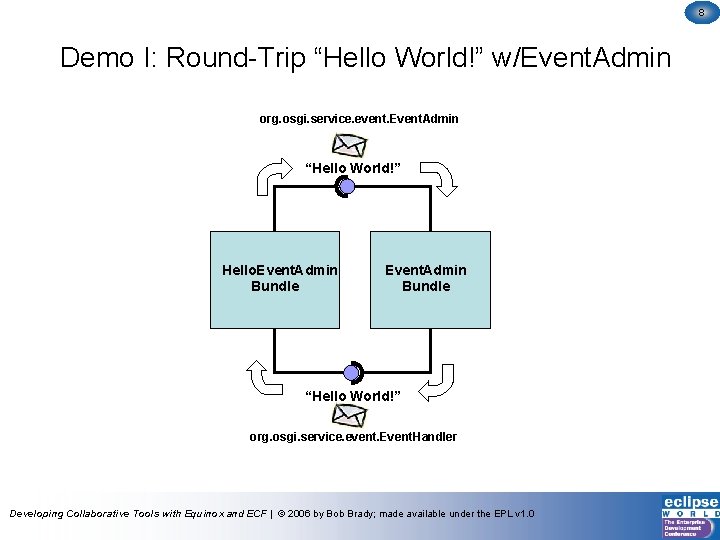
8 Demo I: Round-Trip “Hello World!” w/Event. Admin org. osgi. service. event. Event. Admin “Hello World!” Hello. Event. Admin Bundle “Hello World!” org. osgi. service. event. Event. Handler Developing Collaborative Tools with Equinox and ECF | © 2006 by Bob Brady; made available under the EPL v 1. 0
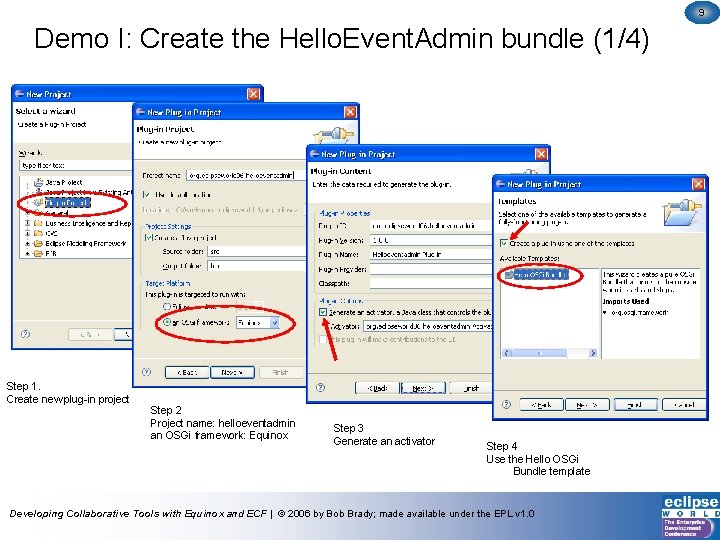
9 Demo I: Create the Hello. Event. Admin bundle (1/4) Step 1. Create new plug-in project Step 2 Project name: helloeventadmin an OSGi framework: Equinox Step 3 Generate an activator Step 4 Use the Hello OSGi Bundle template Developing Collaborative Tools with Equinox and ECF | © 2006 by Bob Brady; made available under the EPL v 1. 0
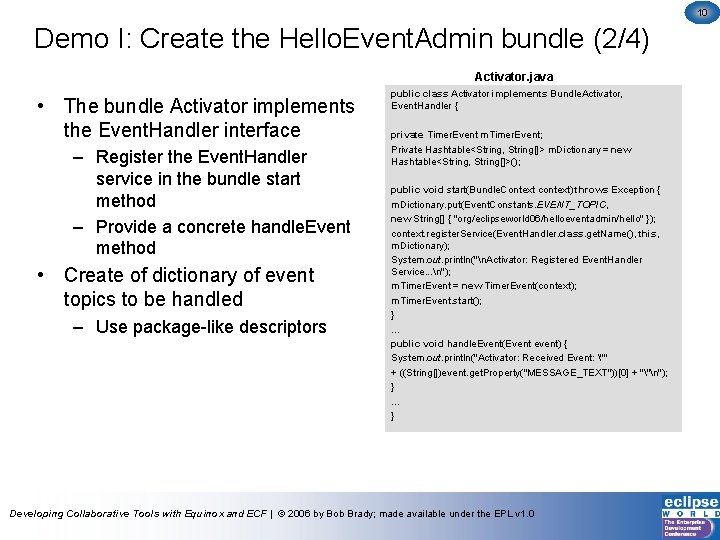
10 Demo I: Create the Hello. Event. Admin bundle (2/4) Activator. java • The bundle Activator implements the Event. Handler interface – Register the Event. Handler service in the bundle start method – Provide a concrete handle. Event method • Create of dictionary of event topics to be handled – Use package-like descriptors public class Activator implements Bundle. Activator, Event. Handler { private Timer. Event m. Timer. Event; Private Hashtable<String, String[]> m. Dictionary = new Hashtable<String, String[]>(); public void start(Bundle. Context context) throws Exception { m. Dictionary. put(Event. Constants. EVENT_TOPIC, new String[] { "org/eclipseworld 06/helloeventadmin/hello" }); context. register. Service(Event. Handler. class. get. Name(), this, m. Dictionary); System. out. println("n. Activator: Registered Event. Handler Service. . . n"); m. Timer. Event = new Timer. Event(context); m. Timer. Event. start(); } … public void handle. Event(Event event) { System. out. println("Activator: Received Event: "" + ((String[])event. get. Property("MESSAGE_TEXT"))[0] + ""n"); } … } Developing Collaborative Tools with Equinox and ECF | © 2006 by Bob Brady; made available under the EPL v 1. 0
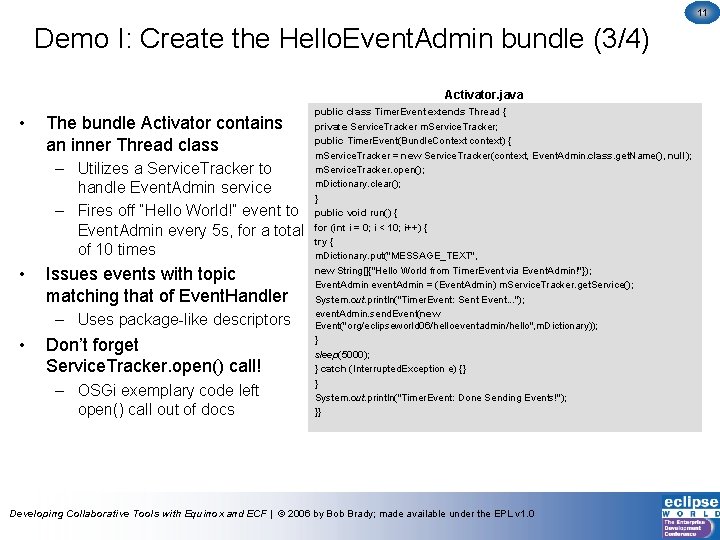
11 Demo I: Create the Hello. Event. Admin bundle (3/4) Activator. java • The bundle Activator contains an inner Thread class – Utilizes a Service. Tracker to handle Event. Admin service – Fires off “Hello World!” event to Event. Admin every 5 s, for a total of 10 times • Issues events with topic matching that of Event. Handler – Uses package-like descriptors • Don’t forget Service. Tracker. open() call! – OSGi exemplary code left open() call out of docs public class Timer. Event extends Thread { private Service. Tracker m. Service. Tracker; public Timer. Event(Bundle. Context context) { m. Service. Tracker = new Service. Tracker(context, Event. Admin. class. get. Name(), null); m. Service. Tracker. open(); m. Dictionary. clear(); } public void run() { for (int i = 0; i < 10; i++) { try { m. Dictionary. put("MESSAGE_TEXT", new String[]{"Hello World from Timer. Event via Event. Admin!"}); Event. Admin event. Admin = (Event. Admin) m. Service. Tracker. get. Service(); System. out. println("Timer. Event: Sent Event. . . "); event. Admin. send. Event(new Event("org/eclipseworld 06/helloeventadmin/hello", m. Dictionary)); } sleep(5000); } catch (Interrupted. Exception e) {} } System. out. println("Timer. Event: Done Sending Events!"); }} Developing Collaborative Tools with Equinox and ECF | © 2006 by Bob Brady; made available under the EPL v 1. 0
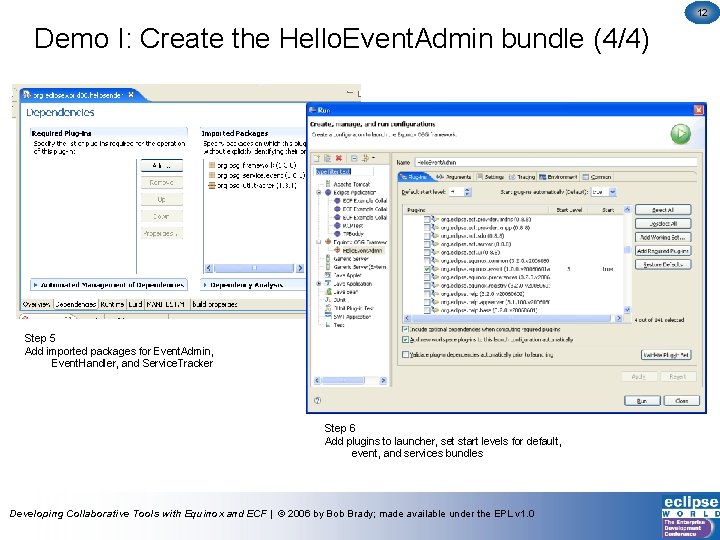
12 Demo I: Create the Hello. Event. Admin bundle (4/4) Step 5 Add imported packages for Event. Admin, Event. Handler, and Service. Tracker Step 6 Add plugins to launcher, set start levels for default, event, and services bundles Developing Collaborative Tools with Equinox and ECF | © 2006 by Bob Brady; made available under the EPL v 1. 0
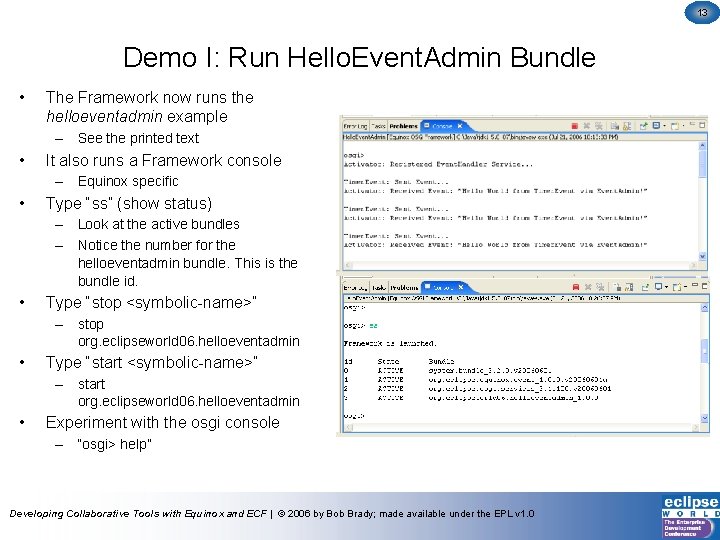
13 Demo I: Run Hello. Event. Admin Bundle • The Framework now runs the helloeventadmin example – See the printed text • It also runs a Framework console – Equinox specific • Type “ss” (show status) – Look at the active bundles – Notice the number for the helloeventadmin bundle. This is the bundle id. • Type “stop <symbolic-name>” – stop org. eclipseworld 06. helloeventadmin • Type “start <symbolic-name>” – start org. eclipseworld 06. helloeventadmin • Experiment with the osgi console – “osgi> help” Developing Collaborative Tools with Equinox and ECF | © 2006 by Bob Brady; made available under the EPL v 1. 0
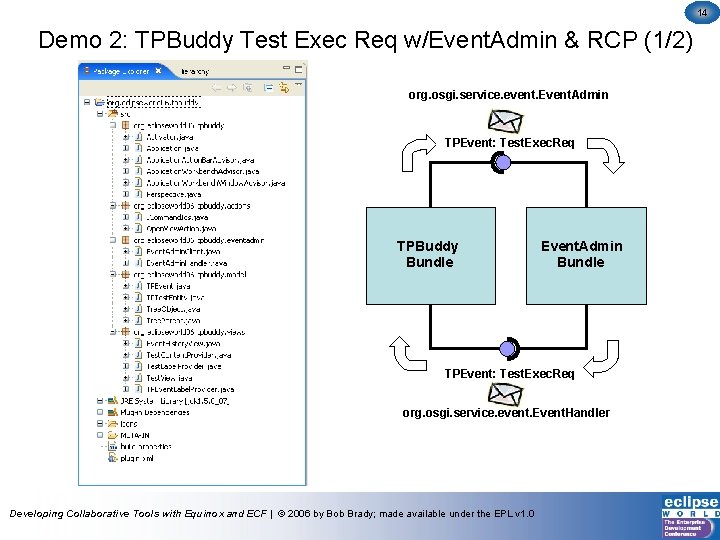
14 Demo 2: TPBuddy Test Exec Req w/Event. Admin & RCP (1/2) org. osgi. service. event. Event. Admin TPEvent: Test. Exec. Req TPBuddy Bundle Event. Admin Bundle TPEvent: Test. Exec. Req org. osgi. service. event. Event. Handler Developing Collaborative Tools with Equinox and ECF | © 2006 by Bob Brady; made available under the EPL v 1. 0
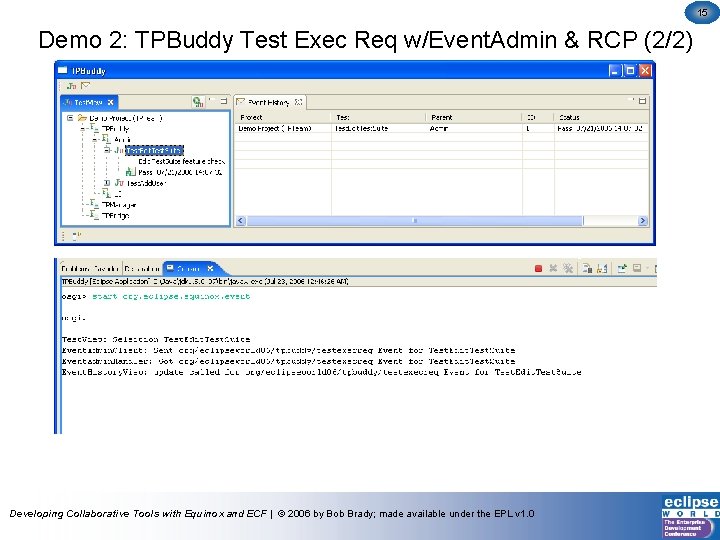
15 Demo 2: TPBuddy Test Exec Req w/Event. Admin & RCP (2/2) Developing Collaborative Tools with Equinox and ECF | © 2006 by Bob Brady; made available under the EPL v 1. 0
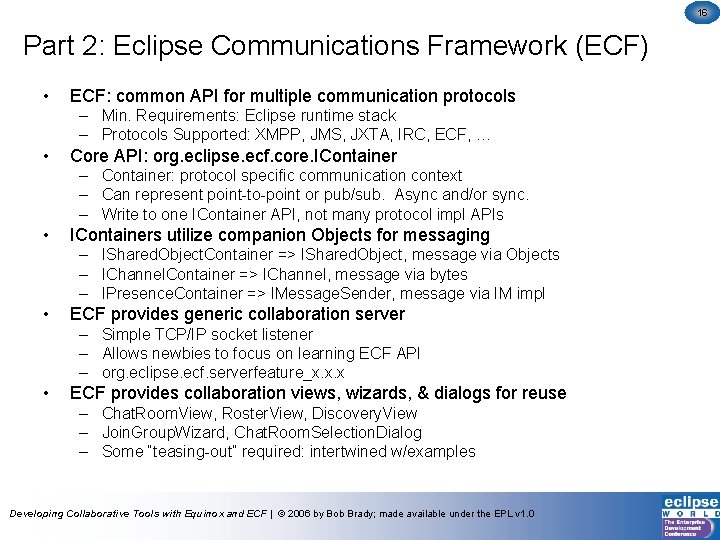
16 Part 2: Eclipse Communications Framework (ECF) • ECF: common API for multiple communication protocols – Min. Requirements: Eclipse runtime stack – Protocols Supported: XMPP, JMS, JXTA, IRC, ECF, … • Core API: org. eclipse. ecf. core. IContainer – Container: protocol specific communication context – Can represent point-to-point or pub/sub. Async and/or sync. – Write to one IContainer API, not many protocol impl APIs • IContainers utilize companion Objects for messaging – IShared. Object. Container => IShared. Object, message via Objects – IChannel. Container => IChannel, message via bytes – IPresence. Container => IMessage. Sender, message via IM impl • ECF provides generic collaboration server – Simple TCP/IP socket listener – Allows newbies to focus on learning ECF API – org. eclipse. ecf. serverfeature_x. x. x • ECF provides collaboration views, wizards, & dialogs for reuse – Chat. Room. View, Roster. View, Discovery. View – Join. Group. Wizard, Chat. Room. Selection. Dialog – Some “teasing-out” required: intertwined w/examples Developing Collaborative Tools with Equinox and ECF | © 2006 by Bob Brady; made available under the EPL v 1. 0
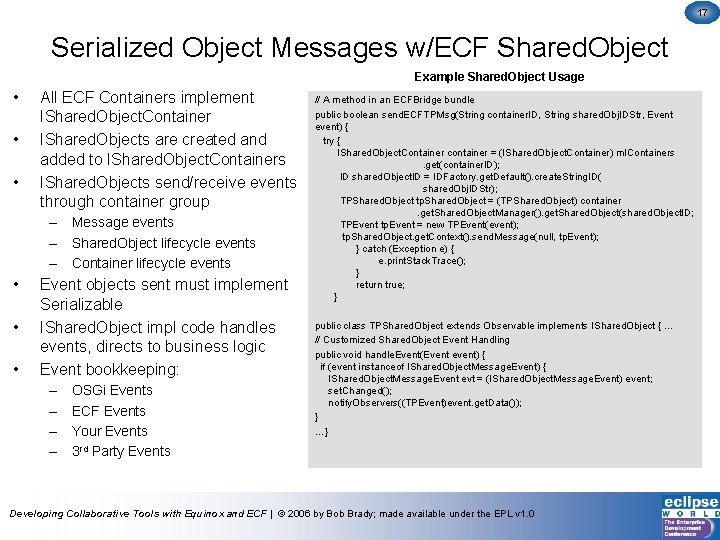
17 Serialized Object Messages w/ECF Shared. Object Example Shared. Object Usage • • • All ECF Containers implement IShared. Object. Container IShared. Objects are created and added to IShared. Object. Containers IShared. Objects send/receive events through container group – Message events – Shared. Object lifecycle events – Container lifecycle events • • • Event objects sent must implement Serializable IShared. Object impl code handles events, directs to business logic Event bookkeeping: – – OSGi Events ECF Events Your Events 3 rd Party Events // A method in an ECFBridge bundle public boolean send. ECFTPMsg(String container. ID, String shared. Obj. IDStr, Event event) { try { IShared. Object. Container container = (IShared. Object. Container) m. IContainers . get(container. ID); ID shared. Object. ID = IDFactory. get. Default(). create. String. ID( shared. Obj. IDStr); TPShared. Object tp. Shared. Object = (TPShared. Object) container . get. Shared. Object. Manager(). get. Shared. Object(shared. Object. ID; TPEvent tp. Event = new TPEvent(event); tp. Shared. Object. get. Context(). send. Message(null, tp. Event); } catch (Exception e) { e. print. Stack. Trace(); } return true; } public class TPShared. Object extends Observable implements IShared. Object { … // Customized Shared. Object Event Handling public void handle. Event(Event event) { if (event instanceof IShared. Object. Message. Event) { IShared. Object. Message. Event evt = (IShared. Object. Message. Event) event; set. Changed(); notify. Observers((TPEvent)event. get. Data()); } …} Developing Collaborative Tools with Equinox and ECF | © 2006 by Bob Brady; made available under the EPL v 1. 0
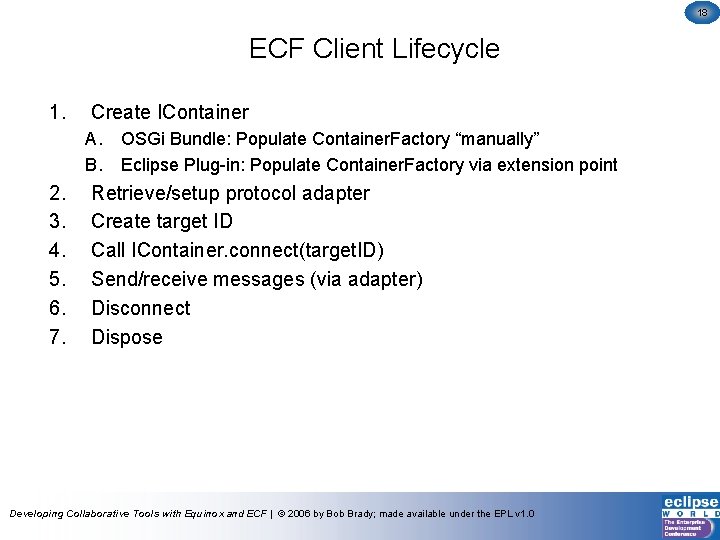
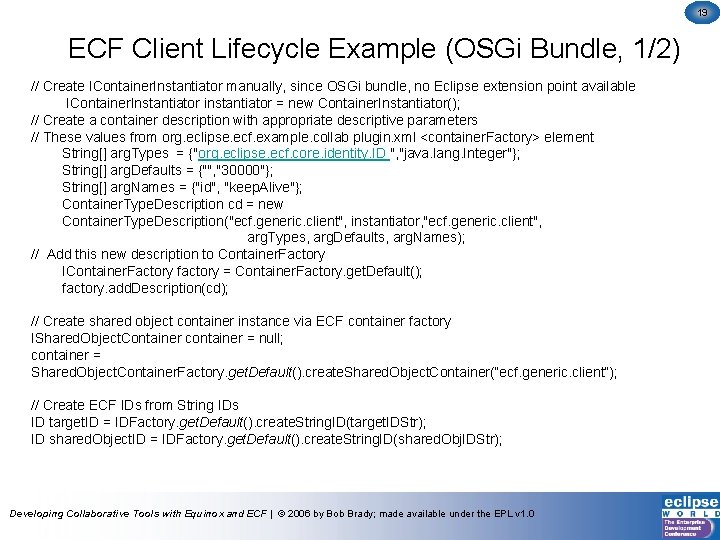
18 ECF Client Lifecycle 1. Create IContainer A. B. 2. 3. 4. 5. 6. 7. OSGi Bundle: Populate Container. Factory “manually” Eclipse Plug-in: Populate Container. Factory via extension point Retrieve/setup protocol adapter Create target ID Call IContainer. connect(target. ID) Send/receive messages (via adapter) Disconnect Dispose Developing Collaborative Tools with Equinox and ECF | © 2006 by Bob Brady; made available under the EPL v 1. 0
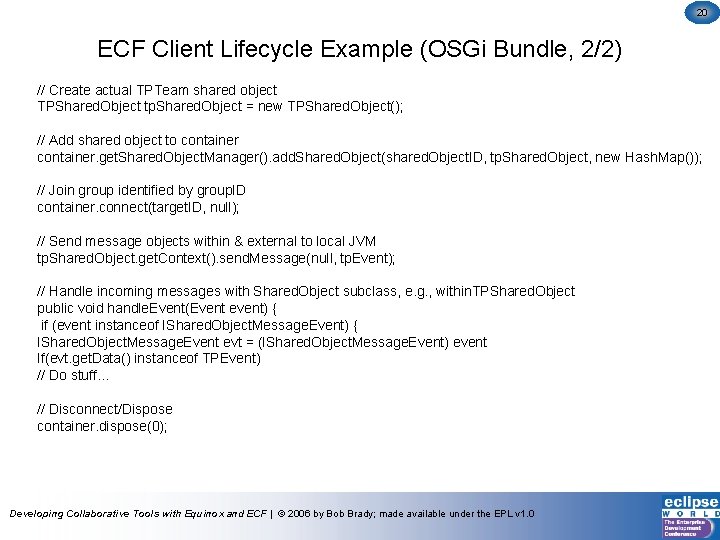
19 ECF Client Lifecycle Example (OSGi Bundle, 1/2) // Create IContainer. Instantiator manually, since OSGi bundle, no Eclipse extension point available IContainer. Instantiator instantiator = new Container. Instantiator(); // Create a container description with appropriate descriptive parameters // These values from org. eclipse. ecf. example. collab plugin. xml <container. Factory> element String[] arg. Types = {"org. eclipse. ecf. core. identity. ID ", "java. lang. Integer"}; String[] arg. Defaults = {"", "30000"}; String[] arg. Names = {"id", "keep. Alive"}; Container. Type. Description cd = new Container. Type. Description("ecf. generic. client", instantiator, "ecf. generic. client", arg. Types, arg. Defaults, arg. Names); // Add this new description to Container. Factory IContainer. Factory factory = Container. Factory. get. Default(); factory. add. Description(cd); // Create shared object container instance via ECF container factory IShared. Object. Container container = null; container = Shared. Object. Container. Factory. get. Default(). create. Shared. Object. Container(“ecf. generic. client”); // Create ECF IDs from String IDs ID target. ID = IDFactory. get. Default(). create. String. ID(target. IDStr); ID shared. Object. ID = IDFactory. get. Default(). create. String. ID(shared. Obj. IDStr); Developing Collaborative Tools with Equinox and ECF | © 2006 by Bob Brady; made available under the EPL v 1. 0
20 ECF Client Lifecycle Example (OSGi Bundle, 2/2) // Create actual TPTeam shared object TPShared. Object tp. Shared. Object = new TPShared. Object(); // Add shared object to container. get. Shared. Object. Manager(). add. Shared. Object(shared. Object. ID, tp. Shared. Object, new Hash. Map()); // Join group identified by group. ID container. connect(target. ID, null); // Send message objects within & external to local JVM tp. Shared. Object. get. Context(). send. Message(null, tp. Event); // Handle incoming messages with Shared. Object subclass, e. g. , within. TPShared. Object public void handle. Event(Event event) { if (event instanceof IShared. Object. Message. Event) { IShared. Object. Message. Event evt = (IShared. Object. Message. Event) event If(evt. get. Data() instanceof TPEvent) // Do stuff… // Disconnect/Dispose container. dispose(0); Developing Collaborative Tools with Equinox and ECF | © 2006 by Bob Brady; made available under the EPL v 1. 0
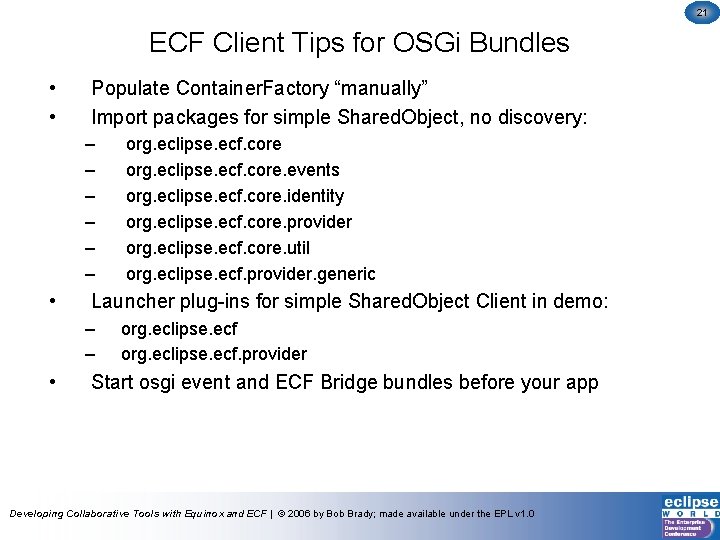
21 ECF Client Tips for OSGi Bundles • • Populate Container. Factory “manually” Import packages for simple Shared. Object, no discovery: – – – • Launcher plug-ins for simple Shared. Object Client in demo: – – • org. eclipse. ecf. core. events org. eclipse. ecf. core. identity org. eclipse. ecf. core. provider org. eclipse. ecf. core. util org. eclipse. ecf. provider. generic org. eclipse. ecf. provider Start osgi event and ECF Bridge bundles before your app Developing Collaborative Tools with Equinox and ECF | © 2006 by Bob Brady; made available under the EPL v 1. 0
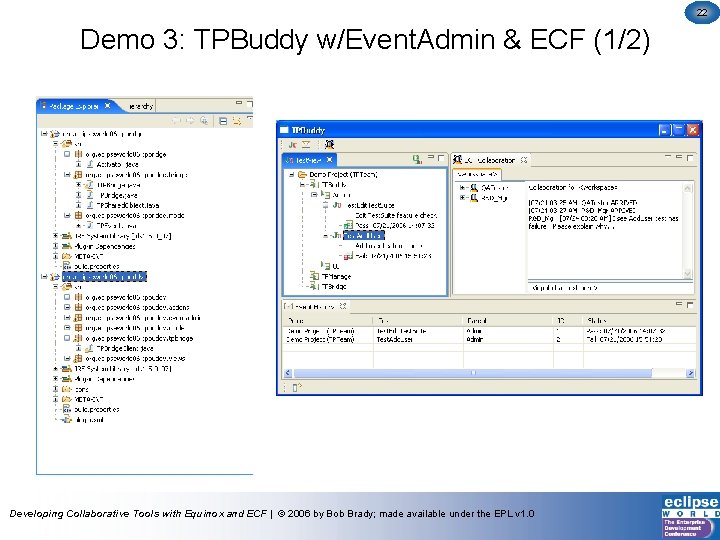
22 Demo 3: TPBuddy w/Event. Admin & ECF (1/2) Developing Collaborative Tools with Equinox and ECF | © 2006 by Bob Brady; made available under the EPL v 1. 0
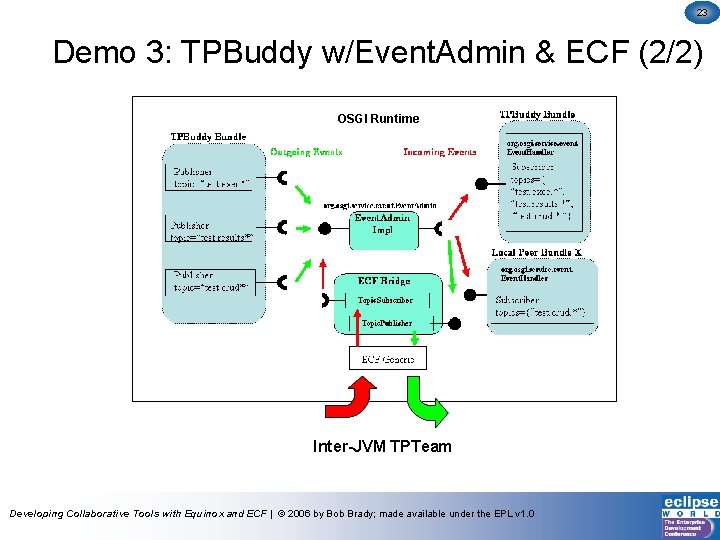
23 Demo 3: TPBuddy w/Event. Admin & ECF (2/2) OSGI Runtime Inter-JVM TPTeam Developing Collaborative Tools with Equinox and ECF | © 2006 by Bob Brady; made available under the EPL v 1. 0
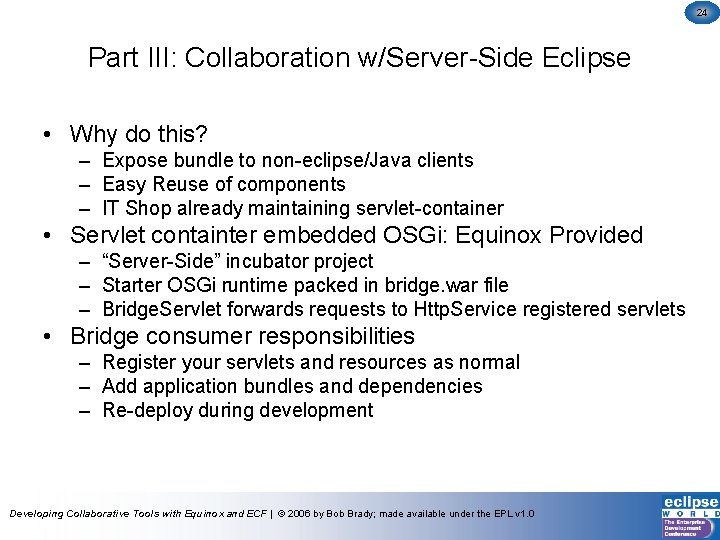
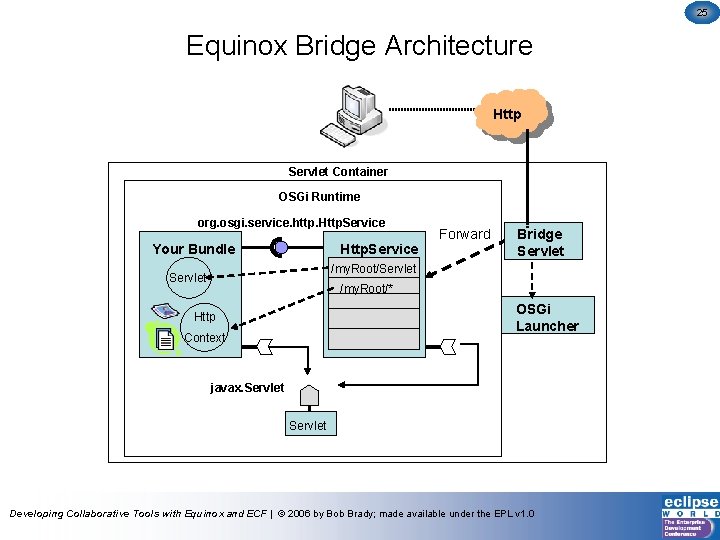
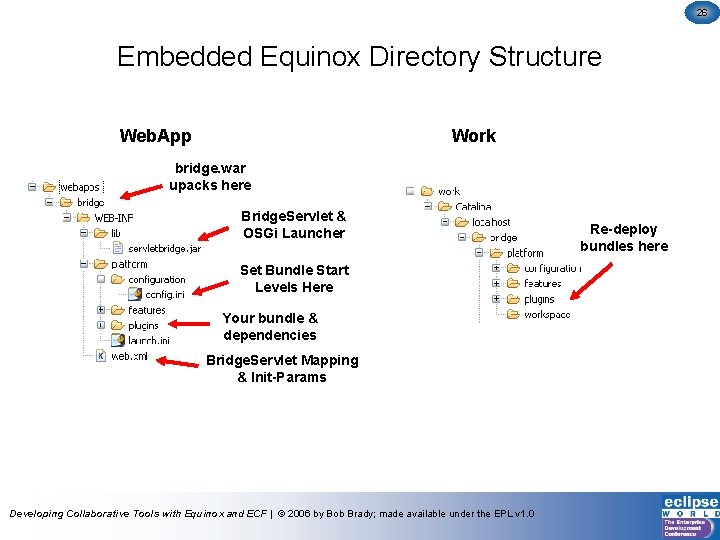
24 Part III: Collaboration w/Server-Side Eclipse • Why do this? – Expose bundle to non-eclipse/Java clients – Easy Reuse of components – IT Shop already maintaining servlet-container • Servlet containter embedded OSGi: Equinox Provided – “Server-Side” incubator project – Starter OSGi runtime packed in bridge. war file – Bridge. Servlet forwards requests to Http. Service registered servlets • Bridge consumer responsibilities – Register your servlets and resources as normal – Add application bundles and dependencies – Re-deploy during development Developing Collaborative Tools with Equinox and ECF | © 2006 by Bob Brady; made available under the EPL v 1. 0
25 Equinox Bridge Architecture Http Servlet Container OSGi Runtime org. osgi. service. http. Http. Service Your Bundle Http. Service Forward Bridge Servlet /my. Root/Servlet /my. Root/* OSGi Launcher Http Context javax. Servlet Developing Collaborative Tools with Equinox and ECF | © 2006 by Bob Brady; made available under the EPL v 1. 0
26 Embedded Equinox Directory Structure Web. App Work bridge. war upacks here Bridge. Servlet & OSGi Launcher Set Bundle Start Levels Here Your bundle & dependencies Bridge. Servlet Mapping & Init-Params Developing Collaborative Tools with Equinox and ECF | © 2006 by Bob Brady; made available under the EPL v 1. 0 Re-deploy bundles here
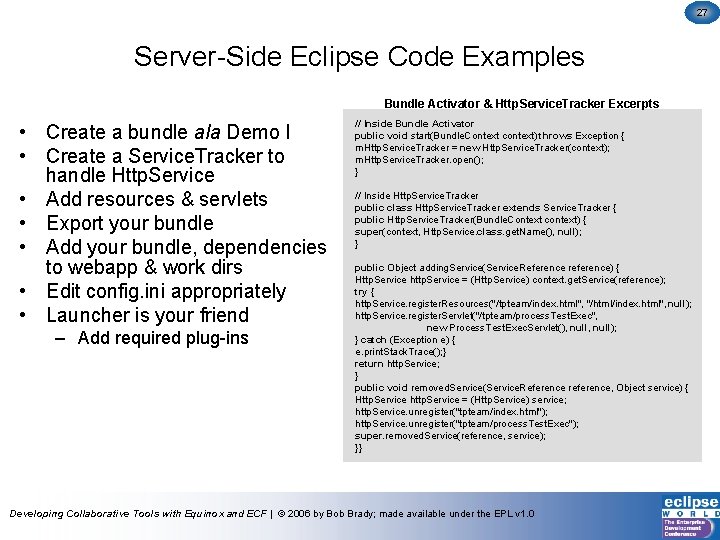
27 Server-Side Eclipse Code Examples Bundle Activator & Http. Service. Tracker Excerpts • Create a bundle ala Demo I • Create a Service. Tracker to handle Http. Service • Add resources & servlets • Export your bundle • Add your bundle, dependencies to webapp & work dirs • Edit config. ini appropriately • Launcher is your friend – Add required plug-ins // Inside Bundle Activator public void start(Bundle. Context context) throws Exception { m. Http. Service. Tracker = new Http. Service. Tracker(context); m. Http. Service. Tracker. open(); } // Inside Http. Service. Tracker public class Http. Service. Tracker extends Service. Tracker { public Http. Service. Tracker(Bundle. Context context) { super(context, Http. Service. class. get. Name(), null); } public Object adding. Service(Service. Reference reference) { Http. Service http. Service = (Http. Service) context. get. Service(reference); try { http. Service. register. Resources("/tpteam/index. html", "/html/index. html", null); http. Service. register. Servlet("/tpteam/process. Test. Exec", new Process. Test. Exec. Servlet(), null); } catch (Exception e) { e. print. Stack. Trace(); } return http. Service; } public void removed. Service(Service. Reference reference, Object service) { Http. Service http. Service = (Http. Service) service; http. Service. unregister("tpteam/index. html"); http. Service. unregister("tpteam/process. Test. Exec"); super. removed. Service(reference, service); }} Developing Collaborative Tools with Equinox and ECF | © 2006 by Bob Brady; made available under the EPL v 1. 0
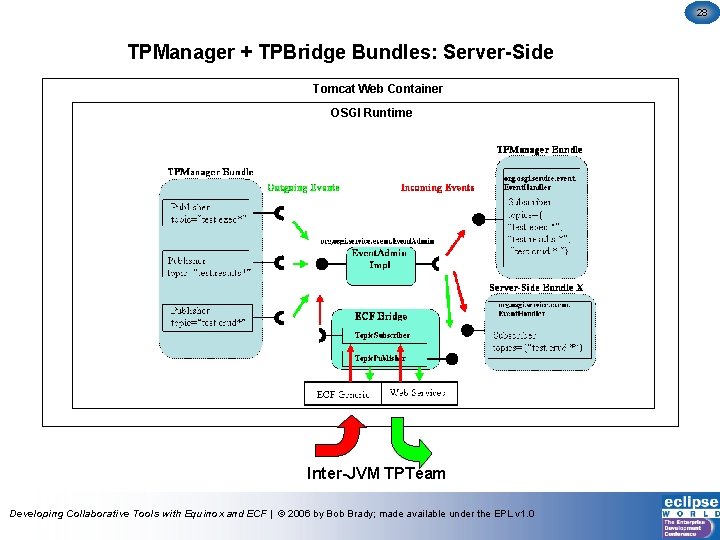
28 TPManager + TPBridge Bundles: Server-Side Tomcat Web Container OSGI Runtime Inter-JVM TPTeam Developing Collaborative Tools with Equinox and ECF | © 2006 by Bob Brady; made available under the EPL v 1. 0
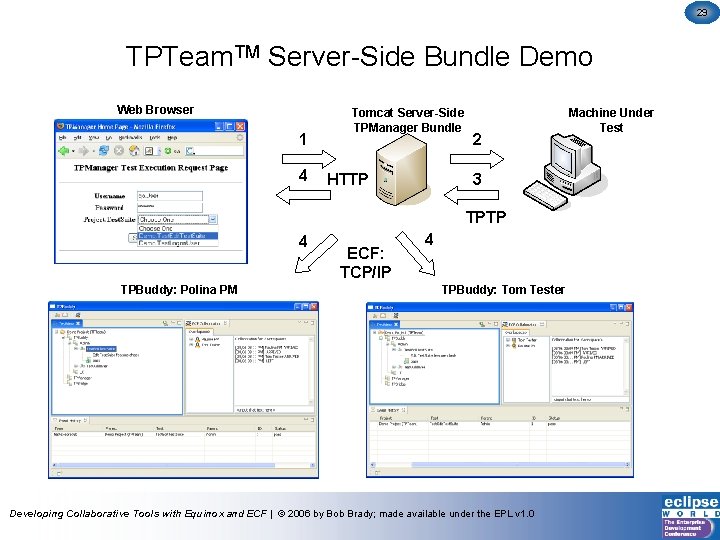
29 TPTeam. TM Server-Side Bundle Demo Web Browser 1 4 Tomcat Server-Side TPManager Bundle HTTP 2 3 TPTP 4 TPBuddy: Polina PM ECF: TCP/IP 4 TPBuddy: Tom Tester Developing Collaborative Tools with Equinox and ECF | © 2006 by Bob Brady; made available under the EPL v 1. 0 Machine Under Test
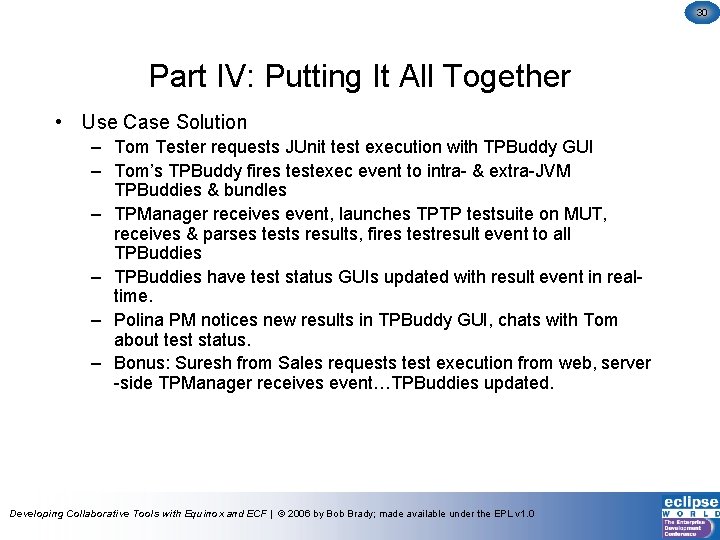
30 Part IV: Putting It All Together • Use Case Solution – Tom Tester requests JUnit test execution with TPBuddy GUI – Tom’s TPBuddy fires testexec event to intra- & extra-JVM TPBuddies & bundles – TPManager receives event, launches TPTP testsuite on MUT, receives & parses tests results, fires testresult event to all TPBuddies – TPBuddies have test status GUIs updated with result event in realtime. – Polina PM notices new results in TPBuddy GUI, chats with Tom about test status. – Bonus: Suresh from Sales requests test execution from web, server -side TPManager receives event…TPBuddies updated. Developing Collaborative Tools with Equinox and ECF | © 2006 by Bob Brady; made available under the EPL v 1. 0
31 Resources • Equinox: Jeff Mc. Affer, Project Lead, jeff_nospam_mcaffer@ca. ibm. com – www. eclipse. org/equinox • ECF: Scott Lewis, Project Lead, slewis@composent. com – www. eclipse. org/ecf • Corona: Dennis O’Flynn, Project Lead, dennis. oflynn@compuware. com – www. eclipse. org/corona • ALF: Ali Kheirolomoom, Project Lead, akheirolomoom@serena. com – www. eclipse. org/alf • TPTP: Joe Toomey, jptoomey@us. ibm. com – www. eclipse. org/tptp • “Dr. OSGi”, Didier Donsez, Professor, Joe Fourier University – www-adele. imag. fr/users/Didier. Donsez/ • TPTeam: Bob Brady, rpbrady@gmail. com – http: //tpteam. sourceforge. net Developing Collaborative Tools with Equinox and ECF | © 2006 by Bob Brady; made available under the EPL v 1. 0
32 Questions Developing Collaborative Tools with Equinox and ECF | © 2006 by Bob Brady; made available under the EPL v 1. 0