
ECE 3430 Introduction to Microcomputer Systems University of
- Slides: 18
ECE 3430 – Introduction to Microcomputer Systems University of Colorado at Colorado Springs Lecture #16 Agenda Today 1. Input Capture 2. Pulse Accumulation Lecture #16 ECE 3430 – Intro to Microcomputer Systems Fall 2009 1
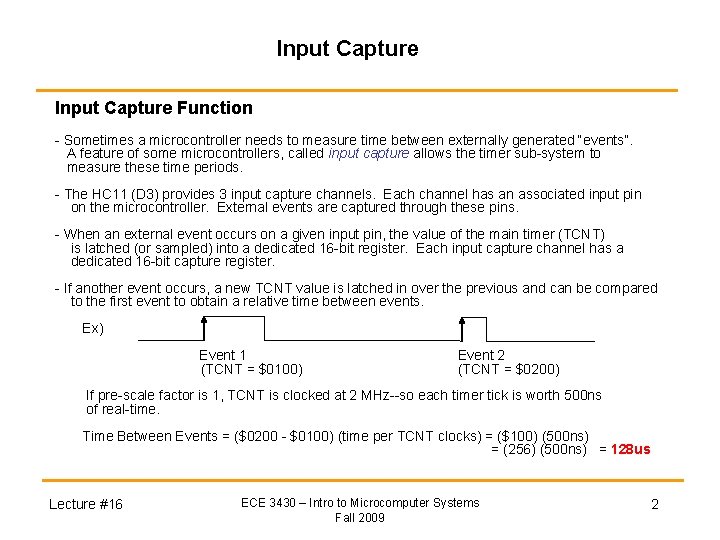
Input Capture Function - Sometimes a microcontroller needs to measure time between externally generated “events”. A feature of some microcontrollers, called input capture allows the timer sub-system to measure these time periods. - The HC 11 (D 3) provides 3 input capture channels. Each channel has an associated input pin on the microcontroller. External events are captured through these pins. - When an external event occurs on a given input pin, the value of the main timer (TCNT) is latched (or sampled) into a dedicated 16 -bit register. Each input capture channel has a dedicated 16 -bit capture register. - If another event occurs, a new TCNT value is latched in over the previous and can be compared to the first event to obtain a relative time between events. Ex) Event 1 (TCNT = $0100) Event 2 (TCNT = $0200) If pre-scale factor is 1, TCNT is clocked at 2 MHz--so each timer tick is worth 500 ns of real-time. Time Between Events = ($0200 - $0100) (time per TCNT clocks) = ($100) (500 ns) = (256) (500 ns) = 128 us Lecture #16 ECE 3430 – Intro to Microcomputer Systems Fall 2009 2
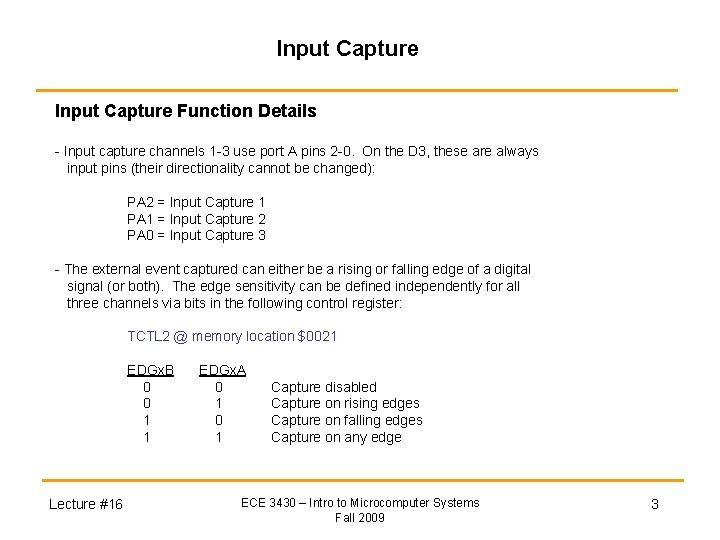
Input Capture Function Details - Input capture channels 1 -3 use port A pins 2 -0. On the D 3, these are always input pins (their directionality cannot be changed): PA 2 = Input Capture 1 PA 1 = Input Capture 2 PA 0 = Input Capture 3 - The external event captured can either be a rising or falling edge of a digital signal (or both). The edge sensitivity can be defined independently for all three channels via bits in the following control register: TCTL 2 @ memory location $0021 EDGx. B 0 0 1 1 Lecture #16 EDGx. A 0 1 Capture disabled Capture on rising edges Capture on falling edges Capture on any edge ECE 3430 – Intro to Microcomputer Systems Fall 2009 3
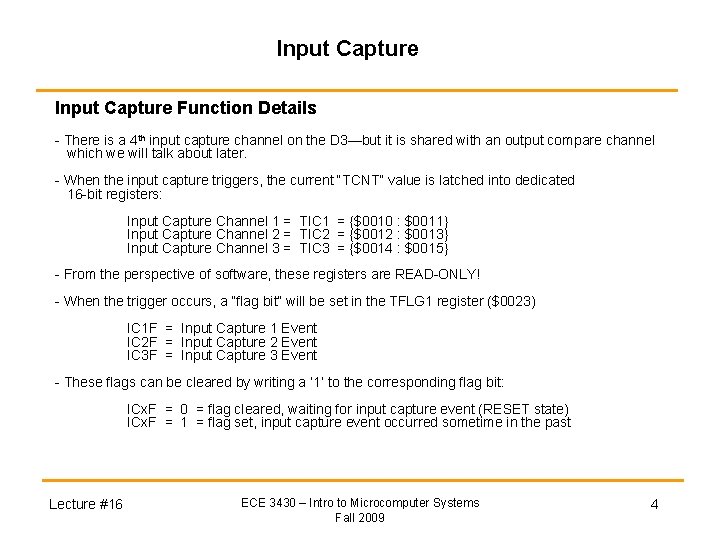
Input Capture Function Details - There is a 4 th input capture channel on the D 3—but it is shared with an output compare channel which we will talk about later. - When the input capture triggers, the current “TCNT” value is latched into dedicated 16 -bit registers: Input Capture Channel 1 = TIC 1 = {$0010 : $0011} Input Capture Channel 2 = TIC 2 = {$0012 : $0013} Input Capture Channel 3 = TIC 3 = {$0014 : $0015} - From the perspective of software, these registers are READ-ONLY! - When the trigger occurs, a “flag bit” will be set in the TFLG 1 register ($0023) IC 1 F = Input Capture 1 Event IC 2 F = Input Capture 2 Event IC 3 F = Input Capture 3 Event - These flags can be cleared by writing a ‘ 1’ to the corresponding flag bit: ICx. F = 0 = flag cleared, waiting for input capture event (RESET state) ICx. F = 1 = flag set, input capture event occurred sometime in the past Lecture #16 ECE 3430 – Intro to Microcomputer Systems Fall 2009 4
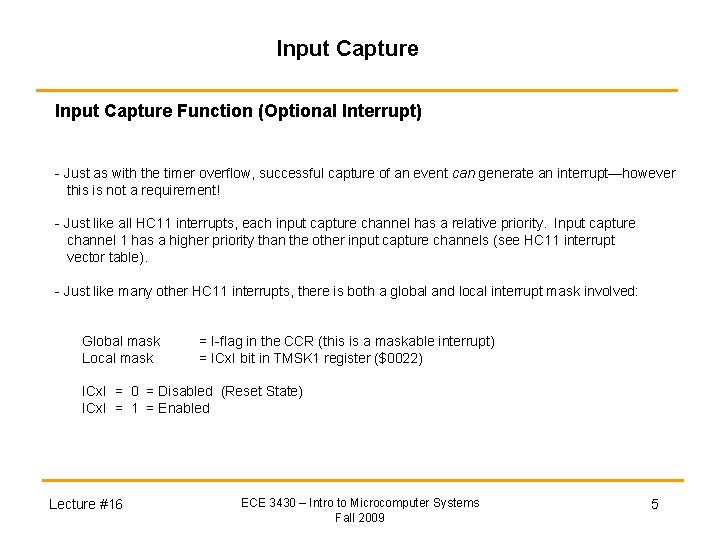
Input Capture Function (Optional Interrupt) - Just as with the timer overflow, successful capture of an event can generate an interrupt—however this is not a requirement! - Just like all HC 11 interrupts, each input capture channel has a relative priority. Input capture channel 1 has a higher priority than the other input capture channels (see HC 11 interrupt vector table). - Just like many other HC 11 interrupts, there is both a global and local interrupt mask involved: Global mask Local mask = I-flag in the CCR (this is a maskable interrupt) = ICx. I bit in TMSK 1 register ($0022) ICx. I = 0 = Disabled (Reset State) ICx. I = 1 = Enabled Lecture #16 ECE 3430 – Intro to Microcomputer Systems Fall 2009 5
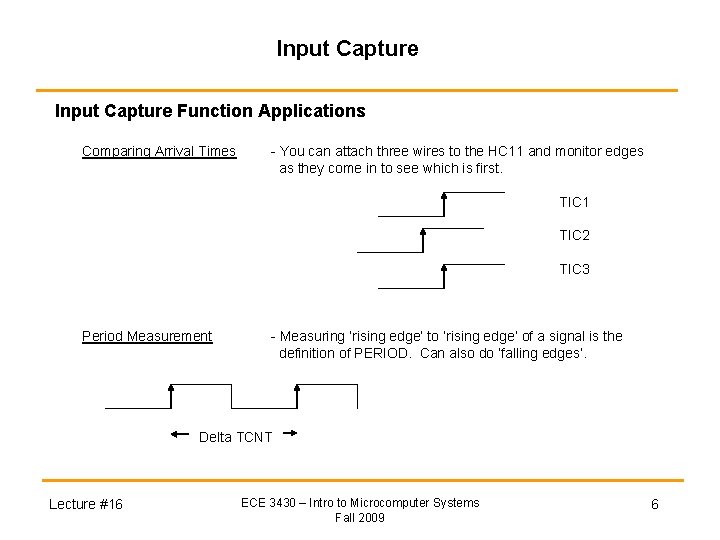
Input Capture Function Applications Comparing Arrival Times - You can attach three wires to the HC 11 and monitor edges as they come in to see which is first. TIC 1 TIC 2 TIC 3 Period Measurement - Measuring ‘rising edge’ to ‘rising edge’ of a signal is the definition of PERIOD. Can also do ‘falling edges’. Delta TCNT Lecture #16 ECE 3430 – Intro to Microcomputer Systems Fall 2009 6
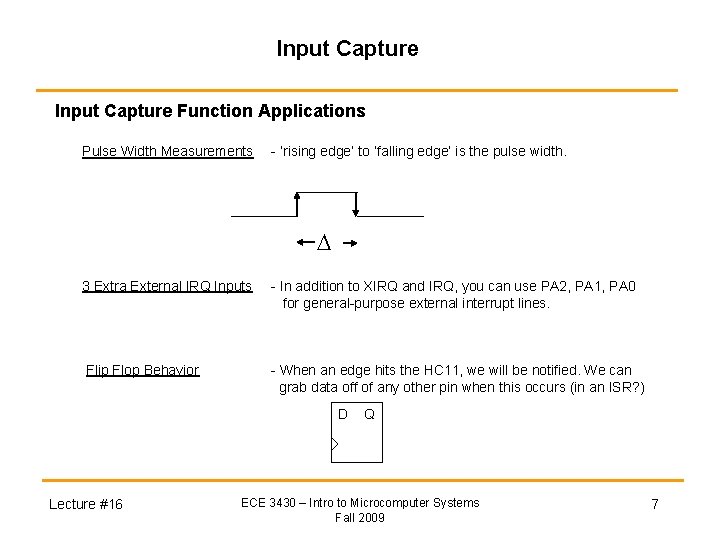
Input Capture Function Applications Pulse Width Measurements - ‘rising edge’ to ‘falling edge’ is the pulse width. 3 Extra External IRQ Inputs - In addition to XIRQ and IRQ, you can use PA 2, PA 1, PA 0 for general-purpose external interrupt lines. Flip Flop Behavior - When an edge hits the HC 11, we will be notified. We can grab data off of any other pin when this occurs (in an ISR? ) D Lecture #16 Q ECE 3430 – Intro to Microcomputer Systems Fall 2009 7
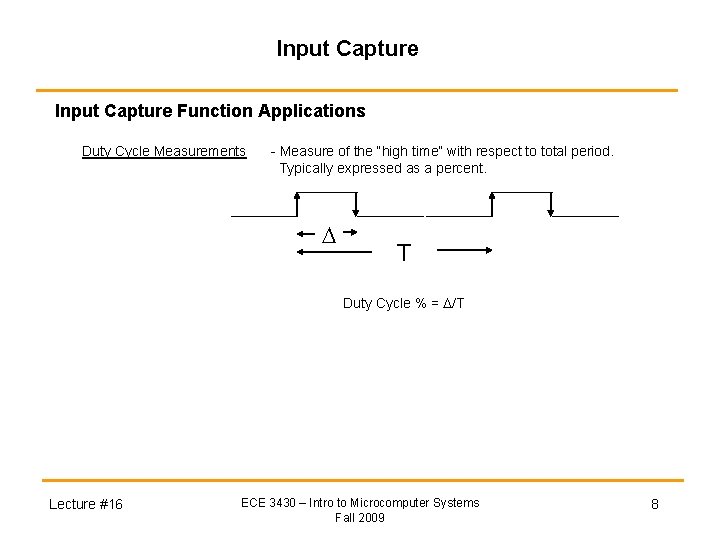
Input Capture Function Applications Duty Cycle Measurements - Measure of the “high time” with respect to total period. Typically expressed as a percent. T Duty Cycle % = /T Lecture #16 ECE 3430 – Intro to Microcomputer Systems Fall 2009 8
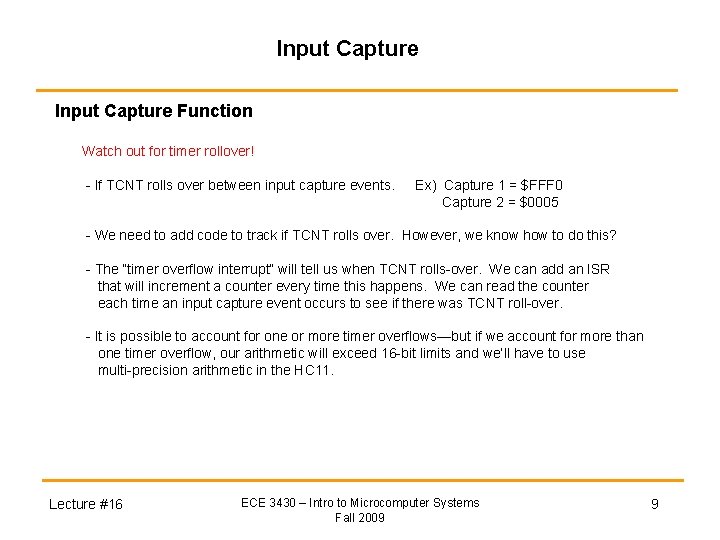
Input Capture Function Watch out for timer rollover! - If TCNT rolls over between input capture events. Ex) Capture 1 = $FFF 0 Capture 2 = $0005 - We need to add code to track if TCNT rolls over. However, we know how to do this? - The “timer overflow interrupt” will tell us when TCNT rolls-over. We can add an ISR that will increment a counter every time this happens. We can read the counter each time an input capture event occurs to see if there was TCNT roll-over. - It is possible to account for one or more timer overflows—but if we account for more than one timer overflow, our arithmetic will exceed 16 -bit limits and we’ll have to use multi-precision arithmetic in the HC 11. Lecture #16 ECE 3430 – Intro to Microcomputer Systems Fall 2009 9
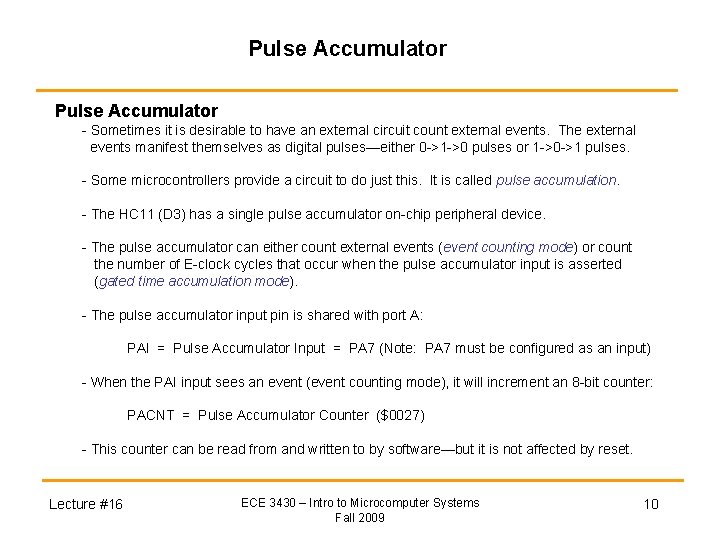
Pulse Accumulator - Sometimes it is desirable to have an external circuit count external events. The external events manifest themselves as digital pulses—either 0 ->1 ->0 pulses or 1 ->0 ->1 pulses. - Some microcontrollers provide a circuit to do just this. It is called pulse accumulation. - The HC 11 (D 3) has a single pulse accumulator on-chip peripheral device. - The pulse accumulator can either count external events (event counting mode) or count the number of E-clock cycles that occur when the pulse accumulator input is asserted (gated time accumulation mode). - The pulse accumulator input pin is shared with port A: PAI = Pulse Accumulator Input = PA 7 (Note: PA 7 must be configured as an input) - When the PAI input sees an event (event counting mode), it will increment an 8 -bit counter: PACNT = Pulse Accumulator Counter ($0027) - This counter can be read from and written to by software—but it is not affected by reset. Lecture #16 ECE 3430 – Intro to Microcomputer Systems Fall 2009 10
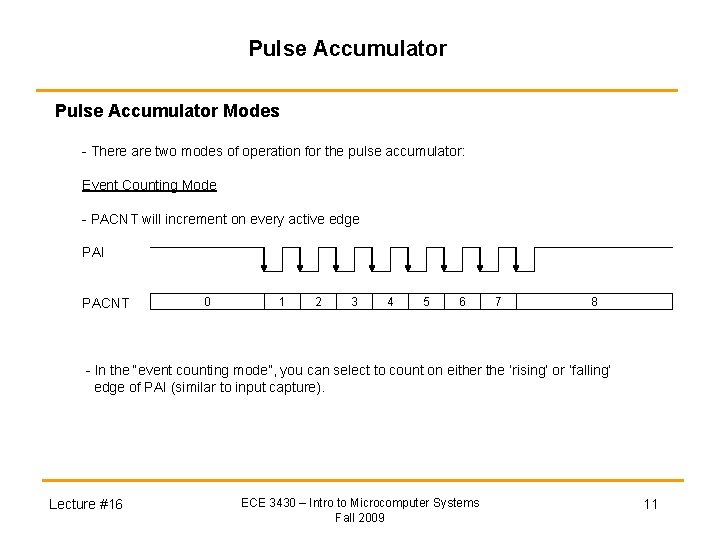
Pulse Accumulator Modes - There are two modes of operation for the pulse accumulator: Event Counting Mode - PACNT will increment on every active edge PAI PACNT 0 1 2 3 4 5 6 7 8 - In the “event counting mode”, you can select to count on either the ‘rising’ or ‘falling’ edge of PAI (similar to input capture). Lecture #16 ECE 3430 – Intro to Microcomputer Systems Fall 2009 11
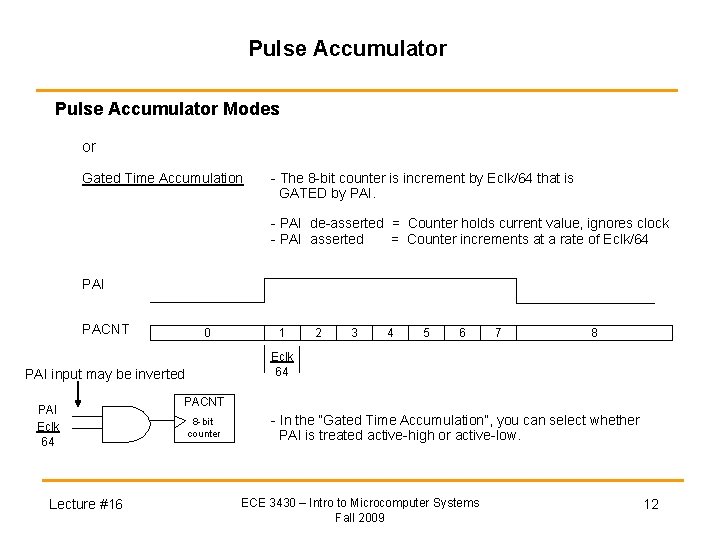
Pulse Accumulator Modes or Gated Time Accumulation - The 8 -bit counter is increment by Eclk/64 that is GATED by PAI. - PAI de-asserted = Counter holds current value, ignores clock - PAI asserted = Counter increments at a rate of Eclk/64 PAI PACNT 0 Lecture #16 2 3 4 5 6 7 8 Eclk 64 PAI input may be inverted PAI Eclk 64 1 PACNT 8 -bit counter - In the “Gated Time Accumulation”, you can select whether PAI is treated active-high or active-low. ECE 3430 – Intro to Microcomputer Systems Fall 2009 12
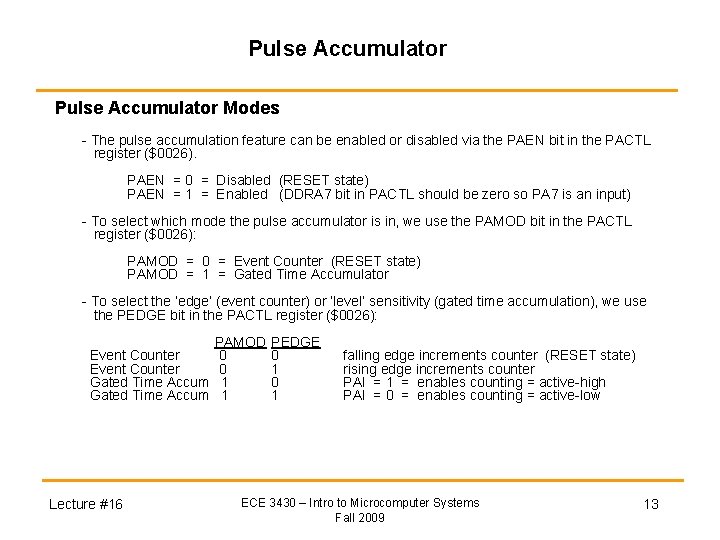
Pulse Accumulator Modes - The pulse accumulation feature can be enabled or disabled via the PAEN bit in the PACTL register ($0026). PAEN = 0 = Disabled (RESET state) PAEN = 1 = Enabled (DDRA 7 bit in PACTL should be zero so PA 7 is an input) - To select which mode the pulse accumulator is in, we use the PAMOD bit in the PACTL register ($0026): PAMOD = 0 = Event Counter (RESET state) PAMOD = 1 = Gated Time Accumulator - To select the ‘edge’ (event counter) or ‘level’ sensitivity (gated time accumulation), we use the PEDGE bit in the PACTL register ($0026): PAMOD Event Counter 0 Gated Time Accum 1 Lecture #16 PEDGE 0 1 falling edge increments counter (RESET state) rising edge increments counter PAI = 1 = enables counting = active-high PAI = 0 = enables counting = active-low ECE 3430 – Intro to Microcomputer Systems Fall 2009 13
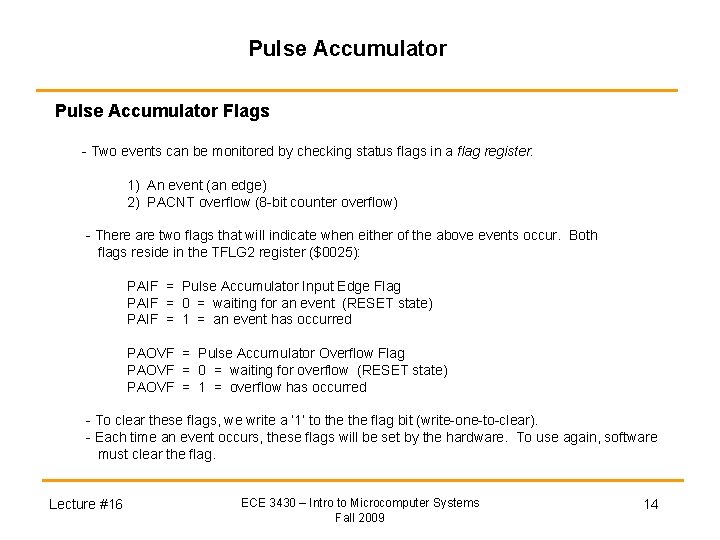
Pulse Accumulator Flags - Two events can be monitored by checking status flags in a flag register: 1) An event (an edge) 2) PACNT overflow (8 -bit counter overflow) - There are two flags that will indicate when either of the above events occur. Both flags reside in the TFLG 2 register ($0025): PAIF = Pulse Accumulator Input Edge Flag PAIF = 0 = waiting for an event (RESET state) PAIF = 1 = an event has occurred PAOVF = Pulse Accumulator Overflow Flag PAOVF = 0 = waiting for overflow (RESET state) PAOVF = 1 = overflow has occurred - To clear these flags, we write a ‘ 1’ to the flag bit (write-one-to-clear). - Each time an event occurs, these flags will be set by the hardware. To use again, software must clear the flag. Lecture #16 ECE 3430 – Intro to Microcomputer Systems Fall 2009 14
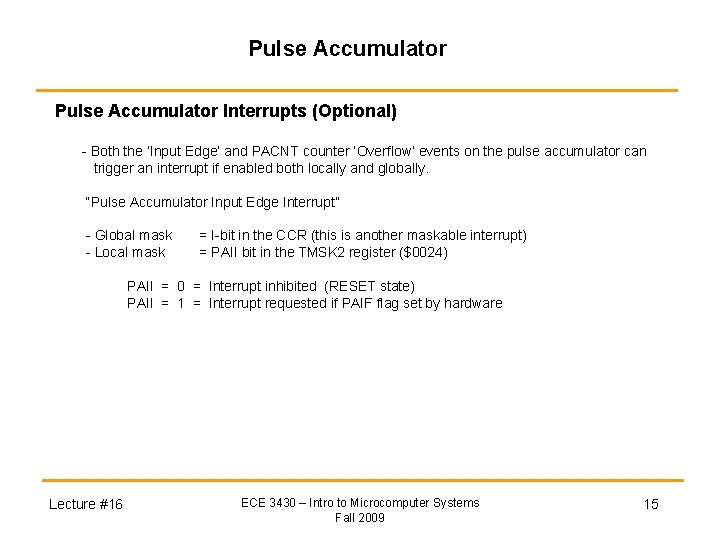
Pulse Accumulator Interrupts (Optional) - Both the ‘Input Edge’ and PACNT counter ‘Overflow’ events on the pulse accumulator can trigger an interrupt if enabled both locally and globally. “Pulse Accumulator Input Edge Interrupt” - Global mask - Local mask = I-bit in the CCR (this is another maskable interrupt) = PAII bit in the TMSK 2 register ($0024) PAII = 0 = Interrupt inhibited (RESET state) PAII = 1 = Interrupt requested if PAIF flag set by hardware Lecture #16 ECE 3430 – Intro to Microcomputer Systems Fall 2009 15
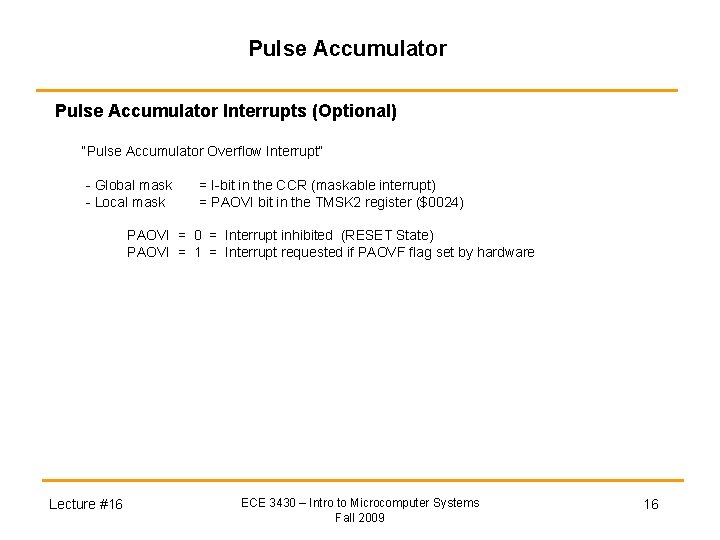
Pulse Accumulator Interrupts (Optional) “Pulse Accumulator Overflow Interrupt” - Global mask - Local mask = I-bit in the CCR (maskable interrupt) = PAOVI bit in the TMSK 2 register ($0024) PAOVI = 0 = Interrupt inhibited (RESET State) PAOVI = 1 = Interrupt requested if PAOVF flag set by hardware Lecture #16 ECE 3430 – Intro to Microcomputer Systems Fall 2009 16
Pulse Accumulator Enable - To enable the pulse accumulator, we use the PAEN bit in the PACTL register ($0026): PAEN = 0 = Disabled (RESET state) PAEN = 1 = Enabled - PA 7 is a bi-direction pin so if you are using it as PAI, make sure to leave the DDRA 7 bit set to input (0 or RESET state). - DDRA 7 is bit 7 in the PACTL register. This bit functions the same as DDRA 3. Some pink books have a typo. Check yours! Lecture #16 ECE 3430 – Intro to Microcomputer Systems Fall 2009 17
Pulse Accumulator Applications Event Counting Anything that needs counting. - Assembly line. - Vending machine to monitor inventory. - Serial bit stream to know when 8 -bits have arrived. Gated Accumulator Monitoring the time it takes for an event to come and go. - Seeing how fast an assembly line is moving. - Measuring duty cycle of an input signal (could also use input capture). -> However, note that the accuracy will not be as fine as TCNT or RTI. - Generating interrupts when a pulse exceeds a certain delta. -> Use gated time accumulation mode, pre-program PACNT, set up pulse accumulator counter overflow interrupt. Lecture #16 ECE 3430 – Intro to Microcomputer Systems Fall 2009 18