
Eagle SatII On Board Computer OBC Subsystem David
Eagle. Sat-II On Board Computer (OBC) Subsystem David Stockhouse – OBC Subsystem Lead 1
OBC Overview • Architecture Description • Payload Computer • Bus Computer 2

Architecture Description Figure 1: System-Level Block Diagram 3
Architecture Description • Two independent computer systems • Payload computer (TI TM 4 C (MCU) + Xilinx Artix-7 (FPGA)) • Controls all payload instruments (cameras and RAM) and some telemetry instruments • Processes all payload data and reports to bus computer • Developed in-house • Bus computer (GOMSpace Nanomind A 3200) • • Connects to all other subsystems, including payload computer Processes all bus system data and telemetry Communicates with the ground through COMMS subsystem Commercial off-the-shelf component 4
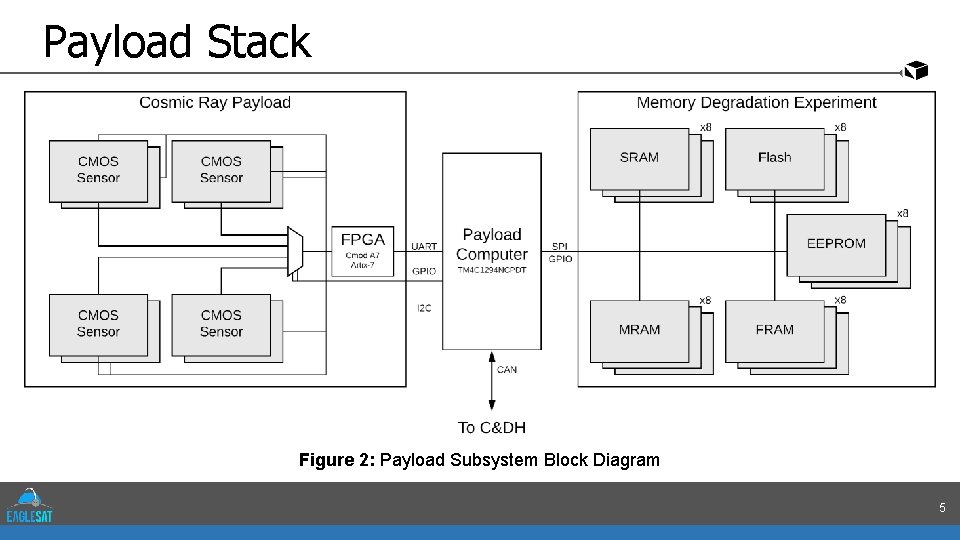
Payload Stack Figure 2: Payload Subsystem Block Diagram 5
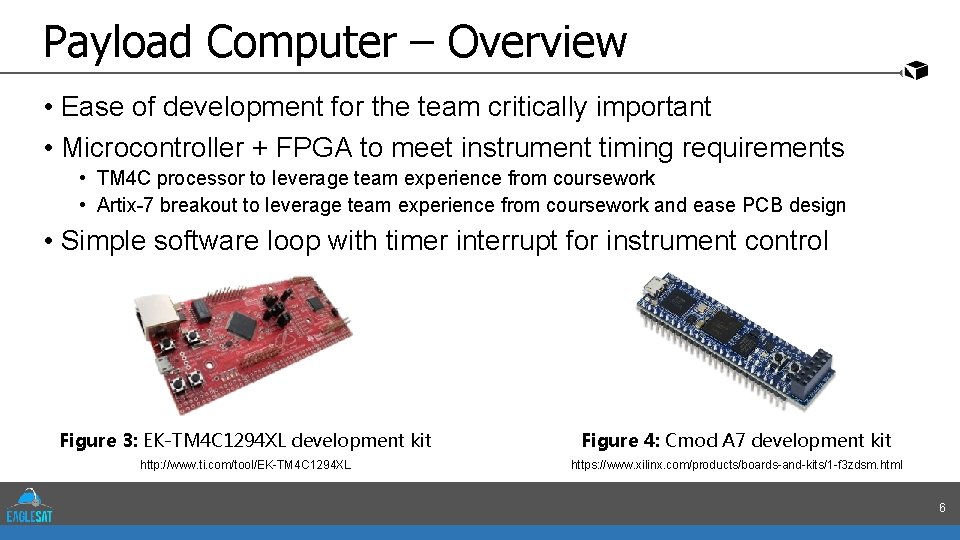
Payload Computer – Overview • Ease of development for the team critically important • Microcontroller + FPGA to meet instrument timing requirements • TM 4 C processor to leverage team experience from coursework • Artix-7 breakout to leverage team experience from coursework and ease PCB design • Simple software loop with timer interrupt for instrument control Figure 3: EK-TM 4 C 1294 XL development kit Figure 4: Cmod A 7 development kit http: //www. ti. com/tool/EK-TM 4 C 1294 XL https: //www. xilinx. com/products/boards-and-kits/1 -f 3 zdsm. html 6
Payload Computer – Software • Ease of development a priority • Payload software being developed by each payload subteam independently • No need for high-overhead complex solution like RTOS • Simple cyclic executive with interrupts 7
Payload Computer – Board Design • Prototype PCB early in design/build process • Parts and interfaces selected, early schematic designs • Pin and peripheral assignments planned, subject to change • MDE prototype already running on less powerful TM 4 C • Black box test of descaled system during high-altitude balloon flight • In processing of migration to flight hardware equivalent • CRP prototype in development • MCU + FPGA development difficult – difficult to test either until both complete 8
Payload Computer – Additional Telemetry • Bus computer doesn’t have any available PC/104 GPIO pins • COTS parts limited to what already exists on hardware • Payload computer designed in house – as many extra interfaces as we want • Temperature sensors • In-house PCBs can include as many sensors as desired routed to unused PC/104 pins • Cubesat I 2 C bus free for use with mission-critical systems • Some unoccupied PC/104 pins can be used for thermal measurements throughout cubesat structure, outside of payload stack • ACS patch heater • Small PCB close to ACS with power control circuitry • Activated by payload computer based on temperature measurements 9
Bus Computer – Overview • Interfaces with all other bus systems and payload stack • Receives and interprets commands from the ground • Packetizes data and telemetry for downlink • Composed of commercial off-the-shelf (COTS) components • Minimize risk from in-house development for mission-critical system • Time can be spent testing and validating requirements 10
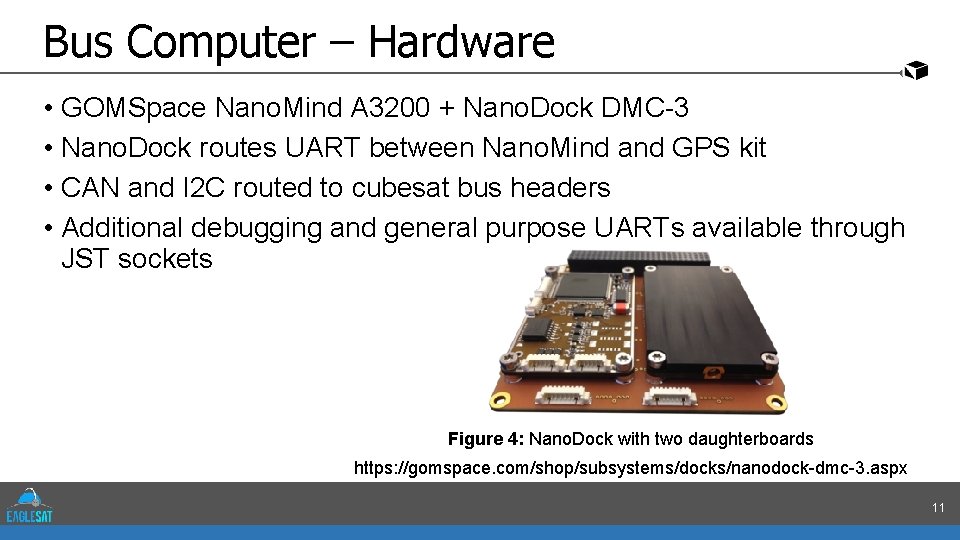
Bus Computer – Hardware • GOMSpace Nano. Mind A 3200 + Nano. Dock DMC-3 • Nano. Dock routes UART between Nano. Mind and GPS kit • CAN and I 2 C routed to cubesat bus headers • Additional debugging and general purpose UARTs available through JST sockets Figure 4: Nano. Dock with two daughterboards https: //gomspace. com/shop/subsystems/docks/nanodock-dmc-3. aspx 11
Bus Computer – Flight Software (FSW) • GOMSpace software includes integration with Free. RTOS • GOMSpace shell (GOSH) for UART debugging during development • F Prime – Open-source NASA JPL FSW architecture and framework • • Object-oriented model of the FSW as components linked by ports Provides framework for ease of software development Comes with debugging and testing environments and tools Supporting to Free. RTOS offered from creators at JPL 12
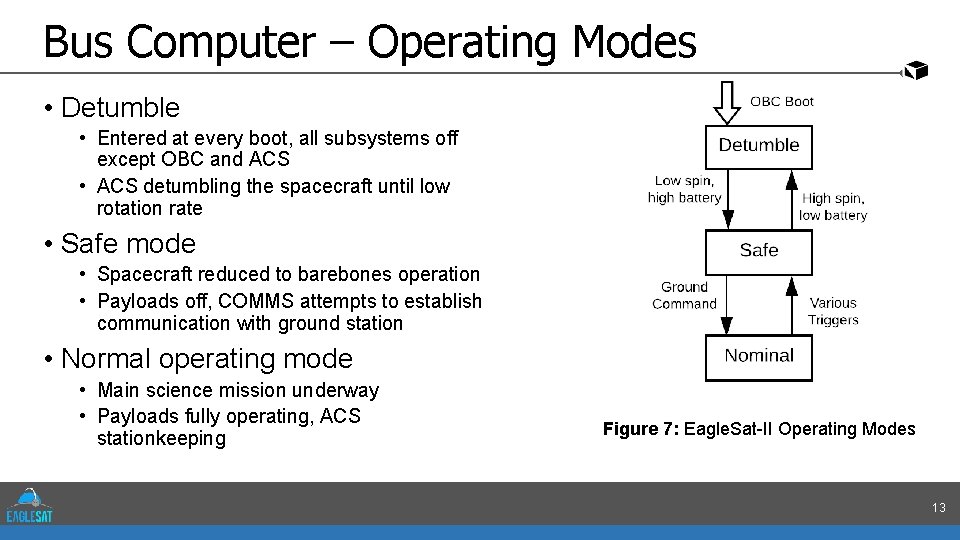
Bus Computer – Operating Modes • Detumble • Entered at every boot, all subsystems off except OBC and ACS • ACS detumbling the spacecraft until low rotation rate • Safe mode • Spacecraft reduced to barebones operation • Payloads off, COMMS attempts to establish communication with ground station • Normal operating mode • Main science mission underway • Payloads fully operating, ACS stationkeeping Figure 7: Eagle. Sat-II Operating Modes 13
Questions? 14
- Slides: 14