
Drawing for Illustration and Annotation in 3 D
![Previous Work [Pugh, 1992] Specify hidden parts by hand [Akeo et al. , 1994]](https://slidetodoc.com/presentation_image/936ab7351ee993c91cd536606e0db5b9/image-5.jpg "Previous Work [Pugh, 1992] Specify hidden parts by hand [Akeo et al. , 1994]")
![Previous Work [Lipson and Shpitalni, 1996] [Eggli et al. , 1997] No free-form drawing](https://slidetodoc.com/presentation_image/936ab7351ee993c91cd536606e0db5b9/image-6.jpg "Previous Work [Lipson and Shpitalni, 1996] [Eggli et al. , 1997] No free-form drawing")
![Previous Work [Cohen et al. , 1999] 3 D curves design, no drawing [Tolba](https://slidetodoc.com/presentation_image/936ab7351ee993c91cd536606e0db5b9/image-7.jpg "Previous Work [Cohen et al. , 1999] 3 D curves design, no drawing [Tolba")
![Previous Work [Zeleznik et al. , 1996] [Igarashi et al. , 1999] Closed strokes](https://slidetodoc.com/presentation_image/936ab7351ee993c91cd536606e0db5b9/image-8.jpg "Previous Work [Zeleznik et al. , 1996] [Igarashi et al. , 1999] Closed strokes")
![Previous Work [Cohen et al. , 2000] Drawing modes adapted to landscaping only, no](https://slidetodoc.com/presentation_image/936ab7351ee993c91cd536606e0db5b9/image-9.jpg "Previous Work [Cohen et al. , 2000] Drawing modes adapted to landscaping only, no")

- Slides: 31
Drawing for Illustration and Annotation in 3 D David Bourguignon*, Marie-Paule Cani* and George Drettakis** *i. MAGIS, INRIA Rhône-Alpes, France **REVES, INRIA Sophia-Antipolis, France i. MAGIS-GRAVIR / IMAG
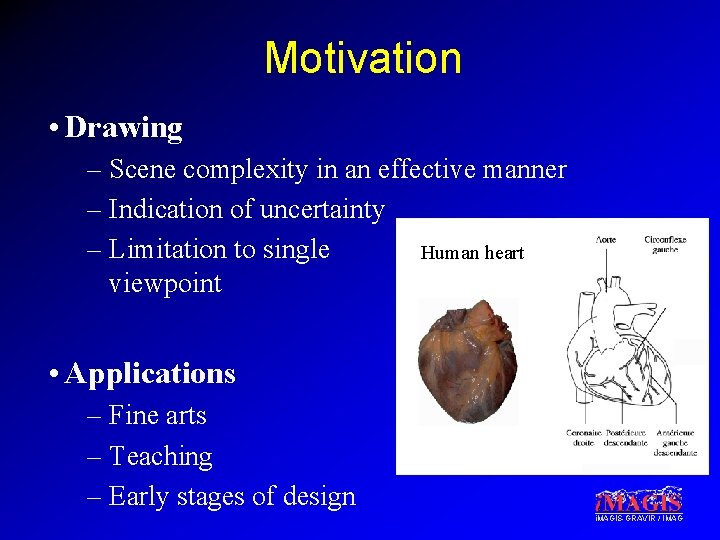
Motivation • Drawing – Scene complexity in an effective manner – Indication of uncertainty – Limitation to single Human heart viewpoint • Applications – Fine arts – Teaching – Early stages of design i. MAGIS-GRAVIR / IMAG
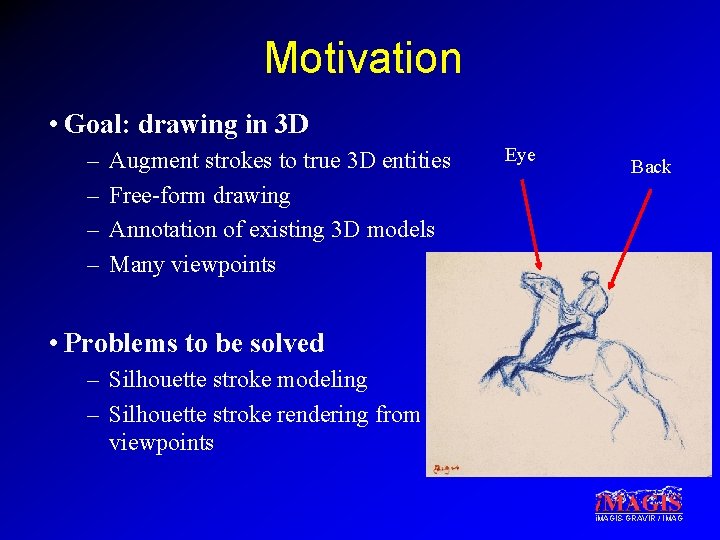
Motivation • Goal: drawing in 3 D – – Augment strokes to true 3 D entities Free-form drawing Annotation of existing 3 D models Many viewpoints Eye Back • Problems to be solved – Silhouette stroke modeling – Silhouette stroke rendering from different viewpoints i. MAGIS-GRAVIR / IMAG
Overview • Previous work • Contributions – Silhouette stroke modeling – Silhouette stroke rendering – Interface for drawing • Results i. MAGIS-GRAVIR / IMAG
Previous Work [Pugh, 1992] Specify hidden parts by hand [Akeo et al. , 1994] 2 D drawing is converted to 3 D i. MAGIS-GRAVIR / IMAG
Previous Work [Lipson and Shpitalni, 1996] [Eggli et al. , 1997] No free-form drawing Limited number of primitives i. MAGIS-GRAVIR / IMAG
Previous Work [Cohen et al. , 1999] 3 D curves design, no drawing [Tolba et al. , 1999] 2 D drawings reprojected, no visibility changes i. MAGIS-GRAVIR / IMAG
Previous Work [Zeleznik et al. , 1996] [Igarashi et al. , 1999] Closed strokes only Limited to a given gestural interface i. MAGIS-GRAVIR / IMAG
Previous Work [Cohen et al. , 2000] Drawing modes adapted to landscaping only, no 3 D model reconstruction in billboard mode i. MAGIS-GRAVIR / IMAG
Overview • Previous work • Contributions – Silhouette stroke modeling – Silhouette stroke rendering – Interface for drawing • Results i. MAGIS-GRAVIR / IMAG
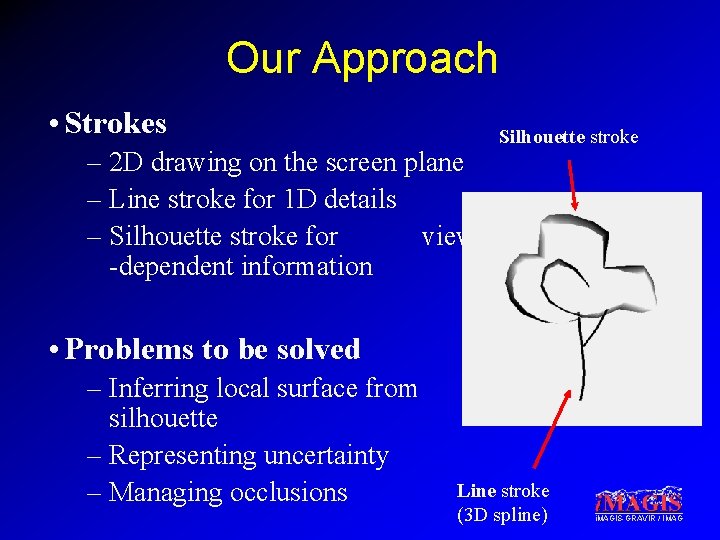
Our Approach • Strokes – 2 D drawing on the screen plane – Line stroke for 1 D details – Silhouette stroke for view -dependent information Silhouette stroke • Problems to be solved – Inferring local surface from silhouette – Representing uncertainty – Managing occlusions Line stroke (3 D spline) i. MAGIS-GRAVIR / IMAG
Overview • Previous work • Contributions – Silhouette stroke modeling – Silhouette stroke rendering – Interface for drawing • Results i. MAGIS-GRAVIR / IMAG
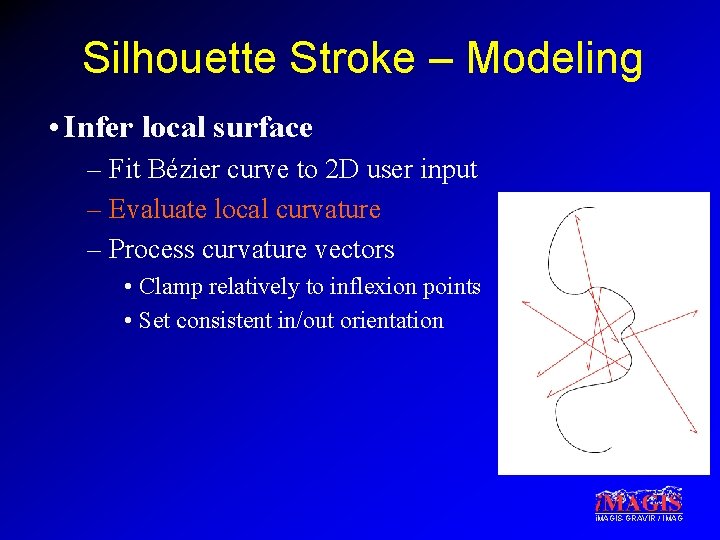
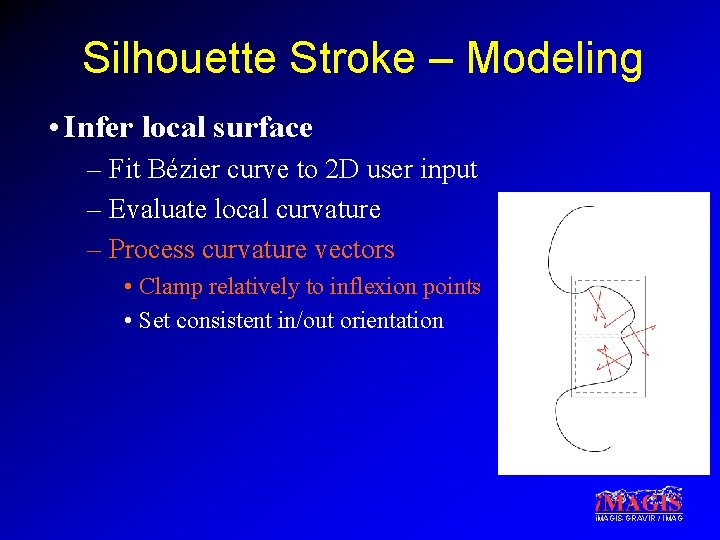
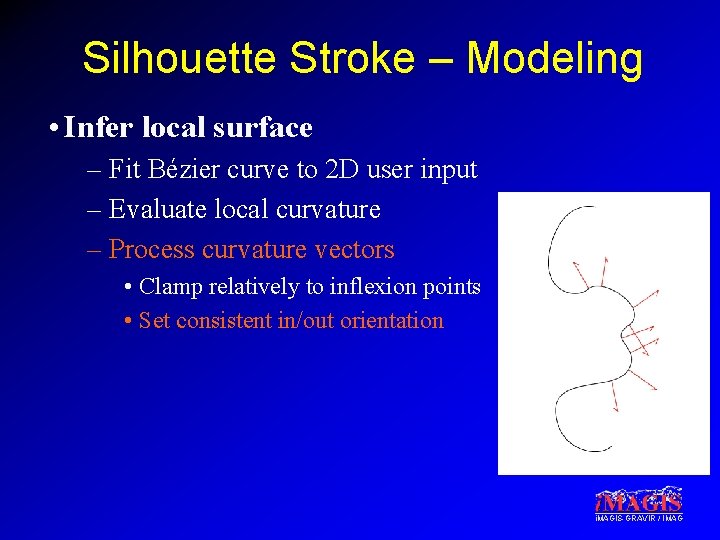
Silhouette Stroke – Modeling • Infer local surface – Fit Bézier curve to 2 D user input – Evaluate local curvature – Process curvature vectors • Clamp relatively to inflexion points • Set consistent in/out orientation i. MAGIS-GRAVIR / IMAG
Silhouette Stroke – Modeling • Infer local surface – Fit Bézier curve to 2 D user input – Evaluate local curvature – Process curvature vectors • Clamp relatively to inflexion points • Set consistent in/out orientation i. MAGIS-GRAVIR / IMAG
Silhouette Stroke – Modeling • Infer local surface – Fit Bézier curve to 2 D user input – Evaluate local curvature – Process curvature vectors • Clamp relatively to inflexion points • Set consistent in/out orientation i. MAGIS-GRAVIR / IMAG
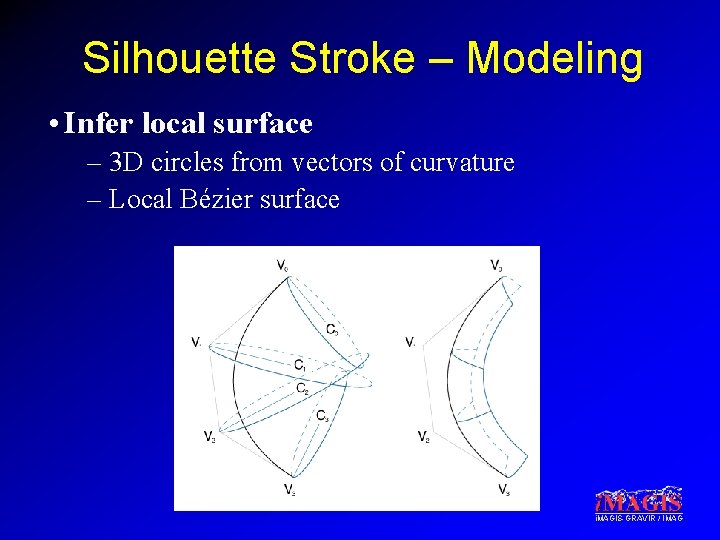
Silhouette Stroke – Modeling • Infer local surface – 3 D circles from vectors of curvature – Local Bézier surface i. MAGIS-GRAVIR / IMAG
Overview • Previous work • Contributions – Silhouette stroke modeling – Silhouette stroke rendering – Interface for drawing • Results i. MAGIS-GRAVIR / IMAG
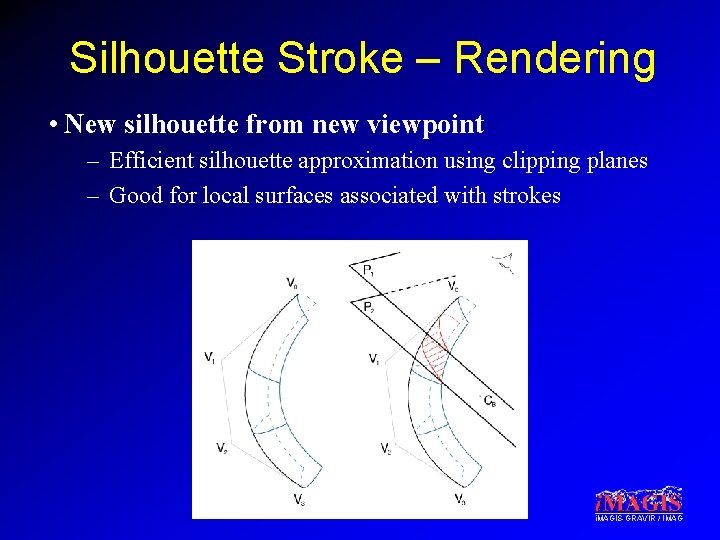
Silhouette Stroke – Rendering • New silhouette from new viewpoint – Efficient silhouette approximation using clipping planes – Good for local surfaces associated with strokes i. MAGIS-GRAVIR / IMAG
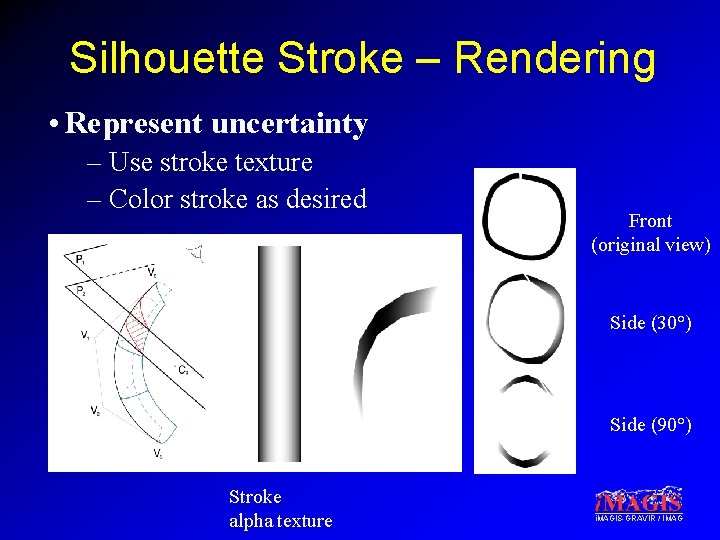
Silhouette Stroke – Rendering • Represent uncertainty – Use stroke texture – Color stroke as desired Front (original view) Side (30°) Side (90°) Stroke alpha texture i. MAGIS-GRAVIR / IMAG
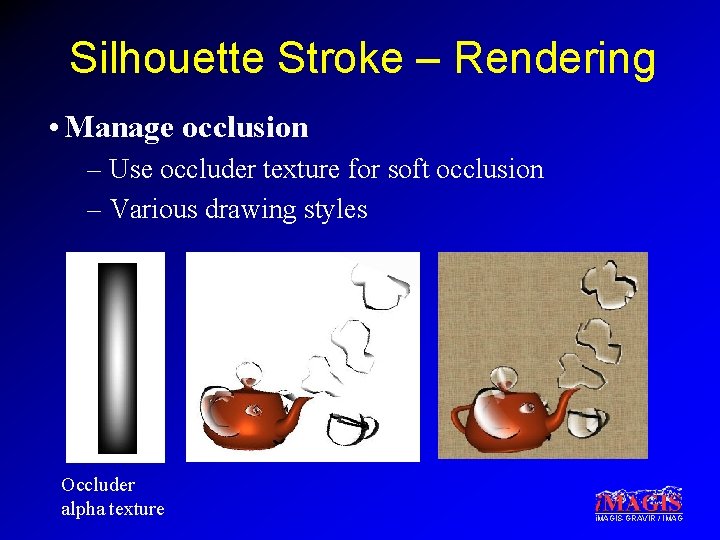
Silhouette Stroke – Rendering • Manage occlusion – Use occluder texture for soft occlusion – Various drawing styles Occluder alpha texture i. MAGIS-GRAVIR / IMAG
Silhouette Stroke – Rendering • Multipass algorithm (Previously render scene and line strokes) – First pass: Rendering silhouette strokes • With stroke texture • With stroke color – Second pass: Soft occlusion by local surfaces (set depth) • With occluder texture – Third pass: Soft occlusion by local surfaces (achieve blend) • With occluder texture • With occluder color i. MAGIS-GRAVIR / IMAG
Overview • Previous work • Contributions – Silhouette stroke modeling – Silhouette stroke rendering – Interface for drawing • Results i. MAGIS-GRAVIR / IMAG
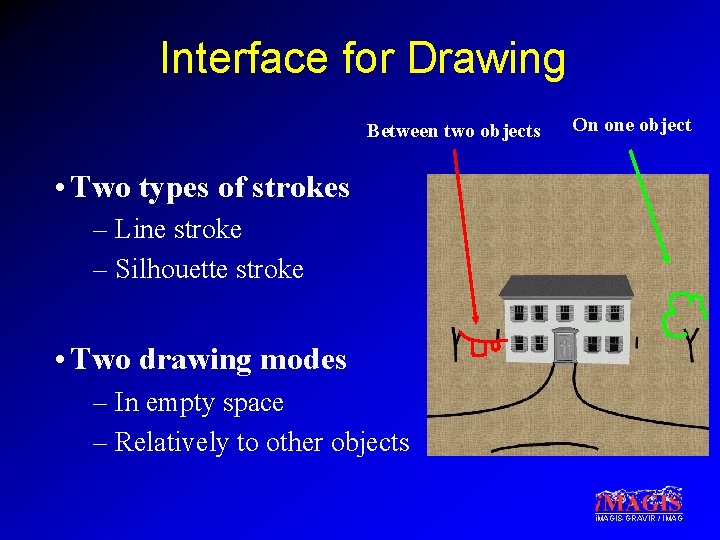
Interface for Drawing Between two objects On one object • Two types of strokes – Line stroke – Silhouette stroke • Two drawing modes – In empty space – Relatively to other objects i. MAGIS-GRAVIR / IMAG
Overview • Previous work • Contributions – Silhouette stroke modeling – Silhouette stroke rendering – Interface for drawing • Results i. MAGIS-GRAVIR / IMAG
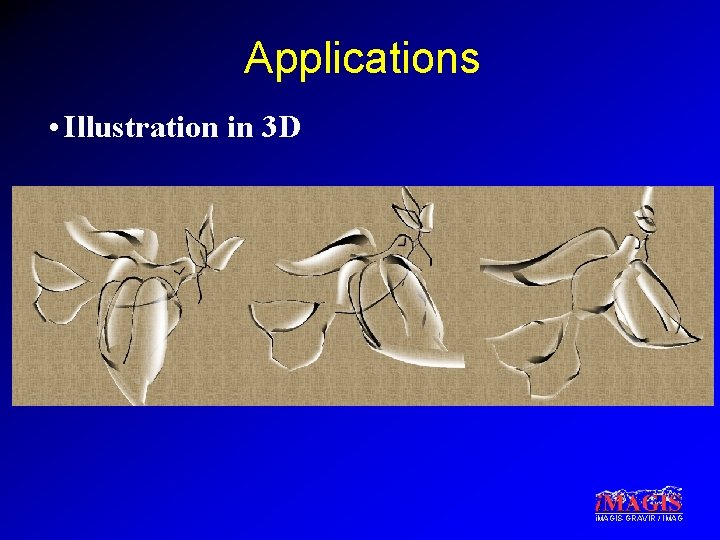
Applications • Illustration in 3 D i. MAGIS-GRAVIR / IMAG
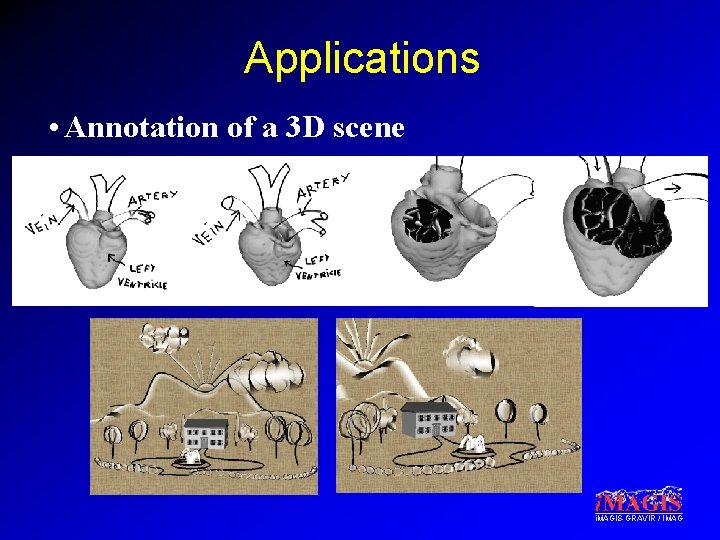
Applications • Annotation of a 3 D scene i. MAGIS-GRAVIR / IMAG
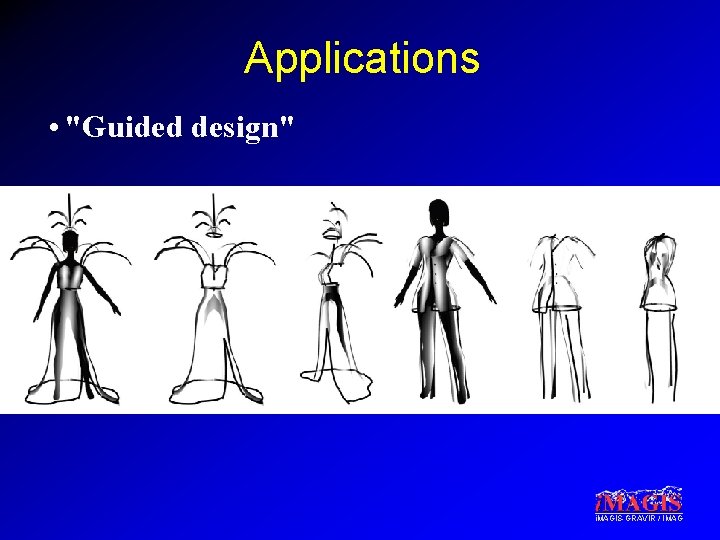
Applications • "Guided design" i. MAGIS-GRAVIR / IMAG
Video i. MAGIS-GRAVIR / IMAG
Conclusion • System for drawing in 3 D – View-dependent strokes with occlusion – Useful for drawing simple scenes in 3 D – Useful for annotations • Future work – Handling tubular objects – Real world test: using it to teach anatomy i. MAGIS-GRAVIR / IMAG
Acknowledgements • Eric Ferley for feedback throughout the project • Laurence Boissieux for creating some of the drawings, Marc Pont for help with models • Frédo Durand for advice on the paper i. MAGIS is a joint project of CNRS, INPG, INRIA and UJF i. MAGIS-GRAVIR / IMAG
i. MAGIS-GRAVIR / IMAG