
Dr Sandip Mal Features of Android The important
- Slides: 10
Dr. Sandip Mal
Features of Android The important features of android are given below: 1) It is open-source. 2) Anyone can customize the Android Platform. 3) There a lot of mobile applications that can be chosen by the consumer. 4) It provides many interesting features like weather details, opening screen, live RSS (Really Simple Syndication) feeds etc. It provides support for messaging services(SMS and MMS), web browser, storage (SQLite), connectivity (GSM, CDMA, Blue Tooth, Wi-Fi etc. ), media, handset layout etc.
Categories of Android applications There are many android applications in the market. The top categories are: • Entertainment • Tools • Communication • Productivity • Personalization • Music and Audio • Social • Media and Video • Travel and Local etc.
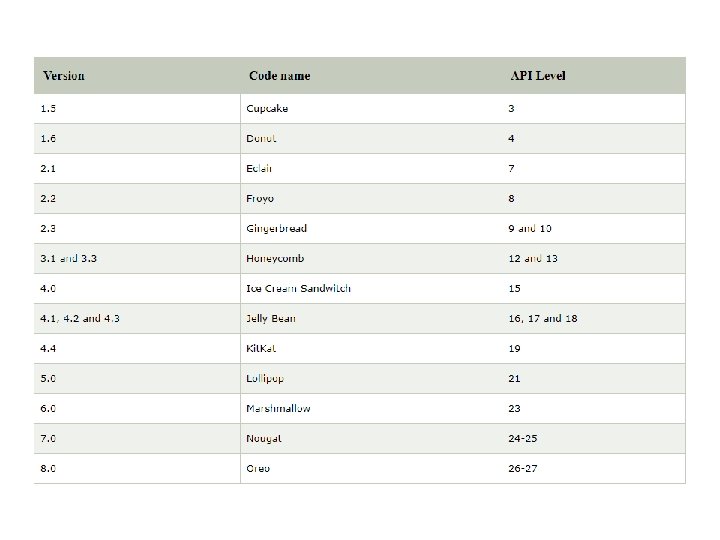
History of Android The history and versions of android are interesting to know. The code names of android ranges from A to J currently, such as Aestro, Blender, Cupcake, Donut, Eclair, Froyo, Gingerbread, Honeycomb, Ice Cream Sandwitch, Jelly Bean, Kit. Kat and Lollipop. Let's understand the android history in a sequence. 1. Initially, Andy Rubin founded Android Incorporation in Palo Alto, California, United States in October, 2003. 2) In 17 th August 2005, Google acquired android Incorporation. Since then, it is in the subsidiary of Google Incorporation. 3) The key employees of Android Incorporation are Andy Rubin, Rich Miner, Chris White and Nick Sears. 4) Originally intended for camera but shifted to smart phones later because of low market for camera only. 5) Android is the nick name of Andy Rubin given by co workers because of his love to robots. 6) In 2007, Google announces the development of android OS. 7) In 2008, HTC launched the first android mobile.
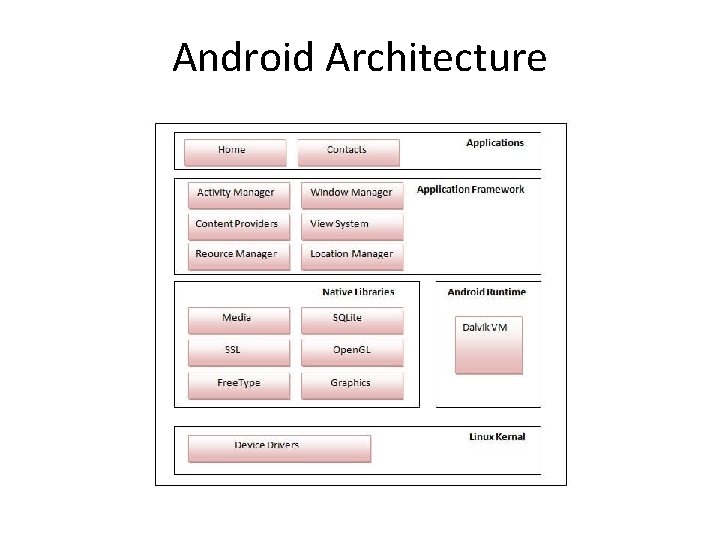
Android Architecture
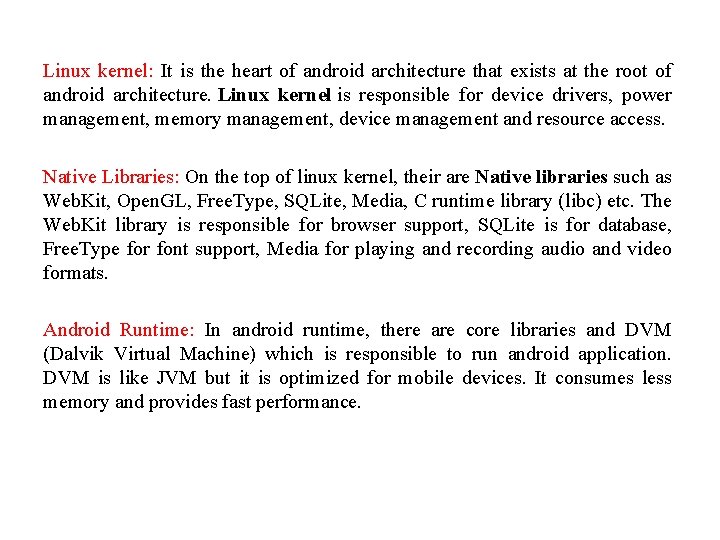
Linux kernel: It is the heart of android architecture that exists at the root of android architecture. Linux kernel is responsible for device drivers, power management, memory management, device management and resource access. Native Libraries: On the top of linux kernel, their are Native libraries such as Web. Kit, Open. GL, Free. Type, SQLite, Media, C runtime library (libc) etc. The Web. Kit library is responsible for browser support, SQLite is for database, Free. Type for font support, Media for playing and recording audio and video formats. Android Runtime: In android runtime, there are core libraries and DVM (Dalvik Virtual Machine) which is responsible to run android application. DVM is like JVM but it is optimized for mobile devices. It consumes less memory and provides fast performance.
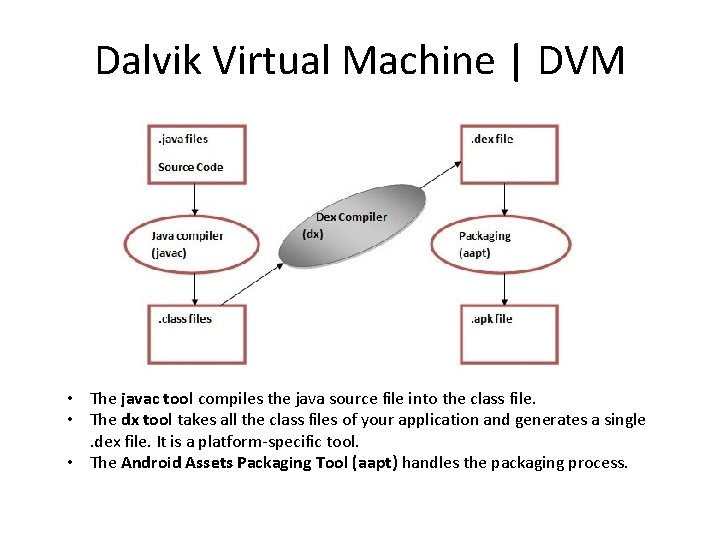
Dalvik Virtual Machine | DVM • The javac tool compiles the java source file into the class file. • The dx tool takes all the class files of your application and generates a single. dex file. It is a platform-specific tool. • The Android Assets Packaging Tool (aapt) handles the packaging process.
Android Framework: On the top of Native libraries android runtime, there is android framework. Android framework includes Android API's such as UI (User Interface), telephony, resources, locations, Content Providers (data) and package managers. It provides a lot of classes and interfaces for android application development. Applications: On the top of android framework, there applications. All applications such as home, contact, settings, games, browsers are using android framework that uses android runtime and libraries. Android runtime and native libraries are using linux kernal.
Installation Procedure • Install JDK version 6 or more. – https: //www. java. com/en/download/ • Set class path – https: //javarevisited. blogspot. com/2013/02/windows-8 -set-path-andclasspath-java-windows-7. html • Check JDK is running properly. – Open cmd and give command javac – Install android studio https: //developer. android. com/studio/ – Open android studio and go to tools to install SDK Manager and AVD Manager. – Select API 27 and Install