
Domore Technical Training Onboard Clock Onboard Clock Accuracy
Do-more Technical Training Onboard Clock

Onboard Clock • Accuracy: 1. 53 minutes/month • Stored as UTC (Coordinated Universal Time) ▫ Stored in $UTC (DST 21) ▫ Uses 1970 Epoch: Epoch number of seconds since 00: 00, 01 -January-1970 • Adjusted by time zone ▫ $Time. Zone (DST 384) – number of minutes • Adjusted by Daylight Savings Time ▫ $Summer. Time (ST 768) – ON +1 hour • Adjusted time stored ▫ $Local. Time (DST 22) – UTC adjusted seconds • NOTE: These values are not very useful Seconds 1970 Epoch
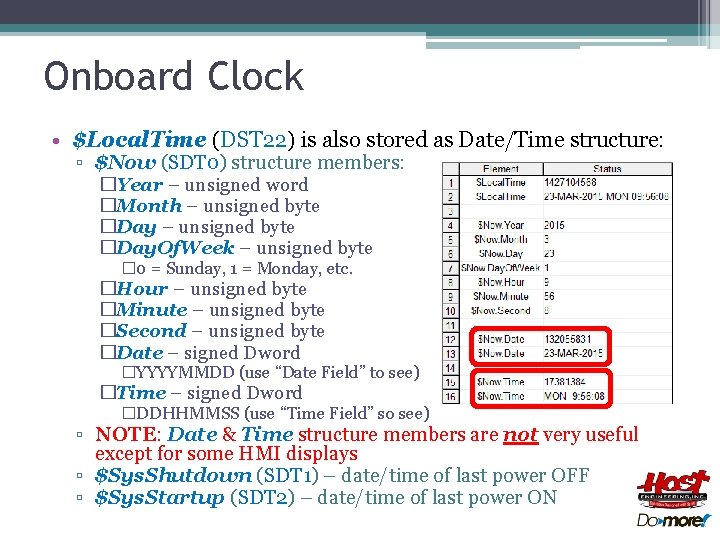
Onboard Clock • $Local. Time (DST 22) is also stored as Date/Time structure: ▫ $Now (SDT 0) structure members: �Year – unsigned word �Month – unsigned byte �Day. Of. Week – unsigned byte � 0 = Sunday, 1 = Monday, etc. �Hour – unsigned byte �Minute – unsigned byte �Second – unsigned byte �Date – signed Dword �YYYYMMDD (use “Date Field” to see) �Time – signed Dword �DDHHMMSS (use “Time Field” so see) ▫ NOTE: Date & Time structure members are not very useful except for some HMI displays ▫ $Sys. Shutdown (SDT 1) – date/time of last power OFF ▫ $Sys. Startup (SDT 2) – date/time of last power ON
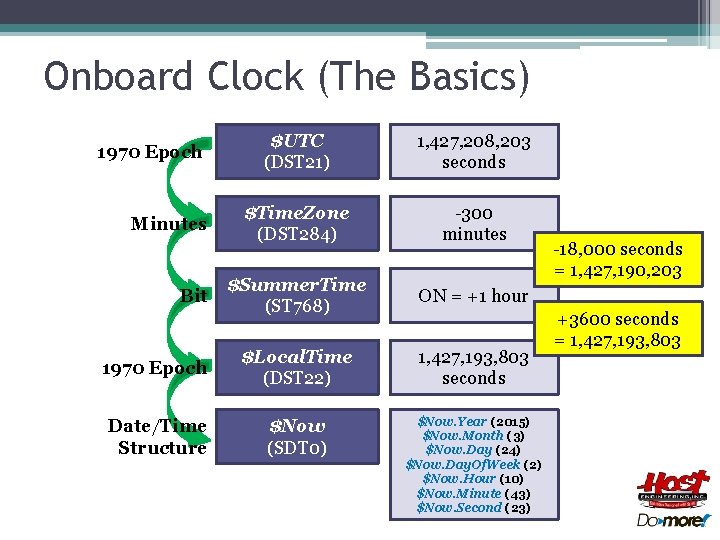
Onboard Clock (The Basics) $UTC (DST 21) 1, 427, 208, 203 seconds $Time. Zone (DST 284) -300 minutes $Summer. Time (ST 768) ON = +1 hour 1970 Epoch $Local. Time (DST 22) 1, 427, 193, 803 seconds Date/Time Structure $Now (SDT 0) $Now. Year (2015) $Now. Month (3) $Now. Day (24) $Now. Day. Of. Week (2) $Now. Hour (10) $Now. Minute (43) $Now. Second (23) 1970 Epoch Minutes Bit -18, 000 seconds = 1, 427, 190, 203 +3600 seconds = 1, 427, 193, 803
Onboard Clock • Setting the system clock: ▫ Manually: �Set PLC Clock dialog ▫ Auomatically: �(1) Time. Sync function �(2) NETTIME “SNTP Client” instruction �(3) SETTIME “Set PLC Date/Time” instruction
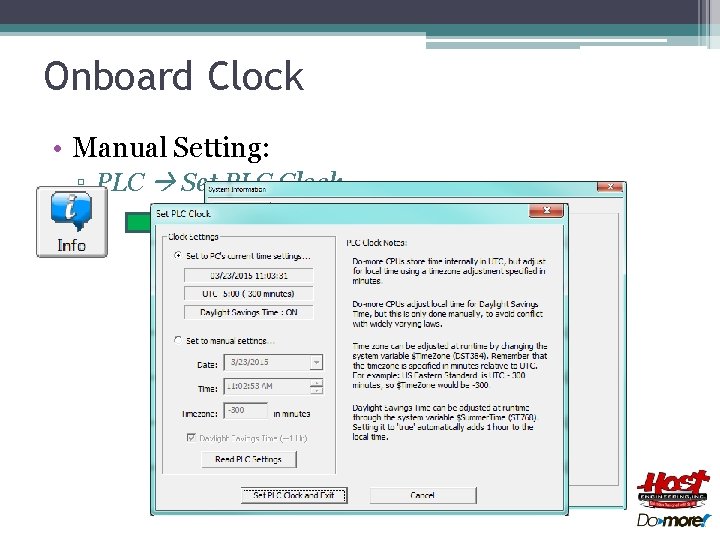
Onboard Clock • Manual Setting: ▫ PLC Set PLC Clock…
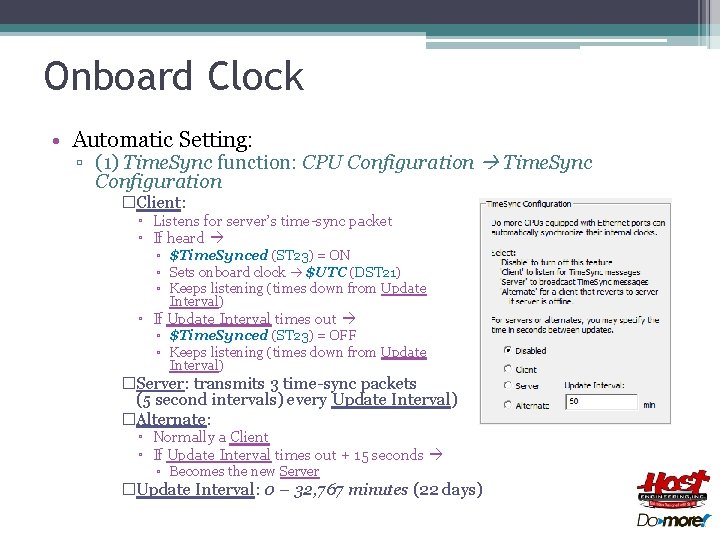
Onboard Clock • Automatic Setting: ▫ (1) Time. Sync function: CPU Configuration Time. Sync Configuration �Client: ▫ Listens for server’s time-sync packet ▫ If heard ▫ $Time. Synced (ST 23) = ON ▫ Sets onboard clock $UTC (DST 21) ▫ Keeps listening (times down from Update Interval) ▫ If Update Interval times out ▫ $Time. Synced (ST 23) = OFF ▫ Keeps listening (times down from Update Interval) �Server: transmits 3 time-sync packets (5 second intervals) every Update Interval) �Alternate: ▫ Normally a Client ▫ If Update Interval times out + 15 seconds ▫ Becomes the new Server �Update Interval: 0 – 32, 767 minutes (22 days)
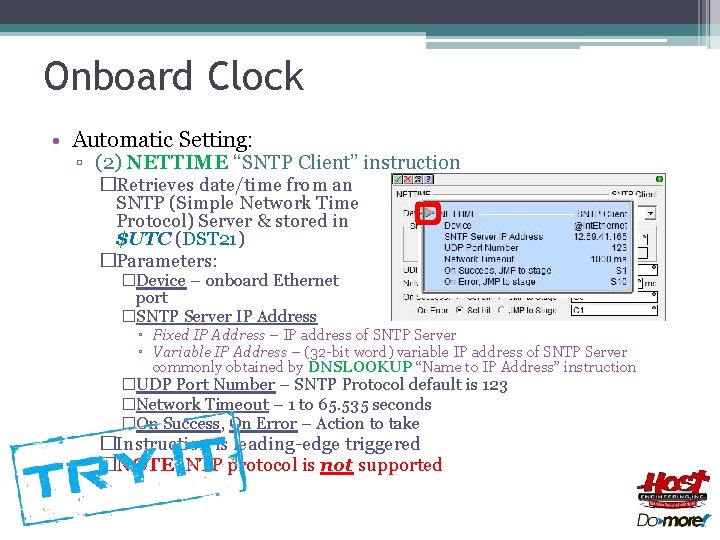
Onboard Clock • Automatic Setting: ▫ (2) NETTIME “SNTP Client” instruction �Retrieves date/time from an SNTP (Simple Network Time Protocol) Server & stored in $UTC (DST 21) �Parameters: �Device – onboard Ethernet port �SNTP Server IP Address ▫ Fixed IP Address – IP address of SNTP Server ▫ Variable IP Address – (32 -bit word) variable IP address of SNTP Server commonly obtained by DNSLOOKUP “Name to IP Address” instruction �UDP Port Number – SNTP Protocol default is 123 �Network Timeout – 1 to 65. 535 seconds �On Success, On Error – Action to take �Instruction is leading-edge triggered �NOTE: NTP protocol is not supported

Onboard Clock • Automatic Setting: ▫ (3) SETTIME “Set PLC Date/Time” instruction �Writes date/time to system clock $UTC �Writes $UTC (DST 21) directly, or… �Writes $Local. Time (DST 22) then… �…back-adjusts $UTC (DST 21) based on: $Time. Zone ▫ $Time. Zone (DST 284) value (DST 284) ▫ $Summer. Time (ST 768) bit �Parameters: �Source Date/Time$Summer. Time – structure containing setting (ST 768) �Source Type: ▫ Local Time – Source Date/Time represents local time ▫ UTC Time – Source$Local. Time Date/Time represents UTC time �Instruction is leading-edge triggered (DST 22) $Now (SDT 0)
Onboard Clock • Programmatic use: ▫ Assignment: �MEMCOPY “Copy Memory Range” �MOVE “Move Value” ▫ Conversion: �DT 2 EPOCH “Convert Date/Time to 1970 Epoch” �EPOCH 2 DT “Convert Epoch to Date/Time” �MATH NOW() function – Get Date/Time as a 32 -bit integer (1970 Epoch) ▫ Math-style operations: �DTCMP “Compare Date/Time” �DTDIFF “Difference between two Date/Times” �DTOFFSET “Add Offset to Date/Time”
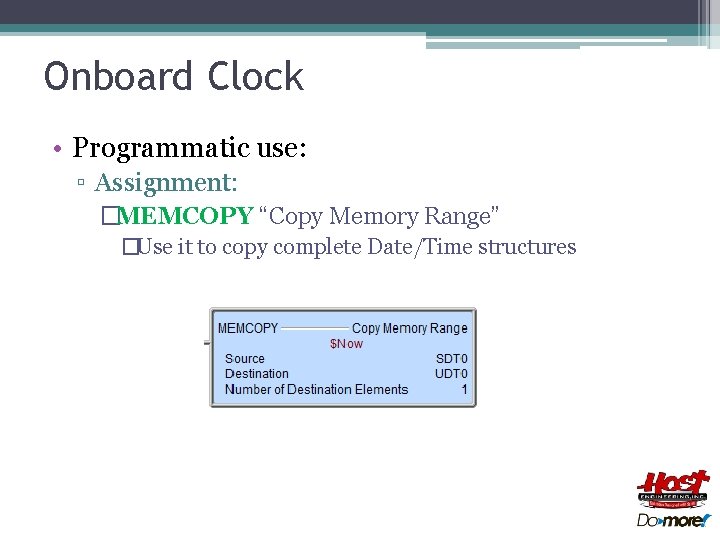
Onboard Clock • Programmatic use: ▫ Assignment: �MEMCOPY “Copy Memory Range” �Use it to copy complete Date/Time structures
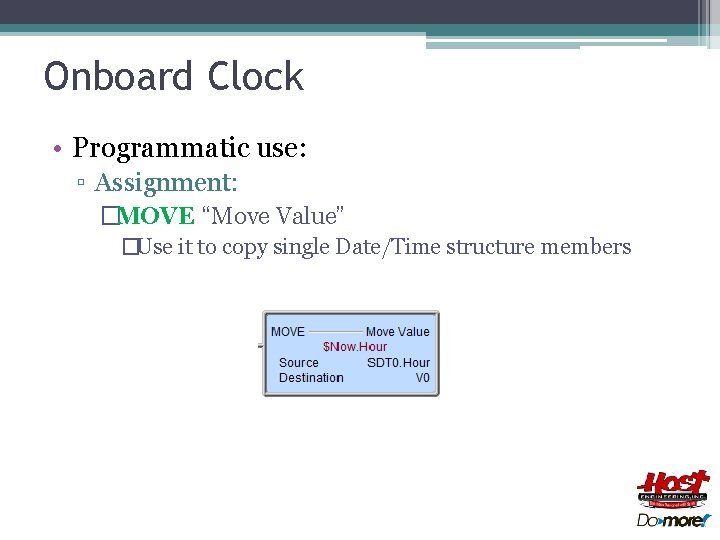
Onboard Clock • Programmatic use: ▫ Assignment: �MOVE “Move Value” �Use it to copy single Date/Time structure members

Onboard Clock • Programmatic use: ▫ Conversion: �DT 2 EPOCH “Convert Date/Time to 1970 Epoch” �Converts a Date/Time structure to 1970 Epoch value �Parameters: ▫ Date/Time – structure to convert ▫ 1970 Epoch – location of converted value

Onboard Clock • Programmatic use: ▫ Conversion: �EPOCH 2 DT “Convert Epoch to Date/Time” �Converts a 1970 Epoch value to Date/Time structure �Parameters: ▫ 1970 Epoch – seconds to convert ▫ Date/Time – structure of converted value
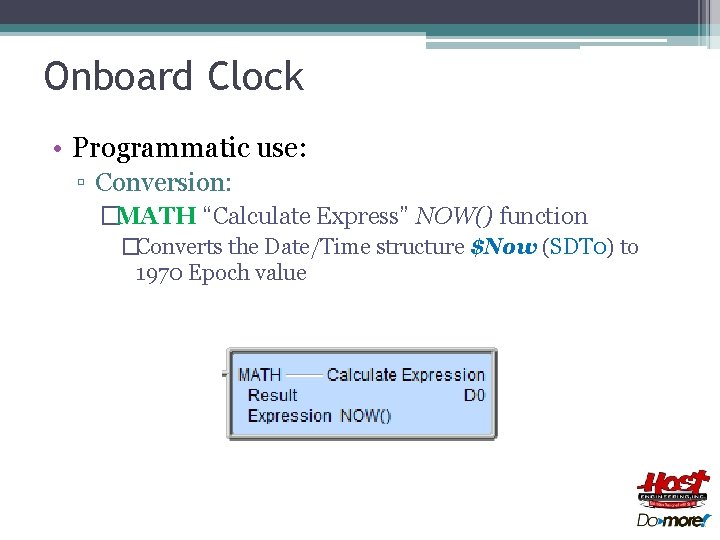
Onboard Clock • Programmatic use: ▫ Conversion: �MATH “Calculate Express” NOW() function �Converts the Date/Time structure $Now (SDT 0) to 1970 Epoch value
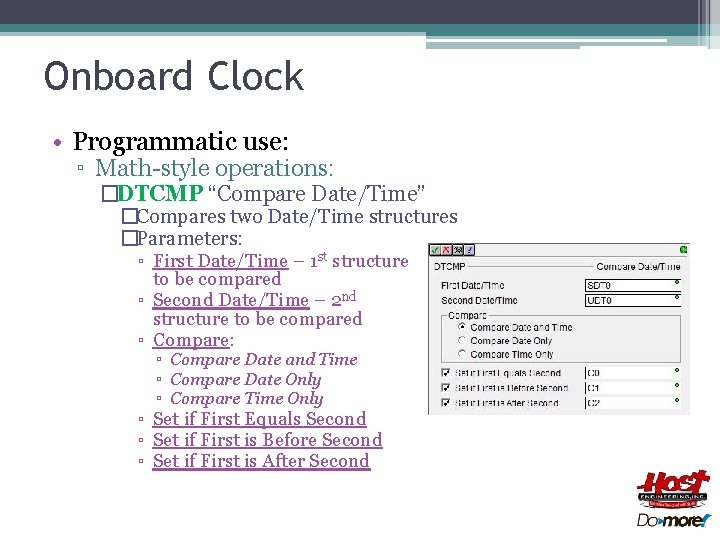
Onboard Clock • Programmatic use: ▫ Math-style operations: �DTCMP “Compare Date/Time” �Compares two Date/Time structures �Parameters: ▫ First Date/Time – 1 st structure to be compared ▫ Second Date/Time – 2 nd structure to be compared ▫ Compare: ▫ Compare Date and Time ▫ Compare Date Only ▫ Compare Time Only ▫ Set if First Equals Second ▫ Set if First is Before Second ▫ Set if First is After Second
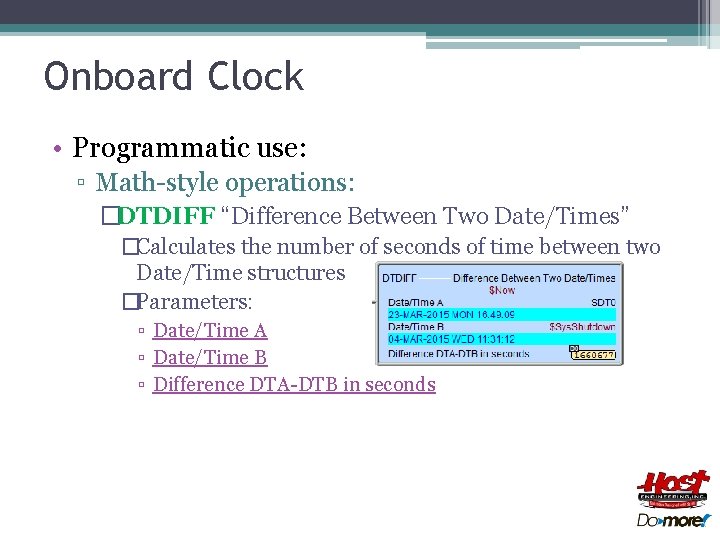
Onboard Clock • Programmatic use: ▫ Math-style operations: �DTDIFF “Difference Between Two Date/Times” �Calculates the number of seconds of time between two Date/Time structures �Parameters: ▫ Date/Time A ▫ Date/Time B ▫ Difference DTA-DTB in seconds
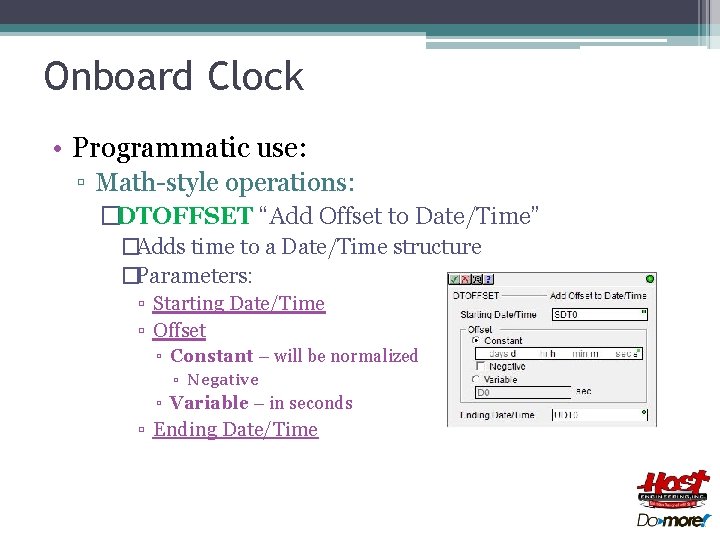
Onboard Clock • Programmatic use: ▫ Math-style operations: �DTOFFSET “Add Offset to Date/Time” �Adds time to a Date/Time structure �Parameters: ▫ Starting Date/Time ▫ Offset ▫ Constant – will be normalized ▫ Negative ▫ Variable – in seconds ▫ Ending Date/Time
- Slides: 18