
DOMINION UNIVERSITY COLLEGE ACCREDITED BY NATIONAL ACCREDITATION BOARD

DOMINION UNIVERSITY COLLEGE [ACCREDITED BY NATIONAL ACCREDITATION BOARD & AFFILIATED WITH THE UNIVERSITY OF CAPE COAST, GHANA] SCHOOL OF SCIENCE AND TECHNOLOGY www. semesgrp. com
Topic System Analysis and Design For B. Sc Degree in Computer Science with Management By Mr. Isaac Owusu Danquah (Lecturer and Energy Information Systems Expert) Contact: 0233 -555120127/0233 -263321107 Email: semesgh@gmail. com/danowus@gmail. com www. semesgrp. com
Chapter Two Understanding and Modeling of Organizational Systems www. semesgrp. com
Objectives • Understand that organizations and their members are systems and that analysts need to take a systems perspective. • Depict systems graphically using context-level data flow diagrams, and entity-relationship models, use cases, and use case scenarios. • Recognize that different levels of management require different systems. • Comprehend that organizational culture impacts the design of information systems. www. semesgrp. com
Sub Topics • Organizations as systems • Depicting systems graphically – Data flow diagram – Entity-relationship model – Use case modeling • Levels of management • Organizational culture www. semesgrp. com
The Composition of Organizations –Operations –Middle management –Strategic management www. semesgrp. com
Organizations as Systems • Conceptualized as systems designed to accomplish predetermined goals and objectives • Composed of smaller, interrelated systems serving specialized functions • Specialized functions are reintegrated to form an effective organizational whole www. semesgrp. com
Organizations as Systems • All systems and subsystems are interrelated and interdependent • All systems process inputs from their environments • All systems are contained by boundaries separating them from their environments • System feedback for planning and control • An ideal system self-corrects or self-regulates itself. www. semesgrp. com
Organizations as Systems • Open – Free flow of information – Output from one system becomes input to another • Closed – Restricted access to information – Limited by numerous rules – Information only on a “need to know” basis www. semesgrp. com
Organizational Environments • Community – Physical location – Demographic profile (education, income) • Economic – Market factors – Competition • Political – State and local government • Legal – Federal, state, regional, local laws, and guidelines www. semesgrp. com
Taking a Systems Perspective • Allows system analyst to understand businesses before they begin their tasks • It is important that members of subsystems realize that they are interrelated with other subsystems • Problems occur when each manager thinks that his/her department is the most important • Bigger problems may occur when that manager rises through the ranks www. semesgrp. com
Depicting Systems Graphically • Context-level data flow diagrams • Entity-relationship model • Use case modeling www. semesgrp. com
Context-Level Data Flow Diagrams • Focus is on the data flowing into and out of the system and the processing of the data • Shows the scope of the system: – What is to be included in the system – The external entities are outside the scope of the system www. semesgrp. com
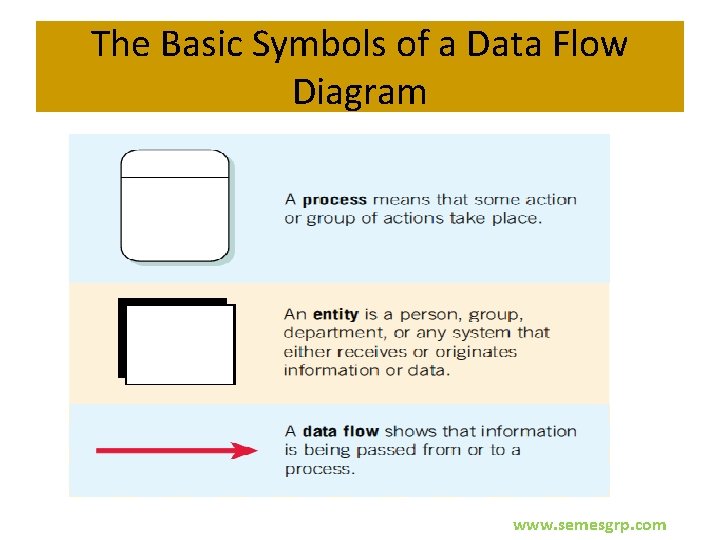
The Basic Symbols of a Data Flow Diagram www. semesgrp. com
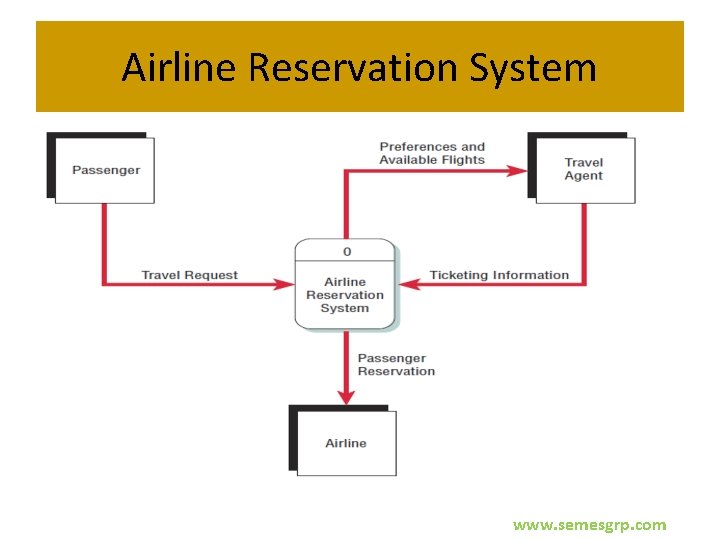
Airline Reservation System www. semesgrp. com
Airline Reservation System A context-level data flow diagram for an airline reservation system The passenger (an entity) initiates a travel request (data flow). The passenger’s preferences and the available flights are sent to the travel agent, who sends ticketing information back to the process. The passenger information is also sent to the airline. www. semesgrp. com
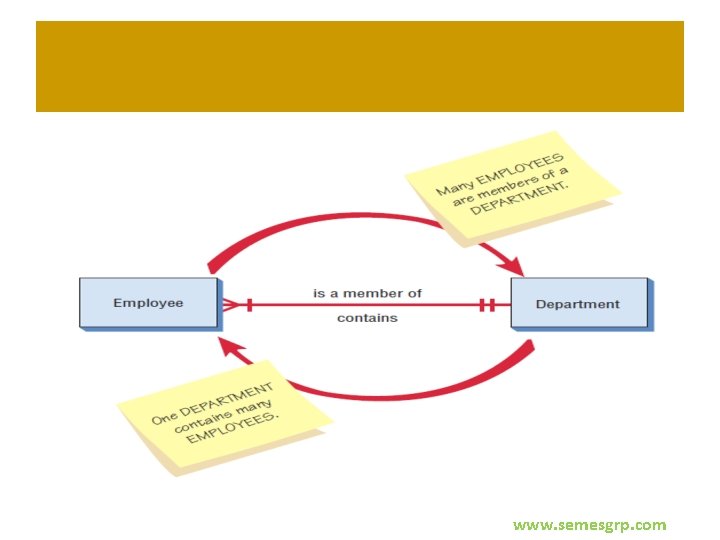
Entity-Relationship Model • Focus is on the entities and their relationships within the organizational system • Another way to show the scope of a system www. semesgrp. com
Relationships • Relationships show the entities are connected • Three types of relationships: – One-to-one – One-to-many – Many-to-many www. semesgrp. com
www. semesgrp. com
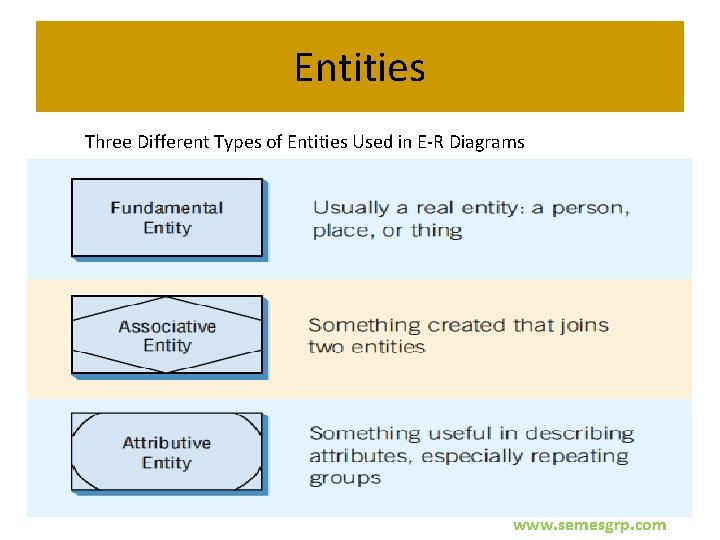
Entities Three Different Types of Entities Used in E-R Diagrams www. semesgrp. com
Attributes Data attributes are what make up or define the entity. Data attributes may be added to the diagram. www. semesgrp. com
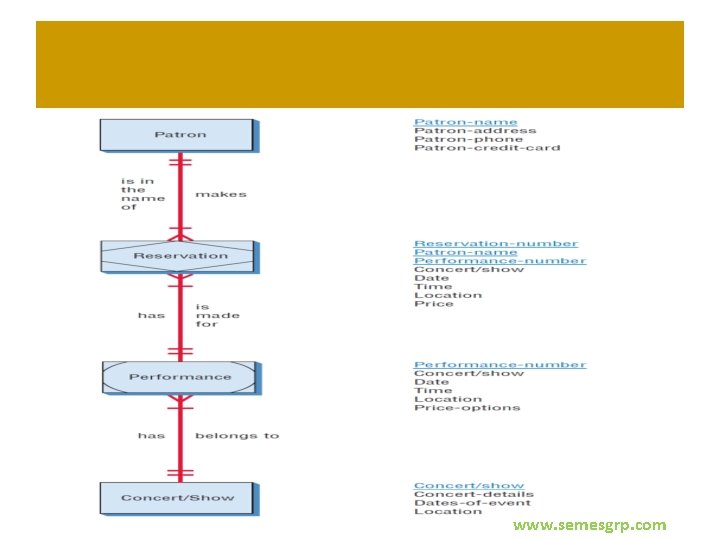
Creating Entity-Relationship Diagrams • List the entities in the organization • Choose key entities to narrow the scope of the problem • Identify what the primary entity should be • Confirm the results of the above through data gathering www. semesgrp. com
www. semesgrp. com
Use Case Modeling • Describes what a system does without describing how the system does – A logical model of the system • Use case is a view of the system requirements • Analyst works with business experts to develop requirements www. semesgrp. com
Use Case Diagram • Actor – Refers to a particular role of a user of the system – Similar to external entities; they exist outside of the system • Use case symbols – An oval indicating the task of the use case • Connecting lines – Arrows and lines used to diagram behavioral relationships www. semesgrp. com
Actor • Divided into two groups – Primary actors: • Supply data or receive information from the system • Provide details on what the use case should do – Supporting actors: • Help to keep the system running or provide help • The people who run the help desk, the analysts, programmers, and so on www. semesgrp. com
A Use Case Always Provides Three Things • An actor that initiates an event • The event that triggers a use case • The use case that performs the actions triggered by the event www. semesgrp. com
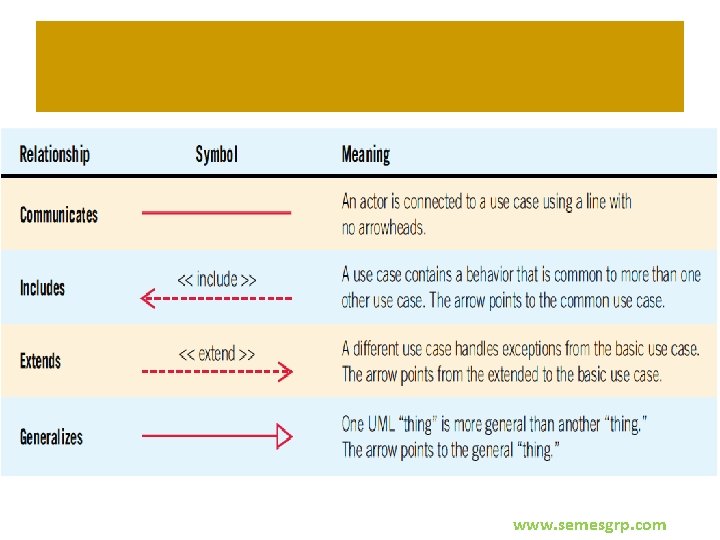
Use Case Relations • Behavioral relationships – Communicates • Used to connect an actor to a use case – Includes • Describes the situation in which a use case contains behavior that is common to more than one use case www. semesgrp. com
Use Case Relations • Behavioral relationships (continued) – Extends • Describes the situation in which one use case possesses the behavior that allows the new case to handle a variation or exception from the basic use case – Generalizes • Implies that one thing is more typical than the other thing www. semesgrp. com
www. semesgrp. com
www. semesgrp. com
Developing Use Case Diagrams • Review the business specifications and identify the actors involved • May use agile stories • Identify the high-level events and develop the primary use cases that describe those events and how the actors initiate them • Review each primary use case to determine the possible variations of flow through the use case • The context-level data flow diagram could act as a starting point for creating a use case www. semesgrp. com
Developing the Use Case Scenarios • The description of the use case • Three main areas: – Use case identifiers and initiators – Steps performed – Conditions, assumptions, and questions www. semesgrp. com
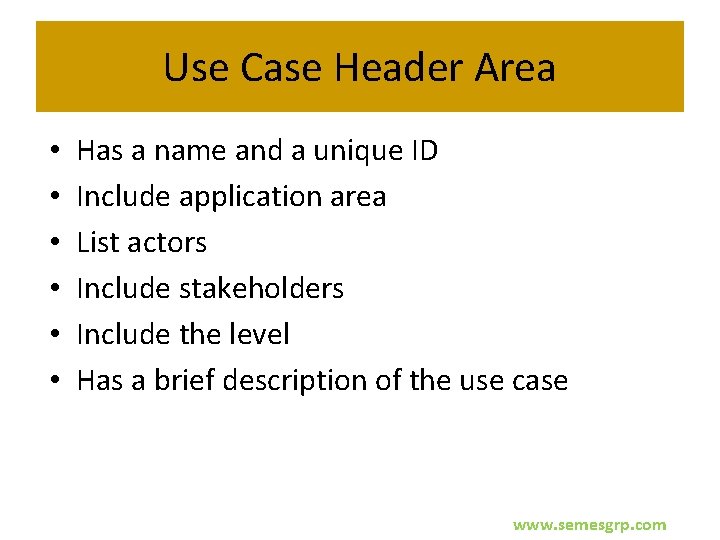
Use Case Header Area • • • Has a name and a unique ID Include application area List actors Include stakeholders Include the level Has a brief description of the use case www. semesgrp. com
www. semesgrp. com
www. semesgrp. com

www. semesgrp. com
- Slides: 37