
DokumentenInformationsSystem DIS for technical rules operation manual Edition
- Slides: 37
Dokumenten-Informations-System (DIS) for technical rules operation manual Edition: 01. 05. 2020
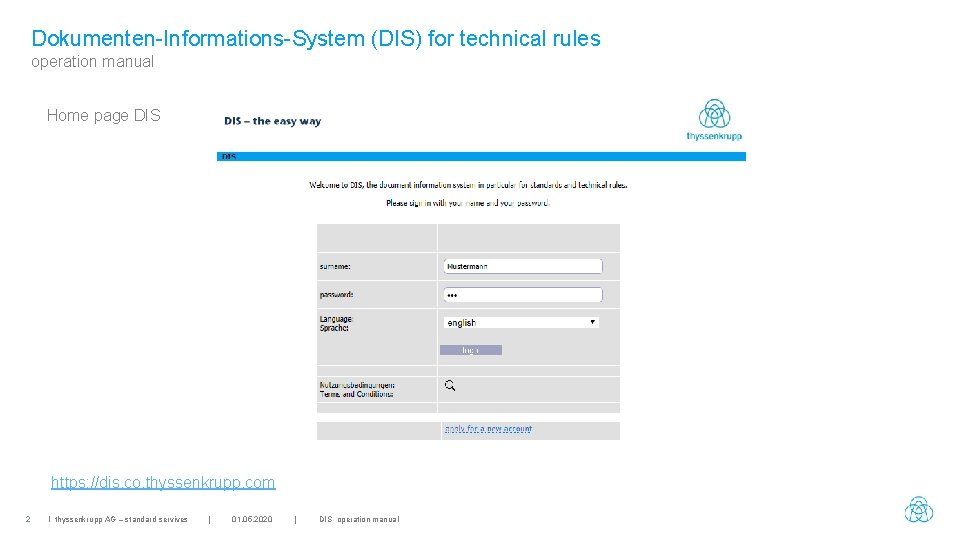
Dokumenten-Informations-System (DIS) for technical rules operation manual Home page DIS https: //dis. co. thyssenkrupp. com 2 I thyssenkrupp AG – standard servives | 01. 05. 2020 | DIS operation manual
Dokumenten-Informations-System (DIS) for technical rules operation manual Table of Contents • • • 3 I thyssenkrupp AG – standard servives Symbol meanings & general Apply for a new account / guest account First registration after activation / Terms and Conditions of use Power user / co-user account Menu: Change password Menu: Select from the following options, the search Search options - Regulations & number - Environment search & search for search term Search Results - Standards and Regulations 16 About standards - Bibliographic data for standard Order - Cart Displaying standards (active magnifying glass) - Load the Tiff / PDF file Menu: Select from the following options, DIS Home page 21 | 01. 05. 2020 | DIS operation manual 5 6 10 11 12 13 14 15 17 18 19 20
Dokumenten-Informations-System (DIS) for technical rules operation manual Table of Contents • • • 4 I thyssenkrupp AG – standard servives Menu: Show my file of documents (standard book) Show my file of documents, create Show my file of documents, display Show my file of documents, in three file formats (static) Show my file of documents, dynamic 25 Menu: Select from the following options, Remove Messages Menu: Update messages Menu: ICS classes Menu: My data Menu: Message to headquarters 30 Menu: Own folders (My own projects / fields of activity / folders / work packages) - create - Editing - Breakdown - Subfolder - Allocation of standards - View associated standards 36 Menu: Group. Admin (see separate operating instructions) Contact person & address | 01. 05. 2020 | DIS operation manual 22 23 24 26 27 28 29 31 32 33 34 35 37
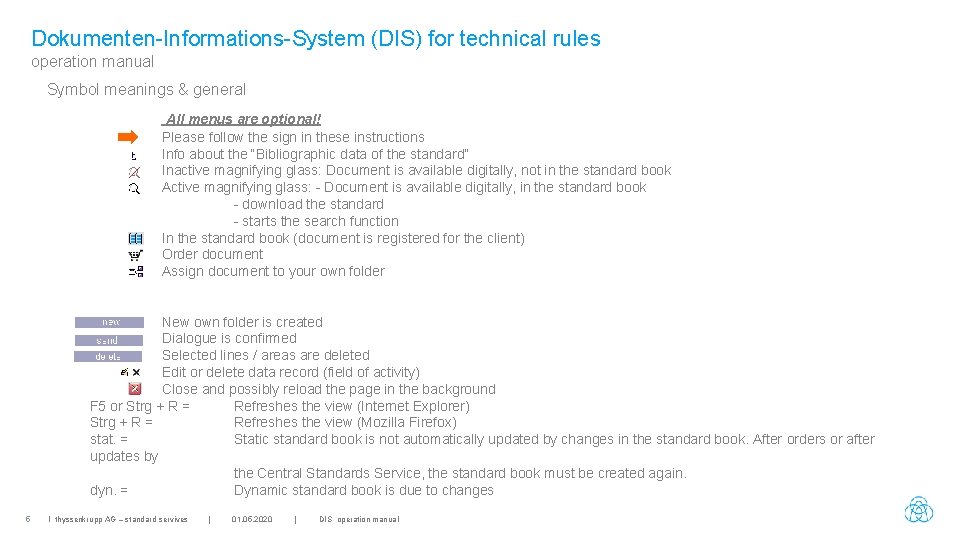
Dokumenten-Informations-System (DIS) for technical rules operation manual Symbol meanings & general All menus are optional! Please follow the sign in these instructions Info about the “Bibliographic data of the standard” Inactive magnifying glass: Document is available digitally, not in the standard book Active magnifying glass: - Document is available digitally, in the standard book - download the standard - starts the search function In the standard book (document is registered for the client) Order document Assign document to your own folder New own folder is created Dialogue is confirmed Selected lines / areas are deleted Edit or delete data record (field of activity) Close and possibly reload the page in the background F 5 or Strg + R = Refreshes the view (Internet Explorer) Strg + R = Refreshes the view (Mozilla Firefox) stat. = Static standard book is not automatically updated by changes in the standard book. After orders or after updates by the Central Standards Service, the standard book must be created again. dyn. = Dynamic standard book is due to changes 5 I thyssenkrupp AG – standard servives | 01. 05. 2020 | DIS operation manual
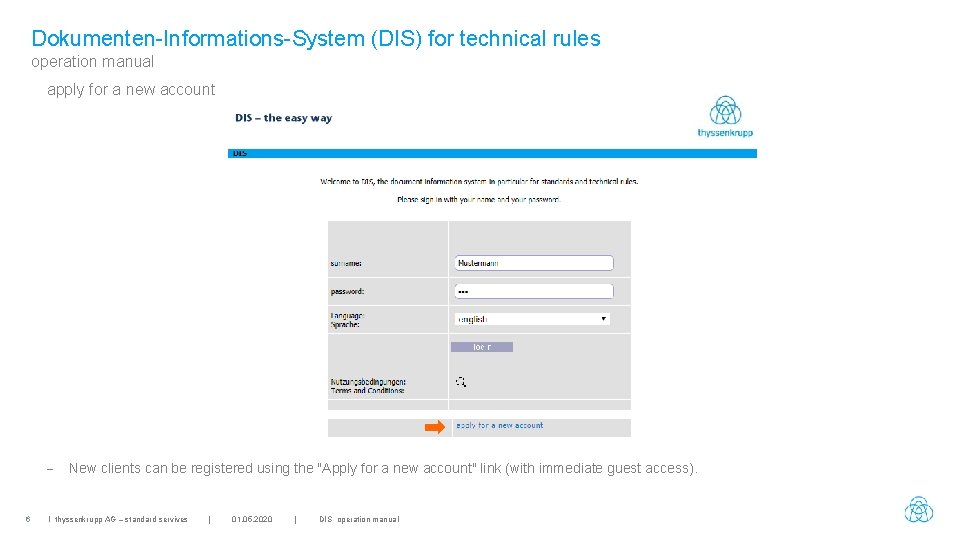
Dokumenten-Informations-System (DIS) for technical rules operation manual apply for a new account - 6 New clients can be registered using the "Apply for a new account" link (with immediate guest access). I thyssenkrupp AG – standard servives | 01. 05. 2020 | DIS operation manual
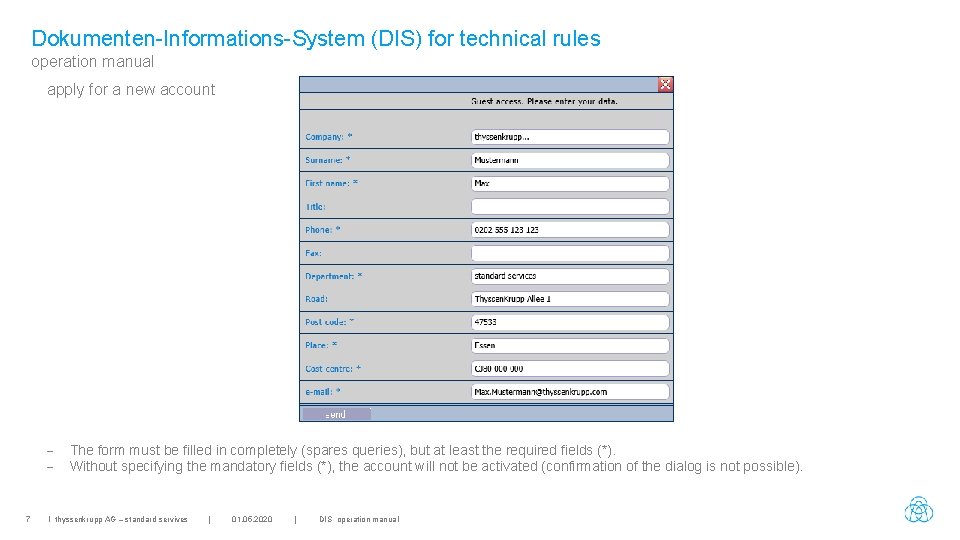
Dokumenten-Informations-System (DIS) for technical rules operation manual apply for a new account - 7 The form must be filled in completely (spares queries), but at least the required fields (*). Without specifying the mandatory fields (*), the account will not be activated (confirmation of the dialog is not possible). I thyssenkrupp AG – standard servives | 01. 05. 2020 | DIS operation manual
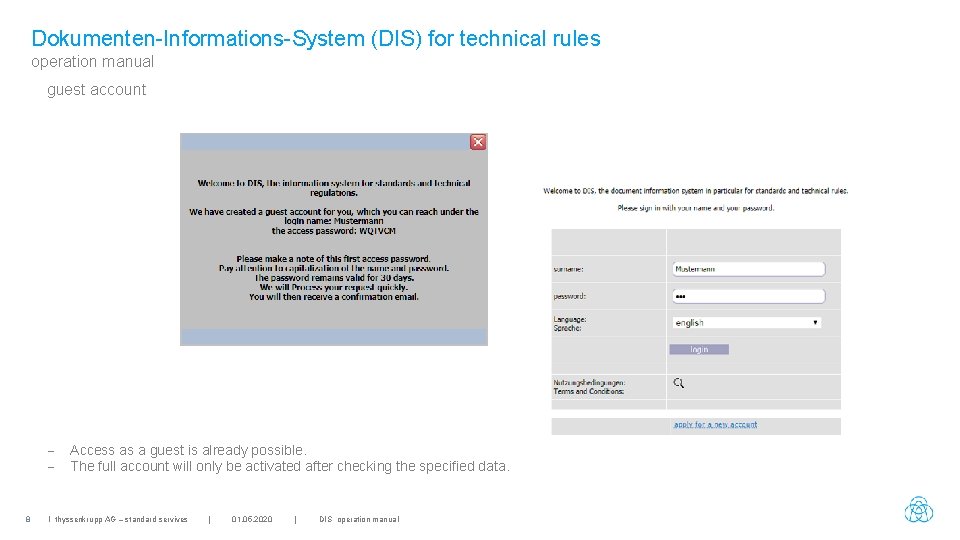
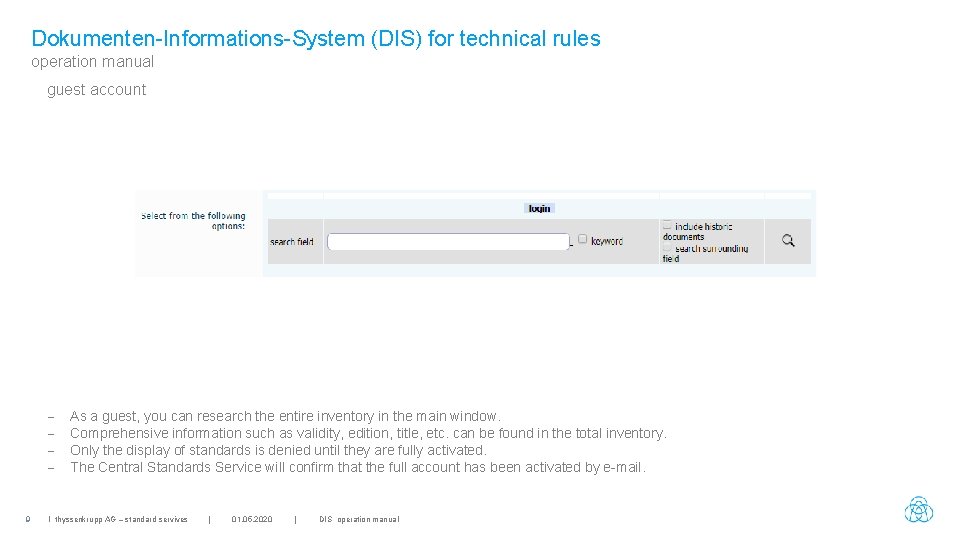
Dokumenten-Informations-System (DIS) for technical rules operation manual guest account - 8 Access as a guest is already possible. The full account will only be activated after checking the specified data. I thyssenkrupp AG – standard servives | 01. 05. 2020 | DIS operation manual
Dokumenten-Informations-System (DIS) for technical rules operation manual guest account - 9 As a guest, you can research the entire inventory in the main window. Comprehensive information such as validity, edition, title, etc. can be found in the total inventory. Only the display of standards is denied until they are fully activated. The Central Standards Service will confirm that the full account has been activated by e-mail. I thyssenkrupp AG – standard servives | 01. 05. 2020 | DIS operation manual
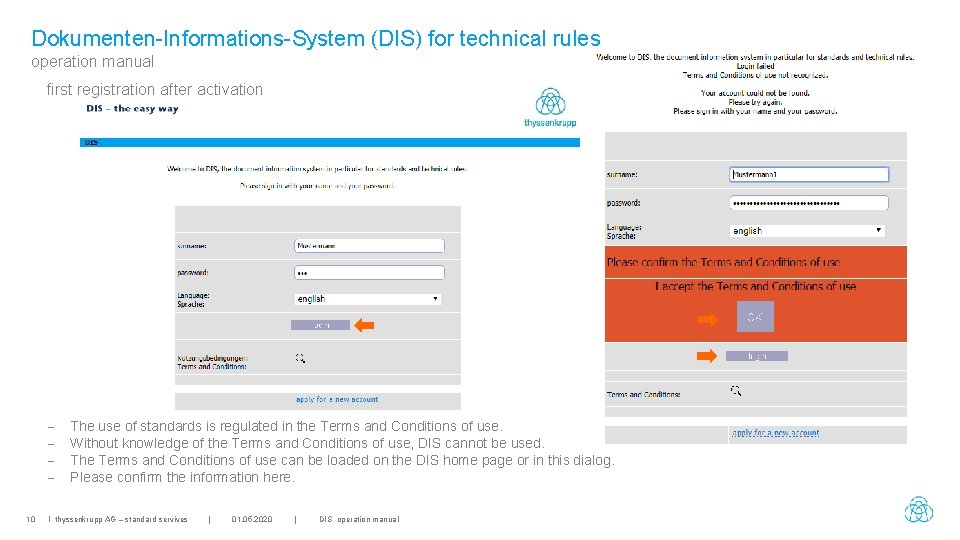
Dokumenten-Informations-System (DIS) for technical rules operation manual first registration after activation 10 The use of standards is regulated in the Terms and Conditions of use. Without knowledge of the Terms and Conditions of use, DIS cannot be used. The Terms and Conditions of use can be loaded on the DIS home page or in this dialog. Please confirm the information here. I thyssenkrupp AG – standard servives | 01. 05. 2020 | DIS operation manual
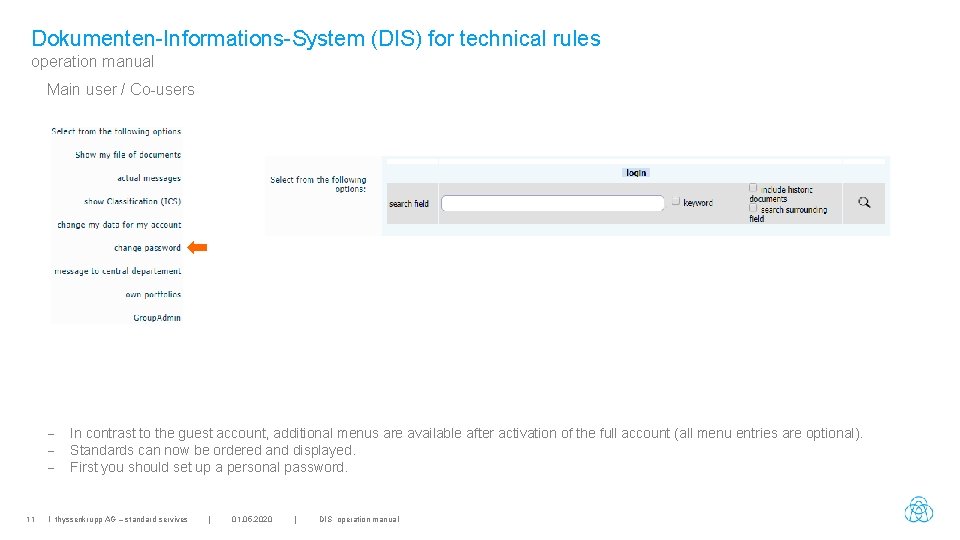
Dokumenten-Informations-System (DIS) for technical rules operation manual Main user / Co-users - 11 In contrast to the guest account, additional menus are available after activation of the full account (all menu entries are optional). Standards can now be ordered and displayed. First you should set up a personal password. I thyssenkrupp AG – standard servives | 01. 05. 2020 | DIS operation manual
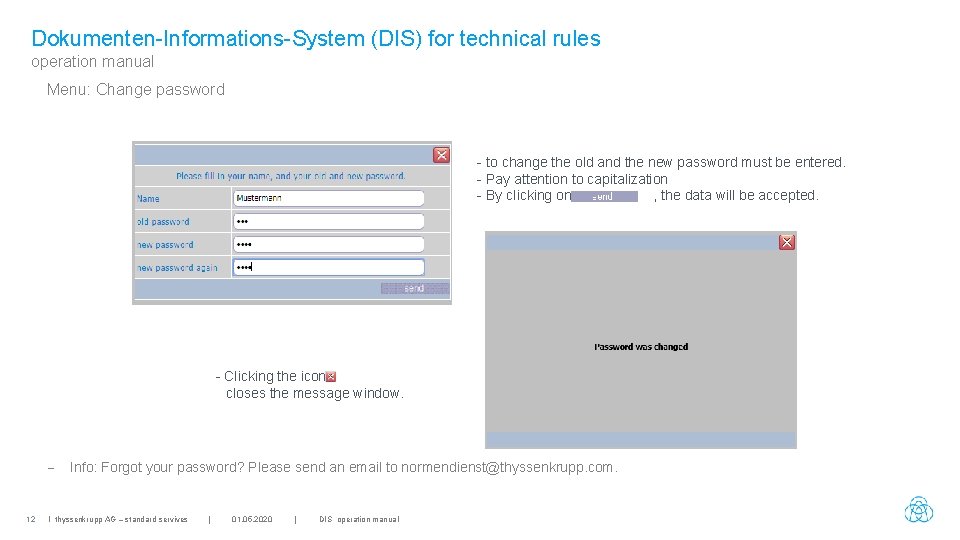
Dokumenten-Informations-System (DIS) for technical rules operation manual Menu: Change password - to change the old and the new password must be entered. - Pay attention to capitalization - By clicking on , the data will be accepted. - Clicking the icon closes the message window. - 12 Info: Forgot your password? Please send an email to normendienst@thyssenkrupp. com. I thyssenkrupp AG – standard servives | 01. 05. 2020 | DIS operation manual
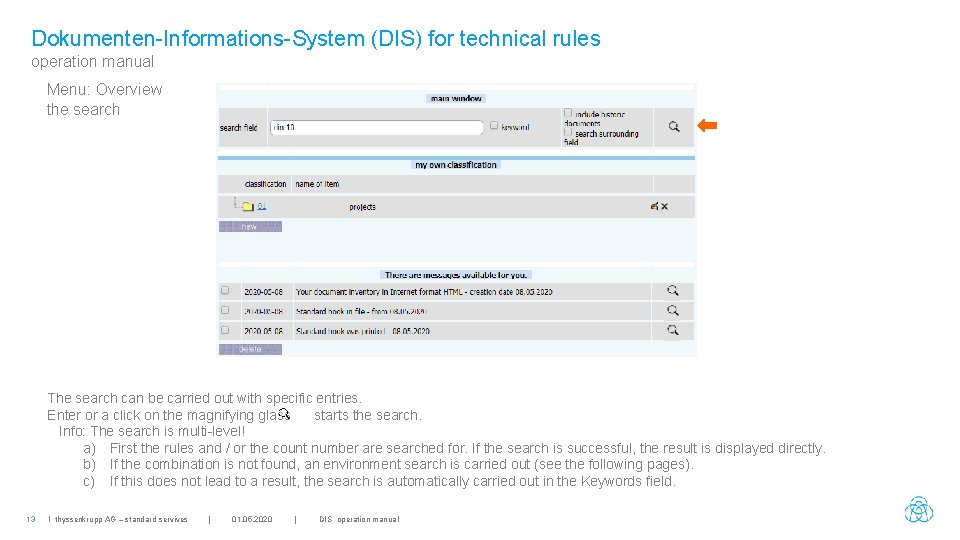
Dokumenten-Informations-System (DIS) for technical rules operation manual Menu: Overview the search The search can be carried out with specific entries. Enter or a click on the magnifying glass starts the search. Info: The search is multi-level! a) First the rules and / or the count number are searched for. If the search is successful, the result is displayed directly. b) If the combination is not found, an environment search is carried out (see the following pages). c) If this does not lead to a result, the search is automatically carried out in the Keywords field. 13 I thyssenkrupp AG – standard servives | 01. 05. 2020 | DIS operation manual
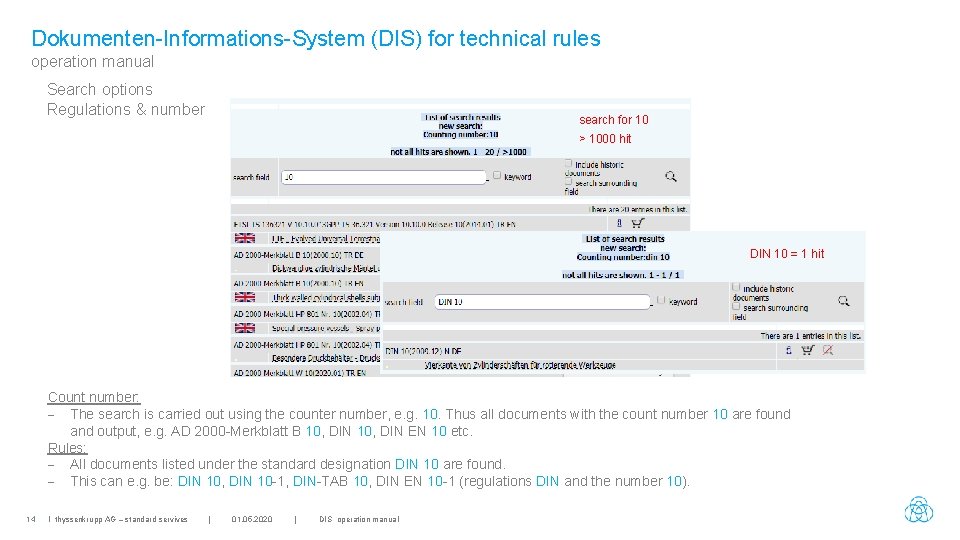
Dokumenten-Informations-System (DIS) for technical rules operation manual Search options Regulations & number search for 10 > 1000 hit DIN 10 = 1 hit Count number: - The search is carried out using the counter number, e. g. 10. Thus all documents with the count number 10 are found and output, e. g. AD 2000 -Merkblatt B 10, DIN EN 10 etc. Rules: - All documents listed under the standard designation DIN 10 are found. - This can e. g. be: DIN 10, DIN 10 -1, DIN-TAB 10, DIN EN 10 -1 (regulations DIN and the number 10). 14 I thyssenkrupp AG – standard servives | 01. 05. 2020 | DIS operation manual
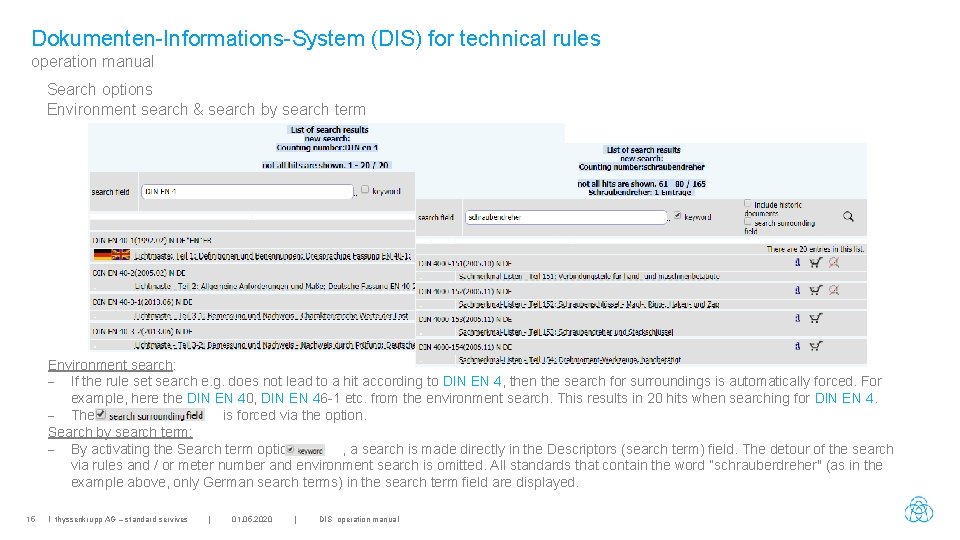
Dokumenten-Informations-System (DIS) for technical rules operation manual Search options Environment search & search by search term Environment search: - If the rule set search e. g. does not lead to a hit according to DIN EN 4, then the search for surroundings is automatically forced. For example, here the DIN EN 40, DIN EN 46 -1 etc. from the environment search. This results in 20 hits when searching for DIN EN 4. - The is forced via the option. Search by search term: - By activating the Search term option , a search is made directly in the Descriptors (search term) field. The detour of the search via rules and / or meter number and environment search is omitted. All standards that contain the word “schrauberdreher" (as in the example above, only German search terms) in the search term field are displayed. 15 I thyssenkrupp AG – standard servives | 01. 05. 2020 | DIS operation manual
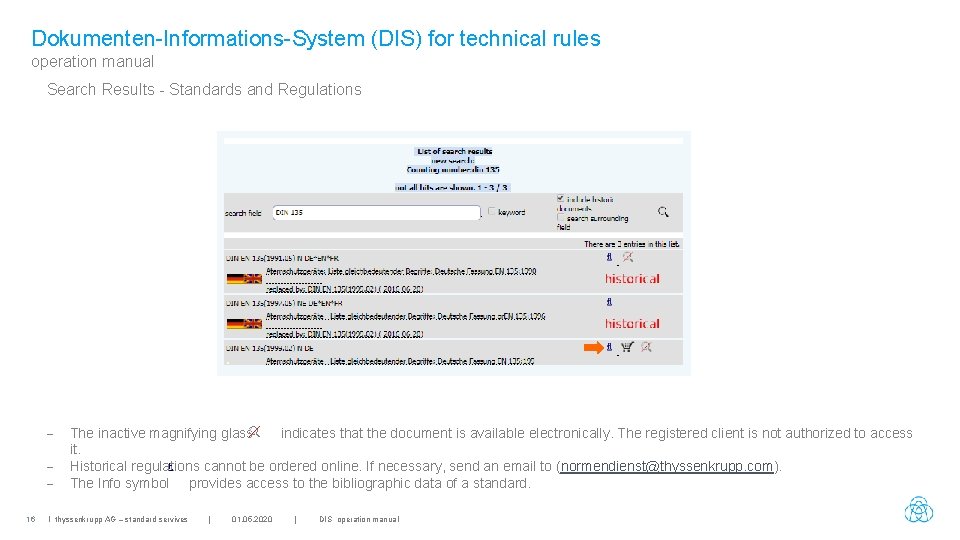
Dokumenten-Informations-System (DIS) for technical rules operation manual Search Results - Standards and Regulations 16 The inactive magnifying glass indicates that the document is available electronically. The registered client is not authorized to access it. Historical regulations cannot be ordered online. If necessary, send an email to (normendienst@thyssenkrupp. com). The Info symbol provides access to the bibliographic data of a standard. I thyssenkrupp AG – standard servives | 01. 05. 2020 | DIS operation manual
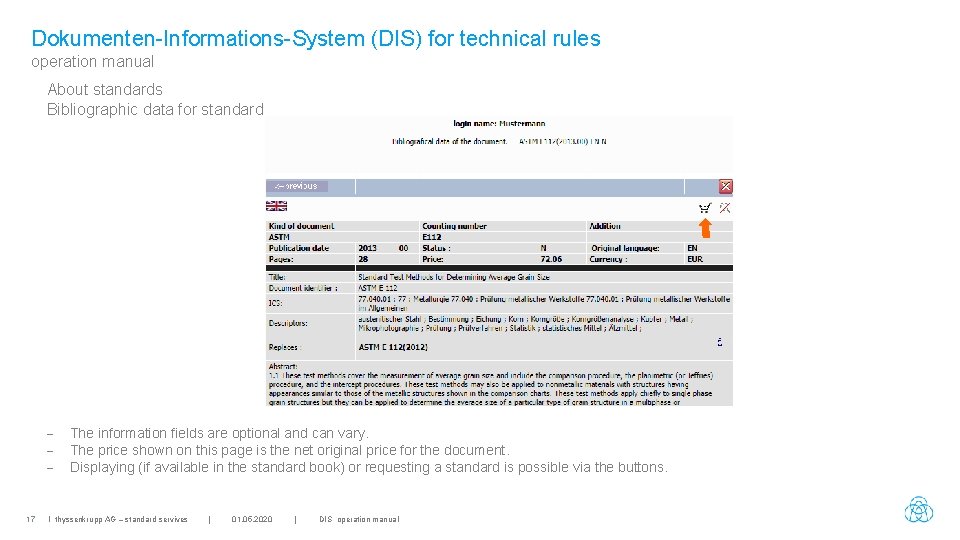
Dokumenten-Informations-System (DIS) for technical rules operation manual About standards Bibliographic data for standard - 17 The information fields are optional and can vary. The price shown on this page is the net original price for the document. Displaying (if available in the standard book) or requesting a standard is possible via the buttons. I thyssenkrupp AG – standard servives | 01. 05. 2020 | DIS operation manual
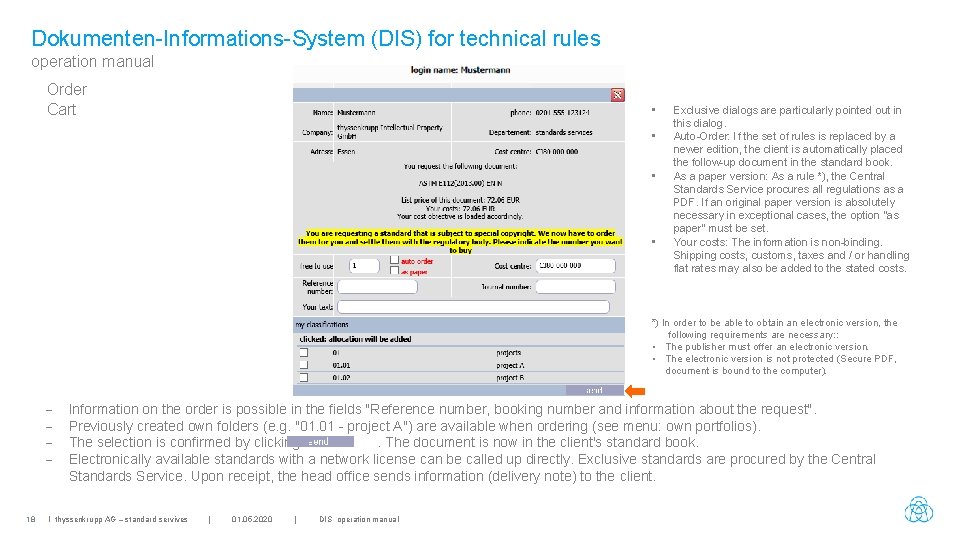
Dokumenten-Informations-System (DIS) for technical rules operation manual Order Cart • • Exclusive dialogs are particularly pointed out in this dialog. Auto-Order: If the set of rules is replaced by a newer edition, the client is automatically placed the follow-up document in the standard book. As a paper version: As a rule *), the Central Standards Service procures all regulations as a PDF. If an original paper version is absolutely necessary in exceptional cases, the option "as paper" must be set. Your costs: The information is non-binding. Shipping costs, customs, taxes and / or handling flat rates may also be added to the stated costs. *) In order to be able to obtain an electronic version, the following requirements are necessary: : • The publisher must offer an electronic version. • The electronic version is not protected (Secure PDF, document is bound to the computer). - 18 Information on the order is possible in the fields "Reference number, booking number and information about the request". Previously created own folders (e. g. "01. 01 - project A") are available when ordering (see menu: own portfolios). The selection is confirmed by clicking. The document is now in the client's standard book. Electronically available standards with a network license can be called up directly. Exclusive standards are procured by the Central Standards Service. Upon receipt, the head office sends information (delivery note) to the client. I thyssenkrupp AG – standard servives | 01. 05. 2020 | DIS operation manual
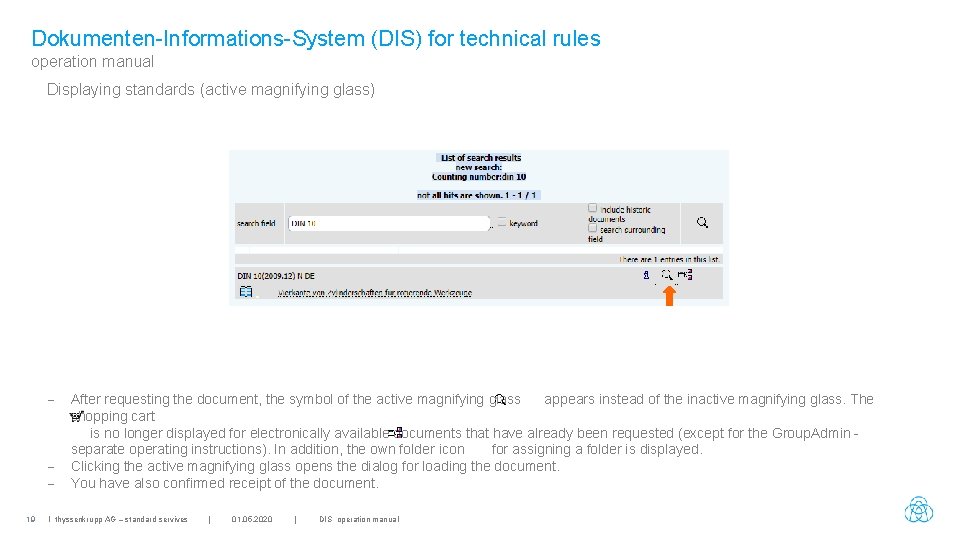
Dokumenten-Informations-System (DIS) for technical rules operation manual Displaying standards (active magnifying glass) - 19 After requesting the document, the symbol of the active magnifying glass appears instead of the inactive magnifying glass. The shopping cart is no longer displayed for electronically available documents that have already been requested (except for the Group. Admin separate operating instructions). In addition, the own folder icon for assigning a folder is displayed. Clicking the active magnifying glass opens the dialog for loading the document. You have also confirmed receipt of the document. I thyssenkrupp AG – standard servives | 01. 05. 2020 | DIS operation manual
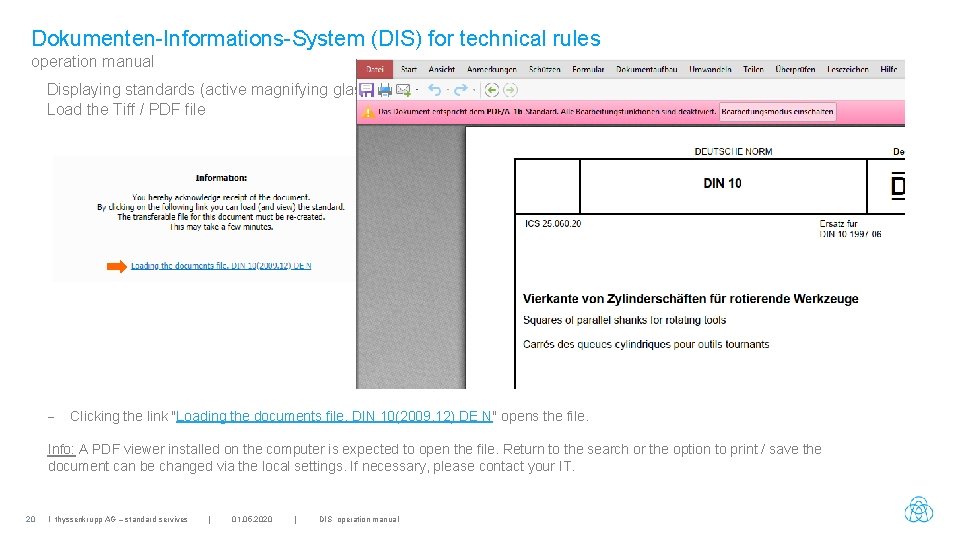
Dokumenten-Informations-System (DIS) for technical rules operation manual Displaying standards (active magnifying glass) Load the Tiff / PDF file - Clicking the link "Loading the documents file. DIN 10(2009. 12) DE N" opens the file. Info: A PDF viewer installed on the computer is expected to open the file. Return to the search or the option to print / save the document can be changed via the local settings. If necessary, please contact your IT. 20 I thyssenkrupp AG – standard servives | 01. 05. 2020 | DIS operation manual
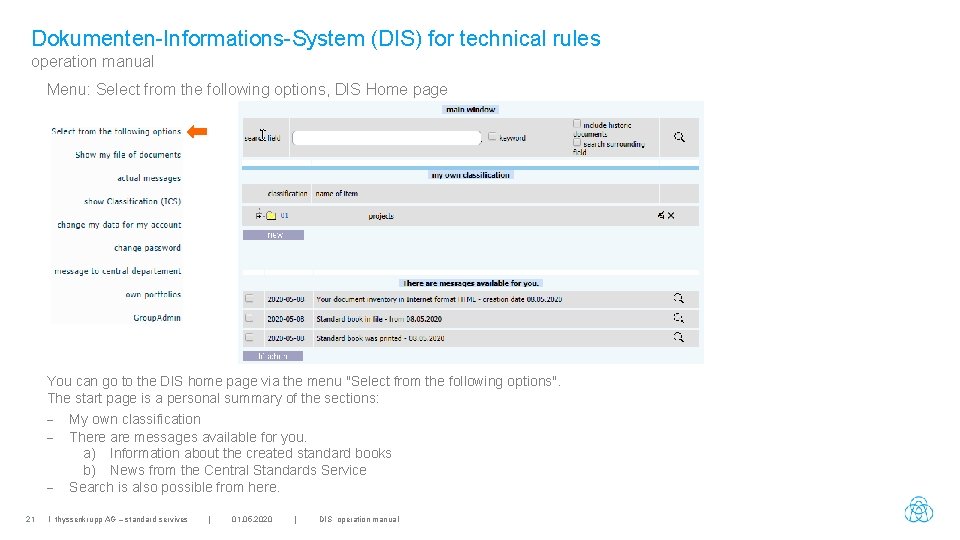
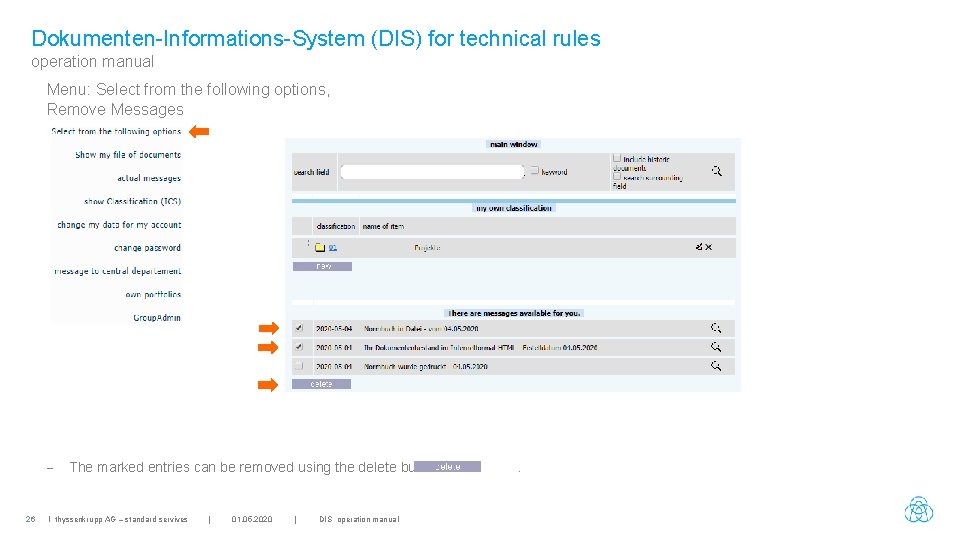
Dokumenten-Informations-System (DIS) for technical rules operation manual Menu: Select from the following options, DIS Home page You can go to the DIS home page via the menu "Select from the following options". The start page is a personal summary of the sections: - My own classification - There are messages available for you. a) Information about the created standard books b) News from the Central Standards Service - Search is also possible from here. 21 I thyssenkrupp AG – standard servives | 01. 05. 2020 | DIS operation manual
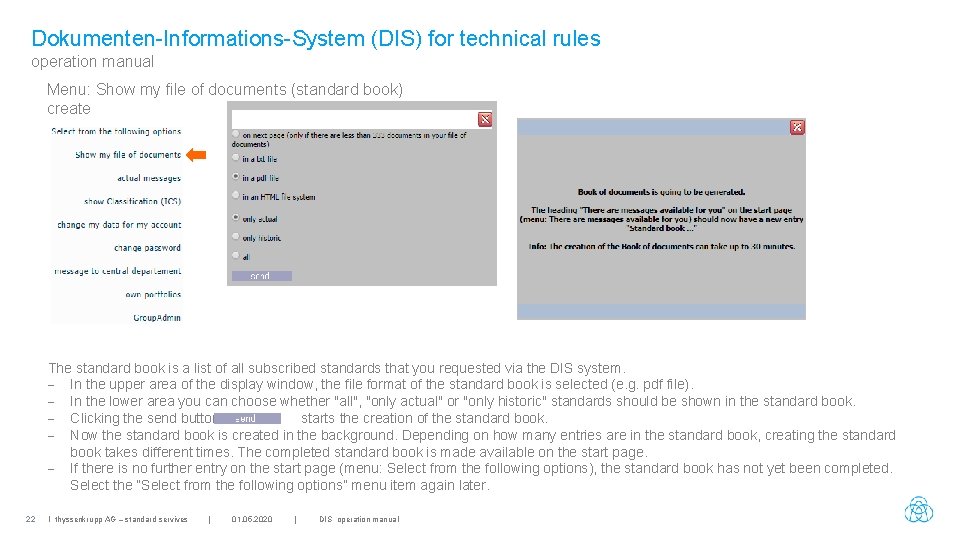
Dokumenten-Informations-System (DIS) for technical rules operation manual Menu: Show my file of documents (standard book) create The standard book is a list of all subscribed standards that you requested via the DIS system. - In the upper area of the display window, the file format of the standard book is selected (e. g. pdf file). - In the lower area you can choose whether "all", "only actual" or "only historic" standards should be shown in the standard book. - Clicking the send button starts the creation of the standard book. - Now the standard book is created in the background. Depending on how many entries are in the standard book, creating the standard book takes different times. The completed standard book is made available on the start page. - If there is no further entry on the start page (menu: Select from the following options), the standard book has not yet been completed. Select the “Select from the following options” menu item again later. 22 I thyssenkrupp AG – standard servives | 01. 05. 2020 | DIS operation manual
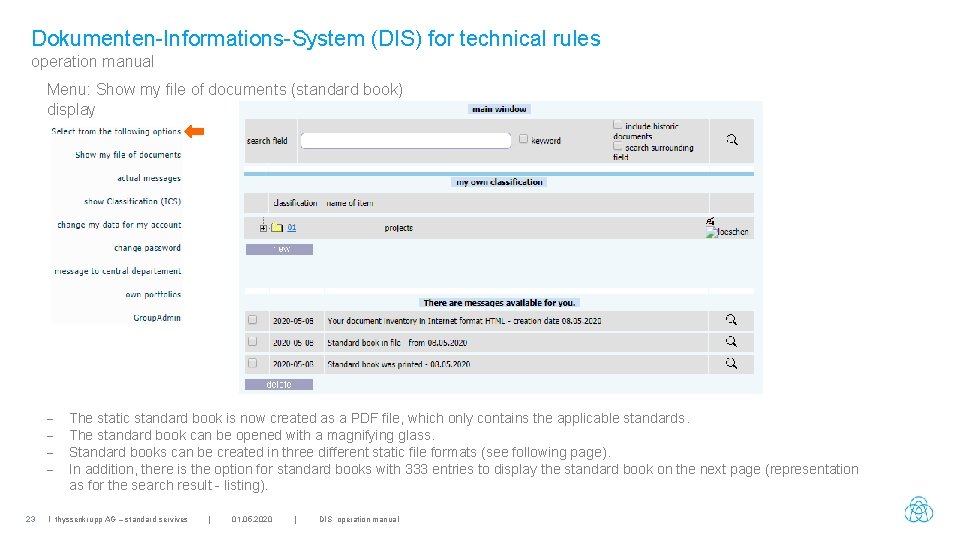
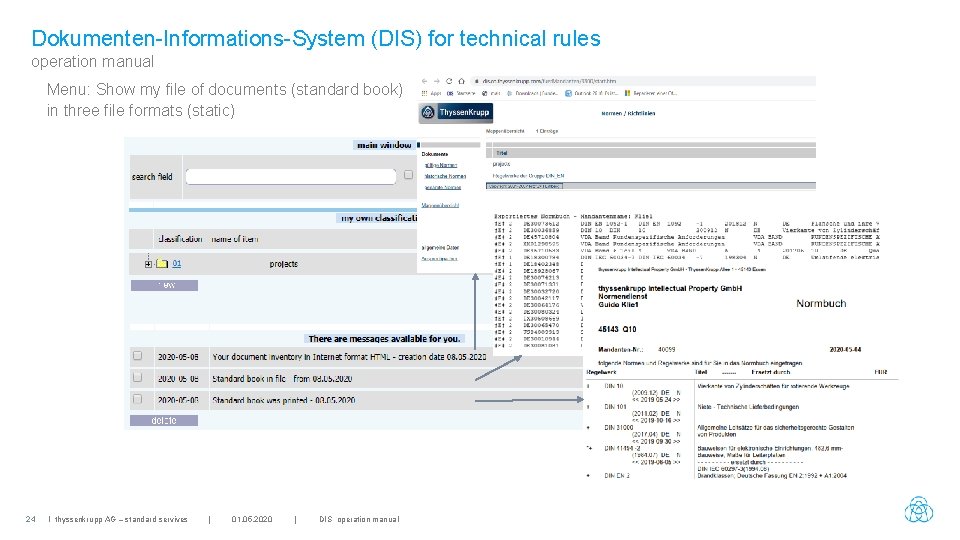
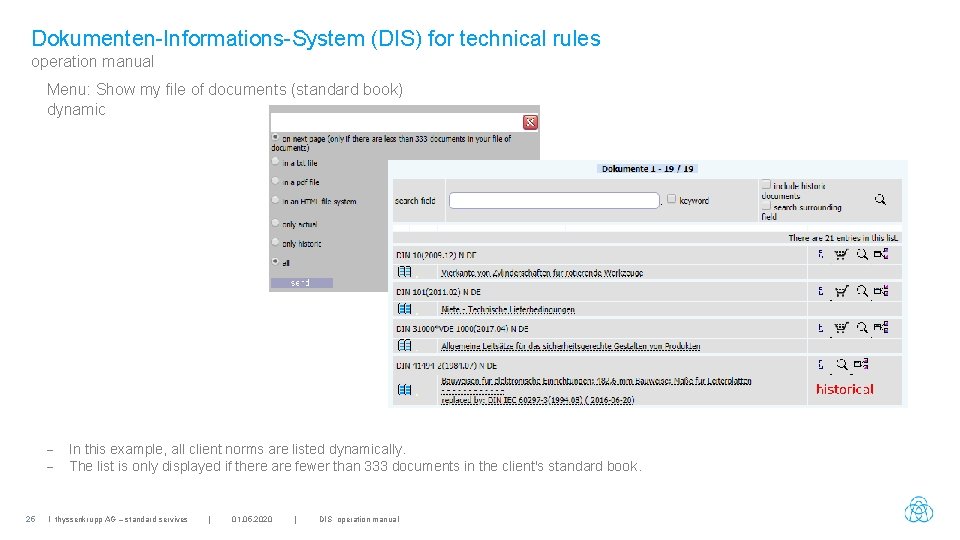
Dokumenten-Informations-System (DIS) for technical rules operation manual Menu: Show my file of documents (standard book) display - 23 The static standard book is now created as a PDF file, which only contains the applicable standards. The standard book can be opened with a magnifying glass. Standard books can be created in three different static file formats (see following page). In addition, there is the option for standard books with 333 entries to display the standard book on the next page (representation as for the search result - listing). I thyssenkrupp AG – standard servives | 01. 05. 2020 | DIS operation manual
Dokumenten-Informations-System (DIS) for technical rules operation manual Menu: Show my file of documents (standard book) in three file formats (static) 24 I thyssenkrupp AG – standard servives | 01. 05. 2020 | DIS operation manual
Dokumenten-Informations-System (DIS) for technical rules operation manual Menu: Show my file of documents (standard book) dynamic - 25 In this example, all client norms are listed dynamically. The list is only displayed if there are fewer than 333 documents in the client's standard book. I thyssenkrupp AG – standard servives | 01. 05. 2020 | DIS operation manual
Dokumenten-Informations-System (DIS) for technical rules operation manual Menu: Select from the following options, Remove Messages - 26 The marked entries can be removed using the delete button I thyssenkrupp AG – standard servives | 01. 05. 2020 | DIS operation manual .
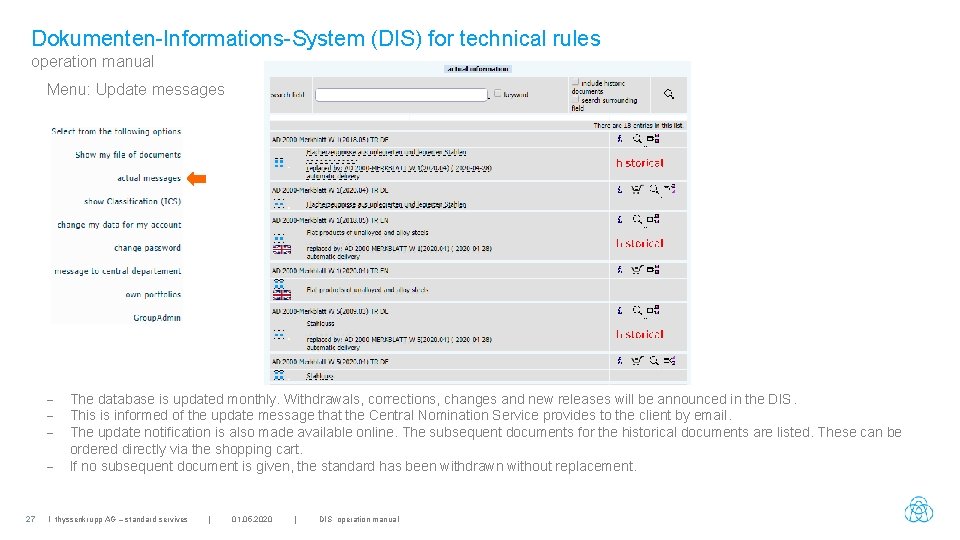
Dokumenten-Informations-System (DIS) for technical rules operation manual Menu: Update messages - 27 The database is updated monthly. Withdrawals, corrections, changes and new releases will be announced in the DIS. This is informed of the update message that the Central Nomination Service provides to the client by email. The update notification is also made available online. The subsequent documents for the historical documents are listed. These can be ordered directly via the shopping cart. If no subsequent document is given, the standard has been withdrawn without replacement. I thyssenkrupp AG – standard servives | 01. 05. 2020 | DIS operation manual
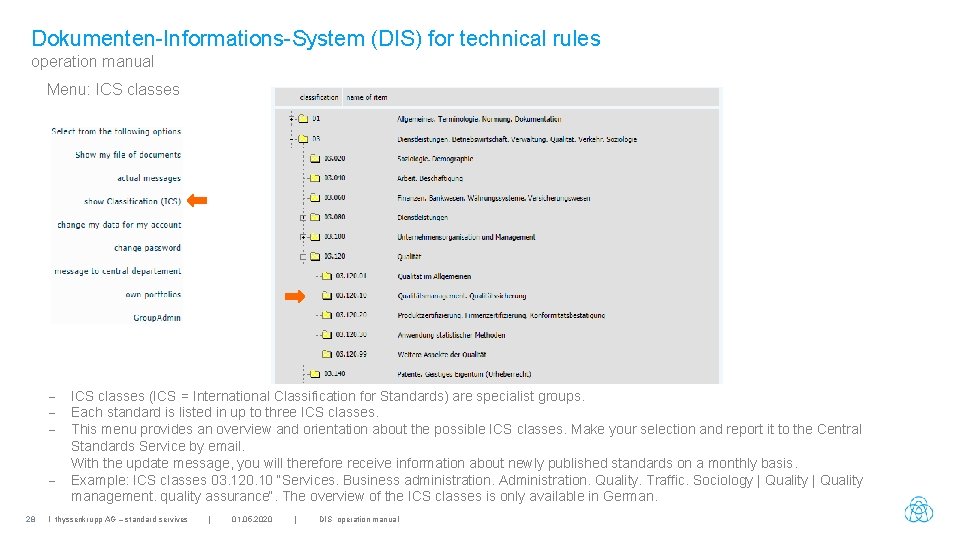
Dokumenten-Informations-System (DIS) for technical rules operation manual Menu: ICS classes 28 ICS classes (ICS = International Classification for Standards) are specialist groups. Each standard is listed in up to three ICS classes. This menu provides an overview and orientation about the possible ICS classes. Make your selection and report it to the Central Standards Service by email. With the update message, you will therefore receive information about newly published standards on a monthly basis. Example: ICS classes 03. 120. 10 “Services. Business administration. Administration. Quality. Traffic. Sociology | Quality management. quality assurance“. The overview of the ICS classes is only available in German. I thyssenkrupp AG – standard servives | 01. 05. 2020 | DIS operation manual
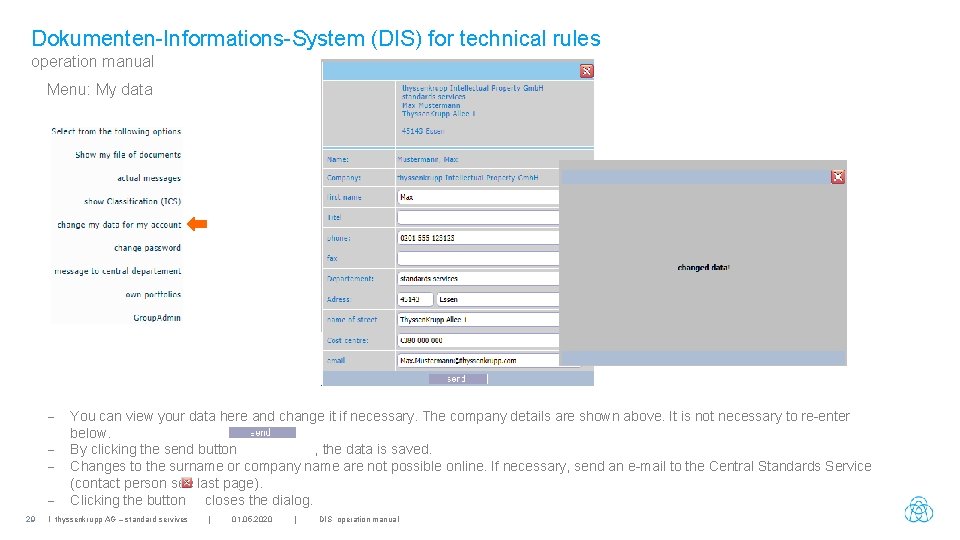
Dokumenten-Informations-System (DIS) for technical rules operation manual Menu: My data 29 You can view your data here and change it if necessary. The company details are shown above. It is not necessary to re-enter below. By clicking the send button , the data is saved. Changes to the surname or company name are not possible online. If necessary, send an e-mail to the Central Standards Service (contact person see last page). Clicking the button closes the dialog. I thyssenkrupp AG – standard servives | 01. 05. 2020 | DIS operation manual
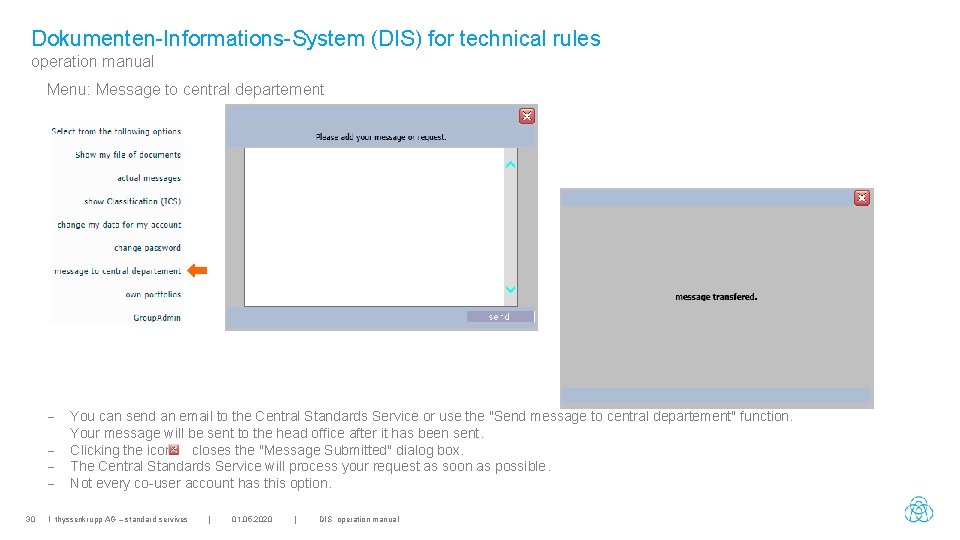
Dokumenten-Informations-System (DIS) for technical rules operation manual Menu: Message to central departement 30 You can send an email to the Central Standards Service or use the "Send message to central departement" function. Your message will be sent to the head office after it has been sent. Clicking the icon closes the "Message Submitted" dialog box. The Central Standards Service will process your request as soon as possible. Not every co-user account has this option. I thyssenkrupp AG – standard servives | 01. 05. 2020 | DIS operation manual
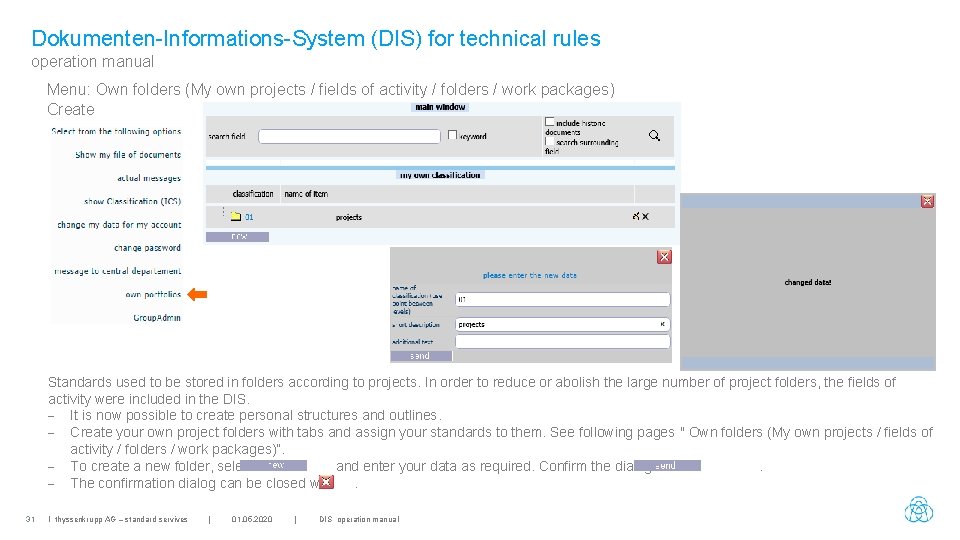
Dokumenten-Informations-System (DIS) for technical rules operation manual Menu: Own folders (My own projects / fields of activity / folders / work packages) Create Standards used to be stored in folders according to projects. In order to reduce or abolish the large number of project folders, the fields of activity were included in the DIS. - It is now possible to create personal structures and outlines. - Create your own project folders with tabs and assign your standards to them. See following pages " Own folders (My own projects / fields of activity / folders / work packages)“. - To create a new folder, select and enter your data as required. Confirm the dialog with. - The confirmation dialog can be closed with. 31 I thyssenkrupp AG – standard servives | 01. 05. 2020 | DIS operation manual
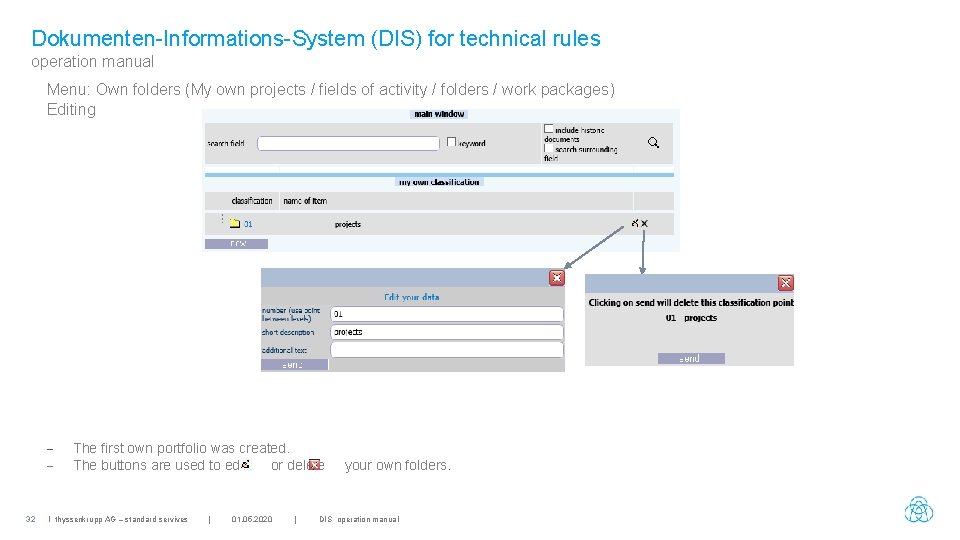
Dokumenten-Informations-System (DIS) for technical rules operation manual Menu: Own folders (My own projects / fields of activity / folders / work packages) Editing - 32 The first own portfolio was created. The buttons are used to edit or delete I thyssenkrupp AG – standard servives | 01. 05. 2020 | your own folders. DIS operation manual
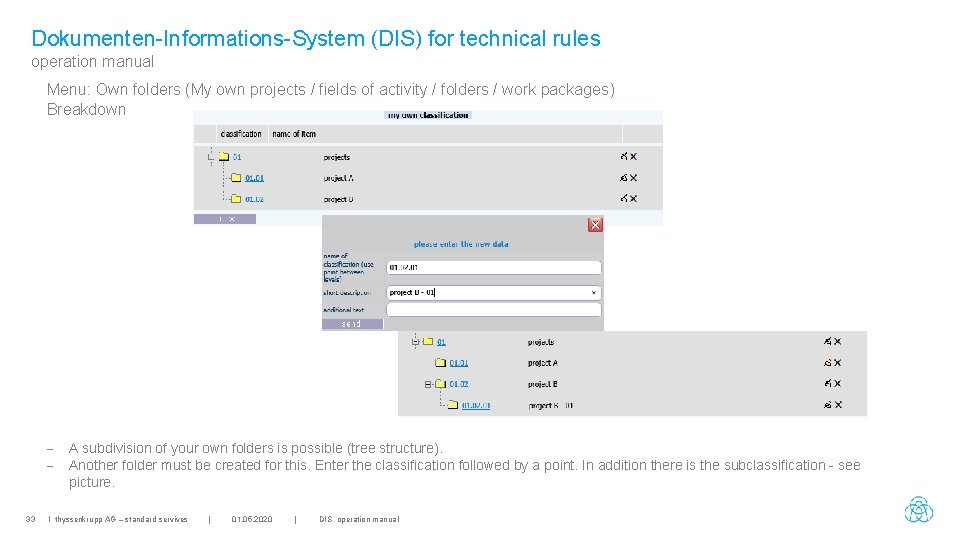
Dokumenten-Informations-System (DIS) for technical rules operation manual Menu: Own folders (My own projects / fields of activity / folders / work packages) Breakdown - 33 A subdivision of your own folders is possible (tree structure). Another folder must be created for this. Enter the classification followed by a point. In addition there is the subclassification - see picture. I thyssenkrupp AG – standard servives | 01. 05. 2020 | DIS operation manual
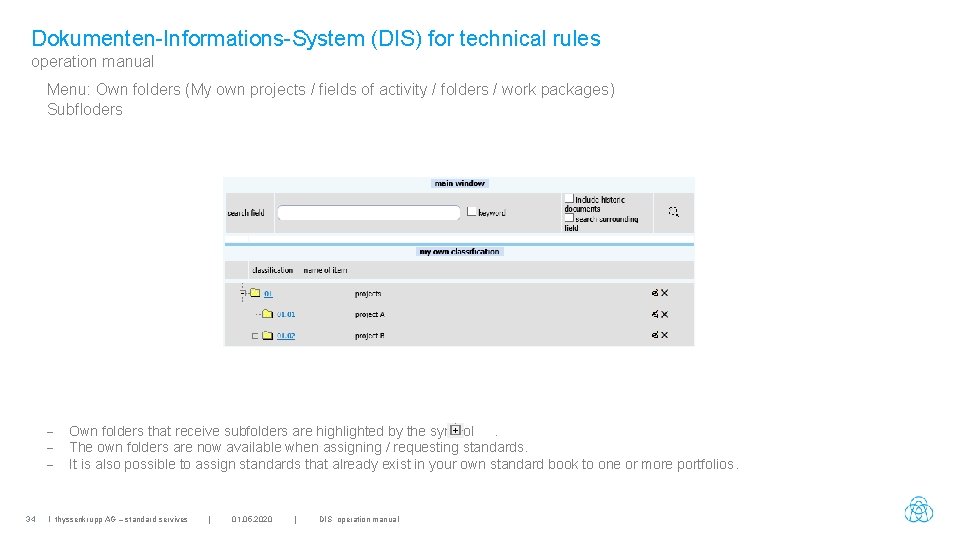
Dokumenten-Informations-System (DIS) for technical rules operation manual Menu: Own folders (My own projects / fields of activity / folders / work packages) Subfloders - 34 Own folders that receive subfolders are highlighted by the symbol. The own folders are now available when assigning / requesting standards. It is also possible to assign standards that already exist in your own standard book to one or more portfolios. I thyssenkrupp AG – standard servives | 01. 05. 2020 | DIS operation manual
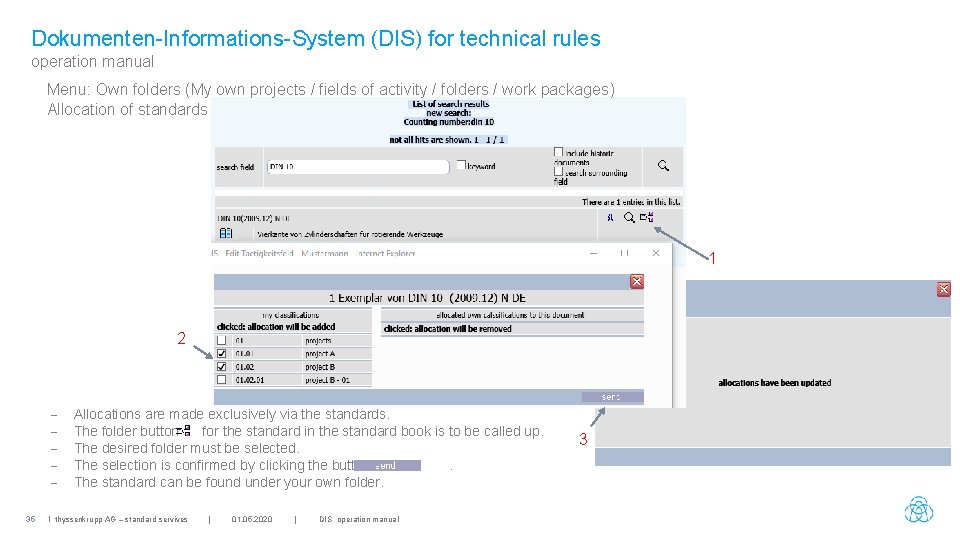
Dokumenten-Informations-System (DIS) for technical rules operation manual Menu: Own folders (My own projects / fields of activity / folders / work packages) Allocation of standards 1 2 35 Allocations are made exclusively via the standards. The folder button for the standard in the standard book is to be called up. The desired folder must be selected. The selection is confirmed by clicking the button. The standard can be found under your own folder. I thyssenkrupp AG – standard servives | 01. 05. 2020 | DIS operation manual 3
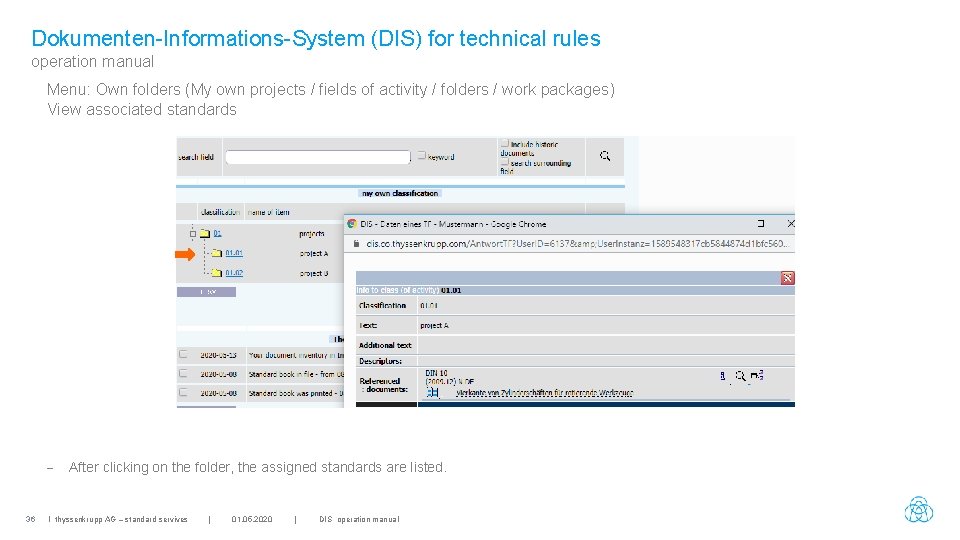
Dokumenten-Informations-System (DIS) for technical rules operation manual Menu: Own folders (My own projects / fields of activity / folders / work packages) View associated standards - 36 After clicking on the folder, the assigned standards are listed. I thyssenkrupp AG – standard servives | 01. 05. 2020 | DIS operation manual
Dokumenten-Informations-System (DIS) for technical rules operation manual Contact person & address Herr Guido Klie Tel. : 0201 844 – 536642 E-Mail: guido. klie@thyssenkrupp. com Frau Anne Küpper Tel. : 0201 844 – 536643 E-Mail: annegret. kuepper@thyssenkrupp. com E-Mail: normendienst@thyssenkrupp. com thyssenkrupp Intellectual Property Gmb. H Thyssen. Krupp Allee 1 45143 Essen 37 I thyssenkrupp AG – standard servives | 01. 05. 2020 | DIS operation manual