
DOE2 Overview and Basic Concepts Background p US
DOE-2 Overview and Basic Concepts
Background p US public domain programs from 1970 s n n n Post Office program; NECAP (NASA energycost analysis program); NBSLD (National Bureau of Standards Load Determination) Cal-ERDA (California + U. S. Energy Research & Development Administration) program Department of Energy (DOE) funding First generation DOE-1. 4 program (1978) p Later DOE-2. 0 A, 2. 1 A, B, C, D, E come out p p Program description n http: //gundog. lbl. gov/dirsoft/d 2 whatis. html
Background p Current versions n n n p DOE-2. 1 E (official), DOE-2. 2 & Power. DOE Maintained by the Simulation Research Group of Lawrence Berkeley National Laboratory (LBNL) Funded by U. S. Department of Energy (DOE) Several PC versions & interfaces, e. g. n n ADM-DOE 2, FTI-DOE, Visual. DOE (at a cost) e. QUEST (freeware)
Background p In the past, mainly used by researchers n n n p DOE-2 is powerful but very complicated Require much input time & detail Need efforts to learn & to master In recent years, also used by building designers & energy analysts n n n Consider as the reference program in USA Becoming popular internationally (e. g. for developing building energy codes) Often used for performance-based energy codes
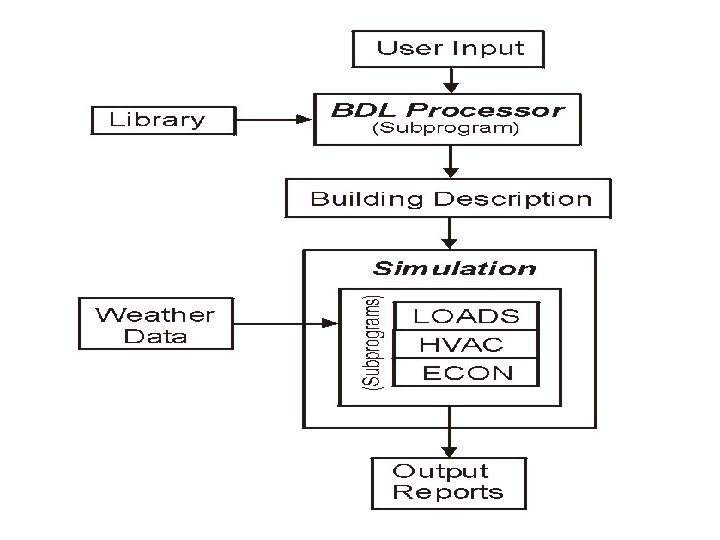
Background Based on transfer function theory & weighting factor method; in FORTRAN language p Program structure p n Building description language (BDL) processor p n Error diagnosis & calculate response factors Simulation subprograms LOADS – building loads p SYSTEMS – secondary HVAC system p PLANT – primary HVAC system p ECONOMICS – economic analysis p
Main Features p Capabilities n Energy conservation studies Building envelope design (materials, construction, etc. ) p Internal loads (occupant, lighting, equipment) p HVAC systems & plant p n Building design studies Daylighting & ventilation design p Energy & environmental systems p § Such as cogeneration, desiccant cooling & ice thermal storage p Economic & life cycle analysis
Main Features p Limitations n n Cannot model electrical & lift systems Certain constraints on some building systems Inflexible FORTRAN structure Sequential calculation method (L-S-P-E) p Not able to consider heat balance
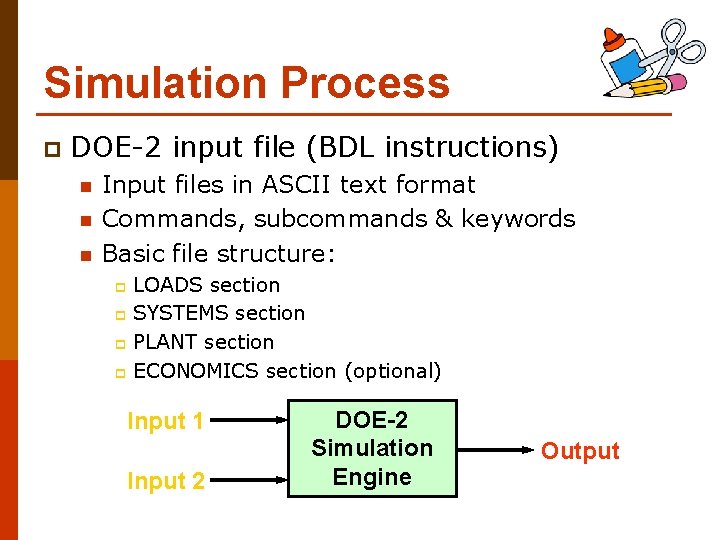
Simulation Process p DOE-2 input file (BDL instructions) n n n Input files in ASCII text format Commands, subcommands & keywords Basic file structure: LOADS section p SYSTEMS section p PLANT section p ECONOMICS section (optional) p Input 1 Input 2 DOE-2 Simulation Engine Output
Simulation Process p Run periods n n n p Normally whole year (8, 760 hours) May run on shorter period (say, one month) May carry out simulation for multiple years (if the weather files are available) Control of simulation process n n n Base case design Design alternatives (done with interface program) Parametric runs & analysis (may be tailored made)

Simulation Process p DOE-2 output reports n Standard reports Verification reports + Summary reports p For loads, systems, plant & economics p n Hourly reports p p Very detailed; for checking by advanced users Program-specific output n n n Summary graphs and tables Customised reports Errors & diagnostics
Simulation Process p DOE-2 output files & reports n Commonly read summary reports: LS-A (Space Peak Loads Summary) p SS-A & SS-B (System Monthly Loads Summary) p PS-A (Plant Energy Utilization Sumary) p PS-B (Monthly Peak and Total Energy Use) p PS-E (Monthly Energy End Use Summary) p BEPS (Building Energy Performance Summary) p
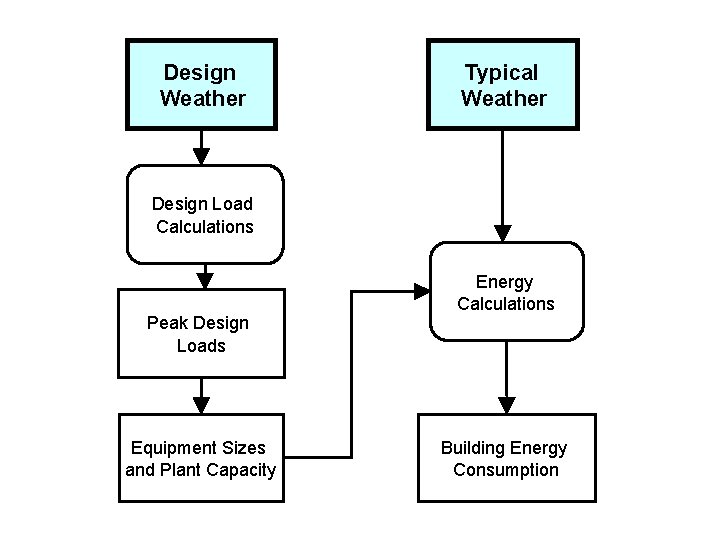
Design Weather Typical Weather Design Load Calculations Peak Design Loads Equipment Sizes and Plant Capacity Energy Calculations Building Energy Consumption
Input Requirements p Input data n Site data Building type, location, geometry, construction p Weather data: design weather, weather files p n Building data Surface areas, windows, zoning, room shapes p Building materials, mass, finishes, shades p Operating schedules & profiles p Internal loads, design conditions p
Input Requirements p Input data (cont’d) n Building systems HVAC (air side) system type & performance p Lighting & electrical services p n Building plant and equipment p n Performance of refrigeration, boiler & other plants Data for economic analysis Electricity tariffs/rates, fuel prices p Equipment costs, interest rates p
Input Requirements p Model zoning (thermal, not geometric) n n n Should consider thermal loads (e. g. interiorperimeter), occupancy, lighting type and schedule For existing buildings, refer to actual zoning Need to simplify the model Combine zones with similar load and usage p Intermediate typical floors are modelled as one floor p Combine HVAC systems p Sometimes, use ONE zone to quickly calculate the load p
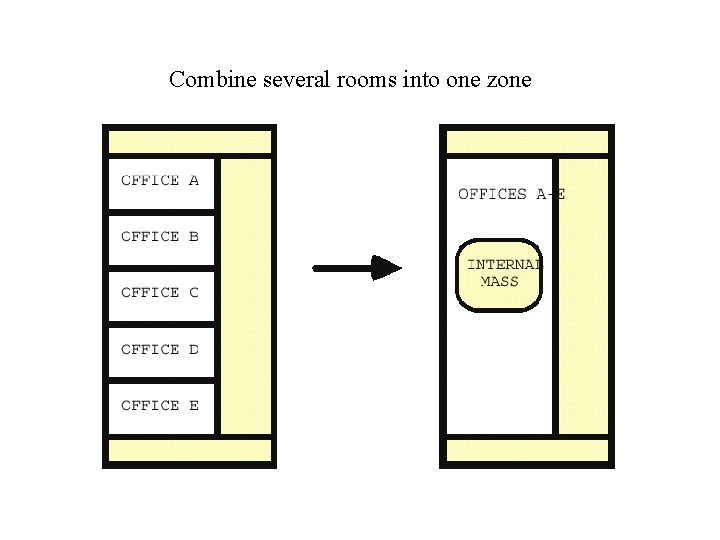
Combine several rooms into one zone
Input Requirements p General rules for zoning n n n One exterior zone per major orientation (4 -5 m deep) One internal zone per use schedule One plenum zone (if plenum returns) for each air handler One zone each for special uses Separate ground and top floor zones
- Slides: 18