
DOAG Regio Freiburg Enterprise Manager Cloud Control 12
DOAG Regio Freiburg Enterprise Manager Cloud Control 12 c BASEL 1 BERN LAUSANNE ZÜRICH 2012 © Trivadis September 2012 DÜSSELDORF FRANKFURT A. M. . mal ohne Packs oder. . . Monitoring Oracle Database Without Packs – ist das überhaupt möglich / sinnvoll? FREIBURG I. BR. HAMBURG MÜNCHEN STUTTGART WIEN
Trivadis Facts and Figures – Robert Crames § Senior Consultant § Trivadis AG, Bern, since 04. 2000 § Enterprise Manager Knowledge since EM 1. x § Trainer for Trivadis Courses § § (O_EM_x (Enterprise Manager 2. 2, 9. 0, 9. 2)) (O-GC_x (Grid Control 10 g, 11 g)) O-CC-12 c (Cloud Control) O-WLS-FR (Weblogic Server und Forms/Reports) § Several speeches at different conferences § Contact: robert. crames@trivadis. com 2 2012 © Trivadis September 2012
AGENDA 1. Introduction § § General Restricted-use license (DB, WLS, …) Showing Management Pack Information Enable / Disable Management Packs 2. Monitoring Oracle Database Without Packs § Restrictions § Monitoring – but what …? § (No) Notification 3 2012 © Trivadis September 2012
Oracle Licensing – Introduction § First of all: Prices are not shown here § If you have special questions please ask Trivadis Licensing Competence Center (http: //www. trivadis. com/consulting-services/infrastructure-engineering/oracle-lizenzmanagement-beratung. html) § Second (Taken from Oracle® Enterprise Manager Licensing Information): “You cannot use the options, packs, reports, licensed repository views, or Command Line Interface (CLI) verbs described in these chapters without the appropriate licenses. Although these options, Management Packs, or products may be included in product CDs or downloads, or described in documentation that you receive, this does not authorize you to use them without the appropriate licenses” § Third: By default, all Packs are enabled (!) § Forth: Due to limitations of time, we must focus on Database related licensing – detailed information about other licenses can be found at oracle. com (The pdf has 336 pages) 4 2012 © Trivadis September 2012
Oracle Licensing – Introduction § Fifth: Yes – we know. . . Packs are necessary – and not licensable to Oracle Standard Edition. . . But: This speech will not only demonstrate that it‘s not possible to monitor SE Databases / monitor Databases without Diagnostic Pack, it will § clarify some – possibly – unknown facts regarding licensing, § show what metrics are best practice to monitor § start a discussion about alternatives 5 2012 © Trivadis September 2012
AGENDA 1. Introduction § § General Restricted-use license (DB, WLS, …) Showing Management Pack Information Enable / Disable Management Packs 2. Monitoring Oracle Database Without Packs § Restrictions § Monitoring – but what …? § (No) Notification 6 2012 © Trivadis September 2012
Oracle Licensing – Restricted Use License § For Repository Database § EM 12 c includes a restricted use license of an Oracle Database for use only with the EM Repository (or other complementary repositories) or as RMAN catalog database § Additional database options or servers for disaster recovery require separate licensing § An EM Repository in a Data Guard Environment requires to purchase a license for the standby site § If RAC is used, all additional databases must be licensed, plus for every node an additional Oracle RAC license is to purchase § For Weblogic Server § Use of WLS with OEM 12 c is restricted to the servlet functionality without clustering for the OMS 7 2012 © Trivadis September 2012
Oracle Licensing – Restricted Use License § For Virtual Assembly Builder § Never heard about? Oracle says: “Take multi-tier enterprise applications—for example, a Web server, application server, and database—and package them into self-contained, single-purpose virtual machines. ” Virtualisation § Is licensed, as long as the assemblies are deployed through EM 12 c § For Oracle Business Intelligence Publisher and Business Intelligence Mobile § EM 12 c includes restriced use of these tools, but only for use with EM functionalities and interfaces 8 2012 © Trivadis September 2012
AGENDA 1. Introduction § § General Restricted-use license (DB, WLS, …) Showing Management Pack Information Enable / Disable Management Packs 2. Monitoring Oracle Database Without Packs § Restrictions § Monitoring – but what …? § (No) Notification 9 2012 © Trivadis September 2012
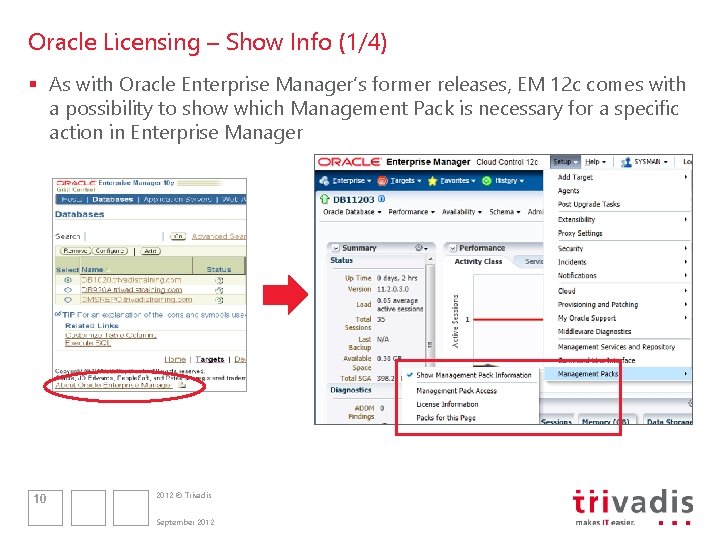
Oracle Licensing – Show Info (1/4) § As with Oracle Enterprise Manager’s former releases, EM 12 c comes with a possibility to show which Management Pack is necessary for a specific action in Enterprise Manager 10 2012 © Trivadis September 2012
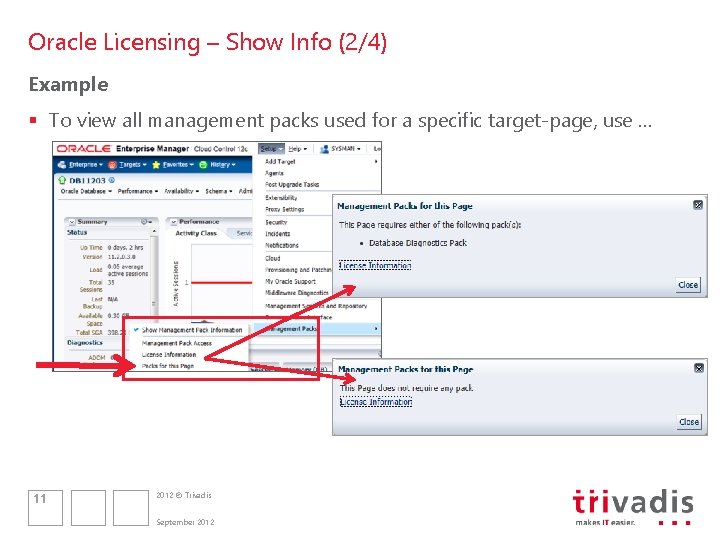
Oracle Licensing – Show Info (2/4) Example § To view all management packs used for a specific target-page, use … 11 2012 © Trivadis September 2012
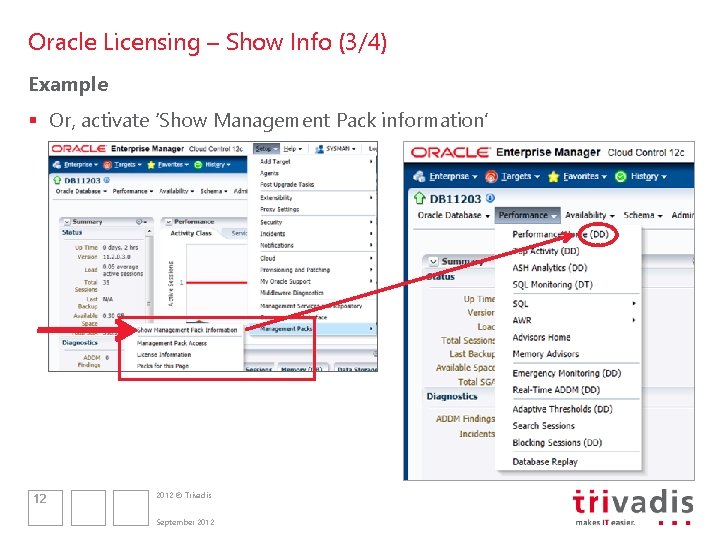
Oracle Licensing – Show Info (3/4) Example § Or, activate ‘Show Management Pack information’ 12 2012 © Trivadis September 2012
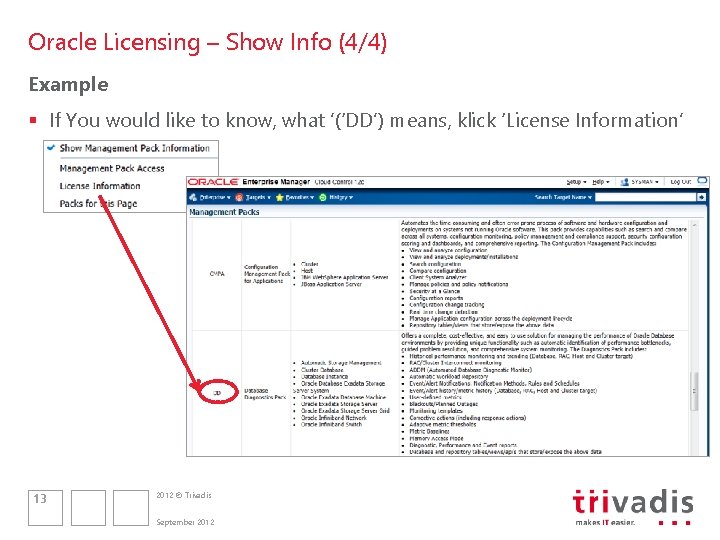
Oracle Licensing – Show Info (4/4) Example § If You would like to know, what ’(‘DD’) means, klick ‘License Information’ 13 2012 © Trivadis September 2012
AGENDA 1. Introduction § § General Restricted-use license (DB, WLS, …) Showing Management Pack Information Enable / Disable Management Packs 2. Monitoring Oracle Database Without Packs § Restrictions § Monitoring – but what …? § (No) Notification 14 2012 © Trivadis September 2012
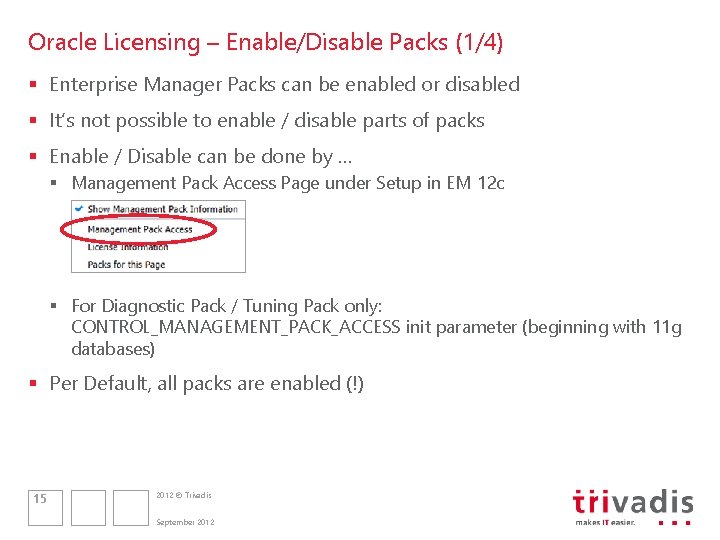
Oracle Licensing – Enable/Disable Packs (1/4) § Enterprise Manager Packs can be enabled or disabled § It’s not possible to enable / disable parts of packs § Enable / Disable can be done by … § Management Pack Access Page under Setup in EM 12 c § For Diagnostic Pack / Tuning Pack only: CONTROL_MANAGEMENT_PACK_ACCESS init parameter (beginning with 11 g databases) § Per Default, all packs are enabled (!) 15 2012 © Trivadis September 2012
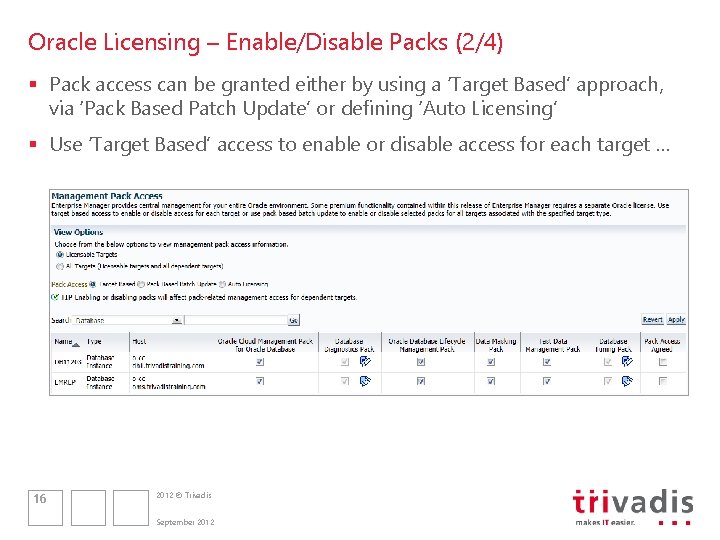
Oracle Licensing – Enable/Disable Packs (2/4) § Pack access can be granted either by using a ‘Target Based’ approach, via ‘Pack Based Patch Update’ or defining ‘Auto Licensing’ § Use ‘Target Based’ access to enable or disable access for each target … 16 2012 © Trivadis September 2012
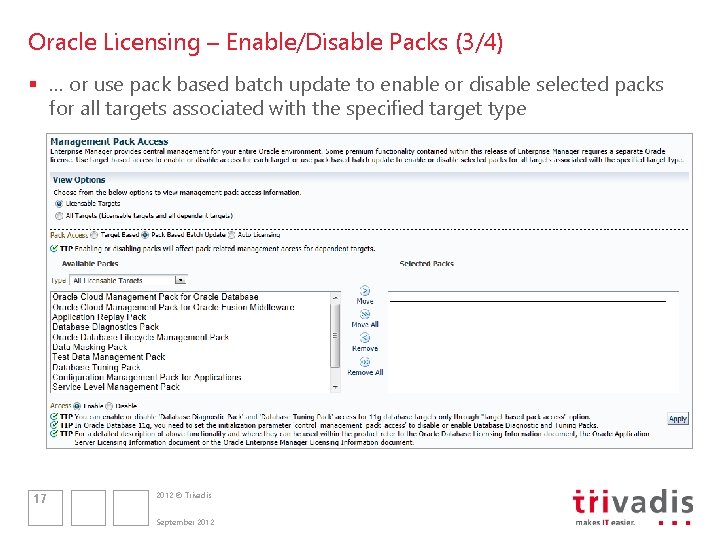
Oracle Licensing – Enable/Disable Packs (3/4) § … or use pack based batch update to enable or disable selected packs for all targets associated with the specified target type 17 2012 © Trivadis September 2012
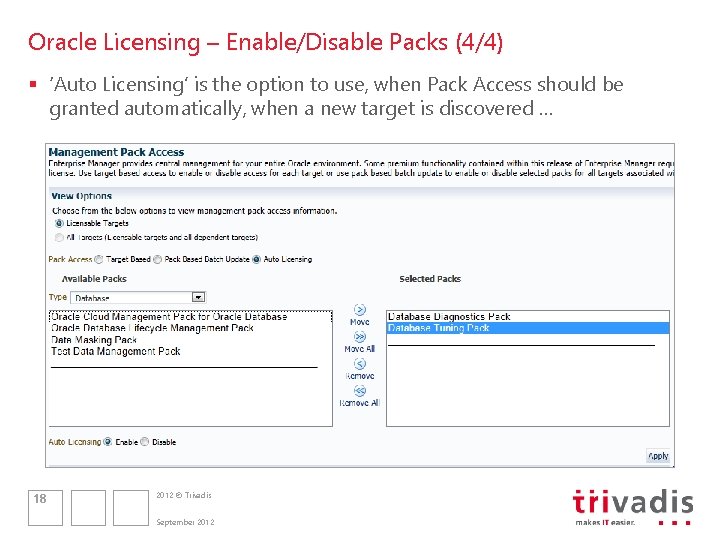
Oracle Licensing – Enable/Disable Packs (4/4) § ‘Auto Licensing’ is the option to use, when Pack Access should be granted automatically, when a new target is discovered … 18 2012 © Trivadis September 2012
AGENDA 1. Introduction § § General Restricted-use license (DB, WLS, …) Showing Management Pack Information Enable / Disable Management Packs 2. Monitoring Oracle Database Without Packs § Restrictions § Monitoring – but what …? § (No) Notification 19 2012 © Trivadis September 2012
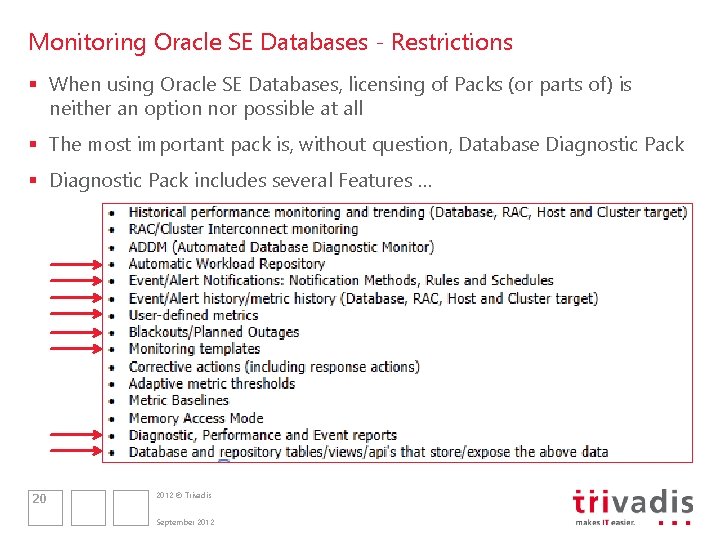
Monitoring Oracle SE Databases - Restrictions § When using Oracle SE Databases, licensing of Packs (or parts of) is neither an option nor possible at all § The most important pack is, without question, Database Diagnostic Pack § Diagnostic Pack includes several Features … 20 2012 © Trivadis September 2012
Monitoring Oracle SE Databases - Restrictions § That results in loss of possibility (1 of 4) §. . . to view and monitor any AWR related information no ADDM no Performance Tab because of the missing Diagnostic Pack Features: ADDM and AWR §. . . to notify (neither mail, nor os-commands, nor pl/sql, nor SNMP) §. . . to define Notification Rules (means, You are not able to define any metric violation / event you will be informed of) §. . . to define schedules (when to send a message to a specific e. Mail address) because of the missing Diagnostic Pack Feature: Event/Alert Notification: Notification Methods, Rules and Schedules 21 2012 © Trivadis September 2012
Monitoring Oracle SE Databases - Restrictions § That results in loss of possibility (2 of 4) §. . . to define User Defined Metrics (new: Metric Extensions) no application related monitoring because of the missing Diagnostic Pack Feature: User Defined Metrics §. . . to setup Blackouts no possibility to suspend collection and notification, in case of planned outages because of the missing Diagnostic Pack Feature: Blackouts / Planned Outages 22 2012 © Trivadis September 2012
Monitoring Oracle SE Databases - Restrictions § That results in loss of possibility (3 of 4) §. . . to define Monitoring Templates it‘s not possible to define Metric Thresholds as standard settings for all targets of a specific target type because of the missing Diagnostic Pack Feature: Monitoring Templates §. . . to create / run / view Diagnostic , Performance or Event-Reports no possibility to create Reports, showing information about current Metric Violations, nor to send those reports to a mail address, nor. . . because of the missing Diagnostic Pack Feature: Diagnostic , Performance or Event-Reports 23 2012 © Trivadis September 2012
Monitoring Oracle SE Databases - Restrictions § That results in loss of possibility (4 of 4) §. . . to define self defined notification methods it‘s not possible to develop and setup own methods of notification because of the missing Diagnostic Pack Feature: Database and repository views / tables / api‘s that store/expose the above data §. . . of monitoring / collecting historical data You must manually deactivate collecting historical data when defining metric thresholds (separate checkbox when clicking on edit in a metric‘s detail pane) 24 2012 © Trivadis September 2012
AGENDA 1. Introduction § § General Restricted-use license (DB, WLS, …) Showing Management Pack Information Enable / Disable Management Packs 2. Monitoring Oracle Database Without Packs § Restrictions § Monitoring – but what …? § (No) Notification 25 2012 © Trivadis September 2012
Licensing of … Middleware Enterprise Management (1/2) Generally § Whether Diagnostic Pack is available or not, a basic monitoring (without notification) is always possible. Results of that monitoring are visible on the homepage of a target and on the summary page of Enterprise Manager 26 2012 © Trivadis September 2012
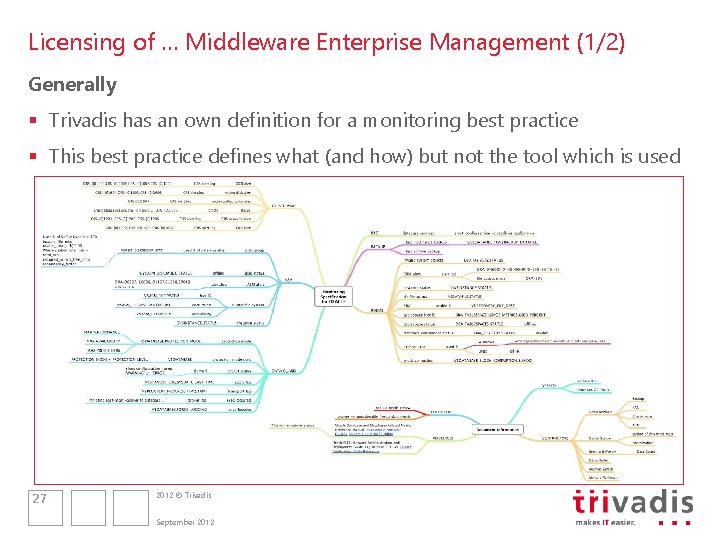
Licensing of … Middleware Enterprise Management (1/2) Generally § Trivadis has an own definition for a monitoring best practice § This best practice defines what (and how) but not the tool which is used 27 2012 © Trivadis September 2012
Monitoring - Best Practice – Enterprise Manager Monitor? What? Who? § There is a huge amount of metrics and policies – for every target type § … most of them to monitor performance issues § … if we would activate all metrics and all policies, there would be a flood of mails (no one could handle) § … and, some questions have to get asked … 2012 © Trivadis 28
Monitoring - Best Practice – Enterprise Manager Monitor? What? Who? § What metrics are of interest for us? § Who will define the warnings- and alarmlimits in a group of DBAs § … and who is responsible for transforming these limits into real metric settings § What metric settings are of interest for notification? § … and what is the preferred notification method to use in that case? 2012 © Trivadis 29
Monitoring - Best Practice – Enterprise Manager Monitoring – a few basics … § Metric Alerts are always visible on the targets homepage (where the problem has occured) § Notifications can only send to (via) Administrators § Notification Methods define what possibilities of transporting messages are available (e. Mail, OS-Commands, PL/SQL …) § A Notification Rules defines, what alerts will be send – any administrator can create a Notification Rule and/or subscribe to that § With a Notification Schedule, You define when to get an e. Mail and the e. Mailadress you wish to use on a certain point in time 2012 © Trivadis 30
Monitoring – Best Practice – Enterprise Manager … keep in mind … § First rule of thumb: Monitor as less as possible but as much as necessary § Second rule of thumb: monitor all other stuff only when there is a reason for that § Means: Do not monitor all metrics Grid Control offers – this would lead into a situation, where You‘ll receive thousands of messages (per hour) … Monitor just what is really of interest § For the ‚daily business‘, the focus is on availability monitoring § Do performance monitoring only in case of performance issues § You‘ll find on the next slides our best practices to monitor an oracle environment 2012 © Trivadis 31
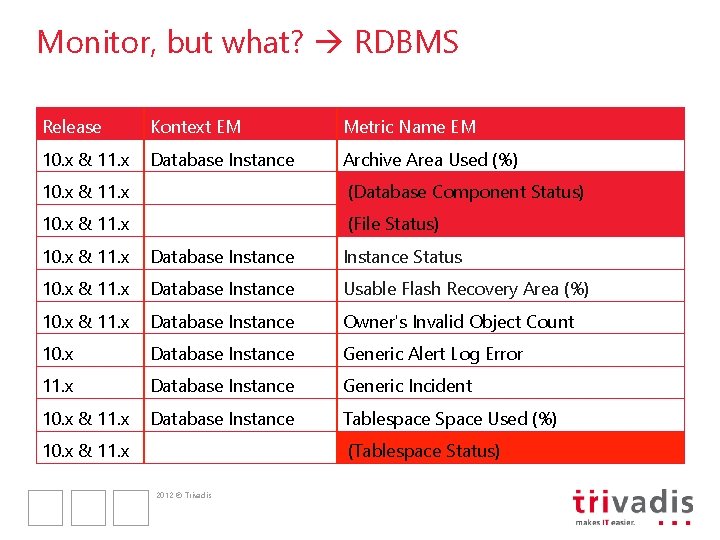
Monitor, but what? RDBMS Release Kontext EM Metric Name EM 10. x & 11. x Database Instance Archive Area Used (%) 10. x & 11. x (Database Component Status) 10. x & 11. x (File Status) 10. x & 11. x Database Instance Status 10. x & 11. x Database Instance Usable Flash Recovery Area (%) 10. x & 11. x Database Instance Owner's Invalid Object Count 10. x Database Instance Generic Alert Log Error 11. x Database Instance Generic Incident 10. x & 11. x Database Instance Tablespace Space Used (%) 10. x & 11. x (Tablespace Status) 2012 © Trivadis
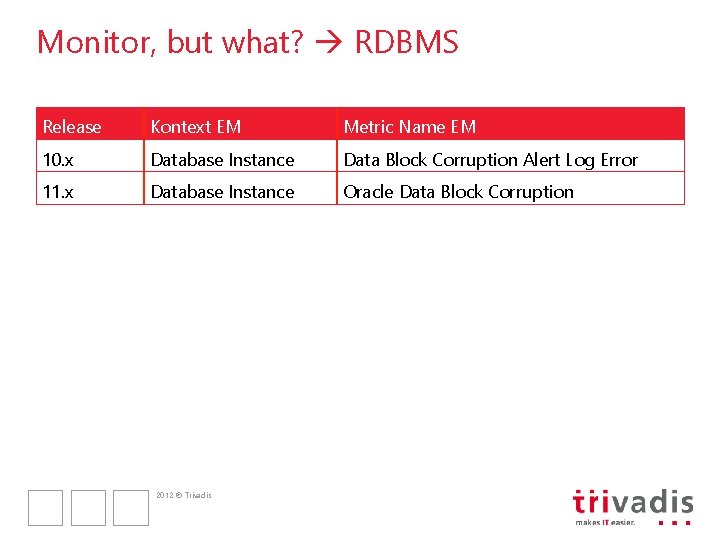
Monitor, but what? RDBMS Release Kontext EM Metric Name EM 10. x Database Instance Data Block Corruption Alert Log Error 11. x Database Instance Oracle Data Block Corruption 2012 © Trivadis
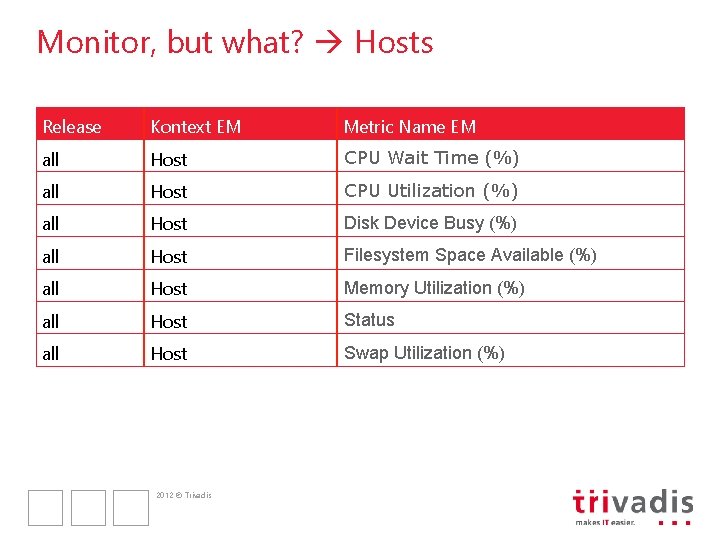
Monitor, but what? Hosts Release Kontext EM Metric Name EM all Host CPU Wait Time (%) all Host CPU Utilization (%) all Host Disk Device Busy (%) all Host Filesystem Space Available (%) all Host Memory Utilization (%) all Host Status all Host Swap Utilization (%) 2012 © Trivadis
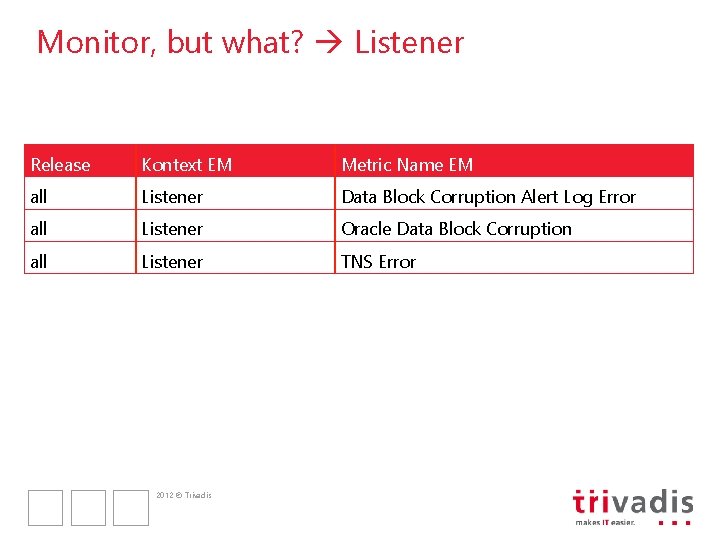
Monitor, but what? Listener Release Kontext EM Metric Name EM all Listener Data Block Corruption Alert Log Error all Listener Oracle Data Block Corruption all Listener TNS Error 2012 © Trivadis
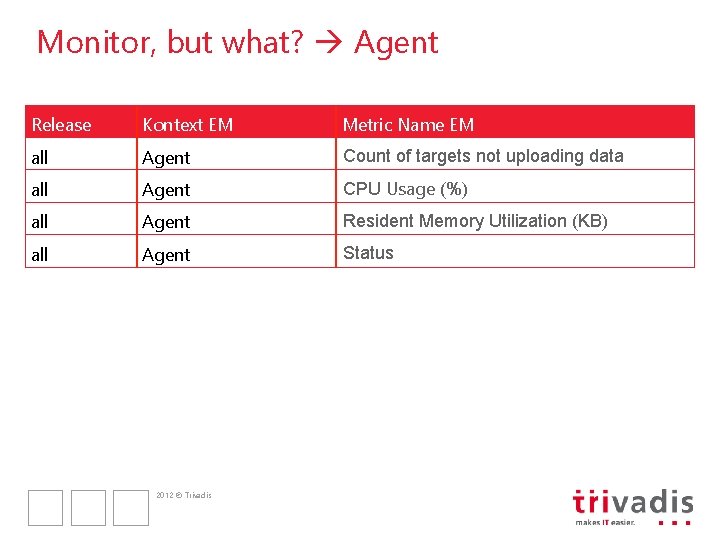
Monitor, but what? Agent Release Kontext EM Metric Name EM all Agent Count of targets not uploading data all Agent CPU Usage (%) all Agent Resident Memory Utilization (KB) all Agent Status 2012 © Trivadis
AGENDA 1. Introduction § § General Showing Management Pack Information Enable / Disable Management Packs Restricted-use license (DB, WLS, …) 2. Monitoring Oracle Database Without Packs § Restrictions § Monitoring – but what …? § (No) Notification 37 2012 © Trivadis September 2012
Monitoring Oracle SE Databases – (No) Notification Generally § I asked Oracle (excerpt of the mail): EM does not support Monitoring Oracle SE Databases in terms of notification using a notification method, because notification methods are part of Diagnostic Pack which is not licensable for Standard Edition. That's, in fact, ridiculous - Oracle Database Without Packs are usually not less important than EE DBs. My questions are: § - Is Oracle's License Team aware of that fact? And if Yes - what's the reason behind? § Or am I allowed to use Notification Methods for SE's, too? ” § And what about environments where a customer has either SE and EE Databases licensed? I need urgently an answer 38 2012 © Trivadis September 2012
Monitoring Oracle SE Databases – (No) Notification Generally § Oracle‘s answer (excerpt of the mail): I have gone through your statements and questions and have deemed this rather to be a question around product design. From a technical point of view there may be many options that do work very well with DB Standard Edition. However, from a licensing point of view it is not allowed to use these options with Standard Edition. Hence, the answer to your question about whether you are allowed to use Notification with SE is clearly “No”. And whether we are aware of this fact, yes, we are. However, regarding the reason for this, we don’t know and can only make educated guesses. 39 2012 © Trivadis September 2012
Conclusion – Licensing § It’s still necessary to license packs … that means EE § Licensing has not changed – most of the interesting features are included in a pack (thus leading to the necessity to license) § It’s easy to find out, what Packs Enterprise Manager is using and which license is necessary § Keep an eye on Your EM 12 c (and former releases) regarding used packs – by default, all packs are enabled! § Keep an eye on Your monitoring solution even if it’s not Enterprise Manager – the necessity of a Pack is given here, too! § It is as it is: All packs are optional, but, as with every EM Release before, Diagnostic Pack is a MUST! And with SE it’s simply not possible to monitor Databases using EM 40 2012 © Trivadis September 2012
- Slides: 40