
DNS LOG MONITORING IN A WINDOWS ENVIRONMENT Or

- Slides: 34
DNS LOG MONITORING IN A WINDOWS ENVIRONMENT Or… Trying to prove SANS is wrong, failing and learning from it. ACCS 2017 March 16, 2017 John York, Blue Ridge Community College yorkj@brcc. edu
SLIDES, SCRIPT SNIPPETS AND SAMPLE LOG FILES ▪ https: //drive. google. com/open? id=0 B 5 Bu. M
DNS LOG MONITORING WINDOWS ENVIRONMENT ▪ Caveats and Architecture ▪ Why maintain DNS server logs? ▪ Executive Summary ▪ DNS Server Debug logs and Detailed Debug logs ▪ DNS Server Analytical Event logs, Server 2012 r 2 and above ▪ Passive. DNS
CAVEATS ▪ This was developed with a small/medium-sized Windows environment in mind. Tested on: ▪ DNS-only server with ~1, 000 clients ▪ DNS/Domain Controller with ~300 clients ▪ Some ideas presented here may scale, others may not ▪ Be careful running scheduled scripts on your Windows DNS server, *especially* if it is a Domain Controller ▪ Be careful saving logs on a DNS/DC…C: full is bad
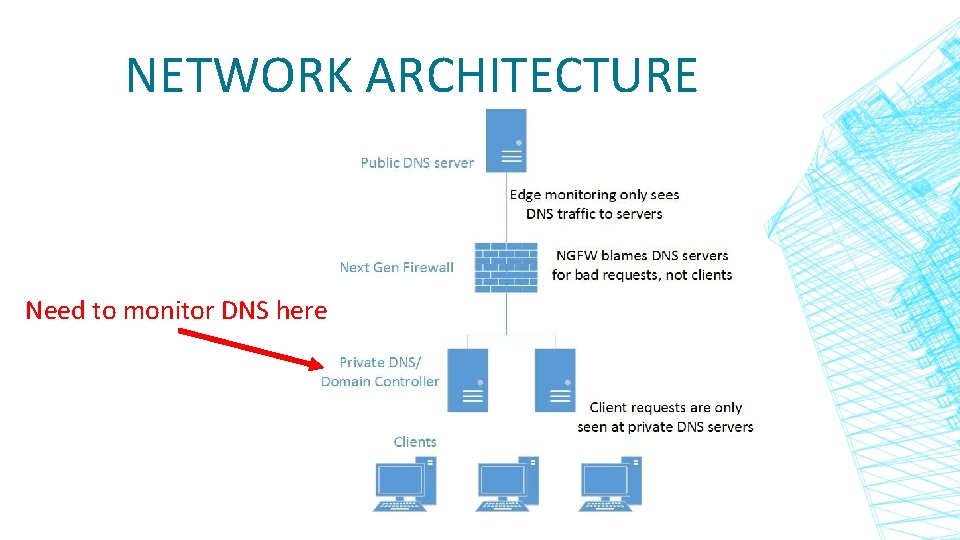
NETWORK ARCHITECTURE Need to monitor DNS here
WHY MAINTAIN DNS LOGS? ▪ Identify malicious activity and identify outgoing Cn. C traffic ▪ DNS logs are extremely useful for incident response and forensics ▪ Current Next Generation Firewalls (NGFW) block on DNS— works well so small environments may just use logs forensics ▪ Examples: ▪ What client caused NGFW DNS block event? ▪ Need time, client IP, Query ▪ Who contacted IP w. x. y. z? Who else is infected? ▪ Need time, client IP, Query, IP Resolved by Server
EXECUTIVE SUMMARY ▪ Remember caveats about running scripts and saving logs on critical servers ▪ Windows log/debug access for Client IP, time, and Query is ▪ SIMPLE ▪ Windows log/debug access for Resolved IP (address returned by server) is ▪ DIFFICULT ▪ Power. Shell is very slow if large files (like log files) get into the pipeline ▪ Best solution is to monitor private DNS/DC traffic with an Ethernet tap or Cisco span port to a separate box. ▪ Captures both Query and Resolved IP ▪ Box can be small ▪ Removes risk of taking down DNS/DC server (Résumé Generating Event (RGE))
QUOTES ▪ “For a while now, I've recommended moving completely away from serverspecific implementations for DNS logging and moving to something closer to internal passive DNS logs. Depending on the volume of traffic, a tap feeding a system running even a very tiny logger like (wait for it) "Passive. DNS"[1] gives you normalized, easy-to-parse text logs of each DNS query and response. I like this utility because it also runs against a pcap file. This particular passive DNS logging implementation also uses a BPF via libpcap to reduce data to just port 53, so it's quite efficient, even at high volumes. ” ▪ Phil Hagen, Author, SANS Network Forensics ▪ [1] https: //github. com/gamelinux/passivedns ▪ “Personally, I think most orgs would be better off using Passive. DNS or similar, if only to avoid the performance impact on the DNS server, especially when that DNS server is also a domain controller. ” ▪ Jason Fossen, Author, SANS Securing Windows and Power. Shell Automation
INTO THE WEEDS—TRYING TO PROVE SANS WRONG… ▪ My goal was to build a Windows DNS logging infrastructure ▪ Use only tools built in to Windows ▪ Results: It sort of works, resolved IP is still in work ▪ Windows DNS logs get large in a hurry, process slowly ▪ We’ll go through the options with logging on the Windows server, but will show that SANS is probably right
SIDE NOTE: POWERSHELL AND LARGE LOG FILES ▪ The “Power. Shell Way” is to use the pipeline ▪ Get-Content “C: usersmefile. log” | { do stuff } ▪ Large files in the pipeline use lots of CPU time and lots of Memory ▪ The. Net Stream. Reader and Stream. Writer functions are much faster ▪ Example: Parsing a 370 MB DNS debug file (28% CPU utilization) took: ▪ Pipeline 1 hour 39 minutes, 4 GB RAM (max’d out) ▪ Stream 39 seconds, 20 MB RAM ▪ The initial parsing cuts the file by 90% ▪ Using the pipeline after initial parsing works well
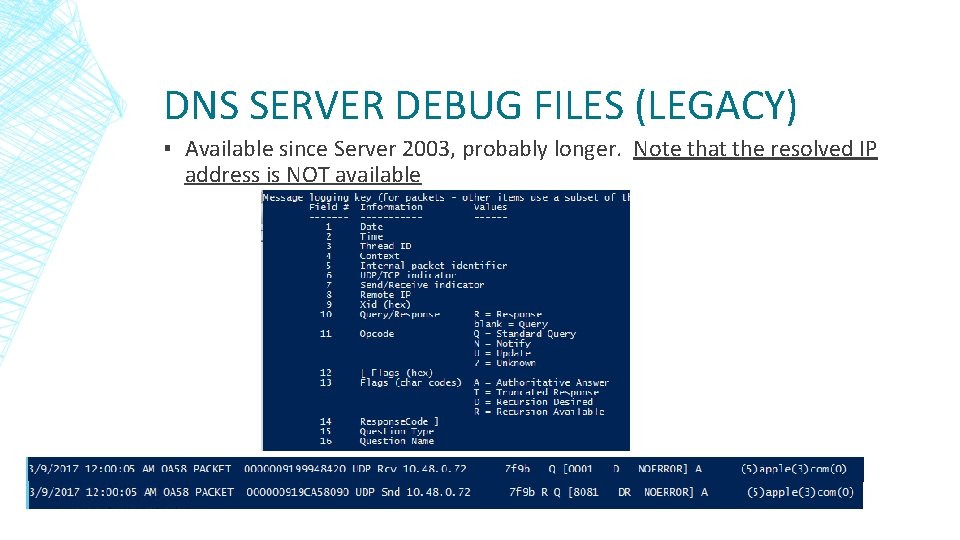
DNS SERVER DEBUG FILES (LEGACY) ▪ Available since Server 2003, probably longer. Note that the resolved IP address is NOT available
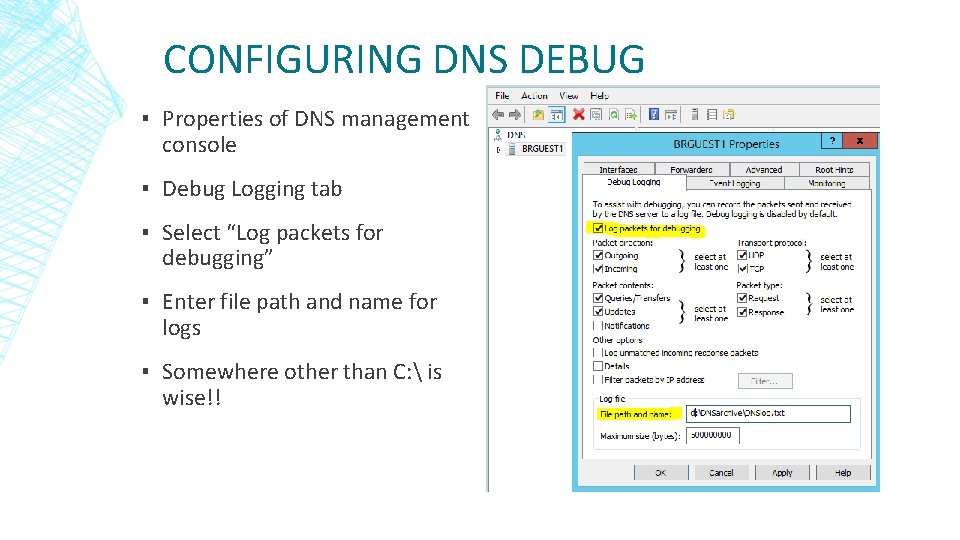
CONFIGURING DNS DEBUG ▪ Properties of DNS management console ▪ Debug Logging tab ▪ Select “Log packets for debugging” ▪ Enter file path and name for logs ▪ Somewhere other than C: is wise!!
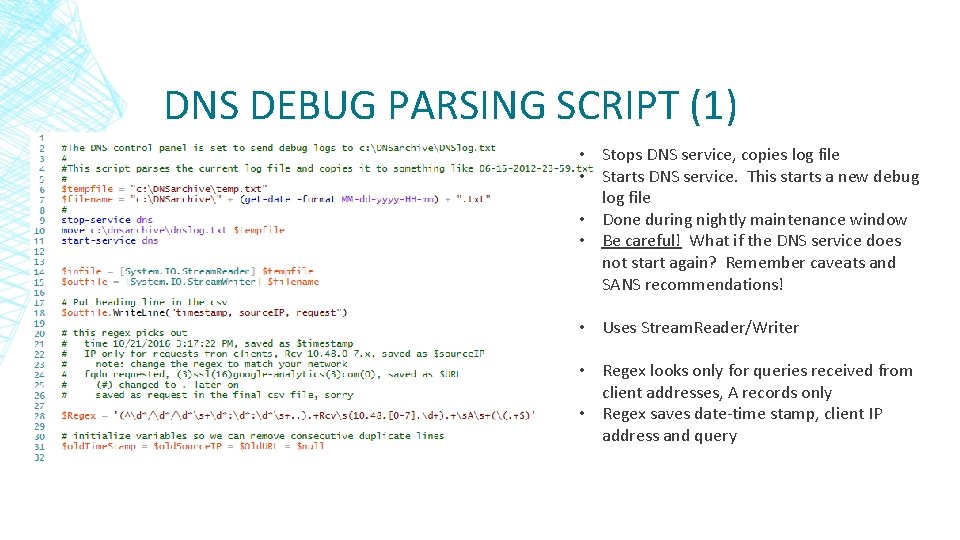
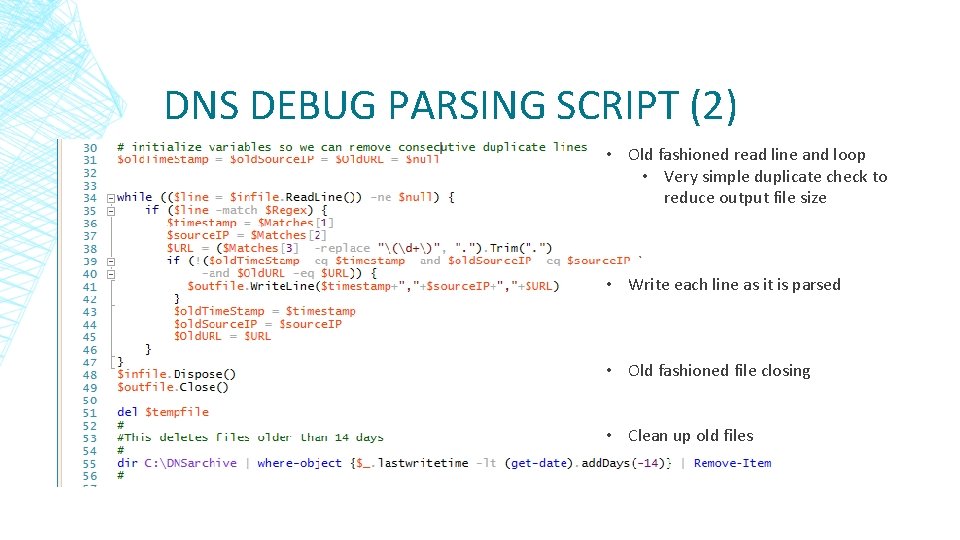
DNS DEBUG PARSING SCRIPT (1) • Stops DNS service, copies log file • Starts DNS service. This starts a new debug log file • Done during nightly maintenance window • Be careful! What if the DNS service does not start again? Remember caveats and SANS recommendations! • Uses Stream. Reader/Writer • Regex looks only for queries received from client addresses, A records only • Regex saves date-time stamp, client IP address and query
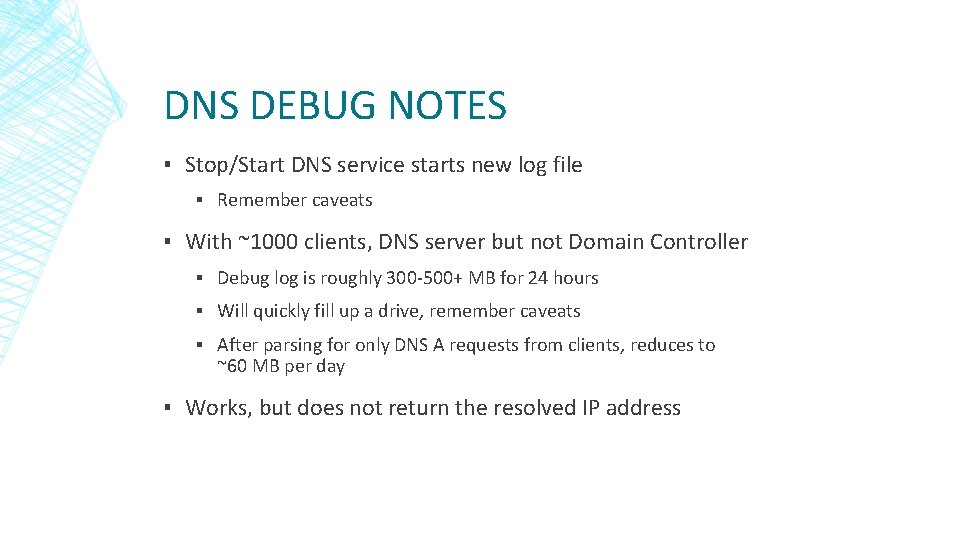
DNS DEBUG PARSING SCRIPT (2) • Old fashioned read line and loop • Very simple duplicate check to reduce output file size • Write each line as it is parsed • Old fashioned file closing • Clean up old files
DNS DEBUG NOTES ▪ Stop/Start DNS service starts new log file ▪ Remember caveats ▪ With ~1000 clients, DNS server but not Domain Controller ▪ Debug log is roughly 300 -500+ MB for 24 hours ▪ Will quickly fill up a drive, remember caveats ▪ After parsing for only DNS A requests from clients, reduces to ~60 MB per day ▪ Works, but does not return the resolved IP address
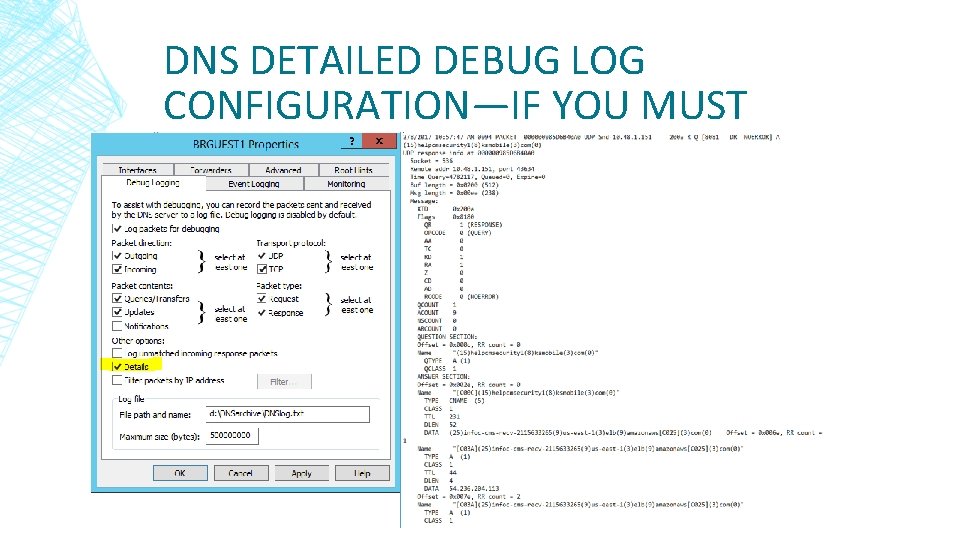
DNS DETAILED DEBUG LOGS (LEGACY) • Only available Microsoft log that directly returns the resolved IP address (the answer to the DNS query) • Logs get huge in a hurry, can get to GB+ size in 24 hours • Logs have multiple lines per event, parsing is more difficult • Responses may contain multiple types and addresses, often: • CNAME www. college. edu -> g 45604065 stuff. useast. amazonaws. com • A 192. 168. 5. 1, with many addresses • More difficult to store • I wrote a script for this, but am reluctant to use it in a production environment (available at )
DNS DETAILED DEBUG LOG CONFIGURATION—IF YOU MUST
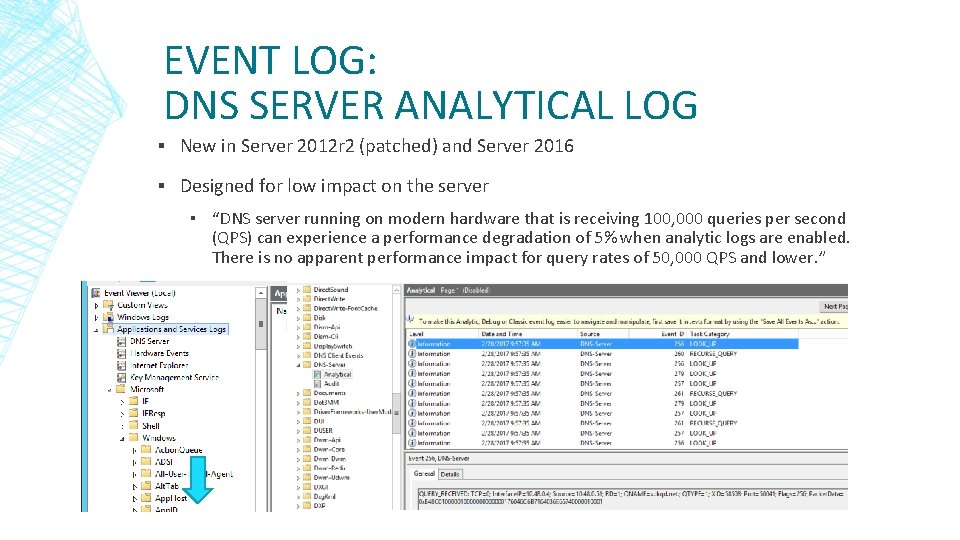
EVENT LOG: DNS SERVER ANALYTICAL LOG ▪ New in Server 2012 r 2 (patched) and Server 2016 ▪ Designed for low impact on the server ▪ “DNS server running on modern hardware that is receiving 100, 000 queries per second (QPS) can experience a performance degradation of 5% when analytic logs are enabled. There is no apparent performance impact for query rates of 50, 000 QPS and lower. ”
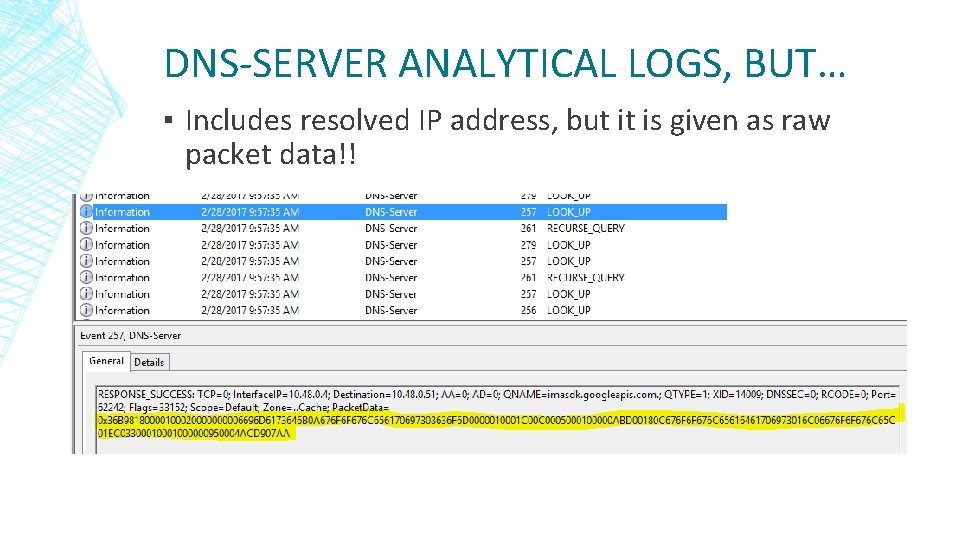
DNS-SERVER ANALYTICAL LOGS, BUT… ▪ Includes resolved IP address, but it is given as raw packet data!!
DNS-SERVER ANALYTICAL LOGS, BUT…(2) ▪ Log is big…DNS/DC serving 300 hosts, > 1 GB per day ▪ Windows Event Collection (WEC) is a recent feature that allows forwarding of events to a collecting server ▪ But, ‘Analytic’ logs are not included, to reduce impact ▪ “tracelog [. . . ] will record events offered by the ETW channel and write them to a file” ▪ But, you need to install “WDK, Visual Studio, and the Windows SDK for desktop apps” ▪ Power. Shell Get-Win. Event cmdlet works ▪ But, it is *really* slow with large files
WEVTUTIL. EXE WORKS (1) ▪ wevtutil. exe can read Analytical log or. etl files it creates, and is already installed on Windows Servers ▪ Works best if run on the computer that holds the logs ▪ This is true for Get-Win. Event and most other methods ▪ Otherwise the app won’t interpret the file correctly ▪ May be ok if server versions are same and both have DNS installed ▪ Can convert logs to evtx (export-log), text or xml (query) format
WEVTUTIL. EXE WORKS (2) ▪ Queries run slowly, takes much RAM if run from Power. Shell (cmd. exe is ok for RAM) ▪ Resolved IP is still stuck in packet data ▪ I’m still testing, haven’t gone to production yet!! ▪ Lots of slides with wevtutil examples here—I found syntax and documentation difficult, lots of trial and error.
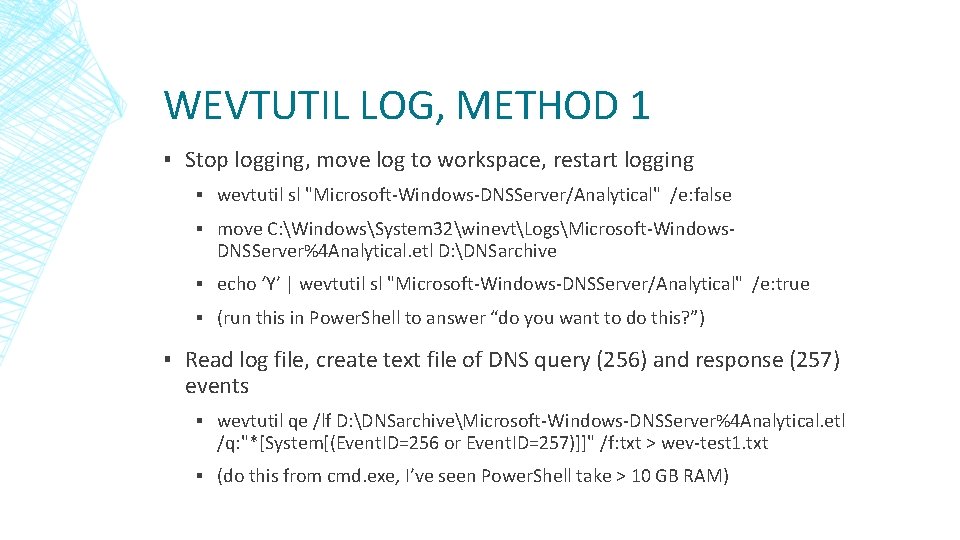
WEVTUTIL LOG, METHOD 1 ▪ Stop logging, move log to workspace, restart logging ▪ wevtutil sl "Microsoft-Windows-DNSServer/Analytical" /e: false ▪ move C: WindowsSystem 32winevtLogsMicrosoft-Windows. DNSServer%4 Analytical. etl D: DNSarchive ▪ echo ‘Y’ | wevtutil sl "Microsoft-Windows-DNSServer/Analytical" /e: true ▪ (run this in Power. Shell to answer “do you want to do this? ”) ▪ Read log file, create text file of DNS query (256) and response (257) events ▪ wevtutil qe /lf D: DNSarchiveMicrosoft-Windows-DNSServer%4 Analytical. etl /q: "*[System[(Event. ID=256 or Event. ID=257)]]" /f: txt > wev-test 1. txt ▪ (do this from cmd. exe, I’ve seen Power. Shell take > 10 GB RAM)
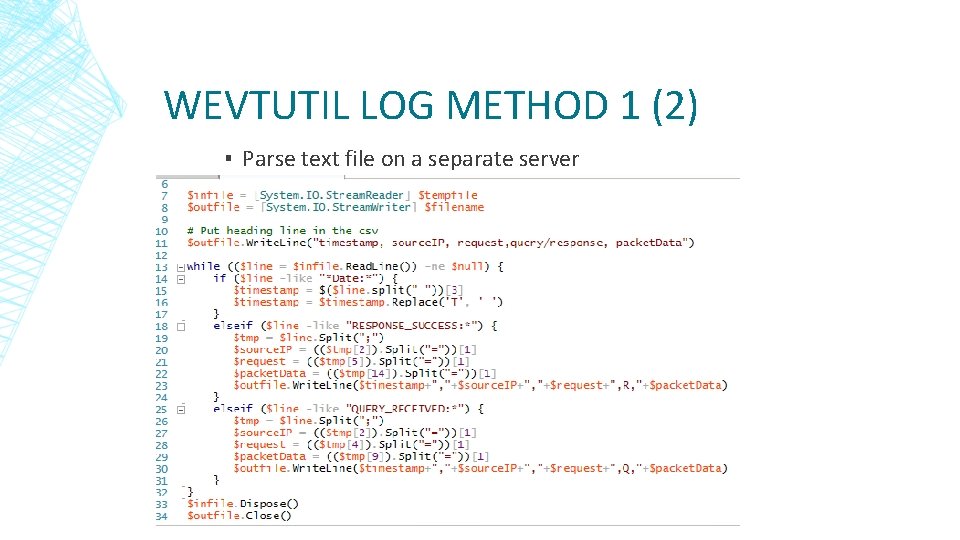
WEVTUTIL LOG METHOD 1 (2) ▪ Parse text file on a separate server
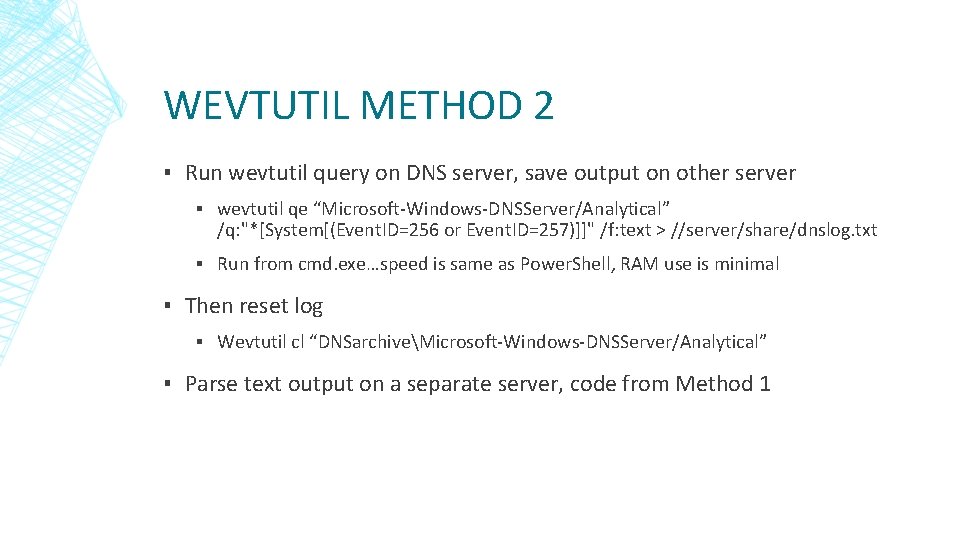
WEVTUTIL METHOD 2 ▪ Run wevtutil query on DNS server, save output on other server ▪ wevtutil qe “Microsoft-Windows-DNSServer/Analytical” /q: "*[System[(Event. ID=256 or Event. ID=257)]]" /f: text > //server/share/dnslog. txt ▪ Run from cmd. exe…speed is same as Power. Shell, RAM use is minimal ▪ Then reset log ▪ Wevtutil cl “DNSarchiveMicrosoft-Windows-DNSServer/Analytical” ▪ Parse text output on a separate server, code from Method 1
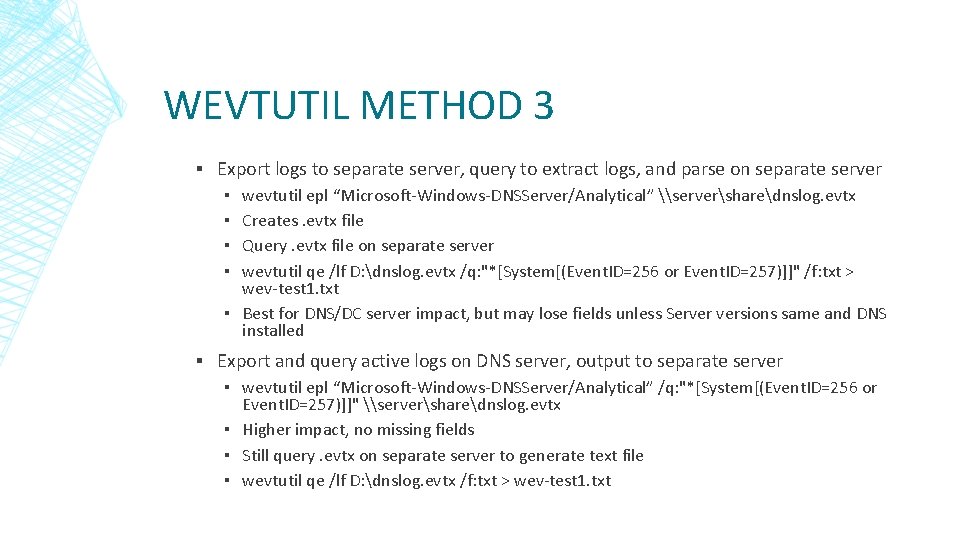
WEVTUTIL METHOD 3 ▪ Export logs to separate server, query to extract logs, and parse on separate server wevtutil epl “Microsoft-Windows-DNSServer/Analytical” \serversharednslog. evtx Creates. evtx file Query. evtx file on separate server wevtutil qe /lf D: dnslog. evtx /q: "*[System[(Event. ID=256 or Event. ID=257)]]" /f: txt > wev-test 1. txt ▪ Best for DNS/DC server impact, but may lose fields unless Server versions same and DNS installed ▪ ▪ ▪ Export and query active logs on DNS server, output to separate server ▪ wevtutil epl “Microsoft-Windows-DNSServer/Analytical” /q: "*[System[(Event. ID=256 or Event. ID=257)]]" \serversharednslog. evtx ▪ Higher impact, no missing fields ▪ Still query. evtx on separate server to generate text file ▪ wevtutil qe /lf D: dnslog. evtx /f: txt > wev-test 1. txt
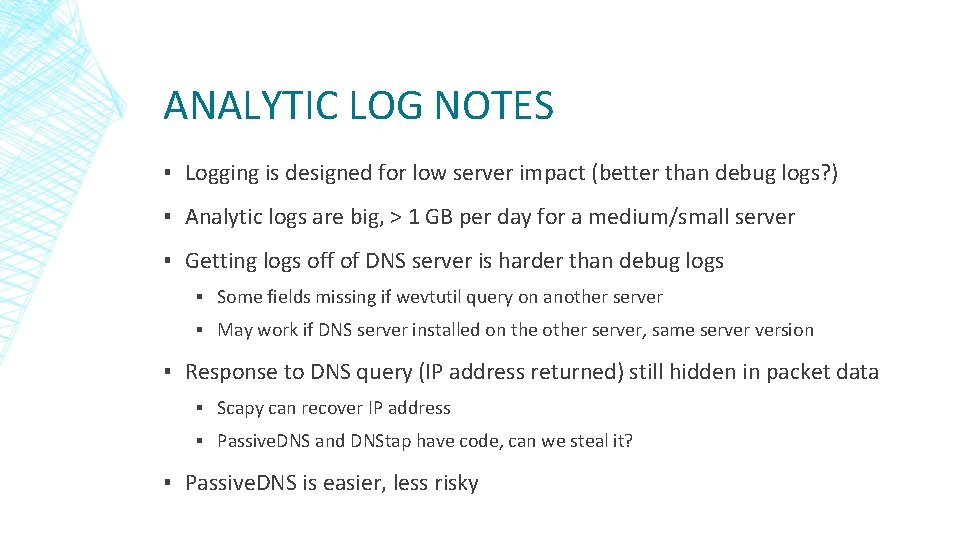
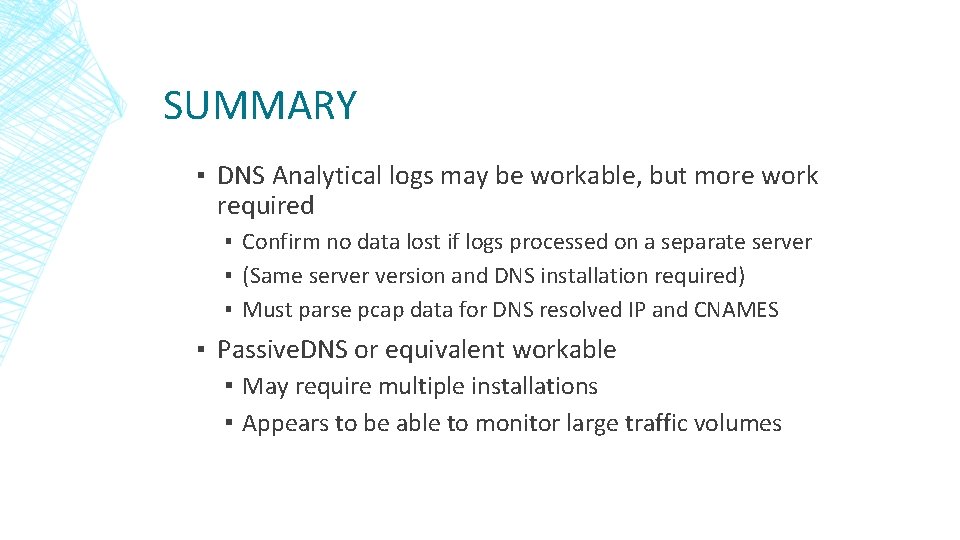
ANALYTIC LOG NOTES ▪ Logging is designed for low server impact (better than debug logs? ) ▪ Analytic logs are big, > 1 GB per day for a medium/small server ▪ Getting logs off of DNS server is harder than debug logs ▪ Some fields missing if wevtutil query on another server ▪ May work if DNS server installed on the other server, same server version ▪ Response to DNS query (IP address returned) still hidden in packet data ▪ Scapy can recover IP address ▪ Passive. DNS and DNStap have code, can we steal it? ▪ Passive. DNS is easier, less risky
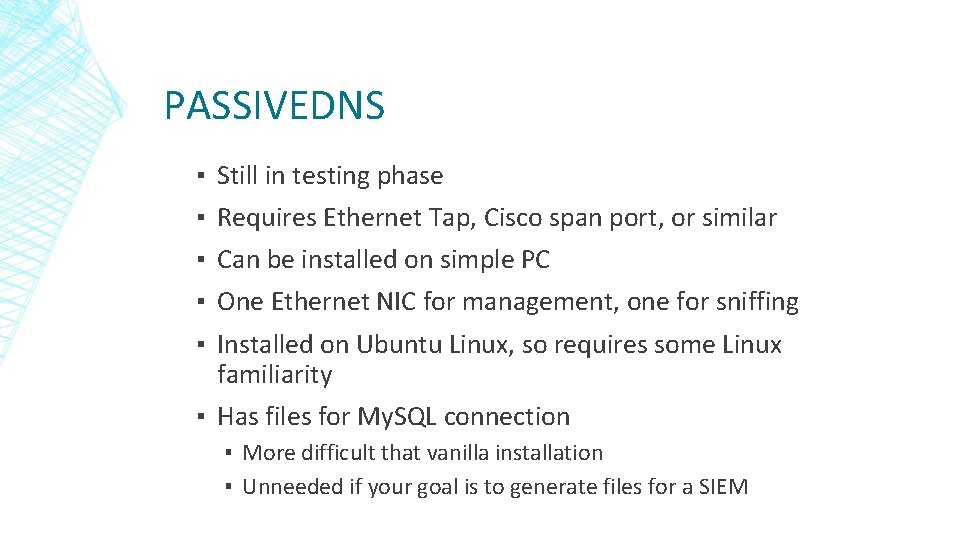
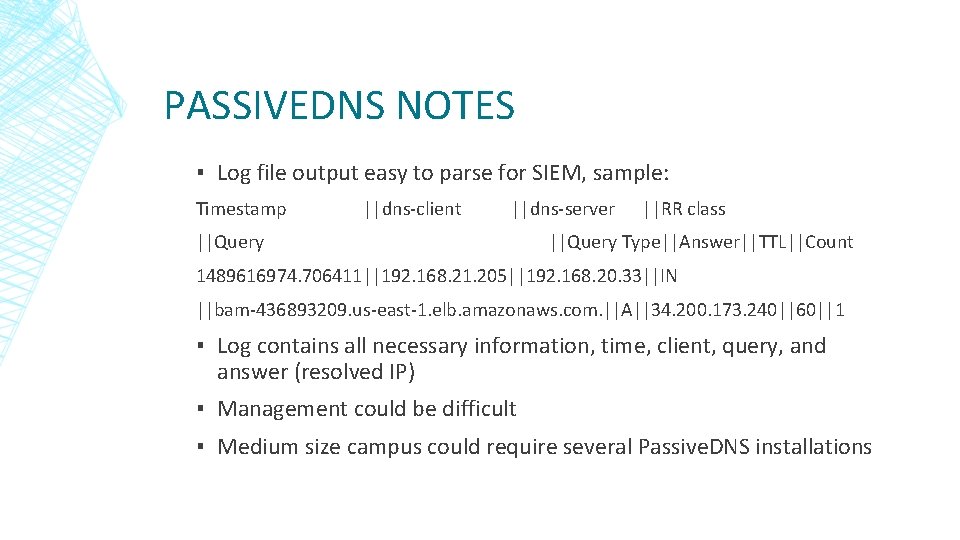
PASSIVEDNS ▪ ▪ ▪ Still in testing phase Requires Ethernet Tap, Cisco span port, or similar Can be installed on simple PC One Ethernet NIC for management, one for sniffing Installed on Ubuntu Linux, so requires some Linux familiarity ▪ Has files for My. SQL connection ▪ More difficult that vanilla installation ▪ Unneeded if your goal is to generate files for a SIEM
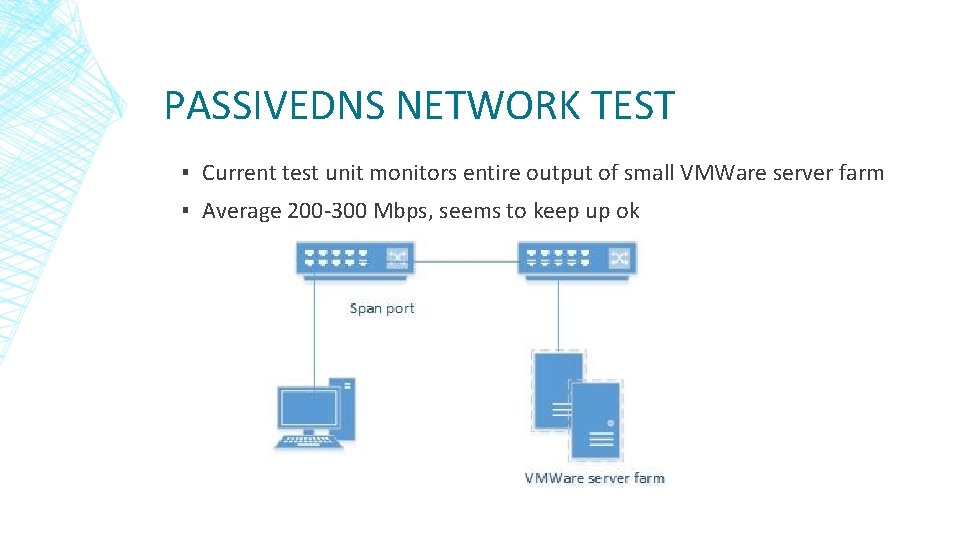
PASSIVEDNS NETWORK TEST ▪ Current test unit monitors entire output of small VMWare server farm ▪ Average 200 -300 Mbps, seems to keep up ok
PASSIVEDNS NOTES ▪ Log file output easy to parse for SIEM, sample: Timestamp ||dns-client ||dns-server ||RR class ||Query ||Query Type||Answer||TTL||Count 1489616974. 706411||192. 168. 21. 205||192. 168. 20. 33||IN ||bam-436893209. us-east-1. elb. amazonaws. com. ||A||34. 200. 173. 240||60||1 ▪ Log contains all necessary information, time, client, query, and answer (resolved IP) ▪ Management could be difficult ▪ Medium size campus could require several Passive. DNS installations
SUMMARY ▪ DNS Analytical logs may be workable, but more work required ▪ Confirm no data lost if logs processed on a separate server ▪ (Same server version and DNS installation required) ▪ Must parse pcap data for DNS resolved IP and CNAMES ▪ Passive. DNS or equivalent workable ▪ May require multiple installations ▪ Appears to be able to monitor large traffic volumes
REFERENCES ▪ General DNS logging ▪ http: //www. networkstr. com/dnscentric/identify_threats_with_dns_logging ▪ https: //pen-testing. sans. org/blog/2015/07/10/dns-anomaly-analysis-tips-did-you-put-a-newcover-sheet-on-that-ddd-report ▪ https: //itworldjd. wordpress. com/2016/12/01/dns-logging-and-auditing/ ▪ https: //isc. sans. edu/suspicious_domains. html ▪ https: //zeltser. com/malicious-ip-blocklists/ ▪ Primary DNS Analytical log reference ▪ https: //technet. microsoft. com/en-us/library/dn 800669(v=ws. 11). aspx ▪ Large DNS Analytical log installation (uses tracelog. exe) ▪ https: //blogs. technet. microsoft. com/teamdhcp/2015/11/23/network-forensicswith-windows-dns-analytical-logging/ ▪ DNS debug log concerns ▪ https: //www. solutionary. com/resource-center/blog/2016/01/dns-logging/
REFERENCES (2) ▪ wevtutil. exe ▪ https: //technet. microsoft. com/en-us/library/cc 732848(v=ws. 11). aspx ▪ https: //deploywindows. info/2013/01/08/event-viewer-how-to-manage-with-commandswevtutil-exe/ ▪ https: //www. petri. com/command-line-event-log ▪ https: //www. petri. com/managing-command-line-event-logs ▪ http: //adminontherun. blogspot. com/2010/07/wevtutil-my-new-favorite-toy. html ▪ https: //blogs. technet. microsoft. com/askds/2011/09/26/advanced-xml-filtering-in-thewindows-event-viewer/ ▪ tracelog. exe ▪ https: //msdn. microsoft. com/windows/hardware/drivers/devtest/tracelog-command-syntax ▪ Power. Shell speed issues ▪ http: //www. happysysadm. com/2014/10/reading-large-text-files-withpowershell. html
REFERENCES (3) ▪ Power. Shell speed issues (cont. ) ▪ https: //powershell. org/2013/10/21/why-get-content-aint-yer-friend/ ▪ https: //learn-powershell. net/2013/01/13/quick-hits-speed-up-some-of-your-commands-byavoiding-the-pipeline/ ▪ https: //foxdeploy. com/2016/03/23/coding-for-speed/ ▪ https: //rkeithhill. wordpress. com/2008/03/02/nothings-perfect-including-powershell/ ▪ https: //thesurlyadmin. com/2015/06/01/read-text-files-faster-than-get-content/ ▪ Passive. DNS ▪ https: //github. com/gamelinux/passivedns ▪ DNStap ▪ http: //dnstap. info/